

CosmoLex acoperă gestionarea cabinetelor de avocatură și contabilitatea, însă abordarea sa poate să nu se potrivească fluxurilor de lucru ale fiecărei firme. Unele alternative oferă rezumate ale cazurilor bazate pe inteligență artificială, redactarea automată a documentelor și gestionarea mai flexibilă a dosarelor, în timp ce altele se concentrează pe comunicarea cu clienții, facturare și contabilitatea conturilor fiduciare.
Am comparat aceste opțiuni pe baza funcțiilor, integrărilor și cazurilor practice de utilizare pentru a identifica aspectele prin care fiecare platformă oferă ceva diferit față de CosmoLex.
Ce este CosmoLex?
CosmoLex este o platformă completă pentru gestionarea cabinetelor de avocatură, care combină fluxurile de lucru ale dosarelor cu facturarea și contabilitatea conturilor fiduciare. Oferă firmelor un singur sistem pentru gestionarea activităților legate de cazuri și a proceselor financiare, deși o altă platformă s-ar putea potrivi mai bine dacă echipa dvs. are nevoie de fluxuri de lucru, integrări sau asistență pentru migrare diferite.
Tabel comparativ: alternative la CosmoLex
Comparați prețurile și specificațiile, unul lângă altul, pentru alternativele la CosmoLex care au ajuns pe lista mea scurtă.
Score legend (out of 5)
- Excellent4.5–5
- Good4–4.4
- Average3–3.9
- Below average2–2.9
- Poor1–1.9
Sorted by: Default
| Tool | Starting Price | Website | |||||||
|---|---|---|---|---|---|---|---|---|---|
Best for automatic legal time tracking | 3.7 out of 5 | 4 | 3 | 4 | 4 | 4 | 3 | Pricing upon request Free trial available | Website |
Best for personal injury case management | 3.7 out of 5 | 5 | 3 | 4 | 2 | 4 | 4 | Pricing upon request Free demo available | Website |
Best for customizable legal practice workflows | 4.2 out of 5 | 4 | 4 | 5 | 4 | 4 | 4 | $49/user/month Free demo + 7-day free trial available | Website |
Best for firms standardizing case workflows | 3.3 out of 5 | 4 | 3 | 4 | 2 | 4 | 3 | Pricing upon request Free demo available | Website |
Best for matter-level trust and WIP-AR reporting | 3.5 out of 5 | 4 | 3 | 4 | 3 | 4 | 3 | Pricing upon request Free demo available | Website |
Best for capturing billable work across apps | 3.5 out of 5 | 4 | 4 | 4 | 4 | 2 | 3 | $59/user/month 10-day free trial + free demo available | Website |
Best for midsize firms standardizing workflows | 3.7 out of 5 | 3 | 3 | 4 | 4 | 4 | 4 | Pricing upon request Free demo available | Website |
Best for AI agents across legal workflows | 3.5 out of 5 | 4 | 4 | 4 | 2 | 4 | 3 | Pricing upon request Free demo available | Website |
Best for automated legal document drafting | 3.8 out of 5 | 4 | 4 | 4 | 4 | 4 | 3 | Pricing upon request Free demo available | Website |
Best for AI-powered law firm financial reporting | 3.5 out of 5 | 3 | 4 | 4 | 4 | 3 | 3 | Pricing upon request Free demo available | Website |


Why Trust Our Software Recommendations
6,700+
Reviews
20
Industry experts
16+
Evaluation factors
14
Years
Our team has been testing and reviewing software since 2012. As legal practice leaders ourselves, we know how difficult—and important—it is to choose the right software.
For this guide, we evaluated tools using hands-on testing and independent research, scoring tools using our selection criteria.
Our reviews reflect our human editorial judgment, not a sales pitch.
Recenzii ale alternativelor la CosmoLex
Mai jos sunt rezumatele mele despre cele mai bune alternative la CosmoLex de pe lista mea scurtă. Fiecare recenzie acoperă fluxurile de lucru ale dosarelor, funcțiile de facturare și asistența pentru migrare, pentru a vă ajuta să găsiți platforma potrivită pentru firma dvs.
 Best for automatic legal time tracking
- Free trial available
- Pricing upon request
Visit WebsiteCustomer Rating:4.8/5
Smokeball lets users log and review billable time entries by date and staff. Smokeball is legal practice management software built for law firms of all sizes that want to centralize matter files, automate document preparation, track time, and handle trust accounting without juggling multiple tools.
Who Is Smokeball Best For?
Smokeball is a strong fit for law firms that lose billable hours to manual time tracking and want a system that captures work automatically in the background.
Why I Picked Smokeball
I picked Smokeball as one of the best because its AutoTime feature captures billable activity in the background while you work in Word and Outlook, automatically assigning time to the right matter without manual entry. That means a client call, a drafted motion, an email thread—all logged without you stopping to record it. I also appreciate that those captured entries feed directly into invoicing, so the gap between work done and work billed stays tight.
Smokeball Key Features
- TemplateLab document library: Access to 20,000+ legal templates across 250+ matter types that auto-fill with matter data to reduce manual document preparation.
- Communicate client portal: A secure, MFA-protected portal for exchanging messages and files with clients, with optional SMS notifications linked directly to matters.
- Three-way trust reconciliation: Built-in trust accounting that reconciles client ledgers, trust account records, and bank statements across multiple trust accounts.
- LawToolBox court deadline calculator: Rule-based deadline calculation that generates court deadlines from a selected rule set and trigger date, added directly as calendar events or tasks.
Smokeball Integrations
Smokeball offers native integrations with Microsoft Word, Microsoft Outlook, Outlook Calendar, QuickBooks Online, and InfoTrack. It also supports REST API access, webhooks, and desktop and web SDKs for custom integrations, plus marketplace integrations through Archie Apps.
Pros and Cons
Pros:
- Document templates reduce repetitive drafting
- Matter files keep case materials organized
- Automatic capture helps recover missed billable time
Cons:
- Users report glitches and slow performance
- Billing workflows feel cumbersome and step-heavy
Learn more about Smokeball: Best for personal injury case management
- Free demo available
- Pricing upon request
Visit WebsiteCustomer Rating:4.7/5
SmartAdvocate's Intake Wizard displays incident details, injury tracking, drug intake history, and plaintiff-specific medical questions. SmartAdvocate is a legal case management platform built for litigation-heavy firms that need to centralize case intake, automate deadline tracking, manage documents, and keep client communications tied to individual case records.
Who Is SmartAdvocate Best For?
SmartAdvocate is a strong fit for litigation-heavy firms—particularly personal injury practices—that need a dedicated case management system built around high-volume, deadline-sensitive work.
Why I Picked SmartAdvocate
I picked SmartAdvocate as one of the best because it's purpose-built for personal injury and high-volume litigation practices in a way that general-purpose tools simply aren't. The Intake Wizard runs automatic conflict checks the moment a new case is created, and WorkPlans chain together the follow-up tasks, deadline calculations, and client communications that keep PI cases moving. I also like that statutes of limitations are calculated by matter type and jurisdiction directly within the case record, so nothing slips through on deadline-heavy dockets.
SmartAdvocate Key Features
- Document templates with merge codes: Create reusable Word, Excel, or PDF templates that auto-populate with case data using over 4,000 standard and custom merge codes.
- Client portal with document upload: Give clients controlled access to case documents, calendar entries, and notes, and let them upload files directly to their case record.
- Case Browse custom reports: Build custom reports using hundreds of case criteria and schedule them for automatic email delivery to your team.
- WorkPlans task checklists: Assign structured task lists to cases that define required work, ownership, and next steps to keep case handling consistent across your firm.
SmartAdvocate Integrations
SmartAdvocate reports 175+ integrations across 20+ categories, including native Microsoft Outlook synchronization and integrations with QuickBooks, Confido Legal, Docubee, DocuSign, and CalendarRules. It can create custom integrations for existing partners, but a public API isn’t documented.
Pros and Cons
Pros:
- Intake conflict checks connect lead screening to case files
- Barcode filing handles large scanned document batches
- Case-linked deadline tracking reduces manual docket checks
Cons:
- Crowded screens add steps to routine tasks
- Built-in trust ledgers and reconciliation aren’t documented
Learn more about SmartAdvocate: Best for customizable legal practice workflows
- Free demo + 7-day free trial available
- From $49/user/month
Visit WebsiteCustomer Rating:4.7/5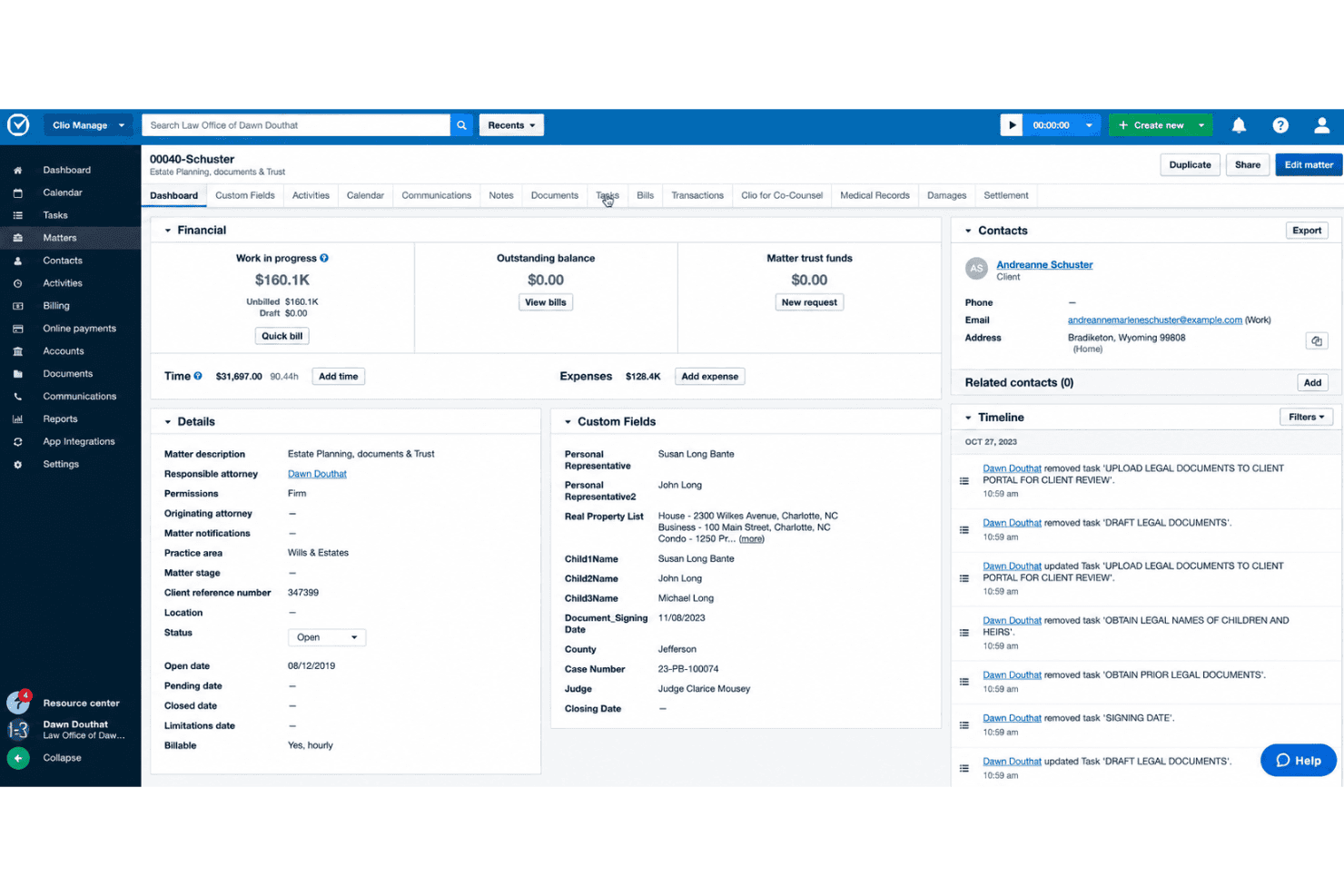
Clio Manage customizes matter workflows, task groups, and court-rule-based deadlines. Clio Manage is a legal practice management platform that brings together matter management, trust accounting, billing, document storage, and client communication in one place—making it a strong fit for law firms looking to move away from accounting-first tools like CosmoLex.
Who Is Clio Manage Best For?
Clio Manage is a strong fit for law firms of any size that want matter management, billing, trust accounting, and client communication built into one platform rather than stitched together from separate tools.
Why I Picked Clio Manage
I've included Clio Manage in my top picks because its matter-centric design lets you build fully customizable workflows around how your firm actually works, not around a fixed accounting structure like CosmoLex's. I particularly like that you can define matter stages with kanban-style boards, apply templated task groups to recurring case types, and use court-rule-based deadline calculation across 2,200+ U.S. jurisdictions, all tied to a single matter record. Trust reconciliation is built in from the Starter plan, so you're not cobbling together a separate accounting tool.
Clio Manage Key Features
- Trust account reconciliation: Compare bank records, the client trust ledger, and the firm's trust ledger side by side, with locked reports retained for 10 years.
- AI-assisted billing: Automatically prepare bills from recorded time and expenses, flagging issues for attorney review before invoices go out.
- Client portal: Give clients a secure space to send messages, share documents, view matter updates, and pay bills from a browser or mobile app.
- 300+ app integrations: Connect Clio Manage to tools like QuickBooks, Xero, Gmail, Outlook, Google Drive, and Zapier through the Clio App Directory.
Clio Manage Integrations
Clio Manage offers 300+ integrations through its App Directory, including QuickBooks, Xero, Gmail, Outlook, Google Drive, Microsoft 365, and Google Workspace. It also provides an API and Zapier connectivity for custom workflows.
Pros and Cons
Pros:
- Shared calendars help coordinate deadlines
- Trust reconciliation connects three ledgers
- Matters keep casework together
Cons:
- CosmoLex migration requires manual exports
- Reports can require spreadsheet workarounds
Learn more about Clio Manage: Best for firms standardizing case workflows
- Free demo available
- Pricing upon request
Visit WebsiteCustomer Rating:4.5/5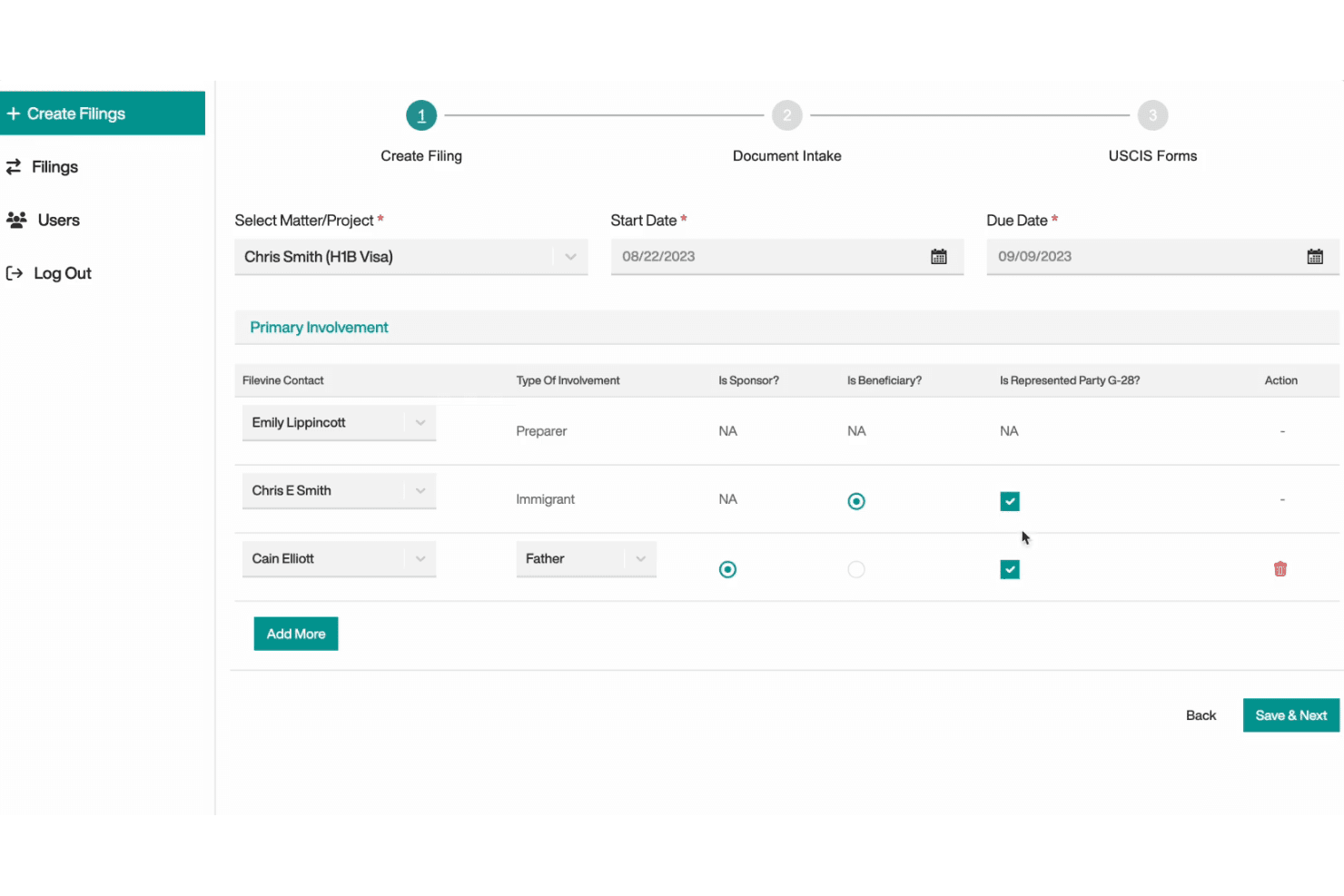
Filevine builds custom case workflows with tailored phases, fields, and taskflows. Filevine is a cloud-based case management platform built for law firms that want to centralize matters, documents, client communication, and billing workflows in a single, highly customizable workspace.
Who Is Filevine Best For?
Filevine is a strong fit for law firms that need to build structured, repeatable case workflows across practice areas and teams.
Why I Picked Filevine
I picked Filevine as one of the best because it's built around the idea that every practice area needs its own structured workflow, not a one-size-fits-all case record. I love how project templates let you define custom fields, deadline chains, and automatic task flows per matter type, so a personal injury file and a corporate transaction each follow their own repeatable process. The project feed pulls two-way texting, captured emails, and third-party tool activity into a single case view, keeping communication traceable without manual logging.
Filevine Key Features
- Document assembly: Generate documents from matter data using templates that automatically fill in client and case information with one click.
- Vinesign e-signature: Send PDF documents by text or email for signing directly from a case file, with a full audit log for completed documents.
- Client Portal: Give clients secure access to messages, assigned tasks, documents, and invoices, with multilingual form support across 12+ languages.
- QuickBooks integration: Sync client and matter data between Filevine and QuickBooks, and export time entries and expenses in either direction.
Filevine Integrations
Filevine lists over 2,000 potential integrations, including QuickBooks, Microsoft 365, Google Workspace, Outlook, and NetSuite. It also offers an API and webhooks for custom integrations.
Pros and Cons
Pros:
- Case-linked texting organizes client conversations
- Document generation keeps drafts tied to matters
- Custom matter templates keep case steps consistent
Cons:
- Complex reports take effort to configure
- Trust-accounting depth may not replace CosmoLex
Learn more about Filevine: Best for matter-level trust and WIP-AR reporting
- Free demo available
- Pricing upon request
Visit WebsiteCustomer Rating:4.4/5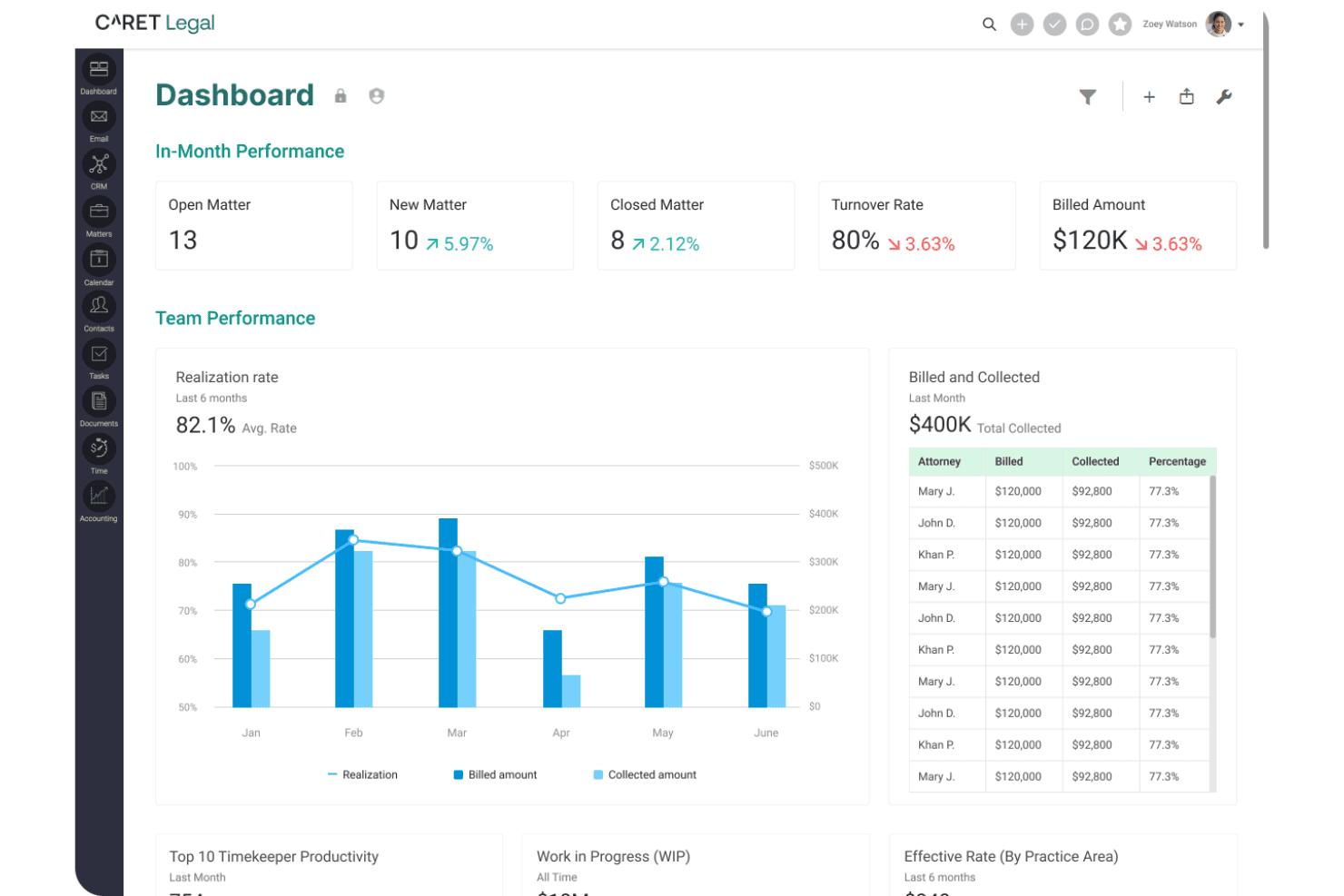
CARET Legal provides matter-level financial reporting on WIP, receivables, and trust balances. CARET Legal is a cloud-based practice management platform built for law firms that want matter management, billing, trust accounting, and client communication handled in one place.
Who Is CARET Legal Best For?
CARET Legal is a good fit for mid-sized law firms where billing attorneys and operations staff need matter-level visibility into trust balances, WIP, and accounts receivable in one place.
Why I Picked CARET Legal
I've included CARET Legal in my top picks because its matter-level financial reporting goes deeper than most practice management platforms. The WIP-AR-Trust report breaks down unbilled fees, accounts receivable, unused trust, and operating retainers by matter, and you can filter it by billing attorney, practice area, or matter status. Pair that with the Three-way Reconciliation report comparing bank balance, book balance, and client-ledger totals, and you get a clear picture of where every dollar sits across your caseload.
CARET Legal Key Features
- Built-in email with matter linking: Send and receive email directly within CARET Legal and associate correspondence with the relevant matter record.
- Client portal (Caseway): Share documents and invoices with clients through a secure portal, where clients can pay invoices or replenish retainers.
- LawToolBox court deadline calculation: Connect a LawToolBox account to calculate court deadlines and automatically update calendar dates for rule changes, weekends, and court holidays.
- QuickBooks Online sync: Push invoice approvals, edits, and deletions from CARET Legal to QuickBooks Online to keep accounting records aligned.
CARET Legal Integrations
CARET Legal offers native integrations with QuickBooks Online, Microsoft 365, Google Workspace, LawToolBox, NetDocuments, OneDrive, and Payments. It also connects with RMail, Lawmatics, HotDocs, Microsoft Word for Windows, and IMAP; API availability isn’t documented.
Pros and Cons
Pros:
- Matter-linked documents keep correspondence in context
- Reviewers praise connected billing and case files
- Matter-level WIP, AR, and trust visibility
Cons:
- Calendar delays and deadline calculation complaints
- Reviewers report bugs in trust workflows
Learn more about CARET Legal: Best for capturing billable work across apps
- 10-day free trial + free demo available
- From $59/user/month (billed annually)
Visit WebsiteCustomer Rating:4.4/5
Rocket Matter centralizes tasks, billing, and calendar on one dashboard. Rocket Matter is a cloud-based legal practice management platform for law firms that centralizes matter management, time tracking, billing, trust accounting, and document assembly in one system.
Who Is Rocket Matter Best For?
Rocket Matter is a strong fit for law firms where billing partners and office managers need tight control over time capture, invoicing, and trust accounting across the full matter lifecycle.
Why I Picked Rocket Matter
I picked Rocket Matter because of how it handles billable time capture across the apps attorneys already use. Rocket Matter Track runs in the background on your desktop, logging activity across office apps so you can assign that work to matters without reconstructing your day from memory. Pair that with email timekeeping directly from Outlook and timers you can run simultaneously on multiple matters, and very little billable time slips through.
Rocket Matter Key Features
- Trust accounting: Create separate trust accounts per matter, track deposits and disbursements, place holds, and generate trust ledgers across clients.
- Document assembly: Build legal documents from customizable templates pre-populated with matter and contact data stored in Rocket Matter.
- Batch billing: Review, approve, and send multiple invoices in a single session using the paperless prebilling screen.
- Conflict checking: Search matters and contacts to flag potential conflicts of interest before taking on new clients or matters.
Rocket Matter Integrations
Rocket Matter offers native integrations with QuickBooks Online, Microsoft Outlook, Office 365, OneDrive, Google Calendar, Box, Dropbox, and NetDocuments. It also lists WebCal, iCalendar, and Zapier, and provides an HTTP JSON API for custom integrations.
Pros and Cons
Pros:
- Matter-linked templates reduce repetitive document entry
- Combines trust ledgers with invoice workflows
- Captures billable activity across desktop apps
Cons:
- Reviewers flag clunky mobile app behavior
- Intake workflows sit behind a paid add-on
Learn more about Rocket Matter: Best for midsize firms standardizing workflows
- Free demo available
- Pricing upon request
Visit WebsiteCustomer Rating:4.2/5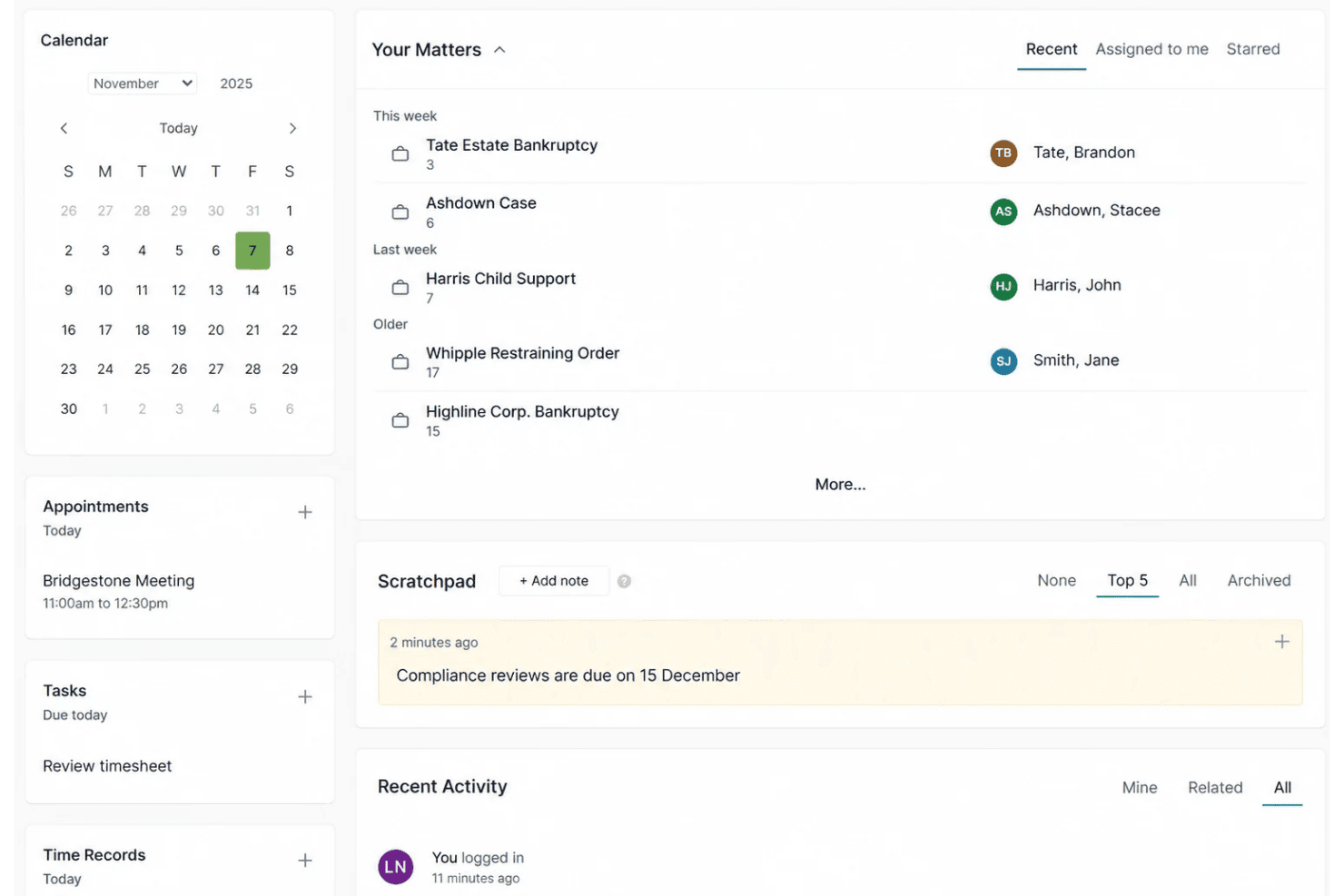
Actionstep automates matter workflows, task assignments, reminders, and case stages. Actionstep is a cloud-based practice management platform built for midsize law firms that need to connect matter management, client intake, trust accounting, billing, and workflow automation in one configurable system.
Who Is Actionstep Best For?
Actionstep is a strong fit for midsize law firms that need matter management, trust accounting, billing, and client intake connected in one configurable system.
Why I Picked Actionstep
I've included Actionstep in my top picks because it's purpose-built for midsize firms that need every matter to follow a defined, repeatable process. I particularly like how matter types come with their own configurable workflows, document templates, and task automations, so your firm's intake-to-close process isn't improvised case by case. The LawToolBox integration also stands out for US-based teams, calculating relative court deadlines from a trigger date and pushing them directly to synced Outlook or Google calendars.
Actionstep Key Features
- Trust account reconciliation: Reconcile trust accounts manually against a printed bank statement or electronically by uploading OFX or QIF files, with completed reconciliations locked against further editing.
- Client portal: Share matter documents and exchange encrypted messages with clients through a permission-controlled portal, with client notifications triggered on each upload or update.
- QuickBooks Online integration: Sync invoices between Actionstep and QuickBooks Online, with edits and deletions automatically pushed across both systems.
- Mobile time tracking: Log time, create file notes, and manage tasks directly from the iOS or Android app using concurrent timers and matter-linked time entries.
Actionstep Integrations
Actionstep has documented integrations with QuickBooks Online, DocuSign, LawToolBox, Microsoft Office 365, Outlook, and Google Calendar. It also offers a REST API, webhooks, and Zapier.
Pros and Cons
Pros:
- Client portals keep matter documents accessible
- Timekeeping and billing share matter context
- Matter workflows adapt to firm-specific processes
Cons:
- Reporting and trust tools draw reviewer criticism
- Workflow configuration demands substantial setup
Learn more about Actionstep: Best for AI agents across legal workflows
- Free demo available
- Pricing upon request
Visit WebsiteCustomer Rating:4.2/5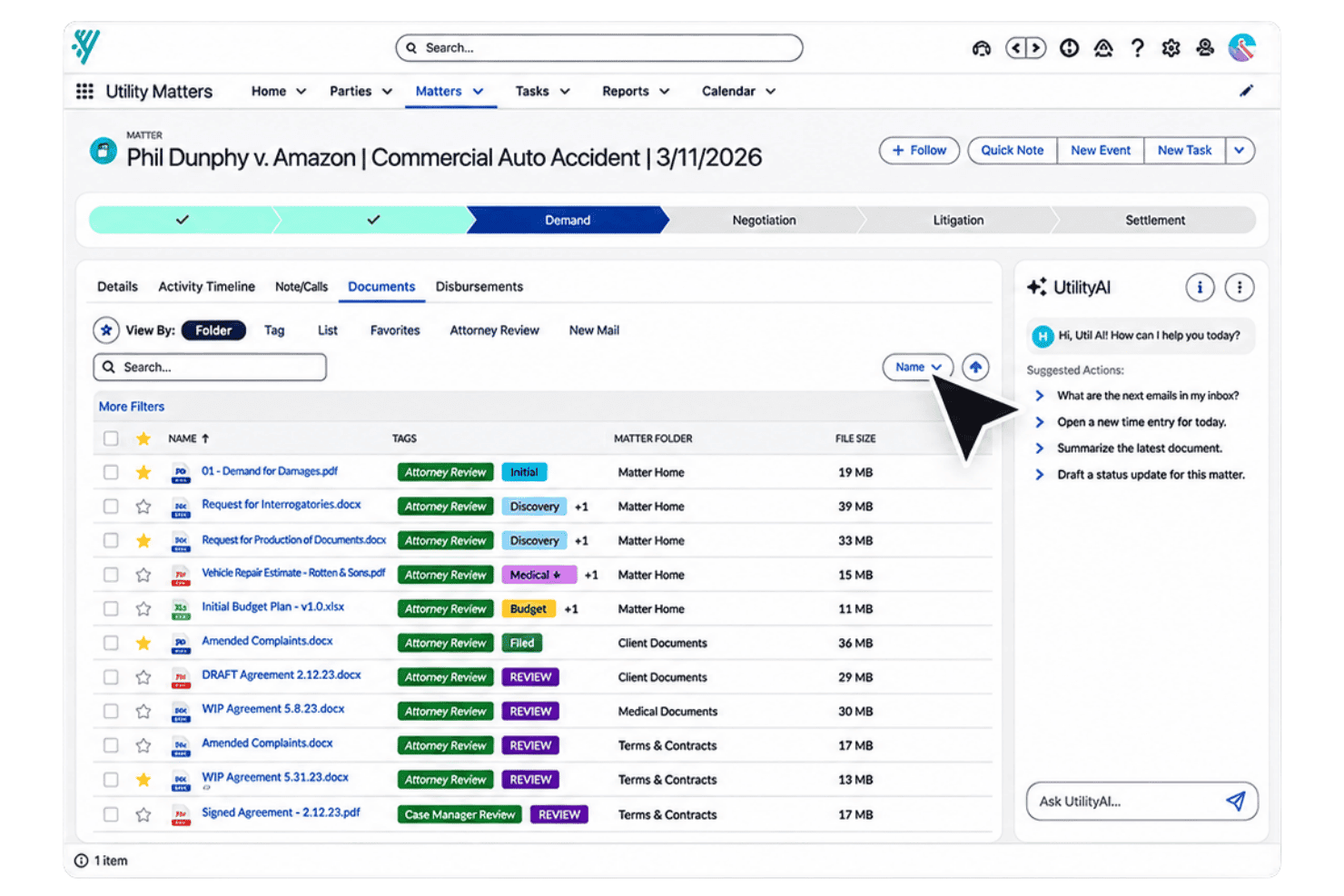
Litify's AI agents automate casework, from matter summaries to risk reviews and intake. Litify is a Salesforce-native legal platform built for mid-to-large law firms and legal departments that need AI-driven matter management, automated intake workflows, and firm-wide reporting.
Who Is Litify Best For?
Litify is a strong fit for mid-to-large law firms and legal departments that want AI-driven matter management, automated intake, and firm-wide operational reporting on a Salesforce-native platform.
Why I Picked Litify
I picked Litify as one of the best because of how far its AI agents actually reach into day-to-day legal work. The Matter Summary Agent pulls together Chatter threads, notes, tasks, emails, and files into an on-demand brief, while the Strengths & Weakness Agent reviews case-file documents to flag legal risks before they surface in court. I also appreciate the Intake Qualifier Agent, which screens prospective claims against your firm's criteria automatically, cutting the manual triage that bogs down intake teams at busier practices.
Litify Key Features
- LitifyAI time capture: Tracks your activity across emails and internal coordination, then generates review-ready time entries automatically.
- Mass bill generation: Runs multiple billing jobs simultaneously or schedules them for off-hours to reduce manual billing work.
- Configurable matter plans: Templated task lists by practice area and case type give your team a structured, repeatable process for each matter.
- Legal KPI dashboards: Real-time dashboards track time-on-desk, staff productivity, and billing realization across your firm.
Litify Integrations
Litify integrates with QuickBooks, Accounting Seed, DocuSign, CalendarRules, LawPay, Confido Legal, Outlook, NetDocuments, iManage, and RingCentral. It also offers a REST API for custom connections.
Pros and Cons
Pros:
- Searchable files keep case documents accessible
- Custom dashboards track team productivity
- AI agents summarize matters and flag risks
Cons:
- Numerous tabs can obscure case information
- Prior-system migration can lose matter-plan details
Learn more about Litify: 9Best for automated legal document drafting
LEAP
- Free demo available
- Pricing upon request
Visit WebsiteCustomer Rating:4.3/5
LEAP combines legal case management, document automation, trust accounting, and AI tools. LEAP is a legal practice management platform that brings together case management, document automation, trust accounting, billing, and AI tools—making it a strong fit for solo attorneys and small-to-midsize law firms that want to run their entire practice from one system.
Who Is LEAP Best For?
LEAP is a strong fit for solo attorneys and small-to-midsize law firms that want matter management, document automation, trust accounting, and billing in one platform.
Why I Picked LEAP
I picked LEAP as one of the best because its document automation is genuinely impressive: it pulls client and matter data already stored in the platform to populate forms, letters, and court documents without re-entering anything. I also like that LEAP's AI Generator drafts discovery requests, wills, and trust agreements using your own practice documents as source material. When switching from CosmoLex, that combination means your firm's existing precedents become the foundation for faster drafting from day one.
LEAP Key Features
- Trust accounting workflows: Built-in trust and operating ledgers support IOLTA and IOLA compliance, with reconciliations, audit reports, and low-balance alerts included.
- AutoTime time tracking: Runs in the background to automatically capture billable time across matter activities without manual input.
- LawConnect client portal: Lets clients securely share files, complete intake, review documents, and pay invoices directly from a branded portal.
- Power BI reporting connector: Pulls real-time matter data into pre-built dashboards and customizable reports for firm-level performance tracking.
LEAP Integrations
LEAP has native integrations with QuickBooks Online, Xero, Microsoft 365, Lawmatics, LawToolBox, InfoTrack, LawConnect, and Power BI. It also offers REST APIs and Zapier connectivity to more than 8,000 apps; several integrations may cost extra.
Pros and Cons
Pros:
- Mobile access covers matters, documents, and time
- Trust accounting and billing share matter workflows
- Matter data populates reusable legal documents
Cons:
- Email filing can require extra steps
- CosmoLex data migration may omit records
Learn more about LEAP: Best for AI-powered law firm financial reporting
- Free demo available
- Pricing upon request
Visit WebsiteCustomer Rating:4.5/5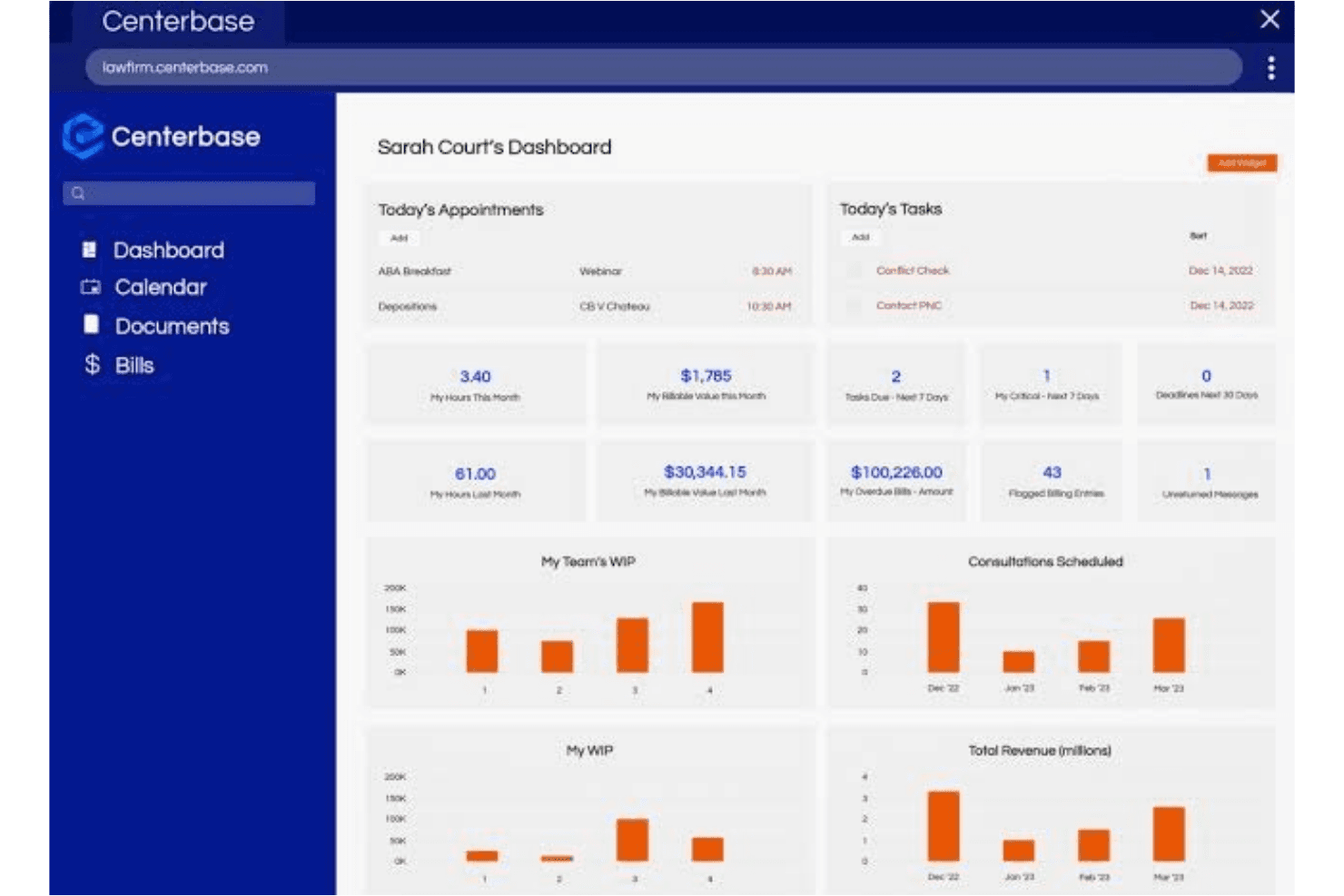
Centerbase connects AI-powered matter management, billing, trust accounting, and financial reporting. Centerbase is an AI-powered practice management platform built for midsize law firms that unifies matter management, billing, trust accounting, and firm reporting in a single system.
Who Is Centerbase Best For?
Centerbase is built for midsize law firms that need a single platform connecting matter management, billing, trust accounting, and AI-driven firm reporting.
Why I Picked Centerbase
I picked Centerbase because its AI reporting tool, Centerbase IQ, lets me ask plain-English questions about live billing, WIP aging, and attorney performance and get citation-backed answers I can trace directly to source records. I can run profitability reports by department, matter, or attorney without building a query from scratch. That kind of financial visibility is exactly what midsize firms need when they outgrow CosmoLex's reporting.
Centerbase Key Features
- Three-way trust reconciliation: Compares bank balance, trust ledger balance, and individual client ledger balances to surface discrepancies at the close of each reconciliation period.
- Multiple billing arrangements: Supports hourly, flat-fee, project, subscription, split, consolidated, and electronic billing formats within a single matter or across clients.
- Client portal with payment processing: Lets clients view bills, share documents, and pay via credit card, debit card, eCheck/ACH, or recurring payments through Centerbase Payments.
- Automated matter workflows: Triggers configured actions across matter records, documents, calendar events, and client activities based on set conditions.
Centerbase Integrations
Centerbase offers native integrations across the Microsoft 365 ecosystem, including Outlook, Word, and SharePoint. It also lists integrations with QuickBooks Online, Plaid, Stripe, and LawToolBox, plus Service and Web APIs for custom integrations.
Pros and Cons
Pros:
- Reviewers value unified timekeeping and billing
- Three-way trust reconciliation supports client-fund oversight
- Citation-backed financial reporting clarifies firm performance
Cons:
- Some users report slow time-entry screens
- Reviewers report difficult custom report building
Learn more about Centerbase:
Alte alternative la CosmoLex
Iată câteva opțiuni care nu au ajuns pe lista mea scurtă, dar merită totuși verificate:
- 11MyCaseBest for AI-powered case summaries
- 12PracticePantherBest for matter-linked client-to-cash workflows
- 13CasePeerBest for managing PI cases through settlement
- 14Bill4TimeBest for billing-first case management
- 15NeosBest for PI demands with cited records
- 16LawmaticsBest for AI-assisted legal lead intake
- 17DocketWiseBest for immigration forms and USCIS tracking
- 18SurePointBest for partners' financial and market insight
- 19PCLaw Time MattersBest for firms building matter workflows
- 20LollyLawBest for multilingual immigration intake
Related Reviews
How I Evaluate CosmoLex Alternatives
I split my evaluation into three parts. First, core functionality: any alternative must handle matter and case management and trust and billing accounting—this carries the most weight. Second, standout features like client payment portals and court rules integration. Third, I look at migration support, pricing transparency, and onboarding quality.
Core Functionality (Table Stakes For This List)
When I'm selecting tools for my list, I score each one on a scale from 0 (does not offer the functionality) to 5 (excels in this area) for each core functionality listed below. I then convert the total into a percentage to help assess each tool's overall fit, with extra weight on any functionalities I’ve deemed essential.
- Matter & Case Management (Essential): I look for searchable matter records that link parties, documents, notes, tasks, and status updates across a case’s lifecycle.
- Trust & Billing (Essential): I assess time entry, invoice generation, client trust ledgers, reconciliation, and audit trails for routine financial workflows.
- Document Management: I check how teams organize, search, version, and permission documents tied to matters, including templates and retrieval.
- Calendaring & Deadlines: I look for matter-linked court dates, tasks, and deadline tools that help staff coordinate filing work and avoid missed dates.
- Client Intake & Communication: I assess whether intake details connect to matters and whether teams can track client messages and follow-up.
- Reporting & Analytics: I check for useful billing, matter-status, and productivity reports, plus options to customize views across the firm.
Once I have a list of tools that meet the criteria, I consider what sets each platform apart.
Differentiating Factors (What Sets Vendors Apart)
Here's how I compare and contrast different vendors:
Standout Features
Court rules integration is a big one. I check whether a platform auto-calculates jurisdiction-specific deadlines from a single trigger date, since a missed filing deadline can't be undone. Clio and MyCase both offer this, though implementations differ. I also evaluate client payment portals—specifically whether they support credit card, ACH, and payment plans tied to trust-compliant invoicing. A firm that still emails invoices and waits on checks will notice the difference. Finally, I look at mobile app depth beyond basic access; attorneys deposing witnesses or in court need real time entry, document access, and client messaging from their phone.
Beyond Features
Migration support matters most when you're moving trust ledgers and matter histories. I check whether a vendor offers dedicated implementation specialists who map your data before cutover, since a botched trust migration can trigger bar compliance issues. Pricing transparency is the other factor I weigh heavily. Some platforms advertise a base rate but charge extra for e-signatures or trust accounting modules, so I look for clear per-user or flat-rate plans that won't surprise a growing firm. I also evaluate how responsive support is during urgent, deadline-driven moments like a filing crunch.
De ce să căutați alternative la CosmoLex?
Deși CosmoLex este o alegere bună pentru platforma de gestionare a cazurilor juridice, unii utilizatori caută alternative care să corespundă mai bine nevoilor lor. Este posibil să căutați o alternativă la CosmoLex deoarece:
- Cabinetul dvs. are nevoie de fluxuri de lucru pentru litigii complexe sau pentru un volum mare de dosare
- Echipa dvs. se bazează pe instrumente din afara integrărilor pe care le utilizați
- Firma dvs. în creștere are nevoie de fluxuri de lucru potrivite pentru operațiuni de dimensiuni mai mari
- Regulile dvs. contabile diferă de cerințele acceptate de CosmoLex
- Echipa dvs. are nevoie de asistență pentru migrare care să se potrivească unui program strict de tranziție
Dacă oricare dintre aceste situații vi se pare familiară, ați ajuns în locul potrivit. Lista mea include mai multe opțiuni de platforme pentru gestionarea cazurilor juridice, mai potrivite pentru echipele care se confruntă cu aceste provocări legate de CosmoLex și caută soluții alternative.
Funcțiile principale ale CosmoLex
Iată funcțiile principale ale CosmoLex, pentru a vă ajuta să îl comparați cu opțiunile alternative:
- Gestionarea dosarelor: CosmoLex asociază e-mailurile, sarcinile, evenimentele, documentele, elementele facturabile și tranzacțiile cu dosarele clienților. Astfel, echipa dvs. dispune de o evidență comună a dosarului pentru urmărirea activității cazului și găsirea informațiilor aferente.
- Contabilitatea conturilor fiduciare și a activității: Platforma combină contabilitatea conturilor fiduciare și a activității cu gestionarea cabinetului. Firma dvs. poate gestiona aceste fluxuri financiare alături de evidențele dosarelor, inclusiv cerințele privind contabilitatea conturilor fiduciare acceptate de platformă.
- Gestionarea timpului și facturarea: Înregistrați timpul și creați facturi juridice în cadrul platformei. Money Finder de la CosmoLex semnalează întâlnirile și sarcinile nealocate pentru a fi verificate ca posibile elemente facturabile, ajutând personalul să verifice activitatea care ar putea trebui facturată.
- Calendar, sarcini și fluxuri de lucru: Gestionați evenimentele și sarcinile asociate dosarelor, apoi creați fluxuri de lucru pentru sarcini pentru dosare noi sau existente. Stabilirea responsabilităților și a momentului în care acestea trebuie îndeplinite le oferă angajaților o modalitate consecventă de a urma etapele recurente ale unui caz.
- Gestionarea e-mailurilor: CosmoLex arhivează e-mailurile în dosarele clienților și vă avertizează atunci când nu găsește o potrivire sau găsește mai multe. Puteți clasifica mesajele e-mail facturabile și puteți stabili permisiuni de vizualizare pentru mesajele sensibile.
- Gestionarea documentelor: Stocați și regăsiți documentele asociate dosarelor clienților, cu acces la servicii de stocare conectate precum OneDrive, Google Drive, NetDocuments, Dropbox și Box. Asamblarea documentelor bazate pe Word poate utiliza câmpurile din baza de date CosmoLex pentru a completa șabloanele.
- Portal pentru clienți: Clienții pot schimba mesaje și documente printr-un portal securizat, unde comunicările sunt înregistrate în evidențele dosarelor. De asemenea, pot vizualiza facturi, efectua plăți online și accesa fișiere partajate; platforma prezintă semnătura electronică drept o funcție a portalului.
- Rapoarte și analize: Utilizați rapoarte și analize pentru a examina informațiile despre firmă și dosare. Aceste vizualizări vă pot ajuta să verificați starea dosarelor și activitatea de facturare atunci când monitorizați volumul de lucru sau pregătiți evaluări operaționale.
Costurile și prețurile alternativelor la CosmoLex
Prețurile variază în funcție de funcții, dimensiunea firmei și suplimente. Iată intervalele de preț și funcțiile tipice pe care le veți găsi în cazul alternativelor la CosmoLex.
Tabel comparativ al planurilor pentru alternativele la CosmoLex
| Tip de plan | Preț mediu | Funcții comune |
|---|---|---|
| Tip de planPlan personal | Preț mediu$39–$60/utilizator/lună | Funcții comuneGestionarea dosarelor și cauzelor, urmărirea timpului și facturare de bază. |
| Tip de planPlan pentru companii | Preț mediu$60–$125/utilizator/lună | Funcții comuneFluxuri de lucru avansate pentru dosare, contabilitatea fondurilor fiduciare, portaluri pentru clienți și raportare. |
| Tip de planPlan pentru întreprinderi | Preț mediu$125–$200+/utilizator/lună sau prețuri personalizate | Funcții comuneAdministrare la nivelul întregii firme, permisiuni avansate, asistență pentru implementare și integrări personalizate. |