

Programele de gestionare a cazurilor juridice vă oferă un singur sistem pentru a organiza spețele, termenele-limită, documentele, timpul, facturarea și comunicarea pentru firma dumneavoastră de avocatură sau departamentul juridic. Dacă sunteți în căutarea celui mai bun program de gestionare a cazurilor juridice, probabil că doriți instrumente care economisesc timp, reduc munca manuală și vă ajută să gestionați cu precizie și control un număr tot mai mare de cazuri. În această listă, veți putea compara direct instrumentele de top, veți afla ce diferențiază fiecare soluție și veți găsi detalii esențiale care să vă ajute să decideți ce sistem se potrivește fluxului dumneavoastră de lucru, domeniului de practică și nevoilor afacerii.
Why Trust Our Software Recommendations
6,700+
Reviews
20
Industry experts
16+
Evaluation factors
14
Years
Our team has been testing and reviewing software since 2012. As legal practice leaders ourselves, we know how difficult—and important—it is to choose the right software.
For this guide, we evaluated tools using hands-on testing and independent research, scoring tools using our selection criteria.
Our reviews reflect our human editorial judgment, not a sales pitch.
Cele mai bune programe de gestionare a cazurilor juridice
Score legend (out of 5)
- Excellent4.5–5
- Good4–4.4
- Average3–3.9
- Below average2–2.9
- Poor1–1.9
Sorted by: Default
| Tool | Starting Price | Website | |||||||
|---|---|---|---|---|---|---|---|---|---|
Best for end-to-end legal workflow automation | 3.5 out of 5 | 3 | 4 | 3 | 4 | 3 | 4 | $59/user/month Free demo + 7-day free trial available | Website |
Best for automatic time tracking | 3.7 out of 5 | 4 | 4 | 3 | 4 | 3 | 4 | Pricing upon request Free trial available | Website |
Best for customizable matter automation | 3.8 out of 5 | 4 | 5 | 3 | 4 | 4 | 3 | Pricing upon request Free demo available | Website |
Best for integrated paralegal services | 4.0 out of 5 | 4 | 5 | 4 | 4 | 4 | 3 | Pricing upon request Free demo available | Website |
Best for client intake and marketing automation | 3.7 out of 5 | 4 | 4 | 4 | 4 | 2 | 4 | Pricing upon request Free demo available | Website |
Best for legal graph-powered AI | 4.0 out of 5 | 4 | 5 | 3 | 4 | 4 | 4 | Pricing upon request Free demo available | Website |
Best for firms with varied legal tech stacks | 3.8 out of 5 | 4 | 4 | 4 | 4 | 4 | 3 | £79/user/month 7-day free trial + free demo available | Website |
Best for unified legal and business management | 3.7 out of 5 | 4 | 4 | 3 | 4 | 4 | 3 | Pricing upon request Free demo available | Website |
Best for enterprise-grade analytics | 4.2 out of 5 | 4 | 5 | 4 | 5 | 3 | 4 | Pricing upon request Free demo available | Website |
Best for documented conflict-review workflows | 3.8 out of 5 | 4 | 5 | 3 | 4 | 3 | 4 | Pricing upon request Free demo available | Website |



Recenzii ale celor mai bune programe de gestionare a cazurilor juridice
Mai jos sunt rezumatele mele detaliate ale celor mai bune programe de gestionare a cazurilor juridice care au ajuns pe lista mea scurtă. Recenziile mele oferă o analiză detaliată a funcțiilor, celor mai potrivite cazuri de utilizare și integrărilor fiecărui program, pentru a vă ajuta să găsiți cea mai bună soluție pentru dumneavoastră.
 Best for end-to-end legal workflow automation
- Free demo + 7-day free trial available
- From $59/user/month
Visit WebsiteCustomer Rating:4.3/5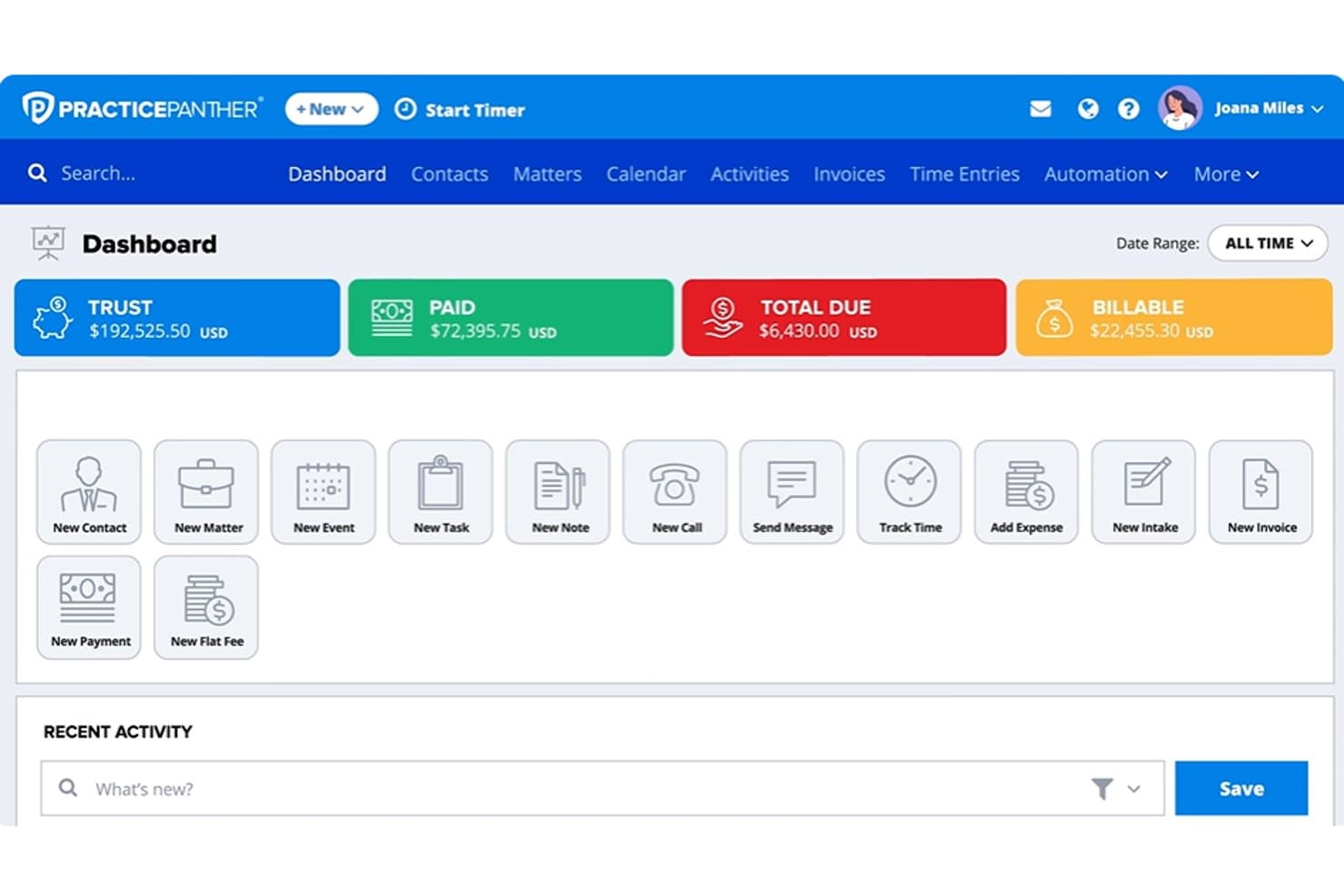
PracticePanther dashboard showing trust balances, payments, billable amounts, matters, and legal billing tools PracticePanther is a legal practice management platform that covers matter management, client intake, document automation, time tracking, billing, trust accounting, and client communication in a single system.
Who Is PracticePanther Best For?
Solo practitioners and small to mid-size firms that want intake, billing, trust accounting, and client communication running from a single platform without stitching together multiple tools.
Why I Picked PracticePanther
I've included PracticePanther in my top picks because it connects intake, billing, trust accounting, and client communication in a single system without requiring you to stitch together separate tools. I particularly like how conditional workflows can trigger tasks, checklists, and follow-up reminders the moment a client submits an intake form, which removes a lot of manual handoff between onboarding and active case management. The built-in trust reconciliation with three-way matching and low-balance alerts also covers a workflow that many platforms leave to a separate accounting add-on.
PracticePanther Key Features
- Full-text conflict check: Searches the entire system—including notes, tasks, emails, and custom fields—for a name or keyword to surface potential conflicts.
- MoneyFinder: Identifies activities that have been logged but not yet billed, so billable time doesn't slip through the cracks.
- Secure client portal: Gives clients access to shared documents, invoice balances, encrypted messages, and online payments from a branded portal.
- Custom security roles: Lets you restrict user access to specific areas of the software, including financial reports and trust account data.
PracticePanther Integrations
PracticePanther offers marketplace integrations with QuickBooks, Google Calendar, Microsoft Exchange, Google Drive, OneDrive, Dropbox, Box, and LawToolBox. It also provides an API and supports Zapier.
Pros and Cons
Pros:
- Three-way trust reconciliation supports ledger oversight
- Matter-linked time capture reduces missed billing
- Intake submissions trigger matter follow-ups
Cons:
- Reviewers report billing and retainer inaccuracies
- Court-rule deadline automation requires separate service
Learn more about PracticePanther: Best for automatic time tracking
- Free trial available
- Pricing upon request
Visit WebsiteCustomer Rating:4.8/5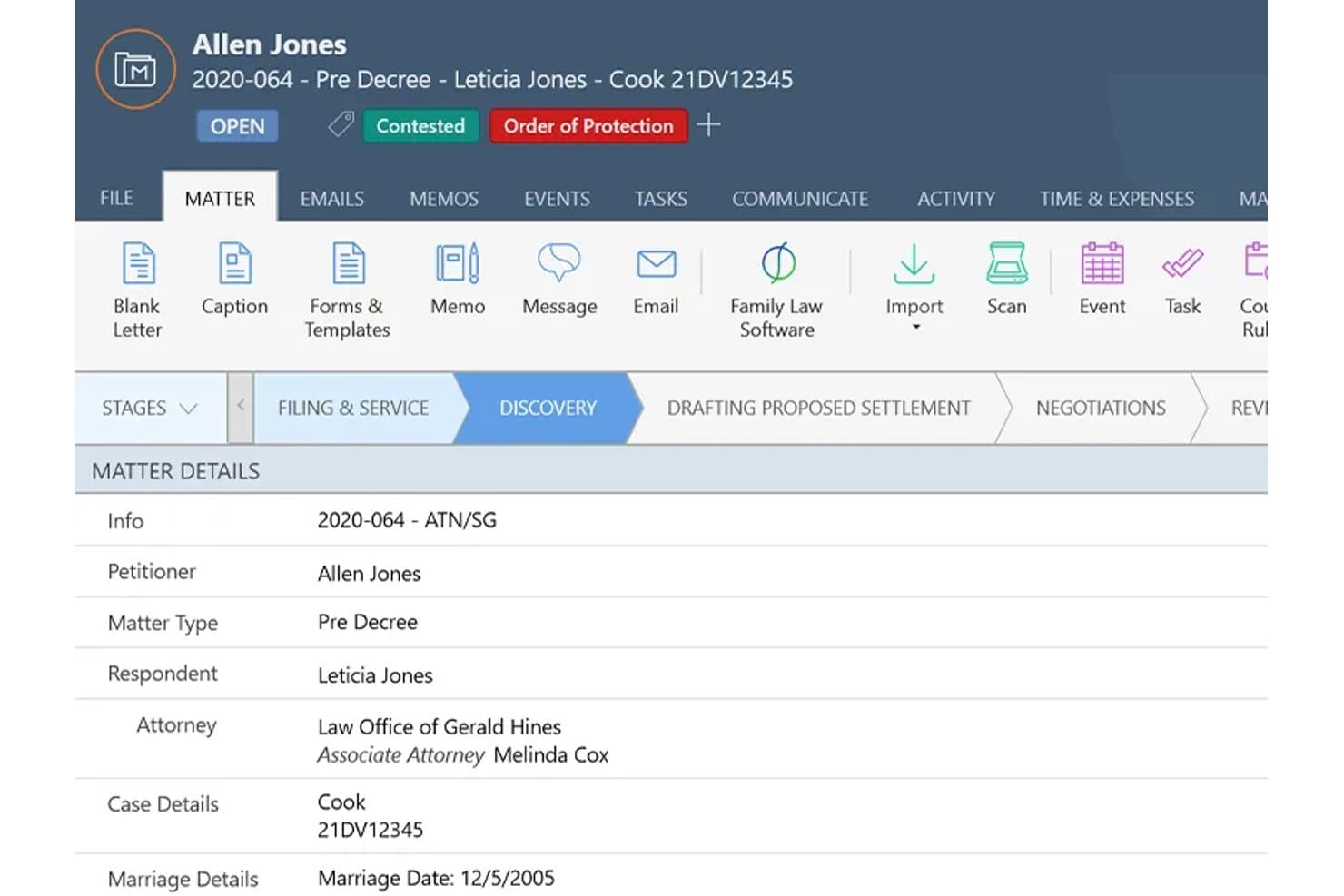
Smokeball offers a detailed matter management view displaying case stages, client details, attorney assignments, and case status in one centralized interface. Smokeball is a cloud-based legal practice management platform built for small and solo law firms, combining matter management, document automation, time tracking, billing, and trust accounting in one system.
Who Is Smokeball Best For?
Smokeball suits solo attorneys and small firm lawyers who handle high-volume practice areas like family law, real estate, or personal injury and need tight matter and billing control.
Why I Picked Smokeball
Smokeball earns its spot on my shortlist because AutoTime captures billable time automatically as I work, recording activity across Word documents, Outlook emails, and matter-related tasks without me ever starting a timer. That means I'm not reconstructing my day at 5pm trying to remember what I worked on. Paired with Firm Insights Reporting, I can see exactly where time is going across matters and staff, which makes profitability visible in a way manual tracking never could.
Smokeball Key Features
- Matter management templates: Choose from over 200 pre-built matter types for specific practice areas.
- Practice area calculators: Access calculators tailored to family law, real estate, and other legal specialties.
- Client portal: Share documents and updates securely with clients through an integrated portal.
- Document automation: Generate court forms, letters, and pleadings with merge fields and automated templates.
Smokeball Integrations
Smokeball offers native integrations with Microsoft Word, Microsoft Outlook, LawPay, and QuickBooks Online. An API is available for custom integrations.
Pros and Cons
Pros:
- Built-in IOLTA trust accounting with reconciliation tools
- 200+ matter templates organized by practice area
- AutoTime captures billable hours without manual input
Cons:
- Limited availability outside US and Australian markets
- Windows desktop app required for full functionality
Learn more about Smokeball: Best for customizable matter automation
- Free demo available
- Pricing upon request
Visit WebsiteCustomer Rating:4.7/5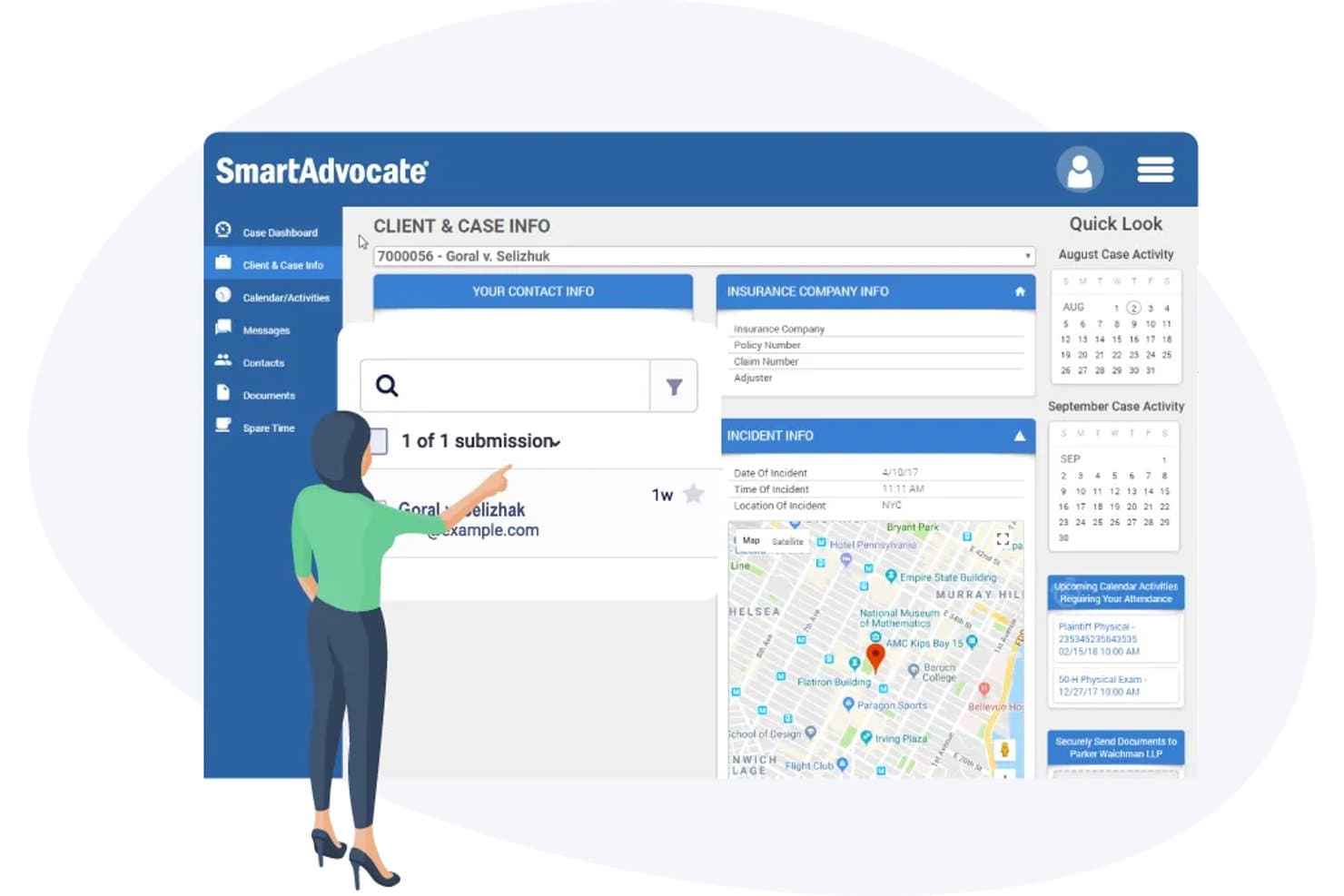
SmartAdvocate offers a comprehensive Client & Case Info dashboard with incident details, insurance company info, map view, and calendar activity tracking. SmartAdvocate is a legal case management platform built for plaintiff litigation practices, combining matter management, document automation, customizable workflows, client intake, and AI-powered case tools.
Who Is SmartAdvocate Best For?
Small to mid-size personal injury and mass tort firms where paralegals and intake staff handle high case volumes will find SmartAdvocate a natural fit.
Why I Picked SmartAdvocate
SmartAdvocate earns its spot on my shortlist because of how deeply you can automate matter workflows without relying on a developer. I use WorkPlans to build automated procedure chains that trigger tasks, send client texts, and generate documents the moment a case hits a specific stage. On top of that, the 4,000+ merge codes make templated document generation genuinely granular, so no two practice areas have to follow the same process.
SmartAdvocate Key Features
- AI Case Chat: Query and summarize case data, briefs, or medical records using built-in artificial intelligence tools.
- Court rules-based calendaring: Automatically calculates deadlines and court dates based on jurisdiction-specific rules.
- Unlimited document storage: Store, organize, and search thousands of matter documents with barcode-based batch scanning.
- Client portal integration: Share case updates, transmit documents, and securely message clients through connected portal solutions.
SmartAdvocate Integrations
SmartAdvocate offers native integrations with DocuSign, QuickBooks, Microsoft 365, LawToolBox, RingCentral, and Docubee. An API is available for custom integrations.
Pros and Cons
Pros:
- Purpose-built for high-volume plaintiff litigation
- AI tools built directly into case records
- Highly configurable WorkPlan automation per practice area
Cons:
- Not suited for transactional or non-litigation matters
- Steep setup time for new workflow configurations
Learn more about SmartAdvocate: Best for integrated paralegal services
- Free demo available
- Pricing upon request
Visit WebsiteCustomer Rating:4.8/5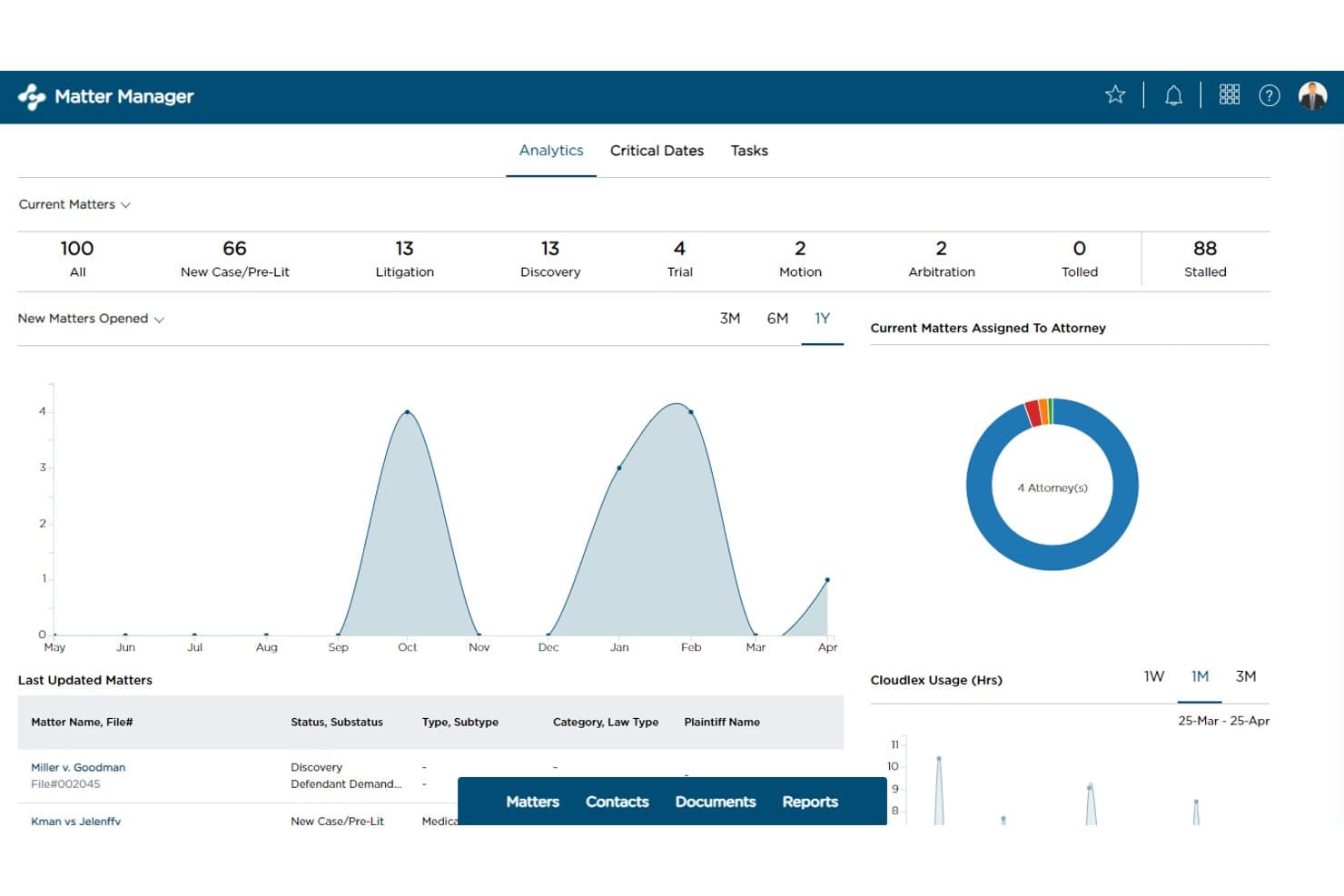
CloudLex tracks matter status, analytics, and attorney assignments in one dashboard. CloudLex is a personal injury-focused practice management platform that covers matter tracking, document organization, client intake, medical records management, task workflows, and client communication in a single system.
Who Is CloudLex Best For?
CloudLex is purpose-built for personal injury law firms that want matter tracking, client communication, and paralegal support in one place.
Why I Picked CloudLex
CloudLex earns its spot on my shortlist because of how deeply it integrates human paralegal support into the case management workflow itself. I love that you can request medical record retrieval, document indexing, chronologies, and even litigation support directly within the platform, with work tracked and delivered inside the same matter record your team is already using. The optional paralegal services also cover court calendar management and intake-to-close operations, so a small PI firm can scale capacity without hiring full-time staff.
CloudLex Key Features
- Matter status timeline report: Tracks every status and substate a matter passes through, with dates and time spent in each stage.
- Lexee AI demand drafting: Generates a structured demand package draft from case facts and records, tracked through review stages inside the matter.
- Conflict-of-interest search: Searches stored intakes, matters, and contacts using identifiers like name, phone number, or email to surface related records.
- Shared Drive client collaboration: Provides a matter-linked workspace where clients and co-counsel can share documents, notes, and updates with firm-controlled access permissions.
CloudLex Integrations
CloudLex lists 13+ integrations, including Google Calendar, OneDrive, Google Drive, Dropbox, DocuSign, Adobe Sign, QuickBooks Online, RingCentral, LexSign, and Shared Drive. Advanced includes a website-forms API integration, but broader public API documentation isn’t stated.
Pros and Cons
Pros:
- Client texts stay linked to case files
- Matter timelines show status and stage duration
- Human paralegal support works inside matter records
Cons:
- No automatic jurisdiction-based deadline calculation
- PDF OCR requires manual processing
Learn more about CloudLex: Best for client intake and marketing automation
- Free demo available
- Pricing upon request
Visit WebsiteCustomer Rating:4.6/5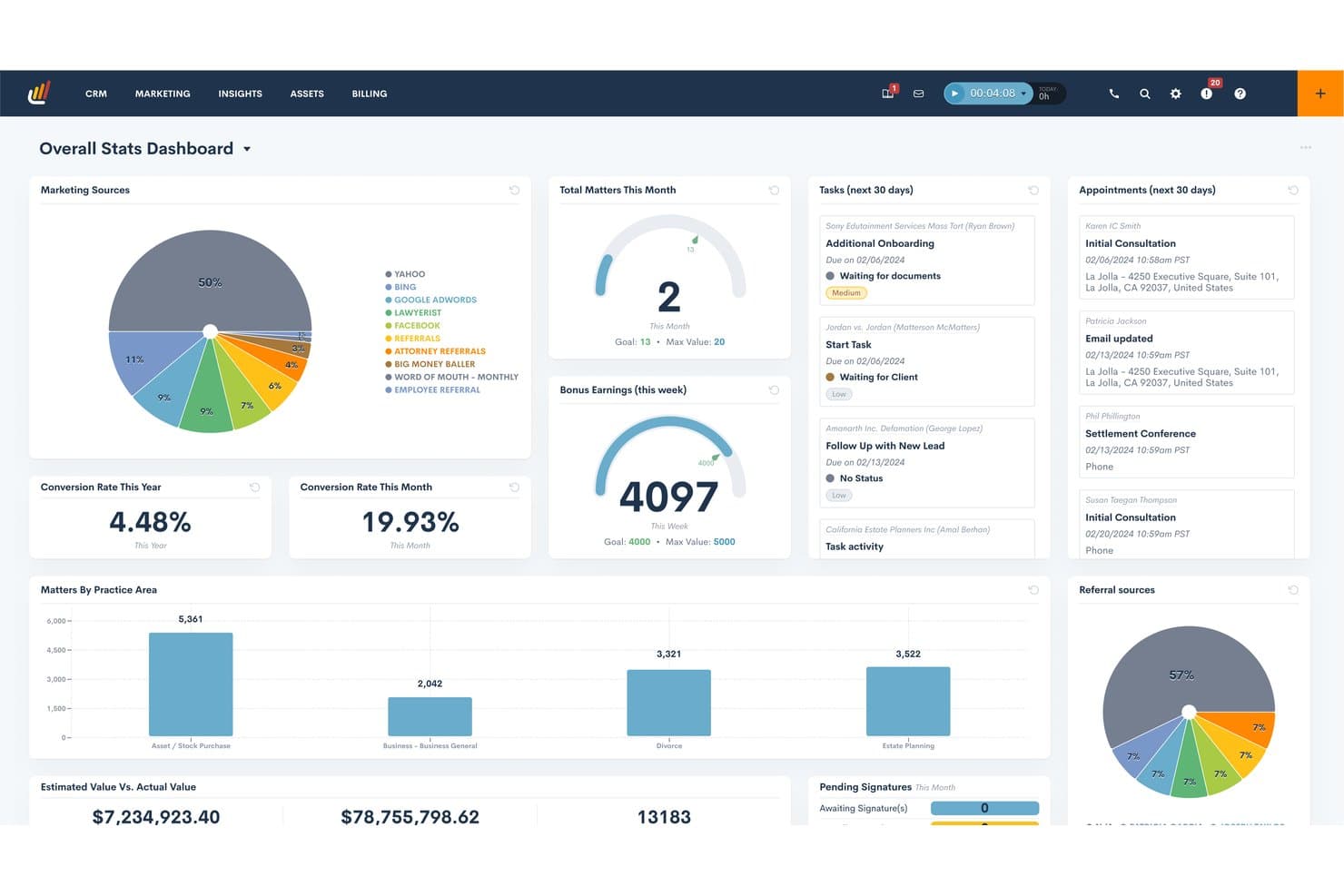
Lawmatics centralizes firm metrics in a single analytics dashboard. Lawmatics is a legal CRM and client intake platform that combines lead management, intake automation, marketing workflows, document collection, and client relationship tracking for law firms.
Who Is Lawmatics Best For?
Lawmatics fits law firms that handle high lead volume and need a dedicated system for client intake, follow-up automation, and marketing workflows alongside their practice management software.
Why I Picked Lawmatics
I've included Lawmatics in my top picks because it treats client intake as a full pipeline, not just a form. I particularly like how automated intake journeys move leads through custom stages, trigger follow-up tasks, and log every interaction on a matter timeline without manual input. The file-request templates are genuinely useful too: firms can collect signed agreements and supporting documents before a client ever steps through the door, with everything landing directly in the matter's Files tab.
Lawmatics Key Features
- Client self-service portal: Clients access a dedicated web app to view shared documents, forms, file requests, appointments, tasks, invoices, and messages tied to their matter.
- Conflict-of-interest checking: Lawmatics searches across matter records, fields, and notes for potential conflicts, with results logged directly to the related matter's timeline.
- Custom user roles and permissions: Administrators can build role-based access controls that limit visibility of matters, contacts, external emails, and platform features by user association.
- Time & Billing add-on: Firms can track billable time and expenses, manage invoices, and accept online client payments through an add-on module available across all plans.
Lawmatics Integrations
Lawmatics offers marketplace integrations with Clio, MyCase, Filevine, CARET Legal, PracticePanther, Rocket Matter, Gmail, Microsoft Outlook, QuickBooks, and OneDrive. Its REST API, webhooks, and OAuth 2.0 support custom integrations.
Pros and Cons
Pros:
- Portal file requests collect intake documents
- Matter timelines centralize client communications
- Automated intake tasks reduce missed follow-ups
Cons:
- Intake focus leaves broader case management gaps
- No automated court-deadline calculations
Learn more about Lawmatics: Best for legal graph-powered AI
- Free demo available
- Pricing upon request
Visit WebsiteCustomer Rating:4.5/5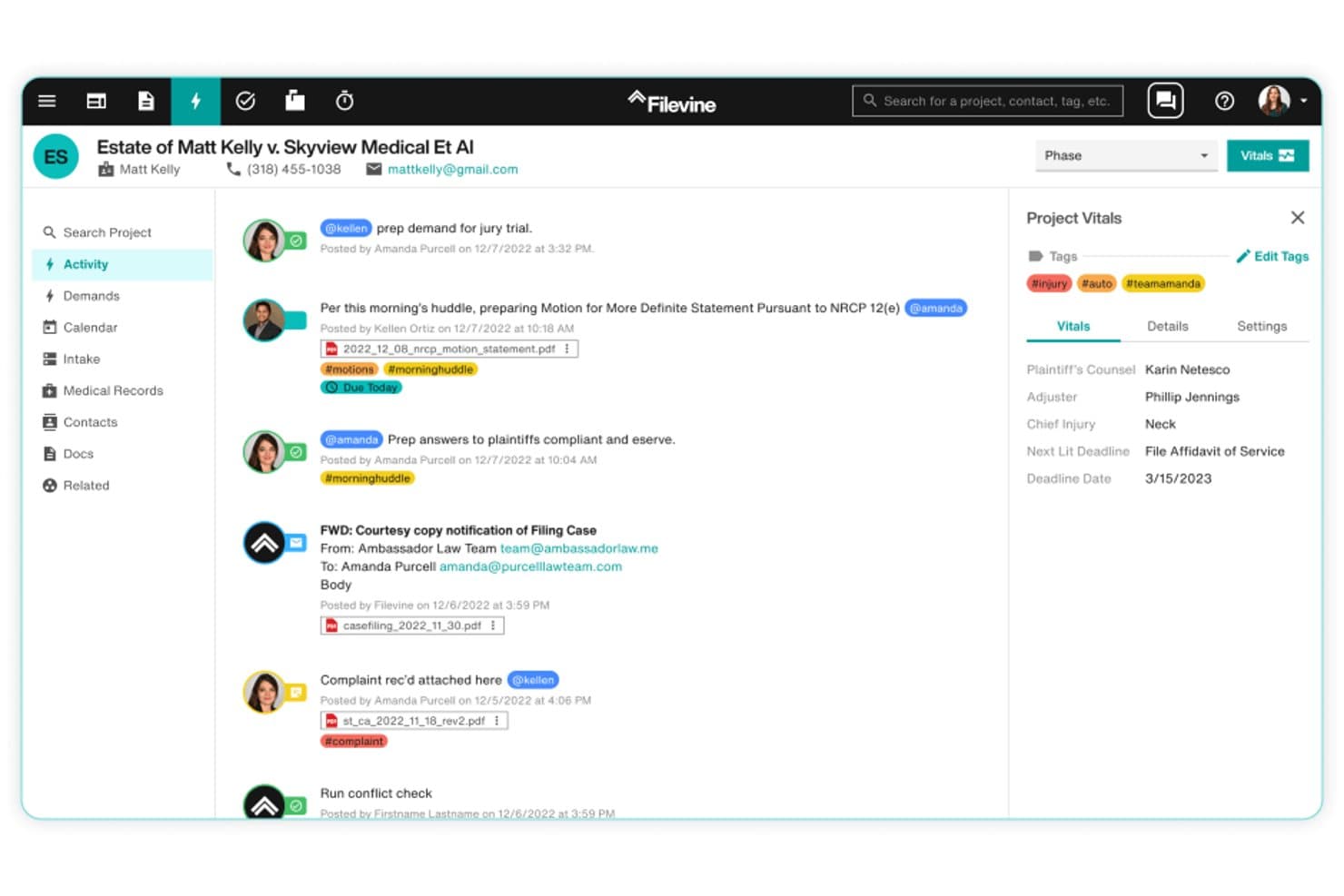
Filevine offers a real-time activity feed that centralizes case communications, tagged updates, document attachments, and project vitals in one unified legal case management view. Filevine is a cloud-based legal case management platform that combines matter management, AI-assisted document drafting, rules-based court deadline tracking, and end-to-end client intake in one system.
Who Is Filevine Best For?
Filevine is a strong fit for small to mid-size law firms running high-volume practice areas like personal injury, mass tort, or family law.
Why I Picked Filevine
I picked Filevine as one of the best because its AI layer, LOIS, is built on a legal graph trained on over 40 million matters. Unlike AI tools that summarize a single document on request, LOIS runs across every active matter in the firm simultaneously, setting tasks, adjusting deadlines, and generating documents without manual triggers. Ask LOIS lets me query case data in plain language and get source-linked answers I can trace directly back to the underlying record.
Filevine Key Features
- Project Hub: Offers a unified dashboard to see all matters, team activity, and deadlines in one place.
- Automated court calendaring: Generates jurisdiction-specific litigation deadlines for all 50 US states directly within the platform.
- Integrated e-signature (Vinesign): Enables clients and team members to sign documents securely through native digital signature functionality.
- Lead Docket intake management: Captures and automates new client intake, referral tracking, and lead conversion workflows.
Filevine Integrations
Filevine offers native integrations with QuickBooks Online, Microsoft 365, Google Workspace, Vinesign, Outlook, and Lead Docket. An API is also available for custom integrations.
Pros and Cons
Pros:
- Highly configurable per practice area type
- Automated court deadlines calculated by jurisdiction
- LOIS AI spans all active matters simultaneously
Cons:
- Built-in reporting lacks deep financial analytics
- Initial setup demands significant configuration time
Learn more about Filevine: 7Best for firms with varied legal tech stacks
Clio
- 7-day free trial + free demo available
- From £79/user/month
Visit WebsiteCustomer Rating:4.5/5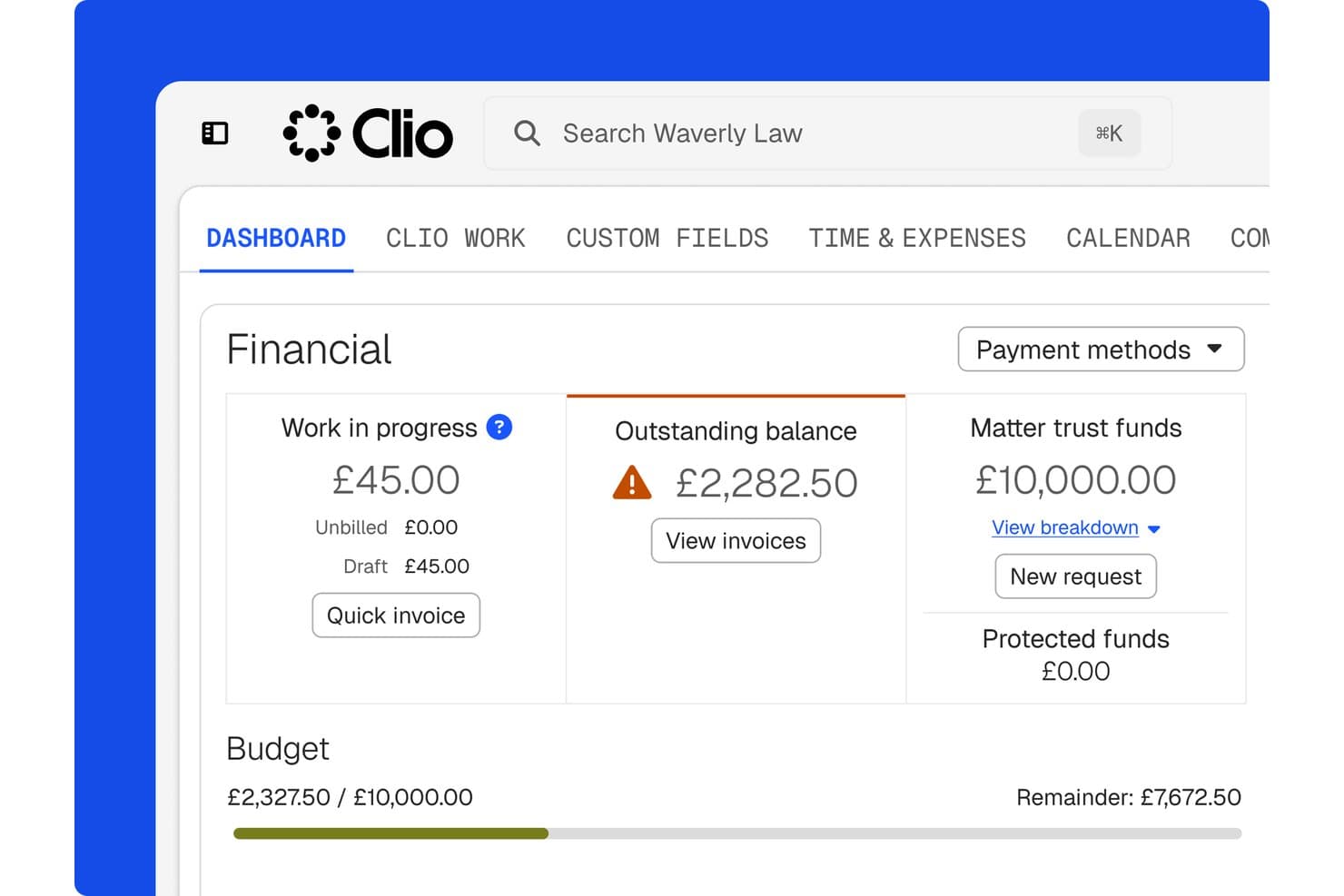
Clio tracks financials, trust funds, and budgets per matter. Clio is a legal practice management platform that covers matter tracking, document storage, court-deadline calendaring, client communications, time and expense tracking, and trust accounting—all connected through a 300+ app integration ecosystem.
Who Is Clio Best For?
Clio is a strong fit for small to mid-sized law firms that run several tools side by side and need one platform to connect them all.
Why I Picked Clio
I've included Clio in my top picks because it's built around the reality that most law firms already run a mix of tools—and Clio connects them without forcing you to abandon what's working. Its 300+ app integrations mean Gmail threads and Outlook emails file automatically to the right matter, QuickBooks stays in sync with billing, and court-rule deadlines calculate across 2,200 jurisdictions without manual entry. That connected workflow is where Clio genuinely earns its place.
Clio Key Features
- Client portal: Give clients a secure space to view invoices, share documents, send messages, and make payments directly from a matter record.
- Trust accounting: Manage trust and operating accounts with built-in reconciliation, ledger tracking, and low-balance alerts without a separate bookkeeping system.
- Role-based permissions: Control which firm users can access specific matters, files, and communications, with custom roles available on higher-tier plans.
- Automated email filing: Connect Gmail, Outlook, or Microsoft Exchange to automatically file emails and threads to the right matter based on contact and matter matches.
Clio Integrations
Clio offers 300+ marketplace integrations, including Gmail, Outlook, Microsoft 365, Google Workspace, QuickBooks, Xero, OneDrive, Google Drive, NetDocuments, and Zapier. An API is available for custom integrations.
Pros and Cons
Pros:
- Time entries connect directly to billing
- Court-rule reminders keep deadlines visible
- Matter records keep case details together
Cons:
- Document syncing glitches interrupt casework
- Reports offer limited detail and export flexibility
Learn more about Clio: Best for unified legal and business management
- Free demo available
- Pricing upon request
Visit WebsiteCustomer Rating:4.4/5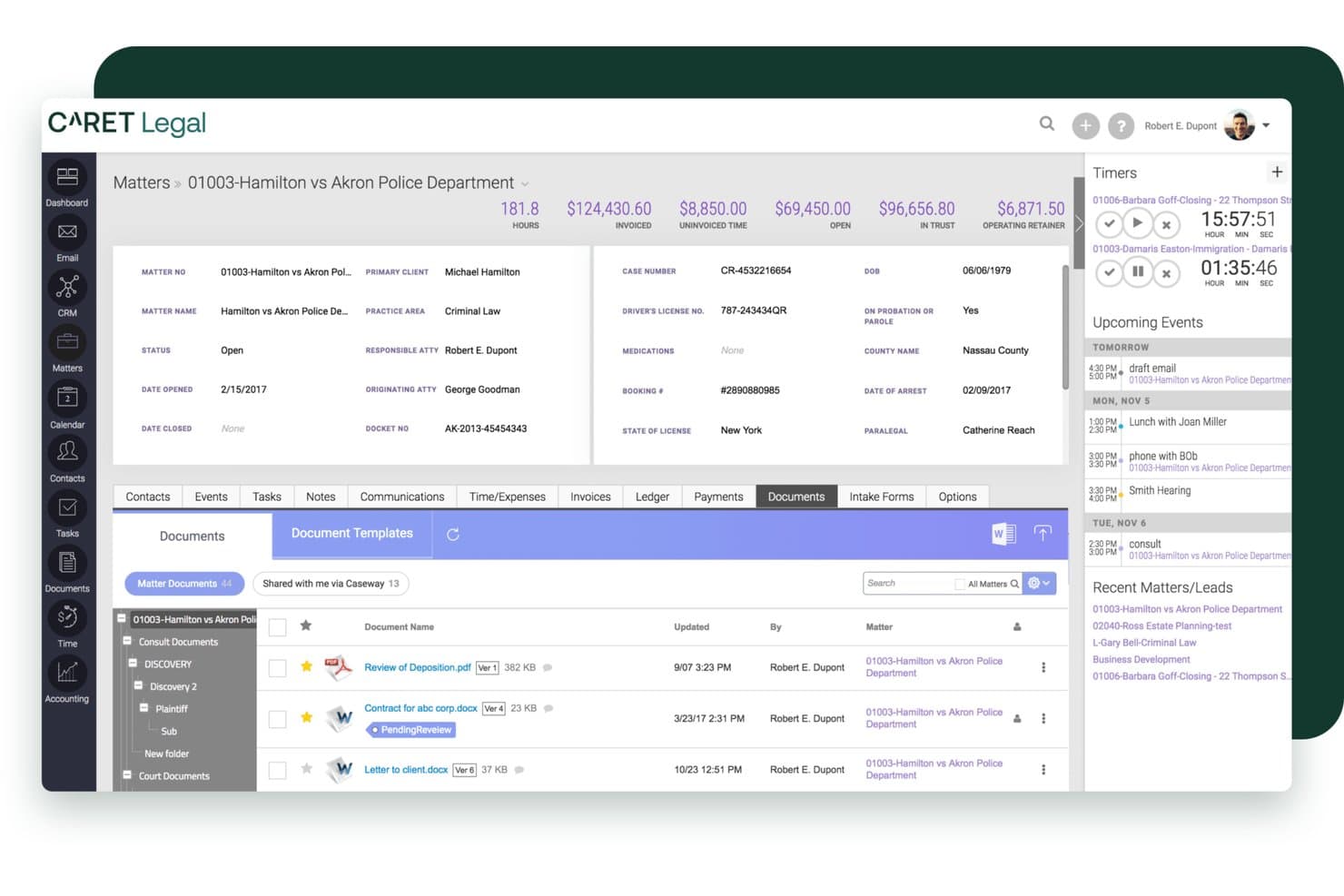
CARET Legal offers a comprehensive matter management interface with document tracking, billing summaries, timers, and upcoming events in a single dashboard view. CARET Legal is a cloud-based legal practice management platform that combines matter management, native email, document management, IOLTA-compliant trust accounting, and billing in a single system for law firms.
Who Is CARET Legal Best For?
CARET Legal is a strong fit for small-to-midsize law firms that want to replace disconnected tools with one system covering cases, billing, and accounting.
Why I Picked CARET Legal
I picked CARET Legal as one of the best because it's one of the few platforms where trust accounting and matter management genuinely share the same data layer. When a client pays through CARET Pay, the invoice automatically updates as paid, eliminating any manual reconciliation step. I also like CARET Workflows, which lets my team automate multi-step processes like setting up a deposition or drafting settlement negotiations, with role-based task visibility so each person only sees what's relevant to them.
CARET Legal Key Features
- Native email client: Manage and associate emails with matters directly through Microsoft 365, Google Workspace, or IMAP accounts.
- Integrated legal calendaring: Access advanced shared calendars with deadline calculation and bi-directional sync to Microsoft and Google.
- Document assembly templates: Generate standard legal documents using merge fields from matter data for consistent drafting.
- Conditional matter workflows: Set up automated task sequences based on specific practice area requirements within the platform.
CARET Legal Integrations
CARET Legal offers native integrations with Microsoft 365, Google Workspace, NetDocuments, LawToolBox, and Lawmatics, and provides an API for custom integrations.
Pros and Cons
Pros:
- Automated workflow sequences by practice area
- Trust accounting and billing share one data layer
- Native email client built into matter records
Cons:
- Mobile app functionality lags behind desktop
- Reporting customization options are limited
Learn more about CARET Legal: Best for enterprise-grade analytics
- Free demo available
- Pricing upon request
Visit WebsiteCustomer Rating:4.2/5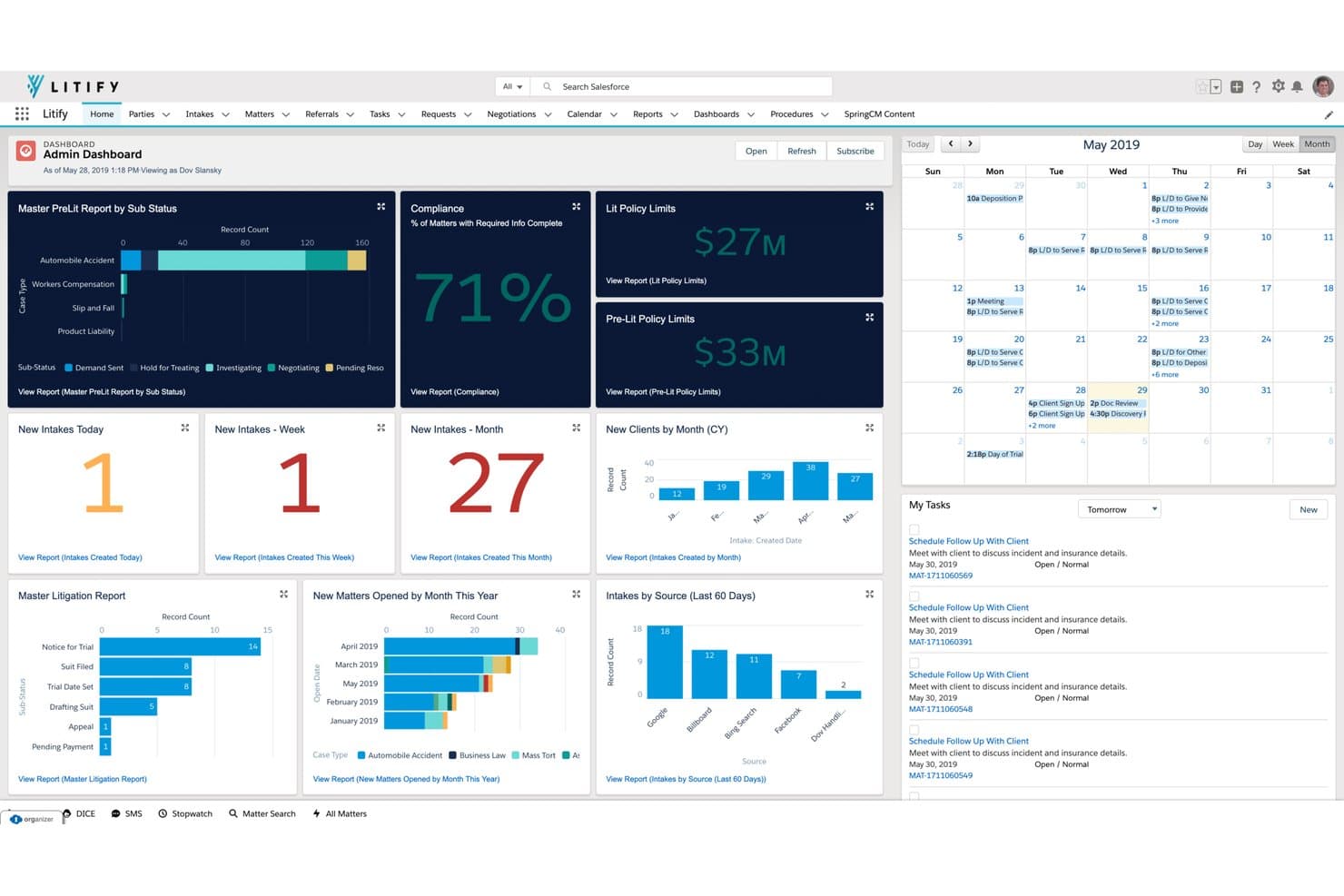
Litify centralizes case metrics, tasks, and calendars in one dashboard. Litify is a Salesforce-native legal platform that covers matter management, document handling, client intake, time and billing, and reporting across law firms and in-house legal departments.
Who Is Litify Best For?
Litify is a strong fit for larger law firms and in-house legal departments that need enterprise-level reporting, configurable workflows, and a platform that can scale across practice areas and teams.
Why I Picked Litify
Litify earns its spot on my shortlist because its reporting and analytics capabilities go deeper than what most legal platforms offer. I particularly like the configurable, real-time dashboards that let firm leaders and legal operations managers track case performance, team productivity, and revenue without needing a developer to build custom reports. The Global Insights feature lets you ask business questions in plain language and get answers pulled from across your entire caseload, which I find genuinely useful when you're managing high volumes across multiple practice areas.
Litify Key Features
- Conflict Check Agent: Screens prospective matters against the firm's full client database using fuzzy matching and generates a permanent conflict report.
- Document Assistant: Automatically retrieves, classifies, and routes incoming documents to matched matters for review.
- LitifyAI Time Capture: Identifies billable activity from daily work and generates review-ready time entries automatically.
- Adaptive intake questionnaires: Dynamically adjusts intake questions based on information provided, streamlining client and case intake.
Litify Integrations
Litify integrates with Outlook, CalendarRules, DocuSign, QuickBooks, NetDocuments, and iManage. It also provides an API for custom integrations.
Pros and Cons
Pros:
- Configurable task plans support complex workflows
- Matter timelines centralize case activity and documents
- Real-time dashboards track case and team performance
Cons:
- Slow file uploads and downloads frustrate users
- Crowded screens add clicks to routine work
Learn more about Litify: 10Best for documented conflict-review workflows
LEAP
- Free demo available
- Pricing upon request
Visit WebsiteCustomer Rating:3.6/5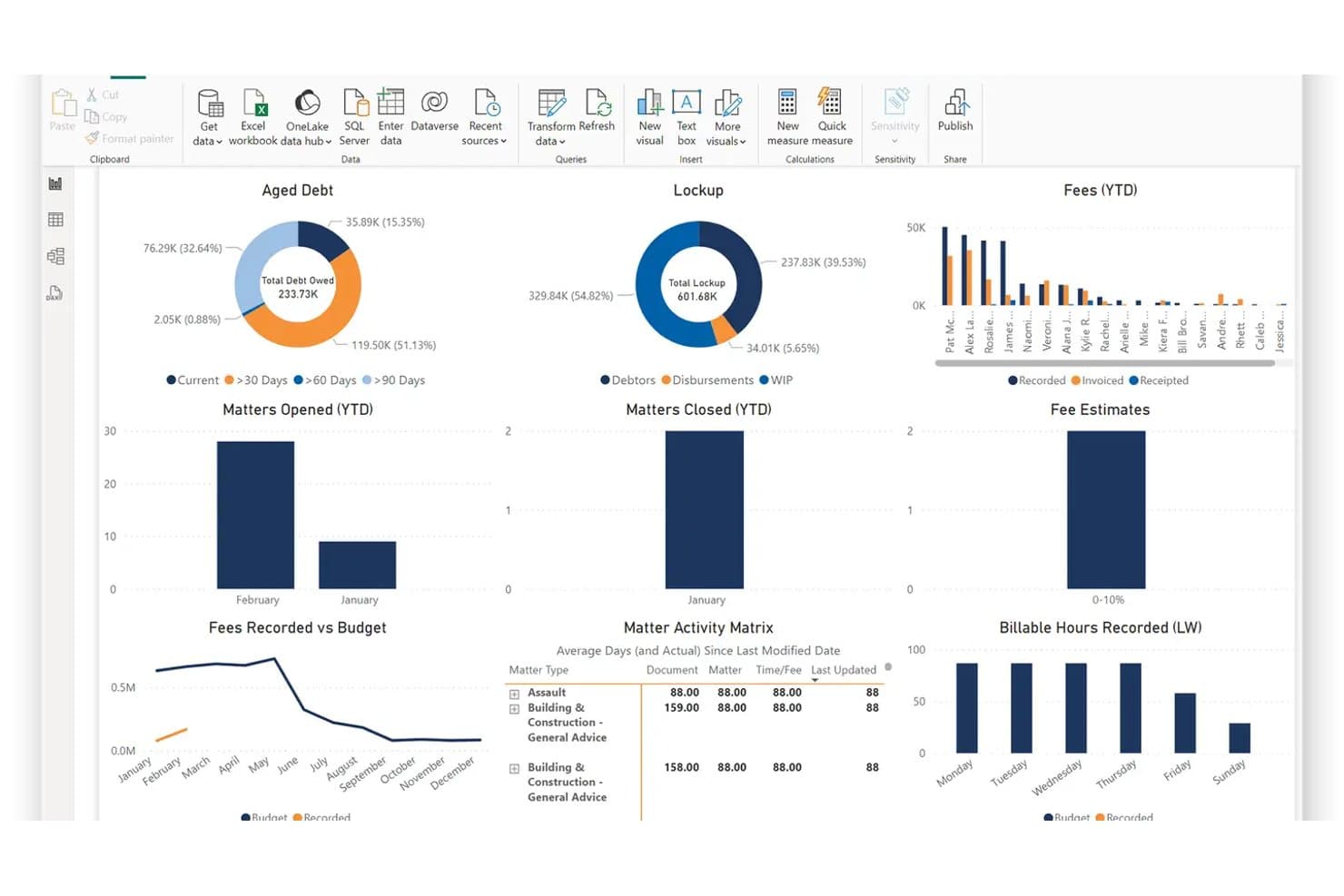
LEAP's Power BI dashboard centralizes key legal financial metrics. LEAP is a cloud-based legal practice management platform that combines matter management, document automation, legal accounting, billing, and AI-powered drafting tools in a single system.
Who Is LEAP Best For?
LEAP suits law firms that need conflict checks, billing, and matter management fully integrated in one place.
Why I Picked LEAP
I picked LEAP as one of the best because its Conflict Check app goes further than a simple name search: you can search across People, Cards, Matters, and Correspondence using names, addresses, phone numbers, and birth dates, then assign the check a status, annotate it, and attach the report directly to the matter's Compliance table. That documented paper trail is what makes it my top pick for conflict-review workflows. The Generator and Matter AI tools round things out by letting me draft letters and court forms from existing matter data inside Microsoft Word.
LEAP Key Features
- Matter workflow builder: Create repeatable workflows across matters by assigning duties by role, organizing tasks by phases, and tracking progress from open to close.
- LawConnect client portal: Share documents, collect intake details, accept invoice payments, and let clients upload files through a firm-branded, password-protected portal.
- AutoTime timekeeping: Automatically records billable time spent on matter activities while you work, without requiring manual time entry.
- Power BI reporting connector: Links LEAP matter data to Power BI dashboards for customized, real-time firm performance analytics.
LEAP Integrations
LEAP documents native integrations with Microsoft 365, LawConnect, InfoTrack, LawToolBox, QuickBooks Online, Xero, Power BI, and Zapier. An Open API is documented for LEAP Enterprise, while US API documentation isn’t available.
Pros and Cons
Pros:
- Document automation populates forms from matter data
- Matter records connect casework, billing, and trust accounting
- Conflict checks create a documented review trail
Cons:
- Users report bugs and slow performance
- Web Outlook emails may require manual filing
Learn more about LEAP:
Alte programe de gestionare a cazurilor juridice
Iată câteva opțiuni suplimentare de programe de gestionare a cazurilor juridice care nu au ajuns pe lista mea scurtă, dar care merită totuși analizate:
- 11Assembly NEOSBest for source-linked medical chronologies
- 12Zola SuiteBest for Microsoft-connected matter workflows
Related Reviews
How I Evaluate Legal Case Management Software
I split my evaluation into three parts, in order: core functionality carries the most weight, especially organizing matters and files and linking deadlines to case events. Next, I consider standout features such as AI-assisted drafting or client portals. Finally, I weigh onboarding, support, integrations, and pricing.
Core Functionality (Table Stakes For This List)
When I'm selecting tools for my list, I score each one on a scale from 0 (does not offer the functionality) to 5 (excels in this area) for each core functionality listed below. I then convert the total into a percentage to help assess each tool's overall fit, with extra weight on any functionalities I’ve deemed essential.
- Matter & Case Tracking (Essential): I look for structured matter records with status, key details, and linked records so teams can see where each file stands.
- Document Management (Essential): I evaluate how documents and evidence are organized by matter, searched, and versioned during a busy case.
- Calendar & Deadlines: I check whether dates link to case events, with reminders or rule-based calculations for court deadlines.
- Contact Tracking: I look for client, party, and witness records linked to matters, with roles and interaction history.
- Tasks & Workflows: I assess whether teams can assign and track case tasks, including recurring steps tied to matter stages.
- Case Communications: I check how calls, emails, and notes are logged, linked to matters, and retrieved later.
Once I have a list of tools that meet the criteria, I consider what sets each platform apart.
Differentiating Factors (What Sets Vendors Apart)
Here's how I compare and contrast different vendors:
Standout Features
I look for conflict-of-interest search tools that scan historical matters and contacts before intake—missing a conflict can trigger disqualification or disciplinary action. Practice-area templates also matter: a family law firm and an immigration practice need different workflows, and platforms like Clio or CosmoLex offer pre-built templates that cut setup time. I evaluate client self-service portals, where clients upload documents and review invoices without back-and-forth email. Finally, I check whether AI drafting tools work inside the matter record rather than requiring a separate application.
Beyond Features
I check whether a vendor offers guided data migration and onboarding support, since most small firms lack dedicated IT staff and a botched migration can stall an entire practice. Integration depth matters just as much—I look for native connections to Outlook, Gmail, QuickBooks, and e-filing systems so attorneys aren't re-keying data across platforms. I also evaluate support responsiveness, because a billing outage the night before a filing deadline needs live help, not a ticket queue.
Cum să alegeți un program de gestionare a cazurilor juridice
Este ușor să vă pierdeți în liste lungi de funcții și structuri complexe de prețuri. Pentru a vă ajuta să rămâneți concentrat în timp ce parcurgeți procesul dumneavoastră unic de selectare a programului, iată o listă de verificare cu factorii de care trebuie să țineți cont:
| Factor | Ce trebuie luat în considerare |
| Scalabilitate | Va susține software-ul dezvoltarea firmei dumneavoastră — utilizatori, locații sau domenii de practică noi — fără reconfigurări extinse sau creșteri bruște ale costurilor? |
| Integrări | Se conectează cu instrumentele dumneavoastră de contabilitate, e-mail, semnătură electronică și documente, astfel încât să evitați introducerea dublă a datelor sau izolarea acestora? |
| Posibilitate de personalizare | Puteți adapta câmpurile, fluxurile de lucru și șabloanele pentru a se potrivi proceselor specifice sau cerințelor de conformitate ale firmei dumneavoastră ori sunteți limitat la setări implicite rigide? |
| Ușurință în utilizare | Vor adopta efectiv avocații și personalul acest instrument sau navigarea, instruirea ori interfețele greoaie vor încetini activitatea tuturor? |
| Implementare și integrare inițială | Cum se desfășoară migrarea — în special din sisteme vechi de gestionare a cazurilor, foi de calcul sau dosare pe hârtie? Sunt suficiente resursele de instruire și asistența? |
| Cost | Pe lângă taxele per utilizator, înainte de semnarea contractului, țineți cont de costuri precum migrarea datelor, stocarea sau funcțiile avansate incluse în nivelurile de preț superioare. |
| Măsuri de securitate | Datele clienților sunt criptate atât în repaus, cât și în tranzit? Sunt disponibile permisiuni avansate și jurnale de audit pentru a respecta regulile baroului și politicile interne? |
| Cerințe de conformitate | Platforma acceptă regulile specifice jurisdicției dumneavoastră privind contabilitatea fondurilor fiduciare, păstrarea evidențelor și raportarea, pe care firma trebuie să le respecte? |
Ce este software-ul pentru gestionarea cazurilor juridice?
Software-ul pentru gestionarea cazurilor juridice este una dintre mai multe categorii de software juridic care ajută firmele de avocatură și echipele juridice să organizeze, să urmărească și să gestioneze dosarele, termenele-limită, facturarea, documentele și comunicarea cu clienții. Acesta centralizează evidențele spețelor, automatizează procesele de rutină și sprijină respectarea obligațiilor legale și etice, facilitând gestionarea unui număr tot mai mare de cazuri și menținerea acurateței în fiecare etapă a ciclului de viață al unui caz.
Funcțiile software-ului pentru gestionarea cazurilor juridice
Atunci când selectați un software pentru gestionarea cazurilor juridice, urmăriți următoarele funcții esențiale:
- Gestionarea spețelor: Centralizează toate dosarele, contactele, notițele și activitățile asociate unui caz, astfel încât să puteți urmări cu ușurință evoluția acestuia și informațiile conexe de la început până la final.
- Gestionarea documentelor: Stochează, organizează și gestionează versiunile documentelor juridice, oferă regăsire rapidă și permite utilizarea unor șabloane de documente specifice speței sau la nivelul întregii firme.
- Calendar și gestionarea termenelor procedurale: Urmărește termenele-limită, termenele de prescripție, datele ședințelor de judecată și sarcinile, cu mementouri automate și calcule ale datelor bazate pe reguli, pentru a evita depunerile întârziate.
- Monitorizarea timpului și facturarea: Înregistrează orele facturabile, generează facturi, gestionează tarife multiple de facturare și asociază toate înregistrările de timp și cheltuielile cu spețe și clienți specifici.
- Contabilitatea fondurilor fiduciare: Gestionează depunerile și plățile din fondurile fiduciare ale clienților, cu respectarea cerințelor IOLTA, inclusiv reconcilierea în trei direcții, jurnale de audit și cerințe specifice jurisdicției.
- Preluarea clienților: Automatizează integrarea clienților noi prin formulare de preluare personalizabile, verificarea conflictelor și transformarea fără probleme a potențialilor clienți în spețe active.
- Portal securizat pentru clienți: Le permite clienților să consulte stadiul cazului, să schimbe documente în siguranță, să semneze formulare și să plătească facturi online, toate într-un singur loc.
- Gestionarea sarcinilor: Atribuie, urmărește și actualizează sarcinile echipei în cadrul cazurilor, pentru a asigura responsabilitatea și colaborarea eficientă între avocați, paralegali și personal.
- Raportare și analiză: Oferă informații despre evoluția cazurilor, orele facturabile, fluxurile de lucru și performanța financiară, prin tablouri de bord personalizabile și rapoarte care pot fi descărcate.
- Permisiuni bazate pe roluri: Controlează cine poate vizualiza, modifica sau accesa informații sensibile despre cazuri, sprijinind protecția solidă a datelor și confidențialitatea relației avocat-client.
Funcții AI uzuale ale software-ului pentru gestionarea cazurilor juridice
Pe lângă funcțiile standard ale software-ului pentru gestionarea cazurilor juridice prezentate mai sus, multe dintre aceste soluții integrează inteligența artificială prin funcții precum:
- Revizuirea automată a documentelor: Utilizează inteligența artificială pentru a scana, analiza și semnala problemele sau informațiile lipsă din contracte, acte de procedură și documente de cercetare a probelor, economisind timp la revizuirea manuală.
- Gestionarea predictivă a termenelor-limită: Inteligența artificială analizează datele cazului și regulile instanței pentru a anticipa posibile conflicte sau riscuri legate de termene, alertând echipele înainte să apară problemele.
- Verificarea inteligentă a conflictelor: Utilizează inteligența artificială pentru a verifica încrucișat spețele și contactele noi în raport cu bazele de date ale firmei, identificând mai rapid și mai precis potențialele conflicte de interese.
- Cercetare juridică bazată pe inteligență artificială: Se integrează cu bazele de date de cercetare pentru a sugera jurisprudență, legi sau precedente relevante pe baza faptelor și contextului fiecărei spețe.
- Înregistrarea inteligentă a timpului: Utilizează inteligența artificială pentru a detecta activitățile facturabile din e-mailuri, evenimente din calendar și modificări ale documentelor, sugerând automat înregistrări de timp pentru verificare.
- Comunicarea automată cu clienții: Inteligența artificială redactează actualizări, mementouri sau mesaje de urmărire de rutină pentru clienți, pe baza stadiului cazului și a activității recente, reducând volumul de muncă administrativă.
Avantajele software-ului pentru gestionarea cazurilor juridice
Implementarea unui software pentru gestionarea cazurilor juridice oferă mai multe avantaje pentru echipa și afacerea dumneavoastră. Iată câteva dintre beneficiile pe care le puteți aștepta:
- Organizare mai eficientă a dosarelor: Păstrați toate fișierele, contactele, termenele-limită și notițele conectate într-un singur spațiu de lucru securizat și ușor de căutat, eliminând informațiile pierdute și confuzia.
- Comunicare îmbunătățită cu clienții: Portalurile pentru clienți și mesageria securizată facilitează partajarea actualizărilor și documentelor despre caz, menținând în același timp confidențialitatea și profesionalismul.
- Reducerea volumului de muncă administrativă: Automatizați preluarea inițială a datelor, asamblarea documentelor, facturarea și sarcinile de asigurare a conformității, oferind echipei posibilitatea de a se concentra asupra activității juridice în locul proceselor manuale.
- Controale mai solide privind conformitatea: Contabilitatea fondurilor fiduciare, pistele de audit și permisiunile detaliate ale utilizatorilor vă ajută să respectați regulile baroului, cerințele clienților și obligațiile privind confidențialitatea.
- Colaborare îmbunătățită: Calendarele partajate, atribuirea sarcinilor și datele centralizate despre cazuri sporesc vizibilitatea și responsabilitatea echipei pentru toate dosarele.
- Facturare și colectare mai rapide: Cronometrele, facturarea LEDES și instrumentele de plată online vă ajută să facturați prompt și le oferă clienților modalități flexibile de plată.
- Luarea deciziilor pe baza datelor: Instrumentele de raportare și analiză evidențiază informații despre volumul de muncă, venituri și progresul cazurilor, astfel încât să vă puteți coordona strategic practica.
Costurile și prețurile software-ului de gestionare a cazurilor juridice
Selectarea unui software de gestionare a cazurilor juridice necesită înțelegerea diferitelor modele și planuri de preț disponibile. Acestea pot varia de la software gratuit de gestionare a cazurilor juridice până la planuri plătite mai avansate, costurile variind în funcție de funcții, dimensiunea echipei, suplimente și alți factori. Tabelul de mai jos prezintă pe scurt planurile obișnuite, prețurile medii ale acestora și funcțiile incluse în mod obișnuit în soluțiile software de gestionare a cazurilor juridice:
Tabel comparativ al planurilor pentru software-ul de gestionare a cazurilor juridice
| Tipul planului | Preț mediu | Funcții comune |
| Plan gratuit | $0 | Urmărirea de bază a dosarelor, spațiu de stocare limitat pentru documente și funcții simple de calendar. |
| Plan personal | $20-$40/utilizator/lună | Gestionarea completă a dosarelor, gestionarea de bază a documentelor, instrumente de facturare de bază și asistență prin e-mail. |
| Plan de afaceri | $40-$80/utilizator/lună | Automatizarea avansată a documentelor, urmărirea integrată a timpului și facturarea, portal pentru clienți, contabilitatea fondurilor fiduciare și gestionarea sarcinilor. |
| Plan pentru întreprinderi | $80-$150/utilizator/lună | Fluxuri de lucru personalizate, permisiuni bazate pe roluri, API deschis, asistență prioritară, instrumente de conformitate și raportare avansată. |
Întrebări frecvente despre software-ul de gestionare a cazurilor juridice
Iată câteva răspunsuri la întrebările frecvente despre software-ul de gestionare a cazurilor juridice:
Poate software-ul de gestionare a cazurilor juridice să ajute la conformitate și la contabilitatea fondurilor fiduciare?
Da, multe platforme oferă funcții precum gestionarea IOLTA, reconcilierea în trei direcții, piste de audit și rapoarte de conformitate personalizabile. Aceste instrumente ajută firmele de avocatură să îndeplinească cerințele etice specifice jurisdicției și să prevină erorile costisitoare de conformitate.
Cât de securizat este software-ul de gestionare a cazurilor juridice?
Măsurile de securitate variază, însă soluțiile de top utilizează criptare, permisiuni bazate pe roluri, MFA și certificare SOC 2 Type II. Ar trebui să consultați documentația privind securitatea și politicile de guvernanță a datelor ale fiecărui furnizor pentru a vă asigura că acestea corespund cerințelor firmei dumneavoastră privind confidențialitatea și reglementările.
Se integrează acest software cu instrumentele pe care le folosesc deja?
Da, majoritatea opțiunilor oferă integrări cu instrumente precum QuickBooks, Microsoft 365, Google Workspace și platforme de semnătură electronică. Verificați dacă software-ul oferă integrări native sau un API în cazul în care firma dumneavoastră se bazează pe aplicații personalizate sau necesită conexiuni specifice cu terți.
Ce presupune migrarea de la un sistem tradițional?
Migrarea include de obicei maparea datelor, transferul contactelor, al dosarelor și al înregistrărilor de facturare, precum și verificarea și curățarea acestora. Căutați furnizori care oferă o configurare inițială specifică domeniului juridic și asistență dedicată pentru migrare, pentru a reduce la minimum timpul de nefuncționare și a facilita tranziția pentru echipa dumneavoastră.
Este disponibilă instruirea personalului?
Da, majoritatea furnizorilor oferă sesiuni de inițiere, resurse în centre de ajutor, webinare și asistență în timp real. Unii pun la dispoziție chiar biblioteci video la cerere și programe de certificare pentru a ajuta atât personalul nou, cât și pe cel cu experiență să se familiarizeze rapid cu software-ul și să-i maximizeze valoarea.