

AI case management software uses AI to help legal teams organize case information, extract facts from documents, and move matter workflows forward. The best fit depends on your practice area, team size, and whether you need day-to-day matter tracking, specialist case tools, or broader workflow automation. After 35 years in law firm operations, I know system selection starts with how work actually moves through your team. This guide compares 12 options by their features and use cases to help you choose a practical fit.
Why Trust Our Software Recommendations
6,700+
Reviews
20
Industry experts
16+
Evaluation factors
14
Years
Our team has been testing and reviewing software since 2012. As legal practice leaders ourselves, we know how difficult—and important—it is to choose the right software.
For this guide, we evaluated tools using hands-on testing and independent research, scoring tools using our selection criteria.
Our reviews reflect our human editorial judgment, not a sales pitch.
Comparison Table: AI Case Management Software
Compare pricing and specs, side by side, for the AI case management software that made it onto my shortlist.
| Tool | Best For | Trial Info | Price | ||
|---|---|---|---|---|---|
| 1 | Best for AI built into legal case workflows | Free demo available | Pricing upon request | Website | |
| 2 | Best for AI Q&A across the full case record | 10-day free trial | From $50/user/month (billed annually) | Website | |
| 3 | Best for immigration firm case tracking | Free trial + free demo available | From $90/user/month | Website | |
| 4 | Best for AI-driven legal document extraction | Free demo available | Pricing upon request | Website | |
| 5 | Best for law firms tracking AI-backed matter insights | 7-day free trial + free demo available | From $49/user/month | Website | |
| 6 | Best for regulated enterprise case automation | Free plan available | Pricing upon request | Website | |
| 7 | Best for investigation-focused AI case management | Free demo available | Pricing upon request | Website | |
| 8 | Best for law firms tracking matters end to end | Free demo available | Pricing upon request | Website | |
| 9 | Best for PI firms extracting case facts at scale | Free demo available | Pricing upon request | Website | |
| 10 | Best for law firm matter and workflow tracking | Free demo available | Pricing upon request | Website |


AI Case Management Software Reviews
Below are my reviews of the best AI case management software on my shortlist. They cover each platform’s features and use cases to help you find the right fit.
 Best for AI built into legal case workflows
- Free demo available
- Pricing upon request
Visit WebsiteCustomer Rating:4.7/5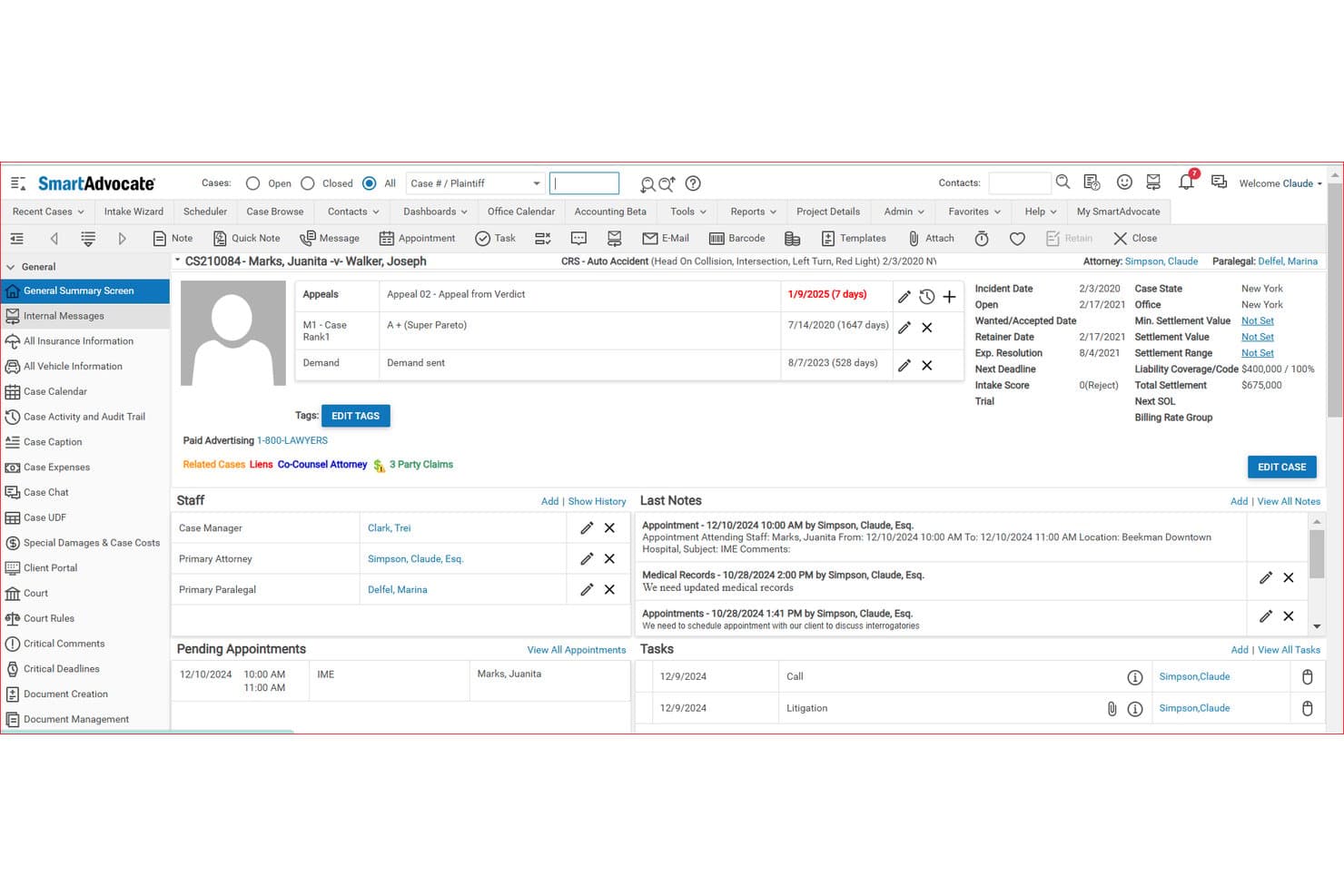
SmartAdvocate tracks case information, notes, and tasks in a summary screen. SmartAdvocate is a legal case management system built specifically for law firms, with built-in AI tools for document summarization, data extraction, medical chronology generation, intake automation, and conversational case querying.
Who Is SmartAdvocate Best For?
SmartAdvocate is a strong fit for personal injury and high-volume plaintiff law firms that want AI tools built directly into their case management system—not bolted on.
Why I Picked SmartAdvocate
SmartAdvocate earns its spot on my shortlist because the AI lives inside the case management system itself, not in a separate tool you have to switch to. I particularly like SmartIntelligence's Medical Chronology Generation, which processes medical records into searchable, hyperlinked timelines and auto-populates SmartAdvocate fields, and the Data Extraction Engine, which pulls deadlines, discovery dates, and insurance coverage directly from documents into the case record. The Enhanced Chat with Case feature lets you query your own case data in natural language, which I find genuinely useful when you need a fast answer buried across dozens of documents.
SmartAdvocate Key Features
- Intake Assistant Coach: Listens to live intake conversations, matches details to case-specific questionnaires, and provides real-time coaching feedback to staff.
- Demand letter generation: Analyzes case materials—including medical chronologies, deposition transcripts, and police reports—to produce tailored demand-letter drafts.
- WorkPlans and Automated Procedures: Automate checklists, recurring tasks, client communications, and document generation triggered by case events or status changes.
- Settlement Screen: Calculates settlement distributions, including firm fees and client net proceeds, directly within the case record.
SmartAdvocate Integrations
SmartAdvocate lists 175+ marketplace integrations across 20+ categories, including Microsoft, DocuSign, Lawmatics, EvenUp, and Docubee. It supports custom integrations and provides an MCP server for connecting external AI platforms to case data and documents.
Pros and Cons
Pros:
- Status changes can trigger assigned follow-up tasks
- Case documents stay organized alongside client records
- AI chronologies populate searchable medical timelines
Cons:
- Calendar reminders aren’t fully automated
- Some reports take work to configure
Learn more about SmartAdvocate: Best for AI Q&A across the full case record
- 10-day free trial
- From $50/user/month (billed annually)
Visit WebsiteCustomer Rating:4.6/5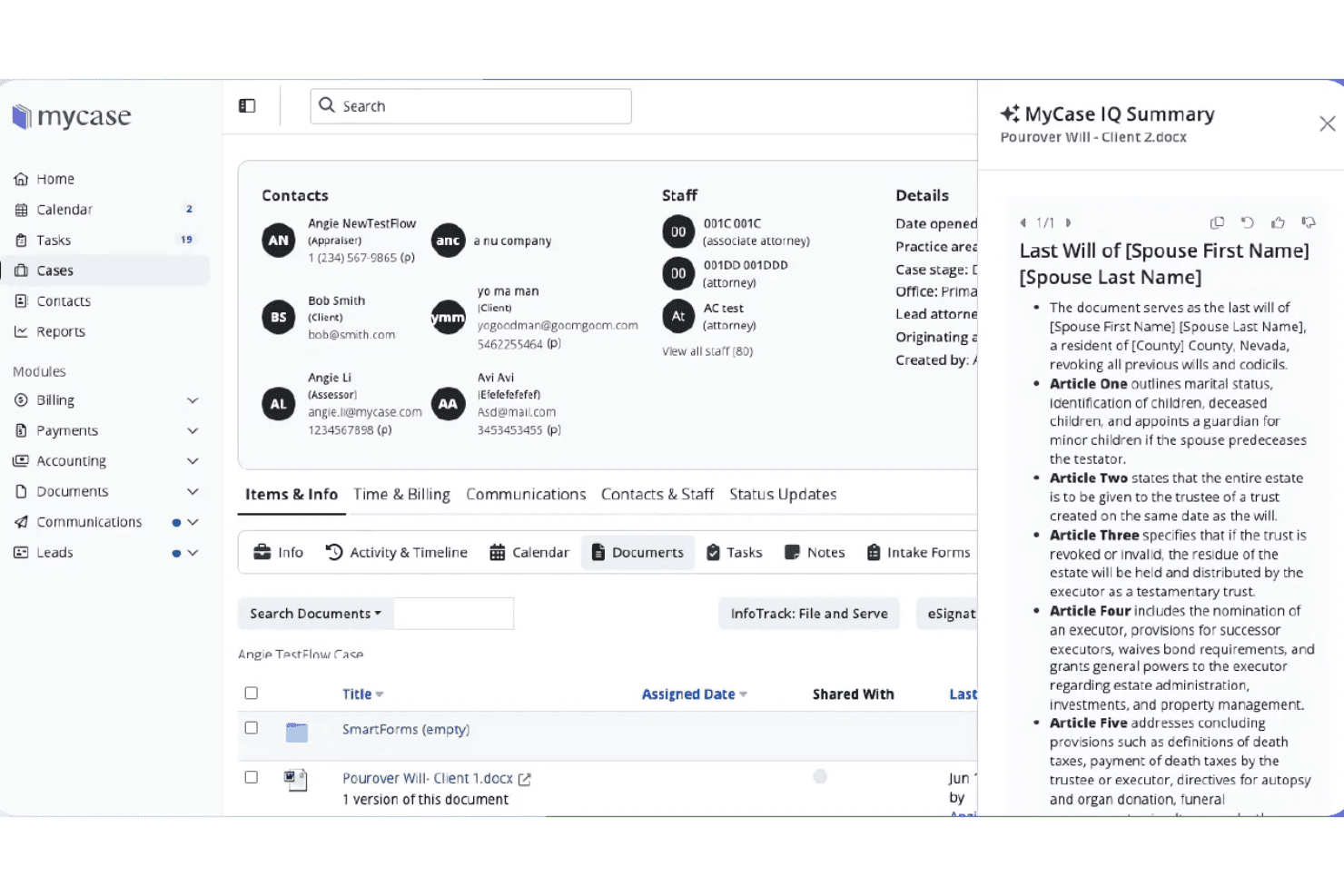
MyCase uses AI to generate instant document summaries within cases. 8am MyCase is a cloud-based legal practice management platform that combines case organization, client communications, billing, trust accounting, and AI-powered document and case analysis tools.
Who Is MyCase Best For?
MyCase is a strong fit for small to mid-sized law firms that want a single platform to manage cases, billing, and client communications alongside AI tools for searching and summarizing case records.
Why I Picked MyCase
I picked MyCase as one of the best because of how far its Case Assistant reaches across the full case record. Ask it a natural-language question and it pulls answers from case notes, filed documents, SMS threads, call logs, invoices, and time entries simultaneously, with citations back to the source material. I also like that the Discovery Assistant uses OCR to make scanned PDFs searchable before Case Assistant processes them, so even image-heavy case files are fair game for AI Q&A.
MyCase Key Features
- Automated workflows: Build workflows that generate tasks, calendar events, and documents when a selected task is completed, with scheduling tied to trigger dates or task completion.
- 8am IQ Writing Assistant: Use AI to adjust tone, rephrase text, and improve grammar in client communications and case writing.
- Trust accounting: Manage trust ledgers, reconciliations, and multiple bank accounts with built-in IOLTA and ABA compliance tools.
- Client portal: Give clients access to case documents, messages, tasks, and events through a dedicated portal linked directly to their matter.
MyCase Integrations
MyCase lists 61 marketplace integrations, including LawKPIs, Lawmatics, Dropbox, Google Calendar, Microsoft Outlook, QuickBooks, and LawPay. Advanced includes a public Open API, and MyCase also supports Zapier.
Pros and Cons
Pros:
- Reviewers praise organized matters and deadline tracking
- OCR makes scanned case files searchable
- Cited answers span the full case record
Cons:
- Reviewers want more citation-specific deposition summaries
- AI doesn't natively triage or route matters
 Best for immigration firm case tracking
- Free trial + free demo available
- From $90/user/month
Visit WebsiteCustomer Rating:4.8/5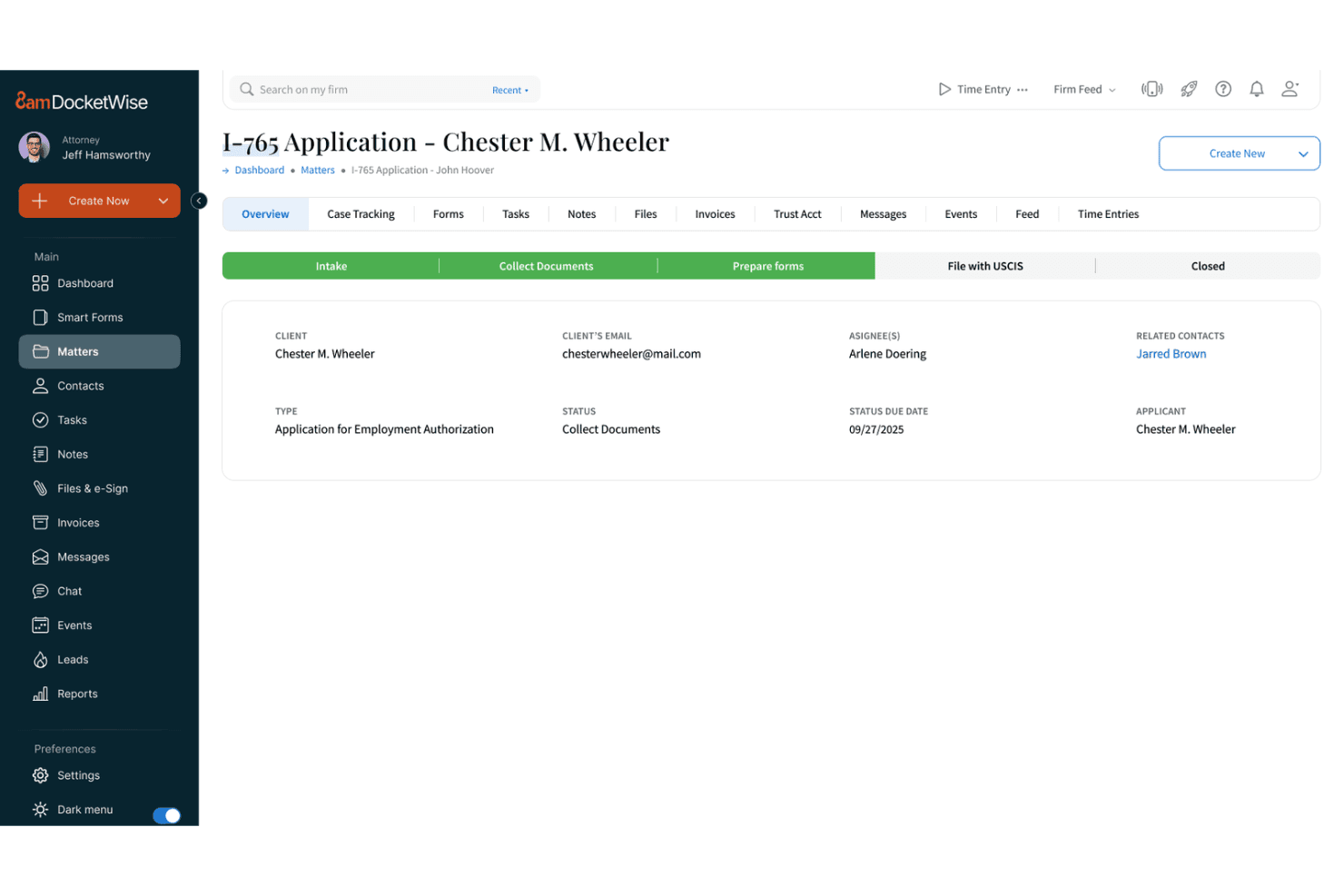
Docketwise tracks immigration case status and client details in one view. DocketWise is an immigration law firm platform that covers case tracking, immigration form automation, client intake, AI-assisted document data extraction, billing, and CRM in one system.
Who Is DocketWise Best For?
DocketWise is built for immigration law firms that need a dedicated system for managing cases, tracking matter status, and handling client intake from one place.
Why I Picked DocketWise
I picked DocketWise as one of the best because it's purpose-built for immigration case tracking in a way that generalist tools simply aren't. I love how matter types and statuses let you configure distinct workflows for family, business, and humanitarian matters, with status durations that flag overdue cases right on the matter overview. The DocketWise IQ document assistant can pull names, dates, and case details from scanned passports, green cards, and I-94s and map that data directly into USCIS forms, which cuts a genuinely tedious manual step.
DocketWise Key Features
- Smart Forms: Clients complete one intake questionnaire that auto-populates multiple immigration forms, reducing repeated data entry across a case.
- Multilingual client questionnaires: Questionnaires can be sent in Spanish, French, Portuguese, Arabic, Chinese, and several other languages to match client needs.
- Custom reporting: Build and save reports across matters, invoices, tasks, payments, and time entries, with AND/OR filter groups and sharing across your team.
- User permission controls: Administrators configure user-level access, with finely tuned permission groups and multiple account admin support available on the Advanced plan.
DocketWise Integrations
DocketWise lists 18 integrations, including Gmail, Google Calendar, Outlook Calendar, QuickBooks, LawPay, and Lawmatics. It offers a RESTful JSON API for custom integrations and supports Zapier.
Pros and Cons
Pros:
- AI extracts data from immigration documents
- Client and matter records stay together
- Questionnaires populate immigration forms
Cons:
- AI lacks case triage and predictions
- Form autofill sometimes needs correction
Learn more about Docketwise: Best for AI-driven legal document extraction
- Free demo available
- Pricing upon request
Visit WebsiteCustomer Rating:4.5/5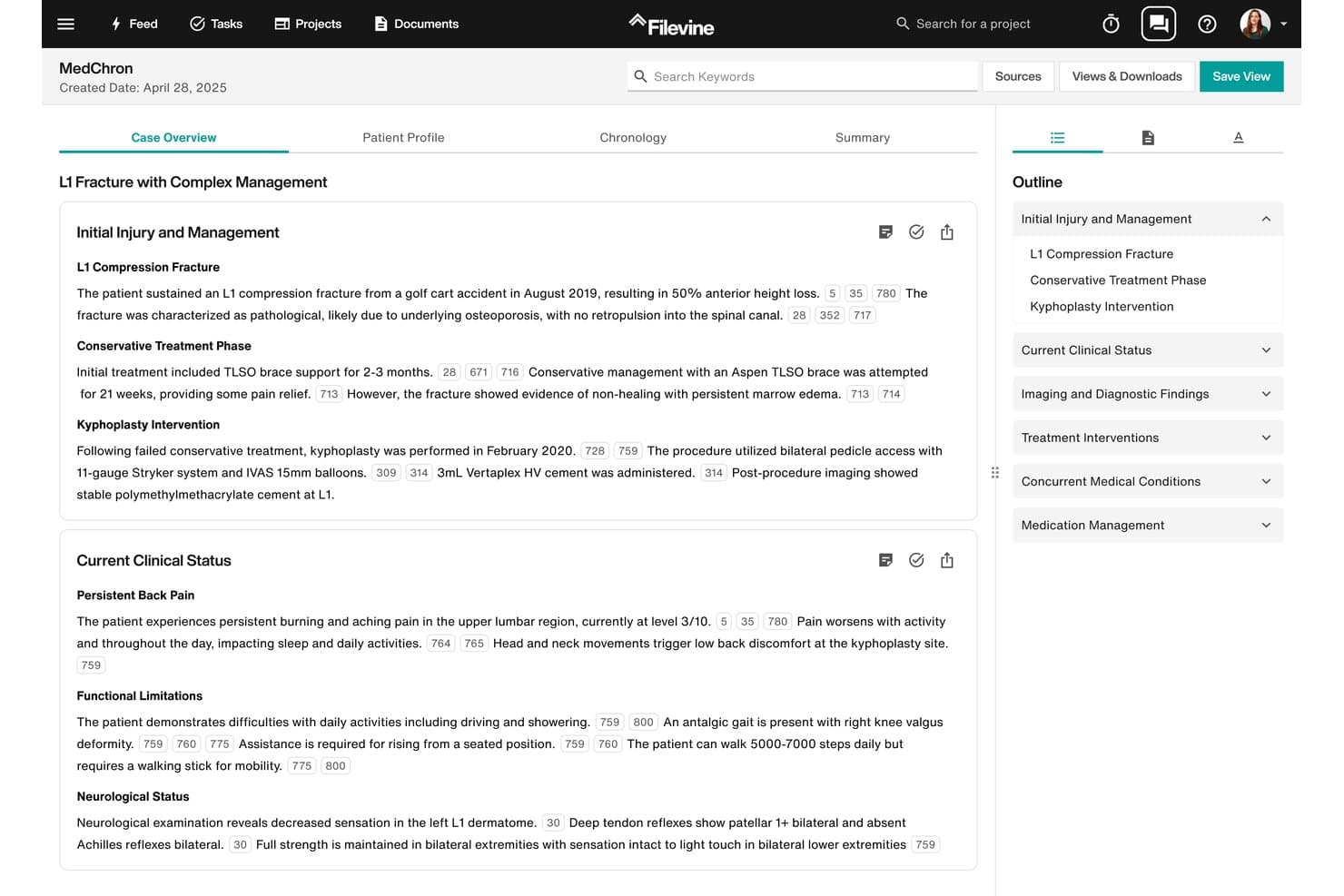
Filevine's MedChron tool auto-generates structured medical chronologies for legal cases. Filevine is a legal case management platform that centralizes matter files, document management, AI-driven data extraction, workflow automation, and deadline tracking across your caseload.
Who Is Filevine Best For?
Filevine is a strong fit for plaintiff law firms and legal operations teams that handle high document volumes and need AI-driven extraction built into their case management workflow.
Why I Picked Filevine
I picked Filevine as one of the best because its AI document extraction tools go deeper than most case management platforms I've used. AIFields pulls structured details directly from medical records, court orders, and police reports, while AI Doc Review generates a separate output document with extracted or summarized content, with source page links included. That combination means I can process a 200-page medical file without manually reading every page.
Filevine Key Features
- Deadline Chains: Automate dependent and branching deadlines that trigger based on due dates or task completion within a matter.
- Chat with Your Case: A conversational AI interface that answers case questions, adds notes and tasks, and generates case summaries.
- ValidationAI: Automates case validation checks as matters move through phase transitions in your workflow.
- Project feed: Consolidates two-way texts, captured emails, and team communications in a single case-level activity view.
Filevine Integrations
Filevine lists over 2,000 potential integrations, including native Outlook and Gmail connections, plus Workato, QuickBooks, and Dialpad. API availability for custom integrations isn’t documented.
Pros and Cons
Pros:
- Matter files consolidate documents and communications
- Custom taskflows assign work by case status
- Extracts and summarizes medical records with AI
Cons:
- Setup and migration can require substantial effort
- Search can make case information hard to find
Learn more about Filevine: 5Best for law firms tracking AI-backed matter insights
Clio
- 7-day free trial + free demo available
- From $49/user/month
Visit WebsiteCustomer Rating:4.5/5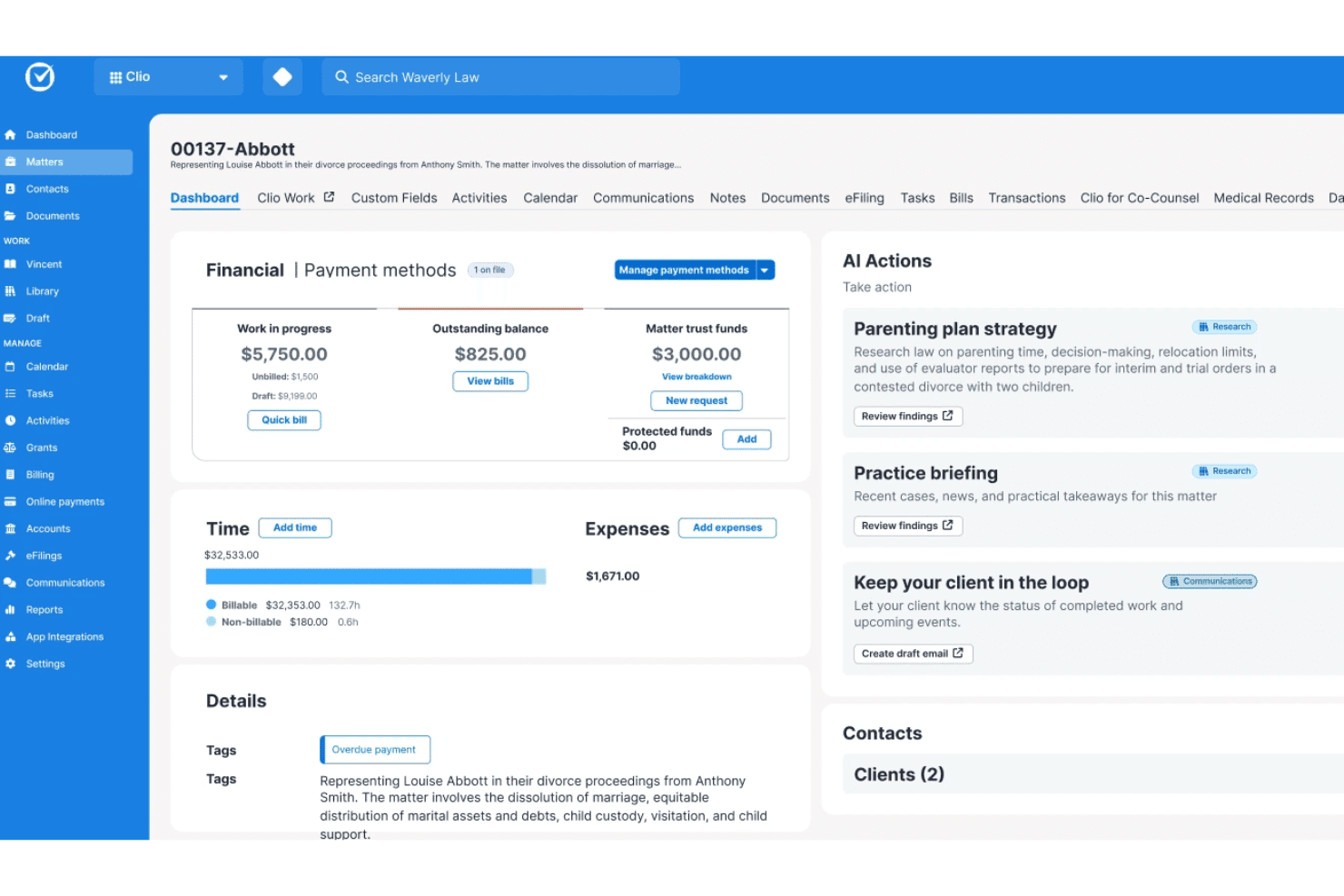
Clio's matter screen includes financial records, time entries, and AI actions. Clio Manage is a cloud-based legal practice management platform for law firms that combines matter and contact management, AI-assisted document analysis, automated workflows, calendaring, time tracking, and billing in one system.
Who Is Clio Best For?
Clio Manage is a strong fit for law firms that need to centralize matter tracking, document analysis, and client billing in one AI-assisted platform.
Why I Picked Clio
I picked Clio as one of the best because its AI surfaces matter-specific insights directly inside each case record—flagging upcoming deadlines, drafting client updates, and suggesting time entries for unlogged activity through Proactive AI Actions. I also rely on its Document Analyzer, which pulls summaries and key details from up to 25 documents at once, with in-text citations linking back to the source.
Clio Key Features
- Matter stages and kanban board: Track open and pending matters across practice-area-specific boards, with cards showing how many days a matter has remained in its current stage.
- Automated workflows: Trigger task list assignment, document generation, or matter template application when a matter is created or changes stage.
- Court calendaring rules: Apply jurisdiction-specific court rules to schedule deadlines, with coverage across 50 US states and 2,200 jurisdictions.
- Role-based permissions: Assign standard or custom roles to control what each user can view, edit, delete, or export across matters and client records.
Clio Integrations
Clio Manage advertises 300+ integrations, including native Gmail, Outlook, QuickBooks, Xero, and TrustBooks, plus marketplace integrations such as Case Status and InfoTrack: File, Serve and Sync. It offers a REST API v4, webhooks, OAuth 2.0, and Zapier.
Pros and Cons
Pros:
- AI flags deadlines and drafts updates
- Matter timelines centralize files and activity
- Cited document summaries surface matter details
Cons:
- Reporting can miss operational detail
- AI-created tasks require manual approval
Learn more about Clio: Best for regulated enterprise case automation
- Free plan available
- Pricing upon request
Visit WebsiteCustomer Rating:4.4/5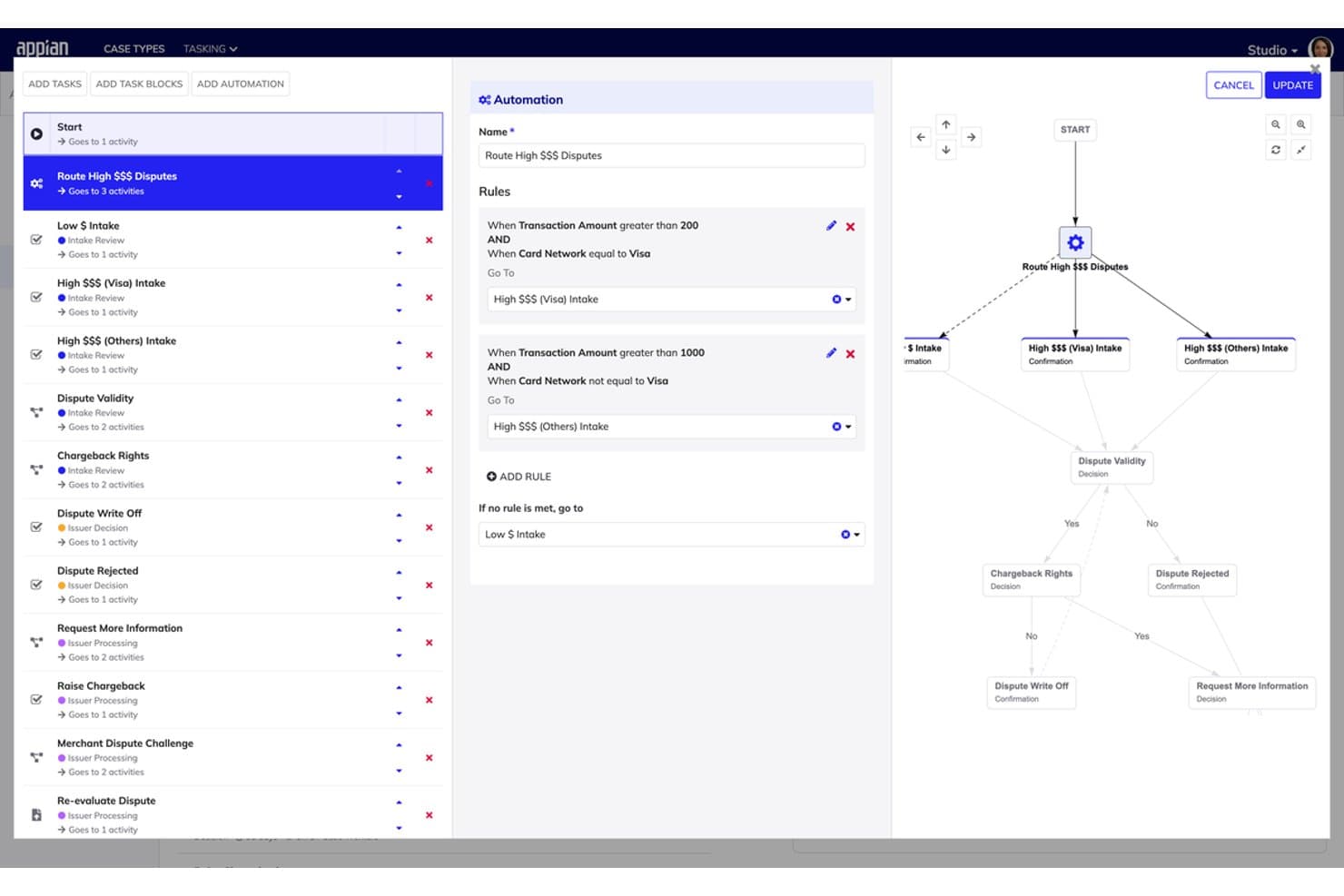
Appian routes disputes automatically using rule-based workflow automation. Appian is a low-code process automation platform that combines AI-driven case workflow management, document processing, and AI agent orchestration with an enterprise-grade compliance and security framework.
Who Is Appian Best For?
Appian suits enterprise legal and compliance teams that need to automate high-volume, regulated casework across multiple departments or jurisdictions.
Why I Picked Appian
I picked Appian as one of the best because its compliance certifications go deeper than almost any other platform I've evaluated, covering FedRAMP, HIPAA, SOC 2 Type II, and HITRUST out of the box. I especially like how Case Management Studio pairs no-code workflow configuration with AI-driven document classification and routing, so a legal ops team can automate intake and triage for high-volume, regulated casework without leaning on developers for every change. The AI agent framework also handles end-to-end investigation workflows, gathering evidence and producing structured summaries for human review.
Appian Key Features
- My Cases module: Lets authenticated users search, filter, view, and update submitted cases while exchanging messages and documents with case workers through a mobile-first interface.
- Case Comments Summary: Uses AI to condense case comment histories so case workers can review activity without reading every individual comment.
- Process insights: Lets data stewards configure KPI dashboards covering case volume, resolution times, due dates, and overdue status for individual case types or across all cases.
- Data Fabric: Connects case data across disparate systems without requiring migration, giving applications and AI agents read and write access to source systems in context.
Appian Integrations
Appian offers hundreds of prebuilt connectors, including Salesforce, Microsoft SharePoint, DocuSign, SAP, Oracle, and Workday. It supports REST, SOAP, JDBC, OpenAPI, Web APIs, and an Integration SDK, while Data Fabric connects disparate systems without migration.
Pros and Cons
Pros:
- Audit trails and certifications suit regulated work
- AI classifies, extracts, and summarizes case material
- Configurable case workflows adapt as requirements change
Cons:
- Deadline tracking lacks documented automated alerts
- Analytics show KPIs, not predictive case recommendations
Learn more about Appian: Best for investigation-focused AI case management
- Free demo available
- Pricing upon request
Visit WebsiteCustomer Rating:4.5/5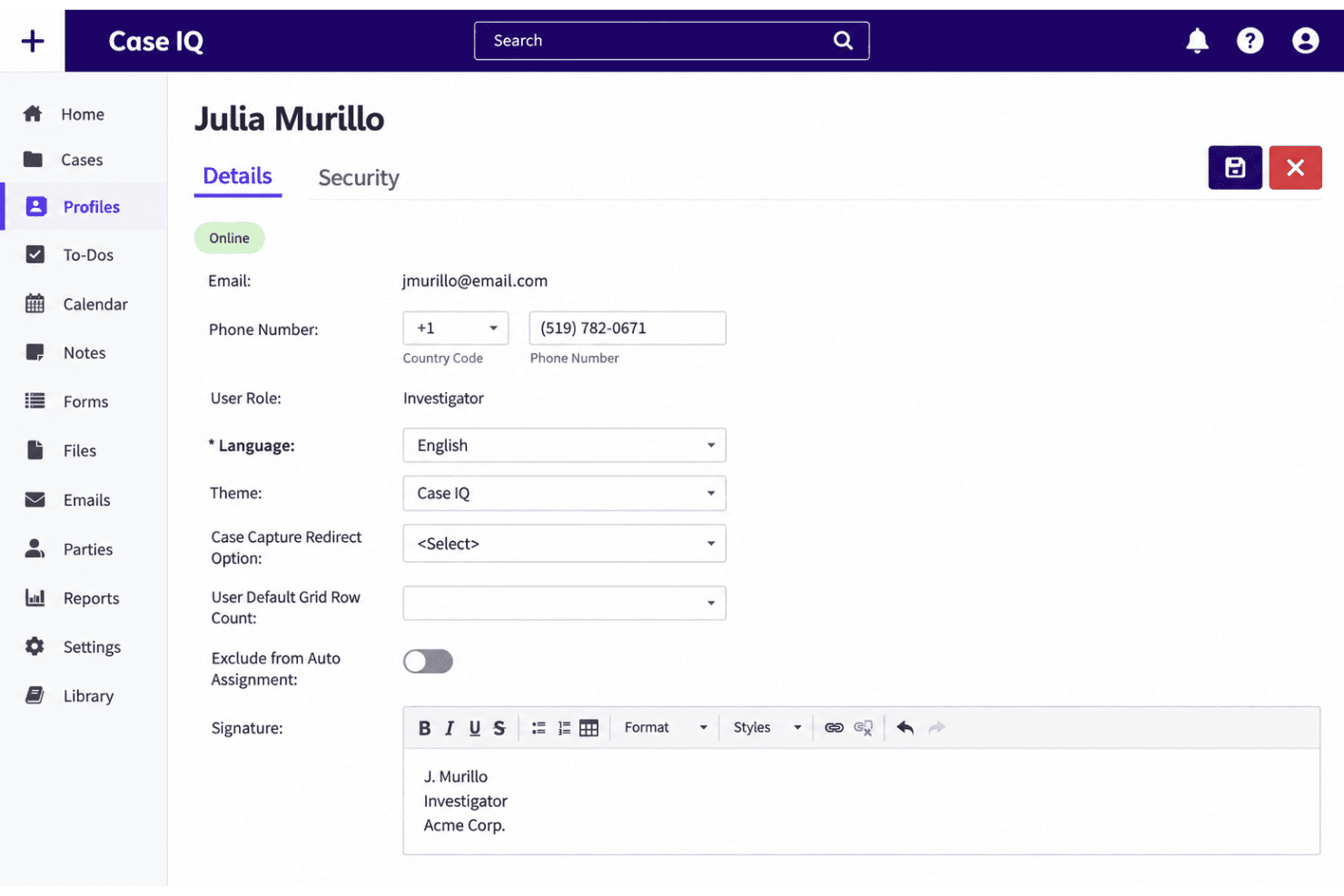
Case IQ lets users manage investigator profiles and email signatures. Case IQ is an AI-supported case management platform built for investigators, combining multichannel case intake, configurable workflows, centralized case records, and an AI assistant (Clairia) that generates summaries, timelines, and investigative guidance from within the case record.
Who Is Case IQ Best For?
Case IQ is a strong fit for ethics and compliance teams, HR departments, and professional investigators who manage high volumes of workplace investigations and need a centralized, configurable case record system.
Why I Picked Case IQ
I picked Case IQ as one of the best because it's the only tool on my list built specifically around the investigator's workflow, with Clairia sitting directly inside the case record rather than bolted on as a separate AI layer. I use Clairia to generate case summaries, assemble incident timelines from collected evidence, and cross-reference case details against internal policies, all without leaving the case record. Playbooks let me pre-load custom instructions and one-click prompts so Clairia follows our specific investigative process every time.
Case IQ Key Features
- Multichannel case intake: Collect reports through hotlines, webforms, portals, email, and integrations, with branded forms that use more than 30 field types and conditional logic.
- Role-based access controls: Assign individualized permissions, access control lists, and case-level access flags to restrict case data by user role.
- Yellowfin-integrated reporting: Build reports with a drag-and-drop creator, choose from 75 chart types, and schedule reports or trigger them on an event-driven basis.
- Automated workflows: Configure case routing, notifications, escalations, and to-do assignments using rule-based workflows tied to case-field criteria.
Case IQ Integrations
Case IQ reports integrations with hundreds of systems, including Workday, SAP, SAP SuccessFactors, PeopleSoft, BambooHR, Okta, Azure AD, Salesforce, and ServiceNow. It also offers a REST API, but connector types and a marketplace aren’t documented.
Pros and Cons
Pros:
- Centralized records support linked case histories
- Configurable workflows track ownership and escalation
- Investigation-specific AI summarizes evidence and timelines
Cons:
- Search and report retrieval can frustrate investigators
- AI routing and structured extraction remain absent
Learn more about Case IQ: Best for law firms tracking matters end to end
- Free demo available
- Pricing upon request
Visit WebsiteCustomer Rating:4.4/5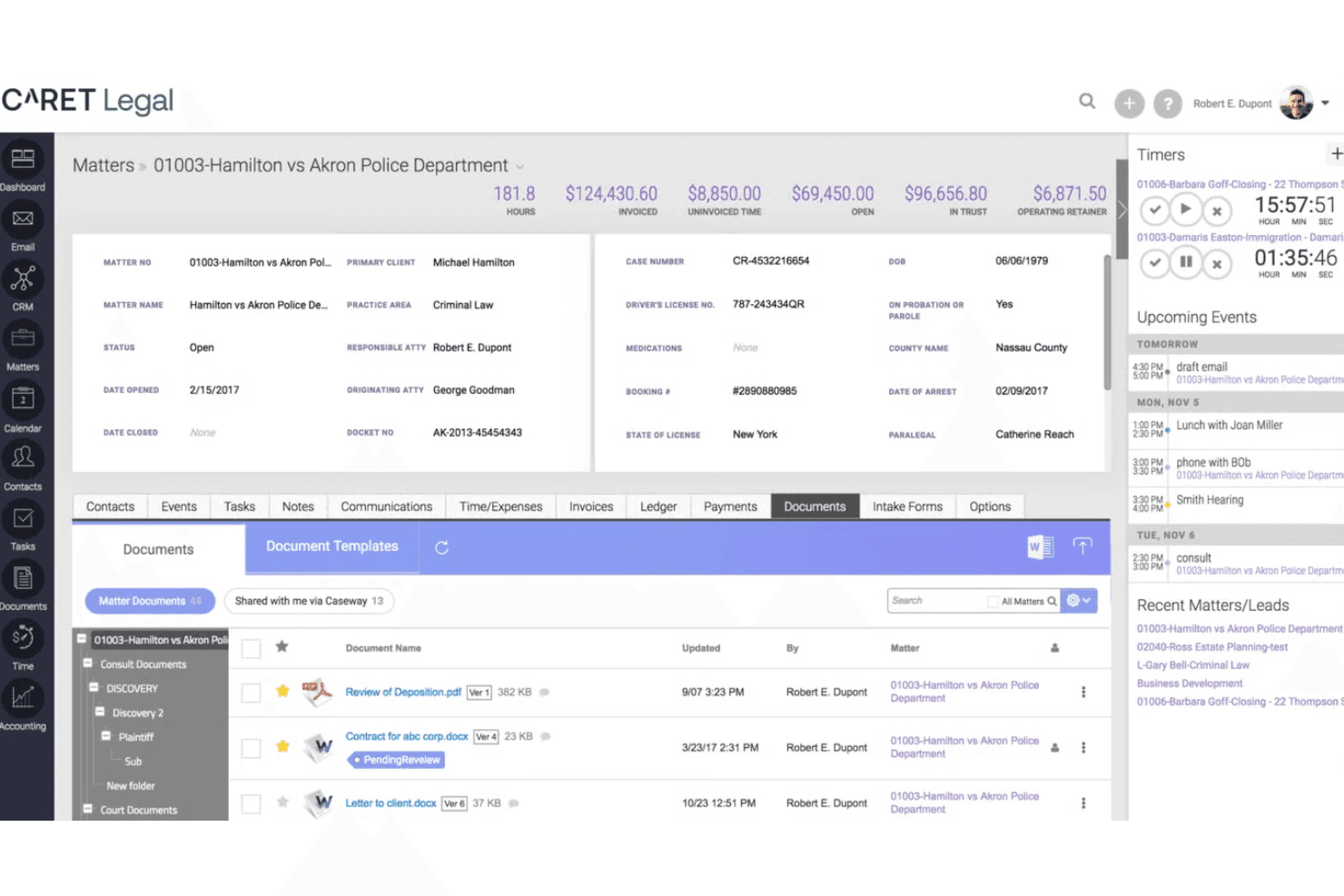
CARET Legal organizes matter documents with version control and folders. CARET Legal is a cloud-based legal practice management platform that brings matter tracking, automated workflows, task and deadline management, document management, billing, and AI-powered document summarization together for law firms.
Who Is CARET Legal Best For?
CARET Legal is a good fit for law firms that want matter tracking, billing, and document management in one place without cobbling together separate tools.
Why I Picked CARET Legal
I picked CARET Legal as one of the best because it keeps every stage of a matter in one record, from open tasks and calendar deadlines to documents and billing, so nothing falls through the cracks. I especially like how workflow templates let you attach dependent or parallel task and calendar steps to a specific matter type, with dates auto-scheduled from a single anchor event. CARET Command pulls overdue tasks, billing issues, and matter activity into one priority dashboard, giving you a real-time read on where every matter stands.
CARET Legal Key Features
- Quick Summary: AI condenses uploaded DOC, DOCX, PDF, RTF, and TXT documents into summaries, available on Enterprise Plus and above.
- CARET Capture: Reviews calls, emails, and meetings to suggest a matching matter, time, and entry details before you log a time entry.
- CARET Analytics: Drag-and-drop dashboards powered by a Domo integration display attorney performance, accounts receivable, and firm financial data.
- Role-based permission controls: Administrators create, clone, and modify permission levels, and restrict matter access to specific users or groups.
CARET Legal Integrations
CARET Legal lists native integrations with Microsoft 365, Google Workspace, OneDrive, NetDocuments, QuickBooks Online, LawToolBox, Lawmatics, HotDocs, RMail, and Payments. Its API supports custom connections for matters, custom fields, contacts, notes, and files.
Pros and Cons
Pros:
- Reviewers praise task assignments and reminders
- Matter-based workflows schedule dependent tasks and deadlines
- Matter records consolidate documents, email, and billing
Cons:
- Reviewers report email-sync and custom-reporting friction
- AI lacks documented intake triage and routing
Learn more about CARET Legal: Best for PI firms extracting case facts at scale
- Free demo available
- Pricing upon request
Visit WebsiteCustomer Rating:4.8/5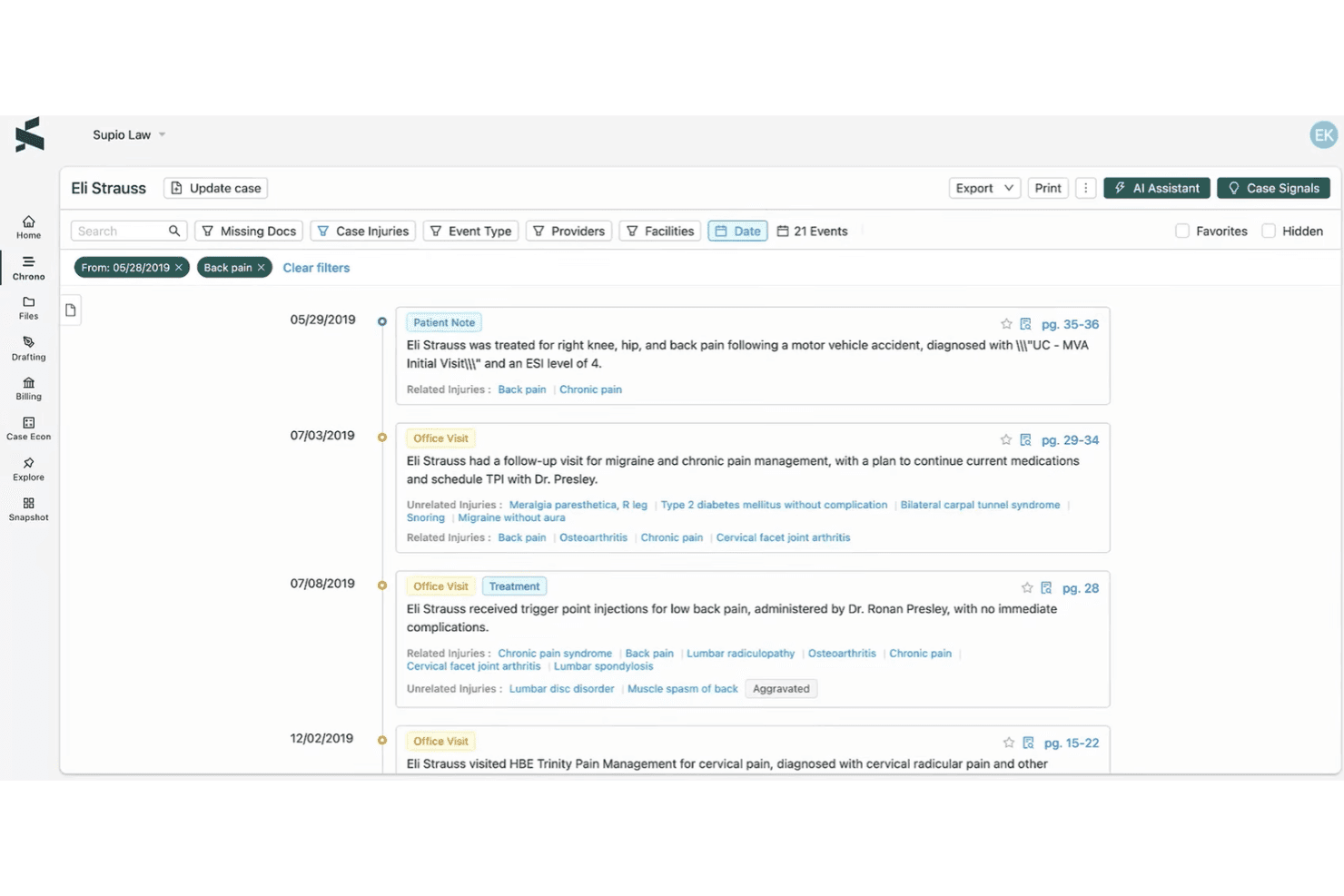
Supio organizes medical records chronologically with AI-tagged injuries. Supio is an AI legal platform for plaintiff law firms that handles case work across intake, document analysis, medical chronology building, demand drafting, communications, and litigation preparation.
Who Is Supio Best For?
Supio is built for plaintiff personal injury and mass tort law firms that need to process high volumes of case records, from intake through litigation.
Why I Picked Supio
I picked Supio as one of the best because of how it handles the raw volume of records that PI firms deal with daily. Its Document Intelligence engine parses 112+ personal-injury litigation document types and reports 96.6%+ extraction accuracy, pulling injuries, treatment events, and billing totals into structured case data automatically. I also like that Supio Agent builds source-linked medical chronologies from those records, so attorneys can trace every fact back to the originating document without manual cross-referencing.
Supio Key Features
- AI intake scoring and routing: Voice, Scoring, and Coaching Agents capture lead details, score leads by severity and urgency, and transfer high-priority cases directly to an attorney.
- Case Communications automation: The platform can open insurance claims, request medical records via HIPAA-compliant fax, and follow up with clients across email, SMS, fax, and voice.
- Case economics ledger: Supio Agent extracts and organizes medical-bill line items, adjustments, insurance payments, and lien details, with support for line-item-level negotiation tracking.
- Cross-case analytics: Firm-level dashboards surface settlement patterns, case mix, throughput, bottlenecks, and performance benchmarking across your entire docket.
Supio Integrations
Supio lists integrations with Litify, SmartAdvocate, MyCase, CASEpeer, Filevine, SharePoint, Google Drive, Outlook, and QuickBooks. It also offers a REST API and webhooks for custom integrations, dashboards, and workflows.
Pros and Cons
Pros:
- Analyzes case economics and cross-case patterns
- Extracts facts across 112+ document types
- Builds citation-linked medical chronologies
Cons:
- Automated case-stage transitions aren’t documented
- Automated deadline reminders aren’t documented
Learn more about Supio: Best for law firm matter and workflow tracking
- Free demo available
- Pricing upon request
Visit WebsiteCustomer Rating:4.2/5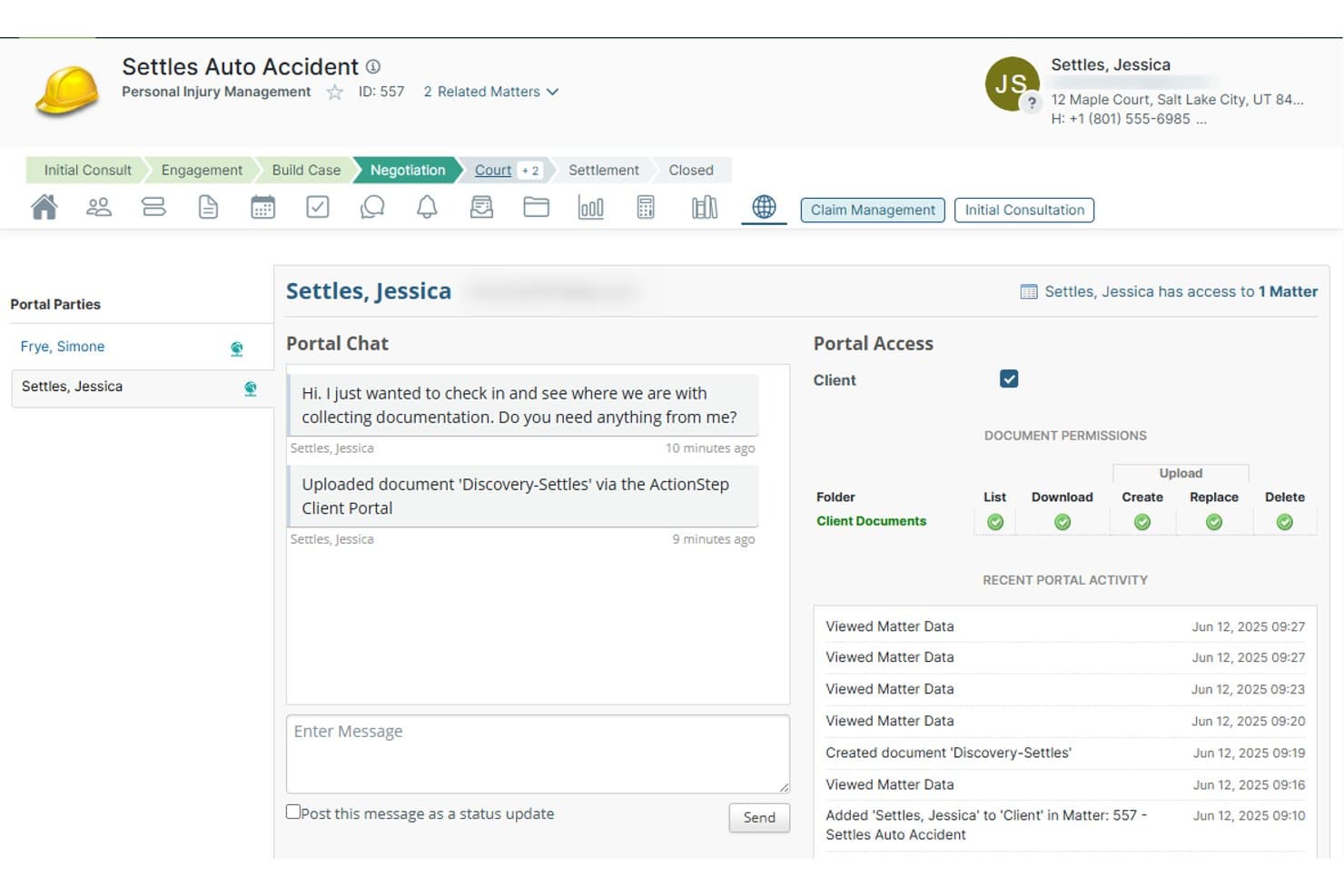
Actionstep lets clients chat and share documents via a secure portal. Actionstep is a cloud-based legal practice management platform for law firms that combines matter management, workflow automation, document handling, client intake, time tracking, and billing in one system.
Who Is Actionstep Best For?
Actionstep is a strong fit for midsize law firms that need a configurable system to manage matters, automate multi-step workflows, and keep case records, tasks, and deadlines in one place.
Why I Picked Actionstep
I picked Actionstep as one of the best because its matter workflow engine genuinely earns the matter and workflow tracking label. You can build multi-stage workflows tied to specific practice areas, attach tasks to individual workflow steps with fixed or matter-date-relative deadlines, and configure due-date notifications to fire before a deadline hits. The home dashboard pulls assigned tasks, upcoming appointments, and active matters into one view, so nothing slips between the cracks on a busy caseload.
Actionstep Key Features
- Client intake workflows: Capture prospect details through customizable webforms that map collected data directly to matters.
- Document assembly and automation: Generate personalized legal documents and emails from templates using matter data.
- Trace AI time capture: A desktop add-on that passively records activity across Outlook, Word, and Actionstep, then drafts bill-ready time-entry narratives.
- Mobile app: Access tasks, documents, client messages, time capture, and matter searches from iOS or Android.
Actionstep Integrations
Actionstep offers a native Outlook integration through its Office 365 add-in, plus integrations with First AML, InfoTrack, and Zapier. Its REST API and REST Hooks support custom integrations.
Pros and Cons
Pros:
- AI analytics answer firm-performance questions
- Workflow tasks support matter-relative deadlines
- Practice-area workflows organize multi-step matters
Cons:
- AI workflow agents remain unreleased
- No AI case-file summarization or extraction
Learn more about Actionstep:
Other AI Case Management Software
Here are a few additional options that didn’t make my shortlist but are still worth checking out:
- 11LitifyBest for Salesforce-native legal AI workflows
- 12LEAPBest for AI document analysis in legal matters
- 13CasePeerBest for PI firms managing cases start to finish
- 14SmokeballBest for matter-aware AI in legal case tracking
- 15LawmaticsBest for AI-powered legal client intake
- 16CaseWorthyBest for human services case tracking and compliance
- 17CasetextBest for legal spend AI and matter tracking
- 18Hyland OnBaseBest for enterprise document-driven case workflows
- 19LexzurBest for legal teams managing cases end to end
- 20MatterSuiteBest for in-house legal AI document analysis
How I Evaluate AI Case Management Software
To make this list, a tool’s AI must handle case work, like summarizing files or extracting data. From there, I evaluate three things. Core functionality carries the most weight, like managing workflows and tracking deadlines. Then I consider standout features, like a no-code workflow builder, and security certifications for sensitive case data.
Core Functionality (Table Stakes For This List)
When I'm selecting tools for my list, I score each one on a scale from 0 (does not offer the functionality) to 5 (excels in this area) for each core functionality listed below. I then convert the total into a percentage to help assess each tool's overall fit, with extra weight on any functionalities I’ve deemed essential.
- Case Workflow (Essential): I look for customizable stages and routing that reflect how different case types move from intake through review, follow-up, and resolution.
- AI Automation (Essential): I check whether AI handles meaningful workflow steps, such as classifying incoming documents, prioritizing cases, or routing work to the right person.
- Document Intelligence: I assess how AI summarizes case files or extracts facts and fields staff need, such as dates, parties, and key events.
- Centralized Case Records: I look for searchable case records that bring together relevant documents, communications, and activity history.
- Tasks & Deadlines: I check whether teams can assign case-linked tasks and receive reminders tied to deadlines or workflow stages.
- Reporting & Analytics: I consider whether reports help teams spot caseload trends, stalled cases, or recurring workflow bottlenecks.
Once I have a list of tools that meet the criteria, I consider what sets each platform apart.
Differentiating Factors (What Sets Vendors Apart)
Here's how I compare and contrast different vendors:
Standout Features
I look for a no-code workflow builder that lets office managers adjust case stages without calling in a developer. A firm adding a new practice area should be able to reconfigure intake and review steps in minutes. I also evaluate conversational AI assistants, checking whether staff can query a case record in plain language to pull status updates or draft client emails. Role-based permission controls matter too, especially in multi-practice firms where family law files shouldn't be visible to the corporate team.
Beyond Features
I check whether vendors hold SOC 2 or equivalent certifications and encrypt data at rest and in transit, since case files often contain privileged or sensitive client information. AI transparency matters too—I look for clear disclosure on whether a vendor's AI is proprietary or LLM-based and whether customer data trains future models. I also evaluate onboarding support, because a firm migrating thousands of matters needs data migration help and admin training to get value before the next billing cycle.
How to Choose AI Case Management Software
Choose a platform by testing whether its case workflows, document handling, and access controls match the way your team manages matters.
| If your priority is… | Look for… |
|---|---|
| If your priority is…Adapting workflows as matters progress | Look for…Configurable stages and routing from intake through resolution |
| If your priority is…Finding key facts in large files | Look for…AI summaries or extracted fields you can verify against source documents |
| If your priority is…Keeping case information together | Look for…Searchable records containing documents, communications, and activity history |
| If your priority is…Protecting sensitive matter information | Look for…Role-based permissions and written details on AI data use |
How to Vet Your Shortlist
- Test document extraction: In a trial, submit one de-identified case file and compare extracted dates, parties, and events with the source.
- Walk through a matter: Ask the vendor to configure a sample intake-to-resolution workflow, then test routing, task assignment, and deadline reminders.
- Check record access: Request the permissions matrix and use two test accounts to confirm each can access only its assigned matters.
- Get AI terms in writing: Request the data-use and retention clauses, including whether customer documents train models and how you can delete them.
- Set the decision filter: In a 30-minute workflow review, decide whether your team needs a broad platform for varied matter processes or a specialist tool for deeper case-specific extraction.
What Is AI Case Management Software?
AI case management software uses artificial intelligence to organize case records, extract information from documents, and support case-related workflows. Legal teams can use it to summarize files, identify key facts, track tasks, and manage case progress. The right system depends on your practice area, workflow needs, and data-handling requirements.
Features
Here are the main features I look for in AI case management software:
- Case workflows: Configurable stages and routing move matters from intake through review and resolution. Teams can set steps for different case types and assign work as a matter progresses.
- AI automation: AI can classify incoming documents, prioritize cases, or route work based on defined criteria. Staff should be able to review automated decisions, especially when they affect deadlines or matter assignments.
- Document intelligence: AI summarizes files and extracts details such as dates, parties, and key events. Teams can use these results to locate relevant facts, then check them against the source documents.
- Centralized case records: Each matter has a searchable record for documents, communications, and activity history. Keeping these items together gives staff a single place to review case context.
- Tasks and deadlines: Teams can assign tasks to a matter, set due dates, and receive reminders tied to deadlines or workflow stages. This helps staff see what needs attention and who owns the next step.
- Reporting and analytics: Reports show caseload trends, stalled matters, and recurring workflow bottlenecks. Managers can use this information to review workloads and identify where cases are slowing down.
- Access controls: Role-based permissions limit access to matters and information based on a person’s role. This helps teams separate sensitive files across practice areas and support confidentiality requirements.
Benefits
In my experience, AI case management software offers several benefits. Here are a few common ones:
- Faster file review: AI summaries and extracted details help you locate dates, parties, and key events in case documents.
- More consistent workflows: Configurable stages and routing help teams follow defined steps from intake through resolution.
- Clearer case visibility: Searchable records bring documents, communications, and activity history together for a fuller view of each matter.
- Better deadline tracking: Case-linked tasks, due dates, and reminders show who owns the next step and when it’s due.
- Earlier issue spotting: Caseload and workflow reports can help managers identify stalled matters and recurring bottlenecks.
- Controlled information access: Role-based permissions help restrict sensitive case records to people with the appropriate access.
Costs and Pricing
Costs vary by features, team size, and support needs. Here are typical pricing ranges for AI case management software.
Plan Comparison Table for AI Case Management Software
| Plan Type | Average Price | Common Features |
|---|---|---|
| Plan TypePersonal Plan | Average Price$20–$50/user/month | Common FeaturesCase and document management, task reminders, basic workflows, and AI summaries. |
| Plan TypeBusiness Plan | Average Price$50–$100/user/month | Common FeaturesCustom workflows, team permissions, document extraction, reporting, and expanded AI usage. |
| Plan TypeEnterprise Plan | Average Price$100–$250/user/month | Common FeaturesAdvanced workflow configuration, granular access controls, integration options, audit logs, and dedicated support. |
Actual prices and included features vary by vendor; enterprise plans may use custom quotes.
FAQs
Some answers to common questions about AI case management software:
Can AI case management software replace a lawyer’s judgment?
No. AI can organize documents, extract facts, and flag information for review, but it shouldn’t make legal decisions or replace professional judgment. A lawyer or qualified team member should verify important details against the original record, especially before taking action or communicating with a client. Treat AI-generated summaries as a starting point, not an authoritative account. Set clear review rules for your team, including who checks outputs and how staff correct errors.
What should we prepare before migrating cases into a new system?
Start by identifying active matters, the records your team needs, and any retention or legal hold requirements. Map existing fields—such as matter status, parties, and key dates—to the new system’s fields. Remove duplicate or outdated records only when your policies permit it. Before the full migration, move a small sample and check documents, permissions, activity history, and search results. Keep a record of what you migrated and any gaps that need follow-up.
How should we handle AI outputs when a case has strict retention requirements?
Confirm how the vendor handles retention, deletion, exports, and audit records before adding those cases. Ask whether the same rules apply to documents, prompts, summaries, and other AI-generated material. Then compare the answers with your organization’s retention schedule, legal holds, and applicable obligations. Document the settings you choose and assign someone to review them when policies or vendor terms change. If the vendor can’t explain how a data type is retained or deleted, don’t assume it follows the same rules as the original file.