

In-house legal case management software is a system for capturing legal requests, assigning and tracking matters, coordinating stakeholders, and monitoring outside counsel and spend. The right platform should fit your team’s workflows, reporting needs, and resources—not add complexity to an already busy legal function. This guide compares leading options by their matter management, intake, spend, and contract capabilities, so you can find a fit for your team’s size and operating model.
Why Trust Our Software Recommendations
6,700+
Reviews
20
Industry experts
16+
Evaluation factors
14
Years
Our team has been testing and reviewing software since 2012. As legal practice leaders ourselves, we know how difficult—and important—it is to choose the right software.
For this guide, we evaluated tools using hands-on testing and independent research, scoring tools using our selection criteria.
Our reviews reflect our human editorial judgment, not a sales pitch.
Comparison Table: In-House Legal Case Management Software
Compare pricing and specs side by side for the in-house legal case management software that made it onto my shortlist.
| Tool | Best For | Trial Info | Price | ||
|---|---|---|---|---|---|
| 1 | Best for outside counsel spend control | Free demo available | Pricing upon request | Website | |
| 2 | Best for outside counsel spend tracking and e-billing | Free demo available | Pricing upon request | Website | |
| 3 | Best for legal ops on one shared data model | Free demo available | Pricing upon request | Website | |
| 4 | Best for outside counsel spend tracking and scoring | Free demo available | Pricing upon request | Website | |
| 5 | Best for multi-entity matters and CLM in one place | 14-day free trial | Pricing upon request | Website | |
| 6 | Best for CLM-linked matter tracking at enterprise scale | Free demo available | Pricing upon request | Website | |
| 7 | Best for AI-driven outside counsel spend control | Free demo available | Pricing upon request | Website | |
| 8 | Best for Fortune 100-scale e-billing and matter ops | Not available | Pricing upon request | Website | |
| 9 | Best for highly configurable matter tracking | Not available | Pricing upon request | Website | |
| 10 | Best for corporate legal intake and spend tracking | 14-day free trial | From $100/user/month | Website |


In-House Legal Case Management Software Reviews
Below are detailed summaries of the best in-house legal case management software on my shortlist. I cover intake, matter tracking, and outside counsel spend features of each platform to help you find the right fit.
 Best for outside counsel spend control
- Free demo available
- Pricing upon request
Visit WebsiteCustomer Rating:4.6/5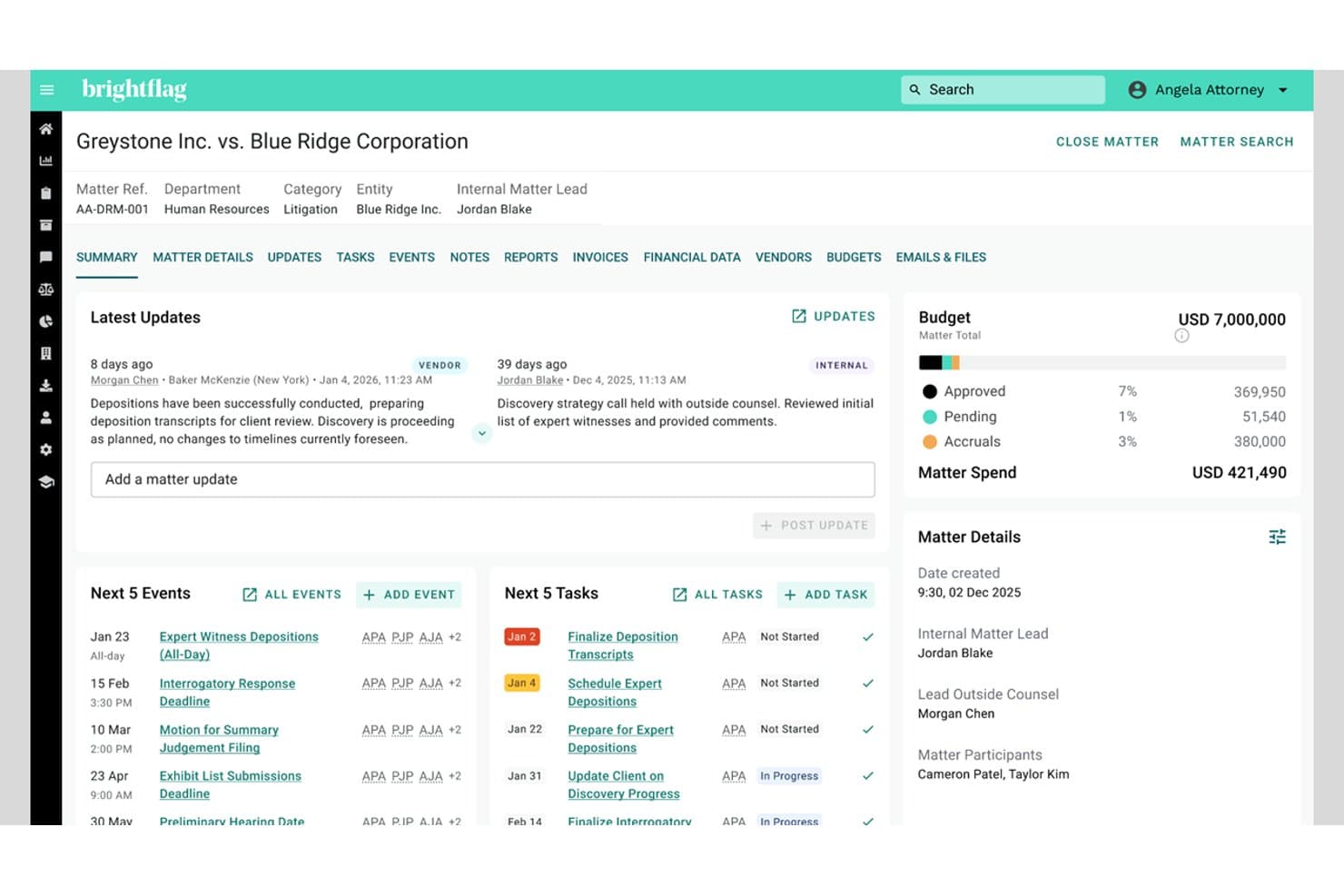
Brightflag centralizes matter tasks, events, and budget tracking in one view. Brightflag is an AI-powered enterprise legal management platform built around e-billing and outside counsel spend control, with matter management, vendor scorecards, legal intake, and reporting layered in.
Who Is Brightflag Best For?
Brightflag is a strong fit for legal operations managers and in-house counsel at mid-to-large enterprises with significant outside counsel spend to track, review, and control.
Why I Picked Brightflag
Brightflag earns its spot on my shortlist because no other tool I've tested matches its depth of outside counsel spend control. I love how the AI invoice review automatically flags block billing, rate violations, and out-of-scope work on every incoming invoice, so my team catches billing issues we'd otherwise miss in a manual review. On top of that, vendor scorecards give you real-time financial KPIs across your entire law firm panel, with side-by-side comparisons that make panel reviews far more data-driven.
Brightflag Key Features
- AI invoice review: Brightflag's AI reads each incoming invoice, flags billing guideline violations, block billing, and rate discrepancies, and can auto-approve or auto-reject based on your thresholds.
- Budget and accrual tracking: Set budgets at the department, practice area, cost center, or matter level, with AI-driven spend forecasting and automated accrual reminders to vendors before cutoff.
- Custom report builder: Build reports by selecting fields, filters, and sort orders, then save and schedule delivery or push data to BI tools like Power BI, Tableau, or Snowflake.
- Legal Service Requests: Business users submit requests through a branded intake form with conditional dropdowns and file uploads, which legal admins can convert to matters in one click.
Brightflag Integrations
Brightflag offers integrations with iManage, NetDocuments, Outlook, Google Calendar, Jira, Power BI, Tableau, Snowflake, and Exterro. It also provides an API for custom integrations and supports MCP connections to AI tools.
Pros and Cons
Pros:
- Vendor scorecards compare firms side by side
- Clearer visibility into outside counsel spend
- AI flags block billing and rate violations
Cons:
- Advanced matter tools require a paid add-on
- 20MB file caps and no version control
Learn more about Brightflag: Best for outside counsel spend tracking and e-billing
- Free demo available
- Pricing upon request
Visit WebsiteCustomer Rating:4.5/5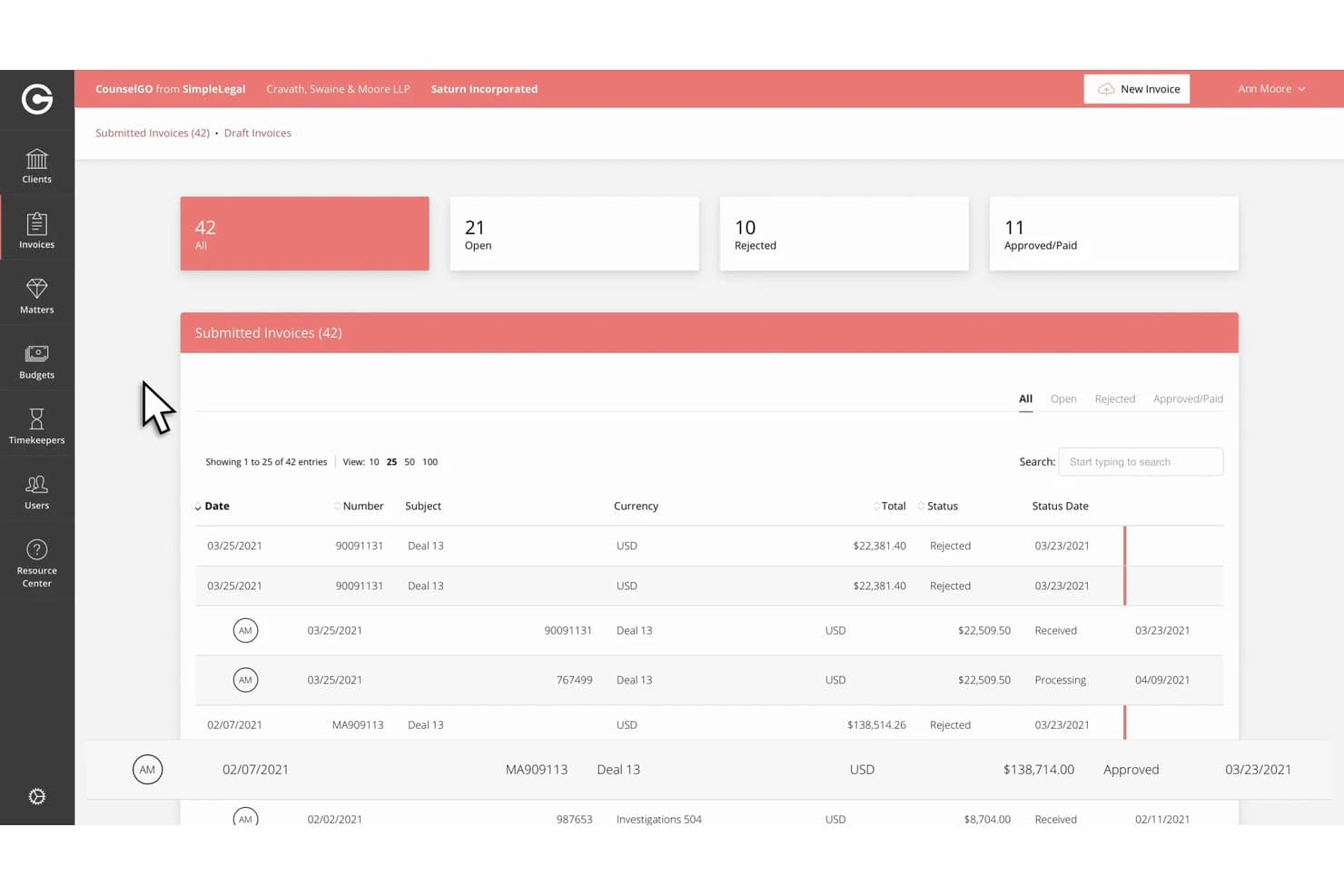
Onit SimpleLegal tracks submitted invoice statuses and totals in one view. Onit SimpleLegal is an enterprise legal management (ELM) platform for corporate legal departments that covers matter management, legal intake, e-billing, outside counsel management, and spend tracking and reporting.
Who Is Onit SimpleLegal Best For?
Onit SimpleLegal is a strong fit for mid-market legal operations teams that need structured outside counsel management and detailed spend visibility.
Why I Picked Onit SimpleLegal
I picked Onit SimpleLegal as one of the best because its outside counsel spend tracking goes well beyond basic invoice logging. It enforces billing guideline rules automatically, flags non-compliant line items, and handles alternative fee arrangements natively. I also like that outside counsel scorecards let you tie firm performance data directly to matter assignments, so decisions about which firms get work are grounded in actual results, not relationships.
Onit SimpleLegal Key Features
- Matter tracking: Each matter record captures impact, complexity, practice area, assigned people, tasks, and attached documents in a single view.
- Legal intake workflows: Configure intake templates and routing rules to standardize how work requests come in and get assigned to the right team members.
- Enhanced reporting: Build custom reports on custom fields, choose chart types, and share dashboards covering spend, outcomes, productivity, and resource planning.
- Outside counsel management: Track timekeepers, manage vendor relationships, and use scorecards to evaluate law firm performance against budget and delivery targets.
Onit SimpleLegal Integrations
Onit SimpleLegal’s native integrations with specific vendors aren’t clearly documented. It supports flat files, prebuilt connectors, and a REST API for custom integrations with finance, document management, and other systems.
Pros and Cons
Pros:
- Matter records consolidate tasks, people, and documents
- Firm scorecards connect performance to matter assignments
- Invoice approvals clarify outside counsel spend
Cons:
- Some reviewers find reporting confusing and finicky
- No documented document version control or repository
Learn more about Onit SimpleLegal: Best for legal ops on one shared data model
- Free demo available
- Pricing upon request
Visit WebsiteCustomer Rating:4.5/5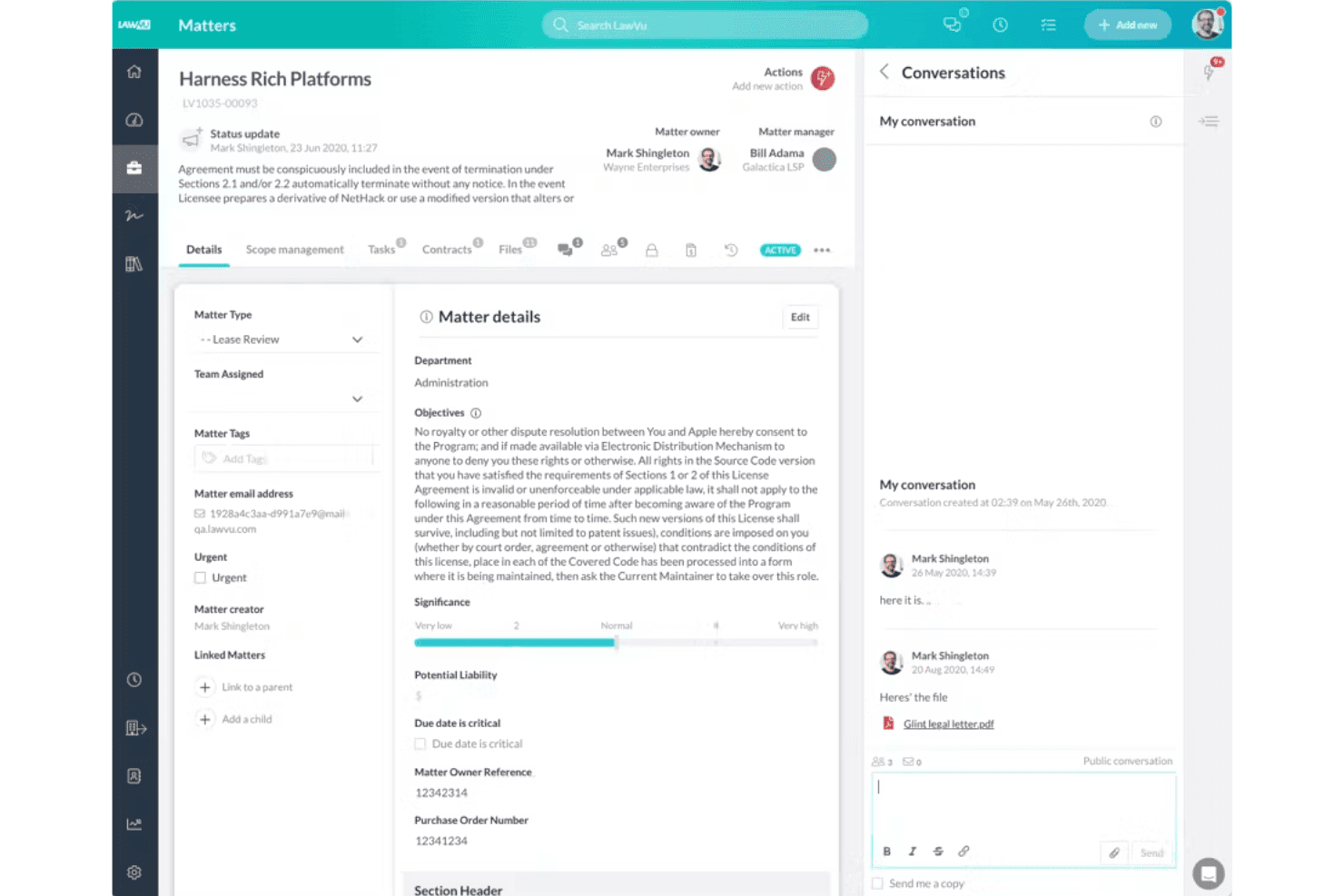
LawVu organizes matter details, tasks, files, and team conversations in one place for efficient legal work tracking. LawVu is an in-house legal management platform that connects matter management, contract lifecycle management, legal intake, e-billing, and AI-assisted workflows on a single shared data model.
Who Is LawVu Best For?
LawVu is a strong fit for corporate legal departments that want intake, matters, contracts, and e-billing managed on a single shared data model rather than stitched together across separate tools.
Why I Picked LawVu
LawVu earns its spot on my shortlist because intake, matters, contracts, e-billing, and AI all run on one shared data model, which means a contract opened from a matter record carries the same context, history, and permissions without any manual syncing. I particularly like AI Intake, which routes and prioritizes incoming requests based on past patterns, team capacity, and urgency, and the AI billing guideline review, which checks invoice batches against your uploaded guidelines and flags discrepancies before approval.
LawVu Key Features
- Matter budgets and accrual tracking: Set budgets at the matter level, record accruals from law firms, and monitor overspend through built-in dashboards.
- Business Portal: A configurable self-service front door where business users submit requests, track status, and access templates, FAQs, and approved documents.
- Insights Connect: A read-only data connector that pipes pre-modeled LawVu data into BI tools like Power BI for custom reporting.
- MCP server: Connects external AI tools like Claude, ChatGPT, and Copilot to your LawVu data so they can search matters, create tasks, and trigger workflows within your permission settings.
LawVu Integrations
LawVu offers native integrations with Microsoft 365, including Outlook, Teams, SharePoint, and Word, plus Google Drive, Box, Salesforce, Slack, DocuSign, and Power BI. It also provides an API, Power Automate connector, Workato integrations, and an MCP server for custom connectivity.
Pros and Cons
Pros:
- Billing review flags guideline discrepancies
- AI intake prioritizes requests by urgency
- Matters, contracts, and email share context
Cons:
- Some tasks require extra navigation steps
- Invoice entry can feel tedious
Learn more about LawVu: Best for outside counsel spend tracking and scoring
- Free demo available
- Pricing upon request
Visit WebsiteCustomer Rating:4.2/5
Litify centralizes case metrics, intake data, and tasks in one dashboard. Litify is an enterprise legal management platform built on Salesforce that covers matter management, legal intake, eBilling, document management, outside counsel tracking, and legal holds for corporate legal departments.
Who Is Litify Best For?
Litify ELM is a strong fit for mid-size to large corporate legal departments that manage significant outside counsel relationships and need structured spend oversight.
Why I Picked Litify
I picked Litify as one of the best because it handles outside counsel spend tracking with a level of detail I haven't seen in many ELM tools. Outside counsel scorecards evaluate firms on billing compliance, cost efficiency, and past performance, while an AI tool cross-references eBilling data, jurisdiction, specialty, and internal attorney sentiment to score and recommend co-counsel. UTBMS-based milestone budgets, accrual tracking, and AI-driven year-end spend forecasting give legal ops teams real visibility into where matter budgets are heading before they're blown.
Litify Key Features
- Self-service request portal: Business users submit legal service requests through structured intake forms and track request status without involving the legal team directly.
- Legal holds management: Automated workflows track custodians, notices, acknowledgments, and releases, with a full audit trail for each hold.
- SLA tracking: Open, pending, and overdue work is monitored against SLAs configured by request type, risk level, or department.
- Global teams routing: Matters and requests are routed by geography, jurisdiction, language, practice area, urgency, or attorney workload across distributed legal teams.
Litify Integrations
Litify offers integrations with Salesforce, Microsoft Outlook, SharePoint, Google Drive, Workday, SAP, Oracle, QuickBooks, and DocuSign. It also connects with 3,400+ marketplace apps through Salesforce AppExchange.
Pros and Cons
Pros:
- Matter plans connect intake to workflows
- Scorecards compare firms on billing compliance
- UTBMS budgets forecast outside-counsel spend
Cons:
- Reviewers describe crowded screens and extra clicks
- Reviewers report slow performance and documents
Learn more about Litify: Best for multi-entity matters and CLM in one place
- 14-day free trial
- Pricing upon request
Visit WebsiteCustomer Rating:4.6/5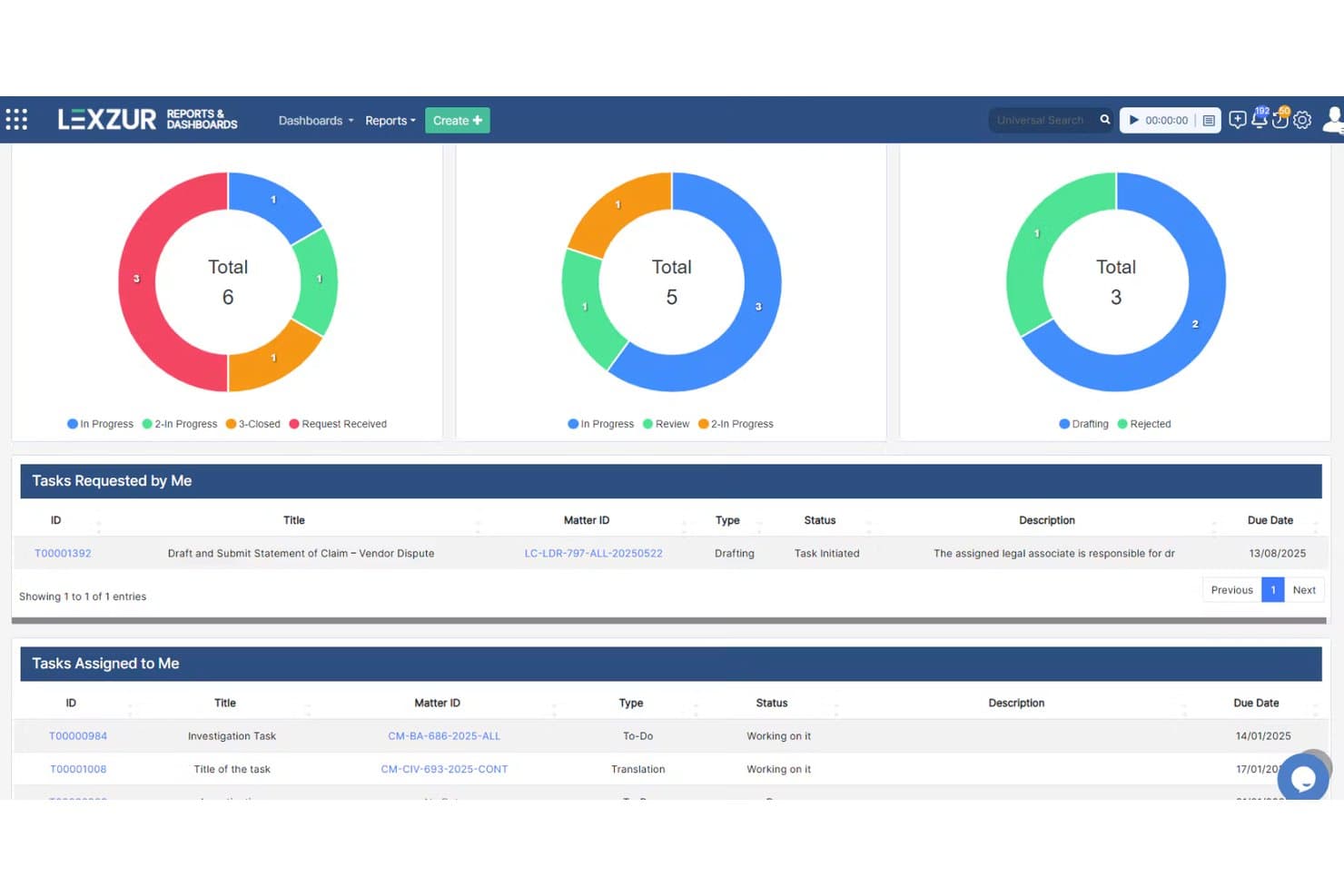
Lexzur centralizes task tracking with visual dashboards and assignments. Lexzur is an in-house legal management platform that covers matter management, contract lifecycle management, document storage, task tracking, legal intake, and outside counsel collaboration in a single system.
Who Is Lexzur Best For?
Lexzur is a strong fit for corporate legal departments managing matters and contracts across multiple entities or jurisdictions from a single platform.
Why I Picked Lexzur
Lexzur earns its spot on my shortlist because it's the only tool here that handles both matter management and contract lifecycle management on a single platform, without stitching two separate products together. I really like how PRACTICE and CONTRA share one workspace, so a matter tied to a contract dispute doesn't have to live in two systems. What genuinely sets it apart is the multi-entity reporting layer: legal teams managing separate subsidiaries can set distinct approval matrices and permissions per entity, then pull reports across all of them from one dashboard.
Lexzur Key Features
- Client Portal: Internal clients submit requests, upload documents, and track status updates through a white-labelled, configurable intake portal.
- Advisor Portal: Outside counsel access a dedicated portal to log time, add tasks, upload files, and update litigation stages directly.
- Automation Hub: Set trigger-based rules to route matters, send reminders, lock fields after approval, or reassign tasks without manual intervention.
- LEXA AI assistant: Flags risks in documents, extracts obligations and key dates, and checks compliance across governing jurisdictions.
Lexzur Integrations
Lexzur claims 5,000+ marketplace and no-code connector integrations, including Gmail, Outlook, Slack, Dropbox, SharePoint, OneDrive, Google Drive, and iManage. It also offers Outlook Connect, Teams Connect, Google Workspace Connect, webhooks, and third-party APIs on Enterprise Plus.
Pros and Cons
Pros:
- Reviewers praise responsive setup and support
- Entity-specific approvals support cross-company matters
- Matters and contracts share one workspace
Cons:
- Reporting depth requires the BI extension
- Reviewers flag clunky file sharing
Learn more about Lexzur: Best for CLM-linked matter tracking at enterprise scale
- Free demo available
- Pricing upon request
Visit WebsiteCustomer Rating:4.3/5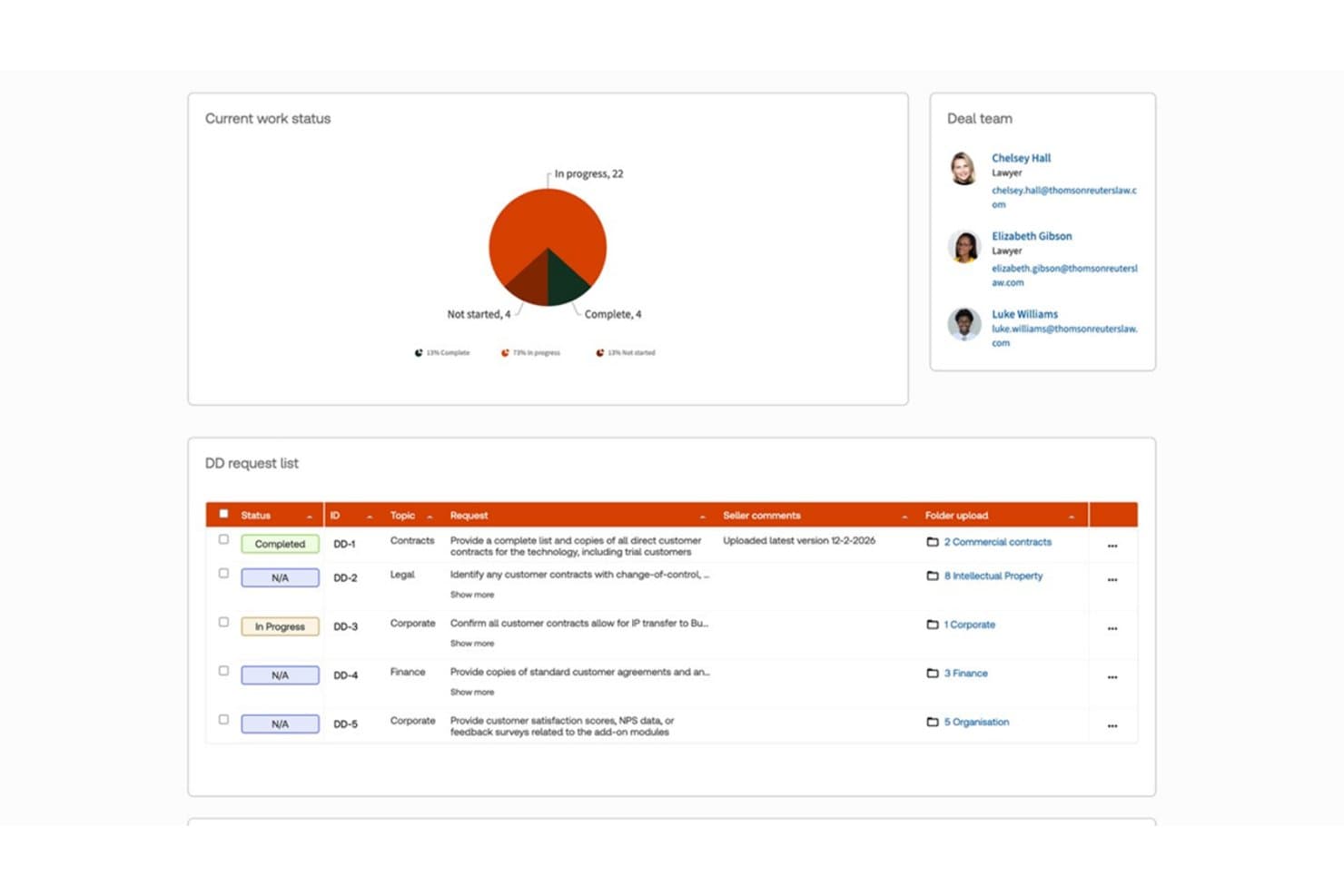
HighQ tracks due diligence requests and work status in one place. HighQ is a Thomson Reuters cloud platform for corporate legal departments that connects matter management, contract lifecycle management, document collaboration, legal intake workflows, and vendor oversight in one configurable environment.
Who Is HighQ Best For?
HighQ is a strong fit for large corporate legal departments and legal operations teams that need a configurable, enterprise-grade environment to manage matters, contracts, and outside counsel in one place.
Why I Picked HighQ
HighQ earns its spot on my shortlist because it's one of the few platforms that ties contract lifecycle management directly into matter tracking, so your team isn't bouncing between separate tools to see where a contract sits relative to an open matter. I particularly like the native CLM module, which covers everything from intake and clause extraction to obligation dashboards, and the iSheets-based matter configuration lets legal ops teams build structured workflows around their actual matter types. The outside counsel engagement layer adds another layer I find genuinely useful, giving vendors access to shared matter status, documents, and tasks inside a permissioned hub rather than through email chains.
HighQ Key Features
- Self-service request portal: Business users submit legal requests through branded intake forms, with automated triage and routing that assigns requests without manual intervention from the legal team.
- CoCounsel AI integration: Generative AI runs inside HighQ for document summarization, clause extraction, and guided due diligence workflows, with outputs surfaced directly in iSheets.
- Virtual data rooms: Secure, permissioned data rooms give external parties controlled access to documents, with full audit trails, digital rights management, and activity reporting.
- Two-way DMS sync: HighQ syncs content and metadata bidirectionally with SharePoint, iManage, NetDocuments, and eDoc, keeping your existing document management system in step with HighQ's repository.
HighQ Integrations
HighQ integrations include SharePoint, iManage, NetDocuments, eDoc, Microsoft 365, Google Workspace, DocuSign, and Adobe Sign. It also offers APIs and two-way document and metadata sync through SeeUnity.
Pros and Cons
Pros:
- Reviewers praise secure external collaboration
- Configurable iSheets fit varied matter types
- Connects contract workflows with matter records
Cons:
- Spend tracking stops short of e-billing
- Matter workflows require substantial configuration
Learn more about HighQ: 7Best for AI-driven outside counsel spend control
Onit
- Free demo available
- Pricing upon request
Visit WebsiteCustomer Rating:4.8/5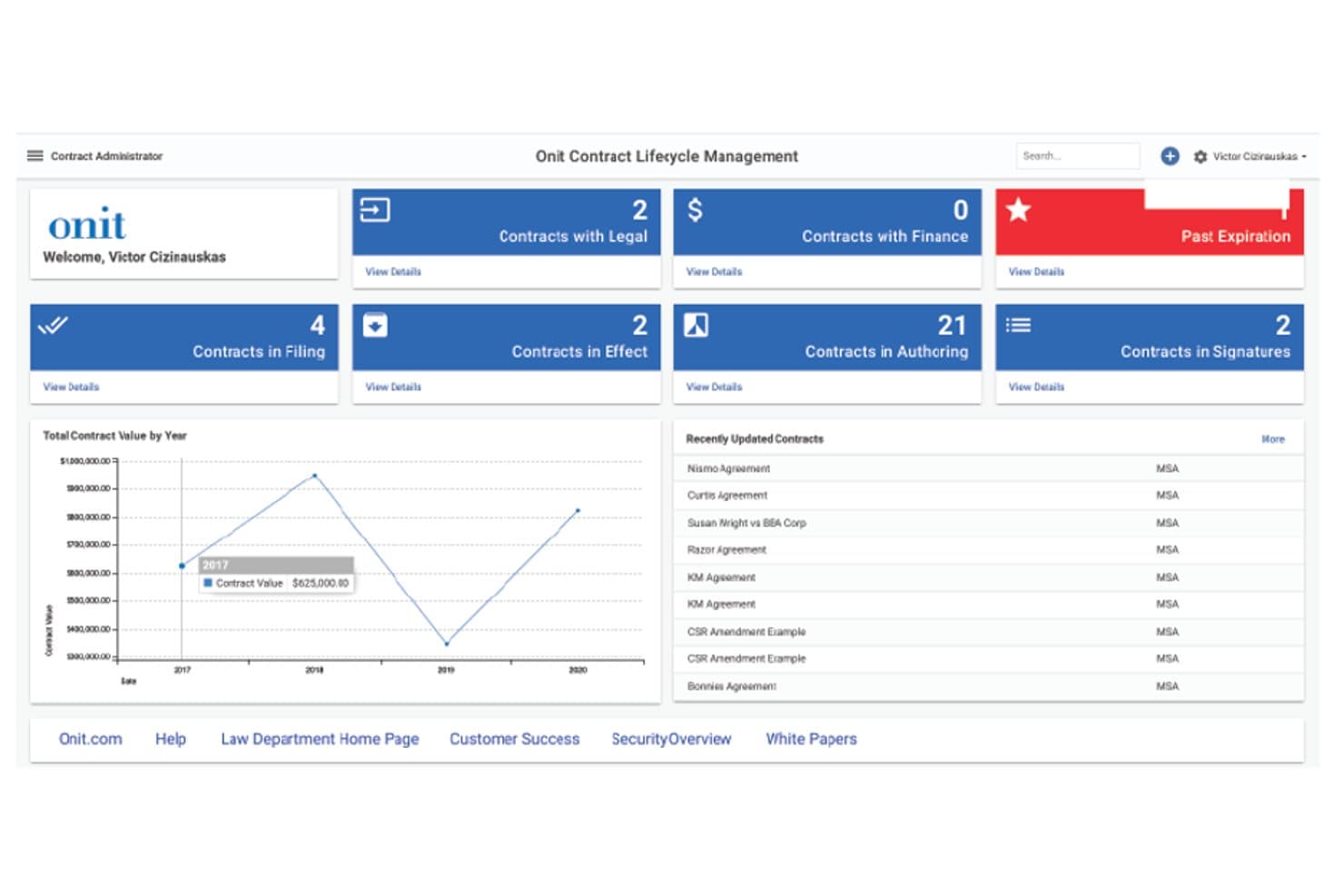
Onit centralizes contract lifecycle management in one dashboard. Onit is an enterprise legal management platform covering matter management, legal intake, e-billing, outside counsel management, contract lifecycle management, and AI-driven spend review across a suite of products including Unity ELM, SimpleLegal, OnitX ELM, and Legal Files.
Who Is Onit Best For?
Onit fits enterprise legal departments that manage significant outside counsel spend and need AI-driven invoice review, vendor scorecards, and e-billing controls built into their matter management workflow.
Why I Picked Onit
I picked Onit as one of the best because its AI-driven invoice review, called Spend Agent, goes well beyond standard billing-guideline enforcement. It applies plain-English billing rules, flags irregular charges, and logs every approval or rejection in an audit trail, so outside counsel spend is traceable at the line-item level. I also like that CounselMatch and Unity RFP give legal ops teams structured tools for selecting, comparing, and scoring outside firms before any invoice even enters the queue.
Onit Key Features
- Legal intake and request routing: LSR lets business users submit requests through a self-service portal, which are then triaged, routed, and converted into tracked matters automatically.
- E-billing with billing-guideline enforcement: Outside counsel submit invoices through vendor portals, where configurable billing rules review and approve or reject line items before payment.
- Outside counsel performance scorecards: Onit generates automatic vendor scorecards and benchmarks firm performance across cost, quality, and matter outcomes.
- Ask Unity natural-language analytics: This beta feature lets you query your legal operations data in plain language to surface spend trends and matter insights without running manual reports.
Onit Integrations
Documented integrations include NetDocuments, iManage, SharePoint, Microsoft Office, Outlook, Salesforce, DocuSign, Adobe Sign, and Tableau. Onit also supports finance and ERP connections through APIs, prebuilt connectors, or flat files.
Pros and Cons
Pros:
- Intake converts requests into tracked matters
- Outside counsel scorecards inform firm selection
- Invoice-level spend controls support matter budgeting
Cons:
- Reporting and search have noted limitations
- Implementation and data migration can take time
Learn more about Onit: Best for Fortune 100-scale e-billing and matter ops
- Not available
- Pricing upon request
Visit WebsiteCustomer Rating:4.7/5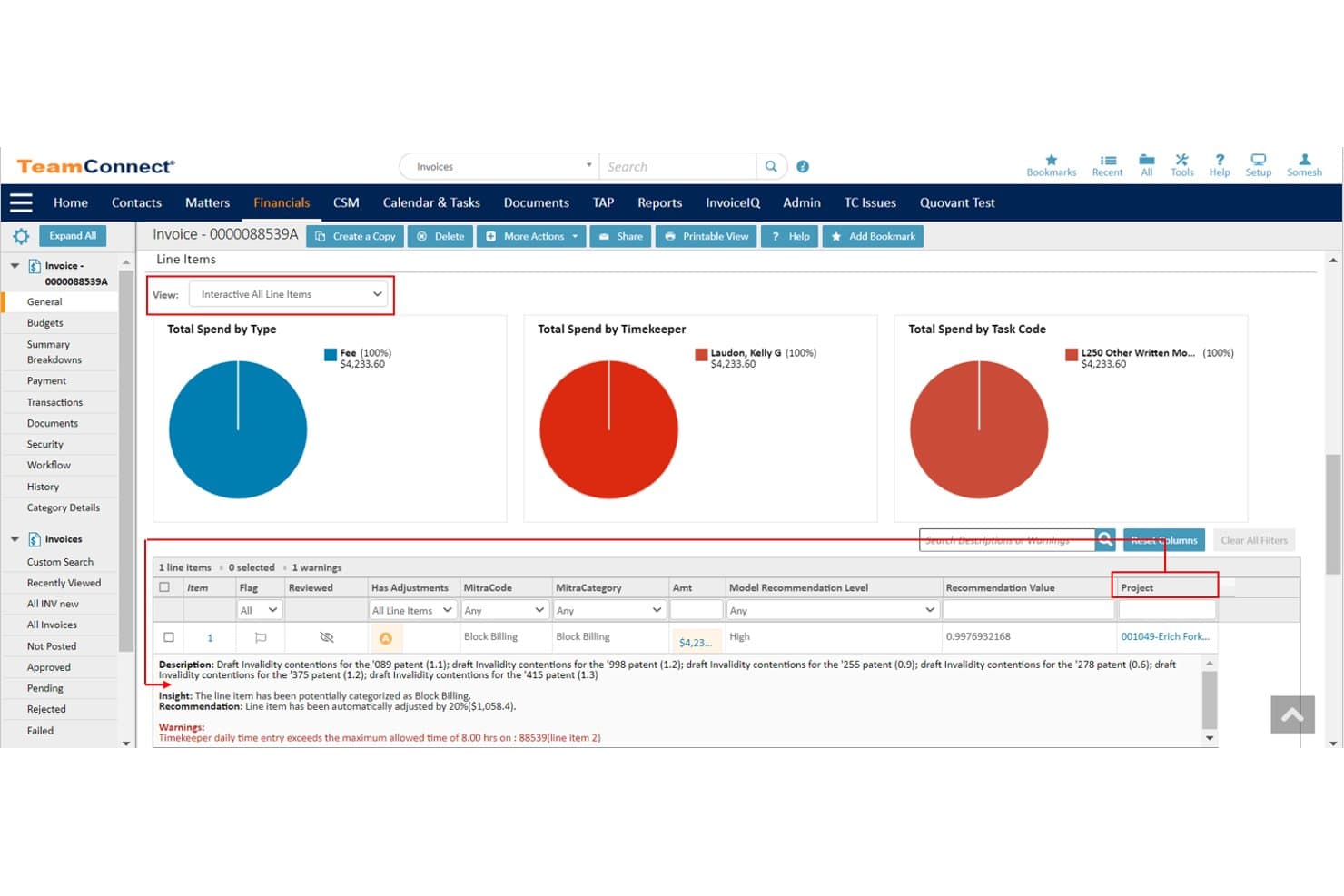
Mitratech TeamConnect tracks invoice line items with AI-driven billing insights. Mitratech TeamConnect is an enterprise legal management platform for corporate legal departments that covers matter management, e-billing, document storage, legal spend tracking, workflow automation, and analytics in one configurable system.
Who Is Mitratech TeamConnect Best For?
TeamConnect is a strong fit for large corporate legal departments that need enterprise-grade matter management and e-billing across a high volume of matters, vendors, and jurisdictions.
Why I Picked Mitratech TeamConnect
I picked TeamConnect as one of the best because no other platform comes close to its e-billing depth at Fortune 100 scale. The Collaborati portal connects 14,000-plus outside firms across 160 countries, while InvoiceIQ uses machine learning to auto-categorize invoice line items and flag non-compliant charges before they're approved. On top of that, ARIES reads litigation scheduling orders and automatically generates tasks and calendar events from templates, cutting the manual work out of docket management entirely.
Mitratech TeamConnect Key Features
- Screen Designer: Build and modify screen layouts, workflows, and business rules without writing any code.
- TCBI dashboards: Access Sisense-powered dashboards that display matter status, law firm performance, workload, and spend data with drill-down capability.
- Document version control: Check documents in and out of matter records, with full version history and folder-level permission settings.
- Legal hold integration: Initiate a hold directly from a matter record, with matter fields auto-populating in Mitratech LegalHold and access following the matter's existing permissions.
Mitratech TeamConnect Integrations
Mitratech TeamConnect offers native integrations with Microsoft 365, Salesforce, Slack, SharePoint Online, iManage, CT Corp, and CSC, plus DocuSign and Adobe Sign through TAP. REST APIs with OAuth 2.0 support custom integrations.
Pros and Cons
Pros:
- Configurable workflows support complex department processes
- Invoice review supports detailed billing controls
- Matter records unify tasks, budgets, and documents
Cons:
- Reporting can feel unintuitive to users
- Interface feels dated to some reviewers
Learn more about Mitratech TeamConnect: Best for highly configurable matter tracking
- Not available
- Pricing upon request
Visit WebsiteCustomer Rating:3.3/5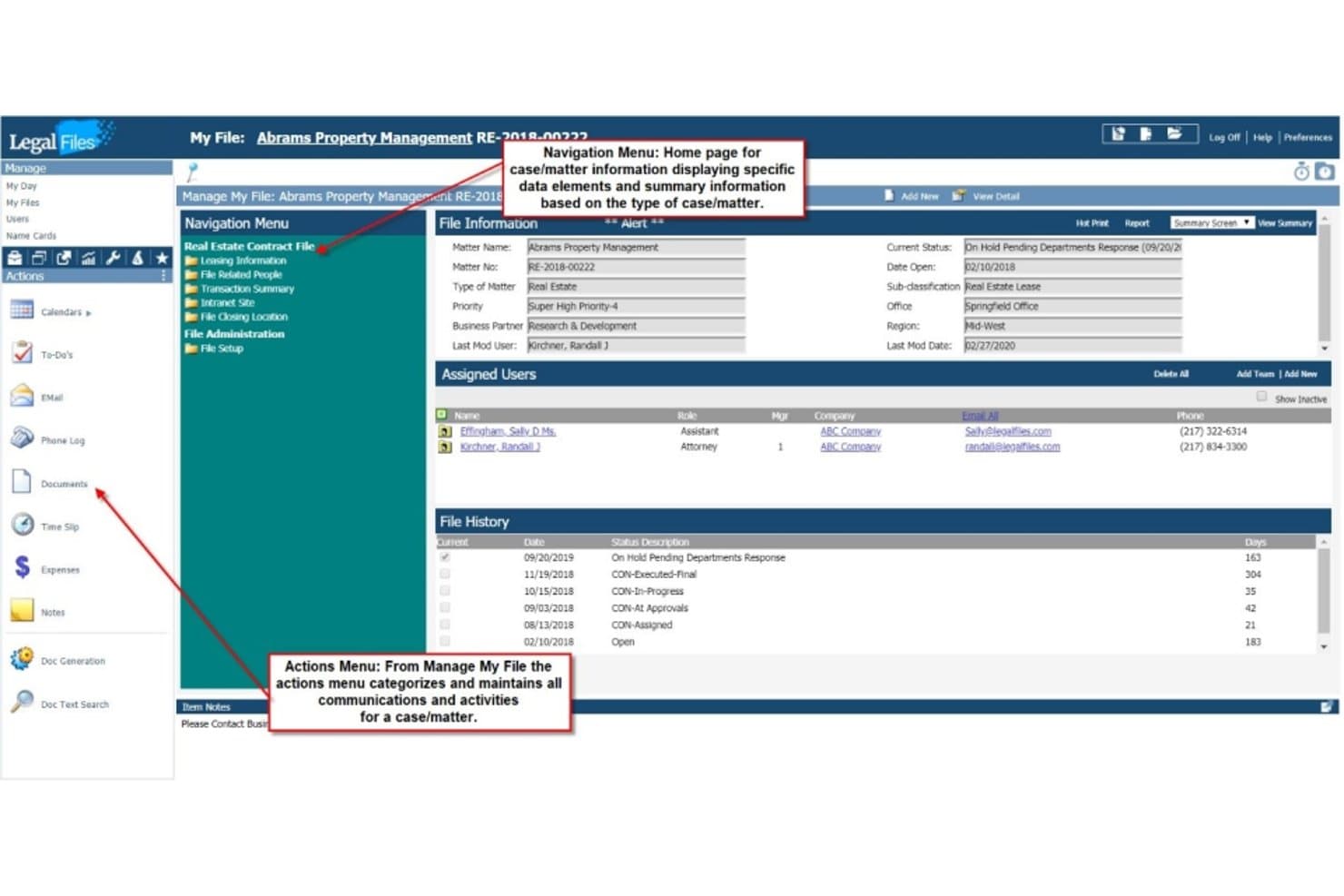
Legal Files centralizes case details, history, and assigned users in one view. Legal Files is a configurable matter and case management system that covers the full lifecycle of legal work, including document storage, task and deadline tracking, intake workflows, and reporting.
Who Is Legal Files Best For?
Legal Files is a strong fit for legal teams in government, education, and insurance that need a highly configurable matter tracking system they can adapt without developer support.
Why I Picked Legal Files
Legal Files earns its spot on my shortlist because of how far you can tailor it without touching a line of code. I'm particularly drawn to its no-code custom windows, workflow wizards, and configurable intake forms, which let a legal team in government, insurance, or education shape the system around their specific matter types rather than the other way around. In practice, that means you can build a two-tier intake wizard for legal aid intake one day and a contract expiration alert for 750-plus annual contracts the next.
Legal Files Key Features
- Document check-in/check-out controls: Lock documents during editing to prevent conflicting versions from being saved across your team.
- Crystal Reports integration: Build and run custom reports using Crystal Reports for more advanced data queries beyond standard built-in options.
- Microsoft Teams and SharePoint connectivity: Save Teams chat threads as matter notes, attach documents to meetings, and store or stream video directly within Legal Files.
- Contract expiration and milestone alerts: Set up automated alerts for renewal deadlines and key contract dates so nothing slips through the cracks.
Legal Files Integrations
Legal Files offers native integrations across the Microsoft ecosystem, including Outlook, Microsoft Teams, SharePoint, and Microsoft Word. It also supports Crystal Reports for custom reporting; no public API or other native connectors are clearly documented.
Pros and Cons
Pros:
- Intake routing supports structured legal requests
- Matter files, tasks, and deadlines stay together
- No-code workflows adapt to distinct matter types
Cons:
- Native spend tracking remains limited
- Outdated screens can require extra clicks
Learn more about Legal Files: 10Best for corporate legal intake and spend tracking
Xakia
- 14-day free trial
- From $100/user/month
Visit WebsiteCustomer Rating:4.8/5
Xakia centralizes legal matters, spend, and firm analytics in one dashboard. Xakia is a cloud-based legal operations platform built exclusively for corporate legal departments, covering matter management, legal intake, document storage, contract lifecycle management, and spend tracking.
Who Is Xakia Best For?
Xakia is a strong fit for corporate legal departments with two to 200 team members who need a single platform to handle matter tracking, intake, and spend management.
Why I Picked Xakia
I picked Xakia as one of the best because its intake and spend tracking features are genuinely purpose-built for corporate legal teams, not adapted from law firm tools. The structured intake portal lets business users submit requests, track progress, and even self-serve document generation through AutoDocs, while legal handles triage and routing. On the spend side, Xakia Connect brings outside firms into the platform to submit invoices, which then run through AI-powered review that flags block billing, duplicate entries, and time-increment breaches automatically.
Xakia Key Features
- Dispute log: Track class actions, limitation periods, parties, claim amounts, amounts at risk, and insurance coverage across multi-stage proceedings.
- Capacity dashboard: View each team member's workload as a red, amber, or green status based on volume and complexity of assigned matters.
- Contract lifecycle management: Manage contract intake, AI-assisted Word review, approval workflows, and renewal alerts from within the same platform.
- Xakia Quadrant: A prebuilt analytics dashboard that plots matters by strategic value and complexity to support workload prioritization.
Xakia Integrations
Xakia offers native integrations with Microsoft 365, Gmail, SharePoint, NetDocuments, iManage, DocuSign, Salesforce, Slack, Ironclad, and Brightflag. It also provides a free open API for custom integrations.
Pros and Cons
Pros:
- Capacity dashboard maps workload by complexity
- AI invoice checks flag billing guideline breaches
- Intake portal supports unlimited business requesters
Cons:
- Reviewers report matter search and field customisation limits
- Reviewers want deeper task management features
Learn more about Xakia:
Other In-House Legal Case Management Software
Here are a few additional options that didn’t make my shortlist but are still worth checking out:
- 11MatterSuiteBest for intake-to-matter tracking with built-in CLM
- 12DazychainBest for small in-house teams with intake triage
- 13CheckboxBest for AI-driven intake and matter routing
- 14Clio ManageBest for document-heavy matter tracking
- 15Legal TrackerBest for outside counsel spend benchmarking
- 16Streamline AIBest for AI-driven legal intake and triage
- 17LegiswayBest for unified contracts and matters in one platform
Related Reviews
How I Evaluate In-House Legal Case Management Software
I split my evaluation into three parts. Core functionality carries the most weight: I look for tools that let you create and track matters through their full lifecycle, and store and retrieve documents linked to each matter. From there, I consider standout features like outside counsel scorecards and e-billing, then weigh support, onboarding, and pricing value.
Core Functionality (Table Stakes For This List)
When I'm selecting tools for my list, I score each one on a scale from 0 (does not offer the functionality) to 5 (excels in this area) for each core functionality listed below. I then convert the total into a percentage to help assess each tool's overall fit, with extra weight on any functionalities I've deemed essential.
- Matter Management (Essential): I evaluate how well a tool tracks matters from intake through resolution, including customizable stages, matter types, and cross-matter visibility.
- Document Repository (Essential): Each tool should store documents linked to matters with version control, search, and permissions so teams can retrieve files without digging through email.
- Task and Deadline Tracking: I look for assigned tasks tied to specific matters, automated reminders, and workload visibility across the team to catch missed deadlines early.
- Legal Intake Workflow: Configurable intake forms that route and categorize requests matter here. Tools like Xakia and LawVu handle this differently, so I check how triage and conversion to matters actually work.
- Budget and Spend Tracking: I check whether the tool links costs to individual matters, compares actuals against budgets, and flags outside counsel spend overages before they escalate.
- Reporting and Analytics: Dashboards should summarize matter volume, status, and spend without requiring a data analyst. I look for customizable views that support both operational updates and leadership reporting.
Once I have a list of tools that meet the criteria, I consider what sets each platform apart.
Differentiating Factors (What Sets Vendors Apart)
Here's how I compare and contrast different vendors:
Standout Features
I look for outside counsel scorecards that rate firms on cost, turnaround, and quality—these help legal ops decide which firms to keep on panel and which to replace. E-billing integration matters just as much; I check whether a tool enforces billing guidelines and flags non-compliant line items automatically, since manual invoice review is where spend leaks happen. I also evaluate self-service request portals, where business users submit legal requests through a branded form instead of emailing the team directly. Tools like Xakia and LawVu handle this differently, so I compare how each one routes and triages incoming work.
Beyond Features
I check whether a vendor holds SOC 2 Type II or ISO 27001 certification and supports role-based permissions granular enough to protect privileged matters in a shared system. Implementation support matters just as much—legal teams rarely have dedicated IT staff, so I look for vendor-led onboarding, data migration assistance, and ongoing customer success resources that help departments adapt workflows over time.
How to Choose In-House Legal Case Management Software
Choose a system by testing whether it can handle your team’s actual intake, matter, document, and spend workflows without adding steps your lawyers won’t follow.
| If your priority is… | Look for… |
| Seeing matter status and ownership | Matter views with clear owners, stages, and cross-matter reporting |
| Routing business requests | Intake forms that categorize requests and assign them to the right queue |
| Controlling outside counsel spend | Matter-level budgets, invoice review, and firm scorecards |
| Protecting sensitive matter files | Role-based access controls and document permissions |
How to Vet Your Shortlist
- Run a matter trial: Ask each vendor to configure one sample matter from intake through closure, including an owner, task, deadline, and linked document.
- Test intake routing: Submit three sample requests with different categories and confirm each follows the intended assignment path.
- Trace an invoice: Use a sample outside-counsel invoice to show how the system links charges to a matter, compares spend with budget, and flags exceptions.
- Request security evidence: Obtain the vendor’s current SOC 2 Type II or ISO 27001 documentation, then ask how permissions restrict access to a privileged matter.
- Choose your tradeoff: Favor deeper configuration when your workflows vary by matter type; favor simpler setup when your team needs consistent intake and tracking with fewer administration demands.
What Is In-House Legal Case Management Software?
In-house legal case management software helps a company’s legal team manage requests, matters, documents, tasks, and outside counsel spend in one system. Teams use it to route incoming work, track matters through resolution, and monitor deadlines and budgets. The right setup gives counsel and legal operations staff a shared view of work while controlling access to sensitive files.
Features
Here are the main features I look for in in-house legal case management software:
- Matter management: Create matter records with owners, matter types, status, and key dates. A shared matter view helps your team track work from intake through resolution.
- Legal intake: Give business teams forms for submitting legal requests, then categorize and route each request to the appropriate queue or lawyer.
- Document management: Store files alongside related matters, with search, version history, and access controls. This helps counsel find current documents without relying on email threads.
- Task and deadline tracking: Assign tasks to matter owners and set due dates, reminders, and dependencies. Team views can help legal operations spot overdue work and uneven workloads.
- Outside counsel and spend management: Link invoices and costs to matters, set budgets, and review spend against them. Invoice checks can flag charges that need attention.
- Reporting and analytics: Use dashboards and reports to review matter volume, status, workload, and spend. Customizable views can support routine team reviews and leadership updates.
- Workflow automation: Configure repeatable steps, assignments, and notifications for common legal processes. For example, a new matter type can trigger the right review tasks.
- Permissions and security: Set role-based access to matters and files so users see only information they’re authorized to access. This is especially important for privileged or sensitive matters.
Benefits
In my experience, in-house legal case management software can help in several practical ways:
- Matter visibility: Shared matter records show owners, stages, key dates, and status from intake through resolution.
- Structured intake: Configurable forms categorize incoming requests and route them to the appropriate lawyer or queue.
- Document access: Matter-linked files with search, version history, and permissions help your team find current documents while limiting access to sensitive records.
- Deadline ownership: Assigned tasks, due dates, and reminders make responsibility for matter-related work easier to track.
- Spend control: Matter budgets and invoice review features help teams compare outside counsel costs with budgets and flag charges for review.
- Operational reporting: Dashboards and customizable reports summarize matter volume, status, workload, and spend for team and leadership reviews.
- Consistent workflows: Configurable stages, assignments, and notifications support repeatable processes for common matter types.
Costs and Pricing
Costs vary by features, team size, add-ons, and contract terms. Use these ranges as budgeting estimates, since many in-house legal platforms set prices through custom quotes.
Plan Comparison Table for In-House Legal Case Management Software
| Plan Type | Average Price | Common Features |
| Personal Plan | $10–$30/user/month | Matter records, task and deadline tracking, document storage, and basic reporting. |
| Business Plan | $30–$100/user/month | Configurable intake, workflow automation, matter-level budgets, permissions, and analytics. |
| Enterprise Plan | $100–$300+/user/month or custom pricing | Advanced matter workflows, e-billing, outside counsel reporting, integrations, and dedicated implementation support. |
FAQs
Here are answers to common questions about in-house legal case management software:
How is in-house legal case management software different from law firm software?
Yes. In-house legal case management software is built around a company legal department’s work, while law firm systems often center on client matters, timekeeping, and billing. An in-house team typically needs employee request intake, cross-functional matter ownership, internal reporting, and visibility into outside counsel spend. Some products serve both settings, so don’t judge by the category label alone. During a demo, ask the vendor to show a business request becoming a matter, then track its tasks, documents, and costs.
Can legal case management software replace contract management software?
No, not by default. Contract lifecycle management (CLM) software typically handles contract drafting, negotiation, approvals, signing, and renewal workflows. Case management software tracks legal requests and matters, with related tasks, files, deadlines, and costs. Some platforms overlap, but that doesn’t guarantee full contract authoring or obligation tracking. Map your current contract process before choosing. If contract review is the main workload, test clause libraries, version comparison, approval routing, and repository search alongside matter tracking. Confirm whether the systems share records or require duplicate entry.
What should we migrate when changing systems?
Plan migration around usable records, not simply a bulk file transfer. Start with active matters, owners, status, key dates, linked documents, budgets, and open tasks. Agree on field definitions and access rules before importing; inconsistent matter names or permissions can make search and confidentiality harder. Ask the vendor which data it can migrate, how it handles versions and attachments, and what it excludes. Run a sample import, compare records against the source, and retain a read-only copy of the old system until sign-off.
How can we tell if our team is ready to adopt a new system?
Your team is ready when it can agree on a small set of standard matter fields, owners, and intake routes. You don’t need every workflow mapped before a pilot, but choose one common matter type and document its current steps, exceptions, and approval points. Include lawyers and business requesters in testing; a portal that doesn’t fit their submission habits can push requests back to email. Set success measures, such as complete intake fields, accurate matter statuses, and pilot-group adoption, then adjust before a wider rollout.