

Legal document review software lets you quickly organize, analyze, and review case documents in one secure platform. If your team’s overwhelmed by manual review, endless files, or complex evidence, these tools can help you find what matters fast and protect sensitive information.
The right software will help you manage risks, meet tight deadlines, and deliver accurate guidance without getting lost in paperwork. In this list, I’ll show you the best legal document review options, so you can compare features and choose what fits your workflow and security needs.
Why Trust Our Software Recommendations
6,700+
Reviews
20
Industry experts
16+
Evaluation factors
14
Years
Our team has been testing and reviewing software since 2012. As legal practice leaders ourselves, we know how difficult—and important—it is to choose the right software.
For this guide, we evaluated tools using hands-on testing and independent research, scoring tools using our selection criteria.
Our reviews reflect our human editorial judgment, not a sales pitch.
Legal Document Review Software Comparison Table
Use this comparison table to review pricing details for my top legal document review software selections.
| Tool | Best For | Trial Info | Price | ||
|---|---|---|---|---|---|
| 1 | Best for AI-driven review prioritization | Free demo available | Pricing upon request | Website | |
| 2 | Best for integrated language translation | Free demo available | Pricing upon request | Website | |
| 3 | Best for customizable workflow automation | Free demo available | Pricing upon request | Website | |
| 4 | Best for AI-assisted document categorization | Free demo available | Pricing upon request | Website | |
| 5 | Best for comprehensive compliance management | Free demo available | Pricing upon request | Website | |
| 6 | Best for real-time case collaboration | Free demo available | Pricing upon request | Website | |
| 7 | Best for instant document upload and processing | Free trial available | Pricing upon request | Website | |
| 8 | Best for automated evidence organization | Free demo available | Pricing upon request | Website | |
| 9 | Best for advanced search customization | Free demo | Pricing upon request | Website | |
| 10 | Best for built-in privacy redaction tools | Free demo | From $500/month | Website |


Best Legal Document Review Software Shortlist
 Best for AI-driven review prioritization
- Free demo available
- Pricing upon request
Visit WebsiteCustomer Rating:4.6/5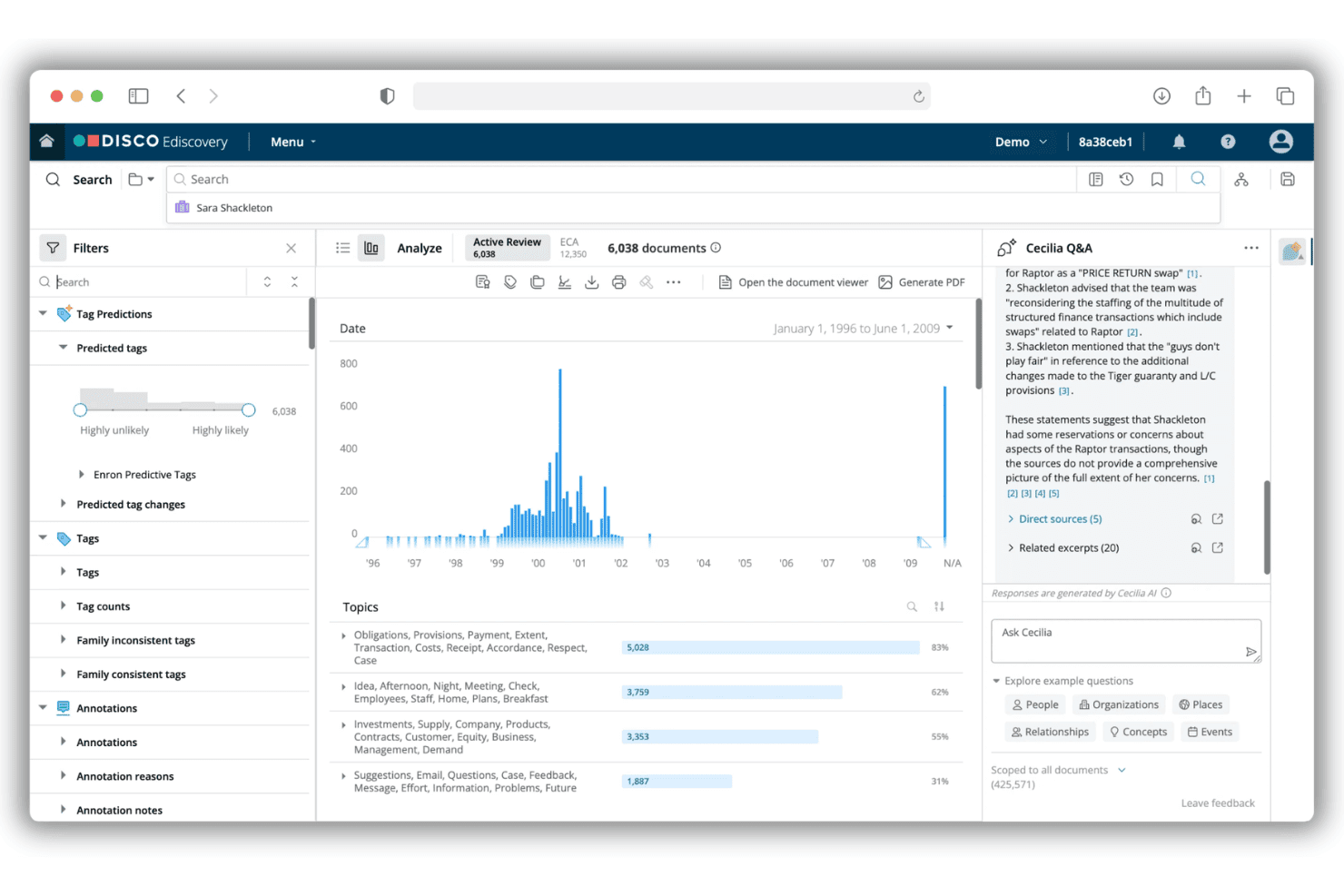
DISCO Auto Review uses AI to review, tag, and redact legal documents. DISCO Auto Review is an AI-powered legal document review platform designed to help litigation and eDiscovery teams manage large-scale document analysis, predictive coding, tagging, redaction, and production within a single solution.
Who Is DISCO Best For?
Litigation attorneys and eDiscovery teams at law firms or corporate legal departments handling complex, high-volume document review projects.
Why I Picked DISCO
I picked DISCO as one of the best because I can prioritize massive review projects using advanced AI that delivers explainable tagging. My team uses its predictive coding and continuous learning features to quickly surface relevant or privileged materials.
DISCO Key Features
- Bulk document ingestion: Import large volumes of files in multiple formats with full metadata retention.
- Pattern-based redaction: Find and redact sensitive data across documents using custom rules.
- Hierarchical tagging panels: Apply multi-level tags and codes to documents for organized review.
- Bates numbering and load file export: Generate production sets compatible with industry standards like Relativity and Concordance.
DISCO Integrations
DISCO offers native export integrations with Relativity and Concordance, supports industry-standard load file formats, and provides an API for custom integrations.
Pros and Cons
Pros:
- Built-in privilege and responsiveness tagging
- Scalable to very large datasets
- AI explanations for review decisions
Cons:
- Advanced redaction requires additional modules
- Few direct document management integrations
Learn more about DISCO: Best for integrated language translation
- Free demo available
- Pricing upon request
Visit WebsiteCustomer Rating:4.5/5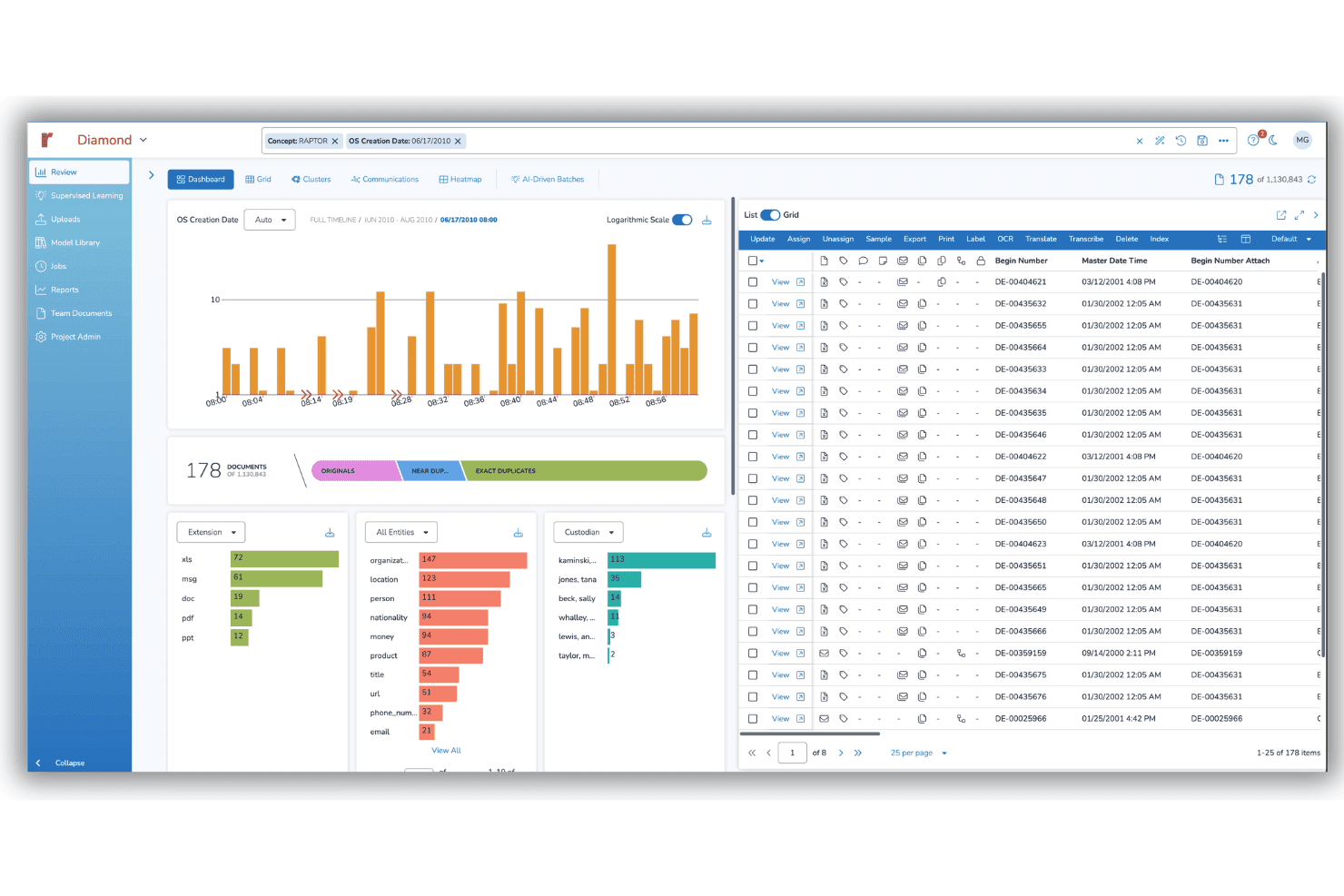
Reveal provides AI-powered legal document review for eDiscovery teams. Reveal is an AI-powered legal document review platform that provides advanced search, TAR/predictive coding, tagging, redaction, and multi-format document processing for litigation and eDiscovery teams.
Who Is Reveal Best For?
Reveal is a strong match for litigation teams and eDiscovery professionals handling high volumes of multilingual or cross-border data.
Why I Picked Reveal
I picked Reveal as one of the best because I use its built-in language translation to review non-English evidence in complex, multilingual matters. My team is able to apply AI-assisted translation alongside document tagging and redaction in one workflow.
Reveal Key Features
- Bulk document ingestion: Upload large volumes of documents in multiple formats with preserved metadata.
- Custom coding panels: Configure detailed coding and tagging systems for nuanced review workflows.
- AI-powered contextual search: Run concept, Boolean, or semantic queries to surface relevant documents quickly.
- Automated Bates numbering: Generate consistent Bates numbers and export production-ready files in standard formats.
Reveal Integrations
Reveal offers native integrations with Relativity, Concordance, and Brainspace, and provides an API for custom integrations.
Pros and Cons
Pros:
- Transparent rationale for tagging and coding
- Bulk redaction across content and metadata
- Built-in AI document classification and review
Cons:
- Not ideal for small-volume litigation reviews
- Some advanced features can be unstable
Learn more about Reveal: Best for customizable workflow automation
- Free demo available
- Pricing upon request
Visit WebsiteCustomer Rating:4.9/5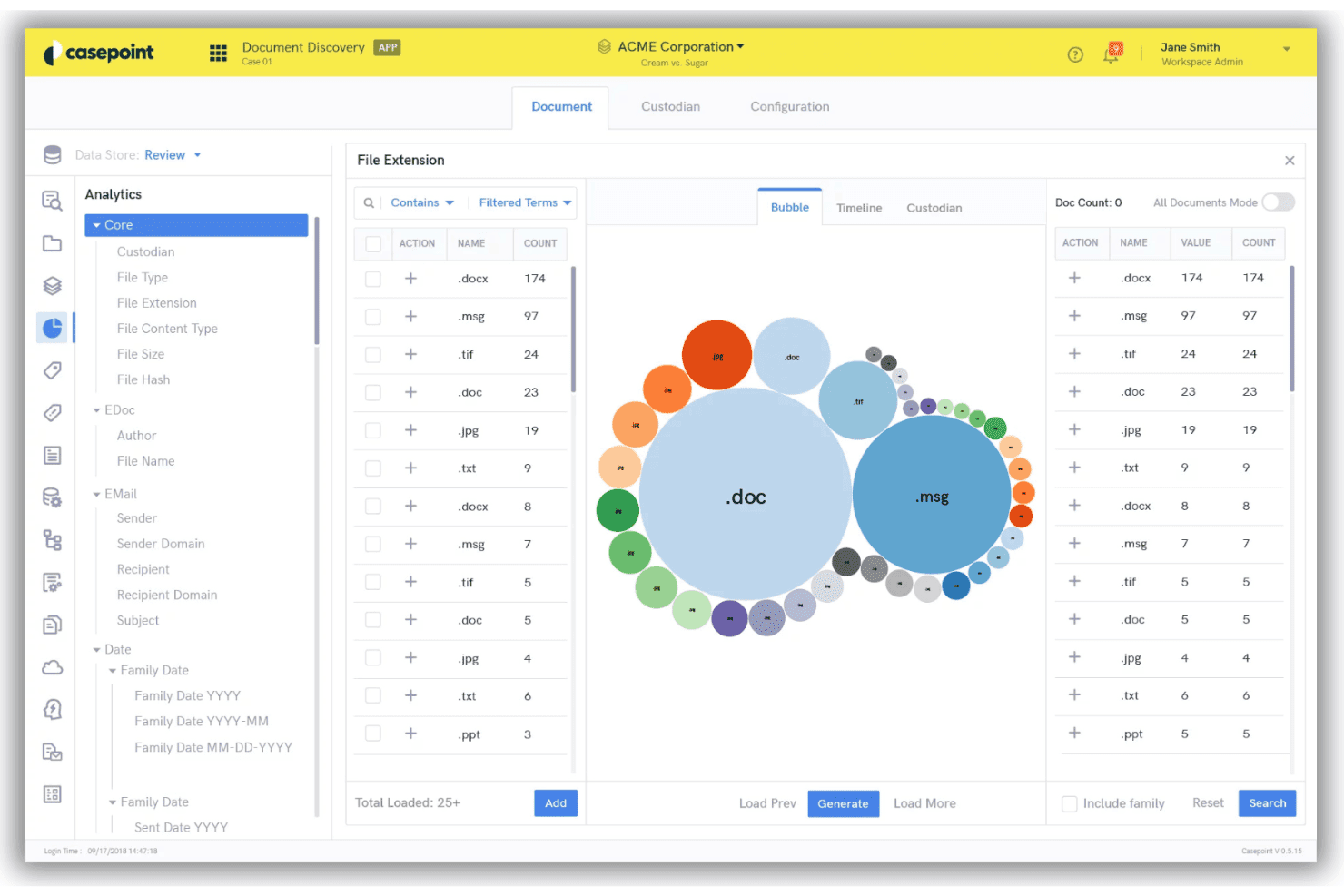
Casepoint streamlines legal document review with eDiscovery and AI tools. Casepoint is an eDiscovery software platform purpose-built for legal document review, offering bulk ingestion, advanced search, technology-assisted review, granular tagging, redaction, and production tools for legal teams handling complex cases.
Who Is Casepoint Best For?
Casepoint suits litigation teams and legal operations professionals in large law firms, corporate legal departments, and government agencies managing high-volume discovery.
Why I Picked Casepoint
I picked Casepoint as one of the best because I can automate complex legal review workflows using its flexible workflow designer. I use triggers to batch documents, set privilege review steps, and automatically escalate issues for quality control.
Casepoint Key Features
- Bulk document ingestion: Import large volumes of documents in all common legal and native formats with metadata and OCR.
- Advanced search and filtering: Run Boolean, conceptual, and metadata searches across the entire database of case documents.
- Technology-assisted review: Apply predictive coding and continuous active learning to prioritize responsive or privileged documents.
- Production and export tools: Generate Bates-numbered, court-compliant production sets in multiple formats, including Relativity and Concordance.
Casepoint Integrations
Casepoint offers native integrations with Microsoft 365, Google Workspace, NetDocuments, Relativity, and Concordance, and provides an API for custom integrations.
Pros and Cons
Pros:
- Customizable coding panel for privilege tagging
- Automatically escalates priority quality issues
- Advanced bulk redaction tools for PII
Cons:
- Requires vendor support for setups
- Some workflows require vendor technical support
Learn more about Casepoint: Best for AI-assisted document categorization
- Free demo available
- Pricing upon request
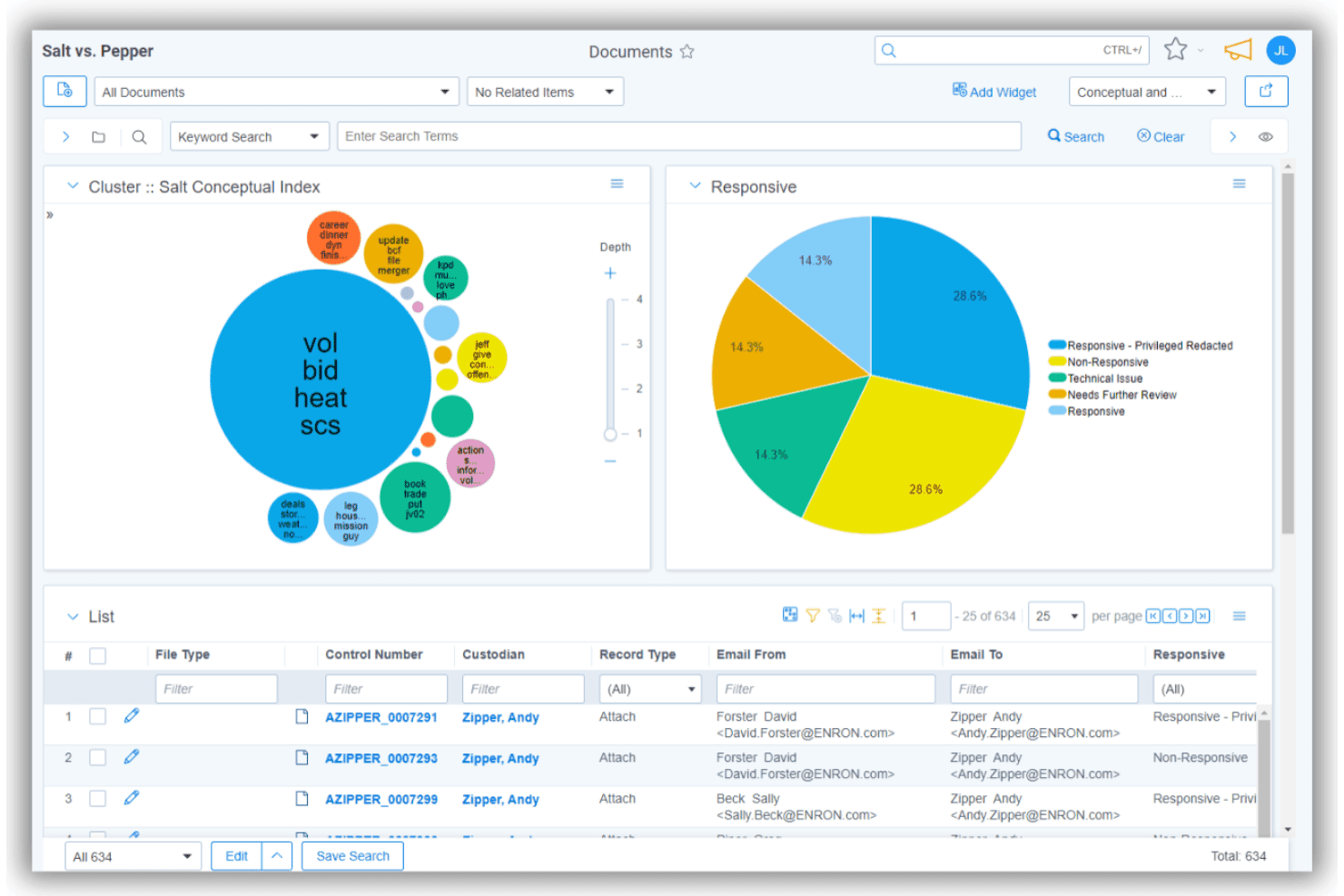
Relativity aiR uses AI for legal document review and eDiscovery. Relativity aiR for Review is an AI-powered legal document review platform designed to support advanced search, document categorization, tagging, redaction, and production workflows for litigation and eDiscovery teams.
Who Is Relativity Best For?
Litigation teams and eDiscovery professionals in large law firms or corporate legal departments managing complex, high-volume document reviews.
Why I Picked Relativity
I picked Relativity because I rely on its advanced AI-assisted document categorization to quickly surface relevant files in high-volume matters. My team can set AI-based rules to auto-code privilege, responsiveness, and issue tags, accelerating review and quality control.
Relativity Key Features
- Bulk document ingestion: Import and process large volumes of files across 300+ formats, including emails and images.
- Advanced search queries: Run Boolean, concept, and metadata searches to pinpoint documents quickly.
- Redaction toolkit: Redact text, images, and metadata using pattern-based and bulk workflows.
- Production export workflows: Create Bates-stamped, load file-compatible export sets for opposing counsel and court submission.
Relativity Integrations
Relativity offers native integrations across the Microsoft ecosystem, including Microsoft 365 and Azure, and provides access to the Relativity App Hub for marketplace integrations. An API is available for custom integrations.
Pros and Cons
Pros:
- Audit trails for defensibility and compliance
- Customizable coding panels for review workflows
- AI-assisted multi-class document categorization
Cons:
- Occasional platform slowdowns with large datasets
- Steep onboarding for advanced workflow features
Learn more about Relativity: Best for comprehensive compliance management
- Free demo available
- Pricing upon request
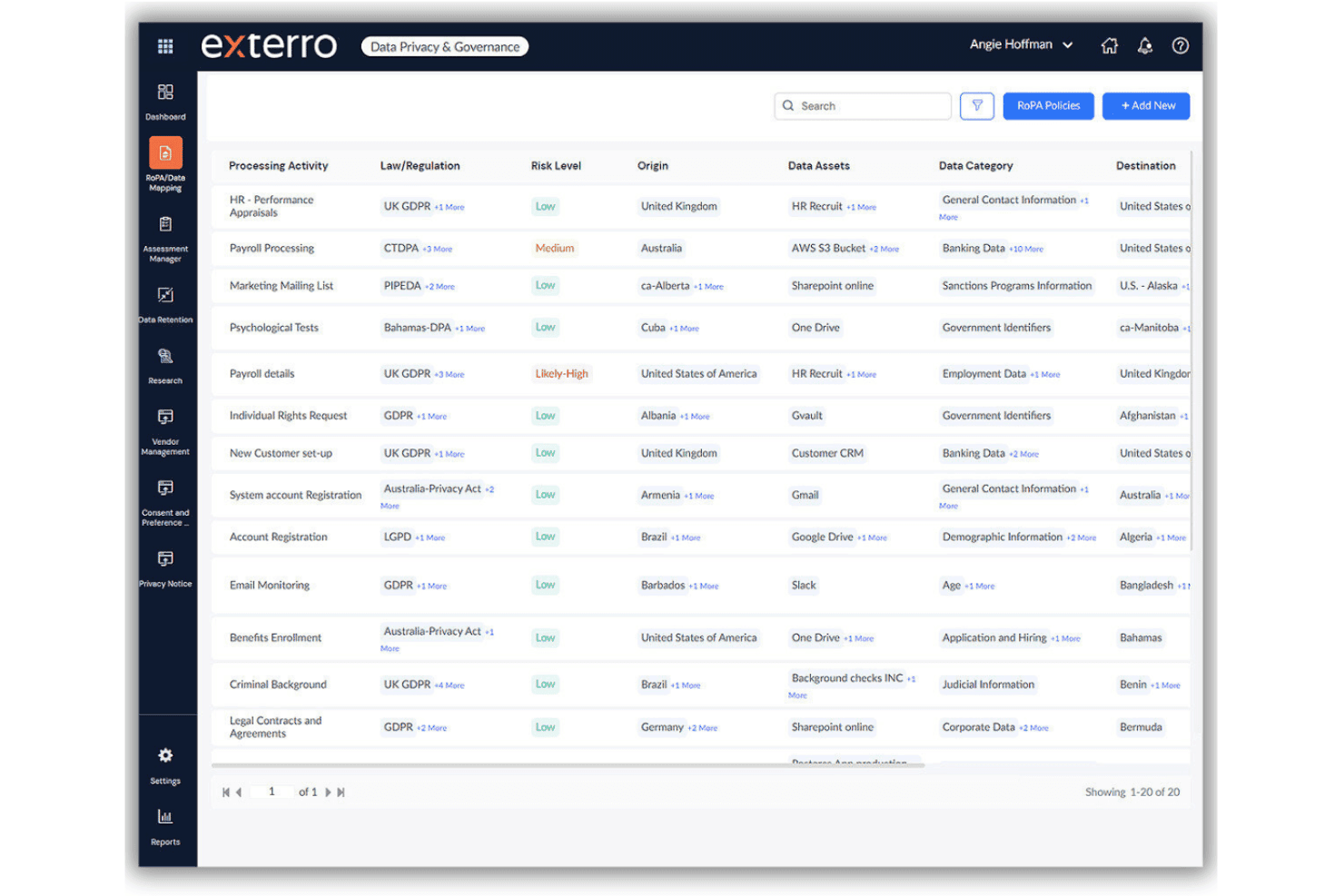
Exterro streamlines legal review with AI and compliance tools. Exterro is a legal document review software platform designed for enterprises and law firms, offering advanced document ingestion, AI-assisted search, predictive coding, granular tagging, and built-in compliance management.
Who Is Exterro Best For?
Exterro suits litigation teams, eDiscovery managers, and corporate legal departments in midsize to large organizations with complex compliance obligations.
Why I Picked Exterro
I picked Exterro because I rely on its automated compliance workflows and defensible audit trails for large-scale legal reviews. I like having baked-in AI-powered bulk redaction and export tools that align with strict enterprise and regulatory requirements.
Exterro Key Features
- Bulk document ingestion: Import and process files in diverse formats with batch upload and metadata preservation.
- Custom tag panels: Apply hierarchical issue coding and tag sets directly to documents for granular review organization.
- Advanced search functionality: Run Boolean, concept, and fuzzy searches across the entire document set with saved query support.
- Production set builder: Compile structured, rules-based production sets with Bates numbering and multiple export options.
Exterro Integrations
Exterro offers native integrations across the Microsoft ecosystem, including Microsoft 365, and supports data sources like Google Workspace, Box, Dropbox, and Relativity. An API is available for custom integrations.
Pros and Cons
Pros:
- Extensive export options and Bates labelling
- AI-powered bulk redaction and privilege detection
- Automated audit trail for document action
Cons:
- Interface performance slows with huge data sets
- Complex setup for large-scale review workflows
Learn more about Exterro: Best for real-time case collaboration
- Free demo available
- Pricing upon request
Visit WebsiteCustomer Rating:4.7/5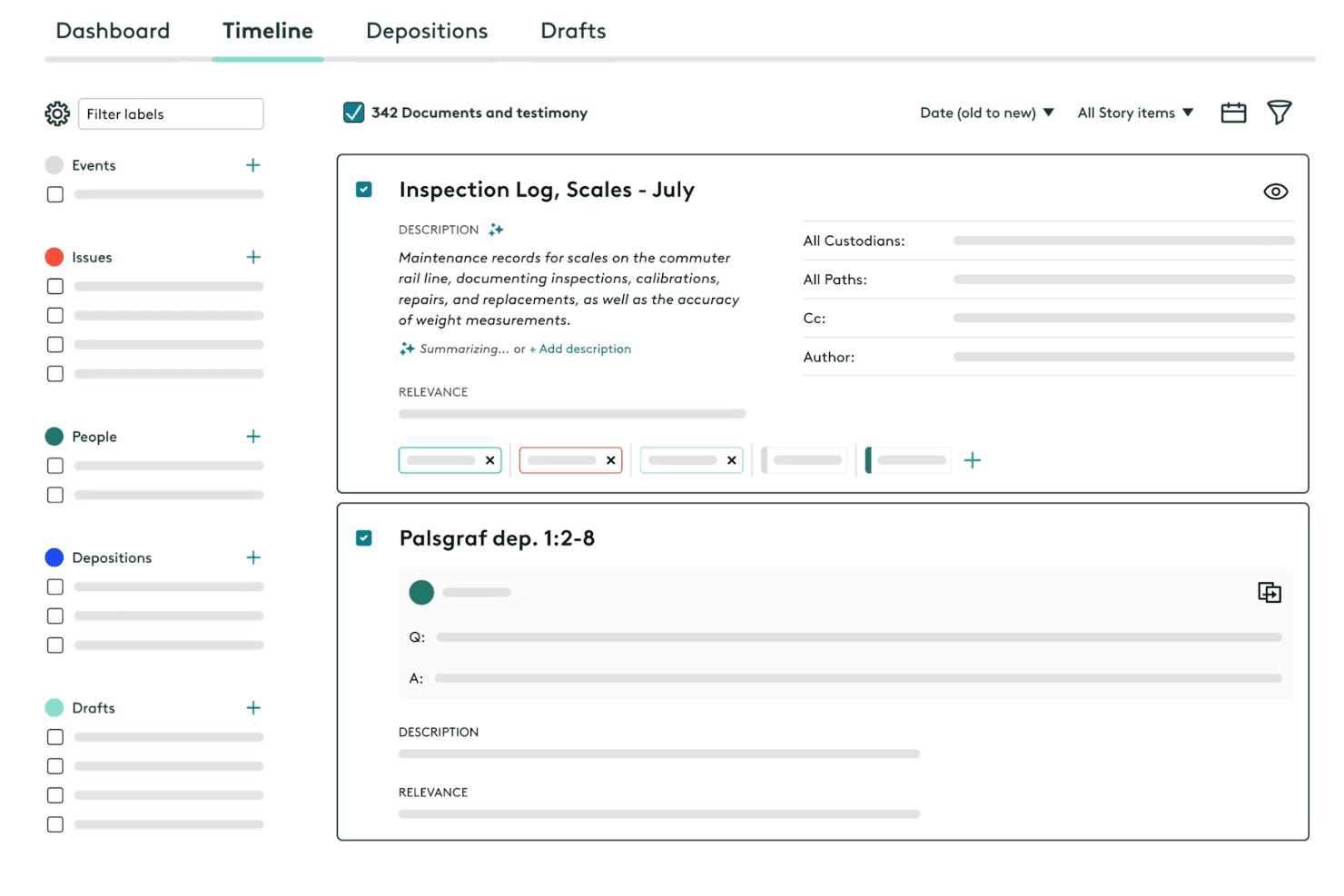
Everlaw streamlines legal discovery with AI-powered document review. Everlaw is a cloud-based legal document review platform that offers advanced search, technology-assisted review, customizable coding panels, bulk redactions, and full production workflows for law firms and legal teams handling discovery.
Who Is Everlaw Best For?
Litigation teams, eDiscovery managers, and legal departments at midsize to large organizations seeking secure, collaborative document review environments.
Why I Picked Everlaw
I picked Everlaw as one of the best because I use its real-time case collaboration to assign review tasks, leave comments directly on specific documents, and coordinate productions with multiple teams in one secure platform.
Everlaw Key Features
- Bulk document ingestion: Upload and process large sets of emails, PDFs, images, and native files with metadata preserved.
- Advanced search and filtering: Use Boolean, fuzzy, and keyword searches to locate documents quickly across large datasets.
- Technology-assisted review (TAR): Apply machine learning to classify documents by relevance or privilege.
- Customizable coding panels: Configure multi-level tagging, issue codes, and audit trails for consistent document review workflows.
Everlaw Integrations
Everlaw offers native integrations with Microsoft 365, Google Workspace, Relativity, and Okta, and provides an API for custom integrations.
Pros and Cons
Pros:
- Transparent and auditable review workflows
- Advanced document redaction features
- Real-time collaboration on case documents
Cons:
- Higher cost for small law firms
- No on-premise deployment option
Learn more about Everlaw: Best for instant document upload and processing
- Free trial available
- Pricing upon request
Visit WebsiteCustomer Rating:4.6/5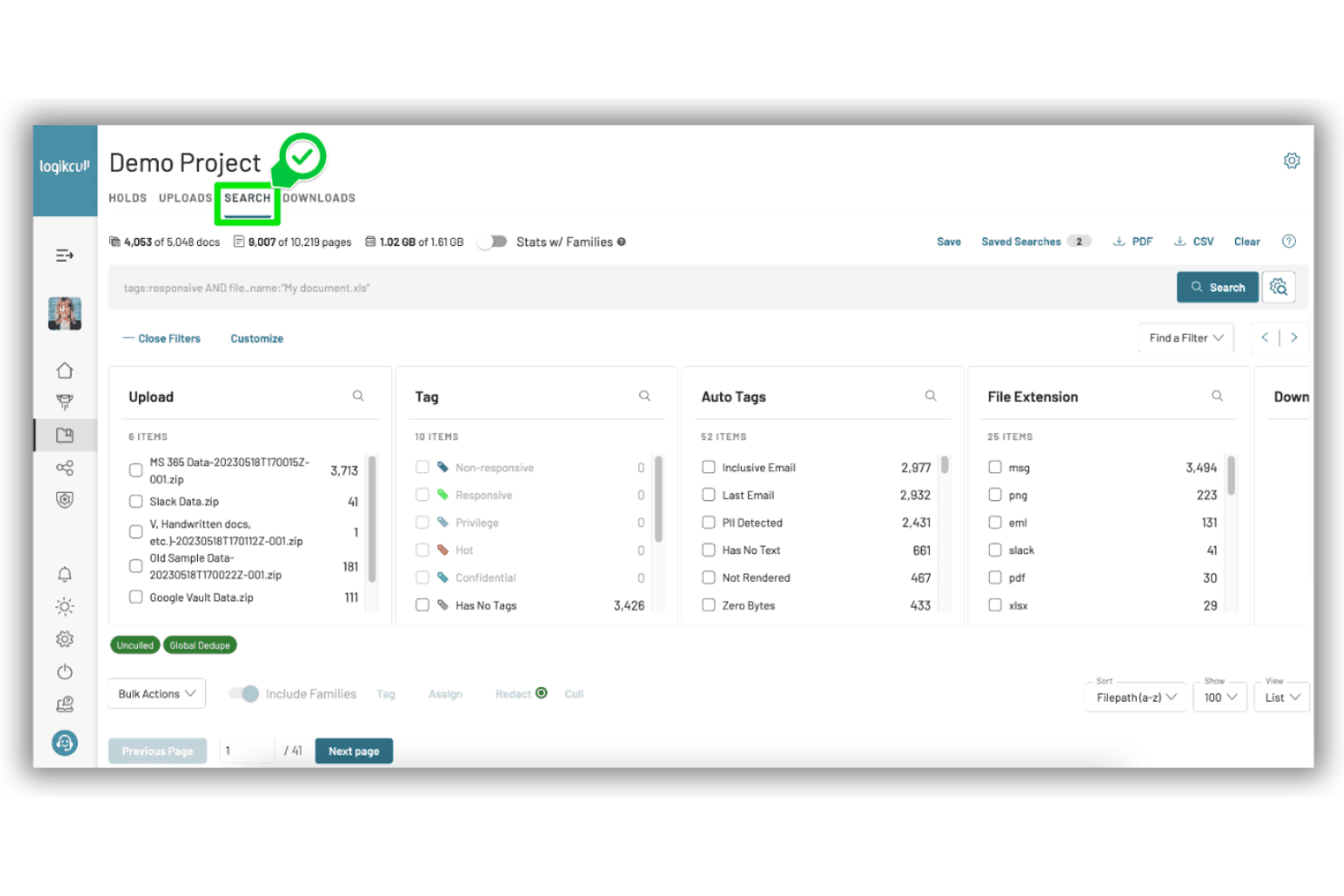
Logikcull streamlines eDiscovery with fast document review and search. Logikcull is a cloud-based legal document review and eDiscovery platform built for fast document ingestion, metadata preservation, advanced search, and collaborative review of case files.
Who Is Logikcull Best For?
Litigation attorneys, corporate counsel, and legal operations teams handling document-heavy discovery or investigations.
Why I Picked Logikcull
I picked Logikcull as one of the best because I can instantly upload large volumes of case files, trigger automatic processing and OCR, and start reviewing searchable documents in minutes. This has made quick-turn matters and deadline-driven discovery much less stressful for my team.
Logikcull Key Features
- Advanced search and filtering: Run Boolean, keyword, and metadata searches across your entire document set.
- Custom tagging and issue coding: Apply tags and issue codes to documents with a clear audit trail.
- Bulk redaction tools: Redact sensitive text, images, or patterns across multiple documents at once.
- Production and export with Bates numbering: Create structured export sets in standard legal formats with Bates stamping.
Logikcull Integrations
Logikcull offers native integrations with Box, Google Drive, Slack, Clio, Microsoft OneDrive, and Microsoft 365. An API is available for custom integrations.
Pros and Cons
Pros:
- Strong search and filtering for large datasets
- Reliable bulk redaction and metadata culling
- Instant document upload and automatic processing
Cons:
- Limited coding customization for complex workflows
- No TAR or predictive coding options
 Best for automated evidence organization
- Free demo available
- Pricing upon request
Visit WebsiteCustomer Rating:4.4/5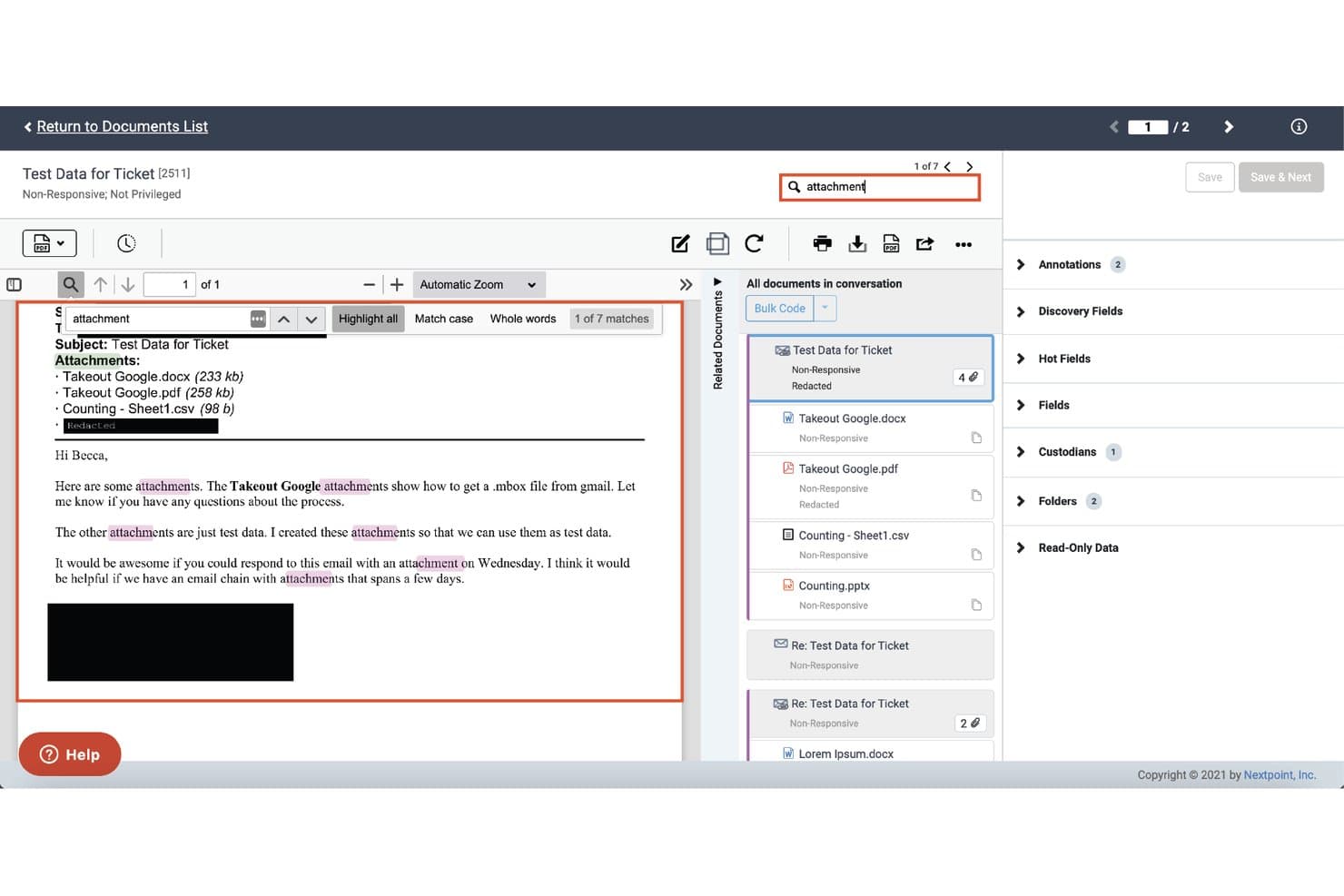
Nextpoint offers search hit highlighting across documents, with keyword matches visually flagged and related documents grouped by conversation in the review panel. Nextpoint is a legal document review platform designed for discovery teams that need to organize, search, and manage large volumes of digital evidence with integrated AI, redaction, tagging, and production tools.
Who Is Nextpoint Best For?
Litigation teams, law firms, and corporate counsel managing complex eDiscovery and high-volume document review projects.
Why I Picked Nextpoint
I picked Nextpoint as one of the best because I’m able to quickly organize massive evidence collections, apply custom tags in bulk, and auto-classify documents, making it especially effective for automated evidence organization.
Nextpoint Key Features
- Bulk document ingestion: Import large volumes of email, PDFs, images, and native files while preserving metadata.
- Advanced search and filtering: Use Boolean, fuzzy, and concept searches to find and organize documents.
- Integrated redaction tools: Redact text, images, and metadata directly inside the review workspace.
- Production set builder: Create Bates-stamped productions in standard formats with load files for opposing counsel.
Nextpoint Integrations
Nextpoint offers native integrations with Microsoft 365, Box, Dropbox, Google Drive, Relativity load files, iManage, and NetDocuments. An API is available for custom integrations.
Pros and Cons
Pros:
- Continuous active learning TAR workflows
- Advanced batch redaction and tagging tools
- Automated organization of evidence collections
Cons:
- Semantic search capabilities are still developing
- Limited analytics on cross-matter patterns
Learn more about Nextpoint:
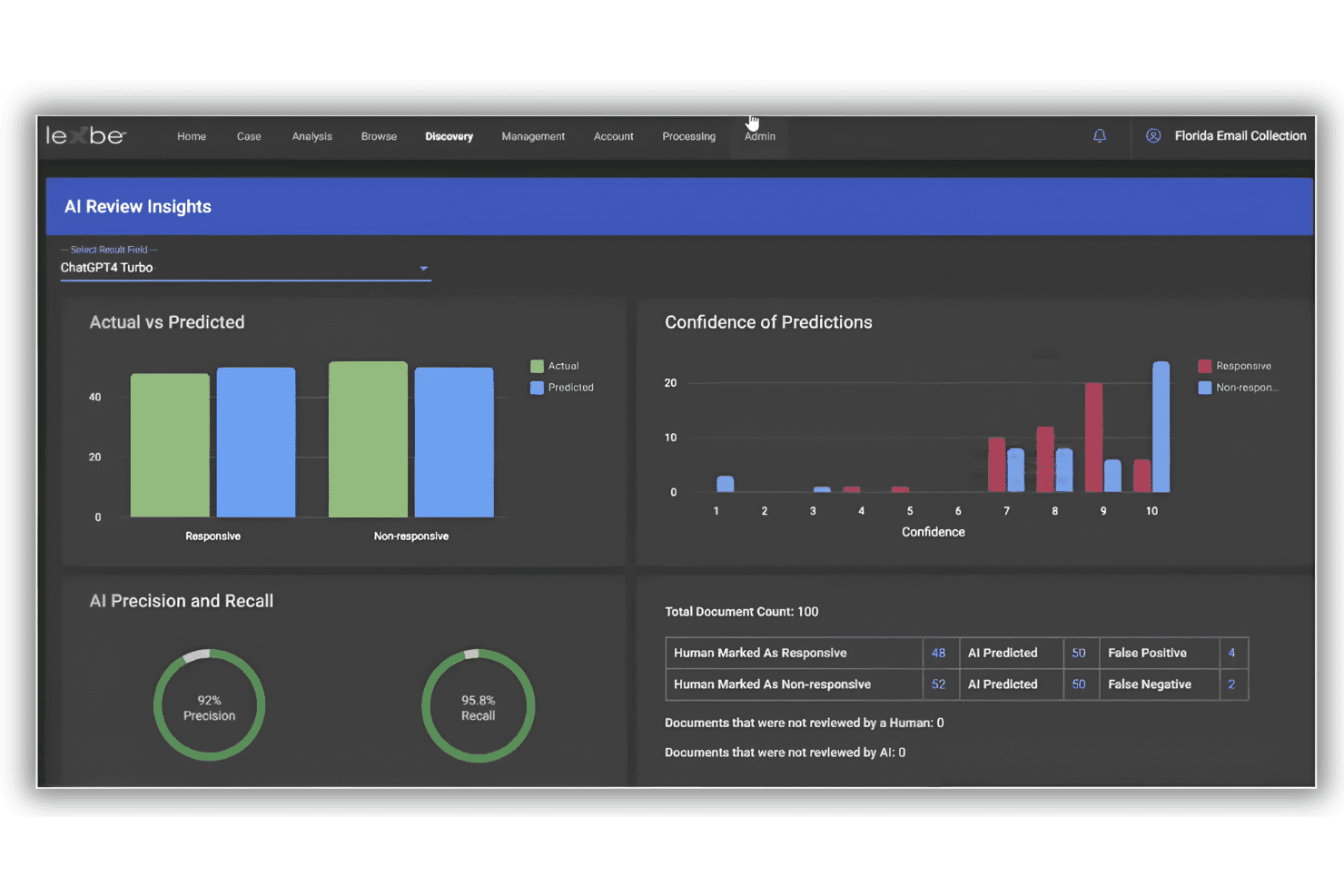
Lexbe streamlines legal document review with AI search and litigation tools. Lexbe is a cloud-based legal document review software designed for high-volume litigation, offering bulk document ingestion, advanced search, AI-driven analytics, custom tagging, and full-scale production capabilities.
Who Is Lexbe Best For?
Litigation teams and law firms managing complex eDiscovery projects with large, diverse document sets.
Why I Picked Lexbe
I picked Lexbe as one of the best because I need advanced search customization for high-volume legal reviews. I use Lexbe’s Boolean, fuzzy, and concept search to create highly nuanced filters, and I rely on its save and share query options during large-scale collaborative projects.
Lexbe Key Features
- Bulk document ingestion: Upload thousands of files at once with automatic metadata extraction and deduplication.
- AI-assisted redaction: Automatically identify and redact sensitive information across documents.
- Custom tagging and coding panels: Apply issue codes, privilege flags, and custom tags for quick document categorization.
- Production set management: Create Bates-stamped, court-ready production sets with load file export options.
Lexbe Integrations
Lexbe offers a native integration with Clio Manage and leverages AWS Bedrock for AI-powered features. An API is available for custom integrations.
Pros and Cons
Pros:
- AI-powered redaction for sensitive content
- Fast bulk document OCR and ingestion
- Advanced multilayered and entity-based search tools
Cons:
- Limited native integrations outside core legal tools
- Lacks built-in tools to create chronologies
Learn more about Lexbe:
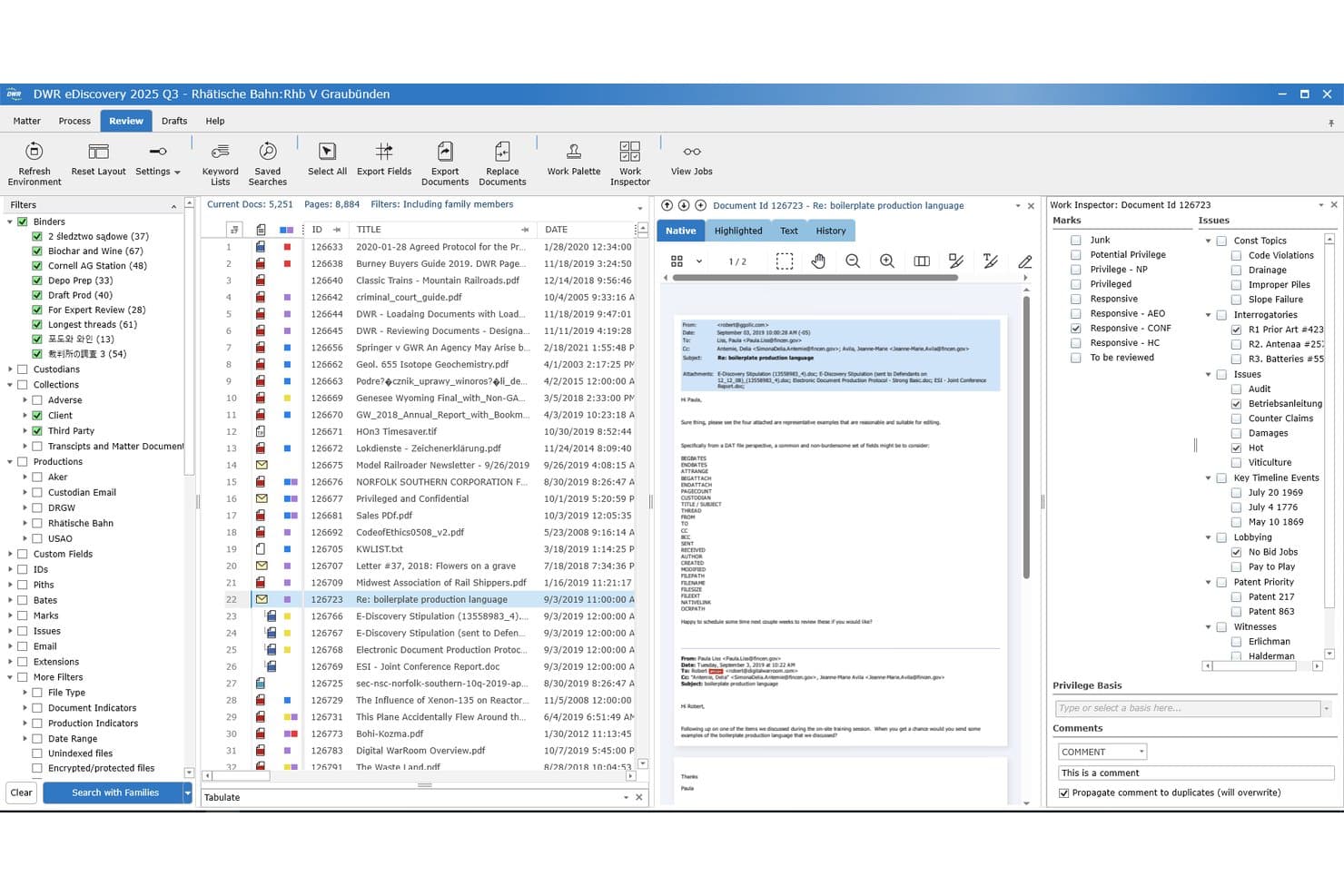
Digital WarRoom offers a comprehensive document review interface with filters, document preview, work inspector, marks, issues, and privilege basis panels for legal teams. Digital WarRoom is a legal document review software platform built for litigation, eDiscovery, and corporate legal teams to handle document ingestion, search, tagging, redaction, and full production workflows.
Who Is Digital WarRoom Best For?
Litigation teams, corporate legal departments, and eDiscovery professionals managing sensitive or high-volume document reviews.
Why I Picked Digital WarRoom
I picked Digital WarRoom as one of the best because I rely on its built-in privacy redaction tools for bulk redactions of text, images, and metadata. My team can quickly identify and redact sensitive information using its pattern-based and auto-detection features.
Digital WarRoom Key Features
- Bulk document ingestion: Import large volumes of emails, PDFs, and native files with automated metadata extraction.
- Advanced search and filtering: Use Boolean, keyword, and metadata queries to isolate relevant documents fast.
- Custom tagging and coding panels: Assign tags, privilege codes, and issue codes with audit trails tracking review decisions.
- Structured production workflows: Produce sets with Bates numbering and export to standard load file formats for court or opposing counsel.
Digital WarRoom Integrations
Digital WarRoom offers native integrations with Microsoft Outlook, Microsoft 365, PST files, and MBOX. An API is available for custom integrations.
Pros and Cons
Pros:
- Custom audit trails for every review action
- End-to-end Bates stamping and production tools
- Built-in pattern-based redaction for privacy data
Cons:
- Few connections to legal practice management tools
- Limited AI-assisted document review capabilities
Learn more about Digital WarRoom:
Other Legal Document Review Software
Here are some additional legal document review software options that didn’t make it onto my shortlist, but are still worth checking out:
- 11Venio SystemsBest for interactive dashboard visualization
- 12CloudNineBest for on-premise deployment flexibility
- 13Epiq DiscoveryBest for multilingual data processing
- 14Nuix DiscoverBest for email thread visualizations
- 15OnnaBest for direct cloud tool integrations
- 16ConsilioBest for project-managed review services
- 17Microsoft Purview eDiscoveryBest for Microsoft 365 data integration
- 18OpenText eDiscoveryBest for building case chronologies
How I Evaluate Legal Document Review Software
I split my evaluation into core capabilities every review platform must have—like bulk ingestion and TAR—and the differentiators that separate tools in high-stakes, large-scale matters.
Core Functionality (Table Stakes For This List)
When I'm selecting tools for my list, I rank each one on a scale from 0 (does not offer the functionality) to 5 (excels in this area) for each core functionality listed below. Then, I calculate the tool's total score as a percentage. Each tool needs to achieve a minimum total score of 65% to be considered for inclusion.
- Bulk Document Ingestion: I check whether the platform can handle large mixed-format uploads—emails, PDFs, images, spreadsheets—while preserving metadata and family relationships.
- Advanced Search & Filtering: Boolean, concept, and metadata search capabilities matter here, especially for isolating date ranges or custodians across a large corpus.
- TAR/Predictive Coding: I evaluate whether the tool supports continuous active learning workflows that let reviewers train the model as they code documents in real time.
- Document Tagging & Coding: Custom coding panels, issue tags, and privilege designations with full audit trails are what I look for to support defensible review workflows.
- Redaction Tools: The ability to apply bulk and pattern-based redactions across text, images, and metadata is key—particularly for matters involving PII or PHI.
- Production & Export: I look for structured production sets with Bates numbering, load file generation, and export compatibility with formats like Concordance and Relativity.
Once I have a list of tools that meet the criteria, I consider what sets each platform apart.
Differentiating Factors (What Sets Vendors Apart)
Here's how I compare and contrast different vendors:
Standout Features
Generative AI summarization is a big differentiator I evaluate. Platforms that auto-summarize depositions, extract key facts, or draft privilege logs save review teams hours on every matter. Multilingual and OCR support also matters for cross-border investigations where scanned contracts or foreign-language correspondence need to be searchable alongside native files. I look at how far redaction automation goes beyond manual tools—AI-driven PII detection that flags sensitive data across thousands of documents at once is where the real value shows up.
Beyond Features
Pricing models vary widely in this space—per-GB hosting fees can spiral on large matters, so I evaluate whether a platform offers predictable per-user or flat-rate pricing that scales with your caseload. Security certifications like SOC 2 Type II and FedRAMP matter when you're handling sensitive litigation data, and I check whether the vendor provides single-tenant hosting for matters that demand it. Ecosystem integrations also weigh in, especially connectivity with Microsoft 365 and tools like iManage or NetDocuments for collection and production handoffs.
How to Choose Legal Document Review Software
It’s easy to get bogged down in long feature lists and complex pricing structures. To help you stay focused as you work through your unique software selection process, here’s a checklist of factors to keep in mind:
| Factor | What to Consider |
|---|---|
| FactorScalability | What to ConsiderWill the software still perform with rapidly growing data sets or multiple concurrent reviews? Check for clear guidance on case volume limits and scaling options. |
| FactorIntegrations | What to ConsiderDoes it connect with tools you already use, like Microsoft 365, Slack, or iManage? Confirm how these integrations impact your existing workflows and IT resources. |
| FactorCustomizability | What to ConsiderCan you tailor tags, workflows, and coding panels to your team’s preferred processes? Consider the ease and limits of setup changes. |
| FactorEase of use | What to ConsiderWill reviewers and legal staff ramp up quickly? Ask to see reviewer interfaces in action and look for common friction areas like search, redaction, or coding. |
| FactorImplementation and onboarding | What to ConsiderWhat’s the timeline from purchase to first use? Understand the vendor’s onboarding support and what resources you’ll need internally for a smooth transition. |
| FactorCost | What to ConsiderIs pricing transparent and predictable? Consider all-in costs, hosting, user licenses, extra data processing, and ongoing support when budgeting. |
| FactorSecurity safeguards | What to ConsiderWhat certifications, controls, and encryption does the platform support? Review details for sensitive or regulated data, especially for litigation or compliance. |
| FactorSupport availability | What to ConsiderIs there live support when you’re on deadline? Check for 24/7 response commitments, escalation routes, and user training options relevant to your region/time zone. |
What Is Legal Document Review Software?
Legal document review software is a specialized platform that helps legal teams organize, search, tag, redact, and produce large volumes of electronic documents for litigation or investigations. These tools support discovery workflows, enable efficient collaboration among reviewers, and ensure sensitive information is protected throughout the review and production process.
Features of Legal Document Review Software
When selecting legal document review software, keep an eye out for the following key features:
- Bulk document ingestion: Import, process, and organize thousands of files in various formats—emails, PDFs, images, spreadsheets—while preserving metadata and relationships.
- Advanced search and filtering: Perform Boolean, keyword, and metadata searches across the entire document set to quickly find relevant materials and responsive content.
- Predictive coding (TAR): Use AI-assisted algorithms to classify, prioritize, and flag documents for responsiveness, privilege, or issue relevance, minimizing manual review hours.
- Custom tagging and coding: Apply issue codes, privilege designations, and reviewer tags to documents, with user-friendly panels and complete audit trails for tracking decisions.
- Bulk redaction tools: Remove sensitive data—like personal information or privileged content—from large sets of documents quickly and with pattern-based rules.
- Automated production and export: Generate production sets with Bates numbering, load files, and multiple export formats to comply with legal and court requirements.
- Review collaboration: Assign batches to reviewers, manage conflicts, and communicate decisions to keep teams aligned and efficient, even on large, fast-moving cases.
- Analytics and reporting: Track reviewer activity, document status, and key metrics to monitor progress, spot bottlenecks, and manage budgets.
- Multilingual and OCR support: Process documents in multiple languages and convert scanned or handwritten content to searchable, editable text using optical character recognition.
- Role-based security controls: Limit access, actions, and visibility by user role, ensuring confidentiality and maintaining defensible chains of custody.
Benefits of Legal Document Review Software
Implementing legal document review software provides several benefits for your team and your business. Here are a few you can look forward to:
- Faster document review: Automated ingestion, search, and predictive coding accelerate the review process, helping you meet tight discovery or investigation deadlines.
- Reduced risk of errors: Bulk redaction and role-based access controls lower the chance of accidentally producing privileged or sensitive information.
- Improved collaboration: Shared workspaces, reviewer assignments, and audit trails make it easier to manage complex matters with distributed teams.
- Cost control: Advanced analytics and reporting let you monitor review progress, predict budgets, and reduce unnecessary manual work.
- Greater compliance assurance: Automated audit trails, production workflows, and secure data handling help you demonstrate defensible practices for courts or regulators.
- Multi-format and language support: OCR and multilingual tools let your team handle diverse data types and global matters without added complexity.
- Direct integration with your stack: Built-in connections to leading legal and productivity platforms support workflows from collection to production.
Costs and Pricing of Legal Document Review Software
Selecting legal document review software requires an understanding of the various pricing models and plans available. Costs vary based on features, team size, add-ons, and more. The table below summarizes common plans, their average prices, and typical features included in legal document review software solutions:
Plan Comparison Table for Legal Document Review Software
| Plan Type | Average Price | Common Features |
|---|---|---|
| Plan TypeFree Plan | Average Price$0 | Common FeaturesLimited document uploads, basic search, single reviewer access, and manual tagging. |
| Plan TypePersonal Plan | Average Price$50-$150/user/month | Common FeaturesStandard ingestion, basic analytics, limited redaction, email support, and small batch productions. |
| Plan TypeBusiness Plan | Average Price$200-$500/user/month | Common FeaturesBulk ingestion, predictive coding, advanced search, team collaboration, secure audit trails, and custom production formats. |
| Plan TypeEnterprise Plan | Average Price$1,000+/month | Common FeaturesTerabyte-scale storage, multilingual OCR, role-based access, API integrations, compliance controls, and 24/7 support. |
Legal Document Review Software FAQs
Here are some answers to common questions about legal document review software:
How does legal document review software handle confidential or privileged information?
These legal tech platforms provide granular access controls, detailed audit trails, and automated redaction features driven by modern AI tools to prevent unauthorized access or accidental disclosure of privileged materials. By securing legal document review and protecting data privacy during electronic discovery, they protect sensitive ESI (electronically stored information) and ensure only authorized legal teams have access during the review process.
Can legal document review software process emails, images, and non-standard file types?
Yes, most solutions support a wide range of documents, including emails, images, spreadsheets, and scanned files, with OCR technology making even non-text formats searchable. Using advanced artificial intelligence, this comprehensive ediscovery process extracts valuable metadata from any complex data set and converts it into a searchable legal document with accurate citations, which is a highly cost-effective AI solution compared to time-consuming manual sorting.
Is it possible to collaborate with external co-counsel or review teams?
Yes, many software providers let you invite outside reviewers or advisors with specific access permissions, making cross-organization collaboration secure and efficient. Built-in collaboration tools and legal AI allow both in-house corporate legal departments and external partners to work together in a secure workspace to manage legal workflows, optimize overall legal processes, and coordinate case strategy in real-time.
Are these tools suitable for small law firms or just large organizations?
As highlighted in a recent industry webinar, most vendors offer scalable plans, so both small practices and large enterprises can find a solution that fits their caseload and budget. For boutique law firms and solo legal professionals, implementing a saas or cloud-based electronic discovery platform means paralegals and attorneys can execute an end-to-end document review without needing massive IT budgets.
What integrations should I look for when comparing legal document review software?
Look for solid connections with tools like Microsoft 365, Google Workspace, matter management platforms, and billing systems to enable efficient data collection, secure electronic discovery, and automation. Connecting these systems lets you connect your document management with vital functions like issuing a legal hold across your organization, which helps—as we often demonstrate in our training webinar sessions—in creating a unified review platform for all legal work.