

Los principales problemas que abordan estas herramientas son la gestión desorganizada de los casos, las prácticas de facturación ineficientes y la dificultad para gestionar las transacciones con tarjeta de crédito, desafíos comunes a los que he visto enfrentarse a muchos profesionales del derecho.
Tabla comparativa de alternativas a Clio
Esta tabla comparativa resume los detalles de precios de mis principales selecciones de alternativas a Clio:
| Tool | Best For | Trial Info | Price | ||
|---|---|---|---|---|---|
| 1 | Ideal para la gestión segura de casos en la nube | Prueba gratuita de 7 días | Desde $49/usuario/mes (facturado anualmente) | Website | |
| 2 | La mejor opción para gestionar calendarios y citas | Prueba gratuita disponible | Precios previa solicitud | Website | |
| 3 | Ideal para facilitar los pagos en línea y la comunicación con los clientes | Prueba gratuita de 10 días | El precio de MyCase comienza en $49/usuario/mes. | Website | |
| 4 | Ideal para la gestión automatizada de las relaciones con los clientes | Demostración gratuita disponible | Desde $59/usuario/mes (facturado anualmente) | Website | |
| 5 | La mejor opción para funciones avanzadas de gestión de proyectos | Plan gratuito disponible | Precios disponibles previa solicitud | Website | |
| 6 | La mejor opción para una integración fluida de la facturación y la contabilidad | Prueba gratuita de 10 días | Desde $69/usuario/mes | Website | |
| 7 | Ideal para contabilidad jurídica especializada | Prueba gratuita de 10 días | Desde $49/usuario/mes | Website | |
| 8 | La mejor opción para aumentar la productividad con IA | Prueba gratuita de 10 días | El precio de Rocket Matter comienza en $65/usuario/mes (facturado anualmente). | Website | |
| 9 | La mejor opción para operaciones completas basadas en la nube | Demostración gratuita disponible | El precio de Actionstep comienza en $60/usuario/mes (facturado anualmente). | Website | |
| 10 | La mejor opción para una gestión integral de casos | Demostración gratuita disponible | Desde $69/usuario/mes (facturado anualmente) | Website |


Por qué confiar en nuestras recomendaciones de software
6,700+
Reviews
20
Industry experts
16+
Evaluation factors
14
Years
Nuestro equipo lleva probando y evaluando software desde 2012. Como líderes de despachos jurídicos, sabemos lo difícil —y lo importante— que es elegir el software adecuado.
Para esta guía, evaluamos las herramientas mediante pruebas prácticas e investigación independiente, puntuando las herramientas según nuestros criterios de selección.
Nuestras reseñas reflejan nuestro criterio editorial humano, no un discurso de ventas.
Opiniones sobre las mejores alternativas a Clio
 Ideal para la gestión segura de casos en la nube
- Prueba gratuita de 7 días
- Desde $49/usuario/mes (facturado anualmente)
Visit WebsiteCustomer Rating:4.3/5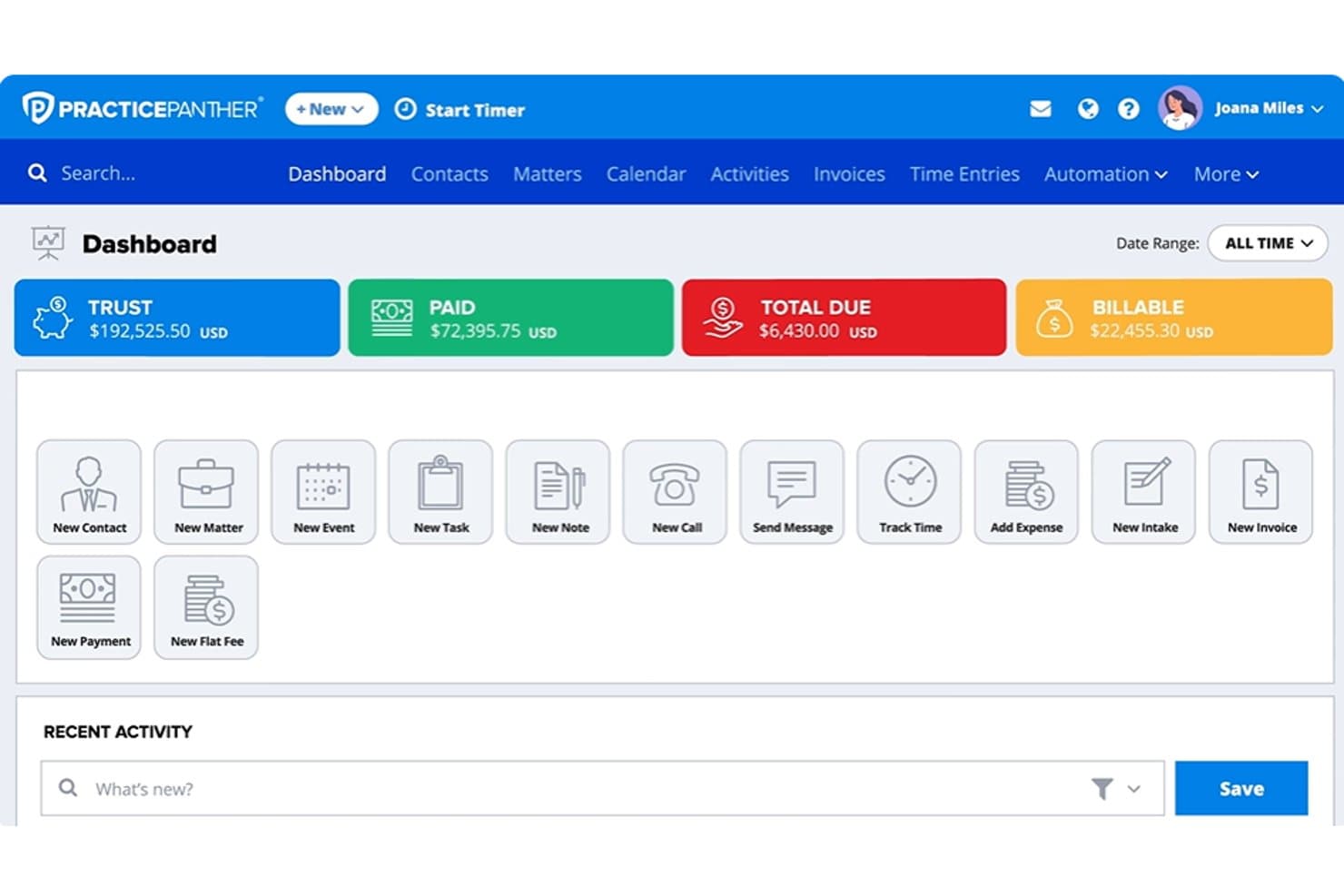
El panel de PracticePanther centraliza la facturación, las tareas y las acciones de los clientes. PracticePanther es un software de gestión de despachos jurídicos para firmas que gestionan asuntos, comunicaciones con clientes y facturación, y se posiciona como “Ideal para la gestión segura de casos en la nube”.
¿Para quién es más adecuado PracticePanther?
Los abogados que trabajan por cuenta propia y los de firmas pequeñas que quieren un único sistema para gestionar asuntos, comunicaciones con clientes y facturación encajan bien con PracticePanther.
Por qué elegí PracticePanther
Elegí PracticePanther como alternativa a Clio porque encaja con “Ideal para la gestión segura de casos en la nube”. Su cifrado de 256 bits, sus permisos detallados basados en roles y su historial de auditoría de cambios en los asuntos ayudan a proteger los registros de los clientes y a hacer un seguimiento de las ediciones. Valoro poder restringir el acceso a los informes financieros mientras el personal autorizado accede a los asuntos en línea.
Características principales de PracticePanther
- Seguimiento del tiempo: Registra el tiempo facturable con un temporizador o mediante entradas manuales.
- Creación de facturas: Genera facturas para trabajos por horas, de tarifa fija o de honorarios de contingencia.
- Calendario de plazos: Calcula los plazos según las normas judiciales y sincroniza los calendarios.
- Formularios de admisión de clientes: Crea formularios en línea que sincronizan los datos enviados con los contactos y los casos.
Integraciones de PracticePanther
Las integraciones indicadas de PracticePanther incluyen QuickBooks Online, Outlook, Gmail, Google Drive, Dropbox, OneDrive, Google Calendar, Lawmatics y LawToolBox, y se conecta con Zapier. Hay una API abierta disponible para integraciones personalizadas.
Pros and Cons
Pros:
- Historial de auditoría a nivel de asunto y controles basados en roles
- Las plantillas de flujo de trabajo generan tareas, plazos y documentos
- Los usuarios elogian los temporizadores y la facturación masiva
Cons:
- El temporizador móvil puede restablecerse inesperadamente
- Las plantillas de facturación pueden parecer inflexibles
Learn more about PracticePanther: 2La mejor opción para gestionar calendarios y citas
8am
- Prueba gratuita disponible
- Precios previa solicitud
Visit WebsiteCustomer Rating:4.6/5
Crea y genera múltiples documentos de clientes a las 8 a. m. mediante plantillas personalizables; luego almacena, organiza y gestiona los expedientes desde un sistema centralizado de gestión documental. Las firmas de abogados que necesitan que sus abogados y personal de apoyo trabajen con la misma información de los casos encontrarán en MyCase una plataforma de gestión de prácticas jurídicas diseñada en torno a ese tipo de visibilidad para todo el equipo.
¿Para quién es más adecuado MyCase?
MyCase es adecuado para firmas de abogados en crecimiento en las que los abogados, asistentes jurídicos y personal de apoyo necesitan tener visibilidad sobre los mismos casos y las comunicaciones con los clientes.
Por qué MyCase es una buena alternativa a Clio
Elegí MyCase como una de las mejores alternativas a Clio por la estrecha conexión entre su gestión del calendario y la actividad real de los casos. La sincronización bidireccional con Google Calendar y Outlook significa que cualquier cambio realizado en cualquiera de los dos sistemas actualiza automáticamente el otro, por lo que los conflictos de programación no pasan desapercibidos. También valoro el seguimiento de plazos basado en la jurisdicción, que calcula automáticamente los plazos judiciales según las normas locales y los vincula directamente al expediente correspondiente.
Características principales de MyCase
- Portal seguro para clientes: Los clientes pueden iniciar sesión para consultar las novedades del caso, enviar mensajes, compartir documentos y programar citas sin intercambiar correos electrónicos.
- Desencadenadores de flujos de trabajo automatizados: Configura flujos de trabajo según el tipo de caso que generen automáticamente tareas y documentos cuando un asunto llegue a una etapa específica.
- Mensajería de texto integrada: Envía y recibe mensajes SMS con los clientes directamente desde un expediente, con todos los mensajes registrados automáticamente.
- Aplicación móvil: Accede a casos, contactos y documentos desde dispositivos iOS y Android cuando estés fuera de la oficina.
Integraciones de MyCase
MyCase ofrece más de 50 integraciones, incluidas Dropbox, Gmail, Google Calendar, Microsoft Outlook, InfoTrack, CallRail, Lawmatics, QuickBooks, LawToolBox y NetDocuments. También se conecta con Zapier y proporciona una API abierta para integraciones personalizadas.
Pros and Cons
Pros:
- Mensajería SMS integrada con los clientes
- Seguimiento automatizado de gastos y conciliación de tres vías
- Acceso al día siguiente a los fondos de pagos de clientes
Cons:
- Dificultades con archivos de vídeo y audio grandes
- Opciones limitadas de personalización de flujos de trabajo y campos
Learn more about 8am: Ideal para facilitar los pagos en línea y la comunicación con los clientes
- Prueba gratuita de 10 días
- El precio de MyCase comienza en $49/usuario/mes.
Visit WebsiteCustomer Rating:4.6/5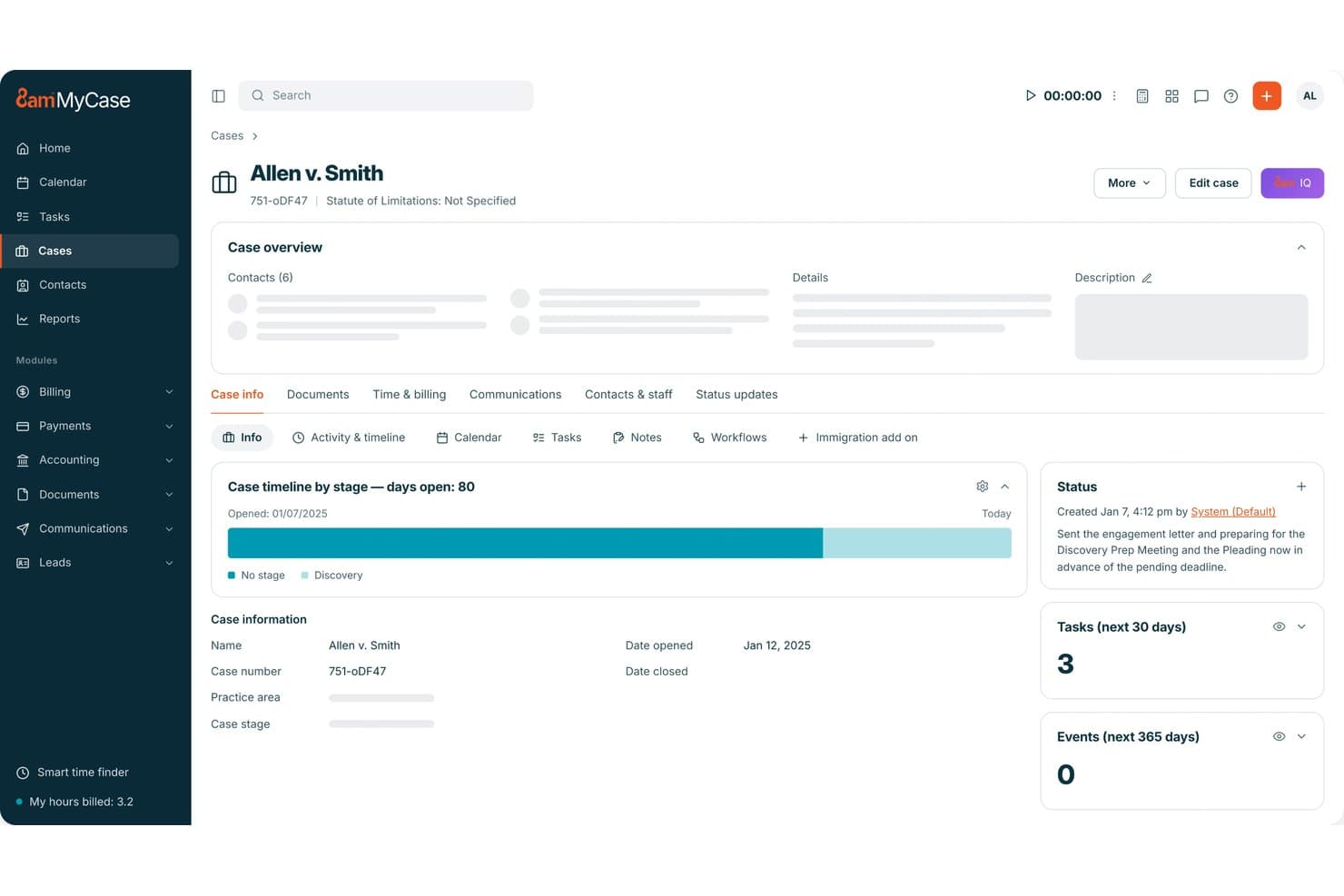
MyCase centraliza los detalles de los casos, las tareas y los cronogramas en un solo panel. MyCase es un software de gestión de prácticas jurídicas para pequeños y medianos despachos de abogados que reúne los expedientes, la gestión del calendario, la facturación y los flujos de trabajo de los asuntos en un solo espacio para ayudar a los equipos a mantener organizado el trabajo de los clientes.
¿Para quién es más adecuado MyCase?
MyCase es adecuado para pequeños y medianos despachos de abogados que desean simplificar los pagos de los clientes y mantenerlos informados sobre el progreso de sus casos.
Por qué elegí MyCase
Elegí MyCase como alternativa a Clio porque es ideal para facilitar los pagos en línea y la comunicación con los clientes. Su portal del cliente permite revisar facturas y estados de cuenta, y luego pagar sin compartir los números de tarjeta con el despacho. La mensajería de texto integrada sincroniza los mensajes con los expedientes, de modo que las actualizaciones de los clientes permanecen junto con los registros de los asuntos.
Características principales de MyCase
- Gestión del calendario jurídico: Realiza un seguimiento de citas, reuniones, eventos y plazos de los casos en un calendario central.
- Generación de documentos: Crea documentos de casos a partir de plantillas y complétalos con los datos de los clientes.
- Seguimiento del tiempo y los gastos: Registra el tiempo facturable y los gastos asociados a los asuntos de los clientes.
- Formularios de admisión de clientes: Crea formularios web personalizables para recopilar información de posibles clientes.
Integraciones de MyCase
El directorio de integraciones de MyCase incluye 61 opciones, entre ellas LawPay, QuickBooks Online, Google Calendar, Microsoft Outlook, Dropbox, LawToolBox y Lawmatics, además de Zapier. También ofrece una API abierta para conexiones personalizadas.
Pros and Cons
Pros:
- Los clientes pagan las facturas a través del portal seguro
- Las respuestas por mensaje de texto permanecen adjuntas a los expedientes
- Los registros de los asuntos combinan plazos, documentos y facturación
Cons:
- La sincronización del correo electrónico puede ocultar mensajes a los compañeros de equipo
- Los formatos y los informes de facturación ofrecen una flexibilidad limitada
 Ideal para la gestión automatizada de las relaciones con los clientes
- Demostración gratuita disponible
- Desde $59/usuario/mes (facturado anualmente)
Visit WebsiteCustomer Rating:4.6/5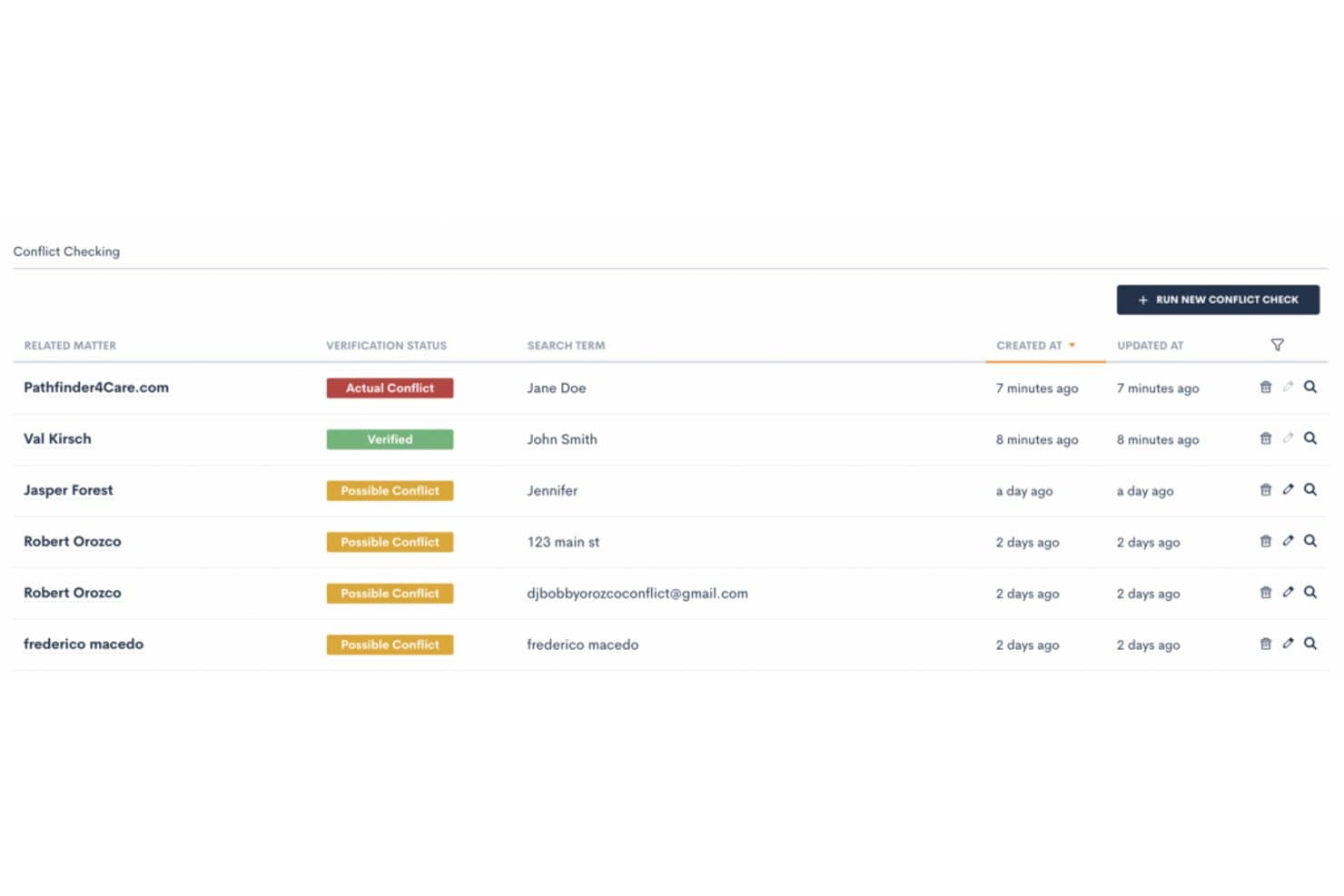
Lawmatics detecta conflictos de intereses antes de aceptar nuevos clientes. Lawmatics es una plataforma de gestión de despachos jurídicos para firmas de abogados que desean organizar la incorporación de clientes, los flujos de trabajo de los asuntos y las comunicaciones en un solo sistema.
¿Para quién es más adecuado Lawmatics?
Lawmatics es adecuado para firmas de abogados que desean automatizar el seguimiento de clientes potenciales y gestionar las relaciones con posibles clientes.
Por qué elegí Lawmatics
Elegí Lawmatics para firmas que buscan una alternativa a Clio con la gestión de relaciones con los clientes como eje central. Su proceso de incorporación puede activar acciones de seguimiento a medida que avanza un cliente potencial, mientras que los formularios personalizables y las respuestas automáticas por correo electrónico o mensaje de texto ayudan al personal a responder con rapidez. Una cronología central de interacciones mantiene juntas las llamadas, los mensajes y los formularios de cada posible cliente.
Características principales de Lawmatics
- Firmas electrónicas: Envía documentos legales para su firma y realiza un seguimiento de su estado.
- Creador de solicitudes de archivos: Crea plantillas reutilizables para solicitar documentos a los clientes.
- Portal del cliente: Permite que los clientes accedan a archivos compartidos, mensajes, tareas y eventos del calendario.
- Informes y análisis: Crea informes para hacer un seguimiento de las fuentes de clientes potenciales, el marketing y los objetivos del despacho.
Integraciones de Lawmatics
Lawmatics ofrece integraciones con Clio, 8am™ MyCase, Filevine, PracticePanther, Gmail y Google Calendar, Microsoft Outlook, QuickBooks y OneDrive, y es compatible con Zapier. También proporciona una API abierta y webhooks salientes para integraciones personalizadas.
Pros and Cons
Pros:
- Los seguimientos activados por etapas reducen la búsqueda manual de clientes potenciales
- Mantiene las comunicaciones con los posibles clientes en una cronología
- Los informes de marketing conectan las fuentes de clientes potenciales con las conversiones
Cons:
- La configuración de la automatización puede tardar meses en completarse
- La ausencia de un entorno de prueba hace que la automatización en producción sea arriesgada
Learn more about Lawmatics: La mejor opción para funciones avanzadas de gestión de proyectos
- Plan gratuito disponible
- Precios disponibles previa solicitud
Visit WebsiteCustomer Rating:4.5/5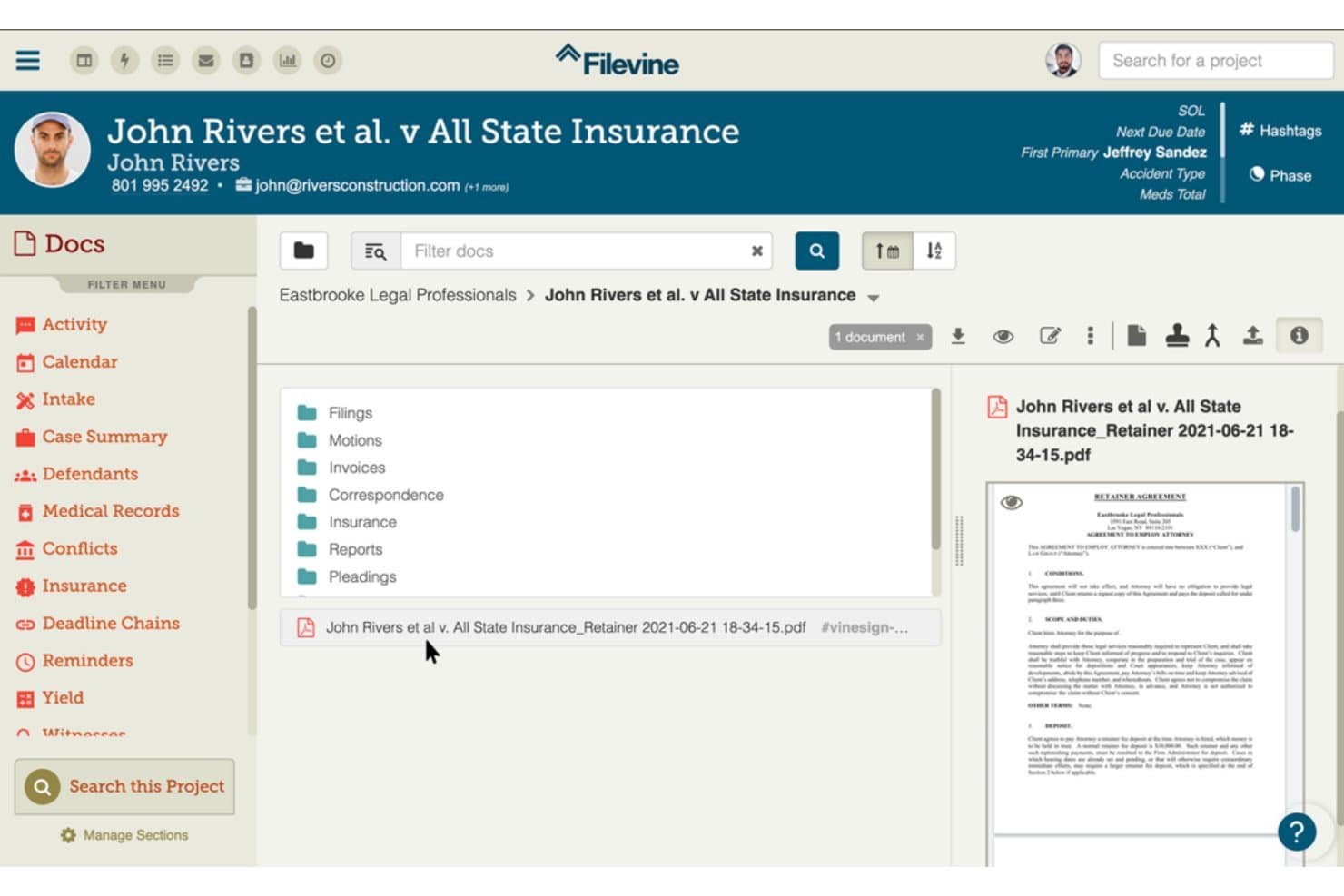
Filevine organiza los documentos de los casos en carpetas para facilitar el acceso. Filevine es una plataforma de gestión de despachos jurídicos para bufetes de abogados que necesitan organizar los registros de asuntos, la comunicación con los clientes y los flujos de trabajo de los casos en un solo espacio de trabajo.
¿Para quién es más adecuado Filevine?
Filevine es adecuado para bufetes de abogados y equipos de operaciones jurídicas que necesitan controles detallados de proyectos para coordinar asuntos complejos, plazos y responsabilidades del equipo.
Por qué elegí Filevine
Elegí Filevine como alternativa a Clio porque sus controles de proyectos justifican la denominación “La mejor opción para funciones avanzadas de gestión de proyectos”. Me gusta que los equipos puedan asignar tareas específicas de cada caso con responsables, fechas de vencimiento y prioridades, y luego usar recordatorios automatizados para hacer seguimiento de los plazos. Eso me ayuda a mantener claras las responsabilidades y los próximos pasos de cada asunto.
Funciones principales de Filevine
- Gestión de documentos: Almacena, previsualiza y edita documentos jurídicos dentro de la plataforma.
- Portal del cliente: Comparte actualizaciones del caso y recopila información mediante formularios para clientes.
- Generación de documentos: Genera documentos jurídicos utilizando la información del caso y formularios.
- Control del tiempo: Registra las horas facturables con un temporizador disponible en toda la plataforma.
Integraciones de Filevine
Filevine documenta integraciones con QuickBooks, Outlook y Microsoft 365, Google Calendar y Slack; describe explícitamente su integración con QuickBooks como nativa. También se conecta con Zapier y ofrece una API para integraciones personalizadas.
Pros and Cons
Pros:
- Los flujos de trabajo de asuntos personalizables se adaptan a litigios complejos
- Los expedientes de los casos centralizan documentos, notas y tareas
- Las asignaciones de tareas aclaran la responsabilidad y los plazos
Cons:
- La configuración inicial puede tardar meses
- Los informes pueden limitar los campos y requerir un reprocesamiento
Learn more about Filevine: La mejor opción para una integración fluida de la facturación y la contabilidad
- Prueba gratuita de 10 días
- Desde $69/usuario/mes
Visit WebsiteCustomer Rating:4.5/5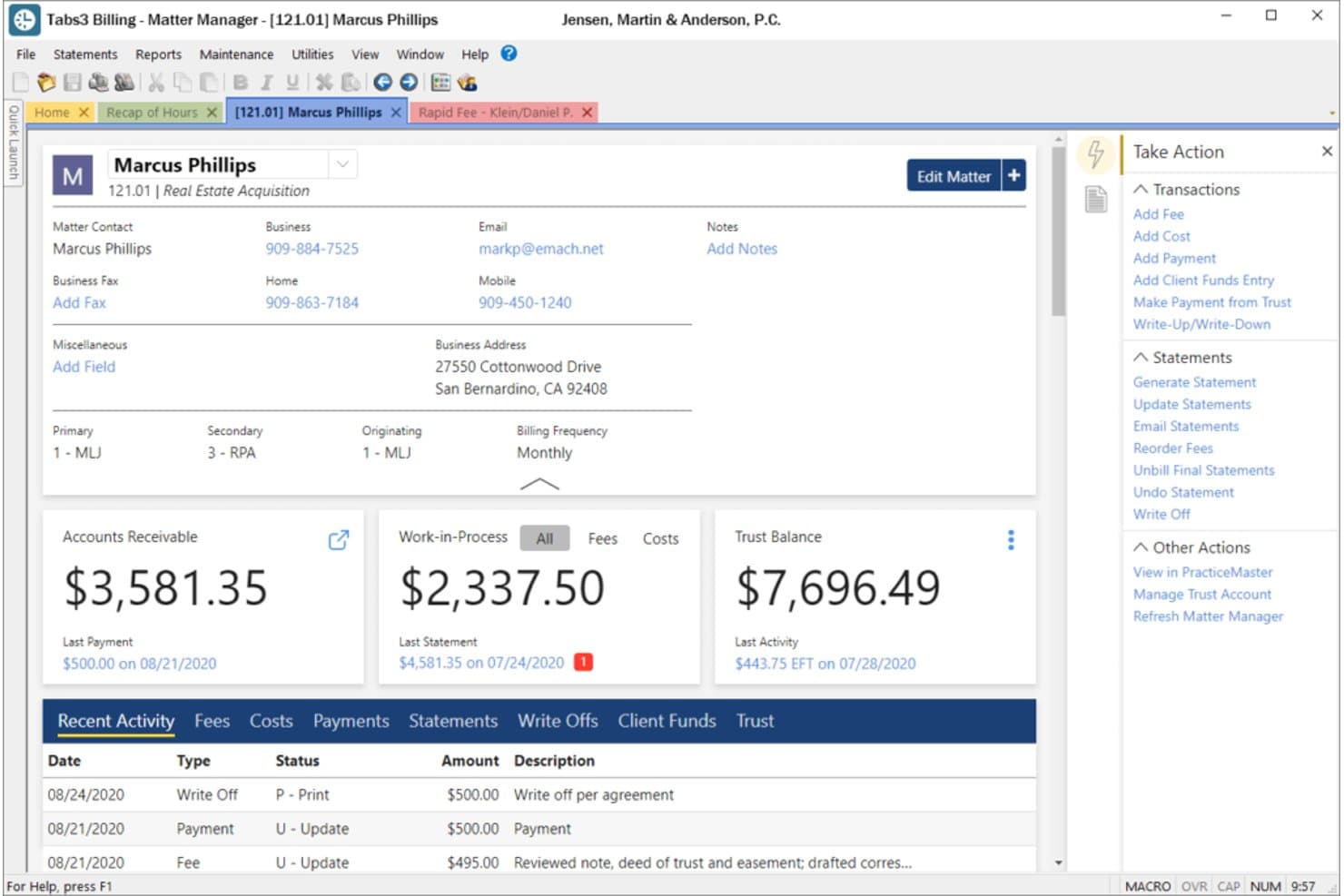
Tabs3 muestra de un vistazo los detalles de los asuntos de los clientes, los saldos y la actividad reciente. Tabs3 es una plataforma de gestión de prácticas jurídicas para bufetes de abogados que necesitan organizar registros de clientes y asuntos, hacer seguimiento del trabajo y gestionar la administración diaria de casos como alternativa a Clio.
¿Para quién es más adecuado Tabs3?
Tabs3 es una buena opción para los bufetes de abogados que desean conectar la facturación y la contabilidad con la administración de sus asuntos.
Por qué elegí Tabs3
Elegí Tabs3 como alternativa a Clio porque es “la mejor opción para una integración fluida de la facturación y la contabilidad”. Sus flujos de trabajo de facturación y contabilidad se conectan con la administración de clientes y asuntos, manteniendo la actividad financiera vinculada a los archivos correspondientes. Me gusta que los bufetes también puedan hacer seguimiento del trabajo junto con los registros de asuntos.
Características principales de Tabs3
- Calendario y programación: Consulta y programa citas por empleado, caso o área de práctica.
- Comprobación de conflictos: Busca nombres mediante palabras parciales o coincidencias fonéticas.
- Creación de documentos: Utiliza plantillas para insertar detalles específicos del cliente o del asunto.
- Permisos de usuario: Configura el acceso de visualización, edición y eliminación por usuario o campo.
Integraciones de Tabs3
PracticeMaster incluye integraciones con Microsoft Outlook, iManage, PointOne, HotDocs, Adobe y CalendarRules. También sincroniza los contactos de los clientes con Tabs3 Billing y envía los registros de honorarios y costes a facturación.
Pros and Cons
Pros:
- Facturación y contabilidad fiduciaria integradas
- Los informes personalizados permiten hacer seguimiento del trabajo en curso
- Los registros detallados de los asuntos mantienen los saldos accesibles
Cons:
- Los informes se ejecutan lentamente o requieren Report Builder
- Las tareas de facturación pueden bloquear el acceso de otros usuarios
Learn more about Tabs3: Ideal para contabilidad jurídica especializada
- Prueba gratuita de 10 días
- Desde $49/usuario/mes
Visit WebsiteCustomer Rating:4.4/5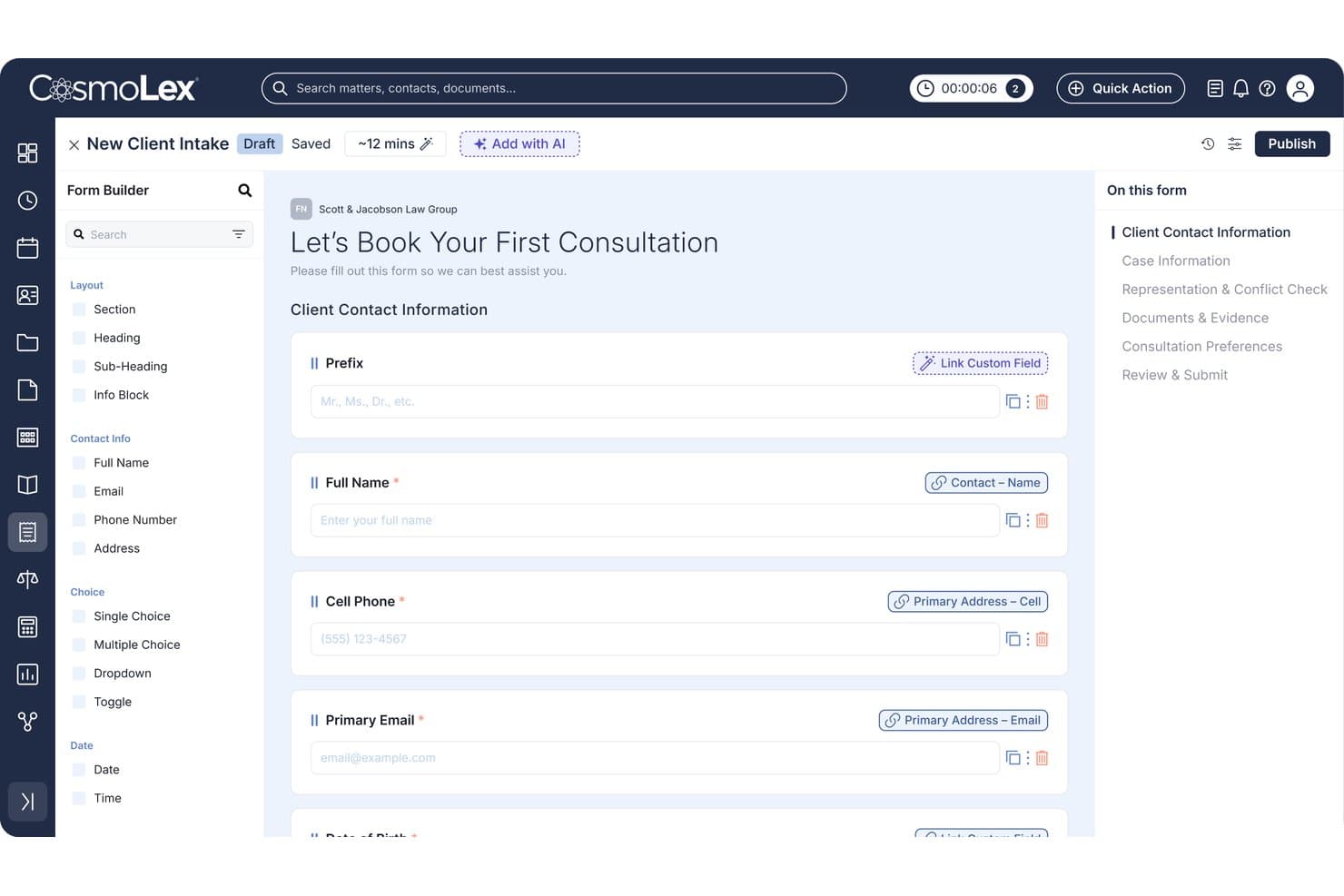
CosmoLex permite a los usuarios crear formularios personalizados de incorporación de clientes con campos vinculados. Para los bufetes de abogados que buscan una alternativa a Clio, CosmoLex reúne la gestión de asuntos, la programación, la facturación y los registros de clientes en una sola plataforma para ayudar a mantener organizados el trabajo de los casos y las operaciones diarias.
¿Para quién es más adecuado CosmoLex?
CosmoLex es una buena opción para los bufetes de abogados que desean una contabilidad específica para el sector jurídico conectada con sus flujos de trabajo de asuntos y facturación.
Por qué elegí CosmoLex
Elegí CosmoLex como alternativa a Clio porque su contabilidad jurídica especializada conecta la contabilidad fiduciaria y la del bufete con los flujos de trabajo de los asuntos. Valoro la contabilidad fiduciaria integrada, la conciliación de tres vías y los registros de auditoría detallados al revisar los fondos de los clientes e investigar discrepancias en los libros contables. La facturación y los registros de los asuntos se encuentran junto a esos controles contables.
Características principales de CosmoLex
- Gestión de calendarios y tareas: Vincula eventos y tareas con asuntos y carga flujos de trabajo de tareas personalizados.
- Gestión del correo electrónico: Archiva los correos electrónicos en carpetas de asuntos y controla quién puede ver las comunicaciones del bufete.
- Gestión de documentos: Almacena archivos de asuntos y crea plantillas de Word con campos de combinación de bases de datos.
- Portal del cliente: Permite que los clientes intercambien mensajes y documentos de forma segura con tu bufete.
Integraciones de CosmoLex
CosmoLex se integra con Microsoft 365, Dropbox, Google Drive, Box, NetDocuments, OneDrive, Google Calendar, LawPay y QuickBooks Online, y se conecta con Zapier. También ofrece una API REST abierta; la integración con QuickBooks Online está disponible para los bufetes de EE. UU. que tengan los planes Core y Pro.
Pros and Cons
Pros:
- La contabilidad fiduciaria integrada permite la conciliación de tres vías
- La facturación vinculada a los asuntos reduce la duplicación de datos financieros
- Los registros de auditoría aclaran las discrepancias en los libros fiduciarios
Cons:
- La interfaz desordenada dificulta encontrar algunas secciones
- Controles limitados para la asignación de pagos y la facturación recurrente
Learn more about CosmoLex: La mejor opción para aumentar la productividad con IA
- Prueba gratuita de 10 días
- El precio de Rocket Matter comienza en $65/usuario/mes (facturado anualmente).
Visit WebsiteCustomer Rating:4.4/5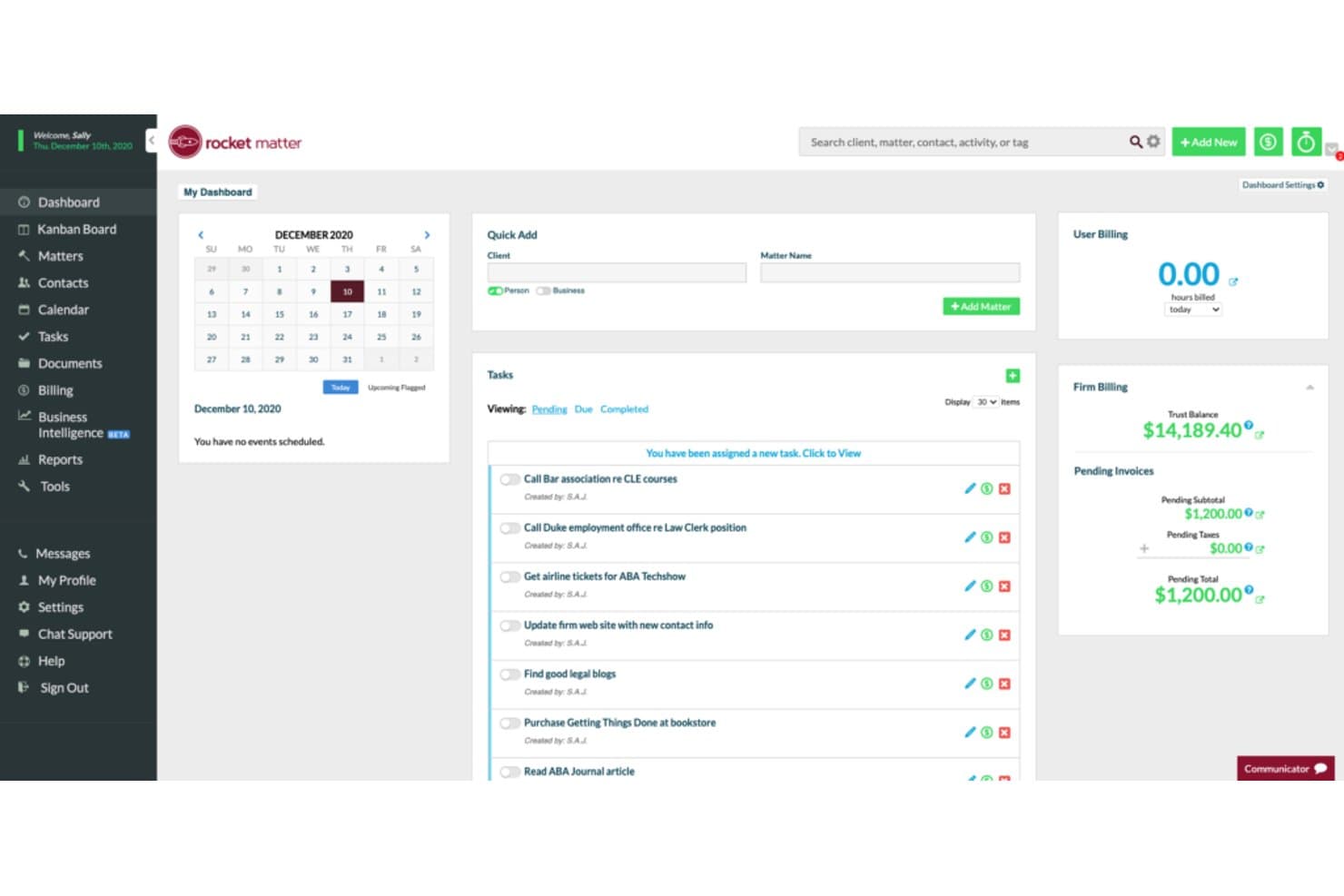
Rocket Matter centraliza las tareas, la facturación y los asuntos de los clientes en un solo panel. Rocket Matter es un software de gestión de despachos jurídicos para firmas que desean gestionar asuntos, el registro del tiempo, la facturación y los flujos de trabajo de los clientes en una sola plataforma.
¿Para quién es más adecuado Rocket Matter?
Rocket Matter es adecuado para equipos de despachos jurídicos que desean asistencia de IA para organizar el trabajo legal y mantener en marcha las tareas relacionadas con los asuntos.
Por qué elegí Rocket Matter
Elegí Rocket Matter como alternativa a Clio porque su USP, “La mejor opción para aumentar la productividad con IA”, se ajusta a las firmas que buscan reducir el trabajo rutinario. Su integración con ChatGPT me permite redactar comunicaciones para clientes y resumir información dentro de la plataforma. Aun así, revisaría cada borrador generado por IA para comprobar su exactitud y confidencialidad antes de enviarlo.
Características principales de Rocket Matter
- Gestión de asuntos: Organiza la información de casos y clientes en una sola plataforma.
- Registro del tiempo: Registra el tiempo facturable asociado a los asuntos.
- Facturación y pagos: Supervisa la facturación y ofrece a los clientes opciones de pago.
- Informes y flujos de trabajo personalizados: Adapta los informes, los flujos de trabajo y las plantillas a tu firma.
Integraciones de Rocket Matter
Rocket Matter incluye integraciones con Office 365 Outlook, OneDrive, QuickBooks Online, NetDocuments, Dropbox, Google Calendar, Box y Zapier. También ofrece una API para integraciones personalizadas.
Pros and Cons
Pros:
- La IA integrada redacta mensajes y resume documentos
- Los cronómetros vinculados a los asuntos simplifican el registro del tiempo facturable
- La contabilidad fiduciaria permite gestionar anticipos y conciliaciones
Cons:
- Los informes personalizados pueden ser difíciles de configurar
- No incluye flujos de trabajo integrados para la admisión de clientes ni CRM
Learn more about Rocket Matter: La mejor opción para operaciones completas basadas en la nube
- Demostración gratuita disponible
- El precio de Actionstep comienza en $60/usuario/mes (facturado anualmente).
Visit WebsiteCustomer Rating:4.2/5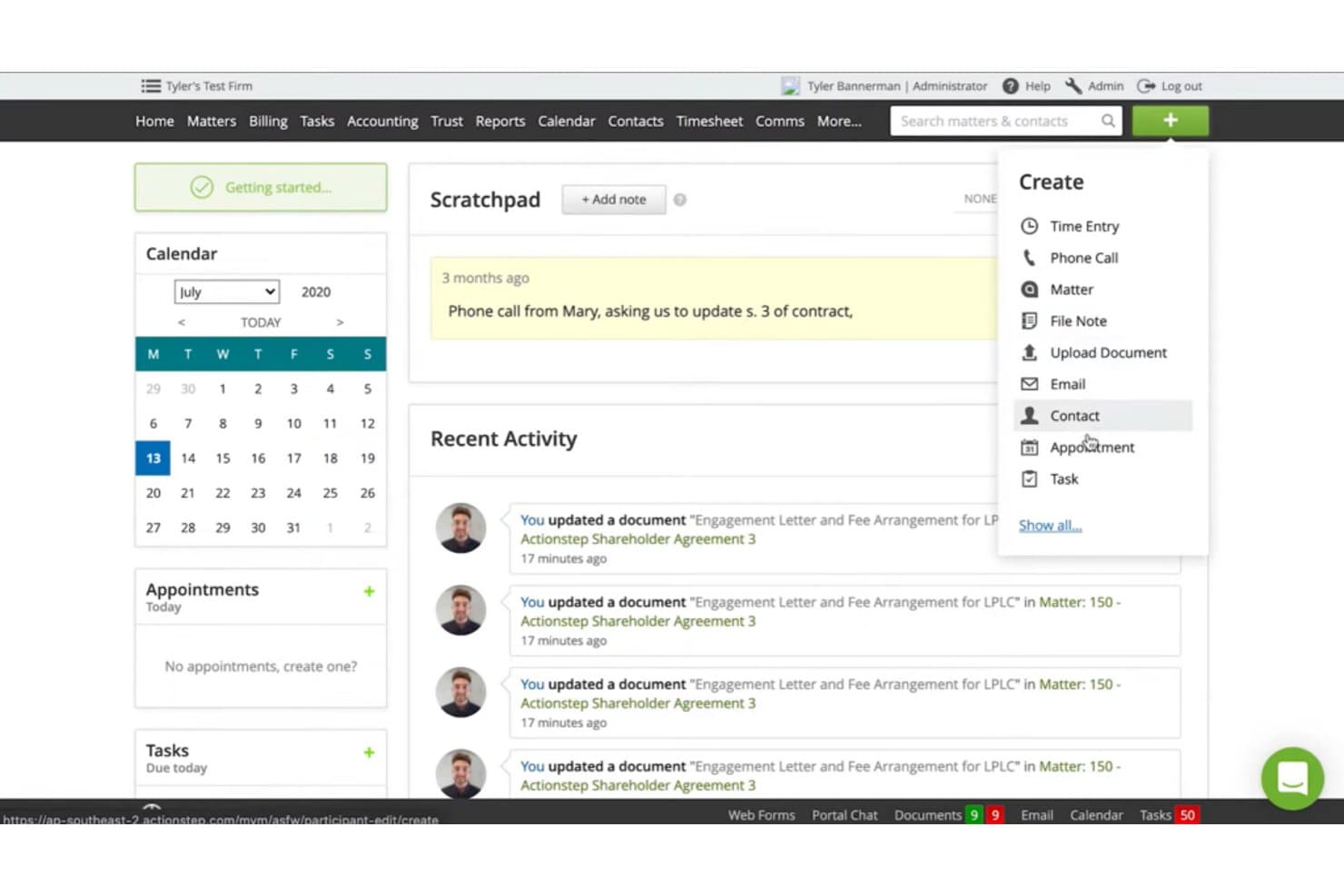
Actionstep permite a los usuarios crear rápidamente contactos, tareas y citas desde cualquier pantalla. Actionstep es una plataforma de gestión de prácticas jurídicas para bufetes de abogados que necesitan integrar la información de clientes y asuntos, el trabajo diario y la facturación en un flujo de trabajo más organizado.
¿Para quién es más adecuado Actionstep?
Actionstep es adecuado para bufetes de abogados cuyos abogados y equipos operativos necesitan gestionar asuntos, flujos de trabajo y facturación en un único sistema basado en la nube.
Por qué elegí Actionstep
Elijo Actionstep como alternativa a Clio: es la mejor opción para operaciones completas basadas en la nube. Sus flujos de trabajo específicos para cada asunto pueden asignar tareas y activar correos electrónicos para clientes, mientras que los expedientes electrónicos de los asuntos reúnen documentos, notas, registros de tiempo, facturación y contabilidad fiduciaria. También valoro los informes de estado, que muestran el paso actual y la siguiente acción de cada asunto.
Características clave de Actionstep
- Formularios de admisión de clientes: Crea formularios personalizables con lógica condicional para recopilar información de clientes potenciales.
- Calendario: Registra fechas importantes, citas y audiencias en el calendario integrado.
- Comprobaciones de conflictos: Comprueba si existen conflictos como parte del proceso de admisión de clientes.
- Portal del cliente: Comparte actualizaciones sobre los asuntos con los clientes a través del portal.
Integraciones de Actionstep
Actionstep ofrece integraciones con Xero, QuickBooks Online, Microsoft 365 y First AML. También se conecta con Zapier y proporciona una API REST para integraciones personalizadas.
Pros and Cons
Pros:
- Los flujos de trabajo personalizados de los asuntos automatizan la asignación de tareas
- La contabilidad fiduciaria se integra con la facturación de asuntos
- El ensamblaje de documentos reduce la redacción repetitiva
Cons:
- La configuración inicial del flujo de trabajo requiere un esfuerzo considerable
- Los informes y las plantillas de facturación pueden resultar frustrantes
Learn more about Actionstep: La mejor opción para una gestión integral de casos
- Demostración gratuita disponible
- Desde $69/usuario/mes (facturado anualmente)
Visit WebsiteCustomer Rating:4/5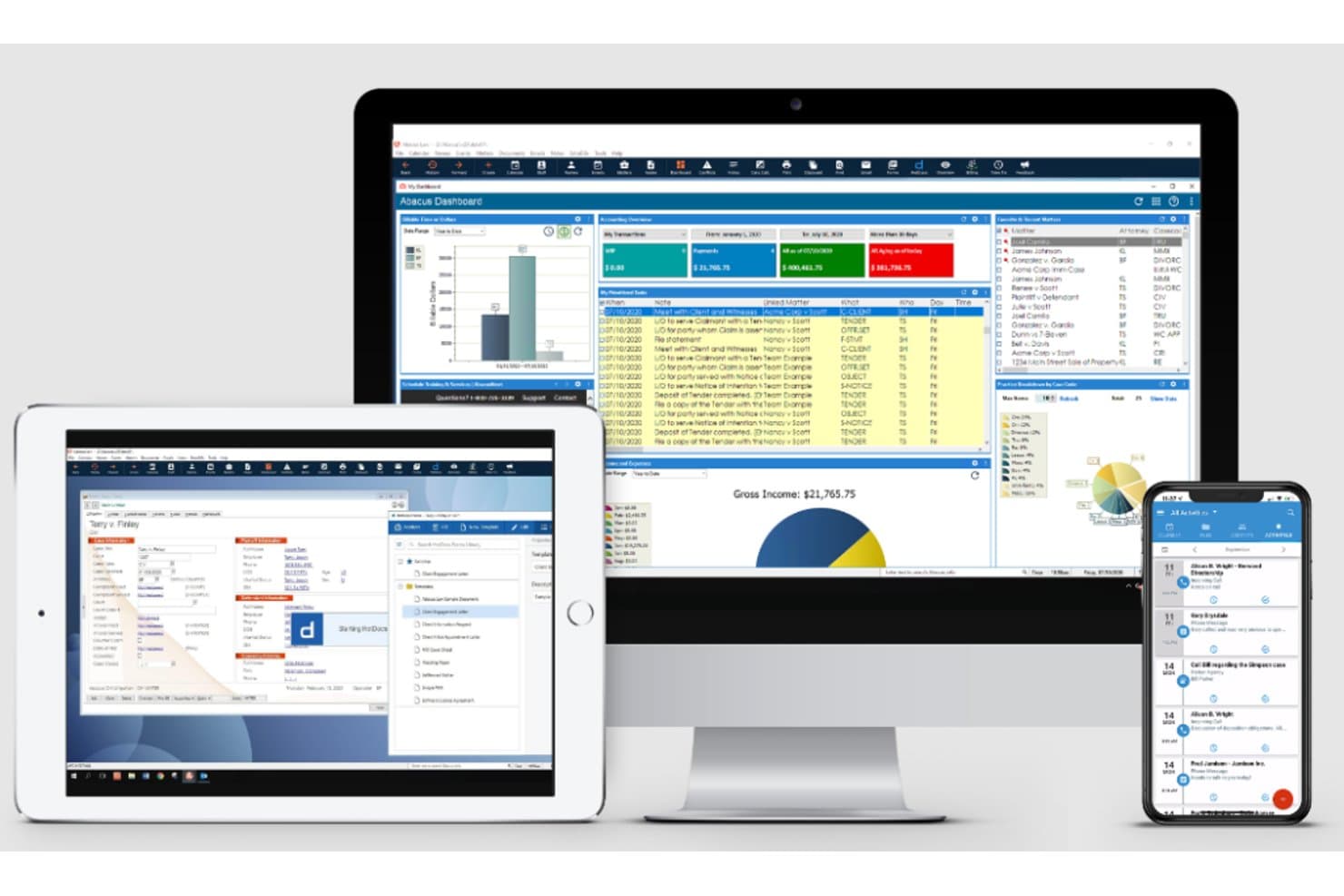
AbacusLaw muestra datos de casos, facturación y calendarios en distintos dispositivos. AbacusLaw es un software de gestión de despachos jurídicos para bufetes de abogados que conecta los flujos de trabajo de asuntos, la gestión de calendarios y los registros de clientes para ayudar a los equipos legales a coordinar casos y hacer un seguimiento de los plazos.
¿Para quién es más adecuado AbacusLaw?
AbacusLaw es adecuado para bufetes de abogados que necesitan un sistema centralizado para organizar expedientes, plazos y el trabajo diario relacionado con los asuntos.
Por qué elegí AbacusLaw
Elegí AbacusLaw como alternativa a Clio porque es mi elección como “La mejor opción para una gestión integral de casos”. Sus pantallas de admisión capturan los datos de los clientes e inician flujos de trabajo con formularios legales y eventos de seguimiento. Los informes sobre el estado del caso, la cronología, los plazos y las alertas me ayudan a hacer un seguimiento de lo que necesita cada asunto a continuación.
Características principales de AbacusLaw
- Contabilidad fiduciaria: Registra y gestiona cuentas fiduciarias con herramientas contables integradas.
- Integración con Outlook: Conecta AbacusLaw con Microsoft Outlook para utilizar herramientas de calendario y comunicación con clientes.
- Seguimiento del tiempo y los gastos: Registra el tiempo facturable y los gastos de los asuntos de los clientes.
- Procesamiento de pagos: Acepta tarjetas de crédito y cheques electrónicos mediante Abacus Payment Exchange.
Integraciones de AbacusLaw
AbacusLaw ofrece integraciones nativas con Microsoft Outlook y HotDocs. Los contactos y calendarios de Outlook pueden sincronizarse con AbacusLaw mediante Exchange u Office 365.
Pros and Cons
Pros:
- Los registros de casos vinculan plazos, cronología y alertas
- Las pantallas de admisión activan formularios y seguimientos específicos de cada asunto
- Los campos y los informes personalizados se adaptan a las áreas de práctica
Cons:
- Los usuarios informan de problemas técnicos en la facturación y la contabilidad
- Algunos usuarios informan de cierres inesperados y un rendimiento lento
Learn more about AbacusLaw:
Otras herramientas alternativas a Clio
A continuación se incluye una lista de alternativas adicionales a Clio que seleccioné, pero que no llegaron a estar entre las 12 mejores. Sin duda, merece la pena echarles un vistazo.
- 11CARET Legal (Zola Suite)Ideal para una plataforma de gestión de prácticas todo en uno
- 12LeanLawLa mejor integración con QuickBooks Online
- 13Bill4TimeIdeal para el seguimiento del tiempo y la facturación de manera intuitiva
- 14Practice MasterAdecuado para bufetes de abogados australianos que necesitan soluciones de software localizadas
Opiniones relacionadas sobre herramientas jurídicas
- Herramientas gratuitas de investigación jurídica
- Software de gestión de despachos jurídicos
- Software de gestión de documentos jurídicos
- Software de gestión para pequeños despachos jurídicos
Cómo evalúo las alternativas a Clio
Evalúo las alternativas a Clio en dos niveles: los requisitos básicos que debe cumplir toda herramienta de gestión de despachos, como la contabilidad fiduciaria y el seguimiento de asuntos, y los elementos diferenciadores que las distinguen.
Funcionalidad principal (requisitos básicos para esta lista)
Al seleccionar herramientas para mi lista, califico cada una en una escala de 0 (no ofrece la funcionalidad) a 5 (sobresale en esta área) para cada una de las funcionalidades principales que se indican a continuación. Después, convierto la puntuación total de la herramienta en un porcentaje. Cada herramienta debe alcanzar una puntuación total mínima del 65 % para ser considerada para su inclusión.
- Gestión de asuntos y casos: Busco registros de asuntos estructurados en los que se puedan organizar contactos, notas, documentos y asuntos relacionados, de forma similar a cómo PracticePanther y CosmoLex gestionan la organización de casos.
- Seguimiento del tiempo y facturación jurídica: Toda herramienta debería admitir varios modelos de facturación (por hora, tarifa fija y contingencia) y permitir que los abogados registren el tiempo mediante cronómetros, entradas del calendario o registros manuales.
- Contabilidad fiduciaria y de IOLTA: Compruebo si la plataforma gestiona conciliaciones de tres vías y mantiene correctamente separados los fondos fiduciarios de los clientes de las cuentas operativas dentro del software.
- Gestión y automatización de documentos: Las opciones más sólidas ofrecen generación de documentos basada en plantillas con campos de combinación, para que los abogados puedan crear cartas de contratación o escritos sin tener que empezar desde cero cada vez.
- Captación de clientes y CRM: Evalúo cómo cada herramienta captura clientes potenciales, dirige los formularios de admisión y realiza comprobaciones de conflictos, pasos clave que determinan la rapidez con la que un bufete puede incorporar nuevos clientes.
- Calendario y seguimiento de plazos: En este caso, busco un calendario basado en las normas judiciales, en el que la herramienta calcule automáticamente los plazos de presentación y genere cadenas de tareas vinculadas basadas en normas específicas de cada jurisdicción.
Una vez que tengo una lista de herramientas que cumplen estos criterios, considero qué distingue a cada plataforma.
Factores diferenciadores (qué distingue a los proveedores)
Así es como comparo y contrasto los distintos proveedores:
Funciones destacadas
Un portal seguro para clientes cambia la forma en que los bufetes interactúan con ellos: compartir documentos, recopilar firmas electrónicas y aceptar pagos sin intercambios constantes de correos electrónicos. También evalúo si una plataforma incluye contabilidad nativa del libro mayor, ya que herramientas como CosmoLex eliminan la necesidad de configurar QuickBooks o Xero por separado. Las capacidades de AI también son importantes en este aspecto. Compruebo si una herramienta ofrece captura automatizada del tiempo o redacción de documentos para reducir el trabajo administrativo al que se enfrentan los abogados a diario.
Más allá de las funciones
La transparencia de precios es importante al evaluar alternativas a Clio. Compruebo si los proveedores limitan funciones clave, como la contabilidad fiduciaria, a planes superiores, lo que puede aumentar rápidamente los costes de los bufetes en crecimiento. La profundidad de las integraciones es otro factor: las herramientas que se conectan con Westlaw, LawPay y Microsoft 365 se integran en los flujos de trabajo jurídicos existentes sin obligar a renovar por completo toda la plataforma tecnológica. El soporte para la migración también tiene mucho peso, ya que cambiar de Clio implica trasladar años de datos de asuntos, documentos e historial de facturación a una nueva plataforma.
¿Por qué buscar una alternativa a Clio?
Buscar una alternativa a Clio puede ser una decisión estratégica para los despachos que desean optimizar sus soluciones de gestión. Aunque Clio es popular y completo, puede que no se ajuste a las necesidades específicas, el presupuesto o las preferencias de todos los despachos jurídicos. Algunos usuarios consideran que su interfaz no es intuitiva o que sus funciones son abrumadoras, lo que provoca que no aprovechen plenamente sus capacidades.
Además, diversificar las opciones de software permite a los despachos beneficiarse de funciones únicas, precios competitivos y distintas opciones de integración disponibles en otras plataformas. Por tanto, explorar otras opciones puede conducir a una solución adaptada a las necesidades operativas específicas de cada despacho.
Preguntas más frecuentes sobre las mejores alternativas a Clio para su bufete de abogados (FAQ)
¿Cuáles son las ventajas de utilizar software de gestión de la práctica jurídica como los enumerados anteriormente?
Existen varias ventajas de utilizar este tipo de herramientas. En primer lugar, pueden agilizar el flujo de trabajo dentro de un bufete de abogados mediante la automatización de tareas rutinarias. En segundo lugar, permiten almacenar de forma segura los documentos de los casos y acceder a ellos fácilmente.
En tercer lugar, facilitan el seguimiento preciso de las horas facturables y simplifican el proceso de facturación. En cuarto lugar, proporcionan canales de comunicación seguros con los clientes a través de portales de clientes integrados. Por último, la mayoría de estas herramientas ofrecen versiones móviles, lo que proporciona la flexibilidad necesaria para trabajar desde cualquier lugar.
¿Cuánto cuestan estas herramientas de gestión de la práctica jurídica?
El coste de estas herramientas puede variar considerablemente en función de las características, la escala y las necesidades específicas de su bufete.
¿Cuáles son los modelos de precios de estas herramientas?
La mayoría de las herramientas de gestión de la práctica jurídica utilizan un modelo de precios por suscripción, normalmente por usuario y mes. Suelen ofrecer varios niveles de precios, cada uno con un conjunto diferente de características. Algunas también ofrecen suscripciones anuales con una tarifa reducida.
¿Cuál es el rango de precios habitual de estas herramientas?
Aunque los precios pueden variar, el rango habitual es de $20 a $100 por usuario/mes. Esta variación depende en gran medida del número de características y del nivel de servicio proporcionado.
¿Qué software es el más barato y cuál el más caro?
De la lista anterior, CaseFox suele ser una de las opciones más asequibles, con precios desde tan solo $10/usuario/mes. En el otro extremo del espectro, herramientas como SmartAdvocate son más caras, con precios a partir de aproximadamente $80/usuario/mes.
¿Existen alternativas gratuitas a Clio?
Hay algunas herramientas de gestión de la práctica jurídica que ofrecen un plan gratuito, pero normalmente tienen funciones limitadas. Lawcus es un ejemplo de herramienta que ofrece un nivel gratuito, pero tenga en cuenta que, para disfrutar de todas sus funcionalidades, normalmente es necesario contratar un plan de pago.
¿Merece la pena invertir en estas herramientas?
Sin duda, la automatización y la eficiencia que proporcionan estas herramientas pueden ahorrar una cantidad considerable de tiempo y reducir el riesgo de errores, lo que las convierte en una inversión valiosa. También pueden ofrecer una experiencia más profesional a sus clientes, lo que puede contribuir a su satisfacción y fidelización.
¿Pueden estas herramientas sustituir al personal administrativo?
Aunque estas herramientas pueden automatizar muchas tareas administrativas, no pueden sustituir por completo al personal humano. Están diseñadas para ayudar y agilizar las tareas, no para reemplazar el servicio personalizado que puede proporcionar el personal administrativo. Se trata de aumentar el esfuerzo humano, no de sustituirlo.