

I 10 migliori strumenti alternativi a Clio per studi legali nel 2026

10 Elenco delle migliori alternative a Clio


I principali punti critici affrontati da questi strumenti sono la gestione disorganizzata dei casi, le pratiche di fatturazione inefficienti e la difficoltà nella gestione delle transazioni con carta di credito: sfide comuni che ho visto affrontare da molti professionisti legali.
Tabella comparativa delle alternative a Clio
Questa tabella comparativa riassume i dettagli dei prezzi delle migliori alternative a Clio da me selezionate:
| Tool | Best For | Trial Info | Price | ||
|---|---|---|---|---|---|
| 1 | Ideale per gestire calendari e appuntamenti | Prova gratuita disponibile | Prezzi su richiesta | Website | |
| 2 | Ideale per la gestione sicura dei casi su cloud | Prova gratuita di 7 giorni + demo gratuita disponibile | I prezzi di PracticePanther partono da $49/utente/mese (fatturazione annuale). | Website | |
| 3 | Ideale per pagamenti online facili e comunicazione con i clienti | Prova gratuita di 10 giorni + demo gratuita disponibile | Il prezzo di MyCase parte da $49/utente/mese. | Website | |
| 4 | Ideale per la gestione automatizzata delle relazioni con i clienti | Demo gratuita disponibile | Da $59/utente/mese (fatturato annualmente) | Website | |
| 5 | Ideale per funzionalità avanzate di gestione dei progetti | Prova gratuita + demo gratuita disponibili | Prezzo su richiesta | Website | |
| 6 | Ideale per un'integrazione fluida tra fatturazione e contabilità | Prova gratuita + demo disponibile | Da $32/utente/mese + $10 di quota base al mese | Website | |
| 7 | Ideale per la contabilità legale dedicata | Prova gratuita di 10 giorni | I prezzi di CosmoLex partono da $79/utente/mese, fatturati annualmente. | Website | |
| 8 | Ideale per aumentare la produttività con l'AI | Prova gratuita di 10 giorni + demo gratuita disponibile | Il prezzo di Rocket Matter parte da $65/utente/mese (fatturazione annuale). | Website | |
| 9 | Ideale per operazioni cloud complete e ricche di funzionalità | Demo gratuita disponibile | Il prezzo di Actionstep parte da $60/utente/mese (fatturazione annuale). | Website | |
| 10 | Ideale per una gestione completa dei casi | Demo gratuita disponibile | Da $69/utente/mese (fatturazione annuale) | Website |
Perché fidarsi dei nostri consigli sui software
Il nostro team testa e recensisce software dal 2012. In quanto leader di studi legali noi stessi, sappiamo quanto sia difficile — e importante — scegliere il software giusto.
Per questa guida, abbiamo valutato gli strumenti attraverso test pratici e ricerche indipendenti, assegnando un punteggio agli strumenti in base ai nostri criteri di selezione.
Le nostre recensioni riflettono il nostro giudizio editoriale umano, non un discorso di vendita.
Recensioni delle migliori alternative a Clio

8am
Ideale per gestire calendari e appuntamenti

Gli studi legali che hanno bisogno che i propri avvocati e il personale di supporto lavorino sulle stesse informazioni relative ai casi troveranno in MyCase, una piattaforma per la gestione degli studi legali, uno strumento progettato per offrire questo tipo di visibilità a tutto il team.
Per chi è più adatto MyCase?
MyCase è adatto agli studi legali in crescita in cui avvocati, paralegali e personale di supporto hanno tutti bisogno di visibilità sugli stessi casi e sulle comunicazioni con i clienti.
Perché MyCase è una buona alternativa a Clio
Ho scelto MyCase come una delle migliori alternative a Clio per il modo in cui la gestione del calendario è strettamente collegata alle attività effettive dei casi. La sincronizzazione bidirezionale con Google Calendar e Outlook fa sì che qualsiasi modifica apportata in uno dei due sistemi aggiorni automaticamente l'altro, evitando che si verifichino conflitti di programmazione. Apprezzo inoltre il monitoraggio delle scadenze in base alla giurisdizione, che calcola automaticamente le scadenze giudiziarie in base alle norme locali e le collega direttamente al relativo fascicolo.
Funzionalità principali di MyCase
- Portale clienti sicuro: I clienti possono accedere per visualizzare gli aggiornamenti sui casi, inviare messaggi, condividere documenti e fissare appuntamenti senza dover scambiare email.
- Attivatori automatici dei flussi di lavoro: Configura flussi di lavoro in base al tipo di caso che generano automaticamente attività e documenti quando una pratica raggiunge una fase specifica.
- Messaggistica integrata: Invia e ricevi messaggi SMS con i clienti direttamente da un fascicolo, registrando automaticamente tutti i messaggi.
- App mobile: Accedi a casi, contatti e documenti da dispositivi iOS e Android quando sei fuori ufficio.
Integrazioni di MyCase
MyCase offre oltre 50 integrazioni, tra cui Dropbox, Gmail, Google Calendar, Microsoft Outlook, InfoTrack, CallRail, Lawmatics, QuickBooks, LawToolBox e NetDocuments. Si collega inoltre a Zapier e fornisce un'API aperta per integrazioni personalizzate.
Pros and Cons
Pros:
- Messaggistica SMS integrata con i clienti
- Monitoraggio automatico delle spese e riconciliazione a tre vie
- Accesso ai fondi dei pagamenti dei clienti il giorno successivo
Cons:
- Difficoltà nella gestione di file video e audio di grandi dimensioni
- Opzioni limitate per la personalizzazione dei flussi di lavoro e dei campi

Ideale per la gestione sicura dei casi su cloud
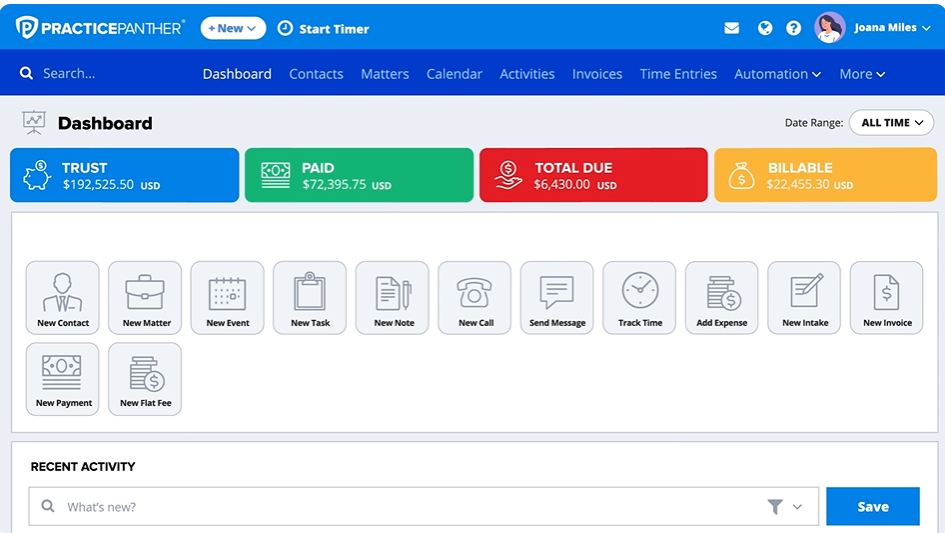
PracticePanther è un software completo per la gestione degli studi legali, noto per le sue sicure capacità di gestione dei casi basate su cloud. Grazie alla crittografia avanzata e agli strumenti completi per la gestione dei casi in un sistema cloud, PracticePanther eccelle nell'assicurare la sicurezza e l'accessibilità dei dati.
Perché ho scelto PracticePanther: Ho scelto PracticePanther perché dimostra un forte impegno verso la sicurezza, una caratteristica sempre più importante nel panorama digitale odierno. Ciò che distingue PracticePanther è la crittografia avanzata di tutti i dati archiviati e una disponibilità del servizio del 99,99%. Pertanto, considero PracticePanther la scelta migliore per gli studi legali che danno priorità a una gestione sicura dei casi basata su cloud.
Funzionalità e integrazioni principali:
PracticePanther offre una vasta gamma di funzionalità, tra cui gestione dei contatti, monitoraggio del tempo, fatturazione e gestione dei documenti. Tuttavia, il suo punto di forza è la funzione di gestione sicura dei casi, che include controlli di conflitto, monitoraggio delle pratiche e gestione delle attività. Per quanto riguarda le integrazioni, PracticePanther può essere abbinato a software essenziali come Gmail, QuickBooks, Office 365 e Dropbox.
Pros and Cons
Pros:
- Misure di sicurezza dei dati di alto livello
- Offre funzionalità estese per una gestione completa dei casi
- Si integra bene con software ampiamente utilizzati
Cons:
- Il prezzo potrebbe essere un ostacolo per gli studi più piccoli
- Fatturazione annuale necessaria per ottenere il prezzo più basso
- Il software potrebbe presentare una curva di apprendimento per alcuni utenti

MyCase
Ideale per pagamenti online facili e comunicazione con i clienti

MyCase è un software versatile per la gestione degli studi legali, noto per il suo sistema integrato di pagamenti online e per i suoi efficaci strumenti di comunicazione con i clienti. Offrendo opzioni di pagamento online senza soluzione di continuità e promuovendo l'interazione diretta con i clienti, MyCase si conferma la scelta migliore per queste esigenze specifiche.
Perché ho scelto MyCase: Nel mio processo di selezione, MyCase si è distinto per la sua doppia funzionalità. Mentre molti strumenti di gestione legale si concentrano solo sui pagamenti o sulla comunicazione, MyCase è riuscito a integrare entrambi in un'unica piattaforma. Il suo solido portale clienti e il sistema di pagamenti integrato lo rendono una scelta eccezionale per gli studi che desiderano facilitare i pagamenti online e semplificare la comunicazione con i clienti.
Caratteristiche e integrazioni principali:
MyCase offre diverse funzionalità robuste, tra cui gestione delle attività, monitoraggio dei casi e fatturazione. Tuttavia si distingue grazie al sistema integrato di pagamenti, che consente agli studi legali di ricevere pagamenti online, e al portale clienti che facilita la comunicazione diretta e ordinata con i clienti. MyCase si integra bene con applicazioni popolari come QuickBooks, Dropbox e Outlook.
Pros and Cons
Pros:
- Integrazione efficace di pagamenti online e comunicazione con i clienti in un'unica piattaforma
- Buona integrazione con le app desktop e mobile più comuni
- Strumenti completi di gestione dei casi
Cons:
- Per alcuni utenti la curva di apprendimento potrebbe essere ripida
- Il costo potrebbe risultare proibitivo per studi di piccole dimensioni
- Le opzioni di personalizzazione possono essere limitate rispetto ad altre piattaforme

Ideale per la gestione automatizzata delle relazioni con i clienti

Lawmatics è specializzato nel marketing per studi legali e nella gestione delle relazioni con i clienti (CRM). Si tratta di una piattaforma tutto-in-uno che consente ai professionisti legali di gestire l'accoglienza dei clienti, il marketing e la CRM in un'unica interfaccia.
Perché ho scelto Lawmatics: Nella mia ricerca di un software efficiente per la gestione degli studi legali, Lawmatics ha attirato la mia attenzione grazie alle sue solide capacità di gestione delle relazioni con i clienti. Non si tratta solo di gestire i dettagli; Lawmatics si distingue per le sue funzionalità CRM automatiche, rispondendo in modo efficace alle esigenze dei professionisti legali impegnati.
Credo che sia la soluzione migliore per la gestione automatizzata delle relazioni con i clienti poiché permette di tenere traccia dei clienti senza inserimenti manuali e garantisce che nessun dettaglio importante venga trascurato.
Caratteristiche e integrazioni principali:
Lawmatics offre una varietà di funzionalità come marketing via email automatizzato, moduli di accoglienza personalizzati e analisi dettagliate dei dati dei clienti. Permette ai professionisti legali di offrire un'esperienza personalizzata ai clienti e prendere decisioni basate sui dati. Inoltre, si integra facilmente con piattaforme diffuse come Mailchimp per l'email marketing, QuickBooks per la contabilità e Zapier per un'automazione avanzata.
Pros and Cons
Pros:
- Sistema completo di gestione delle relazioni con i clienti
- Le funzionalità automatizzate fanno risparmiare tempo e fatica
- Integrazioni avanzate con piattaforme popolari
Cons:
- Alcune funzionalità possono richiedere un periodo di apprendimento
- Nessuna opzione di fatturazione mensile, solo annuale
- Può essere costoso per studi legali piccoli o singoli professionisti

Filevine
Ideale per funzionalità avanzate di gestione dei progetti

Filevine si presenta come un software di gestione dei casi con un'attenzione particolare agli strumenti avanzati di gestione dei progetti. Combina l'organizzazione dei fascicoli, la comunicazione con i clienti e la gestione di progetti e documenti in un'unica piattaforma intuitiva, rendendolo una scelta ideale per gli studi legali che necessitano di funzionalità avanzate di project management.
Perché ho scelto Filevine: Valutando diverse piattaforme, ho scelto Filevine per le sue eccezionali capacità di gestione dei progetti. Queste funzionalità offrono agli utenti la possibilità di gestire casi legali complessi e compiti in modo efficiente. L'ampia gamma di strumenti di gestione dei progetti è ciò che distingue Filevine e mi ha portato a considerarlo la scelta migliore per gli studi che richiedono funzionalità avanzate di project management.
Funzionalità principali & integrazioni:
Filevine offre funzionalità potenti tra cui il monitoraggio dettagliato della cronologia dei casi, l'automazione dei documenti e la gestione delle scadenze. Dispone inoltre di modelli di caso personalizzabili, adattabili a diverse tipologie di casi legali. In termini di integrazioni, Filevine si connette con piattaforme popolari come Google Calendar, Microsoft 365 e Dropbox per offrire un ambiente di lavoro più integrato.
Pros and Cons
Pros:
- Funzionalità avanzate di gestione dei progetti
- Modelli di caso personalizzabili
- Ampia integrazione con piattaforme popolari
Cons:
- Prezzi non immediatamente disponibili
- Curva di apprendimento per i nuovi utenti
- Funzionalità limitate nei piani di livello inferiore

Tabs3
Ideale per un'integrazione fluida tra fatturazione e contabilità

Tabs3 offre soluzioni per la fatturazione legale, la gestione dei casi e la gestione finanziaria per ottimizzare le operazioni degli studi legali. Il suo punto di forza risiede nella capacità di integrare efficacemente attività di fatturazione e contabilità.
Perché ho scelto Tabs3: Tabs3 si è guadagnato un posto nella mia lista per la sua eccezionale capacità di integrare fatturazione e contabilità. Il suo punto di vendita unico è il collegamento senza soluzione di continuità tra questi due aspetti cruciali di uno studio legale, che spesso operano separatamente in altre piattaforme.
Pertanto, Tabs3 è un'ottima scelta per gli studi legali che cercano una soluzione finanziaria integrata. La sua qualità distintiva è l'approccio completo alla fatturazione e alla contabilità, rendendolo ideale per chi desidera una piattaforma unica per gestire queste attività.
Funzionalità e integrazioni principali:
Tabs3 offre una gamma di funzionalità, tra cui conti da pagare e da ricevere, libro mastro generale e contabilità fiduciaria. È progettato per tracciare e fatturare il tempo, gestire clienti e pratiche e tenere aggiornati conti e dati finanziari. Tra le integrazioni degne di nota ci sono LawPay per l'elaborazione sicura dei pagamenti, CalendarRules per la calendarizzazione basata su regole di tribunale e Casemaker per la ricerca giuridica.
Pros and Cons
Pros:
- Gestione finanziaria completa
- Focus unico sull'integrazione tra fatturazione e contabilità
- Integrazioni utili con strumenti di pagamento e ricerca legale
Cons:
- Quota base aggiuntiva mensile
- Curva di apprendimento per chi utilizza il software la prima volta
- L'abbondanza di funzionalità può risultare eccessiva per piccoli studi

CosmoLex
Ideale per la contabilità legale dedicata

CosmoLex è un software di gestione per studi legali che unisce la gestione dei casi, la fatturazione e una contabilità dedicata per il settore legale in un'unica piattaforma. Questo focus sulla contabilità specificamente progettata per il settore legale conferisce a CosmoLex una posizione unica sul mercato e spiega perché è particolarmente indicato per chi cerca funzionalità di contabilità legale avanzata.
Perché ho scelto CosmoLex: Ho selezionato CosmoLex per la sua attenzione completa alla contabilità legale, un'area spesso trascurata da altri software di gestione per studi legali. CosmoLex si differenzia integrando sia la contabilità generale che quella fiduciaria, mantenendo la conformità con le normative specifiche del settore legale. Date queste caratteristiche uniche, ritengo che CosmoLex sia il migliore per chi necessita di funzioni dedicate di contabilità legale.
Funzionalità e integrazioni principali:
CosmoLex offre funzionalità come la gestione delle pratiche, la gestione dei documenti e il monitoraggio di tempi e spese, ma la sua caratteristica distintiva è il modulo integrato di contabilità legale. Questo include un sistema di contabilità aziendale e fiduciaria conforme alle normative legali specifiche. Si integra con applicazioni di rilievo come LawPay, DropBox, Office 365 e QuickBooks, rendendolo uno strumento ancora più efficiente per gli studi legali.
Pros and Cons
Pros:
- Sistema di contabilità legale dedicato
- Gestione completa di pratiche e documenti
- Integrazione fluida con applicazioni chiave
Cons:
- Il prezzo può risultare elevato per gli studi più piccoli
- Richiede un impegno annuale per il livello di prezzo più basso
- Potrebbe essere troppo ricco di funzionalità per i professionisti singoli

Ideale per aumentare la produttività con l'AI

Rocket Matter è uno strumento di gestione dello studio legale progettato per aiutare gli studi legali ad aumentare efficienza e redditività. La piattaforma si distingue grazie all'integrazione della tecnologia AI per automatizzare le attività ripetitive, rendendola la scelta ideale per gli studi che desiderano migliorare la produttività.
Perché ho scelto Rocket Matter: Ho scelto Rocket Matter per la sua adozione precoce e integrazione della tecnologia AI nel software di gestione dello studio. Questa scelta lo differenzia dalle altre piattaforme, automatizzando compiti noiosi, riducendo l'errore umano e liberando tempo per gli utenti. Per questo considero Rocket Matter il miglior strumento per gli studi legali che vogliono aumentare la produttività grazie all'AI.
Funzionalità principali e integrazioni:
Rocket Matter eccelle in ambiti come la gestione dei documenti, la fatturazione e il monitoraggio delle attività. Tuttavia, la sua funzionalità di intelligenza artificiale, Rocket Project Management, spicca offrendo flussi di lavoro automatici e capacità predittive. Per quanto riguarda le integrazioni, Rocket Matter funziona in modo fluido con software diffusi come Dropbox, Evernote, QuickBooks Online e Office 365, aumentando ulteriormente il suo valore.
Pros and Cons
Pros:
- AI integrata per una maggiore produttività
- Set di funzionalità esteso inclusa la gestione delle attività e la fatturazione
- Forte integrazione con altri software diffusi
Cons:
- Il prezzo può risultare proibitivo per gli studi più piccoli
- Richiede un impegno annuale per ottenere il prezzo più basso
- Presenta una curva di apprendimento a causa delle numerose funzionalità

Ideale per operazioni cloud complete e ricche di funzionalità

Actionstep è un software completo per la gestione degli studi legali che opera nel cloud, offrendo un set completo di strumenti per supportare le attività legali. Il software aiuta a ottimizzare i flussi di lavoro degli studi legali unificando la gestione dei documenti, il CRM, le email, la rilevazione del tempo, la fatturazione e molto altro, rendendolo particolarmente adatto per operazioni cloud complete e dotate di tutte le funzionalità.
Perché ho scelto Actionstep: Nel fare la mia selezione, ho valutato Actionstep come un'opzione di rilievo per le sue complete funzionalità basate su cloud. Offre una piattaforma all-in-one per gli studi legali, rendendo comode le attività legali. Data la sua natura cloud e l'ampia gamma di funzioni, ritengo che Actionstep sia la scelta migliore per gli studi che cercano soluzioni cloud complete e ricche di funzionalità.
Funzionalità e integrazioni principali:
Le funzionalità più importanti di Actionstep includono una solida automazione dei flussi di lavoro, che permette di automatizzare le attività amministrative risparmiando tempo e riducendo errori. Inoltre, dispone di un potente sistema di gestione documentale che facilita l'organizzazione dei documenti legali più importanti. Si integra perfettamente con numerose applicazioni di terze parti come Microsoft Office, Xero e InfoTrack.
Pros and Cons
Pros:
- Soluzione cloud completa
- Funzionalità avanzate di automazione dei flussi di lavoro
- Integrazioni con applicazioni di terze parti più diffuse
Cons:
- Curva di apprendimento ripida per i nuovi utenti
- Costo superiore rispetto ad alcuni concorrenti
- È necessario un impegno annuale per ottenere il prezzo più basso

AbacusLaw
Ideale per una gestione completa dei casi

AbacusLaw offre una soluzione completa per la gestione dello studio legale con un forte focus sulla gestione dei casi. Le sue solide capacità assicurano un'organizzazione efficiente di tutti i dettagli relativi ai casi, rendendolo ideale per gli studi legali.
Perché ho scelto AbacusLaw: Ho scelto AbacusLaw per le sue funzionalità complete di gestione dei casi che lo distinguono dagli altri strumenti. Offre una soluzione a tutto tondo che soddisfa ogni esigenza di gestione dei casi di uno studio legale. Lo strumento eccelle nel fornire un sistema efficiente per organizzare e gestire i dettagli dei casi, risultando la scelta migliore per gli studi che devono gestire un numero elevato di casi.
Caratteristiche principali e integrazioni:
AbacusLaw offre un'ampia gamma di funzionalità, tra cui calendario, automazione dei documenti e un avanzato portale clienti. Le sue integrazioni con Microsoft Office 365 e Abacus Payment Exchange semplificano il flusso di lavoro.
Pros and Cons
Pros:
- Funzionalità complete di gestione dei casi
- Integrazione con Microsoft Office 365
- Portale clienti avanzato
Cons:
- L'interfaccia utente può essere migliorata
- La configurazione può richiedere tempo
- Più costoso rispetto ad alcuni concorrenti
Altri strumenti alternativi a Clio
Di seguito è riportato un elenco di ulteriori alternative a Clio che ho selezionato, ma che non sono rientrate tra le prime 12. Vale sicuramente la pena dare loro un’occhiata.
- CARET Legal (Zola Suite)
Ideale per una piattaforma di gestione dello studio tutto-in-uno
- LeanLaw
Ideale per l'integrazione con QuickBooks Online
- Bill4Time
Ideale per la rilevazione intuitiva di tempo e fatturazione
- Practice Master
Ideale per studi legali australiani che necessitano di soluzioni software localizzate


Recensioni correlate sugli strumenti legali
- Strumenti gratuiti di ricerca giuridica
- Software di gestione degli studi legali
- Software di gestione dei documenti legali
- Software di gestione degli studi legali di piccole dimensioni
Come valuto le alternative a Clio
Valuto le alternative a Clio su due livelli: i requisiti di base che ogni strumento di gestione dello studio deve soddisfare, come la contabilità fiduciaria e il monitoraggio delle pratiche, e gli elementi distintivi che le differenziano.
Funzionalità fondamentali (requisiti essenziali per questo elenco)
Quando seleziono gli strumenti da inserire nel mio elenco, assegno a ciascuno un punteggio su una scala da 0 (non offre la funzionalità) a 5 (eccelle in questo ambito) per ogni funzionalità fondamentale elencata di seguito. Successivamente, converto il punteggio totale dello strumento in una percentuale. Ogni strumento deve raggiungere un punteggio totale minimo del 65% per essere preso in considerazione.
- Gestione di pratiche e casi: cerco schede strutturate delle pratiche in cui sia possibile organizzare contatti, note, documenti e pratiche correlate, in modo simile a come PracticePanther e CosmoLex gestiscono l'organizzazione dei casi.
- Monitoraggio del tempo e fatturazione legale: ogni strumento dovrebbe supportare diversi modelli di fatturazione (a ore, a forfait, a percentuale) e consentire agli avvocati di registrare il tempo tramite timer, voci di calendario o registrazioni manuali.
- Contabilità fiduciaria e IOLTA: verifico se la piattaforma gestisce la riconciliazione a tre vie e mantiene correttamente separati i fondi fiduciari dei clienti dai conti operativi all'interno del software.
- Gestione e automazione dei documenti: i candidati più validi offrono la generazione di documenti basata su modelli con campi di unione, consentendo agli avvocati di produrre lettere di incarico o atti giudiziari senza dover ricominciare da zero ogni volta.
- Acquisizione dei clienti e CRM: valuto il modo in cui ogni strumento acquisisce i potenziali clienti, indirizza i moduli di acquisizione e svolge i controlli dei conflitti di interesse, passaggi fondamentali che determinano la rapidità con cui uno studio può accogliere nuovi clienti.
- Calendario e monitoraggio delle scadenze: in questo caso cerco una gestione del calendario basata sulle norme processuali, in cui lo strumento calcoli automaticamente le scadenze per il deposito degli atti e generi sequenze di attività collegate sulla base delle norme specifiche della giurisdizione.
Una volta ottenuto un elenco di strumenti che soddisfano questi criteri, valuto ciò che distingue ciascuna piattaforma.
Elementi distintivi (ciò che differenzia i fornitori)
Ecco come confronto e metto a confronto i diversi fornitori:
Funzionalità di rilievo
Un portale clienti sicuro cambia il modo in cui gli studi interagiscono con i clienti: consente di condividere documenti, raccogliere firme elettroniche e accettare pagamenti senza scambi continui di e-mail. Valuto anche se una piattaforma include una contabilità generale nativa, poiché strumenti come CosmoLex eliminano la necessità di una configurazione separata di QuickBooks o Xero. Anche le funzionalità di intelligenza artificiale sono importanti. Verifico se uno strumento offre la registrazione automatica del tempo o la redazione automatizzata dei documenti per ridurre il lavoro amministrativo che gli avvocati devono svolgere quotidianamente.
Oltre le funzionalità
La trasparenza dei prezzi è importante quando si valutano le alternative a Clio. Verifico se i fornitori riservano funzionalità fondamentali come la contabilità fiduciaria ai piani di livello superiore, cosa che può far aumentare rapidamente i costi per gli studi in crescita. Anche il livello di integrazione è un altro fattore: gli strumenti che si connettono a Westlaw, LawPay e Microsoft 365 si inseriscono nei flussi di lavoro legali esistenti senza imporre una revisione completa dell'infrastruttura tecnologica. Anche il supporto alla migrazione ha un peso rilevante, poiché passare da Clio significa trasferire a una nuova piattaforma anni di dati sulle pratiche, documenti e storico della fatturazione.
Perché cercare un'alternativa a Clio?
Cercare un'alternativa a Clio può essere una scelta strategica per gli studi che desiderano ottimizzare le proprie soluzioni di gestione. Clio, sebbene popolare e completo, potrebbe non essere in linea con le esigenze specifiche, il budget o le preferenze di ogni studio legale. Alcuni utenti ritengono che la sua interfaccia non sia intuitiva o che le sue funzionalità siano eccessive, con conseguente sottoutilizzo delle sue capacità.
Inoltre, diversificare le scelte software consente agli studi di beneficiare di funzionalità uniche, prezzi competitivi e diverse opzioni di integrazione presenti su altre piattaforme. Pertanto, esplorare altre opzioni può portare a una soluzione più adatta alle esigenze operative specifiche di uno studio.
Domande più comuni sulle migliori alternative a Clio per il tuo studio legale (FAQ)
Quali sono i vantaggi dell'utilizzo di software per la gestione degli studi legali come quelli elencati sopra?
L’utilizzo di questo tipo di strumenti offre diversi vantaggi. Innanzitutto, possono ottimizzare il flusso di lavoro all’interno di uno studio legale automatizzando le attività di routine. In secondo luogo, consentono di archiviare i documenti dei casi in modo sicuro e di accedervi facilmente.
In terzo luogo, facilitano il monitoraggio preciso delle ore fatturabili e semplificano il processo di fatturazione. In quarto luogo, forniscono canali di comunicazione sicuri con i clienti attraverso portali clienti integrati. Infine, la maggior parte di questi strumenti offre versioni mobili, garantendo la flessibilità di lavorare ovunque.
Quanto costano questi strumenti per la gestione degli studi legali?
Il costo di questi strumenti può variare notevolmente a seconda delle funzionalità, delle dimensioni e delle esigenze specifiche del tuo studio.
Quali sono i modelli di prezzo di questi strumenti?
La maggior parte degli strumenti per la gestione degli studi legali utilizza un modello di prezzo basato su abbonamento, generalmente calcolato per utente al mese. Spesso offre diversi livelli di prezzo, ciascuno con un insieme differente di funzionalità. Alcuni offrono anche abbonamenti annuali a una tariffa scontata.
Qual è l'intervallo di prezzo tipico per questi strumenti?
Sebbene i prezzi possano variare, un intervallo tipico va da $20 a $100 per utente/mese. Questa variazione dipende in gran parte dal numero di funzionalità e dal livello di servizio offerto.
Quale software è il più economico e quale il più costoso?
Tra quelli elencati sopra, CaseFox tende a essere una delle opzioni più convenienti, con prezzi a partire da soli $10/utente/mese. All’altra estremità dello spettro, strumenti come SmartAdvocate sono più costosi, con prezzi a partire da circa $80/utente/mese.
Esistono alternative gratuite a Clio?
Esistono alcuni strumenti per la gestione degli studi legali che offrono un piano gratuito, ma di solito hanno funzionalità limitate. Lawcus è un esempio di strumento che offre un livello gratuito, ma tieni presente che per usufruire di tutte le funzionalità è generalmente necessario un piano a pagamento.
Vale la pena investire in questi strumenti?
Sicuramente: l’automazione e l’efficienza offerte da questi strumenti possono far risparmiare una notevole quantità di tempo e ridurre il rischio di errori, rendendoli un investimento prezioso. Possono inoltre offrire ai clienti un’esperienza più professionale, contribuendo alla loro soddisfazione e fidelizzazione.
Questi strumenti possono sostituire il personale amministrativo?
Sebbene questi strumenti possano automatizzare molte attività amministrative, non possono sostituire completamente il personale umano. Sono progettati per supportare e semplificare le attività, non per sostituire il servizio personalizzato che il personale amministrativo può offrire. Si tratta di potenziare l’impegno umano, non di sostituirlo.