Legal billing software can speed up payments, simplify trust accounting, and give clients clearer invoices. It can also bring real trade-offs: customization limits, data security obligations, and a learning curve that disrupts workflows.
I think the decision to adopt it isn't really about whether it's "worth it" in the abstract. It's about whether the benefits align with how your firm actually works. Weighing these factors carefully is how you avoid investing in a tool that creates more friction than it removes.
Quick Overview: Legal Billing Software Pros & Cons
Use this summary to get a balanced look at how legal billing software can impact your firm:
| Pros | Cons |
|---|---|
| ProsAccurate Time Tracking Captures More Revenue: Automated timers and activity logs make it easier for everyone to bill for all their time, helping stop revenue leaks. | ConsSteep Learning Curve Disrupts Workflows: Adopting a new system can slow productivity at first, pulling teams off billable work for training. |
| ProsAutomated Invoicing Reduces Billing Errors: E-billing features cut down on manual entry mistakes, sending more consistent, accurate invoices to your clients. | ConsImplementation Costs Strain Smaller Firms: Data migration, training, and setup costs make some tools tough for smaller teams to afford. |
| ProsFaster Payments Improve Firm Cash Flow: Online payment processing and invoice reminders help clients pay sooner, so your firm gets paid faster. | ConsSoftware Limitations Restrict Customization: Most tools support only standard billing formats, so you may have to adapt your processes to the software’s options. |
| ProsBuilt-In Trust Accounting Simplifies Compliance: Integrated trust accounting lets your team manage client funds and compliance tasks together, all in one place. | ConsData Security Risks Require Ongoing Vigilance: Storing sensitive billing data in the cloud brings ongoing security responsibilities and risk your team must monitor. |
| ProsTransparent Invoices Strengthen Client Relationships: Clear, itemized statements make billing more open, giving clients fewer reasons to dispute charges and building trust. | Cons |
5 Advantages of Legal Billing Software
Here’s how legal billing software can help your firm solve challenges around time capture, invoicing, and client trust:
1. Accurate Time Tracking Captures More Revenue
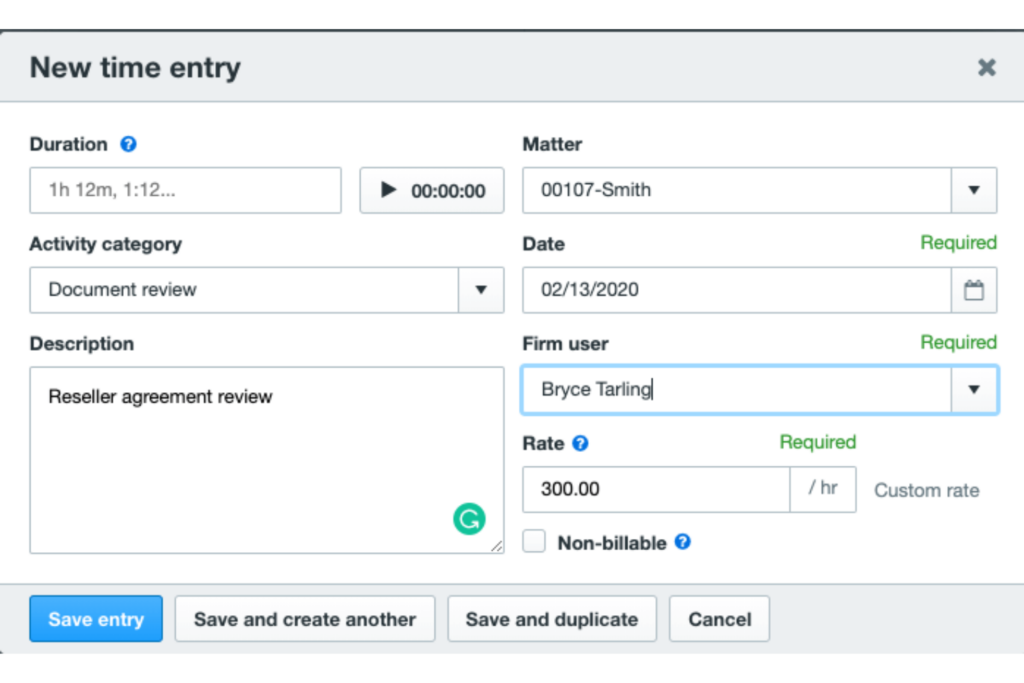
Legal billing software helps teams bill more of the work they actually do by recording activities in real time. Instead of relying on memory or handwritten notes, you can use built-in timers or activity tracking tools to log every call, meeting, or email as it happens. That means fewer missed billable hours and higher firm revenue.
Products like Clio offer automatic time capture from phone calls, document editing, and calendar appointments. With LEAP, you can track time from your mobile device, automatically associating your entries with the right matter.
These features keep everyone—attorneys, paralegals, and admins—working from the same source of truth, so nothing falls through the cracks. I’ve seen firms catch hundreds of dollars in missed revenue every month just by using these kinds of tracking tools.
To get the most value from automated time tracking, keep these best practices in mind:
- Set up activity codes: Use standardized codes for calls, drafting, court appearances, and research to make reporting and billing reviews more efficient.
- Encourage same-day entry: Block time each day for your team to review and log any remaining activities while memories are still fresh.
- Audit regularly: Review individual and firm-wide activity logs each month to spot patterns, catch gaps, and celebrate accurate billing habits.

2. Automated Invoicing Reduces Billing Errors
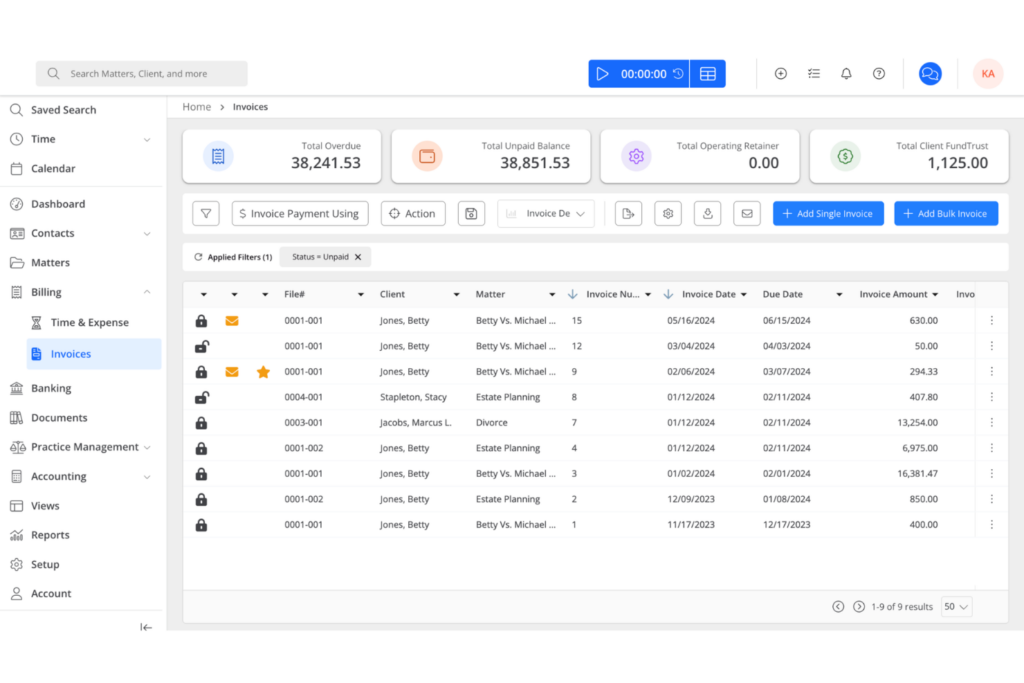
Legal billing software helps cut down on mistakes in your invoices by generating them automatically based on time entries and preset rates. This leads to fewer disputes, faster processing, and happier clients who see consistency on every bill.
Platforms like TimeSolv let you set up templates that pull in matter details, expenses, and tax calculations every time you generate an invoice. Rocket Matter offers batch invoicing and automatic task-to-bill conversion, so even multi-matter clients get clear, error-free bills. I’ve worked with teams who used to spend hours double-checking every invoice, but with these tools they’re able to send bills out faster and with more confidence.
If you want to tighten up your invoicing process and reduce errors, watch for these outcomes as you automate billing:
- Fewer client disputes: Clients receive invoices that align with signed agreements, reducing questions and objections about billed items.
- Shorter review cycles: Team members spend less time fixing errors or looking up time entries before sending invoices.
- Greater billing consistency: Every invoice follows the same template and rules, preventing mismatch between matters or client accounts.
3. Faster Payments Improve Firm Cash Flow
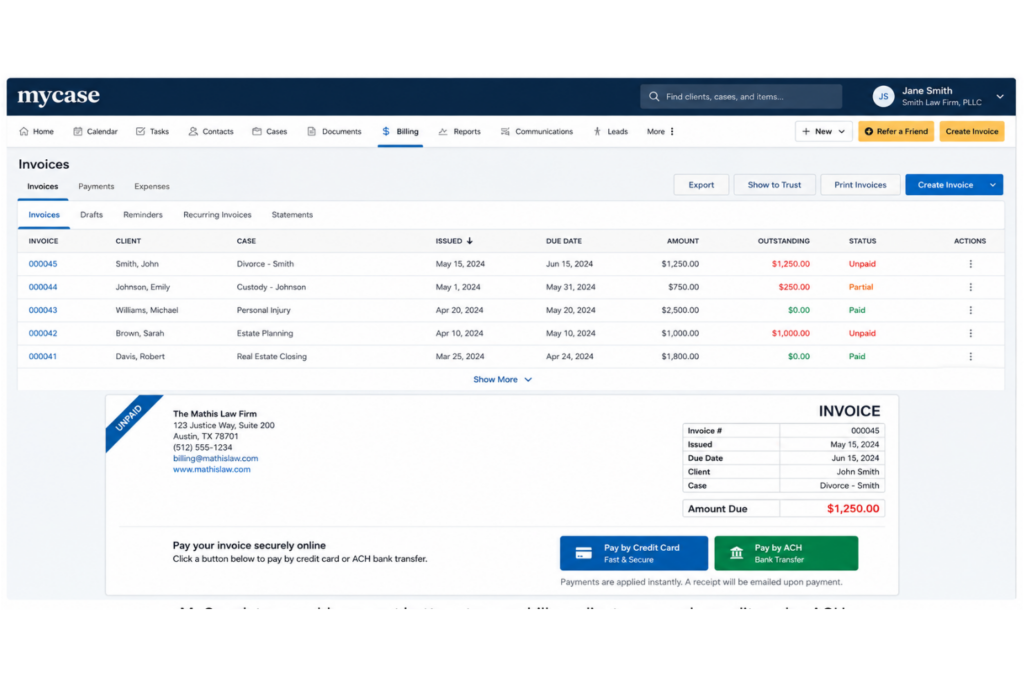
Legal billing software helps your firm get paid sooner by offering online payment links, client portals, and automated reminders right on the invoice. That means money in the bank faster, fewer overdue accounts, and less time spent chasing clients.
With tools like MyCase, you can add payment buttons to every bill, letting clients pay by credit card or ACH as soon as they open the email. PracticePanther’s automated payment reminders nudge clients about upcoming or overdue invoices, cutting out manual collections work.
Cash flow steadies out when payments come in more regularly. I’ve seen firms move from 45-day cycles down to less than 20 days when they use these features consistently.
Here are a few practical ways to use billing software to speed up your firm’s payment cycles:
- Enable multiple payment options: Give clients the choice to pay by credit card, ACH, or eCheck to remove barriers to quick payment.
- Send immediate e-invoices: Deliver each invoice as soon as work is complete instead of waiting for monthly billing cycles.
- Schedule recurring payment reminders: Automate follow-ups with clients who haven’t paid by the due date to keep cash flowing steadily.
4. Built-In Trust Accounting Simplifies Compliance
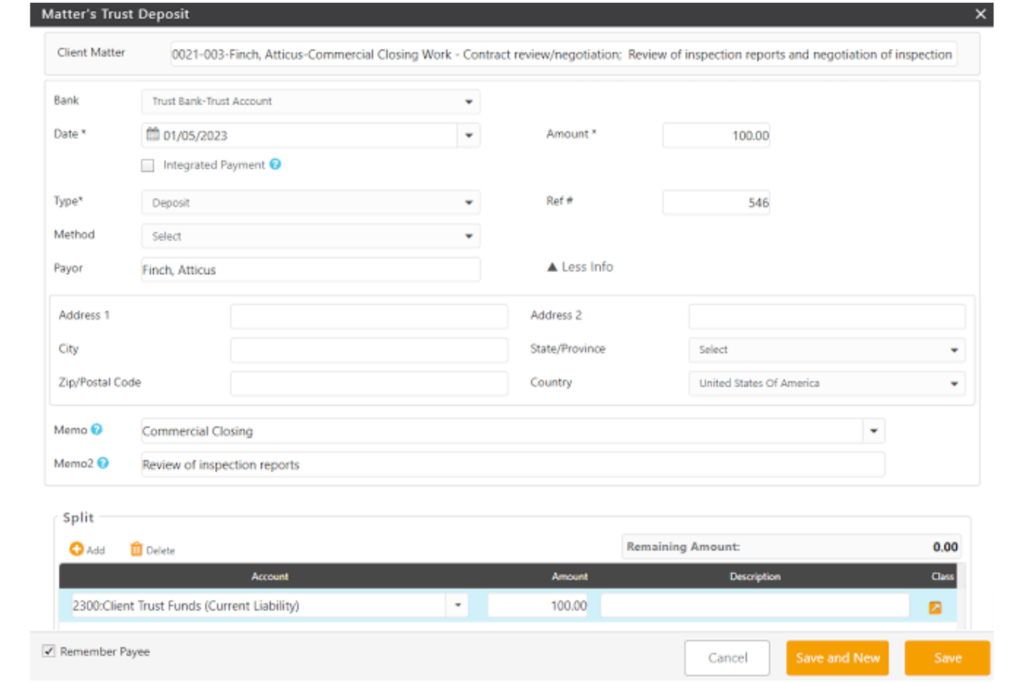
Legal billing software makes it much easier to follow handling rules for client funds by managing trust accounts directly within the system. Your team can stay in sync with bar association requirements, avoid commingling funds, and quickly produce audit-ready records when needed.
Software like Zola Suite tracks every deposit, disbursement, and client ledger entry in real time, keeping trust balances current and visible. CosmoLex manages three-way reconciliations, syncing your bank, trust account, and client ledger with just a few clicks. Firms handling retainers or settlement funds can avoid errors and disciplinary issues by relying on these built-in features instead of spreadsheets or manual calculations.
Keep these tips in mind to make the most of built-in trust accounting tools:
- Set up separate ledgers: Maintain a dedicated ledger for each client to avoid commingling and make audits simple.
- Record transactions immediately: Post every deposit, withdrawal, or fee application the same day to keep balances accurate.
- Reconcile monthly: Compare trust records with bank statements every month so you catch and correct discrepancies early.
5. Transparent Invoices Strengthen Client Relationships
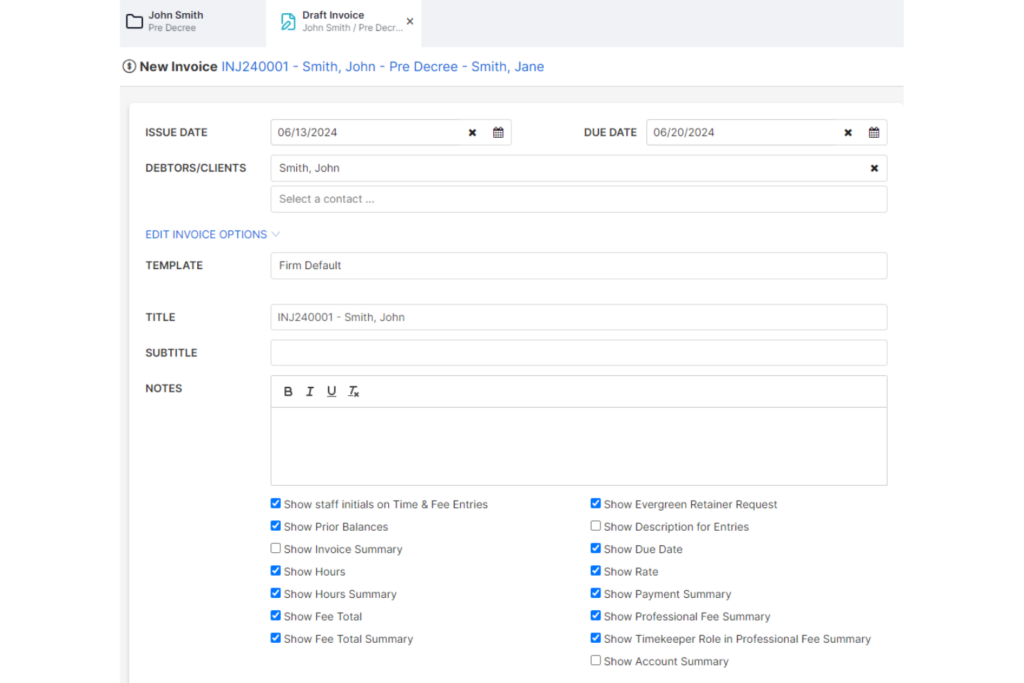
Legal billing software lets you show clients exactly what work you did and how you’re billing for it. This makes invoices easier to understand and builds trust, leading to fewer billing disputes and better long-term relationships.
Features like detailed time-entry breakdowns, matter-specific descriptions, and attachments to invoices give clients the context they need. Tools such as Bill4Time and Smokeball let you add clear explanations or supporting documents to every invoice.
I’ve seen teams get positive client feedback because clients no longer have to guess what a line item means or ask for clarifications. That kind of transparency makes clients more likely to pay on time and refer your services in the future.
Here are some ways to make your invoices more transparent and client-friendly:
- Add plain-language descriptions: Use clear, simple terms for each task so clients know what’s included.
- Include relevant dates and times: Show when work was performed to clarify the timeline of services provided.
- Attach supporting documents: Provide receipts, court filings, or status updates to back up charges and answer questions upfront.
4 Disadvantages of Legal Billing Software
While legal billing software offers important benefits, there are also drawbacks you should consider before making the switch:
1. Steep Learning Curve Disrupts Workflows
Learning to use legal billing software can slow your team down, especially when everyone’s adjusting to new time-tracking tools and billing dashboards. During onboarding, billing mistakes and confusion can increase, causing disruptions in how attorneys, paralegals, and administrative staff manage their daily work.
Some products include features to help teams adjust, but even then, your firm still faces downtime and extra training sessions.
For example, Clio offers interactive tutorials and an onboarding specialist to guide new users, while TimeSolv gives access to a knowledge base and live webinars. Even so, you’re likely to see a temporary dip in productivity as your team gets comfortable with the new system.
Try these strategies to shorten the adjustment period and minimize workflow disruption as you roll out new billing software:
- Pilot with a small group: Test new tools with a handful of users first, then expand when processes are ironed out.
- Schedule protected training time: Block off calendars so attorneys and staff can focus on learning without client interruptions.
- Pair experienced and new users: Assign software “buddies” to help answer day-to-day questions as new skills are learned.
2. Implementation Costs Strain Smaller Firms
Adopting new billing software often means paying for setup, training, and transferring old data, which can make small firm budgets tight or put upgrades out of reach. Solo practitioners and small firms might find that the true cost goes well beyond just the monthly fee, especially when they must also invest in customizations or outside support to get the system working for them.
Some platforms offer flexible options to reduce this barrier. CosmoLex has tiered subscription plans and bundled onboarding to keep costs predictable. Zola Suite provides in-house migration for a flat fee, helping firms avoid extra expenses. Even with these features, smaller practices need to plan for upfront spending and make sure the investment aligns with immediate business needs.
Consider these steps to help soften the financial impact when implementing billing software at a smaller firm:
- Request detailed quotes: Ask vendors for clear, itemized pricing before committing to avoid hidden costs.
- Prioritize essential features: Focus on must-have billing tools now and consider expanding as your needs grow.
- Leverage free trials: Test software on a small scale before investing in a full rollout or data migration.
3. Software Limitations Restrict Customization
Many billing systems come with fixed workflows and templates that can make it tough for firms with unique billing arrangements or specialized fee structures to adapt the software to their exact needs. If your firm handles alternative fee agreements or needs custom approval paths, these restrictions can mean extra manual work or creative workarounds.
Some platforms try to solve this by offering limited customization options. Actionstep includes configurable billing codes and approval processes.
Bill4Time lets users set up custom rates for clients and matters, but bigger changes may still require IT support or won’t be possible at all. Firms with complex billing requirements need to evaluate how locked-down systems might slow them down or force process compromises.
Try these approaches to work around limits on customization and keep your billing processes efficient:
- Document critical workflows: Map out your firm’s essential billing steps before choosing a tool to find the best fit.
- Leverage integrations: Connect your billing software to case management or accounting apps for more tailored processes.
- Request feature updates: Share your firm’s customization needs with vendors so improvements align better with real practice demands.
4. Data Security Risks Require Ongoing Vigilance
Storing sensitive client and financial data in cloud-based billing software exposes your firm to privacy threats—breaches or accidental access can harm client trust and produce compliance headaches. For example, if user permissions aren’t set up carefully, a paralegal might access sensitive invoices meant only for partners, risking confidentiality violations.
Many billing vendors include built-in safeguards, such as two-factor authentication and regular security audits, to help minimize these risks. Tabs3 implements granular user controls and audit trails so firms can restrict access and track changes.
LeanLaw offers encrypted data storage and provides transparency on compliance certifications. Even with these protections in place, firms need to keep policies updated and staff trained to spot security gaps as threats keep evolving.
Use these best practices to help safeguard your firm’s billing data:
- Assign role-based access: Limit data visibility and editing rights to only those staff who need it for their role.
- Schedule regular security reviews: Audit your user permissions, passwords, and incident response plan at least twice a year.
- Update training resources: Refresh staff awareness on recognizing phishing attempts and reporting suspicious activity as threats evolve.
More Articles
Is Legal Billing Software Right for You?
Legal billing software can make it easier to track time, manage trust accounts, and reduce billing errors, but choosing the right platform requires more than comparing feature lists. You also need to consider your firm’s size, workflows, budget, security needs, and how much change your team can realistically manage.
When deciding how to choose legal billing software, focus on whether the system fits your current billing process, supports your compliance requirements, and can scale with your firm without adding unnecessary complexity.
Use this table to decide when legal billing software is the right fit—or when another approach may work better.
| Consider legal billing software if… | Consider a different solution if… |
|---|---|
| Consider legal billing software if…Your firm manages a high volume of clients and invoices monthly. | Consider a different solution if…Your practice handles low-volume, infrequent billing that’s easily managed with manual processes. |
| Consider legal billing software if…You need accurate time tracking for multiple attorneys or practice groups. | Consider a different solution if…Staff struggle with new technology or don’t have time for extended software training. |
| Consider legal billing software if…Clients request detailed, transparent invoices with itemized billing and expense breakdowns. | Consider a different solution if…Your firm’s billing requirements are highly specialized and can’t be customized in most software. |
| Consider legal billing software if…You work with trust accounts and compliance reporting that must meet legal industry standards. | Consider a different solution if…You’re a solo practitioner trying to minimize expenses and avoid monthly or annual software costs. |
| Consider legal billing software if…Payments are routinely delayed and your team needs automated reminders and faster digital processing to improve cash flow. | Consider a different solution if…Your firm’s existing billing and accounting process is closely tied to proprietary tools or methods. |
| Consider legal billing software if…Integration with case management, accounting, or document storage platforms would reduce double entry and admin errors. | Consider a different solution if…Data security risks or jurisdictional compliance concerns make you hesitant to store sensitive info in the cloud. |
| Consider legal billing software if…Growing your firm will require scalable, standardized billing processes as you add staff or clients. | Consider a different solution if…Your practice will remain intentionally small, with no plans for growth or operational changes. |
Top Legal Billing Software to Consider
Here's my shortlist of the best legal billing software solutions:
Now You Know the Trade-Offs, Here's What to Do Next
If you're ready to move past the pros and cons and get a clearer picture of how this software actually works, our guide to what legal billing software is and how it works covers key features, costs, and top-rated tools to help you find the right fit for your firm.