Choosing the right legal billing software comes down to more than price—it's about finding a tool that fits how your firm actually bills. From time tracking and invoice generation to trust accounting and client portals, the feature gaps between platforms are significant.
I’ve evaluated enough of these tools to know that the wrong choice can create more work, not less.
This guide walks through the key criteria to evaluate, the questions worth asking vendors, and the trade-offs that matter most when comparing different legal billing, from standalone billing platforms to practice management systems with built-in billing and enterprise e-billing solutions.
4 Things to Look for When Choosing Legal Billing Software
Based on my experience using and testing dozens of billing platforms, here’s what I focus on every time I choose legal billing software for a legal team:
1. Smooth Integration With Your Legal Tech Stack
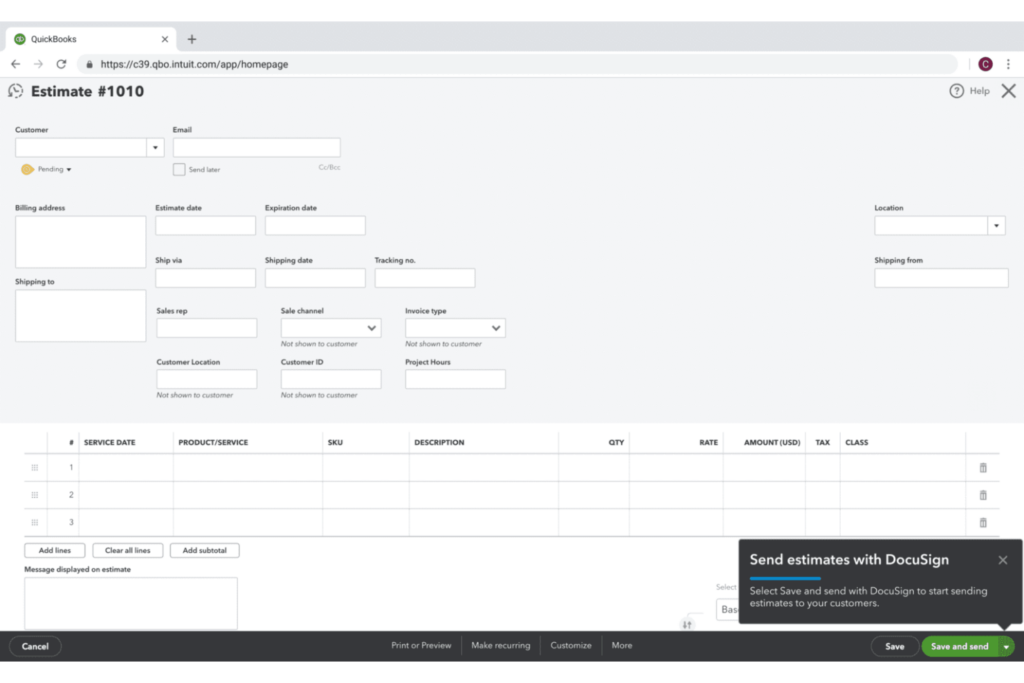
Integrating billing software with your existing case management, document storage, and accounting tools is a game changer for reducing duplicate work and manual entry. I’ve found systems that don’t sync easily end up adding more complexity than they solve.
Check if the software supports native integrations or offers an open API—and ask yourself whether you need out-of-the-box sync with platforms like Clio, NetDocuments, or QuickBooks.
2. Customizable Billing Templates and Rate Structures
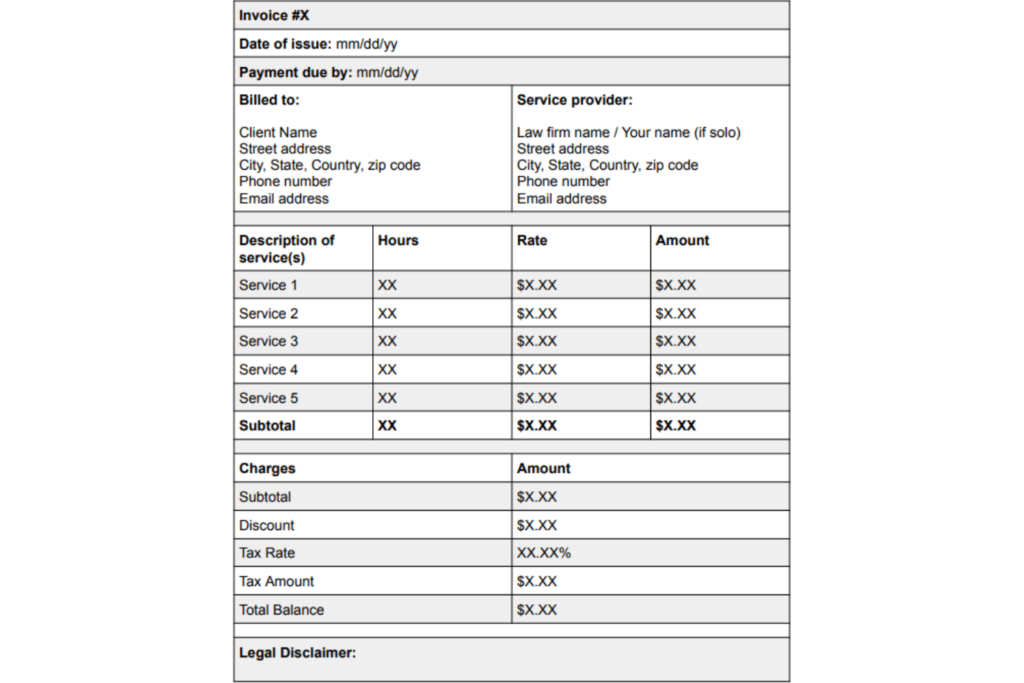
Not every client or matter fits a standard invoice, so being able to tailor billing templates and set custom rates for different work types has saved me countless hours. When software locks you into rigid formats, you risk confusion for both your team and your clients.
Look for tools that let you set automated rate rules, apply discounts, and format invoices to client specifications—and think about how often you negotiate special rates or alternative fee arrangements.

3. Trust Accounting and Compliance Safeguards
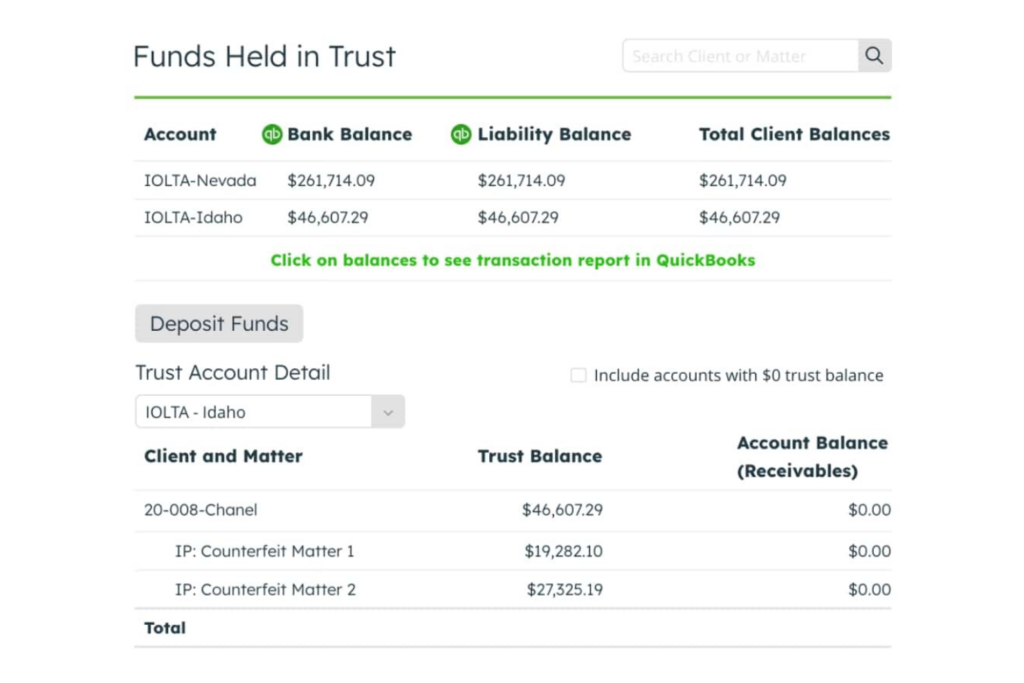
Trust accounting missteps can put your firm at real risk, so I always look for billing platforms built with legal-specific compliance guardrails. Generic billing tools rarely deliver the reliable IOLTA management and segregation of client funds you need.
Verify the software offers built-in trust accounting with audit trails, safeguards against commingling, and compliance reporting—and ask whether it meets your local bar requirements.
4. Robust Reporting and Financial Analytics
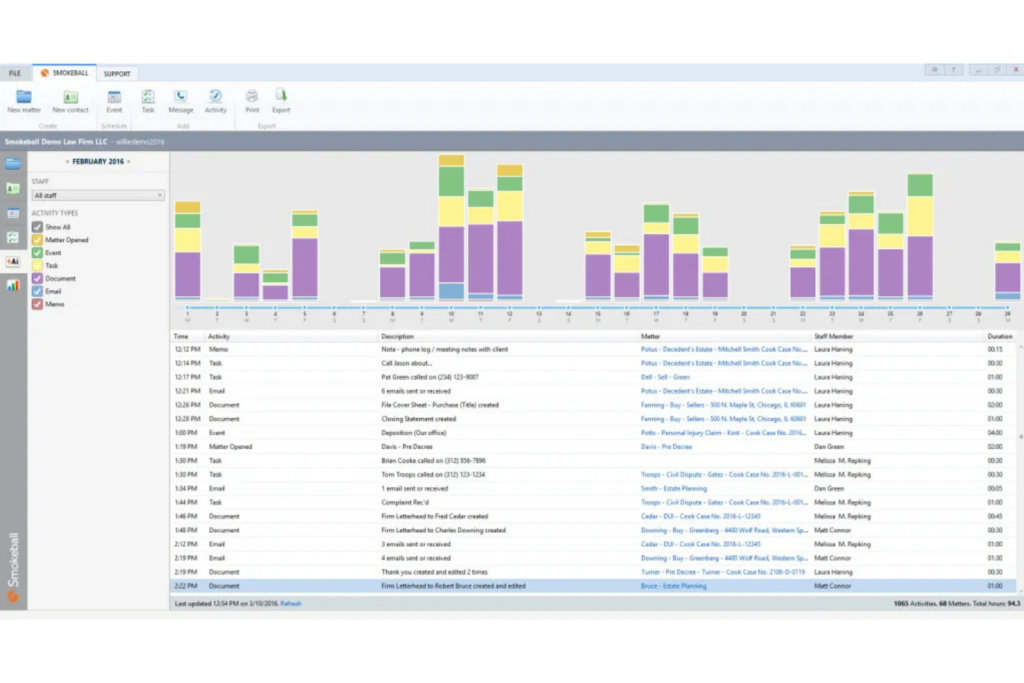
Detailed reporting gives you insight into what’s working—and what’s not—across your firm’s matters, timekeepers, and billing cycles. I rely on software that offers customizable dashboards and exportable data to help forecast revenue and track key metrics.
See if you can easily generate reports by client, matter, attorney, and billing stage—and ask whether the platform can filter data in ways that map to your firm’s needs.
How to Choose Legal Billing Software: A 5-Step Framework
Here’s the step-by-step process I use to evaluate and select legal billing software that actually meets a firm’s needs:
Step 1: Identify Your Needs
Before comparing any tools, I always start by getting clear on what the firm actually needs—not just what sounds useful in a demo. Consider which types of legal billing software fit your workflow, whether that’s a standalone billing platform, practice management software with built-in billing, legal e-billing software, or a broader accounting and billing system.
Talk to the people who use your current billing process every day, since their input will reveal the features, workflows, and pain points that should shape the rest of your evaluation.
Start by speaking with these stakeholders:
- Billing administrators: who process invoices and chase payments
- Attorneys and timekeepers: who log time and expenses
- Finance or accounting staff: who reconcile trust accounts and run reports
- IT or legal ops: who manage integrations and data security
Then work through these questions to surface your real requirements:
- How do you currently track billable time—manually, in spreadsheets, or through another tool?
- Which billing arrangements do you use most: hourly, flat fee, contingency, or hybrid?
- Do you manage client trust accounts, and how complex is that process today?
- Which tools does your team already rely on that billing software needs to connect with?
- Where does your current billing process break down most often?
Use this table to map your answers to the right software priorities:
| Need | What to Prioritize |
|---|---|
| NeedComplex rate structures | What to PrioritizeCustomizable billing templates |
| NeedTrust account management | What to PrioritizeBuilt-in IOLTA compliance tools |
| NeedMultiple practice areas | What to PrioritizeMatter-level reporting and filtering |
| NeedLegacy tool integrations | What to PrioritizeAPI access or native integrations |
| NeedHigh invoice volume | What to PrioritizeAutomated billing and batch invoicing |
By the end of this step, you should have a clear picture of your must-haves vs. nice-to-haves—which makes every subsequent step faster and sharper.
Step 2: Research Legal Billing Software Vendors
Once you know what you need, I'd recommend casting a wide net before narrowing anything down. The goal here is to build a full picture of the market—not to make decisions yet.
At this stage, focus on identifying vendors that cover your core requirements rather than choosing a winner too early.
Use these sources to gather information on available vendors:
- Peer recommendations: Ask colleagues at similar firms what they use and what they'd avoid
- Bar association resources: Many state and local bar associations publish approved or recommended software lists
- Legal ops communities: Forums and professional networks surface real-world feedback you won't find in marketing materials
- Software review platforms: Look for patterns in reviews—recurring complaints matter more than one-off opinions
- Legal industry publications: Trade publications often run annual software roundups worth bookmarking
As you research, pay attention to signals that indicate whether a vendor understands legal-specific requirements:
| Research Signal | What It Tells You |
|---|---|
| Research SignalLegal-specific marketing and documentation | What It Tells YouVendor understands the industry |
| Research SignalActive user community or forum | What It Tells YouProduct has an engaged customer base |
| Research SignalFrequent product updates | What It Tells YouVendor invests in ongoing development |
| Research SignalPublicly available compliance documentation | What It Tells YouTransparency around security and data handling |
| Research SignalResponse to negative reviews | What It Tells YouVendor's customer service culture |
Document every vendor you come across, even ones that seem like a stretch. I've been surprised more than once by a platform that didn't look right on paper but turned out to be the best fit after a deeper look. By the end of this step, you should have a longlist you can systematically narrow down in the next step.
Top Legal Billing Software to Consider
Here's my shortlist of the best legal billing software solutions:
Step 3: Make a Legal Billing Software Shortlist
This is where your research gets filtered through your actual requirements. I'd aim to get your longlist down to three to five vendors—enough to compare meaningfully without overwhelming your evaluation process.
Use these criteria to cut vendors that aren't worth your time:
- Hard requirements first: If a vendor doesn't support IOLTA compliance or a critical integration, remove them immediately
- Firm size fit: Some platforms are built for solo practitioners; others are designed for mid-size or large firms—make sure the vendor's target market matches yours
- Deployment model: Confirm whether the software is cloud-based, on-premise, or hybrid, and check that it aligns with your IT policy
- Pricing structure: Eliminate vendors whose pricing model doesn't scale with your firm or whose costs exceed your budget ceiling
- Support availability: If your team needs live support during business hours, vendors with only async or community support may not work
Once you've applied those filters, use this table to score remaining vendors before reaching out:
| Evaluation Criteria | Weight | Notes |
|---|---|---|
| Evaluation CriteriaMeets hard requirements | WeightHigh | NotesNon-negotiable—cut if missing |
| Evaluation CriteriaFirm size alignment | WeightHigh | NotesAffects feature relevance |
| Evaluation CriteriaPricing fit | WeightMedium | NotesFactor in total cost of ownership |
| Evaluation CriteriaIntegration compatibility | WeightMedium | NotesConfirm with your IT or legal ops team |
| Evaluation CriteriaUser review patterns | WeightLow | NotesUse to validate, not decide |
Contact vendors only after you've done this scoring exercise. I've seen firms book demos too early and get sold on features they don't need. Reaching out with a clear list of requirements puts you in a stronger position and makes demo conversations far more productive. By the end of this step, you should have a focused shortlist ready for structured evaluation.
More Articles
Step 4: Build the Business Case
A business case doesn’t need to be lengthy, but it should answer the questions decision-makers are likely to ask before approving the investment. I’d focus on the practical benefits that legal billing software can bring to the firm, such as reducing billing delays, improving payment visibility, reducing manual work, and giving teams better control over revenue.
Framing the case around measurable outcomes rather than a long feature list usually makes the value easier to understand.
Start by quantifying where your current process is costing you:
- Unbilled time: Estimate how much billable time goes uncaptured each month due to manual logging gaps
- Collection delays: Calculate your average days-to-payment and what that costs in cash flow
- Administrative overhead: Tally hours spent on manual invoice preparation, corrections, and follow-ups
- Compliance risk: Factor in the cost of trust accounting errors, even if they haven't resulted in sanctions yet
Then build out your cost and timeline estimate using this framework:
| Cost Category | What to Include |
|---|---|
| Cost CategoryLicensing or subscription fees | What to IncludePer-user costs, annual vs. monthly pricing |
| Cost CategoryImplementation and setup | What to IncludeData migration, configuration, and IT time |
| Cost CategoryTraining | What to IncludeStaff onboarding hours and any vendor-provided training costs |
| Cost CategoryIntegration work | What to IncludeConnecting to existing tools or systems |
| Cost CategoryOngoing support | What to IncludeMaintenance, upgrades, and support tier costs |
Be honest about risks—decision-makers will raise them whether you do or not. Address adoption risk, data migration complexity, and any temporary productivity dips during the transition period. Showing you've thought through the risks builds more confidence than pretending they don't exist. By the end of this step, you should have a clear, defensible case that connects software cost to concrete firm outcomes.
Step 5: Implement Your Legal Billing Software and Onboard Your Users
Choosing the right software is only half the work. I've seen strong platforms fail at firms simply because the rollout was rushed or ownership wasn't clear. A structured implementation plan prevents that.
Start by laying the groundwork before go-live:
- Assign an internal owner: Designate one person—usually in legal ops, finance, or administration—to lead the rollout and serve as the vendor's primary contact
- Set a phased timeline: Avoid switching everything over at once; pilot with one practice group or matter type before firm-wide deployment
- Communicate early: Brief all affected staff before launch so no one is caught off guard by system changes
- Migrate and validate data: Confirm that historical billing records, client matters, and trust account data transfer cleanly before decommissioning your old system
Use this table to assign ownership across the key implementation workstreams:
| Workstream | Owner | Priority |
|---|---|---|
| WorkstreamData migration | OwnerIT or legal ops | PriorityPre-launch |
| WorkstreamStaff training | OwnerBilling administrator | PriorityPre-launch |
| WorkstreamIntegration testing | OwnerIT lead | PriorityPre-launch |
| WorkstreamUser feedback collection | OwnerImplementation owner | PriorityPost-launch |
| WorkstreamCompliance validation | OwnerFinance or general counsel | PriorityOngoing |
Build a feedback loop into the first 90 days. I always recommend scheduling short check-ins with timekeepers and billing staff at the 30-, 60-, and 90-day marks to catch adoption gaps early. By the end of this step, your team should be billing consistently in the new system, with clear support channels in place for any issues that arise.
Choose With Confidence, Then Commit to the Process
With your requirements and priorities mapped out, the next move is to put together a legal billing software RFP that gives vendors clear direction and makes their proposals easy to compare side by side.