

Programvare for juridisk prosjektstyring hjelper advokatfirmaer med å organisere saker, følge opp oppgaver og håndtere frister på ett sted. Hvis du leter etter verktøy for juridisk prosjektstyring for å koordinere juridisk arbeid, forbedre samarbeidet og holde sakene på sporet, vet du hvor raskt uorganisering kan føre til oversitte frister eller risiko for manglende etterlevelse. Mange moderne plattformer kombinerer funksjoner for juridisk teknologi, som kontraktshåndtering, juridisk research og sakssporing, i ett samlet system utviklet for travle juridiske team.
Disse verktøyene hjelper firmaer med å innfri økende klientforventninger, forbedre lønnsomheten og effektivisere interne arbeidsflyter med brukervennlige grensesnitt. Denne listen hjelper deg med å sammenligne de beste alternativene for programvare for juridisk praksisstyring i 2026, slik at du kan finne løsningen som passer best til teamets arbeidsflyt, klientenes behov og regulatoriske krav.
Why Trust Our Software Recommendations
6,700+
Reviews
20
Industry experts
16+
Evaluation factors
14
Years
Our team has been testing and reviewing software since 2012. As legal practice leaders ourselves, we know how difficult—and important—it is to choose the right software.
For this guide, we evaluated tools using hands-on testing and independent research, scoring tools using our selection criteria.
Our reviews reflect our human editorial judgment, not a sales pitch.
Sammenligningstabell for programvare for juridisk prosjektstyring
Denne sammenligningstabellen oppsummerer prisdetaljene for mine beste utvalgte løsninger for juridisk prosjektstyring:
| Tool | Best For | Trial Info | Price | ||
|---|---|---|---|---|---|
| 1 | Best for integrated legal billing solutions | Free trial available | Pricing upon request | Website | |
| 2 | Best for secure client portal access | 10-day free trial | From $11/user/month | Website | |
| 3 | Best for solo and small firm collaboration | Free trial available | From £79/user/month | Website | |
| 4 | Best for visual task board interface | 14-day free trial | From $39/user/month (billed annually) | Website | |
| 5 | Best for document generation features | Free plan available; Free demo available | Pricing upon request | Website | |
| 6 | Best for integrated time and billing tracking | 10-day free trial | From $59/user/month (billed annually) | Website | |
| 7 | Best for customizable process templates | Free demo available | Pricing upon request | Website | |
| 8 | Best for advanced workflow automation | Free demo available | Pricing upon request | Website | |
| 9 | Best for built-in compliance management | Free demo available | Pricing upon request | Website | |
| 10 | Best for mobile-friendly task management | 7-day free trial | From $59/user/month | Website |


Anmeldelser av programvare for juridisk prosjektstyring
Nedenfor finner du mine detaljerte oppsummeringer av programvare for juridisk prosjektstyring som kom med på kortlisten. Anmeldelsene mine gir en detaljert gjennomgang av funksjonene, de beste bruksområdene og integrasjonene til hver plattform, slik at du kan finne den beste løsningen for deg.
 1Best for integrated legal billing solutions
8am
- Free trial available
- Pricing upon request
Visit WebsiteCustomer Rating:4.6/5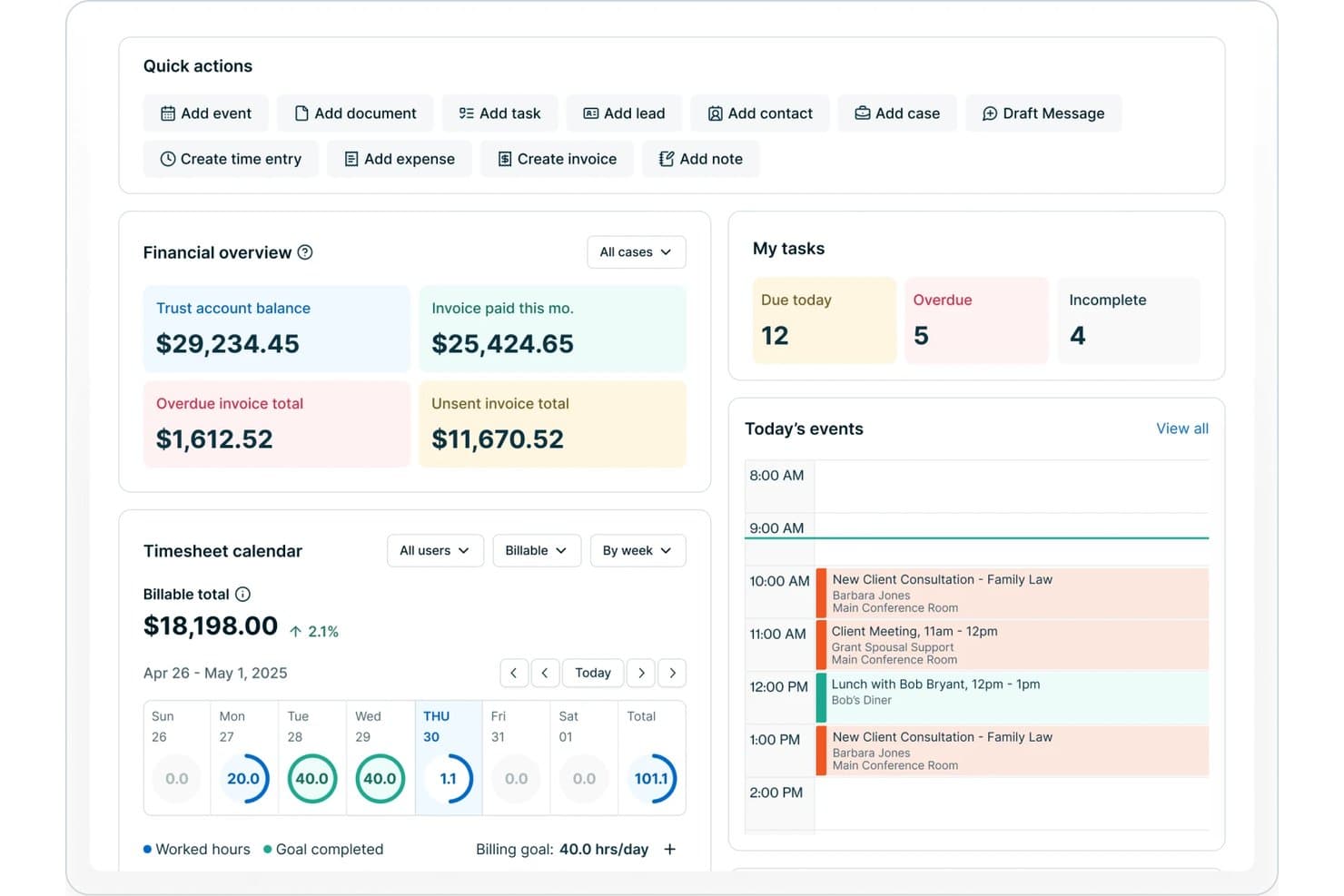
8am offers a legal practice dashboard with financial overview, task tracking, timesheet calendar, and today's events including client consultations and meetings. 8am is a legal project management software platform offering matter planning, automated billing, time tracking, document management, and workflow tools designed specifically for law firms and legal teams.
Who Is 8am Best For?
Law firms and legal departments seeking a centralized platform for managing matters, billing, and legal team collaboration.
Why I Picked 8am
I picked 8am as one of the best because the platform centralizes billing, payment processing, and time tracking inside matter workflows. I’ve sent client invoices, tracked outstanding balances, and received trust payments directly within the legal case file.
8am Key Features
- Matter templates: Create and reuse structured templates for common case types and workflows.
- Document management: Store, organize, and version control all case-related files securely in one location.
- Role-based permissions: Set detailed access and editing rights for teams and individual users on sensitive data.
- Custom reporting: Build and schedule matter and financial reports tailored to firm needs.
8am Integrations
Native integrations are not publicly listed.
Pros and Cons
Pros:
- Specialized workflows for case and matter types
- Role-based permissions for sensitive case data
- Built-in e-signature and document version control
Cons:
- Initial workflow setup takes time
- Limited advanced analytics and forecasting
Learn more about 8am: Best for secure client portal access
- 10-day free trial
- From $11/user/month
Visit WebsiteCustomer Rating:4.8/5
Clinked handles workflows and improves client communication. Clinked offers legal teams and law firms a dedicated client portal designed to centralize document sharing, communication, and collaboration. Its focus on privacy and granular access controls helps legal professionals manage sensitive client matters and streamline project workflows.
Who Is Clinked Best For?
Clinked suits law firms and legal departments that need a secure, branded portal for managing client communications and sensitive documents.
Why I Picked Clinked
I picked Clinked because its client portal is built specifically around secure, controlled access—something legal teams can't compromise on. I appreciate that it lets you assign granular permissions at the group or individual level, so clients only see the files and conversations relevant to their matter. The white-label branding feature also stands out for firms that want to present a professional, firm-branded experience rather than a generic third-party tool. In practice, that means my team can share sensitive documents and track client activity in one place, without relying on unsecured email threads.
Clinked Key Features
- Kanban board: Visualize task progress across client matters using a drag-and-drop Kanban board with due dates and status tracking.
- Document version control: Track changes to files over time, with access to previous versions of any document stored in the portal.
- Audit trail: Log every user action in real time, including file views, edits, and downloads, to maintain a full activity record.
- File request: Send clients a direct request to upload specific documents into the portal without requiring them to navigate the full interface.
Clinked Integrations
Integrations include Google Workspace, Microsoft 365, DocuSign, and Jotform. An API is also available for custom integrations.
Pros and Cons
Pros:
- Task assignment links directly to client workspaces
- Group chat enables real-time client discussions
- Document versioning tracks all file changes
Cons:
- Notification settings can be difficult to manage
- No built-in document automation tools
Learn more about Clinked: 3Best for solo and small firm collaboration
Clio
- Free trial available
- From £79/user/month
Visit WebsiteCustomer Rating:4.7/5
Clio simplifies client management and billing for solo practitioners. Clio offers legal project management software designed legal professionals (specializing in UK-based firms) seeking to organize cases, documents, and client communications in one place. Its intuitive interface and cloud-based access make it especially appealing to smaller practices aiming to simplify daily workflows.
Who Is Clio Best For?
Clio suits solo practitioners and small law firms in the UK looking for centralized case, document, and client management.
Clio Key Features
- Standardized task lists: Build reusable task sequences tied to specific matter types, with relative deadlines and per-user assignments managed from inside a matter.
- Time and expense tracking: Log billable hours directly from a task and track expenses against matters using the built-in Timekeeper tool.
- Law firm performance reporting: View hours captured, billed, and collected across your firm in a single dashboard, with filters by user, matter, or date.
- Client portal: Give clients a dedicated desktop and mobile app to view assigned tasks, receive reminders, and communicate securely with your firm.
Clio Integrations
Integrations include Xero, QuickBooks Online, Legl, InfoTrack, OurFamilyWizard, Case Status, ChartSquad, Scorpion RevenueMAX, Precedent Demand Composer, and Clio’s open API for custom integrations.
Pros and Cons
Pros:
- Calendar sync with court dates and deadlines
- Matter-centric organization for all case files
- Built-in time tracking for billable matters
Cons:
- Document automation lacks advanced customization
- Limited reporting options for project analytics
Learn more about Clio: Best for visual task board interface
- 14-day free trial
- From $39/user/month (billed annually)
Visit WebsiteCustomer Rating:4.8/5
Lawcus structures projects and organizes legal work. Lawcus offers legal teams a modern project management platform designed to simplify matter tracking and collaboration. Its intuitive interface and workflow automation features make it a strong fit for law firms and legal departments seeking to organize complex legal work with greater clarity.
Who Is Lawcus Best For?
Lawcus suits small to midsize law firms and legal teams that want to manage matters, tasks, and workflows visually.
Why I Picked Lawcus
I picked Lawcus for its visual task board interface, which lets legal teams manage matters and tasks across Kanban-style boards that mirror how legal work actually moves through stages. I appreciate that you can drag and drop matters between pipeline stages, giving attorneys an at-a-glance view of where every case stands. I also like Lawcus's built-in workflow automation, which triggers task assignments and status updates automatically as matters progress. In practice, that means my team spends less time on manual follow-ups and more time on substantive legal work.
Lawcus Key Features
- Client portal: Lets clients access case updates, exchange messages, share documents, and make payments through an encrypted, firm-branded portal.
- Nova AI writing assistant: Generates emails, notes, matter descriptions, and task descriptions directly within the platform using AI.
- Custom reporting: Produces over 100 standard reports—covering accounts receivable, trust ledgers, pipeline value, and referral sources—with a custom report builder for additional configurations.
- Time and expense tracking: Logs billable hours and expenses against specific matters to support accurate invoicing.
Lawcus Integrations
Integrations include Box, Calendly, Dropbox, Gmail, Google Calendar, Google Drive, LawPay, Microsoft 365, QuickBooks, and Xero.
Pros and Cons
Pros:
- Built-in client portal supports secure messaging
- Workflow automation reduces repetitive task steps
- Kanban boards visualize matter progress clearly
Cons:
- User roles offer limited permission granularity
- No built-in document assembly tools
Learn more about Lawcus: Best for document generation features
- Free plan available; Free demo available
- Pricing upon request
Visit WebsiteCustomer Rating:4.5/5
Filevine optimizes task management and document handling. Filevine is a legal project management platform designed for law firms and legal teams that need advanced workflow automation and collaboration tools. Its flexible case management features help legal professionals handle complex matters, deadlines, and communications in one place.
Who Is Filevine Best For?
Filevine suits midsize to large law firms and legal departments seeking customizable workflows and centralized case management.
Why I Picked Filevine
Document generation is where I find Filevine genuinely pulls ahead of other legal project management tools. Its DocGen feature uses template-based automation to pull case and client data directly into documents with one click—so when my team needs to produce a settlement demand letter, the relevant fields populate automatically from the case file. I also appreciate the proprietary .vine file format, which keeps documents live and connected to case data, so updates in the project automatically reflect in the document. For teams drafting high volumes of contracts, pleadings, or demand letters, that kind of built-in accuracy cuts down on dual data entry and manual error correction.
Filevine Key Features
- Case timeline tracking: View deadlines, tasks, and milestones across all active matters in a single timeline view.
- Client portal: Share documents, collect signatures, and exchange messages with clients through a dedicated portal.
- Team task assignment: Assign, delegate, and track tasks across team members directly within each case file.
- Reporting dashboard: Generate custom reports on case progress, team workload, and matter status using built-in analytics tools.
Filevine Integrations
Integrations include Sageness, Gemini Legal, InfoTrack, Record Retrieval Solutions, DocuPost, MoveDocs, Copitrak, FedEx, Stamps, and Microsoft Teams.
Pros and Cons
Pros:
- Bulk document upload saves time on intake
- Deadline chains automate multi-step case processes
- Custom reporting adapts to firm requirements
Cons:
- User permissions can be difficult to configure
- Workflow automation setup can be time-consuming
Learn more about Filevine: Best for integrated time and billing tracking
- 10-day free trial
- From $59/user/month (billed annually)
Visit WebsiteCustomer Rating:4.4/5
Rocket Matter simplifies billing and time management for law firms. Rocket Matter offers legal professionals a platform designed to simplify case management and project workflows. Its focus on integrating practice management with advanced billing features makes it a strong fit for law firms seeking to unify operations and reduce administrative overhead.
Who Is Rocket Matter Best For?
Rocket Matter suits small to midsize law firms and legal teams that need centralized project management and billing in one platform.
Why I Picked Rocket Matter
I picked Rocket Matter because time tracking and billing aren't separate workflows—they're built into the same system. I appreciate that timers run directly against specific matters, so when I'm done working on a case, converting that tracked time into a billable entry takes seconds. Rocket Matter Track goes further by automatically capturing time across office apps and devices, which means my team isn't manually reconstructing hours at the end of the day. The Matter Status Board also lets me see exactly where each case stands, so I can connect project progress to billing phases without switching between tools.
Rocket Matter Key Features
- Legal trust accounting: Manage and transfer funds across multiple client trust accounts, with built-in compliance safeguards for credit card payments and bank statement reconciliation.
- Document automation: Generate legal documents from customizable templates with auto-populated fields pulled from your central client database.
- Batch billing: Prepare all monthly invoices at once and review them from a paperless prebill screen before sending.
- Conflict checks: Run conflict-of-interest searches across contacts and matters directly within the platform.
Rocket Matter Integrations
Integrations include Office 365, OneDrive, QuickBooks Online, NetDocuments, Dropbox, Google Calendar, and Box.
Pros and Cons
Pros:
- Automated reminders for tasks and deadlines
- Built-in document assembly from templates
- Kanban boards for visual matter tracking
Cons:
- Limited customization for workflow stages
- No built-in client portal for collaboration
Learn more about Rocket Matter: Best for customizable process templates
- Free demo available
- Pricing upon request
Visit WebsiteCustomer Rating:4.2/5
Actionstep automates workflows and simplifies firm operations. Actionstep offers legal teams a cloud-based platform designed to manage complex workflows and automate matter management. Its flexible approach appeals to law firms and legal departments seeking to tailor processes, centralize information, and improve collaboration across cases.
Who Is Actionstep Best For?
Actionstep suits small to mid-sized law firms and legal teams that need to customize workflows and automate legal processes.
Why I Picked Actionstep
I picked Actionstep because its matter type system lets my team build fully customized process templates for each practice area—defining the exact steps, tasks, and deadlines that apply to that matter type from the start. When a new matter opens, Actionstep automatically applies the right workflow, so nothing gets missed. I also appreciate that template management extends to documents and emails, letting my team auto-populate client-specific details without manual drafting. That combination of matter-type templates and document automation makes Actionstep a strong fit for legal project management.
Actionstep Key Features
- Conflict check: Search across all matters, contacts, and emails in one scan to identify potential conflicts of interest before onboarding a new client.
- AI time capture: AI-powered time suggestions auto-fill timesheets based on your activity, capturing billable time you might otherwise miss.
- Client portal: Share matter updates, documents, and invoices with clients through a secure, dedicated portal.
- Trust accounting: Manage client funds and maintain compliance with jurisdiction-specific trust accounting rules directly within the platform.
Actionstep Integrations
Integrations include Outlook 365, InfoTrack, First AML, MiTimes, SpeechWrite, BillerAssist, datacove, Lexidesk, and Zapier.
Pros and Cons
Pros:
- Built-in document versioning for legal files
- Matter types can be fully customized
- Workflow builder supports multi-branch processes
Cons:
- Bulk task editing is not supported
- No built-in Kanban or timeline views
Learn more about Actionstep: Best for advanced workflow automation
- Free demo available
- Pricing upon request
Visit WebsiteCustomer Rating:4.3/5
HighQ boosts efficiency and tracks project progress. HighQ offers legal teams and law firms a platform designed to manage complex legal projects, matter collaboration, and document workflows. Its integration with Thomson Reuters’ legal ecosystem appeals to professionals seeking secure, centralized control over project tasks and client communications.
Who Is HighQ Best For?
Legal operations teams and law firms handling high-volume matters or complex, multi-party projects benefit most from HighQ’s workflow and collaboration capabilities.
Why I Picked HighQ
I picked HighQ because its no-code workflow automation goes further than basic task assignment. I can build conditional rules that trigger actions across the entire platform—automatically creating tasks, generating documents, sending custom emails, and updating data records based on conditions in live matter data. For example, when a contract review reaches a specific stage, HighQ can auto-generate an NDA using document automation and notify the right stakeholders without any manual input. I also rely on its spend-versus-budget dashboards and project risk trackers to keep complex matters on track in real time.
HighQ Key Features
- Client portals: Give clients 24/7 access to matter-specific legal information and resources within a secure, personalized portal.
- Solution templating: Access a library of pre-built templates for matter intake, contract lifecycle management, and end-to-end transaction and litigation management.
- Shared team calendars: Track project milestones, deadlines, and meetings across the team using a shared calendar view.
- Document Insights: Use CoCounsel's AI within HighQ to extract key information, summarize documents, and surface critical findings during review.
HighQ Integrations
Integrations include Microsoft SharePoint, iManage, NetDocuments, Kira Systems, Leverton, Eigen, Seclore, Microsoft Office 365, G Suite, DocuSign, and Adobe Sign.
Pros and Cons
Pros:
- Customizable dashboards for project tracking
- Automated notifications for task deadlines
- Real-time collaboration on case files
Cons:
- Reporting customization options are limited
- Interface can feel complex for new users
Learn more about HighQ: Best for built-in compliance management
- Free demo available
- Pricing upon request

MerusCase facilitates billing and document handling. MerusCase offers legal professionals a cloud-based platform designed to manage complex workflows and sensitive case data. Its integrated approach appeals to law firms and legal departments seeking a unified system for document management, calendaring, and secure collaboration.
Who Is MerusCase Best For?
Law firms and legal teams handling high volumes of cases and requiring secure, centralized management of sensitive legal documents and workflows.
Why I Picked MerusCase
MerusCase's built-in compliance tools set it apart from legal practice management platforms that treat compliance as an afterthought. I appreciate that MerusPay—its native payment processor—is 100% compliant with IOLTA, ABA, and all 50 state bar guidelines, so my team doesn't need to verify third-party payment tools against bar rules. The platform also exceeds HIPAA compliance standards through end-to-end SSL encryption and 256-bit data hashing, which matters when handling sensitive client health information in workers' comp or personal injury matters. For firms where regulatory exposure is a daily reality, having those guardrails built directly into the system removes a layer of manual oversight.
MerusCase Key Features
- Document automation: Generate legal documents using pre-built templates populated with case data.
- Built-in time tracking: Log billable hours directly within matters and sync entries to invoices.
- Calendar and deadline management: Set court dates, deadlines, and task reminders tied to specific cases.
- Client portal: Share documents and communicate with clients through a secure, dedicated portal.
MerusCase Integrations
Integrations include Microsoft Word, Microsoft Outlook, and a developer API for custom integrations.
Pros and Cons
Pros:
- Email is integrated with case files
- Batch scanning speeds up document uploads
- Compliance tracking is built into workflows
Cons:
- Limited options for custom task views
- Interface updates can disrupt daily work
Learn more about MerusCase: Best for mobile-friendly task management
- 7-day free trial
- From $59/user/month
Visit WebsiteCustomer Rating:4.3/5
PracticePanther tracks billing and improves workflow. PracticePanther offers legal professionals a platform designed to simplify case, task, and document management from anywhere. Its intuitive interface and automation features make it a strong fit for law firms seeking to coordinate projects and client work on the go.
Who Is PracticePanther Best For?
Solo practitioners and small to midsize law firms looking for a flexible, mobile-accessible platform to manage legal projects and daily workflows.
Why I Picked PracticePanther
I picked PracticePanther because its mobile app brings full task management functionality to iOS and Android—not just a stripped-down view. I appreciate that I can check assigned tasks, review case updates, and track time from my phone without switching to a desktop. The task dashboard lets me see what's been completed and what's pending across the whole firm at a glance. I also like that tasks can be assigned directly to clients through the client portal, which keeps matters moving without back-and-forth emails.
PracticePanther Key Features
- Custom workflow templates: Apply one-click templates to automatically generate tasks and events for standard legal processes like client intake and billing.
- Client portal: Share documents and communicate with clients through a secure, dedicated portal built into the platform.
- Legal CRM with tagging: Capture client contact details and use custom tags to filter and track leads, matters, and case data.
- eSignature: Send documents for electronic signature and store signed files directly within PracticePanther without a third-party tool.
PracticePanther Integrations
Integrations include QuickBooks, Outlook, Gmail, Google Drive, Dropbox, Box, Lawmatics, WealthCounsel, TrustBooks, and Google Calendar.
Pros and Cons
Pros:
- Calendar syncs with Google and Outlook
- Time tracking links directly to matters
- Mobile app supports full task management
Cons:
- Document automation features are limited
- No built-in Gantt or timeline views
Learn more about PracticePanther:
Annen programvare for juridisk prosjektstyring
Her er noen flere alternativer for programvare for juridisk prosjektstyring som ikke kom med på kortlisten, men som likevel er verdt å undersøke:
- 11BasecampBest for team communication threads
- 12WrikeBest for cross-department collaboration
- 13monday AI WorkspaceBest for customizable workflow boards
- 14Microsoft ProjectBest for advanced timeline visualization
- 15AsanaBest for task dependency tracking
- 16TrelloBest for visual card-based planning
- 17Dashboard LegalBest for centralized matter dashboards
How I Evaluate Legal Project Management Software
I evaluate every tool against two layers: the baseline matter planning, budgeting, and deadline tracking a tool must offer, and the differentiators that set the best apart.
Core Functionality (Table Stakes For This List)
When I'm selecting tools for my list, I rank each one on a scale from 0 (does not offer the functionality) to 5 (excels in this area) for each core functionality listed below. Then, I calculate the tool's total score into a percentage. Each tool needs to achieve a minimum total score of 65% to be considered for inclusion.
- Matter Planning & Scoping: I check whether a tool lets you break matters into phases, tasks, and milestones—like structuring a multi-phase litigation from discovery through trial prep.
- Budgeting & Fee Tracking: Each tool should let you set matter-level budgets and track actual spend against estimates, with alerts when a phase starts exceeding its cap.
- Legal Task & Deadline Management: I evaluate how tasks connect to court-driven deadlines—things like statute of limitations dates or filing windows that shift based on jurisdiction.
- Resource & Workload Allocation: Visibility into who's assigned where matters here. I look for dashboards that show attorney and paralegal utilization across concurrent matters.
- Document & Matter Collaboration: Teams need centralized matter files with version control and role-based access, so associates and partners aren't working off outdated drafts.
- Reporting & Matter Analytics: I look at what each tool surfaces in its reporting—matter status, budget burn rate, realization rates, and portfolio-level performance views.
Once I have a list of tools that meet this criteria, I consider what sets each platform apart.
Differentiating Factors (What Sets Vendors Apart)
Here's how I compare and contrast different vendors:
Standout Features
A client portal changes how firms share matter updates—clients can check status, budgets, and milestones directly instead of waiting on email threads. I also look for a knowledge management library where teams store matter templates and post-matter retrospectives, so lessons from a complex M&A deal or multi-party litigation carry forward to the next one. AI-powered matter insights are a growing differentiator too, especially tools that flag budget risk early or auto-generate task plans based on prior matters.
Beyond Features
Legal tech ecosystem integrations matter a lot—I check whether a tool connects to the systems firms already rely on, like iManage, NetDocuments, or e-billing platforms. Security and data governance are equally important when client-privileged information is involved, so I evaluate SOC 2 compliance, ethical wall controls, and data residency options. Practice area fit varies widely too. A tool built for litigation timelines won't always suit transactional teams managing closing checklists, so I consider how well each platform adapts to different matter types and firm sizes.
Slik velger du programvare for juridisk prosjektstyring
Det er lett å bli overveldet av lange funksjonslister og komplekse prismodeller. For å holde fokus mens du går gjennom din unike prosess for valg av programvare, får du her en sjekkliste over faktorer du bør ha i mente:
| Faktor | Hva du bør vurdere |
|---|---|
| FaktorSkalerbarhet | Hva du bør vurdereVil programvaren støtte firmaets vekst, nye praksisområder eller økt saksmengde over tid? Sjekk begrensninger på antall brukere, lagringsgrenser og muligheter for oppgradering. |
| FaktorIntegrasjoner | Hva du bør vurdereKan verktøyet kobles direkte til systemene dine for dokumenthåndtering, fakturering eller elektroniske signaturer? Vurder hvor mye manuelt arbeid som kreves for å bygge bro over eventuelle mangler. |
| FaktorTilpasningsmuligheter | Hva du bør vurdereKan du tilpasse arbeidsflyter, maler og tillatelser slik at de samsvarer med firmaets prosesser? Vær oppmerksom på rigide systemer som tvinger deg til å tilpasse praksisen din til verktøyet. |
| FaktorBrukervennlighet | Hva du bør vurdereVil teamet og klientene dine ta i bruk verktøyet raskt? Se etter tydelig navigasjon, minimale opplæringsbehov og et logisk grensesnitt. |
| FaktorImplementering og innføring | Hva du bør vurdereHvor lang tid vil det ta å komme i gang? Spør om støtte ved migrering, opplæringsressurser og om leverandøren tilbyr hjelp med innføringen. |
| FaktorKostnad | Hva du bør vurdereEr prisnivåene transparente og forutsigbare? Ta med alle brukere, lagring og eventuelle tillegg. Vær oppmerksom på skjulte gebyrer eller nødvendige oppgraderinger. |
| FaktorSikkerhetstiltak | Hva du bør vurdereTilbyr programvaren kryptering, revisjonsspor og detaljerte tilgangskontroller? Bekreft at løsningen overholder standardene i juridisk sektor og behovene for klientkonfidensialitet. |
| FaktorTilgjengelig kundestøtte | Hva du bør vurdereHvilke kundestøttekanaler tilbys, og når er de tilgjengelige? Vurder om du trenger hjelp døgnet rundt eller en egen kundeansvarlig for hastesaker. |
Hva er programvare for juridisk prosjektstyring?
Programvare for juridisk prosjektstyring er en digital plattform utviklet for å hjelpe advokatfirmaer og juridiske team med å organisere, følge opp og administrere juridiske saker, oppgaver, dokumenter og frister. Disse verktøyene samler prosjektinformasjon på ett sted, støtter samarbeid mellom advokater og klienter og gir oversikt over sakens fremdrift. Ved å standardisere arbeidsflyter og kommunikasjon hjelper programvare for juridisk prosjektstyring juridiske fagpersoner med å koordinere komplekst arbeid samtidig som krav til regelverk og konfidensialitet ivaretas.
Funksjoner
Når du velger programvare for juridisk prosjektstyring, bør du se etter følgende viktige funksjoner:
- Saksstyring: Samler all informasjon, alle dokumenter og all kommunikasjon knyttet til hver juridiske sak eller hvert juridiske oppdrag i ett organisert arbeidsområde.
- Tildeling og oppfølging av oppgaver: Lar deg tildele oppgaver til teammedlemmer, angi frister og følge med på fremdriften for å sikre at ingenting blir glemt.
- Dokumentstyring: Tilbyr sikker lagring, versjonskontroll og enkel gjenfinning av juridiske dokumenter, kontrakter og korrespondanse.
- Kalender- og fristoppfølging: Tilbyr delte kalendere og automatiske påminnelser om rettsdatoer, innsendingsfrister og viktige milepæler.
- Tidsregistrering: Gjør det mulig for brukere å registrere fakturerbare og ikke-fakturerbare timer direkte i plattformen for nøyaktig klientfakturering og intern rapportering.
- Klientportal: Gir klienter sikker tilgang til oppdateringer om saken, delte dokumenter og direkte kommunikasjon med det juridiske teamet.
- Samarbeidsverktøy: Inkluderer funksjoner som gruppechat, diskusjonstråder og kommentarfelt for å støtte samarbeid i sanntid og på ulike tidspunkter.
- Tilgangskontroller: Gjør det mulig for administratorer å angi detaljerte tilgangsnivåer for brukere, slik at sensitiv informasjon bare er tilgjengelig for autoriserte personer.
- Rapportering og analyse: Genererer tilpassbare rapporter om saksstatus, arbeidsmengde, frister og andre viktige nøkkeltall for å støtte datadrevet beslutningstaking.
Vanlige AI-funksjoner i programvare for juridisk prosjektstyring
I tillegg til de vanlige funksjonene i programvare for juridisk prosjektstyring som er nevnt ovenfor, tar mange av disse løsningene i bruk AI med funksjoner som:
- Automatisert dokumentgjennomgang: Bruker AI til å skanne, analysere og flagge problemer eller uoverensstemmelser i juridiske dokumenter, slik at team kan identifisere risikoer og feil raskere.
- Prediktiv friststyring: Bruker maskinlæring til å forutsi mulige forsinkelser eller overskredne frister basert på historiske prosjektdata og aktuell arbeidsmengde.
- Smart prioritering av oppgaver: Bruker AI til å foreslå hvilke oppgaver som bør prioriteres basert på hvor presserende de er, avhengigheter og tilgjengelige ressurser.
- Uthenting av kontraktsklausuler: Identifiserer og henter automatisk ut viktige klausuler eller vilkår fra kontrakter, noe som gjør det enklere å gjennomgå og sammenligne dokumenter.
- AI-drevet saksklassifisering: Klassifiserer nye oppdrag eller saker etter type, jurisdiksjon eller kompleksitet ved hjelp av naturlig språkbehandling, noe som effektiviserer registrering og tildeling.
- Automatiserte forslag til tidsregistrering: Analyserer brukeraktivitet og kommunikasjon for å anbefale eller fylle ut tidsregistreringer automatisk, noe som reduserer manuell oppfølging og forbedrer faktureringsnøyaktigheten.
Fordeler
Implementering av programvare for juridisk prosjektstyring gir flere fordeler for teamet og virksomheten din. Her er noen av fordelene du kan se frem til:
- Bedre organisering av saker: Samler all informasjon, alle dokumenter og all kommunikasjon knyttet til saken, noe som gjør det enklere å håndtere komplekst juridisk arbeid.
- Bedre samarbeid: Støtter samarbeid i sanntid og på ulike tidspunkter med funksjoner som gruppechat, delte arbeidsområder og klientportaler.
- Bedre kontroll på frister: Følger opp viktige datoer og sender automatiske påminnelser, slik at teamet unngår overskredne rettsdatoer eller innsendingsfrister.
- Økt datasikkerhet: Tilbyr detaljerte tilgangskontroller og revisjonsspor for å beskytte sensitiv klientinformasjon og støtte etterlevelse av regelverk.
- Effektivisert klientkommunikasjon: Tilbyr sikre portaler for deling av oppdateringer og dokumenter, noe som reduserer belastningen på e-post og forbedrer klienttilfredsheten.
- Bedre oversikt over arbeidsmengden: Gir oversikter og rapporteringsverktøy som hjelper deg med å følge fremdriften, fordele ressurser og identifisere flaskehalser.
- Mer nøyaktig fakturering: Integrerer tidsregistrering og automatiserte forslag til tidsregistrering, noe som støtter presis fakturering og reduserer inntektstap.
Kostnader & priser
Ved valg av programvare for juridisk prosjektstyring er det nødvendig å forstå de ulike prismodellene og abonnementene som er tilgjengelige. Kostnadene varierer basert på funksjoner, teamstørrelse, tillegg og mer. Tabellen nedenfor oppsummerer vanlige abonnementer, gjennomsnittsprisene deres og typiske funksjoner som er inkludert i løsninger for juridisk prosjektstyring:
Sammenligningstabell for abonnementer på programvare for juridisk prosjektstyring
| Abonnementstype | Gjennomsnittspris | Vanlige funksjoner |
|---|---|---|
| AbonnementstypeGratisabonnement | Gjennomsnittspris$0 | Vanlige funksjonerGrunnleggende saksstyring, begrenset oppgavesporing, grunnleggende dokumentlagring og enkle samarbeidsverktøy. |
| AbonnementstypePersonlig abonnement | Gjennomsnittspris$5-$25/bruker/måned | Vanlige funksjonerTildeling av oppgaver, kalenderintegrasjon, grunnleggende rapportering, dokumenthåndtering og e-poststøtte. |
| AbonnementstypeBedriftsabonnement | Gjennomsnittspris$25-$60/bruker/måned | Vanlige funksjonerAvansert saksstyring, klientportal, tidsregistrering, arbeidsflytautomatisering, integrasjoner og tilpassede rapporter. |
| AbonnementstypeVirksomhetsabonnement | Gjennomsnittspris$60-$120/bruker/måned | Vanlige funksjonerAvansert sikkerhet, detaljerte tillatelser, tilpasset oppstart, API-tilgang, prioritert brukerstøtte og verktøy for samsvar. |
Vanlige spørsmål om programvare for juridisk prosjektstyring
Her er noen svar på vanlige spørsmål om programvare for juridisk prosjektstyring:
Hvordan skiller programvare for juridisk prosjektstyring seg fra generelle prosjektstyringsverktøy?
Programvare for juridisk prosjektstyring er utviklet for juridiske teams unike behov, inkludert saksorientert organisering, funksjoner for samsvar og sikker dokumenthåndtering. Generelle prosjektstyringsverktøy kan mangle funksjoner som juridisk fakturering, klientportaler eller detaljerte tilgangskontroller som er nødvendige i juridisk arbeid.
Kan programvare for juridisk prosjektstyring integreres med det eksisterende dokumenthåndteringssystemet mitt?
Ja, mange løsninger for juridisk prosjektstyring tilbyr integrasjoner med populære dokumenthåndteringssystemer. Før du velger et verktøy, bør du bekrefte at det er kompatibelt med de nåværende systemene dine, og kontrollere om integrasjonen støtter toveis synkronisering, versjonskontroll og sikker fildeling.
Hvilke sikkerhetsfunksjoner bør jeg se etter i programvare for juridisk prosjektstyring?
Se etter kryptering under overføring og ved lagring, revisjonsspor, detaljerte brukertillatelser og samsvar med standarder for juridisk bransje, som GDPR eller SOC 2. Disse funksjonene bidrar til å beskytte sensitive klientdata og støtte firmaets konfidensialitetsforpliktelser.
Hvor lang tid tar det å implementere programvare for juridisk prosjektstyring?
Implementeringstiden varierer, men de fleste skybaserte løsninger kan settes opp på noen dager til noen uker. Faktorer inkluderer behov for datamigrering, brukeropplæring og tilpasning av arbeidsflyter. Spør leverandørene om støtte ved oppstart og tilgjengelige ressurser for å fremskynde bruken.
Passer programvare for juridisk prosjektstyring for små advokatfirmaer?
Ja, mange plattformer tilbyr abonnementer og funksjoner som er tilpasset små advokatfirmaer. Se etter løsninger med fleksibel prissetting, enkelt oppsett og viktige funksjoner som saksstyring, oppgavesporing og sikker dokumentdeling, uten unødvendig kompleksitet.