

Å drive et lite advokatfirma medfører sine egne utfordringer. Du må håndtere klientenes behov, administrere saksdokumenter og sørge for at regelverket overholdes. Det er mye å holde styr på, og det er her programvare for små advokatfirmaer kommer inn for å hjelpe.
I denne artikkelen deler jeg mine beste anbefalinger for programvare som kan gjøre arbeidsmengden mindre og holde virksomheten i gang på en smidig måte. Jeg har testet og vurdert disse verktøyene uavhengig for å gi deg objektiv innsikt.
Du finner informasjon om funksjoner, brukeropplevelse og hvordan hvert verktøy kan passe inn i arbeidsflyten din. Målet mitt er å hjelpe deg med å ta informerte beslutninger som kommer teamet ditt til gode og gjør virksomheten mer effektiv.
Why Trust Our Software Recommendations
6,700+
Reviews
20
Industry experts
16+
Evaluation factors
14
Years
Our team has been testing and reviewing software since 2012. As legal practice leaders ourselves, we know how difficult—and important—it is to choose the right software.
For this guide, we evaluated tools using hands-on testing and independent research, scoring tools using our selection criteria.
Our reviews reflect our human editorial judgment, not a sales pitch.
Sammenligningstabell for den beste programvaren for små advokatfirmaer
| Tool | Best For | Trial Info | Price | ||
|---|---|---|---|---|---|
| 1 | Best for mobile time tracking tools | 14-day free trial | From $49/user/month | Website | |
| 2 | Best with built-in compliance controls | Free trial available | Pricing upon request | Website | |
| 3 | Best for seamless client communication | 7-day free trial | From $59/user/month | Website | |
| 4 | Best for document automation | Not available | Pricing upon request | Website | |
| 5 | Best for robust integrations and customizability | Free trial available | From £79/user/month | Website | |
| 6 | Best for advanced case analytics | Free demo available | From $90/user/month | Website | |
| 7 | Good for personal injury law firms | Free demo available | Pricing upon request | Website | |
| 8 | Best for comprehensive financial management | 10-day free trial | From $49/user/month (billed annually) | Website | |
| 9 | Best for streamlined billing and invoicing | 10-day free trial | From $59/user/month (billed annually) | Website | |
| 10 | Best for bankruptcy attorneys | Free plan available + free demo available | From $159 up to 4 cases/year | Website |


Anmeldelser av den beste programvaren for små advokatfirmaer
 Best for mobile time tracking tools
- 14-day free trial
- From $49/user/month
Visit WebsiteCustomer Rating:4.8/5
Bill4Time’s dashboard helps small law firms track time, manage billing, and monitor performance in one streamlined platform. Bill4Time is a cloud-based legal billing and practice management platform built for law firms, combining time tracking, invoicing, trust accounting, expense management, and case organization in one system.
Who Is Bill4Time Best For?
Bill4Time is a good fit for solo attorneys and small law firms that need a dedicated legal billing system without the complexity of a full enterprise platform.
Why I Picked Bill4Time
I've included Bill4Time in my top picks because of how well its mobile app handles time capture in real-world legal workflows. You can run simultaneous timers across your phone, tablet, and desktop at once, and entries save offline and sync automatically when you reconnect. I also like the one-click conversion of calendar events, tasks, and emails into billable time entries, which makes it easy to capture time from court appearances or client calls without manual entry after the fact.
Bill4Time Key Features
- Trust accounting: Manage IOLTA and client trust accounts with built-in compliance safeguards aligned with ABA and state bar requirements.
- Client portal: Give clients a secure login to view invoices, make payments, and access shared documents directly from the platform.
- Conflict checker: Search across matters, clients, and contacts to flag potential conflicts before taking on new cases.
- Batch invoicing: Generate and send invoices for multiple matters or clients at once using customizable billing templates.
Bill4Time Integrations
Bill4Time offers a small set of native integrations, including QuickBooks, Box, Google Calendar, Outlook Calendar, and NetDocuments, as well as LawPay for online payment processing. An API is available that supports read operations from Bill4Time to other applications. Zapier support is not clearly documented.
Pros and Cons
Pros:
- Mobile time capture on iPhone and iPad
- LEDES invoicing with configurable reporting
- Built-in IOLTA trust reconciliation tools
Cons:
- Interface feels dated compared to competitors
- No online bank account connection support
Learn more about Bill4Time: 2Best with built-in compliance controls
8am
- Free trial available
- Pricing upon request
Visit WebsiteCustomer Rating:4.6/5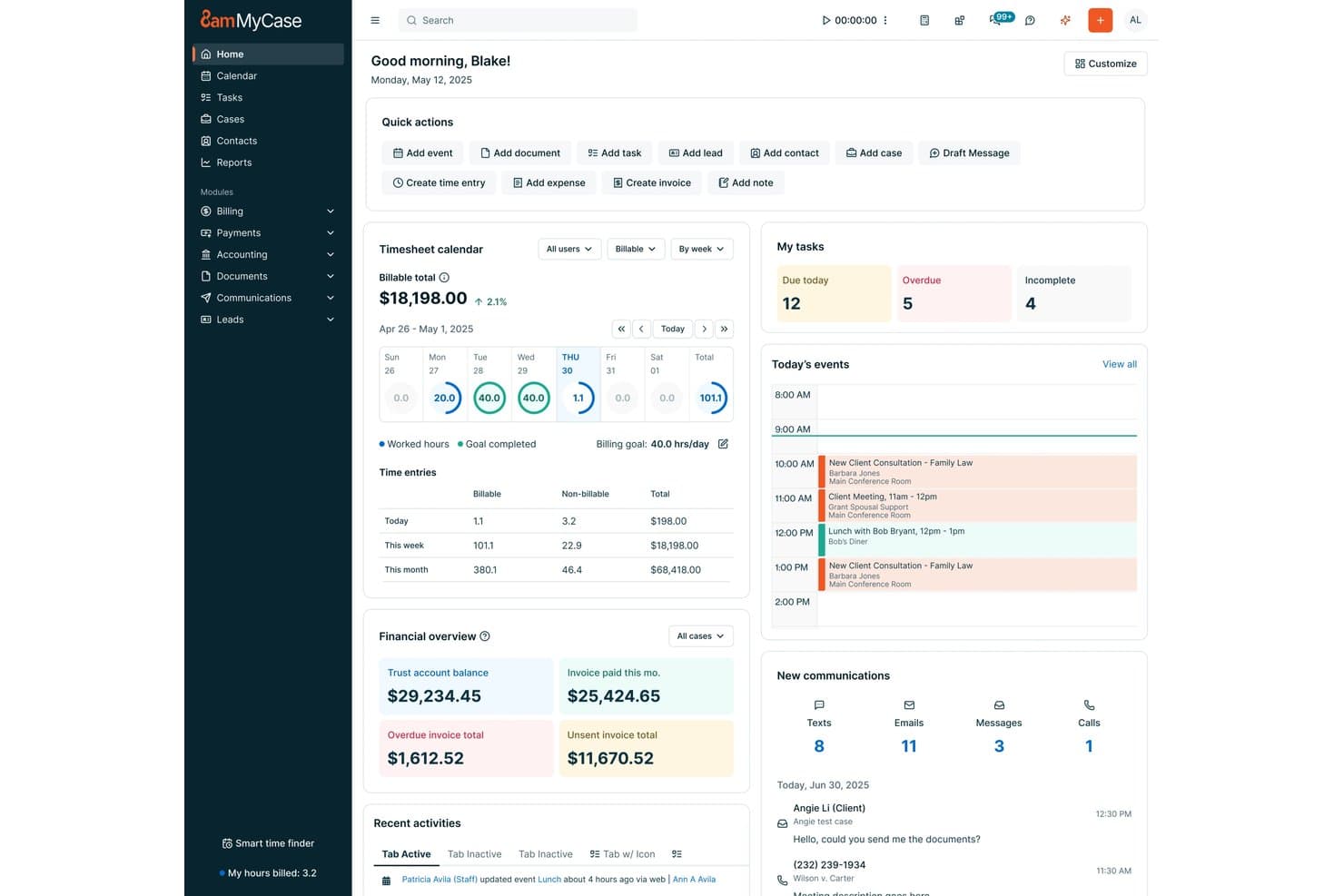
8am offers a dashboard featuring timesheets and task management for small law firm practice management. 8am is a law practice management platform designed for small firms, offering case and matter management, time tracking, billing, document automation, trust accounting, calendaring, and client intake tools in a unified system.
Who Is 8am Best For?
Designed for solo attorneys and small legal teams needing built-in compliance and unified practice management.
Why I Picked 8am
I picked 8am as one of the best because I can rely on its built-in compliance controls for trust accounting and IOLTA management. In my experience, the system’s audit-ready ledgers and three-way reconciliation help keep our small practice audit-ready and ethically sound.
8am Key Features
- Matter management dashboard: Lets you organize, track, and update all matters in one place.
- Batch LEDES billing: Enables you to create and send multiple LEDES-compliant invoices at once.
- Document automation templates: Lets you generate legal documents using customizable templates and merge fields.
- Court rules calendaring: Provides deadline tracking and court rule triggers for select jurisdictions.
8am Integrations
8am offers native integrations with LawPay, CasePeer, QuickBooks, and more.
Pros and Cons
Pros:
- Document automation using templates
- Built-in legal calendaring for deadlines
- Audit-ready trust accounting and reconciliations
Cons:
- Some court rules coverage is jurisdiction-limited
- Advanced billing features require workarounds
Learn more about 8am: Best for seamless client communication
- 7-day free trial
- From $59/user/month
Visit WebsiteCustomer Rating:4.3/5
Practice Panther Small Law Firm Software Interface PracticePanther is a comprehensive law practice management software designed to streamline a variety of legal tasks. It excels in facilitating client communication, making it a top choice for small law firms aiming to improve client relationships.
Why I Picked PracticePanther: I chose PracticePanther for this list due to its user-friendly interface and its exceptional focus on client communication. In my opinion, it stands out as the best option for law firms looking to enhance their client interactions and overall satisfaction.
Standout features & integrations:
PracticePanther offers robust features like document automation, time tracking, and invoicing. Its secure client portal allows for easy communication and document sharing, fostering trust between clients and attorneys.
It also integrates seamlessly with popular platforms like QuickBooks, Microsoft Office 365, and LawPay, ensuring a smooth experience across various tasks.
Pros and Cons
Pros:
- User-friendly interface
- Integrates with popular platforms like QuickBooks and Office 365
- Secure client portal for communication and document sharing
Cons:
- Limited customization options compared to some competitors
- Relatively expensive starting price
- No monthly billing, only annual plans available
Learn more about PracticePanther:

Smokeball Small Law Firm Software Interface Smokeball is a legal case management software that specializes in document automation, streamlining the document creation process for law firms. Its focus on automating routine tasks makes it the ideal choice for practices seeking to improve efficiency in their document management.
Why I Picked Smokeball: I chose Smokeball for this list because its document automation features differentiate it from other legal practice management tools. The software's ability to streamline document creation and management makes it the best option for law firms looking to enhance their efficiency and reduce manual work.
Standout features & integrations:
Smokeball offers robust features such as matter management, time tracking, and billing. Its document automation capabilities stand out, significantly reducing the time spent on creating legal documents.
The software integrates with popular tools like Microsoft Office, LawPay, and InfoTrack, facilitating seamless workflow across platforms.
Pros and Cons
Pros:
- Comprehensive case management features
- Integrates with widely-used tools like Microsoft Office and LawPay
- Exceptional document automation capabilities
Cons:
- May not be suitable for smaller firms with limited budgets
- No free plan or free trial offered
- Pricing information is not readily available
Learn more about Smokeball: 5Best for robust integrations and customizability
Clio
- Free trial available
- From £79/user/month
Visit WebsiteCustomer Rating:4.7/5
Clio Small Law Firm Software Interface Clio is a comprehensive legal practice management software that offers extensive integration options and customization. Its robust integration capabilities make it an ideal choice for law firms looking to optimize their workflows with a customizable software solution.
Why I Picked Clio: I chose Clio for this list because of its exceptional integration capabilities and customizability, which differentiate it from other practice management tools. Its ability to connect with numerous third-party applications and adapt to a law firm's specific needs makes it the best choice for those seeking a customizable and well-integrated software solution.
Standout features & integrations:
Clio offers a wide range of features, including matter management, billing, contact management, document assembly, document storage, document management, and reporting.
Some of its most valuable integrations include QuickBooks Online, Microsoft Office 365, Google Workspace, and LawPay. These integrations allow law firms to streamline their processes and improve overall efficiency.
Pros and Cons
Pros:
- Comprehensive features for practice management, calendaring, billing, and document management
- Highly customizable to suit individual law firm needs
- Extensive integration options with popular tools like QuickBooks Online, Microsoft Office 365, and Google Workspace
Cons:
- Steeper learning curve due to its extensive features and customizability
- No monthly billing option, only annual plans available
- Pricing may be prohibitive for smaller firms or solo practitioners
Learn more about Clio: Best for advanced case analytics
- Free demo available
- From $90/user/month
Visit WebsiteCustomer Rating:4.8/5
Case Peer Small Law Firm Software Interface CASEpeer is a legal case management software that focuses on providing advanced case analytics to law firms. Its in-depth data analysis capabilities make it the top choice for practices seeking to leverage data-driven insights for better decision-making.
Why I Picked CASEpeer: I selected CASEpeer for this list because of its comprehensive case analytics capabilities, which set it apart from other legal practice management tools. Its emphasis on data-driven insights makes it the best option for law firms looking to optimize their operations and make informed decisions.
Standout features & integrations:
CASEpeer offers powerful features such as case tracking, document management, and collaboration tools. Its standout feature is the advanced case analytics that deliver valuable insights for law firms.
The software integrates with tools like QuickBooks, Microsoft Office 365, and Google Workspace, streamlining the user experience.
Pros and Cons
Pros:
- Comprehensive case tracking and document management features
- Integrates with popular productivity tools like QuickBooks and Microsoft Office 365
- Advanced case analytics for data-driven decision-making
Cons:
- No free plan available
- Pricing may be higher compared to some competitors
- No monthly billing option, only annual subscriptions available
 Good for personal injury law firms
- Free demo available
- Pricing upon request
Visit WebsiteCustomer Rating:4.8/5
CloudLex Small Law Firm Software Interface CloudLex is a legal practice management software specifically tailored for personal injury law firms. It provides an array of features designed to handle the unique challenges of personal injury cases, making it the go-to choice for firms in this niche.
Why I Picked CloudLex: I chose CloudLex for this list because it's a specialized solution for personal injury law firms, offering features that cater to their specific needs. In my assessment, it stands out as the best option for personal injury attorneys seeking a tool tailored to their practice.
Standout features & integrations:
CloudLex's most notable features include case management, document management, and its built-in Referral Engine. Additionally, it offers a Matter Intake tool to streamline client onboarding and a robust reporting module for insights into your firm's performance.
CloudLex integrates with Microsoft Office 365 and various third-party applications, ensuring seamless data exchange and collaboration.
Pros and Cons
Pros:
- Matter Intake tool for efficient client onboarding
- Built-in Referral Engine for networking opportunities
- Tailored for personal injury law firms
Cons:
- Not suitable for firms handling multiple practice areas
- Limited integrations compared to some competitors
- Pricing not readily available on the website
Learn more about CloudLex: Best for comprehensive financial management
- 10-day free trial
- From $49/user/month (billed annually)
Visit WebsiteCustomer Rating:4.4/5
CosmoLex Small Law Firm Software Interface CosmoLex is a legal practice management software with a strong focus on financial management, including accounting and billing features. Its comprehensive financial tools make it an excellent choice for law firms seeking to streamline their financial processes.
Why I Picked CosmoLex: I selected CosmoLex for this list due to its extensive financial management capabilities, which set it apart from other legal practice management solutions. Its ability to handle both accounting and billing within a single platform makes it the best choice for law firms looking for an all-in-one financial management tool.
Standout features & integrations:
CosmoLex offers a wide range of features, including matter management, document management, billing software, and time tracking. Its standout financial management features include integrated legal accounting, trust accounting, and billing.
The software integrates with popular tools such as QuickBooks Online, LawPay, and Office 365, enhancing productivity and collaboration.
Pros and Cons
Pros:
- Integrates with QuickBooks Online, LawPay, and Office 365
- Trust accounting compliant with regulations
- Comprehensive financial management tools, including legal accounting and billing
Cons:
- May be too costly for smaller firms with limited budgets
- No free plan or free trial offered
- No monthly billing option, only annual plans available
Learn more about CosmoLex: Best for streamlined billing and invoicing
- 10-day free trial
- From $59/user/month (billed annually)
Visit WebsiteCustomer Rating:4.4/5
Rocket Matter Small Law Firm Software Interface Rocket Matter is a legal practice management software with a strong focus on billing and invoicing features. Its robust financial capabilities make it the ideal choice for law firms looking to optimize their billing processes.
Why I Picked Rocket Matter: I chose Rocket Matter for this list because of its exceptional billing and invoicing functionalities. In my analysis, it stands out as the best option for law firms seeking to simplify and streamline their financial operations.
Standout features & integrations:
Rocket Matter offers key features such as case management, document management, and time tracking. However, its standout feature is the robust billing and invoicing module that simplifies complex billing processes.
The software integrates with platforms like QuickBooks Online, Dropbox, and Office 365, ensuring seamless data exchange and collaboration.
Pros and Cons
Pros:
- Comprehensive case and document management capabilities
- Integrates with popular platforms like QuickBooks Online and Office 365
- Robust billing and invoicing features
Cons:
- May be more than needed for firms not focused on billing optimization
- Annual billing, no monthly plans
- Relatively expensive starting price
Learn more about Rocket Matter: Best for bankruptcy attorneys
- Free plan available + free demo available
- From $159 up to 4 cases/year
Visit WebsiteCustomer Rating:4.8/5
Next Chapter Small Law Firm Software Interface NextChapter is a cloud-based legal practice management software specifically designed for bankruptcy attorneys. Its tailored features and functionality make it the ideal choice for legal professionals in this niche area.
Why I Picked NextChapter: I chose NextChapter for this list because it caters exclusively to bankruptcy attorneys, providing them with the specialized tools and features they require. In my comparison, it stood out as the best solution for professionals in this particular field.
Standout features & integrations:
NextChapter offers essential features for bankruptcy attorneys, such as case management, document automation, and electronic court filing. Its built-in means test calculator simplifies the process of determining client eligibility for bankruptcy.
The software integrates with tools like PACER, Clio, and LawPay, ensuring a cohesive workflow experience.
Pros and Cons
Pros:
- Integrates with essential tools like PACER, Clio, and LawPay
- Includes a built-in means test calculator
- Tailored specifically for bankruptcy attorneys
Cons:
- Customization options may be limited compared to other platforms
- No free plan available
- Limited usefulness for attorneys outside of bankruptcy law
Learn more about NextChapter:
Annen programvare for små advokatfirmaer
Nedenfor finner du en liste over flere programvarealternativer for små advokatfirmaer som vi har vurdert, men som ikke kom med blant de 10 beste. Det er absolutt verdt å ta en titt på dem.
- 11Mitratech CasecloudBest for automating repetitive tasks
- 12RedactableBest for automated redaction
- 13CARET Legal (Zola Suite)Best for all-in-one legal management
- 14TypeLaw Automated Brief FormattingBest for court-specific document compliance
- 15LEAPGood for comprehensive practice management
- 16FilevineGood for comprehensive case management
- 17Amicus AttorneyGood for streamlining legal workflows
- 18LollyLawGood for immigration case management
How I Evaluate Small Law Firm Software
I split my evaluation into baseline criteria—like matter management, trust accounting, and conflict checks—and the differentiators that separate the best options from the rest.
Core Functionality (Table Stakes For This List)
When I'm selecting tools for my list, I rank each one on a scale from 0 (does not offer the functionality) to 5 (excels in this area) for each core functionality listed below. Then, I calculate the tool's total score into a percentage. Each tool needs to achieve a minimum total score of 65% to be considered for inclusion.
- Matter & Case Management: I look for centralized matter records that link contacts, notes, tasks, and documents so an attorney can pull up a full case picture in seconds.
- Time Tracking & Billing: Each tool should let users capture time via running timers or manual entry and generate invoices tied directly to matters.
- Trust & IOLTA Accounting: I evaluate whether the platform supports separate client trust ledgers and three-way reconciliation to keep firms audit-ready.
- Legal Document Management: Storage and version control are baseline, but I check for template-based automation like auto-filling client names into retainer agreements.
- Legal Calendaring & Deadlines: Court-rules-aware calendaring matters here—I look for tools that auto-calculate deadline cascades from a trigger date.
- Client Intake & Conflict Checks: The intake workflow should move from web form to new matter, and conflict searches should flag matches across all existing contacts.
Once I have a list of tools that meet this criteria, I consider what sets each platform apart.
Differentiating Factors (What Sets Vendors Apart)
Here's how I compare and contrast different vendors:
Standout Features
A client portal changes the client experience—I look for ones that let clients view case updates, upload documents, and pay invoices without a single phone call. I also evaluate mobile apps, since solo attorneys and small firm lawyers spend time in court or meeting clients and need to log hours on the go. AI-assisted features are increasingly worth checking, especially tools that draft correspondence or summarize case notes to save time on repetitive work.
Beyond Features
Pricing transparency matters for small firms—I check whether trust accounting, client portals, or document storage come bundled or carry extra fees that inflate the real cost. Integrations are another key factor, especially connections with payment processors like LawPay and accounting tools like QuickBooks, since most small firms rely on these daily. I also evaluate security posture, looking for SOC 2 certification and encryption standards that meet bar association expectations for safeguarding privileged client data.
Slik velger du programvare for små advokatfirmaer
Det er lett å gå seg vill i lange funksjonslister og kompliserte prismodeller. For å hjelpe deg med å holde fokus mens du arbeider deg gjennom den unike prosessen med å velge programvare, finner du her en sjekkliste over faktorer du bør ha i mente:
| Faktor | Hva du bør vurdere |
|---|---|
| FaktorSkalerbarhet | Hva du bør vurdereVil programvaren vokse sammen med firmaet ditt? Vurder om den støtter flere brukere, saker og datamengder etter hvert som firmaet vokser. Unngå verktøy som begrenser veksten med høye kostnader eller rigide abonnementer. |
| FaktorIntegrasjoner | Hva du bør vurdereFungerer den sammen med verktøyene du allerede bruker? Kontroller at den er kompatibel med eksisterende programvare som e-post, kalendere og systemer for dokumenthåndtering, slik at du unngår forstyrrelser i arbeidsflyten. |
| FaktorTilpasningsmuligheter | Hva du bør vurdereKan du tilpasse den etter behovene dine? Se etter alternativer som lar deg justere arbeidsflyter, maler og brukerinnstillinger slik at de passer firmaets unike prosesser. |
| FaktorBrukervennlighet | Hva du bør vurdereEr den brukervennlig for teamet ditt? Vurder programvarens grensesnitt og navigasjon. Komplekse systemer kan gjøre den daglige driften mindre effektiv og kreve mer opplæring. |
| FaktorImplementering og oppstart | Hva du bør vurdereHvor raskt kan du komme i gang? Vurder tiden det tar å sette opp løsningen, tilgjengelig opplæring og støtte under den første bruken. Ta også hensyn til hvor enkelt det er å gå over fra det nåværende systemet. |
| FaktorKostnad | Hva du bør vurdereHva er de totale eierkostnadene? I tillegg til abonnementsavgifter bør du ta med kostnader for ekstra funksjoner, støtte, opplæring og eventuelle fremtidige oppgraderinger. |
| FaktorSikkerhetstiltak | Hva du bør vurdereHvordan beskytter den dataene dine? Sørg for at programvaren overholder juridiske standarder og tilbyr kryptering, tilgangskontroller og regelmessige sikkerhetsoppdateringer. |
| FaktorEtterlevelseskrav | Hva du bør vurdereOppfyller den standardene for juridisk virksomhet? Kontroller at programvaren støtter etterlevelse av regelverk som GDPR eller HIPAA, avhengig av jurisdiksjonen din og klientgrunnlaget ditt. |
Hva er programvare for små advokatfirmaer?
Programvare for små advokatfirmaer er en type programvare for advokatfirmaer som er utviklet for å hjelpe små juridiske virksomheter med å administrere driften mer effektivt. Advokater, advokatfullmektiger og kontorledere bruker vanligvis disse verktøyene til å håndtere oppgaver som saksbehandling, fakturering og organisering av dokumenter. Funksjoner som klientadministrasjon, tidsregistrering og fakturering bidrar til bedre effektivitet og organisering. Alt i alt gir disse verktøyene verdifull støtte i den daglige driften av et lite advokatfirma.
Funksjoner
- Saksbehandling: Effektiv saksbehandling er avgjørende for små advokatfirmaer, ettersom det hjelper med å holde oversikt over alle pågående saker, klientadministrasjon, kommende frister og kritiske dokumenter. Denne funksjonen, som også er en sentral del av programvare for praksisadministrasjon, sikrer at advokater enkelt kan få tilgang til saksinformasjon, følge med på fremdriften og holde orden, noe som gir bedre effektivitet og produktivitet.
- Automatisering av dokumenter: Automatisering av dokumenter forenkler prosessen med å opprette og administrere juridiske dokumenter ved automatisk å generere maler, slå sammen data og sikre ensartethet på tvers av alle dokumenter. Denne funksjonen bidrar til å spare tid, redusere feil og øke firmaets samlede effektivitet.
- Tidsregistrering og fakturering: Funksjoner for tidsregistrering og fakturering gjør det mulig for advokater å registrere fakturerbare timer nøyaktig, opprette fakturaer og følge opp betalinger. Dette legger til rette for transparent fakturering, bedre likviditet og en mer strømlinjeformet prosess både for firmaet og klientene.
- Sikker klientportal: En sikker klientportal muliggjør trygg og effektiv kommunikasjon mellom advokater og klienter. Ved å tilby en sentralisert plattform for deling av dokumenter, meldinger og oppdateringer forbedrer klientportalen samarbeidet og sikrer at sensitiv informasjon forblir konfidensiell.
- Tilpassbare arbeidsflyter: Tilpassbare arbeidsflyter gjør det mulig for små advokatfirmaer å tilpasse prosessene etter sine spesifikke behov. Denne fleksibiliteten gjør det mulig å optimalisere driften og forbedre den samlede effektiviteten, noe som er avgjørende for firmaets vekst og suksess.
- Kontroll av interessekonflikter: Kontroll av interessekonflikter er en viktig funksjon som hjelper advokatfirmaer med å identifisere potensielle interessekonflikter før de tar imot nye klienter eller saker. Ved å sikre samsvar med etiske regler og forskrifter reduserer denne funksjonen risikoen for juridiske tvister og beskytter firmaets omdømme.
- Klientmiddeladministrasjon: Funksjoner for klientmiddeladministrasjon hjelper advokatfirmaer med å administrere klientmidler i samsvar med juridiske krav. Denne funksjonen sikrer nøyaktig journalføring, hindrer sammenblanding av midler og muliggjør transparent rapportering, noe som er avgjørende for å opprettholde klientenes tillit og firmaets troverdighet.
- Detaljert rapportering: Funksjoner for detaljert rapportering gir innsikt i ulike sider ved firmaets resultater, som økonomi, produktivitet og saksfremdrift. Disse rapportene muliggjør velinformerte beslutninger og bidrar til å identifisere områder som kan forbedres, noe som til syvende og sist bidrar til firmaets vekst og suksess.
- Integrasjon med populære verktøy: Integrasjon med populære verktøy, som e-post- og dokumentadministrasjonssystemer, gjør det mulig for advokatfirmaer å effektivisere arbeidsflytene og forbedre den samlede effektiviteten. Ved å koble sammen ulike verktøy på en sømløs måte kan advokater spare tid og konsentrere seg om å tilby juridiske tjenester av høy kvalitet til klientene sine.
- Effektiv kundestøtte: Effektiv kundestøtte er avgjørende for å sikre en god brukeropplevelse med programvaren for advokatfirmaer. Tilgang til et dedikert brukerstøtteteam som raskt kan håndtere spørsmål eller bekymringer knyttet til programvaren, bidrar til å minimere nedetid og sikrer at firmaet kan fortsette å drive effektivt.
Fordeler
Implementering av programvare for små advokatfirmaer gir flere fordeler for teamet og virksomheten din. Her er noen av fordelene du kan se frem til:
- Bedre effektivitet: Automatiserer rutineoppgaver som fakturering og dokumenthåndtering, slik at det frigjøres tid til viktigere arbeid.
- Bedre organisering: Holder klient- og saksinformasjon ryddig organisert, slik at det blir enkelt å finne og oppdatere opplysninger.
- Nøyaktig fakturering: Sikrer nøyaktig registrering og fakturering av fakturerbare timer, reduserer feil og forbedrer likviditeten.
- Bedre klientkommunikasjon: Legger til rette for tydelig og konsekvent kommunikasjon med klienter gjennom integrerte administrasjonsverktøy.
- Datasikkerhet: Beskytter sensitiv informasjon gjennom sterke sikkerhetsfunksjoner og sikrer samsvar med bransjestandarder.
- Velinformerte beslutninger: Gir innsikt og analyser som hjelper deg med å ta strategiske valg for firmaets vekst.
- Tilpasning: Gjør det mulig å tilpasse programvaren til firmaets unike prosesser og behov, noe som forbedrer brukervennligheten.
Kostnader og priser
Valg av programvare for små advokatfirmaer krever en forståelse av de ulike prismodellene og abonnementene som er tilgjengelige. Kostnadene varierer basert på funksjoner, teamstørrelse, tillegg og mer. Tabellen nedenfor oppsummerer vanlige abonnementer, gjennomsnittsprisene deres og typiske funksjoner som er inkludert i programvareløsninger for små advokatfirmaer:
Sammenligningstabell for programvare for små advokatfirmaer
| Abonnementstype | Gjennomsnittspris | Vanlige funksjoner |
|---|---|---|
| AbonnementstypeGratisabonnement | Gjennomsnittspris$0 | Vanlige funksjonerGrunnleggende klientadministrasjon, begrenset dokumentlagring og kundestøtte via e-post. |
| AbonnementstypePersonlig abonnement | Gjennomsnittspris$15-$30/bruker/måned | Vanlige funksjonerKlientadministrasjon, tidsregistrering, fakturering og dokumentlagring. |
| AbonnementstypeBedriftsabonnement | Gjennomsnittspris$40-$70/bruker/måned | Vanlige funksjonerAvansert klientadministrasjon, egendefinert rapportering, integrasjoner og datasikkerhet. |
| AbonnementstypeVirksomhetsabonnement | Gjennomsnittspris$80-$150/bruker/måned | Vanlige funksjonerFull tilpasning, prioritert kundestøtte, avansert analyse og verktøy for overholdelse av regelverk. |
Firmaer som ønsker å minimere programvarekostnadene, kan begynne med å utforske gratis alternativer for administrasjon av advokatpraksis.
Vanlige spørsmål
Kan programvare for små advokatfirmaer håndtere veksten i firmaet mitt?
Ja, mange programvareløsninger for små advokatfirmaer er skalerbare. Se etter funksjoner som støtter flere brukere, saker og datalagring etter hvert som firmaet utvides. Kontroller om prismodellen tar høyde for vekst uten kraftige kostnadsøkninger, og sørg for at programvaren kan håndtere økt arbeidsmengde.
Hvilke sikkerhetstiltak bør jeg forvente i programvare for små advokatfirmaer?
Forvent kryptering for databeskyttelse, sikre metoder for brukerautentisering og regelmessige programvareoppdateringer for å håndtere sårbarheter. Sørg for at programvaren overholder juridiske standarder for databeskyttelse, for eksempel GDPR eller CCPA, hvis det er relevant. Spør alltid leverandøren om sikkerhetsprotokollene deres.
Er opplæring tilgjengelig for nye brukere av programvare for små advokatfirmaer?
De fleste leverandører tilbyr opplæring gjennom webinarer, videoveiledninger og dokumentasjon. Noen tilbyr interaktive produktomvisninger eller direkte støtte fra et kundesuksessteam. Undersøk om leverandøren tilbyr personlige opplæringsøkter eller hjelp med introduksjonen, slik at teamet raskt kommer i gang.
Hva slags kundestøtte bør jeg forvente?
Se etter leverandører som tilbyr flere støtteløsninger, for eksempel telefon, e-post og direktechat. Sjekk åpningstidene for kundestøtte for å sikre at de samsvarer med arbeidstiden din. Noen leverandører tilbyr dedikerte kundeansvarlige eller prioritert kundestøtte for abonnementer på høyere nivå, noe som kan være nyttig for løpende hjelp.