

Håndtering av juridiske dokumenter kan være en krevende oppgave. Du kan fort føle at du drukner i papirarbeid og strever med å holde alt organisert og tilgjengelig. Det er her programvare for håndtering av juridiske dokumenter kommer inn. Disse verktøyene er utviklet for å hjelpe deg og teamet ditt med å håndtere dokumenter effektivt, sikre etterlevelse og spare tid.
Jeg har brukt flere år på å undersøke og teste disse løsningene. Jeg forstår utfordringene du møter i juridisk praksis. I denne artikkelen deler jeg mine beste anbefalinger for programvare for håndtering av juridiske dokumenter. Du finner objektive, grundig undersøkte vurderinger som kan hjelpe deg med å ta en beslutning. Enten du ser etter bestemte funksjoner eller generell brukervennlighet, finnes det noe her for alle.
Why Trust Our Software Recommendations
6,700+
Reviews
20
Industry experts
16+
Evaluation factors
14
Years
Our team has been testing and reviewing software since 2012. As legal practice leaders ourselves, we know how difficult—and important—it is to choose the right software.
For this guide, we evaluated tools using hands-on testing and independent research, scoring tools using our selection criteria.
Our reviews reflect our human editorial judgment, not a sales pitch.
Sammendrag: Beste programvare for håndtering av juridiske dokumenter
Denne sammenligningstabellen oppsummerer prisopplysningene for mine beste utvalgte programmer for håndtering av juridiske dokumenter, slik at du kan finne den beste løsningen for budsjettet og virksomhetens behov.
| Tool | Best For | Trial Info | Price | ||
|---|---|---|---|---|---|
| 1 | Best for enterprise-scale legal content governance | Free demo available | Pricing upon request | Website | |
| 2 | Best for automation of daily tasks | 7-day free trial | From $59/user/month | Website | |
| 3 | Best for preserving defensible HR record history | Free demo available | Pricing upon request | Website | |
| 4 | Best for smart case management | Not available | Pricing upon request | Website | |
| 5 | Best for AI-assisted document drafting | Yes | From $83/user/month (billed annually) | Website | |
| 6 | Best for full spectrum legal practice management | Free trial available | From £79/user/month | Website | |
| 7 | Best for client communication management | 10-day free trial | From $50/user/month (billed annually) | Website | |
| 8 | Best for robust case management | Free plan available; Free demo available | Pricing upon request | Website | |
| 9 | Best for secure document storage | 10-day free trial | From $69/user/month | Website | |
| 10 | Best for integrated accounting features | 10-day free trial | From $49/user/month (billed annually) | Website |


Vurdering av den beste programvaren for håndtering av juridiske dokumenter
Nedenfor finner du mine detaljerte sammendrag av den beste programvaren for håndtering av juridiske dokumenter som kom med på listen over utvalgte verktøy. Vurderingene mine gir en detaljert gjennomgang av de viktigste funksjonene, fordelene og ulempene, integrasjonene og de ideelle bruksområdene for hvert verktøy, slik at du kan finne det som passer best for deg.
 Best for enterprise-scale legal content governance
- Free demo available
- Pricing upon request
Visit WebsiteCustomer Rating:4.8/5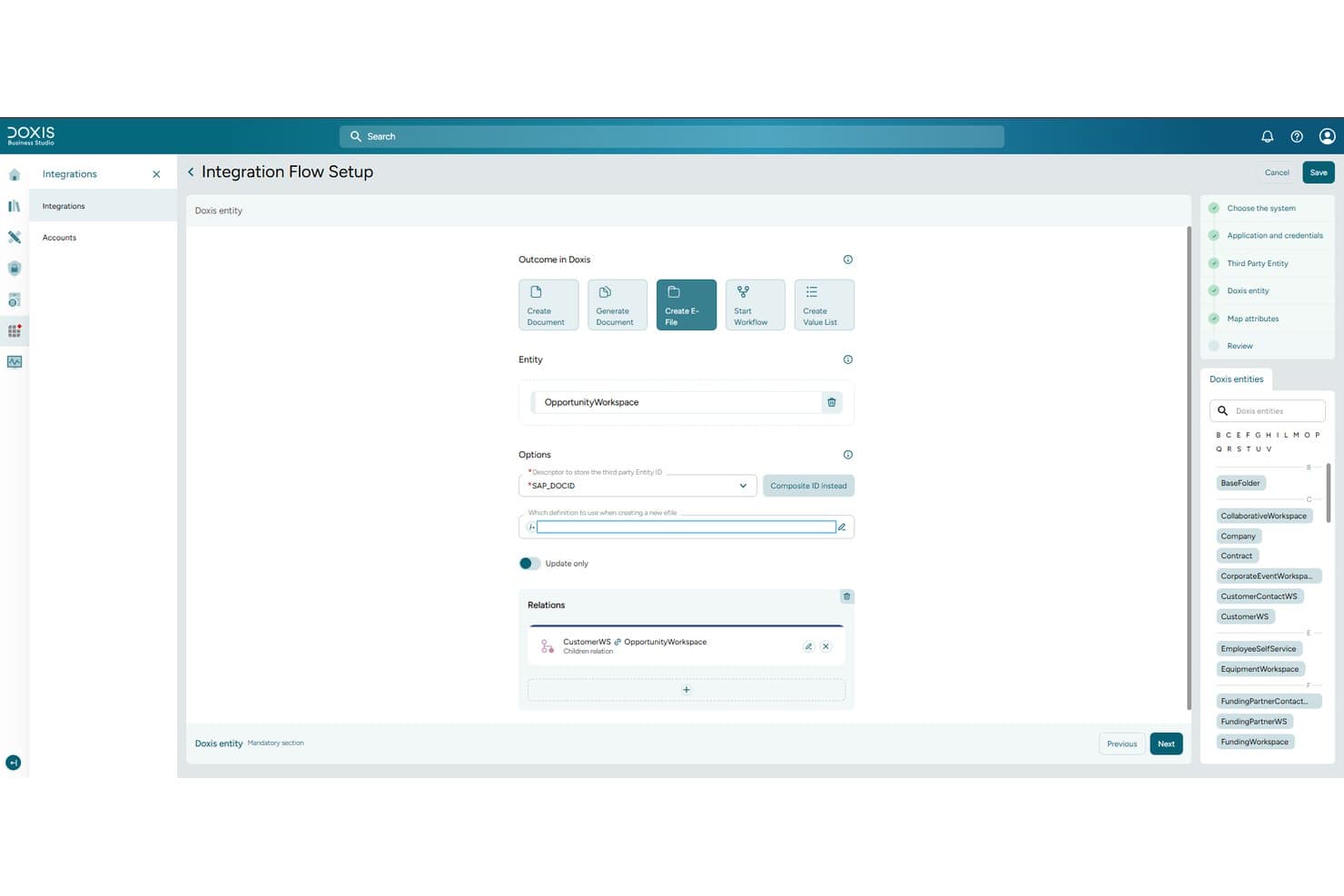
Doxis lets users configure integration flows linking legal entities and documents. Doxis is an enterprise content management platform that centralizes legal documents in digital case files, automates document classification and routing, and supports contract lifecycle management, full-text search, and compliance archiving.
Who Is Doxis Best For?
Doxis is a strong fit for corporate legal departments and IT directors at large enterprises that need to manage high volumes of contracts, case files, and compliance records at scale.
Why I Picked Doxis
I've included Doxis in my top picks because it handles enterprise-scale legal content governance better than almost anything else I've evaluated. Its AI.dp module automatically classifies incoming contracts, extracts key clauses and deadlines, and routes documents into the right eFile without manual intervention. I also like its certified audit-proof archiving, which logs every access event with a timestamp, giving corporate legal teams the traceable record they need for regulatory scrutiny.
Doxis Key Features
- Full-text and metadata search: Search across contracts, case files, and records by keyword, contract number, deadline, price, and terms.
- iRoom virtual data room: Share confidential M&A and due-diligence documents with internal and external users through access-controlled, time-limited rooms.
- Contract lifecycle management: Manage contracts from drafting through signing to archiving, with multi-stage approvals and deadline escalation alerts.
- Microsoft 365 integration: Archive and manage emails from Outlook, track document changes across departments, and use the Doxi AI assistant directly inside Outlook.
Doxis Integrations
Doxis offers native integrations across Microsoft 365, SAP ERP and S/4HANA, Salesforce, Workday, ServiceNow, Oracle, HCL Notes, and SharePoint. Its API-first architecture supports custom integrations and connects with enterprise systems such as SQL Server and PostgreSQL.
Pros and Cons
Pros:
- Reviewers praise stable, customizable document filing
- Audit trails support regulatory scrutiny
- Scales across massive legal archives
Cons:
- Ethical walls and conflict checks undocumented
- Consultant-led implementation needs careful planning
Learn more about Doxis: Best for automation of daily tasks
- 7-day free trial
- From $59/user/month
Visit WebsiteCustomer Rating:4.3/5
Practice Panther's client portal feature is where you can give a clear picture of your clients' case progess PracticePanther offers legal professionals a centralized platform to manage documents, communications, and case details. Its intuitive interface and workflow tools are designed for law firms seeking to reduce manual work and improve digital organization.
Who Is PracticePanther Best For?
PracticePanther suits small to midsize law firms and solo practitioners looking to digitize and automate their legal document workflows.
Why I Picked PracticePanther
I picked PracticePanther for its depth of task automation, which directly reduces the administrative load on legal teams. Its workflow automation lets you set up triggered tasks, events, and checklists that fire automatically as a matter moves through each stage—so your team isn't manually creating follow-up steps after every client intake or case update. I also appreciate the batch document creation feature, which lets you generate, edit, and send multiple legal documents in one sitting using pre-built templates that auto-populate contact and matter details. For firms managing high document volumes, that alone cuts significant non-billable time from the day.
PracticePanther Key Features
- Client intake forms: Collect client contact and case details through automated, on-brand intake forms as soon as a new matter opens.
- eSignature: Send documents for electronic signature and store signed copies directly in PracticePanther without third-party tools.
- Role-based permissions: Assign specific access roles to control which team members can view or edit sensitive matter and client data.
- Two-way business texting: Send and receive text messages with clients directly from the platform, logged alongside other matter communications.
PracticePanther Integrations
Integrations include Outlook, Gmail, Google Drive, OneDrive, Box, Dropbox, QuickBooks, Lawmatics, WealthCounsel, and Smith.ai.
Pros and Cons
Pros:
- Seamless integration with various apps
- Comprehensive case management features
- Strong emphasis on automation
Cons:
- Higher cost compared to some alternatives
- The interface might be overwhelming for first-time users
- No permanent free plan, only a 7-day trial
Learn more about PracticePanther: Best for preserving defensible HR record history
- Free demo available
- Pricing upon request
Visit WebsiteCustomer Rating:5/5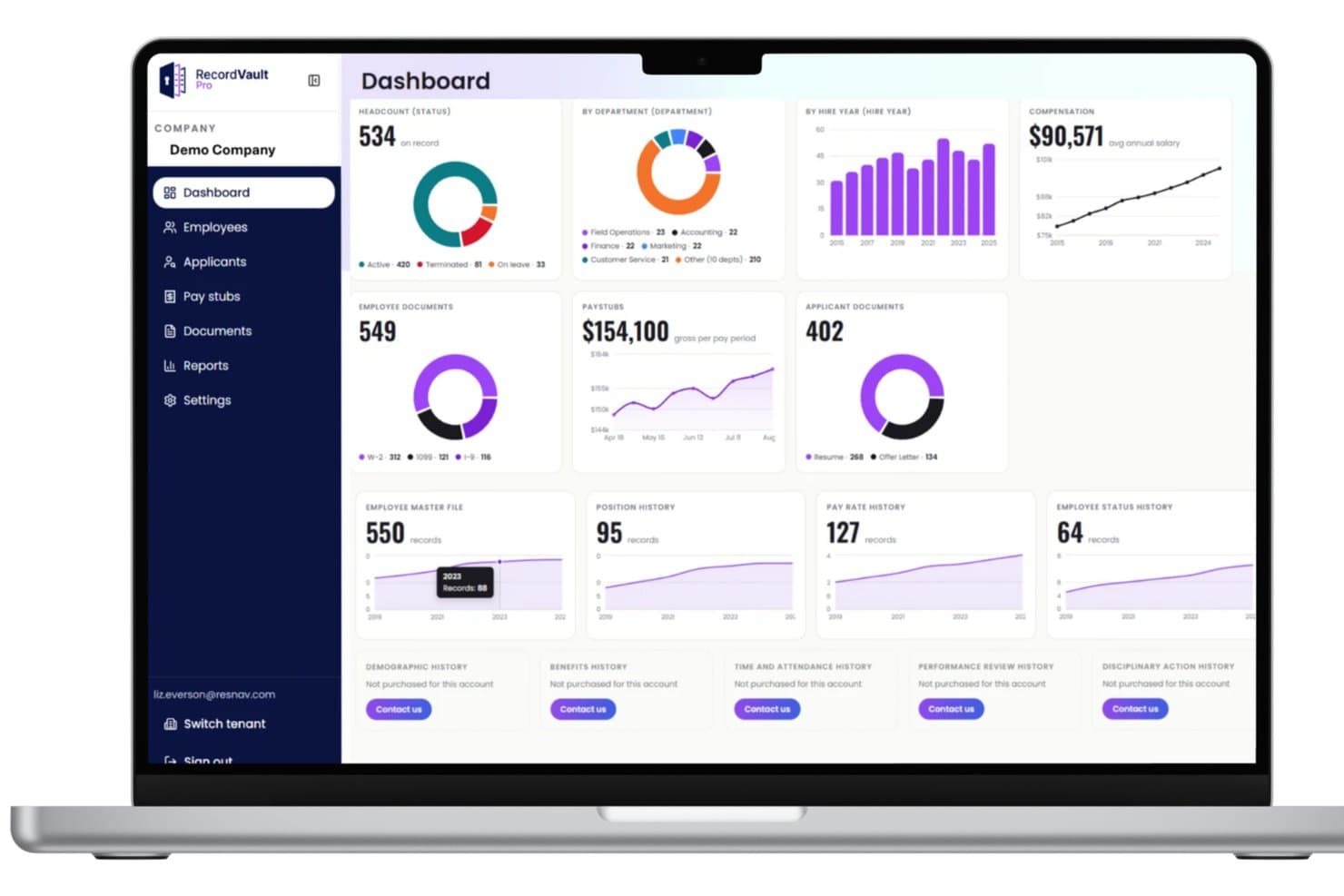
RecordVault's dashboard centralizes HR metrics like headcount, pay, and documents. ResNav’s History Link offers legal and HR teams a specialized solution for managing and tracking sensitive employment records. Its focus on maintaining detailed, tamper-evident document histories appeals to organizations needing reliable audit trails for compliance and dispute resolution.
Who Is ResNav Best For?
HR and legal professionals in regulated industries who need to maintain secure, auditable records of employment actions and documentation.
Why I Picked ResNav
I picked History Link because it solves a specific problem that flat-file exports simply can't: maintaining unaltered, auditable HR and payroll records after a system transition. I appreciate that the platform preserves structured data—not just point-in-time snapshots—so records like pay rate history, employee status changes, and benefit history remain intact and queryable. In practice, that means my team can pull a complete, unmanipulated employment record during a wage dispute or regulatory audit without scrambling to reconstruct data from a CSV. The Azure-based architecture also ensures that stored records meet local, state, and federal retention requirements across jurisdictions.
History Link Key Features
- Searchable record portal: Query structured HR and payroll data—including check stubs, tax reports, and benefit history—directly within the platform without exporting files.
- Multi-level data retention: Stores records at both the employee and company levels, covering position history, status changes, and dependent benefit information.
- Joint reporting with HRIS/payroll vendors: Integrates with existing payroll and HRIS systems to enable cross-platform reporting from a single archive.
- State-specific retention compliance: Tracks and applies jurisdiction-specific retention rules across states like New York, California, and Illinois within the same platform.
History Link Integrations
Native integrations are not currently listed.
Pros and Cons
Pros:
- Precise archival structure preserves documentation integrity for legal review.
- Searchable repository gives fast access to employment records during cases.
- Portal centralizes documents needed for audits and investigations.
Cons:
- Not a full general-purpose DMS — focused mainly on HR/payroll records.
- Integration beyond archival extraction may require custom work.
Learn more about ResNav - RecordVault:

Smokeball offers document management capabilities, reducing time spent on drafting. Smokeball offers legal professionals a platform designed to automate case management and document workflows. Firms seeking to reduce manual tasks and improve collaboration across matters may find its integrated approach to document creation, tracking, and communication especially useful.
Who Is Smokeball Best For?
Smokeball suits small to midsize law firms that need centralized case management and document automation tailored to legal workflows.
Why I Picked Smokeball
Smokeball's legal document automation is what draws me to it most—every contact, party, and case detail entered into the platform automatically populates documents, eliminating manual copy-pasting across matters. I also appreciate AutoTime, which records billable time in the background as my team drafts documents and responds to emails, tying each activity directly to the relevant matter. On top of that, the automated legal forms library covers 20,000+ templates across federal, state, and county jurisdictions, so my team isn't building documents from scratch. For firms managing high document volumes, that combination makes Smokeball a genuinely practical choice.
Smokeball Key Features
- Email management: Automatically tracks and logs every email against its related matter, giving your whole team access to case correspondence in one place.
- Client portal: Lets clients and attorneys exchange messages and documents through a secure, dedicated communication channel.
- Legal calendaring: Displays court deadlines, client meetings, and appointments across week, month, and timeline views.
- Trust accounting: Manages trust accounts and retainers with built-in compliance controls to keep firm finances in order.
Smokeball Integrations
Integrations include Microsoft Word, Microsoft Outlook, LawPay, Birdeye, VXT, CollBox, Aatrox Communications, Accounting Logic, AcroDocz, and Activa Communications.
Pros and Cons
Pros:
- Strong document automation and legal‑forms library.
- Seamless integration with Microsoft Word & Outlook.
- Automatic time‑tracking helps ensure billing accuracy.
Cons:
- Limited customization of templates or workflows for niche use‑cases.
- Reporting/analytics may not be as robust for larger firms.
Learn more about Smokeball: Best for AI-assisted document drafting
- Yes
- From $83/user/month (billed annually)
Visit WebsiteCustomer Rating:4.9/5
Gavel's legal intake app builder view. Gavel offers legal teams and law firms a platform designed to automate and manage complex document workflows. Its focus on customizable automation appeals to professionals seeking to reduce manual drafting, improve accuracy, and maintain compliance in digital legal environments.
Who Is Gavel Best For?
Legal operations teams and law firms that need to automate complex document drafting and streamline workflow processes.
Why I Picked Gavel
I picked Gavel because its AI-assisted drafting capabilities go well beyond basic template filling. With Gavel Exec, I can redline entire contracts directly in Microsoft Word using custom playbooks that reflect my team's preferred positions—no tool-switching required. I also appreciate that Gavel Workflows uses conditional logic to adapt document output based on client intake answers, so complex documents like estate plans or operating agreements generate accurately without manual edits. For legal teams managing high document volumes, that combination of AI-driven review and automated drafting in a single platform is hard to match.
Gavel Key Features
- Legal template library: Access a pre-built collection of automated legal templates and court forms across common practice areas, customizable within your Workflows account.
- Encrypted client intake portal: Collect sensitive client information through a branded, encrypted portal that routes directly into document generation.
- Clause benchmarking: Compare contract clause language against market data to identify off-market positions before negotiation.
- Team Workspaces: Share projects, playbooks, and matter files across your team with granular access controls for consistent, collaborative review.
Gavel Integrations
Integrations include Clio, DocuSign, and Zapier, and Gavel also offers an API for custom integrations.
Pros and Cons
Pros:
- Highly capable no‑code/low‑code legal document automation.
- Strong client‑intake workflows and guided interviews included.
- Integrates with Word, PDF automation, conditional logic, calculations.
Cons:
- Some integration or Zapier connections are weaker/more limited.
- Primarily focused on document generation/automation rather than full‑document lifecycle (storage, archival) management.
Learn more about Gavel: 6Best for full spectrum legal practice management
Clio
- Free trial available
- From £79/user/month
Visit WebsiteCustomer Rating:4.7/5
Clio's dashboard shows details of a matters Clio offers legal professionals a centralized platform to manage documents, cases, and client communications in one place. Its focus on digital workflows and secure collaboration makes it especially useful for law firms seeking to modernize document handling and streamline daily operations.
Who Is Clio Best For?
Clio suits law firms of all sizes in the UK that need integrated tools for managing legal documents, cases, and client relationships.
Why I Picked Clio
Clio covers the full lifecycle of legal practice management—from document creation and storage to billing and client communication—in a single connected platform. I picked it because Clio Manage lets my team automatically generate documents using live case and client data, which removes the manual re-entry that typically causes errors across matters. I also appreciate that Clio Draft converts existing Word files into reusable templates using AI, so my team can start drafting on day one without building a template library from scratch. Together, these tools mean I'm not switching between disconnected systems to move a matter forward.
Clio Key Features
- Client portal: Lets clients view documents, send messages, and receive updates through a dedicated secure portal linked to their matter.
- E-signature collection: Collects legally binding signatures directly within Clio, without routing documents to a separate signing tool.
- AI-powered questionnaires: Sends clients dynamic intake forms that map responses directly to document templates, reducing manual data entry.
- Law firm performance dashboard: Displays hours captured, billed, and collected across the firm in a single reporting view.
Clio Integrations
Integrations include Outlook, Gmail, Google Drive, OneDrive, DropBox, Box, NetDocuments, QuickBooks, Xero, InfoTrack, and Arken Professional.
Pros and Cons
Pros:
- Offers a free trial for users to evaluate the platform
- Integrates with various essential legal tools, full Windows file system and Mac OS compatibility
- Comprehensive suite of tools for legal practice management
Cons:
- The platform may be complex for small practices with straightforward needs
- Premium features require additional cost
- The starting price is relatively high compared to some other tools
Learn more about Clio: Best for client communication management
- 10-day free trial
- From $50/user/month (billed annually)
Visit WebsiteCustomer Rating:4.6/5
MyCase' dashboard view MyCase offers legal professionals a centralized platform to organize case documents, manage workflows, and collaborate securely. It’s especially useful for law firms seeking to streamline document handling and improve coordination across client matters.
Who Is MyCase Best For?
Solo practitioners and small to midsize law firms looking for an all-in-one platform to manage legal documents and client interactions.
Why I Picked MyCase
Client communication is where MyCase genuinely stands out for legal document management. I picked it because the client portal auto-syncs all messages, documents, and case updates in one place—so when a client uploads a signed document or responds to a task, I get an instant notification without digging through email threads. I also appreciate the built-in text messaging feature, which assigns a dedicated number to the firm and automatically syncs every text directly to the relevant case file. In practice, that means my team can send invoice reminders or appointment confirmations without using personal phones, and every exchange is logged and searchable within the case record.
MyCase Key Features
- Advanced document automation: Generate MS Word-based legal documents—like fee agreements or discovery requests—using pre-built templates populated with case and contact data.
- MyCase Drive: Sync files directly from your desktop to MyCase folders, with changes automatically updated across both locations in real time.
- Full-text search: Search across all stored case documents to locate specific files without manually browsing folder structures.
- Rules-based calendaring: Automatically calculate and set court deadlines using a database of court rules across all 50 states.
MyCase Integrations
Integrations include QuickBooks, LawPay, Google Calendar, Outlook, Dropbox, CalendarRules, Infusionsoft, Kenect, CasePeer, Smith.ai, and the 8am™ Visa® Business Card.
Pros and Cons
Pros:
- Transparent pricing with no hidden fees
- Integrates with widely used platforms
- Excellent client communication management features
Cons:
- High cost compared to some competitors
- The user interface advanced search and access control could be more intuitive
- No permanent free plan, only a trial period
 Best for robust case management
- Free plan available; Free demo available
- Pricing upon request
Visit WebsiteCustomer Rating:4.5/5
Filevine's contract dashboard view Filevine offers legal teams a centralized platform designed to handle complex case files, document workflows, and collaboration needs. Its flexible interface and automation features make it especially useful for law firms and legal departments managing high volumes of sensitive documents.
Who Is Filevine Best For?
Filevine suits mid-sized to large law firms and legal departments that need to coordinate complex casework and document management across multiple teams.
Why I Picked Filevine
I picked Filevine because its case management goes well beyond basic file organization—it ties documents directly to cases, tasks, and team activity in one workspace. I appreciate how the DocGen feature automatically pulls client and case data into document templates, cutting out the manual data entry that slows teams down on high-volume matters. The platform's customizable workflows also let my team build case-specific processes, so a personal injury matter follows a different path than a criminal defense case without any workarounds. For firms managing dozens or hundreds of active cases at once, that level of structure is hard to find elsewhere.
Filevine Key Features
- OCR search: Searches the full text of every document in your system—including PDFs and scanned images—to locate specific words or phrases.
- Bates stamping: Applies sequential page numbers and footers across multiple documents for organized court filings and client presentations.
- Conflict checker: Scans uploaded documents and compares names and details against existing clients and cases to flag potential ethical conflicts.
- Two-way folder sharing: Lets teams share case folders with clients or external collaborators and receive contributions back within a controlled environment.
Filevine Integrations
Integrations include Sageness, Gemini Legal, InfoTrack, Record Retrieval Solutions, DocuPost, MoveDocs, Copitrak, FedEx, Stamps, and Microsoft Teams.
Pros and Cons
Pros:
- Seamless integration with Microsoft 365 and Google Workspace
- Advanced reporting tools
- Customizable case management
Cons:
- Could have a steep learning curve for some users
- Quote-based pricing lacks transparency
- No free tier or trial period
Learn more about Filevine: Best for secure document storage
- 10-day free trial
- From $69/user/month
Visit WebsiteCustomer Rating:4.5/5
Tabs3 provides a detailed view of matter management for legal cases. Tabs3 offers legal professionals a document management solution designed to handle sensitive case files and client records. Law firms seeking advanced organization, audit trails, and integration with billing or practice management tools may find Tabs3 especially useful for maintaining control over digital documents.
Who Is Tabs3 Best For?
Tabs3 suits small to midsize law firms and legal departments that need centralized, compliant management of sensitive legal documents.
Why I Picked Tabs3
Secure document storage is where Tabs3 genuinely earns its place on this list. I picked it because PracticeMaster's document management automatically names and stores files linked to the correct matter—so when I pull up a case, every contract, email attachment, and court filing is right there, organized and accounted for. I also appreciate the user-by-user and field-by-field permission controls, which let me restrict who can view, edit, or delete sensitive client records. On top of that, the integration with LexShare adds bank-level encryption for file sharing, which matters when my team is exchanging confidential documents with clients remotely.
Tabs3 Key Features
- Document assembly: Auto-populates templates with client and matter-specific data to generate draft documents.
- Conflict-of-interest checker: Runs partial-word and phonetic searches across matters to flag potential conflicts in seconds.
- WorkFlows automation: Triggers automated tasks—like follow-up emails or appointment scheduling—based on predefined conditions.
- Matter Manager: Displays a full timeline of case activity, including emails, fees, appointments, and research notes, in one view.
Tabs3 Integrations
Integrations include LawPay, LexCharge, BillSync by Scan Logic, ALB, Taskbill, TBDevice, Copitrak, Equitrac, PaperCut, and QuickBooks.
Pros and Cons
Pros:
- Strong billing/time‑tracking features built for law firms.
- Good trust accounting and law‑specific financial modules.
- Document & matter‑management integrated (with matter files, contacts).
Cons:
- User interface and navigation are considered outdated.
- Some integration limitations with third‑party tools and APIs.
Learn more about Tabs3: 10Best for integrated accounting features
CosmoLex
- 10-day free trial
- From $49/user/month (billed annually)
Visit WebsiteCustomer Rating:4.4/5
CosmoLex dashboard CosmoLex offers law firms a cloud-based platform that combines legal practice management with document management capabilities. It’s designed for legal professionals seeking a unified system to handle case files, compliance, and workflow challenges in a digital-first environment.
Who Is CosmoLex Best For?
CosmoLex suits small to midsize law firms and solo practitioners who need integrated legal practice and document management with built-in accounting.
Why I Picked CosmoLex
What sets CosmoLex apart for me is that its accounting tools aren't bolted on—they're built into the core of the platform. I picked it because law firms managing client funds need trust accounting that's native to their document and matter management system, not a workaround through QuickBooks. CosmoLex's built-in trust accounting automatically prevents ledger overdrafts and fund commingling, and I can run three-way reconciliations in just a few clicks. The platform also generates audit-ready trust reports—like ledger activity summaries and account balance reports—so my team is always prepared if a bar auditor comes knocking.
CosmoLex Key Features
- Document assembly: Create reusable templates in Microsoft Word using CosmoLex merge fields to generate matter-specific documents.
- Matter-based email management: Automatically files incoming emails to the correct client-matter folder and flags unmatched messages.
- Secure client portal: Lets clients upload documents, view invoices, and send messages, with all activity logged to the relevant matter record.
- Custom workflow automation: Build task workflows and assign them to new or existing matters to manage deadlines and team responsibilities.
CosmoLex Integrations
Integrations include Microsoft 365, Google Workspace, Dropbox, NetDocuments, Box, OneDrive, LawPay, QuickBooks Online, CalendarRules, and InfoTrack.
Pros and Cons
Pros:
- Seamless integration with Office 365 and Box
- Comprehensive legal practice management tools
- Integrated accounting features
Cons:
- Requires a yearly commitment
- Some users may find its interface less intuitive
- Slightly higher starting price
Learn more about CosmoLex:
Annen programvare for håndtering av juridiske dokumenter
Her er noen flere alternativer for programvare for håndtering av juridiske dokumenter som ikke kom med på listen over utvalgte verktøy, men som likevel er verdt å sjekke ut:
- 11iManageBest for AI-driven document management
- 12LawVuBest for in-house legal team collaboration
- 13CaseFleetBest for intuitive timeline visualizations
- 14GuruBest for AI-powered document search
- 15PreciselyBest for contract automation
- 16CenterbaseBest for customizable workflows
- 17RedactableBest for automated redaction
- 18RocketMatterBest for time tracking and billing
- 19Assembly NEOSBest for content and data migration
- 20XakiaBest for document organization
- 21OntraBest for contract automation and analytics
- 22Document360Best for role-based internal content
- 23MacroViewBest for Microsoft 365 integration
- 24
- 25CobblestoneGood for firms needing an AI-powered contract management system
- 26LitifyGood for law firms seeking an all-in-one platform powered by Salesforce
- 27iCONECTGood for legal teams handling large volumes of data and documents
- 28SolunoGood for law firms looking for cloud-based time and billing software
- 29LexbeGood for law firms dealing with litigation and eDiscovery
- 30IPROGood for legal teams seeking end-to-end eDiscovery processing capabilities
How I Evaluate Legal Document Management Software
I split my evaluation into two layers: baseline must-haves like matter-centric filing and audit trails, then the differentiators that make a tool the right fit for a specific firm's needs.
Core Functionality (Table Stakes For This List)
When I'm selecting tools for my list, I rank each one on a scale from 0 (does not offer the functionality) to 5 (excels in this area) for each core functionality listed below. Then, I calculate the tool's total score into a percentage. Each tool needs to achieve a minimum total score of 65% to be considered for inclusion.
- Matter-Centric Document Organization: I evaluate whether each tool structures files around matters and clients rather than generic folders, so attorneys can pull up every document tied to a case in one place.
- Legal Document Security: Granular permissions, ethical walls between practice groups, and detailed audit trails all factor in—especially for firms handling privileged or sensitive client data.
- Version Control & Check-In/Out: I look for tools that track full edit history, support check-in/check-out to prevent conflicting drafts, and let users compare versions side by side.
- Legal Templates & Document Assembly: Whether it's generating engagement letters or assembling NDAs from a clause library, I check how well each platform supports reusable legal document creation.
- Advanced Legal Search: I evaluate search by matter, document type, author, date range, and full-text content—the kind of filtering that helps a paralegal locate a single exhibit across thousands of files.
- Microsoft Office & Email Integration: Most legal work still happens in Word and Outlook, so I look at how deeply each tool connects—filing emails to matters, opening documents natively, and syncing edits back.
Once I have a list of tools that meet this criteria, I consider what sets each platform apart.
Differentiating Factors (What Sets Vendors Apart)
Here's how I compare and contrast different vendors:
Standout Features
AI-driven document analysis is a major differentiator. Tools that can extract key clauses or flag unusual terms during due diligence save real review hours. Knowledge management also matters—I evaluate whether a platform supports precedent libraries that let attorneys reuse vetted work product across matters. Practice management integration rounds out my assessment, because a DMS that connects to your firm's billing, calendaring, and eDiscovery tools keeps daily workflows unified instead of siloed.
Beyond Features
Legal compliance certifications like SOC 2 Type II and ISO 27001 are top of my checklist—firms handling privileged data need verified security postures, not just promises. I also evaluate firm size and practice area fit, because a solo practitioner's needs look nothing like an AmLaw 200 firm running complex litigation. Migration support is another key factor. Switching from a legacy DMS like Worldox or a shared drive setup can be painful, so I check whether vendors offer dedicated migration services and legal-specific onboarding programs.
Slik velger du programvare for håndtering av juridiske dokumenter
Det er lett å gå seg vill i lange funksjonslister og komplekse prismodeller. For å hjelpe deg med å holde fokus mens du går gjennom den unike prosessen med å velge programvare, får du her en sjekkliste over faktorer du bør ha i bakhodet:
| Faktor | Hva bør vurderes |
|---|---|
| FaktorSkalerbarhet | Hva bør vurderesVil programvaren vokse med firmaet ditt? Ta hensyn til firmaets fremtidige størrelse og dokumentmengde. Sørg for at verktøyet kan håndtere økte datamengder uten ytelsesproblemer. |
| FaktorIntegrasjoner | Hva bør vurderesFungerer det med de eksisterende verktøyene dine? Kontroller kompatibiliteten med programvare som e-postklienter, CRM-systemer og faktureringssystemer for å sikre sømløs arbeidsflytintegrasjon. |
| FaktorTilpasningsmuligheter | Hva bør vurderesKan du tilpasse det etter behovene dine? Se etter fleksible innstillinger som lar deg justere arbeidsflyter, tillatelser og dokumentmaler slik at de passer firmaets spesifikke prosesser. |
| FaktorBrukervennlighet | Hva bør vurderesEr det brukervennlig for teamet ditt? Vurder grensesnittet og navigeringen. En bratt læringskurve kan bremse innføringen og effektiviteten. |
| FaktorImplementering og opplæring | Hva bør vurderesHvor lang tid tar det å komme i gang? Ta hensyn til tiden og ressursene som kreves for oppsett, opplæring og datamigrering. Se etter hurtigstartveiledninger og brukerstøtte. |
| FaktorKostnad | Hva bør vurderesPasser det inn i budsjettet ditt? Sammenlign prisplaner, skjulte gebyrer og totale eierkostnader. Vurder langsiktig verdi fremfor innledende kostnadsbesparelser. |
| FaktorSikkerhetstiltak | Hva bør vurderesHvor sikre er dataene dine? Se etter kryptering, tilgangskontroller og samsvar med juridiske standarder som GDPR eller HIPAA for å beskytte sensitiv informasjon. |
| FaktorEtterlevelseskrav | Hva bør vurderesOppfyller det bransjeregelverket? Sørg for at programvaren støtter etterlevelse av juridiske forpliktelser som gjelder for jurisdiksjonen eller praksisområdet ditt. |
Hva er programvare for håndtering av juridiske dokumenter?
Programvare for håndtering av juridiske dokumenter er en av typene juridisk programvare som er utviklet for å organisere, lagre og håndtere juridiske dokumenter på en effektiv måte. Advokater, advokatfullmektiger og juridiske team bruker vanligvis disse verktøyene for å få bedre tilgang til dokumenter og sikre etterlevelse. Søkefunksjonalitet, tilgangstillatelser og versjonskontroll bidrar til å organisere filer, opprettholde sikkerheten og spore endringer. Alt i alt sparer disse verktøyene tid og reduserer feil ved håndtering av dokumenter.
Funksjoner
Når du velger programvare for håndtering av juridiske dokumenter, bør du se etter følgende viktige funksjoner:
- Dokumentlagring: Lagrer filer sikkert på ett sentralisert sted for enkel tilgang og gjenfinning.
- Versjonskontroll: Sporer endringer i dokumenter over tid, slik at brukerne kan se tidligere versjoner og redigeringer.
- Tilgangstillatelser: Kontrollerer hvem som kan se eller redigere dokumenter, og sikrer konfidensialitet og etterlevelse.
- Søkefunksjonalitet: Tilbyr kraftige søkeverktøy for raskt å finne dokumenter basert på nøkkelord eller metadata.
- Integrasjonsmuligheter: Kobler seg til andre programvareverktøy, for eksempel e-post- eller faktureringssystemer, for å effektivisere arbeidsflyter.
- Støtte for etterlevelse: Sikrer at håndteringen av dokumenter oppfyller bransjeregler og standarder.
- Tilpassbare arbeidsflyter: Lar brukerne tilpasse dokumentprosessene etter sine spesifikke behov og arbeidsmetoder.
- Mobil tilgang: Gjør det mulig for brukerne å få tilgang til og håndtere dokumenter fra mobile enheter, noe som gir fleksibilitet og bekvemmelighet.
- Automatisk merking: Kategoriserer automatisk dokumenter med relevante merker for enklere organisering og gjenfinning.
- Sikkerhetstiltak: Implementerer kryptering og andre sikkerhetstiltak for å beskytte sensitiv juridisk informasjon.
Fordeler
Implementering av programvare for håndtering av juridiske dokumenter gir flere fordeler for teamet og virksomheten din. Her er noen av fordelene du kan se frem til:
- Økt effektivitet: Automatiserer dokumenthåndteringen, reduserer manuelle oppgaver og sparer tid.
- Forbedret sikkerhet: Beskytter sensitiv informasjon med kryptering og tilgangskontroller.
- Bedre organisering: Sentraliserer dokumentlagringen, slik at det blir enkelt å finne og håndtere filer.
- Bedre samarbeid: Gjør det mulig for teammedlemmer å arbeide med dokumenter samtidig ved hjelp av versjonskontroll.
- Etterlevelse av regelverk: Støtter etterlevelse av bransjestandarder og juridiske bestemmelser.
- Kostnadsbesparelser: Reduserer papirbruk og lagringskostnader ved å digitalisere dokumenter.
- Fleksibilitet: Gir tilgang til dokumenter fra hvor som helst takket være mobil- og nettskyfunksjoner.
Kostnader og priser
Valg av programvare for håndtering av juridiske dokumenter krever en forståelse av de ulike prismodellene og planene som er tilgjengelige. Kostnadene varierer basert på funksjoner, teamstørrelse, tillegg og mer. Tabellen nedenfor oppsummerer vanlige planer, gjennomsnittsprisene deres og typiske funksjoner som er inkludert i løsninger for håndtering av juridiske dokumenter:
Tabell for sammenligning av abonnementer for programvare for juridisk dokumenthåndtering
| Abonnementstype | Gjennomsnittlig pris | Vanlige funksjoner |
|---|---|---|
| AbonnementstypeGratisabonnement | Gjennomsnittlig pris$0 | Vanlige funksjonerGrunnleggende lagring av dokumenter, begrenset søkefunksjonalitet og grunnleggende tilgangstillatelser. |
| AbonnementstypePersonlig abonnement | Gjennomsnittlig pris$5-$25/per bruker/måned | Vanlige funksjonerUtvidet lagring av dokumenter, versjonskontroll, grunnleggende integrasjoner og forbedret søkefunksjonalitet. |
| AbonnementstypeForretningsabonnement | Gjennomsnittlig pris$30-$100/per bruker/måned | Vanlige funksjonerAvanserte integrasjoner, tilpassbare arbeidsflyter, forbedrede sikkerhetsfunksjoner og støtte for samsvar. |
| AbonnementstypeVirksomhetsabonnement | Gjennomsnittlig pris$100+/per bruker/måned | Vanlige funksjonerOmfattende sikkerhetstiltak, fullstendige tilpasningsmuligheter, premiumstøtte og mobiltilgang. |
Vanlige spørsmål om programvare for juridisk dokumenthåndtering
Her er noen svar på vanlige spørsmål om programvare for juridisk dokumenthåndtering:
Kan programvare for juridisk dokumenthåndtering integreres med andre verktøy?
Ja, mange løsninger for juridisk dokumenthåndtering kan integreres med andre verktøy, for eksempel e-postklienter, faktureringssystemer og CRM-systemer. Dette kan bidra til å effektivisere arbeidsflytene dine ved å holde alt tilkoblet og tilgjengelig fra ett sted. Når du velger programvare, bør du kontrollere at den er kompatibel med verktøyene du allerede bruker, slik at du unngår avbrudd.
Hvor lang tid tar det å implementere programvare for juridisk dokumenthåndtering?
Implementeringstiden varierer avhengig av hvor kompleks programvaren er, og hvilke behov virksomheten din har. Noen verktøy tilbyr hurtigstartveiledninger og maler som kan hjelpe deg med å komme i gang på noen få dager. Andre kan kreve mer tid til oppsett, særlig hvis du må overføre mye eksisterende data. Vurder ressursene og støtten som tilbys, for å sikre en problemfri overgang.
Tilbys det opplæring ved kjøp av programvare for juridisk dokumenthåndtering?
De fleste leverandører tilbyr opplæringsressurser som webinarer, veiledninger og brukerveiledninger. Noen kan inkludere personlig tilpassede opplæringsøkter som en del av pakken, særlig for større virksomheter. Benytt deg av disse ressursene for å hjelpe teamet ditt med å bli fortrolig med programvaren og få mest mulig ut av fordelene den gir. Kontroller alltid hvilke opplæringsalternativer som er tilgjengelige før du kjøper.
Hva skjer videre:
Hvis du undersøker programvare for juridisk dokumenthåndtering, kan du kontakte en SoftwareSelect-rådgiver for kostnadsfrie anbefalinger.
Du fyller ut et skjema og tar en kort prat der de går gjennom detaljene i behovene dine. Deretter får du en kortliste over programvare du kan vurdere. De støtter deg også gjennom hele kjøpsprosessen, inkludert prisforhandlinger.