

De viktigste utfordringene disse verktøyene løser, er uorganisert saksbehandling, ineffektive faktureringsrutiner og vanskeligheten med å håndtere kredittkorttransaksjoner – vanlige utfordringer jeg har sett mange jurister streve med.
Sammenligningstabell for Clio-alternativer
Denne sammenligningstabellen oppsummerer prisopplysningene for mine beste utvalgte Clio-alternativer:
| Tool | Best For | Trial Info | Price | ||
|---|---|---|---|---|---|
| 1 | Best for secure, cloud-based case management | Free trial available | From $49/user/month (billed annually) | Website | |
| 2 | Best for managing calendars and appointments | Free trial available | Pricing upon request | Website | |
| 3 | Best for easy online payments and client communication | 10-day free trial | From $50/user/month (billed annually) | Website | |
| 4 | Best for automated client relationship management | Free demo available | Pricing upon request | Website | |
| 5 | Best for advanced project management features | Free trial + free demo available | Pricing upon request | Website | |
| 6 | Best for seamless billing and accounting integration | 10-day free trial | From $69/user/month | Website | |
| 7 | Best for dedicated legal accounting | 10-day free trial | From $49/user/month (billed annually) | Website | |
| 8 | Best for boosting productivity with AI | 10-day free trial | From $59/user/month (billed annually) | Website | |
| 9 | Best for full-featured, cloud-based operations | Free demo available | Pricing upon request | Website | |
| 10 | Best for comprehensive case management | Free demo available | Pricing upon request | Website |


Hvorfor du kan stole på våre programvareanbefalinger
6,700+
Reviews
20
Industry experts
16+
Evaluation factors
14
Years
Teamet vårt har testet og anmeldt programvare siden 2012. Vi leder selv advokatfirmaer, så vi vet hvor vanskelig og hvor viktig det er å velge riktig programvare.
I denne guiden har vi vurdert verktøyene gjennom praktisk testing og uavhengig research og gitt dem poeng ut fra våre utvelgelseskriterier.
Anmeldelsene våre bygger på vår egen redaksjonelle vurdering. De er ikke et salgsargument.
Anmeldelser av de beste Clio-alternativene
 Best for secure, cloud-based case management
- Free trial available
- From $49/user/month (billed annually)
Visit WebsiteCustomer Rating:4.3/5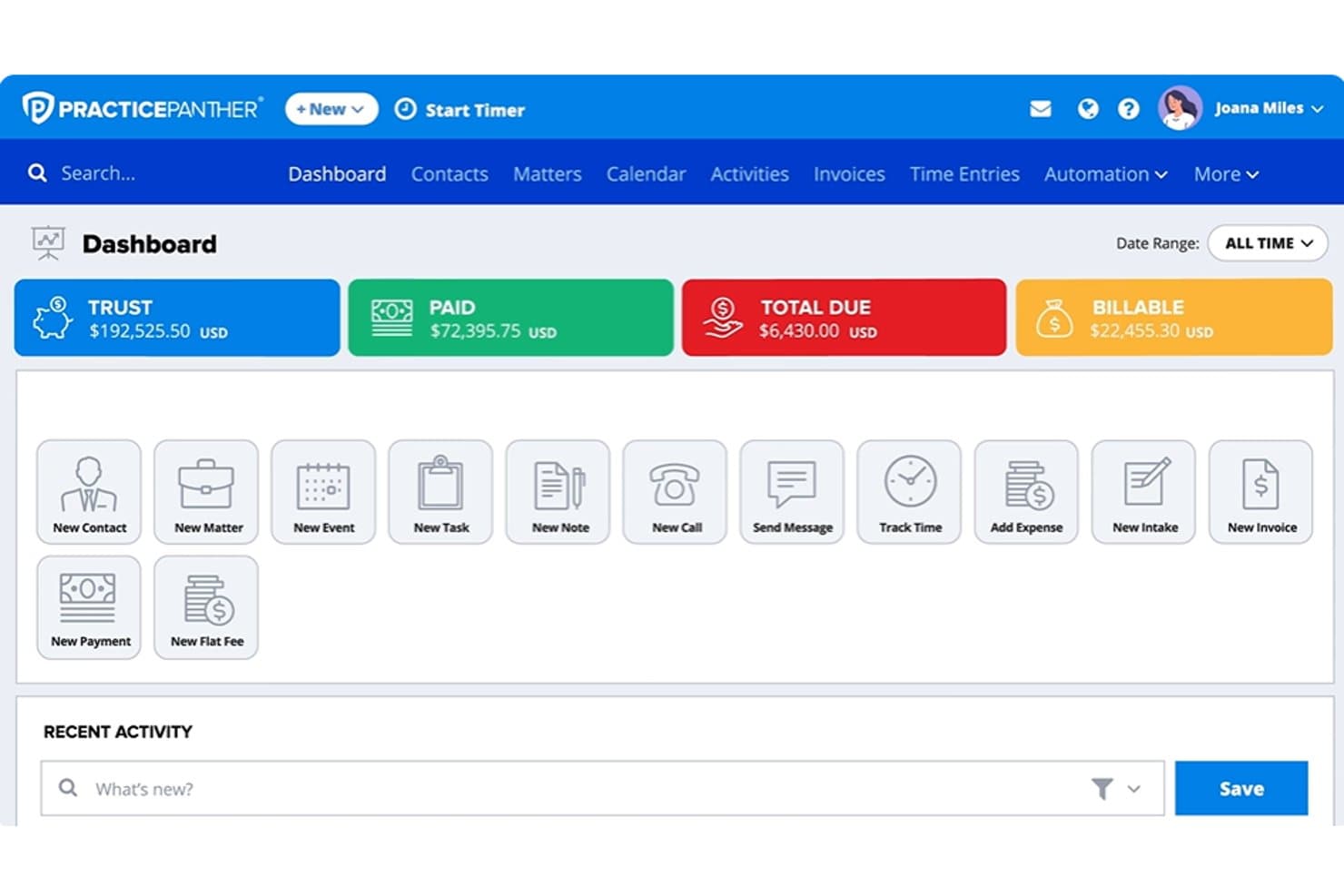
PracticePanther's dashboard centralizes billing, tasks, and client actions. PracticePanther is legal practice management software for law firms managing matters, client communications, and billing, and is positioned as “Best for secure, cloud-based case management.”
Who Is PracticePanther Best For?
Solo and small-firm attorneys who want one system to manage matters, client communications, and billing are a good fit for PracticePanther.
Why I Picked PracticePanther
I picked PracticePanther as a Clio alternative because it fits “Best for secure, cloud-based case management.” Its 256-bit encryption, granular role-based permissions, and matter-change audit history help protect client records and track edits. I value being able to restrict access to financial reports while authorized staff access matters online.
PracticePanther Key Features
- Time tracking: Record billable time with a timer or manual entries.
- Invoice creation: Generate invoices for hourly, flat-fee, or contingency work.
- Deadline calendaring: Calculate deadlines based on court rules and sync calendars.
- Client intake forms: Create online forms that sync submitted details to contacts and cases.
PracticePanther Integrations
PracticePanther’s listed integrations include QuickBooks Online, Outlook, Gmail, Google Drive, Dropbox, OneDrive, Google Calendar, Lawmatics, and LawToolBox, and it connects with Zapier. An open API is available for custom integrations.
Pros and Cons
Pros:
- Users praise timers and bulk invoicing
- Workflow templates generate tasks, deadlines, documents
- Matter-level audit history and role controls
Cons:
- Billing templates can feel inflexible
- Mobile timer can reset unexpectedly
Learn more about PracticePanther: 2Best for managing calendars and appointments
8am
- Free trial available
- Pricing upon request
Visit WebsiteCustomer Rating:4.6/5
Create and generate multiple client documents in 8am using customizable templates, then store, organize, and manage case files from a centralized document management system. Law firms that need their attorneys and support staff working from the same case information will find MyCase, a legal practice management platform, built around that kind of team-wide visibility.
Who Is MyCase Best For?
MyCase suits growing law firms where attorneys, paralegals, and support staff all need visibility into the same cases and client communications.
Why MyCase Is a Good Clio Alternative
I picked MyCase as one of the best Clio alternatives because of how tightly its calendaring connects to actual case activity. The two-way sync with Google Calendar and Outlook means that any change made in either system automatically updates the other, so scheduling conflicts don't sneak up on you. I also appreciate the jurisdiction-based deadline tracking, which automatically calculates court deadlines based on local rules and ties them directly to the relevant case file.
MyCase Key Features
- Secure client portal: Clients can log in to view case updates, send messages, share documents, and schedule appointments without emailing back and forth.
- Automated workflow triggers: Set up case-type workflows that automatically generate tasks and documents when a matter reaches a specific stage.
- Built-in text messaging: Send and receive SMS messages with clients directly from a case file, with all messages logged automatically.
- Mobile app: Access cases, contacts, and documents from iOS and Android devices when you're away from the office.
MyCase Integrations
MyCase offers 50+ integrations, including Dropbox, Gmail, Google Calendar, Microsoft Outlook, InfoTrack, CallRail, Lawmatics, QuickBooks, LawToolBox, and NetDocuments. It also connects with Zapier and provides an open API for custom integrations.
Pros and Cons
Pros:
- Next-day access to client payment funds
- Automated expense tracking and three-way reconciliation
- Built-in SMS texting with clients
Cons:
- Limited workflow and field customization options
- Struggles with large video and audio files
Learn more about 8am: Best for easy online payments and client communication
- 10-day free trial
- From $50/user/month (billed annually)
Visit WebsiteCustomer Rating:4.6/5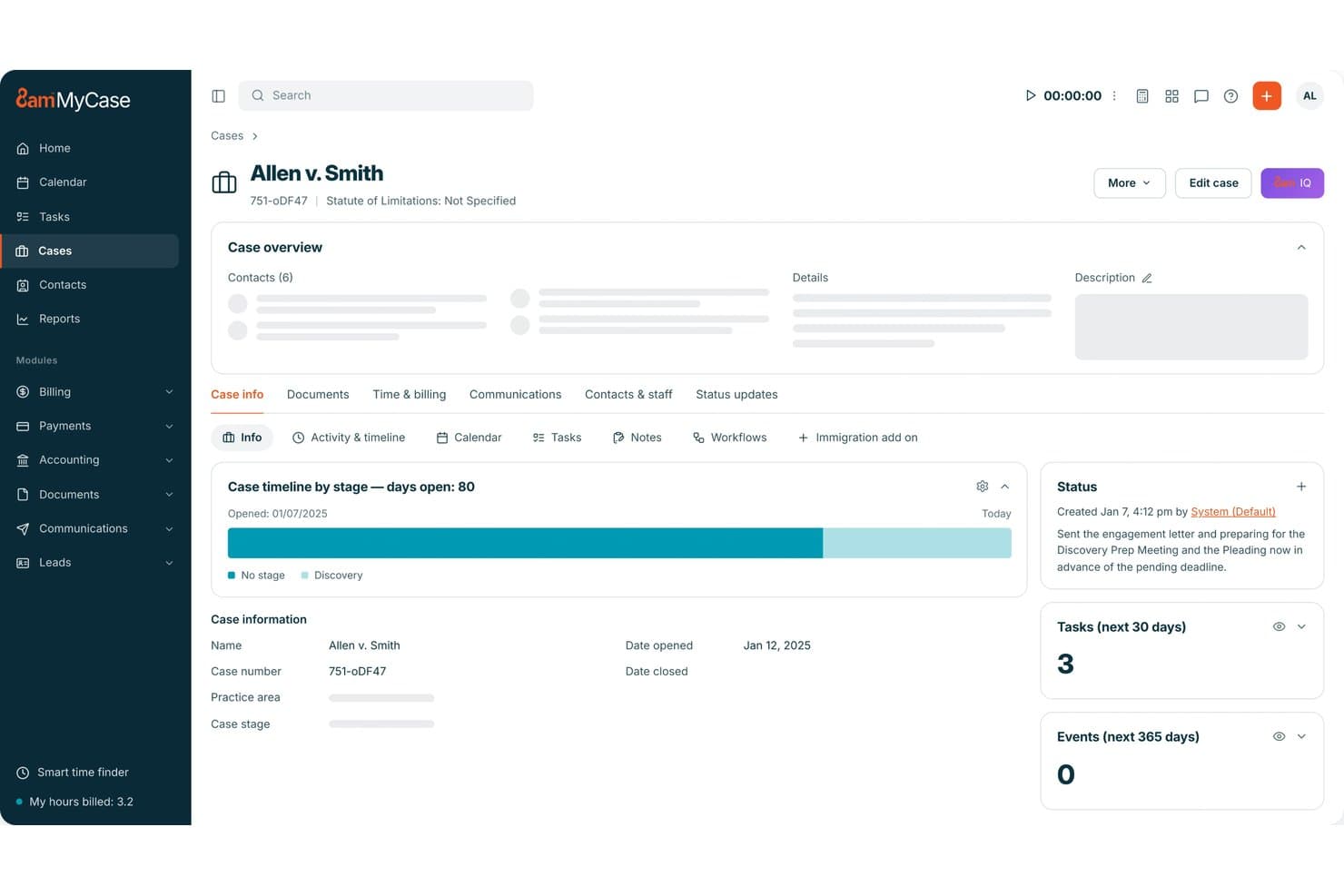
MyCase centralizes case details, tasks, and timelines in one dashboard. MyCase is legal practice management software for small and midsize law firms, bringing case files, calendaring, billing, and matter workflows into one workspace to help teams keep client work organized.
Who Is MyCase Best For?
MyCase suits small and midsize law firms that want to simplify client payments and keep clients informed about case progress.
Why I Picked MyCase
I picked MyCase as a Clio alternative because it’s best for easy online payments and client communication. Its client portal lets clients review invoices and account statements, then pay without sharing card numbers with the firm. Built-in texting syncs messages to case files, keeping client updates alongside matter records.
MyCase Key Features
- Legal calendaring: Track appointments, meetings, events, and case deadlines in a central calendar.
- Document generation: Create case documents from templates and populate them with client details.
- Time and expense tracking: Record billable time and expenses against client matters.
- Client intake forms: Build customizable web forms to collect information from prospective clients.
MyCase Integrations
MyCase’s integrations directory lists 61 options, including LawPay, QuickBooks Online, Google Calendar, Microsoft Outlook, Dropbox, LawToolBox, and Lawmatics, plus Zapier. It also offers an Open API for custom connections.
Pros and Cons
Pros:
- Matter records combine deadlines, documents, and billing
- Text replies stay attached to case files
- Clients pay invoices through the secure portal
Cons:
- Billing formats and reports offer limited flexibility
- Email sync can hide messages from teammates
 Best for automated client relationship management
- Free demo available
- Pricing upon request
Visit WebsiteCustomer Rating:4.6/5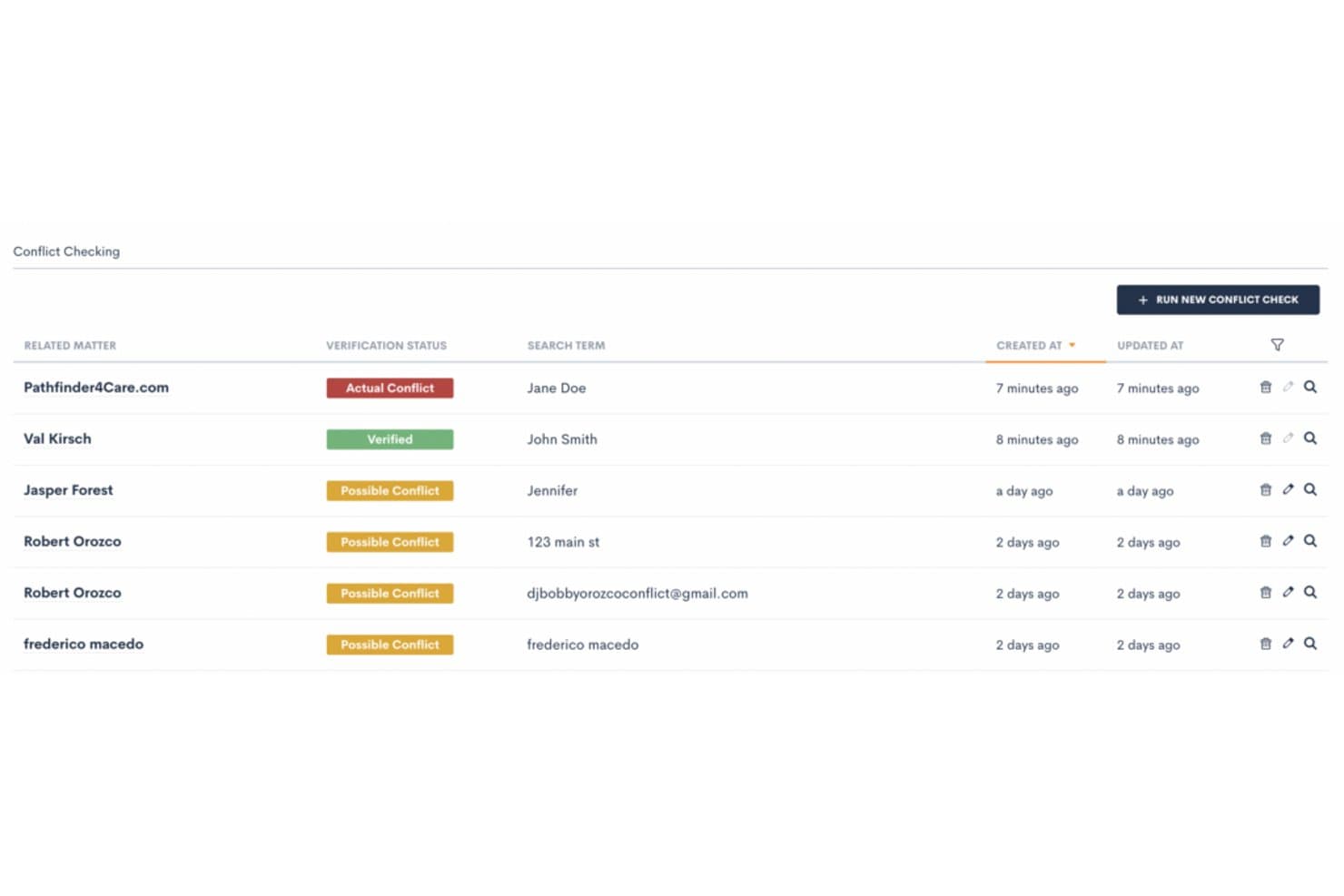
Lawmatics flags conflicts of interest before taking on new clients. Lawmatics is a legal practice management platform for law firms that want to organize client intake, matter workflows, and communications in one system.
Who Is Lawmatics Best For?
Lawmatics suits law firms that want to automate lead follow-up and manage prospective-client relationships.
Why I Picked Lawmatics
I picked Lawmatics for firms that want an alternative to Clio with client relationship management at the center. Its intake pipeline can trigger follow-up actions as a lead advances, while customizable forms and automatic email or text responses help staff respond promptly. A central interaction timeline keeps each prospect’s calls, messages, and forms together.
Lawmatics Key Features
- E-signatures: Send legal documents for signing and track their status.
- File request builder: Create reusable templates for requesting client documents.
- Client portal: Let clients access shared files, messages, tasks, and calendar events.
- Reporting and analytics: Create reports to track lead sources, marketing, and firm goals.
Lawmatics Integrations
Lawmatics offers integrations with Clio, 8am™ MyCase, Filevine, PracticePanther, Gmail and Google Calendar, Microsoft Outlook, QuickBooks, and OneDrive, and it supports Zapier. It also provides an Open API and outbound webhooks for custom integrations.
Pros and Cons
Pros:
- Marketing reports connect lead sources with conversions
- Keeps prospect communications in a chronological timeline
- Stage-triggered follow-ups reduce manual lead chasing
Cons:
- No test environment makes live automation risky
- Automation setup can take months to complete
Learn more about Lawmatics: Best for advanced project management features
- Free trial + free demo available
- Pricing upon request
Visit WebsiteCustomer Rating:4.5/5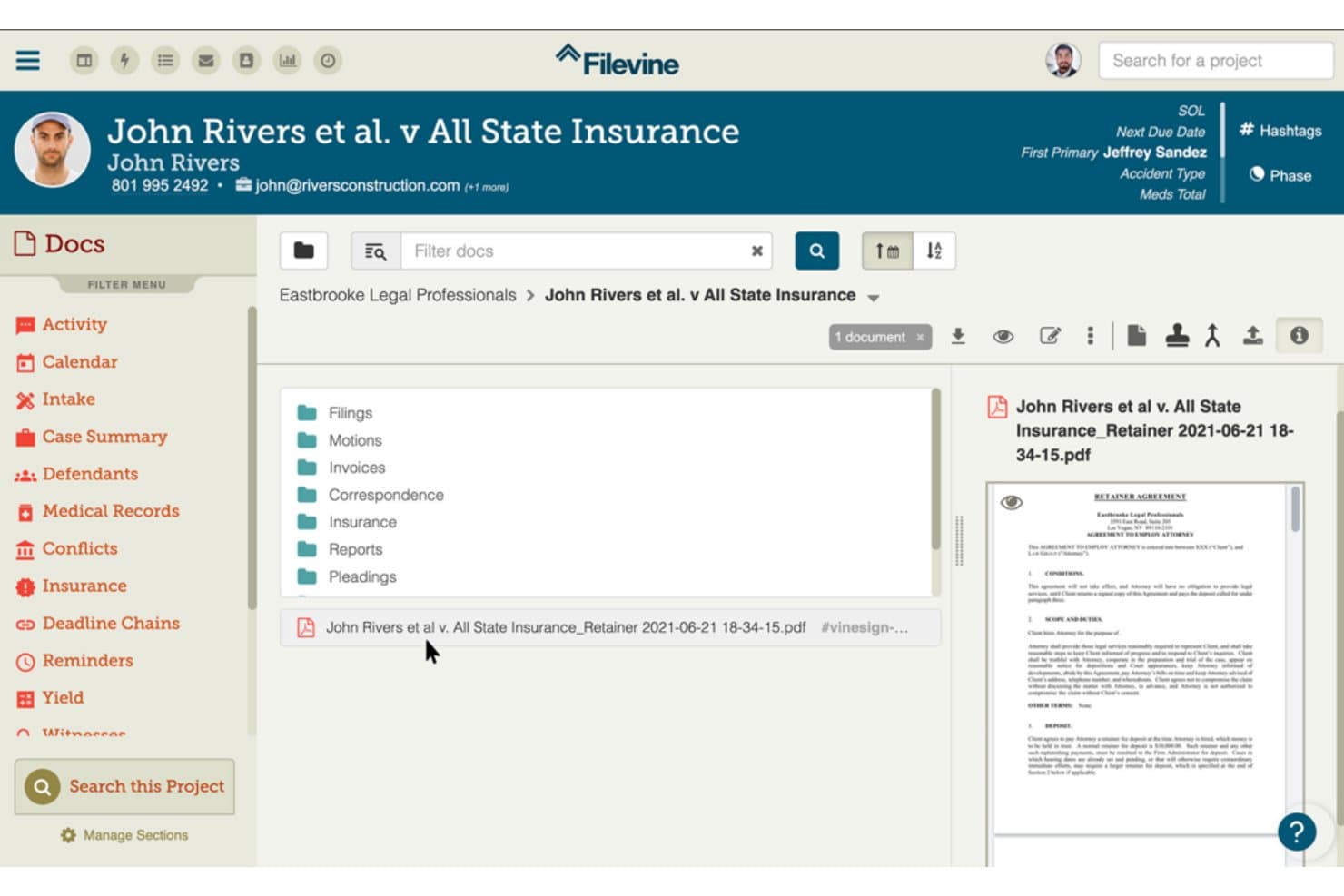
Filevine organizes case documents into folders for easy access. Filevine is a legal practice management platform for law firms that need to organize matter records, client communication, and case workflows in one workspace.
Who Is Filevine Best For?
Filevine suits law firms and legal operations teams that need detailed project controls to coordinate complex matters, deadlines, and team responsibilities.
Why I Picked Filevine
I picked Filevine as a Clio alternative because its project controls earn the label “Best for advanced project management features.” I like that teams can assign case-specific tasks with owners, due dates, and priorities, then use automated reminders to track deadlines. That helps me keep matter responsibilities and next steps clear.
Filevine Key Features
- Document management: Store, preview, and edit legal documents within the platform.
- Client portal: Share case updates and collect information through client-facing forms.
- Document assembly: Generate legal documents using case information and forms.
- Time tracking: Record billable hours with a timer available across the platform.
Filevine Integrations
Filevine documents integrations with QuickBooks, Outlook and Microsoft 365, Google Calendar, and Slack; it explicitly describes its QuickBooks integration as native. It also connects with Zapier and offers an API for custom integrations.
Pros and Cons
Pros:
- Task prompts clarify ownership and deadlines
- Case files centralize documents, notes, and tasks
- Customizable matter workflows fit complex litigation
Cons:
- Reports can restrict fields and require reprocessing
- Initial configuration can take months
Learn more about Filevine: Best for seamless billing and accounting integration
- 10-day free trial
- From $69/user/month
Visit WebsiteCustomer Rating:4.5/5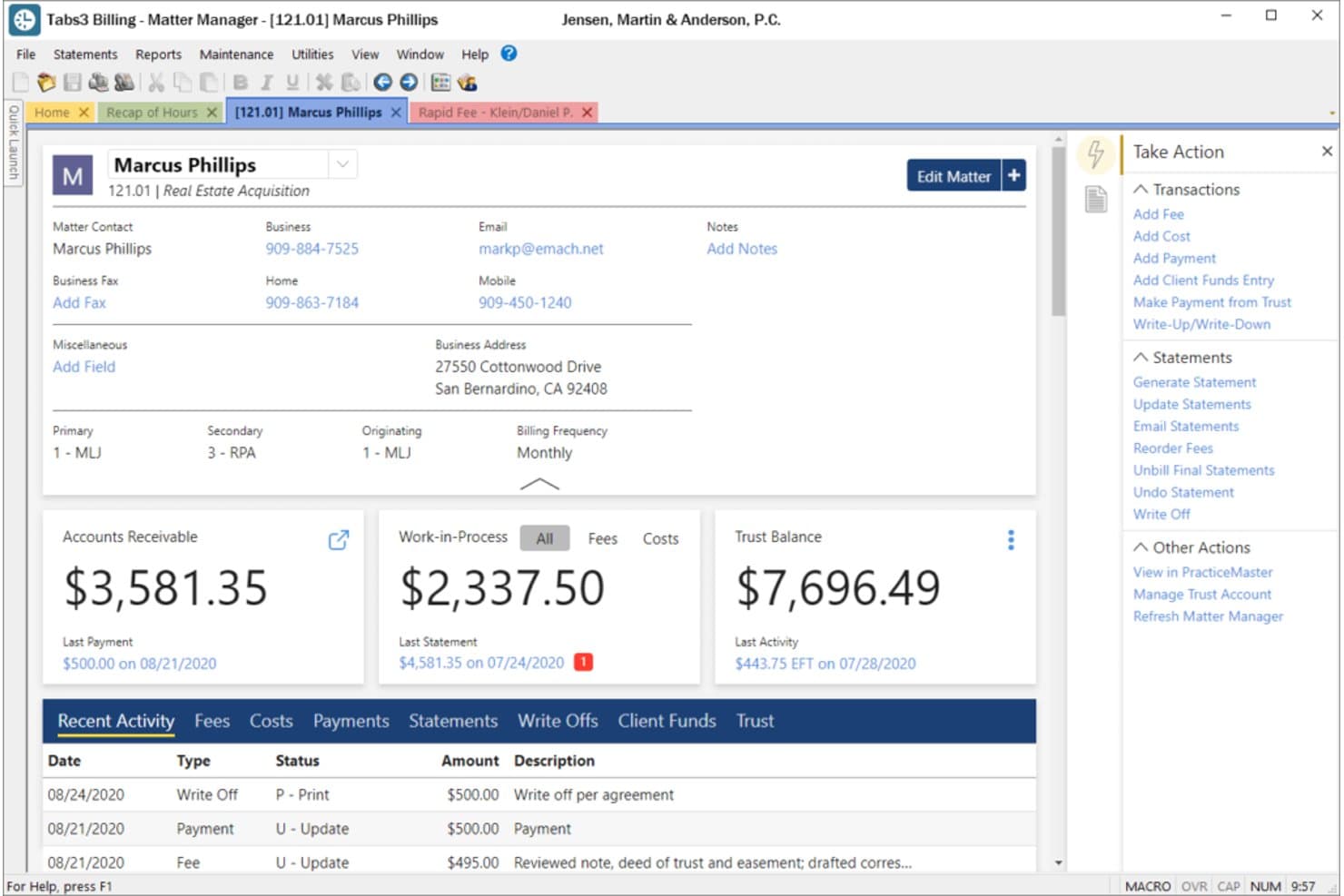
Tabs3 displays client matter details, balances, and recent activity at a glance. Tabs3 is a legal practice management platform for law firms that need to organize client and matter records, track work, and manage day-to-day case administration as an alternative to Clio.
Who Is Tabs3 Best For?
Tabs3 is a good fit for law firms that want billing and accounting connected to their matter administration.
Why I Picked Tabs3
I picked Tabs3 as a Clio alternative because it’s “Best for seamless billing and accounting integration.” Its billing and accounting workflows connect with client and matter administration, keeping financial activity tied to the relevant files. I like that firms can also track work alongside matter records.
Tabs3 Key Features
- Calendaring and scheduling: View and schedule appointments by staff, case, or practice area.
- Conflict checking: Search names using partial words or phonetic matches.
- Document assembly: Use templates to insert client- or matter-specific details.
- User permissions: Set view, edit, and delete access by user or field.
Tabs3 Integrations
PracticeMaster lists integrations with Microsoft Outlook, iManage, PointOne, HotDocs, Adobe, and CalendarRules. It also syncs client contacts with Tabs3 Billing and sends fee and cost entries to billing.
Pros and Cons
Pros:
- Detailed matter records keep balances accessible
- Custom reports track work in progress
- Integrated billing and trust accounting
Cons:
- Billing tasks can lock out other users
- Reports run slowly or need Report Builder
Learn more about Tabs3: Best for dedicated legal accounting
- 10-day free trial
- From $49/user/month (billed annually)
Visit WebsiteCustomer Rating:4.3/5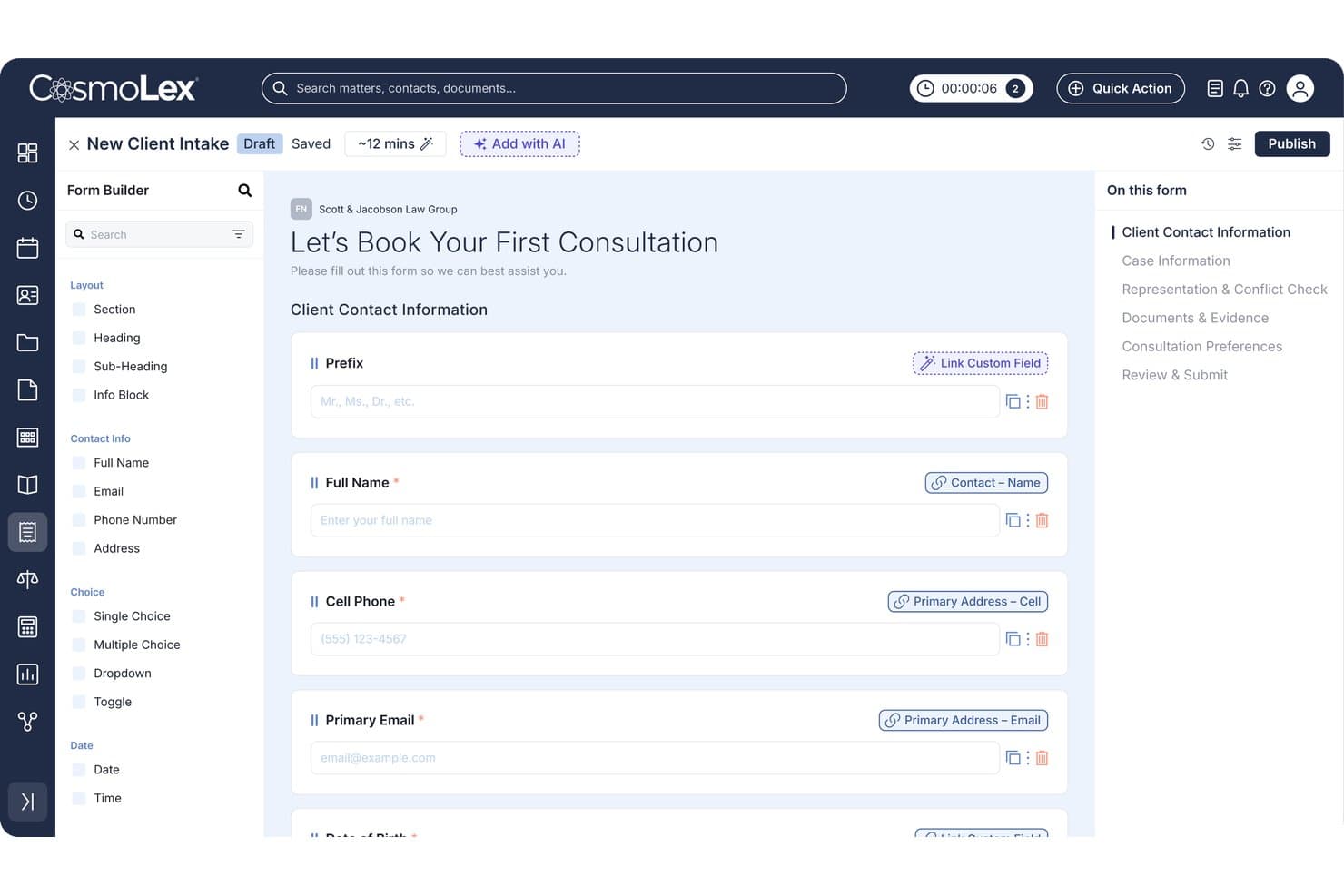
CosmoLex lets users build custom client intake forms with linked fields. For law firms seeking an alternative to Clio, CosmoLex brings matter management, calendaring, billing, and client records into one platform to help keep casework and daily operations organized.
Who Is CosmoLex Best For?
CosmoLex is a good fit for law firms that want legal-specific accounting connected to their matter and billing workflows.
Why I Picked CosmoLex
I picked CosmoLex as a Clio alternative because its dedicated legal accounting connects trust and firm accounting with matter workflows. I value built-in trust accounting, three-way reconciliation, and detailed audit trails when reviewing client funds and investigating ledger discrepancies. Billing and matter records sit alongside those accounting controls.
CosmoLex Key Features
- Calendar and task management: Link events and tasks to matters and load custom task workflows.
- Email management: File emails in matter folders and control who can view firm communications.
- Document management: Store matter files and create Word templates with database merge fields.
- Client portal: Let clients exchange messages and documents securely with your firm.
CosmoLex Integrations
CosmoLex integrates with Microsoft 365, Dropbox, Google Drive, Box, NetDocuments, OneDrive, Google Calendar, LawPay, and QuickBooks Online, and connects with Zapier. It also offers an open REST API; QuickBooks Online integration is available to U.S. firms on Core and Pro plans.
Pros and Cons
Pros:
- Audit trails clarify trust-ledger discrepancies
- Matter-linked billing reduces duplicate financial entry
- Built-in trust accounting supports three-way reconciliation
Cons:
- Limited payment allocation and recurring-billing controls
- Cluttered interface makes sections harder to find
Learn more about CosmoLex: Best for boosting productivity with AI
- 10-day free trial
- From $59/user/month (billed annually)
Visit WebsiteCustomer Rating:4.4/5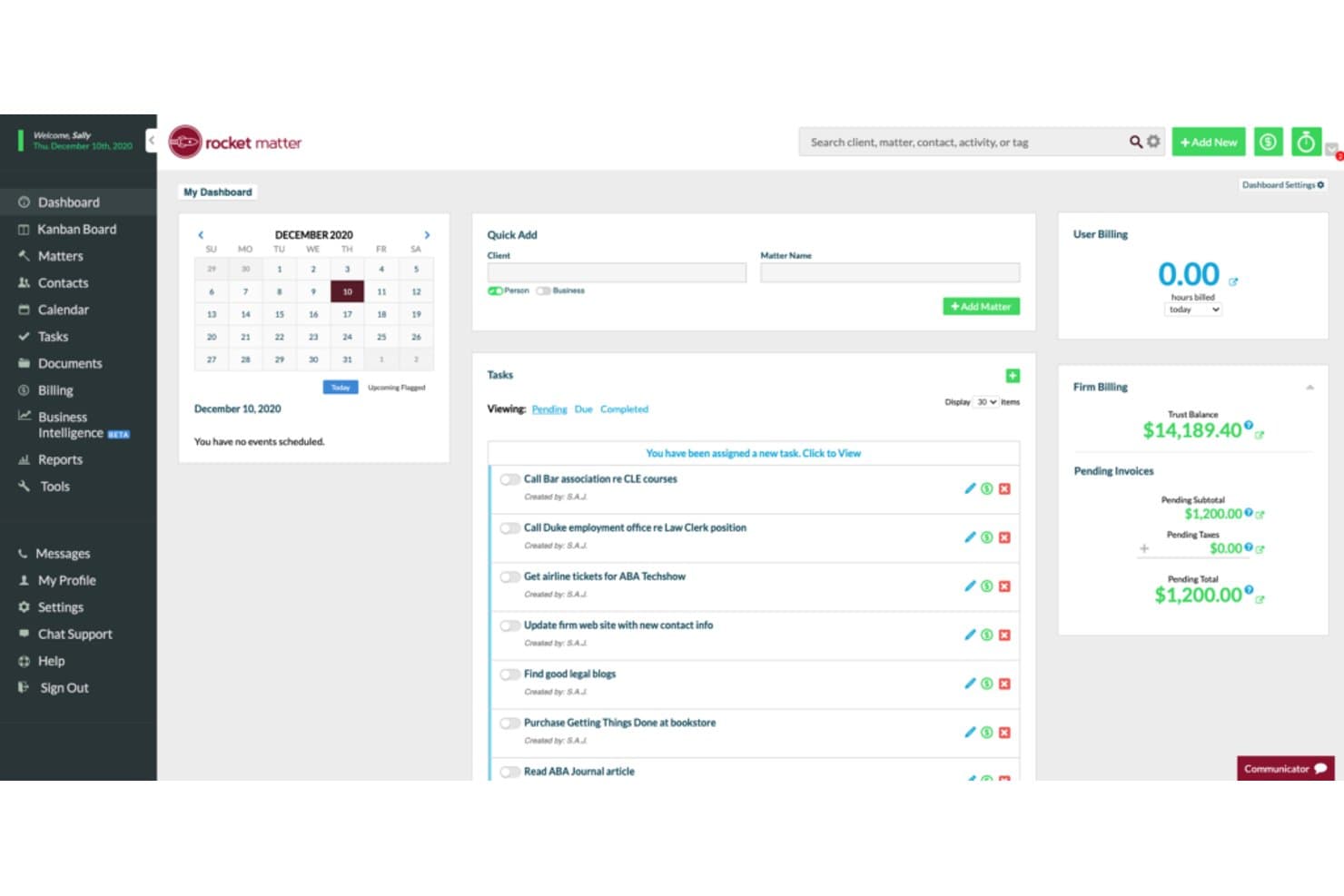
Rocket Matter centralizes tasks, billing, and client matters on one dashboard. Rocket Matter is law practice management software for firms that want to manage matters, time tracking, billing, and client workflows in one platform.
Who Is Rocket Matter Best For?
Rocket Matter suits law firm teams that want AI support for organizing legal work and keeping matter-related tasks moving.
Why I Picked Rocket Matter
I picked Rocket Matter as a Clio alternative because its USP, “Best for boosting productivity with AI,” fits firms looking to reduce routine work. Its ChatGPT integration lets me draft client communications and summarize information within the platform. I’d still review every AI-generated draft for accuracy and confidentiality before sending it.
Rocket Matter Key Features
- Matter management: Organize case and client information in one platform.
- Time tracking: Record billable time against matters.
- Billing and payments: Track billing and offer clients payment options.
- Custom reports and workflows: Tailor reports, workflows, and templates to your firm.
Rocket Matter Integrations
Rocket Matter lists integrations with Office 365 Outlook, OneDrive, QuickBooks Online, NetDocuments, Dropbox, Google Calendar, Box, and Zapier. It also provides an API for custom integrations.
Pros and Cons
Pros:
- Trust accounting supports retainers and reconciliation
- Matter-linked timers simplify billable time capture
- In-app AI drafts messages and summarizes documents
Cons:
- No built-in intake or CRM workflows
- Custom reports can be difficult to configure
Learn more about Rocket Matter: Best for full-featured, cloud-based operations
- Free demo available
- Pricing upon request
Visit WebsiteCustomer Rating:4.2/5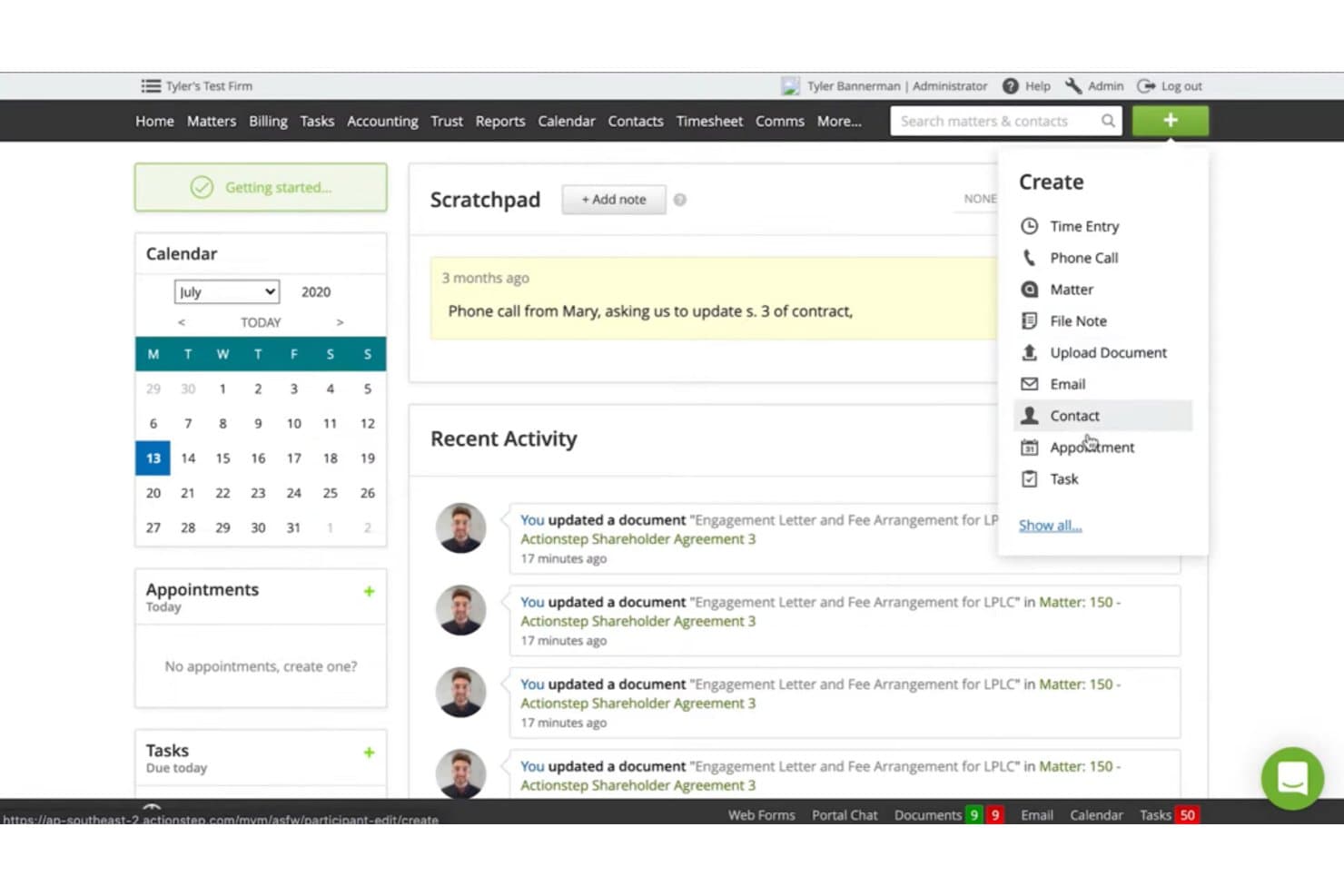
Actionstep lets users quickly create contacts, tasks, and appointments from any screen. Actionstep is a legal practice management platform for law firms that need to bring client and matter information, daily work, and billing into a more organized workflow.
Who Is Actionstep Best For?
Actionstep suits law firms whose attorneys and operations teams need to manage matters, workflows, and billing in one cloud-based system.
Why I Picked Actionstep
I pick Actionstep as a Clio alternative: it’s Best for full-featured, cloud-based operations. Its matter-specific workflows can assign tasks and trigger client emails, while electronic matter files bring documents, notes, time records, billing, and trust accounting together. I also value status reports that show each matter’s current step and next action.
Actionstep Key Features
- Client intake forms: Create customizable forms with conditional logic to collect prospective client information.
- Calendar: Track key dates, appointments, and hearings in the integrated calendar.
- Conflict checks: Check for conflicts as part of your client intake process.
- Client portal: Share matter updates with clients through the portal.
Actionstep Integrations
Actionstep offers integrations with Xero, QuickBooks Online, Microsoft 365, and First AML. It also connects with Zapier and provides a REST API for custom integrations.
Pros and Cons
Pros:
- Document assembly cuts repetitive drafting
- Trust accounting sits alongside matter billing
- Custom matter workflows automate task assignment
Cons:
- Billing reports and templates can frustrate
- Initial workflow setup takes substantial effort
Learn more about Actionstep: Best for comprehensive case management
- Free demo available
- Pricing upon request
Visit WebsiteCustomer Rating:4/5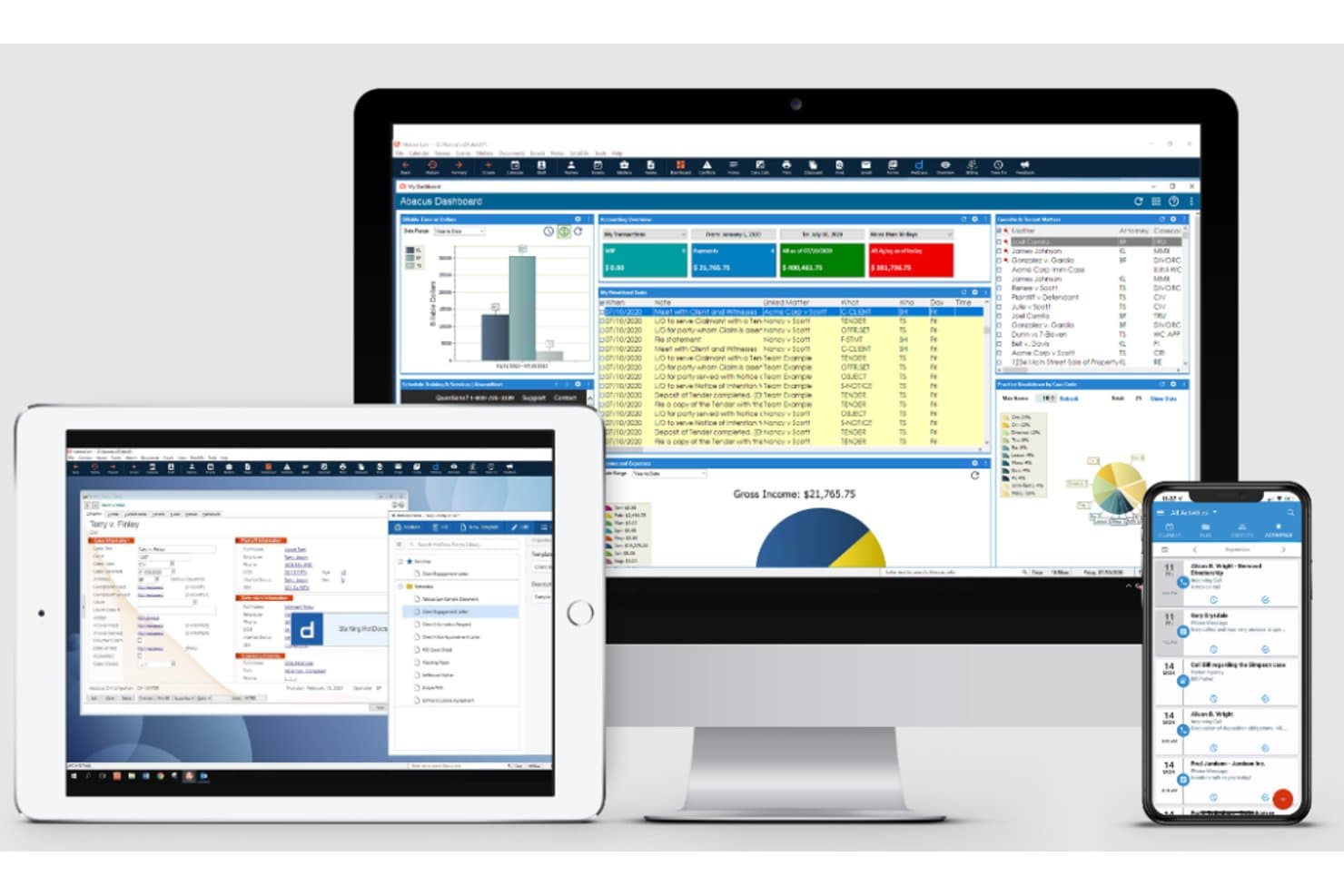
AbacusLaw displays case, billing, and calendar data across devices. AbacusLaw is legal practice management software for law firms that connects matter workflows, calendaring, and client records to help legal teams coordinate cases and track deadlines.
Who Is AbacusLaw Best For?
AbacusLaw suits law firms that need a centralized system to organize case files, deadlines, and day-to-day matter work.
Why I Picked AbacusLaw
I picked AbacusLaw as a Clio alternative because it’s my choice for “Best for comprehensive case management.” Its intake screens capture client details and launch workflows with legal forms and follow-up events. Case status, chronology, deadline, and alert reports help me track what each matter needs next.
AbacusLaw Key Features
- Trust accounting: Record and manage trust accounts with built-in accounting tools.
- Outlook integration: Connect AbacusLaw with Microsoft Outlook for calendar and client communication tools.
- Time and expense tracking: Record billable time and expenses for client matters.
- Payment processing: Accept credit cards and e-checks through Abacus Payment Exchange.
AbacusLaw Integrations
AbacusLaw has native integrations with Microsoft Outlook and HotDocs. Outlook contacts and calendars can sync with AbacusLaw through Exchange or Office 365.
Pros and Cons
Pros:
- Custom fields and reports adapt to practice areas
- Intake screens trigger matter-specific forms and follow-ups
- Case records link deadlines, chronology, and alerts
Cons:
- Some users report crashes and slow performance
- Reviewers report billing and accounting glitches
Learn more about AbacusLaw:
Andre verktøy som alternativer til Clio
Nedenfor finner du en liste over flere Clio-alternativer jeg valgte ut, men som ikke kom med blant de 12 beste. De er absolutt verdt å undersøke nærmere.
- 11CARET Legal (Zola Suite)Best for an all-in-one practice management platform
- 12LeanLawBest for integration with QuickBooks Online
- 13Bill4TimeBest for intuitive time tracking and invoicing
- 14LEAPGood for automating legal documents and forms
- 15SmartAdvocateGood for large law firms with extensive case management needs
- 16CaseFoxGood for freelancers and solo practitioners on a budget
- 17SmokeballGood for small firms looking for robust cloud-based solutions
- 18LawcusGood for visual task and workflow management in law practices
- 19LegalTrekGood for firms desiring customizable legal project management tools
- 20HoudiniESQGood for firms seeking flexibility with on-premise or cloud options
- 21Legal FilesGood for corporate legal departments requiring strong case and document management
- 22WorldoxGood for firms that need advanced document management
- 23Law RulerGood for firms needing strong lead management and intake features
- 24Amicus AttorneyGood for integrating practice management and billing in one place
- 25MerusCaseGood for streamlined document automation and organization
- 26Legal TrackGood for law firms managing legal matters for corporate clients
- 27ProTempusGood for single-user law firms wanting an all-in-one solution
Relaterte anmeldelser av juridiske verktøy
- Gratis juridiske researchverktøy
- Programvare for administrasjon av juridisk praksis
- Programvare for håndtering av juridiske dokumenter
- Programvare for administrasjon av praksis i små advokatfirmaer
How I Evaluate Clio Alternatives
I evaluate Clio alternatives in two layers: the baseline requirements every practice management tool must meet—like trust accounting and matter tracking—and the differentiators that set them apart.
Core Functionality (Table Stakes For This List)
When I'm selecting tools for my list, I rank each one on a scale from 0 (does not offer the functionality) to 5 (excels in this area) for each core functionality listed below. Then, I calculate the tool's total score into a percentage. Each tool needs to achieve a minimum total score of 65% to be considered for inclusion.
- Matter & Case Management: I look for structured matter records where you can organize contacts, notes, documents, and related matters—similar to how PracticePanther and CosmoLex handle case organization.
- Time Tracking & Legal Billing: Every tool should support multiple billing models (hourly, flat, contingency) and let attorneys capture time from timers, calendar entries, or manual logs.
- Trust & IOLTA Accounting: I check whether the platform handles three-way reconciliation and keeps client trust funds properly separated from operating accounts within the software.
- Document Management & Automation: Strong contenders offer template-based document generation with merge fields, so attorneys can produce engagement letters or pleadings without starting from scratch each time.
- Client Intake & CRM: I evaluate how each tool captures leads, routes intake forms, and runs conflict checks—key steps that determine how quickly a firm can onboard new clients.
- Calendaring & Deadline Tracking: Court rules-based calendaring is what I look for here, where the tool auto-calculates filing deadlines and generates linked task chains based on jurisdiction-specific rules.
Once I have a list of tools that meet this criteria, I consider what sets each platform apart.
Differentiating Factors (What Sets Vendors Apart)
Here's how I compare and contrast different vendors:
Standout Features
A secure client portal changes how firms interact with clients—sharing documents, collecting e-signatures, and accepting payments without back-and-forth emails. I also evaluate whether a platform includes native general ledger accounting, since tools like CosmoLex eliminate the need for a separate QuickBooks or Xero setup. AI capabilities matter here too. I look at whether a tool offers automated time capture or document drafting to cut the admin work that attorneys deal with daily.
Beyond Features
Pricing transparency matters when evaluating Clio alternatives. I check whether vendors gate key features like trust accounting behind higher tiers, which can inflate costs quickly for growing firms. Integration depth is another factor—tools that connect with Westlaw, LawPay, and Microsoft 365 fit into existing legal workflows without forcing a full stack overhaul. Migration support also weighs heavily, since switching from Clio means moving years of matter data, documents, and billing history to a new platform.
Hvorfor se etter et alternativ til Clio?
Å se etter et alternativ til Clio kan være et strategisk grep for firmaer som ønsker å optimalisere løsningene sine for praksisadministrasjon. Clio er populært og omfattende, men passer kanskje ikke med de spesifikke behovene, budsjettene eller preferansene til alle advokatfirmaer. Noen brukere opplever at grensesnittet ikke er intuitivt, eller at funksjonene blir overveldende, noe som fører til at mulighetene i løsningen ikke utnyttes fullt ut.
I tillegg gjør et bredere utvalg av programvare det mulig for firmaer å dra nytte av unike funksjoner, konkurransedyktige priser og ulike integrasjonsmuligheter som finnes på andre plattformer. Ved å undersøke andre alternativer kan man derfor finne en løsning som er bedre tilpasset firmaets unike driftsbehov.
Vanligste spørsmål om de beste Clio-alternativene for advokatfirmaet ditt (vanlige spørsmål)
Hva er fordelene ved å bruke programvare for administrasjon av advokatvirksomhet, slik som de som er oppført ovenfor?
Det er flere fordeler ved å bruke denne typen verktøy. For det første kan de effektivisere arbeidsflyten i et advokatfirma ved å automatisere rutineoppgaver. For det andre gjør de det mulig å lagre saksdokumenter sikkert og få enkel tilgang til dem.
For det tredje legger de til rette for nøyaktig registrering av fakturerbare timer og forenkler faktureringsprosessen. For det fjerde tilbyr de sikre kommunikasjonskanaler med klienter gjennom integrerte klientportaler. Til slutt tilbyr de fleste av disse verktøyene mobilversjoner, noe som gir fleksibilitet til å arbeide hvor som helst.
Hvor mye koster disse verktøyene for administrasjon av advokatvirksomhet?
Kostnaden for disse verktøyene kan variere betydelig avhengig av funksjonene, omfanget og de spesifikke behovene til firmaet ditt.
Hvilke prismodeller bruker disse verktøyene?
De fleste verktøyene for administrasjon av advokatvirksomhet bruker en abonnementsbasert prismodell, vanligvis per bruker/måned. De tilbyr ofte flere prisnivåer, der hvert nivå har et annet funksjonssett. Noen tilbyr også årsabonnementer til redusert pris.
Hva er det typiske prisintervallet for disse verktøyene?
Selv om prisene kan variere, ligger et typisk prisintervall på mellom $20 og $100 per bruker/måned. Denne variasjonen avhenger i stor grad av antallet funksjoner og servicenivået som tilbys.
Hvilken programvare er billigst og dyrest?
Av listen ovenfor er CaseFox ofte blant de rimeligste alternativene, med priser fra så lite som $10 per bruker/måned. I den andre enden av skalaen er verktøy som SmartAdvocate dyrere, med priser fra rundt $80 per bruker/måned.
Finnes det gratis alternativer til Clio?
Det finnes noen verktøy for administrasjon av advokatvirksomhet som tilbyr en gratispakke, men de har vanligvis begrensede funksjoner. Lawcus er et eksempel på et verktøy som tilbyr et gratisnivå, men husk at en betalt pakke vanligvis er nødvendig for full funksjonalitet.
Er disse verktøyene verdt investeringen?
Absolutt. Automatiseringen og effektiviteten disse verktøyene gir, kan spare betydelig med tid og redusere risikoen for feil, noe som gjør dem til en verdifull investering. De kan også gi klientene dine en mer profesjonell opplevelse, noe som kan bidra til økt klienttilfredshet og bedre klientbevaring.
Kan disse verktøyene erstatte administrativt personale?
Selv om disse verktøyene kan automatisere mange administrative oppgaver, kan de ikke erstatte menneskelig personale fullstendig. De er utviklet for å støtte og effektivisere oppgaver, ikke for å erstatte den personlige servicen administrativt personale kan tilby. Det handler om å styrke den menneskelige innsatsen, ikke om å erstatte den.