

O software de gestão de processos jurídicos proporciona um único sistema para organizar assuntos, prazos, documentos, tempo, faturação e comunicação para o seu escritório de advogados ou departamento jurídico. Se está à procura do melhor software de gestão de processos jurídicos, é provável que queira ferramentas que lhe permitam poupar tempo, reduzir o trabalho manual e gerir um número crescente de processos com precisão e controlo. Nesta lista, poderá comparar lado a lado as principais ferramentas, perceber o que distingue cada uma e consultar informações importantes para decidir qual o sistema que melhor se adapta ao seu fluxo de trabalho, área de prática e necessidades empresariais.
Why Trust Our Software Recommendations
6,700+
Reviews
20
Industry experts
16+
Evaluation factors
14
Years
Our team has been testing and reviewing software since 2012. As legal practice leaders ourselves, we know how difficult—and important—it is to choose the right software.
For this guide, we evaluated tools using hands-on testing and independent research, scoring tools using our selection criteria.
Our reviews reflect our human editorial judgment, not a sales pitch.
Melhor software de gestão de processos jurídicos
| Tool | Best For | Trial Info | Price | ||
|---|---|---|---|---|---|
| 1 | Best for end-to-end legal workflow automation | 7-day free trial + free demo available | From $59/user/month | Website | |
| 2 | Best for automatic time tracking | Free demo available | Pricing upon request | Website | |
| 3 | Best for customizable matter automation | Free demo available | Pricing upon request | Website | |
| 4 | Best for integrated paralegal services | Free demo available | Pricing upon request | Website | |
| 5 | Best for client intake and marketing automation | Free demo available | Pricing upon request | Website | |
| 6 | Best for legal graph-powered AI | Free demo available | Pricing upon request | Website | |
| 7 | Best for firms with varied legal tech stacks | 7-day free trial + free demo available | From £79/user/month | Website | |
| 8 | Best for unified legal and business management | Free demo available | Pricing upon request | Website | |
| 9 | Best for enterprise-grade analytics | Free demo available | Pricing upon request | Website | |
| 10 | Best for source-linked medical chronologies | Free demo available | From $109/user/month (billed annually) | Website |


Análises do melhor software de gestão de processos jurídicos
Seguem-se os meus resumos detalhados dos melhores softwares de gestão de processos jurídicos que entraram na minha lista final. As minhas análises apresentam uma descrição detalhada das funcionalidades, dos melhores casos de utilização e das integrações de cada software, para ajudar a encontrar a melhor opção para si.
 Best for end-to-end legal workflow automation
- 7-day free trial + free demo available
- From $59/user/month
Visit WebsiteCustomer Rating:4.3/5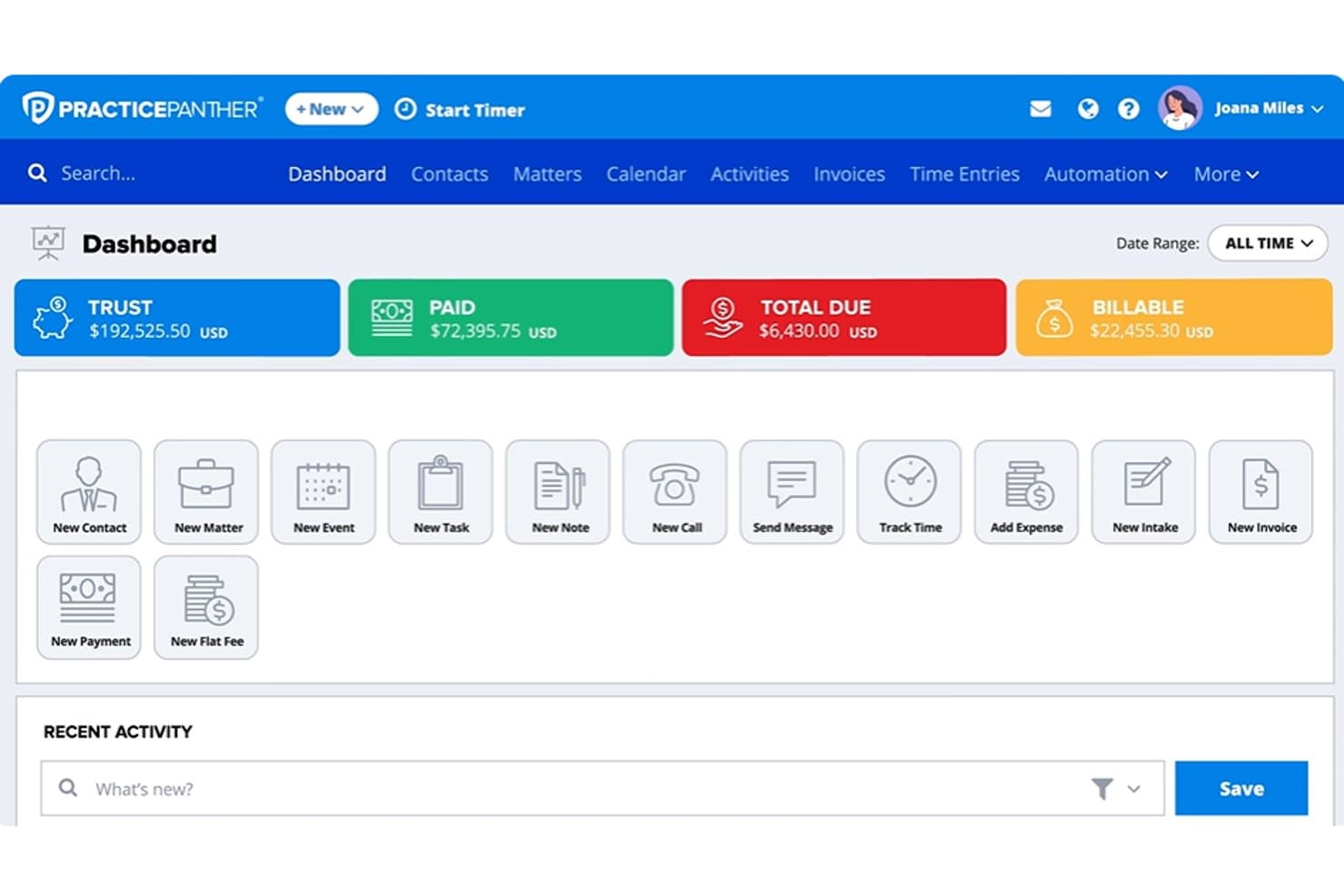
PracticePanther dashboard showing trust balances, payments, billable amounts, matters, and legal billing tools PracticePanther is a legal practice management platform that covers matter management, client intake, document automation, time tracking, billing, trust accounting, and client communication in a single system.
Who Is PracticePanther Best For?
Solo practitioners and small to mid-size firms that want intake, billing, trust accounting, and client communication running from a single platform without stitching together multiple tools.
Why I Picked PracticePanther
I've included PracticePanther in my top picks because it connects intake, billing, trust accounting, and client communication in a single system without requiring you to stitch together separate tools. I particularly like how conditional workflows can trigger tasks, checklists, and follow-up reminders the moment a client submits an intake form, which removes a lot of manual handoff between onboarding and active case management. The built-in trust reconciliation with three-way matching and low-balance alerts also covers a workflow that many platforms leave to a separate accounting add-on.
PracticePanther Key Features
- Full-text conflict check: Searches the entire system—including notes, tasks, emails, and custom fields—for a name or keyword to surface potential conflicts.
- MoneyFinder: Identifies activities that have been logged but not yet billed, so billable time doesn't slip through the cracks.
- Secure client portal: Gives clients access to shared documents, invoice balances, encrypted messages, and online payments from a branded portal.
- Custom security roles: Lets you restrict user access to specific areas of the software, including financial reports and trust account data.
PracticePanther Integrations
PracticePanther offers marketplace integrations with QuickBooks, Google Calendar, Microsoft Exchange, Google Drive, OneDrive, Dropbox, Box, and LawToolBox. It also provides an API and supports Zapier.
Pros and Cons
Pros:
- Three-way trust reconciliation supports ledger oversight
- Matter-linked time capture reduces missed billing
- Intake submissions trigger matter follow-ups
Cons:
- Reviewers report billing and retainer inaccuracies
- Court-rule deadline automation requires separate service
Learn more about PracticePanther: Best for automatic time tracking
- Free demo available
- Pricing upon request
Visit WebsiteCustomer Rating:4.8/5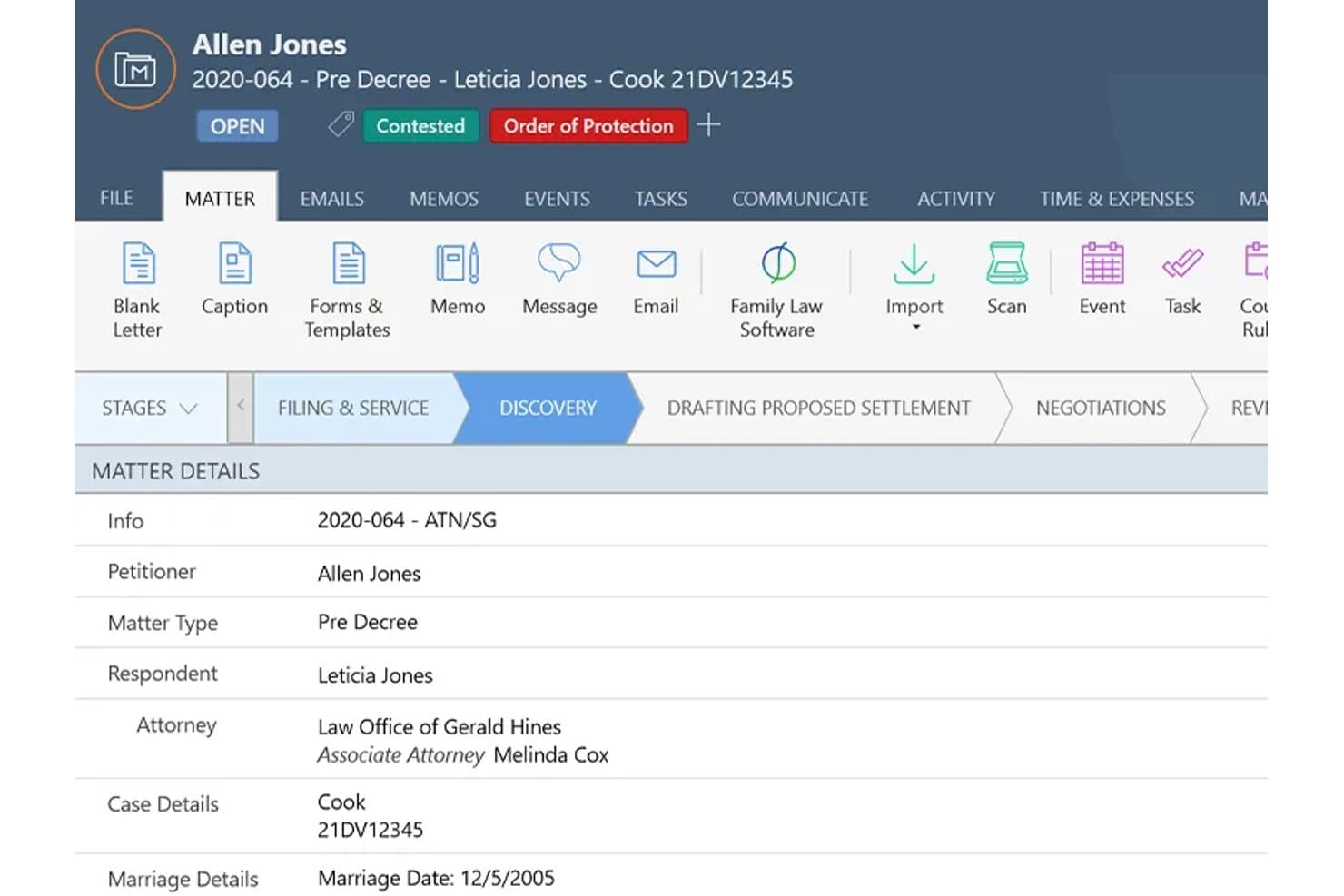
Smokeball offers a detailed matter management view displaying case stages, client details, attorney assignments, and case status in one centralized interface. Smokeball is a cloud-based legal practice management platform built for small and solo law firms, combining matter management, document automation, time tracking, billing, and trust accounting in one system.
Who Is Smokeball Best For?
Smokeball suits solo attorneys and small firm lawyers who handle high-volume practice areas like family law, real estate, or personal injury and need tight matter and billing control.
Why I Picked Smokeball
Smokeball earns its spot on my shortlist because AutoTime captures billable time automatically as I work, recording activity across Word documents, Outlook emails, and matter-related tasks without me ever starting a timer. That means I'm not reconstructing my day at 5pm trying to remember what I worked on. Paired with Firm Insights Reporting, I can see exactly where time is going across matters and staff, which makes profitability visible in a way manual tracking never could.
Smokeball Key Features
- Matter management templates: Choose from over 200 pre-built matter types for specific practice areas.
- Practice area calculators: Access calculators tailored to family law, real estate, and other legal specialties.
- Client portal: Share documents and updates securely with clients through an integrated portal.
- Document automation: Generate court forms, letters, and pleadings with merge fields and automated templates.
Smokeball Integrations
Smokeball offers native integrations with Microsoft Word, Microsoft Outlook, LawPay, and QuickBooks Online. An API is available for custom integrations.
Pros and Cons
Pros:
- Built-in IOLTA trust accounting with reconciliation tools
- 200+ matter templates organized by practice area
- AutoTime captures billable hours without manual input
Cons:
- Limited availability outside US and Australian markets
- Windows desktop app required for full functionality
Learn more about Smokeball: Best for customizable matter automation
- Free demo available
- Pricing upon request
Visit WebsiteCustomer Rating:4.7/5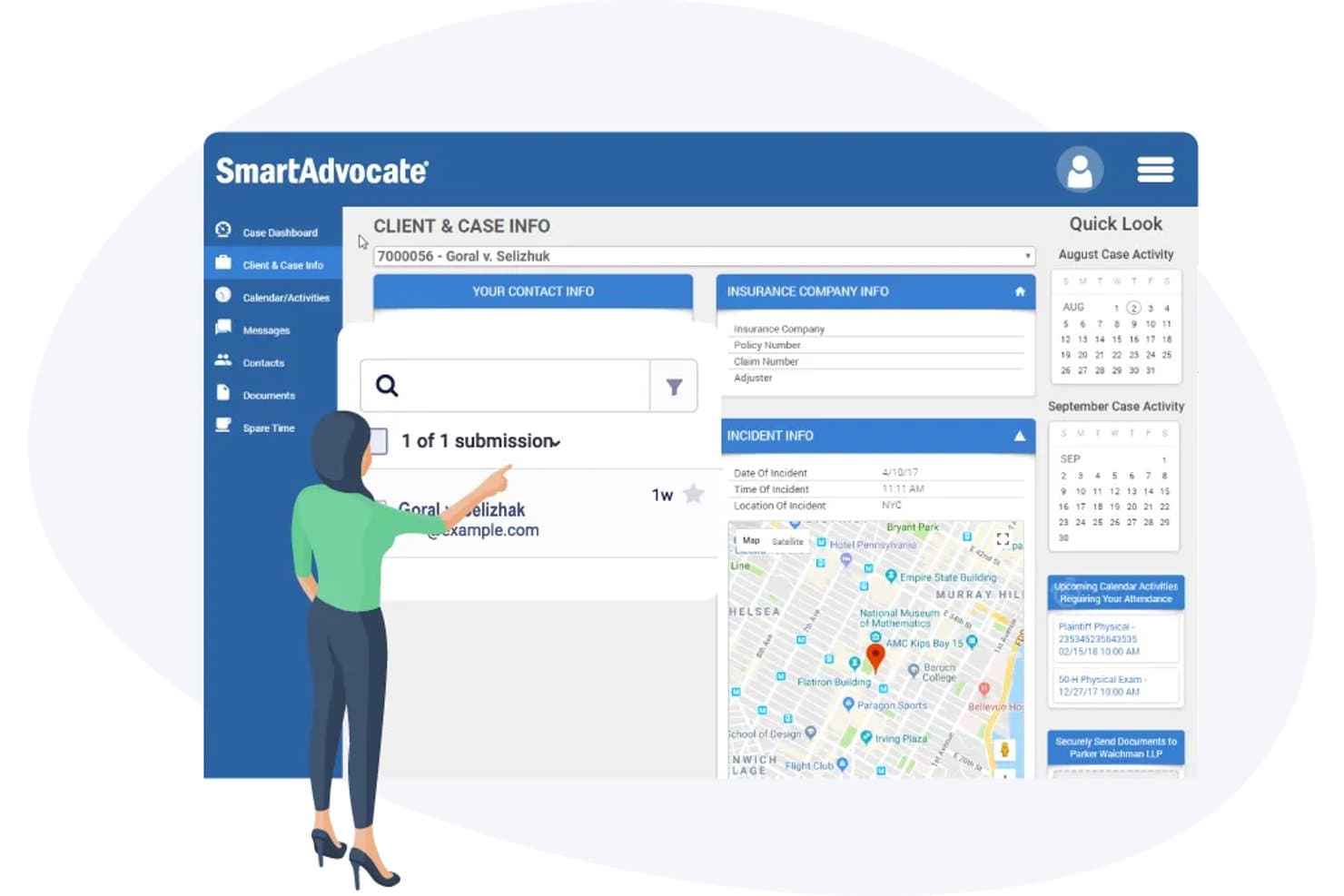
SmartAdvocate offers a comprehensive Client & Case Info dashboard with incident details, insurance company info, map view, and calendar activity tracking. SmartAdvocate is a legal case management platform built for plaintiff litigation practices, combining matter management, document automation, customizable workflows, client intake, and AI-powered case tools.
Who Is SmartAdvocate Best For?
Small to mid-size personal injury and mass tort firms where paralegals and intake staff handle high case volumes will find SmartAdvocate a natural fit.
Why I Picked SmartAdvocate
SmartAdvocate earns its spot on my shortlist because of how deeply you can automate matter workflows without relying on a developer. I use WorkPlans to build automated procedure chains that trigger tasks, send client texts, and generate documents the moment a case hits a specific stage. On top of that, the 4,000+ merge codes make templated document generation genuinely granular, so no two practice areas have to follow the same process.
SmartAdvocate Key Features
- AI Case Chat: Query and summarize case data, briefs, or medical records using built-in artificial intelligence tools.
- Court rules-based calendaring: Automatically calculates deadlines and court dates based on jurisdiction-specific rules.
- Unlimited document storage: Store, organize, and search thousands of matter documents with barcode-based batch scanning.
- Client portal integration: Share case updates, transmit documents, and securely message clients through connected portal solutions.
SmartAdvocate Integrations
SmartAdvocate offers native integrations with DocuSign, QuickBooks, Microsoft 365, LawToolBox, RingCentral, and Docubee. An API is available for custom integrations.
Pros and Cons
Pros:
- Purpose-built for high-volume plaintiff litigation
- AI tools built directly into case records
- Highly configurable WorkPlan automation per practice area
Cons:
- Not suited for transactional or non-litigation matters
- Steep setup time for new workflow configurations
Learn more about SmartAdvocate: Best for integrated paralegal services
- Free demo available
- Pricing upon request
Visit WebsiteCustomer Rating:4.8/5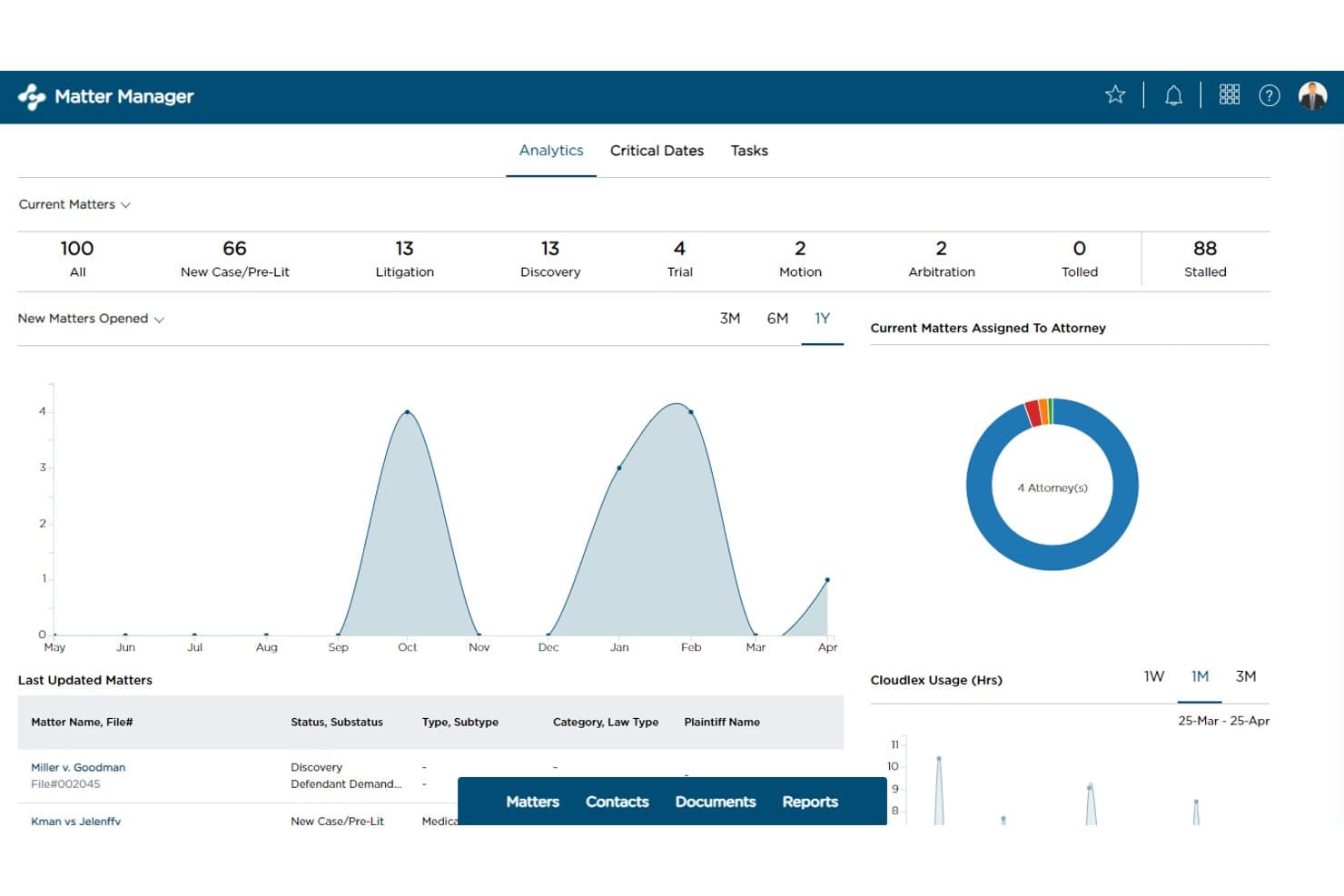
CloudLex tracks matter status, analytics, and attorney assignments in one dashboard. CloudLex is a personal injury-focused practice management platform that covers matter tracking, document organization, client intake, medical records management, task workflows, and client communication in a single system.
Who Is CloudLex Best For?
CloudLex is purpose-built for personal injury law firms that want matter tracking, client communication, and paralegal support in one place.
Why I Picked CloudLex
CloudLex earns its spot on my shortlist because of how deeply it integrates human paralegal support into the case management workflow itself. I love that you can request medical record retrieval, document indexing, chronologies, and even litigation support directly within the platform, with work tracked and delivered inside the same matter record your team is already using. The optional paralegal services also cover court calendar management and intake-to-close operations, so a small PI firm can scale capacity without hiring full-time staff.
CloudLex Key Features
- Matter status timeline report: Tracks every status and substate a matter passes through, with dates and time spent in each stage.
- Lexee AI demand drafting: Generates a structured demand package draft from case facts and records, tracked through review stages inside the matter.
- Conflict-of-interest search: Searches stored intakes, matters, and contacts using identifiers like name, phone number, or email to surface related records.
- Shared Drive client collaboration: Provides a matter-linked workspace where clients and co-counsel can share documents, notes, and updates with firm-controlled access permissions.
CloudLex Integrations
CloudLex lists 13+ integrations, including Google Calendar, OneDrive, Google Drive, Dropbox, DocuSign, Adobe Sign, QuickBooks Online, RingCentral, LexSign, and Shared Drive. Advanced includes a website-forms API integration, but broader public API documentation isn’t stated.
Pros and Cons
Pros:
- Client texts stay linked to case files
- Matter timelines show status and stage duration
- Human paralegal support works inside matter records
Cons:
- No automatic jurisdiction-based deadline calculation
- PDF OCR requires manual processing
Learn more about CloudLex: Best for client intake and marketing automation
- Free demo available
- Pricing upon request
Visit WebsiteCustomer Rating:4.6/5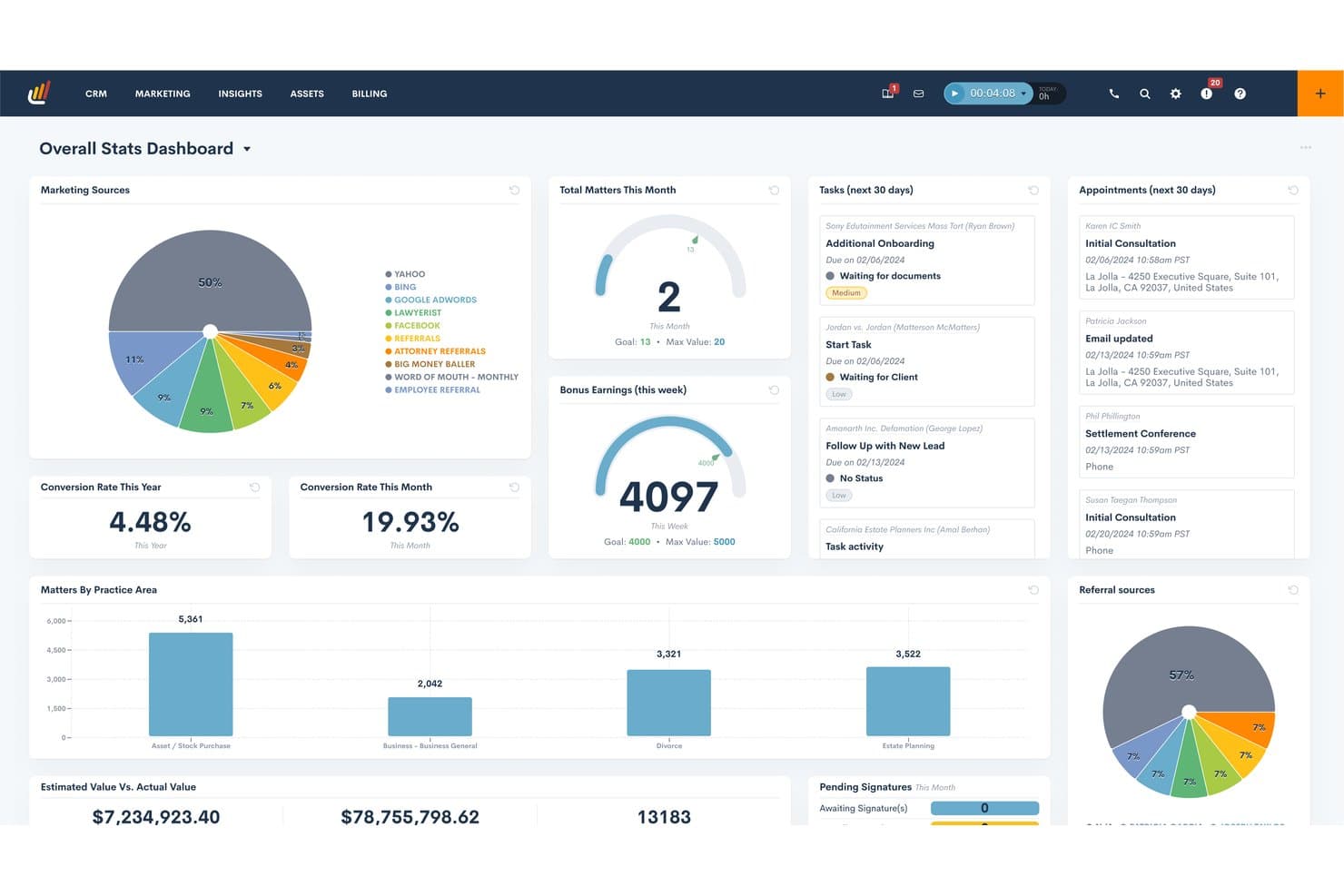
Lawmatics centralizes firm metrics in a single analytics dashboard. Lawmatics is a legal CRM and client intake platform that combines lead management, intake automation, marketing workflows, document collection, and client relationship tracking for law firms.
Who Is Lawmatics Best For?
Lawmatics fits law firms that handle high lead volume and need a dedicated system for client intake, follow-up automation, and marketing workflows alongside their practice management software.
Why I Picked Lawmatics
I've included Lawmatics in my top picks because it treats client intake as a full pipeline, not just a form. I particularly like how automated intake journeys move leads through custom stages, trigger follow-up tasks, and log every interaction on a matter timeline without manual input. The file-request templates are genuinely useful too: firms can collect signed agreements and supporting documents before a client ever steps through the door, with everything landing directly in the matter's Files tab.
Lawmatics Key Features
- Client self-service portal: Clients access a dedicated web app to view shared documents, forms, file requests, appointments, tasks, invoices, and messages tied to their matter.
- Conflict-of-interest checking: Lawmatics searches across matter records, fields, and notes for potential conflicts, with results logged directly to the related matter's timeline.
- Custom user roles and permissions: Administrators can build role-based access controls that limit visibility of matters, contacts, external emails, and platform features by user association.
- Time & Billing add-on: Firms can track billable time and expenses, manage invoices, and accept online client payments through an add-on module available across all plans.
Lawmatics Integrations
Lawmatics offers marketplace integrations with Clio, MyCase, Filevine, CARET Legal, PracticePanther, Rocket Matter, Gmail, Microsoft Outlook, QuickBooks, and OneDrive. Its REST API, webhooks, and OAuth 2.0 support custom integrations.
Pros and Cons
Pros:
- Portal file requests collect intake documents
- Matter timelines centralize client communications
- Automated intake tasks reduce missed follow-ups
Cons:
- Intake focus leaves broader case management gaps
- No automated court-deadline calculations
Learn more about Lawmatics: Best for legal graph-powered AI
- Free demo available
- Pricing upon request
Visit WebsiteCustomer Rating:4.5/5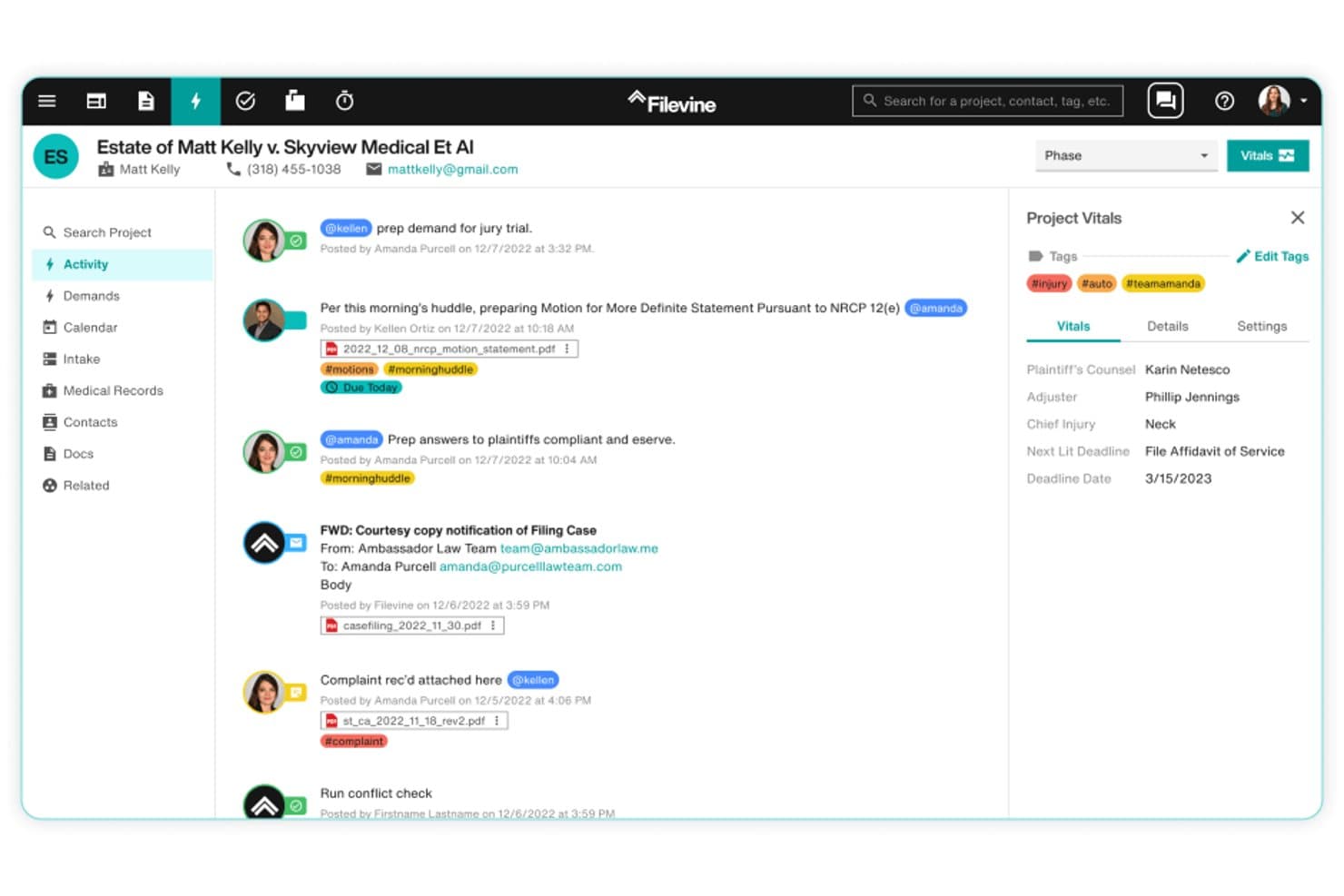
Filevine offers a real-time activity feed that centralizes case communications, tagged updates, document attachments, and project vitals in one unified legal case management view. Filevine is a cloud-based legal case management platform that combines matter management, AI-assisted document drafting, rules-based court deadline tracking, and end-to-end client intake in one system.
Who Is Filevine Best For?
Filevine is a strong fit for small to mid-size law firms running high-volume practice areas like personal injury, mass tort, or family law.
Why I Picked Filevine
I picked Filevine as one of the best because its AI layer, LOIS, is built on a legal graph trained on over 40 million matters. Unlike AI tools that summarize a single document on request, LOIS runs across every active matter in the firm simultaneously, setting tasks, adjusting deadlines, and generating documents without manual triggers. Ask LOIS lets me query case data in plain language and get source-linked answers I can trace directly back to the underlying record.
Filevine Key Features
- Project Hub: Offers a unified dashboard to see all matters, team activity, and deadlines in one place.
- Automated court calendaring: Generates jurisdiction-specific litigation deadlines for all 50 US states directly within the platform.
- Integrated e-signature (Vinesign): Enables clients and team members to sign documents securely through native digital signature functionality.
- Lead Docket intake management: Captures and automates new client intake, referral tracking, and lead conversion workflows.
Filevine Integrations
Filevine offers native integrations with QuickBooks Online, Microsoft 365, Google Workspace, Vinesign, Outlook, and Lead Docket. An API is also available for custom integrations.
Pros and Cons
Pros:
- Highly configurable per practice area type
- Automated court deadlines calculated by jurisdiction
- LOIS AI spans all active matters simultaneously
Cons:
- Built-in reporting lacks deep financial analytics
- Initial setup demands significant configuration time
Learn more about Filevine: 7Best for firms with varied legal tech stacks
Clio
- 7-day free trial + free demo available
- From £79/user/month
Visit WebsiteCustomer Rating:4.5/5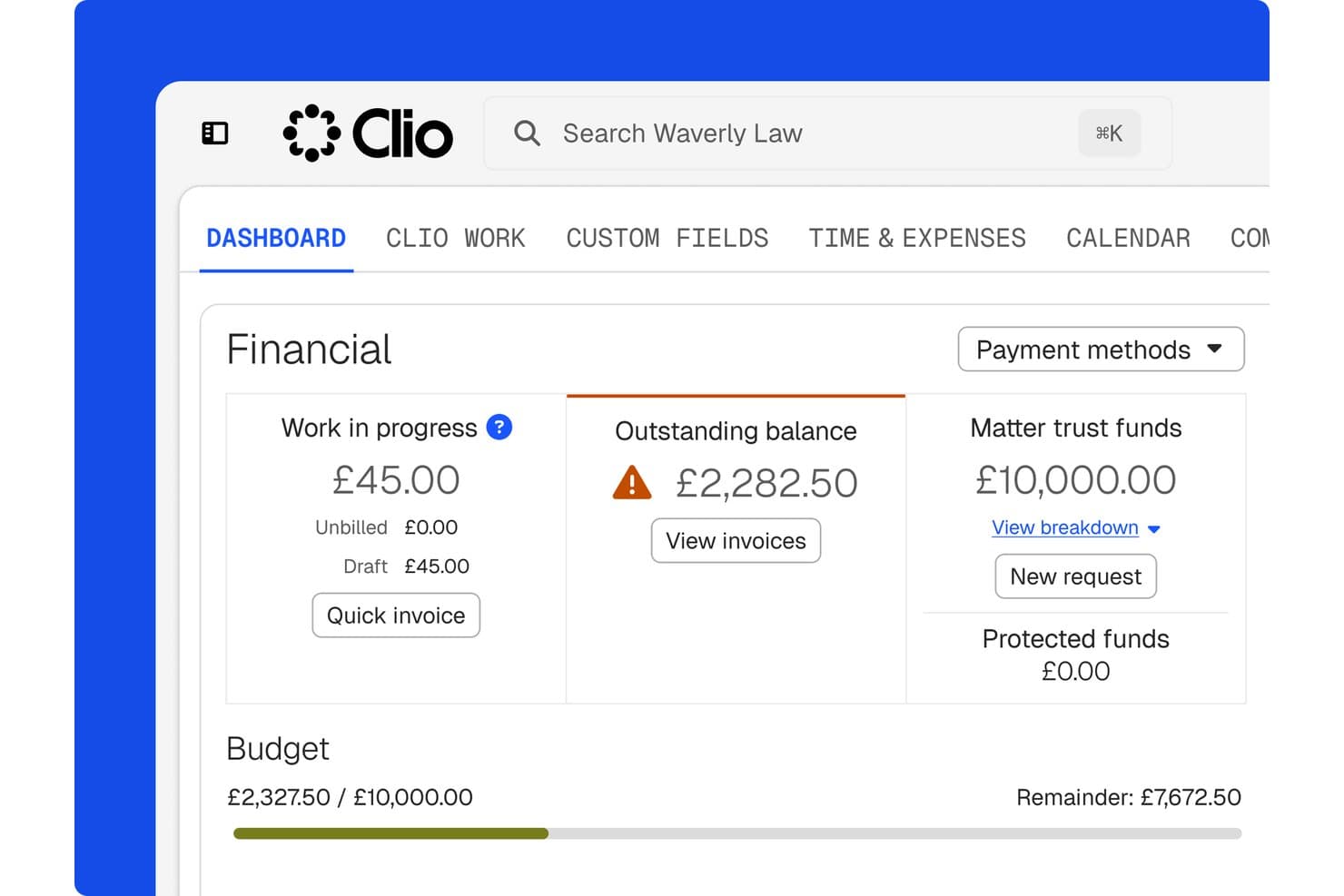
Clio tracks financials, trust funds, and budgets per matter. Clio is a legal practice management platform that covers matter tracking, document storage, court-deadline calendaring, client communications, time and expense tracking, and trust accounting—all connected through a 300+ app integration ecosystem.
Who Is Clio Best For?
Clio is a strong fit for small to mid-sized law firms that run several tools side by side and need one platform to connect them all.
Why I Picked Clio
I've included Clio in my top picks because it's built around the reality that most law firms already run a mix of tools—and Clio connects them without forcing you to abandon what's working. Its 300+ app integrations mean Gmail threads and Outlook emails file automatically to the right matter, QuickBooks stays in sync with billing, and court-rule deadlines calculate across 2,200 jurisdictions without manual entry. That connected workflow is where Clio genuinely earns its place.
Clio Key Features
- Client portal: Give clients a secure space to view invoices, share documents, send messages, and make payments directly from a matter record.
- Trust accounting: Manage trust and operating accounts with built-in reconciliation, ledger tracking, and low-balance alerts without a separate bookkeeping system.
- Role-based permissions: Control which firm users can access specific matters, files, and communications, with custom roles available on higher-tier plans.
- Automated email filing: Connect Gmail, Outlook, or Microsoft Exchange to automatically file emails and threads to the right matter based on contact and matter matches.
Clio Integrations
Clio offers 300+ marketplace integrations, including Gmail, Outlook, Microsoft 365, Google Workspace, QuickBooks, Xero, OneDrive, Google Drive, NetDocuments, and Zapier. An API is available for custom integrations.
Pros and Cons
Pros:
- Time entries connect directly to billing
- Court-rule reminders keep deadlines visible
- Matter records keep case details together
Cons:
- Document syncing glitches interrupt casework
- Reports offer limited detail and export flexibility
Learn more about Clio: Best for unified legal and business management
- Free demo available
- Pricing upon request
Visit WebsiteCustomer Rating:4.4/5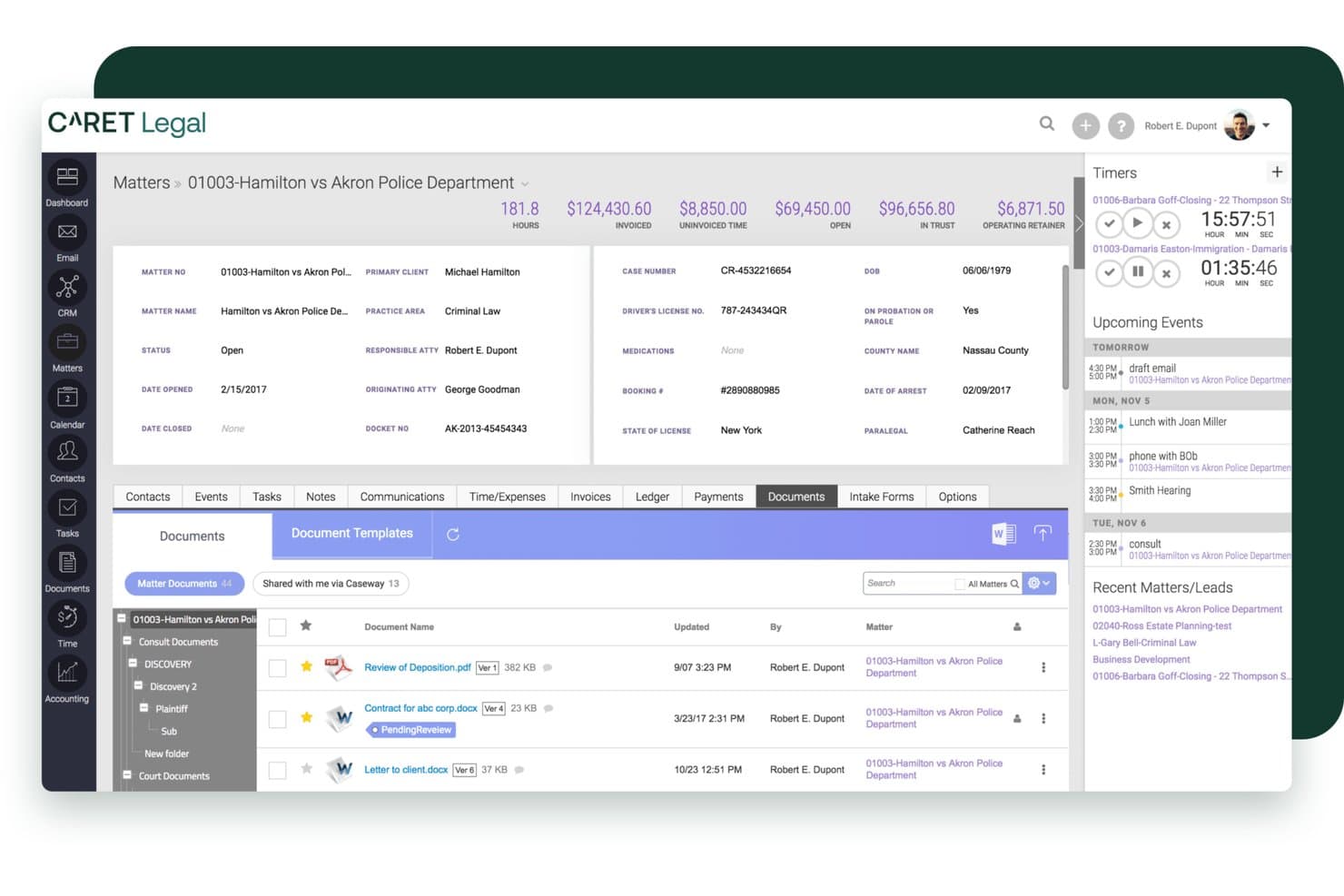
CARET Legal offers a comprehensive matter management interface with document tracking, billing summaries, timers, and upcoming events in a single dashboard view. CARET Legal is a cloud-based legal practice management platform that combines matter management, native email, document management, IOLTA-compliant trust accounting, and billing in a single system for law firms.
Who Is CARET Legal Best For?
CARET Legal is a strong fit for small-to-midsize law firms that want to replace disconnected tools with one system covering cases, billing, and accounting.
Why I Picked CARET Legal
I picked CARET Legal as one of the best because it's one of the few platforms where trust accounting and matter management genuinely share the same data layer. When a client pays through CARET Pay, the invoice automatically updates as paid, eliminating any manual reconciliation step. I also like CARET Workflows, which lets my team automate multi-step processes like setting up a deposition or drafting settlement negotiations, with role-based task visibility so each person only sees what's relevant to them.
CARET Legal Key Features
- Native email client: Manage and associate emails with matters directly through Microsoft 365, Google Workspace, or IMAP accounts.
- Integrated legal calendaring: Access advanced shared calendars with deadline calculation and bi-directional sync to Microsoft and Google.
- Document assembly templates: Generate standard legal documents using merge fields from matter data for consistent drafting.
- Conditional matter workflows: Set up automated task sequences based on specific practice area requirements within the platform.
CARET Legal Integrations
CARET Legal offers native integrations with Microsoft 365, Google Workspace, NetDocuments, LawToolBox, and Lawmatics, and provides an API for custom integrations.
Pros and Cons
Pros:
- Automated workflow sequences by practice area
- Trust accounting and billing share one data layer
- Native email client built into matter records
Cons:
- Mobile app functionality lags behind desktop
- Reporting customization options are limited
Learn more about CARET Legal: Best for enterprise-grade analytics
- Free demo available
- Pricing upon request
Visit WebsiteCustomer Rating:4.2/5
Litify centralizes case metrics, tasks, and calendars in one dashboard. Litify is a Salesforce-native legal platform that covers matter management, document handling, client intake, time and billing, and reporting across law firms and in-house legal departments.
Who Is Litify Best For?
Litify is a strong fit for larger law firms and in-house legal departments that need enterprise-level reporting, configurable workflows, and a platform that can scale across practice areas and teams.
Why I Picked Litify
Litify earns its spot on my shortlist because its reporting and analytics capabilities go deeper than what most legal platforms offer. I particularly like the configurable, real-time dashboards that let firm leaders and legal operations managers track case performance, team productivity, and revenue without needing a developer to build custom reports. The Global Insights feature lets you ask business questions in plain language and get answers pulled from across your entire caseload, which I find genuinely useful when you're managing high volumes across multiple practice areas.
Litify Key Features
- Conflict Check Agent: Screens prospective matters against the firm's full client database using fuzzy matching and generates a permanent conflict report.
- Document Assistant: Automatically retrieves, classifies, and routes incoming documents to matched matters for review.
- LitifyAI Time Capture: Identifies billable activity from daily work and generates review-ready time entries automatically.
- Adaptive intake questionnaires: Dynamically adjusts intake questions based on information provided, streamlining client and case intake.
Litify Integrations
Litify integrates with Outlook, CalendarRules, DocuSign, QuickBooks, NetDocuments, and iManage. It also provides an API for custom integrations.
Pros and Cons
Pros:
- Configurable task plans support complex workflows
- Matter timelines centralize case activity and documents
- Real-time dashboards track case and team performance
Cons:
- Slow file uploads and downloads frustrate users
- Crowded screens add clicks to routine work
Learn more about Litify: Best for source-linked medical chronologies
- Free demo available
- From $109/user/month (billed annually)
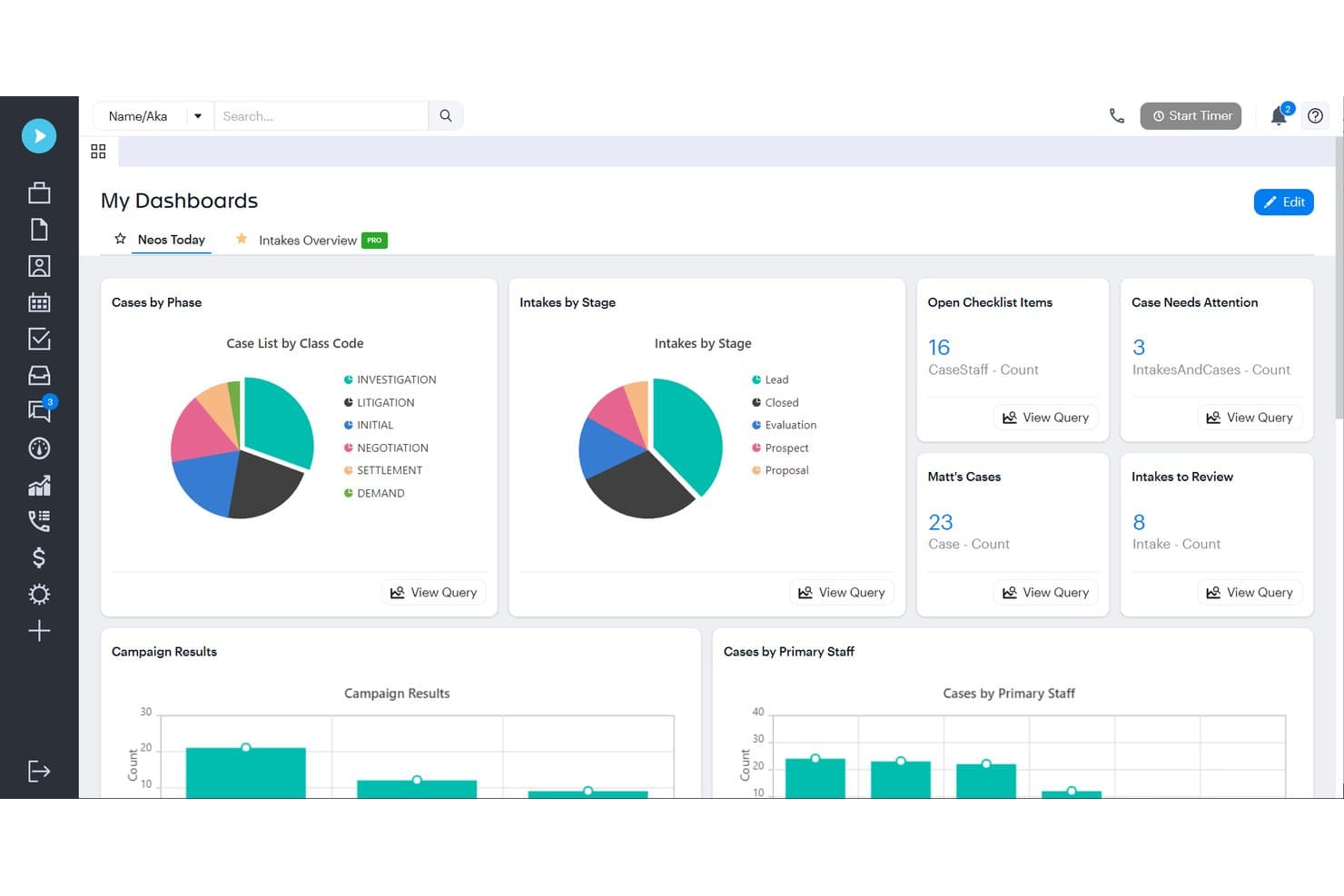
Assembly NEOS displays case phases, intakes, and checklist metrics on one dashboard. Assembly NEOS is a cloud-based legal case management platform built for personal injury firms, covering intake, case tracking, document management, workflow automation, AI-powered demand drafting, and settlement management.
Who Is Assembly NEOS Best For?
Neos is a strong fit for personal injury firms with three or more users that need end-to-end case management, from intake through settlement.
Why I Picked Assembly NEOS
I picked Assembly NEOS as one of the best because its Demands Plus feature does something I haven't seen matched elsewhere: it builds medical chronologies directly from records already in the case file, with every entry linked back to its source page. That means you can click into the citation behind any claim before the demand letter goes out. NeosAI then drafts that letter using your firm's past letters as a guide, so the voice and structure already sound like yours.
Assembly NEOS Key Features
- Intake CRM and lead tracking: Neos captures new leads through customizable intake forms and tracks them through the intake pipeline within the case management system.
- OCR and PDF editing tools: Users can search document text, redact content, apply Bates stamps, and combine or reorder PDFs directly inside the platform.
- Settlement and lien tracking: Firms can track liens, subrogation, case costs, settlement values, and disbursements at the case level.
- Automated checklists and workflows: Neos assigns tasks to the right people and uses checklists to show what's done, what's next, and who owns each step.
Assembly NEOS Integrations
Neos offers native integrations across the Microsoft ecosystem, including Microsoft 365, Outlook, Word, SharePoint, OneDrive, and Teams, plus QuickBooks, RingCentral, DocuSign, Hona, and LawPay. It also provides an API for custom integrations, subject to Assembly approval and contractual call limits.
Pros and Cons
Pros:
- Checklists clarify task ownership across cases
- Source-linked medical chronologies support demand review
- Case timelines keep work visible
Cons:
- Dense screens make routine tasks slower
- Email tagging can obscure case communication
Learn more about Assembly NEOS:
Outros softwares de gestão de processos jurídicos
Eis algumas opções adicionais de software de gestão de processos jurídicos que não entraram na minha lista final, mas que vale a pena conhecer:
- 11Zola SuiteBest for Microsoft-connected matter workflows
- 12LEAPBest for documented conflict-review workflows
How I Evaluate Legal Case Management Software
I split my evaluation into three parts, in order: core functionality carries the most weight, especially organizing matters and files and linking deadlines to case events. Next, I consider standout features such as AI-assisted drafting or client portals. Finally, I weigh onboarding, support, integrations, and pricing.
Core Functionality (Table Stakes For This List)
When I'm selecting tools for my list, I score each one on a scale from 0 (does not offer the functionality) to 5 (excels in this area) for each core functionality listed below. I then convert the total into a percentage to help assess each tool's overall fit, with extra weight on any functionalities I’ve deemed essential.
- Matter & Case Tracking (Essential): I look for structured matter records with status, key details, and linked records so teams can see where each file stands.
- Document Management (Essential): I evaluate how documents and evidence are organized by matter, searched, and versioned during a busy case.
- Calendar & Deadlines: I check whether dates link to case events, with reminders or rule-based calculations for court deadlines.
- Contact Tracking: I look for client, party, and witness records linked to matters, with roles and interaction history.
- Tasks & Workflows: I assess whether teams can assign and track case tasks, including recurring steps tied to matter stages.
- Case Communications: I check how calls, emails, and notes are logged, linked to matters, and retrieved later.
Once I have a list of tools that meet the criteria, I consider what sets each platform apart.
Differentiating Factors (What Sets Vendors Apart)
Here's how I compare and contrast different vendors:
Standout Features
I look for conflict-of-interest search tools that scan historical matters and contacts before intake—missing a conflict can trigger disqualification or disciplinary action. Practice-area templates also matter: a family law firm and an immigration practice need different workflows, and platforms like Clio or CosmoLex offer pre-built templates that cut setup time. I evaluate client self-service portals, where clients upload documents and review invoices without back-and-forth email. Finally, I check whether AI drafting tools work inside the matter record rather than requiring a separate application.
Beyond Features
I check whether a vendor offers guided data migration and onboarding support, since most small firms lack dedicated IT staff and a botched migration can stall an entire practice. Integration depth matters just as much—I look for native connections to Outlook, Gmail, QuickBooks, and e-filing systems so attorneys aren't re-keying data across platforms. I also evaluate support responsiveness, because a billing outage the night before a filing deadline needs live help, not a ticket queue.
Como escolher um software de gestão de processos jurídicos
É fácil perder-se em listas extensas de funcionalidades e estruturas de preços complexas. Para ajudar a manter o foco enquanto analisa o seu processo específico de seleção de software, eis uma lista de verificação dos fatores a ter em conta:
| Fator | O que considerar |
| Escalabilidade | O software acompanhará o seu crescimento — novos utilizadores, localizações ou áreas de prática — sem exigir uma reconfiguração extensa ou provocar aumentos significativos dos custos? |
| Integrações | É compatível com as suas ferramentas de contabilidade, e-mail, assinatura eletrónica e documentos, para evitar a introdução duplicada de dados ou silos de informação? |
| Personalização | Pode adaptar campos, fluxos de trabalho e modelos aos processos específicos ou às necessidades de conformidade do seu escritório, ou fica limitado a predefinições rígidas? |
| Facilidade de utilização | Os advogados e funcionários adotarão efetivamente a ferramenta, ou a navegação, a formação ou interfaces pouco intuitivas tornarão tudo mais lento? |
| Implementação e integração inicial | Como será a migração — especialmente a partir de sistemas antigos de gestão de processos, folhas de cálculo ou ficheiros em papel? Os recursos de formação e o apoio são suficientes? |
| Custo | Além das taxas por utilizador, tenha em atenção custos como a migração de dados, o armazenamento ou as funcionalidades avançadas incluídas nos níveis de preços superiores antes de assinar um contrato. |
| Medidas de segurança | Os dados dos clientes são encriptados em repouso e em trânsito? Estão disponíveis permissões avançadas e registos de auditoria para cumprir as regras da ordem dos advogados e as políticas internas? |
| Requisitos de conformidade | A plataforma suporta as regras específicas da jurisdição relativas à contabilidade de fundos fiduciários, à retenção de registos e à elaboração de relatórios que o seu escritório tem de cumprir? |
O que é o software de gestão de processos jurídicos?
O software de gestão de processos jurídicos é uma das várias categorias de software jurídico que ajudam escritórios de advogados e equipas jurídicas a organizar, acompanhar e gerir ficheiros de processos, prazos, faturação, documentos e comunicações com clientes. Centraliza os registos dos processos, automatiza processos rotineiros e ajuda a cumprir obrigações jurídicas e éticas, facilitando o trabalho dos profissionais jurídicos na gestão de um número crescente de processos e na manutenção da precisão em todas as fases do ciclo de vida de um processo.
Funcionalidades do software de gestão de processos jurídicos
Ao selecionar um software de gestão de processos jurídicos, procure as seguintes funcionalidades essenciais:
- Gestão de processos: Centraliza todos os ficheiros, contactos, notas e atividades dos processos, permitindo acompanhar facilmente a evolução dos processos e as informações relacionadas do início ao fim.
- Gestão de documentos: Armazena, organiza e mantém versões dos documentos jurídicos, permite uma recuperação rápida e possibilita a utilização de modelos de documentos específicos de um processo ou de todo o escritório.
- Calendário e controlo de prazos: Acompanha prazos, prazos de prescrição, datas de tribunal e tarefas, com lembretes automáticos e cálculos de datas baseados em regras, para evitar a perda de prazos processuais.
- Registo de tempo e faturação: Regista horas faturáveis, gera faturas, gere várias tarifas de faturação e associa todo o tempo e despesas a processos e clientes específicos.
- Contabilidade de fundos fiduciários: Gere depósitos e pagamentos de fundos fiduciários de clientes em conformidade com a IOLTA, incluindo reconciliação tripla, registos de auditoria e requisitos específicos da jurisdição.
- Recolha de dados de clientes: Automatiza a integração de novos clientes com formulários de recolha de dados personalizáveis, verificação de conflitos e conversão simples de potenciais clientes em processos ativos.
- Portal seguro para clientes: Permite aos clientes consultar o estado dos processos, trocar documentos de forma segura, assinar formulários e pagar faturas online, tudo num único local.
- Gestão de tarefas: Atribui, acompanha e atualiza tarefas da equipa no âmbito dos processos, assegurando a responsabilização e uma colaboração eficiente entre advogados, paralegais e funcionários.
- Relatórios e análises: Fornece informações sobre a evolução dos processos, as horas faturáveis, os fluxos de trabalho e o desempenho financeiro, através de painéis personalizáveis e relatórios descarregáveis.
- Permissões baseadas em funções: Controla quem pode consultar, editar ou aceder a informações sensíveis dos processos, apoiando uma proteção sólida dos dados e a confidencialidade entre advogado e cliente.
Funcionalidades comuns de IA em software de gestão de processos jurídicos
Para além das funcionalidades padrão do software de gestão de processos jurídicos acima indicadas, muitas destas soluções estão a incorporar IA com funcionalidades como:
- Revisão automatizada de documentos: Utiliza IA para analisar, examinar e assinalar problemas ou informações em falta em contratos, peças processuais e documentos de descoberta, poupando tempo na revisão manual.
- Gestão preditiva de prazos: A IA analisa os dados dos processos e as regras dos tribunais para antecipar potenciais conflitos ou riscos relacionados com prazos, alertando as equipas antes de surgirem problemas.
- Verificação inteligente de conflitos: Utiliza IA para cruzar novos assuntos e contactos com as bases de dados do escritório, identificando potenciais conflitos de interesses de forma mais precisa e rápida.
- Pesquisa jurídica baseada em IA: Integra-se com bases de dados de pesquisa para sugerir jurisprudência, legislação ou precedentes relevantes com base nos factos e no contexto de cada assunto.
- Registo inteligente de tempo: Utiliza IA para detetar atividades faturáveis em emails, eventos do calendário e edições de documentos, sugerindo automaticamente registos de tempo para revisão.
- Comunicação automatizada com clientes: A IA redige atualizações, lembretes ou acompanhamentos de rotina para os clientes com base no estado do processo e na atividade recente, reduzindo a carga de trabalho administrativa.
Vantagens do software de gestão de processos jurídicos
A implementação de software de gestão de processos jurídicos proporciona várias vantagens à sua equipa e à sua empresa. Eis algumas das que pode esperar:
- Maior organização dos assuntos: Mantenha todos os ficheiros, contactos, prazos e notas ligados num único espaço de trabalho seguro e de fácil pesquisa, eliminando a perda de informação e a confusão.
- Melhoria da comunicação com os clientes: Os portais de clientes e as mensagens seguras facilitam a partilha de atualizações e documentos dos processos, mantendo simultaneamente a confidencialidade e o profissionalismo.
- Redução da carga de trabalho administrativa: Automatize as tarefas de admissão, criação de documentos, faturação e conformidade, permitindo que a sua equipa se concentre no trabalho jurídico em vez de processos manuais.
- Controlos de conformidade reforçados: A contabilidade fiduciária, os registos de auditoria e as permissões granulares dos utilizadores ajudam-no a cumprir as regras da Ordem, os requisitos dos clientes e as obrigações de privacidade.
- Colaboração melhorada: Os calendários partilhados, a atribuição de tarefas e os dados centralizados dos processos aumentam a visibilidade e a responsabilização da equipa em todos os assuntos.
- Faturação e cobranças mais rápidas: Os temporizadores, a faturação LEDES e as ferramentas de pagamento online ajudam-no a faturar atempadamente e oferecem aos clientes formas flexíveis de efetuar pagamentos.
- Tomada de decisões baseada em dados: As ferramentas de relatórios e análise apresentam informações sobre a carga de trabalho, as receitas e o progresso dos processos, permitindo-lhe orientar estrategicamente a sua atividade.
Custos e preços do software de gestão de processos jurídicos
A seleção de software de gestão de processos jurídicos requer uma compreensão dos vários modelos e planos de preços disponíveis. Estes podem variar entre software gratuito de gestão de processos jurídicos e planos pagos mais avançados, com custos que variam consoante as funcionalidades, a dimensão da equipa, os complementos e outros fatores. A tabela abaixo resume os planos comuns, os seus preços médios e as funcionalidades normalmente incluídas nas soluções de software de gestão de processos jurídicos:
Tabela comparativa de planos de software de gestão de processos jurídicos
| Tipo de plano | Preço médio | Funcionalidades comuns |
| Plano gratuito | $0 | Monitorização básica de assuntos, armazenamento limitado de documentos e calendários simples. |
| Plano pessoal | $20-$40/user/month | Gestão completa de assuntos, gestão essencial de documentos, ferramentas básicas de faturação e apoio por correio eletrónico. |
| Plano empresarial | $40-$80/user/month | Automatização avançada de documentos, registo de tempo e faturação integrados, portal do cliente, contabilidade fiduciária e gestão de tarefas. |
| Plano empresarial de grande dimensão | $80-$150/user/month | Fluxos de trabalho personalizados, permissões baseadas em funções, API aberta, apoio prioritário, ferramentas de conformidade e relatórios avançados. |
Perguntas frequentes sobre software de gestão de processos jurídicos
Eis algumas respostas a perguntas frequentes sobre software de gestão de processos jurídicos:
O software de gestão de processos jurídicos pode ajudar na conformidade e na contabilidade fiduciária?
Sim, muitas plataformas disponibilizam funcionalidades como gestão de IOLTA, reconciliação a três vias, registos de auditoria e relatórios de conformidade personalizáveis. Estas ferramentas ajudam os escritórios de advogados a cumprir os requisitos éticos específicos da jurisdição e a evitar erros de conformidade dispendiosos.
Quão seguro é o software de gestão de processos jurídicos?
As medidas de segurança variam, mas as principais soluções utilizam encriptação, permissões baseadas em funções, MFA e certificação SOC 2 Tipo II. Deve consultar a documentação de segurança e as políticas de governação de dados de cada fornecedor para garantir que respondem às necessidades de privacidade e regulamentares do seu escritório.
Este software integra-se com as minhas ferramentas existentes?
Sim, a maioria das opções disponibiliza integrações com ferramentas como o QuickBooks, o Microsoft 365, o Google Workspace e plataformas de assinatura eletrónica. Verifique se o software disponibiliza integrações nativas ou uma API caso o seu escritório dependa de aplicações personalizadas ou necessite de ligações específicas a terceiros.
O que envolve a migração de um sistema legado?
A migração inclui normalmente o mapeamento de dados, a transferência de contactos, processos e registos de faturação, bem como a verificação e limpeza dos dados. Procure fornecedores com integração específica para escritórios de advogados e suporte dedicado à migração para minimizar o tempo de inatividade e facilitar a transição da sua equipa.
Está disponível formação para os funcionários?
Sim, a maioria dos fornecedores disponibiliza sessões de integração, recursos no centro de ajuda, webinars e suporte em direto. Alguns oferecem ainda bibliotecas de vídeos a pedido e programas de certificação para ajudar tanto os funcionários novos como os experientes a familiarizarem-se rapidamente com o software e a maximizar o seu valor.