

Actionstep oferă funcții extinse de gestionare a dosarelor și automatizare a fluxurilor de lucru, însă abordarea sa în ceea ce privește facturarea, gestionarea documentelor și personalizarea poate să nu fie potrivită pentru orice firmă de avocatură. Unele alternative oferă funcții mai specializate pentru contabilitatea fondurilor fiduciare, redactarea documentelor și Microsoft 365, în timp ce altele asigură fluxuri de lucru mai simple sau un sprijin mai practic pentru migrare.
Am evaluat aceste platforme în funcție de modul în care gestionează activitățile zilnice legate de dosare, sprijină colaborarea echipelor și se adaptează diferitelor cerințe ale practicii juridice.
Ce este Actionstep?
Actionstep este o platformă bazată pe cloud pentru gestionarea practicii juridice, destinată firmelor de avocatură. Aceasta reunește într-un singur sistem gestionarea dosarelor și a fluxurilor de lucru, automatizarea documentelor, urmărirea timpului, facturarea și contabilitatea fondurilor fiduciare. Firmele pot utiliza, de asemenea, instrumentele sale pentru preluarea clienților, CRM, raportare și portalul pentru clienți, pentru a gestiona activitatea de la primul contact până la facturare.
Compară cele mai bune alternative la Actionstep
Compară prețurile și specificațiile alăturate pentru alternativele la Actionstep care au ajuns pe lista mea scurtă.
Score legend (out of 5)
- Excellent4.5–5
- Good4–4.4
- Average3–3.9
- Below average2–2.9
- Poor1–1.9
Sorted by: Default
| Tool | Starting Price | Website | |||||||
|---|---|---|---|---|---|---|---|---|---|
Best for automatic legal time tracking | 3.5 out of 5 | 4 | 4 | 3 | 3 | 3 | 4 | Pricing upon request Free trial available | Website |
Best for AI-assisted injury case preparation | 3.7 out of 5 | 4 | 4 | 4 | 4 | 4 | 2 | Pricing upon request Free demo available | Website |
Best for centralized case and client management | 4.0 out of 5 | 4 | 4 | 4 | 4 | 4 | 4 | $49/user/month Free demo + 7-day free trial available | Website |
Best for case-linked deposition analysis | 3.8 out of 5 | 4 | 4 | 4 | 4 | 4 | 3 | Pricing upon request Free demo available | Website |
Best for trust accounting beyond invoicing | 3.7 out of 5 | 4 | 4 | 3 | 3 | 4 | 4 | Pricing upon request Free demo available | Website |
Best for customizable matter workflows | 3.7 out of 5 | 4 | 5 | 5 | 2 | 3 | 3 | Pricing upon request Free demo available | Website |
Best for automated legal document drafting | 3.8 out of 5 | 4 | 5 | 3 | 3 | 4 | 4 | Pricing upon request Free demo available | Website |
Best for contract details and stage tracking | 3.7 out of 5 | 4 | 4 | 4 | 4 | 3 | 3 | Pricing upon request Free demo available | Website |
Best for case calendars and deadline tracking | 3.7 out of 5 | 4 | 4 | 3 | 4 | 3 | 4 | $60/user/month Free demo + 10-day free trial available | Website |
Best for automated legal billing and invoicing | 3.5 out of 5 | 3 | 4 | 3 | 4 | 3 | 4 | $59/user/month Free demo + 7-day free trial available | Website |


Why Trust Our Software Recommendations
6,700+
Reviews
20
Industry experts
16+
Evaluation factors
14
Years
Our team has been testing and reviewing software since 2012. As legal practice leaders ourselves, we know how difficult—and important—it is to choose the right software.
For this guide, we evaluated tools using hands-on testing and independent research, scoring tools using our selection criteria.
Our reviews reflect our human editorial judgment, not a sales pitch.
Recenzii ale alternativelor la Actionstep
Mai jos sunt rezumatele mele detaliate ale celor mai bune alternative la Actionstep de pe lista mea scurtă. Fiecare recenzie prezintă funcțiile și cele mai potrivite cazuri de utilizare, pentru a te ajuta să găsești platforma potrivită de gestionare a practicii juridice pentru firma ta.
 Best for automatic legal time tracking
- Free trial available
- Pricing upon request
Visit WebsiteCustomer Rating:4.8/5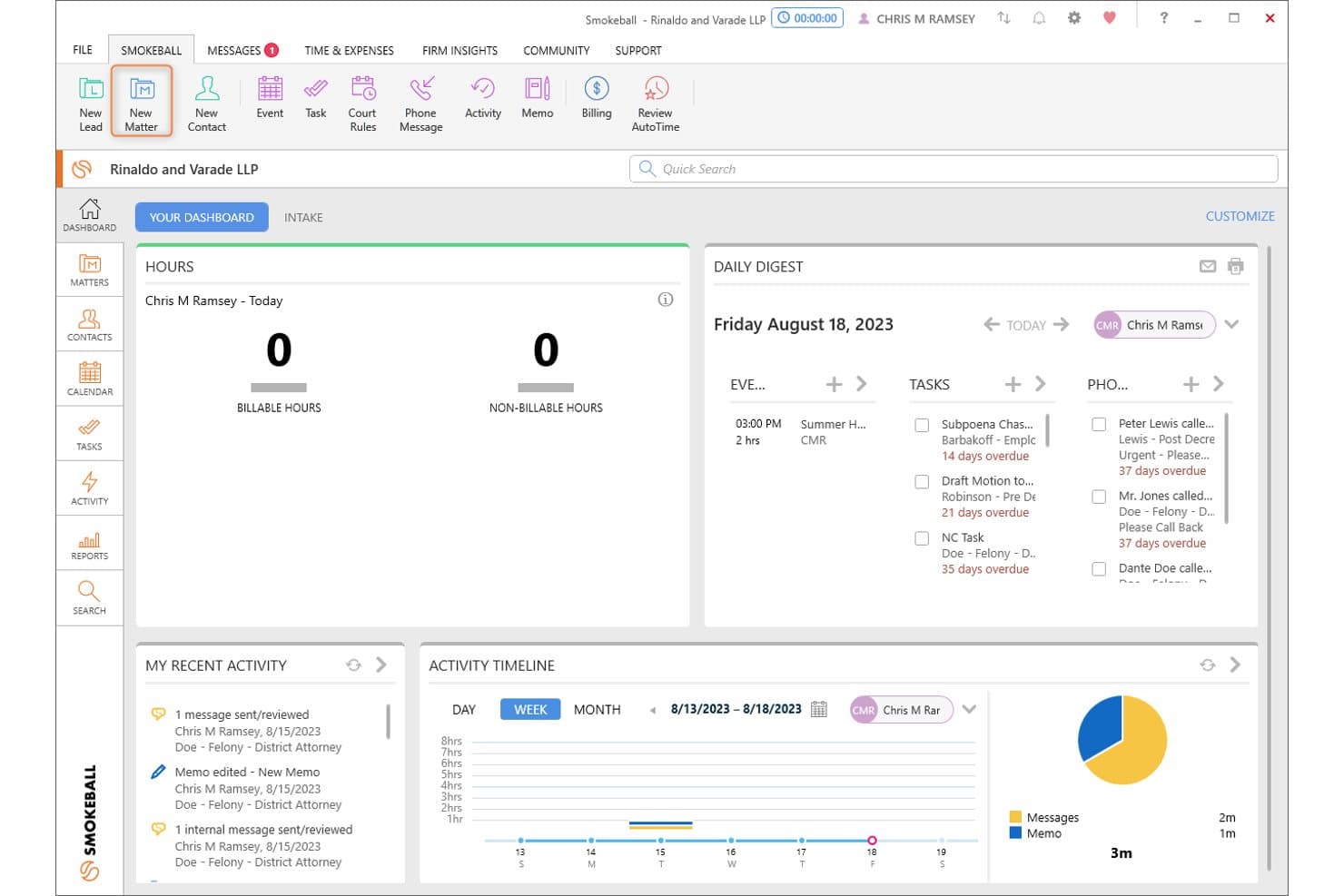
Smokeball's dashboard centralizes tasks, hours, and daily activity at a glance. Smokeball is a legal practice management platform built for law firms that want matter files, billing, trust accounting, document automation, and time tracking in one system.
Who Is Smokeball Best For?
Smokeball is a strong fit for small and mid-sized law firms that want matter management, billing, and time tracking built into one system.
Why I Picked Smokeball
I picked Smokeball as one of the best because its AutoTime feature does something most legal practice management tools don't: it automatically records your activity in Word, Outlook, and Smokeball itself, then maps that activity to the right matter and converts it into billable entries. I've seen firms recover significant unbilled time just by running AutoTime in the background during a normal workday. Pair that with matter files that keep documents, emails, tasks, and trust accounting in one place, and it's a genuinely capable Actionstep alternative.
Smokeball Key Features
- TemplateLab document library: Access and populate over 20,000 court, agency, and legal document templates directly from a matter file, with the option to build or customize your own.
- Matter file organization: Keep documents, emails, contacts, tasks, correspondence, and key dates consolidated in a single matter record with status tracking and client relationship history.
- Firm insights reporting: View dashboards covering firm performance, staff activity, profitability, and productivity, available on the Prosper+ plan.
- LawToolBox deadline calculation: Calculate court-rule deadlines from a selected rule set and trigger date, then create them as calendar events or tasks linked to the relevant matter.
Smokeball Integrations
Smokeball offers native Microsoft 365 integrations, including Outlook, Calendar, and Word, plus marketplace integrations through InfoTrack for e-signature and e-filing. Its APIs, webhooks, and Client SDK support custom connections; QuickBooks Online is also named as an integration.
Pros and Cons
Pros:
- Templates populate documents with matter details
- Matter files unite documents, tasks, and billing
- AutoTime captures activity for billable entries
Cons:
- Deadline reminders can miss or misplace dates
- Historical billing and trust data need manual handling
Learn more about Smokeball: Best for AI-assisted injury case preparation
- Free demo available
- Pricing upon request
Visit WebsiteCustomer Rating:4.7/5
SmartAdvocate's Intake Wizard displays incident details, injury tracking, drug intake history, and plaintiff-specific medical questions. SmartAdvocate is a legal case management platform built for personal injury and litigation-focused law firms that need to centralize case records, automate workflows, and manage everything from client intake through settlement.
Who Is SmartAdvocate Best For?
SmartAdvocate is a strong fit for personal injury and litigation-focused law firms that need purpose-built case management with AI-driven tools for intake, document analysis, and case preparation.
Why I Picked SmartAdvocate
I've included SmartAdvocate in my top picks because its AI toolset, SmartIntelligence, is genuinely built for the demands of personal injury case preparation. I particularly like how the Medical Chronology Generation feature processes raw medical records into searchable, hyperlinked timelines and auto-populates case fields, cutting hours from pre-demand prep. The Demand Letter Generation tool then pulls from those chronologies, deposition transcripts, and police reports to draft demand letters directly inside the platform.
SmartAdvocate Key Features
- Intake Wizard: Captures prospective client information, tracks and assigns leads, and runs an automatic conflict-of-interest check when a new case is created.
- Automated Procedures: Triggers tasks, reminders, texts, emails, and document generation based on case events or status changes.
- Client Portal: Lets clients view case information, documents, calendar entries, and notes, and upload documents directly to their case.
- Dashboard Viewer: Builds customized dashboards with charts, graphs, and maps to track case, lead, financial, and operational data.
SmartAdvocate Integrations
SmartAdvocate lists integrations with 175+ vendors across 20+ categories, including Microsoft, Docubee, DocuSign, and CalendarRules. The directory doesn’t specify integration methods, and API availability isn’t documented.
Pros and Cons
Pros:
- Deadline workflows connect tasks, reminders, and case stages
- Barcode filing helps teams handle paper-heavy cases
- Medical chronologies feed AI demand-letter drafts
Cons:
- Dense case screens can overwhelm new staff
- Report customization can miss firm-specific views
Learn more about SmartAdvocate: Best for centralized case and client management
- Free demo + 7-day free trial available
- From $49/user/month
Visit WebsiteCustomer Rating:4.7/5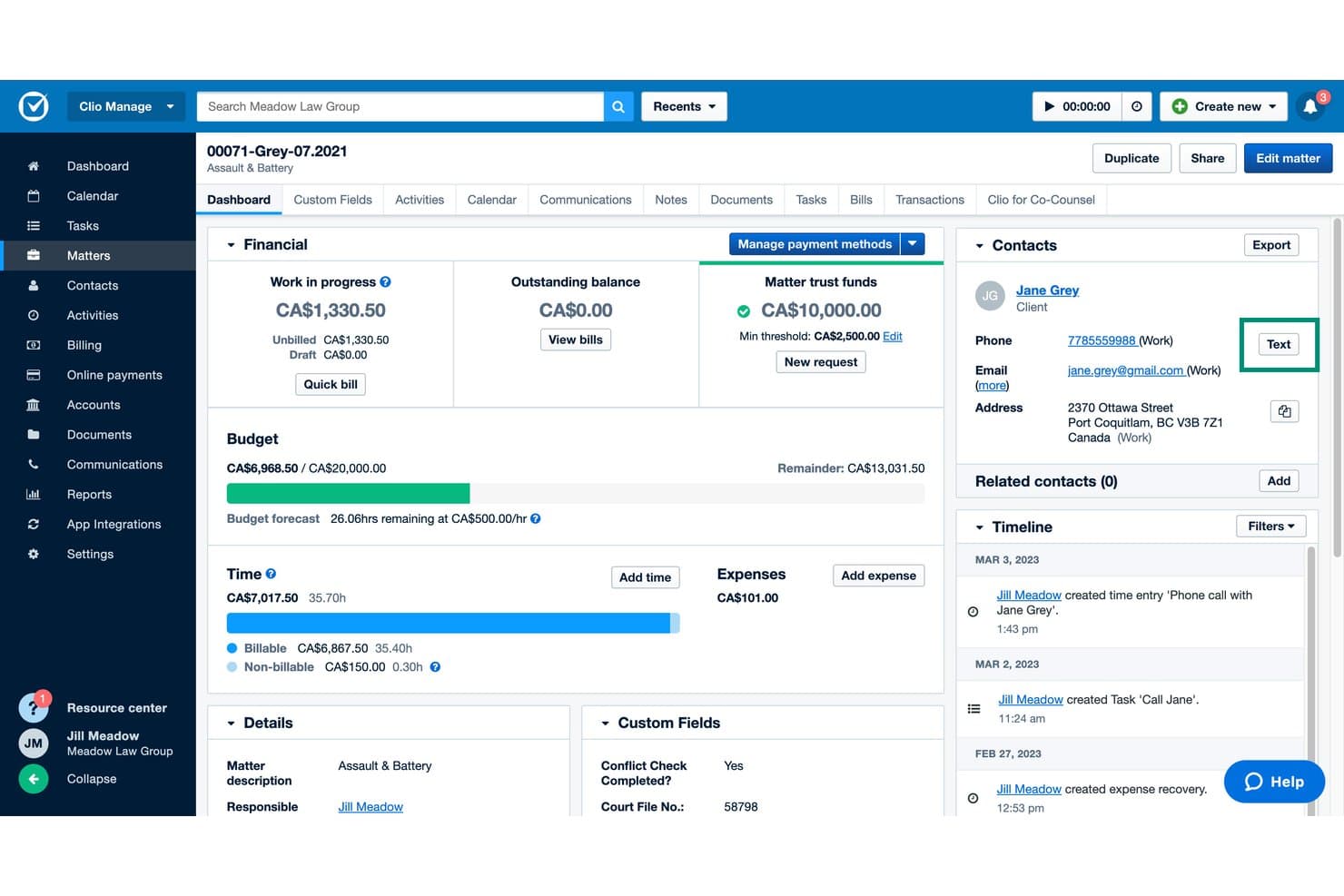
Clio Manage lets users send texts directly from a matter dashboard. Clio Manage is a cloud-based practice management platform for law firms that centralizes matters, client records, documents, billing, and trust accounting in one system—making it a strong fit for solo attorneys and small-to-mid-sized firms that need to replace a disconnected or outgrown setup.
Who Is Clio Manage Best For?
Clio Manage is a strong fit for solo attorneys and small-to-mid-sized law firms that need a single system to handle matters, billing, trust accounting, and client communication without juggling separate tools.
Why I Picked Clio Manage
I've included Clio Manage in my top picks because it genuinely centralizes everything tied to a matter: client records, documents, emails, tasks, deadlines, billing, and trust accounting all live under one matter record. I particularly like how court rules automatically calculate cascading parent and child deadlines by jurisdiction, so nothing slips through when a trigger date shifts. The conflict-check tool lets me run up to 10 searches in a single check and produces a downloadable report I can attach directly to the matter.
Clio Manage Key Features
- Automated billing preparation: Draft bills from recorded time and expenses automatically, with built-in flagging and approval routing before invoices go out.
- Client portal with secure messaging: Give clients a dedicated portal for document sharing, payments, and matter updates, accessible via browser or mobile app.
- Mobile time and expense tracking: Log time and expenses from iOS or Android, with a background timer that keeps running when you leave the app.
- Trust account reconciliation: Reconcile bank records against client and firm trust ledgers with built-in reporting for monthly or quarterly review.
Clio Manage Integrations
Clio Manage connects with 300+ apps, including QuickBooks, Xero, Google Calendar, Microsoft Outlook Calendar, Google Drive, Dropbox, OneDrive, and Zoom. It also offers an open API and Zapier support for custom connections.
Pros and Cons
Pros:
- Mobile timer continues outside the app
- Court-rule deadlines cascade by jurisdiction
- Matter records keep files and communications together
Cons:
- Migration excludes historical financial transactions
- Reports can lack needed fields
Learn more about Clio Manage: Best for case-linked deposition analysis
- Free demo available
- Pricing upon request
Visit WebsiteCustomer Rating:4.5/5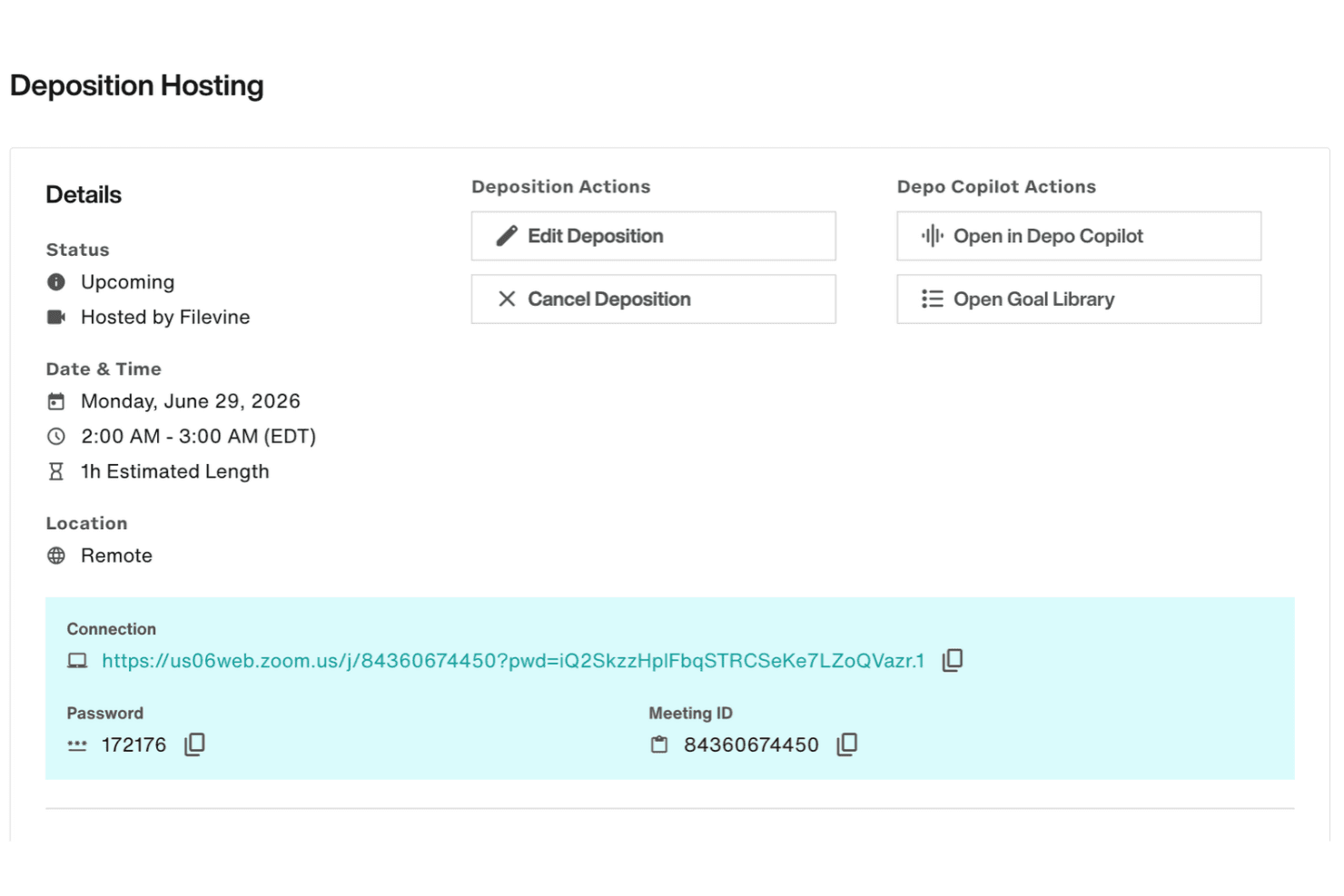
Filevine hosts depositions, analyzes testimony with AI, and organizes case transcripts. Filevine is a legal case management platform built for law firms and legal teams that need a centralized workspace for matters, documents, workflows, billing, and client communication—with AI tools layered in for drafting, deposition analysis, and intake.
Who Is Filevine Best For?
Filevine is a strong fit for plaintiff-side and high-volume law firms that need AI-assisted deposition tools and deep case management built into one platform.
Why I Picked Filevine
I picked Filevine as one of the best because its deposition tools connect directly to active case files in a way I haven't seen elsewhere. Depo Copilot provides live transcription and goal tracking mid-deposition, while Depo Library stores transcripts with synced video and makes them searchable across matters. I love that AI-generated summaries surface admissions with page and line references, so my team can pull testimony into case strategy without manually combing through transcripts.
Filevine Key Features
- Taskflow automation: Triggers task sequences automatically when a matter changes phase or a user clicks an action button, with due dates set as day offsets and assignments tied to project roles.
- Custom reporting and dashboards: Builds reports from matter data—including notes, tasks, fields, and calendar events—and exports them to XLSX or shares them with team members.
- Client portal: Gives clients access to case information, secure messaging, document sharing, and invoice payment from a dedicated portal linked to the matter record.
- Conflict check: Searches a contact name against all organization contacts, including those not tied to an active matter, and lets users assign a status of undecided, conflict, or no conflict.
Filevine Integrations
Filevine lists over 2,000 potential integrations, including Microsoft 365, Outlook, Google Calendar, QuickBooks, Slack, and Zapier. It also offers APIs and webhooks for custom integrations.
Pros and Cons
Pros:
- Client texting keeps matter conversations in-file
- Taskflows assign deadlines by project role
- Case-linked deposition summaries cite page lines
Cons:
- Search and document organization frustrate some reviewers
- Migration demands careful IDs and template matching
Learn more about Filevine: Best for trust accounting beyond invoicing
- Free demo available
- Pricing upon request
Visit WebsiteCustomer Rating:4.4/5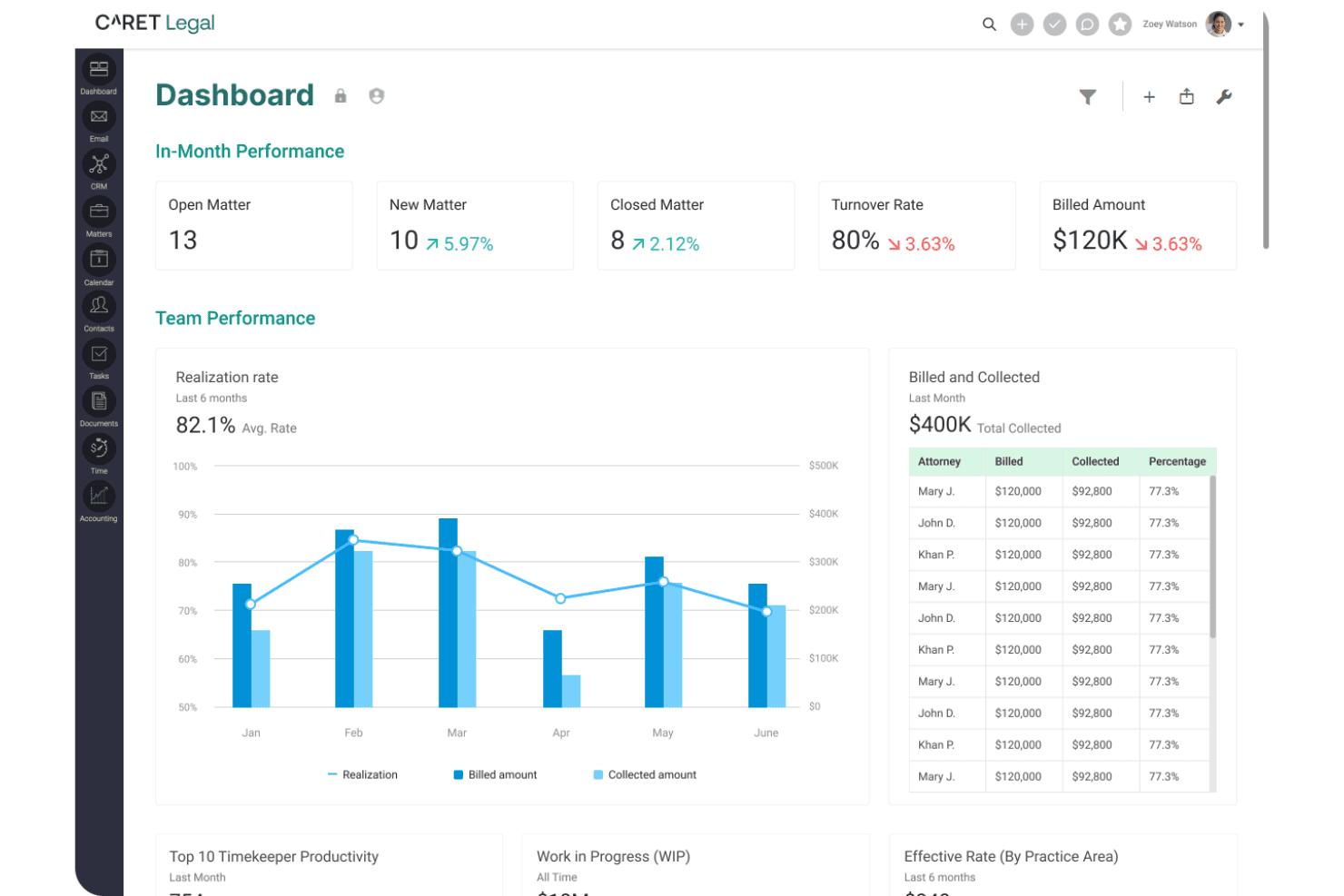
CARET Legal provides matter-level financial reporting on WIP, receivables, and trust balances. CARET Legal is a cloud-based practice management platform built for law firms that want matter management, billing, trust accounting, document organization, and court-deadline tracking in one place.
Who Is CARET Legal Best For?
CARET Legal is a strong fit for mid-size law firms where managing partners need billing, trust accounting, and matter management under one roof.
Why I Picked CARET Legal
I've included CARET Legal in my top picks because its trust accounting goes well beyond generating invoices. The back-office tooling covers the full trust workflow: recording retainer deposits, tracking client funds by matter, reconciling trust accounts separately from operating accounts, and generating trust reconciliation reports. CARET Capture also tracks your work activity throughout the day and queues it for conversion into time entries, so billable time doesn't slip through the cracks.
CARET Legal Key Features
- CARET Court Rules: Automatically calculates connected court deadlines from a trigger date and recalculates the full schedule when any date changes.
- Enhanced conflict check: Searches leads and matters—including matter custom fields—and orders results by closest match to flag potential conflicts early.
- CARET Capture: Tracks your work activity and browser research throughout the day and queues it for review and conversion into time entries.
- QuickBooks Online sync: Pushes invoice approvals, edits, and deletions from CARET Legal directly into QuickBooks Online to keep billing and accounting aligned.
CARET Legal Integrations
CARET Legal offers native integrations with Microsoft 365, Google Workspace, QuickBooks Online, LawToolBox, Lawmatics, HotDocs, OneDrive, NetDocuments, RMail, and CARET Pay. Its integrations page doesn’t state a total count, and API availability isn’t documented.
Pros and Cons
Pros:
- Role-based workflows assign matter tasks
- Matter-linked records keep documents, billing, and time entries together
- Trust and operating accounts reconcile separately
Cons:
- Financial workflow bugs complicate invoices and statements
- Calendar sync delays and inaccurate deadlines recur
Learn more about CARET Legal: Best for customizable matter workflows
- Free demo available
- Pricing upon request
Visit WebsiteCustomer Rating:4.2/5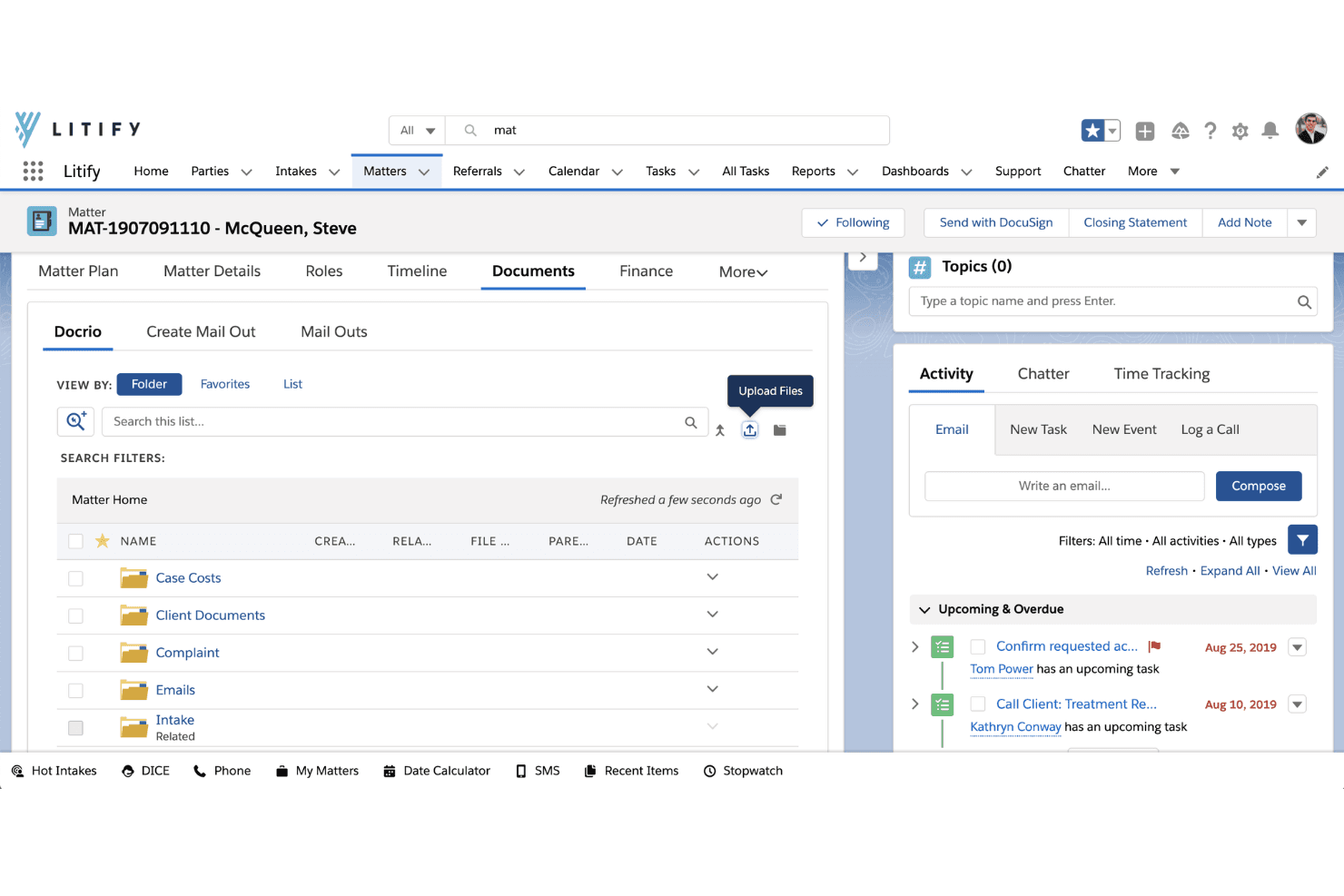
Litify customizes matter workflows, automates case tasks, and tracks billable time with AI. Litify is a legal practice management platform that allows law firms to customize matter workflows based on practice areas, case types, and internal processes. It also covers document management, billing, AI-assisted time tracking, and task automation, keeping legal work organized across different teams.
Who Is Litify Best For?
Litify is a strong fit for mid-to-large law firms that need customizable matter workflows to manage different case types, assign responsibilities, and track progress across practice areas.
Why I Picked Litify
I picked Litify because its configurable matter plans allow legal teams to define task sequences, assign responsibilities, and establish workflows for different practice areas. I particularly like how personal injury and litigation teams can follow separate matter processes while working within the same platform. Its no-code workflow editor also allows firms to adjust tasks, stages, and automation rules as their processes change without requiring developer involvement.
Litify Key Features
- AI time capture: Tracks your activity across emails and internal coordination, then drafts time entries for your review.
- Conflict Check Agent: Automatically screens prospective matters against your firm's existing client database before case acceptance.
- Mass bill generation: Runs multiple billing jobs at once or schedules them for off-hours to reduce manual billing work.
- LawToolBox court-rules integration: Syncs court deadlines and rules into matter calendars alongside Outlook and Google Calendar events.
Litify Integrations
Litify integrates with Microsoft Outlook, DocuSign, QuickBooks, iManage, NetDocuments, and LawToolBox. Its Call Intelligence feature supports over 20 phone providers, while REST API connectivity allows firms to develop custom document integrations.
Pros and Cons
Pros:
- Searchable files preserve document version history
- Shared case records clarify team activity
- Custom matter plans adapt by practice area
Cons:
- Routine tasks can require too many steps
- Large uploads can slow document handling
Learn more about Litify: 7Best for automated legal document drafting
LEAP
- Free demo available
- Pricing upon request
Visit WebsiteCustomer Rating:4.3/5
LEAP combines legal case management, document automation, trust accounting, and AI tools. LEAP is a cloud-based legal practice management platform for law firms that brings together case management, document automation, trust accounting, and AI-assisted drafting in a single workspace.
Who Is LEAP Best For?
LEAP is a strong fit for small and mid-sized law firms that want case management, document automation, billing, and trust accounting in a single cloud-based platform.
Why I Picked LEAP
I picked LEAP as one of the best because its document automation goes deeper than most practice management platforms. Where Actionstep relies on external tools for drafting, LEAP's Generator pulls from existing matter data, firm templates, and AI via LawY to produce legal letters, client emails, and court forms in one place. I also appreciate that its 250+ pre-built matter templates auto-populate fields like fee estimates, billing type, and trust retainer minimums, so drafting starts from a complete record rather than a blank slate.
LEAP Key Features
- Conflict check app: Searches matters, people, and correspondence using names, addresses, dates of birth, and other identifiers to flag potential conflicts before opening a new engagement.
- LawToolBox deadline calculation: Calculates rules-based court deadlines for state and federal courts across all 50 states, with automatic updates when hearing or trial dates change.
- AutoTime activity recording: Automatically captures billable time spent on matter-related work in Word, Outlook, and other supported apps, then generates time entries on the matter record.
- LawConnect client portal: Gives clients a branded portal to view shared documents, upload files, review invoices, and view trust statements without requiring a paid account.
LEAP Integrations
LEAP offers native integrations with Microsoft 365, LawToolBox, InfoTrack, LawConnect, QuickBooks Online, Xero, Power BI, Lawmatics, WealthCounsel, and DecisionVault. It also supports Zapier; a public API isn't documented.
Pros and Cons
Pros:
- Actionstep data migration is supported
- Billing, trust ledgers, and time stay connected
- Matter data auto-fills legal documents
Cons:
- Tasks and workflows can feel disconnected
- Outlook email attachments need manual handling
Learn more about LEAP: Best for contract details and stage tracking
- Free demo available
- Pricing upon request
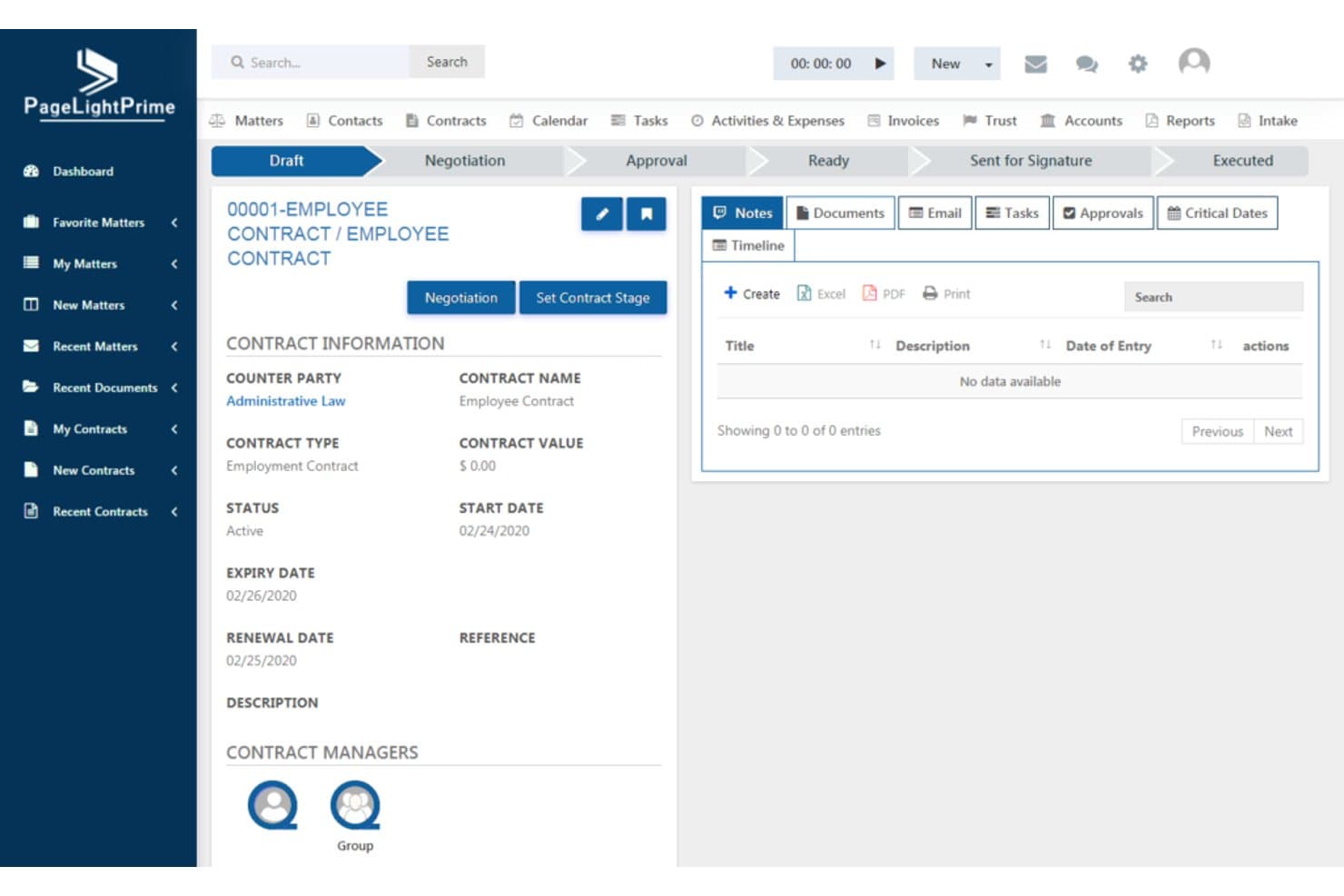
PageLightPrime displays contract details and stage tracking in one view. PageLightPrime is a legal practice management platform that tracks contract details, matter stages, and case progress through configurable workflows. It also covers document management, billing, and client communications, giving legal teams visibility into contractual obligations and ongoing matters.
Who Is PageLightPrime Best For?
PageLightPrime is a good fit for law firms that need to organize contract information, monitor matter stages, and track progress across different legal workflows.
Why I Picked PageLightPrime
I picked PageLightPrime because its matter management capabilities allow legal teams to organize contract details, track case stages, and monitor work as it moves through different phases. I particularly like how customizable fields and matter pipelines provide visibility into important dates, assigned responsibilities, and outstanding tasks. Its document management capabilities also keep related files and communications connected to each matter.
PageLightPrime Key Features
- Practice-area templates: Build and reuse document templates with dynamic fields for real estate, family law, litigation, estate planning, and other practice areas.
- Client portal: Give clients access to case updates, billing statements, documents, and e-signature requests through a branded, secure portal.
- Trust accounting: Manage trust accounts with fund allocation, three-way reconciliations, bank feeds, and multi-ledger financial reporting.
- Legal CRM: Track leads through a matter pipeline with customizable fields, lead scoring, automated follow-ups, and consultation scheduling synced to Outlook.
PageLightPrime Integrations
PageLightPrime integrates with Microsoft 365, Outlook, Word, Teams, SharePoint, OneDrive, and Power BI. It also provides an API for custom integrations.
Pros and Cons
Pros:
- Comments can become trackable matter tasks
- Conflict checks run during client intake
- Matter-based email filing organizes case correspondence
Cons:
- No automatic court-rule deadline calculations
- Mobile device controls were described as limited
Learn more about PageLightPrime: Best for case calendars and deadline tracking
- Free demo + 10-day free trial available
- From $60/user/month
Visit WebsiteCustomer Rating:4.6/5
MyCase centralizes court dates, deadlines, and meetings in one calendar. MyCase is a cloud-based legal practice management platform that brings case calendars, deadline tracking, and task scheduling into one place. It also covers matter management, billing, trust accounting, and client communication, allowing legal teams to coordinate case activities and monitor upcoming deadlines.
Who Is MyCase Best For?
MyCase is a strong fit for solo attorneys and small law firms that need centralized case calendars, deadline reminders, and task tracking to stay on top of legal matters.
Why I Picked MyCase
I picked MyCase because its case calendar allows legal teams to track court dates, appointments, and important deadlines alongside their daily tasks. I particularly like how calendar events can be linked to specific matters, keeping scheduled activities connected to relevant case information. Its task management and automated reminders also make it easier to monitor upcoming deadlines and coordinate responsibilities across staff, while calendar syncing keeps schedules accessible outside the platform.
MyCase Key Features
- Trust ledger and reconciliation: Track trust-account transactions by case or client across multiple trust and operating accounts, with IOLTA-compliant reporting built in.
- Client portal: Give clients secure access to case documents, invoices, messages, and events, with the ability to upload files and pay invoices online.
- Conflict-check tracking: Search across cases, contacts, and documents on the Advanced plan to identify and log potential conflicts of interest before taking on new matters.
- Mobile time tracking: Run up to five simultaneous timers on iOS or Android to capture billable time from anywhere, with changes syncing back to the MyCase database.
MyCase Integrations
MyCase lists 62 marketplace integrations, including Google Calendar, Microsoft Outlook, QuickBooks Online, LawToolBox, InfoTrack, and NetDocuments. It also supports an Open API and Zapier for custom connections and workflow automation.
Pros and Cons
Pros:
- Case-linked billing joins time, invoices, and trust
- Client portal supports evidence sharing and payment
- Migration includes specialist-led data transfer
Cons:
- Drive cannot resolve simultaneous document edits
- Workflow templates require manual case application
 Best for automated legal billing and invoicing
- Free demo + 7-day free trial available
- From $59/user/month
Visit WebsiteCustomer Rating:4.3/5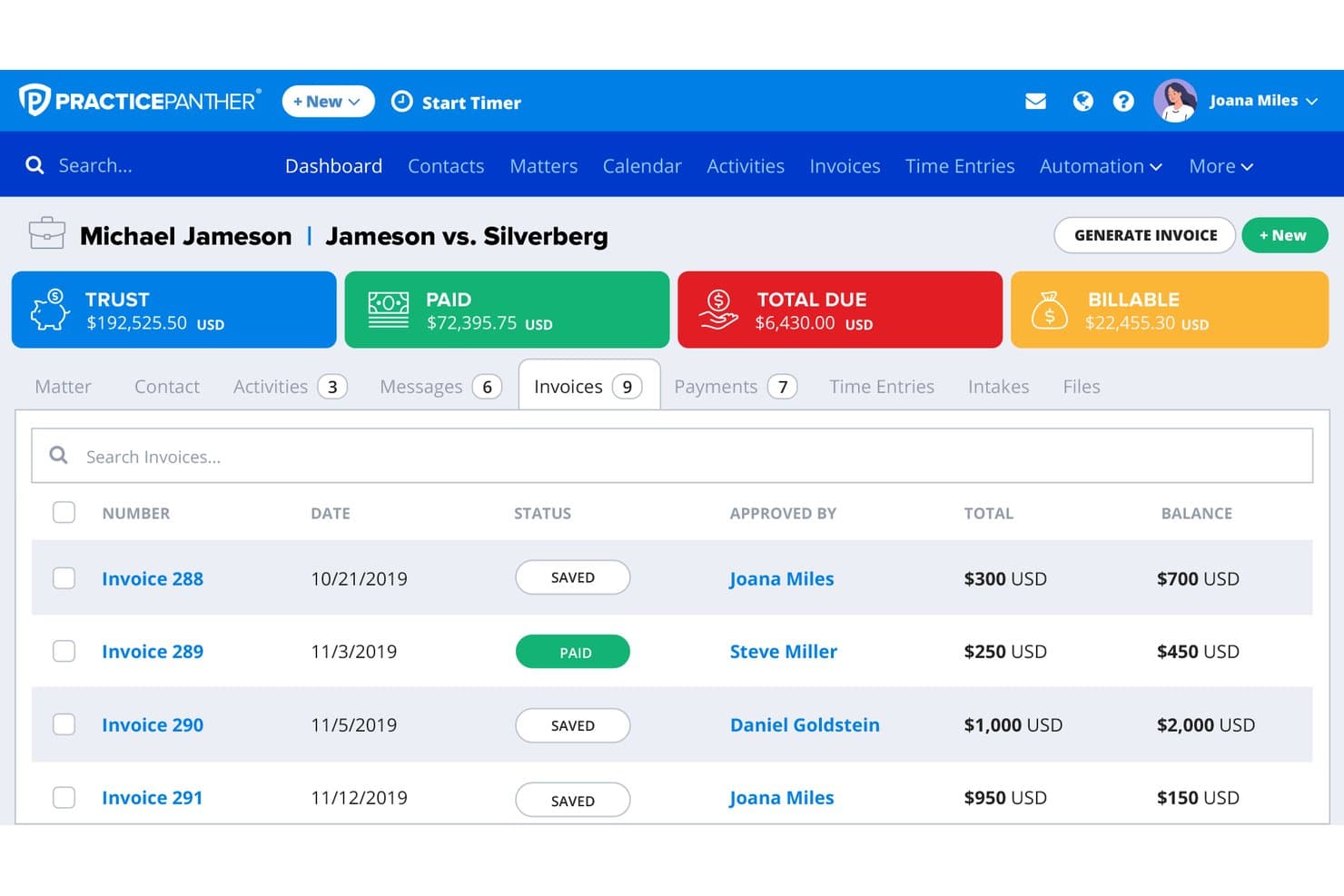
PracticePanther tracks invoices, balances, and trust funds per matter. PracticePanther is a cloud-based legal practice management platform for solo attorneys and small-to-midsize law firms that brings together matter management, client intake, billing, trust accounting, and a secure client portal in one place.
Who Is PracticePanther Best For?
PracticePanther is a strong fit for solo attorneys and small-to-midsize law firms that want billing, invoicing, and matter management under one roof without a steep learning curve.
Why I Picked PracticePanther
I picked PracticePanther as one of the best because its billing automation genuinely sets it apart. MoneyFinder flags unbilled activity from calendar events, tasks, emails, and texts, so nothing slips through the cracks before invoicing. I also like that you can configure billing at the user, activity, matter, or contact level, covering hourly, flat-rate, and contingency arrangements in one place, with LEDES billing available if your clients require it.
PracticePanther Key Features
- Secure client portal: Clients can view invoices, exchange messages, access uploaded documents, and make payments directly through a dedicated portal.
- Conditional task workflows: Tasks can be sequenced so each step activates automatically when the previous one is completed, with due dates calculated from that completion date.
- Native two-way business texting: Send and receive client text messages from within the platform, with all messages stored alongside the relevant matter record.
- Three-way trust reconciliation: Business Pro includes a guided reconciliation process that compares adjusted bank balance, client ledger balance, and trust ledger balance.
PracticePanther Integrations
PracticePanther offers marketplace integrations with QuickBooks Online, Outlook, Google Calendar, Google Drive, Dropbox, and LawToolBox. It also provides a KISS API and supports Zapier.
Pros and Cons
Pros:
- Actionstep migration includes matters and time entries
- Reviewers praise integrated time tracking and invoicing
- MoneyFinder flags unbilled activity for invoicing
Cons:
- Document storage may not replace dedicated systems
- Reviewers report limited client-portal collaboration
Learn more about PracticePanther:
Alte alternative la Actionstep
Iată câteva opțiuni suplimentare care nu au ajuns pe lista mea scurtă, dar care merită totuși analizate:
- 11CosmoLexBest for entry-tier matter and trust accounting
- 12CasePeerBest for managing injury cases to settlement
- 13CloudLexBest for PI medical records and demand drafts
- 14AbacusLawBest for firms needing cloud or self-hosting
- 15Rocket MatterBest for legal practice and firm accounting
- 16LawmaticsBest for tracking marketing ROI through intake
- 17CenterbaseBest for cited AI firm-performance insights
- 18HoudiniESQBest free starting point for solo attorneys
- 19Amicus AttorneyBest for firms needing on-premise control
- 20PCLaw Time MattersBest for firms prioritizing trust accounting
Related Reviews
How I Evaluate Actionstep Alternatives
I split my evaluation into three parts. First, core functionality: I look for platforms that organize all case data around a central matter record and support trust-compliant billing and time tracking—this carries the most weight. Second, standout features: I evaluate conflict-of-interest checking and practice-area workflow templates. Third, I consider migration support and pricing transparency.
Core Functionality (Table Stakes For This List)
When I'm selecting tools for my list, I score each one on a scale from 0 (does not offer the functionality) to 5 (excels in this area) for each core functionality listed below. I then convert the total into a percentage to help assess each tool's overall fit, with extra weight on any functionalities I’ve deemed essential.
- Matter & Case Management (Essential): I look for a central matter record linking parties, documents, notes, tasks, communications, and financials across an active case.
- Billing & Trust Accounting (Essential): I assess whether time entries, invoices, and trust transactions connect to client matters, with safeguards that support trust compliance.
- Document Management: I check how teams organize matter files, track versions, and use templates for recurring documents such as engagement letters.
- Calendaring & Deadlines: I evaluate matter-linked court dates, task reminders, and rules-based deadline calculation for the firm’s jurisdictions and case types.
- Workflow & Task Automation: I look for reusable matter-stage workflows that assign tasks and trigger next steps as a case progresses.
- Client Portal & Communication: I assess secure matter-based sharing and messaging, including how clients access updates and exchange documents with the firm.
Once I have a list of tools that meet the criteria, I consider what sets each platform apart.
Differentiating Factors (What Sets Vendors Apart)
Here's how I compare and contrast different vendors:
Standout Features
I evaluate conflict-of-interest checking to see whether a platform automatically screens new matters against existing clients and adverse parties. A missed conflict can trigger a disqualification motion mid-case, so I look for screening that runs at intake, not just on demand. Custom practice-area templates also matter: a family law firm and a personal injury shop need different stage workflows, document sets, and task sequences out of the box. I check whether mobile time capture logs entries with matter context, since attorneys at depositions or court lose billable hours when entry is delayed.
Beyond Features
I check whether a vendor offers dedicated migration support, since moving historical matter data from a legacy system without losing trust ledger records or document links is a real risk during platform switches. Pricing transparency matters too—some vendors bundle e-signature and client portal access into base plans, while others charge per add-on, which shifts total cost significantly for growing firms. I also evaluate integration depth with tools like Microsoft 365, QuickBooks, and court e-filing systems, because a platform that doesn't connect to your existing stack creates duplicate data entry across every matter.
De ce să cauți o alternativă la Actionstep?
Deși Actionstep este o alegere bună pentru gestionarea dosarelor juridice, unele firme consideră că o altă platformă se potrivește mai bine nevoilor lor. Este posibil să cauți o alternativă la Actionstep deoarece…
- Firma ta mică dorește o configurare mai simplă pentru dosarele obișnuite
- Practica ta are nevoie de fluxuri de lucru adaptate unui domeniu juridic de nișă
- Echipa ta are nevoie de ajutor practic pentru mutarea fișierelor dosarelor și a soldurilor fondurilor fiduciare
- Bugetul tău sau modelul de tarifare preferat nu se potrivește cu planurile Actionstep
Dacă te regăsești în oricare dintre aceste situații, ai ajuns în locul potrivit. Lista mea include mai multe opțiuni de gestionare a dosarelor juridice pentru echipele care se confruntă cu aceste provocări în utilizarea Actionstep și caută o alternativă.
Funcțiile principale ale Actionstep
Iată funcțiile principale ale Actionstep, pentru a te ajuta să îl compari cu alternativele disponibile:
- Gestionarea dosarelor: Actionstep păstrează documentele, e-mailurile, termenele-limită, notițele, facturarea și istoricul dosarului într-o evidență centralizată. Echipa ta poate consulta detaliile și progresul unui caz fără să treacă între fișiere separate pentru fiecare dosar.
- Automatizarea fluxurilor de lucru: Poți crea fluxuri de lucru pentru dosare care atribuie sarcini, trimit mementouri și mută activitatea prin etape definite. Acest lucru ajută echipa să aplice pași consecvenți proceselor recurente, de la preluarea clientului până la soluționarea cazului.
- Gestionarea și automatizarea documentelor: Platforma stochează documentele dosarelor și permite generarea documentelor din șabloane. Modulul său suplimentar Builder poate completa șabloanele Microsoft Word cu date din dosare și poate utiliza câmpuri condiționale pentru diferite situații.
- Urmărirea timpului: Avocații pot înregistra timpul din diferite ecrane, pot rula mai multe cronometre și pot adăuga notițe la dosare. Înregistrările de timp sugerate pot ajuta la consemnarea activităților care altfel ar putea fi omise înainte de facturare.
- Facturarea și contabilitatea: Actionstep conectează înregistrările de timp, facturile, plățile și evidențele financiare la dosarele clienților. Instrumentele sale contabile includ contabilitatea fondurilor fiduciare și a clienților, operațiuni bancare, un registru general și raportare financiară.
- Calendar și termene-limită: Calendarele asociate dosarelor și urmărirea termenelor-limită ajută echipele să păstreze vizibile datele de judecată, mementourile și alte activități programate, alături de informațiile despre caz.
- Preluarea clienților și CRM: Instrumentele de gestionare a clienților includ preluarea acestora, CRM și formulare personalizabile pentru site. Firmele pot colecta informații despre potențialii clienți și pot urmări relațiile înainte și după deschiderea unui dosar.
- Portal pentru clienți: Portalul permite firmelor să partajeze cu clienții actualizări și informații despre dosare, precum și să ofere acces la detaliile de facturare. Astfel, clienții beneficiază de un loc dedicat în care pot consulta informațiile partajate despre caz.
- Verificarea conflictelor: Actionstep include verificarea conflictelor ca parte a funcțiilor sale de gestionare a dosarelor. Echipele pot identifica potențialele conflicte atunci când analizează dosare noi.
- Acces mobil și integrări: Actionstep oferă aplicații pentru iOS și Android, precum și conexiuni cu Outlook, Gmail, Microsoft 365, Zapier și InfoTrack. Aceste opțiuni permit accesul mobil și conectarea cu instrumentele de comunicare și alte instrumente ale firmei.
Costuri și prețuri ale alternativelor la Actionstep
Prețurile alternativelor la Actionstep variază în funcție de funcționalități, dimensiunea firmei și suplimente. Iată intervalele de preț și funcționalitățile tipice pe care le veți întâlni în cadrul planurilor.
Tabel comparativ al planurilor pentru alternativele la Actionstep
| Tipul planului | Preț mediu | Funcționalități comune |
|---|---|---|
| Tipul planuluiPlan personal | Preț mediu$49–$69/utilizator/lună | Funcționalități comuneGestionarea dosarelor și a contactelor, urmărirea timpului, șabloane de documente și facturare de bază. |
| Tipul planuluiPlan pentru companii | Preț mediu$79–$150/utilizator/lună | Funcționalități comuneAutomatizarea fluxurilor de lucru, preluarea datelor clienților, semnături electronice și raportare extinsă. |
| Tipul planuluiPlan pentru întreprinderi | Preț mediuOfertă personalizată, adesea $150+/utilizator/lună | Funcționalități comuneControale avansate ale accesului, autentificare unică, fluxuri de lucru personalizate și asistență dedicată pentru migrare. |