

Compliance software for law firms helps teams manage obligations tied to conflicts, deadlines, client funds, billing, and firm policies. The right fit depends on your practice areas, jurisdictions, client requirements, and existing systems. This guide compares practice-management platforms and specialist tools, explains what each supports, and helps you decide whether your firm needs day-to-day matter controls, policy oversight, or specialized screening.
Why Trust Our Software Recommendations
6,700+
Reviews
20
Industry experts
16+
Evaluation factors
14
Years
Our team has been testing and reviewing software since 2012. As legal practice leaders ourselves, we know how difficult—and important—it is to choose the right software.
For this guide, we evaluated tools using hands-on testing and independent research, scoring tools using our selection criteria.
Our reviews reflect our human editorial judgment, not a sales pitch.
Comparison Table: Compliance Software for Law Firms
Compare pricing and specs, side by side, for the compliance software for law firms that made it onto my shortlist.
| Tool | Best For | Trial Info | Price | ||
|---|---|---|---|---|---|
| 1 | Best for practice management-led compliance | Not available | Pricing upon request | Website | |
| 2 | Best for court-rule calendaring and conflict logs | 7-day free trial | From $49/user/month | Website | |
| 3 | Best for built-in trust accounting and conflict checks | 10-day free trial | From $50/user/month (billed annually) | Website | |
| 4 | Best for California court-form updates | Free demo available | Pricing upon request | Website | |
| 5 | Best for enterprise GRC policy attestation workflows | Free demo available | Pricing upon request | Website | |
| 6 | Best for document security and ethical walls | Free demo available | Pricing upon request | Website | |
| 7 | Best for all-in-one legal practice management | Free trial available | From $49/user/month (billed annually) | Website | |
| 8 | Best for AML screening at client intake | Free trial available | From $119/month | Website | |
| 9 | Best for AI-assisted conflicts clearance tracking | Free demo available | Pricing upon request | Website | |
| 10 | Best for AML and KYC checks at client onboarding | Not available | From £167/month | Website |


Compliance Software for Law Firms Reviews
Below are my detailed summaries of the best compliance software for law firms that made it onto my shortlist. My reviews cover the features, compliance capabilities, and best-fit use cases of each software option to help you find the right fit.
 Best for practice management-led compliance
- Not available
- Pricing upon request
Visit WebsiteCustomer Rating:4.8/5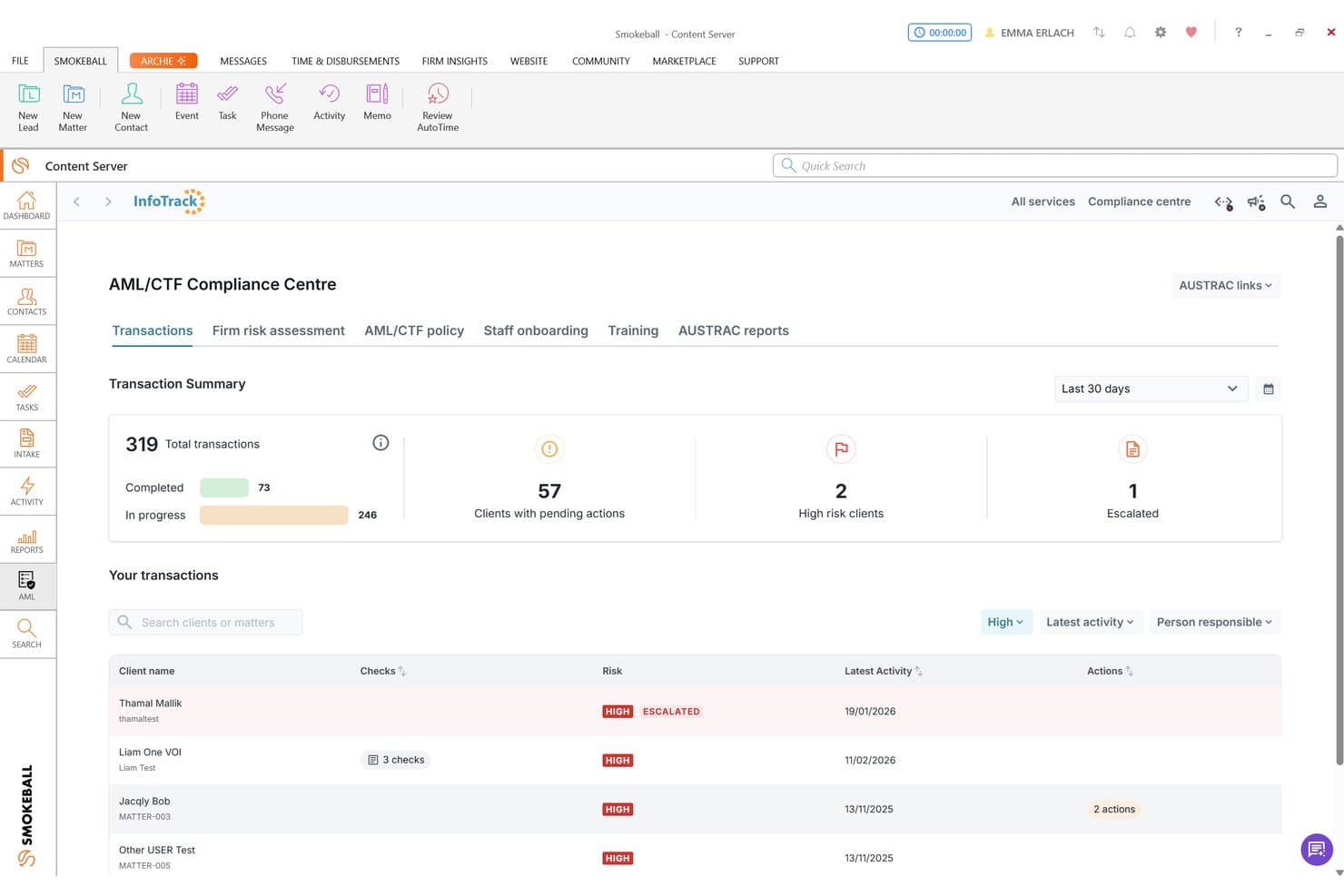
Smokeball tracks AML/CTF compliance with risk ratings and client transaction summaries. Smokeball is a legal practice management platform that combines matter management, trust accounting, conflict checks, document automation, and AML compliance reporting for law firms.
Who Is Smokeball Best For?
Smokeball suits small to mid-sized law firms that want compliance-adjacent features—like conflict checks, trust accounting, and AML reporting—built into their day-to-day practice management system.
Why I Picked Smokeball
I've included Smokeball in my top picks because it weaves compliance-adjacent tools directly into everyday matter management, so firms aren't toggling between separate systems. I particularly like how conflict checks run across the entire matter file, with a timestamped PDF report saved right to the matter. The trust accounting module also keeps IOLTA records audit-ready, with reversals and deletions logged as separate transaction lines rather than overwritten entries.
Smokeball Key Features
- AML/CTF Compliance Centre: Displays firm-wide AML risk assessments—including PEP status, source of funds, and financial-sanctions status—pulled from InfoTrack checks into a single view.
- Matter-level permissions: Restricts specified users from opening or editing a matter, with all permission changes recorded in the matter's history.
- TemplateLab document automation: Generates court forms and custom documents using matter data, with access to more than 20,000 templates across 250+ matter types.
- AutoTime activity tracking: Captures billable activity across Smokeball, Word, and Outlook automatically and assigns it to the relevant matter.
Smokeball Integrations
Smokeball has documented native integrations with Microsoft Word, Microsoft Outlook, and Outlook calendar, plus integrations with InfoTrack and QuickBooks Online. Custom API access may be available to Prosper+ firms meeting Smokeball’s requirements.
Pros and Cons
Pros:
- Trust reversals preserve transaction-level audit visibility
- Document search supports conflict-check follow-up
- Deadline reports help surface upcoming tasks
Cons:
- Large files can slow matter access
- Regulatory reports don’t monitor rule changes
Learn more about Smokeball: Best for court-rule calendaring and conflict logs
- 7-day free trial
- From $49/user/month
Visit WebsiteCustomer Rating:4.7/5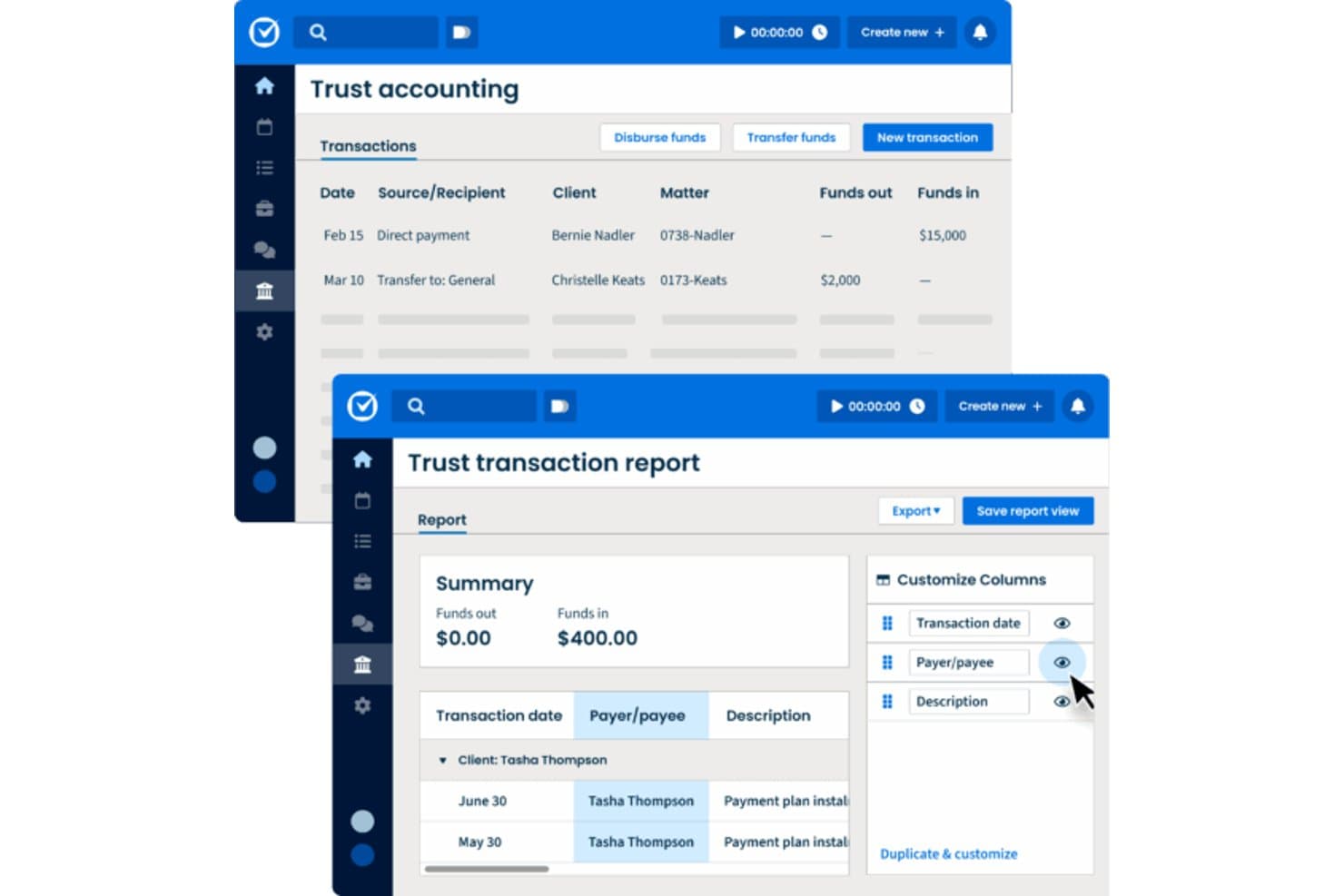
Clio Manage tracks trust accounting transactions and generates detailed reports. Clio Manage is a cloud-based legal practice management platform that combines matter and contact management, court-rule calendaring, conflict checks, KYC/KYB recordkeeping, and an audit log.
Who Is Clio Manage Best For?
Clio Manage is a strong fit for law firm partners and practice managers who need court-rule calendaring, conflict checks, and audit logs in one place.
Why I Picked Clio Manage
I picked Clio Manage as one of the best because its court-rule calendaring and conflict-check tools work together in a way I find genuinely useful for staying ahead of compliance obligations. The Court Rules engine pulls from a library of 2,200 U.S. jurisdictions, automatically generating deadline events from a single trigger date, while conflict checks let me run up to 10 searches per report across matters and contacts, with PDF and CSV exports that double as records for ethics files.
Clio Manage Key Features
- KYC/KYB recordkeeping: Record identity, AML, source-of-funds checks, risk assessments, and ratings directly on contact and matter records.
- Audit log with before-and-after tracking: View a filterable log of every user and AI action, including what changed, then export it as a CSV.
- Matter-level access permissions: Restrict matter visibility to specific users or groups, with bulk updates across up to 200 matters at once.
- Trust account reconciliation: Compare the Clio trust ledger against your bank statement and export completed reconciliation reports as a pdf.
Clio Manage Integrations
Clio Manage lists 250+ app integrations, including native QuickBooks, Xero, TrustBooks, Apple Pay, and Google Pay integrations. It also supports REST API v4, webhooks, OAuth 2.0, and Zapier.
Pros and Cons
Pros:
- Before-and-after audit logs support internal reviews
- Conflict reports preserve search parameters and statuses
- Reviewers value calendar deadline coordination
Cons:
- Reviewers report limited built-in reporting details
- KYC fields don’t screen sanctions lists
Learn more about Clio Manage: Best for built-in trust accounting and conflict checks
- 10-day free trial
- From $50/user/month (billed annually)
Visit WebsiteCustomer Rating:4.6/5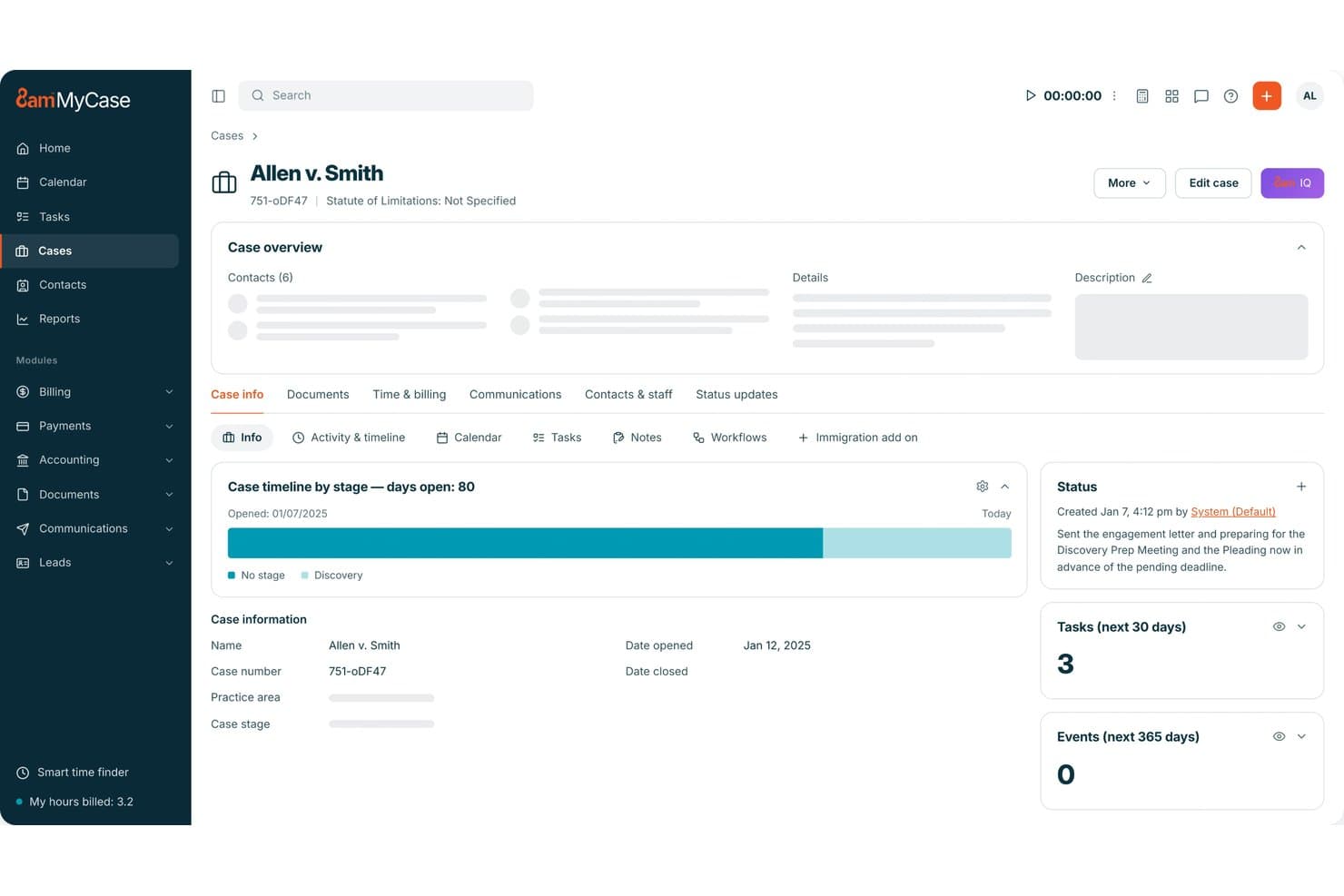
MyCase centralizes case status, tasks, and deadlines in one dashboard. MyCase is a legal practice management platform that centralizes case management, trust accounting, billing, conflict checks, and client communications for law firms.
Who Is MyCase Best For?
MyCase suits small to mid-sized law firms that want trust accounting, billing, and conflict checks managed in one place without juggling separate tools.
Why I Picked MyCase
I picked MyCase as one of the best because its built-in trust accounting handles the compliance details that trip up most firms. The three-way reconciliation aligns client ledger balances, bank activity, and related trust transactions, flagging discrepancies before they become bar complaints. On top of that, the conflict check tool searches across cases, contacts, and documents in one pass, and lets you mark a matter as checked with notes for a clear record.
MyCase Key Features
- LawToolBox deadline integration: Calculates court, statutory, and administrative deadlines across 50 states and syncs them directly to your MyCase calendar.
- Role-based access controls: Restricts user access at the matter level so each team member sees only the cases and folders they're permitted to view.
- Audit trail tracking: Logs activity across matters, communications, and financial transactions to support internal oversight and review.
- Automated workflow triggers: Sets up task sequences, document steps, and calendar events that fire automatically based on case activity.
MyCase Integrations
MyCase connects with 75+ solutions, including native Google Calendar, Microsoft Outlook, QuickBooks, and LawPay integrations, plus marketplace integrations with LawToolBox, Dropbox, and NetDocuments. Its Open API is available on Advanced, and Zapier is supported.
Pros and Cons
Pros:
- Users value deadline and task tracking
- Matter activity histories support team oversight
- Three-way trust reconciliation flags discrepancies
Cons:
- No AML screening or policy attestations documented
- Conflict checks require manual review and recording
 Best for California court-form updates
- Free demo available
- Pricing upon request
Visit WebsiteCustomer Rating:4/5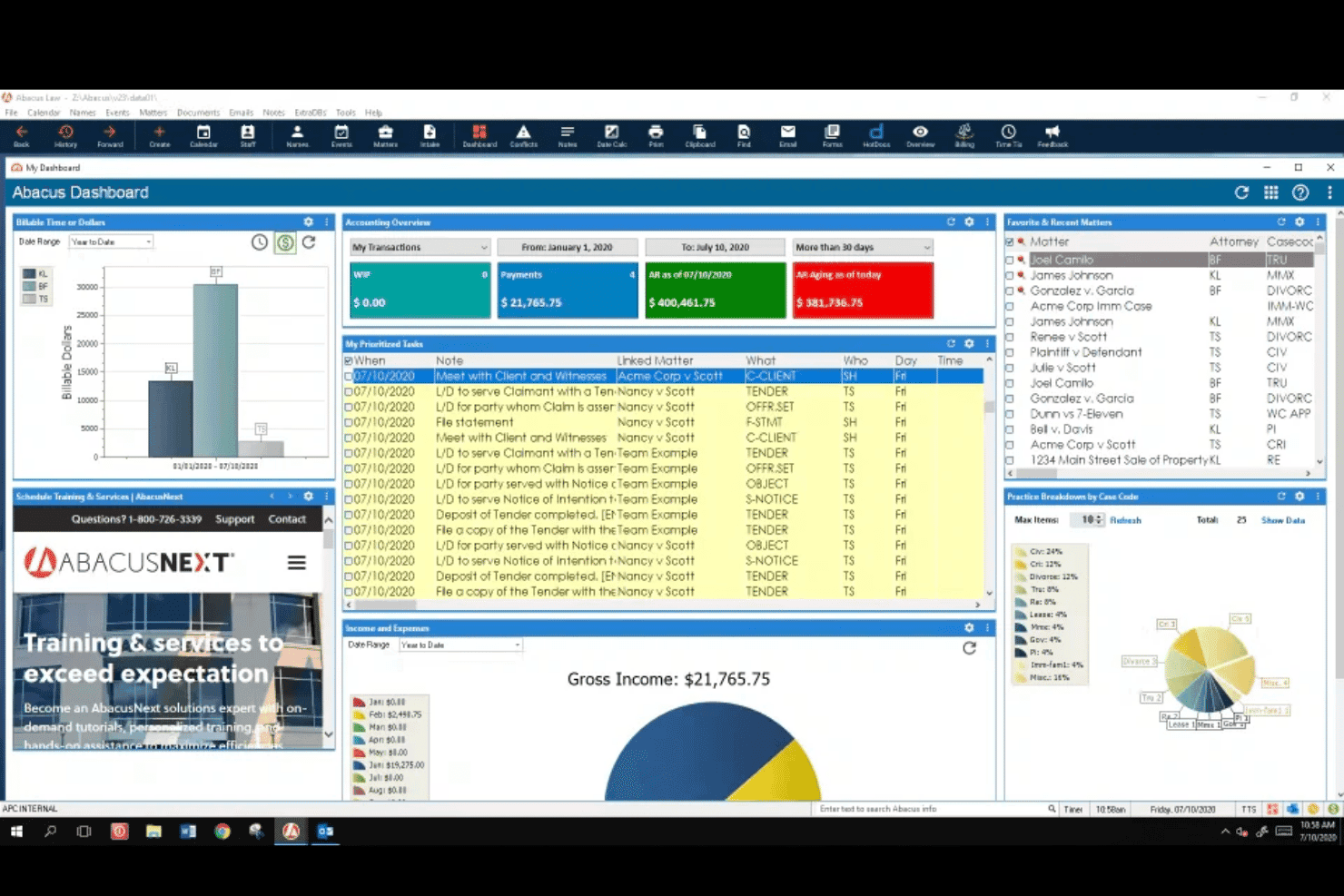
AbacusLaw dashboard showing billing, accounting, tasks, matters, and practice performance. AbacusLaw is a legal practice management platform by CARET that combines case management, built-in accounting, trust accounting, legal calendaring, document automation, and court forms into a single system for law firms.
Who Is AbacusLaw Best For?
AbacusLaw is a strong fit for California-based law firms that need an all-in-one practice management system with built-in accounting and up-to-date state court forms.
Why I Picked AbacusLaw
I picked AbacusLaw as one of the best because its California State Court Forms pack is kept current with court-form changes, so your team isn't manually tracking Judicial Council updates or hunting down revised county forms. You can populate templates directly from existing database records and track form modifications as they happen. The built-in calendaring also surfaces case deadlines and filing alerts in one place, which matters when California court schedules shift.
AbacusLaw Key Features
- Built-in trust accounting: Manages client trust accounts with tools the vendor says meet or exceed Bar Association requirements.
- Practice area customization: Lets firms tailor input screens, automation rules, documents, and terminology to match their specific practice areas.
- Shared legal calendar with change notifications: Displays schedules to relevant team members or clients and sends alerts when appointments or deadlines are updated.
- HotDocs document assembly: Uses client, calendar, and case data already in AbacusLaw to generate completed legal documents in one click.
AbacusLaw Integrations
AbacusLaw offers documented integrations with Microsoft Outlook, Abacus Payment Exchange (APX), and HotDocs. Outlook tracks emails, calls, and client interactions; APX handles payments; HotDocs assembles documents from case data. API availability isn’t stated.
Pros and Cons
Pros:
- Trust accounting centralizes firm records
- Calendar helps surface filing deadlines
- California court forms track updates
Cons:
- No policy attestations or ethical walls
- No documented AML or sanctions screening
Learn more about AbacusLaw: Best for enterprise GRC policy attestation workflows
- Free demo available
- Pricing upon request
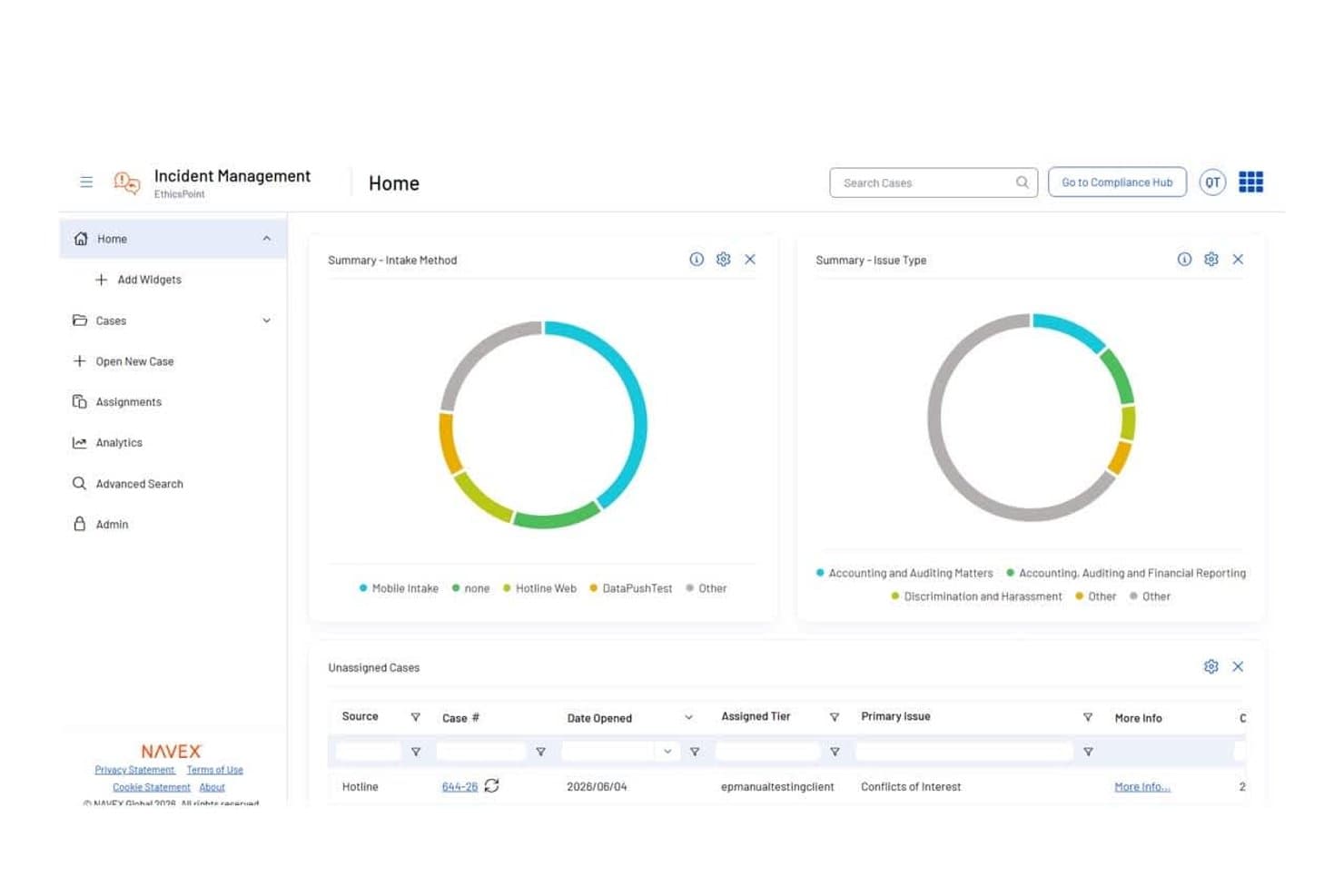
NAVEX One centralizes case intake and issue tracking on one dashboard. NAVEX One is an AI-powered GRC platform that unifies policy management, compliance training, third-party risk screening, whistleblowing intake, and conflict-of-interest disclosures across an organization's risk and compliance program.
Who Is NAVEX One Best For?
NAVEX One is a strong fit for enterprise compliance and legal teams that need to manage, distribute, and track staff attestations across a large organization's policy library.
Why I Picked NAVEX One
I've included NAVEX One in my top picks because it handles the full policy attestation lifecycle better than most tools in this space. When your organization needs to distribute an updated code of conduct or conflict-of-interest policy across hundreds of staff, NAVEX One tracks exactly who read which version and when, with an uneditable audit trail to back it up. I also like that custom approval workflows support thresholds like "3 out of 5 approvers," which mirrors how real review committees actually operate.
NAVEX One Key Features
- Regulatory change monitoring: Tracks regulatory updates across more than 8,000 global sources and maps changes to internal controls and policies.
- Conflict-of-interest disclosure management: Captures and tracks employee conflict-of-interest disclosures over time, including gifts and personal connections.
- Third-party risk screening: Screens and continuously monitors third parties across 50+ risk categories, including sanctions, watchlists, and ownership indicators.
- AI-powered compliance assistant: Answers employee policy questions on demand using an AI assistant trained on your organization's approved policy content.
NAVEX One Integrations
NAVEX One integrates with Microsoft 365 through its Policy Content Integration API, which can deliver approved policy content to enterprise search, knowledge bases, employee portals, and AI assistants. It also offers an API for custom integrations, but no legal practice-management integrations are documented.
Pros and Cons
Pros:
- Attestation records support audit reviews
- Custom approvals and automated reminders
- Reviewers value centralized policy storage
Cons:
- No matter-level conflict checks or ethical walls
- Reviewers report confusing policy search
Learn more about NAVEX One: Best for document security and ethical walls
- Free demo available
- Pricing upon request
Visit WebsiteCustomer Rating:4.1/5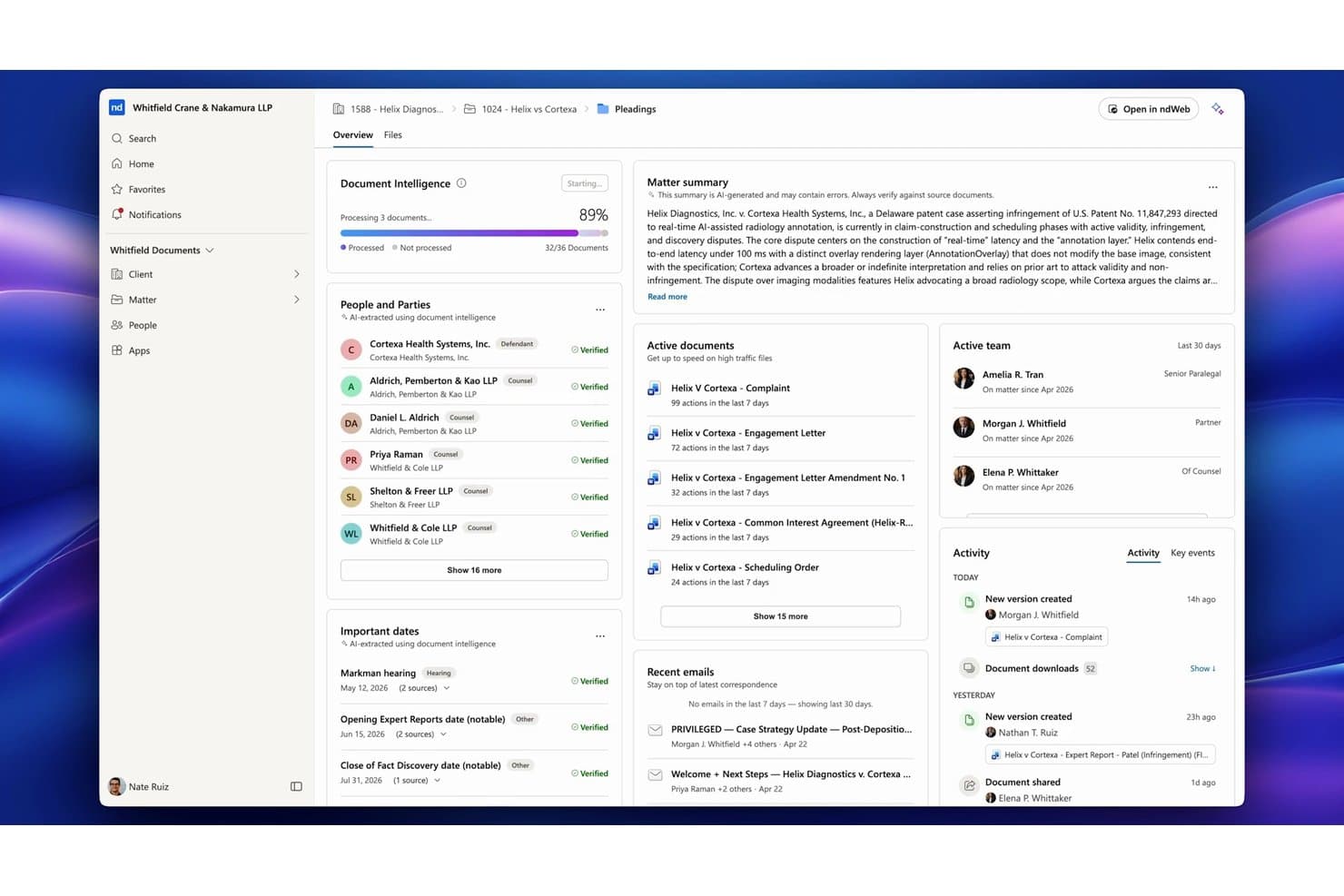
NetDocuments centralizes matter documents, contacts, and deadlines for law firms. NetDocuments is a cloud-based document and knowledge management platform built for legal teams, offering version control, ethical walls, granular access controls, audit trails, and AI-assisted document workflows.
Who Is NetDocuments Best For?
NetDocuments is a strong fit for mid-to-large law firms that prioritize document security, ethical wall enforcement, and governance over purpose-built compliance workflows.
Why I Picked NetDocuments
I've included NetDocuments in my top picks because its ethical wall enforcement is genuinely purpose-built for legal environments, using the Workspace Security Manager to apply cabinet-level permission policies that lock down matter access and prevent other methods from overriding them. When a firm needs to wall off a sensitive matter, administrators can configure and apply a policy across multiple workspaces, with a downloadable audit history showing every change. Pair that with ISO 27001, SOC 2 Type II, and FedRAMP certifications, and you have a document platform built around the kind of security governance that client-facing law firms actually need.
NetDocuments Key Features
- Consolidated Activity Log: Repository administrators can request downloadable activity logs covering document-related actions across a repository, exportable in XML or JSON.
- Document and folder history: Every document records a timestamped history of actions—edits, deletions, profile changes, and access-list updates—filterable and downloadable for review.
- Version control and revision history: NetDocuments tracks document versions automatically, letting teams access prior drafts and review changes over a matter's lifecycle.
- AI-assisted document review: The Legal AI Assistant lets users query single or multiple documents to extract summaries, chronologies, and structured answers across large document sets.
NetDocuments Integrations
NetDocuments reports 150+ integrations, including native integrations across the Microsoft ecosystem and Gmail, plus integrations with DocuSign, Harvey, Legora, and Thomson Reuters. It also offers REST and Interactive Search APIs for custom connections.
Pros and Cons
Pros:
- Version histories support document review
- Locked ethical walls protect matter confidentiality
- Reviewers praise security governance for client requirements
Cons:
- Regulatory monitoring and conflict checks are absent
- No automated conflict or AML screening
Learn more about NetDocuments: Best for all-in-one legal practice management
- Free trial available
- From $49/user/month (billed annually)
Visit WebsiteCustomer Rating:4.3/5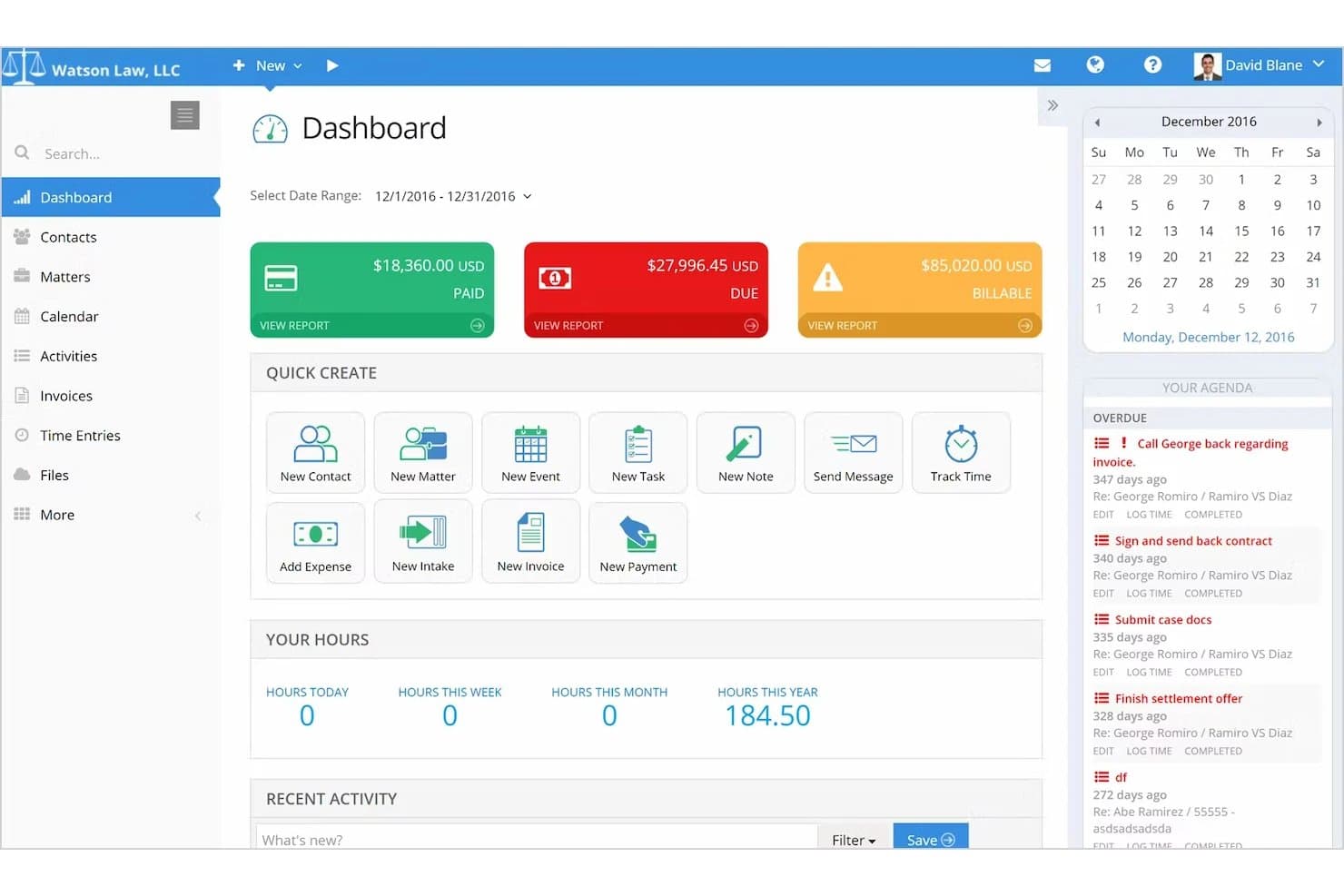
PracticePanther manages legal cases, billing, trust accounting, and client records. PracticePanther is a legal practice management platform that covers case management, calendaring, client communication, billing, payments, and trust accounting for law firms.
Who Is PracticePanther Best For?
PracticePanther is a strong fit for small to mid-sized law firms that want case management, billing, and client communication handled in one place.
Why I Picked PracticePanther
I've included PracticePanther in my top picks because it pulls case management, billing, trust accounting, and client communication into one platform, which cuts the compliance surface area that comes with juggling multiple disconnected tools. I particularly like that the Business Pro plan includes IOLTA-compliant trust accounting with three-way reconciliation, where reconciled payments are locked against edits or deletion. The audit log records every change to case data, documents, and client records with a timestamp and the identity of the person who made it.
PracticePanther Key Features
- Role-based permissions: Administrators can configure create, view, edit, and delete access by feature and restrict access by IP address.
- LawToolBox court-deadline integration: Calculates jurisdiction-specific court deadlines within PracticePanther and sends notifications when court rules change.
- Document version history: Records changes to documents over time, with cloud storage linked to contacts and matters.
- Secure client portal: Gives clients a dedicated space for two-way messaging, document sharing, and bill payments.
PracticePanther Integrations
PracticePanther offers integrations with LawToolBox, QuickBooks, Google Drive, Box, Dropbox, Outlook, Gmail, and Microsoft Exchange. It also provides an API for custom integrations and supports Zapier.
Pros and Cons
Pros:
- Reviewers praise deadline and task organization
- Trust reconciliations lock matched payments
- Centralizes matter, billing, and client records
Cons:
- Court-rule alerts depend on partner service
- No documented client conflict screening
Learn more about PracticePanther: Best for AML screening at client intake
- Free trial available
- From $119/month
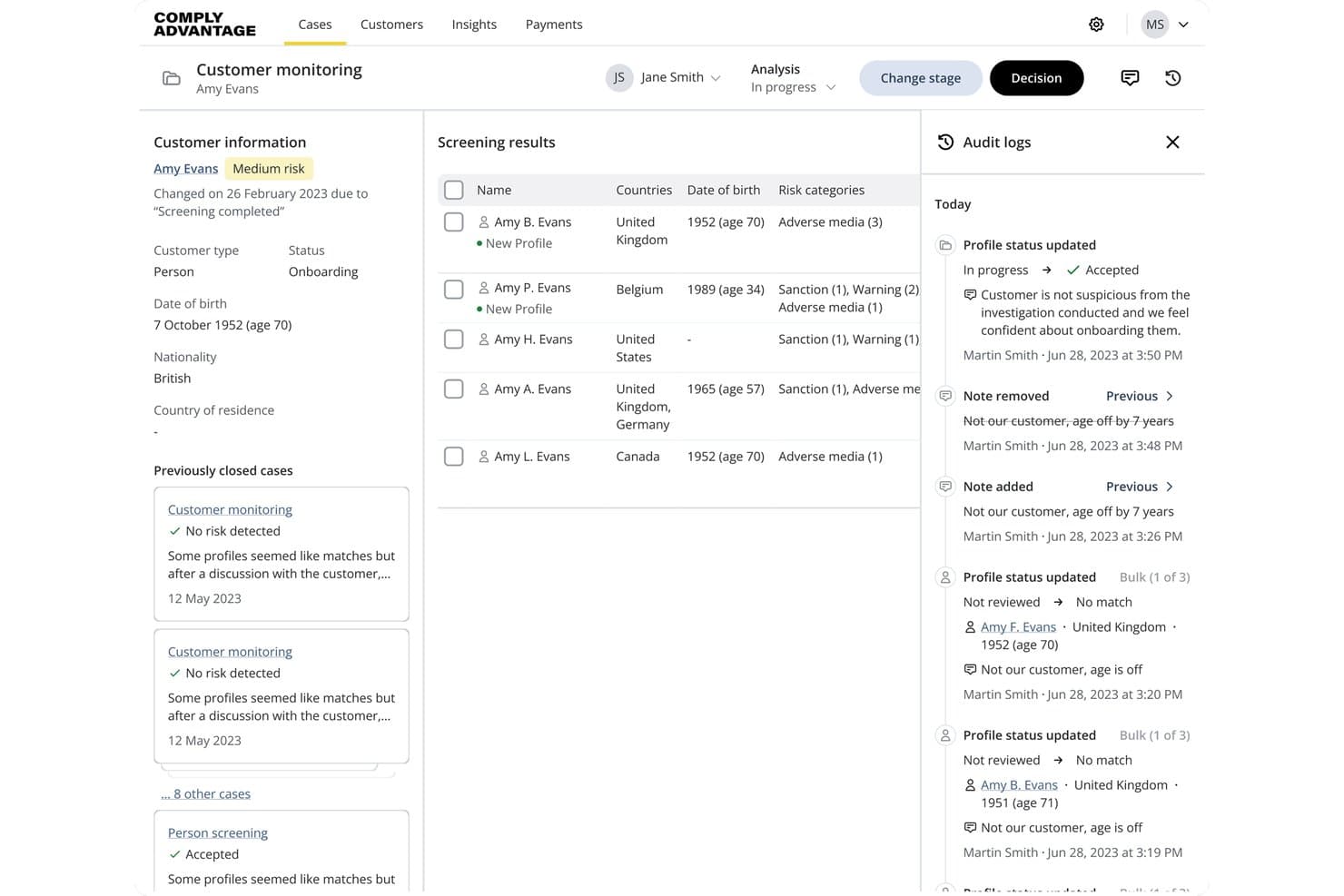
ComplyAdvantage tracks customer screening results and audit logs in one view. ComplyAdvantage Mesh is an AML screening and monitoring platform that screens clients against sanctions lists, PEP databases, watchlists, and adverse media sources, with ongoing monitoring and case management built in.
Who Is ComplyAdvantage Best For?
ComplyAdvantage Mesh suits compliance-focused legal practices that handle regulated client intake and need structured AML screening against sanctions lists, PEP databases, and adverse media sources.
Why I Picked ComplyAdvantage
I've included ComplyAdvantage in my top picks because it's the strongest option on this list for AML screening at client intake. When a new client comes in, Mesh screens them in real time against sanctions lists, PEP databases, and adverse media sources simultaneously. I also like that ongoing monitoring runs automatically, so if a client's risk profile changes after onboarding, your team gets alerted without having to re-run manual checks.
ComplyAdvantage Key Features
- Risk scoring: Automatically calculates and dynamically updates risk scores for each client based on configurable risk thresholds and policies.
- Adverse media screening: Screens clients against a continuously updated database of adverse media sources drawn from news articles and public records.
- Audit trail and case logs: Records timestamped case activity including status changes, screening events, user actions, and match decisions in a reviewable log.
- Agentic alert resolution: AI-powered workflows autonomously resolve approximately 85% of routine screening alerts, reducing manual review volume for your team.
ComplyAdvantage Integrations
Native integrations are not clearly documented. ComplyAdvantage supports custom connectivity through its REST API, webhooks, batch uploads, SFTP, and web interface, with regional EU, US, and APAC API endpoints.
Pros and Cons
Pros:
- Case logs document screening decisions
- Ongoing alerts flag client risk changes
- Broad sanctions, PEP, and adverse-media screening
Cons:
- Missing identifiers require external verification
- False positives add manual match-review work
Learn more about ComplyAdvantage: Best for AI-assisted conflicts clearance tracking
- Free demo available
- Pricing upon request
Visit WebsiteCustomer Rating:4.2/5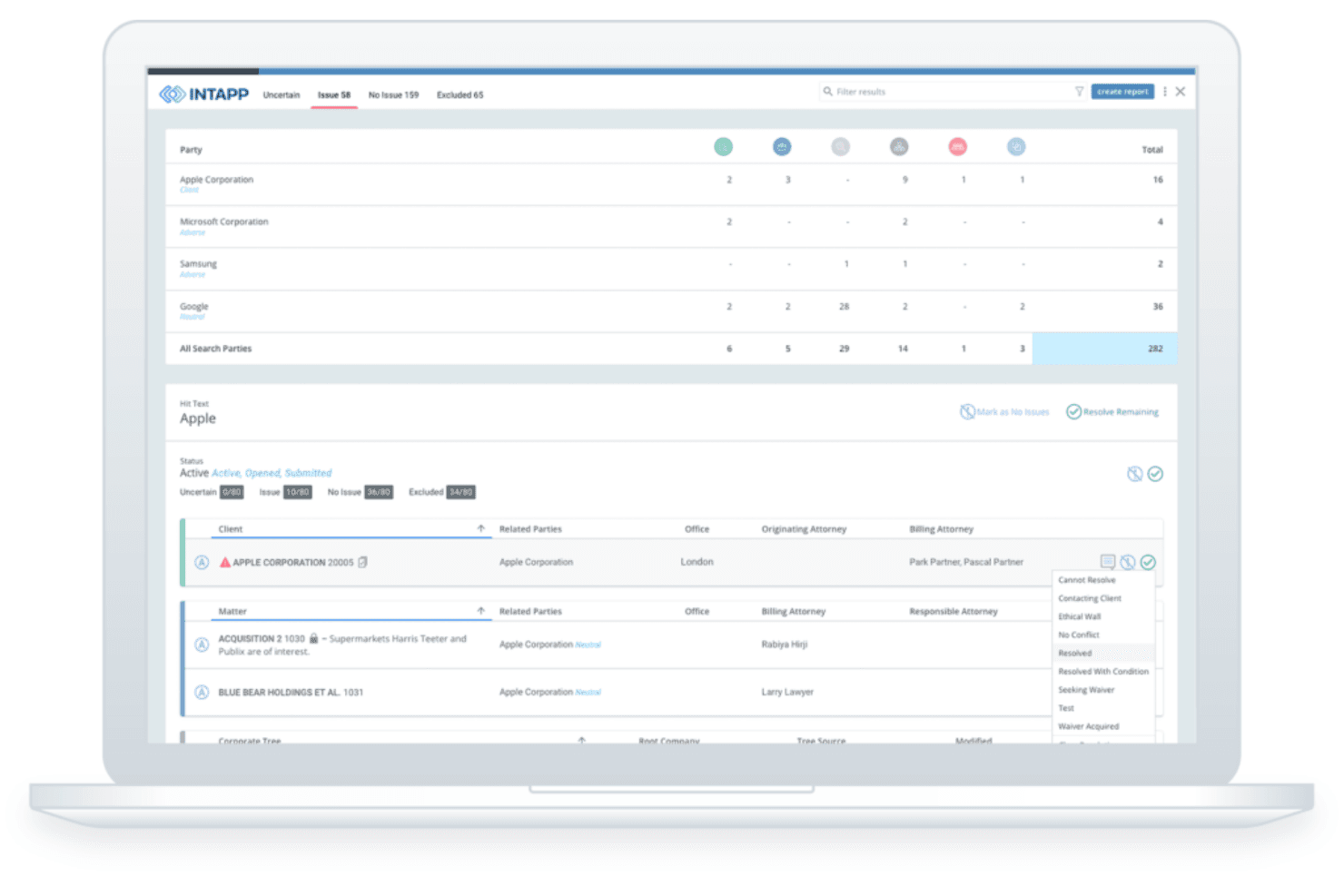
Intapp Conflicts applies AI to run conflict checks, triage potential matches, and manage client and matter data for new business intake. Intapp Conflicts is an AI-powered conflicts management system for law firms and professional services firms that centralizes conflict-of-interest detection, AI-assisted triage, third-party data integration, and resolution recordkeeping.
Who Is Intapp Conflicts Best For?
Intapp Conflicts is a strong fit for law firms and professional services firms that need a dedicated, AI-assisted system to manage conflicts clearance from search through resolution.
Why I Picked Intapp Conflicts
I picked Intapp Conflicts as one of the best because its AI-assisted clearance workflow, powered by Intapp Celeste, does the heavy lifting on conflicts triage: it builds search strategies, categorizes results as "Issue," "No issue," or "Human review," and drafts clearance summaries automatically. I also like that it pulls live corporate-tree and shareholder data from S&P Global, Dun & Bradstreet, and Moody's, so when a client merges or acquires a new subsidiary, the system triggers a fresh conflicts search without anyone manually initiating it.
Intapp Conflicts Key Features
- Team conflicts assignment review: Search current deal-team assignments to assess whether team members are eligible to work on a matter before assigning them.
- Confidentiality-filtered reporting: Reports automatically apply Intapp Walls policies to redact confidential information from conflicts reports.
- Mobile conflicts management: Create and execute conflicts searches, review reports, submit resolutions, and add comments directly from the Intapp 2.0 mobile app.
- Configurable business rules and workflows: Set custom business rules, report formats, filters, and workflows to match your firm's conflicts clearance process.
Intapp Conflicts Integrations
Intapp Conflicts has three documented native data-source integrations: S&P Global, Dun & Bradstreet, and Moody’s. It also connects with Intapp Intake and Intapp DealCloud, although the integration type isn’t specified.
Pros and Cons
Pros:
- Search histories and reports support audit reviews
- AI triage categorizes issues for human review
- Faster conflicts submissions and status tracking
Cons:
- AML and ethical-wall workflows require separate products
- No regulatory deadline tracking or filing alerts
Learn more about Intapp Conflicts: Best for AML and KYC checks at client onboarding
- Not available
- From £167/month
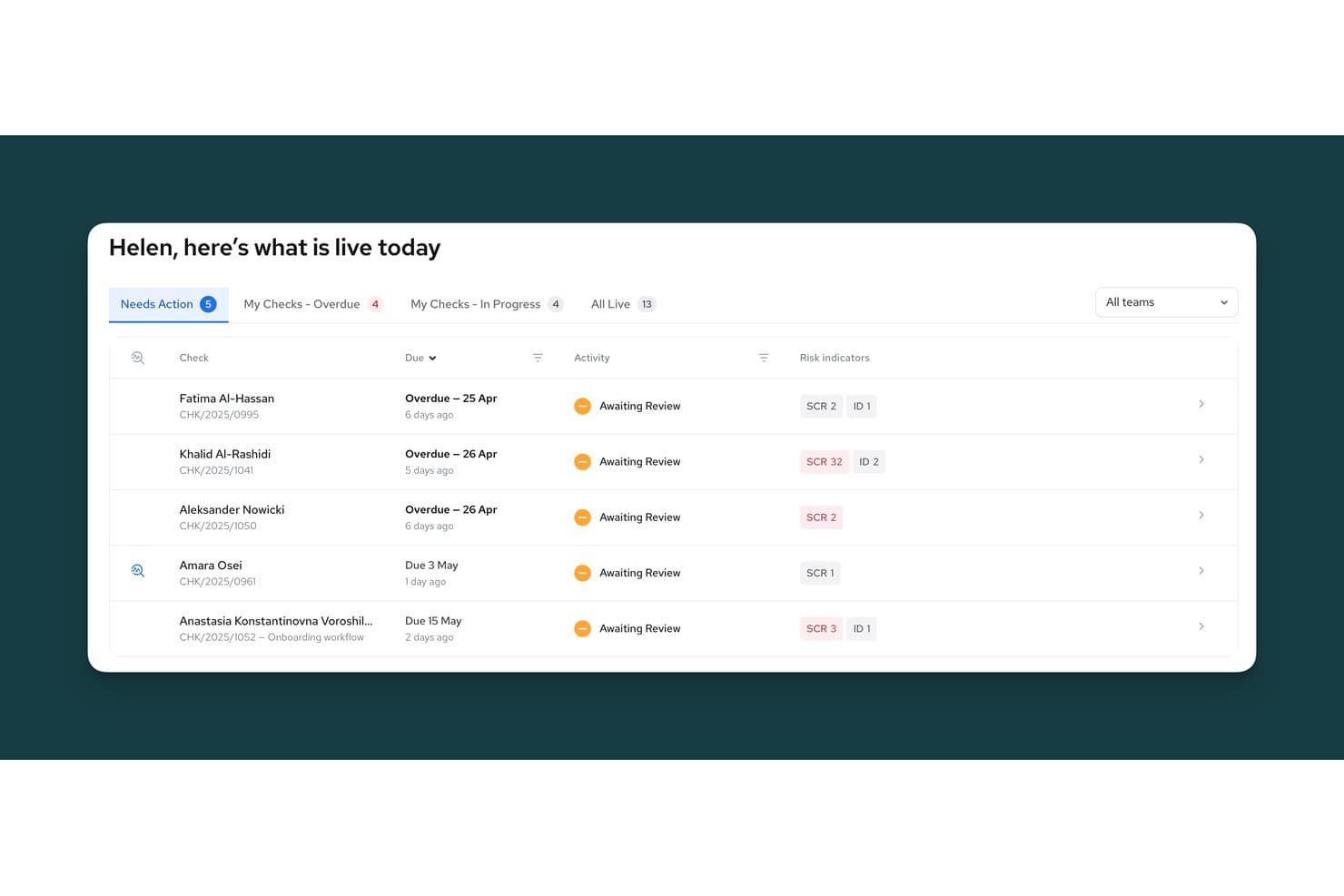
Thirdfort centralizes client compliance checks with risk indicators and due dates. Thirdfort is a client due diligence platform built for legal firms that covers KYC identity verification, AML screening, source-of-funds checks, and know-your-business reports.
Who Is Thirdfort Best For?
Thirdfort suits law firms that need a dedicated client onboarding solution for KYC identity verification, AML screening, and source-of-funds checks.
Why I Picked Thirdfort
Thirdfort earns its spot on my shortlist because it goes further than basic identity checks, covering KYC verification, AML screening, source-of-funds collection, and KYB reports in a single client onboarding workflow. I particularly like how ongoing monitoring alerts your team the moment a client's sanctions or PEP status changes, so you're not relying on periodic manual reviews to catch a flag. The source-of-funds module cross-references open banking data against a client questionnaire and flags specific risk indicators like cash deposits or high-risk third-country funds automatically.
Thirdfort Key Features
- Know-your-business reports: Identifies beneficial owners across multiple ownership layers and jurisdictions, with linked identity and screening checks for directors.
- Activity log: Records timestamped actions by staff and clients to support internal reviews, regulatory audits, and compliance queries.
- Review workflow with audit trail: Routes checks to colleagues for review, capturing decisions, commentary, and timestamps at each step.
- Practice management integrations: Connects natively with Clio, Actionstep, ALB, and several other legal systems, with an open API available on the Compliance plan.
Thirdfort Integrations
Thirdfort offers native integrations with Clio, Actionstep, ALB, Minerva, Redbrick, ProConvey, and Tessaract, plus a marketplace integration with Reapit. An open API is available on the law-firm Compliance plan.
Pros and Cons
Pros:
- Screening changes trigger ongoing AML alerts
- Source-of-funds checks flag risk indicators
- Clients complete identity checks quickly
Cons:
- App crashes can disrupt document submission
- Passport-chip scans frustrate some clients
Learn more about Thirdfort:
Related Reviews
How I Evaluate Compliance Software for Law Firms
I split my evaluation into three parts. First, core functionality: tools must screen matters for conflicts and track regulatory deadlines automatically—this carries the most weight. Second, standout features like integrated trust accounting oversight. Third, what's offered beyond features: onboarding support, configurability, and pricing fit for firm size.
Core Functionality (Table Stakes for This List)
When I'm selecting tools for my list, I score each one on a scale from 0 (does not offer the functionality) to 5 (excels in this area) for each core functionality listed below. I then convert the total into a percentage to help assess each tool's overall fit, with extra weight on any functionalities I've deemed essential.
- Conflict of Interest Checks (Essential): I evaluate how each tool screens new matters against client, party, and entity records—looking for configurable matching rules and workflow routing rather than simple name searches.
- Regulatory Tracking & Alerts (Essential): Each tool should surface jurisdiction-specific deadlines and rule changes automatically, similar to how Clio Manage and MyCase handle court-rule calendaring across multiple jurisdictions.
- Audit Trail & Reporting: I look for exportable logs that cover conflict checks, deadline actions, and trust transactions—details you'd need for a bar audit or client compliance review.
- Client Due Diligence & Screening: Tools should support KYC, AML, or sanctions screening during intake and on an ongoing basis, with risk scoring that flags changes in a client's status over time.
- Policy & Document Management: I check whether the platform tracks policy versions, distributes updates to staff, and logs acknowledgments—essential for firms that need to prove attestation during audits.
- Ethical Wall Enforcement: The tool should restrict matter-level access with system-enforced barriers, not just informal agreements, and log any exceptions for later review.
Once I have a list of tools that meet the criteria, I consider what sets each platform apart.
Differentiating Factors (What Sets Vendors Apart)
Here's how I compare and contrast different vendors:
Standout Features
I look for integrated trust accounting oversight that flags IOLTA discrepancies before they become bar complaints—NAVEX One and MyCase handle this differently, and the details matter. Matter intake risk flagging is equally important: I evaluate whether the tool applies automated risk scoring at intake or just runs a basic name search. Multi-jurisdictional rule mapping separates strong options from average ones, especially for firms spanning multiple states or countries where bar rules overlap and conflict.
Beyond Features
I evaluate how well each tool connects to existing practice management and billing systems. A platform like Smokeball or Clio that keeps conflict and trust data in sync across matter workflows prevents the blind spots that appear when compliance lives in a separate silo. I also check vendor onboarding support and training resources, since a compliance tool only works if attorneys actually use it. Customization matters too—I look for configurable risk thresholds and reporting templates that fit a firm's practice areas and internal audit requirements.
How to Choose Compliance Software for Law Firms
Choose a system by matching its controls to the risks your firm needs to verify, then test those controls against real matter and billing workflows.
| If Your Priority Is | Look For |
| Conflict screening | Matching rules for parties, entities, and aliases, plus a review record |
| Court deadlines | Jurisdiction-specific rule sources and a documented process for rule updates |
| Trust accounting | Matter-level trust records, reconciliation steps, and transaction audit logs |
| Client due diligence | Screening coverage details, risk flags, and a record of screening dates |
| Policy attestations | Version history, staff acknowledgments, and exportable completion records |
How to Vet Your Shortlist
- Test conflict handling: In a trial, enter five sample parties, including an alias and related entity, then review the match results and escalation record.
- Verify deadline rules: Create one test matter with a jurisdiction-specific deadline and request the rule source and a document explaining how rule changes are handled.
- Trace a trust transaction: In a sandbox, record one deposit and disbursement, then export the transaction log and reconciliation record.
- Request evidence: Ask for a sample policy-attestation export or screening coverage document, and confirm it includes dates and review status.
- Set the decision filter: In your selection memo, weigh an integrated matter platform against a specialist tool for deeper policy, screening, or ethical-wall controls.
What Is Compliance Software for Law Firms?
Compliance software for law firms helps legal teams track, document, and manage obligations tied to client matters and firm operations. Depending on the platform, it can support conflict checks, court deadlines, trust accounting, client screening, policy acknowledgments, or ethical walls. Capabilities vary, so firms should match a tool’s controls to their practice areas, jurisdictions, and audit needs.
Features
Here are the main features I look for in compliance software for law firms:
- Conflict checks: Compare new matters against client, party, and entity records, including aliases and related organizations. A review and escalation record helps your team document how potential conflicts were handled.
- Regulatory tracking and alerts: Track relevant deadlines and rule changes by jurisdiction, where supported. Alerts can prompt staff to review upcoming obligations and confirm the applicable rule source.
- Audit trails and reporting: Record actions such as conflict reviews, deadline updates, and trust transactions. Searchable or exportable logs help your team prepare records for audits and client reviews.
- Client due diligence: Support identity, sanctions, or other screening checks during intake and, where available, later reviews. Screening dates and risk flags give your team a record to assess and follow up.
- Trust accounting controls: Track client funds and matter-level transactions, with tools for recording deposits, disbursements, and reconciliations. Transaction histories help staff review account activity and identify discrepancies.
- Policy and document management: Store policy versions, distribute updates, and record staff acknowledgments. These records help you confirm which guidance was issued and who completed an attestation.
- Ethical walls: Restrict access to specified matter information for designated users. Permission settings and exception logs help your firm document how information barriers are applied.
- Matter workflow integration: Connect compliance tasks with matter intake, billing, or practice-management workflows. Shared records can reduce duplicate entry and make compliance steps easier to check within routine work.
Benefits
Here are several practical benefits compliance software for law firms can provide:
- Conflict visibility: Matter screening compares client, party, and entity records, while review workflows document how potential matches were handled.
- Deadline tracking: Jurisdiction-specific calendars and alerts help your team monitor applicable deadlines and review rule changes where supported.
- Audit records: Searchable or exportable logs can document conflict reviews, deadline actions, and trust transactions for audits or client reviews.
- Client screening: Intake and ongoing identity, sanctions, or AML checks can record screening dates and risk flags for follow-up.
- Trust oversight: Matter-level transaction records and reconciliation tools help staff review deposits, disbursements, and account activity.
- Access controls: Ethical-wall permissions can limit access to designated matter information and record exceptions for later review.
- Policy tracking: Version histories and staff acknowledgments can show which guidance was distributed and who confirmed receipt.
Costs and Pricing
Costs vary by features, team size, and add-ons. Here are typical price ranges for compliance software for law firms.
Plan Comparison Table for Compliance Software for Law Firms
| Plan Type | Average Price | Common Features |
| Free Plan | $0 | Limited matter records, basic deadline reminders, and trial access. |
| Personal Plan | 20–60/user/month | Conflict checks, deadline tracking, audit logs, and basic reporting. |
| Business Plan | 60–150/user/month | Configurable conflict workflows, trust accounting tools, client screening, and policy tracking. |
| Enterprise Plan | 150–300+/user/month | Advanced access controls, multi-jurisdictional rule tracking, custom reporting, and dedicated support. |
FAQs
Here are answers to a few common questions about compliance software for law firms:
Does compliance software replace a firm’s compliance officer?
No. A platform can flag tasks, route reviews, and preserve records, but it can’t decide every legal or ethical question. Staff still need to interpret applicable rules, confirm that alerts fit the matter, and resolve exceptions. For example, a calendaring reminder doesn’t establish that the selected deadline rule applies. Assign someone to own each workflow, review unresolved alerts, and update procedures when rules or firm practices change. Treat the software as a control and recordkeeping aid, not a substitute for professional judgment.
Can one platform manage every law firm compliance workflow?
Sometimes, but coverage varies by vendor and product tier. A practice-management system may combine matter intake, conflict checks, calendaring, and trust accounting, while policy attestations or sanctions screening may require separate tools. Build a workflow map before choosing: note the responsible role, system of record, required evidence, and handoffs for each control. Then test the platform against those steps, including exceptions and exports. If you keep specialist tools, confirm which system owns each record and how staff will reconcile duplicate or missing data.
What should a law firm check before storing client data in a compliance platform?
Check the vendor’s security documentation, contract, and data-processing terms before uploading client information. Confirm how the service protects data in transit and at rest, controls user access, records administrator activity, and handles backups, retention, and deletion. Ask about incident notification timelines, subprocessors, and whether your firm can export records when service ends. Then compare the settings with your confidentiality duties and internal policies. Ethical-wall permissions can limit access, but they don’t replace review of broader access and data-handling controls.
When should a firm review its compliance software configuration?
Review the configuration at launch, on a regular schedule, and whenever the firm’s work or personnel change. Check user permissions, matter-opening fields, conflict-matching rules, escalation paths, jurisdiction settings, and reporting access. Revisit them after a merger, new practice area, expansion into another jurisdiction, or staff departure. Assign an owner to record the review date, decisions, and follow-up tasks. A short, documented review can help catch settings that no longer match how the firm handles matters.