

Legal billing software for solo practitioners gives you the tools to manage client billing, trust accounting, and time capture in one place—so you can handle compliance and cash flow without a dedicated admin. If you’re a solo legal practice owner who needs to meet bar rules, manage IOLTA accounts, and keep billing friction to a minimum, you know how urgent it is to pick a tool that actually fits your daily workflow.
In this guide, you’ll find the best legal billing platforms for solo attorneys in 2026, with each option designed for real legal work—whether you want better audit readiness, need built-in trust accounting, or are planning to scale a small practice.
Why Trust Our Software Recommendations
6,700+
Reviews
20
Industry experts
16+
Evaluation factors
14
Years
Our team has been testing and reviewing software since 2012. As legal practice leaders ourselves, we know how difficult—and important—it is to choose the right software.
For this guide, we evaluated tools using hands-on testing and independent research, scoring tools using our selection criteria.
Our reviews reflect our human editorial judgment, not a sales pitch.
Legal Billing Software for Solo Practitioner Comparison Table
This comparison table summarizes pricing details for my top legal billing software for solo practitioners software selections:
| Tool | Best For | Trial Info | Price | ||
|---|---|---|---|---|---|
| 1 | Best for trust accounting built into solo billing | Free trial available | From $49/user/month (billed annually) | Website | |
| 2 | Best for bar-endorsed trust and payment compliance | 10-day free trial | From $50/user/month (billed annually) | Website | |
| 3 | Best for trust accounting and IOLTA compliance | 10-day free trial | From $69/user/month | Website | |
| 4 | Best for passive time capture on solo matters | 10-day free trial | From $59/user/month (billed annually) | Website | |
| 5 | Best for midsize firms scaling past solo | Free demo available | Pricing upon request | Website | |
| 6 | Best for bar-compliant trust and billing in one plan | 7-day free trial | From $49/user/month | Website | |
| 7 | Best for bar-compliant trust accounting built in | Free demo + 10-day free trial available | From $43/user/month (billed annually) | Website | |
| 8 | Best for passive time capture across email and docs | Free demo available | Pricing upon request | Website | |
| 9 | Best for scaling solos with compliance-heavy billing | Free demo available | Pricing upon request | Website | |
| 10 | Best for built-in trust accounting and IOLTA billing | 10-day free trial | From $49/user/month (billed annually) | Website |


Legal Billing Software Solo Practitioner Reviews
Below are my detailed summaries of the best legal billing software for solo practitioners that made it onto my shortlist. My reviews offer a detailed look at the features, best use cases, and compliance capabilities of each platform to help you find the best one for you.
 Best for trust accounting built into solo billing
- Free trial available
- From $49/user/month (billed annually)
Visit WebsiteCustomer Rating:4.3/5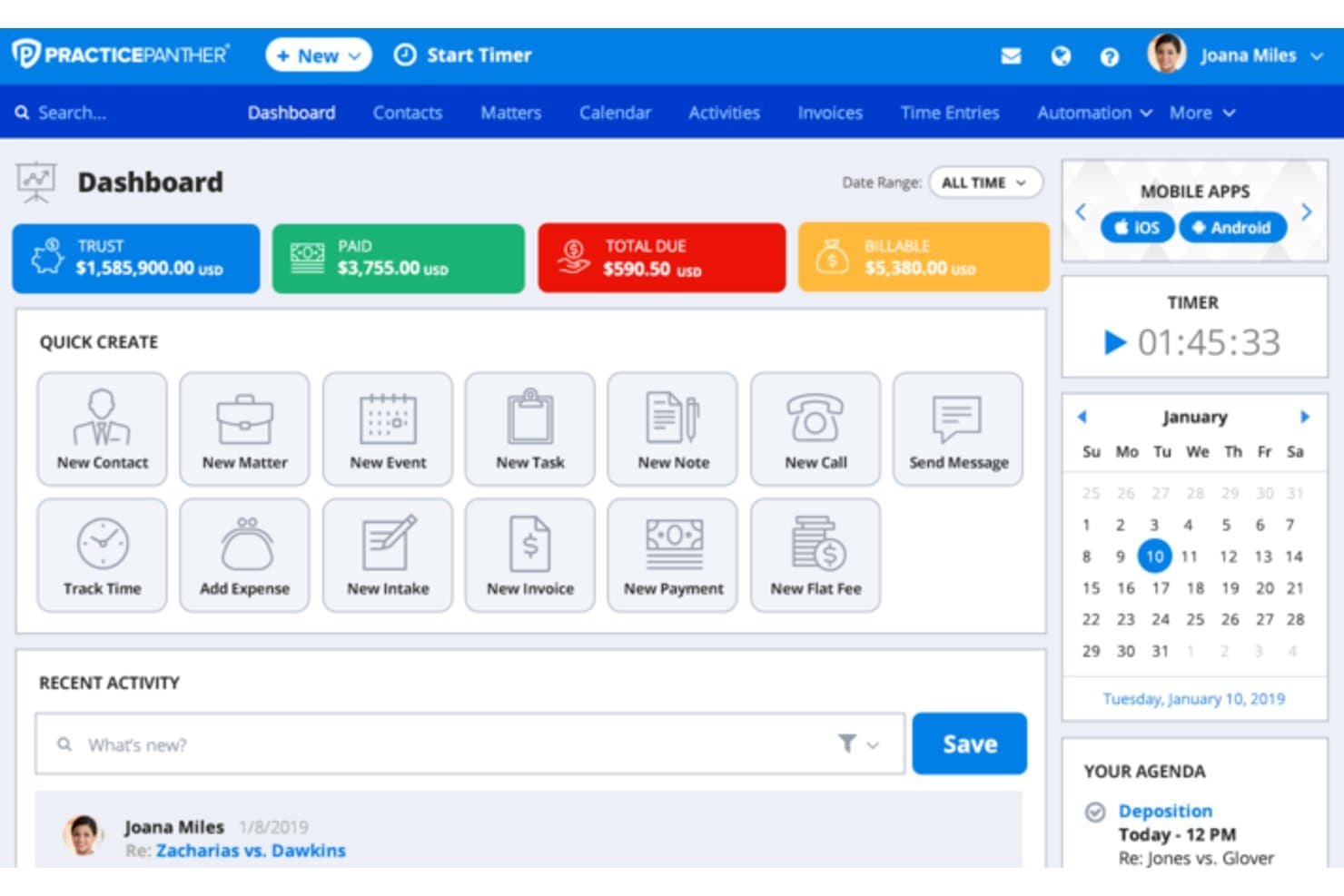
PracticePanther manages cases, court calendars, billing, tasks, and documents. PracticePanther is a cloud-based legal practice management platform for solo attorneys that combines time tracking, invoicing, trust accounting, online payments, and client portal access in one subscription.
Who Is PracticePanther Best For?
Solo attorneys who handle their own books will get the most out of PracticePanther, thanks to its built-in IOLTA trust accounting, guided three-way reconciliation, and native payment processing under one subscription.
Why I Picked PracticePanther
I've included PracticePanther in my top picks because its trust accounting isn't bolted on as an afterthought—it's woven into every billing action. The guided three-way reconciliation wizard walks you through balancing your bank statement, client ledger, and trust account in one sitting, producing audit-ready reports on demand. I also like that evergreen retainer alerts fire automatically when a matter's trust balance dips below your set threshold, prompting a replenishment request without any manual monitoring on your end.
PracticePanther Key Features
- MoneyFinder: Scans tasks, events, and communications with no logged time and surfaces them in a dedicated view so you can recover unbilled hours before invoicing.
- PantherPayments: A built-in payment processor that accepts credit cards at 2.95% and eCheck/ACH at 1%, with no monthly fee and automatic routing to your operating or trust account.
- Secure client portal: A branded, encrypted space included on every plan where clients can view invoices, pay online, share documents, and send two-way messages.
- Batch invoicing: Lets you generate invoices across multiple matters simultaneously, with automated follow-up reminders sent via email, portal, or SMS payment link.
PracticePanther Integrations
PracticePanther offers native integrations with QuickBooks Online, Gmail, Microsoft Outlook, Google Calendar, Dropbox, Google Drive, Box, LawToolBox, and Lawmatics. It also supports custom integrations through its open API and Zapier.
Pros and Cons
Pros:
- Secure branded client portal in every plan
- Automated retainer replenishment alerts by matter
- Built-in IOLTA trust accounting and reconciliation
Cons:
- Full accounting features require highest tier plan
- AI billing narrative generation not included
Learn more about PracticePanther: Best for bar-endorsed trust and payment compliance
- 10-day free trial
- From $50/user/month (billed annually)
Visit WebsiteCustomer Rating:4.6/5
MyCase centralizes case timelines, tasks, and status updates in one view. MyCase is a legal practice management platform that combines time tracking, invoicing, trust accounting, online payments, and a secure client portal in a single subscription built for solo and small-firm attorneys.
Who Is MyCase Best For?
MyCase is a strong fit for solo attorneys and small firms who need built-in IOLTA-compliant payment processing and trust accounting without piecing together separate tools.
Why I Picked MyCase
I've included MyCase in my top picks because it's the only platform here endorsed by the ABA and 130+ bar associations specifically for trust and payment compliance. I particularly like how its native LawPay integration routes IOLTA payments so that processing fees never touch a trust account, and the MyCase Accounting add-on handles three-way reconciliation with automated overdraft safeguards. Smart Time Finder also runs passively in the background, surfacing unbilled activities from your day so nothing slips through.
MyCase Key Features
- Smart Time Finder: Reviews all billable activities logged in MyCase throughout the day and surfaces any that haven't been converted to time entries yet.
- Batch invoicing: Generates multiple client invoices simultaneously from tracked time and expenses, rather than creating each one individually.
- Secure client portal: Gives clients 24/7 access to case updates, documents, messages, invoices, and payment—without going through email.
- Work-in-progress (WIP) report: Displays all unbilled time and expenses across active matters in real time, available on Pro and Advanced plans.
MyCase Integrations
MyCase offers 75+ integrations, including LawPay, QuickBooks Online, Google Calendar, Microsoft Outlook, Dropbox, and LawToolBox. Advanced includes an Open API for custom integrations, and Zapier is also supported.
Pros and Cons
Pros:
- Secure client portal for payment and updates
- Smart Time Finder for passive time capture
- Built-in IOLTA safeguards and trust alerts
Cons:
- No native LEDES or e-billing export
- Three-way reconciliation requires a paid add-on
 Best for trust accounting and IOLTA compliance
- 10-day free trial
- From $69/user/month
Visit WebsiteCustomer Rating:4.5/5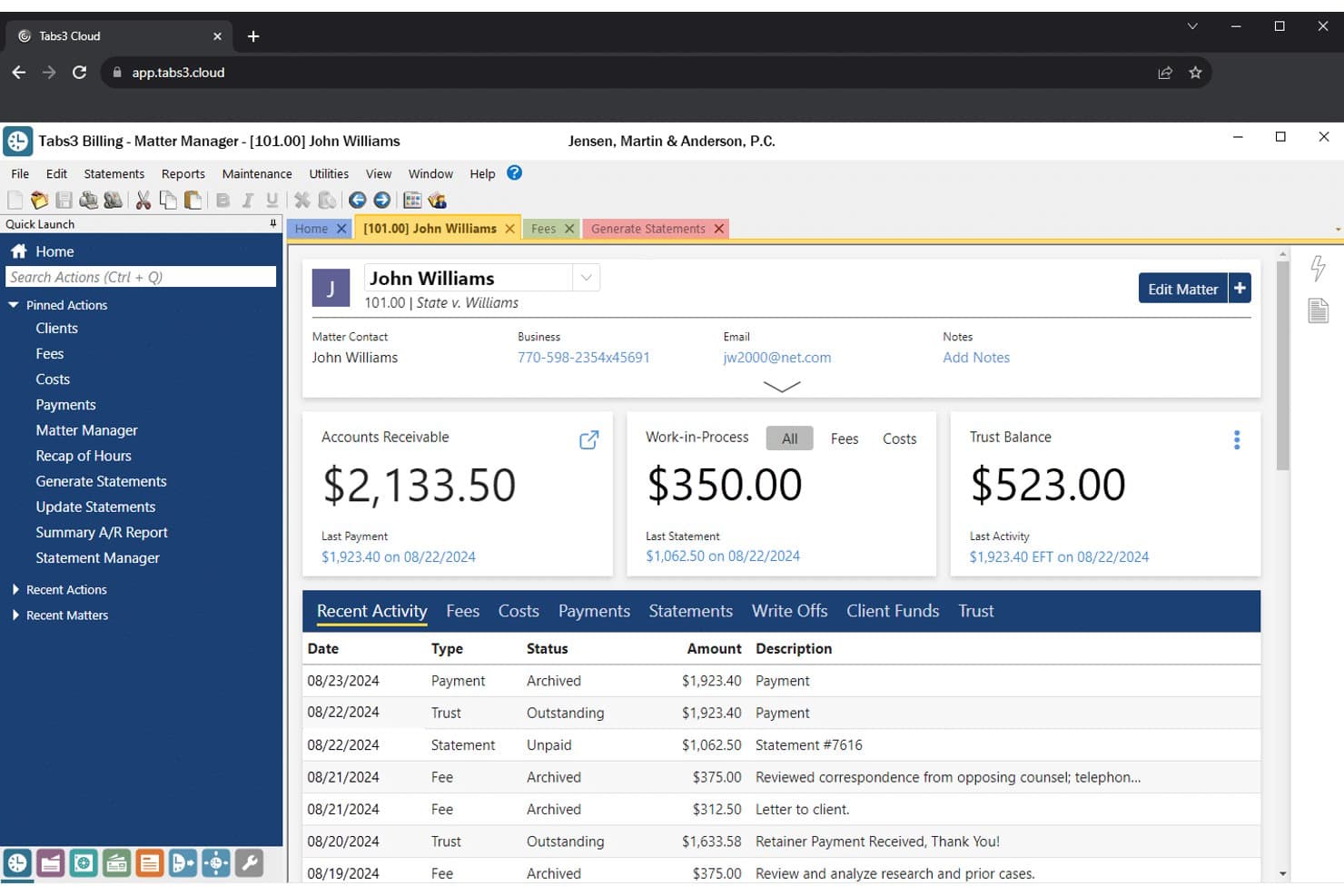
Tabs3 centralizes client billing, trust, and A/R data in one matter view. Tabs3 is a legal billing platform built around time tracking, flexible fee arrangements, trust accounting, and integrated payment processing via Tabs3Pay.
Who Is Tabs3 Best For?
Tabs3 is a strong fit for solo attorneys and small firms who need rigorous trust accounting and IOLTA compliance built directly into their billing workflow.
Why I Picked Tabs3
I picked Tabs3 as one of the best because its trust accounting module is genuinely purpose-built for compliance, not an afterthought. Three-way reconciliation reports that compare your bank statement, client trust ledgers, and internal ledger are built directly into the workflow, which is exactly what state bar auditors expect to see. I also like that Tabs3Pay routes credit card processing fees to your operating account automatically, keeping your IOLTA balance clean without any manual intervention.
Tabs3 Key Features
- Flexible fee arrangements: Set hourly, flat fee, contingency, retainer, progress, or split-fee billing rates per client, matter, or individual timekeeper.
- Tabs3 Connect: Log time, access case files, and view the firm calendar from any smartphone, tablet, or laptop.
- Batch invoicing: Generate and email password-protected PDF statements to multiple clients in a single workflow.
- QuickBooks sync: Push financial data from Tabs3 Billing directly to your QuickBooks general ledger to reduce duplicate data entry.
Tabs3 Integrations
Tabs3 has documented integrations with QuickBooks, Taskbill, LawPay, LexCharge, Microsoft Outlook and 365, and CalendarRules. It also connects with Copitrak, Equitrac, and PaperCut for cost recovery.
Pros and Cons
Pros:
- Detailed reporting for audit and tax
- Wide range of legal billing options
- Trust accounting designed for legal compliance
Cons:
- Manual time tracking without AI features
- Client portal locked behind premium tier
Learn more about Tabs3: Best for passive time capture on solo matters
- 10-day free trial
- From $59/user/month (billed annually)
Visit WebsiteCustomer Rating:4.4/5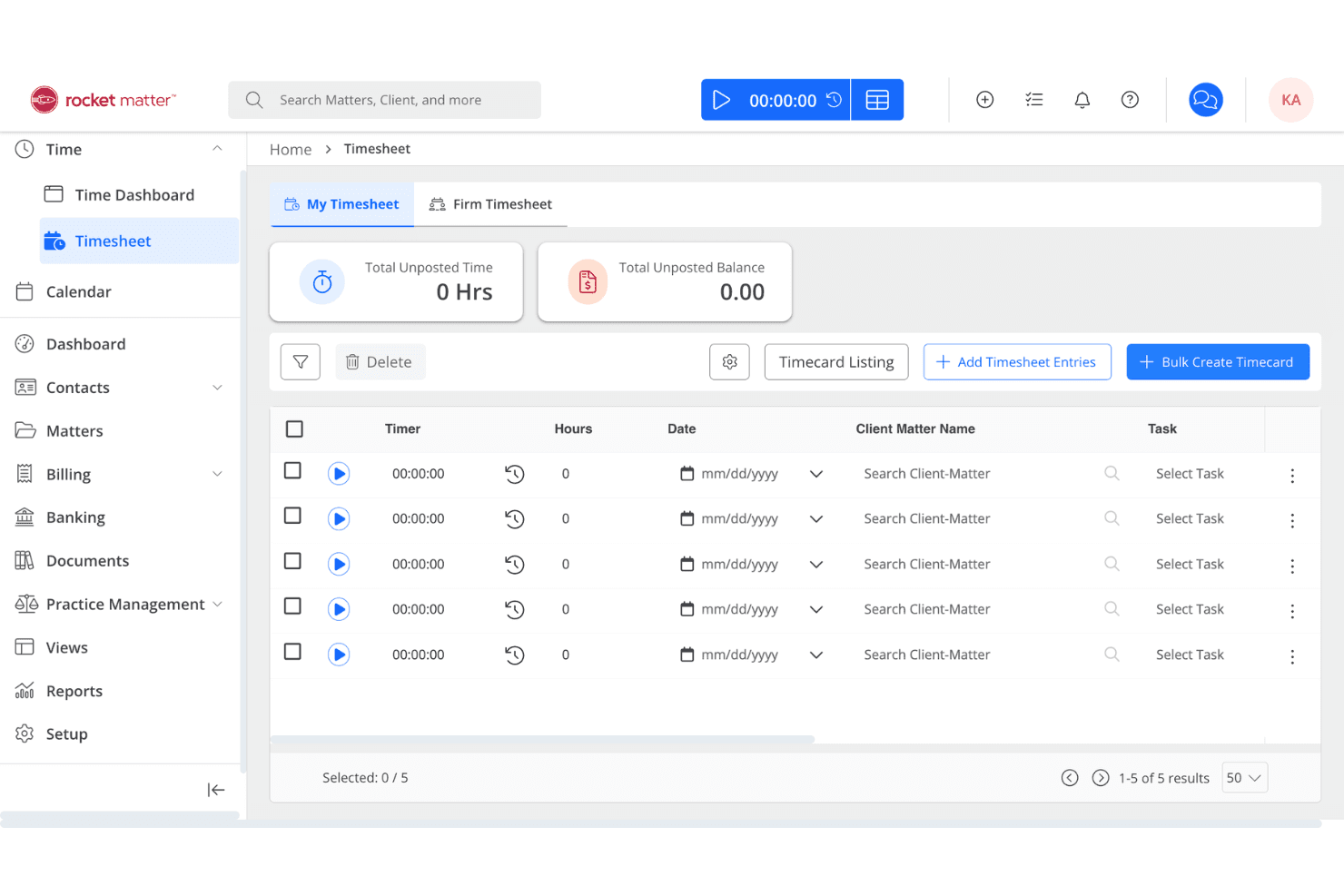
Rocket Matter centralizes law firm tasks, time tracking, billing, and trust accounting. Rocket Matter is a legal practice management and billing platform built for solo and small law firms, covering time tracking, invoicing, trust accounting, online payments, and passive time capture via its Rocket Matter Track add-on.
Who Is Rocket Matter Best For?
Rocket Matter is a strong fit for solo attorneys who need passive time capture to recover billable hours lost across desktop apps, emails, and documents throughout the workday.
Why I Picked Rocket Matter
Rocket Matter earns its spot on my shortlist because of Rocket Matter Track, its passive time capture add-on that runs in the background across all your office apps and devices, automatically logging billable activity without manual input. I find this especially valuable for solo practitioners juggling client calls, document review, and email all at once, since time slips through the cracks constantly. When I look at a busy litigation day, Track captures time spent in Outlook, OneDrive, and desktop apps down to the minute, which Rocket Matter claims can recover up to 50% more billable hours.
Rocket Matter Key Features
- Batch invoicing: Review, approve, and send multiple invoices simultaneously from a single billing run.
- IOLTA-compliant trust accounting: Maintain separate trust accounts per matter with evergreen retainer alerts and audit-ready reports.
- Rocket Matter Pay: Accept credit cards, ACH, PayPal, and Venmo with processing fees automatically routed away from trust accounts.
- QuickBooks Online sync: Bidirectional sync keeps invoices, payments, expenses, and trust transactions current across both platforms.
Rocket Matter Integrations
Rocket Matter offers native integrations with QuickBooks Online, Microsoft 365 including Outlook and OneDrive, Google Calendar, Dropbox, Box, and NetDocuments. It also supports custom integrations through its open API and Zapier.
Pros and Cons
Pros:
- Invoicing supports LEDES and split billing
- Trust accounting explicitly addresses bar audit needs
- Passive time capture reduces missed billables
Cons:
- CRM and intake require costly add-on
- Mobile app misses key desktop features
Learn more about Rocket Matter: Best for midsize firms scaling past solo
- Free demo available
- Pricing upon request
Visit WebsiteCustomer Rating:4.5/5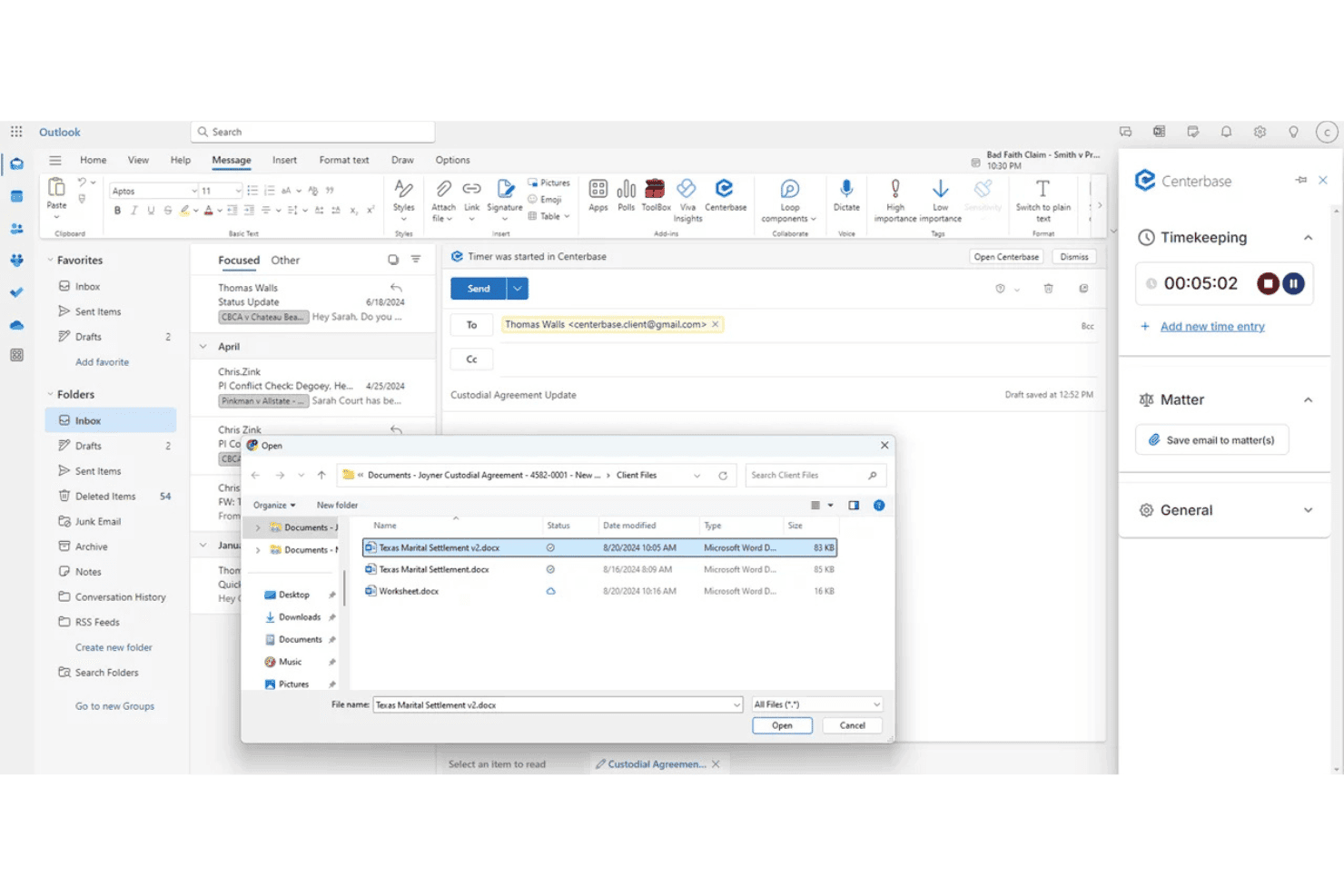
Centerbase ties tasks, deadlines, and follow-ups to matters, with Outlook email and calendar sync. Centerbase is a cloud-based legal practice management platform built for midsize law firms, combining time tracking, billing, trust and IOLTA accounting, online payments, and client matter management in one system.
Who Is Centerbase Best For?
Centerbase suits growing law firms of five or more attorneys that have outgrown solo-focused tools and need billing, trust accounting, and matter management in one platform.
Why I Picked Centerbase
I've included Centerbase in my top picks because it's the natural next step when your firm outgrows solo-focused tools and needs something built for the complexity of a growing team. I particularly like its ePre-bill review workflow, which routes pre-bills through an approval chain before they reach clients, and its multi-trust account setup, which automatically creates a trust account when a matter opens and supports minimum balance triggers for retainer replenishment.
Centerbase Key Features
- Automated time capture: Runs in the background to record billable activity across calls, emails, meetings, and document work without manual input.
- LEDES e-billing file generation: Produces
.datand.txtLEDES-formatted files for electronic billing submissions, including consolidated files covering multiple invoices. - Centerbase Payments: A native, Stripe-powered payment processor that accepts credit cards, debit cards, and ACH transfers with no monthly platform fee.
- Client portal: Gives clients 24/7 self-service access to view, download, and pay invoices and share documents directly through the platform.
Centerbase Integrations
Centerbase offers documented integrations with QuickBooks Online, LawPay, Microsoft 365, NetDocuments, iManage, LawToolBox, Plaid, and Billables AI.
Pros and Cons
Pros:
- Multi-step pre-bill approval workflow
- Advanced trust accounting with IOLTA safeguards
- Automated time capture across all activities
Cons:
- Overkill complexity for solo practitioners
- Long, mandatory onboarding for all customers
Learn more about Centerbase: Best for bar-compliant trust and billing in one plan
- 7-day free trial
- From $49/user/month
Visit WebsiteCustomer Rating:4.7/5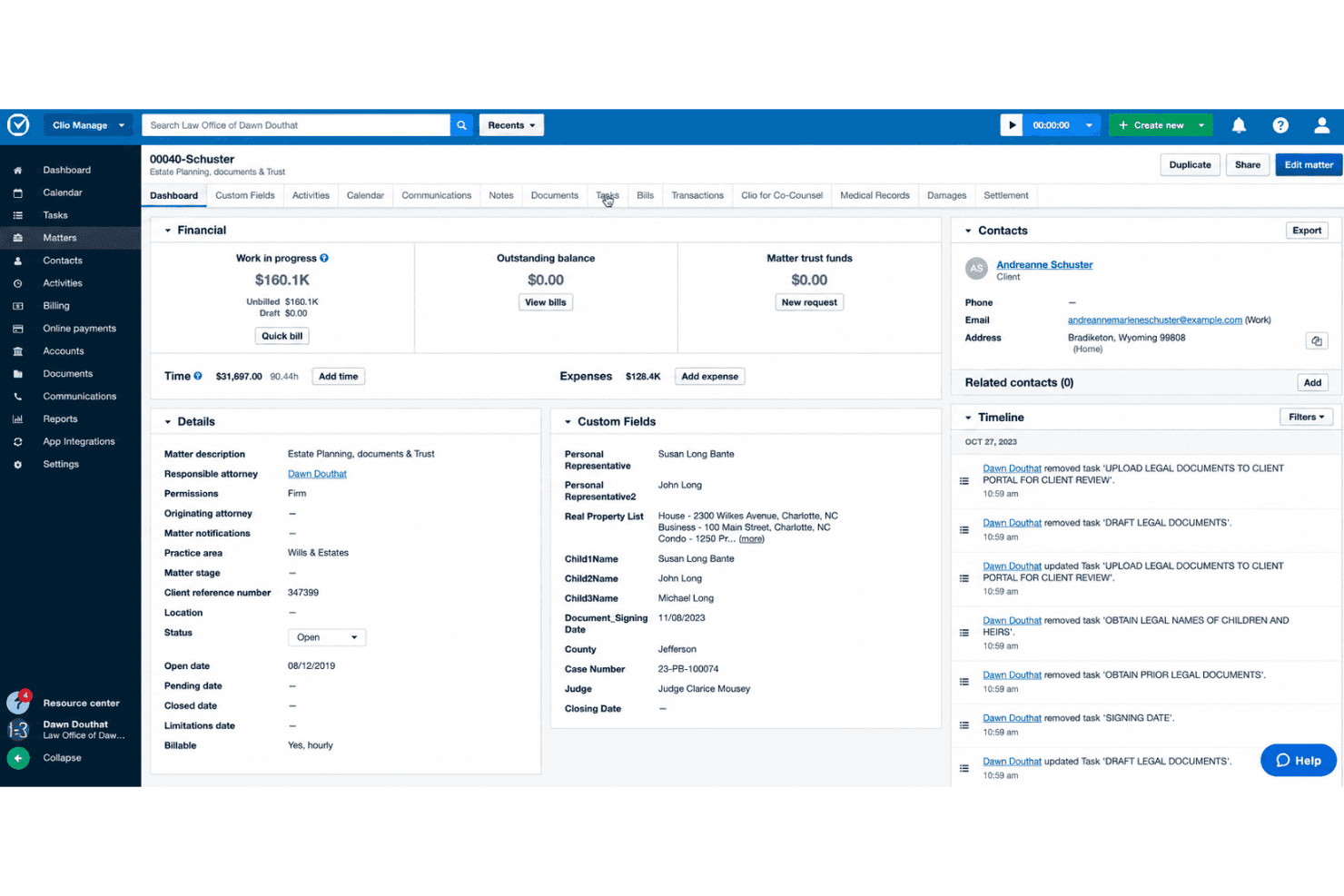
Clio Manage handles matter tasks, court deadlines, time tracking, and client collaboration. Clio Manage is a legal practice management platform that covers time tracking, invoicing, trust and IOLTA accounting, online payments, and matter management in a single subscription built for legal professionals.
Who Is Clio Manage Best For?
Clio Manage is a strong fit for solo attorneys who need billing, trust accounting, and online payments in one place without juggling multiple tools.
Why I Picked Clio Manage
I've included Clio Manage in my top picks because it's the only legal billing tool I know of that's been approved by 100+ bar associations, making it a genuinely trustworthy choice for trust and IOLTA compliance. I particularly like how it keeps earned and unearned funds strictly separate, with per-client trust ledgers and evergreen alerts that automatically notify you when a balance dips below your set threshold. Its native Clio Payments processor routes funds to the correct operating or trust account automatically, so there's no manual sorting after a client pays.
Clio Manage Key Features
- Batch invoicing: Generate all your monthly bills across every matter in a single action, rather than building each invoice one at a time.
- LEDES/UTBMS e-billing codes: Assign standard electronic billing codes to time entries and expenses to meet client billing compliance requirements.
- Mobile tap-to-pay: Collect client payments in person directly from the iOS or Android app using tap-to-pay or QR code scanning.
- QuickBooks Online and Xero two-way sync: Automatically sync contacts, bills, payments, and trust transactions between Clio Manage and your accounting software.
Clio Manage Integrations
Clio Manage offers 250+ marketplace integrations, including QuickBooks Online, Xero, MagicTime, Billables AI, Microsoft 365, Google Workspace, Dropbox, DocuSign, and Adobe Sign. Its Advanced plan includes an open REST API, and Zapier is also supported.
Pros and Cons
Pros:
- AI-generated billing narratives reduce manual entry
- Batch invoicing for all clients at once
- Bar association approval for trust compliance
Cons:
- Credit card fees higher than some rivals
- Client portal not on Starter plan
Learn more about Clio Manage: Best for bar-compliant trust accounting built in
- Free demo + 10-day free trial available
- From $43/user/month (billed annually)
Visit WebsiteCustomer Rating:4.5/5
TimeSolv lets solo practitioners log billable hours with task codes and rates. TimeSolv is a legal billing platform built for law firms and solo practitioners that covers time tracking, LEDES-compliant invoicing, trust/IOLTA accounting, online payments, and matter management.
Who Is TimeSolv Best For?
TimeSolv is a strong fit for solo attorneys and small firm practitioners who handle trust accounts and need built-in IOLTA compliance without a separate accounting tool.
Why I Picked TimeSolv
TimeSolv earns its spot on my shortlist because trust accounting is built directly into the Legal plan, not bolted on as a paid add-on. I especially like the automated three-way reconciliation, which keeps the client ledger, trust bank balance, and overall trust account in sync without manual intervention. The minimum balance alerts tied to individual matters are a practical safeguard I haven't seen as cleanly implemented elsewhere, triggering automatically when a client's trust funds drop below a threshold you set.
TimeSolv Key Features
- Batch invoicing: Generate and send invoices across multiple matters and clients simultaneously from a single action.
- PointOne AI integration: Connects to a passive time-capture tool that tracks billable activity in the background and surfaces draft entries for your review.
- Matter budgets: Set hour and cost thresholds per matter and track estimated vs. actual figures in real time.
- Mobile app with offline mode: Log time and expenses on iOS or Android without an internet connection; entries sync automatically when you reconnect.
TimeSolv Integrations
TimeSolv integrates with QuickBooks, Xero, AccountEdge, LawPay, Microsoft 365, OneDrive, NetDocuments, Dropbox, LexShare, and PointOne. It also offers an Open API for custom integrations.
Pros and Cons
Pros:
- Batch invoicing across multiple matters
- Passive AI time tracking via PointOne
- Automated three-way trust account reconciliation
Cons:
- No native court calendaring or docketing
- Payment processing fees not disclosed publicly
 Best for passive time capture across email and docs
- Free demo available
- Pricing upon request
Visit WebsiteCustomer Rating:4.4/5
CARET Legal organizes matter tracking with visual analytics and status breakdowns. CARET Legal is a practice management and legal billing platform that brings together time tracking, LEDES invoicing, trust accounting, and native payment processing in a single system.
Who Is CARET Legal Best For?
CARET Legal is best suited for midsize law firms that bill institutional or insurance defense clients and need LEDES invoicing, native trust accounting, and passive time capture in one platform.
Why I Picked CARET Legal
I've included CARET Legal in my top picks because of CARET Capture, its passive time tracking feature that runs in the background across email, calendar, and documents without requiring you to start or stop a timer. If you spend a morning drafting in Word and answering client emails, it surfaces those activities as draft time entries automatically. Pair that with LEDES invoicing and native trust accounting, and you get a billing setup built for firms with institutional clients.
CARET Legal Key Features
- LEDES invoicing: Generate LEDES-format electronic invoices for compliance with billing mandates from insurance carriers and corporate clients.
- Three-way trust reconciliation: Automatically reconciles bank balance, book balance, and balance by matter to meet state bar audit requirements.
- Multiple concurrent timers: Run simultaneous timers across different matters so you're never switching contexts to log time manually.
- CARET Pay: Accept credit card, ACH, and e-check payments natively, with automatic routing to trust or operating accounts.
CARET Legal Integrations
CARET Legal offers documented integrations with Microsoft 365, Google Workspace, QuickBooks Online, Lawmatics, OneDrive, NetDocuments, and LawToolBox. It also provides API access for custom integrations.
Pros and Cons
Pros:
- Branded client portal supports secure client payments
- Automated three-way trust reconciliation included
- Passive time capture across email and documents
Cons:
- User interface feels dated and cluttered
- Minimum 25-user contract excludes solo lawyers
Learn more about CARET Legal: Best for scaling solos with compliance-heavy billing
- Free demo available
- Pricing upon request
Visit WebsiteCustomer Rating:4.2/5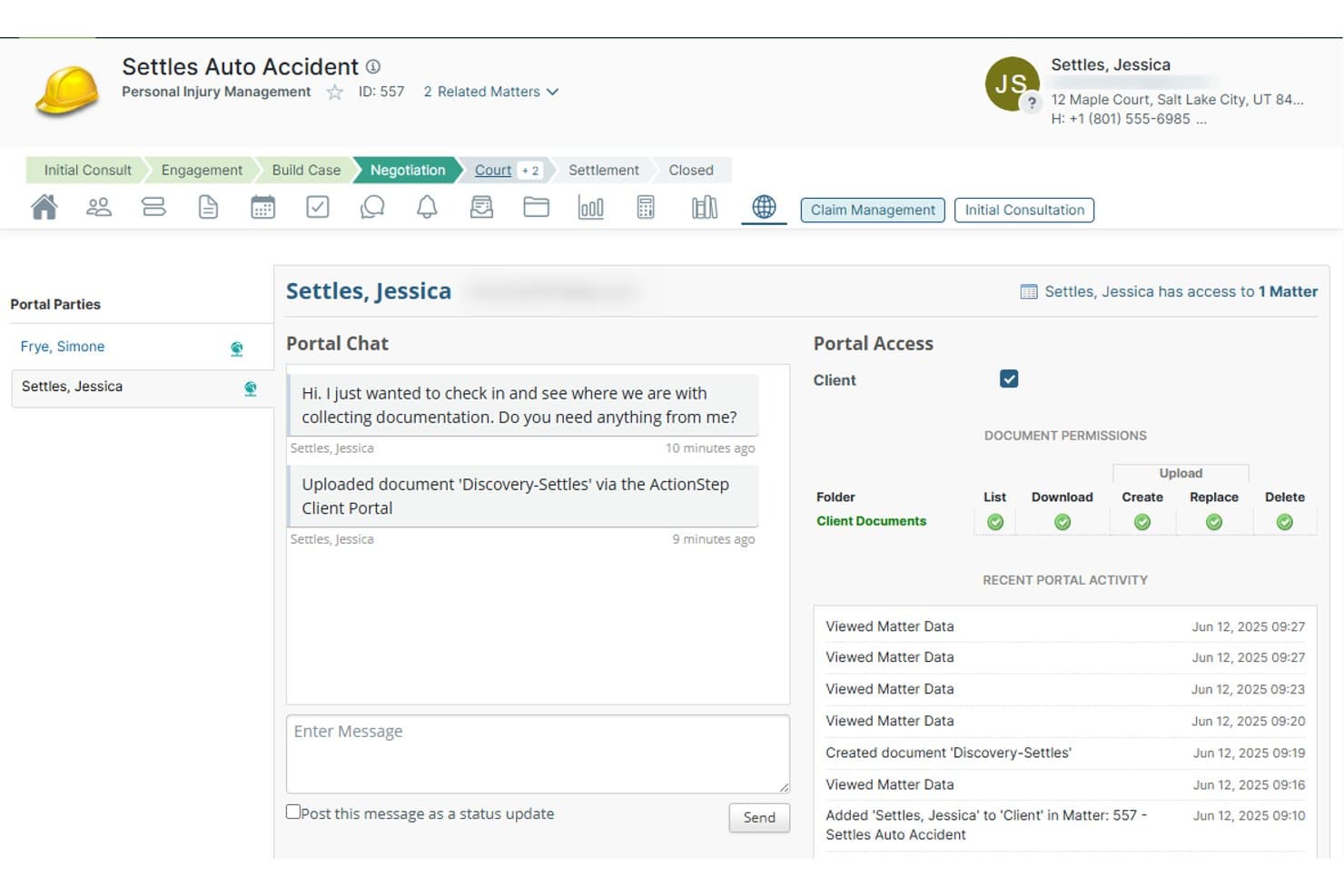
Actionstep lets clients upload documents and chat directly via the portal. Actionstep is a practice management and legal billing platform that combines time tracking, LEDES-compliant invoicing, native trust/IOLTA accounting, online payments, and matter-based workflow automation in a single system.
Who Is Actionstep Best For?
Actionstep suits solo attorneys in compliance-heavy practice areas—like insurance defense or immigration—who are actively growing toward a small firm and need native trust accounting from day one.
Why I Picked Actionstep
I've included Actionstep in my top picks because its native trust/IOLTA accounting is genuinely built in, not bolted on, making it a strong fit for solos in compliance-heavy areas like insurance defense or immigration. Three-way trust reconciliation, per-client ledgers, and overdraft prevention come standard, and LEDES e-billing is supported natively for submitting invoices to corporate clients or insurers with outside counsel guidelines.
Actionstep Key Features
- Concurrent timers: Run multiple timers simultaneously from any screen, assigning each to a specific client and matter as you switch between tasks.
- Automated invoice reminders: Schedule payment reminder emails for upcoming or overdue invoices without manual follow-up.
- Matter workflow automation: Build template-driven workflows per practice area that auto-assign tasks, set deadlines, and trigger client communications.
- Conflict check: Run a one-click search across all matters, documents, file notes, and emails to flag potential conflicts before taking on new clients.
Actionstep Integrations
Actionstep advertises 50+ integrations, including Microsoft Office 365/Outlook, QuickBooks Online, Xero, LawPay, and ALB (Accurate Legal Billing), plus Confido Legal. It also supports API access and Zapier for custom connections.
Pros and Cons
Pros:
- AI-driven passive time tracking across software
- Matter-centric workflows automate legal processes
- Native trust/IOLTA accounting with compliance checks
Cons:
- Designed for midsize firms, not solo practices
- Requires paid setup and certified implementation
Learn more about Actionstep: 10Best for built-in trust accounting and IOLTA billing
CosmoLex
- 10-day free trial
- From $49/user/month (billed annually)
Visit WebsiteCustomer Rating:4.4/5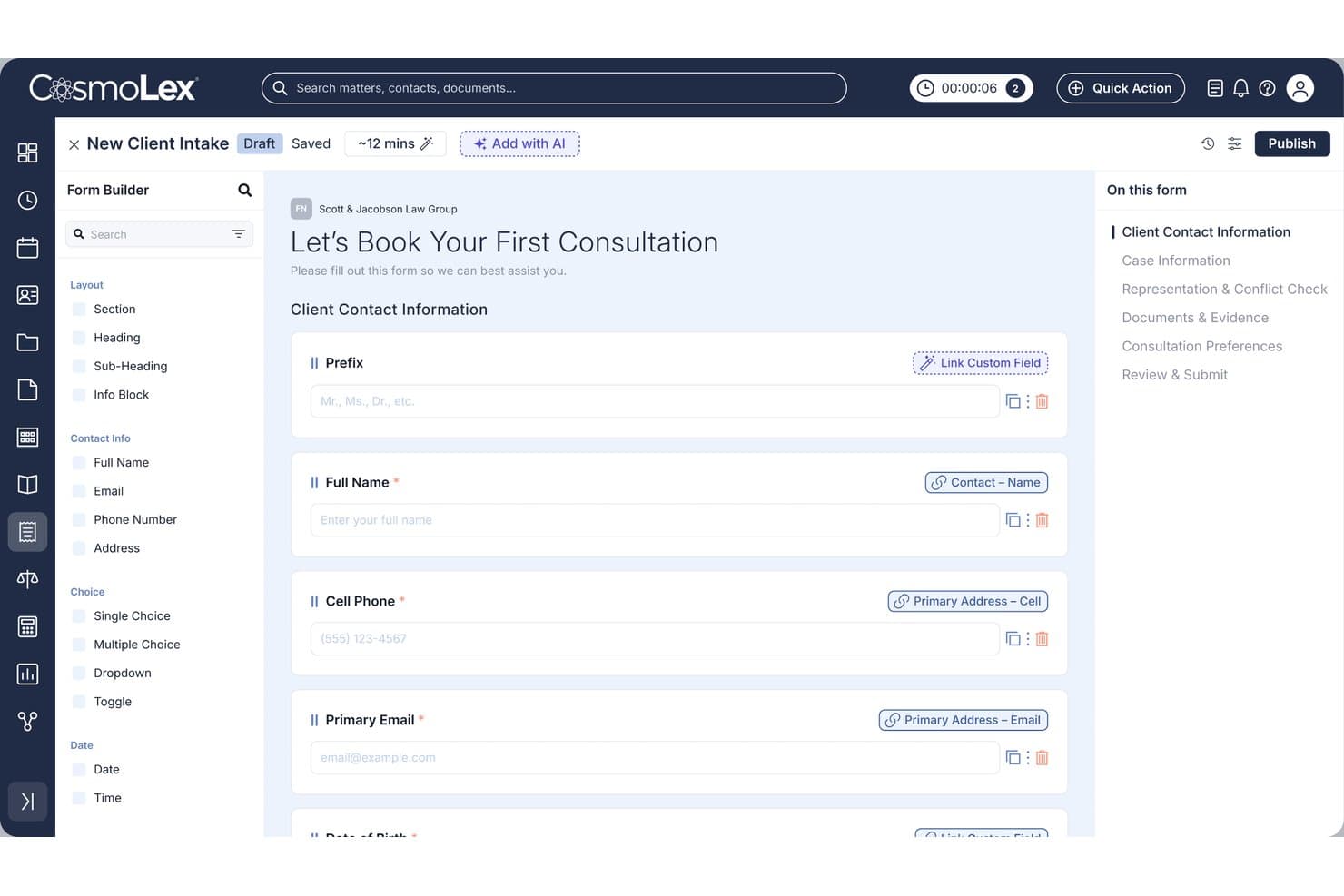
CosmoLex lets users build custom client intake forms with linked fields. CosmoLex is a cloud-based legal practice management platform that combines time tracking, invoicing, trust accounting, online payments, and built-in double-entry legal accounting in a single system.
Who Is CosmoLex Best For?
CosmoLex is a strong fit for solo attorneys who need to manage trust accounting, IOLTA compliance, and client billing in one system without a separate bookkeeper or accounting tool.
Why I Picked CosmoLex
CosmoLex earns its spot on my shortlist because it's one of the only legal billing platforms that treats trust accounting as a core feature rather than an afterthought. I particularly like the one-click three-way reconciliation, which simultaneously matches the trust bank balance, the CosmoLex book balance, and each client's individual ledger. The Money Finder feature is also genuinely useful, scanning matter history for unbilled calendar events and flagging them before you close out a billing cycle.
CosmoLex Key Features
- Batch invoicing: Generate and email all client invoices at once, with personalized notes added per client before sending.
- LEDES/UTBMS e-billing: Full legal e-billing support with task code sets that can be toggled on or off at the firm or matter level.
- Retainer replenishment alerts: Set minimum trust balance thresholds per matter and trigger automatic client-facing replenishment requests when balances fall below them.
- Secure client portal: Clients can view invoices, make payments, exchange messages, and upload or download matter documents through a branded, permission-controlled portal.
CosmoLex Integrations
CosmoLex offers native integrations with Microsoft 365, QuickBooks Online, Dropbox, Google Drive, Box, NetDocuments, Gmail, and Google Calendar. It also supports Chrometa, LexSign, LexShare, and Zapier.
Pros and Cons
Pros:
- Retainer replenishment alerts automate client requests
- Money Finder recovers missed billable time
- Native trust accounting with three-way reconciliation
Cons:
- One-way QuickBooks integration disables native accounting
- Passive time tracking requires separate Chrometa subscription
Learn more about CosmoLex:
Other Legal Billing Software Solo Practitioner
Here are some additional legal billing software solo practitioner options that didn’t make it onto my shortlist, but are still worth checking out:
- 11PCLawBest for legal billing with built-in trust accounting
- 12LeanLawBest for billing built around QuickBooks Online
- 13FilevineBest for litigation billing with IOLTA-safe payments
- 14CaseFoxBest for solos billing corporate clients on LEDES
- 15SmokeballBest for passive time capture as a solo firm
- 16AbacusLawBest for LEDES billing and e-billing compliance
- 17Bill4TimeBest for trust billing without a seat minimum
- 18LawPayBest for bar-endorsed trust and IOLTA compliance
- 19Amicus AttorneyBest for passive time capture across email and calls
- 20PageLightPrimeBest for Microsoft 365-native trust billing
Related Reviews
How I Evaluate Legal Billing Software for Solo Practitioners
I split my evaluation into baseline functionality every tool must cover—like trust accounting and time tracking—and the differentiators that separate a genuinely solo-friendly platform from a generic billing tool.
Core Functionality (Table Stakes for This List)
When I'm selecting tools for my list, I rank each one on a scale from 0 (does not offer the functionality) to 5 (excels in this area) for each core functionality listed below. I then calculate the tool's total score into a percentage, using 65% as a benchmark to help assess its overall fit for the list.
- Time tracking: I check whether the tool offers timers and manual entry tied to specific matters, and whether it supports passive capture or AI-assisted narratives for billing descriptions.
- Legal invoicing: Each tool needs to go beyond generic templates, so I evaluate support for hourly, flat-fee, and contingency arrangements along with LEDES formatting and batch invoicing.
- Trust/IOLTA accounting: I look for dedicated trust ledgers with three-way reconciliation and audit-ready reporting, since mishandling client funds is the fastest path to a bar complaint.
- Online payments: The platform should accept credit card and ACH payments with built-in separation between operating and trust deposits—tools like Clio and CosmoLex handle this natively, while others rely on third-party processors.
- Expense and disbursement tracking: I evaluate whether expenses can be logged at the matter level and pulled directly into invoices, including soft and hard cost categorization and receipt capture.
- Client and matter management: Every billing entry should tie back to a client and matter record, so I look for conflict checks, matter-level rate settings, and custom fields that keep financial data organized alongside case details.
Once I have a list of tools that meet the criteria, I consider what sets each platform apart.
Differentiating Factors (What Sets Vendors Apart)
Here's how I compare and contrast different vendors:
Standout Features
I look for passive time capture that runs in the background across email, calendar, and documents—tools like Clio and CARET Legal surface missed billable activity you'd otherwise lose between court and client calls. AI billing narratives matter too: I evaluate whether a platform can rewrite vague time notes into clear, defensible descriptions that reduce write-downs. I also check for retainer replenishment alerts that auto-trigger when trust balances drop below a matter-specific threshold, since manually monitoring every retainer is unsustainable as a solo.
Beyond Features
I check whether a platform's trust accounting safeguards actually block commingling and overdrafts, since a single disbursement against uncleared funds can trigger a bar complaint. Total cost matters too—I evaluate whether billing, trust, and payments are bundled or stacked across separate subscriptions, because solos rarely have budget for three tools. I also look at data portability: tools like Clio and CosmoLex let you export complete matter and financial records, which is essential if you ever switch vendors or close a practice.
How to Choose a Legal Billing Software Solo Practitioner
Before committing to legal billing software, ask yourself: What billing, trust, and compliance needs truly drive your daily work as a solo practitioner, and how must your software support them?
| If your priority is... | Look for... |
| Bar-compliant trust accounting | Three-way reconciliations and hardcoded IOLTA rules |
| Fast, accurate time capture | Passive time tracking and narrative review |
| Scaling beyond solo to small firm | Multi-user controls and audit-ready exports |
| All-in-one billing plus client management | Unified platform with seamless matter linking |
| Plug-and-play with existing accounting tools | Native QuickBooks Online or Xero integrations |
How to Vet Your Shortlist
- Test IOLTA Handling: Set up a demo account and perform a mock trust disbursement; verify whether the system blocks overdrafts or commingling every time.
- Audit Time Tracking: Run the platform for one full workday with background time capture enabled; review the resulting billable time narrative for missed or duplicated entries.
- Simulate Third-Party Audit: Export a full client matter’s billing, trust, and payment history as required in a compliance audit; check if the report meets your jurisdiction’s format and completeness standards.
- Request Written Compliance Confirmation: Ask the vendor for a clause or attestation stating their system’s compliance with your bar association’s trust accounting rules.
- Weigh All-in-One vs. Best-of-Breed: Decide whether you’ll trade software simplicity for deeper integration—bundled platforms are easier to manage, but standalone billing paired with your favorite tools offers more customization.
What Are Legal Billing Software Solo Practitioners?
Legal billing software solo practitioners are digital platforms designed to help solo attorneys handle client billing, trust accounting, and time tracking from one system. These tools support compliance with legal and financial regulations while making it easier to manage cases and cash flow without administrative help. They typically include features tailored for solo legal practices, such as matter linking, online payments, and audit-ready reporting. This allows you to focus more on practicing law and less on administration.
Features of Legal Billing Software Solo Practitioner
When selecting legal billing software solo practitioner, keep an eye out for the following key features:
- Time tracking: Lets you start timers or enter time manually so every billable minute tied to a specific matter is accurately recorded. Passive time tracking tools can surface work you might otherwise miss.
- Legal invoicing: Creates invoices that support hourly, flat-fee, and contingency billing, including LEDES invoicing formats and batch invoice creation for faster client communications.
- Trust/IOLTA accounting: Provides dedicated trust ledgers with three-way reconciliation, audit-ready reporting, and safeguards to prevent commingling client and operating funds.
- Online payments: Accepts credit card and ACH payments with built-in separation between trust and operating accounts, helping you collect fees faster and stay compliant.
- Expense and disbursement tracking: Lets you log expenses at the matter level, capture receipts, and pull costs directly into invoices with categories for soft and hard costs.
- Client and matter management: Links every time entry and expense to clients and matters, includes conflict checks, custom rate-setting, and ensures billing stays organized by case.
- Retainer management: Enables simple retainer replenishment alerts and automated notifications when client trust balances drop below set thresholds.
- Compliance controls: Blocks overdrafts and detects errors before they result in violations, supporting compliance with strict bar and trust accounting rules.
- Reporting and audit trails: Generates detailed billing, trust, and payment histories that meet auditor and bar requirements if you need to export or review data.
- Integrations with accounting software: Syncs billing and payments with external systems like QuickBooks Online for easier end-of-year reconciliation and financial management.
Benefits of Legal Billing Software Solo Practitioners
Implementing legal billing software solo practitioners provides several benefits for your team and your business. Here are a few you can look forward to:
- Improved billing accuracy: Integrated time tracking and matter-based entries help you capture every billable hour and eliminate manual errors.
- Bar-compliant trust accounting: Automated three-way reconciliations and dedicated trust ledgers ensure you meet IOLTA and jurisdictional client fund handling requirements.
- Faster payment collection: Built-in online payments with credit card and ACH options let clients pay faster while maintaining separation between trust and operating accounts.
- Stronger audit readiness: Detailed reporting and export tools make it easy to produce client, matter, and payment histories that meet audit and compliance standards.
- Automatic retainer management: Real-time alerts and automated replenishment requests prevent trust balance shortfalls before they become a compliance risk.
- Unified client and matter management: Linking every billing entry, disbursement, and payment to client and matter records organizes your financial data and supports better conflict checks.
- Easy integration with accounting systems: Direct syncing to platforms like QuickBooks Online means you can manage billing and financials from one place without extra data entry.
Costs and Pricing of Legal Billing Software Solo Practitioners
Selecting legal billing software solo practitioners requires an understanding of the various pricing models and plans available. Costs vary based on features, team size, add-ons, and more. The table below summarizes common plans, their average prices, and typical features included in legal billing software solo practitioner solutions:
Plan Comparison Table for Legal Billing Software Solo Practitioners
| Plan Type | Average Price | Common Features |
| Free Plan | $0 | Basic time tracking, single user access, simple invoicing, and limited client management. |
| Personal Plan | $25-$40/user/month | Standard time tracking, legal invoicing, trust/IOLTA accounting, online payment processing, and basic reporting. |
| Business Plan | $40-$70/user/month | Advanced billing features, expense and disbursement tracking, compliance controls, integrations, and audit-ready export tools. |
| Enterprise Plan | $70-$120/user/month | Advanced compliance options, custom workflows, consolidated billing, API access, and priority customer support. |
Legal Billing Software Solo Practitioners FAQs
Here are some answers to common questions about legal billing software solo practitioners: