

Legal case management software for Mac lets you organize matters, track deadlines, manage client files, and coordinate legal workflows from a Mac.
The right choice depends on how well a platform handles your practice area, intake, client communication, billing, and trust accounting.
Why Trust Our Software Recommendations
6,700+
Reviews
20
Industry experts
16+
Evaluation factors
14
Years
Our team has been testing and reviewing software since 2012. As legal practice leaders ourselves, we know how difficult—and important—it is to choose the right software.
For this guide, we evaluated tools using hands-on testing and independent research, scoring tools using our selection criteria.
Our reviews reflect our human editorial judgment, not a sales pitch.
Comparison Table: Legal Case Management Software for Mac
Compare pricing and specs, side by side, for the legal case management software for Mac that made it onto my shortlist.
| Tool | Best For | Trial Info | Price | ||
|---|---|---|---|---|---|
| 1 | Best for client communication history per matter | 10-day free trial | From $50/user/month (billed annually) | Website | |
| 2 | Best for intake automation and client tracking | Free demo available | Pricing upon request | Website | |
| 3 | Best for jurisdiction-based deadline automation | Free trial + free demo available | Pricing upon request | Website | |
| 4 | Best for court-rule deadline calculation | 7-day free trial + free demo available | From $49/user/month | Website | |
| 5 | Best for billing, trust accounts, and court deadlines | Free demo available | Pricing upon request | Website | |
| 6 | Best for billing-first Mac-accessible matter tracking | 10-day free trial | From $59/user/month (billed annually) | Website | |
| 7 | Best for solo firm billing and trust accounting | Free plan available | From $39/user/month (billed annually) | Website | |
| 8 | Best for AI-driven matter and billing workflows | Free demo available | From $150/user/month | Website | |
| 9 | Best for built-in trust accounting compliance | 10-day free trial | From $49/user/month (billed annually) | Website | |
| 10 | Best for PI firms tracking cases end to end | Free demo available | From $109/user/month (billed annually) | Website |


Legal Case Management Software for Mac Reviews
Below are my detailed reviews of the legal case management software options on my shortlist. Each overview covers features, matter workflows, and billing tools to help you find the right platform for your firm.
 Best for client communication history per matter
- 10-day free trial
- From $50/user/month (billed annually)
Visit WebsiteCustomer Rating:4.6/5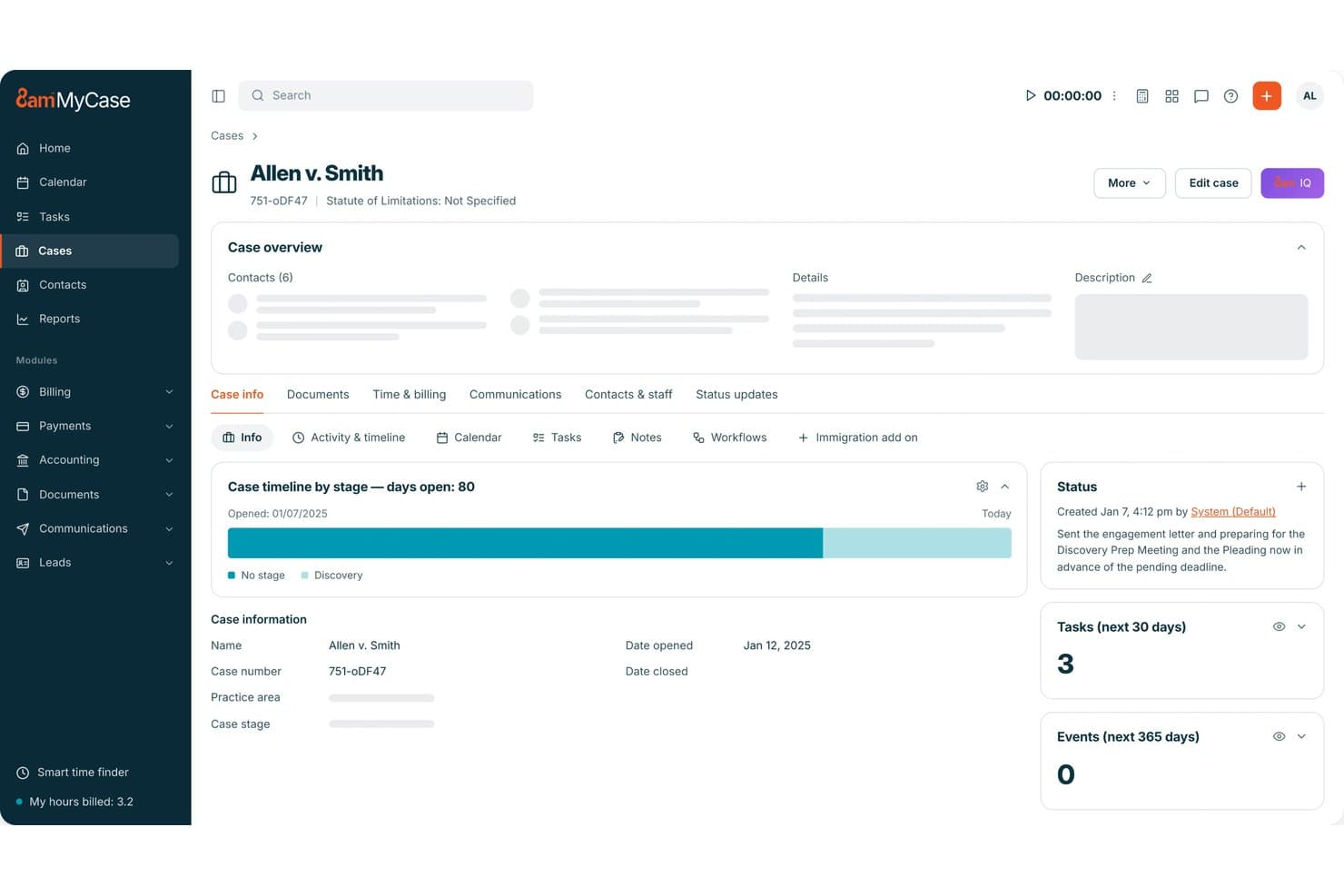
MyCase tracks legal matters, documents, client communications, billing, and trust accounts. MyCase is a cloud-based legal practice management platform that covers case and matter tracking, document management, client communications, time tracking, billing, and trust accounting—with a desktop app and Finder-integrated Drive for Mac users.
Who Is MyCase Best For?
MyCase suits small law firms and solo practitioners who need client communications, case files, billing, and documents tied to a single matter record.
Why I Picked MyCase
I picked MyCase as one of the best because every client interaction gets logged directly to the matter record. Call logs capture direction, timestamp, associated case, and resolution status, and two-way texting keeps those threads in the same place as your documents and invoices. When I need to reconstruct a client communication timeline for a matter, it's all in the Communications tab without digging through email folders or a separate CRM.
MyCase Key Features
- MyCase Drive: A Finder-integrated desktop drive that syncs case documents between your Mac and MyCase's cloud in near real time.
- Workflow automation: Customizable workflows trigger tasks, events, task lists, and documents automatically, with options tailored to specific practice areas.
- Trust ledger and reconciliation: Track trust balances by case and client, manage multiple trust and operating accounts, and reconcile transactions within the platform.
- Conflict check tracking: Search across cases, contacts, and documents to surface potential conflicts before taking on new matters.
MyCase Integrations
MyCase lists 70+ integrations on Pro, including native LawPay and marketplace integrations with Google Calendar, Microsoft Outlook, Dropbox, QuickBooks, LawToolBox, and Gmail. Advanced includes an Open API, and Zapier is also available.
Pros and Cons
Pros:
- Case-linked time, invoices, and trust records
- Finder access to synced case documents
- Matter-linked calls, texts, and client messages
Cons:
- Simultaneous edits can create competing versions
- Drive requires internet, with no offline access
 Best for intake automation and client tracking
- Free demo available
- Pricing upon request
Visit WebsiteCustomer Rating:4.6/5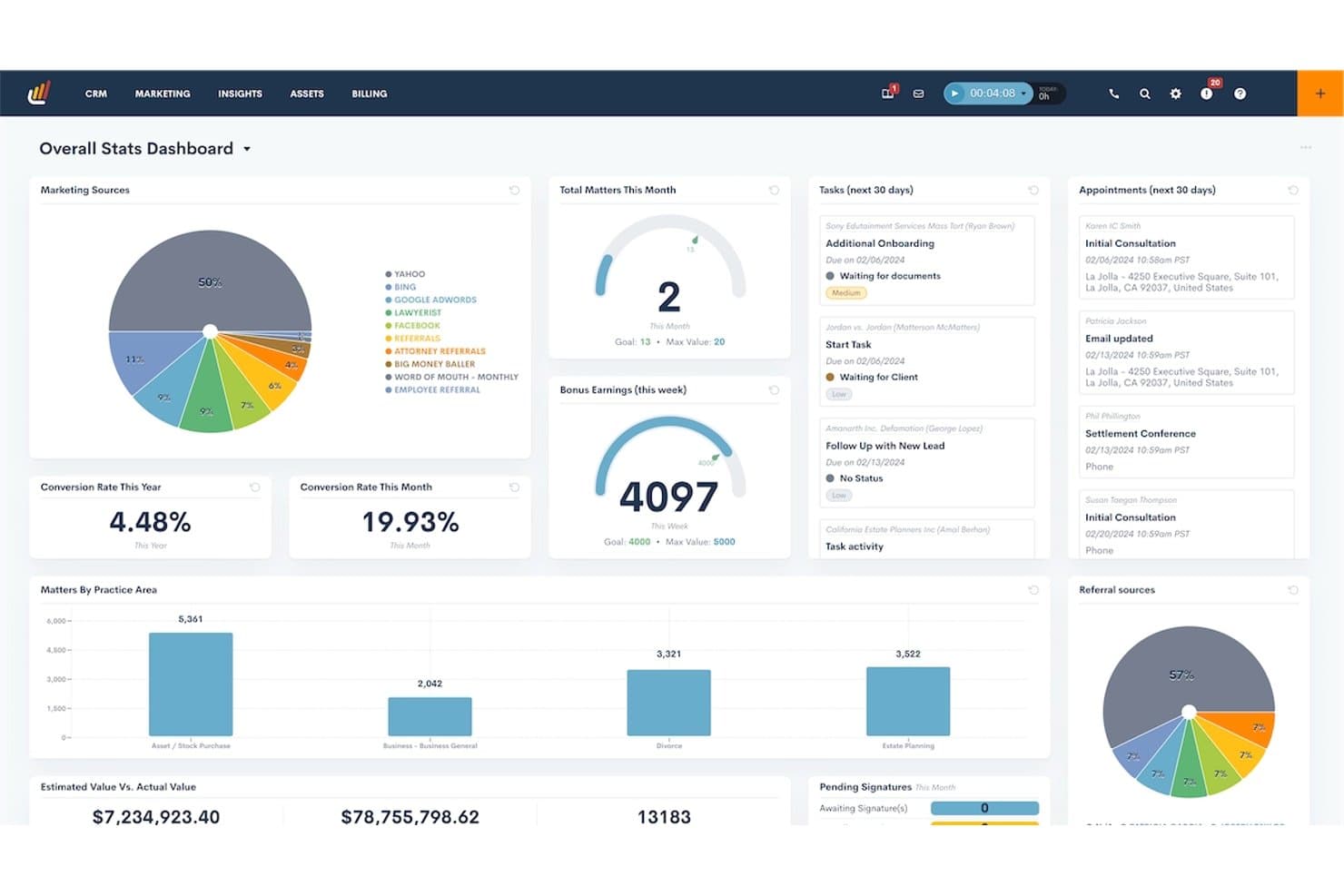
Lawmatics centralizes case stats, tasks, and appointments in one dashboard. Lawmatics is an AI-powered legal CRM that combines client intake automation, matter tracking, marketing automation, and client communication logging for law firms.
Who Is Lawmatics Best For?
Lawmatics is a strong fit for small to mid-sized law firms that need to manage client intake, lead pipelines, and matter communications in one place.
Why I Picked Lawmatics
I picked Lawmatics as one of the best because its intake automation and client tracking capabilities are genuinely hard to replicate with a general-purpose CRM. Every incoming lead moves through a customizable intake pipeline, with automated follow-ups, form collection, and e-signature requests triggered without manual effort. From there, each matter profile pulls together emails, SMS threads, portal messages, tasks, and file activity into a single chronological timeline, so nothing slips through the cracks across your team.
Lawmatics Key Features
- Document automation: Generates customizable documents by pulling from matter and client data fields.
- Client portal: Lets you grant selected contacts access to shared tasks, invoices, file requests, e-signature documents, and messages within a matter.
- Custom user roles and matter access controls: Restricts which matters and features each team member can view or edit based on assigned role and matter attributes.
- AI lead qualification: Uses Merlin Qualify to evaluate and score incoming leads, and Merlin Engage to send automated, personalized follow-up responses.
Lawmatics Integrations
Marketplace integrations include Clio, Gmail, Microsoft Outlook, iCal, OneDrive, QuickBooks, and Zoom. Lawmatics also offers REST API access, webhooks, and OAuth 2.0 for custom integrations.
Pros and Cons
Pros:
- Users praise onboarding support
- Matter timelines consolidate client communications
- Automated intake follow-ups reduce missed leads
Cons:
- No native macOS desktop app
- Workflow setup can take weeks
Learn more about Lawmatics: Best for jurisdiction-based deadline automation
- Free trial + free demo available
- Pricing upon request
Visit WebsiteCustomer Rating:4.5/5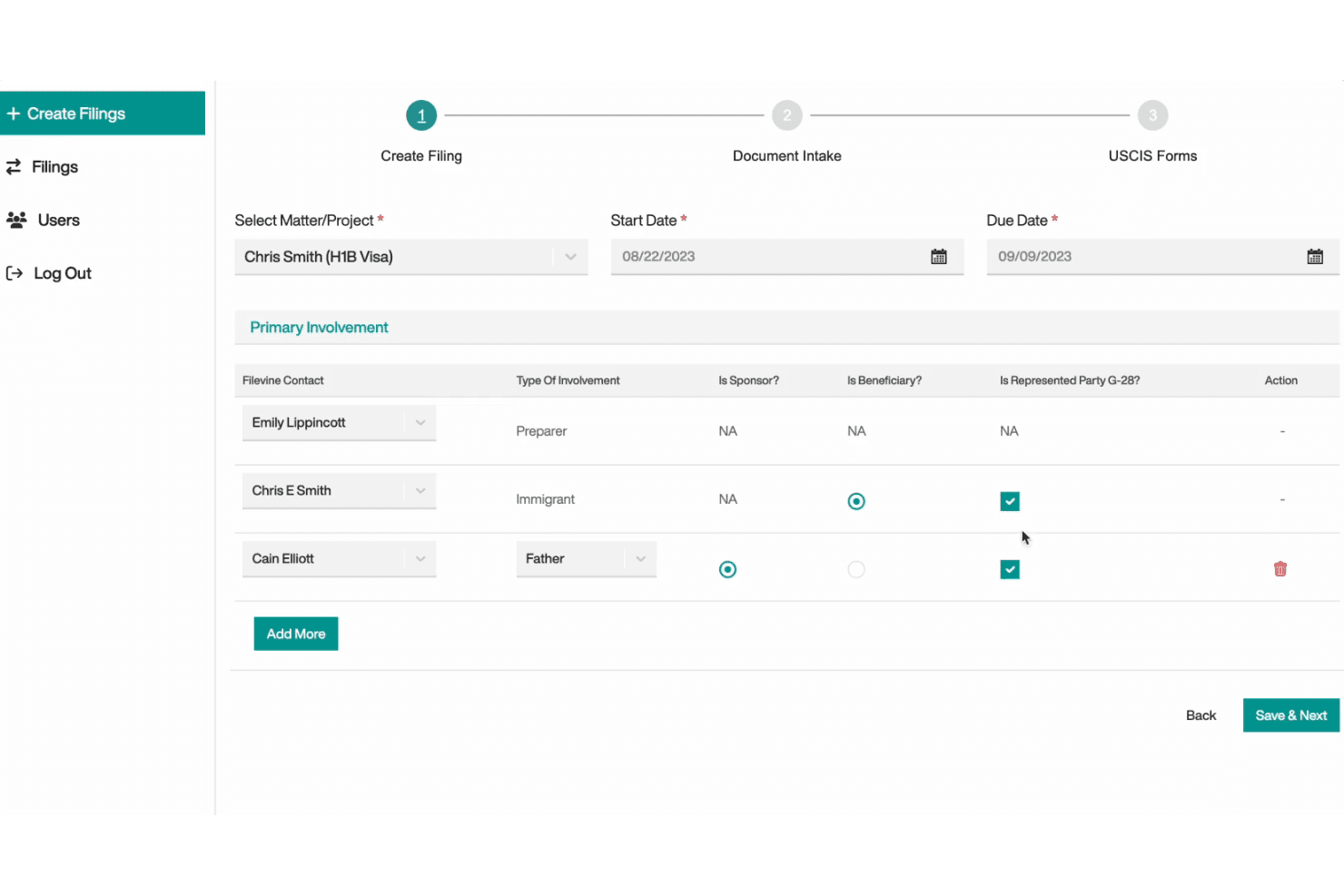
Filevine organizes legal matters, documents, deadlines, billing, and client communications. Filevine is a cloud-based legal case management platform that combines matter tracking, document management, deadline automation, time tracking, billing, and client communication tools in one browser-accessible workspace.
Who Is Filevine Best For?
Filevine is a strong fit for litigation-focused firms that handle high caseloads across multiple jurisdictions and need automated court-rule deadline tracking built into their case management workflow.
Why I Picked Filevine
Filevine earns its spot on my shortlist because of Timely, its jurisdiction-specific deadline engine that calculates court dates directly from statutes and court rules, then updates those rules automatically when jurisdictions change them. I find the workflow genuinely useful: select a jurisdiction, enter a triggering event, review the suggested deadline chain, and export the whole set straight into a Filevine matter or as an
.icsfile. For litigation teams juggling filings across multiple courts, that level of automation cuts real risk out of the calendaring process.Filevine Key Features
- Matter workspace: Connect emails, calendar events, time entries, and case notes to individual matter files in one browser-accessible workspace.
- Client Portal: Give clients secure access to message threads, shared documents, assigned tasks, and a case timeline.
- Document generation: Use DocGen templates to auto-populate client and case data and generate case documents directly from matter records.
- Audit reporting: Track user activity across matters, including task assignments, field edits, and permission changes, with built-in audit reports.
Filevine Integrations
Filevine lists over 2,000 potential integrations, including Outlook, Google Calendar, Office 365, Microsoft Teams, Slack, Gmail, QuickBooks, and Zapier. It also offers an API for custom integrations.
Pros and Cons
Pros:
- Case feeds keep updates with matters
- Matter-linked documents support template generation
- Timely calculates jurisdiction-based court deadlines
Cons:
- Reviewers report slow search and setup demands
- Mac access uses a Chrome-optimized browser
Learn more about Filevine: 4Best for court-rule deadline calculation
Clio
- 7-day free trial + free demo available
- From $49/user/month
Visit WebsiteCustomer Rating:4.5/5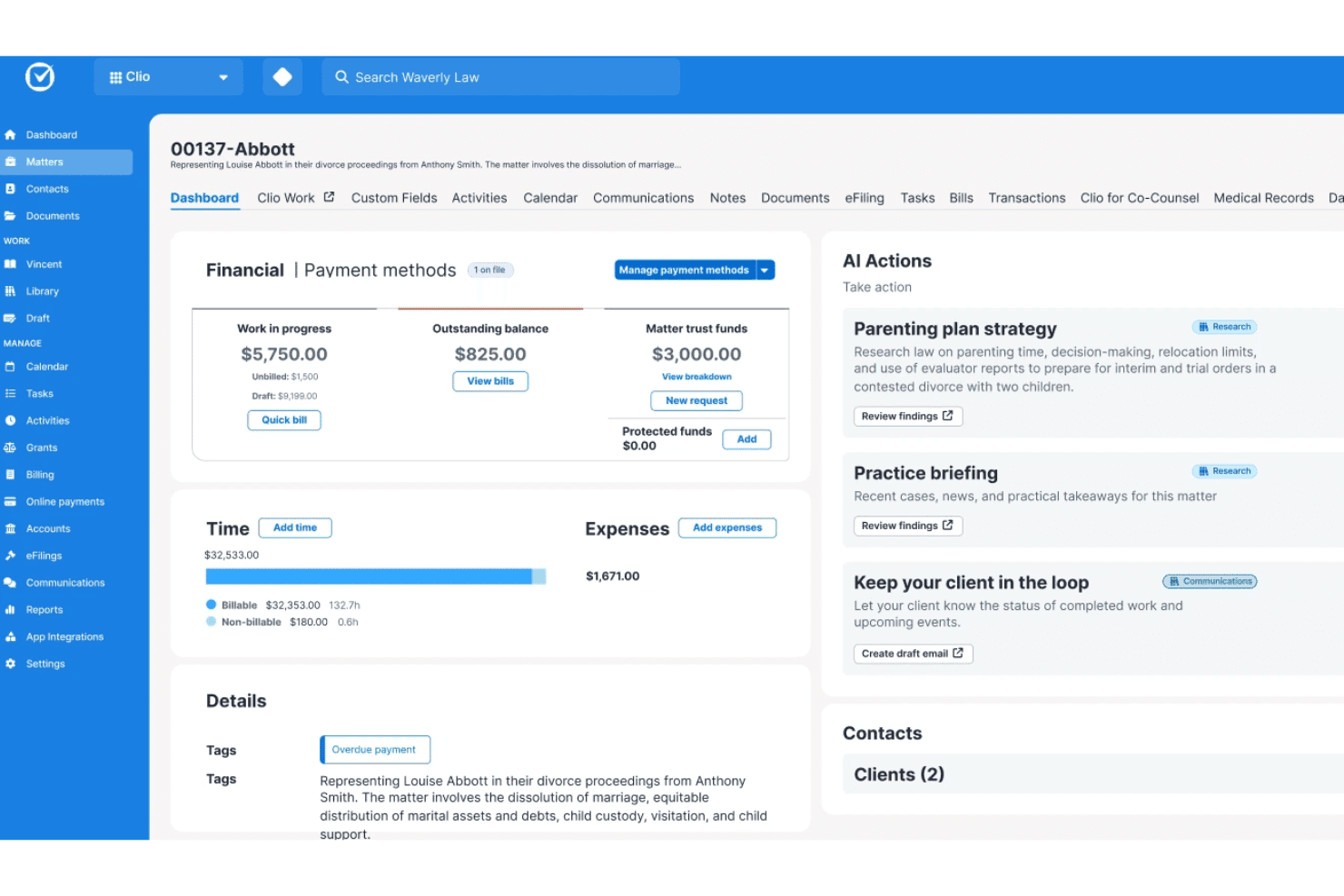
Clio's matter screen includes financial records, time entries, and AI actions. Clio Manage is a cloud-based legal practice management platform that brings together matter tracking, document management, time tracking, billing, trust accounting, and court-rule deadline calculation across thousands of jurisdictions.
Who Is Clio Best For?
Clio Manage is a strong fit for law firms of any size that need court-rule deadline calculation across hundreds of jurisdictions built directly into their practice management workflow.
Why I Picked Clio
Clio earns its spot on my shortlist because of its court-rule deadline calculation, which automatically generates related court events across 2,200 U.S. jurisdictions the moment you select a trigger date. I also like that its AI can parse a court document and convert it directly into calendar events, confirmed against the source. On top of that, each matter acts as a hub where those deadlines sit alongside documents, communications, and billing, so nothing lives in a separate tool.
Clio Key Features
- Trust account reconciliation: Compare your Clio trust ledger against a bank statement and generate exportable reconciliation reports for each client.
- Matter-linked client portal: Share documents, invoices, events, and tasks with clients through a secure per-matter portal accessible via browser or mobile app.
- Clio Drive integration: Access and edit matter documents directly through Mac Finder, with saved changes reflected in Clio Manage automatically.
- Role-based permissions: Assign standard or custom roles to control each user's access to matter records, billing data, and firm information.
Clio Integrations
Clio Manage documents 250+ app integrations, including native Gmail, Microsoft Outlook, QuickBooks, Xero, and TrustBooks connections, plus Ruby through its marketplace and Zapier. Its REST API supports JSON endpoints, webhooks, and OAuth 2.0 for custom integrations.
Pros and Cons
Pros:
- Matter records group billing and communications
- Mac Finder access keeps matter files nearby
- Court rules generate jurisdiction-based deadlines
Cons:
- Billing reports and payment status confuse users
- Calendar and reminder workflows draw complaints
Learn more about Clio: Best for billing, trust accounts, and court deadlines
- Free demo available
- Pricing upon request
Visit WebsiteCustomer Rating:4.4/5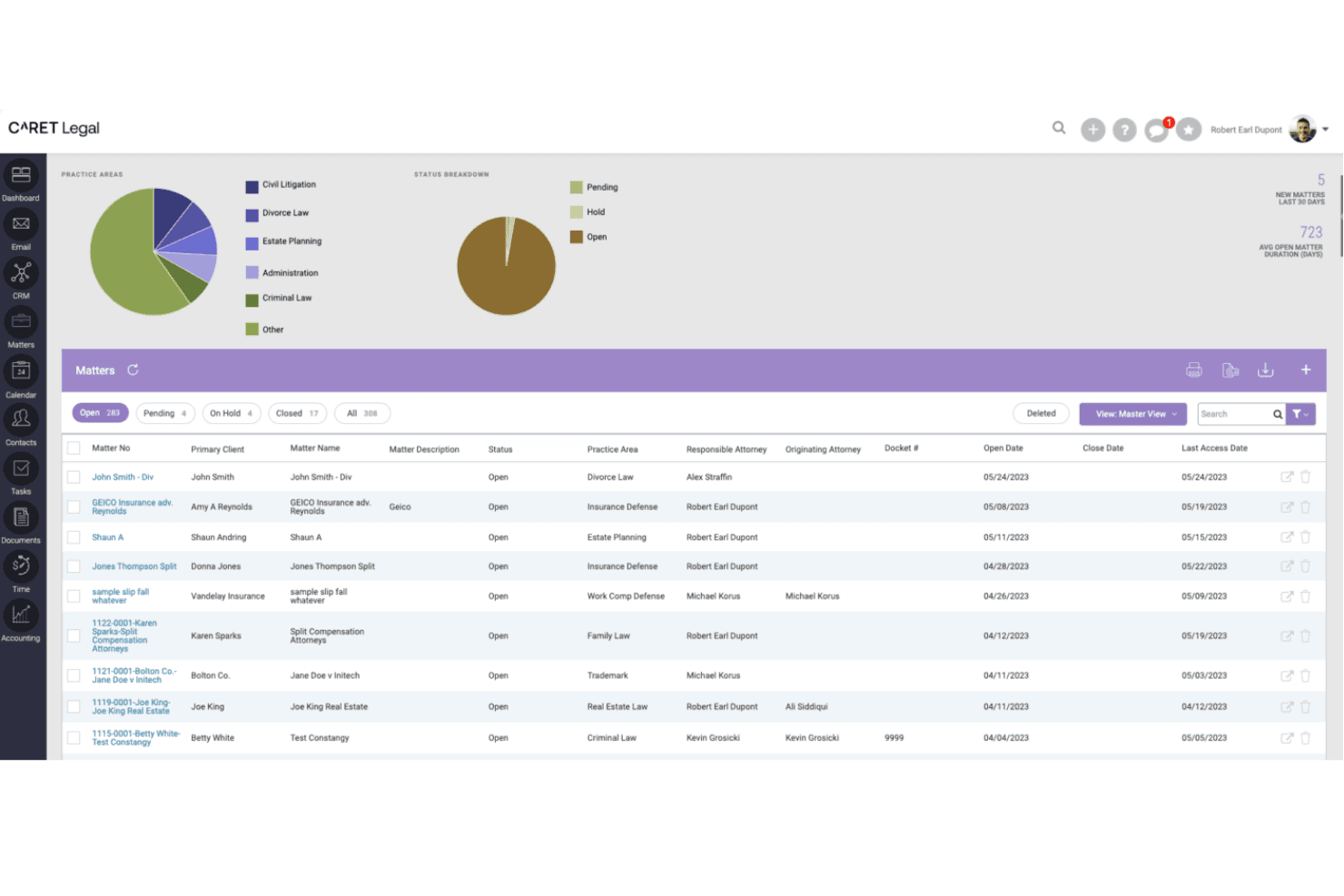
CARET Legal centralizes matter tracking across practice areas and statuses. CARET Legal is a cloud-based legal practice management platform that brings together matter tracking, billing, trust accounting, document management, calendaring, and court-rules-based deadline calculation in one system.
Who Is CARET Legal Best For?
CARET Legal is a strong fit for mid-size law firms where billing administrators and legal operations staff need tight control over trust accounts, invoicing, and court-deadline tracking.
Why I Picked CARET Legal
I've included CARET Legal in my top picks because its billing, trust accounting, and court-deadline tools go deeper than most practice management platforms. CARET Court Rules automatically recalculates dependent deadlines when a trigger date shifts, and flags events that fall on court holidays so you can adjust without losing your chain of dates. On the financial side, the Three-way Reconciliation report compares your bank balance, book balance, and individual trust ledger totals in one view, which is exactly what you need to stay on top of trust account compliance.
CARET Legal Key Features
- Matter-linked task management: Create and track tasks directly within a matter record, keeping all case action items tied to a single, organized view.
- Two-way texting: Send and receive text messages with clients from within the platform, with communication logged alongside other matter activity.
- Role-based user permissions: Assign custom permission levels by role, controlling which users can access specific matters, accounting sections, or billing data.
- iOS and Android mobile app: Access matter details, contacts, documents, and calendars from your phone, with support for Touch ID authentication and business card scanning.
CARET Legal Integrations
CARET Legal lists integrations with Microsoft 365, Google Workspace, OneDrive, NetDocuments, QuickBooks Online, IMAP, LawToolBox, and Lawmatics. It also provides an API for custom integrations.
Pros and Cons
Pros:
- Linked deadlines recalculate after trigger-date changes
- Integrated timers support billable time capture
- Matter records group documents, tasks, and costs
Cons:
- Reviewers report email sync and matter-association friction
- Windows-only Office plugins limit Mac workflows
Learn more about CARET Legal: Best for billing-first Mac-accessible matter tracking
- 10-day free trial
- From $59/user/month (billed annually)
Visit WebsiteCustomer Rating:4.4/5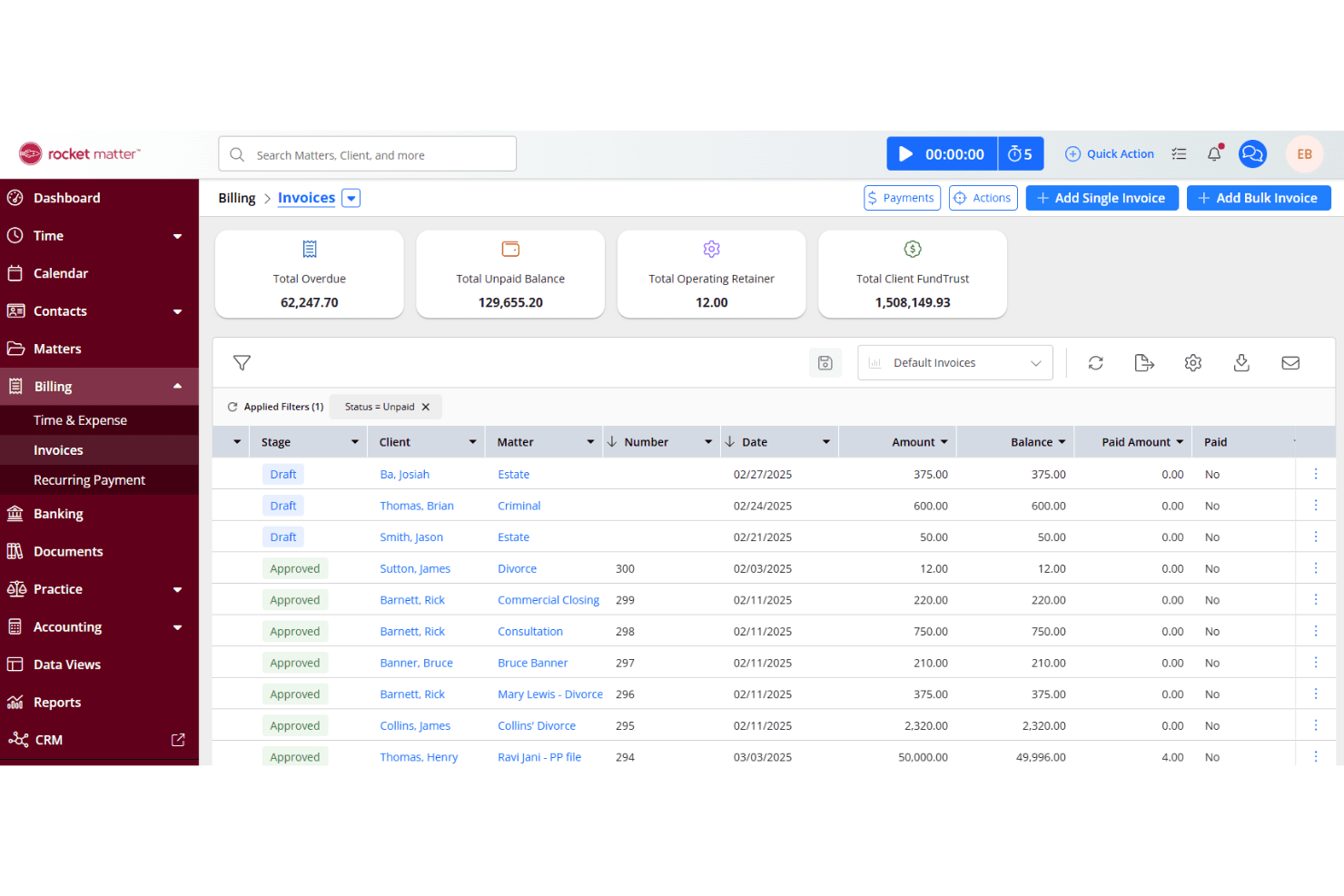
Rocket Matter enables flexible payment plans and balance and invoice tracking. Rocket Matter is a cloud-based legal practice management platform that centralizes matter tracking, time entry, billing, trust accounting, and document management across web, macOS, and mobile devices.
Who Is Rocket Matter Best For?
Rocket Matter is a strong fit for law firms that put billing and trust accounting at the center of their practice management workflow.
Why I Picked Rocket Matter
I picked Rocket Matter as one of the best because billing sits at the core of how it organizes every matter. Time entries, trust account balances, and invoice activity attach directly to each matter record, so when I'm reviewing a case from my Mac, I'm also looking at its full financial picture in one place. The trust accounting tools go further than most, with replenishment alerts that trigger when a client's balance drops below a set threshold and reconciliation built into the platform.
Rocket Matter Key Features
- Matter activity log: Records every user action on tasks, events, notes, and billable entries, so your full matter history stays auditable and accessible.
- Document assembly: Generates legal documents from customizable templates pre-filled with client data stored in Rocket Matter.
- Conflict checking: Runs conflict checks across firm contacts and client relationships directly from the platform.
- Client portal: Lets you share files, send invoices, and respond to client questions through a dedicated secure portal.
Rocket Matter Integrations
Rocket Matter offers native integrations with Microsoft 365 Outlook, Google Calendar, QuickBooks Online, OneDrive, Dropbox, Box, NetDocuments, WebCal, and iCalendar. It also supports Zapier and provides an HTTP JSON API with OpenAPI documentation for custom integrations.
Pros and Cons
Pros:
- Cloud access works across Mac and mobile
- Case records centralize documents and activity
- Matter-linked billing and trust balances
Cons:
- Reviewers report calendar sync problems
- Cloud access, but no native Mac app
Learn more about Rocket Matter: Best for solo firm billing and trust accounting
- Free plan available
- From $39/user/month (billed annually)
Visit WebsiteCustomer Rating:4.4/5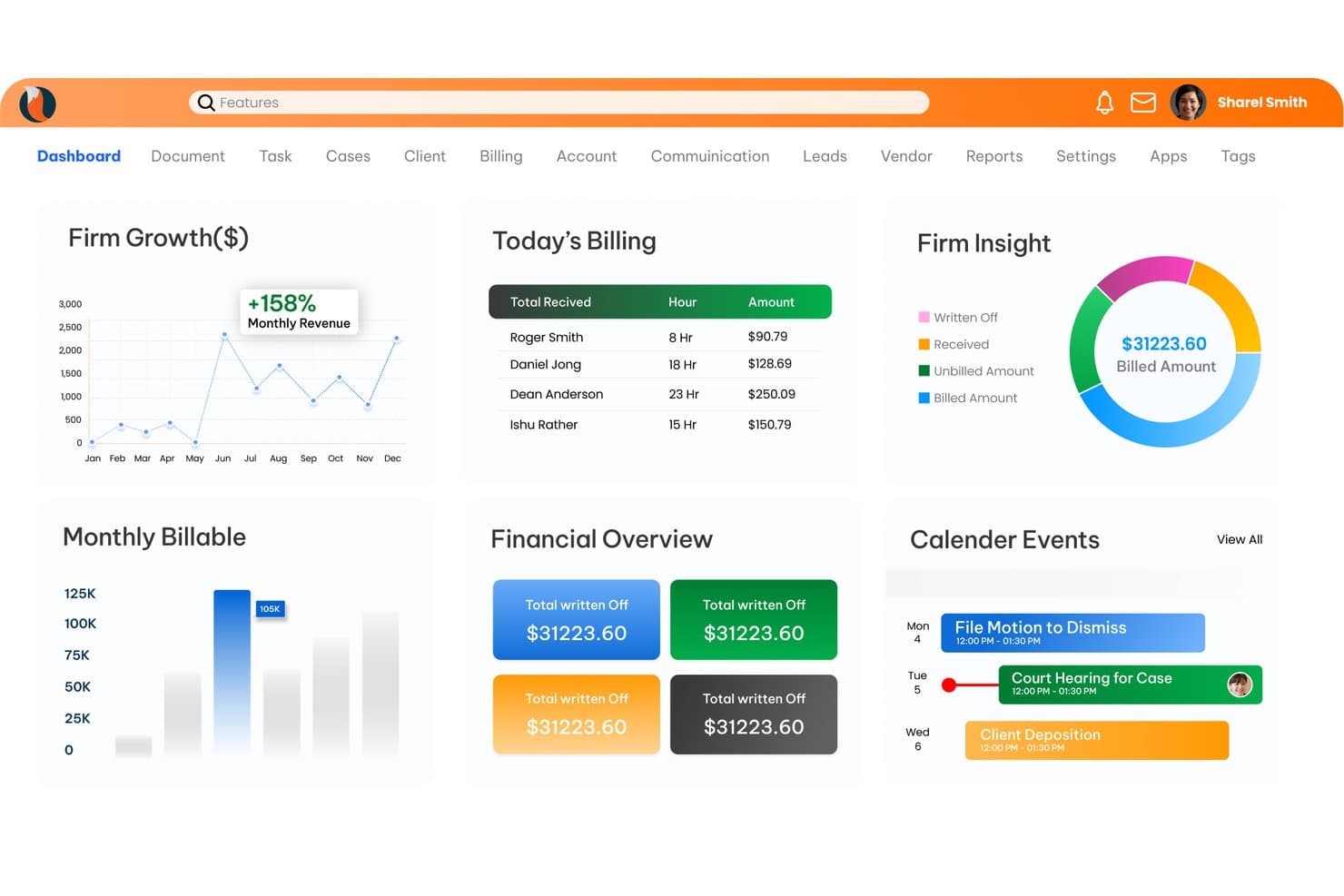
CaseFox tracks legal matters, time, expenses, trust accounts, and client billing. CaseFox is a cloud-based legal case management platform built for solo and small firms, covering matter tracking, time and expense entry, LEDES/UTBMS billing, trust accounting, legal calendaring, document management, and a secure client portal.
Who Is CaseFox Best For?
CaseFox is a strong fit for solo attorneys and small firms that need structured billing, trust accounting, and matter tracking without a steep price tag.
Why I Picked CaseFox
I've included CaseFox in my top picks because its billing and trust accounting tools are genuinely built for the solo attorney workflow, not bolted on as an afterthought. You can record time via a built-in timer, SMS, or calendar notes, then pay invoices directly from IOLTA-labeled trust accounts with deductions reflected on the invoice automatically. The LEDES and UTBMS billing support means you're covered for structured legal billing without needing a separate tool.
CaseFox Key Features
- Conflict check search: Search across clients, contacts, and cases to flag potential conflicts, with matching that accounts for misspellings and multiple languages.
- Client intake forms: Build drag-and-drop intake forms, share them via secure link, and capture submissions directly as leads in CaseFox.
- Rules-based calendaring: Set up automated court-deadline calendars with case-linked events, email reminders, and two-way sync with Google Calendar and Outlook.
- Role-based user permissions: Assign staff roles—including customizable Office Secretary access—to control which cases, time entries, and billing amounts each user can view.
CaseFox Integrations
CaseFox lists integrations with iCal, Google Calendar, Outlook, Google Drive, Dropbox, OneDrive, Google Docs, BoxNet, LawPay, and PayPal. The vendor doesn’t state a total integration count or public API availability.
Pros and Cons
Pros:
- Cloud access supports Mac-based casework
- Trust ledgers pair with invoice deductions
- Reviewers praise easy time entry and invoicing
Cons:
- Email records require manual filing
- No confirmed native macOS application
Learn more about CaseFox: Best for AI-driven matter and billing workflows
- Free demo available
- From $150/user/month
Visit WebsiteCustomer Rating:4.2/5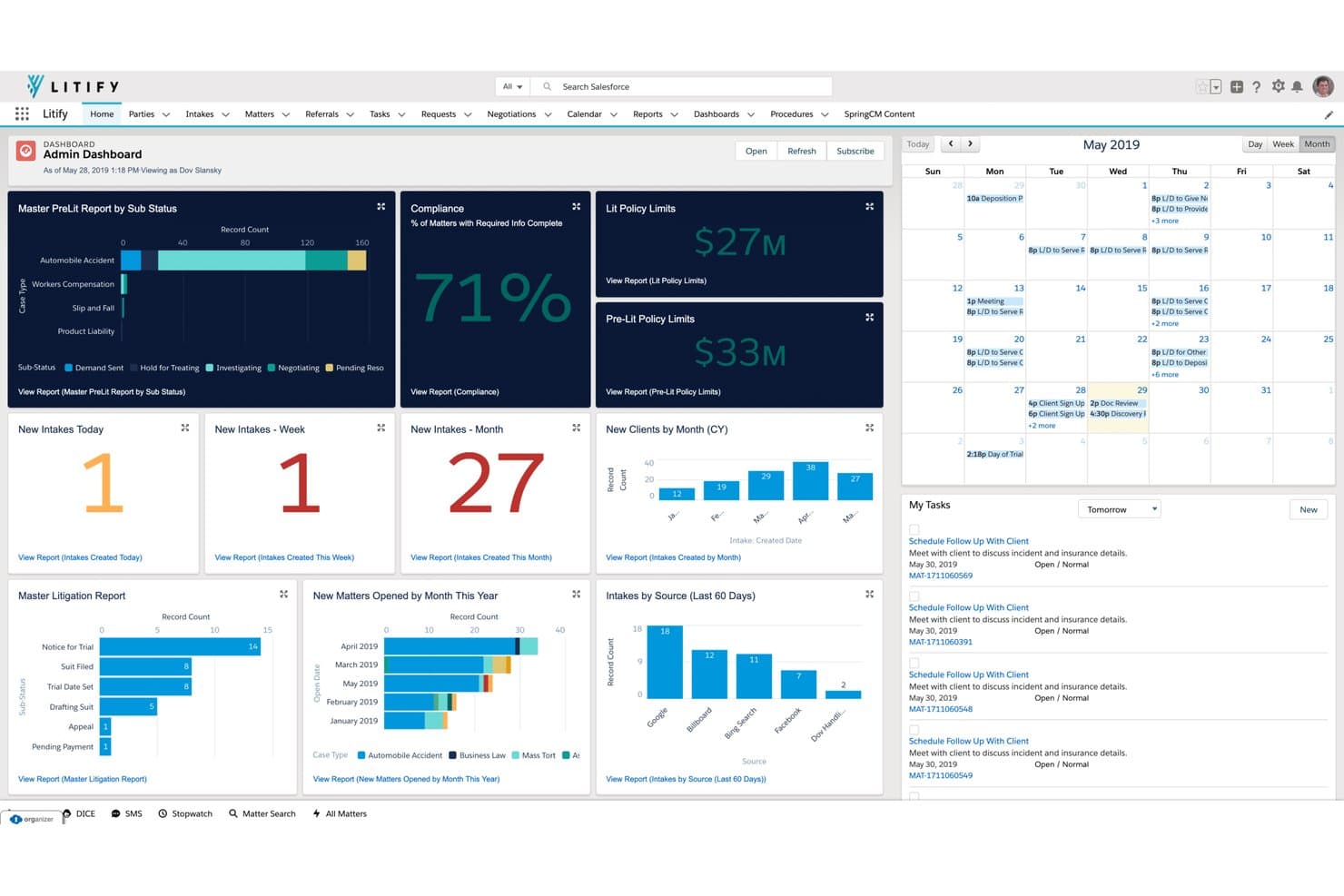
Litify handles legal matters, client intake, billing, documents, and AI workflows. Litify is a cloud-based legal platform built natively on Salesforce that covers matter management, document handling, intake, time tracking, billing, and AI-driven workflow automation across the full case lifecycle.
Who Is Litify Best For?
Litify is a strong fit for mid-size to large law firms that need a single platform to manage the full case lifecycle, from intake through billing, with AI-driven automation built in.
Why I Picked Litify
I've included Litify in my top picks because it's one of the few platforms where AI is woven into the billing and matter workflow itself, not bolted on. LitifyAI Time Capture tracks your daily activity and recommends time entries automatically, while the Matter Summary Agent pulls case status and recent activity into a single, readable snapshot. Built natively on Salesforce, the whole platform runs in a browser, so Mac users get full access without any compatibility concerns.
Litify Key Features
- Document Assistant: Retrieves new documents from email, classifies file types, and routes them to a matter-linked review queue.
- Intake Qualifier Agent: Screens incoming cases against your configured criteria to flag high-value claims before they enter the matter pipeline.
- Configurable no-code reports and dashboards: Build custom reports on case performance, team productivity, and revenue without writing code.
- Digital Disbursements: Manages settlement disbursements with matter-level approval workflows and auditable records for trust and IOLTA transactions.
Litify Integrations
Litify natively integrates with Salesforce and connects with Outlook, DocuSign, Workday, SAP, and QuickBooks. It also supports REST API integrations and marketplace integrations through Salesforce AppExchange, which offers 3,600+ software tools.
Pros and Cons
Pros:
- AI suggests time entries from daily activity
- OCR search finds scanned matter documents
- Matter timelines centralize files and communications
Cons:
- Large document batches can upload slowly
- Calendar lacks automated court-rule deadlines
Learn more about Litify: Best for built-in trust accounting compliance
- 10-day free trial
- From $49/user/month (billed annually)
Visit WebsiteCustomer Rating:4.4/5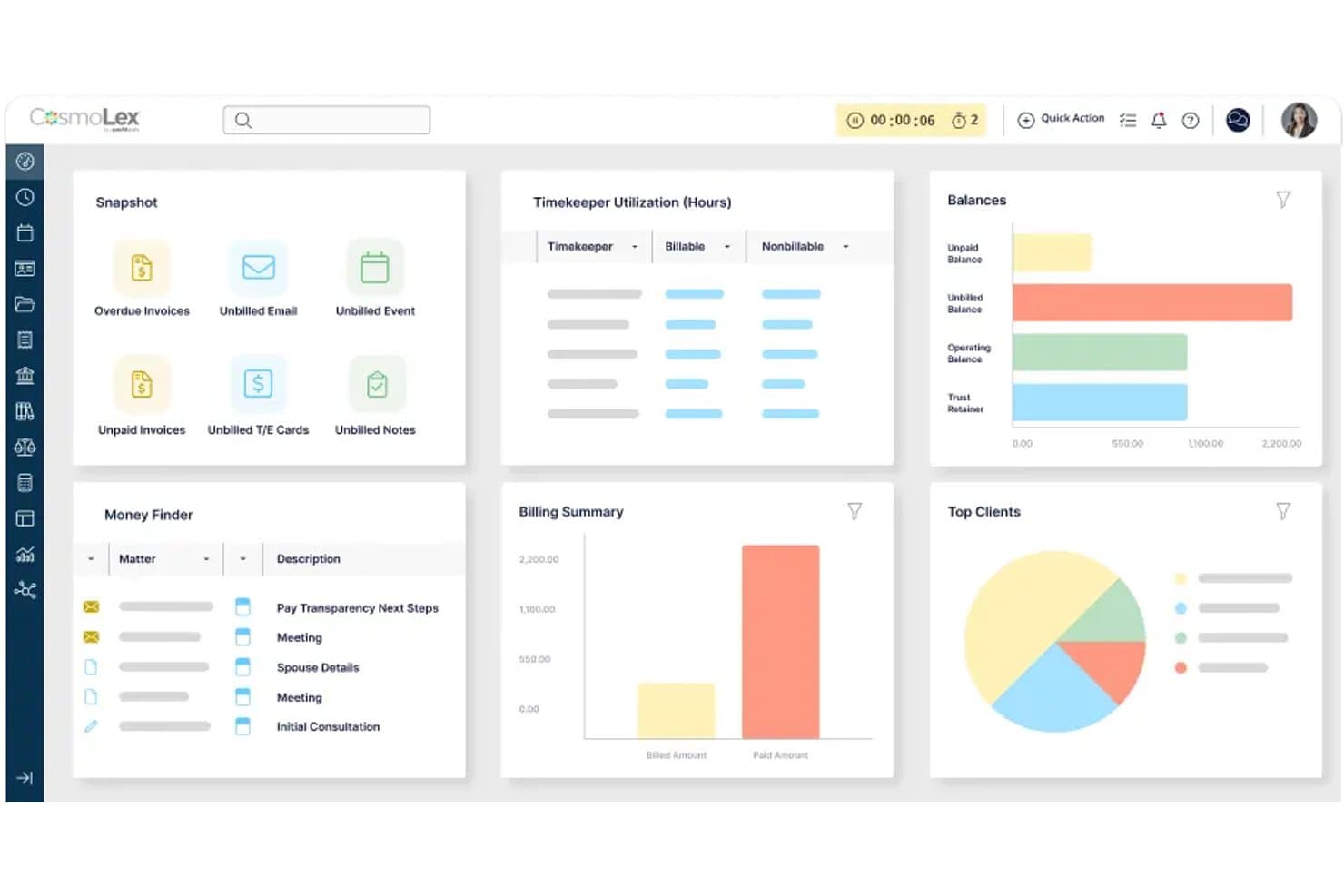
CosmoLex handles legal matters, billing, trust accounting, and client communications. CosmoLex is a cloud-based legal practice management platform that combines matter tracking, billing, trust accounting, document management, and client communication tools in one system.
Who Is CosmoLex Best For?
CosmoLex is a strong fit for solo attorneys and small law firms that need billing, trust accounting, and matter management in one system.
Why I Picked CosmoLex
I've included CosmoLex in my top picks because trust accounting compliance is built directly into the platform, not bolted on as an afterthought. Every plan includes separate trust and operating ledgers, automatic holds and transfers, and three-way reconciliation, so your books stay audit-ready without a separate accounting tool. I also like that system emails are automatically logged to the correct matter, keeping client communication history intact alongside billing and trust records.
CosmoLex Key Features
- Matter-linked email filing: File emails directly to client matters, with automatic alerts when no matching matter is found or multiple matches exist.
- Client portal with document exchange: Clients can upload and download documents, view invoices, send messages, and access matter information through a secure portal.
- Custom workflow templates: Build reusable task workflows and apply them to new or existing matters to keep work moving consistently.
- AI document review: Upload documents to extract key terms, obligations, deadlines, and action items using built-in AI summarization (Core and Pro plans).
CosmoLex Integrations
CosmoLex offers native integrations with Microsoft 365, Outlook, Google Calendar, QuickBooks Online, Dropbox, OneDrive, Google Drive, NetDocuments, Box, and LawPay. It also supports Zapier and provides a REST API for custom integrations.
Pros and Cons
Pros:
- Browser access brings matter work to Mac
- Reviewers praise connected timekeeping and billing workflows
- Matter-linked trust ledgers support three-way reconciliation
Cons:
- Reviewers report glitches, slowdowns, and syncing issues
- No dedicated native macOS desktop app
Learn more about CosmoLex: Best for PI firms tracking cases end to end
- Free demo available
- From $109/user/month (billed annually)
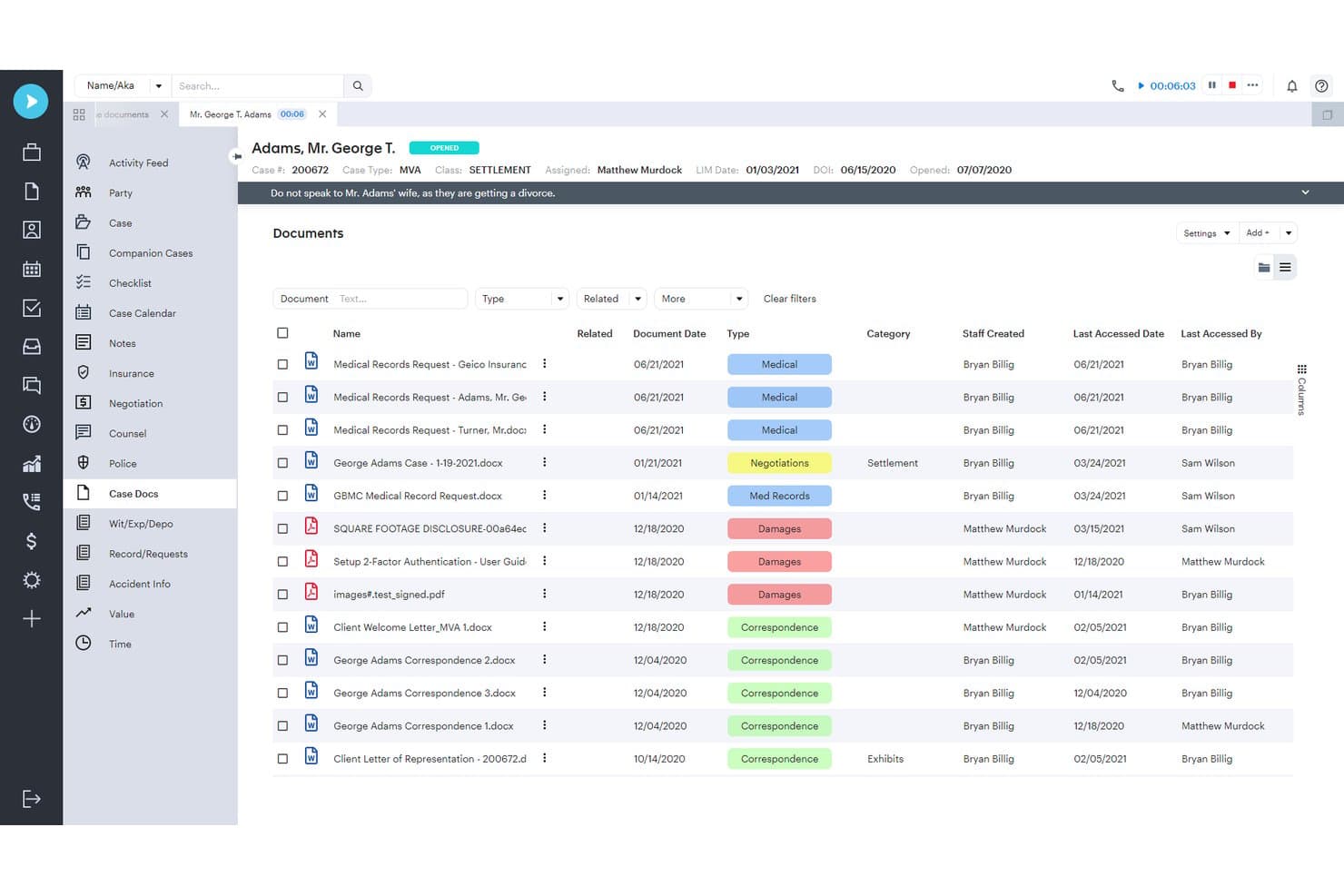
Assembly NEOS centralizes case documents with filters and type tags. Neos is a cloud-based personal injury case management platform by Assembly Software that covers intake, case tracking, document management, client communications, and billing from a single case record.
Who Is Neos Best For?
Neos is built for plaintiff-side personal injury firms with three or more staff who need to manage cases from intake through settlement in one place.
Why I Picked Neos
I picked Neos as one of the best because it's built specifically for plaintiff-side personal injury firms that need to track every case from the first intake call through final disbursement. I love how the case record pulls together liens, subrogation, settlement value, and costs in one place, so nothing slips through during a complex PI matter. The Demands Plus feature is what really sets it apart: it drafts demand letters and builds medical chronologies directly from the case file, with every claim linked back to its source document.
Neos Key Features
- NeosAI document summarization: NeosAI reads case documents and extracts data directly into case fields, reducing manual data entry on Platinum.
- LawToolBox deadline calculation: Automatically calculates jurisdiction-specific court deadlines, filing dates, and statutes of limitation, then syncs them to the Neos calendar.
- Role-based and individual permissions: Firms can control access at the role or individual user level across all staff, from paralegals to partners.
- QuickBooks Online sync: Approved cost and fee entries sync automatically to QuickBooks Online according to firm-configured preferences.
Neos Integrations
Neos offers documented integrations with Microsoft 365, Outlook, SharePoint, OneDrive, RingCentral, Zoom Phone, LawPay, and Case Status. It also provides an API for custom integrations.
Pros and Cons
Pros:
- Document templates support quick letter generation
- Case-linked communications keep matter history together
- PI settlement tracking covers liens and disbursements
Cons:
- Browser layout reduces usable screen space
- Safari compatibility issues affect Mac workflows
Learn more about Assembly NEOS:
Other Legal Case Management Software for Mac
Here are a few additional options that didn’t make my shortlist but are still worth checking out:
- 11Beagle LPMBest for Mac-native matter tracking with local AI
- 12PracticePantherBest for billing and trust accounting compliance
- 13CloudLexBest for PI case tracking via browser on Mac
- 14DayliteBest for Apple-native case and client tracking
- 15SmartAdvocateBest for litigation case workflows with built-in AI
- 16ActionstepBest for customizable matter workflows at scale
- 17SmokeballBest for document automation across matter types
- 18LawcusBest for client intake, CRM, and matter workflows
- 19TimeSolvBest for time-entry billing on Mac and Windows
- 20HoudiniESQBest for solo attorneys on any browser or OS
Related Reviews
How I Evaluate Legal Case Management Software for Mac
I split my evaluation into three parts. Core functionality carries the most weight: the tool must run reliably on macOS and organize matters with linked contacts, deadlines, and documents. Then I look at standout features like court-rules-based deadline automation and trust accounting compliance. Finally, I consider onboarding support and cross-platform pricing value.
Core Functionality (Table Stakes For This List)
When I'm selecting tools for my list, I score each one on a scale from 0 (does not offer the functionality) to 5 (excels in this area) for each core functionality listed below. I then convert the total into a percentage to help assess each tool's overall fit, with extra weight on any functionalities I've deemed essential.
- Mac Compatibility (Essential): I check whether the platform runs on macOS through a native app or full-featured web interface without resorting to virtual machines.
- Case and Matter Tracking (Essential): Each tool needs to let you organize deadlines, contacts, notes, and documents within individual matter records rather than across disconnected screens.
- Document Management: I look for matter-linked storage with version control and templates, so your team can retrieve a filed motion or engagement letter without digging through folders.
- Calendaring and Deadlines: Court-rule-based deadline automation matters here. Tools like Clio and Filevine offer rule sets that calculate downstream dates from a single trigger event.
- Time Tracking and Billing: I evaluate whether time entries, invoicing, and payment tracking are tied directly to matters and whether the platform supports trust accounting and multiple billing models.
- Client Communication Records: The tool should log emails, calls, and notes within each matter record so you can pull a full interaction history during a client call or before a hearing.
Once I have a list of tools that meet the criteria, I consider what sets each platform apart.
Differentiating Factors (What Sets Vendors Apart)
Here's how I compare and contrast different vendors:
Standout Features
Court rules-based deadline automation is the first thing I check. A tool like Clio or Filevine that calculates downstream dates from a single trigger event—say, a filing date generating response and discovery deadlines—saves hours of manual calendaring and reduces malpractice risk. I also evaluate built-in trust accounting compliance, since platforms like CosmoLex and PracticePanther handle IOLTA reconciliation inside the same system where you track matters. A secure client portal rounds out my evaluation; giving clients direct access to documents and invoices cuts down on status-update emails and keeps communication tied to the matter record.
Beyond Features
I evaluate how well each vendor supports Mac users over time—some, like Clio and Zola Suite, maintain native Mac/iOS apps, while others rely solely on browser access that can lag behind macOS updates. Data security also matters: I check for encryption standards and audit trails that satisfy bar association confidentiality rules, especially when privileged matter records are shared across devices. For firms planning to grow, I look at whether adding users and matters forces a platform migration or fits within the existing tier.
How to Choose Legal Case Management Software for Mac
Choose a platform by testing the matter workflows where missed dates, incomplete records, or billing errors create the greatest risk.
| If your priority is | Look for |
|---|---|
| If your priority isAccurate court deadlines | Look forEvidence that calculated dates match rules in your jurisdictions |
| If your priority isIntake-to-matter continuity | Look forA test showing how intake details carry into the matter record |
| If your priority isBilling and trust-account accuracy | Look forA workflow that matches your billing and reconciliation procedures |
| If your priority isMac fit and data access | Look forA trial on your team’s Macs and a clear data-export process |
How to Vet Your Shortlist
- Run a matter trial: Within a 30-minute session, create a test matter, add a contact, and enter a filing date; compare resulting deadlines with your team’s calendar.
- Request rule documentation: Ask for a dated document listing covered jurisdictions, then verify five sample deadlines against your own rule references.
- Test a billing artifact: Enter sample time, prepare an invoice, and record a trust transaction; compare the results with your firm’s reconciliation procedure.
- Test Mac access and exit options: During a two-week pilot, complete a routine matter task on each Mac setup you use, then request a sample data export and review the contract’s export terms.
- Choose your tradeoff: Use the pilot scorecard to decide whether you value a unified billing and matter workflow or deeper deadline automation more, and document that priority before signing.
What Is Legal Case Management Software for Mac?
Legal case management software for Mac is software that helps legal teams organize matters and handle related work on macOS. It can bring contacts, documents, deadlines, communications, and billing records together in matter files. Some platforms run in a browser, while others offer Mac apps. Check that the features your team needs work on its devices and fit your practice’s workflows.
Features of Legal Case Management Software for Mac
Here are the main features I look for in legal case management software for Mac:
- Matter management: Create a central record for each case or client matter, with linked contacts, notes, documents, and status details. Your team can use it to find the current matter history without piecing together information from separate files.
- Document management: Store documents with the related matter and use templates to prepare recurring files, such as engagement letters. Version history can help your team identify the latest draft and avoid relying on an outdated copy.
- Calendaring and deadline tracking: Add appointments, filing dates, and reminders to a shared calendar. Some platforms calculate related dates from a triggering event using court-rule sets, so verify that the rules cover your jurisdictions and match your team’s references.
- Task and workflow management: Assign tasks, owners, and due dates within a matter. Workflow steps can clarify who handles each stage, from document review to filing, and show what still needs attention.
- Time tracking and billing: Record billable time against a matter, prepare invoices, and track payments. Check that the software supports your billing methods and keeps time entries connected to the work they describe.
- Trust accounting: Record client funds separately from operating funds and reconcile trust transactions. Confirm that the platform supports your jurisdiction’s accounting requirements and your firm’s reconciliation process.
- Client communication and portal: Keep records of emails, calls, and notes with the relevant matter. A secure client portal can also give clients a place to view shared documents or invoices without mixing those exchanges into internal records.
- Intake and conflict checks: Capture prospective-client details before opening a matter and compare names against existing records. This helps your team review potential conflicts before accepting new work.
Benefits of Legal Case Management Software for Mac
Here are a few common benefits you can expect from legal case management software for Mac:
- Matter organization: Linked contacts, notes, documents, and status details keep each matter’s records together.
- Deadline tracking: Shared calendars, reminders, and court-rule calculations help your team manage filing dates and related deadlines.
- Document access: Matter-linked storage, templates, and version histories help your team find the right file and identify the latest draft.
- Billing records: Matter-linked time entries, invoices, payment tracking, and trust accounting keep financial activity connected to legal work.
- Communication history: Email, call, and note records stored with a matter give your team a fuller view of client interactions.
- Workflow visibility: Tasks with assigned owners and due dates show who handles each step and what still needs attention.
- Mac access: Native apps or browser-based platforms let your team work from macOS without relying on a virtual machine.
Costs and Pricing of Legal Case Management Software for Mac
Costs depend on features, team size, and billing terms. Most legal case management platforms use paid subscriptions, while free access is usually a time-limited trial. Here are typical monthly price ranges.
Plan Comparison Table for Legal Case Management Software for Mac
| Plan Type | Average Price | Common Features |
|---|---|---|
| Plan TypePersonal Plan | Average Price$30-$60/user/month | Common FeaturesMatter and contact management, calendar and task tracking, document storage, and basic time tracking. |
| Plan TypeBusiness Plan | Average Price$60-$150/user/month | Common FeaturesAdvanced workflows, document automation, client portals, billing and trust accounting, and reporting. |
| Plan TypeEnterprise Plan | Average PriceCustom or $100-$200/user/month | Common FeaturesCustom permissions, advanced automation, centralized administration, integration options, and dedicated support. |
FAQs
Here are answers to common questions about legal case management software for Mac.
Do I need a native Mac app to manage legal matters?
No, a native macOS app isn’t required to run legal case management software on a Mac. A browser-based platform can work well if it supports your macOS version and your firm’s everyday tasks. During a trial, test document uploads, calendar access, email capture, printing, and any integrations your team relies on. Check whether browser and mobile features match desktop features. If you need offline access or deeper macOS integration, ask the vendor to demonstrate those workflows before you commit.
How should I migrate matters into a new system?
Start by asking the vendor for a sample export and import plan before you sign. Identify which records transfer: matters, contacts, notes, documents, calendar items, time entries, and custom fields. Ask whether email history, document versions, permissions, and audit trails can move too; these often need separate handling. Test a small sample with attachments and compare the imported records against your source system. Confirm how the vendor handles failed imports, duplicate records, and access to old files during transition.
Can I use legal case management software offline on a Mac?
Sometimes, but offline access depends on the product and feature. A browser-based system may require an internet connection for matter records, calendars, or document storage, while some apps cache selected information. Ask what you can view or edit without connectivity, whether new entries sync automatically after reconnecting, and how the system resolves conflicting edits. Test with a nonconfidential matter on a Mac before relying on offline access during travel or a court visit. Confirm whether downloaded files remain protected under your device security settings.