

Programvare for oppgavehåndtering i advokatfirmaer er utviklet spesielt for å håndtere saksrelaterte frister, oppgaver og arbeidsflyt for juridiske team. Hvis du trenger en pålitelig måte å redusere risikoen for fristoverskridelser på, knytte hver oppgave til en klientsak og integrere med systemer for fakturering og kalender, har du kommet til rett sted.
Feil verktøy skaper friksjon – tapt fakturerbar tid, oversitte rettsdatoer eller frustrerte medarbeidere – så det lønner seg å sammenligne de beste plattformene for oppgavehåndtering i advokatfirmaer.
Nedenfor går jeg gjennom kjernealternativene som er utviklet spesielt for juridisk praksis, slik at du kan velge et system som passer arbeidsflyten og klientforpliktelsene dine.
Hvorfor du kan stole på våre programvareanbefalinger
6,700+
Reviews
20
Industry experts
16+
Evaluation factors
14
Years
Teamet vårt har testet og anmeldt programvare siden 2012. Vi leder selv advokatfirmaer, så vi vet hvor vanskelig og hvor viktig det er å velge riktig programvare.
I denne guiden har vi vurdert verktøyene gjennom praktisk testing og uavhengig research og gitt dem poeng ut fra våre utvelgelseskriterier.
Anmeldelsene våre bygger på vår egen redaksjonelle vurdering. De er ikke et salgsargument.
Sammenligningstabell for programvare for oppgavehåndtering i advokatfirmaer
Denne sammenligningstabellen oppsummerer prisdetaljene for mine beste utvalgte programmer for oppgavehåndtering i advokatfirmaer:
| Tool | Best For | Trial Info | Price | ||
|---|---|---|---|---|---|
| 1 | Best for matter-linked tasks and auto-captured time | Not available | Pricing upon request | Website | |
| 2 | Best for jurisdiction-aware court deadline workflows | Free trial + free demo available | Pricing upon request | Website | |
| 3 | Best for billing-aware matter task workflows | 10-day free trial | From $49/user/month (billed annually) | Website | |
| 4 | Best for practice-area task suites with built-in rules | Free demo available | Pricing upon request | Website | |
| 5 | Best for Outlook-linked time capture on matters | Free demo available | Pricing upon request | Website | |
| 6 | Best for matter-linked court deadline workflows | 7-day free trial | From $49/user/month | Website | |
| 7 | Best for billing-linked matter task workflows | 14-day free trial | From $39/user/month (billed annually) | Website | |
| 8 | Best for court deadline-driven matter workflows | Free demo available | Pricing upon request | Website | |
| 9 | Best for billing-linked task tracking across matters | 10-day free trial | From $59/user/month (billed annually) | Website | |
| 10 | Best for Salesforce-native matter task automation | Free demo available | From $150/user/month | Website |


Anmeldelser av programvare for oppgavehåndtering i advokatfirmaer
Nedenfor finner du mine detaljerte sammendrag av den beste programvaren for oppgavehåndtering i advokatfirmaer som kom med på kortlisten min. Anmeldelsene mine gir en detaljert gjennomgang av funksjonene, de beste bruksområdene og integrasjonene til hver plattform, slik at du kan finne den beste løsningen for deg.
 Best for matter-linked tasks and auto-captured time
- Not available
- Pricing upon request
Visit WebsiteCustomer Rating:4.8/5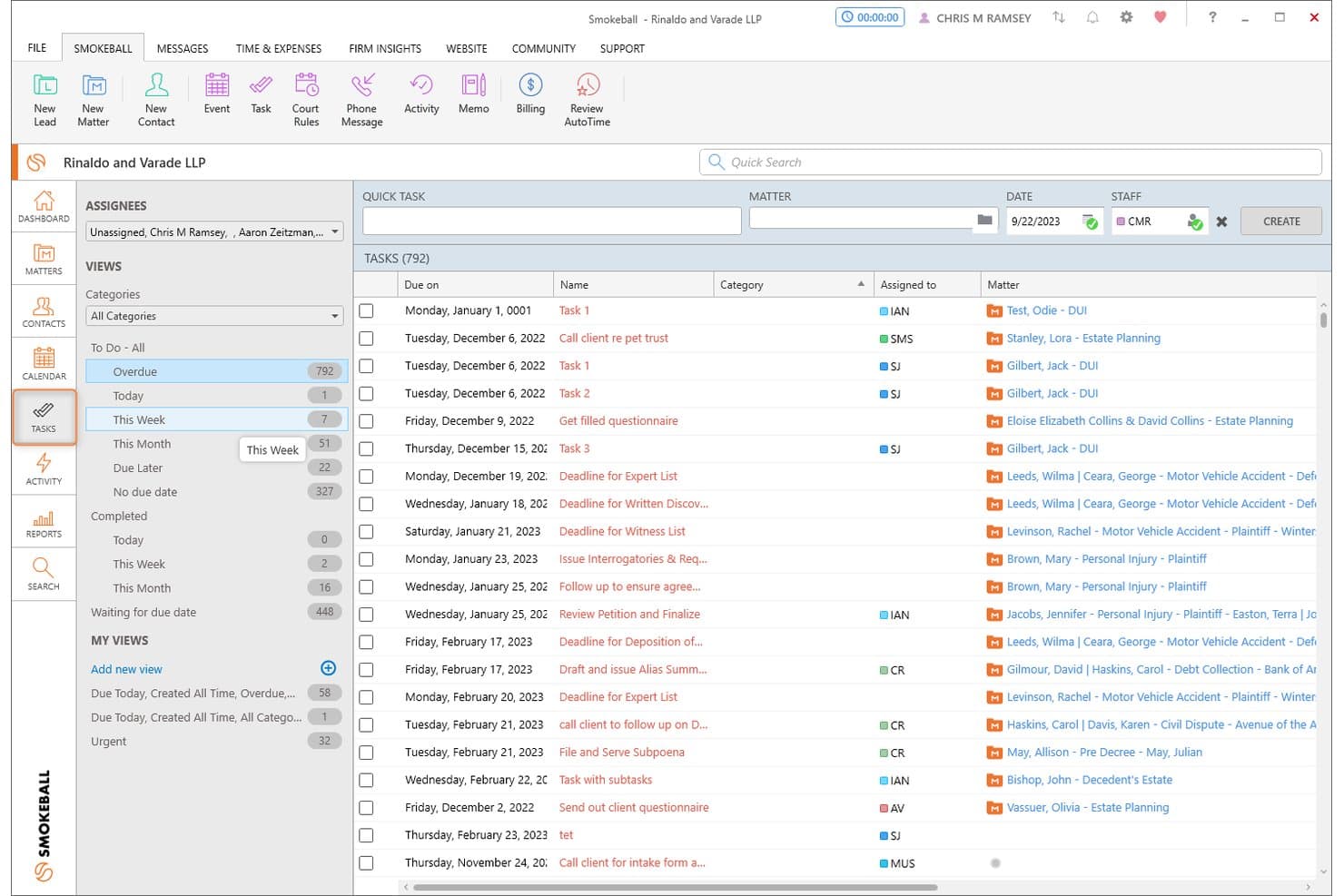
Smokeball organizes overdue and upcoming tasks across all matters in one view. Smokeball is a legal practice management platform built around a matter-centric architecture, combining task management, workflow automation, document generation, deadline tracking, and time capture across case files.
Who Is Smokeball Best For?
Smokeball is a strong fit for solo attorneys and small-to-midsize law firms that want every task, document, and time entry automatically organized under its matter.
Why I Picked Smokeball
Smokeball earns its spot on my shortlist because of how tightly it ties every task to its matter by design, not by configuration. I especially like AutoTime, which passively records billable activity across Smokeball, Word, and Outlook and assigns it to the correct matter automatically, no manual timer needed. Pair that with LawToolBox's jurisdiction-aware deadline cascading, and you get a task layer that's genuinely built around how case work moves.
Smokeball Key Features
- Matter-type workflow templates: Smokeball automatically applies a pre-built task list when a new matter is created, drawing from 250+ matter type templates matched to your practice area.
- LawToolBox deadline cascading: Court rules-based deadline calculation adjusts your entire matter schedule automatically when a trigger date or jurisdiction rule changes.
- TemplateLab document automation: Over 20,000 legal forms and document templates auto-populate with matter data and link directly to individual workflow task stages.
- Firm Insights dashboards: Prosper+ users get configurable reports tracking matter profitability, attorney billable-hour targets vs. actuals, fee collection, and team capacity across the firm.
Smokeball Integrations
Smokeball offers native integrations with LawToolBox, QuickBooks Online, Xero, InfoTrack, LawPay, Zoom, RingCentral, CourtDrive, and Case Status, plus deep native integration across the Microsoft ecosystem, including Microsoft Outlook and Microsoft Word. Additional connectivity is available through the Smokeball Marketplace.
Pros and Cons
Pros:
- LawToolBox court deadline integration
- All tasks organized by matter file
- Automatic time tracking with AutoTime
Cons:
- No built-in conflict check workflow
- Most automation features gated to higher plans
Learn more about Smokeball: Best for jurisdiction-aware court deadline workflows
- Free trial + free demo available
- Pricing upon request
Visit WebsiteCustomer Rating:4.5/5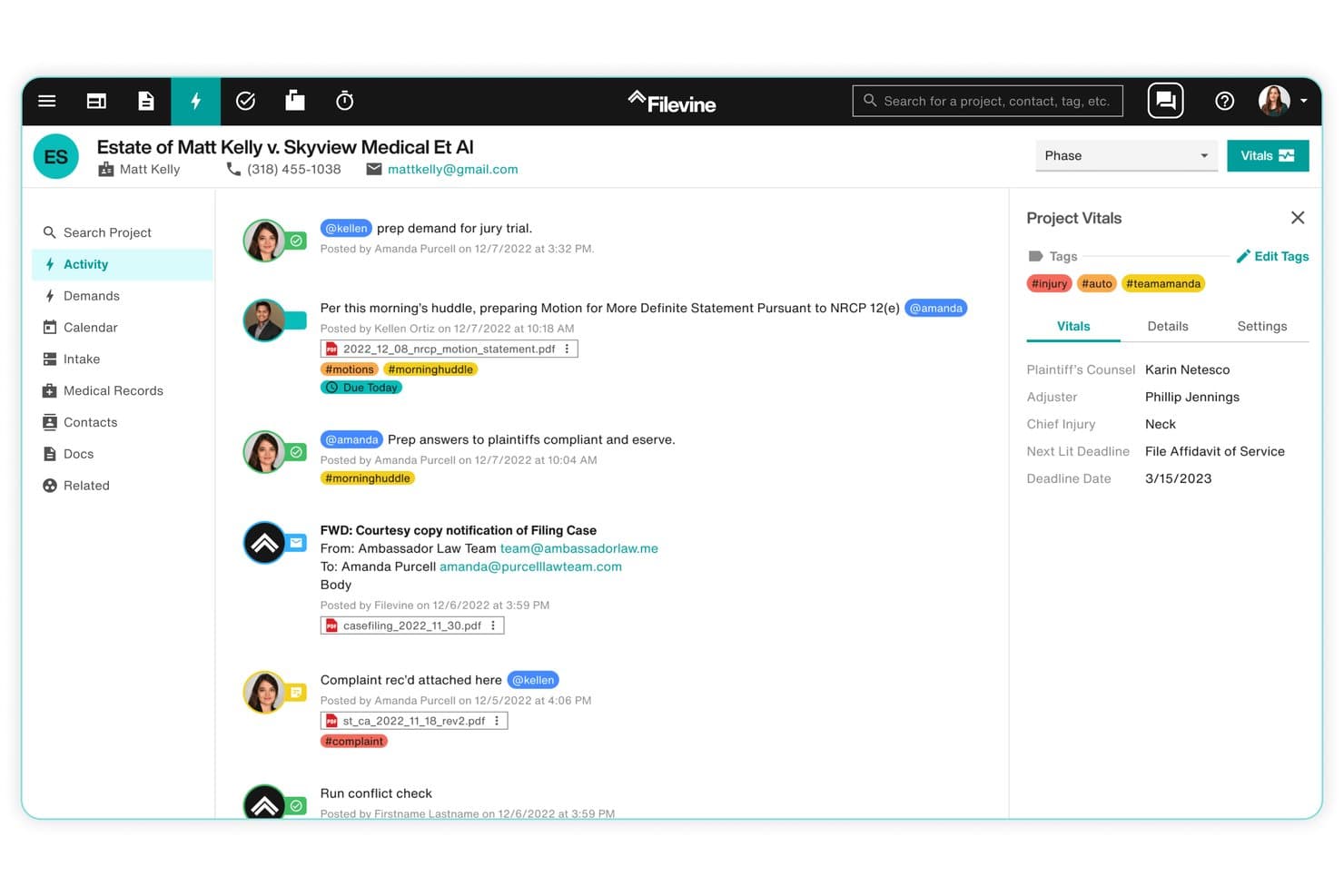
Filevine centralizes case activity, tasks, and deadlines in one view. Filevine is a legal case management platform built around a matter-centric model, with jurisdiction-aware court deadline automation, configurable workflow templates, AI-assisted task management, and document assembly tools.
Who Is Filevine Best For?
Filevine is a strong fit for litigation-focused and plaintiff-side law firms that need jurisdiction-specific court deadline tracking built directly into their case management workflows.
Why I Picked Filevine
Filevine earns its spot on my shortlist because of Timely by Filevine, its jurisdiction-aware court deadline engine covering all 50 U.S. states. I love that you select a jurisdiction and a trigger date, and Timely auto-generates every cascading court deadline from there, with rules reviewed monthly to stay current. AIFields layers on top of that by extracting deadlines directly from uploaded court documents, feeding them into the calendar automatically.
Filevine Key Features
- Matter-centric task page: View, filter, sort, and prioritize all tasks across a matter from a single dedicated task page, with support for task dependencies and sub-matter organization.
- SidebarAI task suggestions: An in-app AI assistant that proactively surfaces relevant tasks based on case context and flags follow-up actions across active matters.
- Non-action detection: Filevine surfaces when expected actions haven't occurred within a matter, giving partners and administrators visibility into stalled work.
- LOIS AI Console: Runs AI agents firm-wide to set tasks, move deadlines, and generate documents, with each action traceable back to its source data.
Filevine Integrations
Filevine offers native integrations with QuickBooks, Microsoft Outlook, Gmail, Google Calendar, Microsoft Teams, Slack, RingCentral, Dialpad, Domo, and Workato, and connects with Zapier. An API is also available for custom integrations, with Filevine claiming 2,000+ potential connections when accounting for Workato and Zapier.
Pros and Cons
Pros:
- Highly configurable, matter-centric workflow engine
- AI surfaces missed or overdue legal tasks
- Jurisdiction-aware court deadline calculations
Cons:
- Setup complexity often requires outside consultants
- Task management considered less advanced than peers
Learn more about Filevine: Best for billing-aware matter task workflows
- 10-day free trial
- From $49/user/month (billed annually)
Visit WebsiteCustomer Rating:4.4/5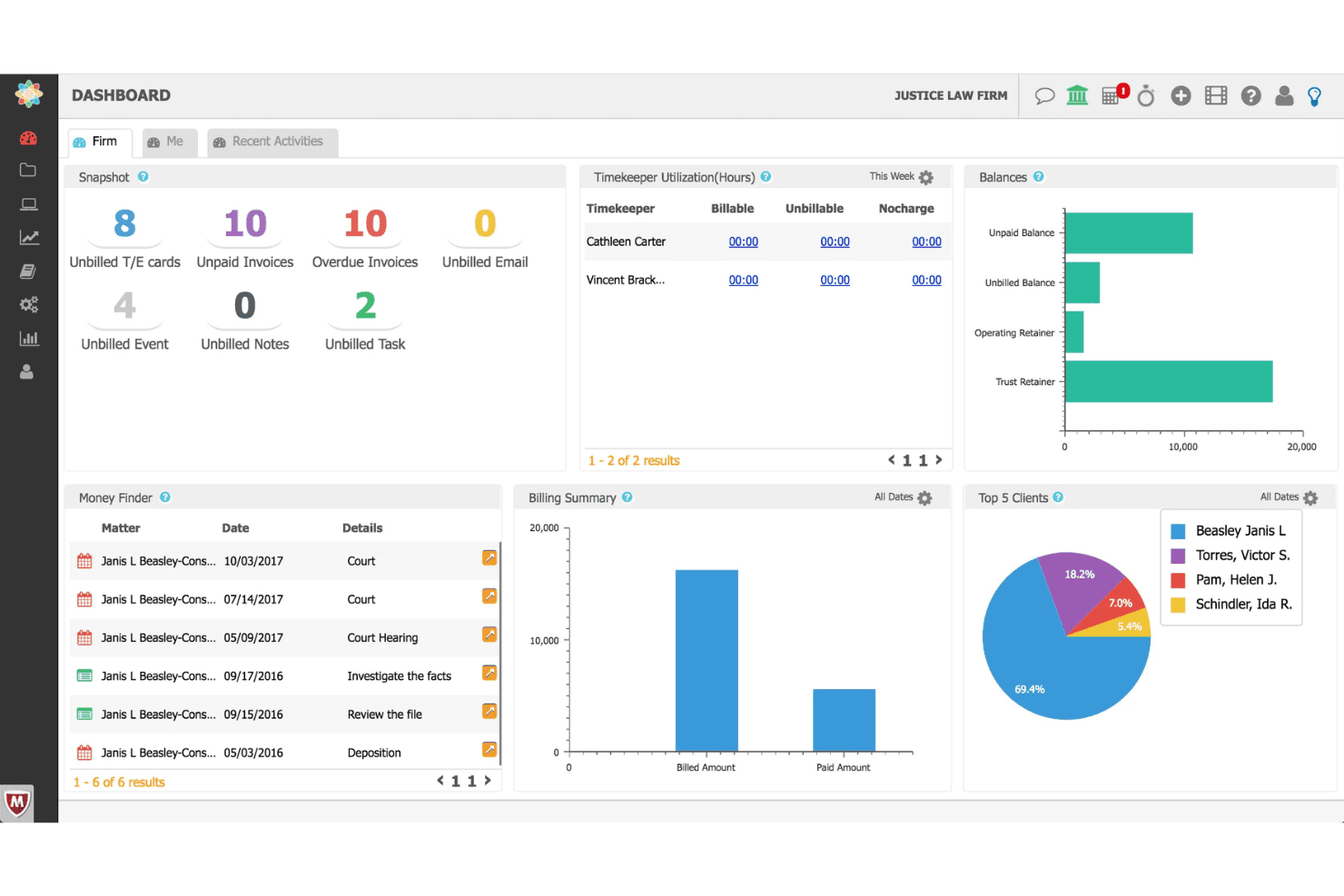
CosmoLex coordinates legal tasks, workflows, time entries, billing, and trust funds. CosmoLex is a cloud-based legal practice management platform that combines matter-centric task management, workflow automation, time tracking, billing, and trust accounting in a single system.
Who Is CosmoLex Best For?
CosmoLex is a strong fit for solo practitioners and small law firms that want billing, trust accounting, and matter task management in one place.
Why I Picked CosmoLex
CosmoLex earns its spot on my shortlist because every task lives inside a matter record, and every matter record connects directly to billing. I particularly like the Money Finder feature, which surfaces unbilled emails, meetings, and tasks so nothing slips through without a time entry attached. Pair that with dynamic due dates that cascade when milestones shift, and you get task management that's genuinely aware of both deadlines and dollars.
CosmoLex Key Features
- Board View: A Kanban-style visual interface that lets you track task progress across multiple matters at a glance.
- Trust accounting integration: Native IOLTA trust accounting with automated three-way reconciliation and overdraft prevention built directly into the platform.
- Matter templates: Pre-built workflow templates that load task sequences, deadlines, and assignments automatically for specific matter types.
- Client portal: A secure, two-way portal where clients can view invoices, make payments, exchange messages, and upload documents that auto-file into the correct matter.
CosmoLex Integrations
CosmoLex offers native integrations with Microsoft 365, Gmail, QuickBooks Online, Dropbox, Google Drive, OneDrive, NetDocuments, Box, LawPay, and Plaid, and it connects with Zapier.
Pros and Cons
Pros:
- Visual Kanban boards for task progress
- "Money Finder" helps capture missed billables
- Matter tasks and billing tightly connected
Cons:
- Report templates have export and customization limits
- No native court rules calendaring
Learn more about CosmoLex: Best for practice-area task suites with built-in rules
- Free demo available
- Pricing upon request
Visit WebsiteCustomer Rating:4/5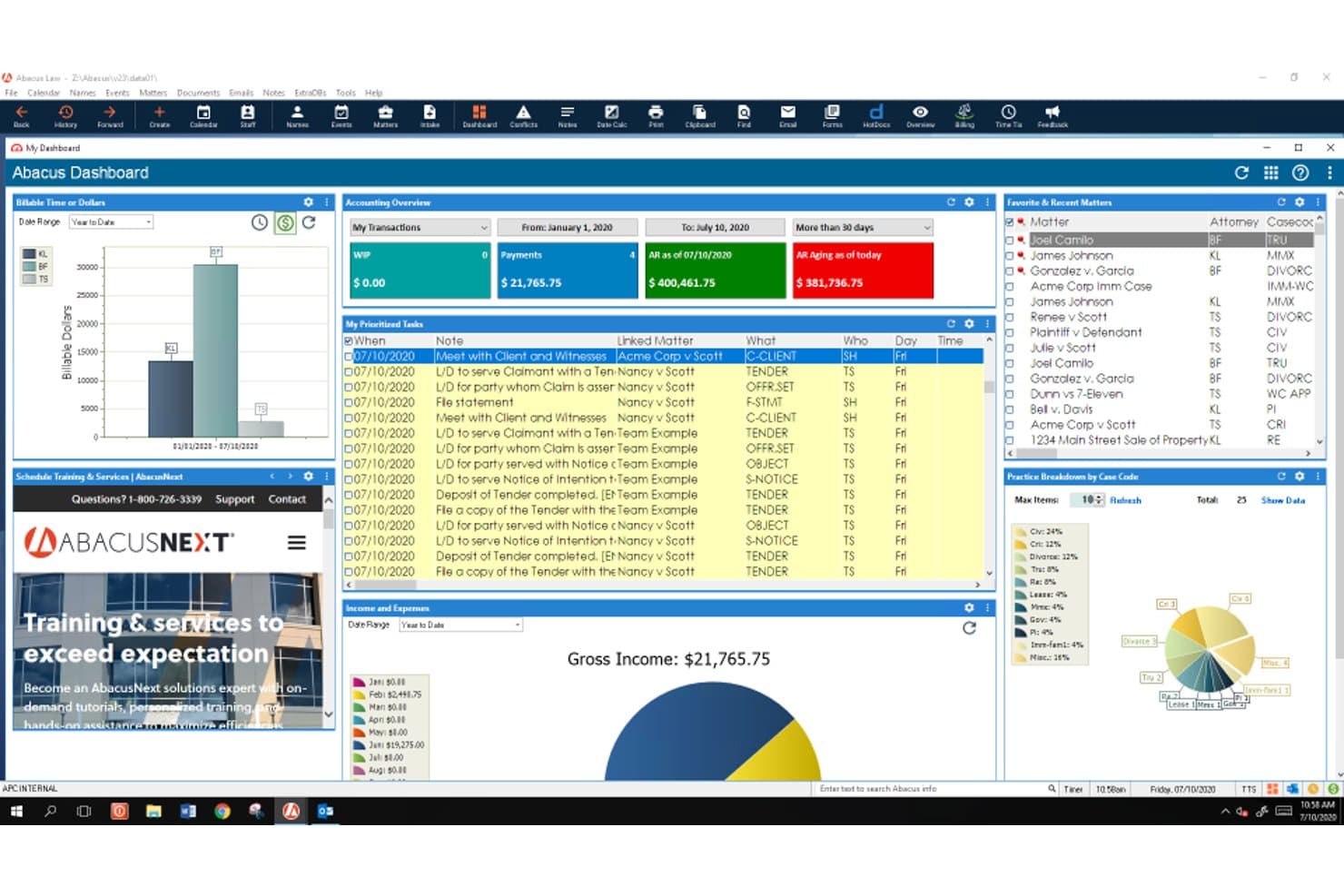
AbacusLaw schedules legal work with task queues, court rules, reminders, and deadlines. AbacusLaw is a legal practice management platform that combines matter-centric task management, rules-based court calendaring, document automation, native time and billing, and trust accounting across 15+ pre-configured practice area suites.
Who Is AbacusLaw Best For?
AbacusLaw is a strong fit for mid-sized law firms with dedicated administrative staff who need practice area-specific workflows and built-in court deadline rules.
Why I Picked AbacusLaw
AbacusLaw earns its spot on my shortlist because of its rules-based court calendaring engine, which is genuinely rare at this depth. I love how practice area suites come pre-loaded with jurisdiction-specific deadline rules: Personal Injury alone ships with 16 pre-built rules that auto-cascade linked events the moment you apply them to a matter. Pair that with a 360-degree matter view that ties every task, document, and billing record to a single case file, and you get task management that's built around how legal work actually moves.
AbacusLaw Key Features
- Conflict of interest checker: A built-in tool that scans matter names, notes, and name records to identify conflicts, producing a printable hit list you can link directly to the case file.
- Native trust accounting: Built-in trust accounting supports IOLTA compliance, bank reconciliation, and payment processing via the Abacus Payment Exchange across trust and operating accounts.
- Client portal: A secure portal lets clients view matter information, access shared documents and invoices, and pay bills online—with firm-controlled access permissions at the client level.
- Document automation: Court forms and customizable templates auto-populate with matter data, and HotDocs integration enables one-click document completion directly from AbacusLaw records.
AbacusLaw Integrations
AbacusLaw offers a smaller set of native integrations, including Microsoft Outlook, Microsoft 365, DocuSign, HotDocs, LawPay, QuickBooks, and Abacus Payment Exchange (APX). It doesn't have a public API or Zapier support, which limits custom connectivity with the broader legal tech stack.
Pros and Cons
Pros:
- Native trust accounting meets IOLTA compliance
- Practice area suites with automated workflow templates
- Rules-based court calendaring reduces manual deadline work
Cons:
- Dated interface compared to modern platforms
- No public API limits custom workflows
Learn more about AbacusLaw: Best for Outlook-linked time capture on matters
- Free demo available
- Pricing upon request
Visit WebsiteCustomer Rating:4.5/5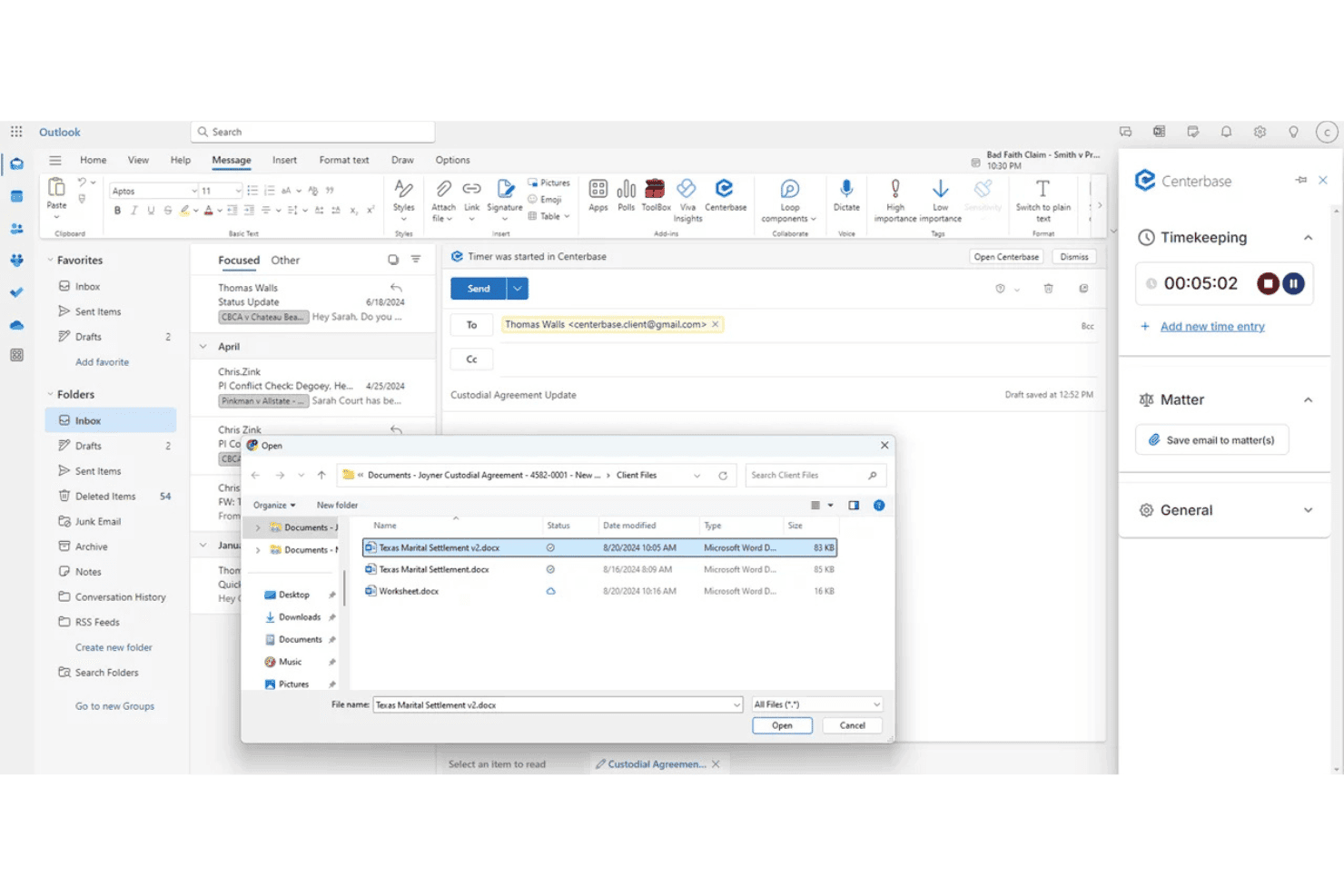
Centerbase ties tasks, deadlines, and follow-ups to matters, with Outlook email and calendar sync. Centerbase is a cloud-based practice management platform for midsize law firms that integrates matter-linked task management, automated time capture, billing, trust accounting, document management, and client communications in one system.
Who Is Centerbase Best For?
Centerbase is built for midsize law firms—typically 5 to 100+ attorneys—that need matter-linked task management, automated time capture, and billing in one connected system.
Why I Picked Centerbase
Centerbase earns its spot on my shortlist because of how tightly it connects Outlook activity to billable time on matters. Its patented Automated Time Capture (ATC) passively logs time attorneys spend drafting in Word and corresponding in Outlook, so billable events surface on the matter dashboard without attorneys manually starting a timer. I've seen firms recover significant write-offs just by capturing email time that previously went unlogged.
Centerbase Key Features
- Matter dashboard: View all tasks, contacts, documents, deadlines, and billing data consolidated on a single matter record.
- LawToolBox integration: Calculate jurisdiction-aware court deadlines directly inside Centerbase with automatic alerts when court rules change.
- Automated conflict checking: Trigger system-wide, OCR-powered conflict checks during client intake before a new matter moves forward.
- Trust and IOLTA accounting: Manage multiple trust accounts with automated interest calculations, transaction logging, and detailed trust reporting built into the platform.
Centerbase Integrations
Centerbase offers native integrations with LawToolBox, NetDocuments, iManage, DocuSign, Stripe, Plaid, and QuickBooks, plus deep native integration across the Microsoft ecosystem, including Microsoft 365 (Outlook, Word, SharePoint) and Microsoft Copilot.
Pros and Cons
Pros:
- Trust and IOLTA accounting features included
- LawToolBox calculates court deadlines automatically
- Automated time capture in Word and Outlook
Cons:
- Onboarding and setup require significant time investment
- Reporting customization options are limited
Learn more about Centerbase: Best for matter-linked court deadline workflows
- 7-day free trial
- From $49/user/month
Visit WebsiteCustomer Rating:4.7/5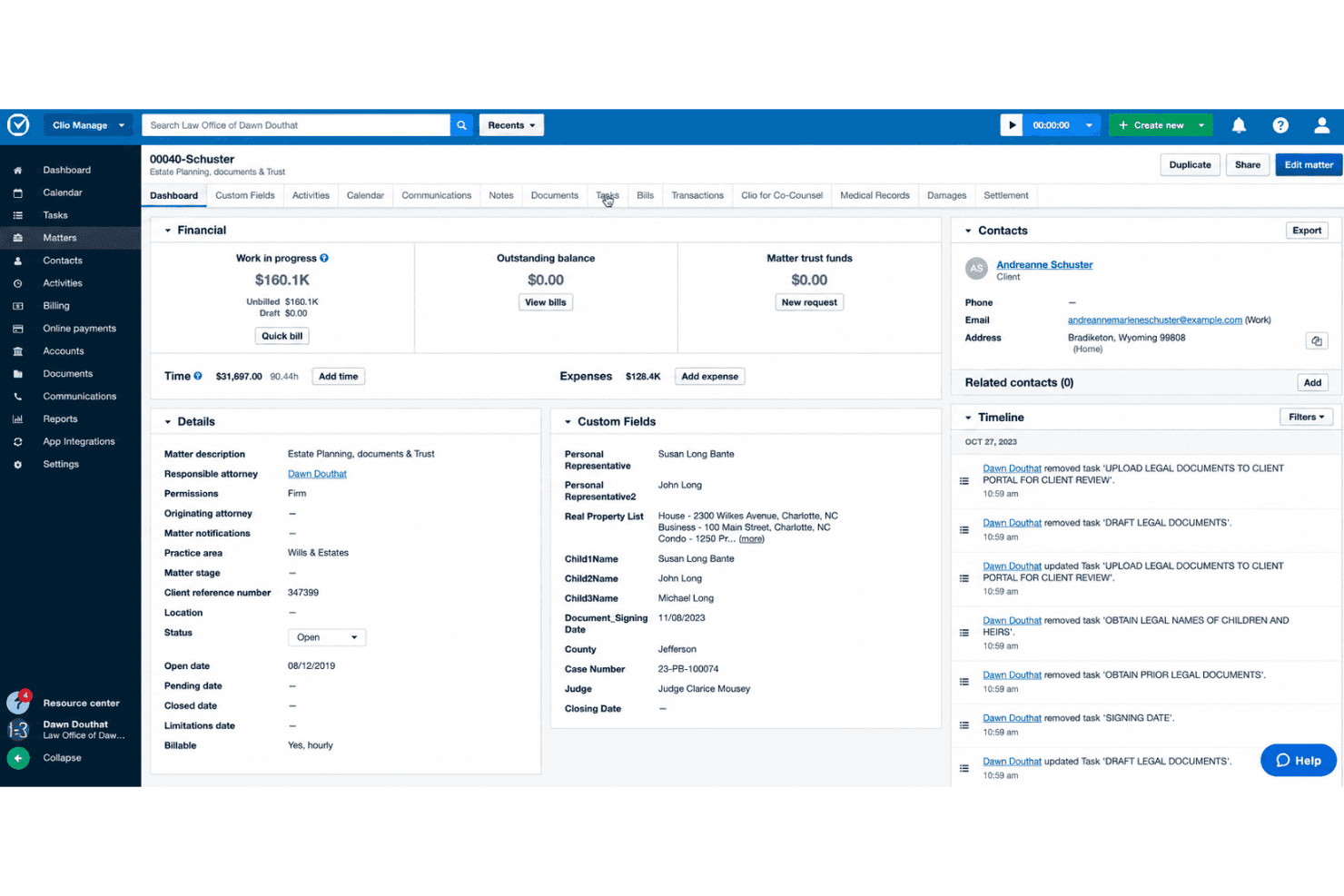
Clio Manage handles matter tasks, court deadlines, time tracking, and client collaboration. Clio Manage is a legal practice management platform built around matter-centric task management, court deadline calendaring, time tracking, and client collaboration tools for law firms.
Who Is Clio Manage Best For?
Clio Manage is a strong fit for small to mid-sized law firms that need every task, deadline, and time entry tied directly to a client matter.
Why I Picked Clio Manage
Clio Manage earns its spot on my shortlist because its entire architecture is built around matters, which means court deadlines, tasks, and time entries are never floating in a vacuum. I especially like the native Court Rules feature: select a trigger event like a filing date, and Clio automatically cascades all associated deadlines across 2,200+ U.S. jurisdictions onto your calendar. Pair that with AI-captured calendar events pulled directly from court documents, and manual deadline entry becomes the exception rather than the rule.
Clio Manage Key Features
- Task list templates: Build reusable, standardized task lists with relative and dependent deadlines that auto-assign to new matters on creation.
- Passive AI time tracking: Manage AI monitors Outlook activity, OneDrive document work, and mobile calls to auto-generate draft time entries for attorney review.
- Client portal: Clio for Clients gives clients secure, selective access to case status, documents, and communications via a dedicated web and mobile app.
- Conflict check: Search across Clio Manage and Clio Grow simultaneously to flag potential conflicts of interest across contacts, matters, and case notes.
Clio Manage Integrations
Clio Manage offers 300+ native integrations through its App Directory, including QuickBooks Online, Xero, Microsoft Outlook, Gmail, Google Calendar, Microsoft Teams, Zoom, Google Drive, Box, and Dropbox, and it connects with Zapier. An Open API is available for custom integrations.
Pros and Cons
Pros:
- Secure client portal for case status
- Passive AI time tracking from activities
- Native court deadline automation with triggers
Cons:
- Reporting depth not ideal for large firms
- Advanced workflow automation is limited
Learn more about Clio Manage: Best for billing-linked matter task workflows
- 14-day free trial
- From $39/user/month (billed annually)
Visit WebsiteCustomer Rating:4.8/5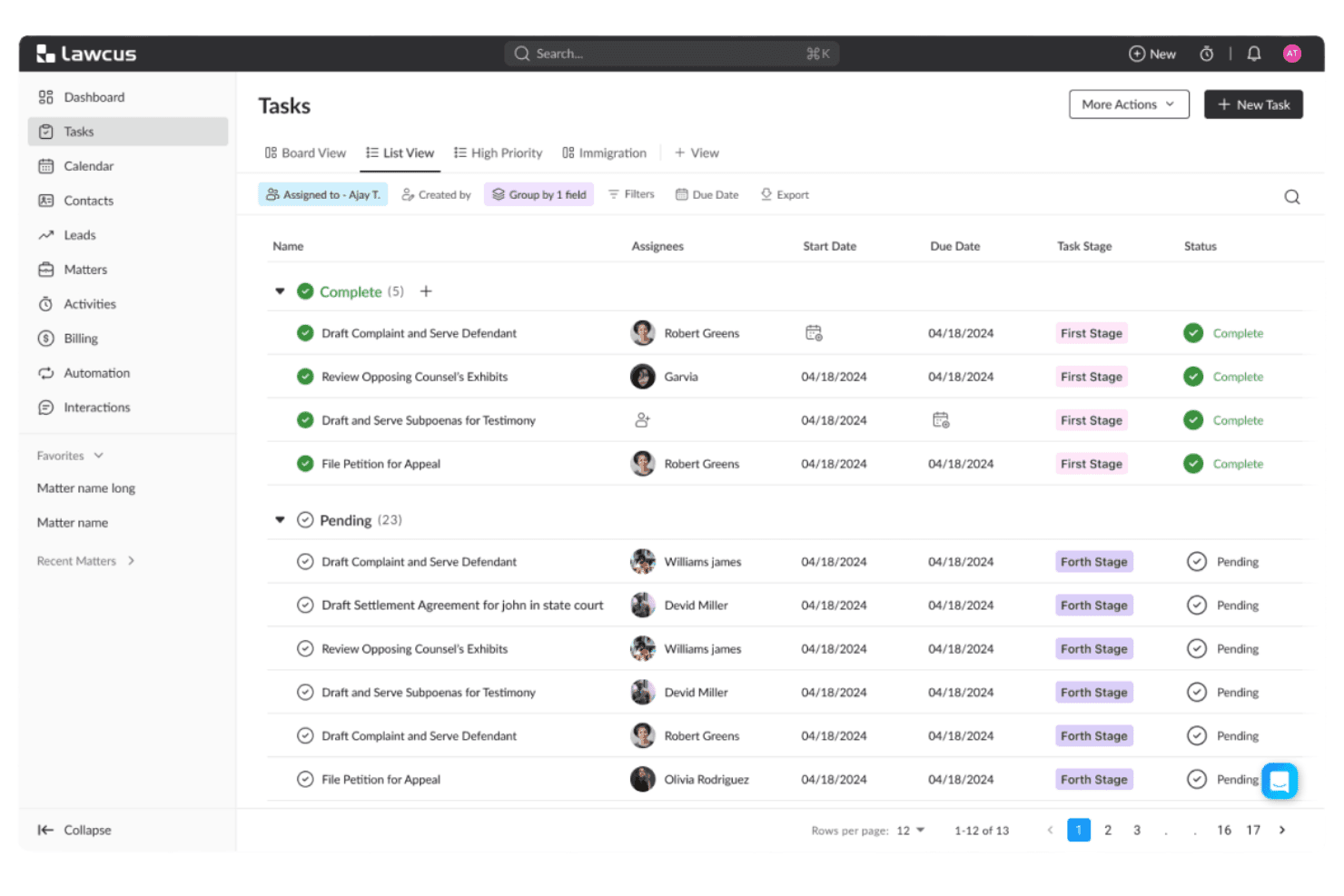
Lawcus tracks law firm tasks with Kanban pipelines and matter-linked workflows. Lawcus is a legal practice management platform that combines matter-linked task management, Kanban pipelines, workflow automation, native time tracking, trust accounting, and client intake in one system.
Who Is Lawcus Best For?
Lawcus is a strong fit for small to mid-size law firms that want task management, time tracking, and billing to live in one connected system rather than across multiple tools.
Why I Picked Lawcus
I picked Lawcus as one of the best because the connection between tasks and billing is genuinely built into its architecture, not bolted on. Every task lives inside a matter hub alongside time entries, trust balances, and invoices, so nothing falls through the cracks between work done and work billed. I especially like the native timer tied directly to matter-linked tasks, combined with LEDES UTBMS coding and trust accounting in the same system.
Lawcus Key Features
- Kanban matter pipelines: Visualize case progress by dragging matters through custom stages on a board view.
- Task dependency management: Link tasks so that changing one due date automatically cascades to dependent tasks.
- Statute of Limitations tracking: Set automated alerts on matter-level SoL deadlines to flag critical dates before they pass.
- Workflow automation builder: Create no-code workflows triggered by matter events, stage changes, or form submissions to automate task sequences.
Lawcus Integrations
Lawcus offers native integrations with QuickBooks, Xero, LawPay, Google Workspace, Microsoft 365, Dropbox, Box, Zoom, Calendly, and WiseTime, and it connects with Zapier. An open REST API is available for custom integrations.
Pros and Cons
Pros:
- Statute of limitations tracking with alerts
- Advanced workflow automation with conditional logic
- Matter-centric tasks with Kanban pipeline views
Cons:
- Conflict checking not yet a live feature
- No native court rules deadline engine
Learn more about Lawcus: Best for court deadline-driven matter workflows
- Free demo available
- Pricing upon request
Visit WebsiteCustomer Rating:4.4/5
CARET Legal lets users manage and prioritize tasks with due dates and filters. CARET Legal is a law practice management platform built around matter-centric task management, court deadline automation, time tracking, billing, and document management.
Who Is CARET Legal Best For?
CARET Legal is a strong fit for litigation-focused law firms that need court deadline automation built directly into their matter workflows.
Why I Picked CARET Legal
CARET Legal earns its spot on my shortlist because of how it handles court deadline automation. The native LawToolBox integration calculates jurisdiction-specific deadlines based on applicable rules of civil procedure, then automatically updates calendar dates when court dates shift, including weekends and court holidays. On top of that, CARET Court Rules does the same calculation natively inside the platform. When a hearing shifts, the entire chain of preparatory tasks updates with it.
CARET Legal Key Features
- CARET Capture AI: Passively identifies billable time within emails and documents as you work, surfacing time entries that might otherwise go unlogged.
- Client portal: Gives clients secure access to case documents and invoices, with built-in payment collection and two-way texting.
- Role-based permissions: Controls access across attorneys, paralegals, and administrative staff at the matter level, scoping visibility and responsibility by role.
- QuickBooks Online integration: Syncs approved invoices between CARET Legal and QuickBooks, keeping your billing and accounting records aligned without manual re-entry.
CARET Legal Integrations
CARET Legal offers native integrations with Microsoft 365, Google Workspace, Microsoft Outlook, Microsoft Word, OneDrive, NetDocuments, HotDocs, LawToolBox, Lawmatics, and QuickBooks Online, plus RMail and CARET Pay. An API is available for custom integrations, but there's no native Zapier support.
Pros and Cons
Pros:
- All tasks and documents linked to matters
- Built-in AI captures billable time from emails
- Native court deadline automation updates with rule changes
Cons:
- Mobile app lacks key task features
- Reporting customization often requires support assistance
Learn more about CARET Legal: Best for billing-linked task tracking across matters
- 10-day free trial
- From $59/user/month (billed annually)
Visit WebsiteCustomer Rating:4.4/5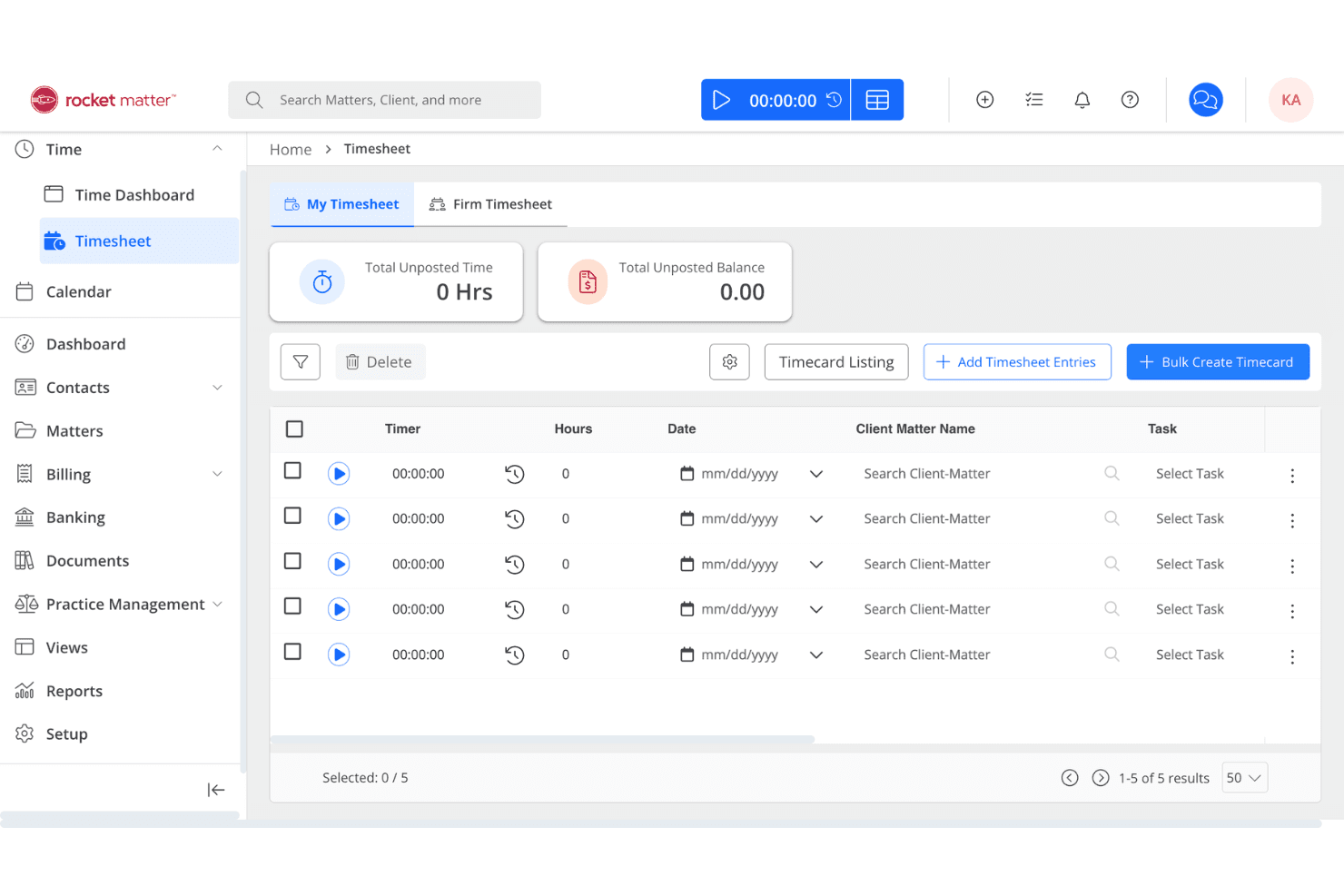
Rocket Matter centralizes law firm tasks, time tracking, billing, and trust accounting. Rocket Matter is a legal practice management platform that combines matter-centric task management, time tracking, billing, document automation, and trust accounting in a single system.
Who Is Rocket Matter Best For?
Rocket Matter is a strong fit for law firms that need task management and time tracking to work as one system, not two.
Why I Picked Rocket Matter
I picked Rocket Matter as one of the best because no other tool on this list ties task management to billing as tightly. Every task sits inside a matter, and running a timer directly on that task feeds billable time straight into invoicing without any extra steps. I also love the Bill-As-You-Work feature, which captures billable time during calendar events on behalf of all attendees, closing a gap that quietly costs firms revenue every day.
Rocket Matter Key Features
- Matter Status Board: A drag-and-drop Kanban board that tracks every active matter from intake to resolution, surfacing bottlenecks in real time.
- LawToolBox integration: Automates court deadline calculations across all 50 U.S. states and updates deadlines automatically when court rules change.
- Dependent task logic: Lets you chain tasks sequentially so downstream assignments only trigger once prerequisite steps are marked complete.
- Audit logs: Records a timestamped history of all task and communication activity across matters, supporting accountability and ethical compliance.
Rocket Matter Integrations
Rocket Matter offers native integrations with Microsoft 365 (including Outlook and OneDrive), Google Calendar, QuickBooks Online, LawToolBox, NetDocuments, Dropbox, Box, and Lawmatics, and it connects with Zapier. An API is also available for custom integrations.
Pros and Cons
Pros:
- Built-in conflict checking and client portal
- Kanban board visualizes matter progress instantly
- Time tracking feeds billable hours directly
Cons:
- Full deadline automation requires LawToolBox subscription
- Task automation less advanced than competitors
Learn more about Rocket Matter: 10Best for Salesforce-native matter task automation
Litify
- Free demo available
- From $150/user/month
Visit WebsiteCustomer Rating:4.2/5
Litify manages law firm tasks with Matter Plans, AI time capture, and reporting. Litify is a Salesforce-native legal practice management platform that combines matter-centric task management, workflow automation via Matter Plans, AI-powered time capture, and real-time reporting across cases, billing, and firm operations.
Who Is Litify Best For?
Litify is a strong fit for mid-to-large law firms that already operate on Salesforce or have the resources to support an enterprise-level implementation and configuration.
Why I Picked Litify
Litify earns its spot on my shortlist because it's built entirely on Salesforce, which means matter task management isn't a feature layered on top of a CRM—it's the foundation. I'm particularly impressed by Matter Plans, which auto-generate role-assigned task checklists the moment a matter is created or changes stage, keeping every attorney and paralegal accountable without manual setup. Pair that with Litify ACE, an AI agent that autonomously routes tasks based on live case data, and you get a task automation layer that few practice management platforms match natively.
Litify Key Features
- LitifyAI time capture: Automatically identifies billable activity from emails, calendar events, and other work items to generate suggested time entries.
- Conflict check agent: Uses fuzzy matching to flag potential conflicts across the firm's case history during intake, accounting for name variations and typos.
- No-code report builder: Lets attorneys and administrators build and schedule custom reports on matter performance, billing realization, and attorney productivity without IT support.
- Microsoft Outlook integration: Syncs emails, calendar events, and meetings bidirectionally with matter records inside Litify.
Litify Integrations
Litify is built natively on Salesforce and offers integrations with Microsoft Outlook, DocuSign, Workday, Okta, Intuit, Billables.ai, Supio, ECFX, Confido Legal, and Anthropic, plus access to the broader Salesforce AppExchange ecosystem. An API is available for custom integrations.
Pros and Cons
Pros:
- Customizable automated matter plan templates
- AI-driven time capture and billing checks
- Native matter-centric workflow for all tasks
Cons:
- Document upload speeds can be slow
- No native jurisdictional court rules engine
Learn more about Litify:
Annen programvare for oppgavehåndtering i advokatfirmaer
Her er noen andre alternativer for programvare for oppgavehåndtering i advokatfirmaer som ikke kom med på kortlisten min, men som likevel er verdt å undersøke:
- 11MerusCaseBest for litigation deadline and workflow automation
- 12PracticePantherBest for billing-linked task tracking in one place
- 13MyCaseBest for client portal task visibility on matters
- 14LEAPBest for all-in-one matter task and trust workflows
- 15CasePeerBest for plaintiff PI case task workflows
- 16ActionstepBest for configurable matter workflow automation
- 17NeosBest for PI firms with court deadline automation
- 18Amicus AttorneyBest for decades-deep matter and deadline workflows
- 19SurePointBest for conflict checks tied to matter tasks
- 20NeostellaBest for no-code workflow automation at case scale
How I Evaluate Law Firm Task Management Software
I split my evaluation into baseline criteria every tool must meet—matter-linked tasks, deadline management, billing integration—and differentiating factors that separate genuinely legal-specific platforms from generic task tools dressed up for law firms.
Core Functionality (Table Stakes for This List)
When I'm selecting tools for my list, I rank each one on a scale from 0 (does not offer the functionality) to 5 (excels in this area) for each core functionality listed below. I then calculate the tool's total score into a percentage, using 65% as a benchmark to help assess its overall fit for the list.
- Matter-linked tasks: I check whether tasks live inside structured matter records or float as standalone to-dos with no case context.
- Deadline and due dates: Court rule calculators and cascading date adjustments matter here—I look for tools that go beyond basic due date fields.
- Task assignment and delegation: I evaluate how each platform handles reassignment, role-based routing, and workload visibility across attorneys and paralegals.
- Workflow automation and templates: Reusable task sets for common matter types like client intake or discovery are what I look for, along with trigger-based automation.
- Time tracking integration: The link between a task and a billable entry should be direct—I check whether timers connect to both the matter and the billing system natively.
- Status tracking and reporting: I look for dashboards that show task progress by matter, by user, and by deadline so partners can spot bottlenecks without digging.
Once I have a list of tools that meet the criteria, I consider what sets each platform apart.
Differentiating Factors (What Sets Vendors Apart)
Here's how I compare and contrast different vendors:
Standout Features
I check whether task completions can trigger document generation—auto-drafting engagement letters or discovery requests when a task closes keeps matters moving without manual paralegal follow-up. Email-to-task capture matters just as much; I evaluate how well Outlook or Gmail integrations convert case emails into matter-linked tasks with attachments filed correctly. Trust accounting awareness is another separator—platforms like Smokeball and CosmoLex can flag tasks when IOLTA balances drop below retainer thresholds, protecting firms from trust accounting violations.
Beyond Features
I evaluate whether a platform carries native or certified integrations with court rule providers like LawToolBox or CalendarRules, since pulling jurisdictional deadlines directly into task workflows is what separates real legal tools from generic project managers. Pricing transparency matters too—I check whether vendors split seats into timekeeper and non-timekeeper tiers, because firms budget around that distinction. I also look at onboarding support tailored to attorneys, including CLE-eligible training and data migration from legacy systems like Amicus Attorney or Time Matters, where preserving matter history during cutover can make or break adoption.
Slik velger du programvare for oppgavehåndtering i advokatfirmaer
Hvis du vil unngå oversitte frister, problemer med fakturering og tap av sakskontekst, bør du basere søket etter programvare for oppgavehåndtering i advokatfirmaer på hvordan systemet håndterer de daglige prioriteringene i den juridiske arbeidsflyten:
| Hvis prioriteten din er … | Se etter … |
|---|---|
| Hvis prioriteten din er …Nøyaktig sporing av rettsbestemte frister | Se etter …Regelbaserte fristkalkulatorer med maler for ulike jurisdiksjoner |
| Hvis prioriteten din er …Å redusere dobbeltregistrering og administrativt arbeid | Se etter …Omfattende integrasjon med systemer for kalender, fakturering og dokumenthåndtering |
| Hvis prioriteten din er …Sammenheng mellom oppgaver og fakturert tid | Se etter …Saksorienterte arbeidsflyter som knytter oppgaver direkte til tidsregistreringer |
| Hvis prioriteten din er …Oversikt på tvers av medarbeidere og saker | Se etter …Sentraliserte kontrollpaneler for oppgavestatus, tildeling og synlighet i flaskehalser |
| Hvis prioriteten din er …Tilpasset arbeidsflyt for fagområdet ditt | Se etter …Fagområdespesifikke oppgavemaler og automatisering, ikke generiske gjøremålslister |
Slik vurderer du kortlisten din
- Test nøyaktigheten til fristene: Kjør en prøvesak gjennom en fullstendig fristkjede ved hjelp av maler for domstolsregler i minst to jurisdiksjoner.
- Kontroller koblingen mellom saker og oppgaver: Send to sporede e-poster og kontroller at begge automatisk konverteres til oppgaver som er koblet til riktig sak, med korrekte vedlegg.
- Prøv tidsregistrering: Tildel en serie fakturerbare oppgaver og bekreft at tidsregistreringene fanges opp automatisk og tilordnes riktig sak.
- Be om dokumentasjon på integrasjoner: Be om et demoopptak eller en kundehistorie som viser synkronisering av kalender og fakturering i sanntid under saksarbeid med flere brukere.
- Ta stilling til fleksibilitet kontra juridisk fokus: Velg mellom verktøy som er utviklet for juridiske arbeidsflyter (bedre for etterlevelse) og generelle plattformer med tilpasninger (bedre for bred skreddersøm).
Hva er programvare for oppgavestyring i advokatfirmaer?
Programvare for oppgavestyring i advokatfirmaer er et dedikert system utviklet for å organisere, spore og administrere oppgaver, frister og arbeidsflyter som er knyttet til bestemte juridiske saker.
Disse plattformene hjelper juridiske team med å overvåke viktige datoer, tildele ansvar og knytte hvert aktivitetspunkt direkte til en klientmappe. Den riktige programvaren støtter sakssentrert oppfølging av oppgaver, integreres med faktureringssystemer og sentraliserer oppdateringer slik at det juridiske teamet holdes samordnet og ansvarlig.
Funksjoner i programvare for oppgavestyring i advokatfirmaer
Vær oppmerksom på følgende viktige funksjoner når du velger programvare for oppgavestyring i advokatfirmaer:
- Saksknyttede oppgaver: Oppgaver ligger i bestemte klient- eller saksoppføringer, slik at du alltid kjenner konteksten og de tilknyttede dokumentene, e-postene og fristene.
- Administrasjon av frister og forfallsdatoer: Innebygde kalkulatorer eller maler lar deg tildele og endre frister basert på domstolsregler eller sakskrav, slik at du kan håndtere lovbestemte tidsfrister og unngå oversittede datoer.
- Tildeling og delegering av oppgaver: Tildel oppgaver til advokater, advokatfullmektiger eller ansatte, følg med på ansvar og tildel oppgaver på nytt ved behov for å holde arbeidet synlig og håndterbart på tvers av teamet.
- Automatisering av arbeidsflyter og maler: Opprett eller bruk gjenbrukbare oppgavesett for standardprosesser (for eksempel inntak, bevisutveksling eller avslutning av saker), og automatiser gjentakende trinn for å redusere administrativt arbeid og sikre ensartethet.
- Integrasjon for tidsregistrering: Knytt tidtakerregistreringer eller manuelle tidslogger direkte til oppgaver og saker, slik at fakturerbare timer registreres ved kilden og overføres til faktureringen.
- Statusoppfølging og rapportering: Bruk oversikter og rapporter som viser fullføring av oppgaver, forsinkede oppgaver og fremdrift per sak, person eller team for å få innsikt i arbeid og flaskehalser.
- E-postintegrasjon: Konverter e-poster til oppgaver, knytt dem til relevante saker og hold kommunikasjonen organisert i oppgavestyringsmiljøet.
- Integrasjon med dokumenthåndtering: Legg ved, opprett eller administrer dokumenter i oppgaver, slik at filer og aktivitetspunkter forblir koblet sammen for rask tilgang og etterlevelse.
- Rollebaserte tillatelser: Bestem hvem som kan se, redigere eller tildele oppgaver basert på stillingsroller for å beskytte sensitiv informasjon og ivareta klientens konfidensialitet.
- Revisjonsspor og aktivitetslogger: Loggfør endringer i oppgaver, fullføringer og oppdateringer per sak for å sikre etterlevelse og følge opp risiko.
Vanlige AI-funksjoner i programvare for oppgavestyring i advokatfirmaer
I tillegg til standardfunksjonene i programvare for oppgavestyring i advokatfirmaer som er nevnt ovenfor, tar mange av disse løsningene i bruk AI med funksjoner som:
- AI-drevne varsler om fristrisiko: Flagge oppgaver og frister som er utsatt, basert på sakshistorikk og trender i arbeidsmengden.
- Automatisert utarbeiding av dokumenter: Genererer utkast til juridiske dokumenter, prosesskriv og klientbrev fra oppgaver eller maler.
- Prediktiv prioritering av oppgaver: Prioriterer juridiske oppgaver ved hjelp av hvor mye det haster, avhengigheter og teamets tilgjengelighet.
- Smart konvertering fra e-post til oppgave: Trekker ut handlinger og frister fra e-poster og knytter nye oppgaver til riktig sak.
- AI-drevne forslag til tidsregistrering: Foreslår eller fyller ut fakturerbare tidsregistreringer basert på aktivitet, kalendere og dokumentredigeringer.
- Oppsummering av juridisk research: Oppsummer rettspraksis, lovbestemmelser og bevisfiler med AI, og legg sammendragene ved oppgaver.
Fordeler med programvare for oppgavestyring i advokatfirmaer
Implementering av programvare for oppgavestyring i advokatfirmaer gir flere fordeler for teamet og virksomheten. Her er noen av fordelene du kan se frem til:
Sentralisert oppgavesporing knyttet til saken: Hold oppgaver, dokumenter og frister koblet til riktig sak for å sikre tydelig kontekst.
Nøyaktig frist- og samsvarsadministrasjon: Beregn rettslige frister automatisk, og juster datoer når regler eller tidsplaner endres.
Effektiv oppgavetildeling og oversikt: Tildel og følg opp oppgaver på tvers av team med oversikter som viser arbeidsmengder og flaskehalser.
Ensartede arbeidsflyter og automatisering: Standardiser rutinearbeid med gjenbrukbare oppgavemaler og regelstyrte arbeidsflyter.
Integrert registrering av tid og fakturering: Koble tidsregistreringer direkte til oppgaver og saker, slik at fakturerbare timer registreres nøyaktig og overføres til fakturerings- eller regnskapssystemet.
Tydelig statusrapportering og innsikt i fremdrift: Følg opp fullførte og forfalte oppgaver per sak, person eller team gjennom oversikter og logger.
Sømløs integrasjon med e-post og dokumenter: Gjør e-poster om til oppgaver knyttet til saken, og legg ved filer direkte fra arbeidsområdet for oppgaver.
Kostnader og priser for programvare for oppgavestyring i advokatfirmaer
Ved valg av programvare for oppgavestyring i advokatfirmaer er det nødvendig å forstå de ulike prismodellene og tilgjengelige abonnementene. Kostnadene varierer basert på funksjoner, teamstørrelse, tillegg og mer. Tabellen nedenfor oppsummerer vanlige abonnementer, gjennomsnittsprisene deres og typiske funksjoner som er inkludert i løsninger for oppgavestyring i advokatfirmaer:
Sammenligningstabell for abonnementer for programvare for oppgavestyring i advokatfirmaer
| Abonnementstype | Gjennomsnittspris | Vanlige funksjoner |
|---|---|---|
| AbonnementstypeGratisabonnement | Gjennomsnittspris$0 | Vanlige funksjonerGrunnleggende saksrelaterte oppgaver, begrenset oppgavetildeling, grunnleggende fristsporing og begrenset lagringsplass. |
| AbonnementstypePersonlig abonnement | Gjennomsnittspris$20–$40/bruker/måned | Vanlige funksjonerSaksrelaterte oppgaver, friststyring, individuell tidsregistrering, registrering av e-post som oppgave og enkel rapportering. |
| AbonnementstypeForretningsabonnement | Gjennomsnittspris$40–$70/bruker/måned | Vanlige funksjonerAvansert automatisering av arbeidsflyter, oppgavetildeling til team, integrasjon med fakturering, tilpassbare maler og standardoversikter. |
| AbonnementstypeVirksomhetsabonnement | Gjennomsnittspris$70–$120/bruker/måned | Vanlige funksjonerAvansert rapportering, regelbaserte fristberegnere, integrasjoner med dokumenthåndtering, rollebaserte tillatelser og prioritert kundestøtte. |
Vanlige spørsmål om oppgavehåndteringsprogramvare for advokatfirmaer
Her er noen svar på vanlige spørsmål om oppgavehåndteringsprogramvare for advokatfirmaer:
Hvordan vet jeg om en programvare for oppgavehåndtering i advokatfirmaer støtter sporing av frister etter domstolsregler?
Kontroller om programvaren har innebygde fristberegnere for domstolsregler eller integrasjoner med verktøy som LawToolBox eller CalendarRules. Disse funksjonene sørger for at fristene i saken justeres etter jurisdiksjonens regler og rettsferier, noe som er avgjørende for virksomheter som arbeider mye med rettssaker.
Kan programvare for oppgavehåndtering i advokatfirmaer integreres med fakturerings- og regnskapssystemer?
Ja, de fleste verktøy for juridisk oppgavehåndtering integreres direkte med fakturerings- og regnskapssystemer, slik at du kan knytte oppgaver direkte til timeregistreringer og fakturaer. Hvis firmaet ditt bruker bestemte systemer som QuickBooks eller Xero, bør du bekrefte at det finnes innebygde eller sertifiserte integrasjoner før du velger en plattform.
Hva er forskjellen mellom saksorientert og generell programvare for oppgavehåndtering?
Saksorienterte verktøy organiserer oppgaver, dokumenter og frister i strukturerte klient- og saksoppføringer. Generelle verktøy behandler oppgaver som isolerte elementer eller lister. For juridisk arbeid bidrar saksorienterte systemer til å bevare konteksten, redusere feil og sikre enkle samsvarskontroller i hele saken.
Hvordan bør jeg teste en plattform for oppgavehåndtering i advokatfirmaer før jeg kjøper den?
Kjør en eksempelssak gjennom viktige arbeidsflyter – opprett en fristkjede, registrer e-poster som oppgaver, tildel fakturerbart arbeid og kontroller flyten for timeregistrering. Be leverandøren om demoopptak eller kundehistorier fra faktisk bruk. Denne fremgangsmåten gir deg et realistisk inntrykk av hvordan verktøyet passer inn i firmaet ditt.
Finnes det verktøy for oppgavehåndtering i advokatfirmaer med AI-funksjoner, for eksempel varsler om frister med høy risiko?
Ja, flere plattformer for juridisk oppgavehåndtering tilbyr AI-baserte varsler om frister med høy risiko, automatisert utarbeidelse av dokumenter og prediktiv prioritering av oppgaver. Disse funksjonene hjelper deg med å oppdage oppgaver som står i fare for å bli forsinket, fremskynde utarbeidelsen av dokumenter og justere arbeidsprioriteringer ved hjelp av maskinlæring som er trent på tidligere saker.
Hvordan fungerer registrering av e-post som oppgave i programvare for oppgavehåndtering i advokatfirmaer?
De fleste plattformer tilbyr programtillegg eller integrasjoner med Outlook og Gmail som lar deg konvertere e-poster, vedlegg og til og med klientkommunikasjon direkte til oppgaver knyttet til saken. Dette sikrer at alle handlingspunkter havner i riktig saksmappe, med de tilhørende dokumentene vedlagt.