

Navegar pelo mundo do direito imobiliário pode ser difícil. Tem de lidar com regulamentações complexas, uma quantidade interminável de documentação e tarefas demoradas. O software para direito imobiliário pode aliviar estas dificuldades ao organizar o seu fluxo de trabalho e aumentar a produtividade.
Na minha experiência enquanto investigador de tecnologia jurídica, vi como o software certo pode transformar a sua prática. Analiso e testo estas ferramentas de forma independente para lhe fornecer informações imparciais e fundamentadas.
Neste artigo, partilharei as principais opções de software para direito imobiliário. Encontrará análises detalhadas centradas nas funcionalidades, na facilidade de utilização e na forma como cada ferramenta pode satisfazer as suas necessidades específicas.
Why Trust Our Software Recommendations
6,700+
Reviews
20
Industry experts
16+
Evaluation factors
14
Years
Our team has been testing and reviewing software since 2012. As legal practice leaders ourselves, we know how difficult—and important—it is to choose the right software.
For this guide, we evaluated tools using hands-on testing and independent research, scoring tools using our selection criteria.
Our reviews reflect our human editorial judgment, not a sales pitch.
Tabela de comparação: software para direito imobiliário
Esta tabela de comparação resume os detalhes dos preços das minhas principais seleções de software para direito imobiliário.
| Tool | Best For | Trial Info | Price | ||
|---|---|---|---|---|---|
| 1 | Best for solo real estate attorney practices | 7-day free trial + free demo available | From $59/user/month | Website | |
| 2 | Best for small law firms | Free demo available | Pricing upon request | Website | |
| 3 | Best for cloud-based access | Free trial available | From £79/user/month | Website | |
| 4 | Best for client communication | 10-day free trial available | From $50/user/month (billed annually) | Website | |
| 5 | Best for billing and invoicing | Free demo available | Pricing upon request | Website | |
| 6 | Best for document automation | Free demo available | Pricing upon request | Website | |
| 7 | Best for closing transactions | 7-day free trial | From $69/user/month | Website | |
| 8 | Best for linked closing and trust accounting | Free plan + free demo available | Pricing upon request | Website | |
| 9 | Best for law firms issuing CPLs and policies | Free demo available | Pricing upon request | Website | |
| 10 | Best for title and eRecording connections | Not available | Pricing upon request | Website |


Análise do melhor software para direito imobiliário
Apresentamos abaixo os meus resumos detalhados do melhor software para direito imobiliário que integrou a minha lista restrita. As minhas análises oferecem uma visão detalhada das principais funcionalidades, vantagens e desvantagens, integrações e casos de utilização ideais de cada ferramenta, para o ajudar a encontrar a melhor opção para si.
 Best for solo real estate attorney practices
- 7-day free trial + free demo available
- From $59/user/month
Visit WebsiteCustomer Rating:4.3/5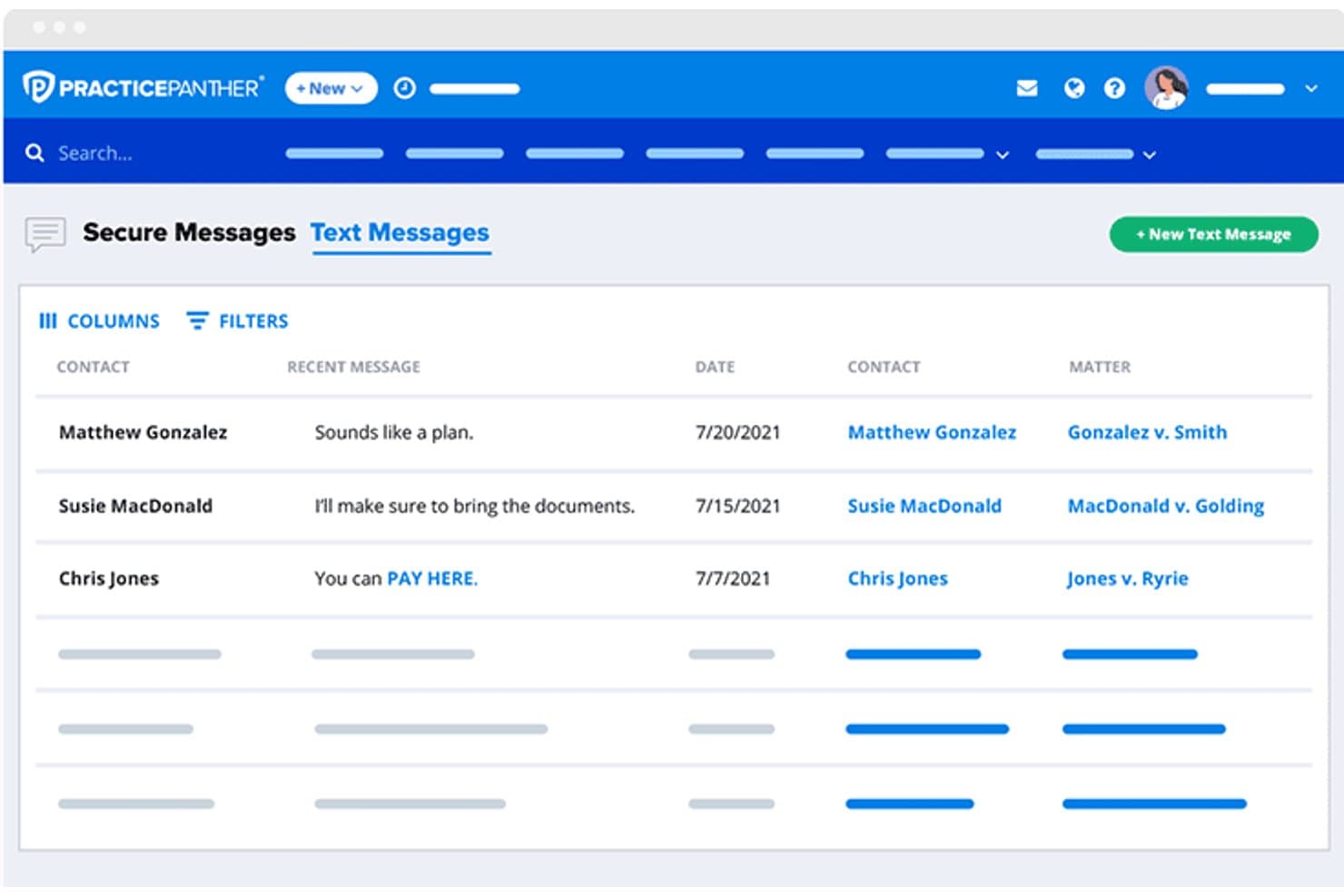
PracticePanther lets users manage client text message threads in one place. PracticePanther is cloud-based legal practice management software for law firms that covers matter management, document templates, billing, trust accounting, client intake, and eSignature in one platform.
Who Is PracticePanther Best For?
PracticePanther fits solo real estate attorneys who need matter management, billing, and document automation in one place without the complexity of a larger platform.
Why I Picked PracticePanther
I picked PracticePanther as one of the best because it packages the core tools a solo real estate attorney actually needs—matter management, document automation, and trust accounting—into a single subscription without the overhead of a larger platform. I like that you can build document templates for quitclaim deeds, easements, and CC&Rs that auto-populate from matter records, cutting out manual drafting. The built-in IOLTA trust accounting with guided three-way reconciliation also means you're not stitching together a separate accounting tool just to stay bar-compliant.
PracticePanther Key Features
- Client intake forms: Build custom online intake forms that sync submitted contact and matter details directly into PracticePanther records.
- Two-way business texting: Send and receive client text messages from within the platform, with message history linked to the related matter.
- LawToolBox court-rules integration: Calculate rules-based deadlines using state and federal court jurisdiction rules and add them to your calendar.
- Client Portal: Give clients a branded, secure space to view documents, send messages, check invoices, and make payments online.
PracticePanther Integrations
Documented integrations include QuickBooks Online, LawToolBox, Google Calendar, Outlook, Microsoft Exchange, Google Drive, Dropbox, and Box. PracticePanther also offers an API and Zapier connectivity.
Pros and Cons
Pros:
- Trust accounting keeps billing in one system
- Templates populate documents from matter data
- Matter records keep client files together
Cons:
- Client portal isn't a shared transaction workspace
- No structured title-search or closing-stage tracking
Learn more about PracticePanther:

Smokeball is legal software for real estate firms, managing time, docs, and clients. Smokeball is a legal practice management software tailored for small law firms specializing in real estate. It offers tools for document management, time tracking, and client communication to help your team stay organized and efficient.
Why I picked Smokeball: It's ideal for small firms due to its user-friendly interface and comprehensive features. You can manage your documents and cases with ease, which simplifies your daily tasks. The automatic time tracking ensures accurate billing without extra effort. Additionally, the client communication tools enhance your ability to maintain strong client relationships.
Standout features & integrations:
Features include a robust document automation system that helps you generate legal documents quickly. The task management feature keeps you on track with deadlines and assignments. The reporting tools provide insights into your firm's performance, aiding in decision-making.
Integrations include Microsoft Office, LawPay, QuickBooks, Xero, NetDocuments, DocuSign, Dropbox, Google Workspace, Outlook, and Clio.
Pros and Cons
Pros:
- Efficient client communication
- Strong document management
- Automatic time tracking
Cons:
- Complexity in setup
- Limited customization options
- Higher pricing for small firms
Learn more about Smokeball: 3Best for cloud-based access
Clio
- Free trial available
- From £79/user/month
Visit WebsiteCustomer Rating:4.7/5
Clio is cloud-based software for real estate case management, billing, and storage. Clio is a cloud-based legal practice management software tailored for real estate law firms. It offers tools for case management, billing, and document storage, allowing your team to work efficiently from anywhere.
Why I picked Clio: Its cloud-based platform provides flexibility and accessibility for remote work. You can manage cases and documents securely, ensuring your team stays connected. The billing features simplify financial management, allowing you to track time and expenses easily. With real-time updates, you can keep clients informed and engaged.
Standout features & integrations:
Features include a comprehensive task management system that helps you prioritize and track work. The document automation feature saves time by generating standard forms and letters. The reporting tools provide insights into firm performance and help with strategic planning.
Integrations include Microsoft Office 365, Google Workspace, Outlook, QuickBooks Online, Xero, Zoom, Dropbox, Stripe, LawPay, and Zapier.
Pros and Cons
Pros:
- Comprehensive billing features
- Secure document management
- Easy remote access
Cons:
- Limited offline functionality
- Learning curve for advanced features
- Initial setup complexity
Learn more about Clio: Best for client communication
- 10-day free trial available
- From $50/user/month (billed annually)
Visit WebsiteCustomer Rating:4.6/5
MyCase is legal software for real estate client management, billing, and storage. MyCase is a legal practice management software that caters to real estate law firms. It focuses on client management, billing, and document storage, helping your firm stay organized and efficient.
Why I picked MyCase: It's especially effective for client communication, offering a client portal that facilitates easy interaction. You can share documents securely and keep clients updated on case progress. The software also provides billing automation, making financial management straightforward. With task management tools, your team can stay on top of deadlines and assignments.
Standout features & integrations:
Features include a calendar management tool that helps you schedule and track important dates. The document management system allows you to organize and store files efficiently. The reporting feature provides insights into your firm's performance, aiding in strategic planning.
Integrations include QuickBooks, LawPay, Google Calendar, Outlook, Dropbox, Microsoft 365, NetDocuments, Box, Stripe, and PayPal.
Pros and Cons
Pros:
- Secure document sharing
- Efficient billing automation
- Strong client communication tools
Cons:
- Complexity in setup
- Learning curve for new users
- Limited customization options
 Best for billing and invoicing
- Free demo available
- Pricing upon request
Visit WebsiteCustomer Rating:4.4/5
CARET Legal is software for real estate case management, billing, and storage. CARET Legal is a practice management software designed for real estate attorneys. It provides tools for case management, billing, and document storage, helping your team stay organized and efficient.
Why I picked CARET Legal: The software excels in billing and invoicing, making financial management straightforward. You can automate invoicing processes, reducing manual effort and errors. The platform also offers detailed reporting, giving you insights into your firm's financial health. With task management tools, you can ensure deadlines and responsibilities are met efficiently.
Standout features & integrations:
Features include a client portal that provides secure communication and document sharing. The calendar management tool helps you track important dates and appointments. The document management system allows for efficient organization and retrieval of legal documents.
Integrations include QuickBooks, NetDocuments, Microsoft Office 365, LawPay, Google Calendar, Outlook, Dropbox, Box, Stripe, PayPal, and Zoom.
Pros and Cons
Pros:
- Comprehensive calendar management
- Secure client portal
- Detailed financial reporting
Cons:
- Initial setup complexity
- Limited customization options
- Learning curve for new users
Learn more about CARET Legal: 6Best for document automation
LEAP
- Free demo available
- Pricing upon request
Visit WebsiteCustomer Rating:4.3/5
LEAP is practice management software for real estate billing, docs, and clients. LEAP is a legal practice management software designed for small to mid-sized real estate law firms. It offers tools for document management, billing, and client communication, enhancing your firm's productivity.
Why I picked LEAP: Its document automation capabilities make it a strong choice for firms dealing with extensive paperwork. You can generate legal documents quickly, reducing manual effort. The software allows you to manage and store documents securely, keeping everything organized. Additionally, the client communication tools facilitate easy interaction, improving client satisfaction.
Standout features & integrations:
Features include a time-tracking tool that ensures accurate billing. The client management system helps you keep track of client details and interactions. The mobile app allows you to access your practice information on the go, making it convenient for remote work.
Integrations include Microsoft 365, QuickBooks, Xero, NetDocuments, LawConnect, InfoTrack, By Lawyers, LawPay, Google Workspace, and Dropbox.
Pros and Cons
Pros:
- Comprehensive time-tracking
- Mobile app for remote access
- Strong document automation & storage
Cons:
- Occasional software updates needed
- Requires internet connection
- Higher cost for small firms
Learn more about LEAP:

Easysoft offers an easy-to-use settlement and auto-calculation solution for real estate. Easysoft is a legal software tool designed for real estate attorneys focusing on closing transactions. It simplifies the closing process by automating calculations and generating necessary documents.
Why I picked Easysoft: It excels in handling real estate closings efficiently. You can automate complex calculations, which reduces errors and saves time. The software generates all required closing documents, streamlining your workflow. With a user-friendly interface, you and your team can focus more on client service rather than administrative tasks.
Standout features & integrations:
Features include a comprehensive HUD-1 and CD form generator, which ensures compliance with real estate regulations. The software automates tax calculations, minimizing manual input. The reporting tools provide insights into transaction details, helping you keep track of all closing activities.
Integrations include QuickBooks, Microsoft Office, Dropbox, Google Drive, Adobe Acrobat, NetDocuments, Box, Clio, LawPay, and DocuSign.
Pros and Cons
Pros:
- Accurate tax calculations
- Automated document generation
- Efficient transaction handling
Cons:
- Basic customer support options
- Learning curve for new users
- Limited customization options
Learn more about Easysoft: Best for linked closing and trust accounting
- Free plan + free demo available
- Pricing upon request

SoftPro organizes settlement charges across recording, taxes, and payoffs. SoftPro is a real estate closing and title production platform built for attorneys and title agents, covering title commitments, policy issuance, escrow disbursements, document automation, and trust accounting through its integrated ProTrust module.
Who Is SoftPro Best For?
SoftPro Standard is a strong fit for real estate attorneys and title agents who need closing production, title commitment workflows, and trust accounting tightly linked in one platform.
Why I Picked SoftPro
SoftPro earns its spot on my shortlist because closing production and trust accounting aren't just adjacent features here—they're built to work as one. I particularly like how ProTrust pulls accounting data directly from orders, so when a disbursement goes out, the ledger updates without any manual rekeying. Three-way reconciliation is built in, which matters when you're managing escrow accounts under audit scrutiny.
SoftPro Key Features
- State and federal document packages: Out-of-the-box closing, title, and escrow document packages are included, covering CDF, HUD-1, HUD-1A, and ALTA settlement statements alongside 100+ ready-to-print documents.
- SoftPro 360 integration portal: A built-in marketplace connecting your orders to 95+ third-party vendors, including e-recording services, underwriters, notary platforms, and fraud prevention tools.
- 1099-S submission module: Stores, manages, and exports 1099-S records directly from closing data, then submits them electronically to the IRS FIRE site without rekeying.
- Documents Portal: An online library of state, underwriter, and national document packages with watchlists and email alerts when packages are updated.
SoftPro Integrations
SoftPro 360 includes marketplace integrations with 95+ vendors, including First American AgentNet, Stewart Access, CSC, eRecording Partners Network, Closinglock, and CertifID. SoftPro also advertises API and SDK access for custom integrations.
Pros and Cons
Pros:
- Title commitments and policy workflows stay together
- ProTrust links orders with three-way reconciliation
- Order data populates closing forms automatically
Cons:
- Reviewers report document merging takes extra work
- Contingency rules and regulatory deadlines aren't automated
Learn more about SoftPro: Best for law firms issuing CPLs and policies
- Free demo available
- Pricing upon request

Qualia streamlines escrow accounting with ledger and disbursement tracking. Qualia is a cloud-based title and escrow production platform that handles order management, closing coordination, CPL and policy issuance, trust accounting, and e-recording for real estate law firms and title companies.
Who Is Qualia Best For?
Qualia Core is a strong fit for real estate law firms that handle high volumes of title and escrow closings and need underwriter integrations to issue CPLs and policies in-house.
Why I Picked Qualia
I picked Qualia Core as one of the best because it's the only tool on this list built specifically around in-house CPL and policy issuance through direct underwriter integrations. Where other platforms require you to jump between systems, Qualia lets you generate closing protection letters and policy jackets in one click from the same file you're already working in. Smart Tags pull order data directly into underwriter forms, so there's no manual re-entry when populating rates or requirements.
Qualia Key Features
- AI-assisted order opening: Upload a purchase and sale contract PDF and generative AI extracts key fields to open an order automatically.
- Task distribution controls: Assign tasks to individuals, roles, or groups, with round robin, equal task load, or overall workload distribution options.
- Smart Balancing: A dynamically updated accounting view that tracks order charges and fees to surface balancing issues before they cause problems.
- 1099-S filing: File 1099-S returns directly to the IRS from Qualia Core, validate records throughout the year, and track return status in a dashboard.
Qualia Integrations
Qualia Core offers native integrations with Old Republic, First American, Fidelity, Stewart, Simplifile, Encompass, Black Knight, and DataTrace. It also provides a read-write GraphQL API for custom integrations, reporting, title orders, messages, and documents.
Pros and Cons
Pros:
- Automatic premium calculations support escrow workflows
- Order, task, and closing work stays organized
- One-click CPL and policy issuance
Cons:
- Finding, updating, and organizing documents can frustrate users
- Accounting can be complex on files
Learn more about Qualia: Best for title and eRecording connections
- Not available
- Pricing upon request

Closers' Choice streamlines title search orders within real estate files. Closers' Choice is a title production and settlement software built for title companies, settlement agents, and real property law firms, covering file management, CPL and policy jacket generation, escrow accounting, document templates, eRecording, and FinCEN identification.
Who Is Closers' Choice Best For?
Closers' Choice is a strong fit for title companies and settlement agents that prioritize direct underwriter connections and eRecording workflows.
Why I Picked Closers' Choice
I've included Closers' Choice in my top picks because its direct underwriter connections and eRecording workflows are genuinely well-built. I can generate CPLs and policy jackets for major underwriters like First American, WFG, and Fidelity National without leaving the platform, and the Simplifile integration lets me push documents, then pull back stamped copies and recording data in one loop. The Transaction Builder also saves real time by extracting details from typed or handwritten contracts and pre-filling files automatically.
Closers' Choice Key Features
- FinCEN identification: Flags potentially reportable transactions early in the workflow so you can route them to the FinCEN Portal for review and submission.
- Escrow reconciliation: Covers deposits, wire-outs, check handling, stop payments, and Positive Pay, with an optional monthly three-way reconciliation service.
- Document template library: Lets you access, edit, and generate closing documents using customizable templates with paragraph and variable controls.
- Secure client portal: Gives buyers, sellers, realtors, lenders, and attorneys a shared space to exchange documents and track transaction updates.
Closers' Choice Integrations
Closers' Choice offers integrations with CSC, Simplifile, Real Res, First American Title, Fidelity National Title Group, Stewart Title, Westcor, WFG National Title, Old Republic Title, and CATIC. API availability isn't documented.
Pros and Cons
Pros:
- Escrow tools cover deposits and reconciliation
- Editable templates generate closing documents
- Transaction Builder extracts contract details
Cons:
- Full closing lifecycle automation remains unclear
- No documented contingency deadline tracking
Learn more about Closers' Choice:
How I Evaluate Real Estate Law Software
I split my evaluation into three parts, giving the most weight to core tasks: track transaction stages and deadlines, and manage trust or escrow balances. Next, I look for differentiators such as wire-fraud safeguards. Finally, I consider factors beyond features, including title-specific onboarding, support, and pricing fit.
Core Functionality (Table Stakes For This List)
When I'm selecting tools for my list, I score each one on a scale from 0 (does not offer the functionality) to 5 (excels in this area) for each core functionality listed below. I then convert the total into a percentage to help assess each tool's overall fit, with extra weight on any functionalities I’ve deemed essential.
- Transaction Management (Essential): I look for stages, checklists, and matter visibility from intake through closing, recording, and post-closing.
- Title & Escrow Support (Essential): I assess how tools handle title commitments, policies, and settlement statements within the closing workflow.
- Document Automation: I look for templates that populate deeds, disclosures, and closing packages with matter data.
- Trust & Escrow Accounting: I check for transaction-level ledgers, reconciliation support, and audit trails for client funds.
- Compliance Tracking: I assess deadline tracking for contingencies and disclosures, including alerts tied to contract terms.
- Third-Party Integration: I check connections to title, underwriting, MLS, or e-recording systems to limit re-entry across closing tasks.
Once I have a list of tools that meet the criteria, I consider what sets each platform apart.
Differentiating Factors (What Sets Vendors Apart)
Here's how I compare and contrast different vendors:
Standout Features
Wire fraud safeguards top my list. I check for built-in wire verification, dual-authorization controls, and identity confirmation steps that protect closings without adding manual bottlenecks. I also evaluate e-recording connectivity, since platforms that submit deeds directly to county systems cut turnaround time and reduce rejection risk. Multi-state licensing support matters for firms operating across jurisdictions—I look for rate calculators and document sets that auto-adjust to each property's local rules.
Beyond Features
I check whether a platform's underwriter relationships match the agencies your firm already works with, since switching partners mid-adoption adds cost and delays. Implementation support matters just as much—I look for vendors with dedicated title and real estate onboarding specialists, not generic help desks, especially when migrating years of escrow ledger history. Pricing models also shape long-term fit: per-transaction billing suits low-volume solo practices, while per-user plans favor busy multi-attorney offices.
Como escolher software para direito imobiliário
É fácil perder-se em listas extensas de funcionalidades e estruturas de preços complexas. Para o ajudar a manter-se concentrado enquanto analisa o seu processo único de seleção de software, apresentamos uma lista de verificação dos fatores a ter em conta:
| Fator | O que considerar |
| Escalabilidade | Certifique-se de que o software consegue acompanhar o crescimento da sua empresa. Procure soluções capazes de gerir um número crescente de casos, clientes e utilizadores sem problemas de desempenho. |
| Integrações | Verifique se o software se integra com as ferramentas que já utiliza, como o QuickBooks ou o Outlook. A troca de dados perfeita pode poupar tempo e reduzir erros. |
| Possibilidades de personalização | Procure software que lhe permita adaptar os fluxos de trabalho e as interfaces às necessidades e preferências específicas da sua empresa. |
| Facilidade de utilização | Avalie a interface do utilizador e a navegação. A sua equipa deve conseguir utilizar o software de forma eficiente sem necessitar de formação extensa. |
| Orçamento | Considere o custo total, incluindo taxas iniciais, preços das subscrições e quaisquer encargos adicionais relativos a funcionalidades ou suporte. Certifique-se de que se enquadra no seu orçamento. |
| Medidas de segurança | Confirme que o software cumpre os regulamentos legais de proteção de dados. Procure funcionalidades como encriptação e controlos de acesso seguros. |
Tendências no software para direito imobiliário
Durante a minha investigação, analisei inúmeras atualizações de produtos, comunicados de imprensa e registos de versões de diferentes fornecedores de software para direito imobiliário. Eis algumas das tendências emergentes que tenho acompanhado:
- Análise baseada em IA: A IA está a transformar a forma como as empresas analisam dados e preveem resultados. O software disponibiliza agora análise preditiva para prever os resultados dos processos e o comportamento dos clientes. Fornecedores como a Clio estão a incorporar IA para fornecer informações práticas.
- Realidade virtual (VR) para visitas a imóveis: A VR está a ser utilizada para proporcionar visitas virtuais a imóveis, reduzindo a necessidade de visitas presenciais. Esta tendência ajuda os clientes a tomar decisões informadas à distância, e fornecedores como a Stavvy estão a explorar as capacidades da VR.
- Blockchain para a segurança das transações: A blockchain está a ganhar força na proteção das transações imobiliárias. Oferece um registo imutável que reforça a confiança e reduz a fraude. Alguns fornecedores estão a começar a integrar a blockchain para garantir transações seguras.
- Melhorias nos portais dos clientes: Os portais dos clientes estão a tornar-se mais interativos, disponibilizando atualizações em tempo real e ferramentas de comunicação. Esta tendência melhora o envolvimento e a satisfação dos clientes. A MyCase está a melhorar as funcionalidades do seu portal de clientes para responder a estas exigências.
- Funcionalidades de sustentabilidade: Existe uma atenção crescente à sustentabilidade no software de direito imobiliário. As ferramentas ajudam agora as empresas a acompanhar e comunicar métricas de sustentabilidade, em conformidade com as expectativas dos clientes e dos reguladores. Alguns fornecedores estão a adicionar funcionalidades para apoiar práticas amigas do ambiente.
O que é o software de direito imobiliário?
O software de direito imobiliário é um tipo de tecnologia jurídica concebida para ajudar os advogados e os escritórios de advocacia especializados em direito imobiliário a gerir as suas operações diárias. Estas ferramentas são geralmente utilizadas por profissionais jurídicos especializados em transações imobiliárias, proporcionando-lhes eficiência e precisão no tratamento de processos complexos. As funcionalidades de gestão documental, faturação e comunicação com os clientes ajudam a organizar tarefas, garantir a conformidade e manter as relações com os clientes. De um modo geral, estas ferramentas proporcionam um valor significativo ao simplificar os processos jurídicos e aumentar a produtividade.
Funcionalidades do software de direito imobiliário
Ao selecionar software de direito imobiliário, procure as seguintes funcionalidades principais:
- Gestão documental: Organiza e armazena documentos jurídicos, facilitando o acesso e a gestão eficiente dos ficheiros.
- Faturação e emissão de faturas: Automatiza os processos de faturação, reduzindo os erros manuais e garantindo pagamentos atempados.
- Registo de tempos: Regista com precisão as horas faturáveis, ajudando a maximizar as receitas e a simplificar a faturação.
- Comunicação com os clientes: Disponibiliza portais seguros para partilhar informações e manter relações sólidas com os clientes.
- Verificações de conformidade: Garante que todas as atividades jurídicas cumprem os regulamentos do setor, reduzindo os riscos de incumprimento.
- Gestão de tarefas: Acompanha prazos e responsabilidades, garantindo que nada fica por tratar.
- Ferramentas de elaboração de relatórios: Fornece informações sobre o desempenho do escritório, apoiando o planeamento estratégico e a tomada de decisões.
- Fluxos de trabalho personalizáveis: Permite que os escritórios adaptem os processos às suas necessidades específicas, aumentando a eficiência.
- Medidas de segurança: Protege os dados sensíveis dos clientes através de encriptação e controlos de acesso seguros.
- Análise baseada em IA: Fornece previsões para ajudar a antecipar resultados e melhorar a tomada de decisões.
Vantagens do software de direito imobiliário
A implementação de software de direito imobiliário proporciona várias vantagens para a sua equipa e para a sua empresa. Eis algumas das vantagens que pode esperar:
- Maior eficiência: Automatiza tarefas rotineiras, como a faturação e a gestão documental, libertando tempo para trabalhos mais importantes.
- Maior satisfação dos clientes: Os portais seguros dos clientes e as ferramentas de comunicação mantêm os clientes informados e envolvidos.
- Faturação precisa: As funcionalidades de registo de tempos e emissão de faturas garantem uma faturação precisa e reduzem o risco de perda de receitas.
- Conformidade regulamentar: As verificações de conformidade integradas ajudam a cumprir as normas jurídicas, reduzindo o risco de penalizações.
- Melhor tomada de decisões: As ferramentas de elaboração de relatórios e a análise baseada em IA fornecem informações que apoiam o planeamento estratégico.
- Segurança dos dados: As medidas de segurança protegem as informações sensíveis dos clientes, proporcionando-lhe tranquilidade.
- Processos personalizáveis: Os fluxos de trabalho adaptados permitem ajustar o software às necessidades específicas da sua empresa, aumentando a produtividade.
Custos e preços do software de direito imobiliário
A seleção de software de direito imobiliário exige uma compreensão dos vários modelos de preços e planos disponíveis. Os custos variam consoante as funcionalidades, a dimensão da equipa, os complementos e outros fatores. A tabela abaixo resume os planos comuns, os respetivos preços médios e as funcionalidades normalmente incluídas nas soluções de software de direito imobiliário:
Tabela de comparação de planos para software de direito imobiliário
| Tipo de plano | Preço médio | Funcionalidades comuns |
| Plano gratuito | $0 | Gestão básica de documentos, comunicação limitada com clientes e gestão de tarefas essenciais. |
| Plano pessoal | $20-$50/ utilizador/mês | Gestão avançada de documentos, controlo do tempo e ferramentas básicas de elaboração de relatórios. |
| Plano empresarial | $50-$100/ utilizador/mês | Faturação e emissão de faturas avançadas, portais de clientes e fluxos de trabalho personalizáveis. |
| Plano empresarial de grande dimensão | $100-$200/utilizador/mês | Verificações abrangentes de conformidade, análise baseada em IA e apoio ao cliente premium. |
Perguntas frequentes sobre software de direito imobiliário
Eis algumas respostas a perguntas comuns sobre software de direito imobiliário:
Quão seguros são os dados armazenados no software de direito imobiliário?
A segurança é uma prioridade máxima para os fornecedores de software de direito imobiliário. A maioria das soluções utiliza encriptação e controlos de acesso seguros para proteger informações sensíveis dos clientes. Além disso, muitos fornecedores cumprem os regulamentos do setor para garantir a proteção dos dados.
O software de direito imobiliário é adequado para pequenas sociedades?
Sim, o software de direito imobiliário é frequentemente escalável e pode ser adaptado às necessidades de pequenas sociedades. Estas ferramentas ajudam as equipas pequenas a gerir processos de forma eficiente, melhorar a comunicação com os clientes e tratar da faturação e da emissão de faturas com facilidade.
Como é que o software de direito imobiliário gere a conformidade com os regulamentos legais?
Muitas soluções de software de direito imobiliário incluem funcionalidades de conformidade integradas que ajudam a cumprir as normas legais. Estas funcionalidades podem incluir verificações automatizadas da conformidade regulamentar e ferramentas para manter registos precisos, reduzindo o risco de incumprimento.
Como funciona o planeamento sucessório no direito imobiliário?
O planeamento sucessório no direito imobiliário envolve a preparação de documentos legais e estratégias que determinam como bens imóveis, como uma casa, terrenos ou imóveis para investimento, serão geridos ou distribuídos após a morte do proprietário. Isto inclui frequentemente a constituição de um trust vivo, a nomeação de fiduciários para agir em nome da herança e a atribuição de uma procuração para tratar de decisões caso o proprietário fique incapacitado.
Os bens imóveis também podem ser afetados pelo imposto sucessório, e um planeamento fiscal adequado garante que estes custos são minimizados. Durante a administração da herança, o executor deve tratar das distribuições, liquidar responsabilidades e, por vezes, recorrer ao processo de inventário, que é supervisionado pelo tribunal. Também podem ser incluídas diretivas para definir desejos específicos relativos aos bens imóveis.
Quem está envolvido na gestão dos ativos imobiliários de uma herança?
A gestão de bens imóveis no âmbito de uma herança envolve normalmente várias funções importantes. Os planeadores sucessórios ajudam a criar a estratégia jurídica para a transferência dos bens, enquanto os advogados especializados em planeamento sucessório asseguram o cumprimento das leis imobiliárias específicas de cada estado.
Os beneficiários são as pessoas que receberão os bens ou o produto da venda dos mesmos. Estes profissionais e particulares devem trabalhar em conjunto para garantir que as transições de propriedade — quer através de um trust, testamento ou venda — são realizadas de forma legal e eficiente.
Que documentos são necessários para o planeamento imobiliário?
Um planeamento sucessório imobiliário eficaz requer vários documentos essenciais. Os documentos de planeamento sucessório podem incluir um testamento, uma procuração e um trust vivo para ajudar a evitar o processo de inventário. Também serão necessários formulários de inventário específicos de cada estado, especialmente quando estão envolvidos bens situados em diferentes jurisdições.
Os questionários são frequentemente utilizados por advogados especializados em planeamento sucessório para recolher informações sobre a propriedade dos bens e os desejos da família. Um guia passo a passo pode ajudar a simplificar o processo, garantindo que o tratamento legal dos bens imóveis cumpre os requisitos locais.
Related Reviews