

O software de gestão de tarefas para escritórios de advogados foi concebido especificamente para gerir prazos associados a processos, tarefas e o acompanhamento de fluxos de trabalho das equipas jurídicas. Se precisa de uma forma fiável de reduzir o risco de incumprimento de prazos, associar cada tarefa a um processo de cliente e integrar sistemas de faturação e calendários, está no sítio certo.
A ferramenta errada cria obstáculos — perda de tempo faturável, prazos judiciais falhados ou funcionários frustrados —, por isso vale a pena comparar as melhores plataformas de gestão de tarefas para escritórios de advogados.
De seguida, apresentarei as principais opções criadas especificamente para práticas jurídicas, para que possa escolher um sistema adequado ao seu fluxo de trabalho e às suas obrigações para com os clientes.
Why Trust Our Software Recommendations
6,700+
Reviews
20
Industry experts
16+
Evaluation factors
14
Years
Our team has been testing and reviewing software since 2012. As legal practice leaders ourselves, we know how difficult—and important—it is to choose the right software.
For this guide, we evaluated tools using hands-on testing and independent research, scoring tools using our selection criteria.
Our reviews reflect our human editorial judgment, not a sales pitch.
Tabela comparativa de software de gestão de tarefas para escritórios de advogados
Esta tabela comparativa resume os detalhes de preços das minhas principais escolhas de software de gestão de tarefas para escritórios de advogados:
| Tool | Best For | Trial Info | Price | ||
|---|---|---|---|---|---|
| 1 | Best for matter-linked tasks and auto-captured time | Free demo available | Pricing upon request | Website | |
| 2 | Best for jurisdiction-aware court deadline workflows | Free demo available | Pricing upon request | Website | |
| 3 | Best for billing-aware matter task workflows | 10-day free trial + free demo available | From $49/user/month (billed annually) | Website | |
| 4 | Best for practice-area task suites with built-in rules | Free demo available | Pricing upon request | Website | |
| 5 | Best for Outlook-linked time capture on matters | Free demo available | Pricing upon request | Website | |
| 6 | Best for matter-linked court deadline workflows | 7-day free trial | From $49/user/month | Website | |
| 7 | Best for billing-linked matter task workflows | Free plan + trial available | From $49/user/month | Website | |
| 8 | Best for court deadline-driven matter workflows | Free demo available | Pricing upon request | Website | |
| 9 | Best for billing-linked task tracking across matters | 10-day free trial + free demo available | From $59/user/month (billed annually) | Website | |
| 10 | Best for Salesforce-native matter task automation | Free demo available | Pricing upon request | Website |


Avaliações de software de gestão de tarefas para escritórios de advogados
Seguem-se os meus resumos detalhados do melhor software de gestão de tarefas para escritórios de advogados que integrou a minha lista restrita. As minhas avaliações apresentam uma análise detalhada das funcionalidades, dos melhores casos de utilização e das integrações de cada plataforma, para ajudar a encontrar a melhor opção para si.
 Best for matter-linked tasks and auto-captured time
- Free demo available
- Pricing upon request
Visit WebsiteCustomer Rating:4.8/5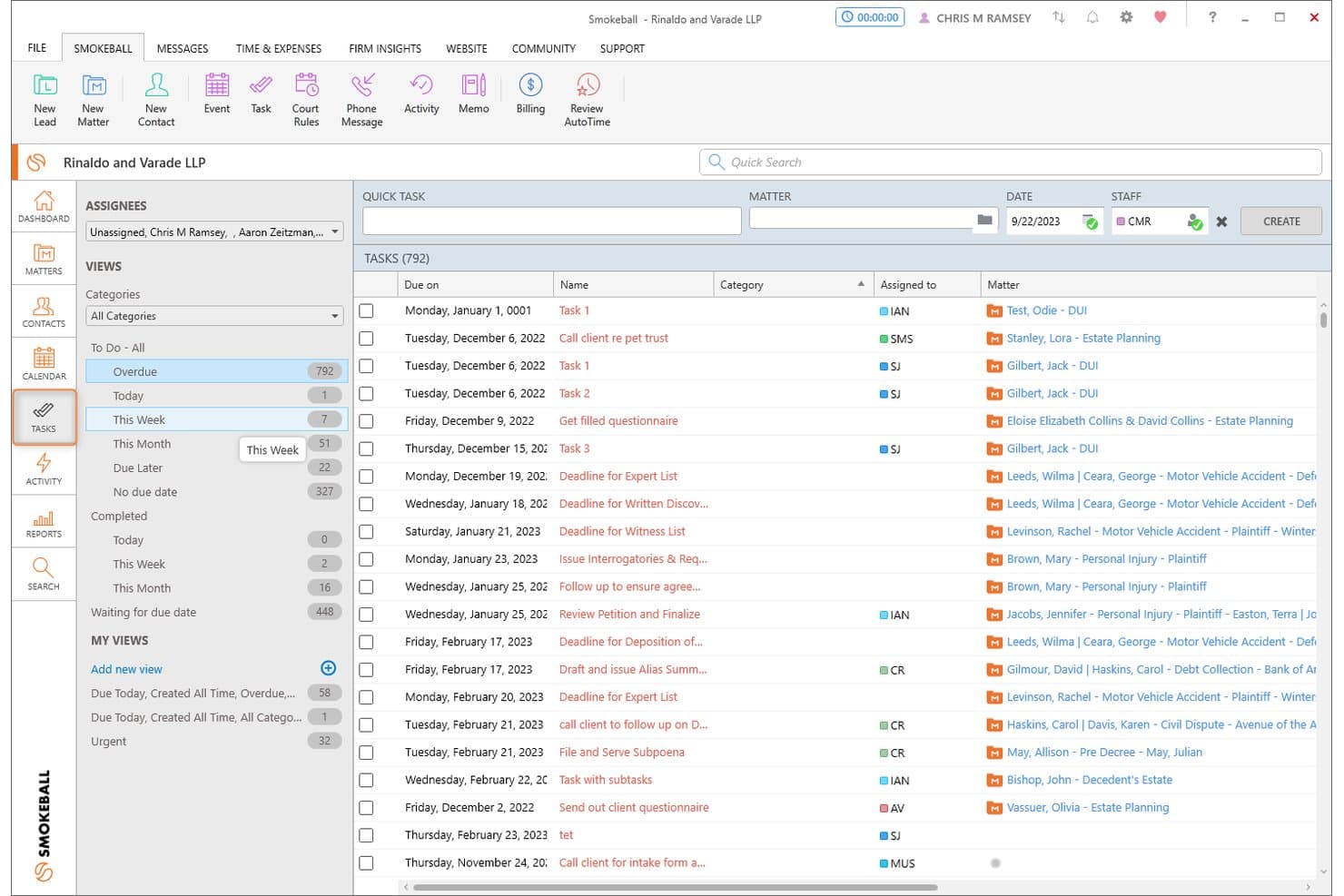
Smokeball organizes overdue and upcoming tasks across all matters in one view. Smokeball is a legal practice management platform built around a matter-centric architecture, combining task management, workflow automation, document generation, deadline tracking, and time capture across case files.
Who Is Smokeball Best For?
Smokeball is a strong fit for solo attorneys and small-to-midsize law firms that want every task, document, and time entry automatically organized under its matter.
Why I Picked Smokeball
Smokeball earns its spot on my shortlist because of how tightly it ties every task to its matter by design, not by configuration. I especially like AutoTime, which passively records billable activity across Smokeball, Word, and Outlook and assigns it to the correct matter automatically, no manual timer needed. Pair that with LawToolBox's jurisdiction-aware deadline cascading, and you get a task layer that's genuinely built around how case work moves.
Smokeball Key Features
- Matter-type workflow templates: Smokeball automatically applies a pre-built task list when a new matter is created, drawing from 250+ matter type templates matched to your practice area.
- LawToolBox deadline cascading: Court rules-based deadline calculation adjusts your entire matter schedule automatically when a trigger date or jurisdiction rule changes.
- TemplateLab document automation: Over 20,000 legal forms and document templates auto-populate with matter data and link directly to individual workflow task stages.
- Firm Insights dashboards: Prosper+ users get configurable reports tracking matter profitability, attorney billable-hour targets vs. actuals, fee collection, and team capacity across the firm.
Smokeball Integrations
Smokeball offers native integrations with LawToolBox, QuickBooks Online, Xero, InfoTrack, LawPay, Zoom, RingCentral, CourtDrive, and Case Status, plus deep native integration across the Microsoft ecosystem, including Microsoft Outlook and Microsoft Word. Additional connectivity is available through the Smokeball Marketplace.
Pros and Cons
Pros:
- LawToolBox court deadline integration
- All tasks organized by matter file
- Automatic time tracking with AutoTime
Cons:
- No built-in conflict check workflow
- Most automation features gated to higher plans
Learn more about Smokeball: Best for jurisdiction-aware court deadline workflows
- Free demo available
- Pricing upon request
Visit WebsiteCustomer Rating:4.5/5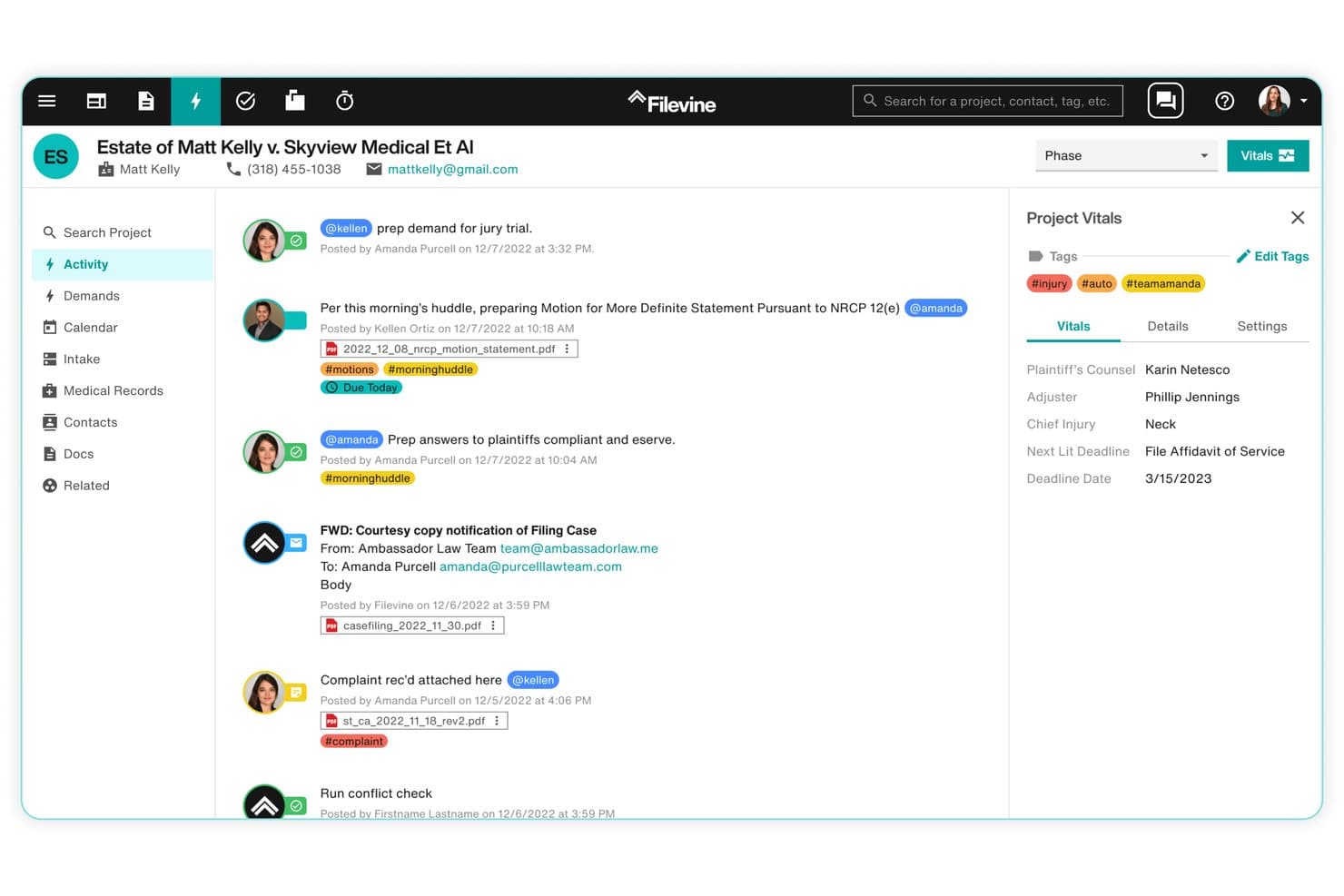
Filevine centralizes case activity, tasks, and deadlines in one view. Filevine is a legal case management platform built around a matter-centric model, with jurisdiction-aware court deadline automation, configurable workflow templates, AI-assisted task management, and document assembly tools.
Who Is Filevine Best For?
Filevine is a strong fit for litigation-focused and plaintiff-side law firms that need jurisdiction-specific court deadline tracking built directly into their case management workflows.
Why I Picked Filevine
Filevine earns its spot on my shortlist because of Timely by Filevine, its jurisdiction-aware court deadline engine covering all 50 U.S. states. I love that you select a jurisdiction and a trigger date, and Timely auto-generates every cascading court deadline from there, with rules reviewed monthly to stay current. AIFields layers on top of that by extracting deadlines directly from uploaded court documents, feeding them into the calendar automatically.
Filevine Key Features
- Matter-centric task page: View, filter, sort, and prioritize all tasks across a matter from a single dedicated task page, with support for task dependencies and sub-matter organization.
- SidebarAI task suggestions: An in-app AI assistant that proactively surfaces relevant tasks based on case context and flags follow-up actions across active matters.
- Non-action detection: Filevine surfaces when expected actions haven't occurred within a matter, giving partners and administrators visibility into stalled work.
- LOIS AI Console: Runs AI agents firm-wide to set tasks, move deadlines, and generate documents, with each action traceable back to its source data.
Filevine Integrations
Filevine offers native integrations with QuickBooks, Microsoft Outlook, Gmail, Google Calendar, Microsoft Teams, Slack, RingCentral, Dialpad, Domo, and Workato, and connects with Zapier. An API is also available for custom integrations, with Filevine claiming 2,000+ potential connections when accounting for Workato and Zapier.
Pros and Cons
Pros:
- Highly configurable, matter-centric workflow engine
- AI surfaces missed or overdue legal tasks
- Jurisdiction-aware court deadline calculations
Cons:
- Setup complexity often requires outside consultants
- Task management considered less advanced than peers
Learn more about Filevine: Best for billing-aware matter task workflows
- 10-day free trial + free demo available
- From $49/user/month (billed annually)
Visit WebsiteCustomer Rating:4.3/5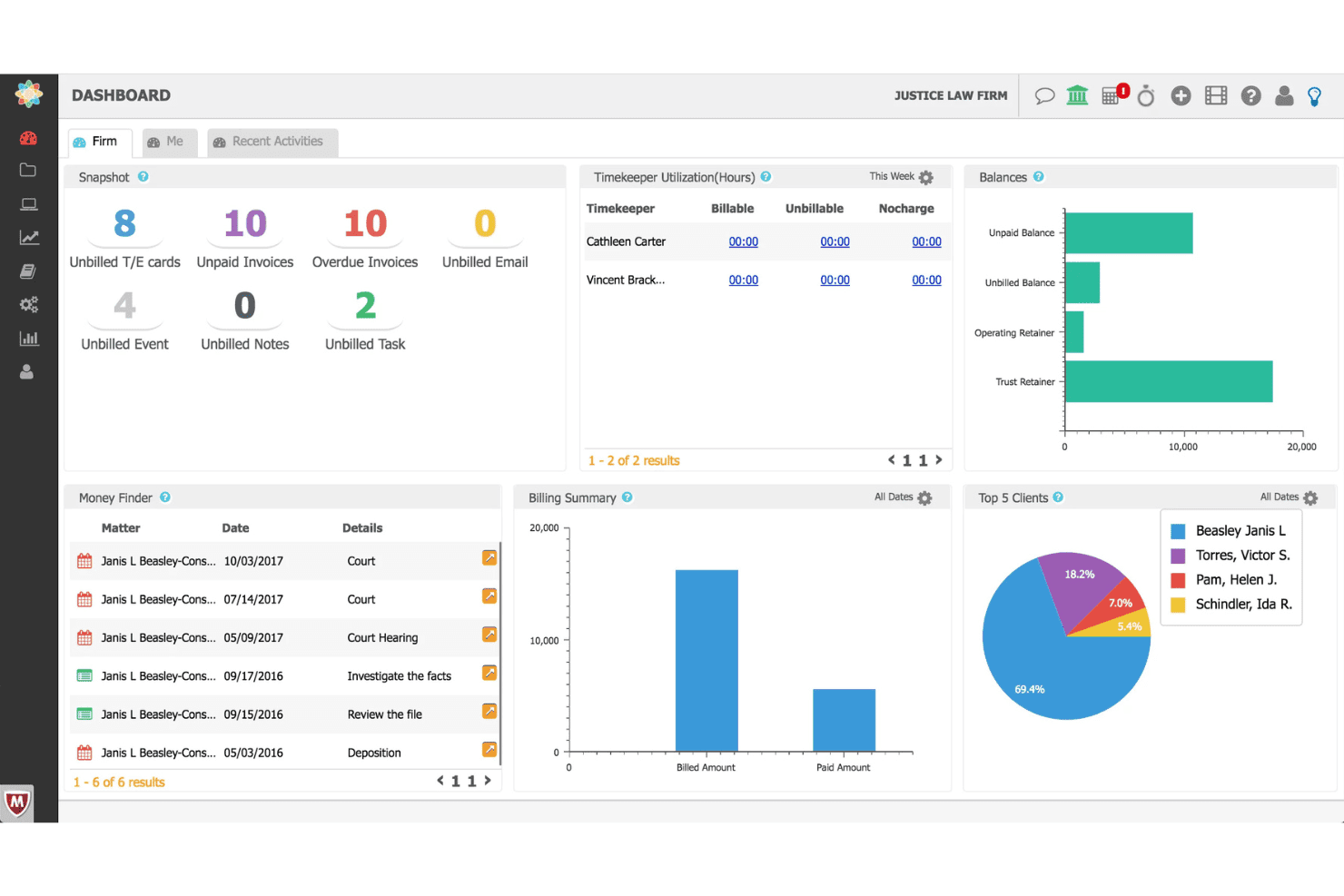
CosmoLex coordinates legal tasks, workflows, time entries, billing, and trust funds. CosmoLex is a cloud-based legal practice management platform that combines matter-centric task management, workflow automation, time tracking, billing, and trust accounting in a single system.
Who Is CosmoLex Best For?
CosmoLex is a strong fit for solo practitioners and small law firms that want billing, trust accounting, and matter task management in one place.
Why I Picked CosmoLex
CosmoLex earns its spot on my shortlist because every task lives inside a matter record, and every matter record connects directly to billing. I particularly like the Money Finder feature, which surfaces unbilled emails, meetings, and tasks so nothing slips through without a time entry attached. Pair that with dynamic due dates that cascade when milestones shift, and you get task management that's genuinely aware of both deadlines and dollars.
CosmoLex Key Features
- Board View: A Kanban-style visual interface that lets you track task progress across multiple matters at a glance.
- Trust accounting integration: Native IOLTA trust accounting with automated three-way reconciliation and overdraft prevention built directly into the platform.
- Matter templates: Pre-built workflow templates that load task sequences, deadlines, and assignments automatically for specific matter types.
- Client portal: A secure, two-way portal where clients can view invoices, make payments, exchange messages, and upload documents that auto-file into the correct matter.
CosmoLex Integrations
CosmoLex offers native integrations with Microsoft 365, Gmail, QuickBooks Online, Dropbox, Google Drive, OneDrive, NetDocuments, Box, LawPay, and Plaid, and it connects with Zapier.
Pros and Cons
Pros:
- Visual Kanban boards for task progress
- "Money Finder" helps capture missed billables
- Matter tasks and billing tightly connected
Cons:
- Report templates have export and customization limits
- No native court rules calendaring
Learn more about CosmoLex: Best for practice-area task suites with built-in rules
- Free demo available
- Pricing upon request
Visit WebsiteCustomer Rating:4/5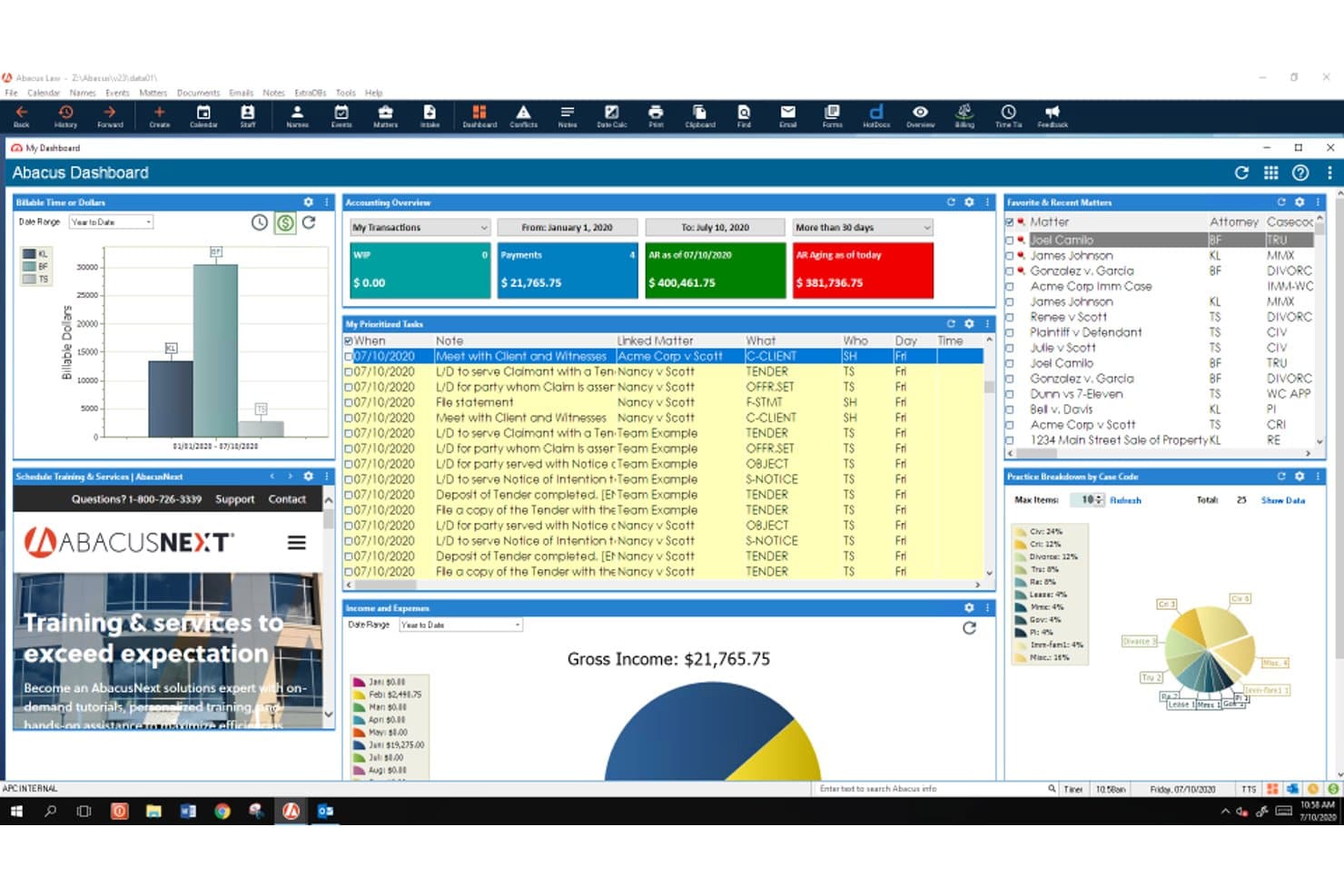
AbacusLaw schedules legal work with task queues, court rules, reminders, and deadlines. AbacusLaw is a legal practice management platform that combines matter-centric task management, rules-based court calendaring, document automation, native time and billing, and trust accounting across 15+ pre-configured practice area suites.
Who Is AbacusLaw Best For?
AbacusLaw is a strong fit for mid-sized law firms with dedicated administrative staff who need practice area-specific workflows and built-in court deadline rules.
Why I Picked AbacusLaw
AbacusLaw earns its spot on my shortlist because of its rules-based court calendaring engine, which is genuinely rare at this depth. I love how practice area suites come pre-loaded with jurisdiction-specific deadline rules: Personal Injury alone ships with 16 pre-built rules that auto-cascade linked events the moment you apply them to a matter. Pair that with a 360-degree matter view that ties every task, document, and billing record to a single case file, and you get task management that's built around how legal work actually moves.
AbacusLaw Key Features
- Conflict of interest checker: A built-in tool that scans matter names, notes, and name records to identify conflicts, producing a printable hit list you can link directly to the case file.
- Native trust accounting: Built-in trust accounting supports IOLTA compliance, bank reconciliation, and payment processing via the Abacus Payment Exchange across trust and operating accounts.
- Client portal: A secure portal lets clients view matter information, access shared documents and invoices, and pay bills online—with firm-controlled access permissions at the client level.
- Document automation: Court forms and customizable templates auto-populate with matter data, and HotDocs integration enables one-click document completion directly from AbacusLaw records.
AbacusLaw Integrations
AbacusLaw offers a smaller set of native integrations, including Microsoft Outlook, Microsoft 365, DocuSign, HotDocs, LawPay, QuickBooks, and Abacus Payment Exchange (APX). It doesn't have a public API or Zapier support, which limits custom connectivity with the broader legal tech stack.
Pros and Cons
Pros:
- Native trust accounting meets IOLTA compliance
- Practice area suites with automated workflow templates
- Rules-based court calendaring reduces manual deadline work
Cons:
- Dated interface compared to modern platforms
- No public API limits custom workflows
Learn more about AbacusLaw: Best for Outlook-linked time capture on matters
- Free demo available
- Pricing upon request
Visit WebsiteCustomer Rating:4.5/5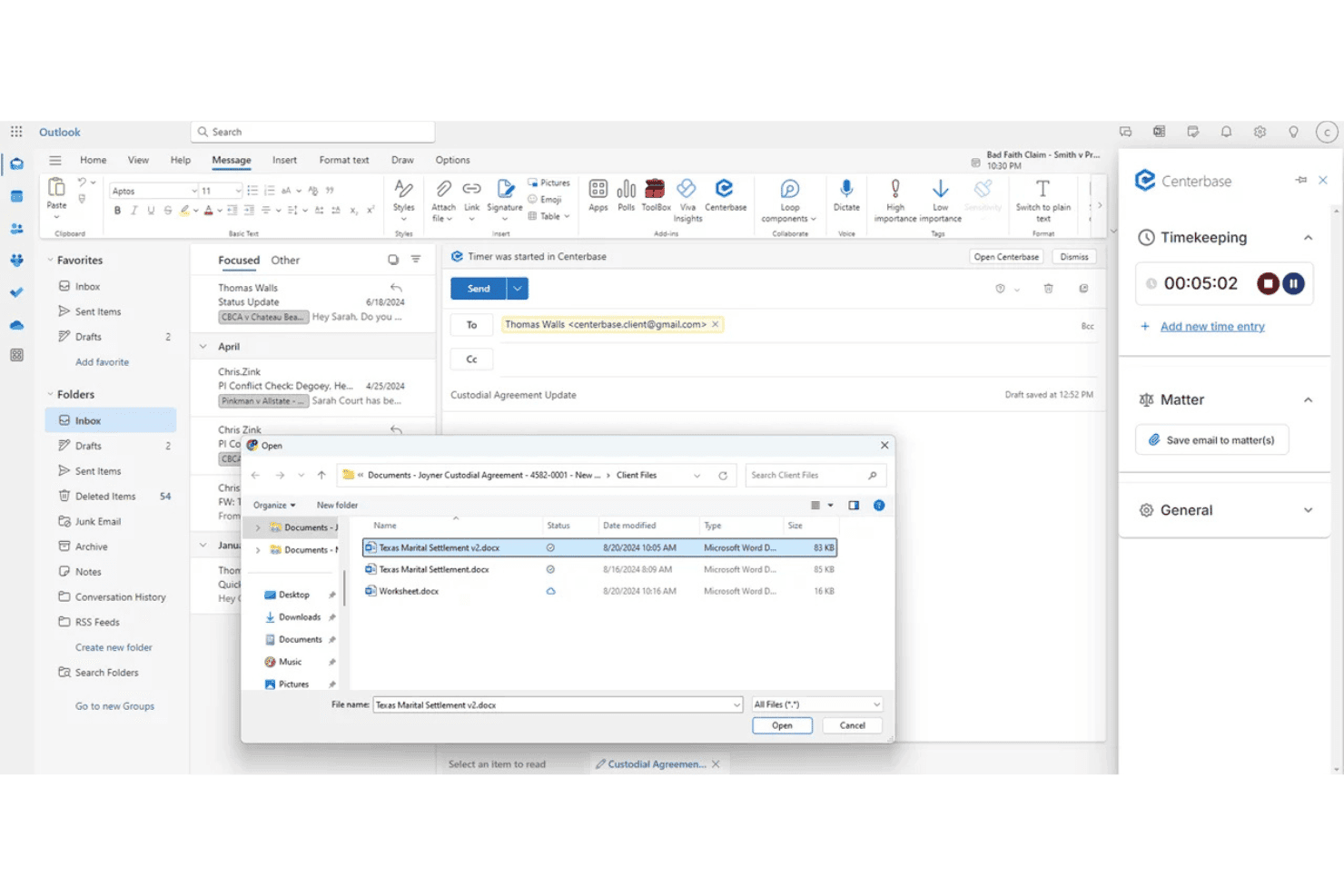
Centerbase ties tasks, deadlines, and follow-ups to matters, with Outlook email and calendar sync. Centerbase is a cloud-based practice management platform for midsize law firms that integrates matter-linked task management, automated time capture, billing, trust accounting, document management, and client communications in one system.
Who Is Centerbase Best For?
Centerbase is built for midsize law firms—typically 5 to 100+ attorneys—that need matter-linked task management, automated time capture, and billing in one connected system.
Why I Picked Centerbase
Centerbase earns its spot on my shortlist because of how tightly it connects Outlook activity to billable time on matters. Its patented Automated Time Capture (ATC) passively logs time attorneys spend drafting in Word and corresponding in Outlook, so billable events surface on the matter dashboard without attorneys manually starting a timer. I've seen firms recover significant write-offs just by capturing email time that previously went unlogged.
Centerbase Key Features
- Matter dashboard: View all tasks, contacts, documents, deadlines, and billing data consolidated on a single matter record.
- LawToolBox integration: Calculate jurisdiction-aware court deadlines directly inside Centerbase with automatic alerts when court rules change.
- Automated conflict checking: Trigger system-wide, OCR-powered conflict checks during client intake before a new matter moves forward.
- Trust and IOLTA accounting: Manage multiple trust accounts with automated interest calculations, transaction logging, and detailed trust reporting built into the platform.
Centerbase Integrations
Centerbase offers native integrations with LawToolBox, NetDocuments, iManage, DocuSign, Stripe, Plaid, and QuickBooks, plus deep native integration across the Microsoft ecosystem, including Microsoft 365 (Outlook, Word, SharePoint) and Microsoft Copilot.
Pros and Cons
Pros:
- Trust and IOLTA accounting features included
- LawToolBox calculates court deadlines automatically
- Automated time capture in Word and Outlook
Cons:
- Onboarding and setup require significant time investment
- Reporting customization options are limited
Learn more about Centerbase: Best for matter-linked court deadline workflows
- 7-day free trial
- From $49/user/month
Visit WebsiteCustomer Rating:4.7/5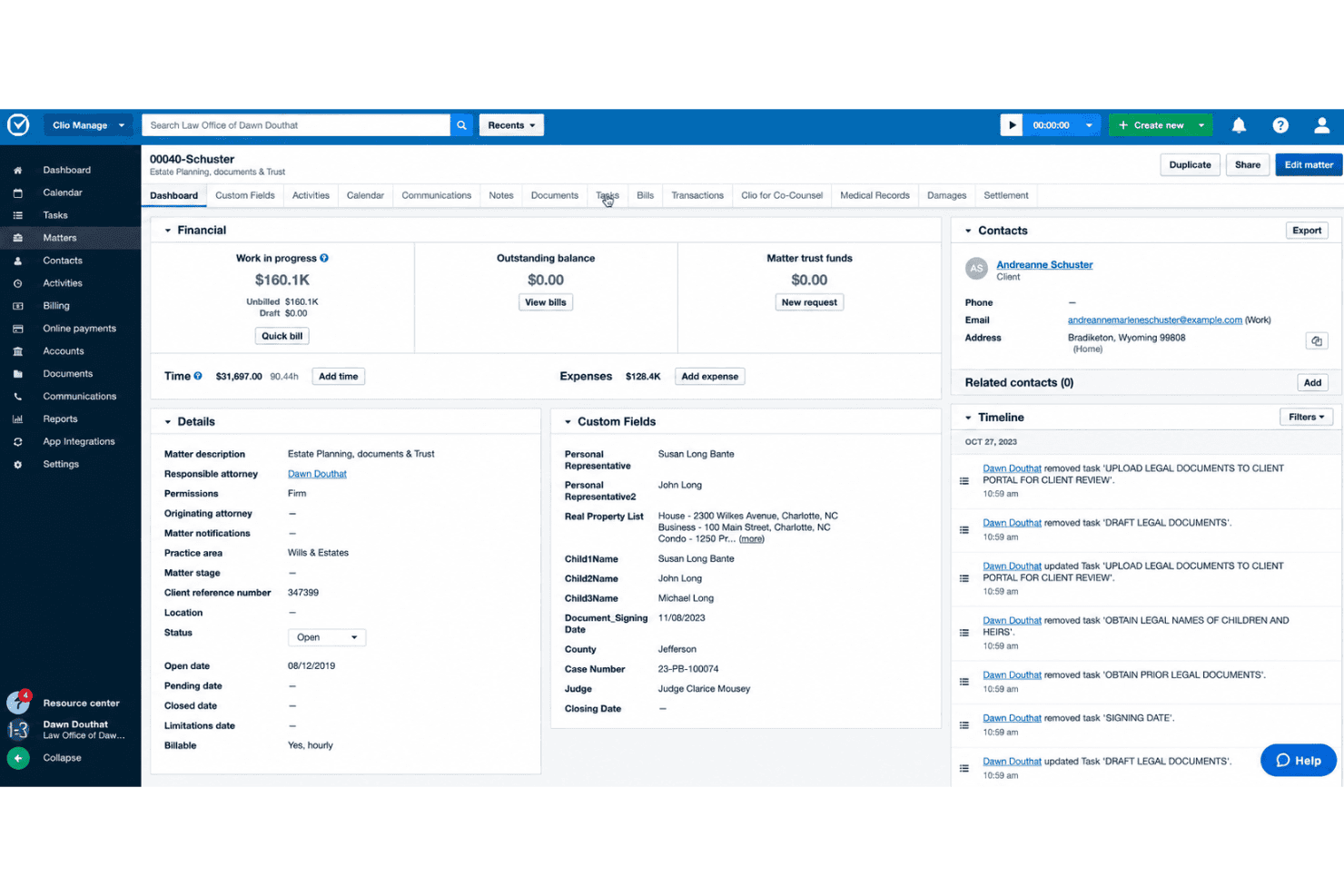
Clio Manage handles matter tasks, court deadlines, time tracking, and client collaboration. Clio Manage is a legal practice management platform built around matter-centric task management, court deadline calendaring, time tracking, and client collaboration tools for law firms.
Who Is Clio Manage Best For?
Clio Manage is a strong fit for small to mid-sized law firms that need every task, deadline, and time entry tied directly to a client matter.
Why I Picked Clio Manage
Clio Manage earns its spot on my shortlist because its entire architecture is built around matters, which means court deadlines, tasks, and time entries are never floating in a vacuum. I especially like the native Court Rules feature: select a trigger event like a filing date, and Clio automatically cascades all associated deadlines across 2,200+ U.S. jurisdictions onto your calendar. Pair that with AI-captured calendar events pulled directly from court documents, and manual deadline entry becomes the exception rather than the rule.
Clio Manage Key Features
- Task list templates: Build reusable, standardized task lists with relative and dependent deadlines that auto-assign to new matters on creation.
- Passive AI time tracking: Manage AI monitors Outlook activity, OneDrive document work, and mobile calls to auto-generate draft time entries for attorney review.
- Client portal: Clio for Clients gives clients secure, selective access to case status, documents, and communications via a dedicated web and mobile app.
- Conflict check: Search across Clio Manage and Clio Grow simultaneously to flag potential conflicts of interest across contacts, matters, and case notes.
Clio Manage Integrations
Clio Manage offers 300+ native integrations through its App Directory, including QuickBooks Online, Xero, Microsoft Outlook, Gmail, Google Calendar, Microsoft Teams, Zoom, Google Drive, Box, and Dropbox, and it connects with Zapier. An Open API is available for custom integrations.
Pros and Cons
Pros:
- Secure client portal for case status
- Passive AI time tracking from activities
- Native court deadline automation with triggers
Cons:
- Reporting depth not ideal for large firms
- Advanced workflow automation is limited
Learn more about Clio Manage: Best for billing-linked matter task workflows
- Free plan + trial available
- From $49/user/month
Visit WebsiteCustomer Rating:4.8/5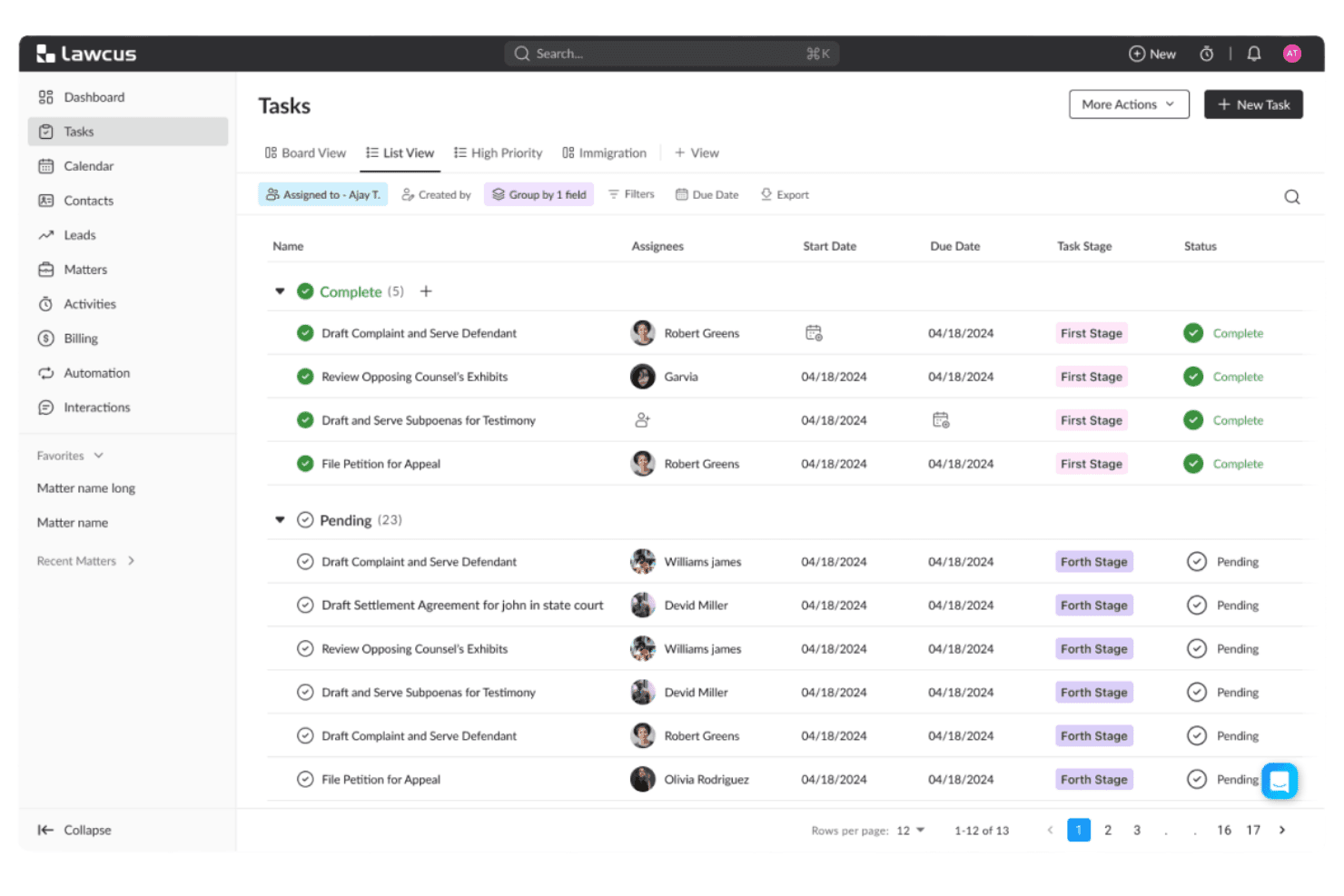
Lawcus tracks law firm tasks with Kanban pipelines and matter-linked workflows. Lawcus is a legal practice management platform that combines matter-linked task management, Kanban pipelines, workflow automation, native time tracking, trust accounting, and client intake in one system.
Who Is Lawcus Best For?
Lawcus is a strong fit for small to mid-size law firms that want task management, time tracking, and billing to live in one connected system rather than across multiple tools.
Why I Picked Lawcus
I picked Lawcus as one of the best because the connection between tasks and billing is genuinely built into its architecture, not bolted on. Every task lives inside a matter hub alongside time entries, trust balances, and invoices, so nothing falls through the cracks between work done and work billed. I especially like the native timer tied directly to matter-linked tasks, combined with LEDES UTBMS coding and trust accounting in the same system.
Lawcus Key Features
- Kanban matter pipelines: Visualize case progress by dragging matters through custom stages on a board view.
- Task dependency management: Link tasks so that changing one due date automatically cascades to dependent tasks.
- Statute of Limitations tracking: Set automated alerts on matter-level SoL deadlines to flag critical dates before they pass.
- Workflow automation builder: Create no-code workflows triggered by matter events, stage changes, or form submissions to automate task sequences.
Lawcus Integrations
Lawcus offers native integrations with QuickBooks, Xero, LawPay, Google Workspace, Microsoft 365, Dropbox, Box, Zoom, Calendly, and WiseTime, and it connects with Zapier. An open REST API is available for custom integrations.
Pros and Cons
Pros:
- Statute of limitations tracking with alerts
- Advanced workflow automation with conditional logic
- Matter-centric tasks with Kanban pipeline views
Cons:
- Conflict checking not yet a live feature
- No native court rules deadline engine
Learn more about Lawcus: Best for court deadline-driven matter workflows
- Free demo available
- Pricing upon request
Visit WebsiteCustomer Rating:4.4/5
CARET Legal lets users manage and prioritize tasks with due dates and filters. CARET Legal is a law practice management platform built around matter-centric task management, court deadline automation, time tracking, billing, and document management.
Who Is CARET Legal Best For?
CARET Legal is a strong fit for litigation-focused law firms that need court deadline automation built directly into their matter workflows.
Why I Picked CARET Legal
CARET Legal earns its spot on my shortlist because of how it handles court deadline automation. The native LawToolBox integration calculates jurisdiction-specific deadlines based on applicable rules of civil procedure, then automatically updates calendar dates when court dates shift, including weekends and court holidays. On top of that, CARET Court Rules does the same calculation natively inside the platform. When a hearing shifts, the entire chain of preparatory tasks updates with it.
CARET Legal Key Features
- CARET Capture AI: Passively identifies billable time within emails and documents as you work, surfacing time entries that might otherwise go unlogged.
- Client portal: Gives clients secure access to case documents and invoices, with built-in payment collection and two-way texting.
- Role-based permissions: Controls access across attorneys, paralegals, and administrative staff at the matter level, scoping visibility and responsibility by role.
- QuickBooks Online integration: Syncs approved invoices between CARET Legal and QuickBooks, keeping your billing and accounting records aligned without manual re-entry.
CARET Legal Integrations
CARET Legal offers native integrations with Microsoft 365, Google Workspace, Microsoft Outlook, Microsoft Word, OneDrive, NetDocuments, HotDocs, LawToolBox, Lawmatics, and QuickBooks Online, plus RMail and CARET Pay. An API is available for custom integrations, but there's no native Zapier support.
Pros and Cons
Pros:
- All tasks and documents linked to matters
- Built-in AI captures billable time from emails
- Native court deadline automation updates with rule changes
Cons:
- Mobile app lacks key task features
- Reporting customization often requires support assistance
Learn more about CARET Legal: Best for billing-linked task tracking across matters
- 10-day free trial + free demo available
- From $59/user/month (billed annually)
Visit WebsiteCustomer Rating:4.4/5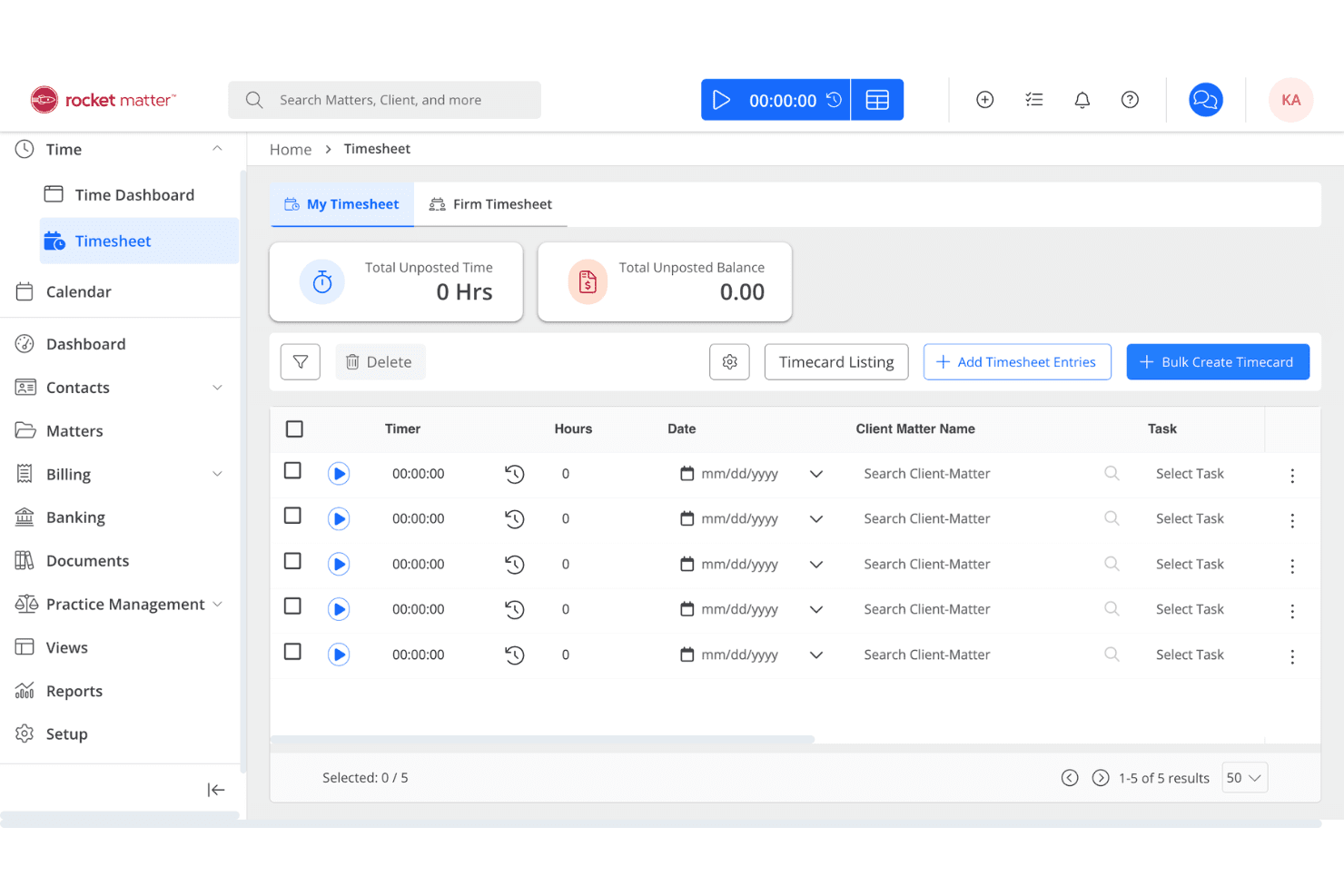
Rocket Matter centralizes law firm tasks, time tracking, billing, and trust accounting. Rocket Matter is a legal practice management platform that combines matter-centric task management, time tracking, billing, document automation, and trust accounting in a single system.
Who Is Rocket Matter Best For?
Rocket Matter is a strong fit for law firms that need task management and time tracking to work as one system, not two.
Why I Picked Rocket Matter
I picked Rocket Matter as one of the best because no other tool on this list ties task management to billing as tightly. Every task sits inside a matter, and running a timer directly on that task feeds billable time straight into invoicing without any extra steps. I also love the Bill-As-You-Work feature, which captures billable time during calendar events on behalf of all attendees, closing a gap that quietly costs firms revenue every day.
Rocket Matter Key Features
- Matter Status Board: A drag-and-drop Kanban board that tracks every active matter from intake to resolution, surfacing bottlenecks in real time.
- LawToolBox integration: Automates court deadline calculations across all 50 U.S. states and updates deadlines automatically when court rules change.
- Dependent task logic: Lets you chain tasks sequentially so downstream assignments only trigger once prerequisite steps are marked complete.
- Audit logs: Records a timestamped history of all task and communication activity across matters, supporting accountability and ethical compliance.
Rocket Matter Integrations
Rocket Matter offers native integrations with Microsoft 365 (including Outlook and OneDrive), Google Calendar, QuickBooks Online, LawToolBox, NetDocuments, Dropbox, Box, and Lawmatics, and it connects with Zapier. An API is also available for custom integrations.
Pros and Cons
Pros:
- Built-in conflict checking and client portal
- Kanban board visualizes matter progress instantly
- Time tracking feeds billable hours directly
Cons:
- Full deadline automation requires LawToolBox subscription
- Task automation less advanced than competitors
Learn more about Rocket Matter: 10Best for Salesforce-native matter task automation
Litify
- Free demo available
- Pricing upon request
Visit WebsiteCustomer Rating:4.2/5
Litify manages law firm tasks with Matter Plans, AI time capture, and reporting. Litify is a Salesforce-native legal practice management platform that combines matter-centric task management, workflow automation via Matter Plans, AI-powered time capture, and real-time reporting across cases, billing, and firm operations.
Who Is Litify Best For?
Litify is a strong fit for mid-to-large law firms that already operate on Salesforce or have the resources to support an enterprise-level implementation and configuration.
Why I Picked Litify
Litify earns its spot on my shortlist because it's built entirely on Salesforce, which means matter task management isn't a feature layered on top of a CRM—it's the foundation. I'm particularly impressed by Matter Plans, which auto-generate role-assigned task checklists the moment a matter is created or changes stage, keeping every attorney and paralegal accountable without manual setup. Pair that with Litify ACE, an AI agent that autonomously routes tasks based on live case data, and you get a task automation layer that few practice management platforms match natively.
Litify Key Features
- LitifyAI time capture: Automatically identifies billable activity from emails, calendar events, and other work items to generate suggested time entries.
- Conflict check agent: Uses fuzzy matching to flag potential conflicts across the firm's case history during intake, accounting for name variations and typos.
- No-code report builder: Lets attorneys and administrators build and schedule custom reports on matter performance, billing realization, and attorney productivity without IT support.
- Microsoft Outlook integration: Syncs emails, calendar events, and meetings bidirectionally with matter records inside Litify.
Litify Integrations
Litify is built natively on Salesforce and offers integrations with Microsoft Outlook, DocuSign, Workday, Okta, Intuit, Billables.ai, Supio, ECFX, Confido Legal, and Anthropic, plus access to the broader Salesforce AppExchange ecosystem. An API is available for custom integrations.
Pros and Cons
Pros:
- Customizable automated matter plan templates
- AI-driven time capture and billing checks
- Native matter-centric workflow for all tasks
Cons:
- Document upload speeds can be slow
- No native jurisdictional court rules engine
Learn more about Litify:
Outro software de gestão de tarefas para escritórios de advogados
Eis algumas opções adicionais de software de gestão de tarefas para escritórios de advogados que não entraram na minha lista restrita, mas que ainda vale a pena consultar:
- 11MerusCaseBest for litigation deadline and workflow automation
- 12PracticePantherBest for billing-linked task tracking in one place
- 13MyCaseBest for client portal task visibility on matters
- 14LEAPBest for all-in-one matter task and trust workflows
- 15CasePeerBest for plaintiff PI case task workflows
- 16ActionstepBest for configurable matter workflow automation
- 17NeosBest for PI firms with court deadline automation
- 18Amicus AttorneyBest for decades-deep matter and deadline workflows
- 19SurePointBest for conflict checks tied to matter tasks
- 20NeostellaBest for no-code workflow automation at case scale
How I Evaluate Law Firm Task Management Software
I split my evaluation into baseline criteria every tool must meet—matter-linked tasks, deadline management, billing integration—and differentiating factors that separate genuinely legal-specific platforms from generic task tools dressed up for law firms.
Core Functionality (Table Stakes for This List)
When I'm selecting tools for my list, I rank each one on a scale from 0 (does not offer the functionality) to 5 (excels in this area) for each core functionality listed below. I then calculate the tool's total score into a percentage, using 65% as a benchmark to help assess its overall fit for the list.
- Matter-linked tasks: I check whether tasks live inside structured matter records or float as standalone to-dos with no case context.
- Deadline and due dates: Court rule calculators and cascading date adjustments matter here—I look for tools that go beyond basic due date fields.
- Task assignment and delegation: I evaluate how each platform handles reassignment, role-based routing, and workload visibility across attorneys and paralegals.
- Workflow automation and templates: Reusable task sets for common matter types like client intake or discovery are what I look for, along with trigger-based automation.
- Time tracking integration: The link between a task and a billable entry should be direct—I check whether timers connect to both the matter and the billing system natively.
- Status tracking and reporting: I look for dashboards that show task progress by matter, by user, and by deadline so partners can spot bottlenecks without digging.
Once I have a list of tools that meet the criteria, I consider what sets each platform apart.
Differentiating Factors (What Sets Vendors Apart)
Here's how I compare and contrast different vendors:
Standout Features
I check whether task completions can trigger document generation—auto-drafting engagement letters or discovery requests when a task closes keeps matters moving without manual paralegal follow-up. Email-to-task capture matters just as much; I evaluate how well Outlook or Gmail integrations convert case emails into matter-linked tasks with attachments filed correctly. Trust accounting awareness is another separator—platforms like Smokeball and CosmoLex can flag tasks when IOLTA balances drop below retainer thresholds, protecting firms from trust accounting violations.
Beyond Features
I evaluate whether a platform carries native or certified integrations with court rule providers like LawToolBox or CalendarRules, since pulling jurisdictional deadlines directly into task workflows is what separates real legal tools from generic project managers. Pricing transparency matters too—I check whether vendors split seats into timekeeper and non-timekeeper tiers, because firms budget around that distinction. I also look at onboarding support tailored to attorneys, including CLE-eligible training and data migration from legacy systems like Amicus Attorney or Time Matters, where preserving matter history during cutover can make or break adoption.
Como escolher software de gestão de tarefas para escritórios de advogados
Se quiser evitar prazos falhados, problemas com a faturação e perda de contexto dos processos, concentre a sua pesquisa de software de gestão de tarefas para escritórios de advogados na forma como o sistema gere as prioridades do seu fluxo de trabalho jurídico diário:
| Se a sua prioridade for... | Procure... |
|---|---|
| Se a sua prioridade for...Acompanhamento preciso de prazos impostos pelos tribunais | Procure...Calculadoras de prazos baseadas em regras, com modelos jurisdicionais |
| Se a sua prioridade for...Reduzir a introdução duplicada de dados e o trabalho administrativo | Procure...Integração profunda com sistemas de calendário, faturação e gestão documental |
| Se a sua prioridade for...Associar tarefas ao tempo faturado | Procure...Fluxos de trabalho centrados no processo que associem diretamente as tarefas aos registos de tempo |
| Se a sua prioridade for...Transparência entre funcionários e processos | Procure...Painéis centralizados para consultar o estado das tarefas, as atribuições e os pontos de estrangulamento |
| Se a sua prioridade for...Fluxo de trabalho personalizado para a sua área de prática | Procure...Modelos de tarefas e automatização específicos da área de prática, não listas genéricas de tarefas |
Como avaliar a sua lista restrita
- Testar a precisão dos prazos: Execute um processo de teste através de uma cadeia completa de prazos, utilizando modelos de regras judiciais em pelo menos duas jurisdições.
- Verificar a ligação entre processos e tarefas: Envie dois emails rastreados e certifique-se de que ambos são convertidos automaticamente em tarefas associadas ao processo, com os anexos corretos.
- Testar a captura de tempo: Atribua uma série de tarefas faturáveis e confirme que os registos de tempo são capturados automaticamente e atribuídos ao processo correto.
- Solicitar provas da integração: Peça uma gravação de demonstração ou um estudo de caso que mostre a sincronização em tempo real do calendário e da faturação durante o trabalho num processo por vários utilizadores.
- Decidir entre flexibilidade e foco jurídico: Escolha entre ferramentas concebidas para fluxos de trabalho jurídicos (mais adequadas para a conformidade) e plataformas genéricas com camadas adicionais (mais adequadas para uma personalização abrangente).
O que é um software de gestão de tarefas para escritórios de advogados?
O software de gestão de tarefas para escritórios de advogados é um sistema dedicado, concebido para organizar, acompanhar e gerir tarefas, prazos e fluxos de trabalho associados a processos jurídicos específicos.
Estas plataformas ajudam as equipas jurídicas a monitorizar datas importantes, atribuir responsabilidades e associar diretamente cada item de ação ao processo de um cliente. O software adequado permite acompanhar tarefas centradas no processo, integra-se com sistemas de faturação e centraliza as atualizações para manter a sua equipa jurídica alinhada e responsável.
Funcionalidades do software de gestão de tarefas para escritórios de advogados
Ao selecionar um software de gestão de tarefas para escritórios de advogados, procure as seguintes funcionalidades essenciais:
- Tarefas associadas ao processo: As tarefas ficam dentro dos registos específicos do cliente ou do processo, para que saiba sempre qual é o contexto e quais são os documentos, emails e prazos relacionados.
- Gestão de prazos e datas-limite: Calculadoras ou modelos integrados permitem atribuir e alterar prazos com base nas regras judiciais ou nos requisitos do processo, para gerir prazos legais e evitar datas não cumpridas.
- Atribuição e delegação de tarefas: Atribua tarefas a advogados, solicitadores ou funcionários, acompanhe os responsáveis e reatribua-as conforme necessário, para manter o trabalho visível e gerível em toda a equipa.
- Automatização de fluxos de trabalho e modelos: Crie ou utilize conjuntos de tarefas reutilizáveis para processos padrão (como a admissão de clientes, a descoberta ou os encerramentos) e automatize etapas recorrentes para reduzir o trabalho administrativo e garantir a consistência.
- Integração do acompanhamento de tempo: Associe registos de temporizadores ou registos de tempo manuais diretamente a tarefas e processos, para que as horas faturáveis sejam capturadas na origem e encaminhadas para a faturação.
- Acompanhamento do estado e relatórios: Utilize painéis e relatórios que mostrem a conclusão de tarefas, os itens em atraso e o progresso por processo, pessoa ou equipa, para obter visibilidade sobre o trabalho e os estrangulamentos.
- Integração de emails: Converta emails em tarefas, associe-os aos processos relevantes e mantenha as comunicações organizadas no seu ambiente de gestão de tarefas.
- Integração da gestão documental: Anexe, crie ou gira documentos dentro das tarefas, para que os seus ficheiros e itens de ação permaneçam ligados, permitindo uma consulta rápida e garantindo a conformidade.
- Permissões baseadas em funções: Controle quem pode consultar, editar ou atribuir tarefas com base nas funções profissionais, para proteger informações sensíveis e manter a confidencialidade dos clientes.
- Registos de auditoria e de atividade: Registe alterações, conclusões e atualizações das tarefas por processo, para garantir a conformidade e acompanhar os riscos.
Funcionalidades comuns de IA no software de gestão de tarefas para escritórios de advogados
Para além das funcionalidades padrão do software de gestão de tarefas para escritórios de advogados apresentadas acima, muitas destas soluções estão a integrar IA com funcionalidades como:
- Alertas de risco de prazos baseados em IA: Assinala tarefas e prazos em risco com base no histórico do processo e nas tendências da carga de trabalho.
- Criação automatizada de documentos: Gera rascunhos de documentos jurídicos, peças processuais e cartas para clientes a partir de tarefas ou modelos.
- Priorização preditiva de tarefas: Dá prioridade às tarefas jurídicas com base na urgência, nas dependências e na disponibilidade da equipa.
- Conversão inteligente de emails em tarefas: Extrai ações e prazos dos emails e associa novas tarefas ao processo correto.
- Sugestões de registos de tempo baseadas em IA: Sugere ou preenche registos de horas faturáveis a partir da atividade, dos calendários e das edições de documentos.
- Resumos de investigação jurídica: Resume jurisprudência, legislação e ficheiros de descoberta com IA e anexa sínteses às tarefas.
Benefícios do software de gestão de tarefas para escritórios de advogados
A implementação de um software de gestão de tarefas para escritórios de advogados proporciona vários benefícios à sua equipa e à sua empresa. Eis alguns dos benefícios que pode esperar:
Gestão centralizada de tarefas associadas a processos: Mantenha as tarefas, os documentos e os prazos ligados ao processo correto, para um contexto claro.
Gestão precisa de prazos e conformidade: Calcule automaticamente os prazos judiciais e ajuste as datas quando as regras ou os calendários forem alterados.
Distribuição e visibilidade eficientes das tarefas: Atribua e acompanhe tarefas entre equipas através de painéis que apresentam as cargas de trabalho e os pontos de estrangulamento.
Consistência e automatização dos fluxos de trabalho: Uniformize o trabalho de rotina com modelos de tarefas reutilizáveis e fluxos de trabalho acionados por eventos.
Registo integrado de tempo e faturação: Associe diretamente os registos de tempo às tarefas e aos processos, garantindo que as horas faturáveis são registadas com precisão e transferidas para o seu sistema de faturação ou contabilidade.
Relatórios claros de estado e informações sobre o progresso: Acompanhe as tarefas concluídas e em atraso por processo, pessoa ou equipa através de painéis e registos.
Integração perfeita com o correio eletrónico e os documentos: Transforme mensagens de correio eletrónico em tarefas associadas a processos e anexe ficheiros diretamente a partir do espaço de trabalho das tarefas.
Custos e preços do software de gestão de tarefas para sociedades de advogados
A seleção de software de gestão de tarefas para sociedades de advogados exige uma compreensão dos vários modelos de preços e planos disponíveis. Os custos variam consoante as funcionalidades, a dimensão da equipa, os complementos e outros fatores. A tabela abaixo resume os planos mais comuns, os respetivos preços médios e as funcionalidades normalmente incluídas nas soluções de software de gestão de tarefas para sociedades de advogados:
Tabela de comparação de planos para software de gestão de tarefas de sociedades de advogados
| Tipo de plano | Preço médio | Funcionalidades comuns |
|---|---|---|
| Tipo de planoPlano gratuito | Preço médio$0 | Funcionalidades comunsTarefas básicas associadas a processos, atribuição limitada de tarefas, acompanhamento básico de prazos e armazenamento limitado. |
| Tipo de planoPlano pessoal | Preço médio$20–$40/utilizador/mês | Funcionalidades comunsTarefas associadas a processos, gestão de prazos, acompanhamento individual do tempo, conversão de mensagens de correio eletrónico em tarefas e relatórios simples. |
| Tipo de planoPlano empresarial | Preço médio$40–$70/utilizador/mês | Funcionalidades comunsAutomatização avançada de fluxos de trabalho, atribuição de tarefas à equipa, integração de faturação, modelos personalizáveis e painéis padrão. |
| Tipo de planoPlano empresarial avançado | Preço médio$70–$120/utilizador/mês | Funcionalidades comunsRelatórios avançados, calculadoras de prazos baseadas em regras, integrações com sistemas de gestão documental, permissões baseadas em funções e apoio prioritário. |
Perguntas frequentes sobre software de gestão de tarefas para sociedades de advogados
Eis algumas respostas a perguntas comuns sobre software de gestão de tarefas para sociedades de advogados:
Como posso saber se um software de gestão de tarefas para sociedades de advogados permite acompanhar prazos decorrentes das regras judiciais?
Verifique se o software inclui calculadoras de regras judiciais ou integrações com ferramentas como LawToolBox ou CalendarRules. Estas funcionalidades garantem que os prazos dos processos são ajustados às regras da jurisdição e aos feriados judiciais, o que é essencial para práticas com forte incidência em contencioso.
O software de gestão de tarefas para sociedades de advogados pode integrar-se com sistemas de faturação e contabilidade?
Sim, a maioria das ferramentas de gestão de tarefas jurídicas integra-se nativamente com sistemas de faturação e contabilidade, permitindo associar tarefas diretamente a registos de tempo e faturas. Se a sua sociedade utilizar sistemas específicos como o QuickBooks ou o Xero, confirme a existência de integrações nativas ou certificadas antes de escolher uma plataforma.
Qual é a diferença entre software de gestão de tarefas centrado em processos e software genérico de gestão de tarefas?
As ferramentas centradas em processos organizam tarefas, documentos e prazos dentro de registos estruturados de processos de clientes. As ferramentas genéricas tratam as tarefas como itens ou listas isolados. No trabalho jurídico, os sistemas centrados em processos ajudam a manter o contexto, reduzir erros e garantir verificações de conformidade simples em todo o processo.
Como devo testar uma plataforma de gestão de tarefas para sociedades de advogados antes de a comprar?
Execute um processo de exemplo através dos principais fluxos de trabalho—crie uma cadeia de prazos, converta emails em tarefas, atribua trabalho faturável e verifique os fluxos de registo de tempo. Peça ao fornecedor gravações de demonstrações ou estudos de caso de utilização real. Esta abordagem dá-lhe uma ideia realista de como a ferramenta se adapta à sua sociedade.
Existem ferramentas de gestão de tarefas para sociedades de advogados com funcionalidades de IA, como alertas de risco relativos a prazos?
Sim, várias plataformas de tarefas jurídicas oferecem alertas de risco relativos a prazos baseados em IA, elaboração automatizada de documentos e definição preditiva da prioridade das tarefas. Estas funcionalidades ajudam a identificar tarefas em risco, aceleram a elaboração de documentos e ajustam as prioridades de trabalho através de aprendizagem automática baseada em processos anteriores.
Como funciona a conversão de emails em tarefas no software de gestão de tarefas para sociedades de advogados?
A maioria das plataformas disponibiliza suplementos ou integrações com o Outlook e o Gmail que permitem converter emails, anexos e até comunicações com clientes diretamente em tarefas associadas a processos. Isto garante que todos os itens que exigem ação ficam no processo correto, com os documentos de apoio anexados.