

Client portal software for law firms gives you a secure, online hub where your clients can access case documents, exchange messages, pay invoices, and stay updated on their matters. If you’re looking to modernize your client experience, improve transparency, and tighten security, choosing the right portal is essential. This guide compares software purpose-built for legal practices, so you can find the best fit for your firm’s workflow and client needs.
Why Trust Our Software Recommendations
6,700+
Reviews
20
Industry experts
16+
Evaluation factors
14
Years
Our team has been testing and reviewing software since 2012. As legal practice leaders ourselves, we know how difficult—and important—it is to choose the right software.
For this guide, we evaluated tools using hands-on testing and independent research, scoring tools using our selection criteria.
Our reviews reflect our human editorial judgment, not a sales pitch.
Comparison Table: Client Portal Software for Law Firms
This comparison chart summarizes pricing details for my top client portal software for law firm selections:
| Tool | Best For | Trial Info | Price | ||
|---|---|---|---|---|---|
| 1 | Best for high-volume case intake | Free demo available | Pricing upon request | Website | |
| 2 | Best for client updates on multi-phase matters | Free trial + free demo available | Pricing upon request | Website | |
| 3 | Best for centralizing firm and communication | Free demo available | Pricing upon request | Website | |
| 4 | Best for billing and invoicing transparency | 10-day free trial | From $59/user/month (billed annually) | Website | |
| 5 | Best for custom workflow automation | Free demo available | Pricing upon request | Website | |
| 6 | Best for collaborative case progress tracking | Not available | Pricing upon request | Website | |
| 7 | Best for automated client payment collection | 10-day free trial | From $50/user/month (billed annually) | Website | |
| 8 | Best for integrated secure client communications | 7-day free trial + free demo available | From $49/user/month | Website | |
| 9 | Best for trust accounting with client access | 10-day free trial | From $49/user/month (billed annually) | Website | |
| 10 | Best for matter-linked document sharing | 7-day free trial + free demo available | From $49/user/month (billed annually) | Website |


Client Portal Software for Law Firms Reviews
Below are my detailed summaries of the best client portal software for law firms that made it onto my shortlist. My reviews offer a detailed look at the features, best use cases, and integrations of each platform to help you find the best one for you.
 Best for high-volume case intake
- Free demo available
- Pricing upon request
Visit WebsiteCustomer Rating:4.7/5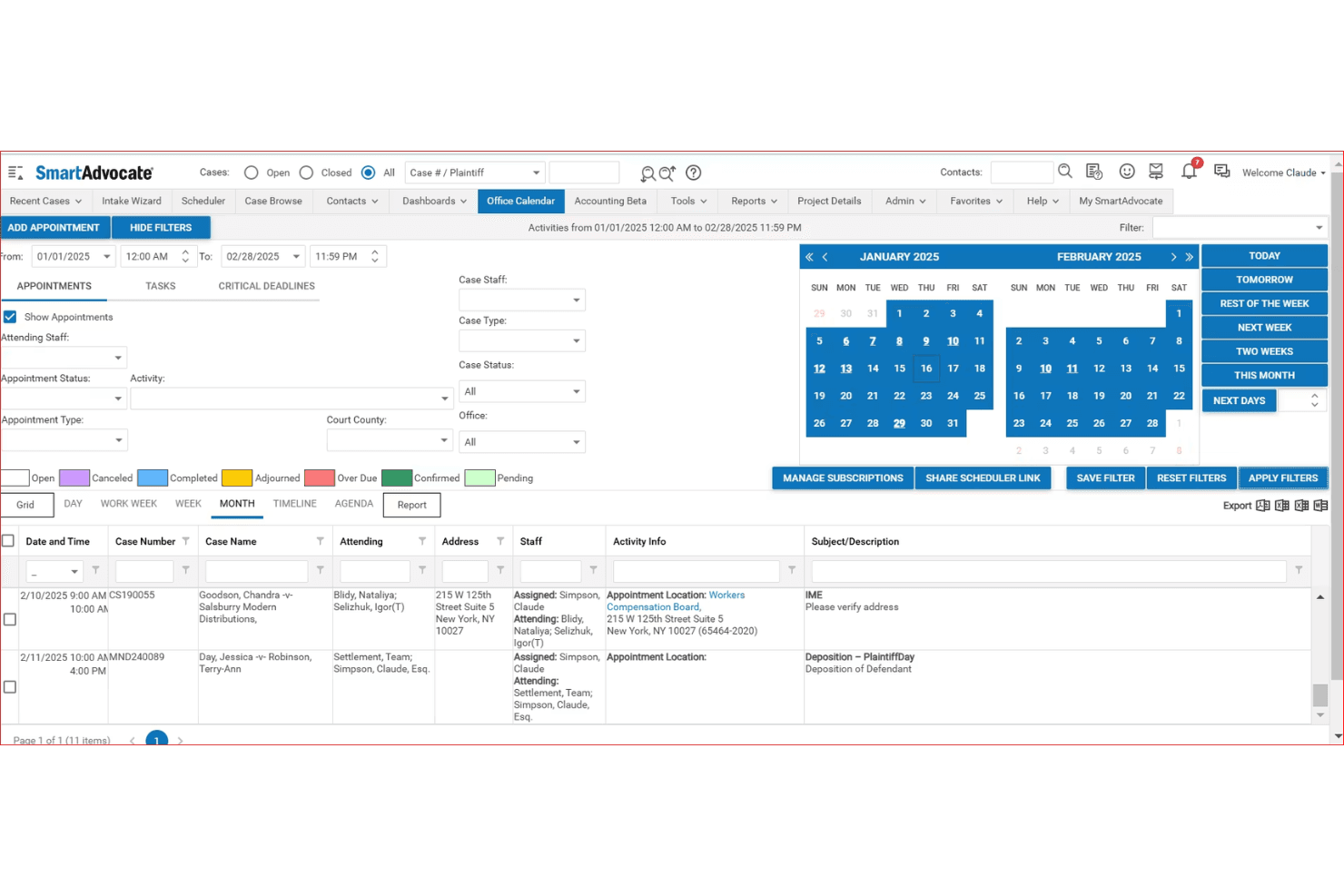
SmartAdvocate centralizes case appointments and deadlines in one calendar view. SmartAdvocate is a litigation-focused case management platform with a built-in client portal that gives clients secure, 24/7 access to case documents, updates, calendar events, and two-way communication.
Who Is SmartAdvocate Best For?
SmartAdvocate is a strong fit for high-volume personal injury and litigation firms that need to manage large caseloads alongside a structured client portal.
Why I Picked SmartAdvocate
SmartAdvocate earns its spot on my shortlist because of its built-in Intake Wizard, which handles lead tracking, intake scoring, and follow-up monitoring in a single system. When a new matter comes in, I can trigger WorkPlans that automatically assign tasks, send communications, and update case status without any manual intervention. The client portal ties directly into that same case file, so clients get immediate, controlled visibility into their matter from day one.
SmartAdvocate Key Features
- Client-facing portal access: Clients can securely log in to view case documents, case calendars, and status updates at any time.
- Granular document permissions: Firms fully control which documents and information are visible to each individual client within the portal.
- Integrated secure messaging: Built-in messaging facilitates confidential attorney-client conversations directly within the portal interface.
- Mobile app access: Dedicated SmartAdvocate apps for iOS and Android let users manage cases and client interactions on the go.
SmartAdvocate Integrations
SmartAdvocate offers over 175 native integrations, including Docubee for e-signatures, QuickBooks, LawPay, Intaker, Lawmatics, NetDocuments, and Microsoft 365. An API is available for custom integrations.
Pros and Cons
Pros:
- Intake Wizard tracks leads, scoring, and follow-ups
- Client portal ties directly to live case files
- Automated WorkPlans trigger tasks immediately after intake
Cons:
- Client portal setup requires significant configuration time
- Built primarily for personal injury practice areas
Learn more about SmartAdvocate: Best for client updates on multi-phase matters
- Free trial + free demo available
- Pricing upon request
Visit WebsiteCustomer Rating:4.5/5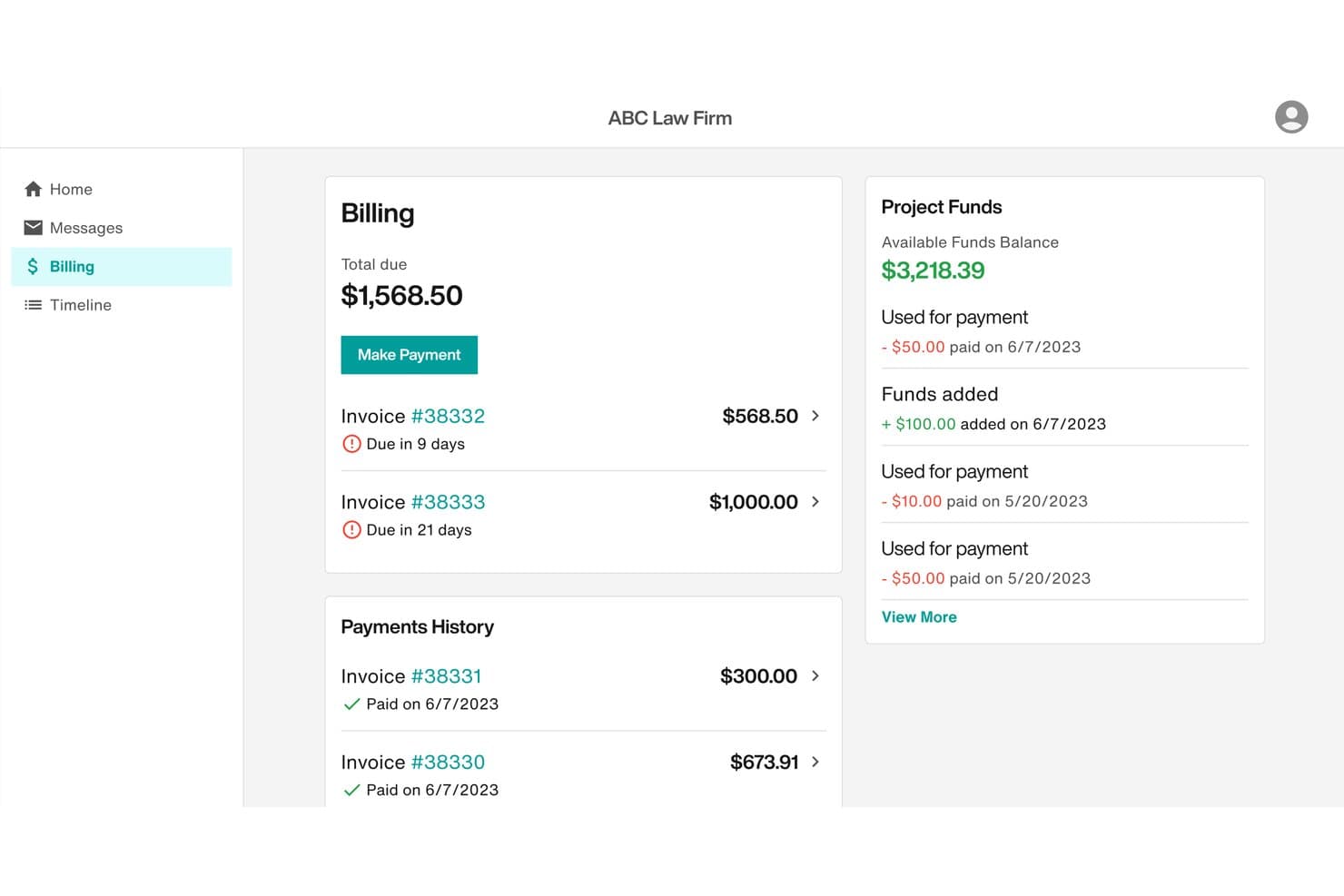
Filevine lets clients view invoices, make payments, and track funds easily. Filevine is a legal case management platform with a native client portal that combines secure document sharing, encrypted messaging, real-time case timeline visibility, customizable intake forms, and integrated billing and payments.
Who Is Filevine Best For?
Filevine is a strong fit for mid-size to large law firms handling high-volume or multi-phase litigation, such as personal injury and mass tort practices.
Why I Picked Filevine
I picked Filevine as one of the best because its Client Portal Manager lets me map internal case phases to curated, client-facing timeline steps with custom names. Clients see exactly what I choose to show them, updated in real time, without exposing internal workflow details. I also like that non-client collaborators, like medical providers or expert witnesses, can access the same portal with scoped visibility, which is essential in complex multi-phase matters.
Filevine Key Features
- Secure document uploads and downloads: Clients can exchange sensitive documents through the portal with encrypted transfer and strict access controls.
- Native e-signature integration: Vinesign allows legally binding signatures on engagement letters and legal documents without leaving the platform.
- Customizable intake and client forms: Firms can build dynamic forms with multi-language support, sending responses directly into matter records.
- Integrated online billing and payments: Clients can view invoices and submit payments directly through the portal with support for credit card and ACH transactions.
Filevine Integrations
Filevine offers native integrations with QuickBooks, NetDocuments, DocuSign, Microsoft 365, and LawPay. An API is available for custom integrations.
Pros and Cons
Pros:
- Vinesign handles e-signatures natively within portal
- Third-party collaborators get scoped portal access
- Customizable client-facing case phase timelines
Cons:
- Client mobile experience lags the desktop version
- Initial setup demands significant configuration time
Learn more about Filevine: Best for centralizing firm and communication
- Free demo available
- Pricing upon request
Visit WebsiteCustomer Rating:4.4/5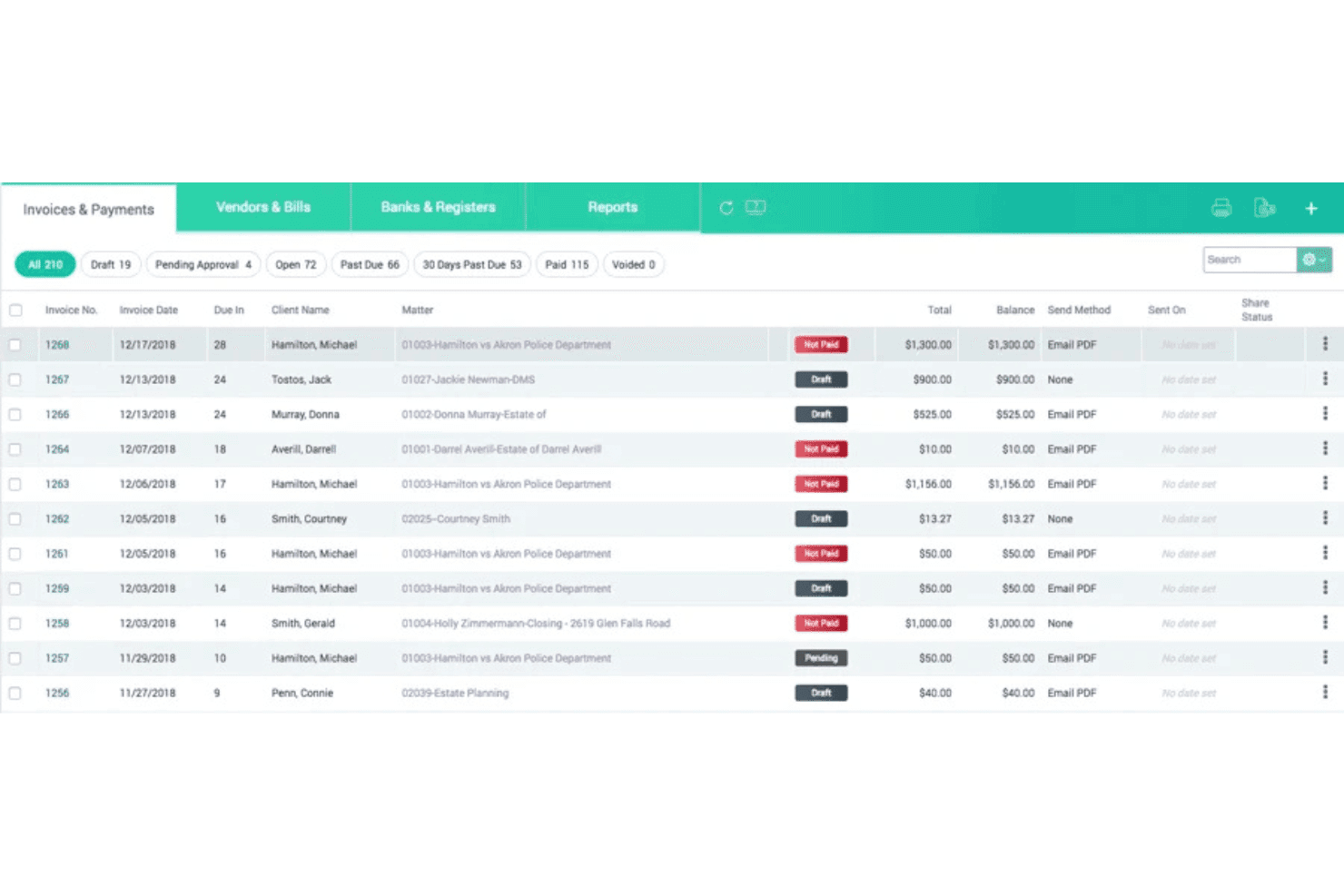
CARET Legal combines accounting, trust reconciliation, and LEDES billing tools. CARET Legal is a legal practice management platform with a built-in client portal that combines encrypted document sharing, secure messaging, client-facing billing and payments, and matter management in a single system.
Who Is CARET Legal Best For?
Small to mid-sized law firms that want to manage matters, client communication, and billing from one platform rather than juggling multiple tools.
Why I Picked CARET Legal
I picked CARET Legal as one of the best because it keeps client-facing work and internal matter management in the same system. The encrypted client portal handles secure document sharing, messaging, and payment collection, so clients never need to switch between apps or channels. What I particularly like is the white-labeled portal option, which lets firms present clients with a branded experience for document review and retainer payments directly tied to their matter.
CARET Legal Key Features
- Role-based permissions: Assign granular access levels to staff and clients for documents and portal activities.
- Integrated trust/IOLTA accounting: Manage trust transactions and perform three-way reconciliations within the same platform.
- Matter-centric document management: Organize, tag, and version documents linked directly to legal matters.
- Custom branded client portals: Provide web and mobile portal experiences with your firm's logo and visual identity.
CARET Legal Integrations
CARET Legal offers native integrations with Lawmatics, NetDocuments, QuickBooks Online, and Microsoft 365, and provides an open API for custom integrations.
Pros and Cons
Pros:
- White-labeled portal with custom firm branding
- Built-in IOLTA trust accounting included natively
- Encrypted client messaging tied to specific matters
Cons:
- Reporting tools limited for high-volume firms
- Mobile app experience reported as inconsistent
Learn more about CARET Legal: Best for billing and invoicing transparency
- 10-day free trial
- From $59/user/month (billed annually)
Visit WebsiteCustomer Rating:4.4/5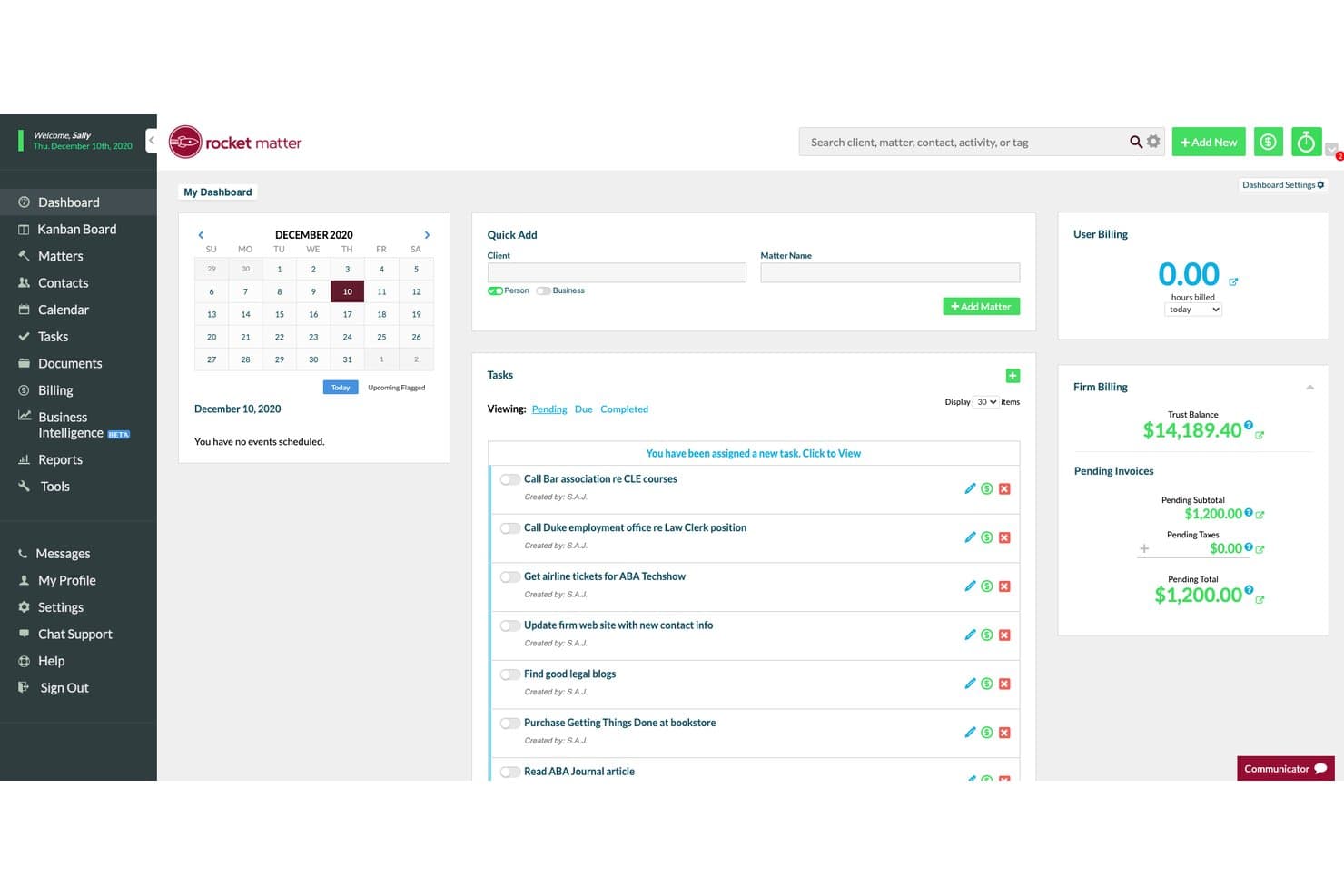
Rocket Matter's dashboard centralizes tasks, billing, and matter management. Rocket Matter is a legal practice management platform with a built-in client portal covering secure document sharing, matter management, trust accounting, and online billing for law firms of all sizes.
Who Is Rocket Matter Best For?
Rocket Matter is a strong fit for solo practitioners and small-to-midsize law firms that need billing, trust accounting, and client payment tools in one place.
Why I Picked Rocket Matter
Rocket Matter earns its spot on my shortlist because the billing transparency it offers through the client portal is genuinely difficult to replicate with a generic solution. Clients can log in, view itemized invoices in real time, and pay by credit card, ACH, or eCheck directly in the portal. I also like that trust accounting is built in natively, so IOLTA-compliant payment handling doesn't require a separate tool.
Rocket Matter Key Features
- Client portal access: Clients can log in securely to view shared documents, invoices, and matter information.
- Matter-linked document sharing: Share files directly within specific legal matters using permission-based controls.
- Native QuickBooks Online integration: Sync billing, expenses, and payments between Rocket Matter and QuickBooks with no manual entry.
- Role-based access controls: Define user roles and permissions to manage data visibility and security across your team and clients.
Rocket Matter Integrations
Rocket Matter offers native integrations with QuickBooks Online, LawPay, Dropbox, Box, Kenect, and ImagineShare. An API is available for custom integrations.
Pros and Cons
Pros:
- Time entry directly from mobile devices
- Trust account tracking built into the portal
- Itemized invoices clearly visible to clients
Cons:
- Client portal features limited compared to dedicated portal tools
- Initial transition to cloud requires staff adjustment
Learn more about Rocket Matter: Best for custom workflow automation
- Free demo available
- Pricing upon request
Visit WebsiteCustomer Rating:4.2/5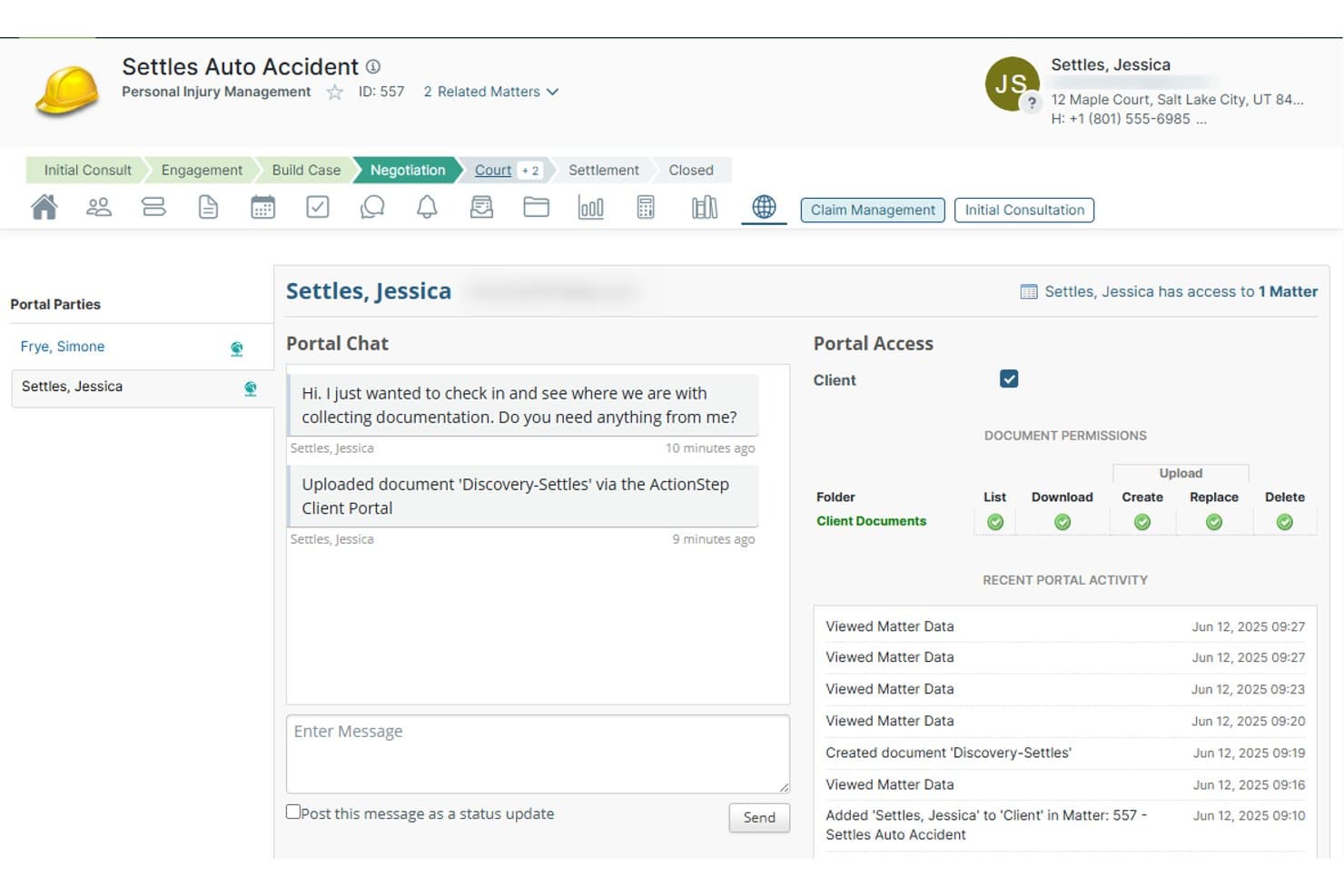
Actionstep lets clients upload documents and chat directly via the portal. Actionstep is a cloud-based legal practice management platform for law firms that combines a built-in client portal, secure document sharing, matter-linked messaging, workflow automation, and trust accounting in one connected system.
Who Is Actionstep Best For?
Actionstep is a strong fit for midsize law firms that need a highly configurable platform and want to build custom matter workflows around their specific practice areas.
Why I Picked Actionstep
Actionstep earns its spot on my shortlist because its workflow automation is built directly into matter management, not bolted on as a separate layer. I like that automation triggers can push status updates to the client portal the moment a matter milestone is hit, without anyone on my team manually intervening. The "upload only" folder permission is also worth noting: clients can submit documents to a specific folder without seeing its existing contents, which is genuinely useful in multi-party or sensitive matters.
Actionstep Key Features
- Granular document permissions: Control client access to folders with options like upload-only, read, create, or delete by folder.
- Matter-linked portal chat: Send and receive messages tied directly to specific client matters within the secure portal.
- Integrated legal accounting: Manage trust accounts, billing, invoicing, and multi-currency ledger functions from one platform.
- Custom intake forms: Build and brand client intake forms with no-code tools, feeding responses straight into case files.
Actionstep Integrations
Actionstep offers native integrations with DocuSign, NetDocuments, Xero, QuickBooks Online, Office 365, iManage, and Adobe Sign. An API is available for custom integrations.
Pros and Cons
Pros:
- Native trust accounting built into the platform
- Granular client document folder permissions
- Highly configurable matter-specific workflow automation
Cons:
- Portal interface feels less polished than competitors
- Setup and configuration requires significant time investment
Learn more about Actionstep: Best for collaborative case progress tracking
- Not available
- Pricing upon request
Visit WebsiteCustomer Rating:4.8/5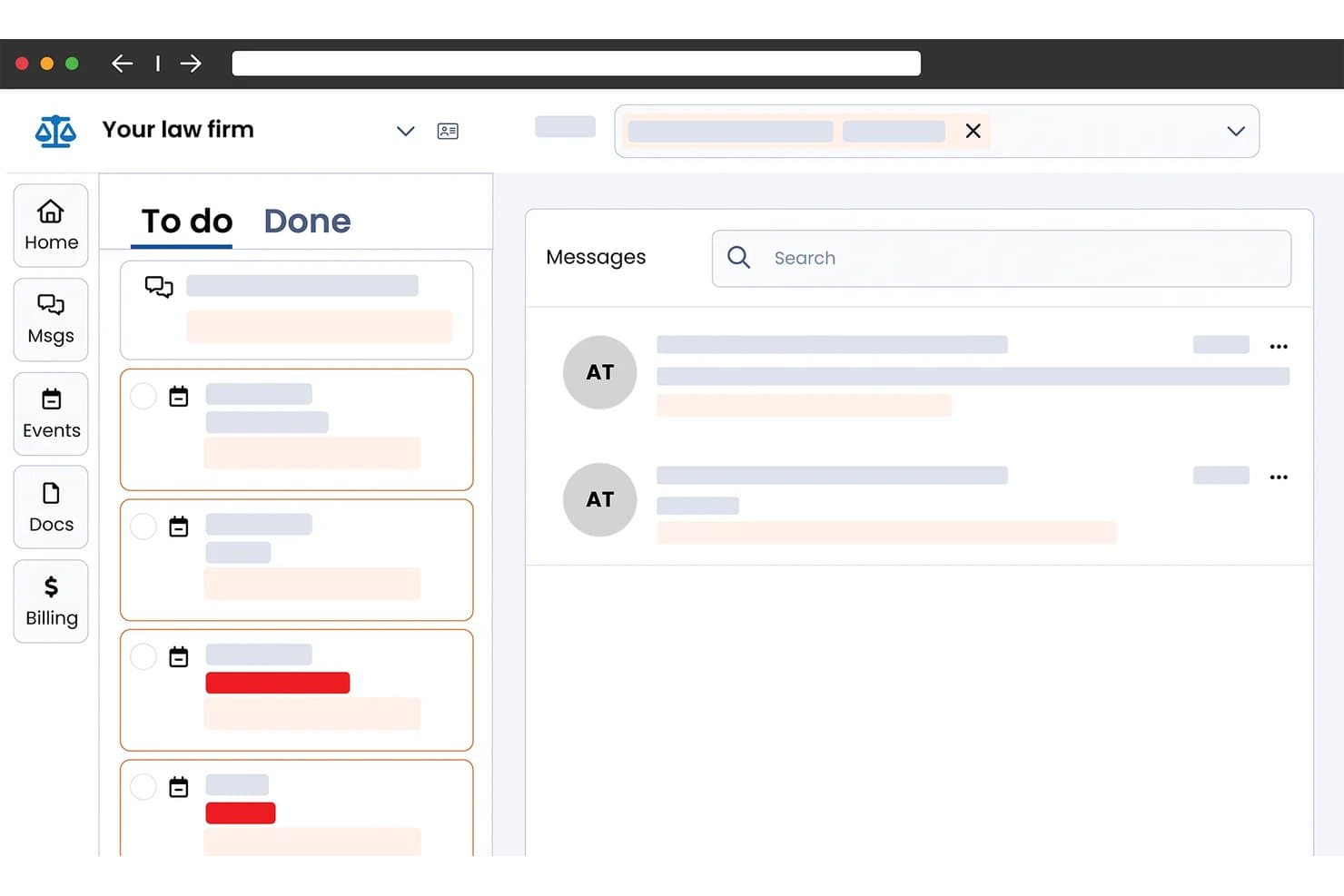
Smokeball centralizes tasks, messages, and docs in one client portal. Smokeball is a legal practice management platform that combines a secure client portal, in-matter messaging, document sharing, e-signatures, client intake, and trust-compliant billing in one system built specifically for small and solo law firms.
Who Is Smokeball Best For?
Smokeball is a strong fit for solo attorneys and small law firms that want client communication, document sharing, and billing managed inside a single matter-based platform.
Why I Picked Smokeball
I picked Smokeball as one of the best because of how it keeps client collaboration anchored directly to the matter file. Every message, whether sent by SMS or through the portal, threads into the relevant matter so nothing gets buried in a separate inbox. Clients also get a shared calendar and a task list showing exactly where their case stands, which cuts down on status-update calls without any extra effort from the attorney's side.
Smokeball Key Features
- Encrypted file sharing: Send documents to clients using secure, permission-based sharing with encryption in transit and at rest.
- Integrated billing and trust accounting: Manage invoices, trust/IOLTA accounts, and client payments within the portal.
- Native e-signature for legal documents: Collect legally binding electronic signatures on retainer agreements and court forms.
- Customizable intake forms: Add client-specific intake forms that feed directly into case files.
Smokeball Integrations
Smokeball offers native integrations with Microsoft 365, LawPay, QuickBooks Online, InfoTrack, LawToolBox, Zapier, LawClerk, and Thomson Reuters CoCounsel. An API is available for custom integrations.
Pros and Cons
Pros:
- Built-in SMS syncs to matter files
- Case progress visible directly to clients
- Matter-linked client messaging threads stay organized
Cons:
- Built primarily for small, solo practices
- Limited white-label branding for client portal
Learn more about Smokeball: Best for automated client payment collection
- 10-day free trial
- From $50/user/month (billed annually)
Visit WebsiteCustomer Rating:4.6/5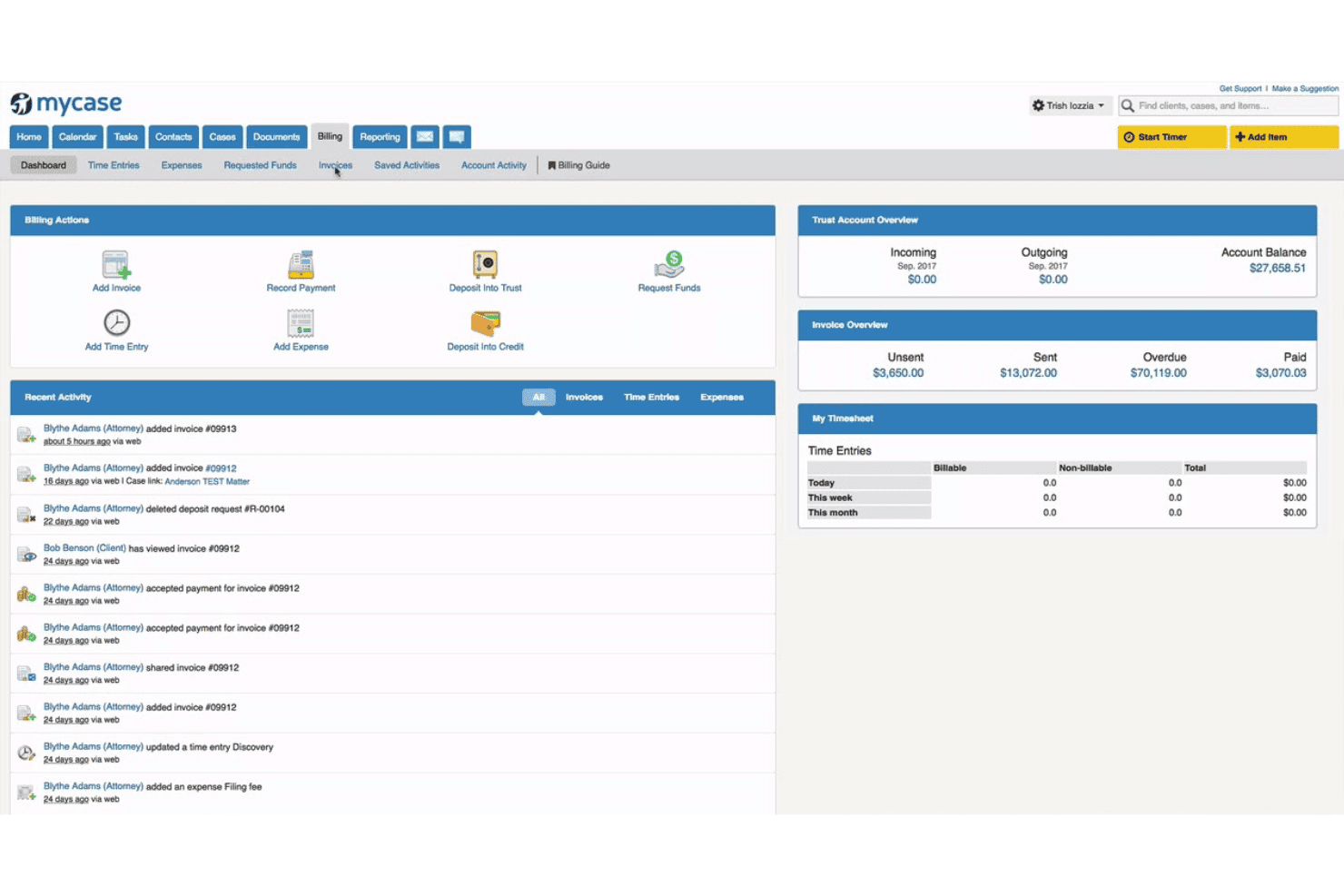
MyCase combines case management, billing, trust accounting, and client communication. MyCase is a legal practice management platform with a native client portal that combines secure document sharing, matter-linked messaging, e-signatures, client intake, and integrated online payment collection.
Who Is MyCase Best For?
MyCase is a strong fit for solo attorneys and small-to-midsize law firms that want a single platform to manage cases, client communication, and payments.
Why I Picked MyCase
I picked MyCase as one of the best because its client portal handles payment collection without any manual back-and-forth. Clients can view invoices and pay directly through the portal via LawPay, with next-day deposits and full IOLTA trust account compliance built in. I particularly like that firms can offer payment plans and collect funds without ever handling a credit card number directly.
MyCase Key Features
- Integrated case management: Link all client portal activity to specific cases and matters for streamlined tracking and oversight.
- Native document e-signature: Collect legally binding electronic signatures on retainer agreements and legal documents without leaving the platform.
- Secure client-attorney messaging: Communicate through encrypted, matter-specific messaging that replaces email for privileged conversations.
- Customizable intake forms: Gather client information with intake questionnaires that feed responses directly into case records.
MyCase Integrations
MyCase offers 70+ native integrations, including Microsoft 365, QuickBooks Online, LawPay, Google Calendar, Dropbox, and Zapier. An open API is available for custom integrations.
Pros and Cons
Pros:
- E-signatures built directly into the portal
- Secure messaging tied to specific matters
- Native payment collection with IOLTA compliance
Cons:
- White-labeling options are relatively restricted
- Mobile app has limited client-facing features
 8Best for integrated secure client communications
Clio
- 7-day free trial + free demo available
- From $49/user/month
Visit WebsiteCustomer Rating:4.5/5
Clio lets clients and attorneys message and share documents securely. Clio is a legal practice management platform with a built-in client portal that lets law firms handle secure messaging, document sharing, case status updates, billing, and online payments in one unified system.
Who Is Clio Best For?
Clio is a strong fit for solo attorneys and small-to-midsize law firms that want their client portal built into their practice management system rather than managed as a separate tool.
Why I Picked Clio
I picked Clio as one of the best because the client portal is built directly into Clio Manage, not connected via a third-party add-on. I really like the AI-drafted client updates feature, which generates status messages from recent matter activity for my review before sending. Secure messaging threads are tied to specific matters and accessible via a dedicated mobile app with biometric login, keeping sensitive communications entirely out of regular email.
Clio Key Features
- Granular document permissions: Assign role-based access to folders and files for ethical walling and confidentiality.
- Matter-specific client dashboards: Give clients a dedicated area to view case updates, documents, and billing for each matter.
- Trust account and IOLTA compliance: Handle client funds and retainers through compliant billing and reconciled ledgers.
- Audit logging and activity tracking: Monitor portal access and document uploads with time-stamped audit trails for defensibility.
Clio Integrations
Clio offers 250+ native integrations, including DocuSign, QuickBooks Online, Xero, NetDocuments, Dropbox, Box, Microsoft 365, Google Workspace, LawPay, Zoom, and Slack. An API is available for custom integrations.
Pros and Cons
Pros:
- Mobile app supports biometric client login
- Matter-linked secure messaging keeps communications organized
- Portal built into practice management natively
Cons:
- Limited white-label branding for client-facing experience
- Portal access requires a higher-tier plan
Learn more about Clio: Best for trust accounting with client access
- 10-day free trial
- From $49/user/month (billed annually)
Visit WebsiteCustomer Rating:4.4/5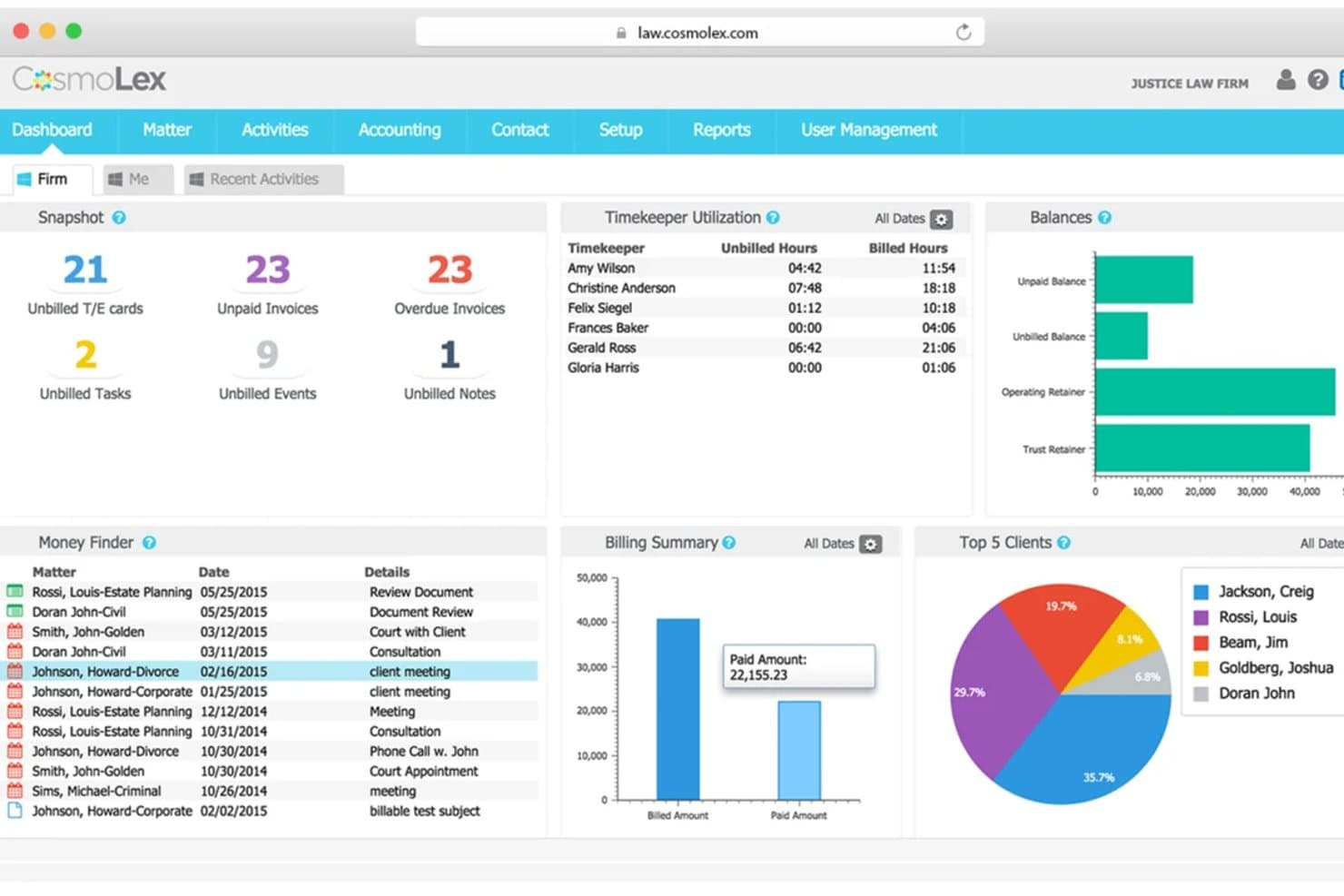
CosmoLex's dashboard gives firms a full financial and billing overview. CosmoLex is a cloud-based legal practice management platform that combines a client-facing portal with built-in trust accounting, document sharing, secure messaging, online billing, and matter management in a single system.
Who Is CosmoLex Best For?
Small to mid-sized law firms that handle client funds and need trust accounting, billing, and client portal access managed from one platform.
Why I Picked CosmoLex
I've included CosmoLex in my top picks because no other tool on this list pairs IOLTA trust accounting with a client-facing portal in a single native system. I particularly like that clients can view invoices and submit payments directly through the portal, while the platform simultaneously runs three-way trust reconciliation on the back end. That combination eliminates the double-entry risk that comes with syncing a separate accounting tool.
CosmoLex Key Features
- Document management integration: Connects with Microsoft 365, Dropbox, Google Drive, and NetDocuments for document storage and syncing.
- Secure web-based messaging: Enables direct, encrypted communication between clients and attorneys within the portal.
- Activity logging and audit trails: Tracks matter-related actions and file sharing for compliance and accountability.
- SOC 2 Type 2 compliance: Meets recognized standards for security and data protection in legal environments.
CosmoLex Integrations
CosmoLex offers native integrations with Microsoft 365, NetDocuments, LawPay, QuickBooks Online, Dropbox, and Google Drive. An API is available for custom integrations.
Pros and Cons
Pros:
- Three-way trust reconciliation built into billing
- Clients can pay invoices directly in portal
- Native trust accounting with client portal access
Cons:
- Mobile app lacks full portal functionality
- No white-label branding for client portal
Learn more about CosmoLex: Best for matter-linked document sharing
- 7-day free trial + free demo available
- From $49/user/month (billed annually)
Visit WebsiteCustomer Rating:4.3/5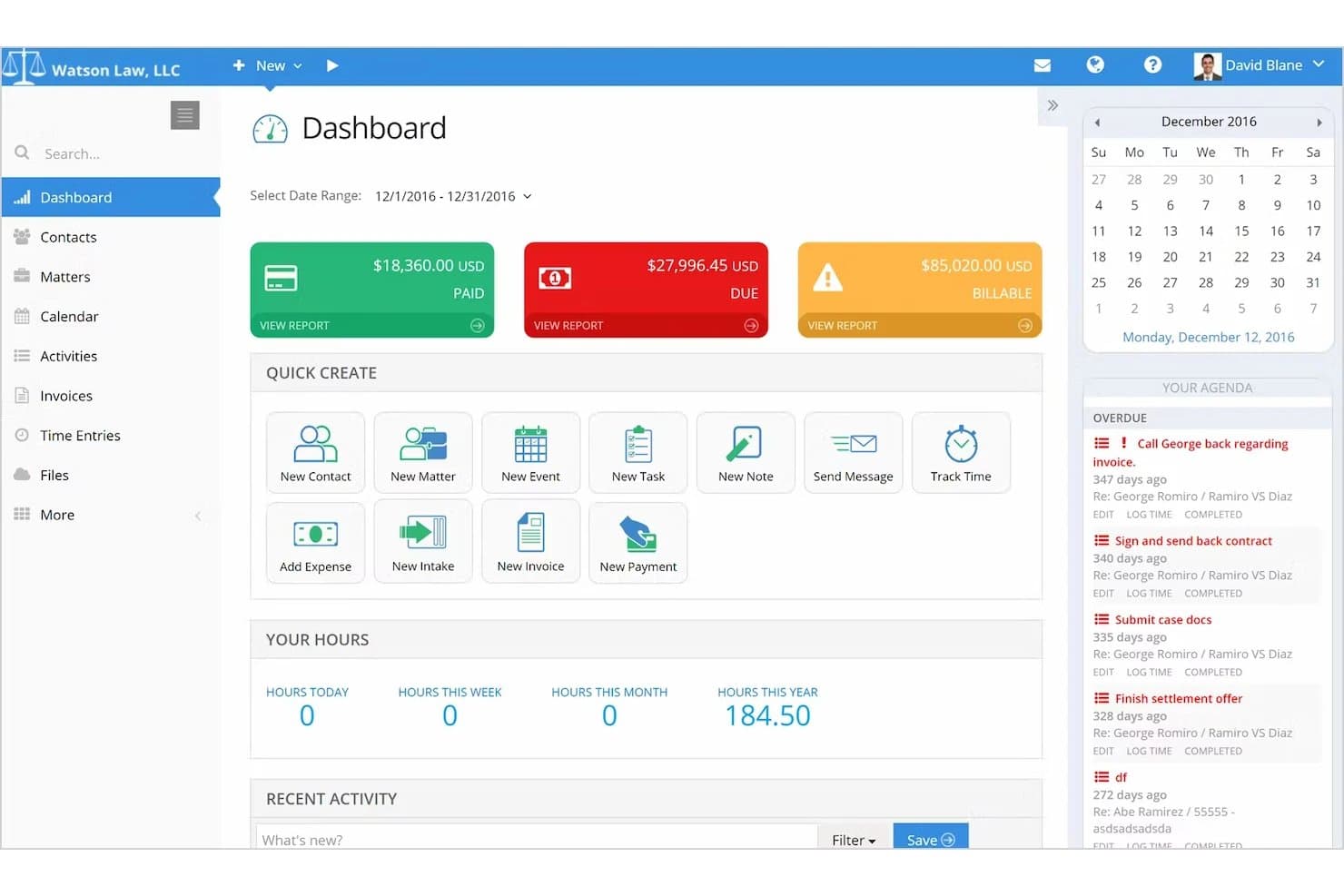
PracticePanther centralizes billing, tasks, and time tracking in one dashboard. PracticePanther is legal practice management software that combines matter and contact management, secure client messaging, document sharing, billing, online payments, and e-signatures in a unified platform for law firms.
Who Is PracticePanther Best For?
PracticePanther suits solo and small firm attorneys who want client documents, billing, and secure messaging tied directly to their matters in one place.
Why I Picked PracticePanther
I picked PracticePanther as one of the best because every file, message, and invoice in the client portal ties directly to a specific matter record. I love that when a client logs in, they see only what's been assigned to them on that case, so there's no risk of cross-matter data bleed. Firms can share documents, exchange encrypted messages with attachments, and collect payment on invoices, all without leaving the matter context.
PracticePanther Key Features
- Two-way secure messaging: Clients and attorneys can exchange encrypted messages in threaded, matter-linked conversations directly through the portal.
- Online payment collection: Clients can view invoices and pay by credit card or eCheck through the portal using PantherPayments.
- E-signature requests: Firms can send, track, and store multi-party signature requests via email, text, or the client portal (Business plan and above).
- Automated client reminders: Firms can schedule automatic email or SMS reminders for appointments, invoices, deadlines, and court dates.
PracticePanther Integrations
PracticePanther has marketplace integrations with Box, Dropbox, Google Drive, OneDrive, QuickBooks Online, Outlook, Gmail, Google Calendar, and Microsoft Exchange. It also offers a KISS API for custom integrations and supports Zapier.
Pros and Cons
Pros:
- Secure message threads support document exchange
- Clients value convenient online invoices and payments
- Matter-linked files keep case details together
Cons:
- Clients lack an automatic case-status timeline
- Reviewers report limited client portal functionality
Learn more about PracticePanther:
Other Client Portal Software for Law Firms
Here are some additional client portal software for law firms options that didn’t make it onto my shortlist, but are still worth checking out:
- 11LEAPBest for document collaboration with clients
- 12Bill4timeBest for secure client self-service scheduling
- 13CasePeerBest for plaintiff-focused case collaboration
- 14LawmaticsBest for automated client intake journeys
- 15CenterbaseBest for personalized portal branding options
- 16Zola SuiteBest for integrated secure document requests
- 17Amicus AttorneyBest for communication history
- 18LexWorkplaceBest for secure document version controls
How I Evaluate Client Portal Software for Law Firms
I split my evaluation into baseline criteria—like encrypted document sharing and trust-compliant billing—and the differentiators that separate good portals from great ones.
Core Functionality (Table Stakes For This List)
When I'm selecting tools for my list, I rank each one on a scale from 0 (does not offer the functionality) to 5 (excels in this area) for each core functionality listed below. I then calculate the tool's total score into a percentage, using 65% as a benchmark to help assess its overall fit for the list.
- Secure Document Sharing: I look for encrypted file exchange with granular permissions and audit trails—essential when sharing settlement drafts or discovery files.
- Client Portal Access: A branded login where clients view matter updates and documents signals professionalism and reduces "where's my case?" calls.
- Secure Messaging: I evaluate whether attorney-client threads are encrypted and tied to specific matters, replacing risky back-and-forth over email.
- E-Signature Support: I check for native e-signature with templates and audit trails so clients can sign retainer agreements or engagement letters inside the portal.
- Matter Management Integration: Portal activity should link to specific cases, so a document uploaded by a family law client routes to the right matter file.
- Online Billing & Payments: I look for invoice viewing, credit card or ACH payment options, and trust or IOLTA-compliant handling for retainer deposits.
Once I have a list of tools that meet the criteria, I consider what sets each platform apart.
Differentiating Factors (What Sets Vendors Apart)
Here's how I compare and contrast different vendors:
Standout Features
E-signature integration matters because it keeps clients inside the portal when signing retainers or engagement letters—no switching to a separate app. I also evaluate how each platform handles trust accounting alongside online payments, since IOLTA-compliant payment processing is a real differentiator for firms managing client retainer funds. White-label branding is another factor I weigh; a portal with your firm's domain and logo builds client confidence from the first login.
Beyond Features
Compliance and security posture are where I start—I check for SOC 2 Type II certification, multi-factor authentication, and encryption at rest and in transit, since these directly affect your ethical obligations around client confidentiality. Firm size fit matters too; a solo practitioner needs affordable per-user pricing, while a mid-size firm may need SSO and role-based admin controls. I also consider client adoption support, because a portal only works if your clients actually use it—so intuitive mobile access and minimal onboarding friction make a real difference.
How to Choose Client Portal Software for Law Firms
Wondering how to identify the right client portal for your law practice amidst all the options? Start by mapping your priorities to what matters most in day-to-day practice management:
| If your priority is... | Look for... |
| Secure client communication | Granular message encryption with audit trails |
| Reducing document bottlenecks | Encrypted file sharing with version control and logs |
| Fast invoice turnaround | Built-in online payment acceptance and trust accounting |
| Branded professionalism | White-label portal branding and custom domains |
| Centralizing intake and onboarding | Customizable intake forms linked to matter files |
How to Vet Your Shortlist
- Review security certifications: Ask for SOC 2 Type II or similar documentation before trialing any tool.
- Test legal e-signature workflows: Run a full mock matter—have someone sign an engagement letter through the portal within 24 hours.
- Check native practice management sync: Ask support to demonstrate end-to-end matter syncing with your current case management provider.
- Request written compliance commitments: Require explicit language on ABA Model Rule 1.6 and data handling in your contract.
- Decide on flexibility vs. deep integration: Choose between best-in-breed standalones with wide app options or all-in-one suites tied to your practice stack.
What Are Client Portal Software for Law Firms?
Client portal software for law firms are secure online platforms that let clients and attorneys share documents, exchange messages, track case progress, and handle billing in one central location. These platforms protect sensitive legal information, streamline client onboarding, and offer e-signature capabilities tailored to legal operations. Using client portal software, law firms can offer clients 24/7 access to important matter details and strengthen attorney-client communication.
Features
Here are the core features any great client portal software for law firms should have:
- Secure document sharing: Encrypted upload and download of files ensures private case materials stay confidential and compliant with legal standards.
- Client-facing portal access: A dedicated login for clients provides 24/7 visibility to case information, shared documents, and relevant updates.
- Encrypted messaging: Direct, privileged attorney-client communication replaces email chains and can be organized by matter for easier reference.
- E-signature capabilities: Clients can electronically sign retainer agreements and legal documents, accelerating workflows without extra tools.
- Matter and case management integration: Connects client interactions and uploaded materials directly to specific case files, reducing manual entry.
- Online billing and payments: Clients can securely view invoices, pay retainers, and handle outstanding balances through the portal with credit card or ACH support.
- Customizable intake forms: Collects client information and onboarding data using tailored forms that feed responses directly into your case system.
- Audit trails and activity logs: Tracks every change, download, and message for defensibility and transparency in client communications.
- White-label branding: Lets you apply your firm’s logo, colors, and domain for a professional, branded client experience.
- Mobile access: Allows clients and lawyers to securely access the portal and respond to time-sensitive matters from smartphones or tablets.
Benefits
Implementing client portal software for law firms provides several benefits for your team and your business. Here are a few you can look forward to:
- Enhanced client collaboration: Clients get 24/7 self-service access to documents, case status, and updates with secure messaging inside the portal.
- Streamlined onboarding and intake: Customizable forms and e-signature support shorten the time needed to bring new clients on board and collect vital information.
- Improved document security: Encrypted file exchange and audit logs help you meet legal confidentiality and compliance standards.
- Accelerated billing and payments: Online billing, invoicing, and IOLTA-compliant payment options allow clients to pay faster and with less friction.
- Centralized communication: You reduce email clutter and keep all case-related messages, signed documents, and files tied back to the relevant matter.
- Professional client experience: White-label branding and mobile-friendly design offer a polished, consistent portal that reinforces your firm’s reputation.
- Audit-ready transparency: Activity logs and version controls ensure defensibility and easy tracking for both compliance and client questions.
Costs and Pricing
Selecting client portal software for law firms requires an understanding of the various pricing models and plans available. Costs vary based on features, team size, add-ons, and more. The table below summarizes common plans, their average prices, and typical features included in client portal software for law firms solutions:
Plan Comparison Table for Client Portal Software for Law Firms
| Plan Type | Average Price | Common Features |
| Free Plan | $0 | Basic document sharing, limited client access, and simple messaging. |
| Personal Plan | $10-$30/user/month | Secure file transfer, encrypted messaging, basic e-signature, and portal branding. |
| Business Plan | $30-$60/user/month | Advanced permissions, integrated billing and payments, intake forms, and custom domain support. |
| Enterprise Plan | $60-$100/user/month | SSO, audit logs, deep practice management integrations, role-based access, and priority support. |
FAQs
Here are some answers to common questions about client portal software for law firms:
How secure is client portal software for law firms?
Client portal software for law firms is typically built with end-to-end encryption, multi-factor authentication, and detailed access logs to help protect sensitive client data and comply with legal confidentiality standards.
Can clients sign legal documents directly in the portal?
Yes, most solutions offer built-in e-signature features, so clients can sign engagement letters, retainers, and settlement agreements without leaving the portal, creating a smooth client experience.
Do client portals integrate with practice management software?
Yes, many platforms integrate with legal practice management tools, letting you link documents, messages, and client activity to specific matters for unified workflow management.
Will my firm’s branding appear on the client portal?
Yes, many client portal tools allow you to add your firm’s logo, color scheme, and even a custom domain, ensuring a consistent, professional experience for your clients.
How do I onboard less tech-savvy clients?
Look for platforms that offer intuitive, mobile-friendly interfaces, plus step-by-step onboarding guides or quick video tutorials designed to make it easy for clients of varying technical backgrounds.