

10 Legal Project Management Software for 2026

Legal Project Management Software Shortlist


Legal project management software helps legal firms organize cases, track tasks, and manage deadlines in one place. If you’re searching for legal project management tools to coordinate legal work, improve collaboration, and keep matters on track, you know how quickly disorganization can lead to missed deadlines or compliance risks. Many modern platforms combine legal technology features like contract management, legal research, and case tracking in an all-in-one system designed for busy legal teams.
These tools help firms meet rising client expectations, improve profitability, and streamline internal workflows with user-friendly interfaces. This list will help you compare the top legal practice management software options for 2026, so you can find the right fit for your team’s workflow, client needs, and regulatory requirements.
Why You Can Trust Us
We’ve been testing and reviewing legal software since 2023. As legal practice leaders ourselves, we know how critical and difficult it is to make the right decision when selecting software.
We invest in deep research to help our audience make better software purchasing decisions. We’ve tested more than 2,000 tools for different legal practice use cases and written over 1,000 comprehensive software reviews. Learn how we stay transparent & our software review methodology.
Best Legal Project Management Software Summary
This comparison chart summarizes pricing details for my top legal project management software selections to help you find the best one for your budget and business needs.
| Tool | Best For | Trial Info | Price | ||
|---|---|---|---|---|---|
| 1 | Best for integrated legal billing solutions | Free demo available | Pricing upon request | Website | |
| 2 | Best for secure client portal access | 10-day free trial + free demo available | From $239/month (billed annually) | Website | |
| 3 | Best for solo and small firm collaboration | 7-day free trial | From $49/user/month | Website | |
| 4 | Best for visual task board interface | 14-day free trial + free demo available | From $39/user/month | Website | |
| 5 | Best for document generation features | Free demo available | Pricing upon request | Website | |
| 6 | Best for integrated time and billing tracking | 10-day free trial | From $59/user/month (billed annually) | Website | |
| 7 | Best for customizable process templates | Free demo available | Pricing upon request | Website | |
| 8 | Best for advanced workflow automation | Free demo available | Pricing upon request | Website | |
| 9 | Best for built-in compliance management | Free demo available | From $49/user/month (billed annually, with a minimum of 5 seats) | Website | |
| 10 | Best for mobile-friendly task management | 7-day free trial | From $49/user/month (billed annually) | Website |
-

CARET Legal
Visit WebsiteThis is an aggregated rating for this tool including ratings from Crozdesk users and ratings from other sites.4.4 -
Redactable
Visit WebsiteThis is an aggregated rating for this tool including ratings from Crozdesk users and ratings from other sites.4.8 -
Insightful
Visit WebsiteThis is an aggregated rating for this tool including ratings from Crozdesk users and ratings from other sites.4.8





Legal Project Management Software Reviews
Below are my detailed summaries of legal project management software that made it onto my shortlist. My reviews offer a detailed look at the features, best use cases, and integrations of each platform to help you find the best one for you.

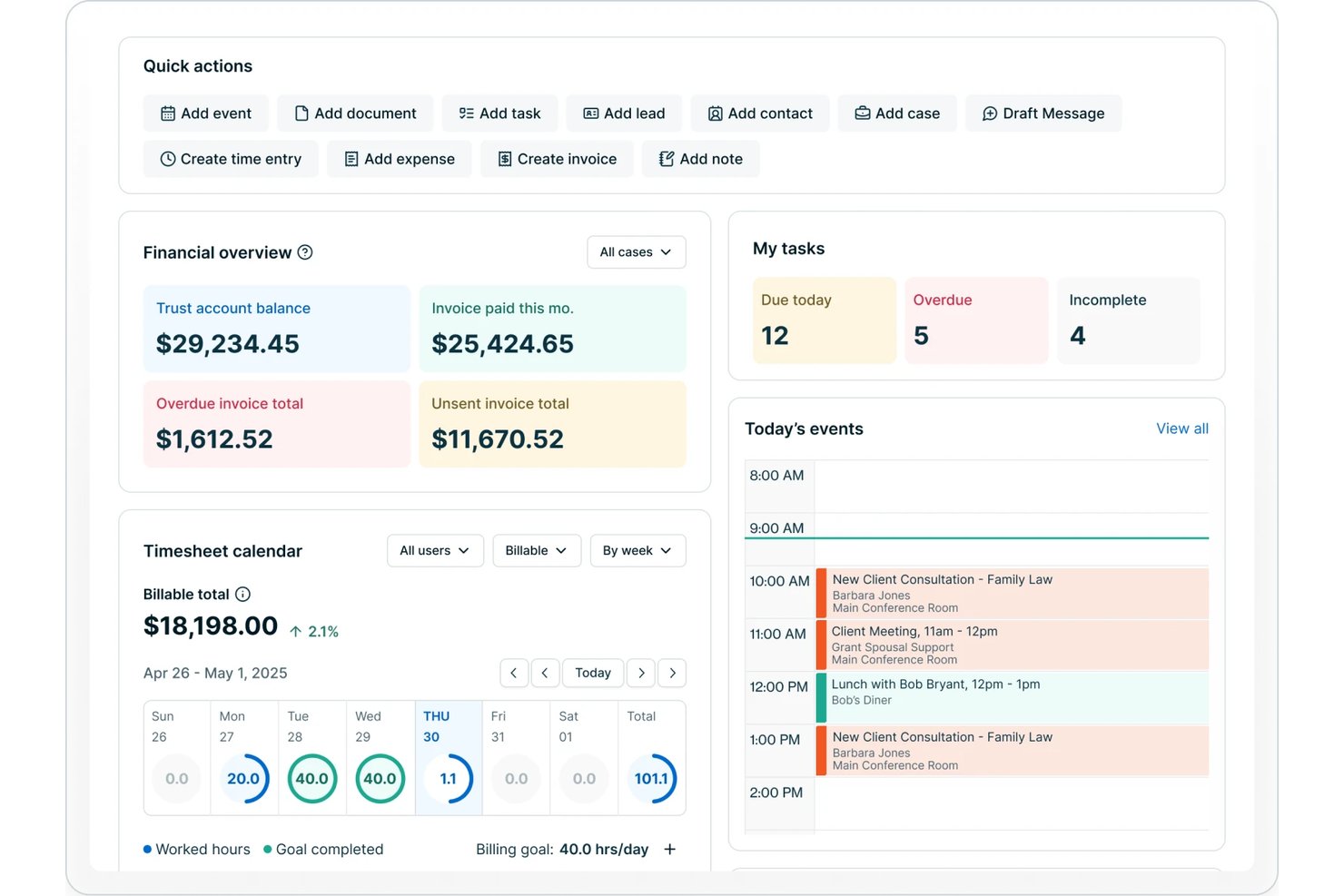
8am is a legal project management software platform offering matter planning, automated billing, time tracking, document management, and workflow tools designed specifically for law firms and legal teams.
Who Is 8am Best For?
Law firms and legal departments seeking a centralized platform for managing matters, billing, and legal team collaboration.
Why I Picked 8am
I picked 8am as one of the best because the platform centralizes billing, payment processing, and time tracking inside matter workflows. I’ve sent client invoices, tracked outstanding balances, and received trust payments directly within the legal case file.
8am Key Features
- Matter templates: Create and reuse structured templates for common case types and workflows.
- Document management: Store, organize, and version control all case-related files securely in one location.
- Role-based permissions: Set detailed access and editing rights for teams and individual users on sensitive data.
- Custom reporting: Build and schedule matter and financial reports tailored to firm needs.
8am Integrations
Native integrations are not publicly listed.
Pros and Cons
Pros:
- Specialized workflows for case and matter types
- Role-based permissions for sensitive case data
- Built-in e-signature and document version control
Cons:
- Initial workflow setup takes time
- Limited advanced analytics and forecasting

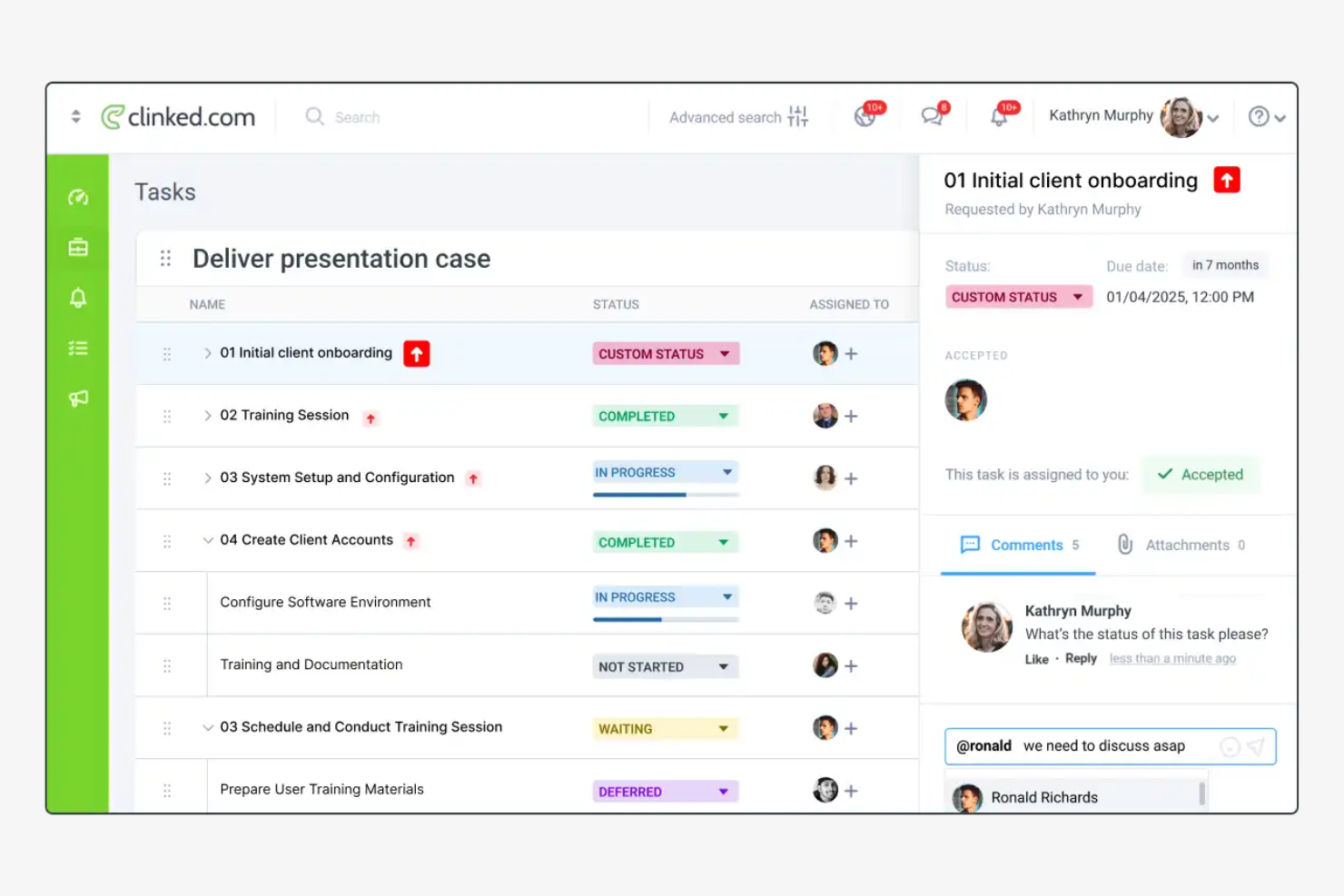
Clinked offers legal teams and law firms a dedicated client portal designed to centralize document sharing, communication, and collaboration. Its focus on privacy and granular access controls helps legal professionals manage sensitive client matters and streamline project workflows.
Who Is Clinked Best For?
Clinked suits law firms and legal departments that need a secure, branded portal for managing client communications and sensitive documents.
Why I Picked Clinked
I picked Clinked because its client portal is built specifically around secure, controlled access—something legal teams can't compromise on. I appreciate that it lets you assign granular permissions at the group or individual level, so clients only see the files and conversations relevant to their matter. The white-label branding feature also stands out for firms that want to present a professional, firm-branded experience rather than a generic third-party tool. In practice, that means my team can share sensitive documents and track client activity in one place, without relying on unsecured email threads.
Clinked Key Features
- Kanban board: Visualize task progress across client matters using a drag-and-drop Kanban board with due dates and status tracking.
- Document version control: Track changes to files over time, with access to previous versions of any document stored in the portal.
- Audit trail: Log every user action in real time, including file views, edits, and downloads, to maintain a full activity record.
- File request: Send clients a direct request to upload specific documents into the portal without requiring them to navigate the full interface.
Clinked Integrations
Integrations include Google Workspace, Microsoft 365, DocuSign, and Jotform. An API is also available for custom integrations.
Pros and Cons
Pros:
- Task assignment links directly to client workspaces
- Group chat enables real-time client discussions
- Document versioning tracks all file changes
Cons:
- Notification settings can be difficult to manage
- No built-in document automation tools
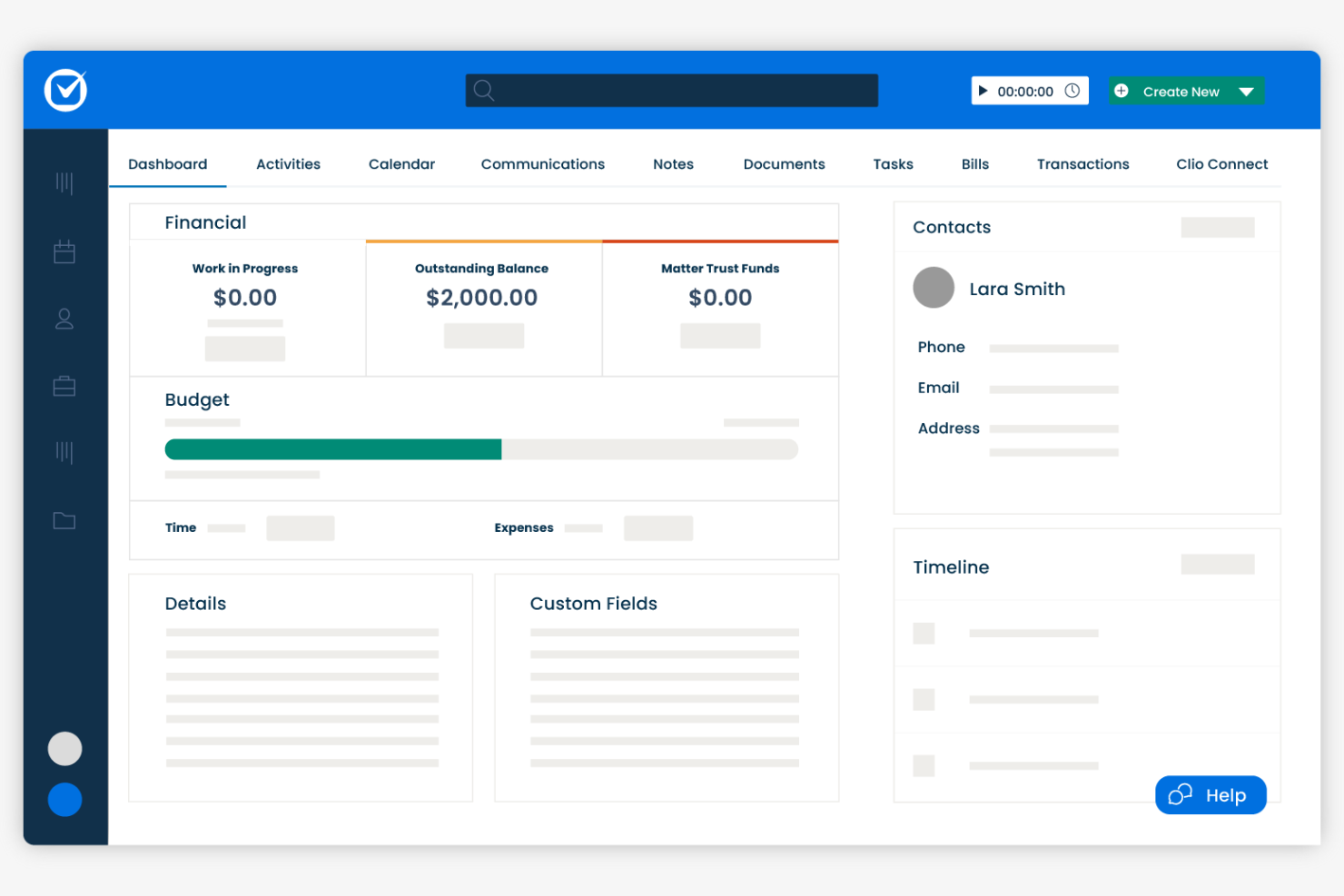
Clio offers legal project management software designed legal professionals (specializing in UK-based firms) seeking to organize cases, documents, and client communications in one place. Its intuitive interface and cloud-based access make it especially appealing to smaller practices aiming to simplify daily workflows.
Who Is Clio Best For?
Clio suits solo practitioners and small law firms in the UK looking for centralized case, document, and client management.
Clio Key Features
- Standardized task lists: Build reusable task sequences tied to specific matter types, with relative deadlines and per-user assignments managed from inside a matter.
- Time and expense tracking: Log billable hours directly from a task and track expenses against matters using the built-in Timekeeper tool.
- Law firm performance reporting: View hours captured, billed, and collected across your firm in a single dashboard, with filters by user, matter, or date.
- Client portal: Give clients a dedicated desktop and mobile app to view assigned tasks, receive reminders, and communicate securely with your firm.
Clio Integrations
Integrations include Xero, QuickBooks Online, Legl, InfoTrack, OurFamilyWizard, Case Status, ChartSquad, Scorpion RevenueMAX, Precedent Demand Composer, and Clio’s open API for custom integrations.
Pros and Cons
Pros:
- Calendar sync with court dates and deadlines
- Matter-centric organization for all case files
- Built-in time tracking for billable matters
Cons:
- Document automation lacks advanced customization
- Limited reporting options for project analytics

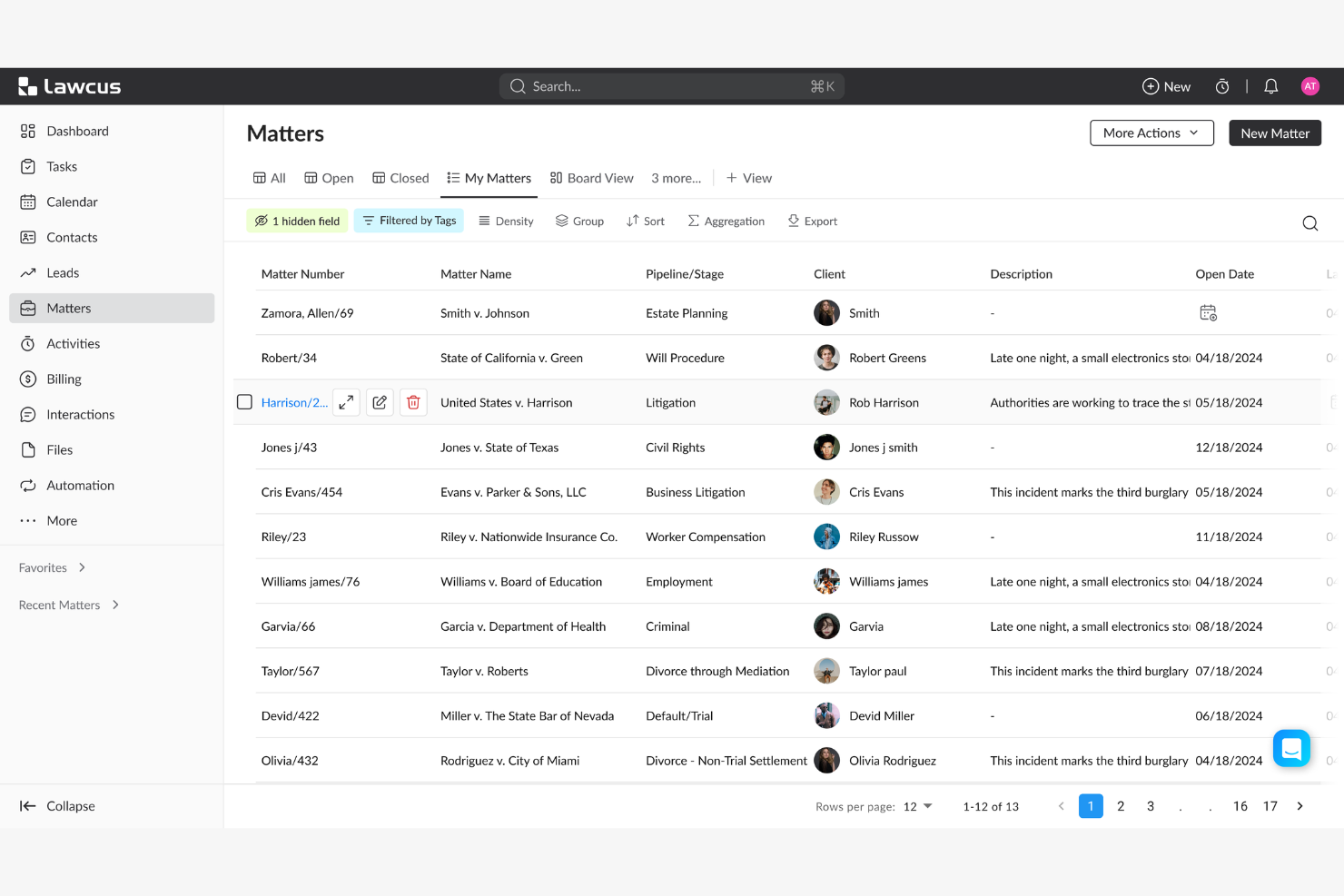
Lawcus offers legal teams a modern project management platform designed to simplify matter tracking and collaboration. Its intuitive interface and workflow automation features make it a strong fit for law firms and legal departments seeking to organize complex legal work with greater clarity.
Who Is Lawcus Best For?
Lawcus suits small to midsize law firms and legal teams that want to manage matters, tasks, and workflows visually.
Why I Picked Lawcus
I picked Lawcus for its visual task board interface, which lets legal teams manage matters and tasks across Kanban-style boards that mirror how legal work actually moves through stages. I appreciate that you can drag and drop matters between pipeline stages, giving attorneys an at-a-glance view of where every case stands. I also like Lawcus's built-in workflow automation, which triggers task assignments and status updates automatically as matters progress. In practice, that means my team spends less time on manual follow-ups and more time on substantive legal work.
Lawcus Key Features
- Client portal: Lets clients access case updates, exchange messages, share documents, and make payments through an encrypted, firm-branded portal.
- Nova AI writing assistant: Generates emails, notes, matter descriptions, and task descriptions directly within the platform using AI.
- Custom reporting: Produces over 100 standard reports—covering accounts receivable, trust ledgers, pipeline value, and referral sources—with a custom report builder for additional configurations.
- Time and expense tracking: Logs billable hours and expenses against specific matters to support accurate invoicing.
Lawcus Integrations
Integrations include Box, Calendly, Dropbox, Gmail, Google Calendar, Google Drive, LawPay, Microsoft 365, QuickBooks, and Xero.
Pros and Cons
Pros:
- Built-in client portal supports secure messaging
- Workflow automation reduces repetitive task steps
- Kanban boards visualize matter progress clearly
Cons:
- User roles offer limited permission granularity
- No built-in document assembly tools

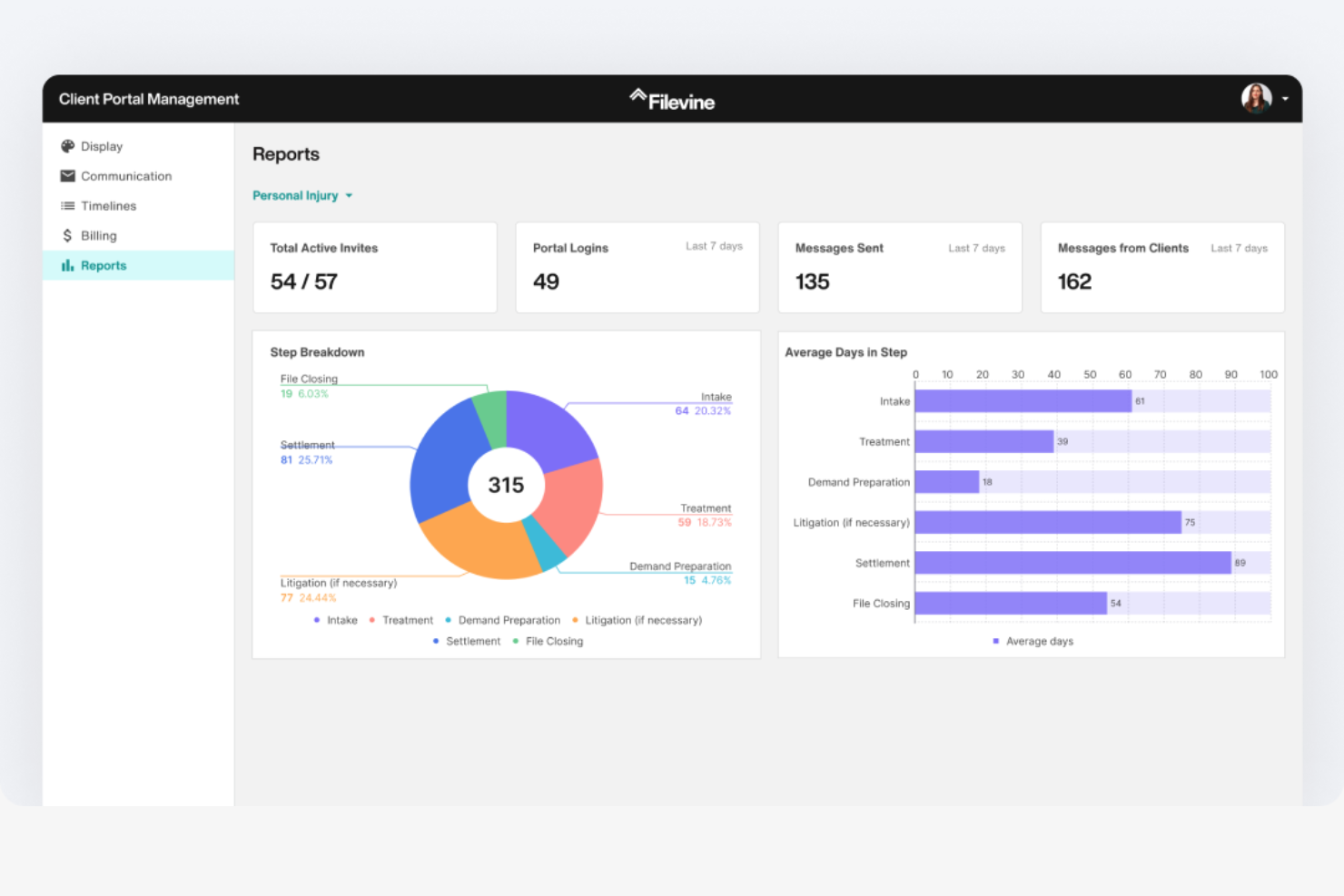
Filevine is a legal project management platform designed for law firms and legal teams that need advanced workflow automation and collaboration tools. Its flexible case management features help legal professionals handle complex matters, deadlines, and communications in one place.
Who Is Filevine Best For?
Filevine suits midsize to large law firms and legal departments seeking customizable workflows and centralized case management.
Why I Picked Filevine
Document generation is where I find Filevine genuinely pulls ahead of other legal project management tools. Its DocGen feature uses template-based automation to pull case and client data directly into documents with one click—so when my team needs to produce a settlement demand letter, the relevant fields populate automatically from the case file. I also appreciate the proprietary .vine file format, which keeps documents live and connected to case data, so updates in the project automatically reflect in the document. For teams drafting high volumes of contracts, pleadings, or demand letters, that kind of built-in accuracy cuts down on dual data entry and manual error correction.
Filevine Key Features
- Case timeline tracking: View deadlines, tasks, and milestones across all active matters in a single timeline view.
- Client portal: Share documents, collect signatures, and exchange messages with clients through a dedicated portal.
- Team task assignment: Assign, delegate, and track tasks across team members directly within each case file.
- Reporting dashboard: Generate custom reports on case progress, team workload, and matter status using built-in analytics tools.
Filevine Integrations
Integrations include Sageness, Gemini Legal, InfoTrack, Record Retrieval Solutions, DocuPost, MoveDocs, Copitrak, FedEx, Stamps, and Microsoft Teams.
Pros and Cons
Pros:
- Bulk document upload saves time on intake
- Deadline chains automate multi-step case processes
- Custom reporting adapts to firm requirements
Cons:
- User permissions can be difficult to configure
- Workflow automation setup can be time-consuming

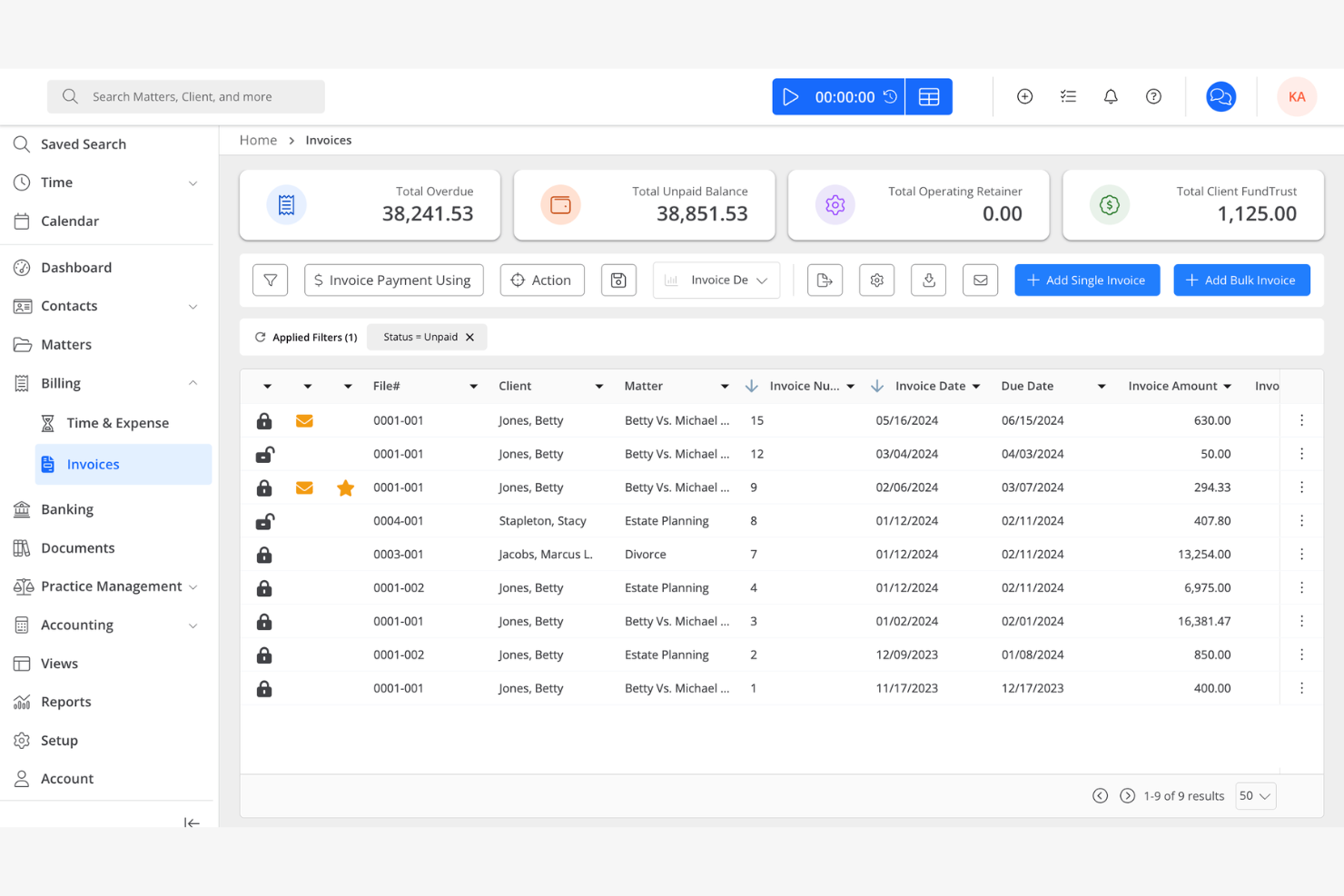
Rocket Matter offers legal professionals a platform designed to simplify case management and project workflows. Its focus on integrating practice management with advanced billing features makes it a strong fit for law firms seeking to unify operations and reduce administrative overhead.
Who Is Rocket Matter Best For?
Rocket Matter suits small to midsize law firms and legal teams that need centralized project management and billing in one platform.
Why I Picked Rocket Matter
I picked Rocket Matter because time tracking and billing aren't separate workflows—they're built into the same system. I appreciate that timers run directly against specific matters, so when I'm done working on a case, converting that tracked time into a billable entry takes seconds. Rocket Matter Track goes further by automatically capturing time across office apps and devices, which means my team isn't manually reconstructing hours at the end of the day. The Matter Status Board also lets me see exactly where each case stands, so I can connect project progress to billing phases without switching between tools.
Rocket Matter Key Features
- Legal trust accounting: Manage and transfer funds across multiple client trust accounts, with built-in compliance safeguards for credit card payments and bank statement reconciliation.
- Document automation: Generate legal documents from customizable templates with auto-populated fields pulled from your central client database.
- Batch billing: Prepare all monthly invoices at once and review them from a paperless prebill screen before sending.
- Conflict checks: Run conflict-of-interest searches across contacts and matters directly within the platform.
Rocket Matter Integrations
Integrations include Office 365, OneDrive, QuickBooks Online, NetDocuments, Dropbox, Google Calendar, and Box.
Pros and Cons
Pros:
- Automated reminders for tasks and deadlines
- Built-in document assembly from templates
- Kanban boards for visual matter tracking
Cons:
- Limited customization for workflow stages
- No built-in client portal for collaboration

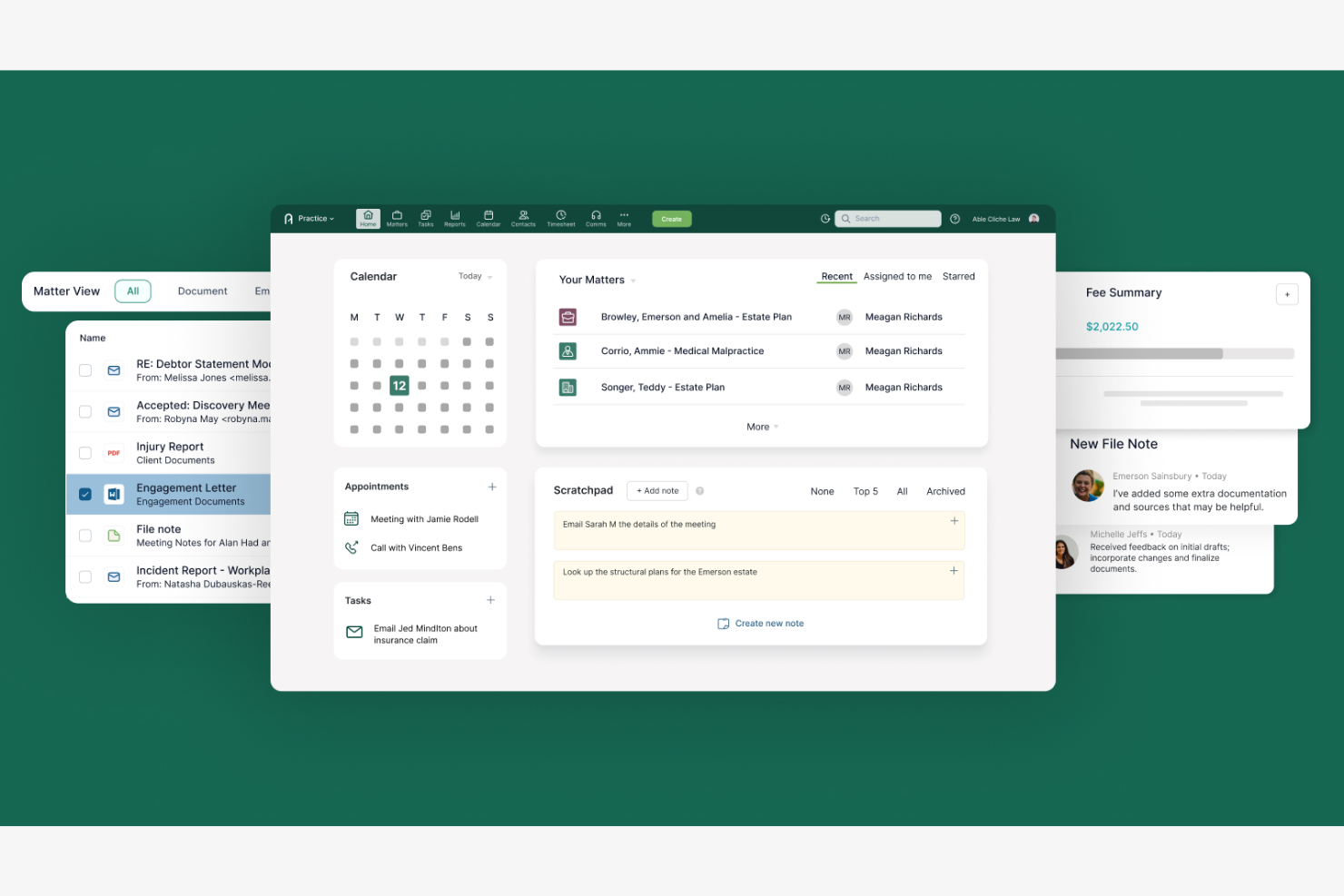
Actionstep offers legal teams a cloud-based platform designed to manage complex workflows and automate matter management. Its flexible approach appeals to law firms and legal departments seeking to tailor processes, centralize information, and improve collaboration across cases.
Who Is Actionstep Best For?
Actionstep suits small to mid-sized law firms and legal teams that need to customize workflows and automate legal processes.
Why I Picked Actionstep
I picked Actionstep because its matter type system lets my team build fully customized process templates for each practice area—defining the exact steps, tasks, and deadlines that apply to that matter type from the start. When a new matter opens, Actionstep automatically applies the right workflow, so nothing gets missed. I also appreciate that template management extends to documents and emails, letting my team auto-populate client-specific details without manual drafting. That combination of matter-type templates and document automation makes Actionstep a strong fit for legal project management.
Actionstep Key Features
- Conflict check: Search across all matters, contacts, and emails in one scan to identify potential conflicts of interest before onboarding a new client.
- AI time capture: AI-powered time suggestions auto-fill timesheets based on your activity, capturing billable time you might otherwise miss.
- Client portal: Share matter updates, documents, and invoices with clients through a secure, dedicated portal.
- Trust accounting: Manage client funds and maintain compliance with jurisdiction-specific trust accounting rules directly within the platform.
Actionstep Integrations
Integrations include Outlook 365, InfoTrack, First AML, MiTimes, SpeechWrite, BillerAssist, datacove, Lexidesk, and Zapier.
Pros and Cons
Pros:
- Built-in document versioning for legal files
- Matter types can be fully customized
- Workflow builder supports multi-branch processes
Cons:
- Bulk task editing is not supported
- No built-in Kanban or timeline views

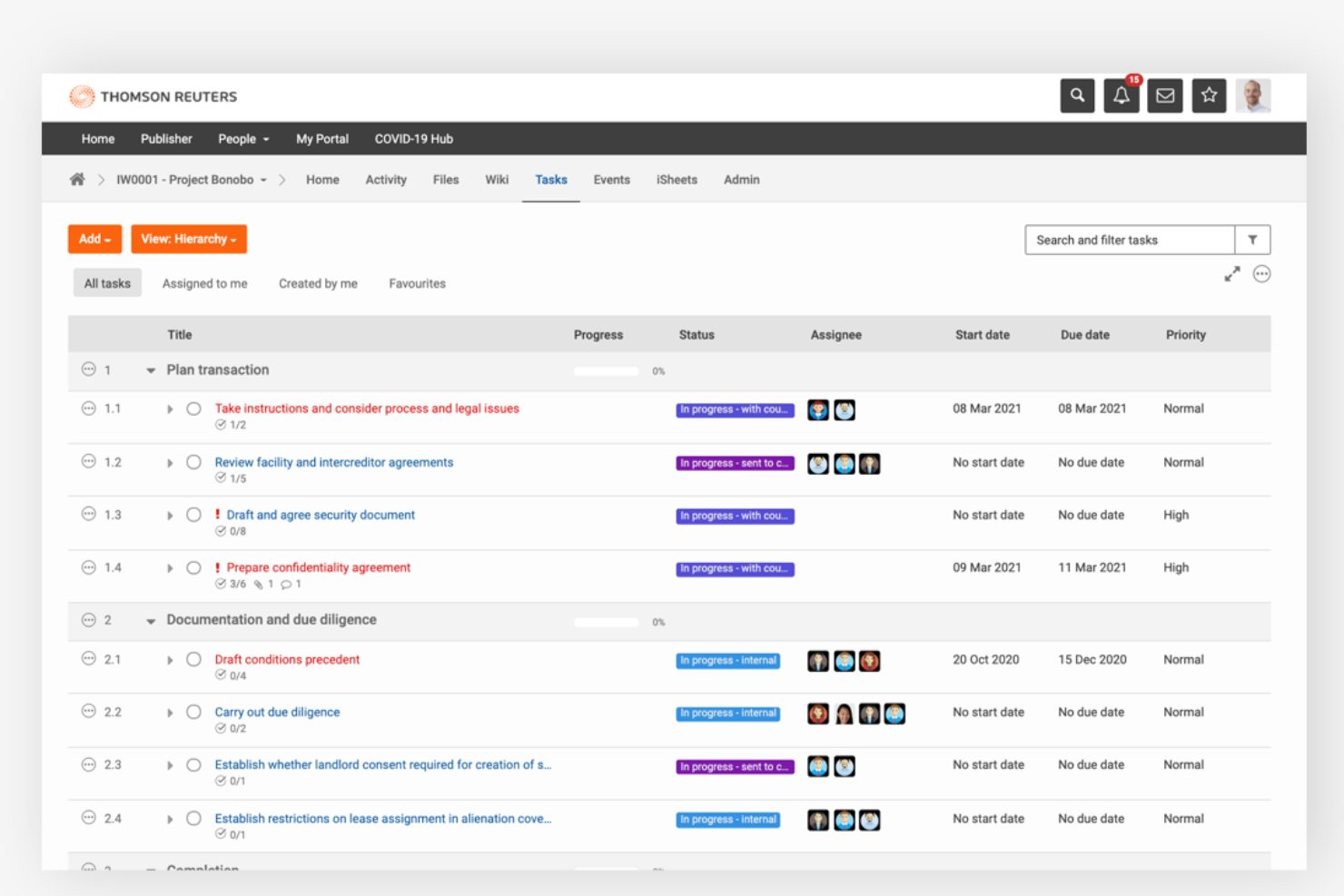
HighQ offers legal teams and law firms a platform designed to manage complex legal projects, matter collaboration, and document workflows. Its integration with Thomson Reuters’ legal ecosystem appeals to professionals seeking secure, centralized control over project tasks and client communications.
Who Is HighQ Best For?
Legal operations teams and law firms handling high-volume matters or complex, multi-party projects benefit most from HighQ’s workflow and collaboration capabilities.
Why I Picked HighQ
I picked HighQ because its no-code workflow automation goes further than basic task assignment. I can build conditional rules that trigger actions across the entire platform—automatically creating tasks, generating documents, sending custom emails, and updating data records based on conditions in live matter data. For example, when a contract review reaches a specific stage, HighQ can auto-generate an NDA using document automation and notify the right stakeholders without any manual input. I also rely on its spend-versus-budget dashboards and project risk trackers to keep complex matters on track in real time.
HighQ Key Features
- Client portals: Give clients 24/7 access to matter-specific legal information and resources within a secure, personalized portal.
- Solution templating: Access a library of pre-built templates for matter intake, contract lifecycle management, and end-to-end transaction and litigation management.
- Shared team calendars: Track project milestones, deadlines, and meetings across the team using a shared calendar view.
- Document Insights: Use CoCounsel's AI within HighQ to extract key information, summarize documents, and surface critical findings during review.
HighQ Integrations
Integrations include Microsoft SharePoint, iManage, NetDocuments, Kira Systems, Leverton, Eigen, Seclore, Microsoft Office 365, G Suite, DocuSign, and Adobe Sign.
Pros and Cons
Pros:
- Customizable dashboards for project tracking
- Automated notifications for task deadlines
- Real-time collaboration on case files
Cons:
- Reporting customization options are limited
- Interface can feel complex for new users

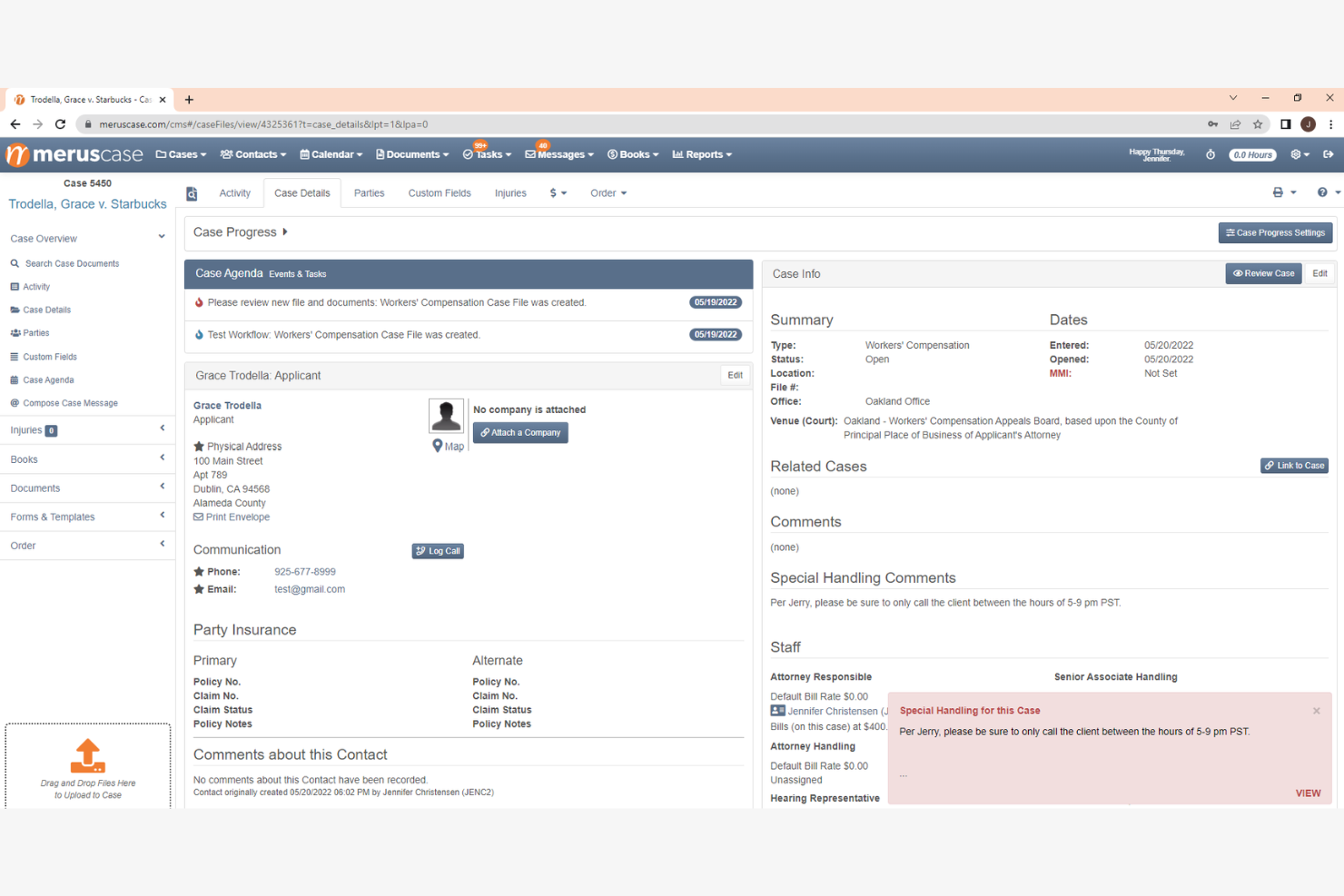
MerusCase offers legal professionals a cloud-based platform designed to manage complex workflows and sensitive case data. Its integrated approach appeals to law firms and legal departments seeking a unified system for document management, calendaring, and secure collaboration.
Who Is MerusCase Best For?
Law firms and legal teams handling high volumes of cases and requiring secure, centralized management of sensitive legal documents and workflows.
Why I Picked MerusCase
MerusCase's built-in compliance tools set it apart from legal practice management platforms that treat compliance as an afterthought. I appreciate that MerusPay—its native payment processor—is 100% compliant with IOLTA, ABA, and all 50 state bar guidelines, so my team doesn't need to verify third-party payment tools against bar rules. The platform also exceeds HIPAA compliance standards through end-to-end SSL encryption and 256-bit data hashing, which matters when handling sensitive client health information in workers' comp or personal injury matters. For firms where regulatory exposure is a daily reality, having those guardrails built directly into the system removes a layer of manual oversight.
MerusCase Key Features
- Document automation: Generate legal documents using pre-built templates populated with case data.
- Built-in time tracking: Log billable hours directly within matters and sync entries to invoices.
- Calendar and deadline management: Set court dates, deadlines, and task reminders tied to specific cases.
- Client portal: Share documents and communicate with clients through a secure, dedicated portal.
MerusCase Integrations
Integrations include Microsoft Word, Microsoft Outlook, and a developer API for custom integrations.
Pros and Cons
Pros:
- Email is integrated with case files
- Batch scanning speeds up document uploads
- Compliance tracking is built into workflows
Cons:
- Limited options for custom task views
- Interface updates can disrupt daily work

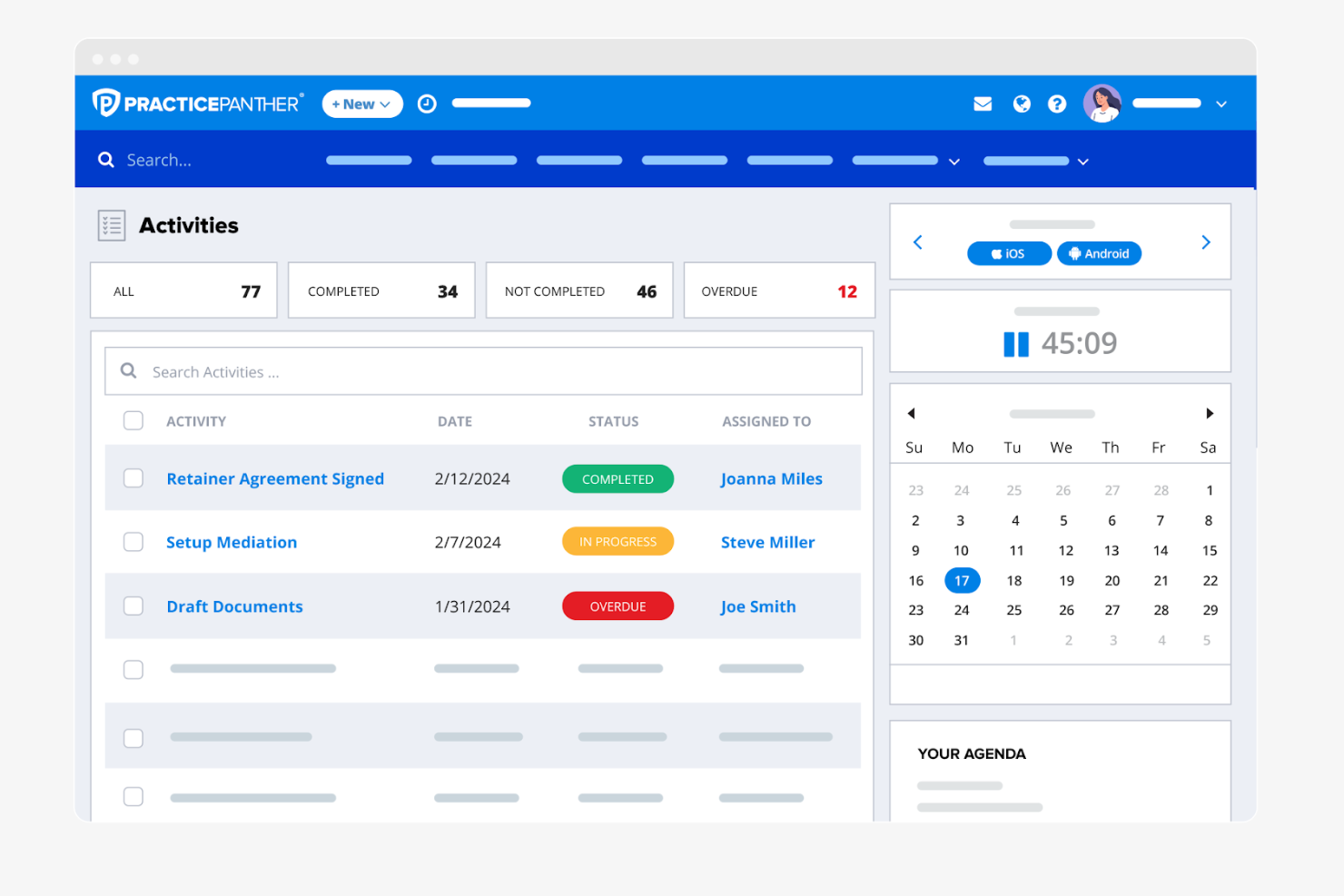
PracticePanther offers legal professionals a platform designed to simplify case, task, and document management from anywhere. Its intuitive interface and automation features make it a strong fit for law firms seeking to coordinate projects and client work on the go.
Who Is PracticePanther Best For?
Solo practitioners and small to midsize law firms looking for a flexible, mobile-accessible platform to manage legal projects and daily workflows.
Why I Picked PracticePanther
I picked PracticePanther because its mobile app brings full task management functionality to iOS and Android—not just a stripped-down view. I appreciate that I can check assigned tasks, review case updates, and track time from my phone without switching to a desktop. The task dashboard lets me see what's been completed and what's pending across the whole firm at a glance. I also like that tasks can be assigned directly to clients through the client portal, which keeps matters moving without back-and-forth emails.
PracticePanther Key Features
- Custom workflow templates: Apply one-click templates to automatically generate tasks and events for standard legal processes like client intake and billing.
- Client portal: Share documents and communicate with clients through a secure, dedicated portal built into the platform.
- Legal CRM with tagging: Capture client contact details and use custom tags to filter and track leads, matters, and case data.
- eSignature: Send documents for electronic signature and store signed files directly within PracticePanther without a third-party tool.
PracticePanther Integrations
Integrations include QuickBooks, Outlook, Gmail, Google Drive, Dropbox, Box, Lawmatics, WealthCounsel, TrustBooks, and Google Calendar.
Pros and Cons
Pros:
- Calendar syncs with Google and Outlook
- Time tracking links directly to matters
- Mobile app supports full task management
Cons:
- Document automation features are limited
- No built-in Gantt or timeline views
New Product Updates from PracticePanther

PantherAccounting Plus Unveiled
PracticePanther launches PantherAccounting Plus, enhancing financial management for law firms. It enables law firms to manage trust and operating accounting directly within the platform. For more information, visit PracticePanther's official site.
 .
.Other Legal Project Management Software
Here are some additional legal project management software options that didn’t make it onto my shortlist, but are still worth checking out:
- Basecamp
For team communication threads
- Wrike
For cross-department collaboration
- monday AI Workspace
For customizable workflow boards
- Microsoft Project
For advanced timeline visualization
- Asana
For task dependency tracking
- Trello
For visual card-based planning
- Dashboard Legal
For centralized matter dashboards


How I Evaluate Legal Project Management Software
I evaluate every tool against two layers: the baseline matter planning, budgeting, and deadline tracking a tool must offer, and the differentiators that set the best apart.
Core Functionality (Table Stakes For This List)
When I'm selecting tools for my list, I rank each one on a scale from 0 (does not offer the functionality) to 5 (excels in this area) for each core functionality listed below. Then, I calculate the tool's total score into a percentage. Each tool needs to achieve a minimum total score of 65% to be considered for inclusion.
- Matter Planning & Scoping: I check whether a tool lets you break matters into phases, tasks, and milestones—like structuring a multi-phase litigation from discovery through trial prep.
- Budgeting & Fee Tracking: Each tool should let you set matter-level budgets and track actual spend against estimates, with alerts when a phase starts exceeding its cap.
- Legal Task & Deadline Management: I evaluate how tasks connect to court-driven deadlines—things like statute of limitations dates or filing windows that shift based on jurisdiction.
- Resource & Workload Allocation: Visibility into who's assigned where matters here. I look for dashboards that show attorney and paralegal utilization across concurrent matters.
- Document & Matter Collaboration: Teams need centralized matter files with version control and role-based access, so associates and partners aren't working off outdated drafts.
- Reporting & Matter Analytics: I look at what each tool surfaces in its reporting—matter status, budget burn rate, realization rates, and portfolio-level performance views.
Once I have a list of tools that meet this criteria, I consider what sets each platform apart.
Differentiating Factors (What Sets Vendors Apart)
Here's how I compare and contrast different vendors:
Standout Features
A client portal changes how firms share matter updates—clients can check status, budgets, and milestones directly instead of waiting on email threads. I also look for a knowledge management library where teams store matter templates and post-matter retrospectives, so lessons from a complex M&A deal or multi-party litigation carry forward to the next one. AI-powered matter insights are a growing differentiator too, especially tools that flag budget risk early or auto-generate task plans based on prior matters.
Beyond Features
Legal tech ecosystem integrations matter a lot—I check whether a tool connects to the systems firms already rely on, like iManage, NetDocuments, or e-billing platforms. Security and data governance are equally important when client-privileged information is involved, so I evaluate SOC 2 compliance, ethical wall controls, and data residency options. Practice area fit varies widely too. A tool built for litigation timelines won't always suit transactional teams managing closing checklists, so I consider how well each platform adapts to different matter types and firm sizes.
How to Choose Legal Project Management Software
It’s easy to get bogged down in long feature lists and complex pricing structures. To help you stay focused as you work through your unique software selection process, here’s a checklist of factors to keep in mind:
| Factor | What to Consider |
|---|---|
| Scalability | Will the software support your firm’s growth, new practice areas, or increased matter volume over time? Check for user limits, storage caps, and upgrade paths. |
| Integrations | Does the tool connect natively with your document management, billing, or e-signature systems? Consider how much manual work will be needed to bridge gaps. |
| Customizability | Can you tailor workflows, templates, and permissions to match your firm’s processes? Beware of rigid systems that force you to adapt your practice to the tool. |
| Ease of use | Will your team and clients adopt the tool quickly? Look for clear navigation, minimal training requirements, and a logical interface. |
| Implementation and onboarding | How long will it take to get up and running? Ask about migration support, training resources, and whether the vendor offers onboarding assistance. |
| Cost | Are pricing tiers transparent and predictable? Factor in all users, storage, and potential add-ons. Watch for hidden fees or required upgrades. |
| Security safeguards | Does the software offer encryption, audit trails, and granular access controls? Confirm compliance with legal industry standards and client confidentiality needs. |
| Support availability | What support channels are offered, and during what hours? Consider if you’ll need 24/7 help or a dedicated account manager for urgent legal matters. |
What Is Legal Project Management Software?
Legal project management software is a digital platform designed to help law firms and legal teams organize, track, and manage legal matters, tasks, documents, and deadlines. These tools centralize project information, support collaboration among attorneys and clients, and provide visibility into case progress. By standardizing workflows and communication, legal project management software helps legal professionals coordinate complex work while maintaining compliance and confidentiality.
Features
When selecting legal project management software, keep an eye out for the following key features:
- Matter management: Centralizes all information, documents, and communications related to each legal case or matter in one organized workspace.
- Task assignment and tracking: Lets you assign tasks to team members, set deadlines, and monitor progress to ensure nothing falls through the cracks.
- Document management: Provides secure storage, version control, and easy retrieval of legal documents, contracts, and correspondence.
- Calendar and deadline tracking: Offers shared calendars and automated reminders for court dates, filing deadlines, and key milestones.
- Time tracking: Allows users to log billable and non-billable hours directly within the platform for accurate client invoicing and internal reporting.
- Client portal: Gives clients secure access to case updates, shared documents, and direct communication with their legal team.
- Collaboration tools: Includes features like group chat, discussion threads, and comment sections to support real-time and asynchronous teamwork.
- Permission controls: Enables administrators to set granular access levels for users, ensuring sensitive information is only available to authorized individuals.
- Reporting and analytics: Generates customizable reports on case status, workload, deadlines, and other key metrics to support data-driven decision-making.
Common Legal Project Management Software AI Features
Beyond the standard legal project management software features listed above, many of these solutions are incorporating AI with features like:
- Automated document review: Uses AI to scan, analyze, and flag issues or inconsistencies in legal documents, helping teams identify risks and errors faster.
- Predictive deadline management: Applies machine learning to forecast potential delays or missed deadlines based on historical project data and current workload.
- Smart task prioritization: Leverages AI to suggest which tasks should be prioritized based on urgency, dependencies, and resource availability.
- Contract clause extraction: Automatically identifies and extracts key clauses or terms from contracts, making it easier to review and compare documents.
- AI-powered matter classification: Classifies new matters or cases by type, jurisdiction, or complexity using natural language processing, streamlining intake and assignment.
- Automated time entry suggestions: Analyze user activity and communications to recommend or auto-fill time entries, reducing manual tracking and improving billing accuracy.
Benefits
Implementing legal project management software provides several benefits for your team and your business. Here are a few you can look forward to:
- Improved matter organization: Centralizes all case-related information, documents, and communications, making it easier to manage complex legal work.
- Improved collaboration: Supports real-time and asynchronous teamwork with features like group chat, shared workspaces, and client portals.
- Greater deadline control: Tracks key dates and sends automated reminders, helping your team avoid missed court dates or filing deadlines.
- Increased data security: Offers granular permission controls and audit trails to protect sensitive client information and support compliance.
- Streamlined client communication: Provides secure portals for sharing updates and documents, reducing email overload and improving client satisfaction.
- Better workload visibility: Delivers dashboards and reporting tools that help you monitor progress, allocate resources, and identify bottlenecks.
- More accurate billing: Integrates time tracking and automated time entry suggestions, supporting precise invoicing and reducing revenue leakage.
Costs & Pricing
Selecting legal project management software requires an understanding of the various pricing models and plans available. Costs vary based on features, team size, add-ons, and more. The table below summarizes common plans, their average prices, and typical features included in legal project management software solutions:
Plan Comparison Table for Legal Project Management Software
| Plan Type | Average Price | Common Features |
|---|---|---|
| Free Plan | $0 | Basic matter management, limited task tracking, basic document storage, and simple collaboration tools. |
| Personal Plan | $5-$25/user/month | Task assignment, calendar integration, basic reporting, document management, and email support. |
| Business Plan | $25-$60/user/month | Advanced matter management, client portal, time tracking, workflow automation, integrations, and custom reports. |
| Enterprise Plan | $60-$120/user/month | Advanced security, granular permissions, custom onboarding, API access, priority support, and compliance tools. |
Legal Project Management Software FAQs
Here are some answers to common questions about legal project management software:
How does legal project management software differ from general project management tools?
Legal project management software is designed for the unique needs of legal teams, including matter-centric organization, compliance features, and secure document handling. General project management tools may lack features like legal billing, client portals, or granular permission controls required for legal work.
Can legal project management software integrate with my existing document management system?
Yes, many legal project management solutions offer integrations with popular document management systems. Before choosing a tool, confirm compatibility with your current systems and check if the integration supports two-way syncing, version control, and secure file sharing.
What security features should I look for in legal project management software?
Look for encryption in transit and at rest, audit trails, granular user permissions, and compliance with legal industry standards like GDPR or SOC 2. These features help protect sensitive client data and support your firm’s confidentiality obligations.
How long does it take to implement legal project management software?
Implementation timelines vary, but most cloud-based solutions can be set up in a few days to a few weeks. Factors include data migration needs, user training, and workflow customization. Ask vendors about onboarding support and available resources to speed up adoption.
Is legal project management software suitable for small law firms?
Yes, many platforms offer plans and features tailored to small law firms. Look for solutions with flexible pricing, easy setup, and essential features like matter management, task tracking, and secure document sharing without unnecessary complexity.