Key Takeaways
Efficiency Improvement: Legal document generation saves most teams significant time and lowers errors compared to manual drafting processes.
Platform Selection Criteria: Choosing the right system depends on template control, integration capabilities, analytics features, and security standards.
AI and Automation: AI in document generation now assists with drafting, template conversion, and clause review but keeps final review with attorneys.
Common Implementation Barriers: Challenges often arise from over-automating complex documents, weak template maintenance, poor intake design, and slow change management.
Vendor Comparison: The article reviews leading legal document generation platforms with strengths ranging from deep logic capability to strong integrations.
Legal document generation automates document creation using templates and data. It's one of the fastest ways for legal teams to reclaim hours lost to manual drafting. In my experience, the highest cost isn't the software—it's the time spent reworking contract templates or catching clauses that slipped through a manual edit. Those errors compound, and they're avoidable.
This guide covers how document generation works, which features matter, how to measure ROI, and where implementations go wrong. I'll also help you compare legal document generation software so you can find a tool that delivers value for your investment.
What Is Legal Document Generation?
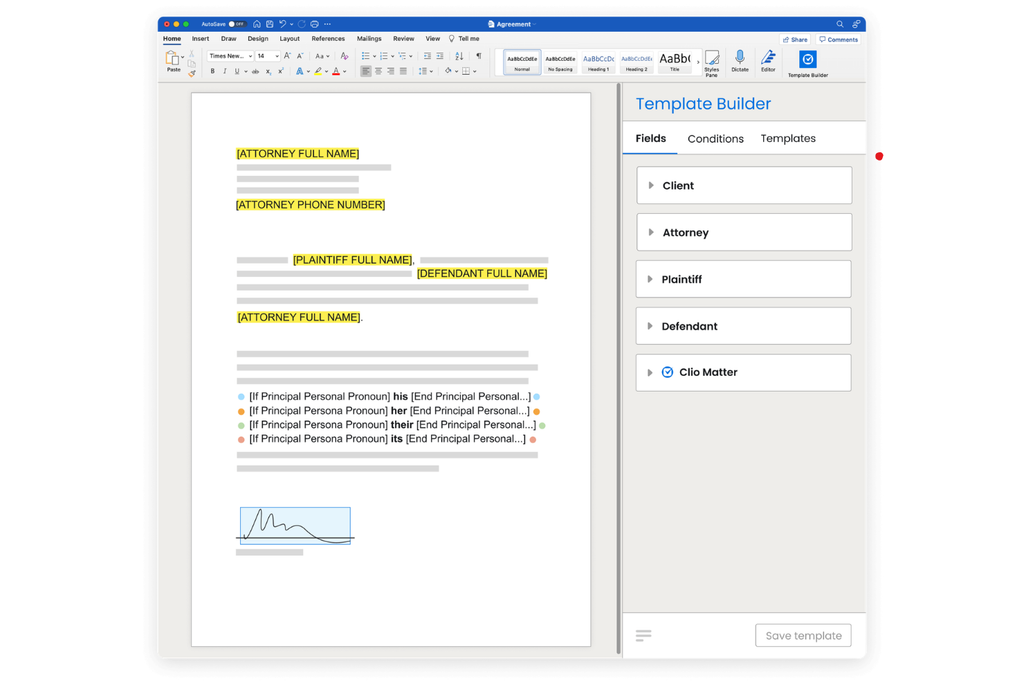
Legal document generation is the process of creating legal documents automatically using predefined templates, structured data inputs, and rules-based logic. You fill in the relevant variables—client name, dates, jurisdiction, deal terms—and the system assembles a complete, formatted document in seconds.
It's worth distinguishing this from two related concepts:
- Document assembly is a narrower term, typically describing the merging of clauses or sections from a library into a finished document. Document generation often includes this, but also handles data collection, logic branching, and output formatting end-to-end.
- Document management is about storing, organizing, and retrieving documents. Generation is upstream of that—it's about creating the document in the first place.
The practical upside is speed and consistency. Every document that comes out of a generation system follows the same structure, uses the same approved language, and can't accidentally omit a clause because someone forgot to update a Word template.
How Legal Document Generation Works
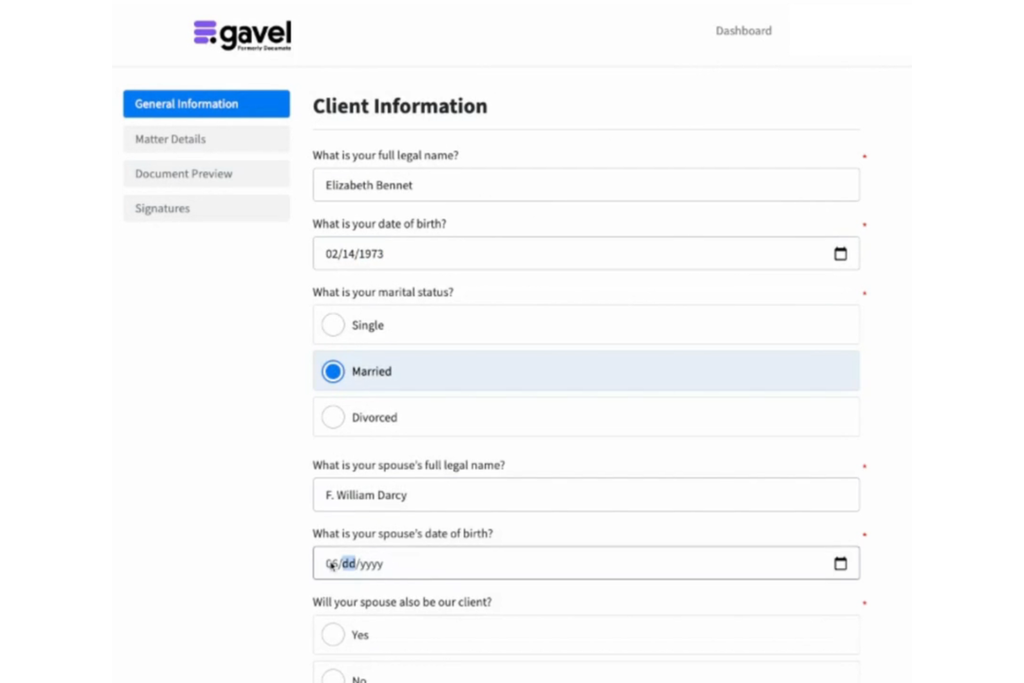
Most legal document generation systems follow the same core workflow. Understanding each step helps you spot where your current process is losing time.
Here's how a typical workflow runs:
- Data intake: A questionnaire, intake form, or connected data source collects the variables needed—party names, dates, jurisdiction, deal-specific terms.
- Conditional logic: The system applies rules to determine which clauses or sections to include. For example, a services agreement might swap in a different liability clause depending on the jurisdiction selected.
- Template population: The engine merges the collected data into the approved master template, filling in all variables and removing placeholder text.
- Review and approval routing: The draft routes to the appropriate reviewer, in-house counsel, or approver based on predefined workflow rules.
- eSigning: The final document is sent for electronic signature without leaving the platform.
- Storage and filing: The executed document saves automatically to your document management system (DMS) or matter management platform.
The intake step is where most teams underinvest. A poorly designed questionnaire produces ambiguous data, and that ambiguity ends up requiring manual edits downstream—which defeats the purpose.
Key Benefits of Automating Legal Document Creation
Time savings are one of the biggest advantages of legal document automation. According to Gavel's own study, involving 50 lawyers across corporate law, family law, and estate planning, its software reduced document drafting time by over 90%.
Similarly, Thomson Reuters reported time savings of up to 82% among users of its document automation software. Both findings show how automation can reduce repetitive drafting tasks, giving lawyers more time to focus on reviewing documents, advising clients, and handling complex legal matters.
But time savings aren't the whole picture. Here's what legal teams actually gain:
- Accuracy: Template-based generation eliminates the most common drafting errors—wrong party names, stale clause language, inconsistent dates—because the system pulls from a single source of truth.
- Consistency: Every document follows the same approved structure. That matters for brand, risk management, and regulatory compliance.
- Compliance: When your templates are kept current, every document reflects the latest approved language. You don't have to rely on attorneys remembering which version of a clause is current.
- Client experience: Faster turnaround on routine documents means clients get what they need sooner—and in-house teams spend less time chasing law firms for simple drafts.
- Scalability: You can handle higher document volume without adding headcount. That's particularly important for in-house teams absorbing more work as legal budgets tighten.
In my view, the compliance argument is underrated. Template drift, where different attorneys use different versions of the same clause, creates legal exposure, and document generation is one way to reduce that risk.
Another benefit worth considering is the ability to generate multiple related legal documents from the same client information. In a Clio case study, Emma Rucker, Managing Paralegal at Cohen Family Law, shared how Clio Draft reduced the time spent preparing document sets from hours to minutes.
Instead of repeatedly entering case details into individual forms, her team could generate a Petition for Dissolution of Marriage and supporting court documents using existing client information.
Rucker's experience shows that legal document generation isn't just about faster drafting. It also reduces duplicate data entry and keeps information consistent across related filings, especially when preparing multiple documents for the same case.
Common Use Cases and Practice Areas
High-Volume Routine Documents
Document generation delivers the most obvious value on high-frequency, lower-complexity documents. These are the ones your team produces over and over, where the structure rarely changes but the variables always do:
- NDAs and confidentiality agreements
- Employment offer letters and contractor agreements
- Client engagement letters and retainer agreements
- Intake questionnaires and client onboarding forms
- Real estate purchase agreements and lease documents
- Corporate resolutions and board consents
By Practice Area
The technology spans almost every practice area, but some benefit more immediately than others:
| Practice Area | Common Documents Automated |
|---|---|
| Practice AreaCorporate/M&A | Common Documents AutomatedNDAs, board resolutions, share purchase agreements |
| Practice AreaEstate planning | Common Documents AutomatedWills, trusts, powers of attorney, healthcare directives |
| Practice AreaReal estate | Common Documents AutomatedPurchase agreements, leases, closing documents |
| Practice AreaEmployment | Common Documents AutomatedOffer letters, severance agreements, restrictive covenants |
| Practice AreaLitigation | Common Documents AutomatedDemand letters, pleadings, court forms |
| Practice AreaFamily law | Common Documents AutomatedDivorce petitions, parenting plans, financial disclosures |
I'd suggest starting with engagement letters and NDAs. They're high-volume, low-risk, and the logic is simple—which makes them ideal for proving the concept internally before you tackle more complex agreement types.

Must-Have Features to Look For
Not every platform is built the same way. Use these criteria to evaluate your options before committing:
- Customizable templates: You need full control over the template library—not just vendor-supplied forms. The ability to import your existing Word documents and convert them into live templates is a practical requirement.
- Conditional logic: The system should support if/then rules that adjust content based on user inputs. Without this, you can't handle the jurisdictional and factual variations that real documents require.
- AI-assisted drafting: Newer platforms offer AI-powered drafting to suggest clause language, flag missing provisions, or generate initial content from a prompt. This is increasingly becoming a baseline expectation.
- Workflow routing and approvals: Look for configurable approval chains so documents route to the right reviewer automatically—without manual handoffs.
- Collaboration and redlining: Multi-user editing and tracked changes matter for documents that go through internal negotiation before finalization.
- eSignature integration: Native or integrated eSignature means documents move from draft to executed without switching platforms.
- Analytics and reporting: Usage data tells you which templates get used, where users drop off in intake forms, and how long documents take to cycle through approval.
- Client portal: For law firms, a branded portal where clients complete intake forms and retrieve documents improves the experience and reduces back-and-forth.
The feature I see undervalued most often is analytics. Teams invest in templates and never revisit them. Usage data tells you which documents are being generated incorrectly, which intake questions get skipped, and where the workflow actually breaks down.
Mauro Gonzalez, Founder of Big Mode Consulting and a legal technology consultant, emphasizes the importance of reusable templates and conditional logic in his guide to legal document generation software. He recommends that firms “convert documents to templates with variables, conditional logic, and calculation rules.”
His insights reinforce why it's worth prioritizing features that match your team's drafting requirements rather than choosing a platform based solely on the number of tools it offers.
The Role of AI and Generative AI in Document Generation
AI has quickly moved beyond a marketing add-on and become a practical part of legal workflows, including document generation. According to Thomson Reuters' 2026 AI in Professional Services Report, 41% of law firms reported using generative AI, up from 28% in 2025. Adoption also increased among corporate legal departments, rising from 23% to 47% over the same period.
These findings reflect the growing use of AI across legal work, including drafting, reviewing, and analyzing documents.
The findings reflect growing AI adoption across legal workflows, including document review, contract drafting, and document summarization. Here's how AI is being used in legal document generation today:
AI-Assisted Drafting
Generative AI can produce first-draft clause language from a plain-language prompt, suggest alternative phrasing, or flag provisions that may be missing based on document type. This is most useful when you're building a new template from scratch or adapting an existing one to a new jurisdiction.
Template Conversion
Some platforms offer AI-powered tools that convert existing Word documents into live, logic-driven templates automatically—identifying variable fields and suggesting where conditional logic should apply. This dramatically reduces the manual work of onboarding your existing document library.
Contract Review and Risk Flagging
AI can review generated documents against a playbook to flag non-standard terms, missing clauses, or potential risk before the document routes for approval. This works as an embedded quality-control layer rather than a separate review step.
Human-in-the-Loop Guardrails
The AI tools I've seen work best are the ones that keep attorneys in control. AI should surface options and flag issues—not make final decisions on legal language. Most credible platforms make this explicit in how they position the feature, and I'd be skeptical of any vendor that doesn't.
Integrations and Technology Stack Fit
A document generation platform that doesn't connect to your existing systems creates more friction than it removes. Prioritize integrations with the tools your team already uses daily:
- Document management systems (DMS): iManage, NetDocuments, and SharePoint are the most common. Your generated documents should save directly to the right matter folder without manual filing.
- Practice management platforms: Clio, Filevine, and similar tools hold client and matter data that should flow into document templates automatically—so users don't re-enter information that already exists in your system.
- eSignature: DocuSign is the most widely integrated. Look for native integration rather than a manual export step.
- CRM: For firms that use a CRM for business development, connecting it to document generation means engagement letters and proposals can populate from existing contact records.
- APIs and webhooks: If you have internal systems or custom workflows, open API access lets your technical team build the connections you need. Zapier integration is a useful low-code option for smaller teams.
Ask vendors specifically about bidirectional sync—whether data updated in your practice management system automatically updates in documents, and vice versa.
Security and Compliance Considerations
Legal documents contain some of the most sensitive data your organization handles. Vendor security practices deserve more scrutiny than they typically get during procurement.
Keep these questions in mind as you evaluate any platform:
- Data encryption: Is data encrypted in transit and at rest? What encryption standards does the vendor use?
- Audit trails: Does the system log every view, edit, approval, and signature action? A legal audit trail is a digitally signed, tamper-resistant record showing who accessed, changed, sent, or received data at any point in the client journey. This matters for litigation holds and regulatory inquiries.
- Access controls: Can you set role-based permissions so that only authorized users can view, edit, or approve specific document types?
- Data residency: Where is client data stored? This is especially relevant for organizations operating across multiple jurisdictions with different data protection requirements.
- Vendor certifications: SOC 2 Type II is the baseline. ISO 27001 is a meaningful additional indicator for enterprise deployments.
- Incident response: What's the vendor's breach notification process and SLA?
I'd request the vendor's security documentation and data processing agreement before signing anything. If they hesitate or can't produce these quickly, that tells you something.
How to Choose the Right Platform (Buyer's Checklist)
Assess Your Workflows First
Before you look at platforms, map what you actually need to automate. Identify your highest-volume document types, your current drafting bottlenecks, and the systems that need to integrate. Vendors will show you what their platform does best—you need to know what your team needs most.
Evaluate Against Your Use Cases
Use these criteria to compare platforms fairly:
| Criteria | What to Assess |
|---|---|
| CriteriaTemplate flexibility | What to AssessCan you import and convert existing documents? |
| CriteriaLogic complexity | What to AssessDoes it handle multi-variable conditional logic? |
| CriteriaIntegrations | What to AssessDoes it connect to your DMS, practice management, and eSignature tools? |
| CriteriaUsability | What to AssessCan non-technical staff build and edit templates without IT? |
| CriteriaAI features | What to AssessWhat does AI actually do—and where does it require human sign-off? |
| CriteriaSupport and training | What to AssessIs onboarding included? What's the support model post-launch? |
| CriteriaSecurity | What to AssessDoes it meet your data protection and compliance requirements? |
| CriteriaPricing model | What to AssessDoes the cost structure scale with your actual usage? |
Cloud vs. On-Premises
Most modern platforms are cloud-based, which reduces IT overhead and enables faster updates. On-premises deployment is still available from some enterprise vendors (including HotDocs) and may be required by organizations with strict data residency policies. If you're in a regulated industry or government-adjacent, clarify this early.
Run a Real Pilot
Don't evaluate platforms on demos alone. Request a trial using one of your actual legal documents to see how the software handles conditional clauses, formatting, and client data. Compare drafting time, accuracy, and manual corrections against your existing process before committing.
Barron Henley, Partner at Affinity Consulting Group, emphasizes the importance of choosing legal document generation software based on your firm's specific drafting requirements. In his guide to evaluating document assembly software, he states, “the right platform for you is primarily determined by the functional criteria your documents require, and whether you intend to do it yourself or outsource it.”
He also recommends evaluating conditional logic, questionnaire flexibility, and document formatting before selecting a platform.
Pricing Models and ROI
How Vendors Price
Legal document automation software typically costs between $50 and $500 per user per month, depending on the platform's capabilities, AI features, and deployment model. The structure varies by vendor:
- Per-user subscription: Most common for small-to-mid-size firms. Predictable costs, but can get expensive as headcount grows.
- Per-document or volume-based: The document automation market has split into two models: per-case pricing ($275–500+ per document) and subscription-included pricing where documents are included in the plan.
- Enterprise flat fee: Custom-quoted based on seat count, volume, and implementation scope. Typical for large law firms and enterprise in-house teams.
A Simple ROI Framework
Before your finance team asks for a business case, calculate this yourself:
- Estimate hours saved per document: Time your current drafting process for the document type you plan to automate. Estimate what it takes today (drafting, review, corrections) versus what it would take with generation (intake, QC, approval).
- Multiply by annual volume: How many of this document type does your team produce per year?
- Apply a cost rate: Use the average fully-loaded hourly cost for the staff doing the drafting (attorney time, paralegal time, or blended).
- Subtract software cost: Annual hours saved × hourly rate − annual software cost = estimated net value.
Example: If you save 1.5 attorney hours per NDA, produce 200 NDAs per year, and attorney time costs $150/hour, that's $45,000 in recovered capacity before software cost. Most mid-market platforms cost well under that annually.
A 2026 Software Advice survey of 396 U.S. legal professionals found that document drafting remains one of the most time-consuming manual tasks in law firms, while 46% of respondents reported using or planning to use AI for document generation.
This reinforces why calculating ROI should go beyond drafting time alone. Consider the hours spent correcting errors, reviewing documents, and completing repetitive administrative work when estimating the value of legal document generation software.
More Articles
Implementation Roadmap: Rolling It Out Successfully
| Step | Best Practice | Key Actions |
|---|---|---|
| StepSet Clear Goals | Best PracticeDefine measurable objectives before implementation. | Key ActionsEstablish targets such as reducing drafting time by 50%, eliminating manual errors in NDAs, or shortening engagement letter approval times. Use these goals to prioritize documents for automation. |
| StepStart With the Right Documents | Best PracticePrioritize high-volume, low-complexity documents. | Key ActionsBegin with intake forms, engagement letters, and NDAs. Focus on documents with straightforward logic and frequent use to demonstrate early results and identify data issues. |
| StepAudit Your Existing Templates | Best PracticeReview and standardize templates before automation. | Key ActionsIdentify outdated clauses, duplicate versions, and inconsistencies across attorney templates. Update and consolidate documents to maintain accuracy and consistency. |
| StepTrain Your Team | Best PracticeProvide role-specific, hands-on training. | Key ActionsConduct separate sessions for template creators and document users. Focus on building templates, completing intake forms, and generating documents. |
| StepMonitor and Optimize | Best PracticeEvaluate performance and refine workflows after launch. | Key ActionsConduct a 90-day review of template usage, abandoned intake forms, and manual edits. Use the findings to improve document templates and automation rules. |
Common Pitfalls to Avoid
Most implementations that underdeliver do so for predictable reasons. Watch for these early warning signs when rolling out document generation:
- Over-automating complex documents too early: Sophisticated agreements with heavy negotiation—M&A term sheets, complex financing documents—involve too much judgment-based variation to automate well without significant setup time. Automating these before simpler documents are working creates frustration and erodes team trust in the platform.
- Neglecting template maintenance: Templates go stale when laws change, standard terms evolve, or internal policy updates aren't reflected. With legal document automation solutions, firms can manage key clauses in a centralized location, so that updating a clause once cascades the change across all documents—but only if someone owns that process. Assign clear template ownership and build a review cycle into your calendar.
- Skipping change management: The technology is rarely the hard part. Resistance from attorneys who prefer their own templates, skepticism from staff about new workflows, and lack of leadership buy-in will slow adoption faster than any technical issue. Involve end-users in template design early. People use tools they helped build.
- Designing intake forms in isolation: Intake questionnaires built without input from the attorneys who'll use the output tend to miss edge cases or ask for data in unhelpful formats. Have drafting attorneys review the intake flow before launch.
- Ignoring end-user feedback post-launch: The first version of any template is a hypothesis. Build a feedback channel so users can flag issues, and act on that feedback visibly. If users see their input ignored, they stop giving it.
Top Legal Document Generation Platforms Compared
Use this table to compare the major platforms at a high level and identify which fits your team's profile:
| Platform | Best For | Key Strengths | Notable Tradeoffs |
|---|---|---|---|
| PlatformHotDocs (Mitratech) | Best ForComplex document automation for established law firms | Key StrengthsAdvanced conditional logic, detailed template customization, cloud and on-premises deployment options | Notable TradeoffsComplex templates require technical knowledge and additional setup |
| PlatformGavel | Best ForClient-facing legal document automation | Key StrengthsGuided questionnaires, reusable templates, branded client portals, and automated document assembly | Notable TradeoffsEnterprise-wide deployments may require additional evaluation |
| PlatformDocubee | Best ForDocument generation with approval workflows | Key StrengthsAutomated document creation, AI-assisted drafting, electronic signatures, and approval routing | Notable TradeoffsComplex document logic may require additional workflow configuration |
| PlatformClio Draft | Best ForDocument automation within the Clio ecosystem | Key StrengthsMatter data population, reusable templates, document assembly, and Clio connectivity | Notable TradeoffsLess suitable for firms using practice management platforms outside Clio |
| PlatformWestlaw Form Builder (Thomson Reuters) | Best ForJurisdiction-specific legal form preparation | Key StrengthsExtensive legal form library, automated field population, and jurisdiction-specific templates | Notable TradeoffsPrimarily focused on existing legal forms rather than fully customized document workflows |
| PlatformLegito | Best ForComplex document assembly without coding | Key StrengthsNo-code template editor, conditional logic, guided questionnaires, and reusable document components | Notable TradeoffsAdvanced automation rules require careful template configuration and testing |
| PlatformTemplafy | Best ForStandardized document creation across legal teams | Key StrengthsCentralized template libraries, dynamic content insertion, AI-assisted generation, and Microsoft Office connectivity | Notable TradeoffsBroader enterprise document platform with more functionality than some legal teams require |
| PlatformBriefpoint | Best ForAutomated litigation discovery drafting | Key StrengthsAI-generated discovery requests and responses, automated objections, and Microsoft Word document exports | Notable TradeoffsSpecialized in discovery workflows rather than general-purpose document generation |
| PlatformCheckbox | Best ForNo-code legal document and workflow automation | Key StrengthsVisual workflow builder, conditional logic, automated document assembly, and approval processes | Notable TradeoffsRequires upfront planning to configure questionnaires and automation workflows |
From my experience, Gavel and Clio Draft are worth considering for small-to-mid-size law firms, particularly those looking to automate document creation within their existing workflows. In-house legal teams handling high-volume document requests may find Checkbox or Templafy more suitable for managing templates, approvals, and document consistency.
For firms working with complex, logic-heavy documents, HotDocs and Legito offer advanced customization, although configuring and maintaining sophisticated templates may require more time and technical expertise.
Ready to Explore More Legal Automation Tools?
Choosing the right legal document generation software is a good starting point, but there's more to improving your firm's daily workflows. Explore our legal automation software guide to compare platforms that reduce repetitive tasks, improve accuracy, and give your team more time to focus on client work.