

O software de gestão de processos jurídicos para pequenos escritórios ajuda-o a organizar processos, gerir documentos, controlar o tempo e simplificar as comunicações — tudo num só lugar. Se procura as melhores ferramentas para simplificar a gestão do escritório, manter a sua carteira de processos organizada e libertar tempo para o trabalho com os clientes, está no sítio certo. Abaixo, encontrará uma análise clara das melhores opções disponíveis em 2026 — para poder comparar funcionalidades e escolher a solução mais adequada à dimensão, ao fluxo de trabalho e aos objetivos do seu escritório.
Why Trust Our Software Recommendations
6,700+
Reviews
20
Industry experts
16+
Evaluation factors
14
Years
Our team has been testing and reviewing software since 2012. As legal practice leaders ourselves, we know how difficult—and important—it is to choose the right software.
For this guide, we evaluated tools using hands-on testing and independent research, scoring tools using our selection criteria.
Our reviews reflect our human editorial judgment, not a sales pitch.
Tabela de comparação de software de gestão de processos jurídicos
| Tool | Best For | Trial Info | Price | ||
|---|---|---|---|---|---|
| 1 | Best for legal billing and accounting | 10-day free trial | From $69/user/month | Website | |
| 2 | Best for time tracking and invoicing | 10-day free trial + demo available | Pricing upon request | Website | |
| 3 | Best for document-heavy legal practices | Free demo available | Pricing upon request | Website | |
| 4 | Best for billing and productivity management | 10-day free trial + free demo available | From $59/user/month (billed annually) | Website | |
| 5 | Best for customizable legal workflows | Free demo available | Pricing upon request | Website | |
| 6 | Best for document and workflow automation | Free demo available | Pricing upon request | Website | |
| 7 | Best for all-in-one small firm management | 7-day free trial | From $49/user/month | Website | |
| 8 | Best for client communication and case tracking | 10-day free trial available | From $50/user/month (billed annually) | Website | |
| 9 | Best for built-in legal accounting | 10-day free trial + free demo available | From $49/user/month (billed annually) | Website | |
| 10 | Best for intuitive case and billing workflows | 7-day free trial + free demo available | From $59/user/month | Website |


Avaliações do melhor software de gestão de processos jurídicos para pequenos escritórios
Apresentamos abaixo os meus resumos detalhados do melhor software de gestão de processos jurídicos para pequenos escritórios que entrou na minha lista final. As minhas avaliações oferecem uma análise detalhada das funcionalidades, dos melhores casos de utilização e das integrações de cada software, para o ajudar a encontrar a melhor opção para si.
 Best for legal billing and accounting
- 10-day free trial
- From $69/user/month
Visit WebsiteCustomer Rating:4.5/5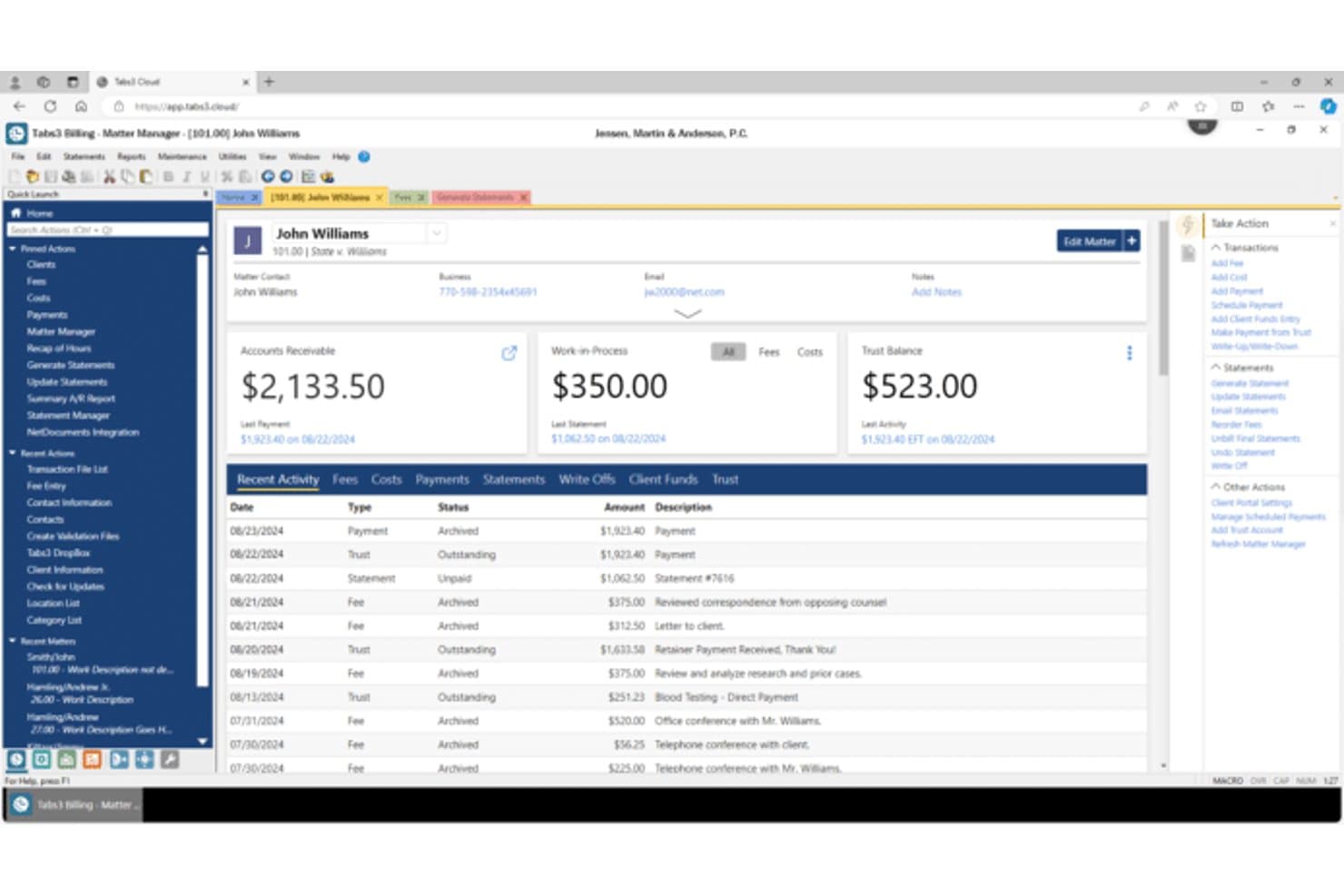
Tabs3 offers a detailed Matter Manager interface displaying client billing, accounts receivable, work-in-process, and recent activity for small law firms. Tabs3 is a legal practice management platform that combines matter management, time tracking, billing, trust accounting, and client intake tools built specifically for solo practitioners and small to midsize law firms.
Who Is Tabs3 Best For?
Tabs3 is a natural fit for small law firms where billing accuracy and trust accounting compliance are central to daily operations.
Why I Picked Tabs3
I picked Tabs3 as one of the best because its billing and trust accounting tools are genuinely built around how law firms actually work. I can set up multiple billing rate structures per matter, run batch invoicing across clients, and accept ACH payments through Tabs3Pay without leaving the platform. The trust accounting module handles three-way reconciliation and generates compliance-ready reports, which I find invaluable when bar audits come up.
Tabs3 Key Features
- Matter-centric dashboard: View all matter details, key contacts, events, and documents from a single, organized screen.
- PracticeMaster cloud access: Manage cases, contacts, calendars, and intake securely from any location via browser-based access.
- Conflict of interest checking: Search across contacts, matters, and notes to identify potential conflicts before intake.
- Custom workflow automation: Set up automated tasks, reminders, or document generation triggered by matter status changes.
Tabs3 Integrations
Tabs3 offers native integrations with NetDocuments, HotDocs, WORLDOX, QuickBooks Online, and LawPay. An API is available for custom integrations.
Pros and Cons
Pros:
- Detailed billing rate customization per matter
- Batch invoicing across multiple client matters
- Strong trust accounting with three-way reconciliation
Cons:
- Setup requires significant technical configuration time
- Desktop-first design limits mobile access
Learn more about Tabs3: Best for time tracking and invoicing
- 10-day free trial + demo available
- Pricing upon request
Visit WebsiteCustomer Rating:4.5/5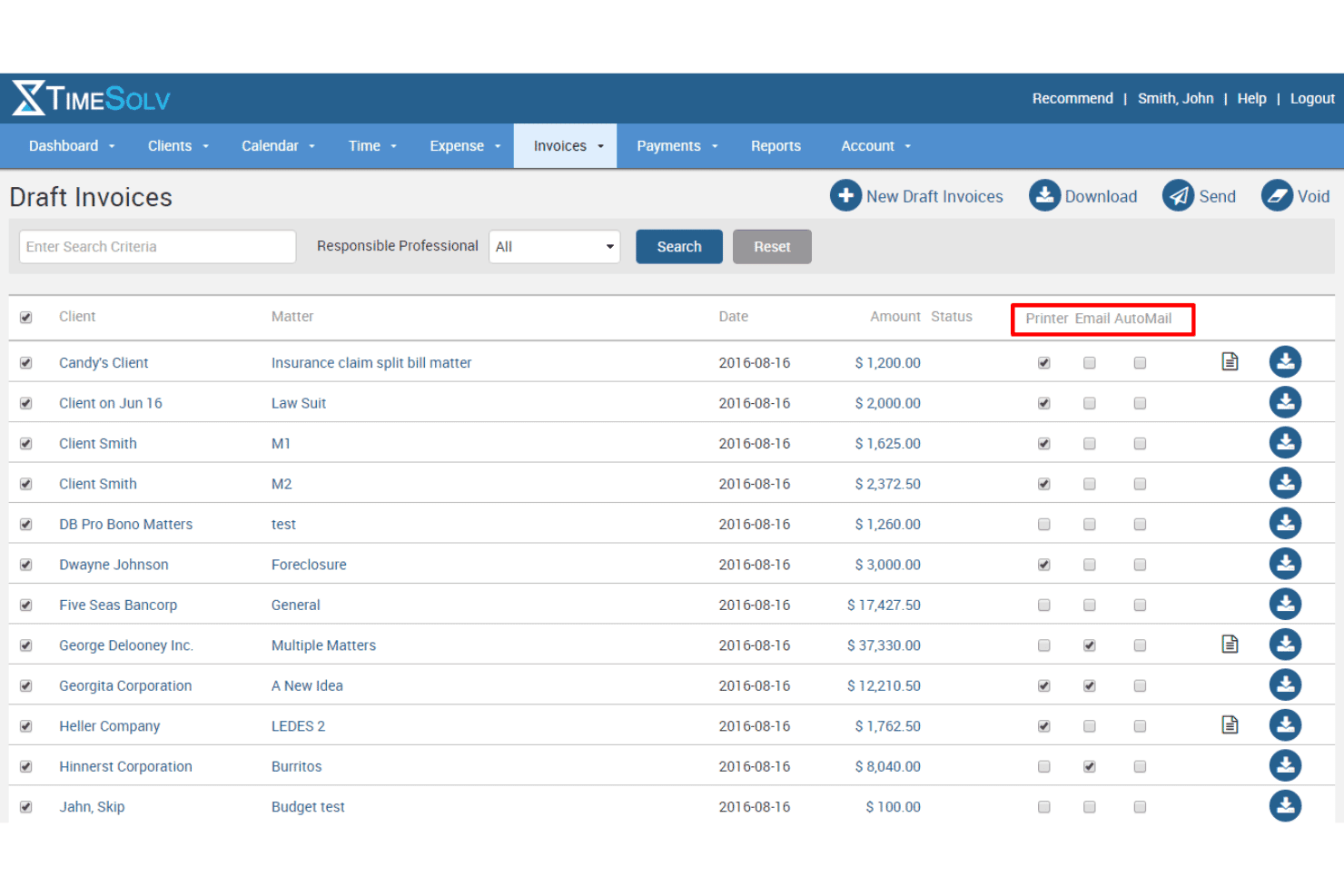
TimeSolv creates invoices with flexible billing templates. TimeSolv is a cloud-based legal billing platform for law firms that combines time tracking, matter management, trust accounting, invoicing, and document management in a single system.
Who Is TimeSolv Best For?
TimeSolv is a strong fit for solo practitioners and small law firms where billing accuracy and trust accounting compliance are the top priorities.
Why I Picked TimeSolv
TimeSolv earns its spot on my shortlist because its time tracking setup is genuinely built for the rhythm of legal work. I love that running multiple simultaneous timers is standard, so switching from drafting a motion to taking a client call doesn't mean losing captured time. Batch invoicing then lets me process an entire month of matters in one pass, and LEDES billing is built into the Legal tier for firms that bill insurers or corporate clients.
TimeSolv Key Features
- Matter management dashboard: Organize case details, client information, deadlines, and contacts by matter in a unified view.
- Trust accounting tools: Perform three-way reconciliation, manage IOLTA ledgers, and run dedicated trust reports to meet bar standards.
- Document management integration: Store and share documents with NetDocuments, Dropbox, and OneDrive from within each matter.
- Client portal: Offer clients access to invoices, payment history, and secure document sharing from a web-based portal.
TimeSolv Integrations
TimeSolv offers native integrations with NetDocuments, Dropbox, OneDrive, QuickBooks Online, Xero, and LawPay. An API is available for custom integrations.
Pros and Cons
Pros:
- Batch invoicing processes all matters at once
- LEDES billing included for corporate clients
- Multiple simultaneous timers run at once
Cons:
- No built-in document automation or templating
- Basic matter management for case-heavy firms
 Best for document-heavy legal practices
- Free demo available
- Pricing upon request
Visit WebsiteCustomer Rating:4.4/5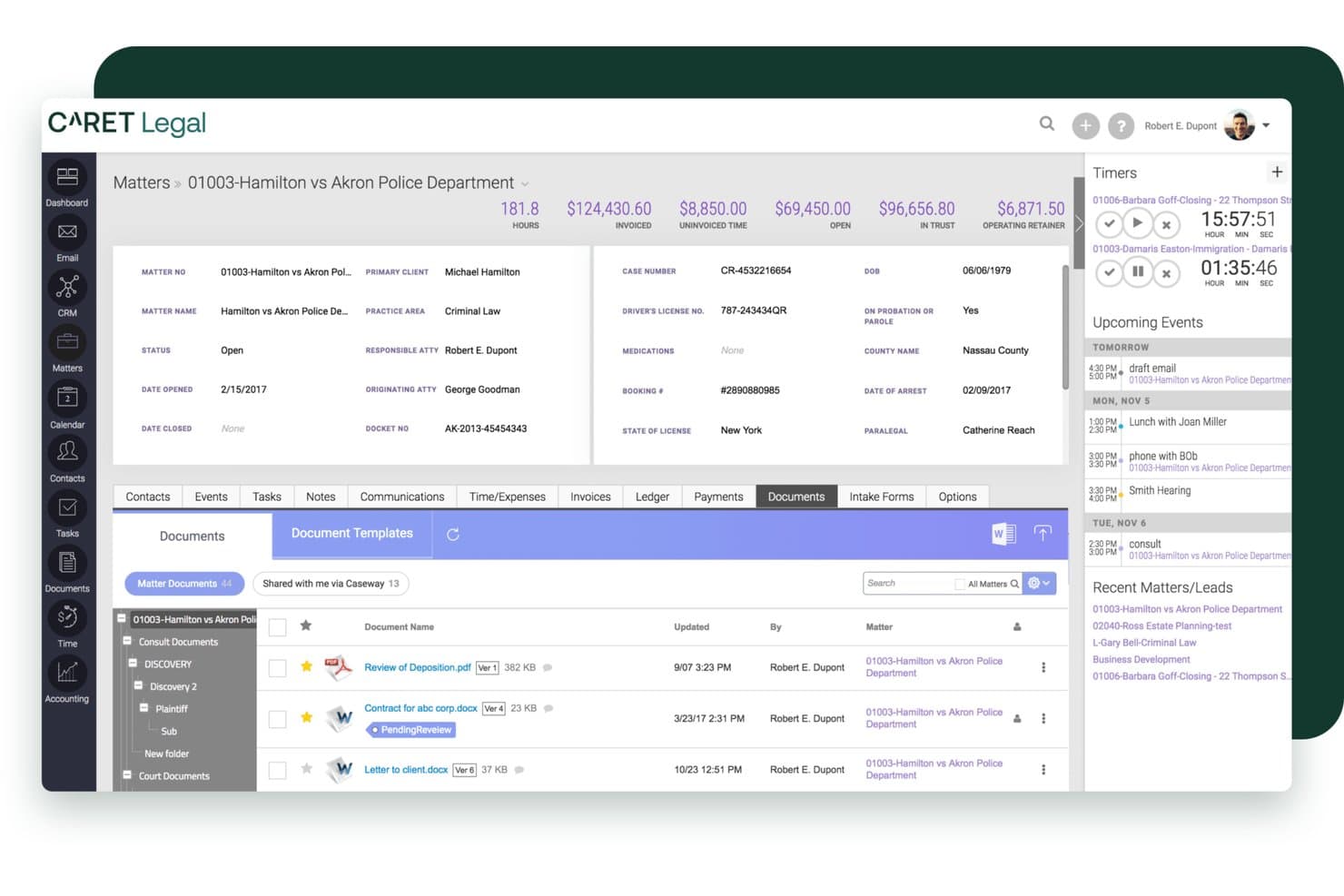
CARET Legal offers a comprehensive matter management interface with document tracking, billing summaries, timers, and upcoming events in a single dashboard view. CARET Legal is a cloud-based legal practice management platform that combines matter management, native trust and business accounting, time tracking, billing, document management, and client portal tools in a single system.
Who Is CARET Legal Best For?
Small to mid-sized law firms that want practice management and full accounting in one platform, without relying on QuickBooks or other third-party financial tools.
Why I Picked CARET Legal
CARET Legal earns its spot on my shortlist because of how it handles document-heavy workflows natively. Document templates with matter merge fields are built directly into the platform, so generating a motion or client agreement pulls live matter data without any copy-paste work. On the Enterprise Plus tier, native document editing and AI-generated document summaries let me draft, review, and finalize files inside the same system where the matter lives.
CARET Legal Key Features
- Native trust accounting: Handles IOLTA-compliant ledgers, three-way reconciliation, and bar association safeguards.
- Automated intake workflows: Connects with Lawmatics to drive online client intake directly into matter creation.
- Rules-based calendaring: Calculates legal deadlines using court rules integration and syncs with Google or Microsoft 365 calendars.
- Integrated client portal: Enables secure message exchange, document sharing, and invoice delivery between clients and firm.
CARET Legal Integrations
CARET Legal offers native integrations with LawToolBox, Lawmatics, NetDocuments, iManage, HotDocs, LawPay, QuickBooks Online, Microsoft 365, and Google Workspace. An API is available for custom integrations.
Pros and Cons
Pros:
- Onboarding and data migration support is consistently praised
- Billing depth rivals standalone legal accounting tools
- Full accounting built in, no QuickBooks required
Cons:
- Reporting customization is limited without higher-tier plans
- Initial setup takes significant time and configuration
Learn more about CARET Legal: Best for billing and productivity management
- 10-day free trial + free demo available
- From $59/user/month (billed annually)
Visit WebsiteCustomer Rating:4.4/5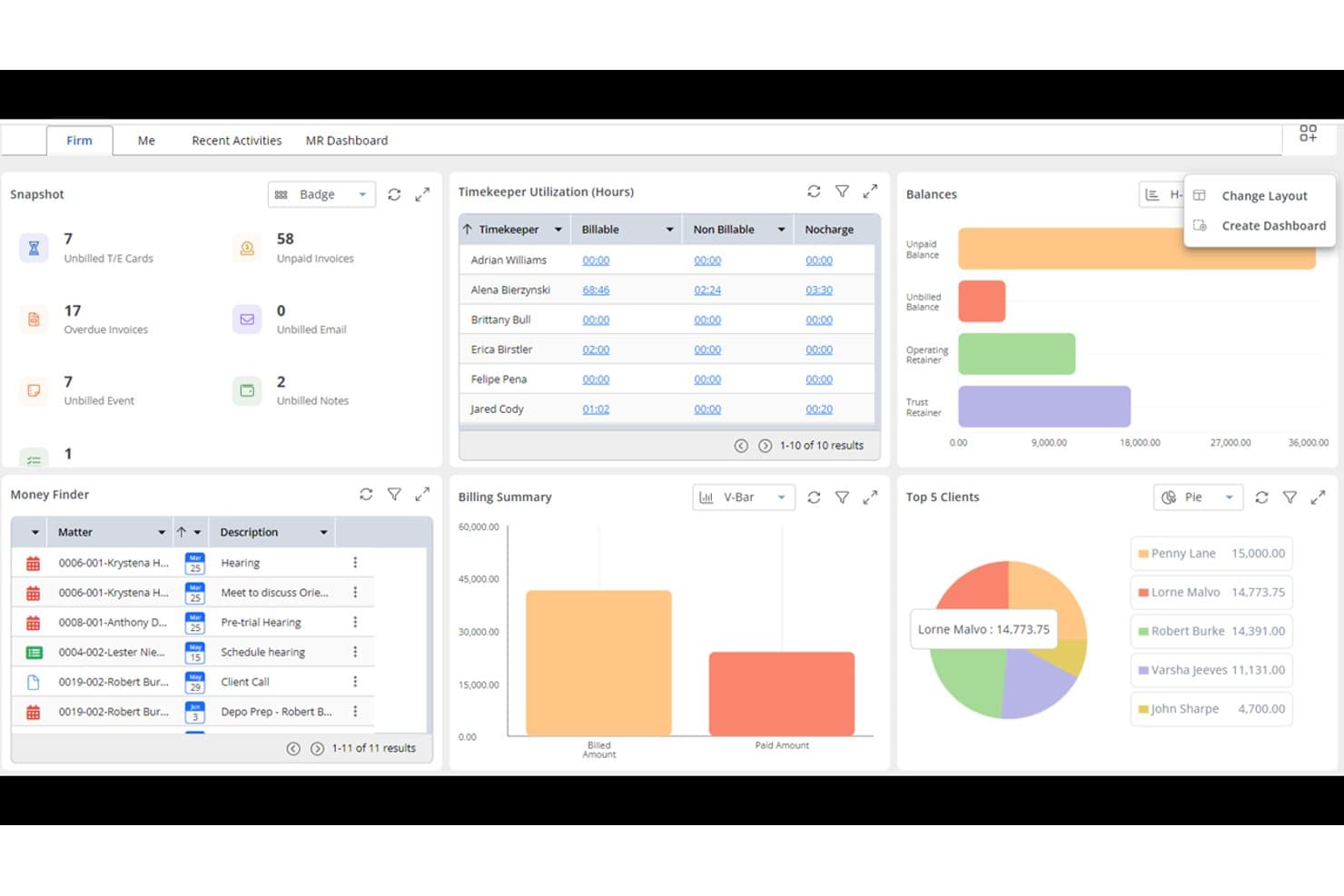
Rocket Matter offers a comprehensive dashboard with timekeeper utilization, billing summary, top 5 clients, balances, and a money finder panel for efficient law firm management. Rocket Matter is a cloud-based legal practice management platform for small firms and solo practitioners, covering matter management, time tracking, billing, trust accounting, document assembly, and client intake.
Who Is Rocket Matter Best For?
Rocket Matter is a strong fit for solo practitioners and small law firms that need a full-featured billing and matter management system without a complex setup.
Why I Picked Rocket Matter
I picked Rocket Matter as one of the best because its billing engine goes well beyond basic invoicing. I can run batch billing across all active matters in one pass, apply custom rate structures per timekeeper, and produce LEDES-formatted e-bills for insurance carriers without leaving the platform. The auto time card captures billable time in the background, so I'm not reconstructing my day at the end of the week.
Rocket Matter Key Features
- Matter templates: Create reusable templates for standardizing matter setup by practice area or workflow.
- Document assembly: Automatically generate documents using templates with merge fields populated from matter data.
- Client portal: Share documents, invoices, and messages securely with clients through a web-based portal.
- Integrated trust accounting: Track client funds separately with compliance features like three-way reconciliation and audit trails.
Rocket Matter Integrations
Rocket Matter offers native integrations with QuickBooks Online, Microsoft 365, Google Workspace, Dropbox, Box, and LawToolBox. An API is available for custom integrations.
Pros and Cons
Pros:
- Trust accounting reconciliation flags compliance issues automatically
- LEDES invoicing built in, no add-on needed
- Batch billing cuts time across multiple matters
Cons:
- Performance slows noticeably with large, document-heavy matters
- Task automation lacks dependency-based workflow logic
Learn more about Rocket Matter: Best for customizable legal workflows
- Free demo available
- Pricing upon request
Visit WebsiteCustomer Rating:4.2/5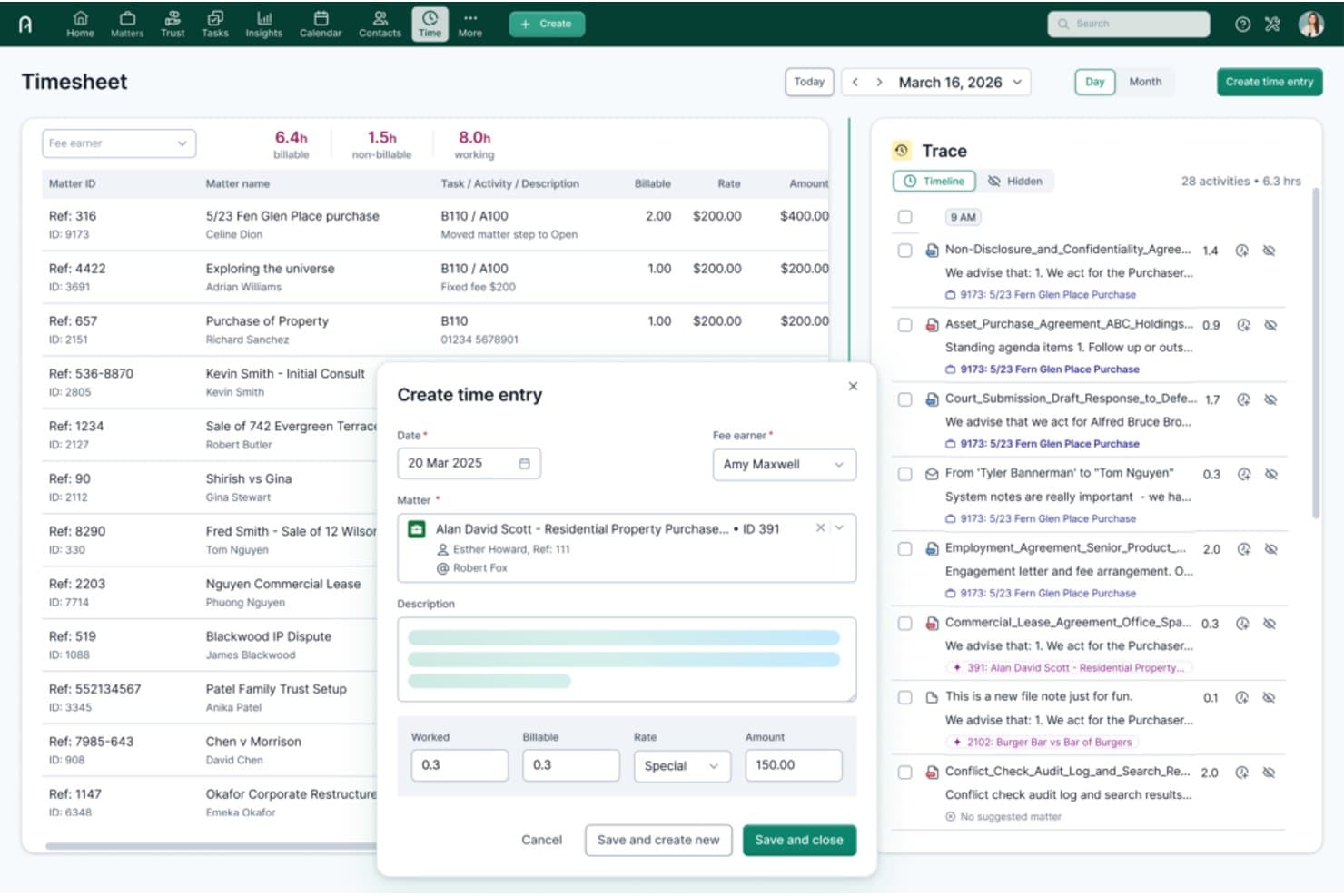
Actionstep offers a detailed timesheet and time entry interface with matter tracking, billable hours, and an AI-powered Trace activity timeline for small law firms. Actionstep is a cloud-based law firm management platform that combines matter management, legal accounting, document automation, client intake, and workflow automation in a single configurable system.
Who Is Actionstep Best For?
Actionstep is a strong fit for small to mid-sized law firms that need a highly configurable platform to match their specific practice workflows.
Why I Picked Actionstep
Actionstep earns its spot on my shortlist because its workflow automation goes deeper than most legal platforms I've used. I can build matter templates by practice area, each with its own automated task sequences, deadline triggers, and document generation steps. The Builder add-on extends this with document automation and dynamic logic tied directly to matter data. I've also used the Trace AI module to passively log billable time across Outlook and Word, removing manual time entry entirely.
Actionstep Key Features
- Full trust accounting: Track trust transactions and segregated client funds with compliance safeguards.
- Advanced document management: Store, version, and organize documents with templates and merge fields tied to matters.
- Client intake forms: Build customizable web-based intake forms to capture new matter data and trigger workflow steps.
- Comprehensive reporting: Generate detailed business, financial, and compliance reports from integrated matter and billing data.
Actionstep Integrations
Actionstep offers native integrations with Microsoft 365, Xero, QuickBooks Online, DocuSign, LawPay, and InfoTrack. An API is available for custom integrations.
Pros and Cons
Pros:
- Passive time capture across Outlook and Word
- Practice-specific templates available out of the box
- Highly configurable matter workflows by practice area
Cons:
- Pricing has increased sharply for solo practitioners
- Initial setup requires significant time investment
Learn more about Actionstep: Best for document and workflow automation
- Free demo available
- Pricing upon request
Visit WebsiteCustomer Rating:4.8/5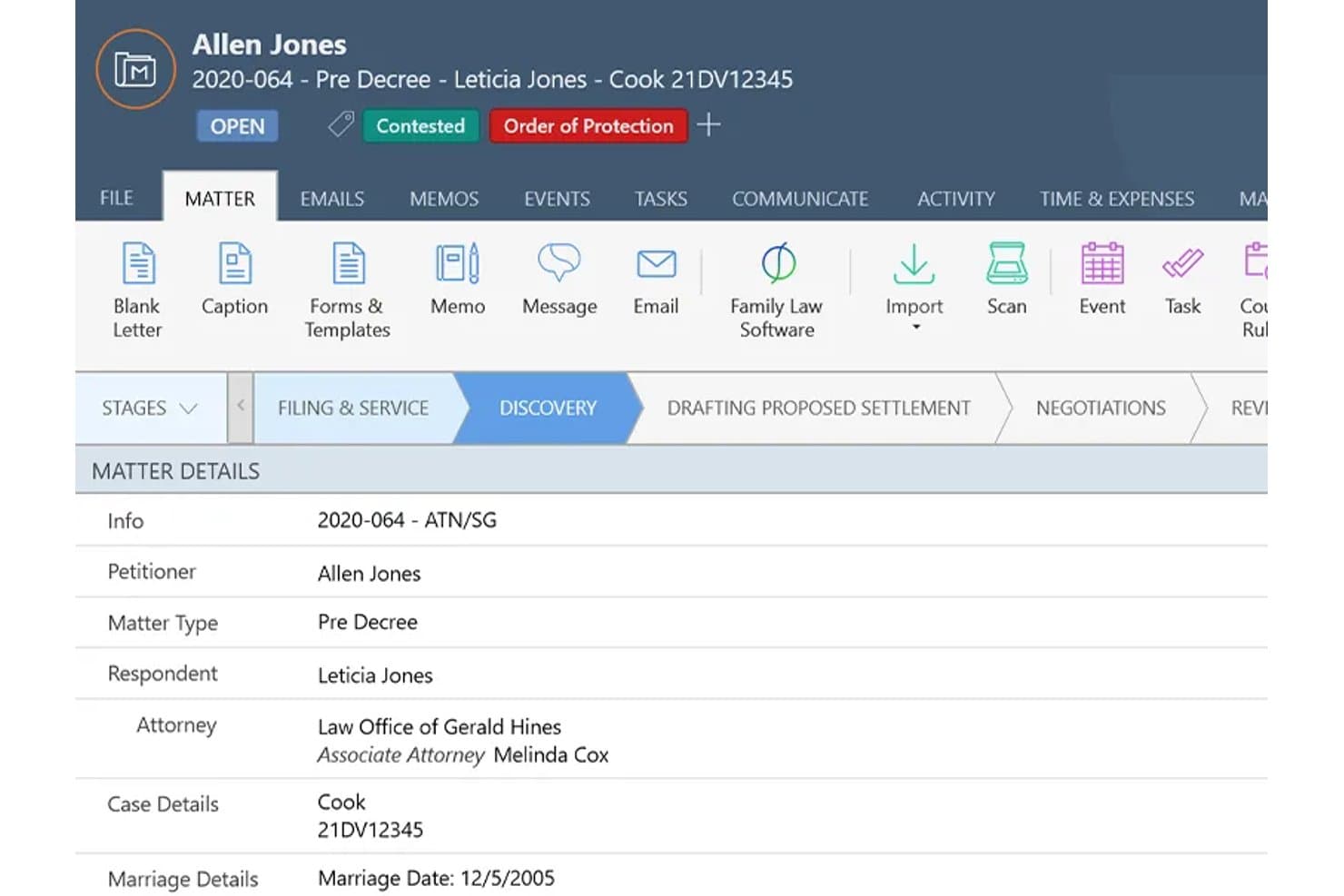
Smokeball offers a detailed matter management view with case stages, client details, attorney assignments, and quick-action toolbar for small law firms. Smokeball is a Windows-based legal practice management platform for small and solo firms that combines matter management, document automation, time tracking, trust accounting, and client intake in one system.
Who Is Smokeball Best For?
Smokeball is a good fit for small law firms with two to ten staff who work across defined practice areas like family law, real estate, or personal injury.
Why I Picked Smokeball
I picked Smokeball as one of the best because its document automation is genuinely unmatched at this firm size. With 20,000+ prebuilt legal forms across 250+ matter types, my team can generate court-ready documents by pulling matter data directly into templates, skipping manual drafting entirely. The AutoTime feature passively logs billable time in the background, so nothing slips through on busy filing days.
Smokeball Key Features
- Customizable matter templates: Create and use tailored templates for over 250 practice areas, helping you quickly set up new cases.
- Three-way trust reconciliation: Manage IOLTA accounts with built-in safeguards and compliance reporting directly from the platform.
- Client portal: Share documents, invoices, and status updates securely with clients using the encrypted web portal.
- Court rules calendaring integration: Sync jurisdiction-specific court deadlines into your calendar with LawToolBox integration.
Smokeball Integrations
Smokeball offers native integrations with Microsoft 365, LawToolBox, QuickBooks Online, InfoTrack, LawPay, and Xero. An API is available for custom integrations.
Pros and Cons
Pros:
- Matter-linked document search across all files
- Prebuilt forms auto-update when laws change
- Passive time capture via background AutoTime logging
Cons:
- Client portal navigation confuses some end clients
- Per-seat pricing becomes costly beyond solo use
Learn more about Smokeball: Best for all-in-one small firm management
- 7-day free trial
- From $49/user/month
Visit WebsiteCustomer Rating:4.7/5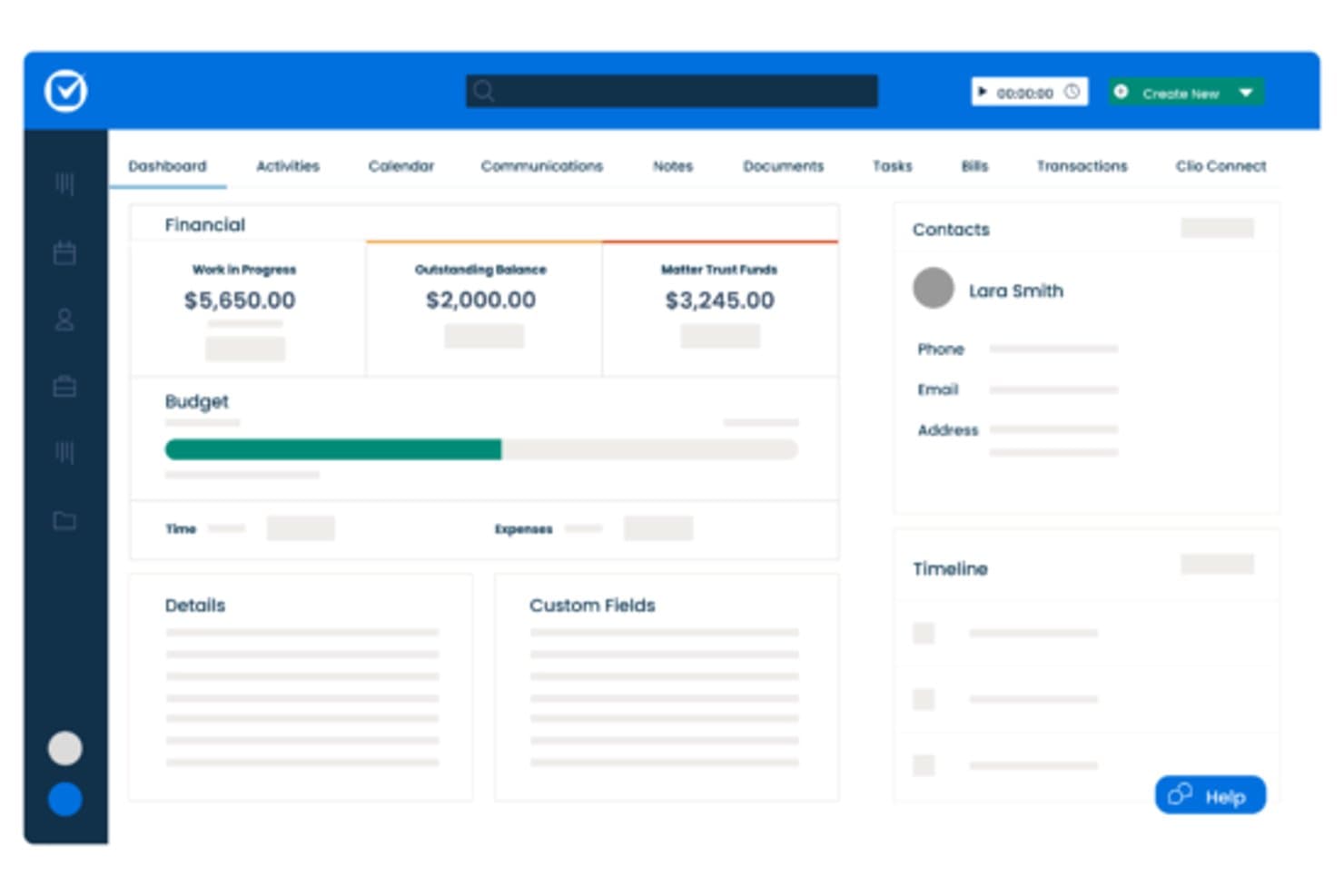
Clio Manage offers a matter dashboard displaying financial summaries, budget tracking, contacts, and custom fields for small firm case management. Clio Manage is a cloud-based legal practice management platform that combines matter management, time tracking, billing, trust accounting, document storage, legal calendaring, and client communication in a single system.
Who Is Clio Manage Best For?
Clio Manage is a strong fit for solo practitioners and small law firms that need to replace a patchwork of disconnected tools with one system.
Why I Picked Clio Manage
I've included Clio Manage in my top picks because it's one of the few platforms where trust accounting, court rules-based calendaring, and matter management genuinely share one roof. I use the court calendaring feature to automatically calculate deadline chains from a single trigger date, which small firms previously needed a separate docketing tool to handle. The built-in IOLTA trust ledger includes three-way reconciliation, so I'm not running a separate accounting system alongside case management.
Clio Manage Key Features
- Document automation: Generate pleadings and contracts using templates with merge fields tied to matter data.
- Integrated payment processing: Accept credit card, ACH, and eCheck payments directly through the system.
- Custom matter templates: Configure practice-specific templates and fields for different case types.
- Secure client portal: Share documents and messages with clients through an encrypted web and mobile portal.
Clio Manage Integrations
Clio Manage offers native integrations with QuickBooks Online, Xero, Microsoft 365, Google Workspace, Dropbox, NetDocuments, DocuSign, LawPay, Zoom, and Zapier. An API is also available for custom integrations.
Pros and Cons
Pros:
- Intake forms auto-populate new matter records
- Court rules-based deadline chains across jurisdictions
- Built-in three-way IOLTA trust reconciliation
Cons:
- Mobile app missing some desktop matter features
- Reporting dashboards have limited filter options
Learn more about Clio Manage: Best for client communication and case tracking
- 10-day free trial available
- From $50/user/month (billed annually)
Visit WebsiteCustomer Rating:4.6/5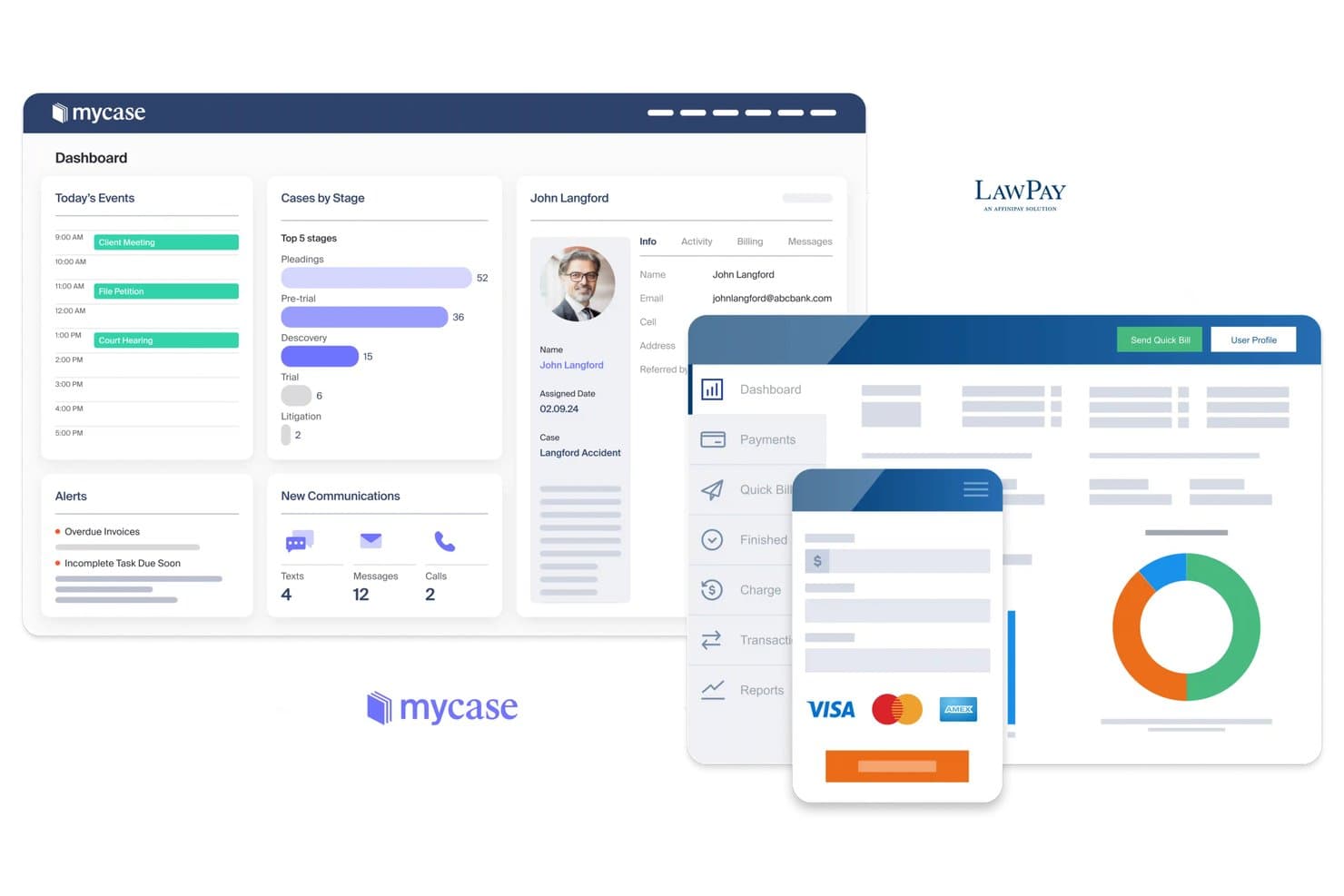
MyCase offers an integrated dashboard combining case management, client profiles, scheduling, and LawPay payment processing tailored for small law firms. MyCase is a legal case management platform for small firms that combines matter management, time tracking, invoicing, trust accounting, document generation, and client communication in a single system.
Who Is MyCase Best For?
Solo attorneys and small firm lawyers in practice areas like family law, personal injury, and criminal defense will find MyCase fits naturally into how they work.
Why I Picked MyCase
I've included MyCase in my top picks because of how it handles client communication alongside case tracking in one place. The secure client portal gives clients 24/7 access to their case documents and updates. Two-way texting with automated reminders keeps things moving without phone tag. The 8am IQ Case Assistant also lets you query your case data in plain language to surface facts and timelines fast.
MyCase Key Features
- Matter templates: Create and customize matter templates for different practice areas to streamline case setup.
- Three-way trust reconciliation: Ensure compliance with IOLTA requirements using built-in reconciliation and audit reports.
- Automated document generation: Merge client and case data into formatted legal documents using templates.
- Integrated calendar with court rules: Link events to deadlines and statutes using optional court rules integrations.
MyCase Integrations
MyCase offers native integrations with QuickBooks Online, LawPay, Google Calendar, Microsoft Outlook, NetDocuments, Dropbox, and LawToolBox. An API is available for custom integrations.
Pros and Cons
Pros:
- Built-in time tracking tied directly to matter records
- Client portal supports document sharing and e-signatures
- Billing visibility shows if clients reviewed invoices
Cons:
- Contingency fee workflows lack dedicated built-in functionality
- Document manipulation within the platform is cumbersome
 Best for built-in legal accounting
- 10-day free trial + free demo available
- From $49/user/month (billed annually)
Visit WebsiteCustomer Rating:4.3/5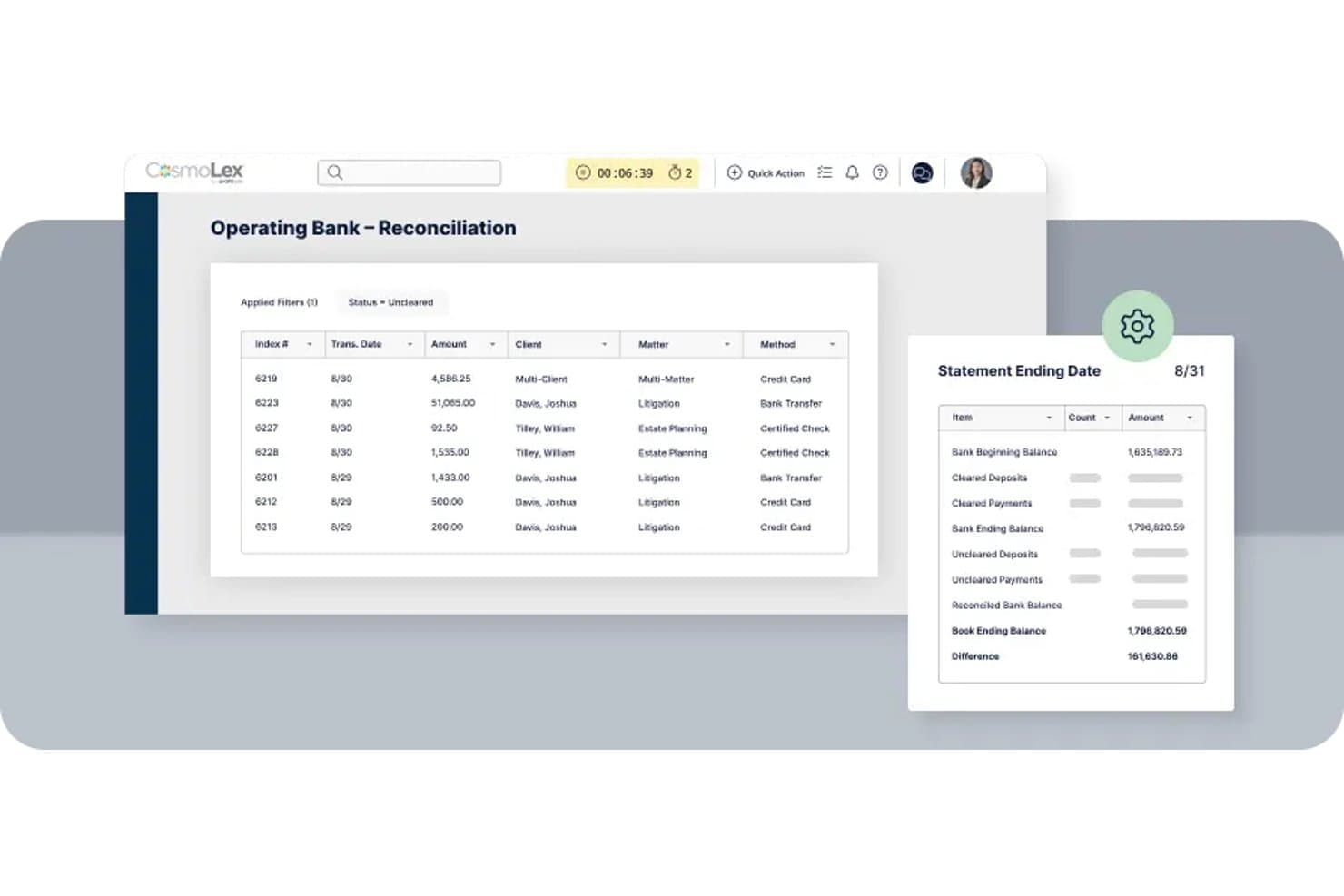
CosmoLex offers a bank reconciliation interface that displays transaction history alongside a statement summary panel with ending balances and differences. CosmoLex is a cloud-based legal practice management platform for small firms that combines matter management, time tracking, billing, document management, client intake, and fully native law firm accounting in a single system.
Who Is CosmoLex Best For?
Solo practitioners and small firm managing partners who want to consolidate practice management and accounting into one platform will find CosmoLex a natural fit.
Why I Picked CosmoLex
CosmoLex earns its spot on my shortlist because it's the only platform where trust accounting isn't an afterthought. The built-in three-way trust reconciliation runs natively alongside matter management, so I can pull a per-client trust ledger or generate bar compliance reports without leaving the platform. My firm doesn't need a separate QuickBooks subscription. CosmoLex handles both operating and trust accounts with full double-entry accounting built in.
CosmoLex Key Features
- Customizable matter templates: Set up matter types with fields and checklists tailored for your firm’s specific workflows.
- Document automation tools: Auto-generate pleadings, forms, and letters using merge fields from matter and contact data.
- Role-based access controls: Assign granular user permissions for viewing, editing, and managing sensitive firm or client information.
- Secure client portal: Share files, invoices, and updates securely with clients, supporting document exchange and electronic signatures.
CosmoLex Integrations
CosmoLex offers native integrations with NetDocuments, Office 365, Google Workspace, QuickBooks Online, LawPay, and Xero. An API is available for custom integrations.
Pros and Cons
Pros:
- Unlimited support included with every plan
- Eliminates the need for a separate QuickBooks subscription
- Native trust accounting with three-way reconciliation built in
Cons:
- Fewer integrations than most competing platforms
- Interface feels dated compared to competitors like Clio
Learn more about CosmoLex: Best for intuitive case and billing workflows
- 7-day free trial + free demo available
- From $59/user/month
Visit WebsiteCustomer Rating:4.3/5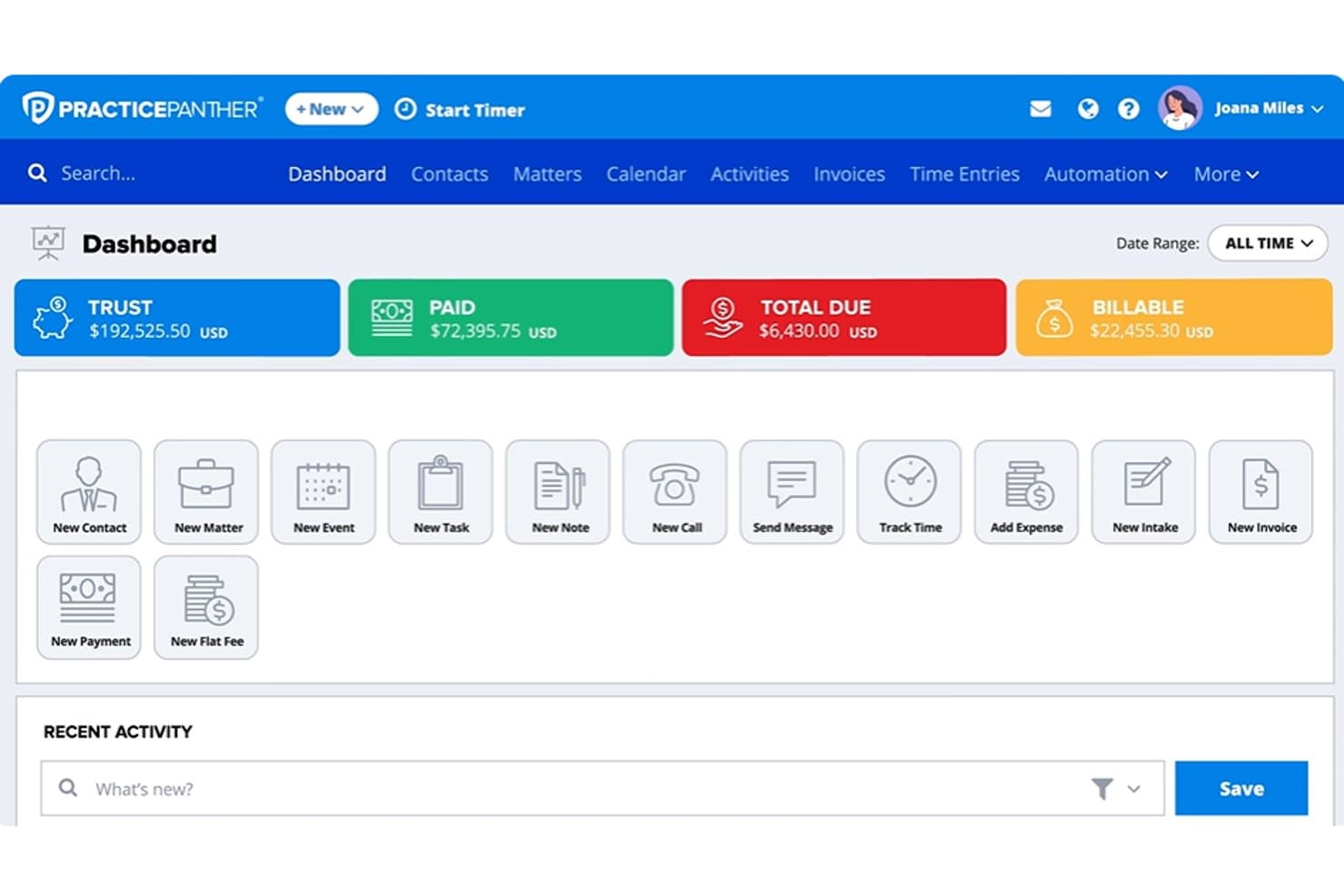
PracticePanther dashboard showing trust balances, payments, billable amounts, matters, and legal billing tools PracticePanther is a cloud-based legal practice management platform built for solo attorneys and small firms, combining matter management, time tracking, billing, trust accounting, client intake, and document management in one system.
Who Is PracticePanther Best For?
PracticePanther is a strong fit for solo attorneys and small law firms that need a single platform to handle cases, billing, and client communication without a steep learning curve.
Why I Picked PracticePanther
PracticePanther earns its spot on my shortlist because of how tightly the case and billing workflows connect. I particularly like the calendar-to-time-entry conversion, where a court appearance automatically becomes a billable time entry without any manual logging. Batch invoicing then lets me process multiple client bills at once rather than one at a time. Task and event workflows also trigger automatically when a matter status changes, keeping casework moving without manual nudges.
PracticePanther Key Features
- Custom matter fields: Add tailored data fields to matters for different practice areas or client needs.
- Three-way trust reconciliation: Complete trust accounting with compliance safeguards for bar association standards.
- Secure client portal: Share documents, updates, and messages with clients through an encrypted platform.
- Document assembly templates: Generate pleadings and letters using templates that auto-populate with matter data.
PracticePanther Integrations
PracticePanther offers native integrations with QuickBooks Online, Xero, Google Workspace, Microsoft 365, LawPay, Dropbox, OneDrive, Box, and specialty tools like LawToolBox and DocuSign. An API is available for custom integrations.
Pros and Cons
Pros:
- Client intake forms auto-populate matter records
- Trust accounting meets bar compliance standards
- Billing and time tracking are tightly integrated
Cons:
- Mobile app has limited functionality
- Reporting features lack depth for complex analysis
Learn more about PracticePanther:
Outro software de gestão de processos jurídicos para pequenos escritórios
Eis algumas opções adicionais de software de gestão de processos jurídicos para pequenos escritórios que não entraram na minha lista final, mas que vale a pena consultar:
- 11LEAPBest for legal documents and case management
- 12AbacusLawBest for established small law firms
- 13CasePeerBest for personal injury firms
- 14FilevineBest for customizable matter management
- 15SmartAdvocateBest for litigation case management
- 16CaseFoxBest for affordable legal billing
- 17LawcusBest for legal CRM and workflow automation
- 18NeosBest for cloud-based case management
- 19Bill4timeBest for legal time and expense tracking
- 20Amicus AttorneyBest for traditional law firm workflows
Related Reviews
How I Evaluate Legal Case Management Software For Small Firms
I split my evaluation into core requirements—matter management, trust accounting, and billing—and differentiators that tell you which tool actually fits a small firm.
Core Functionality (Table Stakes for This List)
When I'm selecting tools for my list, I rank each one on a scale from 0 (does not offer the functionality) to 5 (excels in this area) for each core functionality listed below. Then, I calculate the tool's total score into a percentage. Each tool needs to achieve a minimum total score of 65% to be considered for inclusion.
- Matter Management: I look for a centralized hub where you can tie contacts, notes, deadlines, and documents to each case—so nothing gets buried in email threads or shared drives.
- Time & Billing: Each tool should handle time tracking, expense capture, and invoicing with support for trust-compliant billing and formats like LEDES that larger clients often require.
- Legal Calendaring: I evaluate whether the calendar links to court rules and auto-calculates deadlines, like response windows after a motion is filed, rather than relying on manual date entry.
- Document Management: The tool should offer version control, templates, and merge fields that pull client or matter data directly into pleadings, engagement letters, or correspondence.
- Trust Accounting: I check for IOLTA-compliant ledgers, three-way reconciliation, and safeguards that help you stay on the right side of bar association audits without needing a separate accounting tool.
- Client Intake & Portal: A good intake workflow feeds form responses into new matter records automatically, and a secure portal lets clients upload documents, view invoices, and sign forms in one place.
Once I have a list of tools that meet the criteria, I consider what sets each platform apart.
Differentiating Factors (What Sets Vendors Apart)
Here's how I compare and contrast different vendors:
Standout Features
Court rules integration is a big differentiator. Some tools auto-calculate cascading deadlines when a triggering event shifts—like a trial date change rippling through discovery cutoffs—while others just offer a shared calendar. I also evaluate document automation depth: the best setups let you merge matter data into pleadings or engagement letters in a few clicks rather than manual copy-paste. Client intake automation matters too, especially for firms handling high-volume consultations where intake forms that auto-create matter records save hours each week.
Beyond Features
Pricing structure matters a lot for small firms. I check whether trust accounting and document storage are included in base plans or locked behind add-ons that inflate costs. Practice area fit is another factor—a family law firm needs different templates, intake fields, and workflows than a criminal defense practice, so I look at how configurable each tool is for mixed caseloads. I also evaluate ecosystem integrations, especially native connections to payment processors like LawPay, accounting tools like QuickBooks Online, and productivity suites like Microsoft 365.
Como escolher software de gestão de processos jurídicos para pequenos escritórios
É fácil ficar preso a longas listas de funcionalidades e estruturas de preços complexas. Para o ajudar a manter-se concentrado enquanto trabalha no seu processo único de seleção de software, apresentamos uma lista de verificação dos fatores a ter em conta:
| Fator | O que deve considerar |
| Escalabilidade | O software acomodará o crescimento se adicionar advogados ou expandir as áreas de prática? Verifique os limites de utilizadores, as alterações de preços e os caminhos para atualizar o plano. |
| Integrações | Considere quais as ferramentas (contabilidade, e-mail, assinatura eletrónica, processadores de pagamentos) que precisa de ligar e se as integrações são diretas ou exigem configuração adicional. |
| Personalização | Pode adaptar modelos, campos, fluxos de trabalho e automatizações às áreas de prática e aos processos reais do seu escritório, ou está limitado a uma solução igual para todos? |
| Facilidade de utilização | Os novos utilizadores conseguirão começar a trabalhar rapidamente? Procure uma navegação simples e fluxos de trabalho intuitivos para processos, faturação e documentos. |
| Implementação e integração inicial | Que apoio é disponibilizado para a migração de dados, configuração e formação? Pergunte se existe integração inicial orientada, tutoriais ou especialistas dedicados a pequenos escritórios. |
| Custo | Analise não só os custos mensais por utilizador, mas também se a faturação, a contabilidade fiduciária e o armazenamento estão incluídos ou exigem suplementos que aumentem as despesas. |
| Medidas de segurança | A plataforma utiliza encriptação, oferece permissões baseadas em funções e cumpre os requisitos legais de privacidade dos dados? Pergunte sobre registos de auditoria e certificações. |
| Requisitos de conformidade | O software consegue suportar a contabilidade IOLTA, regras específicas de cada jurisdição e outros fluxos de trabalho éticos ou impostos pela ordem dos advogados na sua região? |
O que é um software de gestão de processos jurídicos para pequenos escritórios?
O software de gestão de processos jurídicos para pequenos escritórios é uma plataforma especializada que ajuda a organizar processos, acompanhar prazos, gerir documentos e centralizar as comunicações com os clientes. Estas ferramentas foram concebidas para advogados em prática individual e pequenos escritórios de advocacia, disponibilizando funcionalidades essenciais como gestão de processos, faturação, calendários e contabilidade fiduciária — tudo adaptado a equipas mais pequenas e a recursos limitados.
Funcionalidades do software de gestão de processos jurídicos para pequenos escritórios
Ao selecionar um software de gestão de processos jurídicos para pequenos escritórios, esteja atento às seguintes funcionalidades essenciais:
- Gestão de processos: Organize todos os ficheiros dos processos, contactos, prazos e notas numa área centralizada para cada cliente ou processo, facilitando a localização rápida de informações importantes.
- Controlo de tempo e faturação: Registe as horas faturáveis e as despesas e gere faturas profissionais, suportando formatos de faturação jurídica e disponibilizando ferramentas para um registo rigoroso do tempo.
- Calendário jurídico: Automatize o cálculo dos prazos judiciais, defina lembretes para os prazos de prescrição e gira eventos específicos dos processos em calendários partilhados ou individuais.
- Gestão de documentos: Armazene, faça a gestão de versões e gere documentos jurídicos utilizando modelos e dados dos processos, mantendo os ficheiros seguros e facilmente acessíveis.
- Contabilidade fiduciária: Gira os fundos fiduciários dos clientes com livros-razão em conformidade com a IOLTA, reconciliação a três níveis e medidas de auditoria que garantam a conformidade ética e regulamentar.
- Admissão de clientes e portal: Permita que os clientes preencham formulários de admissão online que alimentem diretamente os registos de novos processos e disponibilize um portal seguro para atualizações, assinatura eletrónica e partilha de documentos.
- Automatização de tarefas e fluxos de trabalho: Atribua, acompanhe e automatize tarefas em vários processos, gira os marcos dos processos e simplifique os processos jurídicos comuns para reduzir a carga administrativa.
- Integração de assinatura eletrónica: Permita que clientes e advogados assinem documentos eletronicamente, acelerando acordos, processos judiciais ou cartas de contratação sem recurso a documentação impressa.
- Relatórios e análise de dados: Gere relatórios sobre horas faturáveis, cobranças, volume de processos ou saldos fiduciários, ajudando o seu escritório a identificar tendências e a apoiar decisões baseadas em dados.
- Gestão da conformidade: Mantenha registos de auditoria, aplique a privacidade dos dados e garanta que os seus fluxos de trabalho cumprem os requisitos dos tribunais, das jurisdições locais e das ordens dos advogados.
Benefícios do software de gestão de processos jurídicos para pequenos escritórios
A implementação de um software de gestão de processos jurídicos para pequenos escritórios proporciona vários benefícios à sua equipa e à sua empresa. Eis alguns dos benefícios que pode esperar:
- Informação centralizada: Mantenha todos os processos, documentos e contactos organizados num único local, reduzindo a perda de informação e o tempo despendido na pesquisa de dados.
- Maior confiança no cumprimento das normas: A contabilidade fiduciária integrada, os registos de auditoria e o acompanhamento de prazos ajudam o seu escritório a cumprir os requisitos das ordens profissionais e das jurisdições.
- Redução da carga administrativa: A automatização da recolha inicial de dados, a gestão de tarefas e as ferramentas de faturação minimizam a introdução repetitiva de dados e os processos manuais.
- Melhor colaboração: Os calendários partilhados, a atribuição de tarefas e o controlo de versões dos documentos facilitam a coordenação das pequenas equipas em todos os processos.
- Atendimento mais rápido aos clientes: Os portais seguros para clientes e as atualizações automatizadas permitem aos clientes consultar o estado do processo, partilhar ficheiros e comunicar sem intermináveis trocas de mensagens de e-mail.
- Faturação mais precisa: Os cronómetros integrados e o registo de despesas garantem que todos os minutos faturáveis e todas as despesas são registados, resultando numa maior concretização de honorários e em menos disputas de faturação.
- Integração e transições mais fáceis: A migração guiada de dados e os modelos integrados simplificam a mudança de ficheiros em papel ou de sistemas antigos, com menos interrupções.
Custos e preços do software de gestão de processos jurídicos para pequenos escritórios
Ao selecionar software de gestão de processos jurídicos para pequenos escritórios, é necessário compreender os vários modelos de preços e planos disponíveis. Os custos variam consoante as funcionalidades, a dimensão da equipa, os complementos e outros fatores. A tabela abaixo resume os planos comuns, os seus preços médios e as funcionalidades normalmente incluídas nas soluções de software de gestão de processos jurídicos para pequenos escritórios:
Tabela de comparação de planos de software de gestão de processos jurídicos para pequenos escritórios
| Tipo de plano | Preço médio | Funcionalidades comuns |
| Plano gratuito | $0 | Acompanhamento básico de processos, gestão de contactos, armazenamento limitado de documentos e apoio por e-mail. |
| Plano pessoal | $20-$40/utilizador/mês | Gestão de processos, controlo do tempo, faturação, modelos de documentos e formulários limitados de recolha de dados dos clientes. |
| Plano empresarial | $50-$70/utilizador/mês | Gestão avançada de calendários, contabilidade fiduciária, portal seguro para clientes, automatização de documentos e personalizações por área de prática. |
| Plano corporativo | $80-$120/utilizador/mês | Fluxos de trabalho personalizados, relatórios completos, integrações avançadas, apoio prioritário e controlos de segurança reforçados. |
Perguntas frequentes sobre software de gestão de processos jurídicos para pequenas sociedades
Eis algumas respostas a perguntas frequentes sobre software de gestão de processos jurídicos para pequenas sociedades:
Que benefícios obtêm as pequenas sociedades com software dedicado de gestão de processos jurídicos?
As pequenas sociedades conseguem uma melhor organização, uma gestão mais eficaz dos prazos e maior facilidade no cumprimento dos regulamentos relativos à contabilidade de fundos fiduciários e à faturação. Estas ferramentas também poupam tempo administrativo ao automatizarem a receção de clientes, a gestão de calendários e os fluxos de trabalho de documentos concebidos para equipas pequenas.
O software de gestão de processos jurídicos pode integrar-se com plataformas de contabilidade ou de correio eletrónico?
Sim, a maioria das soluções disponibiliza integrações com ferramentas de contabilidade, como o QuickBooks Online, e suites de produtividade, como o Microsoft 365 ou o Google Workspace. Isto permite à sua sociedade sincronizar contactos, automatizar lançamentos de faturação e simplificar a partilha de documentos entre plataformas.
O que devo procurar na implementação e no apoio?
Procure migração de dados orientada, formação ao vivo ou a pedido e um apoio ágil que se adapte ao horário da sua empresa. O apoio durante a implementação é especialmente importante para sociedades que estejam a transitar de folhas de cálculo ou de software antigo.
O software de gestão de processos jurídicos é suficientemente seguro para os dados dos clientes?
Sim, as plataformas conceituadas utilizam encriptação, permissões baseadas em funções e auditorias regulares para proteger dados sensíveis. Confirme sempre se o software cumpre os requisitos de privacidade e segurança da sua jurisdição.
Até que ponto estas soluções são personalizáveis para diferentes áreas de prática?
A maioria dos softwares permite adaptar os tipos de processos, os fluxos de trabalho e os modelos à sua área de prática — quer se concentre em direito da família, planeamento sucessório ou carteiras de processos diversificadas. A personalização é essencial para alinhar o software com as rotinas diárias da sua sociedade.