

Client intake and CRM software for large law firms brings together advanced lead capture, compliance, and client management in platforms built to support complex, high-volume legal practices. If you’re evaluating these tools, you’re likely managing data across multiple offices, tracking intricate relationships in Am Law markets, or needing deep conflict checks tied to every intake.
The stakes are high—your success depends on integrating business development, risk controls, and reporting across the entire client lifecycle.
Below, I’ll break down the best platforms that deliver intake-to-matter data flow, enterprise-grade conflict checking, and marketing ROI tracking, so you can choose a solution that fits your firm’s serious needs.
Why Trust Our Software Recommendations
6,700+
Reviews
20
Industry experts
16+
Evaluation factors
14
Years
Our team has been testing and reviewing software since 2012. As legal practice leaders ourselves, we know how difficult—and important—it is to choose the right software.
For this guide, we evaluated tools using hands-on testing and independent research, scoring tools using our selection criteria.
Our reviews reflect our human editorial judgment, not a sales pitch.
Compare the Best Client Intake and CRM Software for Large Law Firms
Compare pricing and specs, side by side, for the client intake and CRM software for large law firms that made it onto my shortlist.
| Tool | Best For | Trial Info | Price | ||
|---|---|---|---|---|---|
| 1 | Best for intake-to-matter data continuity | Free demo available | Pricing upon request | Website | |
| 2 | Best for native intake-to-matter continuity in PI firms | Free demo available | Pricing upon request | Website | |
| 3 | Best for AI-scored lead routing by practice area | Free demo available | Pricing upon request | Website | |
| 4 | Best for closed-loop marketing ROI to settled matter | Free trial + free demo available | Pricing upon request | Website | |
| 5 | Best for conflict checks tied to the intake pipeline | Free demo available | Pricing upon request | Website | |
| 6 | Best for unified intake-to-matter in one platform | 7-day free trial | From $49/user/month (billed annually) | Website | |
| 7 | Best for marketing ROI tied to matter outcomes | Free demo available | Pricing upon request | Website | |
| 8 | Best for intake-to-matter tracking on Salesforce | Free demo available | Pricing upon request | Website | |
| 9 | Best for AI-driven conflict checks at Am Law firms | Free demo available | Pricing upon request | Website | |
| 10 | Best for intake-to-matter conflict checks in one system | Free demo available | Pricing upon request | Website |


Client Intake and CRM Software for Large Law Firms Reviews
Below are my detailed summaries of the best client intake and CRM software for large law firms that made it onto my shortlist. My reviews offer a detailed look at the features, best use cases, and integrations of each platform to help you find the best one for you
 Best for intake-to-matter data continuity
- Free demo available
- Pricing upon request
Visit WebsiteCustomer Rating:4.8/5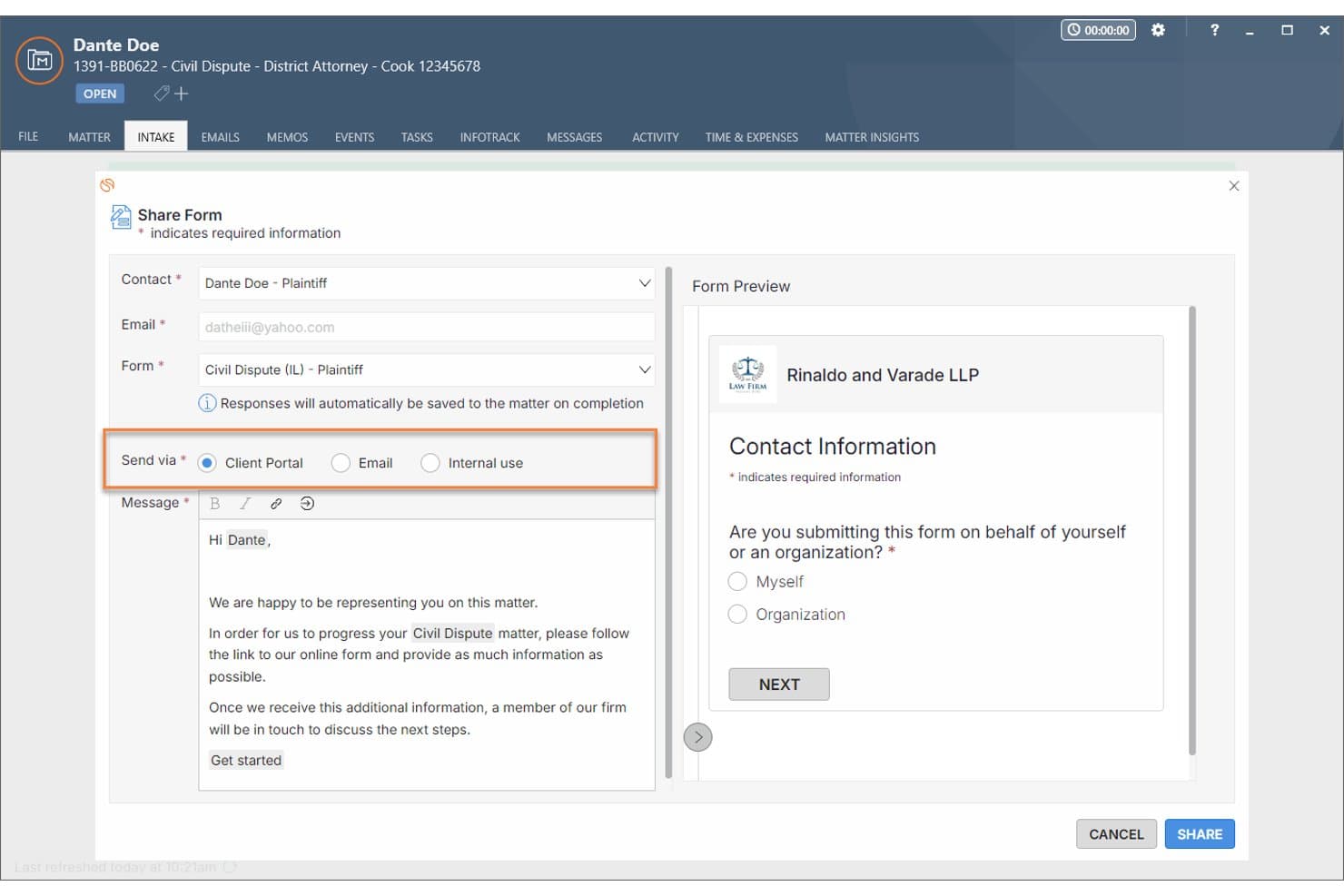
Smokeball lets users send intake forms via Client Portal, Email, or internally. Smokeball is a legal practice management platform with built-in lead pipeline management, customizable intake forms, conflict checking, and native matter management tools.
Who Is Smokeball Best For?
Smokeball is a strong fit for small to mid-sized law firms that want intake forms, conflict checking, and matter management in a single native workflow.
Why I Picked Smokeball
I picked Smokeball as one of the best because of how tightly it connects the intake process to matter opening. When a client submits a web intake form, that data flows directly into the contact card and matter record without any re-keying. I also like the AI-assisted form builder, which generates practice-area-specific intake forms from a selected state and matter type or converts a legacy paper form into a digital one. The conflict check saves as a timestamped PDF report attached directly to the lead or matter, giving you a documented audit trail from day one.
Smokeball Key Features
- Lead-to-matter conversion: Convert a lead record into an open matter in one click, carrying all intake data into the contact card and matter fields without re-entry.
- Referral source tracking: Log referral type and referrer on each lead or matter, then view referral performance and associated billing amounts in the Lead Insights dashboard.
- TemplateLab document autofill: Pull intake and matter data into 20,000+ jurisdiction-specific forms and templates to generate engagement letters and retainers directly from the matter record.
- Zapier integration: Connect Smokeball to external apps via its native Zapier integration, using matter, task, and memo triggers to extend intake and lead workflows beyond the platform.
Smokeball Integrations
Smokeball offers native integrations across Microsoft 365, QuickBooks Online, Xero, Lawmatics, and InfoTrack, plus LawPay and Smokeball Payments. It also supports marketplace integrations, Zapier, and an API/developer program for custom connections.
Pros and Cons
Pros:
- AI-assisted intake forms for fast onboarding
- Intake data flows directly into matters
- Conflict checks saved as timestamped PDF reports
Cons:
- Full functionality relies on Windows desktop app
- No automated practice-group lead routing
Learn more about Smokeball: Best for native intake-to-matter continuity in PI firms
- Free demo available
- Pricing upon request
Visit WebsiteCustomer Rating:4.7/5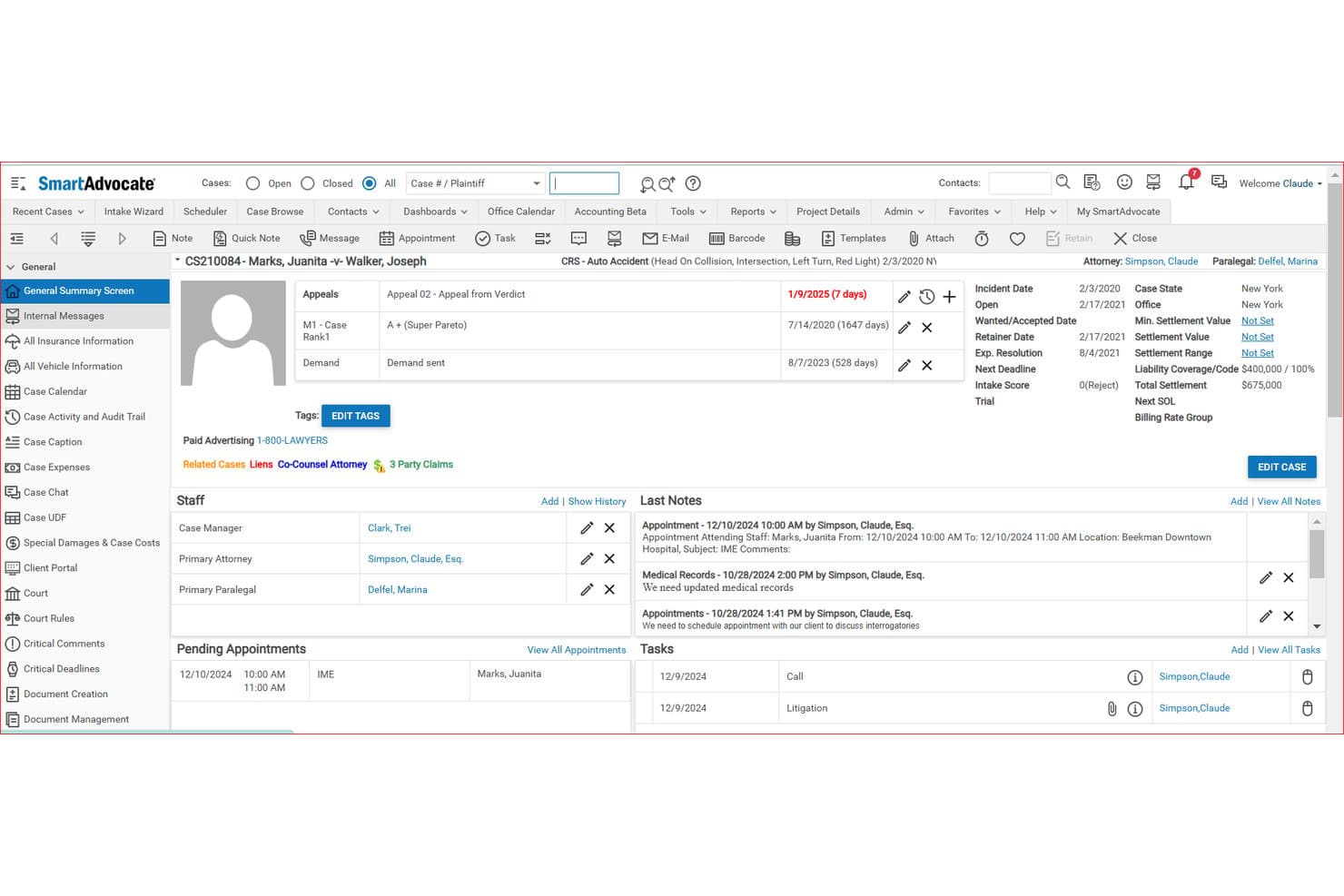
SmartAdvocate centralizes case details, staff, notes, and tasks in one view. SmartAdvocate is a legal case management and CRM platform built for plaintiff law firms, combining intake pipeline management, conflict alerting, referral tracking, workflow automation, and native matter management in a single system.
Who Is SmartAdvocate Best For?
SmartAdvocate is a strong fit for plaintiff law firms—particularly personal injury and mass tort practices—that want intake, conflict alerting, and matter management in one native system.
Why I Picked SmartAdvocate
I picked SmartAdvocate as one of the best because intake data flows directly into the same system running the full matter lifecycle, with no duplicate entry or third-party handoff. I especially like the Intake Wizard's built-in conflict alerting and intake scoring, which qualify leads against custom thresholds before a matter ever opens. That native continuity from first contact through billing is what sets SmartAdvocate apart in PI and mass tort practices.
SmartAdvocate Key Features
- Multi-channel intake capture: Log leads from phone, email, web forms, and in-person visits into a single centralized record.
- Automated Procedures: Trigger task assignments, emails, texts, and document generation automatically based on case status changes.
- Marketing ROI tracking: Track referral sources and marketing campaign performance with built-in analytics and custom dashboard reporting.
- SmartIntelligence™ AI summarization: Generate AI-driven summaries of case files, medical records, and depositions directly within the platform.
SmartAdvocate Integrations
SmartAdvocate offers 175+ integrations across 20+ categories, including Lawmatics, Keap, Captorra, CallRail, DocuSign, Microsoft Outlook, Docubee, Case Status, Attorney Share, and Lexitas. A public API supports custom integrations.
Pros and Cons
Pros:
- Strong analytics and reporting for intake and ROI
- Highly configurable intake scoring and automation
- Intake data flows seamlessly into matter management
Cons:
- Mobile access features receive frequent criticism
- Conflict checks lack related-party audit trail
Learn more about SmartAdvocate: Best for AI-scored lead routing by practice area
- Free demo available
- Pricing upon request
Visit WebsiteCustomer Rating:4.6/5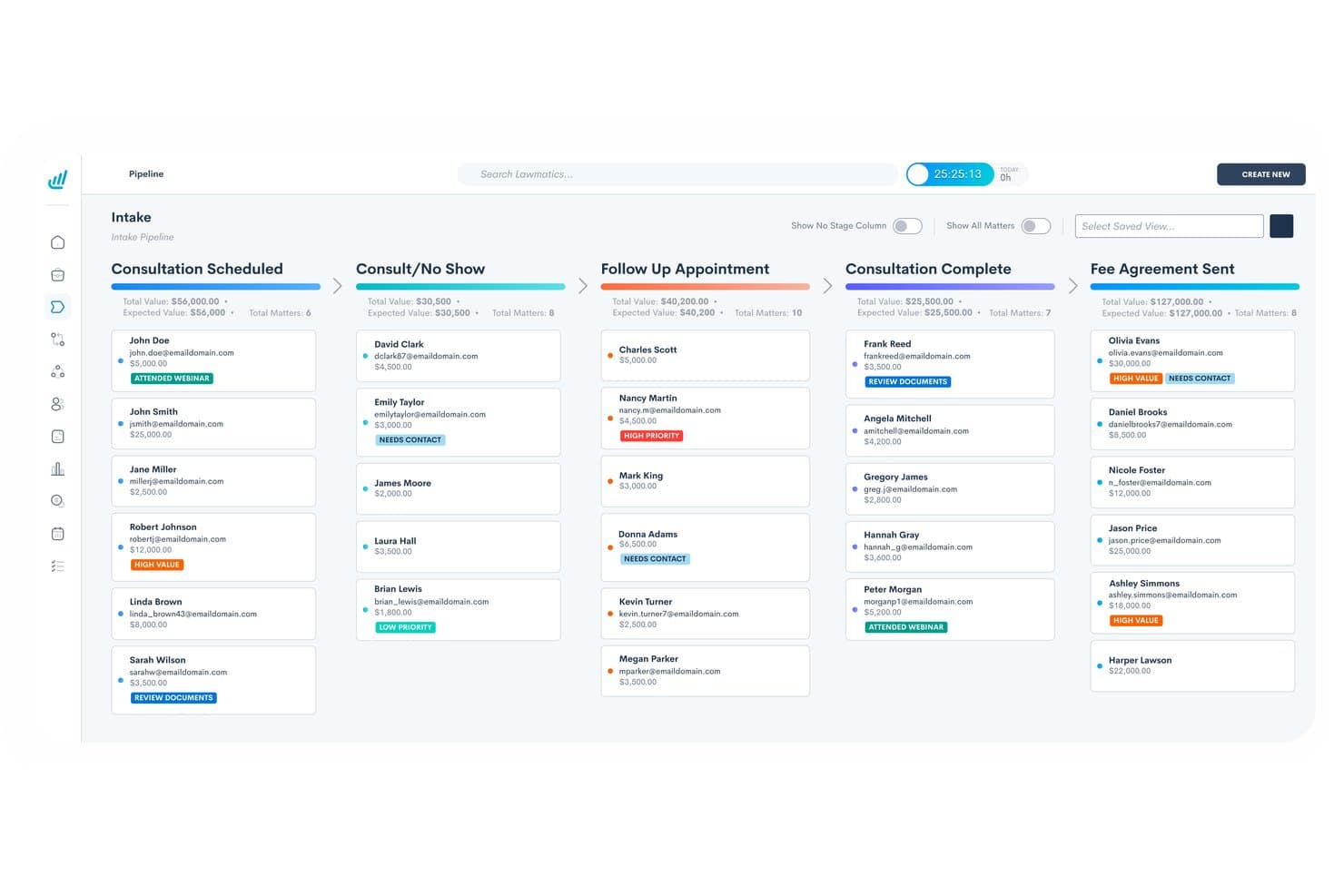
Lawmatics organizes client intake leads across pipeline stages visually. Lawmatics is a legal CRM and client intake platform that combines Kanban-style lead pipelines, AI-scored lead routing, automated conflict checking, customizable intake forms, and marketing ROI reporting across practice areas and offices.
Who Is Lawmatics Best For?
Lawmatics is a strong fit for multi-practice law firms where intake managers and marketing directors need to route, score, and track leads across practice groups from a single platform.
Why I Picked Lawmatics
I picked Lawmatics as one of the best because its QualifyAI add-on automatically scores incoming leads and routes them to the right practice group without manual triage. I love that practice areas are a first-class configuration object, so a personal injury intake pipeline runs entirely separately from an estate planning one, each with its own conditional-logic forms and automation sequences. The native conflict-check module ties directly into those automations, triggering a multi-field database search and logging every result to the matter timeline.
Lawmatics Key Features
- Role-based permissions: Restrict matter visibility by owner, assigned staff, or lead attorney, with feature-level toggles across ~50 areas including analytics, exports, and firm financials.
- Client portal: Give clients a secure space to share documents, exchange messages, sign engagement letters, and view calendar events.
- Marketing ROI dashboard: Track lead sources, UTM parameters, conversion rates, and goal progress across practice groups in real-time custom dashboards.
- E-signature automation: Generate engagement letters from document templates and route them for signature automatically, with deadline expiration controls.
Lawmatics Integrations
Lawmatics offers documented native integrations with Clio, Filevine, LEAP, Smokeball, PracticePanther, SmartAdvocate, MyCase, CARET Legal, Rocket Matter, and SurePoint Pro. It also provides a public REST API for custom integrations.
Pros and Cons
Pros:
- Granular role-based matter visibility controls
- Native, automatable multi-field conflict checking
- AI lead scoring and routing by practice area
Cons:
- No sandbox or test environment for configuration
- Requires manual workaround to track conflict-rejected leads
Learn more about Lawmatics: Best for closed-loop marketing ROI to settled matter
- Free trial + free demo available
- Pricing upon request
Visit WebsiteCustomer Rating:4.5/5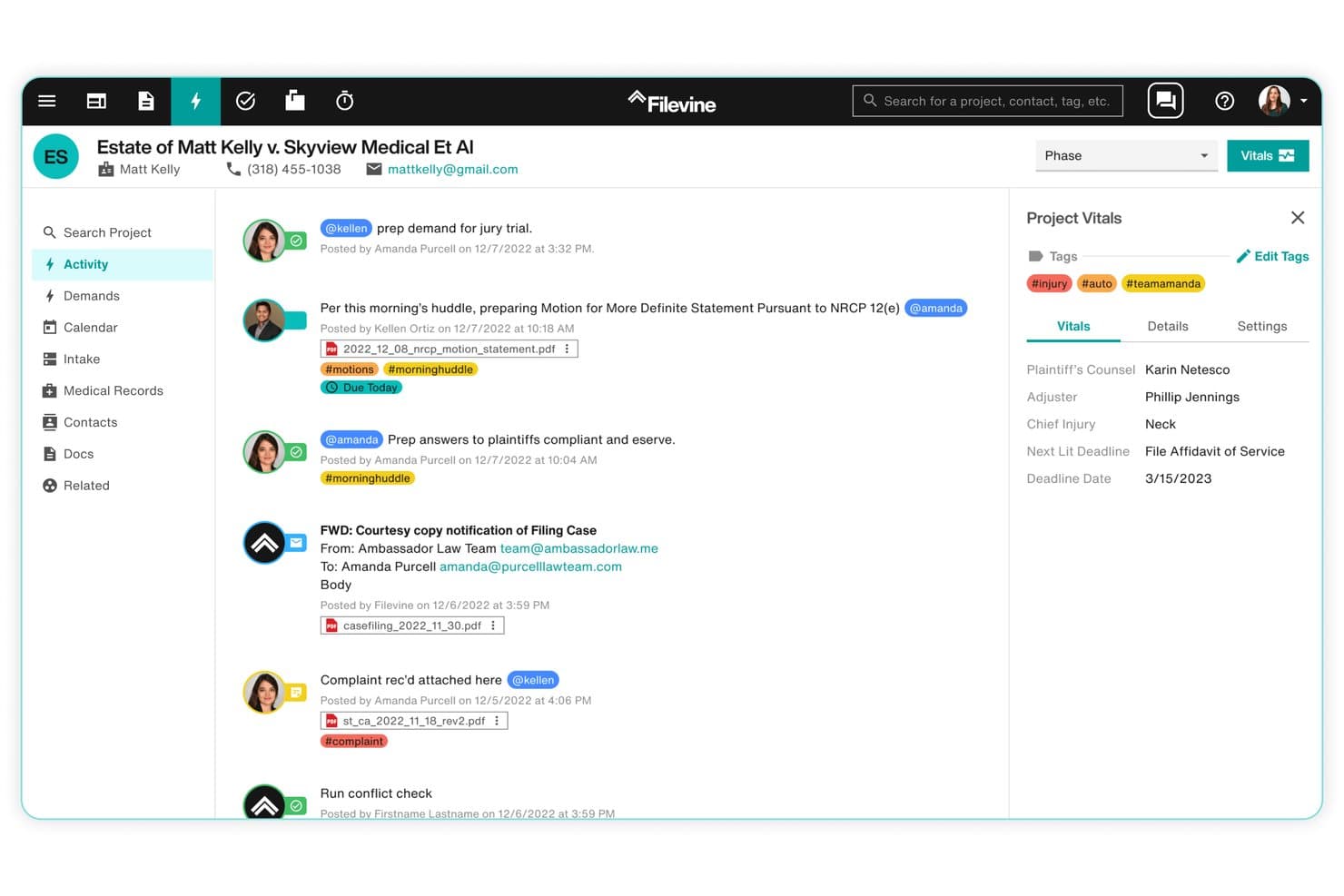
Filevine centralizes case activity, deadlines, client details, documents, communications, and key matter updates. Filevine is a legal intake CRM built around its Lead Docket module, combining lead capture, custom intake pipeline management, referral tracking, marketing attribution, and native lead-to-matter conversion within a single platform.
Who Is Filevine Best For?
Filevine is a strong fit for high-volume plaintiff-side firms—especially personal injury and mass tort practices—where marketing directors and intake managers need to track every lead from first contact through settled matter.
Why I Picked Filevine
Filevine earns its spot on my shortlist because of how tightly it closes the loop between marketing spend and settled matter revenue. I love that Lead Docket lets you enter campaign budgets directly, then tracks each lead from source through signed retainer and final settlement value, so your marketing director can run a true ROI report by channel. Pair that with referral dashboards and CallRail attribution, and you've got a real picture of which spend actually converts.
Filevine Key Features
- LeadsAI lead scoring: Automatically ranks incoming leads by case type, potential value, and conversion likelihood using predictive analysis.
- Custom status workflows: Define per-case-type intake stages with required-field gating that blocks progression until specified data is captured.
- Client portal with intake forms: Clients submit documents and complete forms directly in-portal, with responses flowing into Filevine fields automatically.
- Periscope BI dashboards: Access templated data sets covering case intake, settlements, cycle times, and user actions with unlimited dashboard visualizations.
Filevine Integrations
Filevine offers integrations with CallRail, CallTrackingMetrics, Lawmatics, Intaker, InfoTrack, and Foundation AI, plus referral and records-retrieval partners. It also provides a public API, DataBridge for secure data access, and Filevine Automation through Workato.
Pros and Cons
Pros:
- Highly customizable intake stages and gating
- Marketing attribution reporting through settlement value
- Lead-to-matter workflow without manual handoff
Cons:
- Expensive for low-volume or multi-practice firms
- No automated firm-wide conflict checking
Learn more about Filevine: Best for conflict checks tied to the intake pipeline
- Free demo available
- Pricing upon request
Visit WebsiteCustomer Rating:4.4/5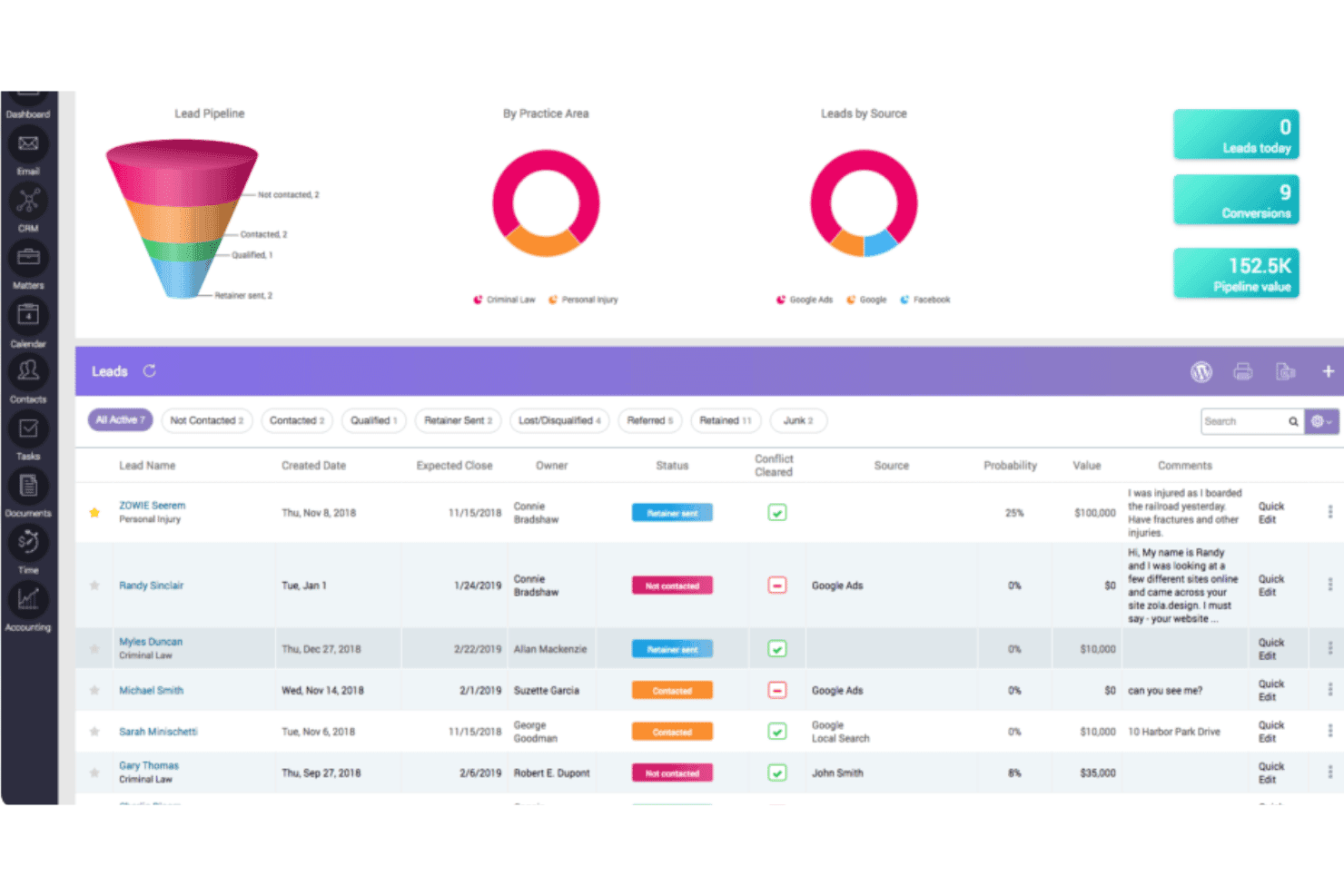
CARET Legal combines CRM, client intake, conflict checking, matter management, billing, and document management. CARET Legal is a cloud-based legal practice management platform that bundles CRM, client intake, conflict checking, matter management, billing, and document management in a single system.
Who Is CARET Legal Best For?
CARET Legal is a strong fit for firms where intake staff and attorneys need conflict checks and lead conversion handled inside a single system, without toggling between separate tools.
Why I Picked CARET Legal
I picked CARET Legal as one of the best because its conflict checking runs directly inside the intake pipeline, not as a separate step you bolt on later. Before converting a lead to a matter, I can run a boolean search with AND/OR/NOT operators across active matters, archived cases, contacts, communication logs, and leads, then export a defensible PDF audit report. That same lead record also tracks estimated value, practice area, and source, so I'm not losing BD context when the intake clears and the matter opens.
CARET Legal Key Features
- Lead pipeline dashboard: View a live funnel with conversion rates, leads by source, leads by practice area, and projected pipeline value across your firm.
- One-click matter conversion: Convert a lead to a matter while carrying contacts, documents, communications, and custom fields into the new record automatically.
- Role-based permissions: Configure access at the user, group, or matter level so attorneys, paralegals, and intake staff each see only what's relevant to their role.
- Business card scanner: Capture contact details on mobile using the native iOS and Android app's built-in scanner, which transcribes cards directly into your address book.
CARET Legal Integrations
CARET Legal offers integrations with Lawmatics, Microsoft 365, Google Workspace, NetDocuments, OneDrive, HotDocs, LawToolBox, QuickBooks Online, RMail, and WordPress. Its public API supports custom integrations for matters, contacts, custom fields, notes, and files.
Pros and Cons
Pros:
- Automatic lead source and pipeline reporting
- Native lead-to-matter conversion keeps data linked
- Conflict checks run directly in intake pipeline
Cons:
- No rules engine for auto-routing leads
- No native e-signature for intake documents
Learn more about CARET Legal: Best for unified intake-to-matter in one platform
- 7-day free trial
- From $49/user/month (billed annually)
Visit WebsiteCustomer Rating:4.3/5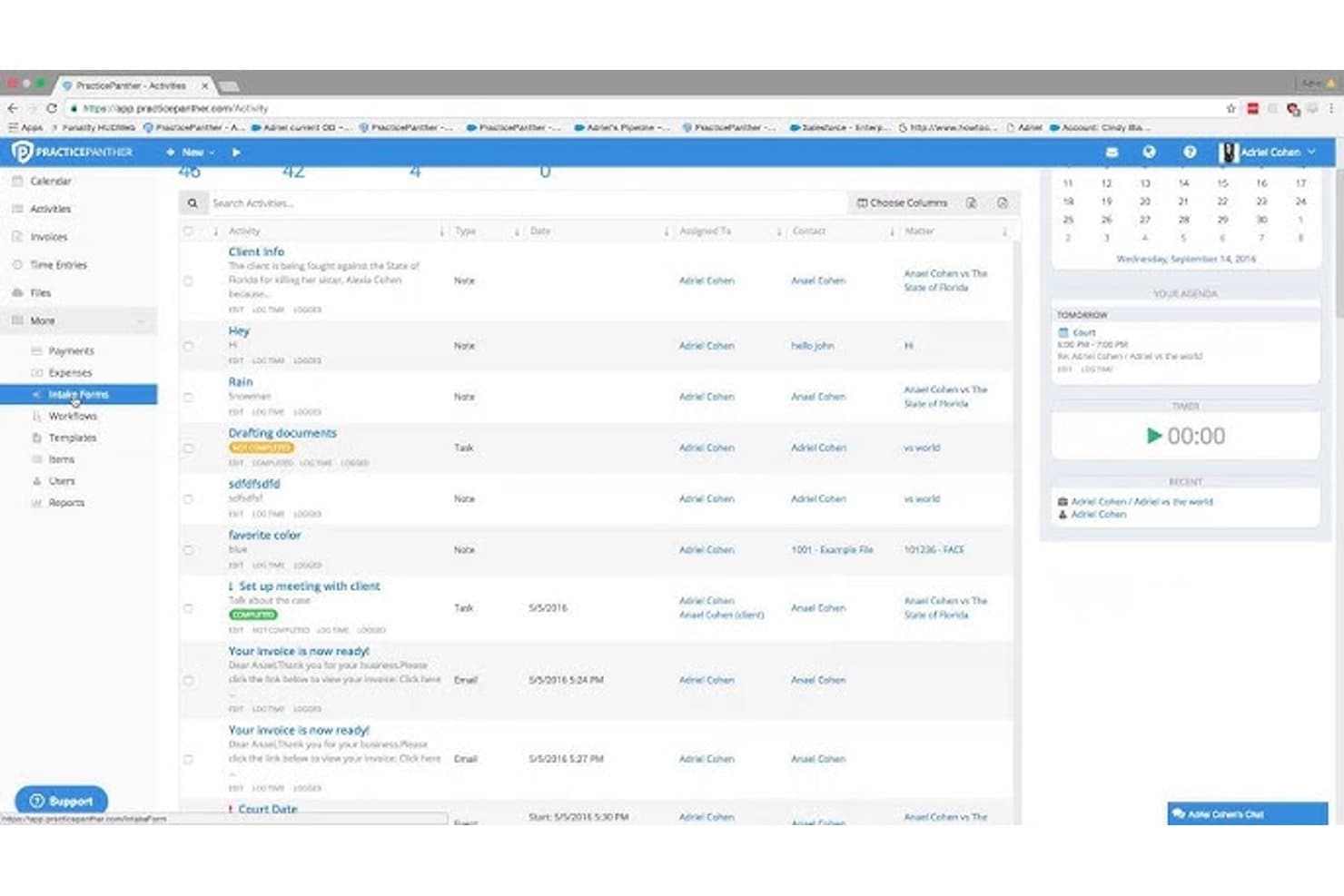
PracticePanther unifies legal intake, matters, billing, and accounting. PracticePanther is a cloud-based legal practice management platform that combines client intake forms, CRM, conflict checking, matter management, document tools, billing, and trust accounting in a single system.
Who Is PracticePanther Best For?
PracticePanther suits mid-sized firms that want intake forms, conflict search, matter management, and billing in one place without stitching together separate tools.
Why I Picked PracticePanther
I've included PracticePanther in my top picks because it's one of the few platforms where an intake form submission flows directly into a contact record and then into a matter, all inside the same database. I particularly like the Workflow Status feature, which tracks where each prospect sits in the intake pipeline with automatic staff notifications on submission. The full-database conflict search, available on every plan, sweeps across notes, emails, tasks, and custom fields, not just contact names.
PracticePanther Key Features
- Custom security roles: Configure role-based permissions by feature and action—create, view, edit, or delete—so each staff member accesses only what they need.
- Native eSignature: Send unlimited engagement letters and retainer agreements for signature directly inside the platform on Business plans and above.
- Two-way client portal: Clients send messages, share documents, view invoices, and make payments through a secure portal included on every plan.
- Two-way business texting: Send and receive SMS messages with clients natively on Business plans, with conversations logged against the relevant contact or matter.
PracticePanther Integrations
PracticePanther integrates with Lawmatics, Microsoft Exchange, Google Calendar, Box, OneDrive, Google Drive, Dropbox, QuickBooks Online, and Smith.ai. It offers API access for custom integrations and supports Zapier.
Pros and Cons
Pros:
- Unlimited, customizable intake forms for departments
- Full-database conflict check on all plans
- Intake-to-matter process in one system
Cons:
- Lacks campaign attribution and ROI dashboards
- No automated lead-routing by practice group
Learn more about PracticePanther: Best for marketing ROI tied to matter outcomes
- Free demo available
- Pricing upon request
Visit WebsiteCustomer Rating:4.2/5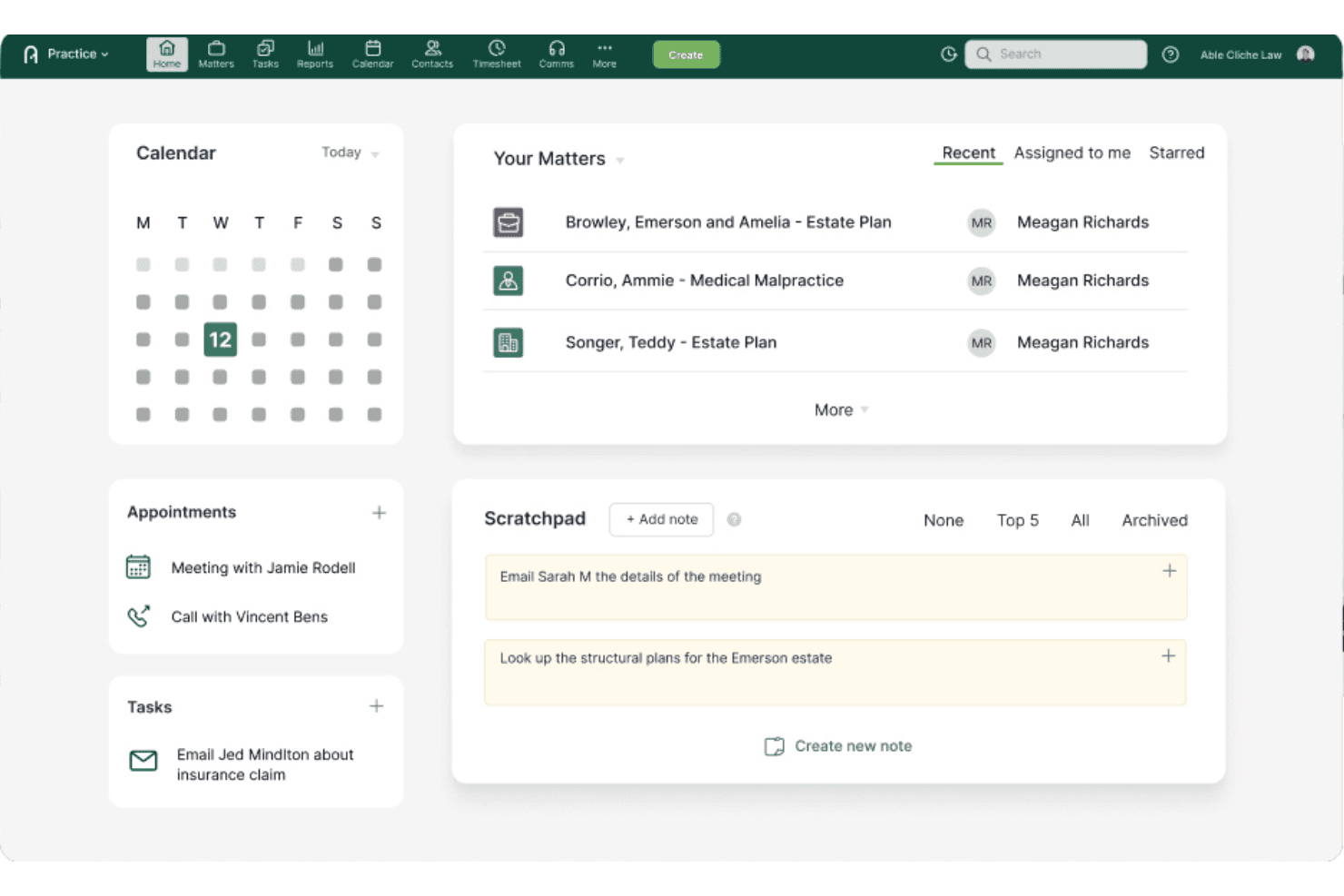
Actionstep centralizes matter management, task tracking, client notes, and case activity. Actionstep is a law firm practice management platform that combines legal CRM, client intake automation, webforms, conflict checking, and marketing ROI tracking in a single native system.
Who Is Actionstep Best For?
Actionstep is a strong fit for midsize law firms whose marketing and business development teams need to trace revenue back to specific campaigns, referral sources, and intake activities.
Why I Picked Actionstep
I picked Actionstep as one of the best because its marketing ROI reporting doesn't just store a "source" field—it ties actual campaign costs and referral sources to income from resulting matters. I love that when a prospective client comes in through a webform, Actionstep records the originating marketing activity, then tracks it through to billed fees so you can see exactly which campaigns are generating revenue. The one-click conflict search, which spans emails, matters, and contacts and exports timestamped PDF records, rounds out a genuinely native intake pipeline.
Actionstep Key Features
- Capture module: A no-code form builder that collects documents, e-signatures, and client data, then auto-maps responses directly to matter fields.
- Client portal: Gives clients access to encrypted messaging, document collaboration, and matter updates, with per-folder permission controls for external parties.
- Workflow automation: Configurable templates that trigger tasks, deadlines, document generation, and status updates across the full matter lifecycle.
- Acumen analytics: An embedded BI module with pre-built dashboards showing WIP, billed fees, utilization, and realization rates, scoped by role.
Actionstep Integrations
Actionstep advertises 50+ integrations, including Microsoft Office 365, Outlook add-in for Office 365, InfoTrack, and First AML. It also supports custom business apps through its API and lists Zapier.
Pros and Cons
Pros:
- Genuine marketing ROI linked to revenue
- Native intake-to-matter data mapping
- One-click firm-wide conflict search capability
Cons:
- Out-of-the-box lead routing is limited
- No named ethical-wall feature provided
Learn more about Actionstep: Best for intake-to-matter tracking on Salesforce
- Free demo available
- Pricing upon request
Visit WebsiteCustomer Rating:4.2/5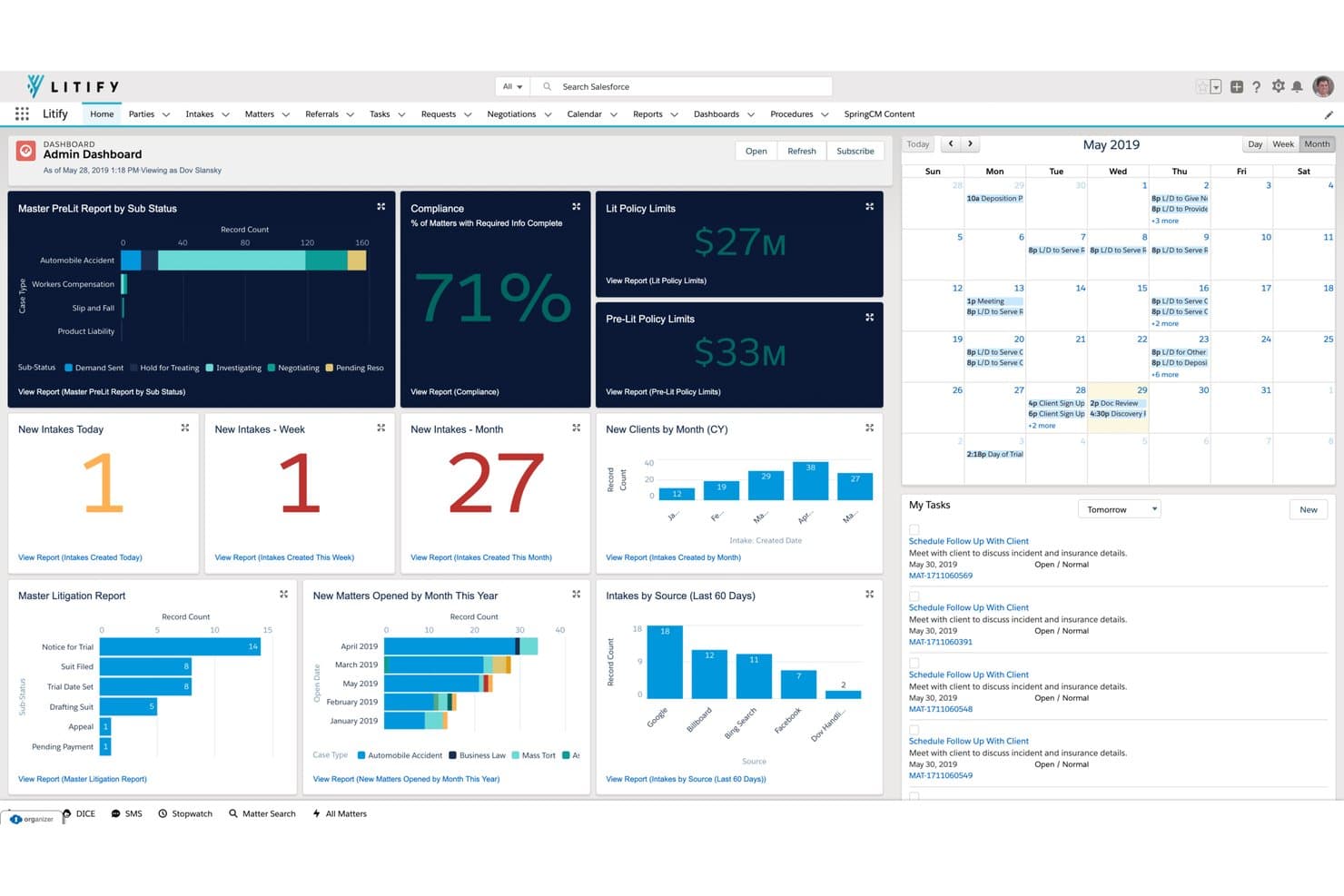
Litify centralizes case intake, task management, client records, and case activity. Litify is a Salesforce-native legal platform that brings together client intake, CRM, conflict checking, matter management, document automation, and analytics in a single system built for large law firms and in-house legal teams.
Who Is Litify Best For?
Litify is a strong fit for large plaintiff, insurance defense, and in-house legal teams that already run on Salesforce or want a single system spanning intake, conflict checking, matter management, and marketing attribution.
Why I Picked Litify
Litify earns its spot on my shortlist because it's the only platform I've seen that keeps intake and matter data in a single Salesforce-native record, so there's no re-keying when a prospect converts to a client. I particularly like the Agentforce Conflict Checker, which runs automatically against your full client and matter database at the intake stage and produces a downloadable conflict report without any manual setup. The AI Intake Qualifier Agent adds another layer by screening prospects against firm criteria before a staff member ever picks up the phone, which is especially useful for high-volume plaintiff and insurance defense practices managing multiple offices.
Litify Key Features
- Intake KPI dashboard: Tracks want rate, conversion rate, referral rate, and turn-down rate across your intake pipeline in real time.
- Matter plans: Pre-built, automated task templates configurable by practice area—litigation, IP, immigration, contracts—to standardize case workflows.
- Referral Network portal: A free portal for sending, receiving, and managing referral cases directly within the platform.
- Role-based analytics dashboards: No-code report builder with unlimited filtering delivers personalized, real-time dashboards for intake managers, marketing directors, and attorneys.
Litify Integrations
Built on Salesforce, Litify offers integrations with Microsoft Outlook, DocuSign, CallRail, Case Status, Intuit, ECFX, and Confido. It also connects with SharePoint and Google Drive for document access.
Pros and Cons
Pros:
- Advanced marketing attribution and referral dashboards
- Automated conflict checks at the intake stage
- Single record spans intake to matter management
Cons:
- Conflict check depth is not publicly documented
- Ongoing Salesforce-based admin may require consultants
Learn more about Litify: Best for AI-driven conflict checks at Am Law firms
- Free demo available
- Pricing upon request
Visit WebsiteCustomer Rating:4.2/5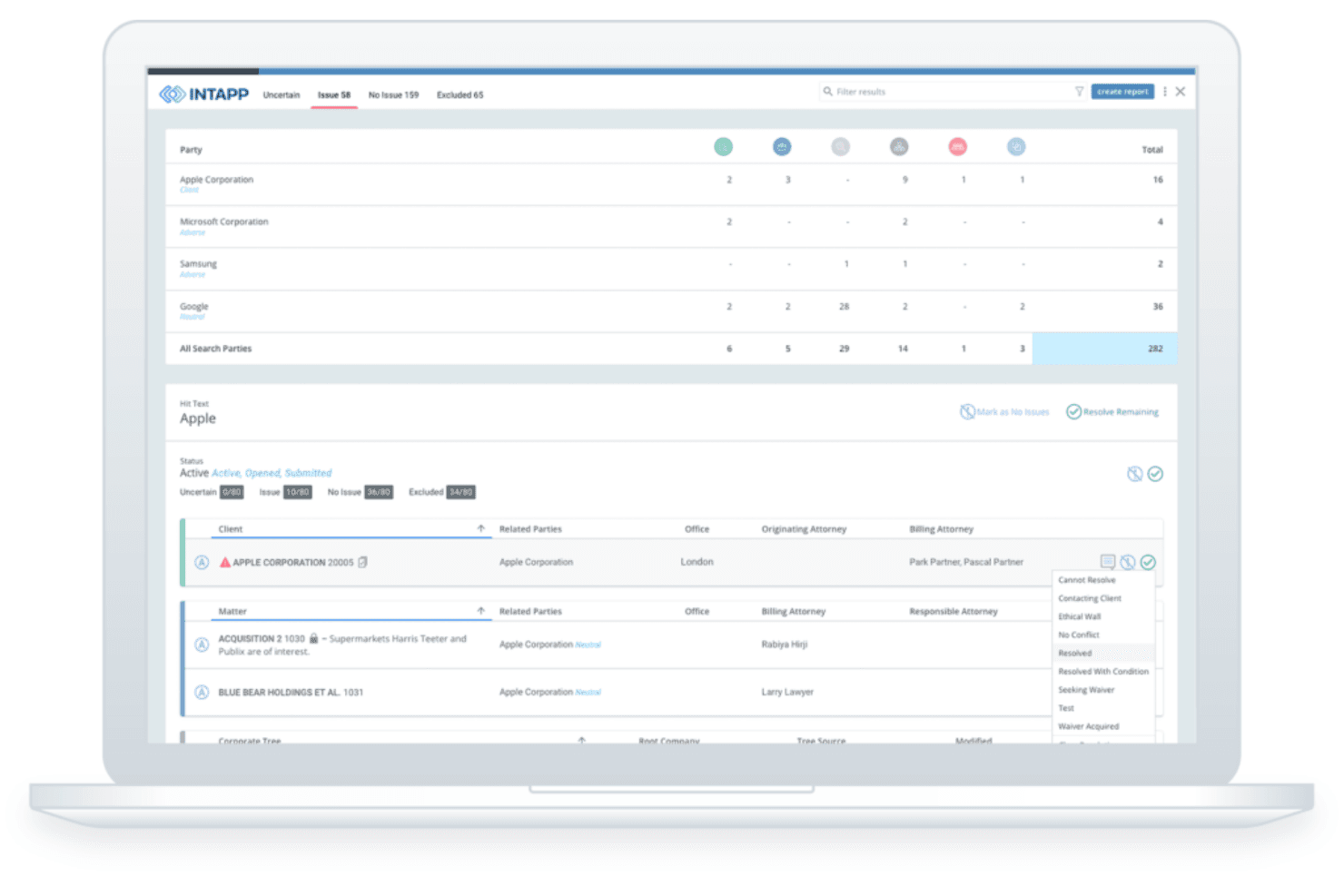
Intapp Conflicts applies AI to run conflict checks, triage potential matches, and manage client and matter data for new business intake. Intapp Conflicts is an AI-powered conflicts management system that centralizes client, matter, and relationship data to run automated conflict checks, triage hits, and support new business intake workflows across large law firms.
Who Is Intapp Conflicts Best For?
Intapp Conflicts is built for Am Law 100 and large global firms where conflicts volume, regulatory complexity, and multi-office risk exposure require an enterprise-grade, AI-driven solution.
Why I Picked Intapp Conflicts
Intapp Conflicts earns its spot on my shortlist because no other tool I've seen matches its depth of AI-driven conflict detection for high-volume, multi-office firms. Intapp Celeste automatically builds the search strategy, triages hits, and drafts clearance summaries, cutting the two most time-consuming steps of any conflicts review. I also like that it categorizes results as "Issue," "No issue," or "Human review" and escalates automatically, so your conflicts team focuses only on what actually needs attention.
Intapp Conflicts Key Features
- Intapp Celeste agentic detection: Celeste automatically builds your conflict search strategy, triages hits by risk level, and drafts clearance summaries for expert review.
- Dynamic intake workflow routing: Configurable approval paths branch by risk score, geography, industry, or service line, so the right people review the right requests.
- Intapp Walls integration: Access controls enforce ethical walls in real time across systems, users, and AI agents, with conflicts reports automatically filtered to respect wall policies.
- Mobile conflicts and intake management: The Intapp mobile app lets you run quick conflict searches, review reports, and create or approve intake requests directly from iOS or Android.
Intapp Conflicts Integrations
Intapp Conflicts offers 1,500+ prebuilt integrations through Intapp Integration Service, including native connections with Intapp Intake, DealCloud, Terms, Walls, Microsoft 365, Outlook, Thomson Reuters Elite, and DocuSign.
Pros and Cons
Pros:
- Dynamic intake workflows fit firm complexity
- Role-based access enforces compliance barriers
- AI-driven conflict detection with expert triage
Cons:
- No self-serve trial or direct signup
- CRM features require separate module licensing
Learn more about Intapp Conflicts: Best for intake-to-matter conflict checks in one system
- Free demo available
- Pricing upon request
Visit WebsiteCustomer Rating:4.5/5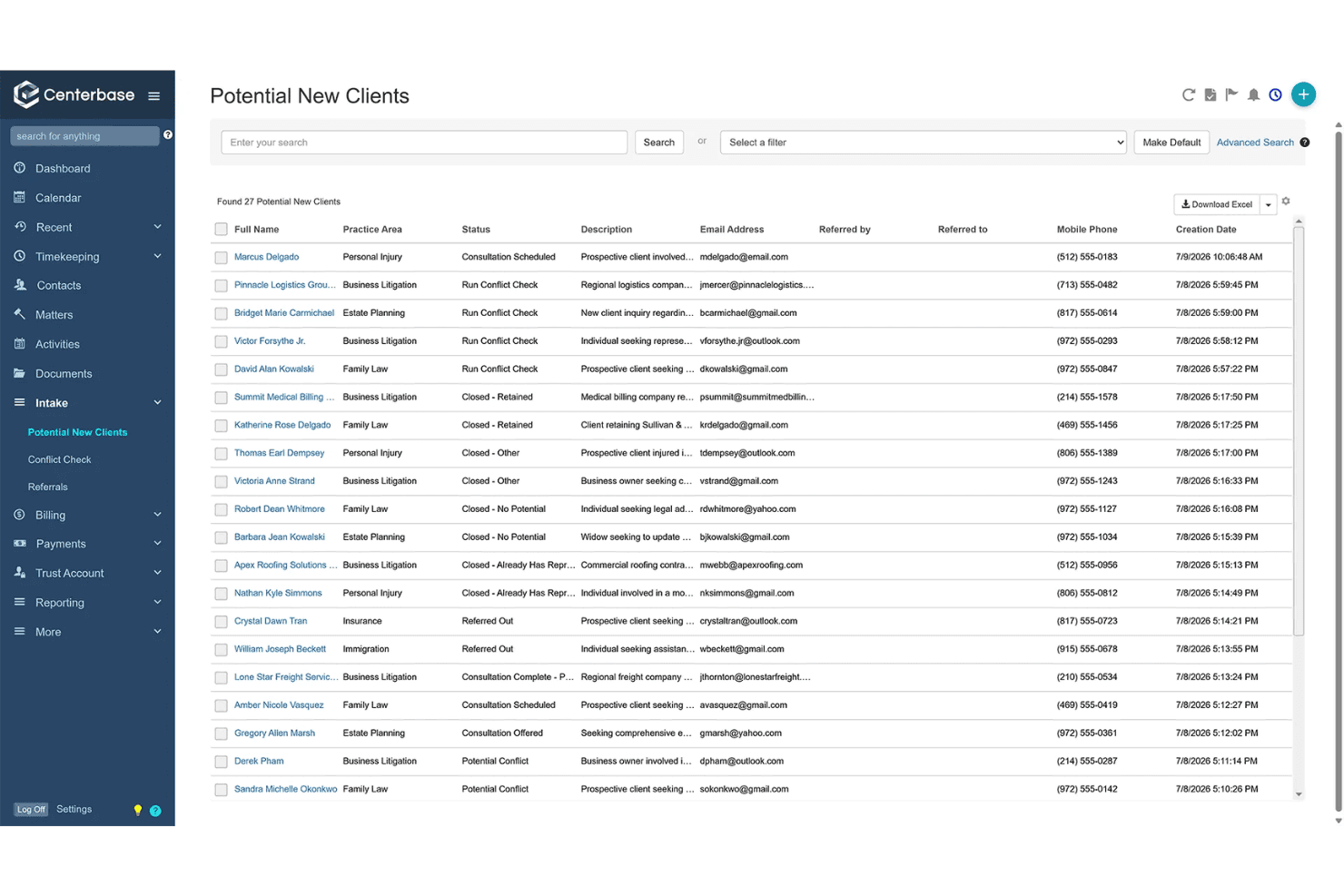
Centerbase unifies client intake, CRM, conflict checks, matter management, billing, and accounting. Centerbase is a cloud-based legal practice management platform that combines client intake, CRM, conflict checking, matter management, billing, and accounting in a single system.
Who Is Centerbase Best For?
Centerbase is a strong fit for midsize law firms whose intake, conflict checking, and matter management teams need to work from a single connected record rather than separate systems.
Why I Picked Centerbase
I picked Centerbase as one of the best because it's the only platform where intake, conflict checking, and matter opening live in a single continuous record. When a web form submission creates a PNC record, a firm-wide Boolean conflict check runs automatically, with timestamped, downloadable results ready for ethics review before a matter ever opens. I also like that referral source is captured at intake and feeds directly into Centerbase IQ's attribution reporting, so your marketing team can trace lead-to-matter conversion without a separate analytics tool.
Centerbase Key Features
- Automated workflow configuration: Build workflows at the client, matter, or system-wide level with conditional logic that auto-populates data, assigns tasks, and triggers emails based on firm-defined criteria.
- Centerbase IQ analytics: Ask plain-English questions about lead sources, matter value, and practice growth, and get charts with source citations, confidence indicators, and drill-through query audit trails.
- Client self-service portal: Give clients encrypted document exchange, 24/7 bill viewing and payment, and calendar sharing through a role-based, mobile-accessible portal.
- NetDocuments and ndMAX integration: Sync AI-extracted parties, dates, and deadlines from NetDocuments directly into Centerbase workflows, reporting, and Centerbase IQ.
Centerbase Integrations
Centerbase offers documented integrations with NetDocuments and ndMAX, iManage, LawToolBox, Microsoft 365, and Outlook. No public self-serve API documentation is available for custom integrations.
Pros and Cons
Pros:
- Centerbase IQ provides plain-English analytics
- Timestamped, downloadable conflict check audit trail
- Intake, conflict, and matter data unified
Cons:
- No public API or developer documentation available
- No documented ethical-wall enforcement for large firms
Learn more about Centerbase:
Other Client Intake and CRM Software for Large Law Firms
Here are some additional client intake and CRM software for large law firms options that didn’t make it onto my shortlist, but are still worth checking out:
- 11DealCloudBest for Am Law 100 BD and relationship tracking
- 12Salesforce Best for multi-office firm data centralization
- 13HubSpotBest for multi-touch referral and attribution tracking
- 14MyCaseBest for intake-to-matter conversion without re-entry
- 15CosmoLexBest for built-in marketing ROI tied to intake data
- 16Zoho CRMBest for multi-office lead routing and BD tracking
- 17Rocket MatterBest for billing-integrated intake on a single platform
- 18Clio GrowBest for lead-to-matter continuity in one vendor stack
- 19Lead DocketBest for PI intake teams tracking ad spend to cases
- 20Law RulerBest for high-volume intake and marketing ROI tracking
How I Evaluate Client Intake and CRM Software for Large Law Firms
I split my evaluation into baseline criteria every tool must meet—like conflict checking and pipeline tracking—and differentiators that separate the best from the rest.
Core Functionality (Table Stakes For This List)
When I'm selecting tools for my list, I rank each one on a scale from 0 (does not offer the functionality) to 5 (excels in this area) for each core functionality listed below. I then calculate the tool's total score into a percentage, and use that to help me assess its overall fit for the list.
- Conflict checking support: I evaluate whether the tool runs automated checks across clients, related parties, and historical matters before intake closes—not just a basic name search.
- Lead and intake pipeline: I look for configurable pipeline stages with real-time visibility, automated task assignments, and escalation rules that keep high-volume intake moving across offices.
- Customizable intake workflows: Each practice group has different requirements, so I check whether the platform supports conditional logic, multi-branch approvals, and tailored questionnaires per department.
- Cross-department data sharing: Large firms need unified client records with role-based permissions across every office and practice group. I look at how granular those access controls actually get.
- Referral and source tracking: I evaluate how well the tool ties referral sources and marketing channels to converted matters and revenue, not just which source field it captures at intake.
- Matter management integration: The intake-to-matter handoff matters most—I check whether the platform creates matters automatically with full data continuity or forces manual re-entry downstream.
Once I have a list of tools that meet the criteria, I consider what sets each platform apart.
Differentiating Factors (What Sets Vendors Apart)
Here's how I compare and contrast different vendors:
Standout Features
I look for practice group routing rules that auto-assign leads based on practice area, geography, or attorney capacity—critical when a firm runs dozens of practice groups across multiple offices. E-signature and engagement automation also matters: I check whether the platform generates and routes retainer agreements the moment a lead qualifies, since manual handoffs here slow intake and frustrate prospective clients. Finally, I evaluate mobile intake capture, because BD teams at conferences or networking events need to log referrals and flag conflicts on the spot, not back at a desk.
Beyond Features
I evaluate whether a platform enforces ethical walls and provides audit trails that hold up during bar reviews—firms adding offices or practice groups can't afford gaps in access controls. Implementation support matters just as much: vendors like Litify and Intapp offer structured onboarding programs, which I check because firm-wide rollouts stall without dedicated change management. I also look at API availability and native integrations with existing billing and document management systems already embedded in a firm's workflow.
How to Choose a Client Intake and CRM Software for Large Law Firms
What matters most when picking client intake and CRM software for a large law firm is making sure your workflow, intake, and compliance needs are met at scale across teams and offices:
| If your priority is... | Look for... |
|---|---|
| If your priority is...Fast, accurate conflict checks | Look for...Automated cross-matter conflict search and audit trails |
| If your priority is...Practice group-specific intake processes | Look for...Custom intake workflows and conditional logic |
| If your priority is...Tying marketing to new matters | Look for...Referral and ad source tracking linked to matter openings |
| If your priority is...Unified cross-office data access | Look for...Role-based, granular permissions and data sharing |
| If your priority is...Reducing lead drop-off before engagement | Look for...Integrated e-signature and automated retainer routing |
How to Vet Your Shortlist
- Run a conflict search demo: Request a live demo using at least 3 actual (de-identified) conflict scenarios from your firm’s history.
- Test intake workflow customization: Set up a sample intake for two distinct practice groups within a trial account in less than one hour.
- Ask for reporting samples: Request anonymized, real report exports showing marketing attribution, opened matters, and compliance audit logs.
- Confirm provider onboarding methodology: Ask for a written 8–12 week implementation plan outlining staff training milestones.
- Decide: Enterprise-wide legal platforms offer native integrations and data controls, while modular CRMs require more custom IT resources and API work over time.
What Is Client Intake and CRM Software for Large Law Firms?
Client intake and CRM software for large law firms are technology platforms that help legal teams capture new leads, manage client onboarding, track relationships, and centralize client data at scale.
These systems support conflict checks, automate workflows, and integrate with practice management tools to ensure compliance and efficient collaboration across multiple offices and practice groups. They are designed to address the complex needs unique to large, multi-practice organizations.
Features of Client Intake and CRM Software for Large Law Firms
When selecting client intake and CRM software for large law firms, keep an eye out for the following key features:
- Conflict checking support: Automated conflict searches scan clients, related parties, and past matters to flag risks before onboarding.
- Customizable intake workflows: Customize intake workflows with conditional logic, multi-step approvals, and practice-specific questionnaires.
- Lead and intake pipeline management: Monitor leads from inquiry to engagement with live pipeline updates, assigned tasks, and escalation rules.
- Matter management integration: Automatically send new intakes to your matter management system while keeping client data and documents consistent.
- Referral and source tracking: Capture referral and marketing sources at intake, then link them to converted matters and revenue to measure ROI.
- Cross-department data sharing: Maintain centralized client records with role-based permissions controlling who can view, edit, or export sensitive information.
- E-signature and engagement automation: Generate retainer agreements, send them for e-signature, and store signed documents within the client record.
- Audit trails and ethical wall support: Track record access and changes, restrict visibility between practice groups, and maintain audit logs for regulatory review.
- Mobile intake capture: Enter leads, scan business cards, and flag conflicts from mobile devices during events or offsite meetings.
- API availability and integrations: Connect intake and CRM with billing, document management, and analytics tools to reduce manual work and keep workflows connected.
Benefits of Client Intake and CRM Software for Large Law Firms
Implementing client intake and CRM software for large law firms provides several benefits for your team and your business. Here are a few you can look forward to:
- Automated conflict checking: Identify potential conflicts across clients, matters, and related parties with built-in searches before onboarding.
- Streamlined intake workflows: Customize intake workflows with conditional logic and approvals tailored to each practice group.
- Unified client data management: Centralize records and make them accessible across offices and departments with granular, role-based permissions.
- Direct integration with matter management: Automatically transfer intake data into your practice management system to keep client and matter details together without manual re-entry.
- Compliant access controls and audit trails: Enforce ethical walls and track changes or data access, so you’re prepared for regulator or bar association reviews.
- Real-time pipeline visibility: Monitor every lead’s status and move high volumes of potential clients through configurable pipelines without bottlenecks.
- Referral and marketing source tracking: Tie referral channels and ad sources to actual opened matters and revenue, helping you measure business development results more accurately.
Costs and Pricing of Client Intake and CRM Software for Large Law Firms
Selecting client intake and CRM software for large law firms requires an understanding of the various pricing models and plans available. Costs vary based on features, team size, add-ons, and more. The table below summarizes common plans, their average prices, and typical features included in client intake and CRM software for large law firms solutions:
Plan Comparison Table for Client Intake and CRM Software for Large Law Firms
| Plan Type | Average Price | Common Features |
|---|---|---|
| Plan TypeFree Plan | Average Price$0 | Common FeaturesBasic contact management, limited matter tracking, entry-level document storage, and email reminders. |
| Plan TypePersonal Plan | Average Price$20–$40/user/month | Common FeaturesIntake forms, e-signature, referral tracking, basic conflict checks, and calendar syncing. |
| Plan TypeBusiness Plan | Average Price$50–$80/user/month | Common FeaturesCustomizable workflows, advanced conflict checking, cross-department data sharing, reporting, and integrations. |
| Plan TypeEnterprise Plan | Average Price$100–$150/user/month | Common FeaturesAPI access, role-based permissions, audit trails, ethical walls, onboarding support, and advanced analytics. |
Client Intake and CRM Software for Large Law Firms FAQs
Here are some answers to common questions about client intake and CRM software for large law firms:
How do large law firms ensure data security when using client intake and CRM software?
Large law firms rely on data encryption, role-based access controls, and detailed audit trails to control who can access sensitive information. Many products offer features such as ethical walls, multi-factor authentication, and secure cloud storage to help firms comply with data privacy regulations and internal IT policies.
Can these systems integrate with matter management and billing software?
Yes, most client intake and CRM software for law firms either provide built-in integrations with popular matter management and billing tools, or include open APIs for custom connections. This keeps client and matter data unified, reducing manual entry and minimizing the risk of duplicate or lost information.
How do these tools help with conflict checking across multiple offices?
Modern intake and CRM platforms support cross-matter conflict searches, automatically scanning all clients, related parties, and closed matters regardless of office location. They flag potential conflicts and document the search process, which is essential for compliance and risk management at larger firms.
What’s involved in rolling out this software across a large firm?
Implementation often includes a structured onboarding plan, with vendor-led training, configuration workshops, and staged rollouts for different practice groups or offices. Change management is a big part of the process—dedicated onboarding support helps avoid disruptions and ensures your team adopts the new workflows smoothly.
Do these products support custom intake workflows for different practice groups?
Yes, most leading platforms offer customizable workflows with conditional logic, allowing you to tailor intake forms, approval steps, and data fields to the needs of each practice group. This flexibility is key for firms handling diverse legal matters and serving various client types under one roof.
How do law firms track referral sources and marketing ROI in these systems?
Intake and CRM tools usually let your team log referral channels, advertising sources, and other marketing data at the outset. Most products then connect this information to opened matters and revenues, providing reports that help analyze what’s driving new business and where to invest future marketing spend.