

10 Best Document and Email Management Software for Law Firms in 2026

Best Document and Email Management Software for Law Firms Shortlist


Document and email management software for law firms gives you a centralized, secure system to organize, store, and quickly retrieve files, emails, and related information for each matter.
If you’re struggling with scattered case files, lost communications, or compliance headaches, you’re not alone—finding the right platform is essential for keeping your legal practice efficient and audit-ready.
In this guide, you’ll get a clear, side-by-side look at the best tools available now, with practical details that help you compare features, integrations, and what makes each platform a fit for different firm needs.
Why Trust Our Software Recommendations
Our team has been testing and reviewing software since 2012. As legal practice leaders ourselves, we know how difficult—and important—it is to choose the right software.
For this guide, we evaluated tools using hands-on testing and independent research, scoring tools using our selection criteria.
Our reviews reflect our human editorial judgment, not a sales pitch.
Document and Email Management Software for Law Firms Comparison Table
This comparison table summarizes pricing details for my top document and email management software for law firms selections:
| Tool | Best For | Trial Info | Price | ||
|---|---|---|---|---|---|
| 1 | Best for automatic time tracking | Free demo available | Pricing upon request | Website | |
| 2 | Best for unlimited storage with secure access | 10-day free trial | From $50/user/month (billed annually) | Website | |
| 3 | Best for OCR search functionality | Free demo available | Pricing upon request | Website | |
| 4 | Best with case and file access from any device | 7-day free trial | From $49/user/month | Website | |
| 5 | Best for large firms needing security governance | Free demo available | Pricing upon request | Website | |
| 6 | Best for automated client intake portals | Not available | Pricing upon request | Website | |
| 7 | Best for client collaboration and digital signing | Free demo available | From $210/month (billed annually) | Website | |
| 8 | Best for advanced legal AI integrations | Free demo available | Pricing upon request | Website | |
| 9 | Best for matter-centric document organization | 7-day free trial + free plan + free demo available | From $395/month | Website | |
| 10 | Best for automated compliance-driven email filing | Free demo available | Pricing upon request | Website |
Best Document and Email Management Software for Law Firms Reviews
Below are my detailed summaries of the best document and email management software for law firms that made it onto my shortlist. My reviews offer a detailed look at the features, integrations, and best use cases of each platform to help you find the best one for you.

Best for automatic time tracking
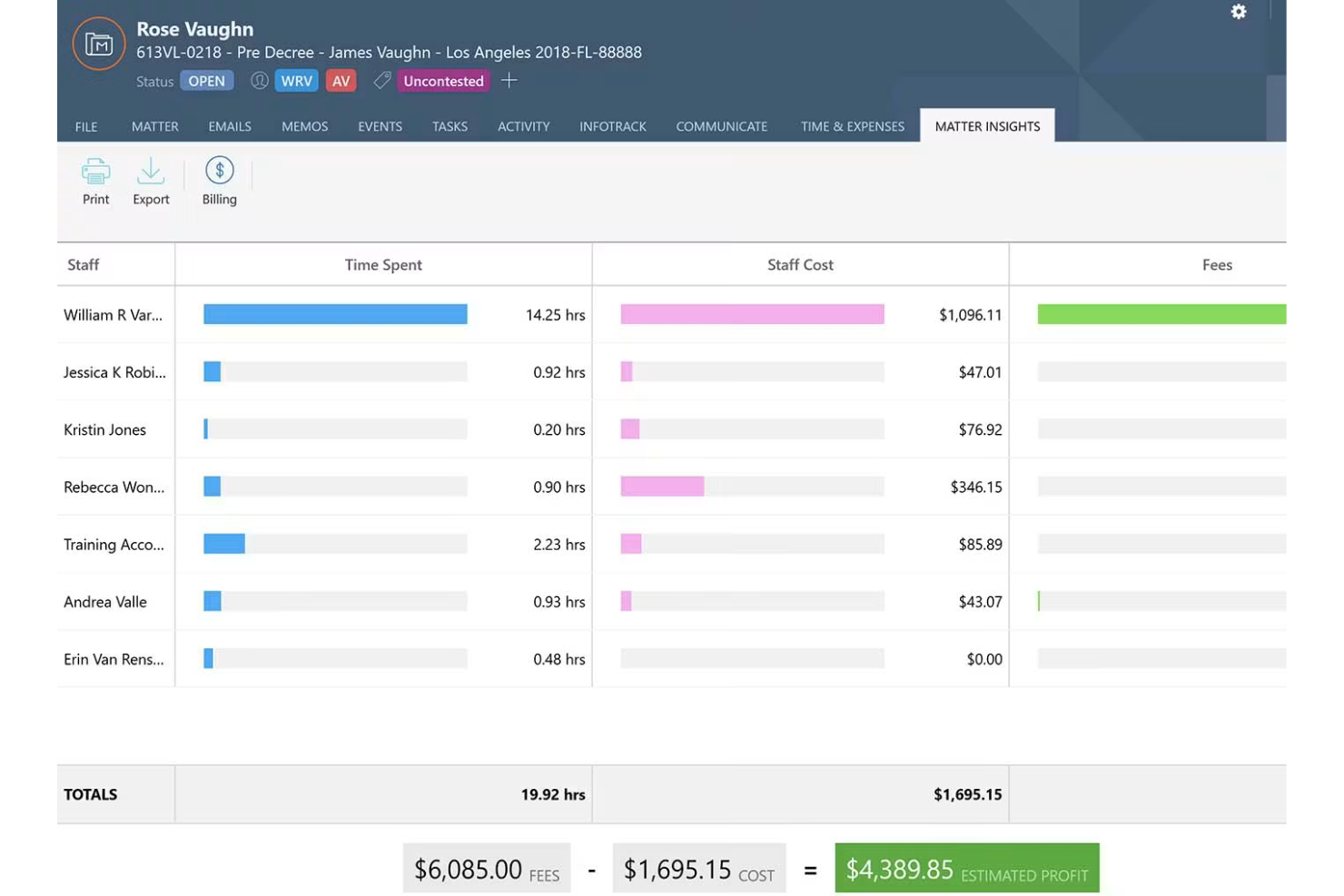
Smokeball is a legal document and email management platform designed for law firms, offering automatic email capture, matter-centric organization, and built-in activity tracking across your practice.
Who Is Smokeball Best For?
Smokeball is a strong fit for small to midsize law firms that rely on automated time capture and tightly integrated document and email management.
Why I Picked Smokeball
I picked Smokeball as one of the best because my team depends on its automatic time tracking, which records all document and email work in the background. I can review minute-by-minute activity logs tied to client matters without manual entry.
Smokeball Key Features
- Matter-centric email management: All emails are automatically saved to associated matters for easy retrieval.
- Email drag-and-drop: Move emails and attachments from Outlook directly into Smokeball matters.
- Document version control: Track revisions and access prior versions of any document.
- Form library: Access a large library of standard legal forms for quick document assembly.
Smokeball Integrations
Integrations include AcroDocz, Answering Legal, Aquarius Reporting, Arctrieval, Birdeye, Briefpoint, Bundledocs, Campaign Monitor, Chicago Title, and CollBox.
Pros and Cons
Pros:
- Records activity minute-by-minute
- Logs billable hours automatically
- Automatic time tracking for emails and documents
Cons:
- Limited offline access to files
- Limited PDF document annotations

MyCase
Best for unlimited storage with secure access
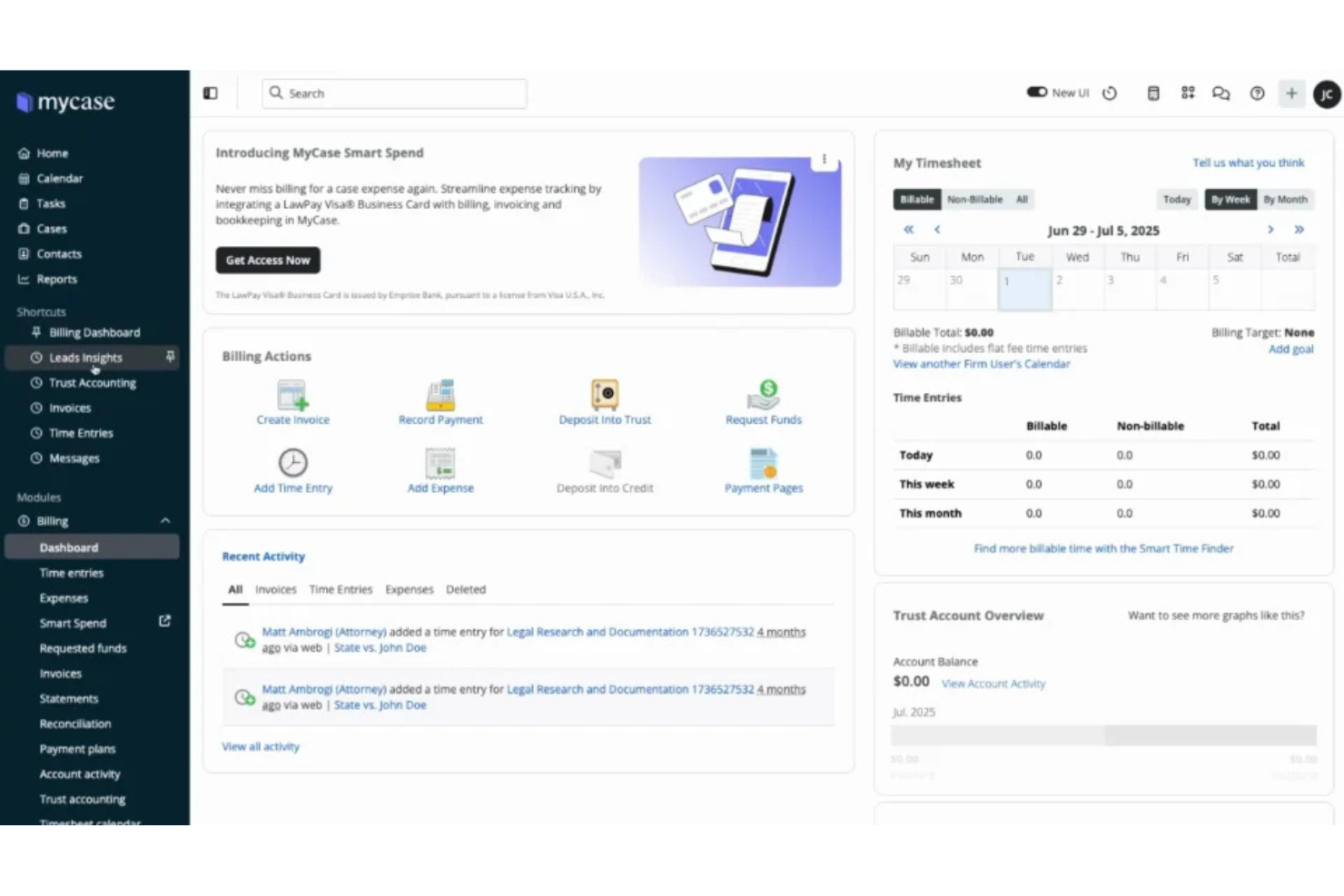
MyCase is a legal document and email management software for law firms that brings together document upload, sharing, organization, e-signatures, case file management, and secure client communication in one system.
Who Is MyCase Best For?
MyCase suits small to mid-sized law firms that need unlimited document storage and secure file sharing built into their daily case workflows.
Why I Picked MyCase
I picked MyCase as one of the best because I rely on unlimited document storage for managing years of case files and can set granular folder permissions for confidential material. I like being able to upload, share, and organize documents without worrying about space limits.
MyCase Key Features
- Integrated e-signatures: Collect legally binding signatures directly within uploaded documents.
- Document tagging: Add searchable tags to organize and locate files quickly.
- Document version history: Review, compare, or restore earlier versions of any document.
- Secure client portal: Share files and messages with clients in a private portal.
MyCase Integrations
Integrations include Access Legal, Ajax, Answering Legal, Arctrieval, Attorney Share, Billables AI, Briefpoint, CallRail, Candle AI, and Case Status.
Pros and Cons
Pros:
- Bulk document upload and drag-and-drop
- Secure file sharing with client portal
- Unlimited document and file storage included
Cons:
- Document search can be slow with large volumes
- No document editing within platform

Filevine
Best for OCR search functionality

Filevine is a legal document and email management software designed for law firms, offering centralized document storage, project-based organization, granular permissions, and workflows tailored for legal teams.
Who Is Filevine Best For?
Filevine is well-suited to midsize and larger law firms that handle complex case files and large volumes of searchable documentation.
Why I Picked Filevine
I picked Filevine as one of the best because my team relies on its OCR search functionality—we can search scanned documents, PDFs, and image-based files for key terms and details within case files.
Filevine Key Features
- Document version history: Track and restore previous versions of files.
- Granular user permissions: Control access to sensitive documents by role.
- Email-to-file automation: Save and organize emails directly within case files.
- In-platform document editing: Edit Word and PDF files without leaving Filevine.
Filevine Integrations
Integrations include Lawmatics, Sageness, Gemini Legal, InfoTrack, Record Retrieval Solutions, DocuPost, MoveDocs, Copitrak, Dialpad, and Microsoft Teams.
Pros and Cons
Pros:
- OCR search scans PDFs and images
- Bulk email attachment organization
- Key terms are searchable inside scanned files
Cons:
- Some workflows require manual intervention
- Limited PDF editing capabilities

Clio
Best with case and file access from any device
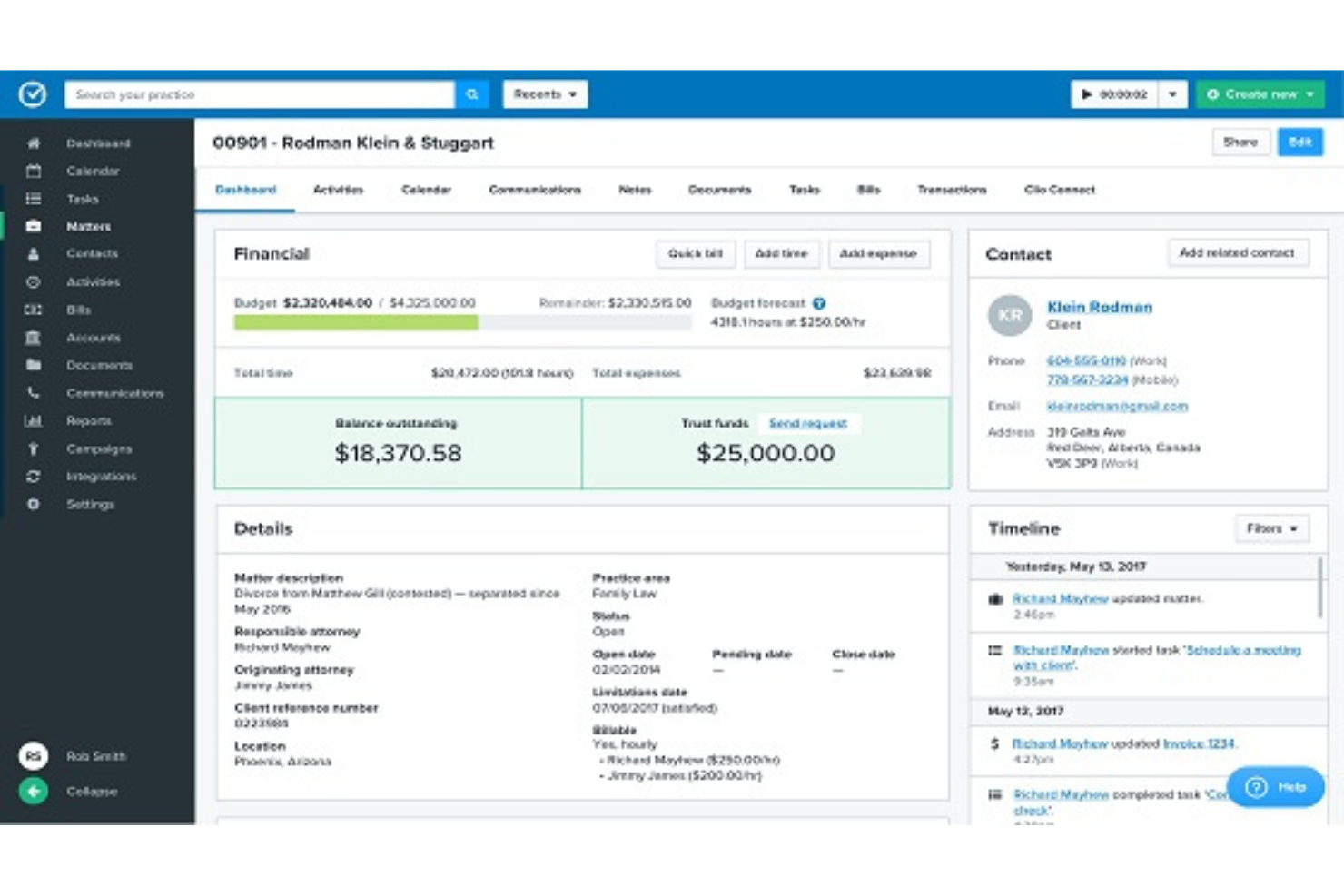
Clio is a cloud-based document and email management software for law firms that combines document automation, secure file storage, E-signature collection, and client collaboration tools.
Who Is Clio Best For?
Clio is a solid fit for small to mid-sized law firms and solo legal practitioners who want unified access to documents, emails, and case files.
Why I Picked Clio
I picked Clio as one of the best because I can edit, organize, and access case files and documents from any device, even on the go. I rely on its document automation and mobile app when my caseload moves between court, office, and home.
Clio Key Features
- E-signature integration: Request and manage document signatures securely within the platform.
- Custom document templates: Create, store, and use reusable templates for legal documents.
- Document versioning: Automatically track and manage different versions of files.
- Permission-based sharing: Set user access controls for documents and folders.
Clio Integrations
Integrations include Scorpion RevenueMAX, OurFamilyWizard, AltFee, NetDocuments by Spring, Xero, Prolegis Solutions, Lawyer Conveyance System, QuickBooks Online, and CallConnector.ai by ion8.
Pros and Cons
Pros:
- In-platform secure e-signature collection
- Automated templates for legal document assembly
- Edit and manage documents on any device
Cons:
- Document tagging options are limited
- Initial setup requires process mapping

iManage
Best for large firms needing security governance
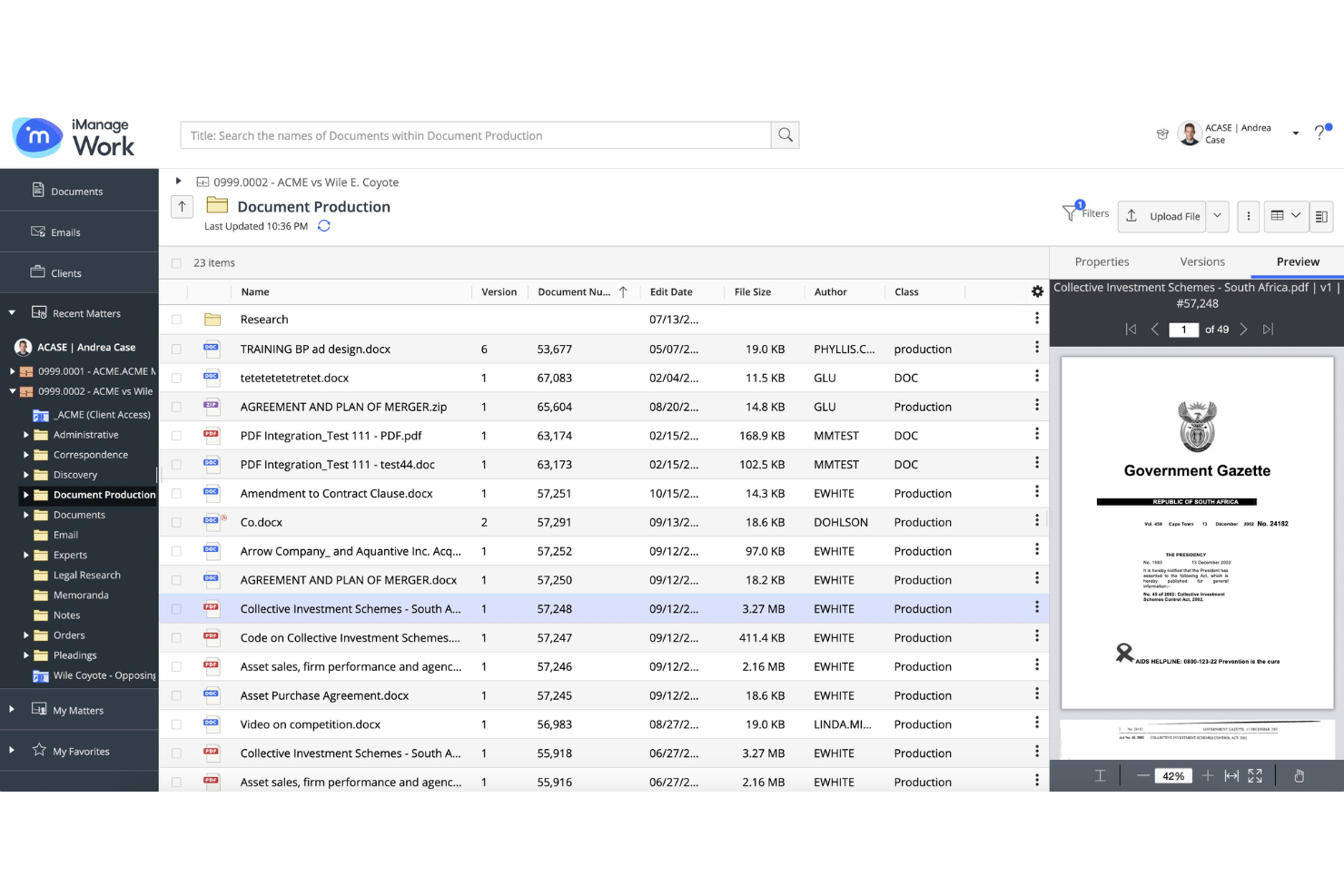
iManage is a document and email management platform for law firms that supports advanced governance, secure file storage, team collaboration, and knowledge management, with specialized controls for managing sensitive legal information.
Who Is iManage Best For?
iManage is a strong fit for large law firms and legal departments that require advanced document governance and strict security measures.
Why I Picked iManage
I picked iManage as one of the best because my team can set granular document access with strict ethical walls, enforce data loss prevention policies, and track file activity at a detailed level—features that large firms need for security governance.
iManage Key Features
- Matter-centric workspaces: Organize all documents and communications by client or project matter.
- Full-text search: Retrieve documents and emails with fast, comprehensive keyword or phrase searches.
- Outlook email integration: Manage, file, and search emails directly within Microsoft Outlook.
- Version control: Track, compare, and restore previous versions of documents in a single location.
iManage Integrations
Integrations include Actionstep, ActiveNav, Aderant, Advanced, Autologyx, BA Insight, BEC Legal Systems, BigHand, Blue Car Technologies Limited, and Brochet.
Pros and Cons
Pros:
- Built-in document version control system
- Advanced document and email search filters
- Granular permission controls for sensitive files
Cons:
- Workflow automation setup can be complex
- Requires dedicated security governance team

Best for automated client intake portals
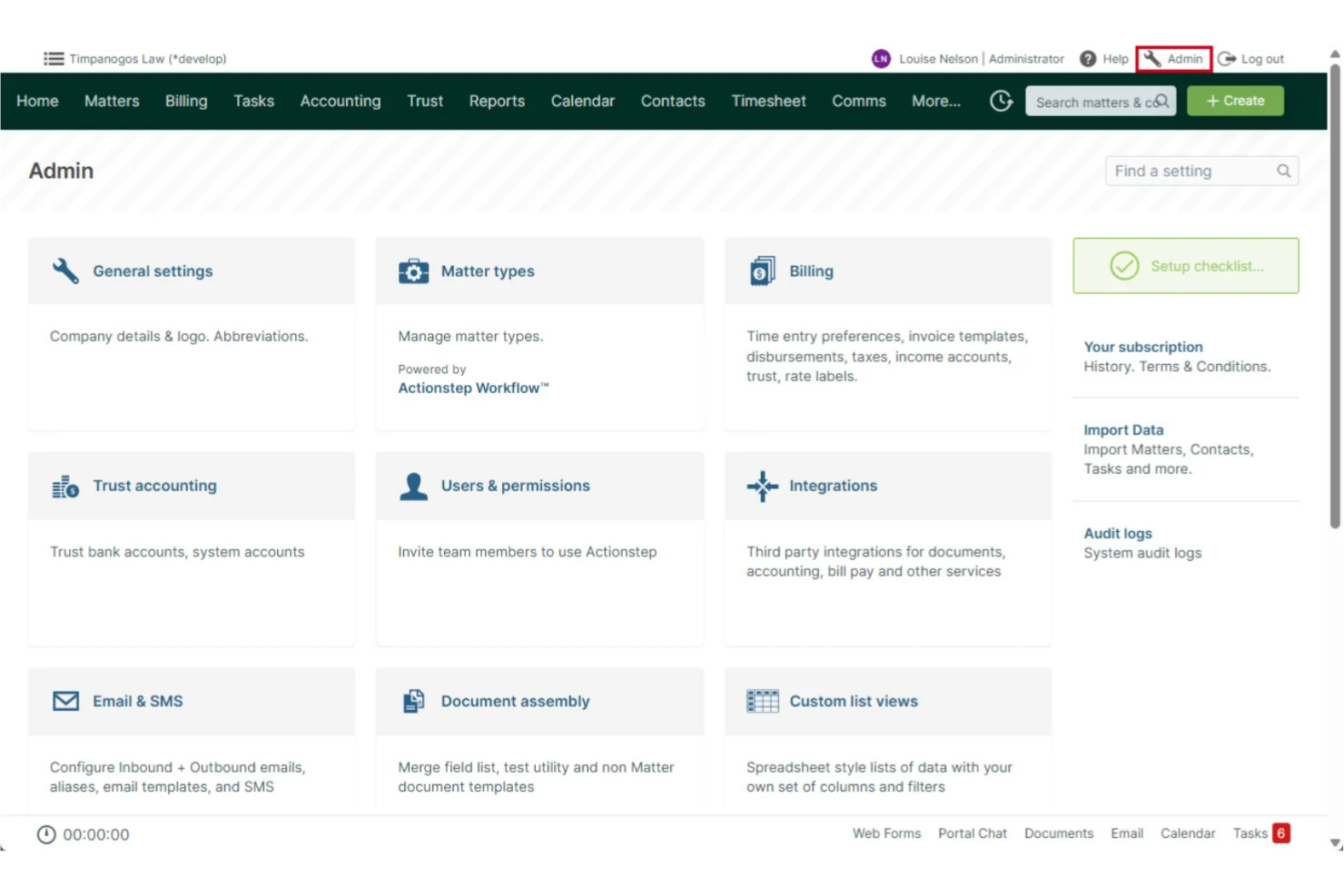
Actionstep is a cloud-based document and email management platform for law firms, offering workflow automation, matter management, client communications, and built-in document assembly.
Who Is Actionstep Best For?
Actionstep is a great fit for small to midsize law firms looking for integrated workflow automation and client onboarding tools.
Why I Picked Actionstep
I picked Actionstep because I can set up automated client intake portals that let new clients submit details and documents directly. I also like that workflow triggers let my team assign tasks and kickstart document templates as soon as new intakes arrive.
Actionstep Key Features
- Version control: Track document edits, view history, and restore previous versions.
- Email management: Store, search, and categorize emails within matters.
- Document templates: Automate creation of legal documents with pre-set fields.
- Role-based access controls: Restrict document and email access by user or group.
Actionstep Integrations
Integrations include Office 365, DocuSign, LawToolBox, Zapier, Adfin, Xero, InfoTrack, First AML, Box, and CASEpeer.
Pros and Cons
Pros:
- Workflow triggers automate task creation
- Batch document upload and tagging
- Automated workflows for matter creation
Cons:
- Limited choice of document templates
- Document preview options are limited

Best for client collaboration and digital signing

SuiteFiles is a document and email management software for law firms that combines cloud-based file storage, secure sharing, client portal functionality, built-in digital signing, and workflow automation tools.
Who Is SuiteFiles Best For?
SuiteFiles is ideal for law firms that prioritize secure client collaboration and need digital signing features integrated with their document workflows.
Why I Picked SuiteFiles
I picked SuiteFiles as one of the best because my team can send documents for digital signing, manage client communications using a secure portal, and collaborate on files in real time with clients—all from a single platform.
SuiteFiles Key Features
- Outlook email filing: File emails and attachments from Outlook directly into client folders.
- Folder permission controls: Set granular access permissions for documents and folders.
- Document templates: Create and use standardized document templates for consistency.
- Automated document approval workflows: Route documents through customizable approval processes.
SuiteFiles Integrations
Integrations include IRIS, MYOB, Xero, Karbon, HubSpot, QuickBooks, and Microsoft 365.
Pros and Cons
Pros:
- Automated document workflow and approvals
- Built-in digital signing for legal agreements
- Client portal enables secure client document sharing
Cons:
- Limited bulk document upload capabilities
- No native mobile app available

Best for advanced legal AI integrations

NetDocuments is a document and email management platform designed specifically for law firms, offering centralized file management, advanced search, and legal workflow tools tailored for complex practice needs.
Who Is NetDocuments Best For?
Large law firms and legal teams handling complex, high-volume matters that require integrated document and email management.
Why I Picked NetDocuments
I picked NetDocuments as one of the best because it’s built around advanced legal AI integrations—my team uses its machine-learning-based search, document analysis, and automated workflow tools to manage complex case files and correspondence.
NetDocuments Key Features
- Version control: Access complete version histories and restore previous versions of files at any time.
- Central matter workspace: Organize documents, emails, and notes by client or matter in a unified workspace.
- Permission management: Set granular permissions for users and groups on sensitive documents.
- Email capture tools: Save Outlook and Gmail correspondence directly into the appropriate matter folders.
NetDocuments Integrations
Integrations include Microsoft 365, Microsoft Teams, Outlook, Word, DocuSign, File Trail, Intapp, Kofax, LexisNexis, and Litera.
Pros and Cons
Pros:
- Automated compliance and audit logging tools
- Search documents using machine learning
- AI-powered document classification and tagging
Cons:
- Advanced features require extensive training
- Limited API access for custom connections

Best for matter-centric document organization
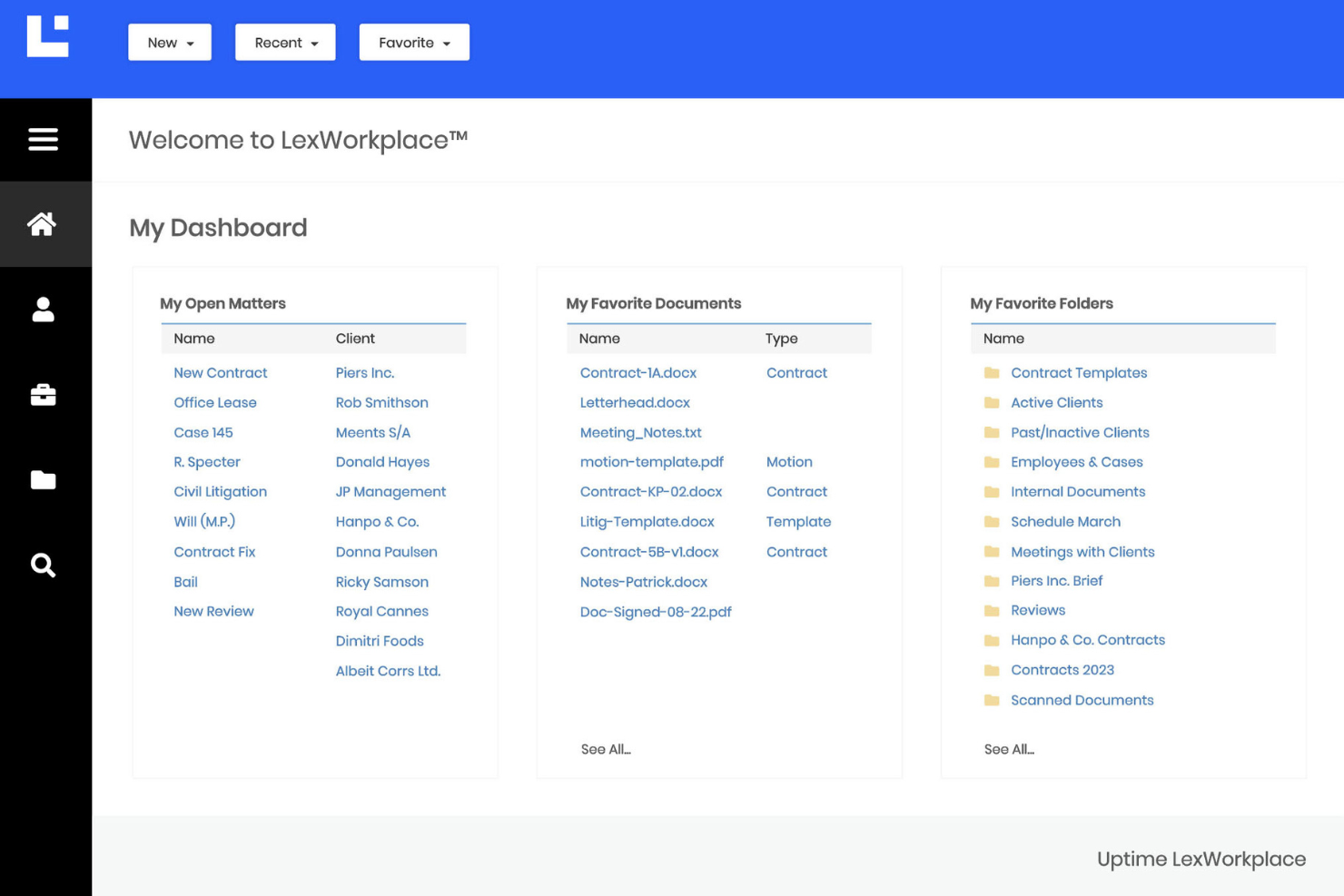
LexWorkplace is a document and email management software for law firms that offers centralized file organization, Microsoft 365 integration, full-text search, document versioning, and data encryption built specifically for legal professionals.
Who Is LexWorkplace Best For?
LexWorkplace is built for small and mid-sized law firms that need organized, matter-centric management of documents and email communications.
Why I Picked LexWorkplace
I picked LexWorkplace as one of the best because I can assign every document and email directly to a specific matter, making it easy for my team to find case-related files, manage versioning, and maintain organized audit trails across active matters.
LexWorkplace Key Features
- Full-text search: Search for keywords across all files and document contents.
- Email management: File, organize, and search emails alongside matter documents.
- Microsoft 365 integration: Work with documents directly from Word, Outlook, and other Microsoft apps.
- Document tagging: Add custom tags to categorize and filter documents.
LexWorkplace Integrations
Integrations include Microsoft 365, Outlook + Exchange, Clio Manage, and Litera Compare.
Pros and Cons
Pros:
- Built-in full-text and metadata search
- Integrated document version history tracking
- Matter-centric email and document workspaces
Cons:
- No calendar rule integration
- Lacks cloud file migration tools

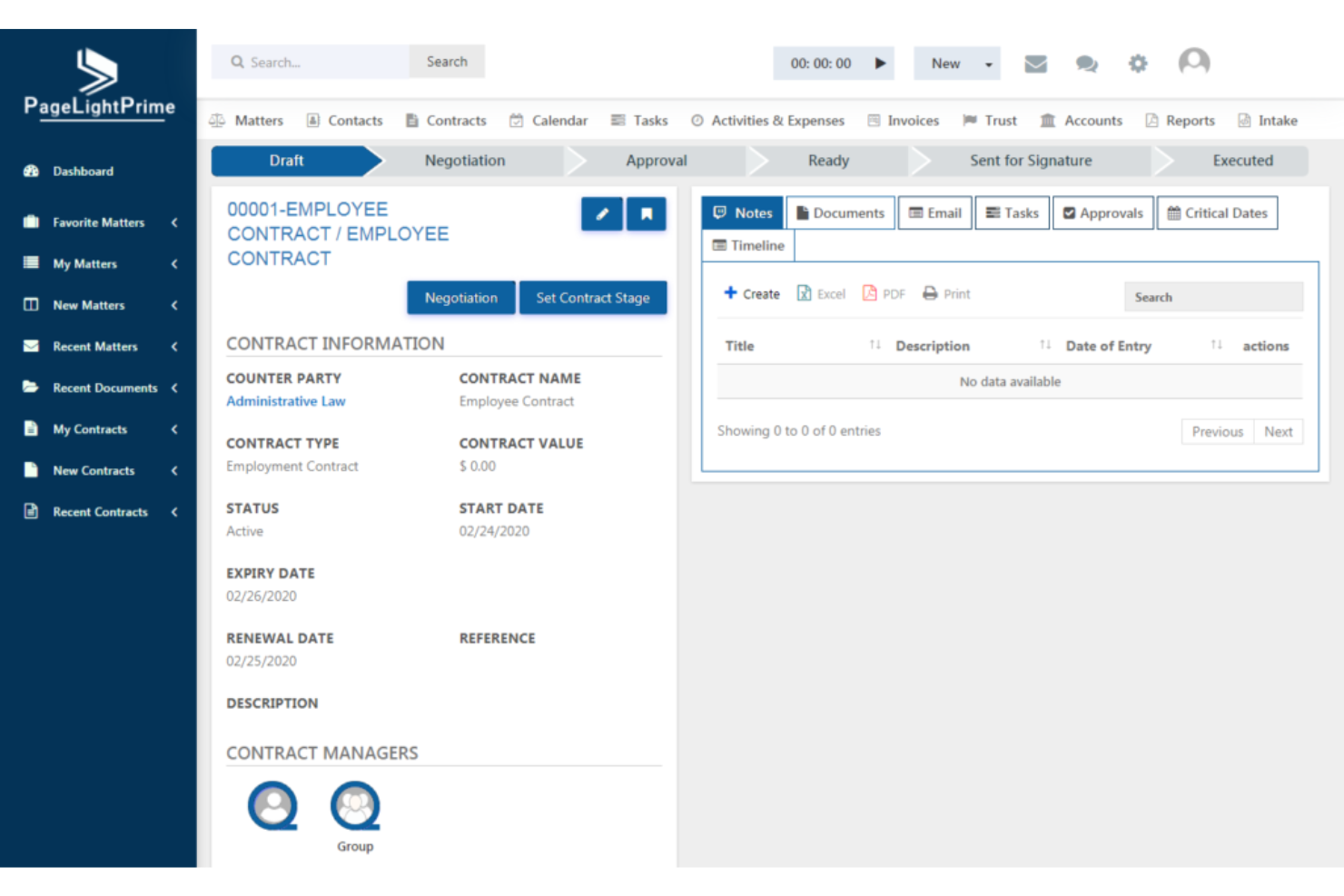
PageLightPrime is a document and email management software for law firms that centralizes email capture, organizes matter files, scans attachments, and applies compliance rules automatically.
Who Is PageLightPrime Best For?
PageLightPrime is a fit for law firms and legal departments that need automated email management and strict compliance on client communications.
Why I Picked PageLightPrime
I picked PageLightPrime as one of the best because I can set it to automatically capture, file, and audit emails for every matter—helping my team ensure compliance with firm and regulatory requirements without manual effort.
PageLightPrime Key Features
- Outlook integration: File and manage emails directly from Microsoft Outlook.
- Matter-centric folders: Organize emails and attachments by specific legal matters.
- Attachment scanning: Automatically scans attachments for compliance and security risks.
- Audit trails: Track all email management actions with detailed logs.
PageLightPrime Integrations
Integrations include Microsoft 365, SharePoint, and Outlook.
Pros and Cons
Pros:
- Auto-detection of privileged or confidential emails
- Flexible compliance policy configuration options
- Granular email classification settings per matter
Cons:
- Limited mobile device management options
- Filing rules are based on SharePoint
Other Document And Email Management Software For Law Firms
Here are some additional document and email management software for law firms options that didn’t make it onto my shortlist, but are still worth checking out:
- CARET Legal
For end-to-end practice oversight
- LEAP
For state-specific legal forms
- CosmoLex
For all-in-one legal accounting
- Tabs3
For ease of use in data organization
- Rocket Matter
For QuickBooks integration simplicity
- PracticePanther
For customizable legal workflows
- Neos
For built-in Microsoft integrations
- Litify
For AI-powered workflow automation
- Centerbase
For advanced billing customization
- LawToolBox
For Microsoft 365 document integrations


How I Evaluate Document and Email Management Software for Law Firms
I split my evaluation into baseline criteria—like matter-centric filing and email-to-matter capture—and differentiating factors that separate a good fit from the right fit for a firm's workflow.
Core Functionality (Table Stakes For This List)
When I'm selecting tools for my list, I rank each one on a scale from 0 (does not offer the functionality) to 5 (excels in this area) for each core functionality listed below. Then, I calculate the tool's total score into a percentage. Each tool needs to achieve a minimum total score of 55% to be considered for inclusion.
- Matter-Centric Document Organization: I look for a native matter/client hierarchy—not just generic folders renamed as matters—so attorneys can file work products under the right engagement without building workarounds.
- Email Filing & Integration: I check whether the tool connects with Outlook or Gmail to let users tag and file emails directly to a matter, rather than forwarding copies into a shared mailbox.
- Versioning & Audit Trails: Every edit to a brief or contract should be tracked with check-in/check-out controls and a clear version history, so teams can compare drafts and prove chain of custody.
- Security & Ethical Walls: I evaluate whether the platform supports granular matter-level permissions and configurable ethical walls, which firms handling opposing-party matters rely on daily.
- Legal Document Search: Full-text and metadata search with filters for matter, author, and document type is the baseline I look for, along with OCR for scanned filings and exhibits.
- Document Assembly & Collaboration: I check for deep Microsoft Word integration, template libraries, and redlining tools—plus secure sharing options for sending drafts to clients or co-counsel for review.
Once I have a list of tools that meet this criteria, I consider what sets each platform apart.
Differentiating Factors (What Sets Vendors Apart)
Here's how I compare and contrast different vendors:
Standout Features
Predictive email filing is a major differentiator—I look for tools that suggest the correct matter based on sender history and subject lines, which saves associates from manually sorting dozens of messages a day. Client collaboration portals also matter. A secure portal where clients upload documents or review drafts without needing a full license cuts down on back-and-forth emails. I also check for integrated time capture that logs billable entries from document edits and email activity, so attorneys aren't reconstructing their day at 9 PM.
Beyond Features
I evaluate how well a platform fits into a firm's existing tech stack—connections to practice management systems like Clio or iManage, plus e-signature and e-discovery tools, tell me a lot about real-world usability. Compliance certifications like SOC 2 Type II and ISO 27001 are worth checking, especially for firms handling regulated client data. Migration support also carries weight. Firms moving off legacy systems like Worldox or shared drives need structured onboarding with dedicated consultants, not just a self-serve knowledge base.
How to Choose Document And Email Management Software For Law Firms
It’s easy to get bogged down in long feature lists and complex pricing structures. To help you stay focused as you work through your unique software selection process, here’s a checklist of factors to keep in mind:
| Factor | What to Consider |
|---|---|
| Scalability | Will the platform handle your growing document and email volume as cases and users increase? Assess limits on storage, concurrent access, or matters. |
| Integrations | Does the system connect to tools your firm relies on, such as Microsoft 365 or accounting platforms? Confirm integrations are native or officially supported. |
| Customizability | Can you tailor workflows, folders, and access permissions for different practice groups or regions? Avoid solutions that force rigid, generic setups. |
| Ease of use | Are busy attorneys and staff able to quickly find, file, and retrieve documents without extensive training? Get hands-on demos to test ease of daily use. |
| Implementation and onboarding | How long will migration and user training take? Ask about data import support, staged rollouts, and available onboarding resources before committing. |
| Security safeguards | Does the tool offer encryption, audit logs, and granular security roles? Check if it’s SOC 2 or ISO 27001 certified for legal data protection. |
| Cost | What are the pricing models and any hidden fees? Request total cost estimates, including data migration, support upgrades, and storage overages. |
| Compliance requirements | Will the tool help meet industry or jurisdictional mandates like GDPR or HIPAA? Ensure compliance alignment early to avoid future disruption. |
What Is Document And Email Management Software For Law Firms?
Document and email management software for law firms helps legal teams organize, store, and control access to case documents and related email correspondence. These tools centralize files, automate matter-based filing, and maintain detailed audit trails, supporting compliance and efficient collaboration across the firm.
This software also protects sensitive data while enabling easy search and retrieval for busy legal professionals.
Features
When selecting document and email management software for law firms, keep an eye out for the following key features:
- Matter-centric organization: Groups documents and emails by client matter, making it easy to locate every related file and communication in one place.
- Version control: Tracks changes and maintains a history of document edits, allowing users to restore previous versions and keep edits transparent.
- Full-text search: Lets users quickly find documents or messages using keywords, phrases, or metadata, saving time and reducing manual sorting.
- Automated email filing: Uses email filing tools to capture and store emails within the correct matter or case, reducing the risk of misfiling and improving record-keeping.
- Access permissions: Enables firms to set user- or group-based controls, so only authorized people can view, edit, or delete sensitive files.
- Audit trails: Records a timeline of document and email activity, aiding compliance efforts and making it easy to track who accessed or modified a record.
- Secure sharing: Supports encrypted sharing of files with clients, colleagues, or outside counsel, ensuring confidentiality and regulatory compliance.
- Document templates: Let users generate frequently used legal documents using firm-approved templates, improving consistency and reducing drafting time.
- Integration with e-signature tools: Allows users to easily send documents for electronic signatures directly from the system, speeding up approvals and reducing manual handling.
- Mobile access: Offers secure access to files and emails from smartphones or tablets, keeping legal teams connected when away from their desks.
Benefits
Implementing document and email management software for law firms provides several benefits for your team and your business. Here are a few you can look forward to:
- Centralized information access: All documents and emails are organized by case or matter, so your team finds what they need without searching multiple locations.
- Improved compliance: Automated audit trails, access controls, and document versioning help your firm meet industry regulations and maintain data integrity.
- Improved collaboration: Team members can securely share and edit documents, track changes, and work together on case files in real time, whether in the office or remotely.
- Reduced risk of data loss: Strong security features, permissions, and consistent backups lower the chance of unauthorized access or accidental deletions.
- Efficient workflows: Automated filing, document templates, and e-signature integrations let your team handle routine document tasks more quickly, cutting down on manual processes.
- Faster client service: Instant document search and retrieval, support prompt responses to client requests, improving client satisfaction and communication.
- Scalability as your practice grows: The software is designed to support increasing document volumes and more complex workflows as your firm expands.
Costs and Pricing
Selecting document and email management software for law firms requires an understanding of the various pricing models and plans available. Costs vary based on features, team size, add-ons, and more. The table below summarizes common plans, their average prices, and typical features included in document and email management software for law firm solutions:
Plan Comparison Table for Document And Email Management Software For Law Firms
| Plan Type | Average Price | Common Features |
|---|---|---|
| Free Plan | $0 | Basic document storage, limited file uploads, simple search, and email support. |
| Personal Plan | $10-$25/user/month | Document uploads, basic email management, version history, and limited access controls. |
| Business Plan | $30-$55/user/month | Matter-centric organization, advanced searching, workflow tools, custom permissions, and basic integrations. |
| Enterprise Plan | $60-$100/user/month | Unlimited storage, advanced security options, full audit trails, API access, priority support, and compliance tools. |
Document And Email Management Software For Law Firms FAQs
Here are some answers to common questions about document and email management software for law firms:
How does matter-centric document management support legal workflows?
Matter-centric management organizes documents and emails by case management or client matter. This makes it easier for attorneys and staff to find all relevant files, track case activity, and maintain compliance, since everything related to one matter is available in a single view.
Can document management software integrate with other legal tools?
Yes, many document management solutions connect with tools like practice management software, e-signature providers, Microsoft Office, and accounting systems. Seamless integration keeps client information consistent across systems and cuts down on duplicate entry.
What security measures should law firms look for in these tools?
Look for security basics like role-based permissions, encryption for data security in transit and at rest, and detailed audit logs. Advanced document management platform options offer compliance certifications, secure ways to share documents, and alerts for unauthorized access to protect sensitive information.
Is it hard to migrate existing case files and emails into a new system?
Migration difficulty varies, but most vendors offer data import tools for both cloud storage and on-premises setups. Evaluating onboarding resources before you buy makes this transition much easier for paralegals and IT teams across any practice area.
Does this software help with regulatory compliance?
Yes, a dedicated document management system (DMS) offers features like audit trails, retention policies, and search capabilities that support compliance with client confidentiality. Choosing the right legal document management software ensures your law practice aligns with local regulations like GDPR or HIPAA.
Can users access documents from mobile devices?
Yes, most modern docs platforms provide secure mobile access through dedicated apps or web browsers, ensuring a great user experience that lets your team review, upload, or send files when working remotely—making them ideal for both small firms and large organizations in the legal industry.