

Law firm task management software is purpose-built to manage matter-linked deadlines, tasks, and workflow tracking for legal teams. If you need a reliable way to reduce deadline risk, tie every task to a client matter, and integrate with billing and calendaring systems, you’re in the right place.
The wrong tool adds friction—lost billable time, missed court dates, or frustrated staff—so it pays to compare the best law firm task management platforms.
Below, I’ll break down the core options built specifically for legal practices so you can pick a system that fits your workflow and client obligations.
Why Trust Our Software Recommendations
6,700+
Reviews
20
Industry experts
16+
Evaluation factors
14
Years
Our team has been testing and reviewing software since 2012. As legal practice leaders ourselves, we know how difficult—and important—it is to choose the right software.
For this guide, we evaluated tools using hands-on testing and independent research, scoring tools using our selection criteria.
Our reviews reflect our human editorial judgment, not a sales pitch.
Law Firm Task Management Software Comparison Table
This comparison table summarizes pricing details for my top law firm task management software selections:
| Tool | Best For | Trial Info | Price | ||
|---|---|---|---|---|---|
| 1 | Best for matter-linked tasks and auto-captured time | Not available | Pricing upon request | Website | |
| 2 | Best for jurisdiction-aware court deadline workflows | Free trial + free demo available | Pricing upon request | Website | |
| 3 | Best for practice-area task suites with built-in rules | Free demo available | Pricing upon request | Website | |
| 4 | Best for Outlook-linked time capture on matters | Free demo available | Pricing upon request | Website | |
| 5 | Best for billing-aware matter task workflows | 10-day free trial | From $49/user/month (billed annually) | Website | |
| 6 | Best for matter-linked court deadline workflows | 7-day free trial | From $49/user/month | Website | |
| 7 | Best for billing-linked matter task workflows | 14-day free trial | From $39/user/month (billed annually) | Website | |
| 8 | Best for court deadline-driven matter workflows | Free demo available | Pricing upon request | Website | |
| 9 | Best for billing-linked task tracking across matters | 10-day free trial | From $59/user/month (billed annually) | Website | |
| 10 | Best for Salesforce-native matter task automation | Free demo available | From $150/user/month | Website |


Law Firm Task Management Software Reviews
Below are my detailed summaries of the best law firm task management software that made it onto my shortlist. My reviews offer a detailed look at the features, best use cases, and integrations of each platform to help you find the best one for you.
 Best for matter-linked tasks and auto-captured time
- Not available
- Pricing upon request
Visit WebsiteCustomer Rating:4.8/5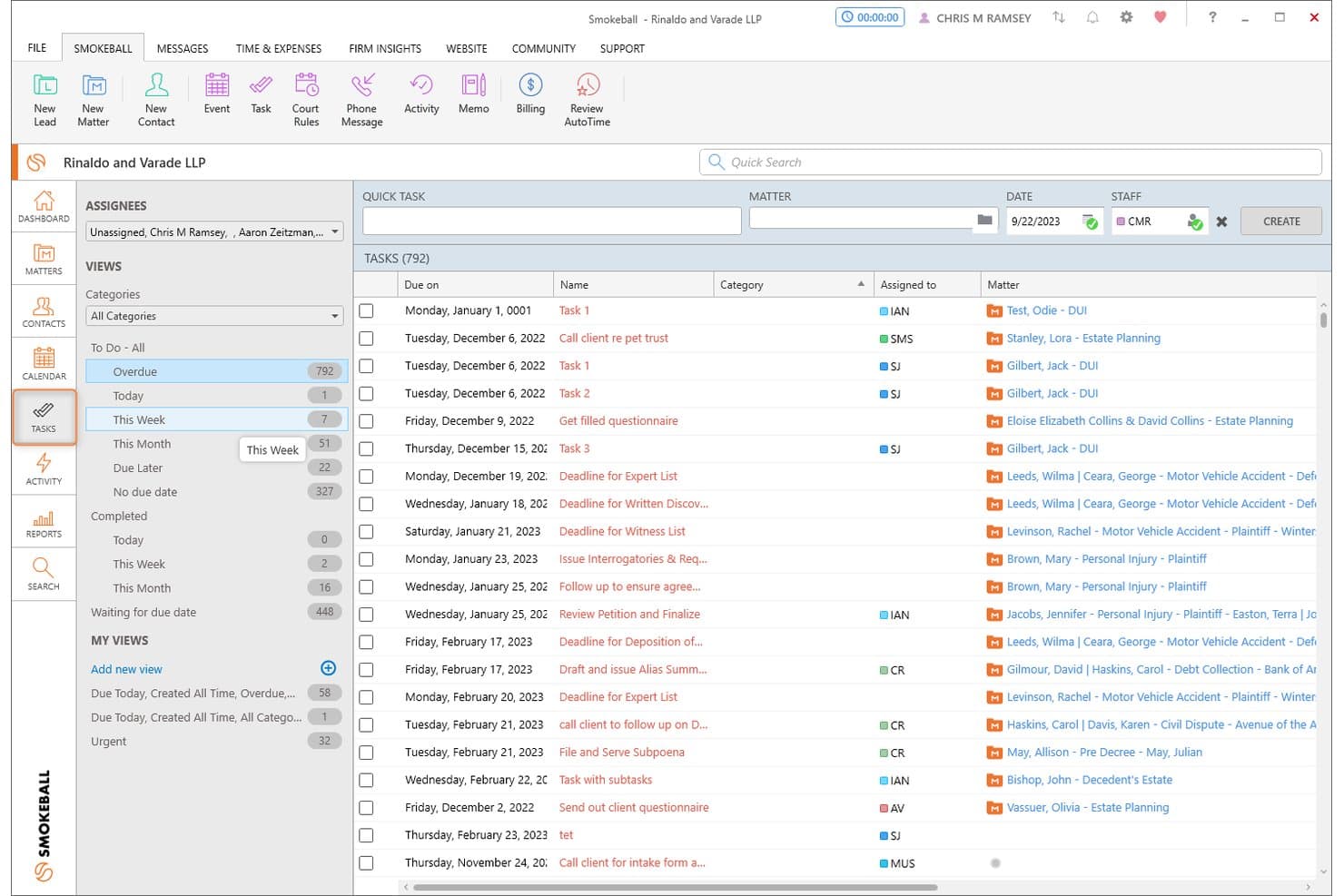
Smokeball organizes overdue and upcoming tasks across all matters in one view. Smokeball is a legal practice management platform built around a matter-centric architecture, combining task management, workflow automation, document generation, deadline tracking, and time capture across case files.
Who Is Smokeball Best For?
Smokeball is a strong fit for solo attorneys and small-to-midsize law firms that want every task, document, and time entry automatically organized under its matter.
Why I Picked Smokeball
Smokeball earns its spot on my shortlist because of how tightly it ties every task to its matter by design, not by configuration. I especially like AutoTime, which passively records billable activity across Smokeball, Word, and Outlook and assigns it to the correct matter automatically, no manual timer needed. Pair that with LawToolBox's jurisdiction-aware deadline cascading, and you get a task layer that's genuinely built around how case work moves.
Smokeball Key Features
- Matter-type workflow templates: Smokeball automatically applies a pre-built task list when a new matter is created, drawing from 250+ matter type templates matched to your practice area.
- LawToolBox deadline cascading: Court rules-based deadline calculation adjusts your entire matter schedule automatically when a trigger date or jurisdiction rule changes.
- TemplateLab document automation: Over 20,000 legal forms and document templates auto-populate with matter data and link directly to individual workflow task stages.
- Firm Insights dashboards: Prosper+ users get configurable reports tracking matter profitability, attorney billable-hour targets vs. actuals, fee collection, and team capacity across the firm.
Smokeball Integrations
Smokeball offers native integrations with LawToolBox, QuickBooks Online, Xero, InfoTrack, LawPay, Zoom, RingCentral, CourtDrive, and Case Status, plus deep native integration across the Microsoft ecosystem, including Microsoft Outlook and Microsoft Word. Additional connectivity is available through the Smokeball Marketplace.
Pros and Cons
Pros:
- LawToolBox court deadline integration
- All tasks organized by matter file
- Automatic time tracking with AutoTime
Cons:
- No built-in conflict check workflow
- Most automation features gated to higher plans
Learn more about Smokeball: Best for jurisdiction-aware court deadline workflows
- Free trial + free demo available
- Pricing upon request
Visit WebsiteCustomer Rating:4.5/5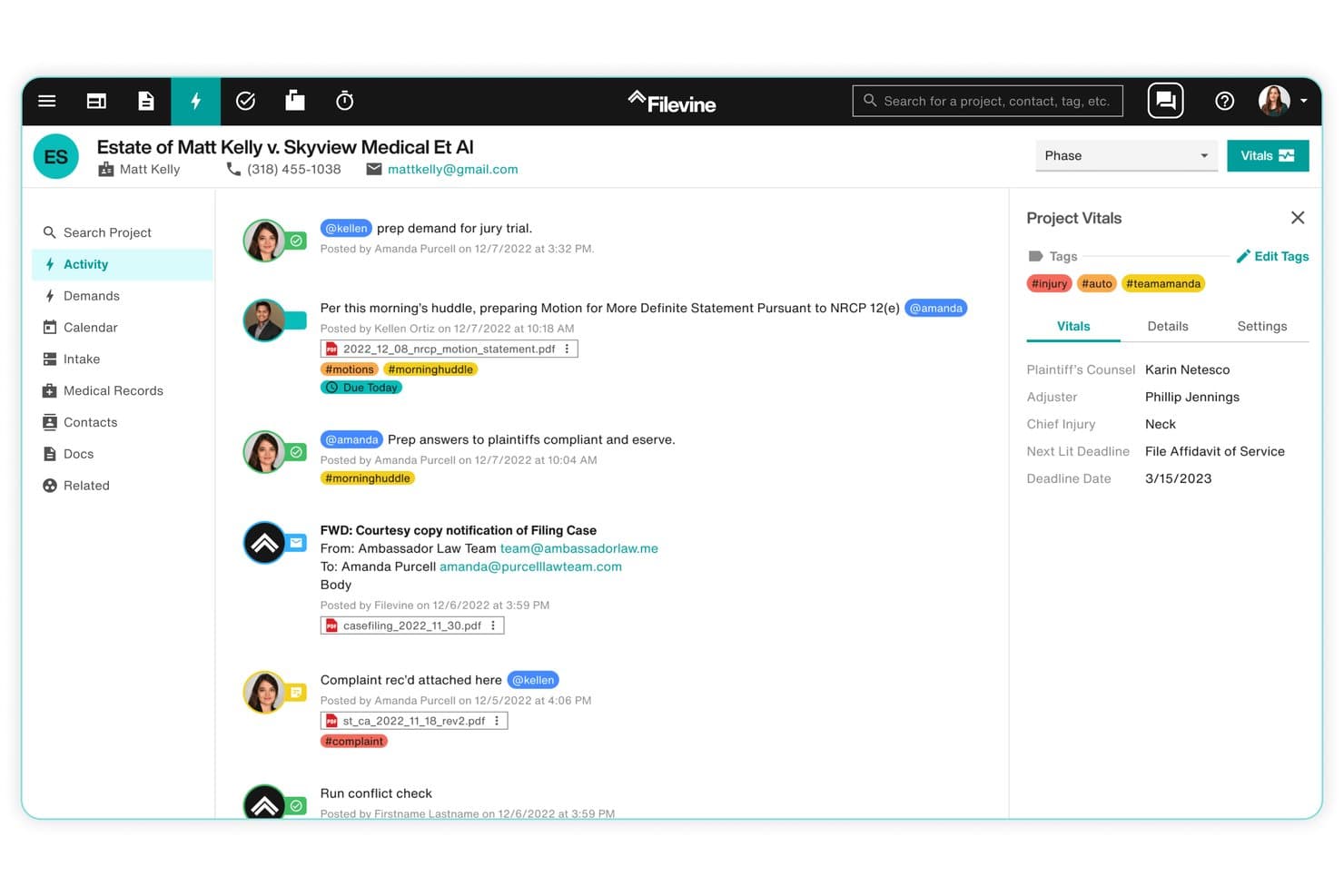
Filevine centralizes case activity, tasks, and deadlines in one view. Filevine is a legal case management platform built around a matter-centric model, with jurisdiction-aware court deadline automation, configurable workflow templates, AI-assisted task management, and document assembly tools.
Who Is Filevine Best For?
Filevine is a strong fit for litigation-focused and plaintiff-side law firms that need jurisdiction-specific court deadline tracking built directly into their case management workflows.
Why I Picked Filevine
Filevine earns its spot on my shortlist because of Timely by Filevine, its jurisdiction-aware court deadline engine covering all 50 U.S. states. I love that you select a jurisdiction and a trigger date, and Timely auto-generates every cascading court deadline from there, with rules reviewed monthly to stay current. AIFields layers on top of that by extracting deadlines directly from uploaded court documents, feeding them into the calendar automatically.
Filevine Key Features
- Matter-centric task page: View, filter, sort, and prioritize all tasks across a matter from a single dedicated task page, with support for task dependencies and sub-matter organization.
- SidebarAI task suggestions: An in-app AI assistant that proactively surfaces relevant tasks based on case context and flags follow-up actions across active matters.
- Non-action detection: Filevine surfaces when expected actions haven't occurred within a matter, giving partners and administrators visibility into stalled work.
- LOIS AI Console: Runs AI agents firm-wide to set tasks, move deadlines, and generate documents, with each action traceable back to its source data.
Filevine Integrations
Filevine offers native integrations with QuickBooks, Microsoft Outlook, Gmail, Google Calendar, Microsoft Teams, Slack, RingCentral, Dialpad, Domo, and Workato, and connects with Zapier. An API is also available for custom integrations, with Filevine claiming 2,000+ potential connections when accounting for Workato and Zapier.
Pros and Cons
Pros:
- Highly configurable, matter-centric workflow engine
- AI surfaces missed or overdue legal tasks
- Jurisdiction-aware court deadline calculations
Cons:
- Setup complexity often requires outside consultants
- Task management considered less advanced than peers
Learn more about Filevine: Best for practice-area task suites with built-in rules
- Free demo available
- Pricing upon request
Visit WebsiteCustomer Rating:4/5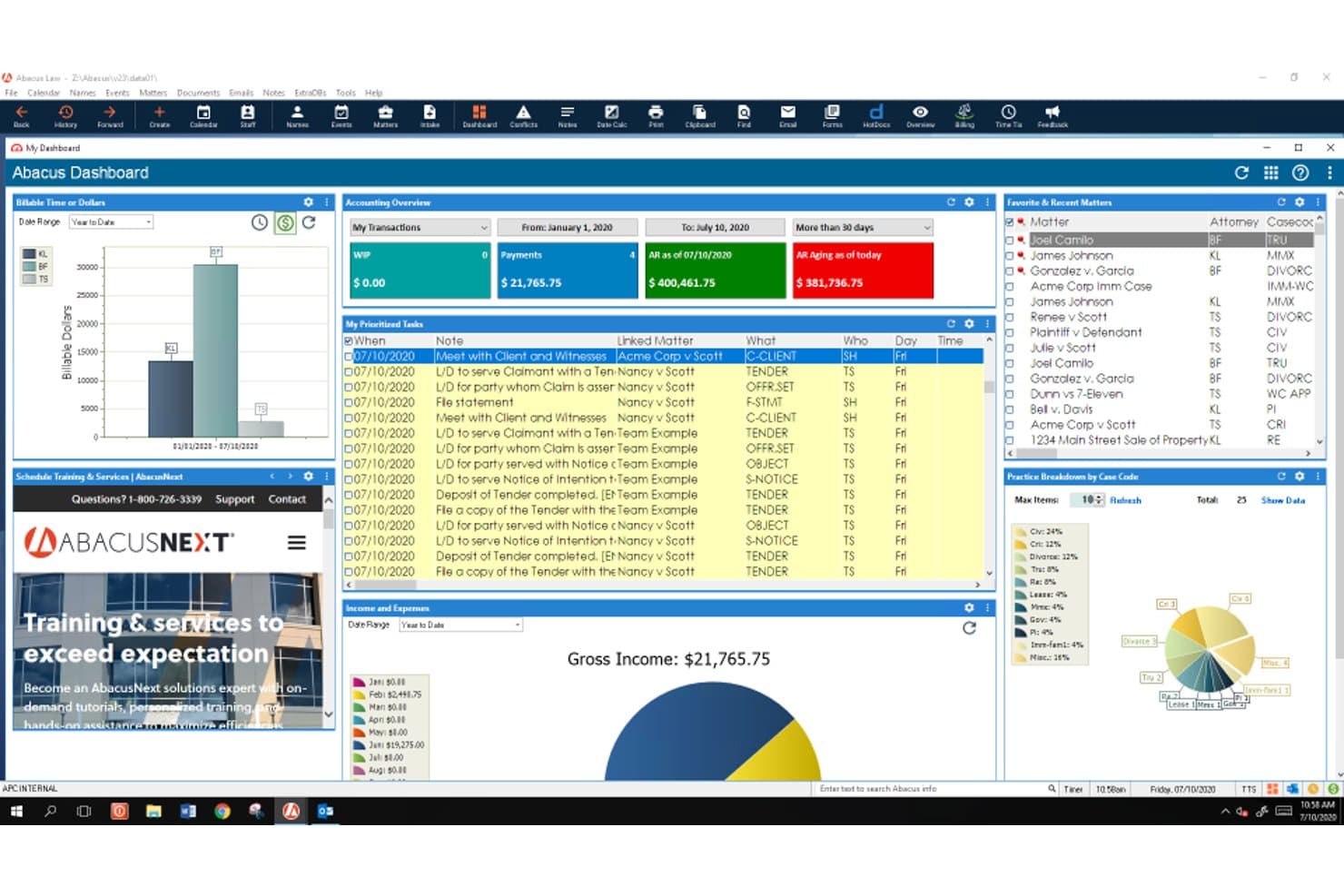
AbacusLaw schedules legal work with task queues, court rules, reminders, and deadlines. AbacusLaw is a legal practice management platform that combines matter-centric task management, rules-based court calendaring, document automation, native time and billing, and trust accounting across 15+ pre-configured practice area suites.
Who Is AbacusLaw Best For?
AbacusLaw is a strong fit for mid-sized law firms with dedicated administrative staff who need practice area-specific workflows and built-in court deadline rules.
Why I Picked AbacusLaw
AbacusLaw earns its spot on my shortlist because of its rules-based court calendaring engine, which is genuinely rare at this depth. I love how practice area suites come pre-loaded with jurisdiction-specific deadline rules: Personal Injury alone ships with 16 pre-built rules that auto-cascade linked events the moment you apply them to a matter. Pair that with a 360-degree matter view that ties every task, document, and billing record to a single case file, and you get task management that's built around how legal work actually moves.
AbacusLaw Key Features
- Conflict of interest checker: A built-in tool that scans matter names, notes, and name records to identify conflicts, producing a printable hit list you can link directly to the case file.
- Native trust accounting: Built-in trust accounting supports IOLTA compliance, bank reconciliation, and payment processing via the Abacus Payment Exchange across trust and operating accounts.
- Client portal: A secure portal lets clients view matter information, access shared documents and invoices, and pay bills online—with firm-controlled access permissions at the client level.
- Document automation: Court forms and customizable templates auto-populate with matter data, and HotDocs integration enables one-click document completion directly from AbacusLaw records.
AbacusLaw Integrations
AbacusLaw offers a smaller set of native integrations, including Microsoft Outlook, Microsoft 365, DocuSign, HotDocs, LawPay, QuickBooks, and Abacus Payment Exchange (APX). It doesn't have a public API or Zapier support, which limits custom connectivity with the broader legal tech stack.
Pros and Cons
Pros:
- Native trust accounting meets IOLTA compliance
- Practice area suites with automated workflow templates
- Rules-based court calendaring reduces manual deadline work
Cons:
- Dated interface compared to modern platforms
- No public API limits custom workflows
Learn more about AbacusLaw: Best for Outlook-linked time capture on matters
- Free demo available
- Pricing upon request
Visit WebsiteCustomer Rating:4.5/5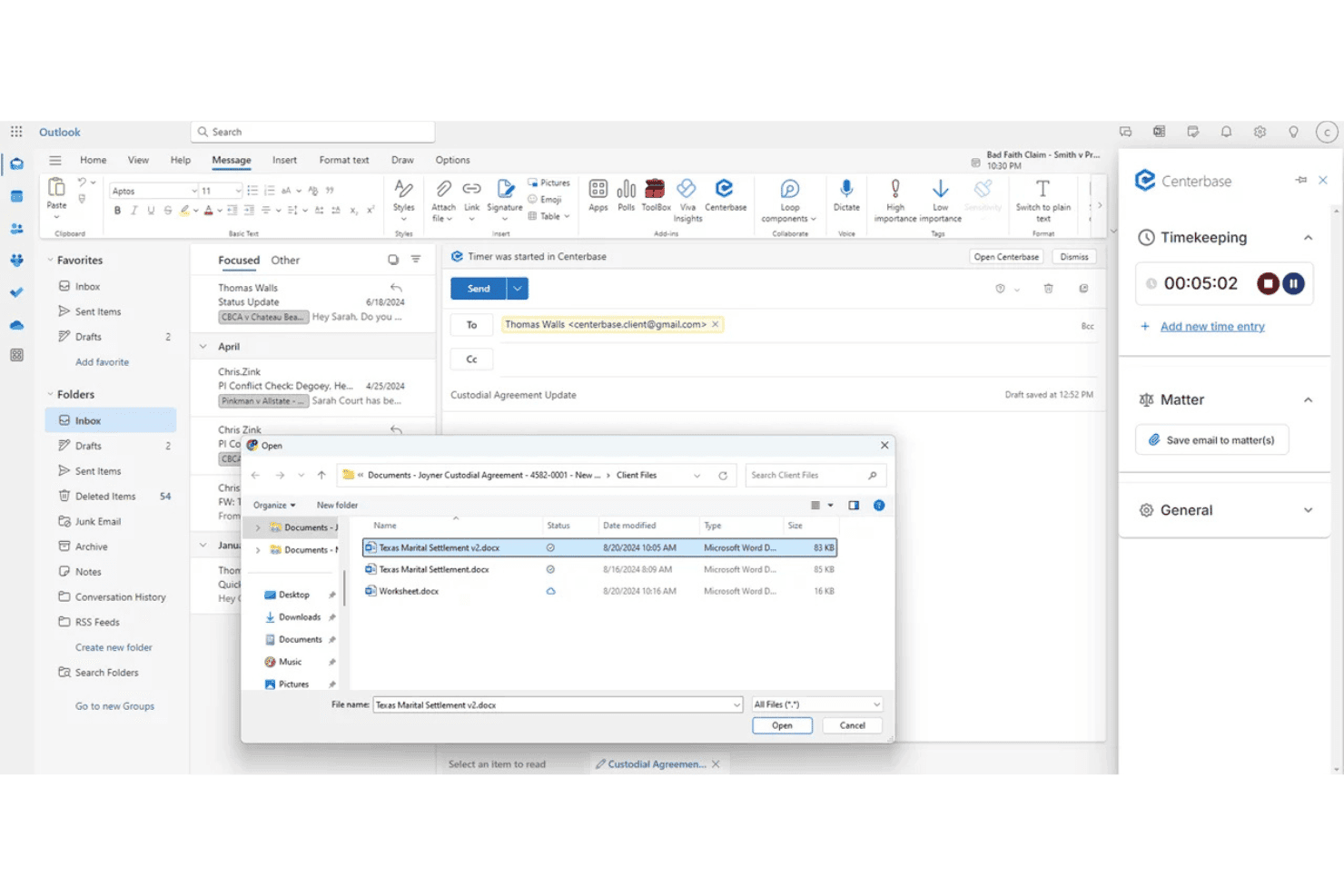
Centerbase ties tasks, deadlines, and follow-ups to matters, with Outlook email and calendar sync. Centerbase is a cloud-based practice management platform for midsize law firms that integrates matter-linked task management, automated time capture, billing, trust accounting, document management, and client communications in one system.
Who Is Centerbase Best For?
Centerbase is built for midsize law firms—typically 5 to 100+ attorneys—that need matter-linked task management, automated time capture, and billing in one connected system.
Why I Picked Centerbase
Centerbase earns its spot on my shortlist because of how tightly it connects Outlook activity to billable time on matters. Its patented Automated Time Capture (ATC) passively logs time attorneys spend drafting in Word and corresponding in Outlook, so billable events surface on the matter dashboard without attorneys manually starting a timer. I've seen firms recover significant write-offs just by capturing email time that previously went unlogged.
Centerbase Key Features
- Matter dashboard: View all tasks, contacts, documents, deadlines, and billing data consolidated on a single matter record.
- LawToolBox integration: Calculate jurisdiction-aware court deadlines directly inside Centerbase with automatic alerts when court rules change.
- Automated conflict checking: Trigger system-wide, OCR-powered conflict checks during client intake before a new matter moves forward.
- Trust and IOLTA accounting: Manage multiple trust accounts with automated interest calculations, transaction logging, and detailed trust reporting built into the platform.
Centerbase Integrations
Centerbase offers native integrations with LawToolBox, NetDocuments, iManage, DocuSign, Stripe, Plaid, and QuickBooks, plus deep native integration across the Microsoft ecosystem, including Microsoft 365 (Outlook, Word, SharePoint) and Microsoft Copilot.
Pros and Cons
Pros:
- Trust and IOLTA accounting features included
- LawToolBox calculates court deadlines automatically
- Automated time capture in Word and Outlook
Cons:
- Onboarding and setup require significant time investment
- Reporting customization options are limited
Learn more about Centerbase: Best for billing-aware matter task workflows
- 10-day free trial
- From $49/user/month (billed annually)
Visit WebsiteCustomer Rating:4.4/5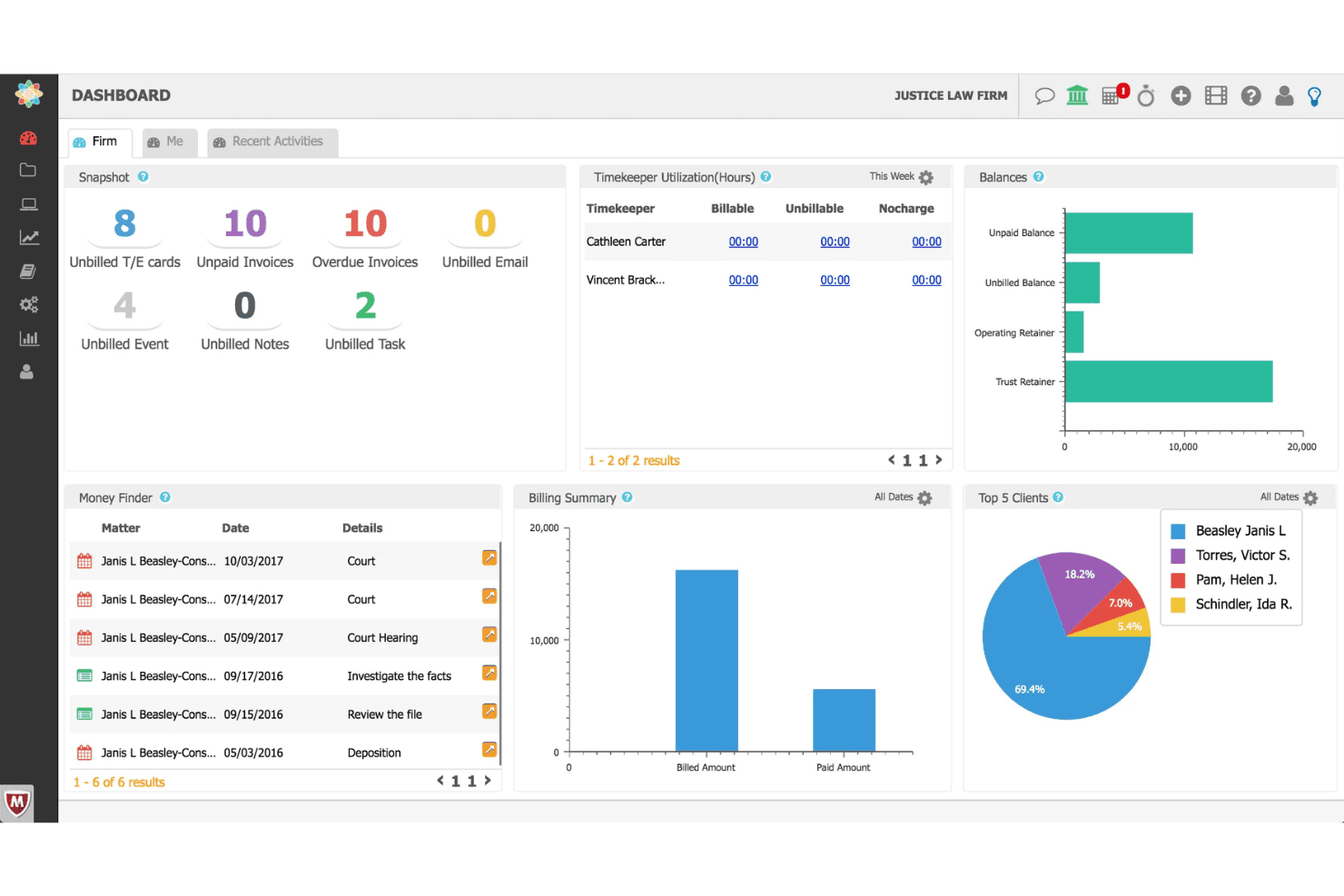
CosmoLex coordinates legal tasks, workflows, time entries, billing, and trust funds. CosmoLex is a cloud-based legal practice management platform that combines matter-centric task management, workflow automation, time tracking, billing, and trust accounting in a single system.
Who Is CosmoLex Best For?
CosmoLex is a strong fit for solo practitioners and small law firms that want billing, trust accounting, and matter task management in one place.
Why I Picked CosmoLex
CosmoLex earns its spot on my shortlist because every task lives inside a matter record, and every matter record connects directly to billing. I particularly like the Money Finder feature, which surfaces unbilled emails, meetings, and tasks so nothing slips through without a time entry attached. Pair that with dynamic due dates that cascade when milestones shift, and you get task management that's genuinely aware of both deadlines and dollars.
CosmoLex Key Features
- Board View: A Kanban-style visual interface that lets you track task progress across multiple matters at a glance.
- Trust accounting integration: Native IOLTA trust accounting with automated three-way reconciliation and overdraft prevention built directly into the platform.
- Matter templates: Pre-built workflow templates that load task sequences, deadlines, and assignments automatically for specific matter types.
- Client portal: A secure, two-way portal where clients can view invoices, make payments, exchange messages, and upload documents that auto-file into the correct matter.
CosmoLex Integrations
CosmoLex offers native integrations with Microsoft 365, Gmail, QuickBooks Online, Dropbox, Google Drive, OneDrive, NetDocuments, Box, LawPay, and Plaid, and it connects with Zapier.
Pros and Cons
Pros:
- Visual Kanban boards for task progress
- "Money Finder" helps capture missed billables
- Matter tasks and billing tightly connected
Cons:
- Report templates have export and customization limits
- No native court rules calendaring
Learn more about CosmoLex: Best for matter-linked court deadline workflows
- 7-day free trial
- From $49/user/month
Visit WebsiteCustomer Rating:4.7/5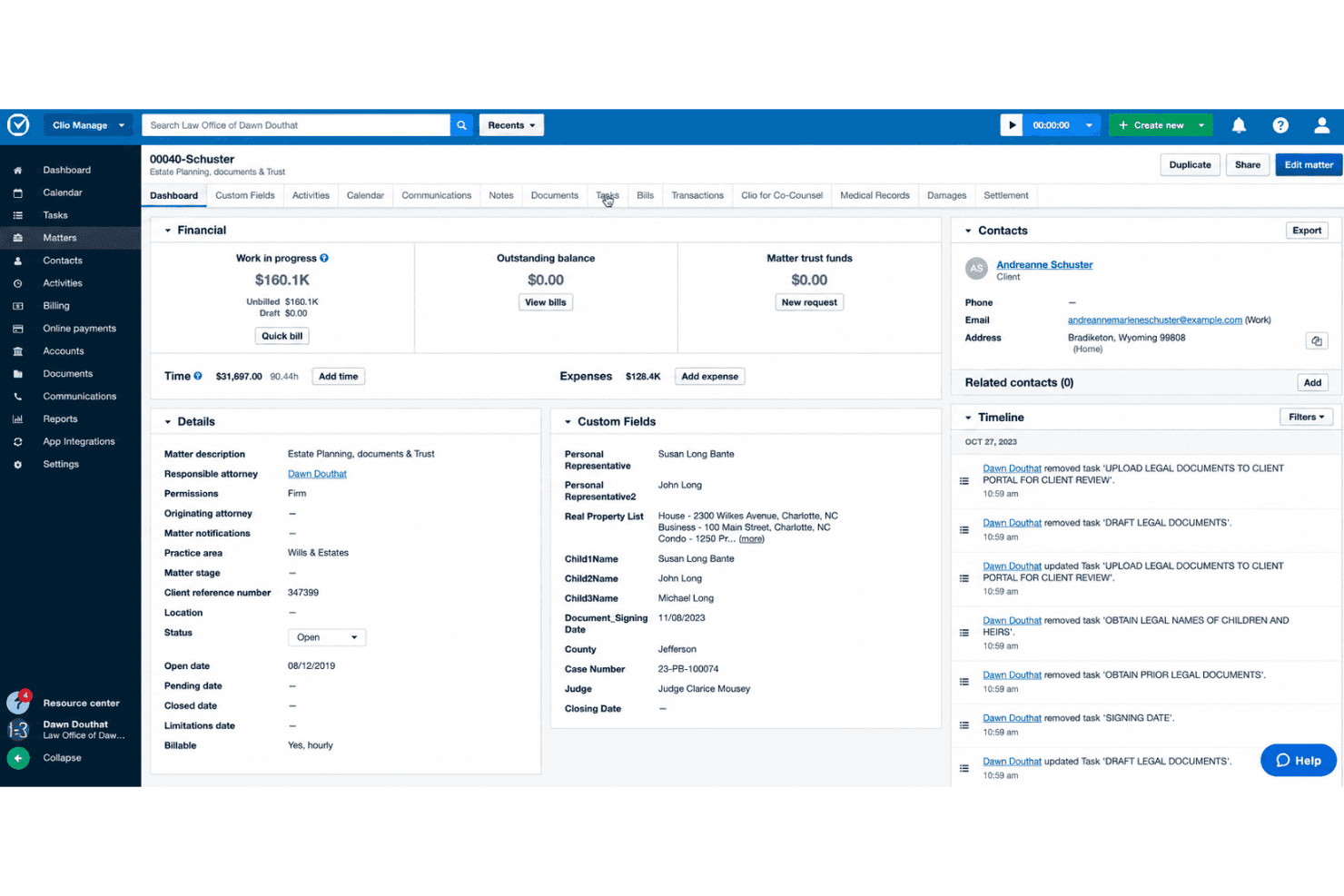
Clio Manage handles matter tasks, court deadlines, time tracking, and client collaboration. Clio Manage is a legal practice management platform built around matter-centric task management, court deadline calendaring, time tracking, and client collaboration tools for law firms.
Who Is Clio Manage Best For?
Clio Manage is a strong fit for small to mid-sized law firms that need every task, deadline, and time entry tied directly to a client matter.
Why I Picked Clio Manage
Clio Manage earns its spot on my shortlist because its entire architecture is built around matters, which means court deadlines, tasks, and time entries are never floating in a vacuum. I especially like the native Court Rules feature: select a trigger event like a filing date, and Clio automatically cascades all associated deadlines across 2,200+ U.S. jurisdictions onto your calendar. Pair that with AI-captured calendar events pulled directly from court documents, and manual deadline entry becomes the exception rather than the rule.
Clio Manage Key Features
- Task list templates: Build reusable, standardized task lists with relative and dependent deadlines that auto-assign to new matters on creation.
- Passive AI time tracking: Manage AI monitors Outlook activity, OneDrive document work, and mobile calls to auto-generate draft time entries for attorney review.
- Client portal: Clio for Clients gives clients secure, selective access to case status, documents, and communications via a dedicated web and mobile app.
- Conflict check: Search across Clio Manage and Clio Grow simultaneously to flag potential conflicts of interest across contacts, matters, and case notes.
Clio Manage Integrations
Clio Manage offers 300+ native integrations through its App Directory, including QuickBooks Online, Xero, Microsoft Outlook, Gmail, Google Calendar, Microsoft Teams, Zoom, Google Drive, Box, and Dropbox, and it connects with Zapier. An Open API is available for custom integrations.
Pros and Cons
Pros:
- Secure client portal for case status
- Passive AI time tracking from activities
- Native court deadline automation with triggers
Cons:
- Reporting depth not ideal for large firms
- Advanced workflow automation is limited
Learn more about Clio Manage: Best for billing-linked matter task workflows
- 14-day free trial
- From $39/user/month (billed annually)
Visit WebsiteCustomer Rating:4.8/5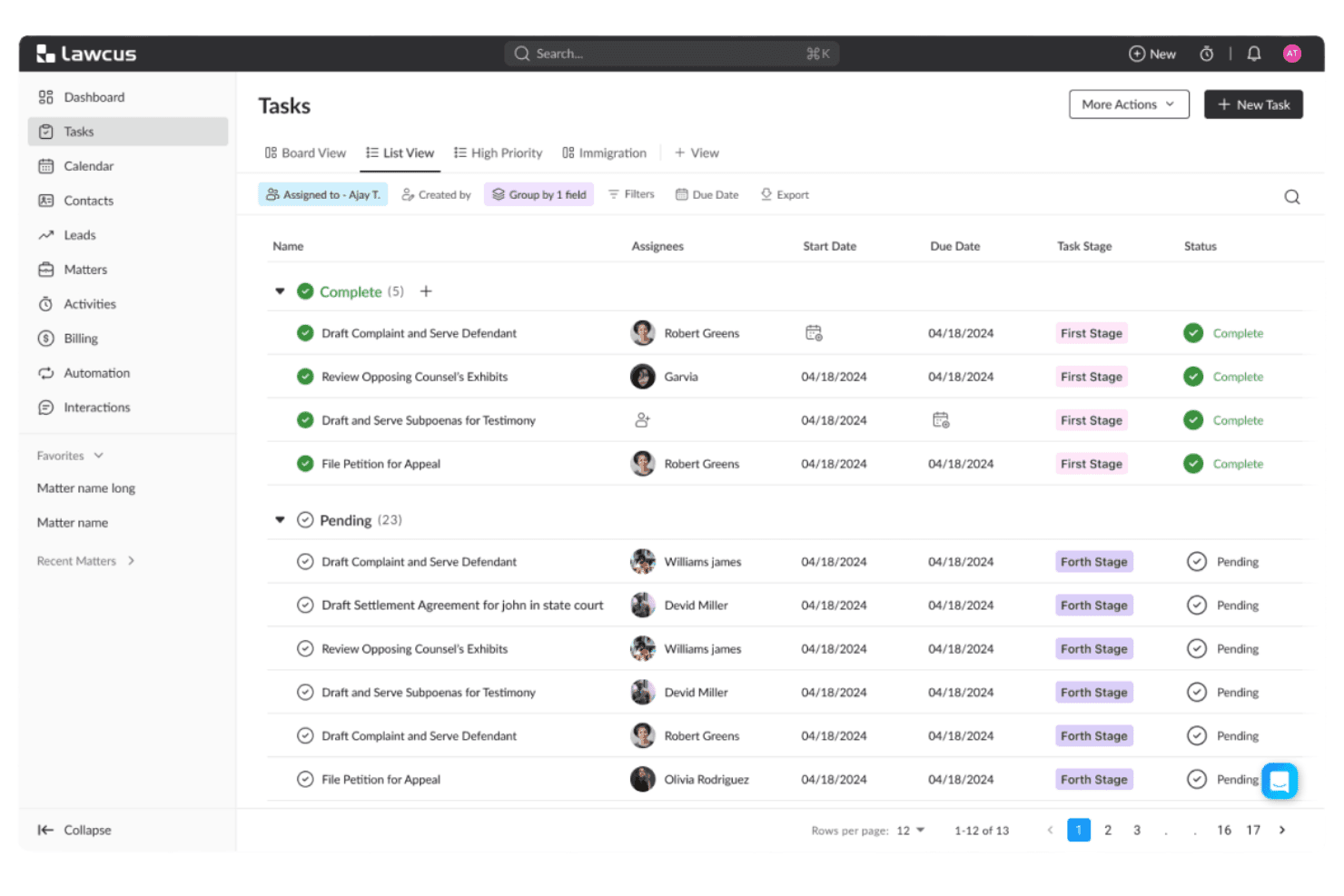
Lawcus tracks law firm tasks with Kanban pipelines and matter-linked workflows. Lawcus is a legal practice management platform that combines matter-linked task management, Kanban pipelines, workflow automation, native time tracking, trust accounting, and client intake in one system.
Who Is Lawcus Best For?
Lawcus is a strong fit for small to mid-size law firms that want task management, time tracking, and billing to live in one connected system rather than across multiple tools.
Why I Picked Lawcus
I picked Lawcus as one of the best because the connection between tasks and billing is genuinely built into its architecture, not bolted on. Every task lives inside a matter hub alongside time entries, trust balances, and invoices, so nothing falls through the cracks between work done and work billed. I especially like the native timer tied directly to matter-linked tasks, combined with LEDES UTBMS coding and trust accounting in the same system.
Lawcus Key Features
- Kanban matter pipelines: Visualize case progress by dragging matters through custom stages on a board view.
- Task dependency management: Link tasks so that changing one due date automatically cascades to dependent tasks.
- Statute of Limitations tracking: Set automated alerts on matter-level SoL deadlines to flag critical dates before they pass.
- Workflow automation builder: Create no-code workflows triggered by matter events, stage changes, or form submissions to automate task sequences.
Lawcus Integrations
Lawcus offers native integrations with QuickBooks, Xero, LawPay, Google Workspace, Microsoft 365, Dropbox, Box, Zoom, Calendly, and WiseTime, and it connects with Zapier. An open REST API is available for custom integrations.
Pros and Cons
Pros:
- Statute of limitations tracking with alerts
- Advanced workflow automation with conditional logic
- Matter-centric tasks with Kanban pipeline views
Cons:
- Conflict checking not yet a live feature
- No native court rules deadline engine
Learn more about Lawcus: Best for court deadline-driven matter workflows
- Free demo available
- Pricing upon request
Visit WebsiteCustomer Rating:4.4/5
CARET Legal lets users manage and prioritize tasks with due dates and filters. CARET Legal is a law practice management platform built around matter-centric task management, court deadline automation, time tracking, billing, and document management.
Who Is CARET Legal Best For?
CARET Legal is a strong fit for litigation-focused law firms that need court deadline automation built directly into their matter workflows.
Why I Picked CARET Legal
CARET Legal earns its spot on my shortlist because of how it handles court deadline automation. The native LawToolBox integration calculates jurisdiction-specific deadlines based on applicable rules of civil procedure, then automatically updates calendar dates when court dates shift, including weekends and court holidays. On top of that, CARET Court Rules does the same calculation natively inside the platform. When a hearing shifts, the entire chain of preparatory tasks updates with it.
CARET Legal Key Features
- CARET Capture AI: Passively identifies billable time within emails and documents as you work, surfacing time entries that might otherwise go unlogged.
- Client portal: Gives clients secure access to case documents and invoices, with built-in payment collection and two-way texting.
- Role-based permissions: Controls access across attorneys, paralegals, and administrative staff at the matter level, scoping visibility and responsibility by role.
- QuickBooks Online integration: Syncs approved invoices between CARET Legal and QuickBooks, keeping your billing and accounting records aligned without manual re-entry.
CARET Legal Integrations
CARET Legal offers native integrations with Microsoft 365, Google Workspace, Microsoft Outlook, Microsoft Word, OneDrive, NetDocuments, HotDocs, LawToolBox, Lawmatics, and QuickBooks Online, plus RMail and CARET Pay. An API is available for custom integrations, but there's no native Zapier support.
Pros and Cons
Pros:
- All tasks and documents linked to matters
- Built-in AI captures billable time from emails
- Native court deadline automation updates with rule changes
Cons:
- Mobile app lacks key task features
- Reporting customization often requires support assistance
Learn more about CARET Legal: Best for billing-linked task tracking across matters
- 10-day free trial
- From $59/user/month (billed annually)
Visit WebsiteCustomer Rating:4.4/5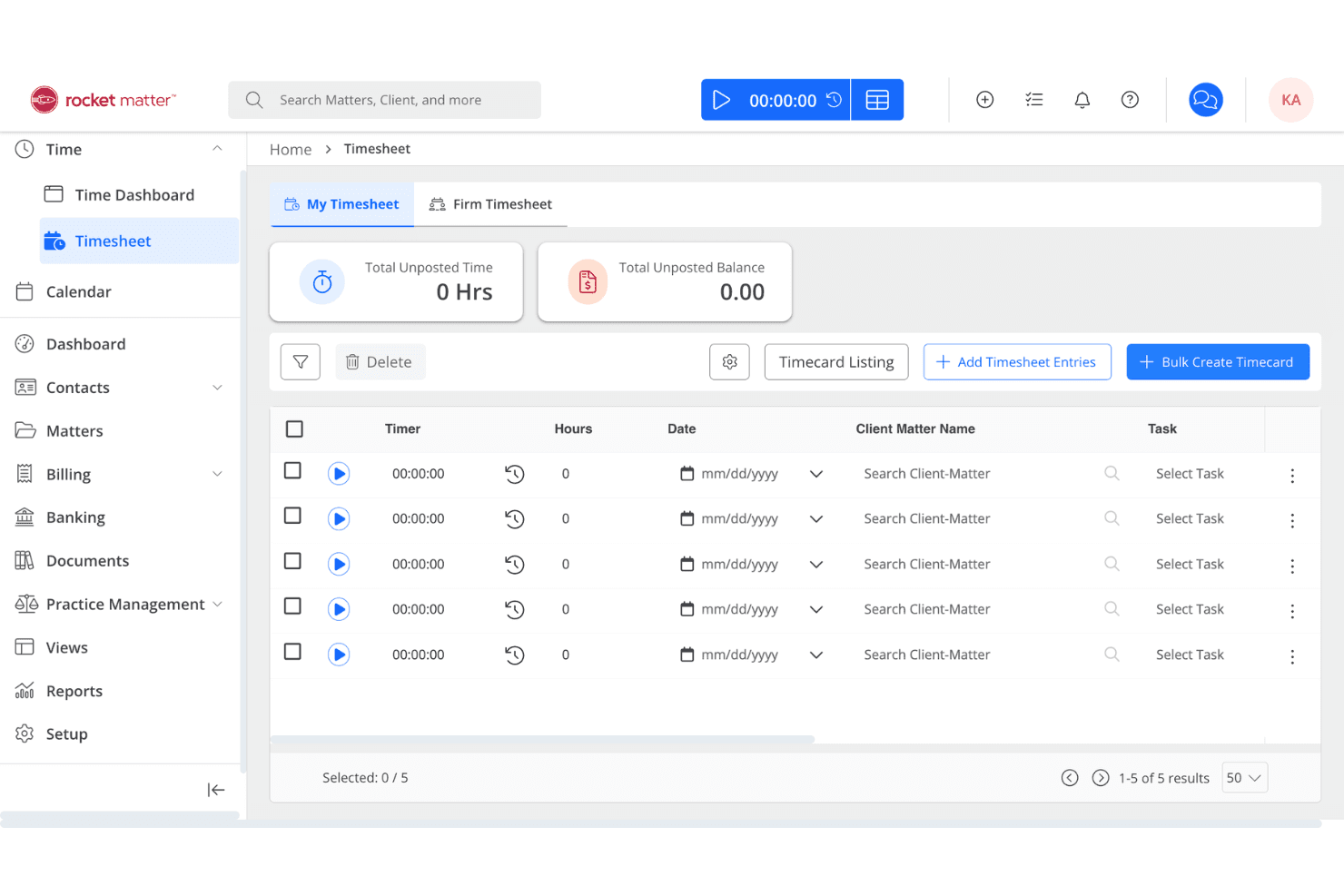
Rocket Matter centralizes law firm tasks, time tracking, billing, and trust accounting. Rocket Matter is a legal practice management platform that combines matter-centric task management, time tracking, billing, document automation, and trust accounting in a single system.
Who Is Rocket Matter Best For?
Rocket Matter is a strong fit for law firms that need task management and time tracking to work as one system, not two.
Why I Picked Rocket Matter
I picked Rocket Matter as one of the best because no other tool on this list ties task management to billing as tightly. Every task sits inside a matter, and running a timer directly on that task feeds billable time straight into invoicing without any extra steps. I also love the Bill-As-You-Work feature, which captures billable time during calendar events on behalf of all attendees, closing a gap that quietly costs firms revenue every day.
Rocket Matter Key Features
- Matter Status Board: A drag-and-drop Kanban board that tracks every active matter from intake to resolution, surfacing bottlenecks in real time.
- LawToolBox integration: Automates court deadline calculations across all 50 U.S. states and updates deadlines automatically when court rules change.
- Dependent task logic: Lets you chain tasks sequentially so downstream assignments only trigger once prerequisite steps are marked complete.
- Audit logs: Records a timestamped history of all task and communication activity across matters, supporting accountability and ethical compliance.
Rocket Matter Integrations
Rocket Matter offers native integrations with Microsoft 365 (including Outlook and OneDrive), Google Calendar, QuickBooks Online, LawToolBox, NetDocuments, Dropbox, Box, and Lawmatics, and it connects with Zapier. An API is also available for custom integrations.
Pros and Cons
Pros:
- Built-in conflict checking and client portal
- Kanban board visualizes matter progress instantly
- Time tracking feeds billable hours directly
Cons:
- Full deadline automation requires LawToolBox subscription
- Task automation less advanced than competitors
Learn more about Rocket Matter: 10Best for Salesforce-native matter task automation
Litify
- Free demo available
- From $150/user/month
Visit WebsiteCustomer Rating:4.2/5
Litify manages law firm tasks with Matter Plans, AI time capture, and reporting. Litify is a Salesforce-native legal practice management platform that combines matter-centric task management, workflow automation via Matter Plans, AI-powered time capture, and real-time reporting across cases, billing, and firm operations.
Who Is Litify Best For?
Litify is a strong fit for mid-to-large law firms that already operate on Salesforce or have the resources to support an enterprise-level implementation and configuration.
Why I Picked Litify
Litify earns its spot on my shortlist because it's built entirely on Salesforce, which means matter task management isn't a feature layered on top of a CRM—it's the foundation. I'm particularly impressed by Matter Plans, which auto-generate role-assigned task checklists the moment a matter is created or changes stage, keeping every attorney and paralegal accountable without manual setup. Pair that with Litify ACE, an AI agent that autonomously routes tasks based on live case data, and you get a task automation layer that few practice management platforms match natively.
Litify Key Features
- LitifyAI time capture: Automatically identifies billable activity from emails, calendar events, and other work items to generate suggested time entries.
- Conflict check agent: Uses fuzzy matching to flag potential conflicts across the firm's case history during intake, accounting for name variations and typos.
- No-code report builder: Lets attorneys and administrators build and schedule custom reports on matter performance, billing realization, and attorney productivity without IT support.
- Microsoft Outlook integration: Syncs emails, calendar events, and meetings bidirectionally with matter records inside Litify.
Litify Integrations
Litify is built natively on Salesforce and offers integrations with Microsoft Outlook, DocuSign, Workday, Okta, Intuit, Billables.ai, Supio, ECFX, Confido Legal, and Anthropic, plus access to the broader Salesforce AppExchange ecosystem. An API is available for custom integrations.
Pros and Cons
Pros:
- Customizable automated matter plan templates
- AI-driven time capture and billing checks
- Native matter-centric workflow for all tasks
Cons:
- Document upload speeds can be slow
- No native jurisdictional court rules engine
Learn more about Litify:
Other Law Firm Task Management Software
Here are some additional law firm task management software options that didn’t make it onto my shortlist, but are still worth checking out:
- 11MerusCaseBest for litigation deadline and workflow automation
- 12PracticePantherBest for billing-linked task tracking in one place
- 13MyCaseBest for client portal task visibility on matters
- 14LEAPBest for all-in-one matter task and trust workflows
- 15CasePeerBest for plaintiff PI case task workflows
- 16ActionstepBest for configurable matter workflow automation
- 17NeosBest for PI firms with court deadline automation
- 18Amicus AttorneyBest for decades-deep matter and deadline workflows
- 19SurePointBest for conflict checks tied to matter tasks
- 20NeostellaBest for no-code workflow automation at case scale
How I Evaluate Law Firm Task Management Software
I split my evaluation into baseline criteria every tool must meet—matter-linked tasks, deadline management, billing integration—and differentiating factors that separate genuinely legal-specific platforms from generic task tools dressed up for law firms.
Core Functionality (Table Stakes for This List)
When I'm selecting tools for my list, I rank each one on a scale from 0 (does not offer the functionality) to 5 (excels in this area) for each core functionality listed below. I then calculate the tool's total score into a percentage, using 65% as a benchmark to help assess its overall fit for the list.
- Matter-linked tasks: I check whether tasks live inside structured matter records or float as standalone to-dos with no case context.
- Deadline and due dates: Court rule calculators and cascading date adjustments matter here—I look for tools that go beyond basic due date fields.
- Task assignment and delegation: I evaluate how each platform handles reassignment, role-based routing, and workload visibility across attorneys and paralegals.
- Workflow automation and templates: Reusable task sets for common matter types like client intake or discovery are what I look for, along with trigger-based automation.
- Time tracking integration: The link between a task and a billable entry should be direct—I check whether timers connect to both the matter and the billing system natively.
- Status tracking and reporting: I look for dashboards that show task progress by matter, by user, and by deadline so partners can spot bottlenecks without digging.
Once I have a list of tools that meet the criteria, I consider what sets each platform apart.
Differentiating Factors (What Sets Vendors Apart)
Here's how I compare and contrast different vendors:
Standout Features
I check whether task completions can trigger document generation—auto-drafting engagement letters or discovery requests when a task closes keeps matters moving without manual paralegal follow-up. Email-to-task capture matters just as much; I evaluate how well Outlook or Gmail integrations convert case emails into matter-linked tasks with attachments filed correctly. Trust accounting awareness is another separator—platforms like Smokeball and CosmoLex can flag tasks when IOLTA balances drop below retainer thresholds, protecting firms from trust accounting violations.
Beyond Features
I evaluate whether a platform carries native or certified integrations with court rule providers like LawToolBox or CalendarRules, since pulling jurisdictional deadlines directly into task workflows is what separates real legal tools from generic project managers. Pricing transparency matters too—I check whether vendors split seats into timekeeper and non-timekeeper tiers, because firms budget around that distinction. I also look at onboarding support tailored to attorneys, including CLE-eligible training and data migration from legacy systems like Amicus Attorney or Time Matters, where preserving matter history during cutover can make or break adoption.
How to Choose a Law Firm Task Management Software
If you want to avoid missed deadlines, billing headaches, and lost matter context, focus your search for law firm task management software on how the system handles your day-to-day legal workflow priorities:
| If your priority is... | Look for... |
|---|---|
| If your priority is...Accurate court-driven deadline tracking | Look for...Rule-based deadline calculators with jurisdictional templates |
| If your priority is...Reducing double-entry and admin work | Look for...Deep integration with calendar, billing, and document management systems |
| If your priority is...Linkage between tasks and billed time | Look for...Matter-centric workflows that tie tasks directly to time entries |
| If your priority is...Transparency across staff and cases | Look for...Centralized dashboards for task status, assignment, and bottleneck visibility |
| If your priority is...Custom workflow for your practice area | Look for...Practice-specific task templates and automation, not generic to-do lists |
How to Vet Your Shortlist
- Test deadline accuracy: Run a practice matter through a full deadline chain using court rule templates in at least two jurisdictions.
- Verify matter-task linkage: Send two tracked emails and ensure both convert automatically to matter-linked tasks with correct attachments.
- Trial time capture: Assign a series of billable tasks and confirm time entries are auto-captured and assigned to the correct matter.
- Request integration evidence: Ask for a demo recording or case study showing live calendar and billing sync during multi-user casework.
- Decide on flexibility vs. legal focus: Choose between tools built for legal workflows (better for compliance) and generic platforms with overlays (better for broad customization).
What Is Law Firm Task Management Software?
Law firm task management software is a dedicated system designed to organize, track, and manage tasks, deadlines, and workflows that are linked to specific legal matters.
These platforms help legal teams monitor key dates, assign responsibilities, and connect each action item directly to a client file. The right software supports matter-centric task tracking, integrates with billing systems, and centralizes updates to keep your legal team aligned and accountable.
Features of Law Firm Task Management Software
When selecting law firm task management software, keep an eye out for the following key features:
- Matter-linked tasks: Tasks live within specific client or case records so you always know the context and related documents, emails, and deadlines.
- Deadline and due date management: Built-in calculators or templates let you assign and shift deadlines based on court rules or matter requirements to manage statutory timelines and avoid missed dates.
- Task assignment and delegation: Assign tasks to attorneys, paralegals, or staff, track ownership, and reassign as needed to keep work visible and manageable across your team.
- Workflow automation and templates: Create or use reusable task sets for standard processes (such as intake, discovery, or closings) and automate recurring steps to reduce admin work and ensure consistency.
- Time tracking integration: Link timer entries or manual time logs directly to tasks and matters so your billable hours are captured at the source and flow into billing.
- Status tracking and reporting: Use dashboards and reports that show task completion, overdue items, and progress by matter, person, or team for visibility into work and bottlenecks.
- Email integration: Convert emails into tasks, associate them with relevant matters, and keep communications organized within your task management environment.
- Document management integration: Attach, generate, or manage documents within tasks so your files and action items stay connected for quick reference and compliance.
- Role-based permissions: Control who can view, edit, or assign tasks based on job roles, to protect sensitive information and maintain client confidentiality.
- Audit trails and activity logs: Log task changes, completions, and updates by matter for compliance and risk tracking.
Common Law Firm Task Management Software AI Features
Beyond the standard law firm task management software features listed above, many of these solutions are incorporating AI with features like:
- AI-driven deadline risk alerts: Flags tasks and deadlines at risk based on matter history and workload trends.
- Automated document drafting: Generates draft legal documents, pleadings, and client letters from tasks or templates.
- Predictive task prioritization: Prioritizes legal tasks using urgency, dependencies, and team availability.
- Smart email-to-task conversion: Extracts actions and deadlines from emails and links new tasks to the correct matter.
- AI-powered time entry suggestions: Suggests or fills billable time entries from activity, calendars, and document edits.
- Legal research summarization: Summarize case law, statutes, and discovery files with AI and attach digests to tasks.
Benefits of Law Firm Task Management Software
Implementing law firm task management software provides several benefits for your team and your business. Here are a few you can look forward to:
Centralized matter-linked task tracking: Keep tasks, documents, and deadlines connected to the right matter for clear context.
Accurate deadline and compliance management: Calculate court deadlines automatically and adjust dates when rules or schedules change.
Efficient task assignment and visibility: Assign and track tasks across teams with dashboards showing workloads and bottlenecks.
Workflow consistency and automation: Standardize routine work with reusable task templates and trigger-based workflows.
Integrated time and billing capture: Link time entries directly to tasks and matters, ensuring billable hours are recorded accurately and flow into your billing or accounting system.
Clear status reporting and progress insights: Track completed and overdue tasks by case, person, or team through dashboards and logs.
Seamless email and document integration: Turn emails into case-linked tasks and attach files directly from the task workspace.
Costs and Pricing of Law Firm Task Management Software
Selecting law firm task management software requires an understanding of the various pricing models and plans available. Costs vary based on features, team size, add-ons, and more. The table below summarizes common plans, their average prices, and typical features included in law firm task management software solutions:
Plan Comparison Table for Law Firm Task Management Software
| Plan Type | Average Price | Common Features |
|---|---|---|
| Plan TypeFree Plan | Average Price$0 | Common FeaturesBasic matter-linked tasks, limited task assignment, basic deadline tracking, and limited storage. |
| Plan TypePersonal Plan | Average Price$20–$40/user/month | Common FeaturesMatter-linked tasks, deadline management, individual time tracking, email-to-task capture, and simple reporting. |
| Plan TypeBusiness Plan | Average Price$40–$70/user/month | Common FeaturesAdvanced workflow automation, team task assignment, billing integration, customizable templates, and standard dashboards. |
| Plan TypeEnterprise Plan | Average Price$70–$120/user/month | Common FeaturesAdvanced reporting, rule-based deadline calculators, integrations with document management, role-based permissions, and priority support. |
Law Firm Task Management Software FAQs
Here are some answers to common questions about law firm task management software:
How do I know if a law firm task management software supports court rule deadline tracking?
Check if the software has built-in court rule calculators or integrations with tools like LawToolBox or CalendarRules. These features make sure your matter deadlines adjust for jurisdictional rules and court holidays, which is essential for litigation-heavy practices.
Can law firm task management software integrate with billing and accounting systems?
Yes, most legal task management tools integrate natively with billing and accounting systems, so you can link tasks directly to time entries and invoices. If your firm uses specific systems like QuickBooks or Xero, verify native or certified integrations before choosing a platform.
What’s the difference between matter-centric and generic task management software?
Matter-centric tools organize tasks, documents, and deadlines inside structured client matter records. Generic tools treat tasks as isolated items or lists. For legal work, matter-centric systems help keep context, reduce errors, and ensure easy compliance checks across the file.
How should I test a law firm task management platform before buying?
Run a sample matter through key workflows—create a deadline chain, capture emails to tasks, assign billable work, and check time entry flows. Ask the vendor for demo recordings or case studies of live use. This approach gives you a realistic sense of how the tool fits your firm.
Are there law firm task management tools with AI features, like deadline risk alerts?
Yes, several legal task platforms offer AI-driven deadline risk alerts, automated document drafting, and predictive task prioritization. These features help you catch at-risk tasks, speed up drafting, and adjust work priorities using machine learning trained on prior matters.
How does email-to-task capture work in law firm task management software?
Most platforms offer plugins or integrations with Outlook and Gmail that let you convert emails, attachments, and even client communications directly into matter-linked tasks. This ensures every actionable item lands on the right file with the supporting documents attached.