

Programvare for klientinntak innen familierett automatiserer og organiserer alt fra innledende henvendelser til opprettelse av saksmapper, interessekonfliktsøk, innsamling av dokumenter og salæravtaler. Hvis du driver en familierettspraksis, vet du hvor raskt potensielle klienter kan falle mellom sprekkene, eller hvordan kaos i inntaksprosessen kan føre til krevende utfordringer med regelverket.
Denne veiledningen dekker den beste programvaren for klientinntak innen familierett i 2026, med fokus på verktøy som kobler sammen inntak, saksbehandling, regelverksetterlevelse, betalinger og klientopplevelse i én effektiv prosess. Jeg hjelper deg med å velge en løsning som reduserer administrasjonen, minimerer tapte muligheter og holder teamet ditt fokusert på å betjene klientene – ikke på å følge opp papirarbeid.
Hvorfor du kan stole på våre programvareanbefalinger
6,700+
Reviews
20
Industry experts
16+
Evaluation factors
14
Years
Teamet vårt har testet og anmeldt programvare siden 2012. Vi leder selv advokatfirmaer, så vi vet hvor vanskelig og hvor viktig det er å velge riktig programvare.
I denne guiden har vi vurdert verktøyene gjennom praktisk testing og uavhengig research og gitt dem poeng ut fra våre utvelgelseskriterier.
Anmeldelsene våre bygger på vår egen redaksjonelle vurdering. De er ikke et salgsargument.
Sammenligningstabell for programvare for klientinntak innen familierett
Denne sammenligningstabellen oppsummerer prisdetaljene for mine utvalgte programmer for klientinntak innen familierett:
| Tool | Best For | Trial Info | Price | ||
|---|---|---|---|---|---|
| 1 | Best for intake-to-case management in one platform | Free demo available | Pricing upon request | Website | |
| 2 | Best for native intake-to-matter sync in one platform | 10-day free trial | From $50/user/month (billed annually) | Website | |
| 3 | Best for all-in-one intake to case file sync | Not available | From $109/user/month (billed annually) | Website | |
| 4 | Best for conflict checks built into matter intake | Free demo available | Pricing upon request | Website | |
| 5 | Best for lead-to-matter intake in one platform | 10-day free trial | From $59/user/month (billed annually) | Website | |
| 6 | Best for family law intake with native matter sync | Not available | Pricing upon request | Website | |
| 7 | Best for intake-to-matter sync in family law firms | 7-day free trial | From $49/user/month (billed annually) | Website | |
| 8 | Best for AI lead scoring in family law intake | Free demo available | Pricing upon request | Website | |
| 9 | Best for sign-and-pay retainer conversion at intake | Free trial + free demo available | Pricing upon request | Website | |
| 10 | Best for intake-to-trust in one family law platform | 10-day free trial | From $49/user/month (billed annually) | Website |


Anmeldelser: Beste verktøy for klientinntak innen familierett
Nedenfor finner du mine detaljerte sammendrag av den beste programvaren for klientinntak innen familierett som kom med på kortlisten min. Anmeldelsene mine gir en grundig gjennomgang av funksjonene, integrasjonene og de beste bruksområdene for hver plattform, slik at du kan finne den som passer best for deg.
 Best for intake-to-case management in one platform
- Free demo available
- Pricing upon request
Visit WebsiteCustomer Rating:4.7/5
SmartAdvocate tracks appointments and deadlines on an office calendar view. SmartAdvocate is a legal case management platform with a built-in intake system that covers the full client lifecycle—from lead capture and conflict checking through e-signature, retainer collection, custody calendars, child support tracking, and domestic violence order management.
Who Is SmartAdvocate Best For?
SmartAdvocate is a strong fit for mid-size family law firms that want intake, case management, and client communication in a single platform rather than a stack of connected tools.
Why I Picked SmartAdvocate
SmartAdvocate earns its spot on my shortlist because it's the only tool here that functions as both the intake system and the case management platform in one. I especially like the Intake Wizard's built-in conflict-of-interest check and real-time lead scoring, which means intake staff can qualify a prospective divorce or custody client and flag conflicts without ever leaving the intake flow. From there, case data moves directly into matter records, custody calendars, and child support tracking fields without any middleware.
SmartAdvocate Key Features
- Custody calendar and visitation scheduling: Track visitation schedules, holiday rotations, and custody exchanges with automated reminders and compliance reporting.
- Domestic violence order tracking: Log orders and violation reports, calendar expiration and renewal dates, and trigger automated workflows for emergency responses.
- Role-based access controls: Set granular, permission-based access to sensitive records like financial disclosures and domestic violence documentation.
- Mass email and SMS follow-up: Send automated, multi-step communication sequences to prospects and log all messages directly to the case file.
SmartAdvocate Integrations
SmartAdvocate advertises 175+ integrations, including DocuSign, Docubee, Nintex eSign, Confido Legal, Lawmatics, Law Ruler, QuickBooks, Microsoft Outlook, CallRail, and Keap. It also supports an API for custom integrations.
Pros and Cons
Pros:
- Automated family law engagement and workflow triggers
- Custom fields for custody, support, DV documentation
- Direct intake-to-case management with no middleware
Cons:
- Conflict checks may not cover aliases or opponents
- No library of prebuilt family law intake templates
Learn more about SmartAdvocate: Best for native intake-to-matter sync in one platform
- 10-day free trial
- From $50/user/month (billed annually)
Visit WebsiteCustomer Rating:4.6/5
MyCase centralizes case timelines, tasks, and status updates in one view. MyCase is a practice management platform for law firms that bundles client intake forms, a built-in legal CRM, eSignature, secure client portal, and billing into a single system purpose-positioned for family law practitioners.
Who Is MyCase Best For?
MyCase is a strong fit for family law firms that want intake, case management, billing, and eSignature in one place rather than juggling separate tools.
Why I Picked MyCase
MyCase earns its spot on my shortlist because intake data flows directly into case files without any external sync, since MyCase is the practice management system itself. I love that when a prospective divorce client submits an intake form, that data auto-populates their matter record instantly. Native unlimited eSignature with merge fields then lets you send a retainer for signature and collect payment via LawPay in the same workflow, without leaving the platform.
MyCase Key Features
- Secure client portal: Clients get 24/7 access to case documents, invoices, and secure messaging through an encrypted portal—keeping sensitive family law communications off email.
- Workflow automation: Rules-based automation triggers follow-up tasks, document requests, and notifications based on form submissions, case milestones, or calendar events.
- Legal CRM with lead pipeline: A built-in CRM tracks prospective clients from first contact through retainer signing, including source attribution and automated text and email follow-up sequences.
- Two-way texting: A dedicated firm number supports unlimited two-way SMS with clients directly within the platform on Pro and Advanced plans.
MyCase Integrations
MyCase lists 70+ integrations, including LawPay, Google Calendar, Microsoft Outlook, Lawmatics, Smith.ai, Answering Legal, Ruby Reception, CallRail, QuickBooks Online, and Zapier. Advanced also includes an open API for custom integrations.
Pros and Cons
Pros:
- Workflow automation triggers onboarding tasks automatically
- Unlimited eSignature included with retainer payments
- Intake flows natively into case management
Cons:
- No pre-built family-law-specific intake templates
- Conflict checking is manual, not automated
 3Best for all-in-one intake to case file sync
Neos
- Not available
- From $109/user/month (billed annually)
Visit WebsiteCustomer Rating:4.4/5
Neos covers case tracking across phases, intakes, and staff assignments. Neos is a cloud-based legal case management platform that covers the full client lifecycle—from customizable intake forms and conflict checking to document automation, billing, and a secure client portal—within a single system.
Who Is Neos Best For?
Neos works best for mid-size to larger family law firms that want a single platform managing intake, case files, billing, and client communication without stitching together separate tools.
Why I Picked Neos
I picked Neos as one of the best because it's the only tool on this list where intake data and the live case file are the same record, not a sync between two systems. When a client submits an intake form, that information flows directly into the matter your team works from, with no export, import, or field mapping required. I also like that Neos Intake Pro includes built-in conflict and duplicate checking as part of that same intake workflow, so your team catches issues before a client is ever retained.
Neos Key Features
- Role-based permissions: Control which staff members can access specific cases and sensitive client data through granular role-based and individual permission settings.
- Two-way client texting: Send and receive client text messages directly within the platform, with every message automatically saved to the case file.
- DocuSign e-signature integration: Send engagement letters and documents for electronic signature directly from the case record with a single click via DocuSign.
- Lead ROI and revenue dashboards: Track lead sources, pipeline stages, and revenue attribution through built-in intake CRM reporting dashboards.
Neos Integrations
Neos has documented integrations with DocuSign, LawPay, Microsoft 365, Case Status, Hona, RingCentral, Zoom Phone, Smith.ai, and InfoTrack. It also offers an API for custom integrations and supports Zapier.
Pros and Cons
Pros:
- Two-way client texting with message archiving
- SOC 2 Type II security and per-firm isolation
- Intake data flows directly into case records
Cons:
- Minimum three-user requirement excludes solo firms
- No family law–specific intake templates
Learn more about Neos: Best for conflict checks built into matter intake
- Free demo available
- Pricing upon request
Visit WebsiteCustomer Rating:4.4/5
CARET Legal organizes matter tracking with visual analytics and status breakdowns. CARET Legal is a practice management platform built for law firms that combines client intake, conflict checking, matter management, billing, trust accounting, and a secure client portal in one system.
Who Is CARET Legal Best For?
CARET Legal is a strong fit for mid-to-large family law firms that want intake, conflict checking, matter management, and trust accounting in one platform.
Why I Picked CARET Legal
I picked CARET Legal as one of the best because its conflict checking is built directly into the matter intake workflow, not bolted on as a separate step. Before a new family law matter opens, I can run a search using Boolean operators and wildcards across active files, archived matters, closed cases, communication logs, and all party types, including opposing counsel and witnesses. That depth matters in divorce and custody work, where conflicts surface in unexpected places. The system also generates exportable PDF and CSV audit reports, so there's a clear record every time.
CARET Legal Key Features
- IOLTA-compliant trust accounting: Manage client funds in dedicated trust accounts that meet legal compliance requirements, with matter-centric billing and split billing support for divorce cases.
- Secure client portal: Give clients encrypted access to documents and invoice payments, backed by 2048-bit encryption, TLS, two-factor authentication, and SOC 2 certification.
- Workflow automation: Automatically trigger task and calendar event sequences based on matter type, helping family law teams manage court date timelines and follow-up steps.
- CARET Pay: Accept credit card, ACH, and e-check payments directly within the platform, including retainer collection through the client portal.
CARET Legal Integrations
CARET Legal has native integrations with Lawmatics, Microsoft 365, Google Workspace, QuickBooks Online, NetDocuments, OneDrive, LawToolBox, HotDocs, and CARET Pay. RMail and Microsoft plugins add electronic signatures and document workflows.
Pros and Cons
Pros:
- IOLTA-compliant trust accounting for retainers
- Secure client portal supports document sharing
- Enhanced conflict checks built into intake
Cons:
- E-signature available only through integration
- Minimum 25 users excludes solo firms
Learn more about CARET Legal: Best for lead-to-matter intake in one platform
- 10-day free trial
- From $59/user/month (billed annually)
Visit WebsiteCustomer Rating:4.4/5
Rocket Matter organizes cases, documents, and client details within a single legal practice management workspace. Rocket Matter is a legal practice management platform that combines matter management, time tracking, billing, trust accounting, e-signature, and a Legal CRM add-on built specifically for lead tracking, intake forms, and consultation scheduling.
Who Is Rocket Matter Best For?
Rocket Matter is a strong fit for family law firms that want intake, matter management, billing, and trust accounting to live in a single platform rather than across separate tools.
Why I Picked Rocket Matter
I've included Rocket Matter in my top picks because it's the only tool on this list where lead tracking, intake, and matter management live in the same native platform. When a prospect submits an intake form, that data flows directly into a matter and billing record without any third-party sync. I particularly like the Legal CRM add-on's built-in dialer and automated SMS/email follow-ups, which keep family law leads moving from first contact to signed engagement letter without manual chasing.
Rocket Matter Key Features
- Conflict checking: Search across all matters and contacts by name to identify potential conflicts of interest before opening a new family law matter.
- Native trust accounting: Track per-client trust balances, process deposits and disbursements, and run compliance reports within the same platform you use for billing.
- Split invoicing: Divide invoices across multiple parties on a single matter, which is useful for family law cases with shared billing arrangements.
- Passive time tracking: Capture billable time automatically through desktop activity monitoring via Rocket Matter Track, reducing missed hours across high-volume caseloads.
Rocket Matter Integrations
Rocket Matter offers native integrations with QuickBooks Online, Microsoft Office 365/Outlook, Google Calendar, OneDrive, Dropbox, Box, and NetDocuments. It also supports Zapier.
Pros and Cons
Pros:
- Full legal CRM tailored for law firms
- Native e-signature available on every plan
- Syncs intake data directly into matters
Cons:
- No pre-built family law intake templates
- Intake automation requires paid CRM add-on
Learn more about Rocket Matter: Best for family law intake with native matter sync
- Not available
- Pricing upon request
Visit WebsiteCustomer Rating:4.8/5
Smokeball organizes family law case details, files, and activity in one view. Smokeball is a legal practice management platform built for small law firms, combining family law–specific intake forms, lead pipeline tracking, matter management, document automation, and trust accounting in a single system.
Who Is Smokeball Best For?
Smokeball is a strong fit for small family law firms that want intake, matter management, billing, and document automation in a single platform—without stitching together multiple tools.
Why I Picked Smokeball
I've included Smokeball in my top picks because it's the only tool on this list where intake and matter management aren't just connected—they're the same system. When a prospective divorce or custody client submits a Settify pre-meeting questionnaire, Smokeball automatically creates a matter from that submission, with no manual re-entry. From there, FamilyPro lets clients enter their financial details remotely, then auto-populates mandatory financial affidavit forms directly from what they submitted.
Smokeball Key Features
- TemplateLab document automation: Access 20,000+ jurisdiction-specific legal templates—including divorce petitions, parenting plans, and custody filings—that auto-populate with existing matter data.
- LeadPro lead pipeline tracking: Manage prospective clients through a CRM-style pipeline, from first inquiry through consultation scheduling via Outlook calendar sync.
- AutoTime background time tracking: Automatically captures billable time spent in Smokeball, Microsoft Word, and Outlook, and assigns it to the correct matter without manual input.
- Archie AI matter assistant: Drafts documents, summarizes case content, and flags inconsistencies using only your firm's own matter data—never external sources.
Smokeball Integrations
Smokeball has native integrations across Microsoft 365, including Outlook, Word, and Calendar, plus DocuSign, InfoTrack, Settify, Lawmatics, Hona, LawPay, QuickBooks Online, and LawToolBox. It also supports marketplace integrations such as Smith.ai.
Pros and Cons
Pros:
- Customizable family law intake forms available
- FamilyPro models financial affidavits and property splits
- Native intake and matter sync in one platform
Cons:
- Conflict check is user-initiated, not automated
- Intake and lead features gated to higher tiers
Learn more about Smokeball: Best for intake-to-matter sync in family law firms
- 7-day free trial
- From $49/user/month (billed annually)
Visit WebsiteCustomer Rating:4.7/5
Clio Grow lets users quickly intake new matters via a guided form. Clio Grow is a legal client intake and CRM platform built for law firms, combining customizable intake forms, kanban pipeline tracking, conflict checking, consultation scheduling, e-signature, and native sync with Clio Manage for matter management.
Who Is Clio Grow Best For?
Clio Grow is the right fit for family law firms already using—or planning to use—Clio Manage as their practice management platform.
Why I Picked Clio Grow
I've included Clio Grow in my top picks because no other tool on this list closes the gap between intake and matter management as tightly. When a lead converts, all intake data, documents, and contact details sync directly into Clio Manage to open a new matter record, with no re-entry required. I also think its automated conflict checking is a genuine differentiator: it runs across both Grow and Manage simultaneously, so family law attorneys catch potential conflicts before the consultation, not after.
Clio Grow Key Features
- Kanban matter pipeline: A drag-and-drop CRM board with customizable stages lets you move leads from first contact through retainer signing in one view.
- Consultation scheduling with SMS reminders: Clients self-book based on attorney availability, with automated text reminders sent before the appointment.
- Family law intake templates: Pre-built forms for divorce, custody, paternity, and adoption cases capture case-specific fields like marriage dates and children's details.
- Grow AI lead screening: AI-powered intake qualification scores and prioritizes incoming leads automatically within the pipeline.
Clio Grow Integrations
Clio Grow has 250+ marketplace integrations through the Clio App Directory, plus native connections with Clio Manage, Dropbox Sign, Google Calendar, Outlook, QuickBooks, Xero, Google Drive, Dropbox, and Clio Payments. It also offers an open API and Zapier.
Pros and Cons
Pros:
- Family law–specific intake and document templates
- Automated conflict checking at intake stage
- Direct intake-to-matter sync with Clio Manage
Cons:
- No dedicated Clio Grow mobile app
- Advanced email drips and automations are basic
Learn more about Clio Grow: Best for AI lead scoring in family law intake
- Free demo available
- Pricing upon request
Visit WebsiteCustomer Rating:4.6/5
Lawmatics organizes family law intake leads across pipeline stages. Lawmatics is a legal intake CRM built specifically for law firms, combining customizable intake forms with conditional logic, automated conflict checking, e-signature, client portal messaging, and AI-powered lead scoring across family law matter types like divorce, custody, adoption, and mediation.
Who Is Lawmatics Best For?
Lawmatics is a strong fit for family law firms with dedicated intake staff who need to manage high lead volumes across multiple matter types like divorce, custody, and adoption.
Why I Picked Lawmatics
I picked Lawmatics as one of the best because its Merlin Qualify AI scores family law leads by case type, urgency, contested status, and retainer fit, so your intake team isn't manually triaging every divorce or custody inquiry. I also like that its conditional intake forms branch dynamically by matter type, prompting asset and children-related questions for divorce leads specifically. Layer in automated conflict checking triggered through the automations engine, and you've got a genuinely end-to-end intake workflow built for high-volume family law practice.
Lawmatics Key Features
- Kanban pipeline management: Visualize family law leads across intake stages—from inquiry through consultation booked to retainer signed—with task assignment triggered by pipeline movement.
- Multi-step SMS and email drip campaigns: Build automated nurture sequences with granular triggers, such as sending a follow-up text when a lead clicks a link but hasn't scheduled within a set window.
- Round-robin consultation scheduling: Automatically distribute incoming consultation requests across available attorneys with SMS and email appointment reminders built in.
- Source tracking and ROI reporting: Track lead origins across Google Ads, Meta, referrals, and CallRail, with custom dashboards showing consultation-to-retention conversion rates by channel.
Lawmatics Integrations
Lawmatics has 11+ documented integrations, including Clio Manage, MyCase, LEAP, Smokeball, PracticePanther, Filevine, Rocket Matter, Google Calendar, Microsoft Outlook, Zoom, and LawPay. It also offers a REST API, OAuth2, and webhooks for custom connections.
Pros and Cons
Pros:
- Secure client portal for sensitive documents
- Conditional intake forms branch by case type
- AI lead scoring for family law matters
Cons:
- Conflict checks only after matter creation
- Requires three-user minimum for all plans
Learn more about Lawmatics: Best for sign-and-pay retainer conversion at intake
- Free trial + free demo available
- Pricing upon request
Visit WebsiteCustomer Rating:4.5/5
Filevine tracks client project funds, balances, and transactions in one place. Filevine is a legal practice management platform built for law firms that combines case management, AI-powered intake via Lead Docket, native e-signature with Vinesign, a secure client portal, conflict checking, and document automation—with dedicated functionality for family law matters.
Who Is Filevine Best For?
Filevine is a strong fit for mid-sized and growing family law firms that need a single platform to manage intake, case work, e-signatures, and retainer collection together.
Why I Picked Filevine
I picked Filevine as one of the best because of how it handles the retainer conversion step that so many family law firms fumble. With Vinesign Payments, a prospective client can sign a fee agreement and pay the retainer deposit in a single step, right from their phone. Lead Docket feeds qualified leads directly into that signing workflow without any manual re-entry, so there's no gap between a client saying yes and the firm actually getting paid.
Filevine Key Features
- Conflict checker: Runs fuzzy-match searches across all organizational contacts—first, last, middle, nickname, and suffix—and exports an auditable PDF report for each check.
- Client Portal Forms: Clients complete custom intake forms directly in the secure portal, with responses mapping automatically into their matter fields.
- LeadsAI sentiment analysis: Analyzes intake communications for sentiment signals, helping intake specialists prioritize and tailor follow-up with prospective family law clients.
- Document automation: Generates jurisdiction-specific family law documents—financial affidavits, parenting plans, custody agreements—from matter data in a single click.
Filevine Integrations
Filevine has native integrations with Google Calendar, Office 365 Calendar, Microsoft Outlook, QuickBooks, and Slack. Partner integrations include Lawmatics, Smith.ai, Lex Reception, and InfoTrack, with Zapier also available.
Pros and Cons
Pros:
- Dedicated family law document automation features
- ABA-compliant conflict checks with audit trails
- Sign-and-pay retainers in one workflow
Cons:
- Custom setup often needs outside assistance
- No built-in consultation scheduling widget
Learn more about Filevine: 10Best for intake-to-trust in one family law platform
CosmoLex
- 10-day free trial
- From $49/user/month (billed annually)
Visit WebsiteCustomer Rating:4.4/5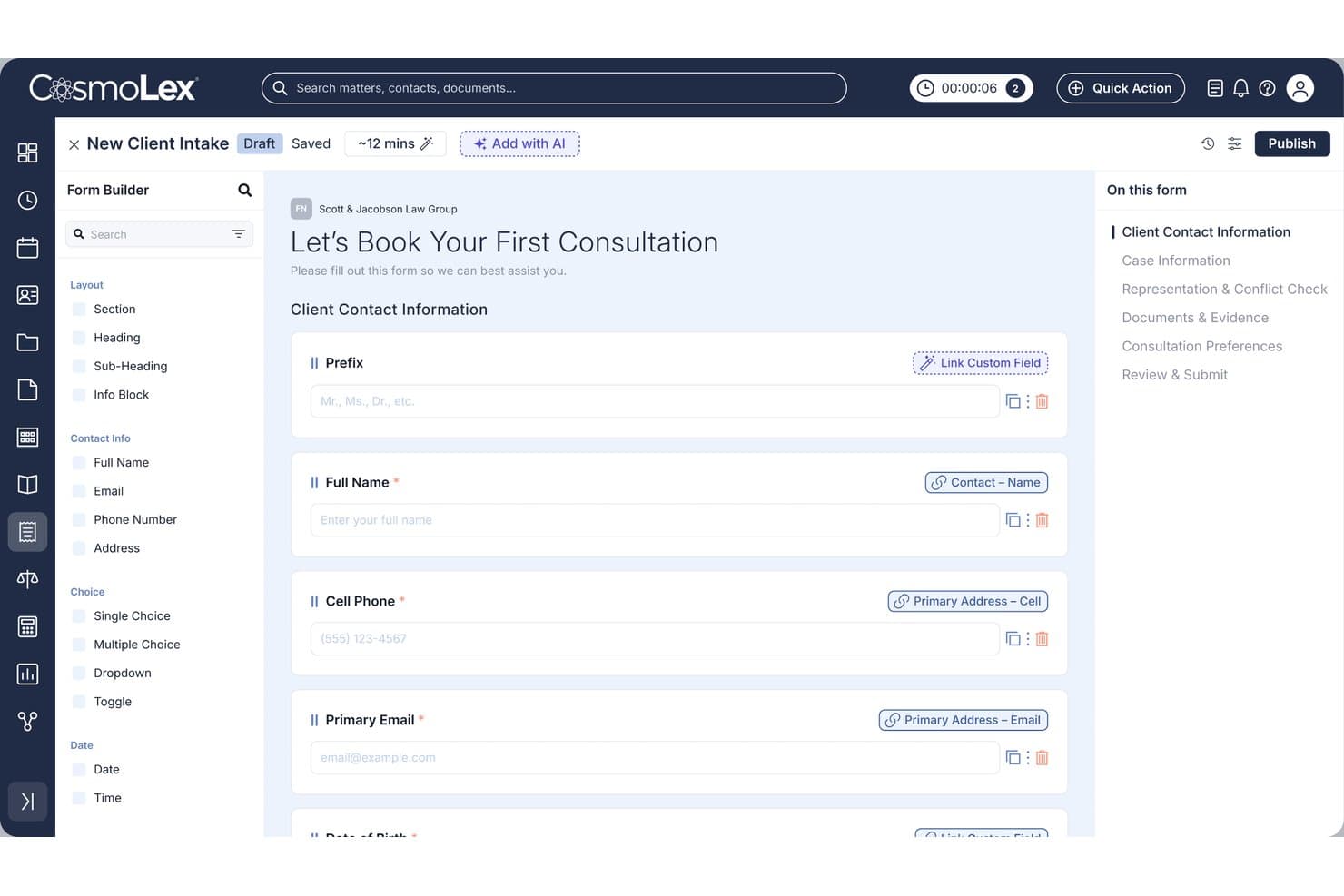
CosmoLex lets users build custom client intake forms with linked fields. CosmoLex is an all-in-one legal practice management platform that combines AI-powered client intake forms, conflict checking, e-signature, trust accounting, and a CRM pipeline built specifically for family law matters like divorce, custody, and adoption.
Who Is CosmoLex Best For?
CosmoLex is a strong fit for solo and small family law firms that want intake, e-signature, trust accounting, and matter management handled inside a single platform.
Why I Picked CosmoLex
I've included CosmoLex in my top picks because it's the only tool on this list that takes a family law case from first inquiry all the way to funded trust account without leaving the platform. The AI Intake Form Builder generates family law-specific forms from a plain-language prompt, with custom fields for separation dates, children's details, and marital status built in. Once a client signs the retainer via native LexSign, CosmoLex Pay routes the payment directly into an IOLTA-compliant trust account, no third-party tools required.
CosmoLex Key Features
- Secure client portal: Clients access a two-way messaging hub where they can upload documents, view invoices, and make payments, all linked directly to their matter record.
- Built-in SMS texting: Send and receive text messages with clients from within CosmoLex, without using a personal phone number.
- Split billing: Assign invoice portions across multiple responsible parties, with separate percentage controls for fees and expenses.
- CRM lead pipeline: Track prospects through customizable stages with automated email and SMS drip campaigns and one-click conversion to a matter record.
CosmoLex Integrations
CosmoLex has native integrations with Microsoft 365, Outlook, Google Calendar, Dropbox, OneDrive, Google Drive, NetDocuments, Box, LawPay, and QuickBooks Online. It also supports Zapier.
Pros and Cons
Pros:
- SOC 2 Type 2 secure client portal
- Intake data maps directly to matter records
- AI builds family law intake forms automatically
Cons:
- Conflict check needs manual contact setup first
- CRM and advanced intake sold as add-ons
Learn more about CosmoLex:
Annen programvare for klientinntak innen familierett
Her er noen flere alternativer som ikke kom med på kortlisten min, men som likevel er verdt å undersøke:
- 11ActionstepBest for all-in-one intake to matter management
- 12LEAPBest for family law firms with native case management
- 13AbacusLawBest for family law intake with PALS case screens
- 14Tabs3Best for firms needing conflict checks at intake
- 15PracticePantherBest for e-sign and retainer capture at intake
- 16Lead DocketBest for marketing ROI tracking in legal intake
- 17Law RulerBest for SMS-based retainer sign-off at intake
- 18Amicus AttorneyBest for family law intake with document automation
- 19IntakerBest for AI-driven family law lead nurture
How I Evaluate Legal Client Intake Software for Family Law
I split my evaluation into baseline criteria every tool must meet and differentiating factors that separate a good fit from the right one for family law.
Core Functionality (Table Stakes for This List)
When I'm selecting tools for my list, I rank each one on a scale from 0 (does not offer the functionality) to 5 (excels in this area) for each core functionality listed below. I then calculate the tool's total score into a percentage, using 65% as a benchmark to help assess its overall fit for the list.
- Custom intake forms: I evaluate whether forms support family law–specific fields like spouse details, children, and asset types with conditional logic.
- Conflict checking: Automated checks across clients, opposing parties, and related contacts matter here—manual name searches alone don't cut it.
- E-signature and engagement: I look for native or tightly integrated e-signature workflows that handle fee agreements, retainer contracts, and engagement letters.
- Secure client portal: Family law intake involves sensitive financial and personal data, so I check for encrypted portals with authentication and document upload.
- Practice management integration: I evaluate how intake data flows into matter and case records, whether through native modules or bidirectional sync with tools like Clio or Filevine.
- Lead and consultation tracking: CRM-style pipelines with consultation scheduling, follow-up automation, and reporting help firms convert inquiries into retained clients.
Once I have a list of tools that meet the criteria, I consider what sets each platform apart.
Differentiating Factors (What Sets Vendors Apart)
Here's how I compare and contrast different vendors:
Standout Features
I look for retainer and trust payment collection built into the intake flow, so a new divorce client can sign their engagement letter and fund an IOLTA-compliant trust account in one step. Automated lead nurture matters too—family law prospects often deliberate for weeks, and I check whether a tool supports multi-step email and SMS drip campaigns to keep your firm top of mind. I also evaluate referral source analytics, specifically consultation-to-retention conversion rates and per-source ROI, since most family law firms compete heavily on paid search and referral channels.
Beyond Features
I evaluate how well a vendor fits family law specifically—pre-built templates for divorce, custody, and support matters save weeks compared to configuring a generic legal CRM. Security also matters: I check for SOC 2 compliance, encryption, MFA, and audit logs, since intake captures sensitive financial and domestic violence disclosures. Integration depth is another priority. A tool like Lawmatics or Clio Grow needs bidirectional sync with your practice management system so intake data flows into matter records without duplicate entry. I also consider firm size fit—solos need flat pricing and DIY setup, while mid-size teams need role-based permissions and manager dashboards.
Slik velger du programvare for klientinntak innen familierett
Å velge riktig programvare for klientinntak innen familierett handler om å finne løsningen som passer best til prioriteringene dine – ikke bare en liste over funksjoner. Hvilke av disse er viktigst for deg?
| Hvis prioriteten din er … | Se etter … |
|---|---|
| Hvis prioriteten din er …Grundige interessekonfliktsøk | Se etter …Automatisert konfliktsøk på tvers av parter og filer |
| Hvis prioriteten din er …Arbeidsflyt fra inntak til sak | Se etter …Innebygd synkronisering av saker (ikke bare CRM-eksport) |
| Hvis prioriteten din er …Håndtering av sensitiv informasjon | Se etter …Klientportal med kryptering, MFA og revisjonslogger |
| Hvis prioriteten din er …Rask innføring og innkreving av forskudd | Se etter …Elektronisk signering av dokumenter samt betaling ved inntak |
| Hvis prioriteten din er …Langsiktig oppfølging av potensielle klienter | Se etter …Innebygde verktøy for oppfølging i flere trinn og sporing |
Slik vurderer du kortlisten din
- Be om en demonstrasjon av interessekonfliktsøket: Be leverandøren gjennomføre et konfliktsøk med dine reelle data eller eksempeldata og vise deg rapporten.
- Test synkroniseringen fra inntak til sak: Start en prøveperiode og opprett en testklient. Kontroller at alle inntaksopplysninger, filer og betalingsoppføringer overføres direkte til en ny sak.
- Kontroller sikkerhetsfunksjonene i portalen: Krev å få se dokumenterte krypteringsmetoder, en SOC 2-rapport og et eksempel på eksport av en revisjonslogg.
- Simuler arbeidsflyten for forskuddsbetaling: Last opp en eksempelavtale og en forespørsel om forskuddsbetaling for å bekrefte at klientene kan signere og betale i ett trinn.
- Avgjør hvilket kompromiss du vil inngå: Prioriter enten dyptgående, familierettsspesifikke maler og automatisering, eller bredere integrasjon med den eksisterende saksbehandlingen din – det er sjelden mulig å maksimere begge deler.
Hva er programvare for klientinntak innen familierett?
Juridisk programvare for klientinntak innen familierett er digitale plattformer som automatiserer og administrerer prosessen med å innhente klientopplysninger, gjennomføre interessekonfliktsjekker, samle inn dokumenter og håndtere honoraravtaler i familierettslige saker. Disse systemene hjelper familierettspraksiser med å organisere henvendelser og registrering av nye klienter, beskytte sensitive data og sikre en effektiv overgang fra det første klientinntaket til aktiv saksbehandling.
Funksjoner
Når du velger programvare for klientinntak innen familierett, bør du se etter følgende viktige funksjoner:
- Tilpassede inntaksskjemaer: Innhent familierettslige opplysninger som informasjon om ektefelle eller partner, barn, typer eiendeler og ønsker knyttet til omsorg. Skjemaene bruker betinget logikk for å samle inn bare det som er relevant for den enkelte saken.
- Interessekonfliktsjekk: Skann databasen automatisk etter eksisterende klienter, motparter og relaterte kontakter. Unngå mulige interessekonflikter ved å generere tydelige rapporter før du går videre.
- Arbeidsflyter for elektronisk signatur og oppdragsinngåelse: La klienter gjennomgå og signere oppdragsavtaler, honoraravtaler og oppdragsbrev på nettet. Dette effektiviserer registreringen av nye klienter og hjelper deg med å dokumentere klientens samtykke.
- Sikker klientportal: Gi klientene et passordbeskyttet område der de kan laste opp sensitive dokumenter, se gjennom kommunikasjon og følge statusen for klientinntaket. Se etter kryptering og kontroller for autentisering.
- Integrasjon med praksisadministrasjon: Sørg for at inntaksopplysninger – skjemaer, kontaktinformasjon, filer og betalinger – overføres direkte til systemet for saksadministrasjon. Unngå dobbeltregistrering av data og hold saksfilene oppdaterte.
- Oppfølging av potensielle klienter og konsultasjoner: Organiser innkommende henvendelser med CRM-baserte arbeidsflyter. Planlegg konsultasjoner, automatiser oppfølginger og følg konverteringen fra henvendelse til klient som inngår oppdrag.
- Betalingsintegrasjon ved klientinntak: Krev inn forskuddsbetalinger eller innskudd på klientkonto som en del av klientinntaksprosessen. La klientene signere og betale i ett trinn for å redusere forsinkelser før oppdraget inngås.
- Malsamling for familierettslige saker: Bruk ferdiglagde maler for klientinntak i forbindelse med skilsmisse, omsorg, adopsjon og underholdsbidrag. Spar tid på oppsett og sørg for ensartet praksis i hele teamet.
- Kommunikasjonsverktøy for flere kanaler: Administrer klientinntak via e-post, SMS og meldinger i klientportalen på ett sted. Følg med på svar og oppbevar en oversikt over alle kontaktpunkter med klienten.
- Rapportering og analyse: Mål konverteringsrater fra konsultasjon til oppdragsinngåelse, kilder til potensielle klienter og trender i inntaksvolumet. Finn ut hva som fungerer i klientinntaksprosessen, og begrunn markedsføringskostnadene.
Fordeler
Implementering av programvare for klientinntak gir flere fordeler for teamet og virksomheten din. Her er noen av fordelene du kan se frem til:
- Redusert administrativ arbeidsmengde: Automatiserte inntaksskjemaer, interessekonfliktsjekker og arbeidsflyter for elektronisk signatur eliminerer manuell dataregistrering og repetitive oppgaver ved registrering av nye klienter.
- Forbedret datasikkerhet: Krypterte klientportaler og revisjonslogger bidrar til å beskytte sensitive økonomiske og personlige opplysninger i tråd med personvernbehovene innen familierett.
- Bedre klientopplevelse: Tilpassbare inntaksskjemaer, opplasting av dokumenter på nettet og integrerte betalingsalternativer gjør prosessen praktisk for nye klienter.
- Nøyaktig interessekonfliktsjekk: Automatiserte søk markerer mulige konflikter på tvers av alle relevante parter, noe som bidrar til å opprettholde etterlevelse og profesjonelle standarder.
- Sømløs integrasjon med saksadministrasjon: Direkte overføring av data til systemet for saksadministrasjon hindrer dobbeltregistrering og bevarer detaljerte klientinntaksopplysninger.
- Bedre sporing av konverteringer: Arbeidsflyter for potensielle klienter og konsultasjoner, rapporteringsoversikter og analyser måler konverteringsrater fra henvendelse til oppdragsinngåelse og identifiserer avkastningen på markedsføringen.
- Raskere innkreving av forskuddsbetaling: Integrert elektronisk signatur og betalingsinnkreving lar klientene signere oppdragsbrev og sette inn penger på klientkonto i ett trinn.
Kostnader og priser
Valg av programvare for klientinntak innen familierett krever en forståelse av de ulike prismodellene og tilgjengelige abonnementene. Kostnadene varierer basert på funksjoner, teamstørrelse, tillegg og mer. Tabellen nedenfor oppsummerer vanlige abonnementer, gjennomsnittsprisene deres og typiske inkluderte funksjoner:
Sammenligningstabell for abonnementer for programvare for klientinntak
| Plantype | Gjennomsnittlig pris | Vanlige funksjoner |
|---|---|---|
| PlantypeGratisplan | Gjennomsnittlig pris$0 | Vanlige funksjonerGrunnleggende inntaksskjemaer, begrenset dokumentopplasting, manuell konfliktsjekk og viktig leadsporing. |
| PlantypePersonlig plan | Gjennomsnittlig pris$30-$50/bruker/måned | Vanlige funksjonerTilpassede inntaksskjemaer, støtte for e-signatur, sikker klientportal og enkel automatisering av konfliktsjekk. |
| PlantypeBedriftsplan | Gjennomsnittlig pris$60-$90/bruker/måned | Vanlige funksjonerAvanserte inntaksskjemaer, sikker klientportal, betalingsintegrasjon, synkronisering med praksisadministrasjon og rapportering. |
| PlantypeVirksomhetsplan | Gjennomsnittlig pris$100-$150/bruker/måned | Vanlige funksjonerRollebaserte tillatelser, revisjonslogger, avansert sikkerhet, tilpassede maler, automatiserte arbeidsflyter og integrasjoner. |
Vanlige spørsmål
Her er noen svar på vanlige spørsmål om programvare for klientinntak i juridisk virksomhet:
Kan jeg automatisere betalinger av forskudd og klientmidler under inntaket?
Ja, mange alternativer lar deg samle inn e-signaturer og betalinger av forskudd direkte i inntaksflyten. Det betyr at klientene dine kan gjennomgå, signere og betale oppdragsdokumenter i ett og samme trinn – noe som hjelper deg med å få klienter raskere i gang og redusere frem-og-tilbake-kommunikasjon.
Hva bør jeg spørre leverandører om når jeg velger ut programvare for klientinntak?
Be leverandørene demonstrere hvordan konfliktsjekk fungerer ved hjelp av eksempeldataene dine. Test dataoverføringen fra inntak til sak med en ekte eller simulert klient. Spør om sertifiseringer for datasikkerhet (for eksempel SOC 2), og om du kan revidere portaltilgang. Kontroller om du kan håndtere arbeidsflyter for e-signatur og betaling i én samlet prosess.
Hvordan beskytter programvare for klientinntak sensitive klientdata?
De fleste anerkjente programvareløsninger bruker kryptering, sikre portaler og flerfaktorautentisering. Se etter verktøy med revisjonslogger, rollebaserte tillatelser og samsvar med standarder som SOC 2. Ikke godta plattformer som ikke tydelig forklarer sikkerhetstiltakene sine eller gir deg dokumentasjon når du ber om det.
Er det mulig å integrere inntaksdata med plattformen min for saksbehandling?
Ja, mange løsninger for juridisk klientinntak kobler seg direkte til plattformer som Clio, Filevine eller PracticePanther. Noen synkroniserer data automatisk med sakspostene dine, mens andre krever manuell eksport eller en tilpasset integrasjon. Test alltid denne integrasjonen i en prøveperiode før du forplikter deg til en plattform.
Hva er forskjellen mellom kjernefunksjoner og særtrekk i programvare for klientinntak?
Kjernefunksjoner er grunnleggende funksjoner alle produkter bør ha, som sikre skjemaer og konfliktsjekker. Særtrekk – som innebygde betalinger, SMS-kampanjer med trinnvis utsendelse eller ferdiglagde skilsmissemaler – kan spare deg for oppsettstid og passe bedre til virksomhetens behov. Fokuser på det som faktisk forbedrer arbeidsflyten din.
Hvordan kan jeg spore konverteringsrater for leads i programvare for klientinntak?
Velg inntakssystemer med CRM-lignende salgsprosesser, sporing av alle henvendelser og detaljerte rapporteringsdashbord. Disse lar deg se hvor mange leads som blir til konsultasjoner og klienter som inngår avtale. Noen plattformer lar deg også måle markedsføringens avkastning basert på leadskilde.