

O software de calendários jurídicos resolve o problema dos prazos falhados e do caos na agenda, libertando a sua equipa para se concentrar na construção de relações mais sólidas com os clientes. Gerir datas de audiências e prazos de conformidade pode ser difícil, mas o apoio adequado pode aumentar a precisão e reduzir o stress.
Neste artigo, comparo e analiso as melhores ferramentas de calendários jurídicos para apoiar a sua decisão de compra.
Why Trust Our Software Recommendations
6,700+
Reviews
20
Industry experts
16+
Evaluation factors
14
Years
Our team has been testing and reviewing software since 2012. As legal practice leaders ourselves, we know how difficult—and important—it is to choose the right software.
For this guide, we evaluated tools using hands-on testing and independent research, scoring tools using our selection criteria.
Our reviews reflect our human editorial judgment, not a sales pitch.
Tabela de comparação de software de calendários jurídicos
Esta tabela de comparação resume os detalhes de preços das minhas principais seleções de ferramentas de monitorização de marcas:
| Tool | Best For | Trial Info | Price | ||
|---|---|---|---|---|---|
| 1 | Best for its robust set of features and client portal | 7-day free trial + free demo available | From $59/user/month | Website | |
| 2 | Best for tracking court dates alongside tasks | Free trial available | Pricing upon request | Website | |
| 3 | Best for comprehensive legal practice management | Free trial available | From £79/user/month | Website | |
| 4 | Best for large law firms seeking advanced features | Free demo available | Pricing upon request | Website | |
| 5 | Best for reviewing AI-drafted dates | 7-day free trial | From $49/user/month | Website | |
| 6 | Best for coordinating case events with clients | 10-day free trial available | From $50/user/month (billed annually) | Website | |
| 7 | Best for paralegal-led docket monitoring | Free demo available | Pricing upon request | Website | |
| 8 | Best for customization and user-specific workflows | Free demo available | Pricing upon request | Website | |
| 9 | Best for deadline access on malpractice forms | Free demo available | Pricing upon request | Website | |
| 10 | Best for cited rules and judge schedules | Free demo available | From $39/user/month (billed annually) | Website |


Análises do melhor software de calendários jurídicos
Seguem-se os meus resumos detalhados do melhor software de calendários jurídicos que entrou na minha lista restrita. As minhas análises apresentam uma análise detalhada das principais funcionalidades, vantagens e desvantagens, integrações e casos de utilização ideais de cada ferramenta, para o ajudar a encontrar a melhor opção para si.
 Best for its robust set of features and client portal
- 7-day free trial + free demo available
- From $59/user/month
Visit WebsiteCustomer Rating:4.3/5
PracticePanter's user dashboard PracticePanther is a comprehensive legal practice management tool known for its wide range of features and a very useful client portal. This tool integrates case management, billing, calendaring, and client communication into a single platform, making it ideal for firms seeking a comprehensive feature set and a dedicated client portal.
Why I Picked PracticePanther: I selected PracticePanther for its comprehensive nature and the inclusion of a client portal. Its breadth of features makes it stand apart from many other legal management tools, offering an all-encompassing solution for various legal practice needs. Therefore, I regard PracticePanther as the top choice for those who need a tool with a robust set of features and a client portal.
Standout features and integrations:
Key features include case management, time tracking, billing, and particularly a client portal. This client portal provides a unique selling point by facilitating transparent communication between lawyers and their clients.
Integrations include several third-party applications, including QuickBooks, Gmail, and Microsoft Calendar.
Pros and Cons
Pros:
- Integration with third-party applications
- Dedicated client portal
- Comprehensive feature set
Cons:
- Might be overly complex for smaller firms or solo practitioners
- Higher cost for smaller practices
- Short free trial period
Learn more about PracticePanther: 2Best for tracking court dates alongside tasks
8am
- Free trial available
- Pricing upon request
Visit WebsiteCustomer Rating:4.6/5
8am MyCase combines events, tasks, and billable time in one dashboard. 8am MyCase is a legal practice management platform that helps law firms track court dates, deadlines, and case-related tasks without relying on disconnected calendars. Its case-linked scheduling brings appointments, client communications, documents, and billing into one workspace, making it well suited for solo attorneys and growing legal teams.
Who Is 8am Best For?
8am is a strong fit for small to mid-sized law firms that want case management and calendaring in a single platform.
Why I Picked 8am
I picked 8am as one of the best because its MyCase product keeps court dates and tasks in the same view, so nothing gets siloed. I really like that you can create and monitor court dates, deadlines, and Statute of Limitations dates directly in the firm's central calendar, with color-coding and filtering to cut through the noise fast. The LawToolBox integration takes it further, pulling from a library of hundreds of court rule sets across all 50 states to auto-calculate rules-based deadlines, which removes the manual entry risk that leads to malpractice exposure.
8am Key Features
- Two-way calendar sync: Sync MyCase calendar events with Google Calendar or Outlook so updates in either system reflect across both.
- Automated reminders: Send pre-scheduled text or email notifications to keep attorneys and clients on top of upcoming dates.
- Case-linked task management: Attach tasks directly to a matter so deadlines, to-dos, and responsible parties stay connected to the right case.
- CourtDrive integration: Process federal and state eNotices with an AI docketing assistant that extracts dates from PDFs and syncs them to your calendar.
8am Integrations
Integrations include Google Calendar, Microsoft Outlook, Gmail, QuickBooks Online, LawToolBox, 8am LawPay, 8am DocketWise, Smith.ai, Intaker, and Case Status.
Pros and Cons
Pros:
- Unlimited email and pop-up reminders support deadline visibility
- Case-linked calendars keep deadlines, tasks, and matters organized
- Jurisdiction-based deadline tracking reduces manual date-calculation errors
Cons:
- External calendars only sync events assigned to that user
- Existing calendar events require manual exporting and importing
Learn more about 8am: 3Best for comprehensive legal practice management
Clio
- Free trial available
- From £79/user/month
Visit WebsiteCustomer Rating:4.7/5
Clio's dashboard Clio is a cloud-based software that offers a complete package for managing legal practices, including scheduling, client communication, case management, and billing. With its in-depth features, it allows attorneys to stay organized, managing all aspects of their practice in one place.
Why I Picked Clio: I chose Clio for its comprehensive nature and excellent user experience. While comparing various tools, it stood out for its extensive feature set, covering every aspect of legal practice management.
I believe Clio is best for comprehensive practice management because it offers more than just calendaring; it combines all elements of managing a legal practice - from communication to billing - making it an all-in-one solution.
Standout features and integrations:
Key features include task management, document management, time tracking, timekeeping, and legal billing, among others. Its robust calendaring function supports deadline calculation, event reminders, and calendar sharing.
Integrations include over 200 apps and services, including Microsoft 365, Google Workspace, Dropbox, and QuickBooks, providing a less time work environment.
Pros and Cons
Pros:
- User-friendly interface with excellent customer support
- Integration with numerous other services and apps
- Comprehensive feature set covering all aspects of legal practice
Cons:
- Mobile app features are limited compared to the desktop version
- Learning curve can be steep for non-tech-savvy users
- Advanced features require more expensive plans
Learn more about Clio: Best for large law firms seeking advanced features
- Free demo available
- Pricing upon request
Visit WebsiteCustomer Rating:4.7/5
SmartAdvocate's case dashboard SmartAdvocate is a comprehensive legal management software aimed at improving efficiency and organization in large law firms. Equipped with advanced features, it is primarily designed to handle high volumes of cases and manage complex legal proceedings, making it ideal for larger law firms.
Why I Picked SmartAdvocate: I selected SmartAdvocate for this list due to its comprehensive suite of advanced features specifically designed to cater to the needs of larger law firms. The richness of its functionality, from document automation to detailed analytics, separates it from other tools. Considering these aspects, it's clear that SmartAdvocate is a top choice for large law firms seeking advanced features.
Standout features and integrations:
Key features include document automation, robust reporting, and detailed analytics. These features provide in-depth insights into firm performance and streamline various administrative tasks.
Integrations include Microsoft Outlook, Dropbox, and QuickBooks, making it a versatile addition to any law firm's toolkit.
Pros and Cons
Pros:
- Offers a variety of software integrations
- Robust reporting and analytics capabilities
- Comprehensive suite of advanced features to streamline operations
Cons:
- Might be too advanced or complex for smaller firms or solo practitioners
- Pricing information is not readily available
- Does not provide a free tier or plan
Learn more about SmartAdvocate: Best for reviewing AI-drafted dates
- 7-day free trial
- From $49/user/month
Visit WebsiteCustomer Rating:4.7/5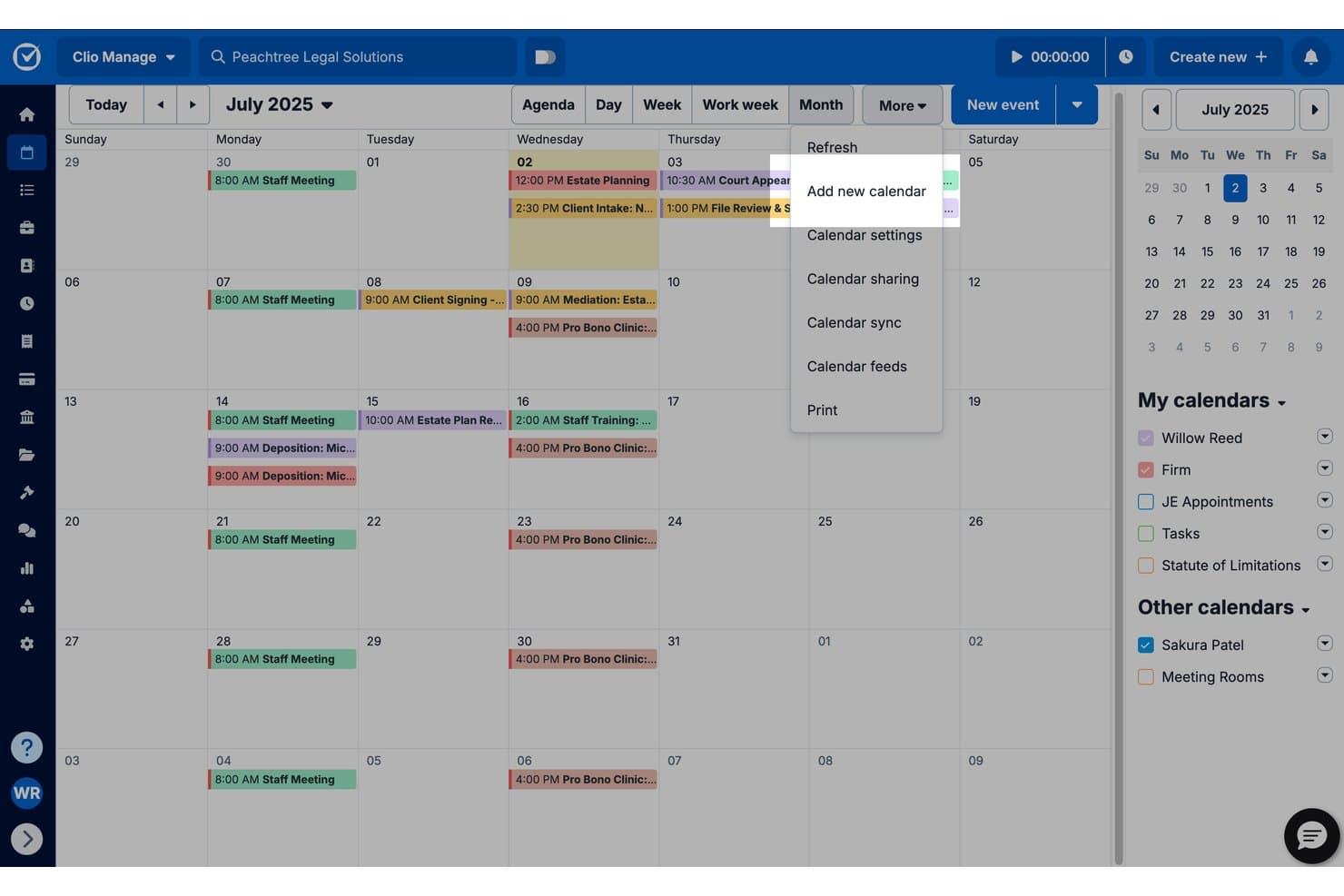
Clio Manage lets users add and manage multiple calendars in one place. Clio Manage is a practice management platform for law firms that combines legal calendaring, court rules-based deadline calculation, matter-linked scheduling, document management, time tracking, and billing in one system.
Who Is Clio Manage Best For?
Clio Manage suits solo practitioners and small law firms that want court-rule deadline calculation and AI-assisted calendar drafting inside a single practice management system.
Why I Picked Clio Manage
I've included Clio Manage in my top picks because its AI-assisted calendar drafting genuinely changes how you handle incoming court documents. When a scheduling order or court notice lands, Clio extracts the dates, drafts the calendar events, and lets you review the source text before confirming anything. That review step is what I find most valuable: you can see exactly where each date came from before it gets added to your docket.
Clio Manage Key Features
- Court Rules deadline calculation: Automatically calculates related court deadlines from a selected jurisdiction, trigger event, and trigger date across 2,200+ U.S. jurisdictions.
- Bidirectional calendar sync: Syncs events two ways with both Google Calendar and Microsoft 365, so changes made in either platform reflect in Clio instantly.
- Matter-linked calendar events: Lets you create and view calendar events directly within a matter record, with the option to record time against that matter from the event.
- Audit Log: Tracks all calendar-entry activity, including who made changes and what changed, with before-and-after details that firm admins can search, filter, and export.
Clio Manage Integrations
Clio Manage offers 300+ app integrations, including Google Calendar, Microsoft 365, Microsoft Outlook, Google Drive, Dropbox, Box, NetDocuments, QuickBooks, and Xero. It also provides an API and supports Zapier.
Pros and Cons
Pros:
- Matter-linked events support time capture
- Court-rule deadlines recalculate when trigger dates change
- AI drafts sourced dates for review
Cons:
- Reminders lack documented supervisor escalation
- No documented attorney or courtroom conflict detection
Learn more about Clio Manage: Best for coordinating case events with clients
- 10-day free trial available
- From $50/user/month (billed annually)
Visit WebsiteCustomer Rating:4.6/5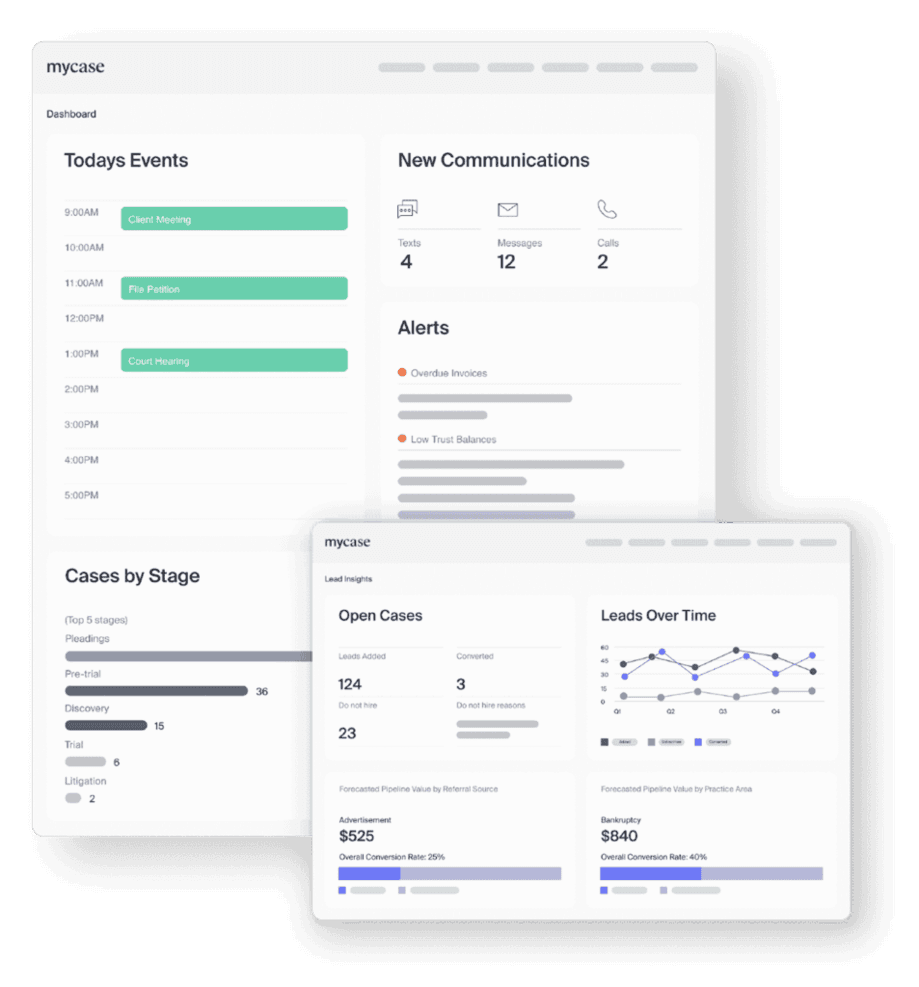
MyCase's dashboard and insights page MyCase is a legal practice management platform that combines case management, legal calendaring, client communication, and billing in a single system, with calendar sharing, two-way Google and Outlook sync, and court-rules docketing via LawToolBox integration.
Who Is MyCase Best For?
MyCase suits law firms that want to coordinate case events directly with clients through a shared portal, alongside billing and case management in one place.
Why I Picked MyCase
I picked MyCase as one of the best because of how directly it connects case events to clients through a shared portal. When a hearing date is set, clients get email notifications automatically, and any changes to the event trigger another notice, so your client is always current without a separate phone call. I also like that the firm-wide calendar lets you filter by case, event type, and statute-of-limitations dates, keeping client-linked deadlines visible alongside internal scheduling.
MyCase Key Features
- Statute-of-limitations tracking: Add SOL dates to cases with a date picker, set multiple reminders, mark dates satisfied or unsatisfied, and generate an exportable SOL report.
- Event Report: View a filterable, firm-wide report of all calendar events to identify scheduling conflicts, overlaps, and gaps across attorneys and cases.
- LawToolBox integration: Calculate court-rule-based deadlines by jurisdiction, trigger, and trigger date, then select which events to add directly to the MyCase calendar.
- Role-based user permissions: Administrators assign each user Add & Edit, View Only, or Hidden access, and control case-level access and deletion rights separately.
MyCase Integrations
MyCase lists 62 marketplace integrations, including Google Calendar, Microsoft Outlook, LawToolBox, QuickBooks, and NetDocuments, plus Zapier. It also offers an open API for custom integrations.
Pros and Cons
Pros:
- Firm-wide event reports expose scheduling overlaps
- Case-linked events keep deadlines beside matter work
- Clients receive notices when shared events change
Cons:
- Overlap checks show conflicts without alerts
- Court-rule updates require staff review
 Best for paralegal-led docket monitoring
- Free demo available
- Pricing upon request
Visit WebsiteCustomer Rating:4.8/5
CloudLex's intake management dashboard CloudLex is a legal practice management tool that primarily focuses on personal injury law. By streamlining the litigation process with its robust features, it serves as an efficient platform for personal injury attorneys.
Why I Picked CloudLex: I chose CloudLex due to its specialization in personal injury law. Most legal practice management tools attempt to cater to a wide range of legal practices, but CloudLex distinguishes itself by focusing exclusively on personal injury. This specialization makes it the ideal choice for personal injury attorneys seeking a tool designed with their unique needs in mind.
Standout features and integrations:
Key features include matter management, medical record ordering, and referral management.
Integrations include popular third-party tools like Microsoft Office 365 and Outlook enhances user convenience and productivity.
Pros and Cons
Pros:
- Integrates with popular third-party tools
- Robust set of features tailored for personal injury attorneys
- Specializes in personal injury law
Cons:
- Its focus on personal injury law might limit its usefulness for attorneys in other practice areas
- Pricing is higher compared to more general legal practice management tools
- No permanently free plan
Learn more about CloudLex: Best for customization and user-specific workflows
- Free demo available
- Pricing upon request
Visit WebsiteCustomer Rating:4.4/5
CARET Legal's tasks page CARET Legal is a comprehensive legal practice management tool designed with an emphasis on customization and individual workflow management. Its robust feature set provides a tailored experience for legal professionals, catering to their unique needs and preferences.
Why I Picked CARET Legal: In my search for legal calendaring software, CARET Legal distinguished itself with its customizable options and user-centric approach. This tailoring to the user's workflows makes it the best choice for those seeking an experience that aligns with their specific work patterns and needs.
Standout features and integrations:
Key features include matter management, time and expense tracking, and a calendar with automated reminders. These make it easy to manage tasks and deadlines effectively.
Integrations include popular office applications such as Microsoft Office and Google Workspace.
Pros and Cons
Pros:
- Seamless integration with common office applications
- Comprehensive feature set including automated reminders
- Highly customizable, catering to individual workflows
Cons:
- It may take time to fully configure the platform due to its customizable nature
- Pricing can be somewhat steep for small firms
- No permanent free tier available
Learn more about CARET Legal: 9Best for deadline access on malpractice forms
LEAP
- Free demo available
- Pricing upon request
Visit WebsiteCustomer Rating:4.3/5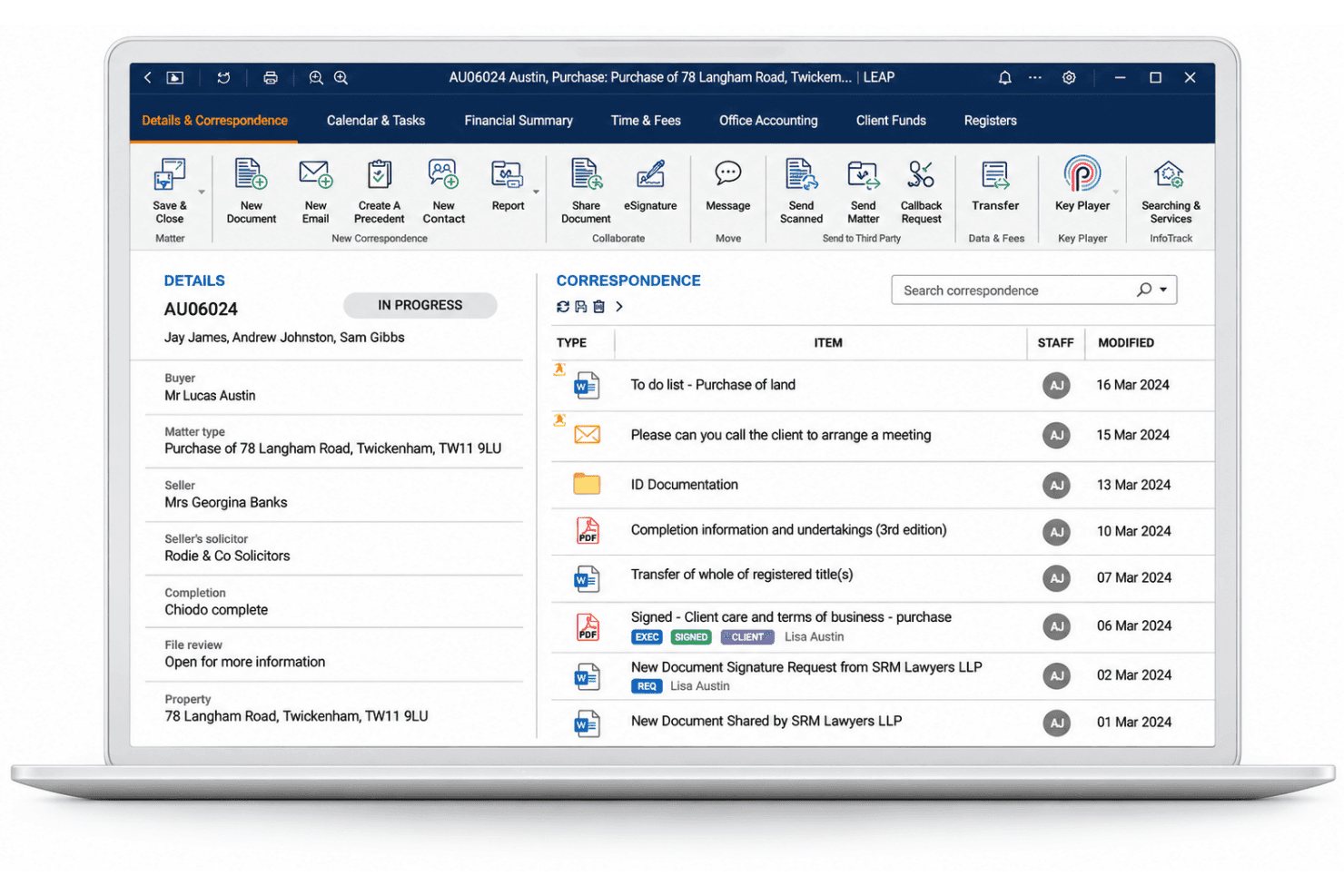
LEAP handles legal matters, document automation, client accounts, time entries, and legal aid billing. LEAP is a legal practice management platform that centralizes matter details, documents, billing, and calendaring, with rules-based deadline tracking across jurisdictions via its LawToolBox integration.
Who Is LEAP Best For?
LEAP suits paralegals and attorneys at small firms who want matter management, documents, billing, and deadline tracking in one place.
Why I Picked LEAP
I picked LEAP as one of the best because its LawToolBox integration lets attorneys and staff access and track court deadlines from multiple locations, which is exactly what many malpractice insurers ask about on their applications. When a hearing date shifts, LawToolBox automatically recalculates associated deadlines and updates them in both the matter record and Outlook. LEAP's matter history also logs every Critical Date change, noting who made it and when.
LEAP Key Features
- Rules-based deadline calculation: LawToolBox applies jurisdiction-specific court rules to a triggering date, accounting for court days, calendar days, weekends, and court holidays across all 50 states.
- Rule-change notifications: When a court rule affecting an existing deadline changes, LEAP's notifications centre alerts users directly on the matter, with options to accept, ignore, or snooze.
- Matter history log: LEAP records every change to matter details and critical dates, capturing which staff member made the change and when.
- Mobile matter access: The LEAP mobile app lets users view critical dates, tasks, and calendar entries on iOS and Android, with changes syncing automatically to desktop and web.
LEAP Integrations
LEAP offers native integrations with LawToolBox for rules-based deadlines, Microsoft 365 including Outlook for calendar sync, and InfoTrack for docket syncing. LawToolBox may cost extra; LEAP also provides an API and Zapier connectivity.
Pros and Cons
Pros:
- Mobile access shows dates and tasks
- Date changes show who made them
- Rules-based deadlines account for court holidays
Cons:
- Calendar-specific sharing permissions aren't documented
- No documented calendar-overlap conflict checks
Learn more about LEAP: Best for cited rules and judge schedules
- Free demo available
- From $39/user/month (billed annually)
Visit WebsiteCustomer Rating:4.1/5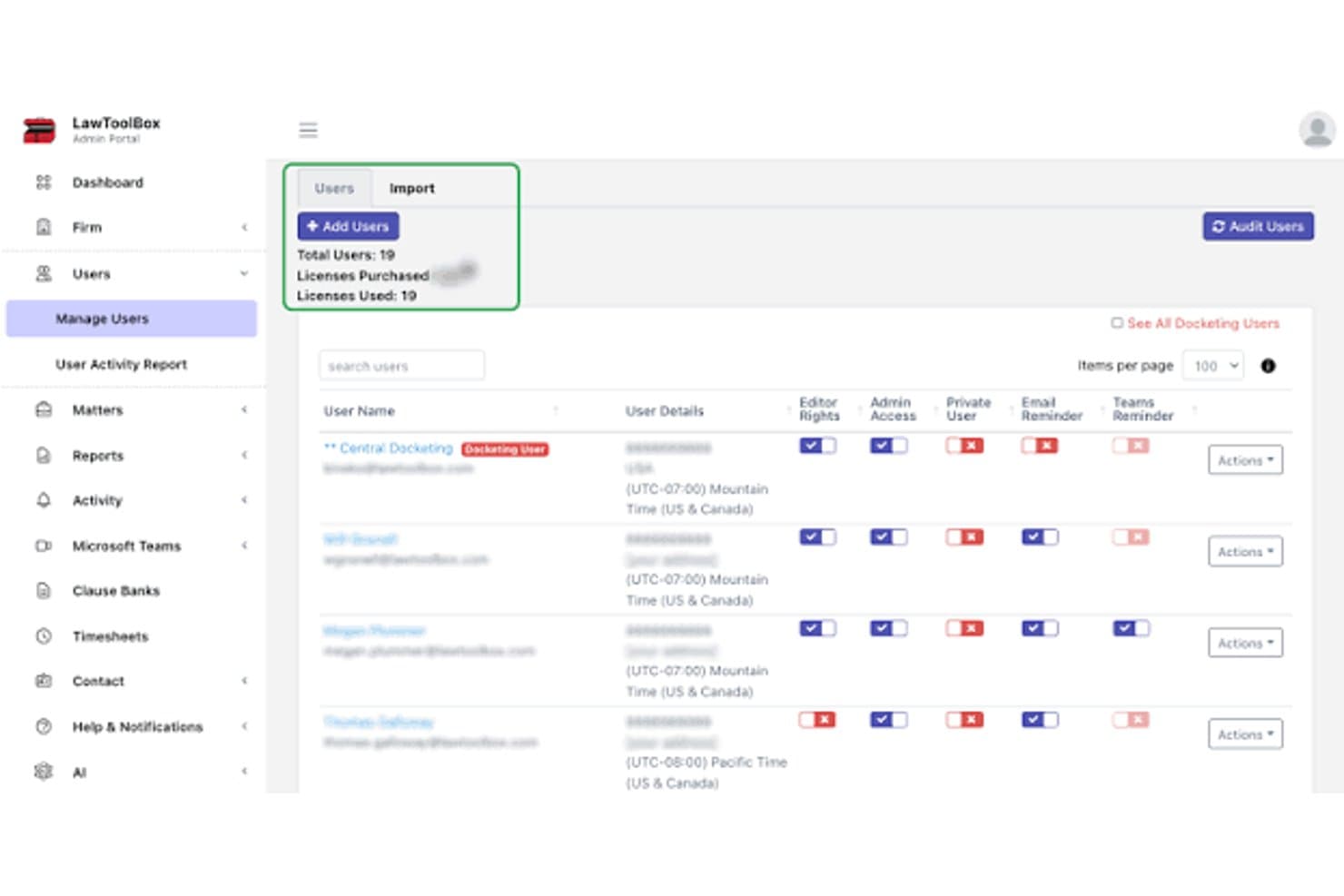
LawToolBox admin dashboard for managing legal calendaring users, permissions, and reminders LawToolBox is a legal docketing and calendaring platform that calculates rules-based court deadlines, syncs them to Outlook, Google Calendar, and Apple Calendar, and organizes matter workflows within Microsoft 365.
Who Is LawToolBox Best For?
LawToolBox is a strong fit for docketing clerks, paralegals, and legal administrators at mid-sized law firms that run their practice inside Microsoft 365.
Why I Picked LawToolBox
LawToolBox earns its spot on my shortlist because of how seriously it treats rule sourcing: every calculated deadline includes a citation to the governing rule or statute, with links to official court publications so I can verify the underlying authority myself. I also like that it surfaces judge-specific scheduling order templates, letting me build reusable deadline sets directly from a judge's own calendar preferences. Its in-house legal team monitors source authorities daily and validates substantive changes before they go live, which gives me more confidence than tools that rely solely on automated scraping.
LawToolBox Key Features
- M365 matter workspace: Creates a dedicated Microsoft 365 workspace for each matter, including a shared inbox, SharePoint document folders, group calendar, and OneNote notebook.
- Deadline-linked document attachments: Lets users attach documents and links directly to calendar events and jump back to LawToolBox from any Outlook deadline entry.
- Multi-user sync controls: Adds matter users as synced or no-sync participants, giving administrators control over which team members receive deadlines in their Outlook calendars.
- Custom reminder intervals: Supports configurable reminders from 0–100 days ahead, alongside built-in alerts at one, four, seven, 14, and 30 days before key deadlines.
LawToolBox Integrations
LawToolBox offers native integrations across the Microsoft ecosystem, including Outlook, Teams, SharePoint, Planner, OneNote, and Word. It also integrates with Google Calendar, Apple Calendar, NetDocuments, iManage, and listed practice-management platforms, with a LawToolBox Deadline API for custom integrations.
Pros and Cons
Pros:
- Automatic calculations save docketing time
- Judge-specific templates reuse scheduling preferences
- Cited rules support deadline verification
Cons:
- No SMS or escalating supervisor alerts
- Users report calculation errors and disappearing deadlines
Learn more about LawToolBox:
How I Evaluate Legal Calendaring Software
I split my evaluation into three parts, giving the most weight to core functionality: calculate jurisdiction-based deadlines from case events and send escalating reminders. Next, I look for features like mobile deadline access and audit trails. Finally, I consider guided migration, onboarding, and pricing that fits the firm’s size.
Core Functionality (Table Stakes For This List)
When I'm selecting tools for my list, I score each one on a scale from 0 (does not offer the functionality) to 5 (excels in this area) for each core functionality listed below. I then convert the total into a percentage to help assess each tool's overall fit, with extra weight on any functionalities I’ve deemed essential.
- Rules-Based Docketing (Essential): I check whether triggering events produce jurisdiction- and case-specific deadlines, including filing and response dates, with rule updates clearly documented.
- Deadline Alerts (Essential): I look for configurable advance alerts, repeat notices, and escalation to another team member when an attorney hasn’t acknowledged a filing deadline.
- Calendar Sharing: I assess whether attorneys and staff can share calendars and sync entries with external calendars without creating duplicate events.
- Matter Linking: I check that calendar entries connect directly to matters, so staff can see the related case when reviewing a hearing or filing date.
- Conflict Checking: I look for warnings when new dates overlap with an attorney’s schedule, another hearing, or a shared resource such as a courtroom.
- Role Permissions: I evaluate whether administrators can set appropriate viewing and editing access for attorneys, paralegals, and support staff.
Once I have a list of tools that meet the criteria, I consider what sets each platform apart.
Differentiating Factors (What Sets Vendors Apart)
Here's how I compare and contrast different vendors:
Standout Features
I check whether deadline entries log who created, modified, or completed each event—audit trails like these matter when defending a malpractice claim or running quality reviews. I also evaluate how deeply a tool connects with case management and billing platforms, since bidirectional sync prevents duplicate data entry when a hearing date shifts. Delegation workflows are another separator: when an attorney is unexpectedly out, I look for tools that let staff reassign docketed deadlines without losing the change history.
Beyond Features
I evaluate how often a vendor updates its court rule sets, since a lagging update can mean a missed deadline and direct malpractice exposure. I also check whether major legal malpractice insurers recognize the tool's rules engine—some carriers offer premium discounts to firms using approved docketing software, which matters most for solo and small firm attorneys weighing total cost. Finally, I look at migration support, because moving years of docket entries from a legacy system without guided onboarding can stall adoption for firms with limited IT staff.
Como escolher software de calendários jurídicos
É fácil ficar perdido entre listas extensas de funcionalidades e estruturas de preços complexas. Para o ajudar a manter o foco enquanto percorre o seu processo único de seleção de software, segue-se uma lista de fatores a ter em conta:
| Fator | O que considerar |
|---|---|
| FatorEscalabilidade | O que considerarO software pode crescer juntamente com a sua empresa? Considere o tamanho futuro da equipa e o volume de processos. Procure ferramentas que ofereçam planos escaláveis e consigam responder a uma procura crescente sem problemas. |
| FatorIntegrações | O que considerarIntegra-se com as suas ferramentas atuais, como o email e os sistemas de gestão documental? Verifique a compatibilidade para evitar perturbações no fluxo de trabalho. |
| FatorPersonalização | O que considerarPode adaptar o software às necessidades e aos processos específicos da sua empresa? Avalie o nível de personalização disponível para fluxos de trabalho e relatórios. |
| FatorFacilidade de utilização | O que considerarO software é fácil de utilizar por toda a sua equipa? Considere a curva de aprendizagem e procure interfaces intuitivas que exijam uma formação mínima. |
| FatorImplementação e integração inicial | O que considerarQuanto tempo será necessário para começar a utilizar o sistema? Avalie os recursos necessários para a configuração e a formação, incluindo a disponibilidade de apoio durante esta fase. |
| FatorCusto | O que considerarEnquadra-se no seu orçamento? Compare os planos de preços e o que está incluído. Tenha atenção às taxas ocultas e aos custos de funcionalidades ou utilizadores adicionais. |
| FatorMedidas de segurança | O que considerarComo protege o software os dados sensíveis dos clientes? Certifique-se de que cumpre as normas do setor e oferece encriptação e controlos de acesso. |
| FatorRequisitos de conformidade | O que considerarA ferramenta cumpre os requisitos legais específicos da sua jurisdição? Verifique o cumprimento das leis e dos regulamentos relevantes para evitar penalizações. |
O que é o software de calendários jurídicos?
O software de gestão de calendários jurídicos é uma ferramenta que acompanha automaticamente prazos, datas judiciais e compromissos para escritórios de advocacia. É utilizado por advogados, paralegais e administradores jurídicos para reduzir o erro humano, evitar prazos perdidos e garantir o cumprimento das regras dos tribunais.
Funcionalidades
Ao selecionar um software de gestão de calendários jurídicos, procure as seguintes funcionalidades principais:
- Acompanhamento de prazos: Acompanhe e atualize automaticamente datas judiciais importantes para evitar prazos perdidos e garantir o cumprimento das obrigações.
- Lembretes automatizados: Envie alertas e notificações sobre próximos compromissos e prazos para manter todos informados.
- Integração com calendários: Sincronize com aplicações de calendário existentes, como o Google Calendar ou o Outlook, para obter uma visão unificada dos horários.
- Relatórios personalizáveis: Gere relatórios detalhados adaptados às necessidades do seu escritório para melhorar a tomada de decisões e a manutenção de registos.
- Acesso móvel: Aceda ao seu calendário em qualquer lugar através de aplicações móveis, garantindo que está sempre ligado.
- Portal do cliente: Proporcione aos clientes acesso seguro aos seus horários e atualizações, melhorando a comunicação e a transparência.
- Interface intuitiva: Garanta uma utilização fácil com um design intuitivo que exige um mínimo de formação para a sua equipa.
- Armazenamento seguro de dados: Proteja as informações sensíveis dos clientes com encriptação e controlos de acesso para manter a confidencialidade.
- Ferramentas de conformidade: Garanta que as suas práticas de agendamento cumprem os regulamentos e as normas legais específicos da sua jurisdição.
- Integração com ferramentas de gestão do escritório: Ligue-se a outro software jurídico para obter um fluxo de trabalho integrado entre diferentes plataformas.
Benefícios
A implementação de um software de gestão de calendários jurídicos proporciona vários benefícios à sua equipa e à sua empresa. Eis alguns dos benefícios que pode esperar:
- Melhor organização: Mantenha os horários e os prazos da sua equipa num só lugar, reduzindo o caos e melhorando a eficiência.
- Maior conformidade: Acompanhe automaticamente os prazos judiciais para garantir o cumprimento de todos os requisitos legais e evitar penalizações.
- Comunicação melhorada: Utilize lembretes automatizados e portais do cliente para manter todos informados e melhorar a transparência.
- Poupança de tempo: Reduza o tempo dedicado a tarefas manuais de agendamento através de funcionalidades e integrações automatizadas.
- Redução de erros: Minimize conflitos de agendamento e prazos perdidos com um acompanhamento e notificações precisos.
- Melhor tomada de decisões: Utilize relatórios personalizáveis para obter informações sobre padrões de agendamento e afetação de recursos.
- Flexibilidade: Aceda ao seu calendário a partir de qualquer lugar através de aplicações móveis, garantindo que está sempre preparado e ligado.
Custos e preços
A seleção de um software de gestão de calendários jurídicos exige uma compreensão dos vários modelos de preços e planos disponíveis. Para escritórios com orçamentos limitados, as opções gratuitas de software de gestão de calendários jurídicos podem disponibilizar as funcionalidades essenciais de que necessitam. Os custos variam consoante as funcionalidades, a dimensão da equipa, os complementos e outros fatores.
A tabela abaixo resume os planos comuns, os respetivos preços médios e as funcionalidades normalmente incluídas nas soluções de software de gestão de calendários jurídicos:
Tabela de comparação de planos de software de gestão de calendários jurídicos
| Tipo de plano | Preço médio | Funcionalidades comuns |
|---|---|---|
| Tipo de planoPlano gratuito | Preço médio$0 | Funcionalidades comunsAgendamento básico, sincronização de calendários e lembretes por e-mail. |
| Tipo de planoPlano pessoal | Preço médio$5-$25/utilizador/mês | Funcionalidades comunsAgendamento avançado, acesso móvel e integrações limitadas. |
| Tipo de planoPlano empresarial | Preço médio$30-$75/utilizador/mês | Funcionalidades comunsColaboração entre equipas, portais do cliente e relatórios personalizáveis. |
| Tipo de planoPlano empresarial de grande escala | Preço médio$80-$150/utilizador/mês | Funcionalidades comunsIntegrações completas, ferramentas de conformidade e suporte dedicado. |
Perguntas frequentes sobre software de gestão de calendários jurídicos
Eis algumas respostas a perguntas comuns sobre software de gestão de calendários jurídicos:
Como escolho o software de gestão de calendários jurídicos adequado?
Comece por avaliar as necessidades específicas do seu escritório, como a dimensão da sua equipa e a complexidade das suas tarefas de agendamento. Procure software que se integre com as ferramentas que utiliza atualmente e que ofereça as funcionalidades de que mais necessita. Considere experimentar versões de avaliação gratuitas para perceber qual se adapta melhor ao seu fluxo de trabalho.
É difícil passar da gestão manual de calendários para um software?
Não, não tem de ser difícil. Muitas ferramentas de gestão de calendários jurídicos oferecem apoio à integração e recursos como vídeos de formação e guias interativos. Comece por transferir os dados essenciais e familiarize gradualmente a sua equipa com o novo sistema. Utilize o apoio disponível para esclarecer quaisquer dúvidas durante a transição.
O software de gestão de calendários jurídicos consegue lidar com compromissos recorrentes?
Sim, a maioria dos softwares de gestão de calendários jurídicos permite gerir compromissos recorrentes. Pode configurar reuniões ou lembretes regulares para se repetirem diariamente, semanalmente ou mensalmente. Esta funcionalidade ajuda a manter a consistência no agendamento e garante que nunca perde tarefas de rotina ou eventos recorrentes importantes.
O software de gestão de calendários jurídicos funciona offline?
Algumas ferramentas de gestão de calendários jurídicos oferecem acesso offline, mas isso varia consoante o fornecedor. Se a funcionalidade offline for importante, verifique se o software dispõe de uma aplicação móvel ou versão para computador que lhe permita consultar e editar o calendário sem ligação à Internet. Isto é útil quando está em deslocação ou em zonas com conectividade limitada.
Em que difere o software de gestão de calendários jurídicos das ferramentas comuns de agendamento?
Ao contrário das aplicações de calendário gerais, as ferramentas de gestão de calendários jurídicos têm em conta as regras dos tribunais, os prazos de apresentação e os prazos específicos de cada jurisdição, automatizando os cálculos de datas em conformidade com os procedimentos legais.
Existem opções de ferramentas gratuitas?
Sim, algumas ferramentas de gestão de calendários jurídicos oferecem uma versão gratuita ou um período de avaliação gratuito. No entanto, estas opções gratuitas podem ter funcionalidades limitadas ou restrições de utilização. Verifique sempre os detalhes do que é disponibilizado no plano gratuito.