

10 Best Casefleet Alternatives in 2026

Best Casefleet Alternatives Shortlist


A strong Casefleet alternative gives you reliable case chronology, fact management, and seamless document linking—without sacrificing ease of use. If you’re looking for Casefleet alternatives, you probably want tools that help you organize evidence, map timelines, and collaborate with your team on complex cases.
Choosing the right platform can help you navigate growing discovery challenges, work faster, and manage case details with confidence. I’ll guide you through trusted Casefleet alternatives so you can find a solution that matches your legal matter’s needs, workflow, and tech stack.
What Is Casefleet?
Casefleet is a cloud-based legal case management tool focused on fact chronology, document linking, and evidence organization. Read our full Casefleet review for a deeper look. Legal professionals use Casefleet to build timelines, connect facts to supporting documents, and manage complex litigation details in one searchable workspace. The software is popular among law firms, legal operations teams, and investigators who need to streamline discovery, deposition prep, and collaborative case analysis.
Best Casefleet Alternative Summary
This comparison chart summarizes pricing details for my Casefleet alternative to help you find the best one for your budget and business needs.
| Tool | Best For | Trial Info | Price | ||
|---|---|---|---|---|---|
| 1 | Best for secure cloud-based document review | Free demo available | Pricing upon request | Website | |
| 2 | Best for customizable legal workflows | Free trial available | Pricing upon request | Website | |
| 3 | Best for large-scale data and evidence management | Not available | Pricing upon request | Website | |
| 4 | Best for visual legal timeline presentations | Free demo available | From $59/user/month | Website | |
| 5 | Best for hearing and deposition preparation tools | Free demo available | Pricing upon request | Website | |
| 6 | Best for personal injury matter management | Free demo available | From $79/user/month | Website | |
| 7 | Best for e-discovery and case preparation | Not available | Pricing upon request | Website | |
| 8 | Best for collaborative case analysis workflows | Free demo available | Pricing upon request | Website | |
| 9 | Best for linking transcripts to evidence | Free demo available | Pricing upon request | Website | |
| 10 | Best for user-friendly chronology creation | Free trial available | From $45/user/month | Website |
Why You Can Trust Us
We’ve been testing and reviewing legal software since 2023. As legal practice leaders ourselves, we know how critical and difficult it is to make the right decision when selecting software.
We invest in deep research to help our audience make better software purchasing decisions. We’ve tested more than 2,000 tools for different legal practice use cases and written over 1,000 comprehensive software reviews. Learn how we stay transparent & our software review methodology.
-

CARET Legal
Visit WebsiteThis is an aggregated rating for this tool including ratings from Crozdesk users and ratings from other sites.4.4 -
Redactable
Visit WebsiteThis is an aggregated rating for this tool including ratings from Crozdesk users and ratings from other sites.4.8 -
Insightful
Visit WebsiteThis is an aggregated rating for this tool including ratings from Crozdesk users and ratings from other sites.4.8





Best Casefleet Alternatives Reviews
Below are my detailed summaries of the best Casefleet alternatives that made it onto my shortlist. My reviews offer a detailed look at the features, best use cases, and capabilities of each platform to help you find the best one for you.

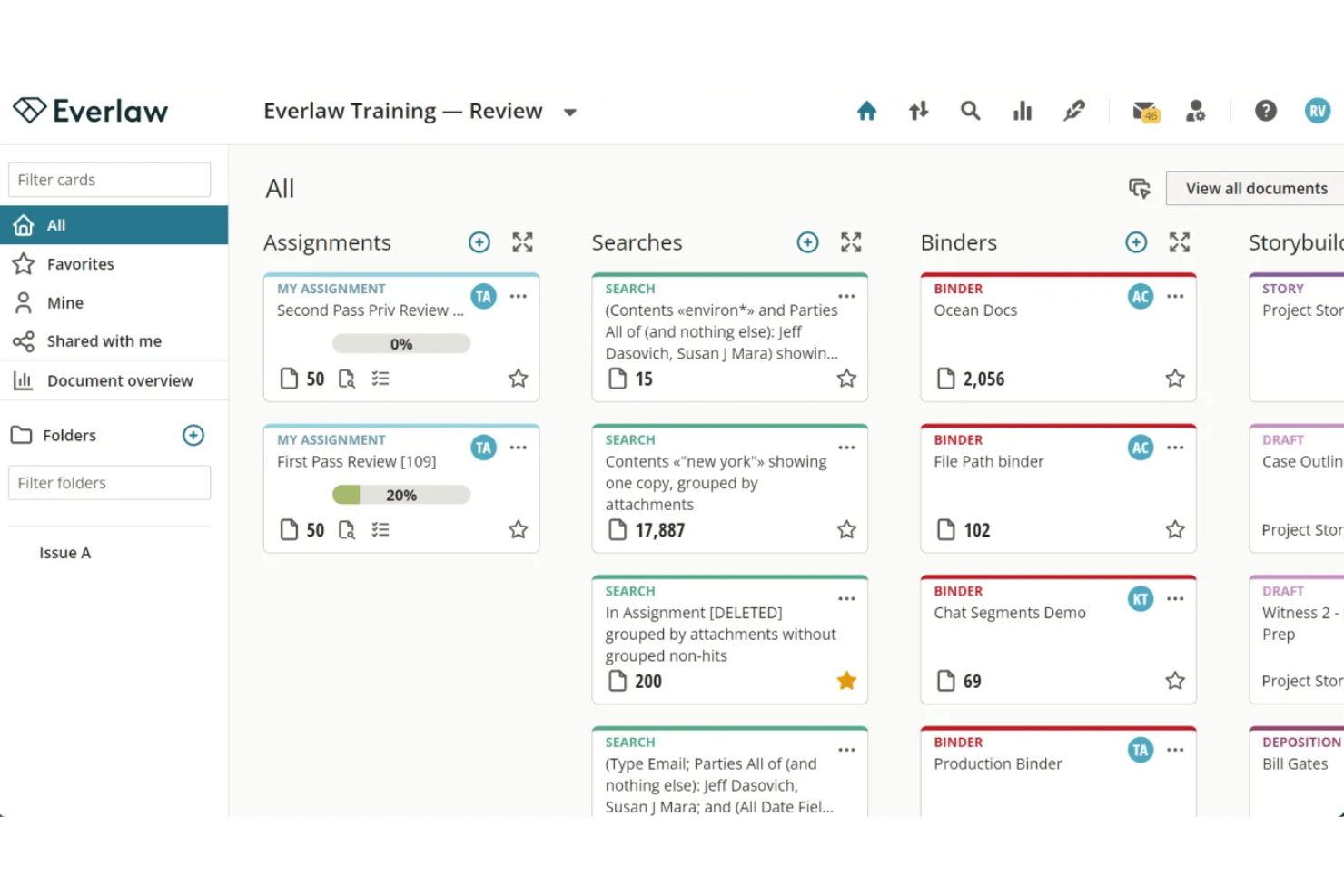
Everlaw is a cloud-based ediscovery platform built for litigation teams that need to manage large document sets, build case chronologies, and develop trial narratives from a single workspace.
Who Is Everlaw Best For?
Everlaw is a strong fit for litigation-focused law firms and corporate legal teams that handle high-volume ediscovery and complex, document-intensive investigations.
Why Everlaw Is a Good Casefleet Alternative
I picked Everlaw as one of the best because its Storybuilder feature directly mirrors what Casefleet does best: linking facts to evidence in a structured chronology. Where it goes further is in document review at scale, with AI-powered coding suggestions and Deep Dive, which surfaces key insights across document sets of 10 million or more. The entire platform runs in a secure cloud environment with no local infrastructure required, which matters when handling sensitive litigation data.
Everlaw Key Features
- Legal holds management: Send, track, and audit legal hold notices directly from the platform.
- Audio and video transcription: Convert multimedia files to searchable text for review and analysis.
- Cloud connectors: Import data from enterprise tools like Microsoft 365, Slack, and Zoom with one-click integration.
- Mass redaction capability: Automatically redact sensitive information across extensive document sets in bulk.
Everlaw Integrations
Everlaw offers native integrations with Microsoft 365, Google Workspace, Slack, Zoom, and Okta, and provides an API for custom integrations.
Pros and Cons
Pros:
- Strong security with FedRAMP authorization available
- Storybuilder links facts and evidence chronologically
- AI-powered document coding speeds up review
Cons:
- Steep cost for small litigation practices
- Not purpose-built for fact management

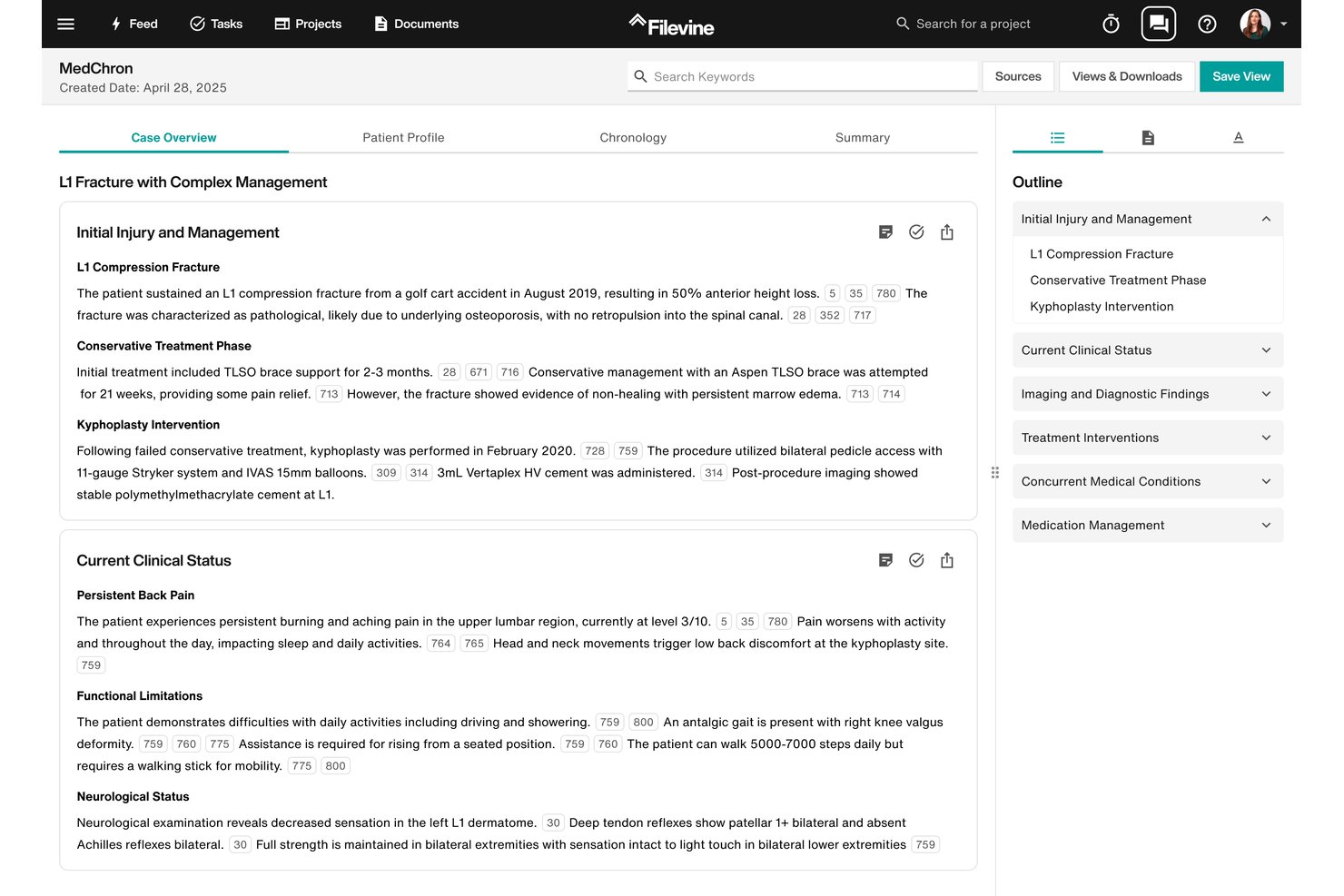
Filevine is a legal operating platform built for law firms that need more than case timelines—covering matter management, document workflows, client intake, depositions, and AI-assisted drafting in one configurable system.
Who Is Filevine Best For?
Filevine suits litigation-focused law firms of all sizes that handle high case volumes and need configurable matter structures across practice groups.
Why Filevine Is a Good Casefleet Alternative
Filevine earns its spot on my shortlist because the workflow customization goes well beyond what most litigation tools offer. I can build distinct matter structures for different practice groups, each with its own custom fields, task sequences, and document assembly rules. MedChron also automatically generates chronological timelines from medical records, replacing the manual fact-entry work I'd otherwise do in a lighter tool like Casefleet.
Filevine Key Features
- Deposition Copilot: Supports deposition scheduling, AI-powered transcription, and real-time document linking during witness examination.
- Built-in court rules calendaring: Calculates jurisdiction-specific deadlines and auto-populates dependent dates as triggering events are entered.
- Client and referral portals: Provides secure, branded portals for two-way document sharing, e-signatures, and status updates to clients and partners.
- Trust accounting compliance: Maintains IOLTA-compliant ledgers, three-way reconciliation, and generates state bar-ready trust accounting reports.
Filevine Integrations
Filevine has native integrations with Microsoft 365, Google Workspace, Domo, QuickBooks, DocuSign, Dropbox, NetDocuments, iManage, LawPay, and Zapier. An API is available for custom integrations.
Pros and Cons
Pros:
- Built-in court deadline calendaring by jurisdiction
- AI-powered medical chronology generation from records
- Custom matter structures across multiple practice areas
Cons:
- Less granular fact-linking than dedicated litigation tools
- Setup and configuration requires significant time investment

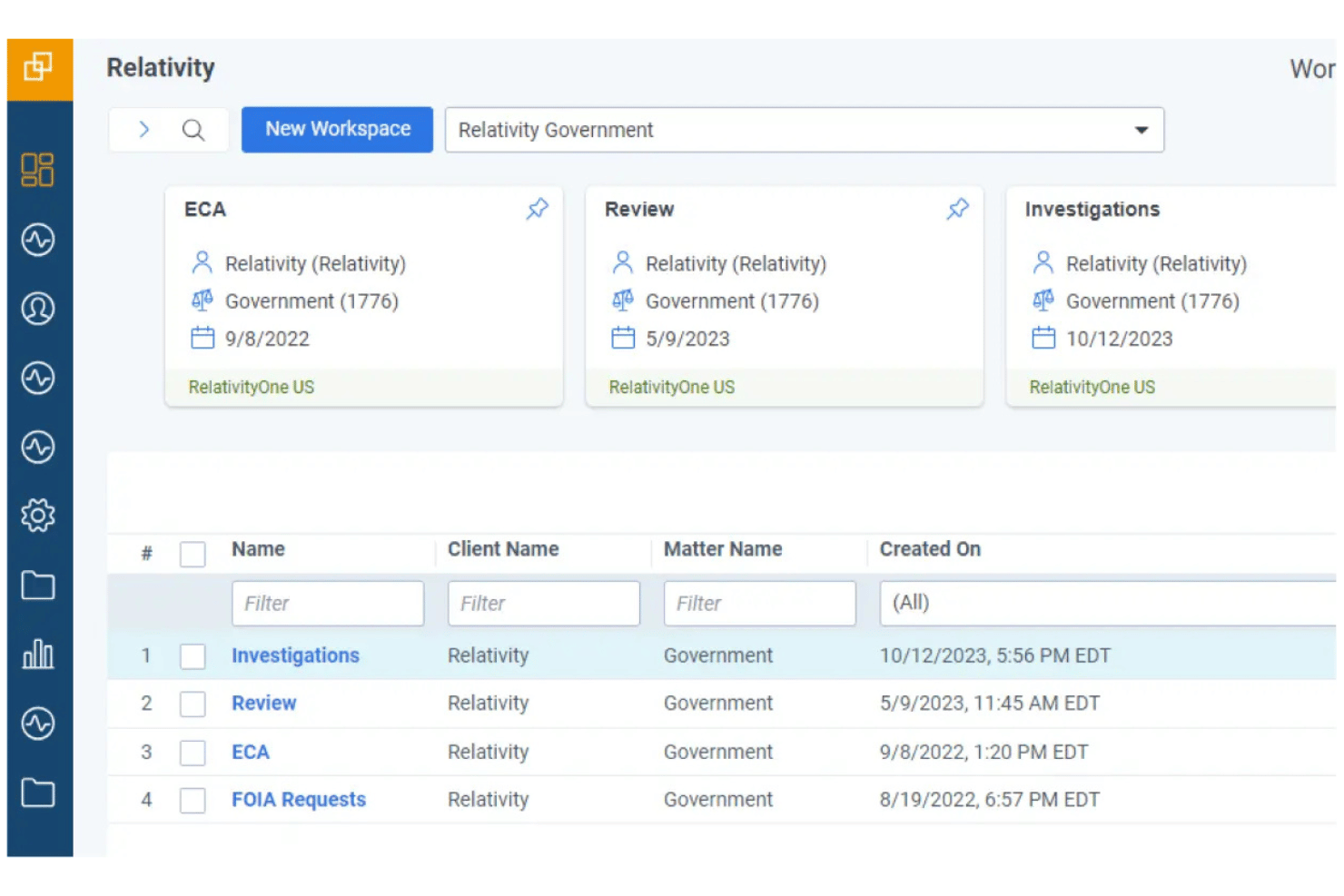
RelativityOne is an enterprise e-discovery platform built for large law firms and corporate legal teams that need to collect, process, and review massive volumes of ESI across complex litigation and investigations.
Who Is Relativity Best For?
Relativity is a strong fit for enterprise legal teams and large law firms that regularly manage high-volume e-discovery across multi-party litigation, regulatory investigations, or second requests.
Why Relativity Is a Good Casefleet Alternative
I've included Relativity in my top picks because no other tool on this list handles sheer data volume the way it does. When a matter spans millions of documents across Microsoft 365, Slack, and enterprise AI platforms, Relativity's native collection and processing engine keeps everything centralized. I also appreciate aiR for Review, which uses AI to accelerate document coding with cited evidence, cutting review time considerably on large, complex productions.
Relativity Key Features
- Advanced document analytics: Visualizes data relationships and communication patterns across large ESI sets for deeper case insights.
- Multilingual audio/video transcription: Converts multimedia evidence to searchable text in over 100 languages.
- Integrated legal hold management: Tracks and manages legal holds within the same workspace for seamless discovery workflows.
- App Hub marketplace: Expands functionality with a wide range of third-party and custom integrations.
Relativity Integrations
Relativity offers native integrations with Microsoft 365, Slack, Google Workspace, Box, and Bloomberg, and provides an API for custom integrations. Additional integrations are available through the Relativity App Hub marketplace.
Pros and Cons
Pros:
- Native collection across enterprise data sources
- AI-assisted document review with cited reasoning
- Handles massive ESI volumes across complex matters
Cons:
- Built for e-discovery, not case fact management
- Steep learning curve for new litigation teams
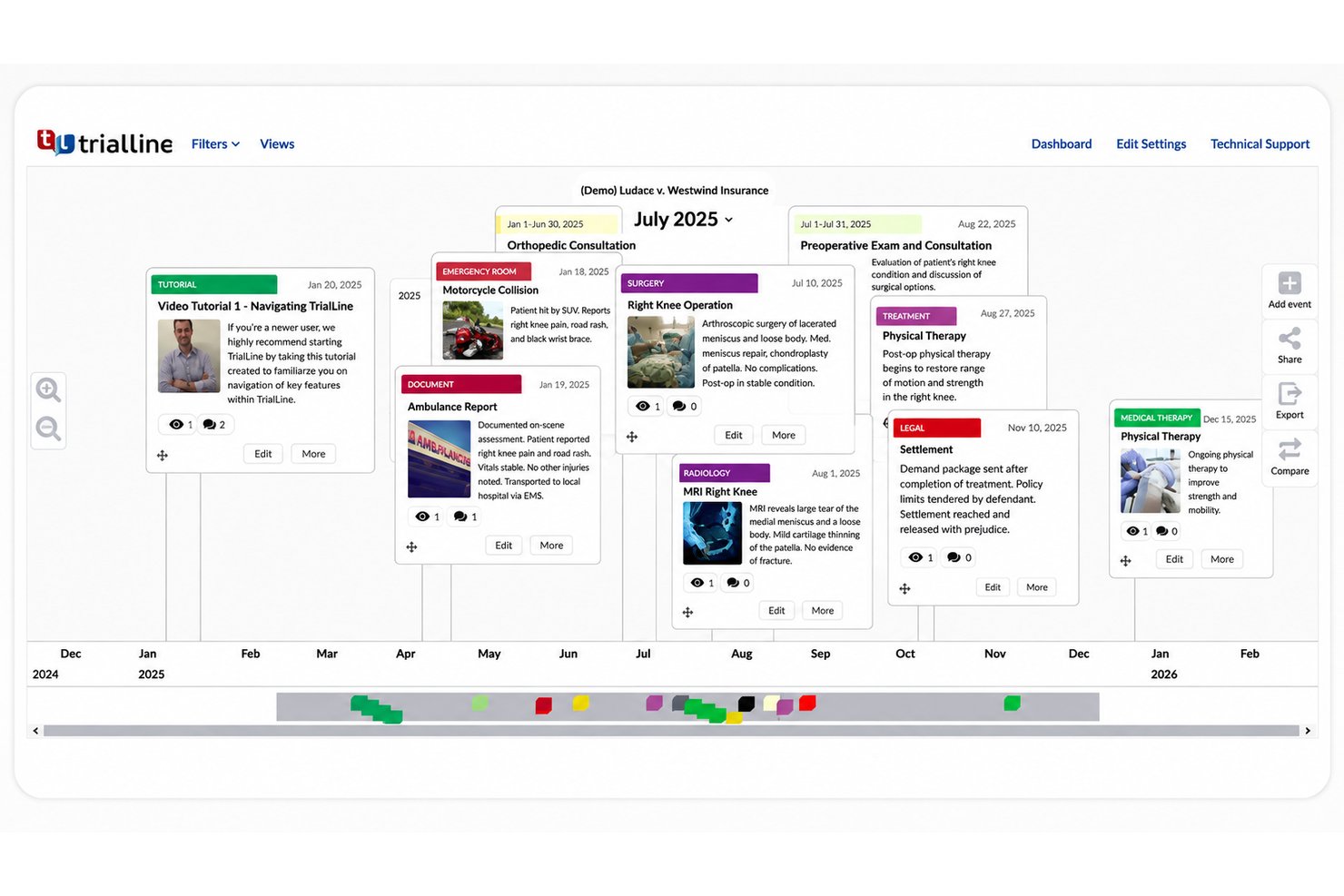
TrialLine is a cloud-based legal timeline and trial presentation tool built for litigation attorneys who need to organize case events, attach supporting evidence, and share polished, audience-ready timelines with co-counsel, mediators, and courts.
Who Is TrialLine Best For?
TrialLine is a strong fit for small litigation firms that regularly present at trial or mediation and need a dedicated tool for courtroom-ready visual storytelling.
Why TrialLine Is a Good Casefleet Alternative
I've included TrialLine in my top picks because its three distinct timeline layouts (Relative, Carousel, and Pyramid) give litigation teams real flexibility in how they frame a case narrative, whether for internal strategy reviews or live courtroom presentations. What I appreciate most is the live trial control mode: I can pull up a timeline event, display its attached exhibits or deposition clips in real time, and zoom in on evidence without breaking the flow of a hearing. The audience-tailored sharing is a genuine differentiator too, letting me share one version with co-counsel and a separate, stripped-down view with a mediator, all from the same timeline.
TrialLine Key Features
- Spreadsheet import: Upload facts and case events using XLSX files to quickly populate timelines.
- Category color coding: Color-code events to visually organize facts by type, claim, or issue.
- Password-protected sharing: Limit access and share specific timeline views securely with clients or outside parties.
- Comment threads: Collaborate with your team directly on each timeline event through threaded discussions.
TrialLine Integrations
Native integrations are not clearly documented. An API is available for custom integrations.
Pros and Cons
Pros:
- Evidence attachments linked directly to individual timeline events
- Supports complex, data-heavy cases like med mal
- Multiple visual layout options for different presentation contexts
Cons:
- Fewer pre-built litigation templates than some competitors
- Limited built-in AI features compared to newer litigation tools

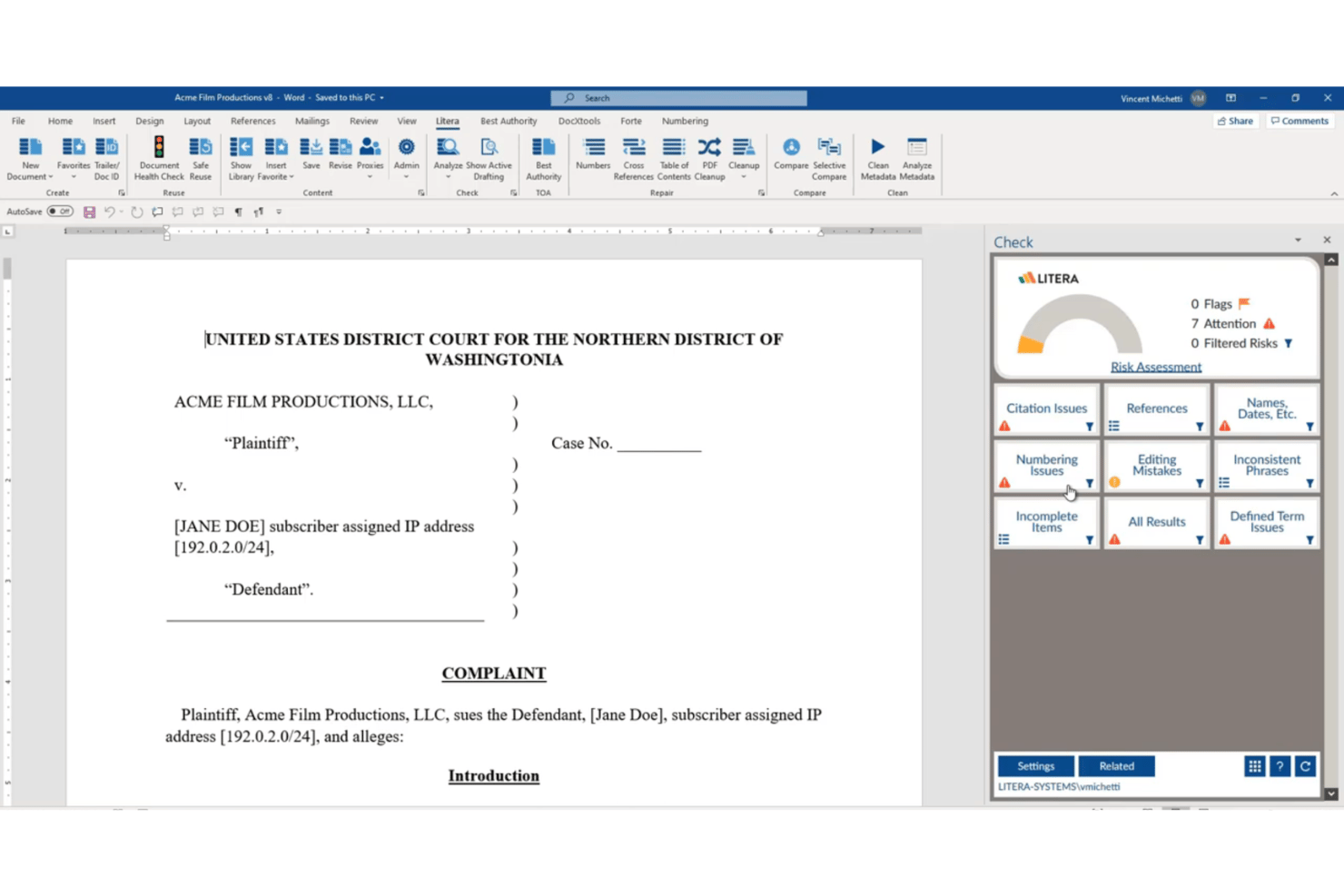
Litera Litigate was a cloud-based litigation management platform built for litigation teams who needed to organize witnesses, transcripts, exhibits, and case facts in one connected workspace.
Who Is Litera Litigate Best For?
It was particularly well-suited to litigation teams at mid-to-large law firms managing complex, document-heavy cases with multiple witnesses and co-counsel.
Why Litera Litigate Is a Good Casefleet Alternative
I picked Litera Litigate for its witness prep capabilities, which auto-link deposition transcripts, affidavits, and interview notes directly to individual witness profiles. I also appreciate that court reporter files, including video recordings, can be imported and accessed alongside all other case materials in one place. For hearing preparation specifically, being able to cross-reference witnesses, transcripts, and issues without switching tools is where this product genuinely stands out.
Litera Litigate Key Features
- Integrated matter workspace: Keep pleadings, motions, discovery documents, and pre-trial material together in a centralized online case file.
- Dynamic electronic binders: Build, reorder, and export fully digital binders for depositions, hearings, or trial preparation.
- Role-based permissions: Assign granular access and editing rights across attorneys, paralegals, and experts within each case.
- Realtime collaboration and notes: Allow litigation teams to make, share, and highlight notes in context on any file, transcript, or document.
Litera Litigate Integrations
Native integrations are not clearly documented. An API is available for custom integrations.
Pros and Cons
Pros:
- Witness profiles linked to case documents
- Video and transcript import in one place
- Dedicated hearing and deposition binder tools
Cons:
- Lacks standalone fact-tagging and issue linking
- Product has reached end-of-life status

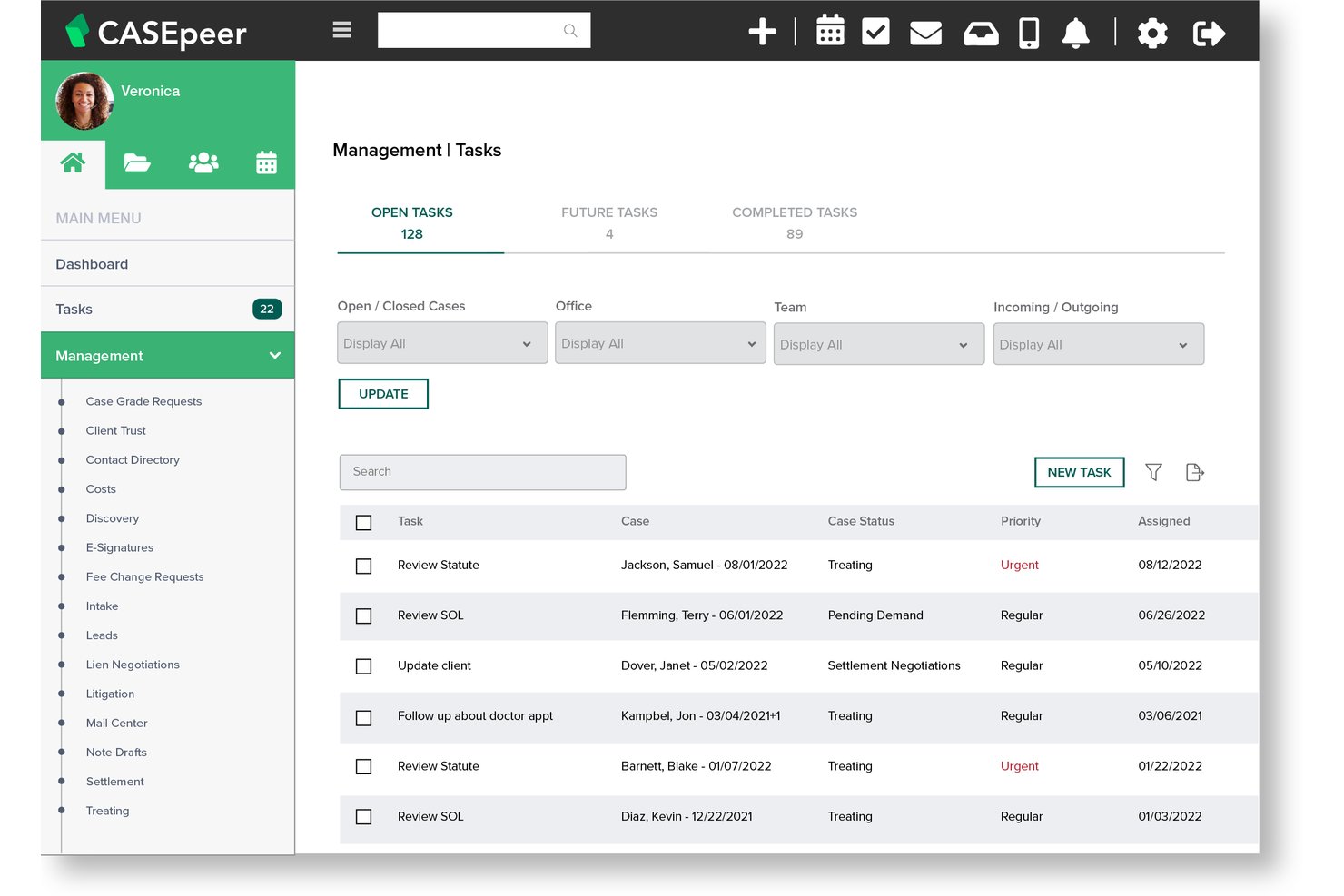
CasePeer is a cloud-based practice management platform built exclusively for personal injury plaintiff firms, handling everything from client intake and medical treatment tracking to lien negotiation and settlement disbursement in one place.
Who Is CasePeer Best For?
It's a strong fit for small to mid-sized plaintiff personal injury firms where paralegals and attorneys manage high caseloads across intake, treatment, and settlement.
Why CasePeer Is a Good Casefleet Alternative
I picked CasePeer as one of the best because its medical treatment tracking and lien negotiation tools are purpose-built for PI workflows. I can track provider bills, log treatment milestones, and monitor lien balances all from the same case record. The built-in settlement tab checks against the trust account balance, so nothing slips through when it's time to disburse.
CasePeer Key Features
- Automated statute alerts: Tracks and reminds the team of all critical deadlines and statute dates for each case.
- Client intake management: Enables teams to capture, qualify, and convert new leads directly in the platform.
- Unlimited document storage: Stores all matter-related documents and correspondence with integrated search and folder organization.
- Two-way texting with clients: Supports real-time communication and image sharing directly from within the platform.
CasePeer Integrations
CasePeer offers native integrations with Microsoft 365, Google Workspace, Dropbox, OneDrive, LawPay, CalendarRules, and Foundation AI. An API is available for custom integrations.
Pros and Cons
Pros:
- Management reports show file activity by date touched
- Tracks marketing efforts and contingency fees natively
- PI-specific case stages from intake to settlement
Cons:
- Document preview requires downloading files first
- Limited customization for cost categories and case types

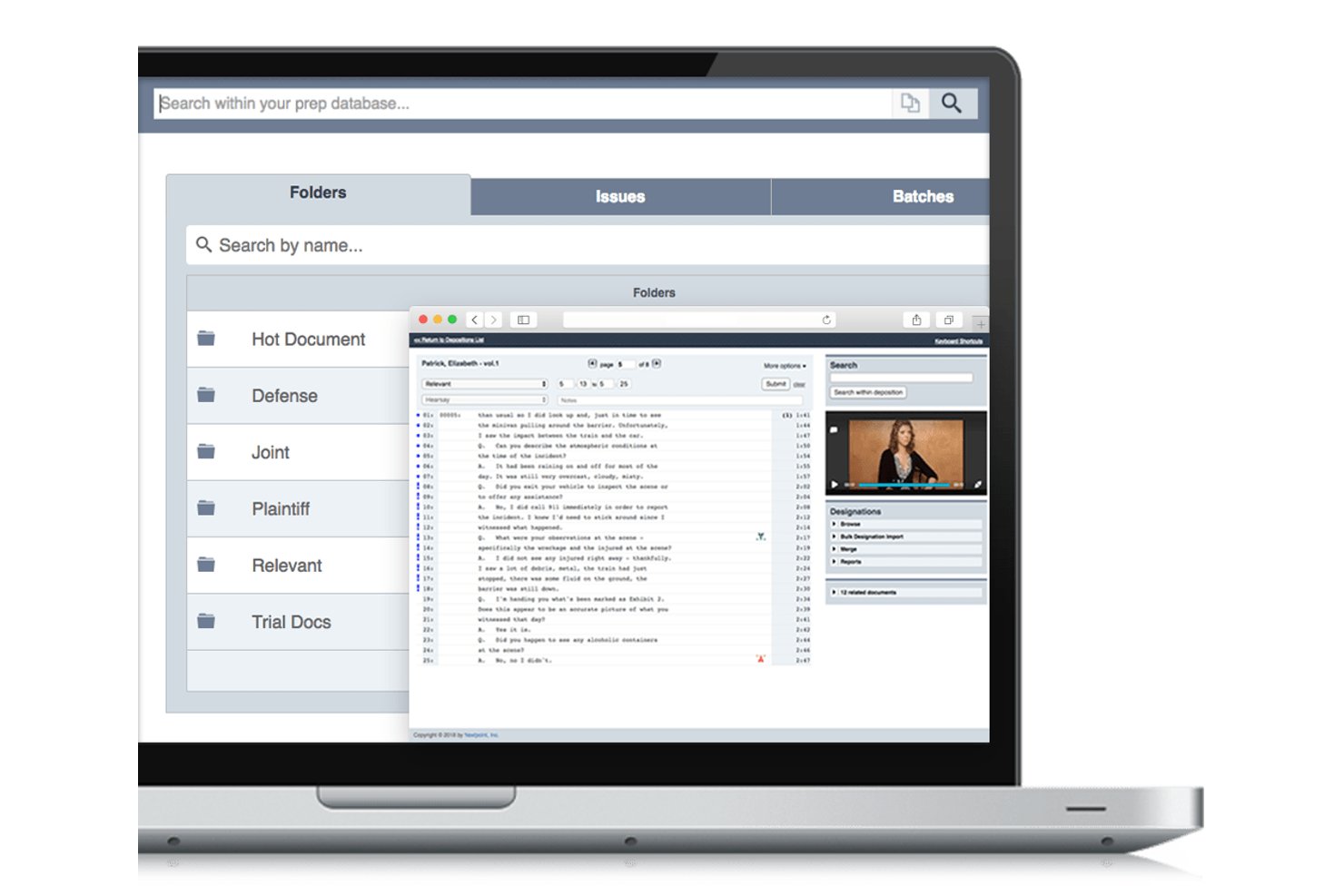
Nextpoint is a cloud-based litigation platform for small-to-midsize law firms that combines eDiscovery, document review, deposition management, and trial preparation in one place.
Who Is Nextpoint Best For?
Nextpoint fits litigation teams that handle document-heavy cases and want to manage discovery through trial prep without relying on outside vendors.
Why Nextpoint Is a Good Casefleet Alternative
I picked Nextpoint as one of the best because it goes beyond case organization to handle the full pre-trial pipeline. I particularly like how the Chronologies feature connects facts, witnesses, and documents into filterable visual timelines you can present directly in Theater Mode during hearings. On the discovery side, the document review tools let my team bulk-tag, annotate, and generate production sets with privilege logs without switching platforms.
Nextpoint Key Features
- Bates stamping and redaction: Apply custom Bates stamps and redact sensitive material directly within the document review workflow.
- AI transcript summaries: Generate automatic narrative or tabular summaries of deposition transcripts for quick understanding.
- Witness profiles: Build comprehensive profiles linking witnesses to facts, key issues, and supporting documents.
- Cloud storage integrations: Import case material quickly from sources like OneDrive, Dropbox, and Google Drive.
Nextpoint Integrations
Nextpoint offers native integrations with Dropbox, Google Drive, OneDrive, Box, and LawToolBox, with an API available for custom integrations.
Pros and Cons
Pros:
- Theater Mode supports live courtroom presentation
- Bulk document tagging within the review interface
- Handles full eDiscovery workflow natively
Cons:
- Steeper onboarding for small litigation teams
- No dedicated fact-to-issue linking feature
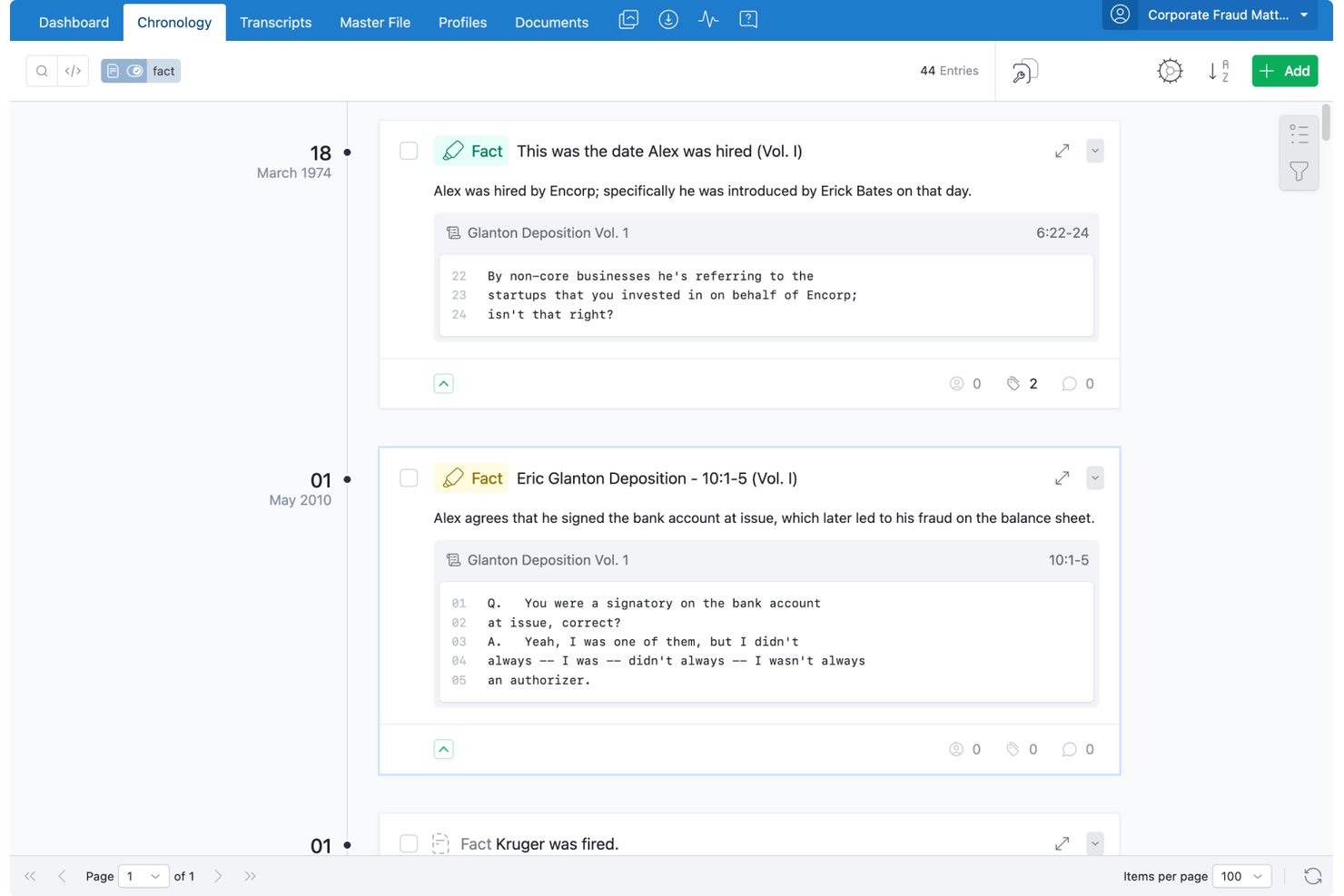
Everchron is a cloud-based litigation management platform built for case teams who need to organize complex evidence, build case chronologies, and manage witness preparation across large-scale matters.
Who Is Everchron Best For?
Litigation teams at AmLaw 100 firms and corporate legal departments handling complex, document-heavy matters will get the most out of Everchron.
Why Everchron Is a Good CaseFleet Alternative
I picked Everchron as one of the best because of how it handles team-based chronology building. Every chronology entry links directly to issues, people, entities, and documents, so the whole case team works from the same connected picture. EC:AI Fact Extraction then drafts structured facts from filings and transcripts automatically, which cuts the manual work of populating that shared timeline.
Everchron Key Features
- Master file management: Organize filings, correspondence, and case documents in a structured matter-specific filing system.
- Integrated transcript management: Read, annotate, and code deposition transcripts side-by-side with exhibits and video.
- Automatic witness files: Instantly generate detailed witness profiles with linked documents, filings, and entity relationships.
- Enterprise-grade security controls: Encrypt all data at rest and in transit, with support for SSO, MFA, and SOC 2 Type II compliance.
Everchron Integrations
Everchron offers native integrations with Relativity and Microsoft 365, and provides an API for custom integrations.
Pros and Cons
Pros:
- Scales to complex multi-district litigation matters
- Witness profiles auto-generated from linked case data
- AI-driven fact extraction from transcripts and filings
Cons:
- No native document drafting or assembly tools
- Not a full e-discovery or document review platform

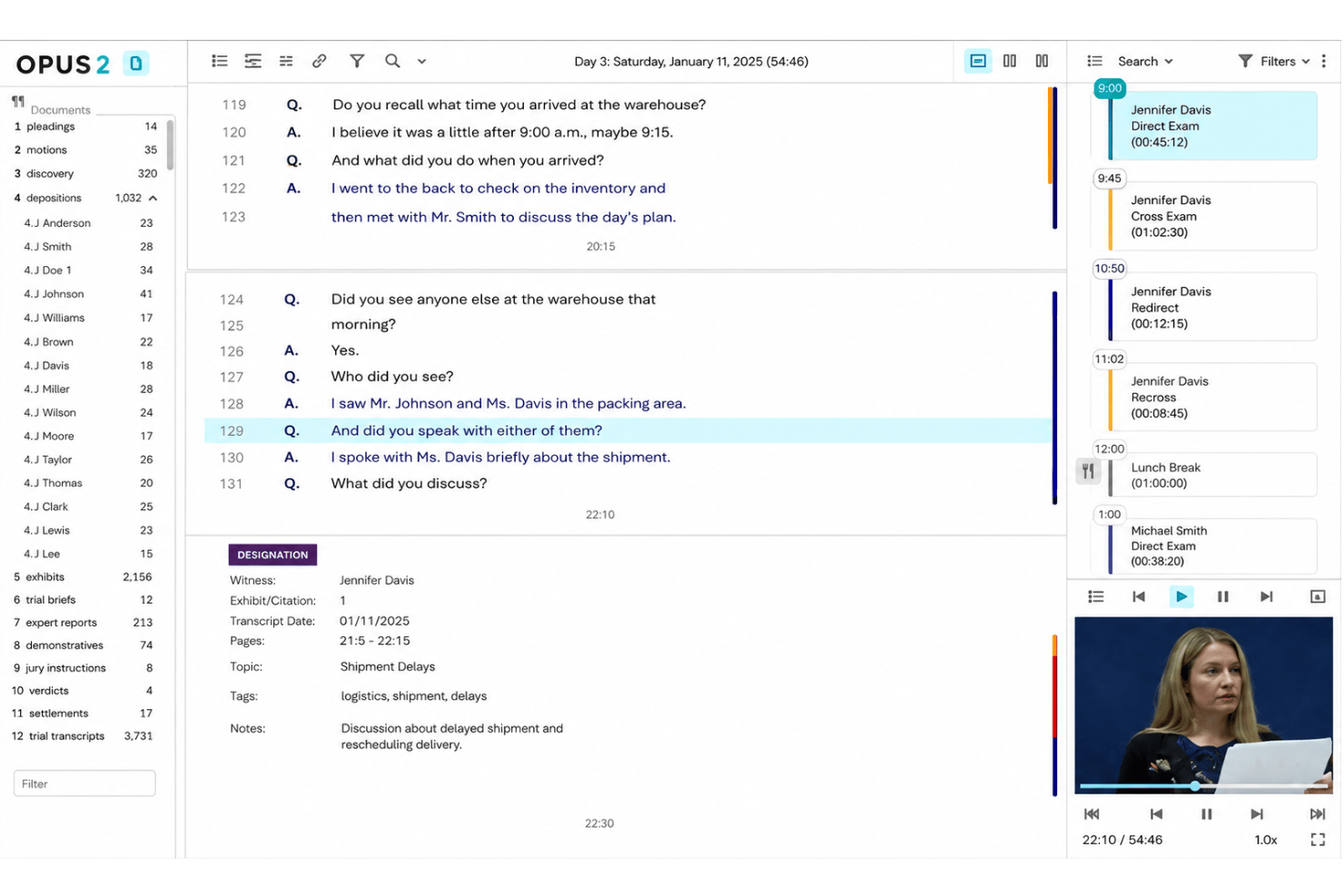
Opus 2 Cases is a cloud-based litigation workspace built for enterprise law firms and legal teams managing complex disputes, arbitrations, and investigations — connecting documents, evidence, characters, and chronologies in one organized environment.
Who Is Opus 2 Best For?
Opus 2 Cases is a strong fit for litigation and arbitration teams at large law firms handling high-volume, document-intensive disputes.
Why Opus 2 Is a Good Casefleet Alternative
I picked Opus 2 as one of the best because its transcript-to-evidence hyperlinking goes deeper than most case analysis tools. Instead of linking to a document broadly, I can hyperlink a specific passage in a deposition transcript directly to a passage in another document, research note, or piece of evidence anywhere in the case. The Transcript Wall surfaces those linked documents in real time during a hearing, alongside annotations and team chat, so I can follow the evidentiary thread without ever leaving the transcript view.
Opus 2 Key Features
- AI analysis: Automatically summarizes documents and surfaces key facts for deeper case understanding.
- Collections (virtual binders): Build digital trial or hearing bundles with drag-and-drop document organization.
- Portals for client sharing: Share information securely with clients and external parties through branded web portals.
- Relativity connector: Import discovery materials directly from Relativity or RelativityOne into your case workspace.
Opus 2 Integrations
Opus 2 offers native integrations with Relativity and RelativityOne for discovery material import. An API is available for custom integrations.
Pros and Cons
Pros:
- Built for high-volume, complex litigation matters
- Real-time Transcript Wall for live hearings
- Deep transcript-to-evidence hyperlinking capability
Cons:
- No built-in task or deadline tracking
- Overkill for smaller, single-matter litigation teams

FactBox is a cloud-based fact and chronology management tool built for litigators who need to organize case facts, link evidence to source documents, and build filterable timelines without the complexity of a full practice management suite.
Who Is FactBox Best For?
FactBox is a strong fit for small to midsize litigation practices where attorneys and paralegals need a focused fact-management tool without a steep setup process.
Why FactBox Is a Good Casefleet Alternative
FactBox earns its spot on my shortlist because of how it handles dynamic chronology building. I love that when I add a new fact, it automatically updates every linked chronology, so I'm never manually reconciling timelines before a deposition. The multi-view organization lets me instantly pivot the same set of facts by witness, issue, or date, and the one-click export generates a witness-specific chronology ready to use in a deposition prep session.
FactBox Key Features
- AI-powered fact extraction: Automatically extracts key facts from uploaded documents and organizes them by issue, witness, or tag.
- Customizable case structure: Lets you create and reorganize issues, sub-issues, and case hierarchies as your matter develops.
- Page-level source linking: Allows you to connect individual facts to specific pages within documents for precise citation.
- Integration with Box, Dropbox, and Clio: Syncs with popular legal and cloud storage tools to centralize your documents and case files.
FactBox Integrations
FactBox offers native integrations with Clio, Box, and Dropbox, and provides an API for custom integrations.
Pros and Cons
Pros:
- Multi-view fact organization by witness or issue
- Page-level source linking within uploaded documents
- Auto-updates linked chronologies when new facts added
Cons:
- No native time tracking or billing tools
- No built-in task or deadline tracking
Other Casefleet Alternatives
Here are some additional Casefleet alternatives options that didn’t make it onto my shortlist, but are still worth checking out:
- Case Chronology
For straightforward event mapping
- CaseMap+ AI
For AI-powered fact organization
- MyCase
For all-in-one practice management
- Clio
For robust third-party integrations
- LEAP
For small firm productivity tools
- Smokeball
For automated document creation
- Litify
For enterprise workflow customization
- DISCO
For advanced litigation timelines
- Lexbe
For cloud-based document review in litigation
- Thomson Reuters Case Notebook
For linked fact and transcript analysis


How I Evaluate Casefleet Alternatives
I split my evaluation into two layers: core functionality every Casefleet alternative must offer, and differentiators that set tools apart. I look for fact linking, chronology building, and document management as the baseline.
Core Functionality (Table Stakes For This List)
When I'm selecting tools for my list, I rank each one on a scale from 0 (does not offer the functionality) to 5 (excels in this area) for each core functionality listed below. Then, I calculate the tool's total score into a percentage. Each tool needs to achieve a minimum total score of 65% to be considered for inclusion.
- Case Management: I look for structured matter records with custom fields, status tracking, and role assignments that keep multi-party litigation organized.
- Fact & Evidence Management: Each tool should let you tag facts, link them to source documents, and flag disputed vs. undisputed items across a case.
- Chronology Building: I evaluate whether timelines are interactive, filterable, and exportable for use in depositions or court presentations.
- Document Management: Tools should support full-text search, OCR, tagging, and the ability to deep-link documents directly to specific case facts.
- Contacts & Witness Tracking: I check whether contacts can be linked to specific facts, evidence, and cases rather than stored in a standalone list.
- Task & Deadline Management: Assignable tasks with due dates, reminders, and calendar sync help teams stay on top of filing deadlines and discovery cutoffs.
Once I have a list of tools that meet the criteria, I consider what sets each platform apart.
Differentiating Factors (What Sets Vendors Apart)
Here's how I compare and contrast different vendors:
Standout Features
Automated medical chronologies are a major differentiator for personal injury and mass tort teams who'd otherwise spend hours manually organizing records into timelines. I also look for built-in court rules calendaring, where the platform auto-calculates dependent deadlines when a triggering event shifts. Native document assembly is another feature worth evaluating—it lets you generate pleadings and discovery requests from templates pre-populated with matter and contact data.
Beyond Features
Practice area fit matters a lot here. Litigation-heavy firms need deep fact and evidence linking, while transactional practices may care more about document automation and billing. I also evaluate migration support—moving fact chronologies, linked evidence, and issue tags out of Casefleet is complex, so vendor-led migration services are worth confirming. Security posture is another key factor; I check for SOC 2 Type II certification, encryption standards, and clear data ownership terms.
Why Look For A Casefleet Alternative?
While Casefleet is a good choice of casefleet alternatives, there are a number of reasons why some users seek out alternative solutions. You might be looking for a casefleet alternatives because…
- Needing advanced document automation tools
- Wanting more integrations with e-discovery and legal research platforms
- Outgrowing Casefleet’s collaboration or user permission controls
- Seeking localized support or compliance for international matters
- Preferring a system that supports accounting and trust management
- Migrating to an all-in-one platform for both litigation and transactional work
If any of these sound like you, you’ve come to the right place. My list contains several casefleet alternatives options that are better suited for teams facing these challenges with Casefleet and looking for alternative solutions.
Casefleet Key Features
Here are some of the key features of Casefleet, to help you contrast and compare what alternative solutions offer:
- Fact chronology: Build sortable, searchable timelines that link facts to supporting documents for swift case analysis.
- Evidence linking: Attach evidence, like correspondence or exhibits, directly to facts and legal issues to keep every detail connected.
- Full-text document search: Instantly locate keywords within uploaded PDFs and case files, helping your team find critical information fast.
- Custom issue tagging: Categorize facts and evidence using issue tags for clear organization and powerful filtering during case prep.
- Role-based access control: Assign roles and permissions so attorneys, paralegals, and co-counsel only see what's relevant to them.
- Contact and witness management: Track all parties, witnesses, and affiliated professionals while connecting them to specific facts or documents.
- Task and deadline tracking: Assign tasks, monitor progress, and track litigation deadlines from a centralized dashboard.
- Collaborative workspace: Work with your team in a single unified environment, sharing notes, timelines, and updates securely.
- Linked document storage: Store, organize, and tag documents in one place, ensuring links to facts stay intact.
- Reporting and exports: Generate custom reports or export timelines and fact sheets for depositions, mediation, or trial.