Key Takeaways
Definition and Purpose: Legal case management software is a digital tool that centralizes case details, streamlining document handling, deadlines, and team collaboration.
Feature Overview: Core features include document automation, deadline alerts, integrated billing, and customizable workflows to improve operational efficiency.
Evaluating Options: This guide outlines how to evaluate legal case management software, reviews leading platforms, and explains critical implementation factors.
Legal case management software centralizes everything your practice needs to manage cases without dropping the ball. In my experience, the biggest risks legal teams face—missed deadlines, scattered documents, and poor client communication—trace back to fragmented tools. This guide walks you through key features, how to evaluate vendors, and what implementation actually looks like. Whether you're building a business case internally or comparing platforms for the first time, you'll leave with a clear picture of what to look for and how to get started.
What Is Legal Case Management Software?
Legal case management software is a digital platform that helps legal teams organize, track, and manage cases from intake to resolution. You can use it to support the broader legal case management process by centralizing documents, deadlines, contacts, billing, and communication. I think these tools reduce manual work, minimize missed tasks, and create a clear workflow for everyone—from attorneys to support staff—so your practice can keep pace with client demands and regulatory requirements.
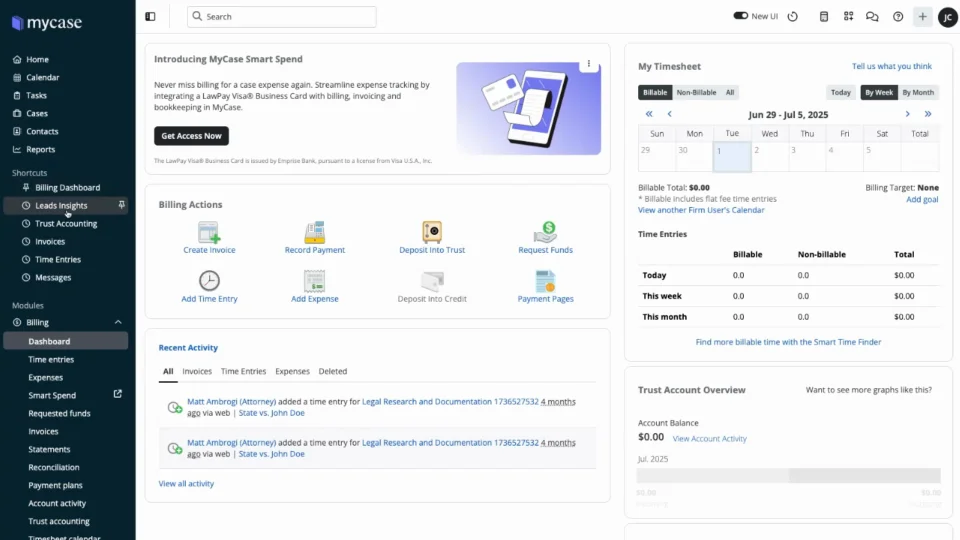
Examples of Legal Case Management Software
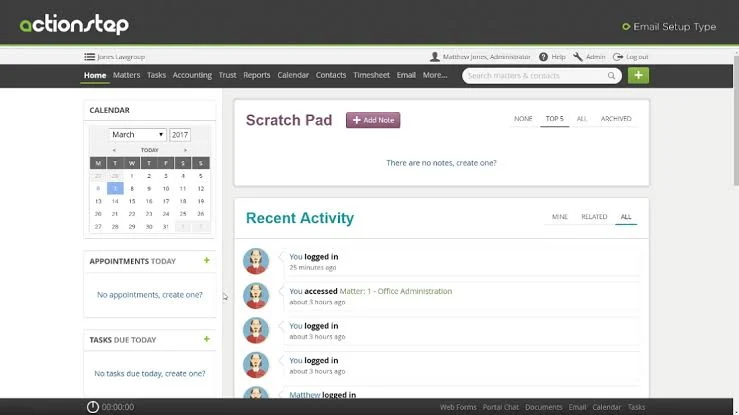
Here are a few visual examples so you can see what legal case management software typically looks like in action:

Top Legal Case Management Software to Consider
Here's my shortlist of the best legal case management software solutions:
Clicks on the links below may earn a commission, which supports our independent testing and review of software and services. Learn more about how we stay transparent.
Who Uses Legal Case Management Software?
This software is best suited for the following types of teams and organizations:
- Law Firms: Small, midsize, and large practices that juggle multiple cases and deadlines.
- In-House Legal Departments: Corporate legal teams managing contracts, litigation, and compliance projects.
- Legal Aid Organizations: Nonprofits providing legal services to individuals or communities.
- Government Legal Offices: Public sector teams handling regulatory, enforcement, or litigation work.
- Boutique Practices: Niche firms with specialized practice areas such as immigration or intellectual property.
Key Legal Case Management Software Benefits & Potential Business Impacts
Adopting legal case management software helps your team work more efficiently, reduce errors and risks, and stay ahead on compliance while supporting stronger business growth. While these platforms can be a significant investment, choosing the right legal case management software matters because a poor fit or poor implementation can lead to wasted resources and workflow disruptions.
Use this table to weigh the key benefits and risks of implementing legal case management software:
| Benefits | Risks |
|---|---|
| BenefitsCentralized document management | RisksData migration challenges |
| BenefitsStreamlined case tracking | RisksUser adoption resistance |
| BenefitsAutomated calendar and deadline alerts | RisksHigh implementation costs |
| BenefitsEasier client communication tracking | RisksPoor vendor support |
| BenefitsSimplified billing and invoicing | RisksSecurity and confidentiality concerns |
| BenefitsBetter compliance management | RisksWorkflow disruption during rollout |
| BenefitsImproved collaboration across teams | RisksSoftware not meeting unique needs |
Legal Case Management Software Case Studies
This section highlights case studies that show how legal case management software changes daily operations. You’ll see real-world examples of what teams faced before implementation and the impact after switching to a dedicated platform.
Case Study: Ceiba Fôrte Law Firm's Implementation of Clio
Ceiba Fôrte Law Firm switched to Clio after finding their original case management platform clunky and hard to navigate, seeking more intuitive software for both staff and clients. Clio's user-friendly design enabled the firm to get up and running quickly, using Clio Manage's practice management, document sharing, and Clio Payments features to operate like a larger firm without hiring additional staff.
Here are the results of Ceiba Fôrte Law Firm's implementation of legal case management software:
- 25% year-over-year growth: The firm grew during the COVID-19 pandemic because it was already fully cloud-based in Clio before remote work became necessary.
- Faster task completion: Tasks that previously took 15–20 minutes were reduced to around 5 minutes after switching to Clio.
- 100% payment recovery rate: The firm maintained a 100% client payment recovery rate, with 90% of clients paying invoices by card through Clio Payments.
- Reduced overhead: The firm avoided hiring additional staff or contractors by handling administrative work directly within Clio.
- Improved client confidence: Clients gained secure, direct access to their documents and case status, reducing back-and-forth communication with staff.
Case Study: Axiom Medical's Implementation of Xakia
Axiom Medical needed a matter management solution that could help them manage their legal matters while also giving them the ability to track and report on their legal department's performance to the board. After evaluating several vendors, they selected Xakia, which delivered an out-of-the-box reporting solution that met the department's needs almost immediately.
Here are the results of Axiom Medical's implementation of legal case management software:
- Hundreds of hours saved: The Chief Legal Officer credited Xakia with saving him hundreds of hours of work, particularly during a team reduction from four to two people.
- Consolidated intake process: Multiple fragmented channels for requesting legal support were replaced by a single, centralized intake process.
- Improved C-suite reporting: The legal department established a stronger, more transparent reporting relationship with senior leadership through Xakia's reporting tools.
- Better matter visibility: The team gained real-time visibility into deadlines, workloads, and matter status without relying on email follow-ups.
- Demonstrable department value: Legal teams are judged by the rest of the business on performance, and by recording and reporting on their efforts, Xakia helped the department demonstrate its value to the wider organization.
Core Features & Capabilities of Legal Case Management Software
Look for these core features in legal case management software designed for legal practice managers:
- Centralized Matter Management: Organize all case details, contacts, documents, and deadlines in a single workspace.
- Document Automation and Storage: Use legal document management software capabilities to generate, edit, share, organize, and securely store legal documents and templates.
- Integrated Time Tracking: Record billable hours and tasks right from the case file to simplify invoicing.
- Automated Task and Deadline Alerts: Set reminders to help your team meet court-imposed or internal deadlines.
- Client Communication Portal: Give clients secure access to case updates, documents, and direct messaging with your team.
- Customizable Workflows: Look for legal workflow software capabilities that let you create and automate matter-specific processes, approvals, reminders, and task assignments.
- Billing and Invoicing Tools: Generate invoices, process online payments, and track outstanding balances.
- Reporting and Analytics: Track key metrics on matter volume, team workload, deadlines, and business development.
Legal Case Management Software Use Cases: Typical Processes & Workflows
Legal case management software supports a wide range of processes, including client intake, document management, deadline tracking, matter assignment, and billing. With everything in one place, your team can manage matters from first contact to case resolution, automate routine tasks, and keep everyone in sync. Following consistent legal case management best practices across these workflows can help reduce errors and keep operations organized.
Use this table to understand how legal case management software supports key processes for legal practice managers:
| Process | Description | How Software Helps |
|---|---|---|
| ProcessClient Intake | DescriptionCollect and organize new client and matter details, including initial conflict checks. | How Software HelpsAutomates intake forms, conflict checks, and centralizes all client data for easy onboarding. |
| ProcessDocument Management | DescriptionStore, edit, and share legal documents securely. | How Software HelpsProvides searchable, organized storage with version control, permissions, and collaboration tools. |
| ProcessDeadline Tracking | DescriptionMonitor, assign, and remind teams of upcoming court dates and key filing deadlines. | How Software HelpsAutomatically tracks, updates, and alerts you to important dates to prevent missed deadlines. |
| ProcessTime and Billing | DescriptionRecord time worked on cases and generate invoices for clients. | How Software HelpsSyncs time entries with case files, automates invoice generation, and tracks payment status. |
| ProcessTask Assignment | DescriptionDistribute case-related tasks among team members and monitor progress. | How Software HelpsAdds legal project management software capabilities for assigning owners, setting deadlines, using task templates, and tracking progress in real time. |
Law practice management software is the essential tool for any practice with more than one client.
More Articles
Types of Legal Case Management Software & Similar Tools
Legal case management software comes in several forms, and there are a few related tools that are easy to mix up with it. Here's a breakdown of the main types and how they differ:
| Type | Differentiator |
|---|---|
| TypePractice Management Software | DifferentiatorBroader than case management; covers billing, accounting, and firm operations alongside matter tracking |
| TypeLegal Matter Management Software | DifferentiatorDesigned for in-house legal teams managing matters internally, rather than client-facing casework |
| TypeContract Management Software | DifferentiatorFocused specifically on contract drafting, negotiation, approvals, and renewals |
| TypeLegal Document Management Software | DifferentiatorSpecialized in document storage, version control, and retrieval, without broader case or matter tracking |
| TypeLitigation Management Software | DifferentiatorBuilt for managing the full lifecycle of litigation, including court filings, discovery, and hearings |
Ready to See the Full Business Case for Legal Case Management Software?
Understanding the features, workflows, and real-world results of legal case management software is a strong starting point—but the benefits of legal case management software go deeper, covering everything from improved organization and client trust to data-driven decision-making and remote access.