

10 Best Casepeer Alternatives in 2026



A strong CasePeer alternative should give your legal team flexible case management, easy client communication, and tools built for the way personal injury lawyers work. If you're searching for Casepeer alternatives, you're likely looking for options that fit your firm's workflow, help manage volume, or offer custom features you don't get today.
I’ll walk you through the best solutions that push beyond CasePeer’s limits—whether you want better automations, more integrations, or an interface your team actually enjoys. By the end, you’ll have a clear sense of which platforms can back up your practice this 2026.
What is Casepeer?
CasePeer is a cloud-based case management platform designed for personal injury law firms. It centralizes case tracking, document management, communication, and billing in one system tailored to the needs of plaintiff-side legal teams. With tools to manage deadlines, store client data, and organize workflows, CasePeer lets law firms standardize how they handle cases from intake to resolution. It’s built to support collaboration, compliance, and efficient daily operations.
Best CasePeer Alternatives Summary
This comparison chart summarizes pricing details for my CasePeer alternatives to help you find the best one for your budget and business needs.
| Tool | Best For | Trial Info | Price | ||
|---|---|---|---|---|---|
| 1 | Best for automated legal workflows | Free demo available | Pricing upon request | Website | |
| 2 | Best for client communication and cases | 10-day free trial | From $50/user/month (billed annually) | Website | |
| 3 | Best for all-in-one legal practice management | 7-day free trial | From $49/user/month | Website | |
| 4 | Best for legal billing and case management | 10-day free trial + free demo available | From $59/user/month (billed annually) | Website | |
| 5 | Best for customizable PI case management | Free demo available | Pricing upon request | Website | |
| 6 | Best for end-to-end PI case management | Free demo available | Pricing upon request | Website | |
| 7 | Best for high-volume personal injury firms | Free demo available | Pricing upon request | Website | |
| 8 | Best for customizable PI case workflows | Free trial available | Pricing upon request | Website | |
| 9 | Best for personal injury case automation | Free demo available | From $109/user/month (billed annually) | Website | |
| 10 | Best for Salesforce-based PI operations | Free demo available | Pricing upon request | Website |
Why You Can Trust Us
We’ve been testing and reviewing legal software since 2023. As legal practice leaders ourselves, we know how critical and difficult it is to make the right decision when selecting software.
We invest in deep research to help our audience make better software purchasing decisions. We’ve tested more than 2,000 tools for different legal practice use cases and written over 1,000 comprehensive software reviews. Learn how we stay transparent & our software review methodology.
-

CARET Legal
Visit WebsiteThis is an aggregated rating for this tool including ratings from Crozdesk users and ratings from other sites.4.4 -
Redactable
Visit WebsiteThis is an aggregated rating for this tool including ratings from Crozdesk users and ratings from other sites.4.8 -
Insightful
Visit WebsiteThis is an aggregated rating for this tool including ratings from Crozdesk users and ratings from other sites.4.8





Best CasePeer Alternatives Reviews
Below are my detailed summaries of the best CasePeer alternatives that made it onto my shortlist. My reviews offer a detailed look at the features, best use cases, and integrations of each platform to help you find the best one for you.

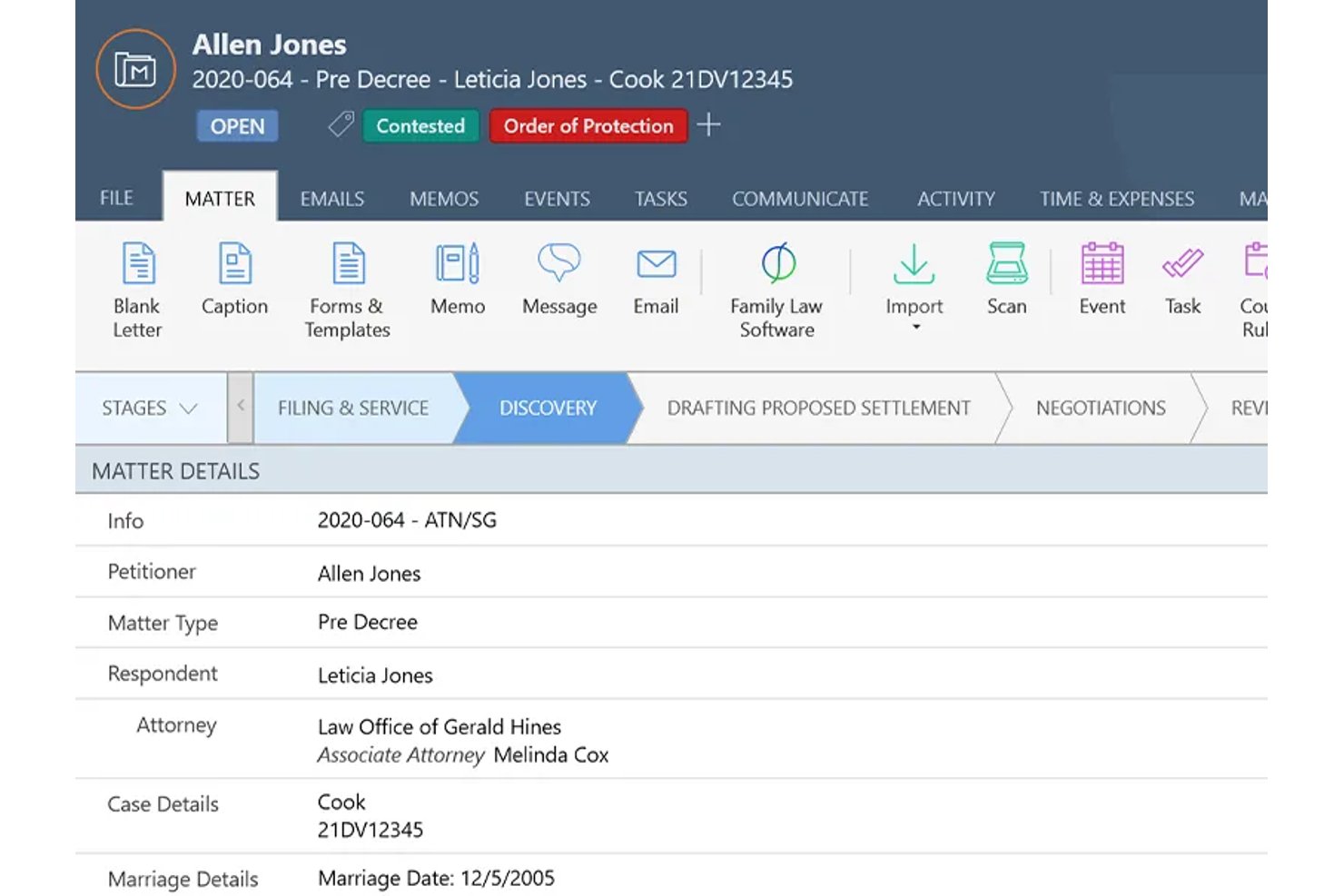
Smokeball is a cloud-based practice management platform built for small and mid-size law firms that need to automate document generation, case workflows, and client intake across practice areas including personal injury.
Who Is Smokeball Best For?
Smokeball suits solo to mid-size plaintiff personal injury firms that manage high document volumes and want automated workflows without building them from scratch.
Why Smokeball Is a Good CasePeer Alternative
I've included Smokeball in my top picks because its workflow automation is genuinely built into how the platform works, not bolted on as an afterthought. TemplateLab auto-fills PI-specific court forms, demand letters, and medical record requests the moment a matter is opened. Archie AI then drafts case summaries and client updates without manual prompting, and stage-triggered task automation assigns work automatically as a case progresses.
Smokeball Key Features
- Customizable intake forms: Build drag-and-drop personal injury intake forms to capture client, injury, and insurance details.
- PI practice area templates: Access ready-to-use templates for motions, subpoenas, and demand letters designed for plaintiff firms.
- InfoTrack e-filing integration: File court documents and capture electronic signatures directly within a case.
- Client communication portal: Share files and case updates securely with clients using a browser-based, 2FA-enabled portal.
Smokeball Integrations
Smokeball offers native integrations with QuickBooks, InfoTrack, Microsoft Word, Microsoft Outlook, and LawPay. An API is available for custom integrations.
Pros and Cons
Pros:
- Stage-triggered workflows automate PI task assignments
- Activity tracker logs all billable time automatically
- Automated document generation built into case workflows
Cons:
- Weaker settlement disbursement than PI-native tools
- Medical records module less PI-specific overall

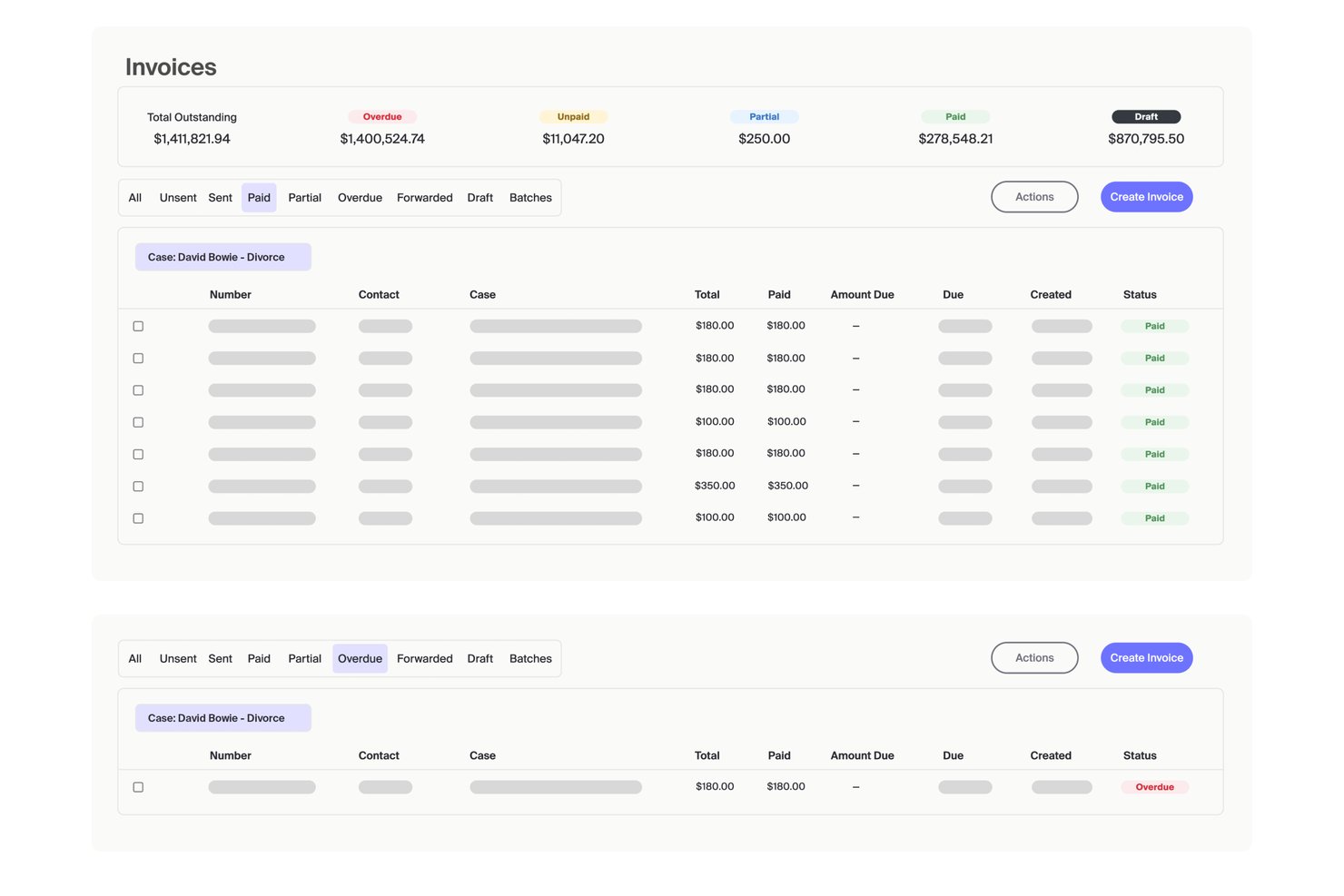
MyCase is a legal practice management platform built for small to mid-sized law firms that need a single system for case management, client communication, billing, and document handling.
Who Is MyCase Best For?
MyCase is a good fit for solo practitioners and small firm attorneys who handle mixed practice areas and want one platform for client communication, billing, and case tracking.
Why MyCase Is a Good CasePeer Alternative
I've included MyCase in my top picks because the client communication tools are genuinely best-in-class. The built-in two-way texting lets me message clients directly from a case file, with replies automatically logged to the matter. The secure client portal gives clients 24/7 access to their documents, invoices, and case updates without a phone call ever needing to happen.
MyCase Key Features
- Automated workflow management: Set up custom workflows to automate tasks and deadlines across the entire case lifecycle.
- Advanced document automation: Generate legal documents with merge fields and track versions within each case.
- Court rules calendaring: Sync court deadlines automatically with Google or Outlook and manage all case events in one place.
- Integrated time and billing tools: Log billable hours, create invoices, and handle trust accounting directly within each matter.
MyCase Integrations
MyCase offers native integrations with LawPay, QuickBooks, Google Calendar, Microsoft Outlook, Dropbox, and CalendarRules. An API is available for custom integrations.
Pros and Cons
Pros:
- Covers billing, tasks, and case tracking
- Secure client portal for document access
- Built-in two-way texting from case files
Cons:
- Limited settlement disbursement calculation features
- No dedicated medical records management module

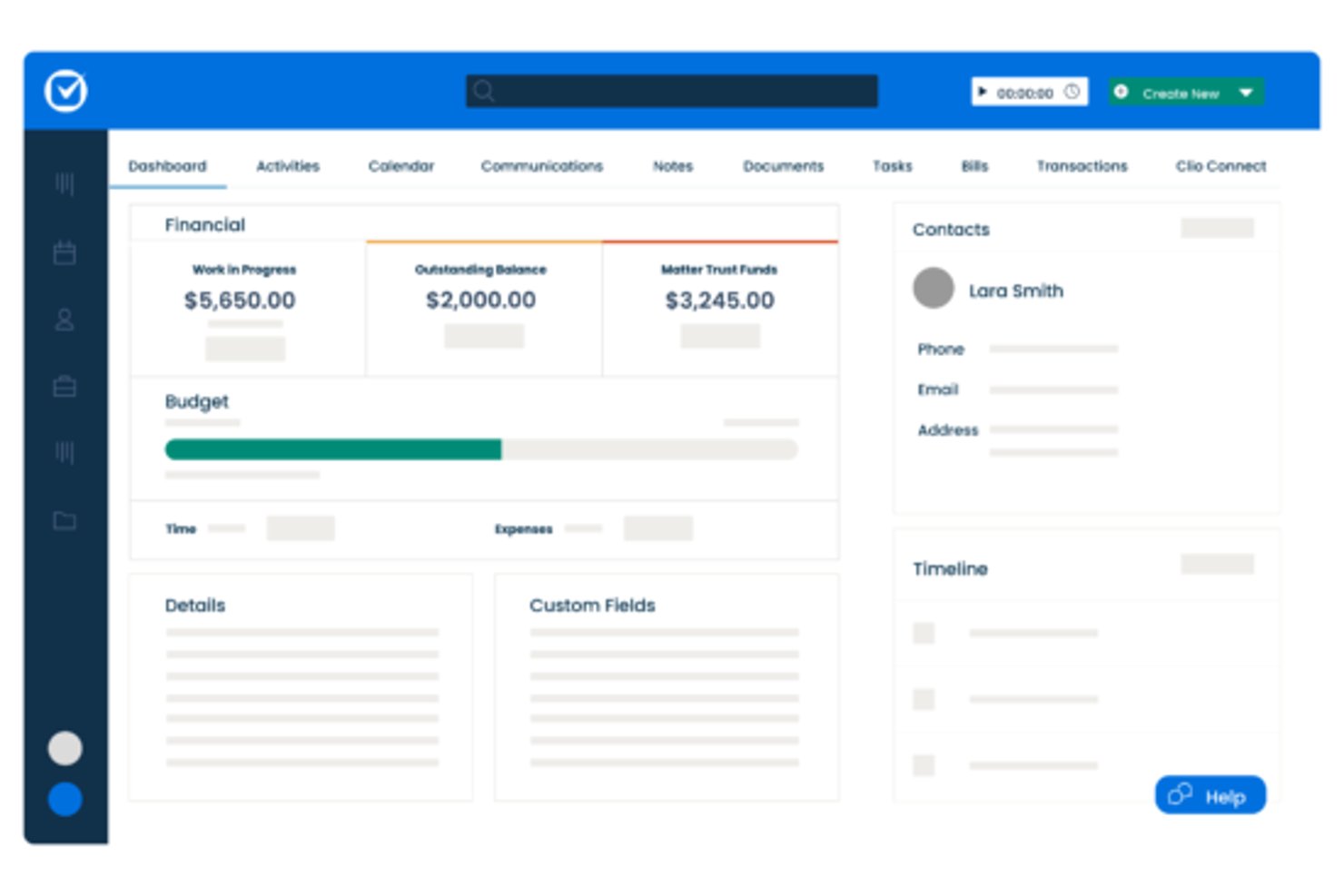
Clio is a legal practice management platform built for personal injury firms that need to handle case tracking, medical records, settlement calculations, and client intake without juggling multiple disconnected tools.
Who Is Clio Best For?
Clio is a strong fit for solo and small-to-mid-sized personal injury firms that handle multiple practice areas alongside PI work.
Why Clio Is a Good CasePeer Alternative
I picked Clio as one of the best because it replaces what most PI firms duct-tape together across separate tools. The built-in settlement calculator generates one-click disbursement statements, and the court-rules-based calendaring covers hundreds of US courts automatically. I also appreciate the AI that extracts deadlines directly from documents and converts them into calendar events, which removes a step I've seen slow down case managers repeatedly.
Clio Key Features
- Medical records management: Log provider details, upload records, and set follow-up reminders for each PI case.
- Custom intake forms: Create and assign customizable lead capture forms that directly populate matter data.
- PI matter templates: Use templates designed for personal injury workflows, including custom fields and pre-built task lists.
- HIPAA-compliant document storage: Store and secure sensitive medical and client files with built-in HIPAA compliance and BAA availability.
Clio Integrations
Clio offers native integrations with Outlook, Gmail, Microsoft 365, QuickBooks Online, LawPay, Dropbox, Google Drive, Xero, DocuSign, and Zoom. It also supports Zapier and provides an API for custom integrations.
Pros and Cons
Pros:
- Handles mixed caseloads across multiple practice areas
- Settlement calculator generates one-click disbursement statements
- Court-rules-based calendaring covers hundreds of courts
Cons:
- PI workflows need significant manual setup
- Medical records module less specialized than CasePeer

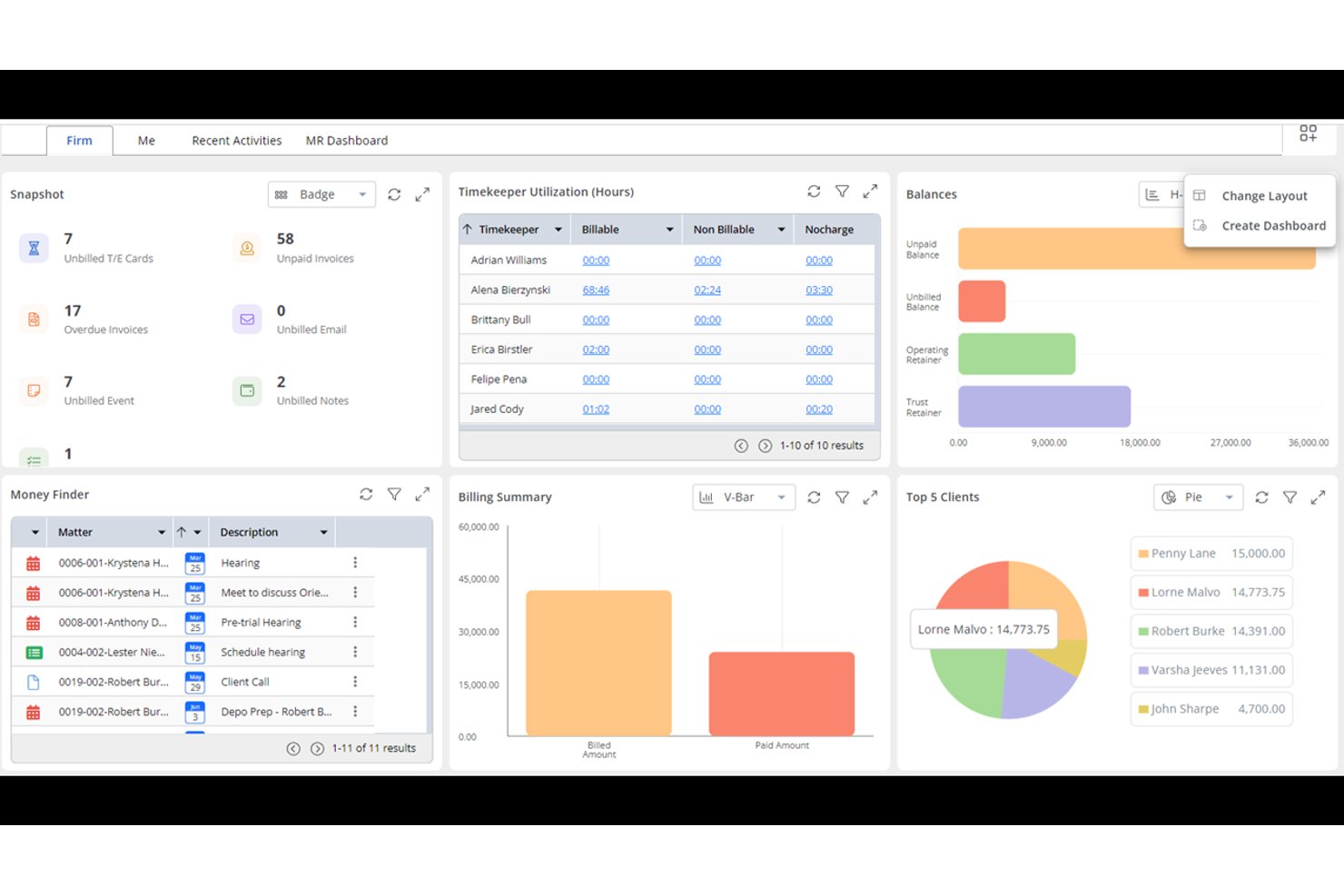
Rocket Matter is a cloud-based legal practice management platform built for law firms that need reliable time tracking, billing, and matter management across a wide range of practice areas.
Who Is Rocket Matter Best For?
Solo practitioners and small to midsize law firms that handle multiple practice areas and need dependable billing, invoicing, and matter organization in one place.
Why Rocket Matter Is a Good CasePeer Alternative
I've included Rocket Matter in my top picks because its billing engine is one of the most detailed I've used in legal practice management software. Batch billing and paperless prebills let me review and send multiple invoices in a single pass, and the auto trust transfer feature moves funds from trust to operating accounts without manual reconciliation. Matter workflows with dependent task and event logic also keep case progress moving automatically as statuses change.
Rocket Matter Key Features
- Matter templates: Create standardized workflows with pre-built matter templates tailored to different case types.
- Integrated document management: Store, organize, and search documents within each matter using unlimited storage on higher tiers.
- Role-based permissions: Customize user access levels and protect sensitive case data through granular security controls.
- Two-way calendar sync: Keep matter deadlines and appointments up to date by syncing with Google Calendar and Office 365.
Rocket Matter Integrations
Rocket Matter offers native integrations with LawPay, QuickBooks Online, NetDocuments, Box, Microsoft Office 365, Google Workspace, and Dropbox, and provides an API for custom integrations.
Pros and Cons
Pros:
- Visual Kanban pipeline for matter stage tracking
- Matter templates adaptable to different practice areas
- Detailed billing with auto trust account transfers
Cons:
- Settlement disbursement tools are not included
- No built-in medical records or lien module

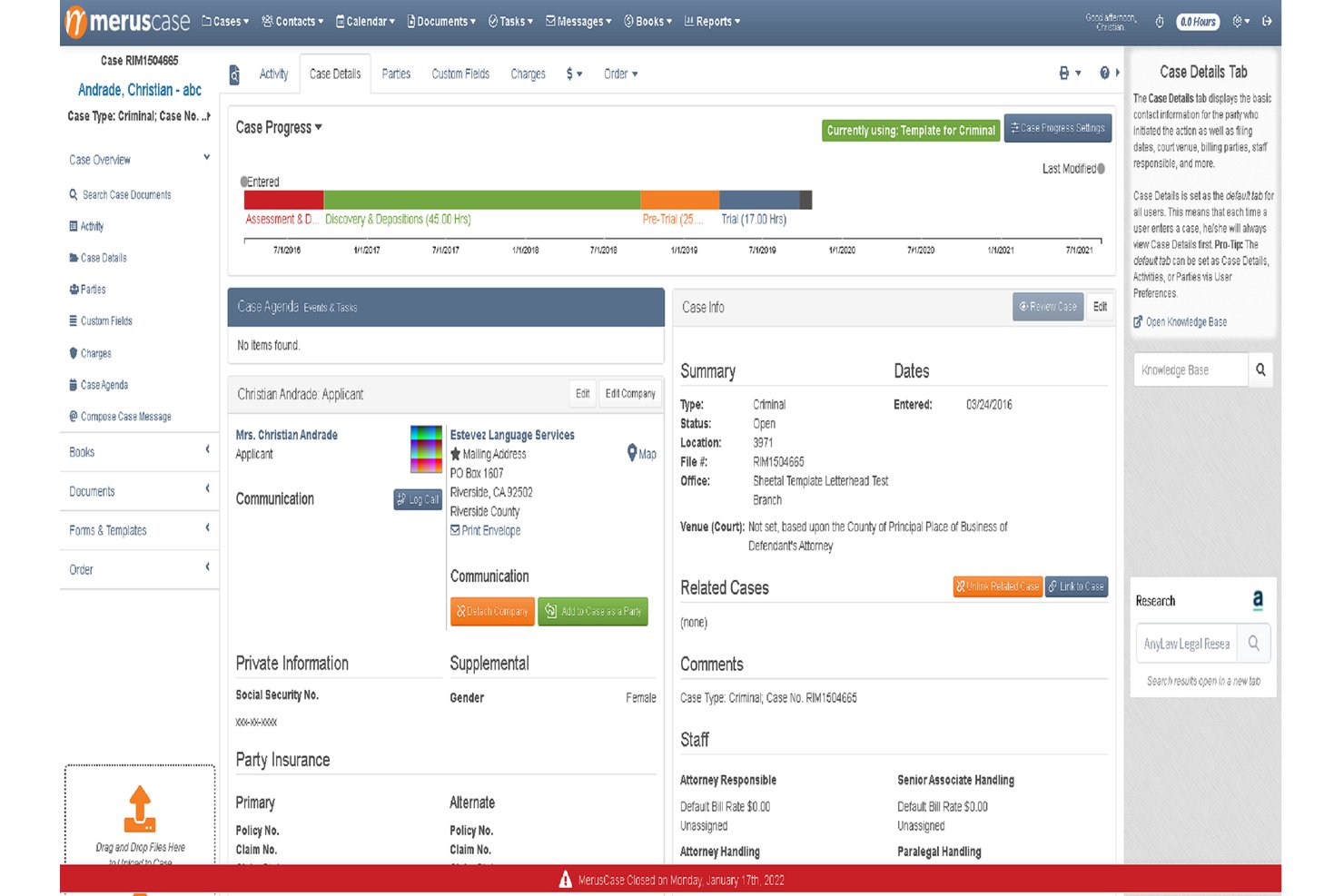
MerusCase is a cloud-based practice management platform built for litigation firms that want a highly configurable system to handle PI case tracking, document automation, and settlement distribution in one place.
Who Is MerusCase Best For?
MerusCase is a strong fit for small to mid-size litigation firms that handle PI and workers' compensation cases and need a configurable, all-in-one platform.
Why MerusCase Is a Good Casepeer Alternative
I've included MerusCase in my top picks because its PI case structure is genuinely configurable in ways most alternatives aren't. The dedicated Incident Tab adapts based on case type, so a motor vehicle accident case automatically surfaces an interactive accident map, vehicle diagrams, and witness fields. I also appreciate the Statutes feature, which auto-generates calendar events based on custom intervals tied directly to each case, keeping deadline tracking locked to the matter rather than managed separately.
MerusCase Key Features
- Batch document scanning: Upload thousands of pages at once for automatic organization and indexing.
- Integrated email management: Sync your Outlook or Gmail inbox and attach emails directly to cases.
- Built-in accounting and time tracking: Track billable hours and manage invoicing without leaving the platform.
- HIPAA-compliant cloud storage: Store sensitive case files with encryption and nightly backups for peace of mind.
MerusCase Integrations
MerusCase offers native integrations with Microsoft 365 (including Outlook), QuickBooks, and EAMS for California workers’ compensation filings. An API is available for custom integrations.
Pros and Cons
Pros:
- Built-in statute tracking automates deadline calendaring
- Incident Tab surfaces case-specific fields automatically
- Highly configurable case-type workflows for PI matters
Cons:
- Reporting tools lack depth for firm-wide analytics
- Mobile app functionality is limited compared to desktop

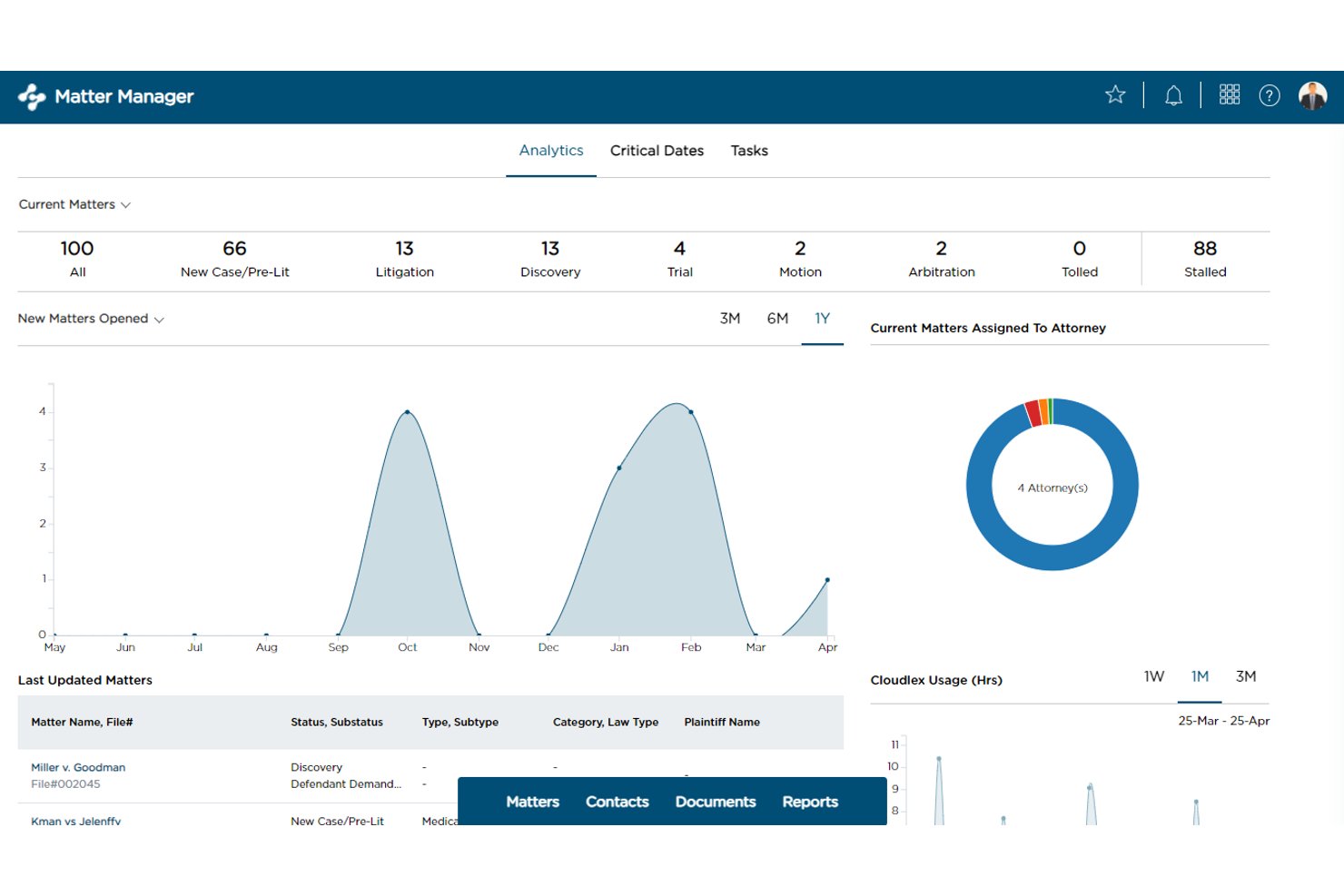
CloudLex is a cloud-based practice management platform built exclusively for plaintiff personal injury law firms, covering everything from client intake and medical records to settlement negotiations in a single system.
Who Is CloudLex Best For?
CloudLex is a strong fit for small to midsize plaintiff personal injury firms that need one platform to replace disconnected tools across intake, case management, and settlement.
Why CloudLex Is a Good CasePeer Alternative
I picked CloudLex as one of the best CasePeer alternatives because it covers the full PI case lifecycle without requiring you to piece together separate tools. I particularly like Lexee AI's demand package drafting, which pulls directly from case facts and medical records already logged in the platform. The built-in settlement negotiation tracker then carries that work forward, letting you calculate fees, liens, and client recovery in the same place.
CloudLex Key Features
- Paralegal services integration: Access remote paralegal support for medical chronologies, document indexing, and bilingual intake directly within your matters.
- HIPAA-compliant closed case archiving: Securely archive closed cases for ten years with indexed search and unlimited retrievals.
- Mobile access apps: Use dedicated mobile applications for iOS and Android to manage cases and communicate on the go.
- Native Microsoft Office integration: Open, edit, and co-author Word, Excel, and PowerPoint documents from within the case file.
CloudLex Integrations
CloudLex offers native integrations with QuickBooks Online, DocuSign, Adobe Sign, Microsoft Outlook, and Word. An API is not available for custom integrations.
Pros and Cons
Pros:
- Referral source attribution with co-counsel fee splitting
- Dedicated medical records and treatment timeline tracking
- PI-exclusive platform with no generic-firm compromises
Cons:
- Limited native third-party integrations compared to competitors
- No publicly available pricing; requires a sales conversation

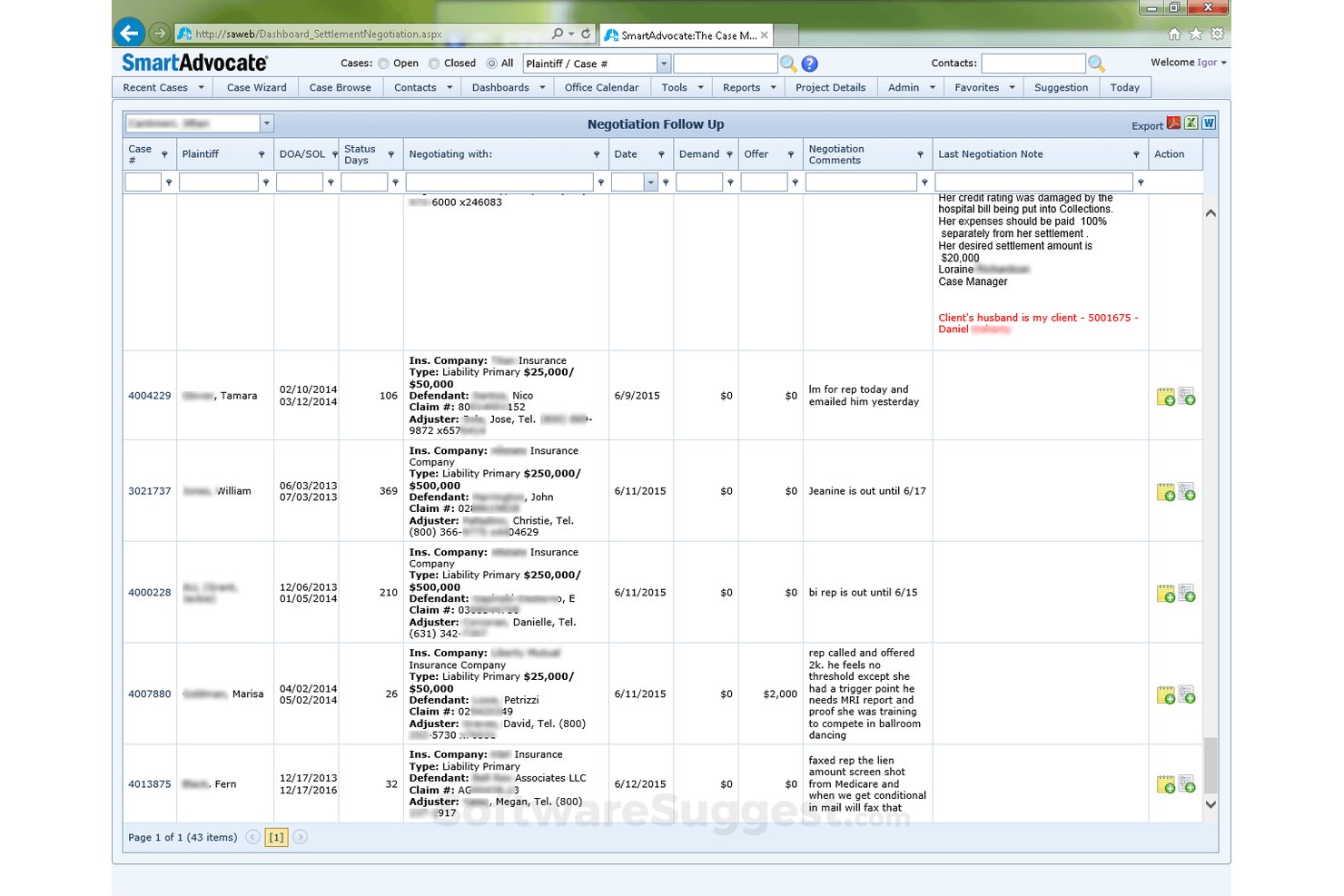
SmartAdvocate is a purpose-built case management platform for personal injury and mass tort law firms, designed to handle high-volume caseloads with PI-specific workflows covering intake, medical records, lien tracking, and settlement management.
Who Is SmartAdvocate Best For?
SmartAdvocate suits plaintiff-side firms running contingency-fee practices, especially those managing large dockets across personal injury, workers' compensation, or mass tort matters.
Why SmartAdvocate Is a Good CasePeer Alternative
I picked SmartAdvocate as one of the best because its WorkPlans and Automated Procedures are purpose-built for PI volume. When a new case opens, the system automatically triggers task checklists, assigns work to staff, and sends client texts without any manual input. I also appreciate the Master Case/Member Case linking, which lets my team manage MDL and mass tort dockets without losing visibility into individual claimants across hundreds of related matters.
SmartAdvocate Key Features
- Intake Wizard: Automatically checks for conflicts of interest and streamlines new client onboarding.
- Medical records integrations: Connects directly to national record retrieval vendors for simplified medical document management.
- Client portal: Offers clients secure access to documents, calendar updates, and case communications online.
- Unlimited document storage: Stores all matter-related files with no additional per-GB fees or restrictions.
SmartAdvocate Integrations
SmartAdvocate offers native integrations with QuickBooks, LawPay, DocuSign, Outlook, Microsoft 365, Lawmatics, Law Ruler, Captorra, American Retrieval, ChartSquad, Lexitas, and National Record Retrieval. An API is available for custom integrations.
Pros and Cons
Pros:
- Dedicated medical records and lien tracking module
- Automated task triggers on new case creation
- PI-specific workflows built for mass tort dockets
Cons:
- Custom reporting requires assistance from SmartAdvocate's team
- Steeper implementation timeline than cloud-native rivals

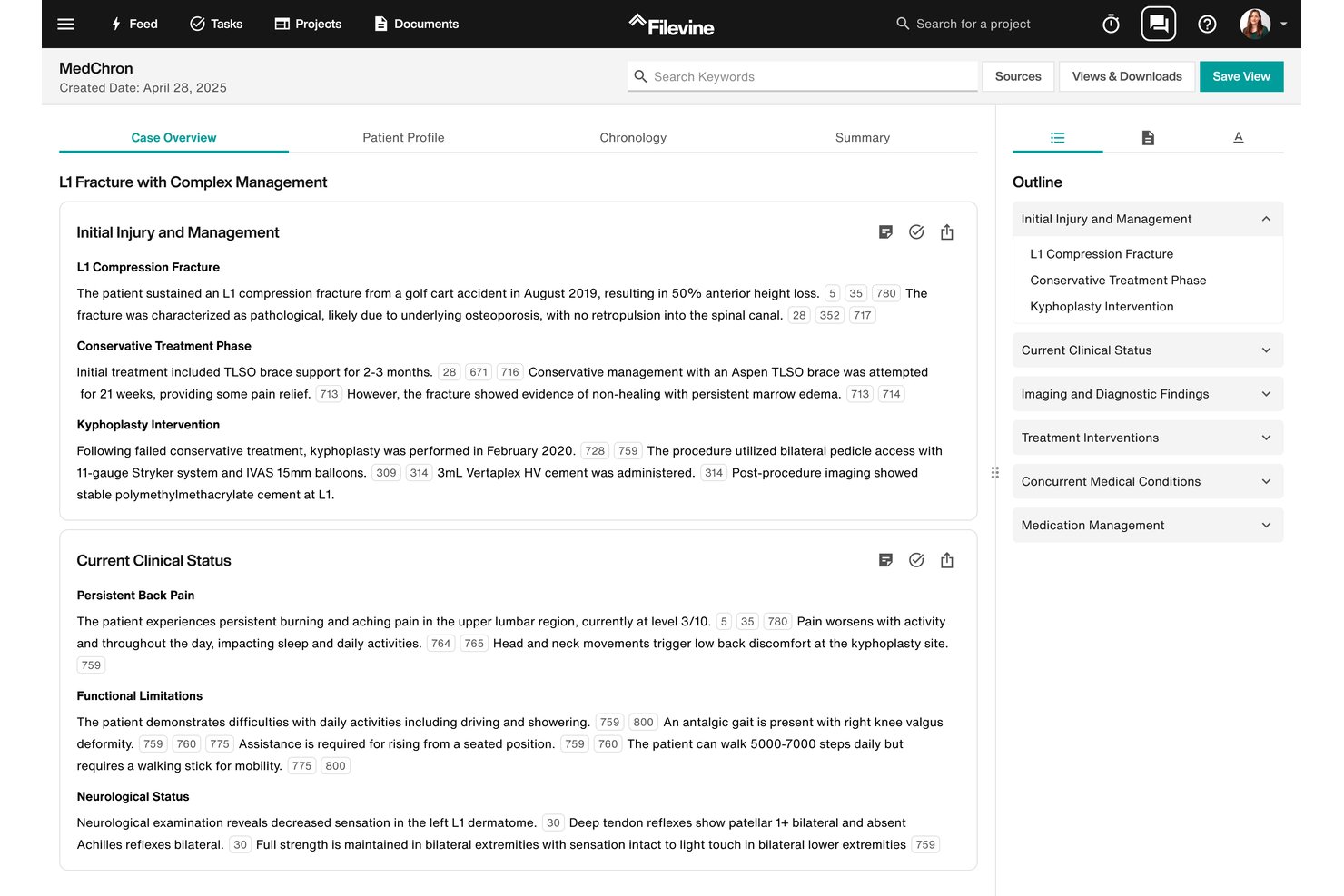
Filevine is a cloud-based legal case management platform built for personal injury and contingency-fee firms that need full control over how they structure case workflows, intake pipelines, and document automation.
Who Is Filevine Best For?
Filevine is a strong fit for mid-size to large PI firms that have a dedicated system administrator and want to build their own workflows from the ground up.
Why Filevine Is a Good CasePeer Alternative
I picked Filevine as one of the best CasePeer alternatives because of how far you can push its workflow customization. I can build PI-specific case phases from scratch, attach custom fields to each stage, and configure task chains that automatically assign work as a case advances. Demands AI takes it further, processing medical records and police reports to generate a demand package in a fraction of the time it would take manually.
Filevine Key Features
- Lead Docket integration: Route incoming leads directly into customizable intake pipelines with status tracking and automated follow-ups.
- Vinesign e-signature: Collect client signatures securely via text or email using built-in e-signature templates.
- Depo Copilot: Enable live deposition transcription with AI-generated follow-up suggestions and transcript tagging.
- MedChron timelines: Automatically generate medical treatment timelines from uploaded documentation for fast reference and analysis.
Filevine Integrations
Filevine offers native integrations with QuickBooks, LawPay, Outlook, Gmail, Google Drive, Dropbox, SharePoint, DocuSign, and Microsoft Word. An API is available for custom integrations.
Pros and Cons
Pros:
- Built-in medical lien and bill tracking
- AI generates demand packages from medical records
- Highly configurable PI-specific case phases
Cons:
- Reporting tools feel limited without customization
- Initial setup demands dedicated admin resources

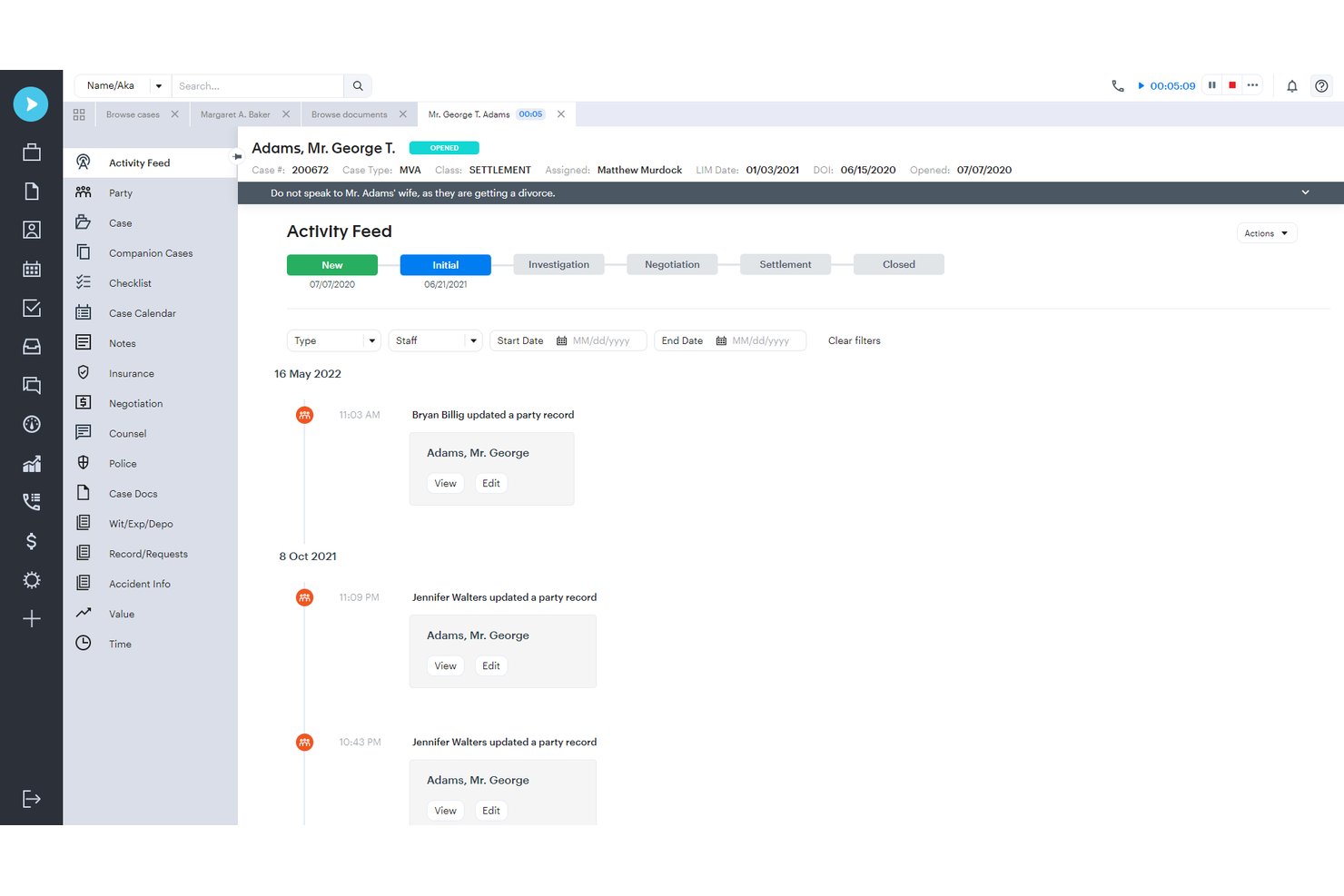
Neos is a cloud-based case management platform built for personal injury and plaintiff law firms that need to manage cases from intake through settlement in a single, AI-assisted system.
Who Is Neos Best For?
Neos is a strong fit for growing plaintiff law firms with three or more users handling high-volume personal injury caseloads across multiple practice areas.
Why Neos Is a Good CasePeer Alternative
I've included Neos in my top picks because its approach to personal injury automation goes deeper than task checklists and reminders. NeosAI reads incoming medical records into coded, searchable fields tied directly to source PDFs, so my team isn't manually logging every provider visit or bill. Demands Plus then builds settlement-ready demand letters and medical chronologies straight from that case data, with every passage cited back to its source document.
Neos Key Features
- Live activity feed: See case actions and updates in real time for visibility across your entire caseload.
- Custom dashboards: Build role-specific dashboards to track metrics, deadlines, and case progress by department or individual.
- Native texting integration: Send and receive client text messages directly within the case file, preserving communication history.
- Rules-based court calendaring: Automatically calculate and track litigation deadlines using built-in court rules integrations.
Neos Integrations
Neos offers native integrations with LawPay, DocuSign, QuickBooks Online, Outlook, Microsoft 365, Kenect, RingCentral, and LawToolBox. An API is available for custom integrations.
Pros and Cons
Pros:
- Customizable dashboards for department-level case tracking
- Demands Plus auto-generates settlement demand letters
- NeosAI auto-codes incoming medical records
Cons:
- Initial setup requires significant configuration time
- Report customization options are relatively limited

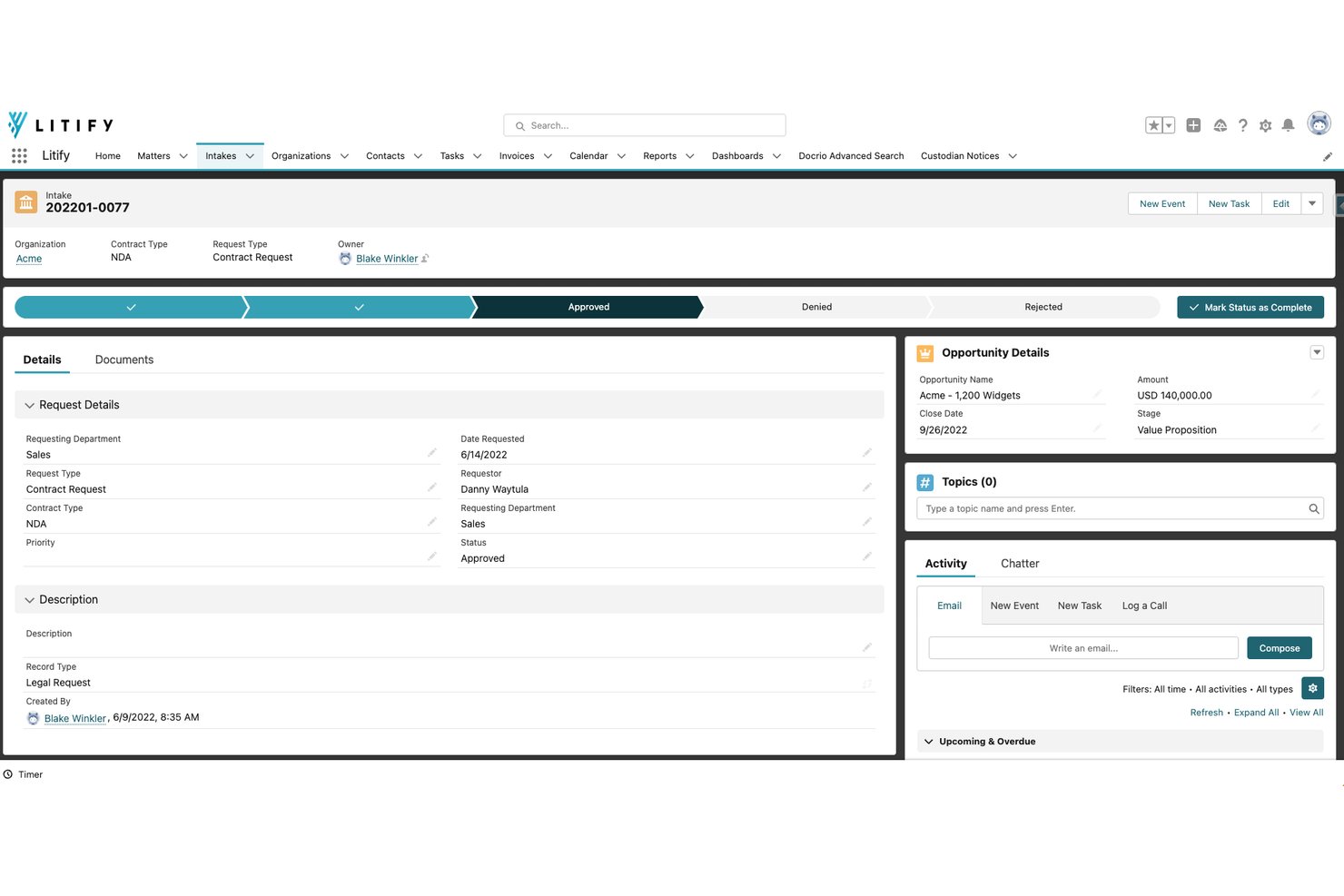
Litify is an enterprise-grade plaintiff case management platform built natively on Salesforce, designed for high-volume PI firms that need AI-driven intake, medical records management, demand generation, and settlement disbursements in one system.
Who Is Litify Best For?
Litify is a strong fit for mid-size to large plaintiff law firms — typically 20 or more attorneys — managing high case volumes across PI, mass tort, or workers' compensation practices.
Why Litify Is a Good CasePeer Alternative
I picked Litify as one of the best because its Salesforce-native architecture gives PI firms reporting and automation depth that no purpose-built competitor can match. I love how LitifyAI Damages Assistant automatically builds source-linked medical chronologies and reconciles the medical ledger, work that normally takes a paralegal hours. Pair that with Instant Demands, which generates a full demand packet with cited exhibits, and my team can move cases from active treatment to demand without ever leaving the platform.
Litify Key Features
- Dynamic intake questionnaires: Capture detailed client information with customizable, branching forms tailored for personal injury workflows.
- Litify Referral Network: Enable easy case referrals and track co-counsel arrangements directly within the platform.
- Advanced PDF editing: Edit, redact, and Bates-stamp documents without leaving the case management interface.
- Reporting dashboards: Build custom, real-time reports and dashboards to monitor firm-wide metrics and case progress.
Litify Integrations
Litify offers native integrations with DocuSign, Outlook, NetDocuments, Accounting Seed, Sage Intacct, National Record Retrieval, Records On Demand, and Adobe Sign. An API is available for custom integrations.
Pros and Cons
Pros:
- Built-in demand packet generation with source-cited exhibits
- Salesforce-native reporting depth unmatched by PI-specific tools
- AI-generated medical chronologies from actual records
Cons:
- Salesforce dependency adds licensing cost on top of Litify
- Implementation complexity is high for smaller firms
Other CasePeer Alternatives
Here are some additional CasePeer alternatives options that didn’t make it onto my shortlist, but are still worth checking out:
- TrialWorks
For litigation-focused case management
- PracticePanther
For simple case and billing workflows
- LEAP
For case and document automation
- CosmoLex
For case management with accounting
- Lawmatics
For legal intake and CRM automation
- EvenUp
For AI-assisted PI case preparation


How I Evaluate Casepeer Alternatives
I split my evaluation into two layers: core PI features every CasePeer alternative must cover, and differentiators that separate the best. I look at settlement tracking depth, referral tools, and how realistic CasePeer migration is.
Core Functionality (Table Stakes for This List)
When I'm selecting tools for my list, I rank each one on a scale from 0 (does not offer the functionality) to 5 (excels in this area) for each core functionality listed below. Then, I calculate the tool's total score into a percentage. Each tool needs to achieve a minimum total score of 65% to be considered for inclusion.
- Case Management: I look for configurable case stages, custom fields, and party tracking that reflect how PI firms actually move a case from incident through resolution.
- Intake & Lead Tracking: A good intake module should let your team capture leads from web forms, route them through a pipeline, and convert them to cases without re-entering data.
- Settlement Tracking: I evaluate whether the tool calculates attorney fees, liens, and costs, then generates disbursement statements your team can hand to clients at closing.
- Medical Records Management: Tracking providers, outstanding record requests, and lien amounts in one place matters—especially when a single case involves dozens of treatment entries.
- Document Management: I check for template merging with case fields, folder organization by matter, and e-signature support so your team isn't toggling between separate document tools.
- Task & Deadline Automation: Workflow triggers tied to case stages—like auto-assigning a demand letter task when treatment concludes—show me the platform understands PI-specific timelines.
Once I have a list of tools that meet the criteria, I consider what sets each platform apart.
Differentiating Factors (What Sets Vendors Apart)
Here's how I compare and contrast different vendors:
Standout Features
Referral tracking is a major differentiator for PI firms that depend on attorney networks. I look for platforms that attribute case origins to specific referral sources and handle co-counsel fee splits automatically. A secure client communication portal also matters—firms fielding constant status update calls benefit from two-way texting and automated case updates. Settlement calculators that generate ready-to-send disbursement statements, rather than just tallying numbers, save real time at case resolution.
Beyond Features
Data migration matters when you're switching from CasePeer . I look for vendors that offer dedicated migration support and realistic onboarding timelines so your team isn't stuck in limbo between systems. Pricing transparency is another factor I evaluate—some platforms bundle features like texting or e-signatures while others charge per add-on, which changes total cost fast. Integration depth with tools like LawPay, QuickBooks, and DocuSign also tells me how well a platform fits into an existing PI firm's tech stack.
Why Look For a CasePeer Alternative?
While CasePeer is a good choice of case management platform, there are a number of reasons why some users seek out alternative solutions. You might be looking for a CasePeer alternative because…
- Need more customizable workflows for unique PI practice needs
- Want deeper integrations with accounting or client intake tools
- Prefer a platform with more flexible pricing or contract terms
- Require advanced automation beyond CasePeer’s limits
- Want better support for data migration from legacy systems
- Need multilingual or international functionality for cross-border teams
If any of these sound like you, you’ve come to the right place. My list contains several CasePeer alternatives options that are better suited for teams facing these challenges with CasePeer and looking for alternative solutions.
CasePeer Key Features
Here are some of the key features of CasePeer, to help you contrast and compare what alternative solutions offer:
- Case management: Centralizes all case information, contacts, deadlines, and communications in a single workspace so your team can monitor every stage of each matter efficiently.
- Intake and lead tracking: Converts new leads into case files with customizable intake forms, status pipelines, and automated follow-up features tailored for personal injury workflows.
- Settlement calculator: Automates calculation of attorney fees, expenses, liens, and medical costs, then generates detailed disbursement statements for client review and final resolution.
- Medical records management: Logs providers, tracks medical record requests, organizes treatment data, and helps manage liens and outstanding bills for every case.
- Document management: Stores, organizes, and generates case documents using templates with merge fields, supports e-signatures, and ties documents directly to relevant files.
- Task and deadline automation: Assigns tasks based on case stage, automates reminders for upcoming deadlines, and ensures nothing falls through the cracks on critical timelines.
- Referral source tracking: Attributes case referrals, manages co-counsel relationships, and splits fees when necessary – supporting both internal and external referral networks.
- Client communication tools: Offers secure two-way texting, client portals, and automated status updates to keep clients informed and reduce status inquiry calls.
- Integrated payments: Connects with payment processors for settlements and fee collections, simplifying trust accounting and client billing.
- Reporting and analytics: Delivers dashboards and custom reports on case progress, lead conversion, referral performance, settlement metrics, and team productivity.