

10 Best Legal Client Take Software for Family Law in 2026

Best Legal Client Take Software for Family Law Shortlist


Legal client intake software for family law automates and organizes everything from initial inquiries to case file creation, conflict checks, document gathering, and fee agreements. If you’re running a family law practice, you know how quickly leads can slip through the cracks or how intake chaos can create compliance headaches. This guide covers the best legal client take software for family law in 2026, focusing on tools that connect intake, case management, compliance, payments, and client experience into one smooth process. I’ll help you pick a solution that reduces admin, minimizes missed opportunities, and keeps your team focused on serving clients—not chasing paperwork.
Why You Can Trust Us
We’ve been testing and reviewing legal software since 2023. As legal practice leaders ourselves, we know how critical and difficult it is to make the right decision when selecting software.
We invest in deep research to help our audience make better software purchasing decisions. We’ve tested more than 2,000 tools for different legal practice use cases and written over 1,000 comprehensive software reviews. Learn how we stay transparent & our software review methodology.
Best Legal Client Take Software for Family Law Summary
This comparison chart summarizes pricing details for my top legal client take software for family law selections to help you find the best one for your budget and business needs.
| Tool | Best For | Trial Info | Price | ||
|---|---|---|---|---|---|
| 1 | Best for native intake-to-matter sync in one platform | 10-day free trial | From $50/user/month (billed annually) | Website | |
| 2 | Best for intake-to-case management in one platform | Free demo available | Pricing upon request | Website | |
| 3 | Best for all-in-one intake to case file sync | Not available | From $109/user/month (billed annually) | Website | |
| 4 | Best for conflict checks built into matter intake | Free trial available OR Free demo available | From $79/user/month (billed annually) | Website | |
| 5 | Best for lead-to-matter intake in one platform | Free trial available | From $59/user/month | Website | |
| 6 | Best for family law intake with native matter sync | Free trial available | From $49/user/month | Website | |
| 7 | Best for intake-to-matter sync in family law firms | 7-day free trial | From $49/user/month (billed annually) | Website | |
| 8 | Best for AI lead scoring in family law intake | Free demo available | Pricing upon request | Website | |
| 9 | Best for sign-and-pay retainer conversion at intake | Free demo available | Pricing upon request | Website | |
| 10 | Best for intake-to-trust in one family law platform | 10-day free trial | From $49/user/month (billed annually) | Website |
Legal Client Take Software for Family Law Reviews
Below are my detailed summaries of the best legal client take software for family law that made it onto my shortlist. My reviews offer a detailed look at the features, integrations, and best use cases of each platform to help you find the best one for you.

MyCase
Best for native intake-to-matter sync in one platform
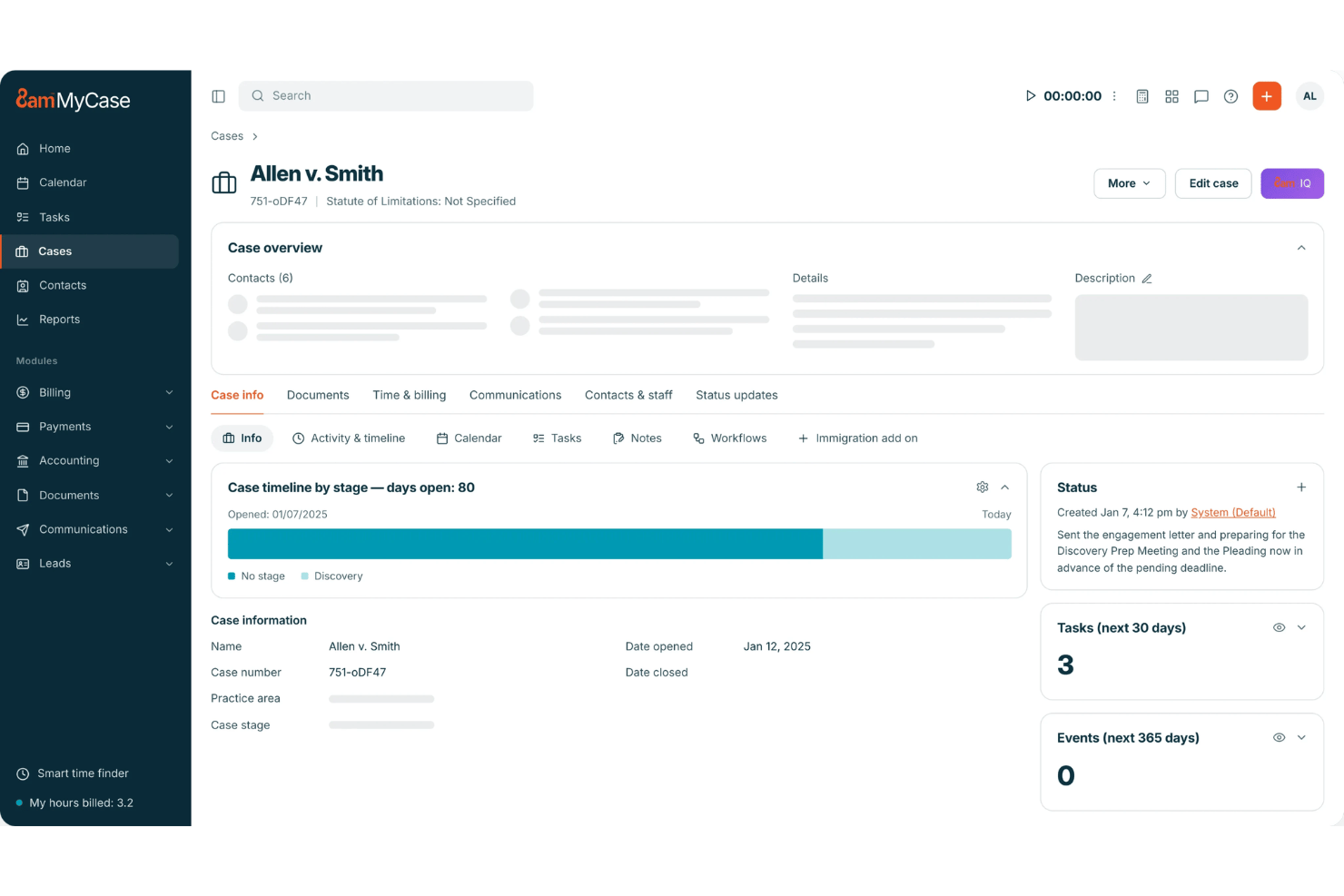
MyCase is a practice management platform for law firms that bundles client intake forms, a built-in legal CRM, eSignature, secure client portal, and billing into a single system purpose-positioned for family law practitioners.
Who Is MyCase Best For?
MyCase is a strong fit for family law firms that want intake, case management, billing, and eSignature in one place rather than juggling separate tools.
Why I Picked MyCase
MyCase earns its spot on my shortlist because intake data flows directly into case files without any external sync, since MyCase is the practice management system itself. I love that when a prospective divorce client submits an intake form, that data auto-populates their matter record instantly. Native unlimited eSignature with merge fields then lets you send a retainer for signature and collect payment via LawPay in the same workflow, without leaving the platform.
MyCase Key Features
- Secure client portal: Clients get 24/7 access to case documents, invoices, and secure messaging through an encrypted portal—keeping sensitive family law communications off email.
- Workflow automation: Rules-based automation triggers follow-up tasks, document requests, and notifications based on form submissions, case milestones, or calendar events.
- Legal CRM with lead pipeline: A built-in CRM tracks prospective clients from first contact through retainer signing, including source attribution and automated text and email follow-up sequences.
- Two-way texting: A dedicated firm number supports unlimited two-way SMS with clients directly within the platform on Pro and Advanced plans.
MyCase Integrations
MyCase lists 70+ integrations, including LawPay, Google Calendar, Microsoft Outlook, Lawmatics, Smith.ai, Answering Legal, Ruby Reception, CallRail, QuickBooks Online, and Zapier. Advanced also includes an open API for custom integrations.
Pros and Cons
Pros:
- Workflow automation triggers onboarding tasks automatically
- Unlimited eSignature included with retainer payments
- Intake flows natively into case management
Cons:
- No pre-built family-law-specific intake templates
- Conflict checking is manual, not automated

Best for intake-to-case management in one platform
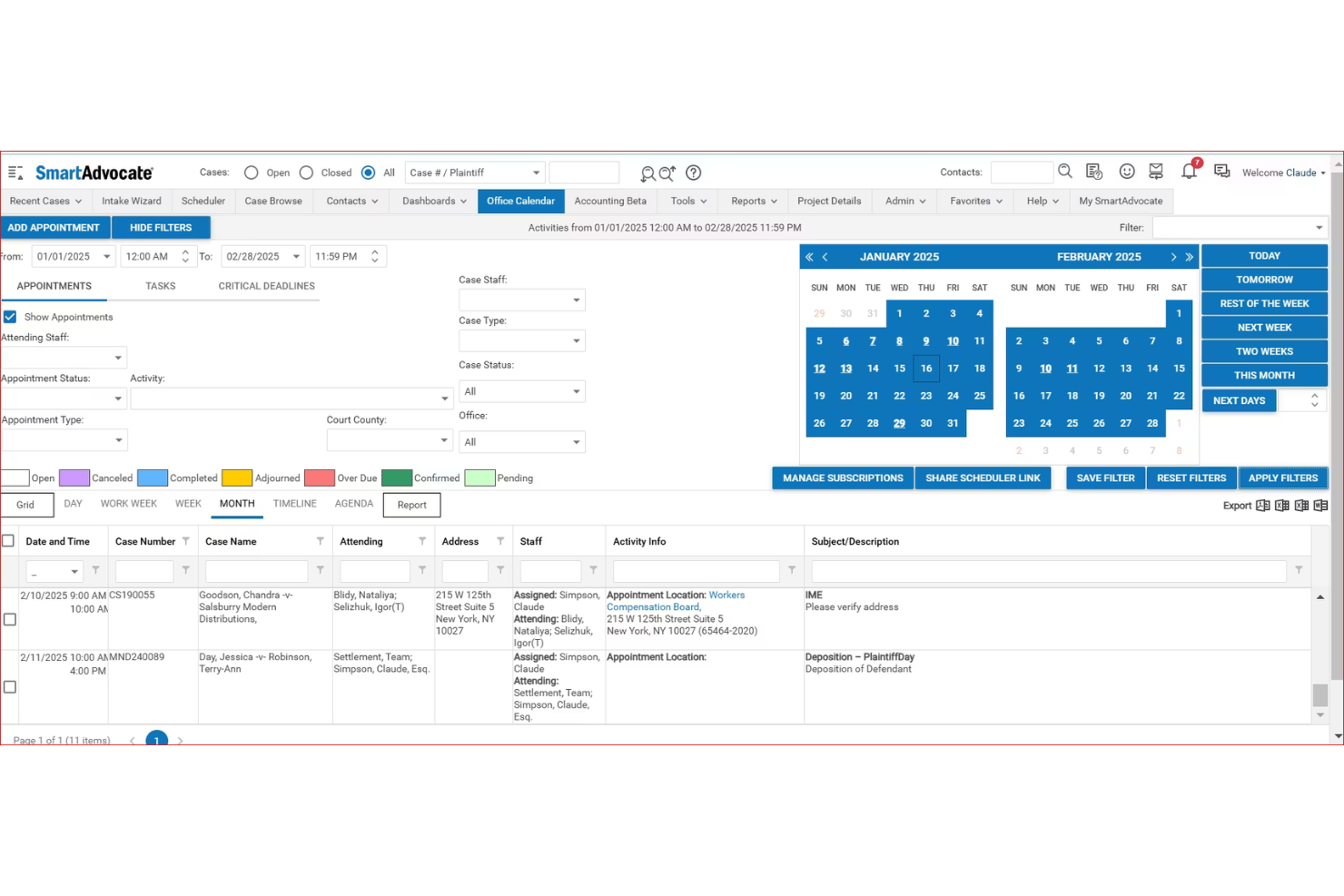
SmartAdvocate is a legal case management platform with a built-in intake system that covers the full client lifecycle—from lead capture and conflict checking through e-signature, retainer collection, custody calendars, child support tracking, and domestic violence order management.
Who Is SmartAdvocate Best For?
SmartAdvocate is a strong fit for mid-size family law firms that want intake, case management, and client communication in a single platform rather than a stack of connected tools.
Why I Picked SmartAdvocate
SmartAdvocate earns its spot on my shortlist because it's the only tool here that functions as both the intake system and the case management platform in one. I especially like the Intake Wizard's built-in conflict-of-interest check and real-time lead scoring, which means intake staff can qualify a prospective divorce or custody client and flag conflicts without ever leaving the intake flow. From there, case data moves directly into matter records, custody calendars, and child support tracking fields without any middleware.
SmartAdvocate Key Features
- Custody calendar and visitation scheduling: Track visitation schedules, holiday rotations, and custody exchanges with automated reminders and compliance reporting.
- Domestic violence order tracking: Log orders and violation reports, calendar expiration and renewal dates, and trigger automated workflows for emergency responses.
- Role-based access controls: Set granular, permission-based access to sensitive records like financial disclosures and domestic violence documentation.
- Mass email and SMS follow-up: Send automated, multi-step communication sequences to prospects and log all messages directly to the case file.
SmartAdvocate Integrations
SmartAdvocate advertises 175+ integrations, including DocuSign, Docubee, Nintex eSign, Confido Legal, Lawmatics, Law Ruler, QuickBooks, Microsoft Outlook, CallRail, and Keap. It also supports an API for custom integrations.
Pros and Cons
Pros:
- Automated family law engagement and workflow triggers
- Custom fields for custody, support, DV documentation
- Direct intake-to-case management with no middleware
Cons:
- Conflict checks may not cover aliases or opponents
- No library of prebuilt family law intake templates

Neos
Best for all-in-one intake to case file sync
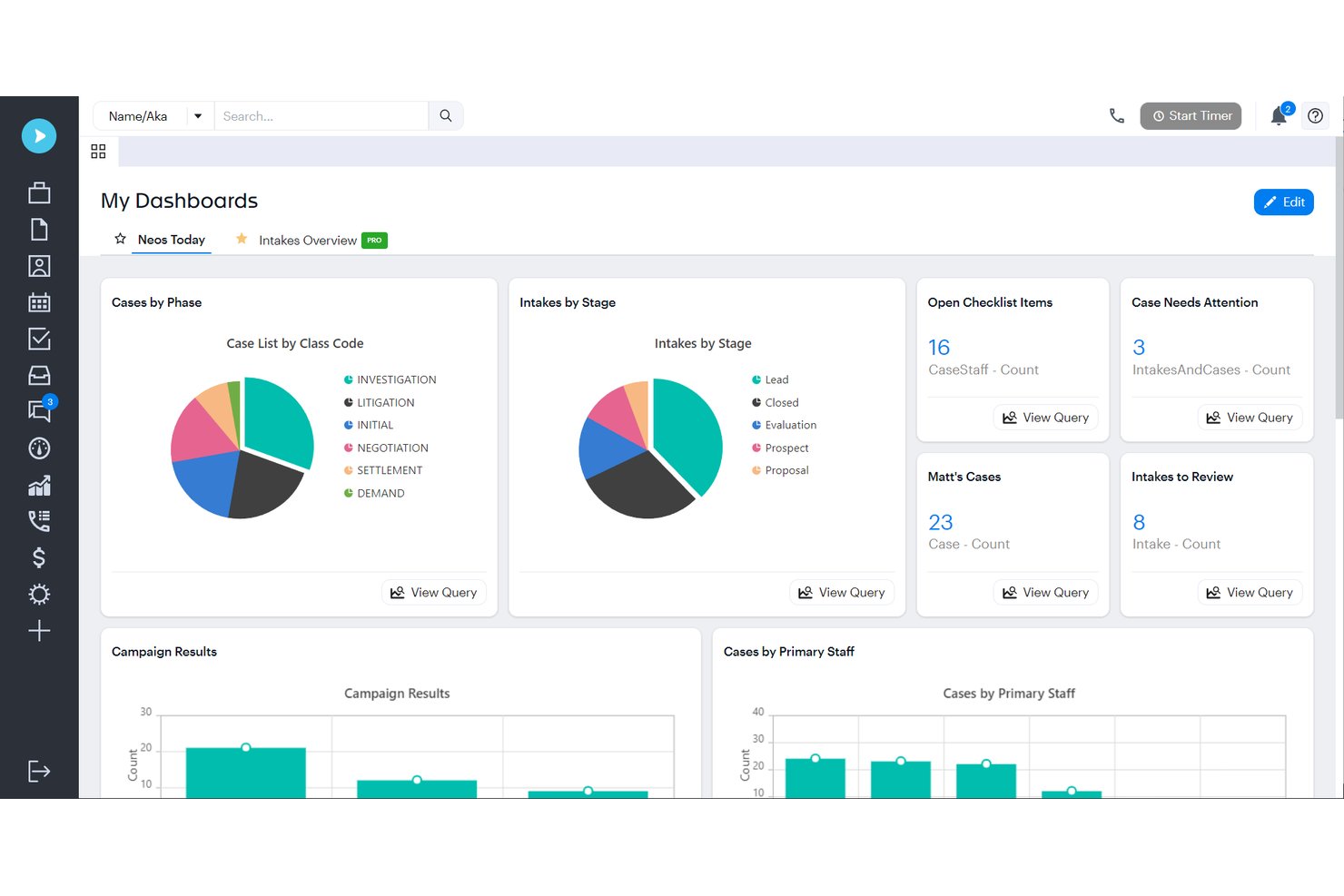
Neos is a cloud-based legal case management platform that covers the full client lifecycle—from customizable intake forms and conflict checking to document automation, billing, and a secure client portal—within a single system.
Who Is Neos Best For?
Neos works best for mid-size to larger family law firms that want a single platform managing intake, case files, billing, and client communication without stitching together separate tools.
Why I Picked Neos
I picked Neos as one of the best because it's the only tool on this list where intake data and the live case file are the same record, not a sync between two systems. When a client submits an intake form, that information flows directly into the matter your team works from, with no export, import, or field mapping required. I also like that Neos Intake Pro includes built-in conflict and duplicate checking as part of that same intake workflow, so your team catches issues before a client is ever retained.
Neos Key Features
- Role-based permissions: Control which staff members can access specific cases and sensitive client data through granular role-based and individual permission settings.
- Two-way client texting: Send and receive client text messages directly within the platform, with every message automatically saved to the case file.
- DocuSign e-signature integration: Send engagement letters and documents for electronic signature directly from the case record with a single click via DocuSign.
- Lead ROI and revenue dashboards: Track lead sources, pipeline stages, and revenue attribution through built-in intake CRM reporting dashboards.
Neos Integrations
Neos has documented integrations with DocuSign, LawPay, Microsoft 365, Case Status, Hona, RingCentral, Zoom Phone, Smith.ai, and InfoTrack. It also offers an API for custom integrations and supports Zapier.
Pros and Cons
Pros:
- Two-way client texting with message archiving
- SOC 2 Type II security and per-firm isolation
- Intake data flows directly into case records
Cons:
- Minimum three-user requirement excludes solo firms
- No family law–specific intake templates

Best for conflict checks built into matter intake
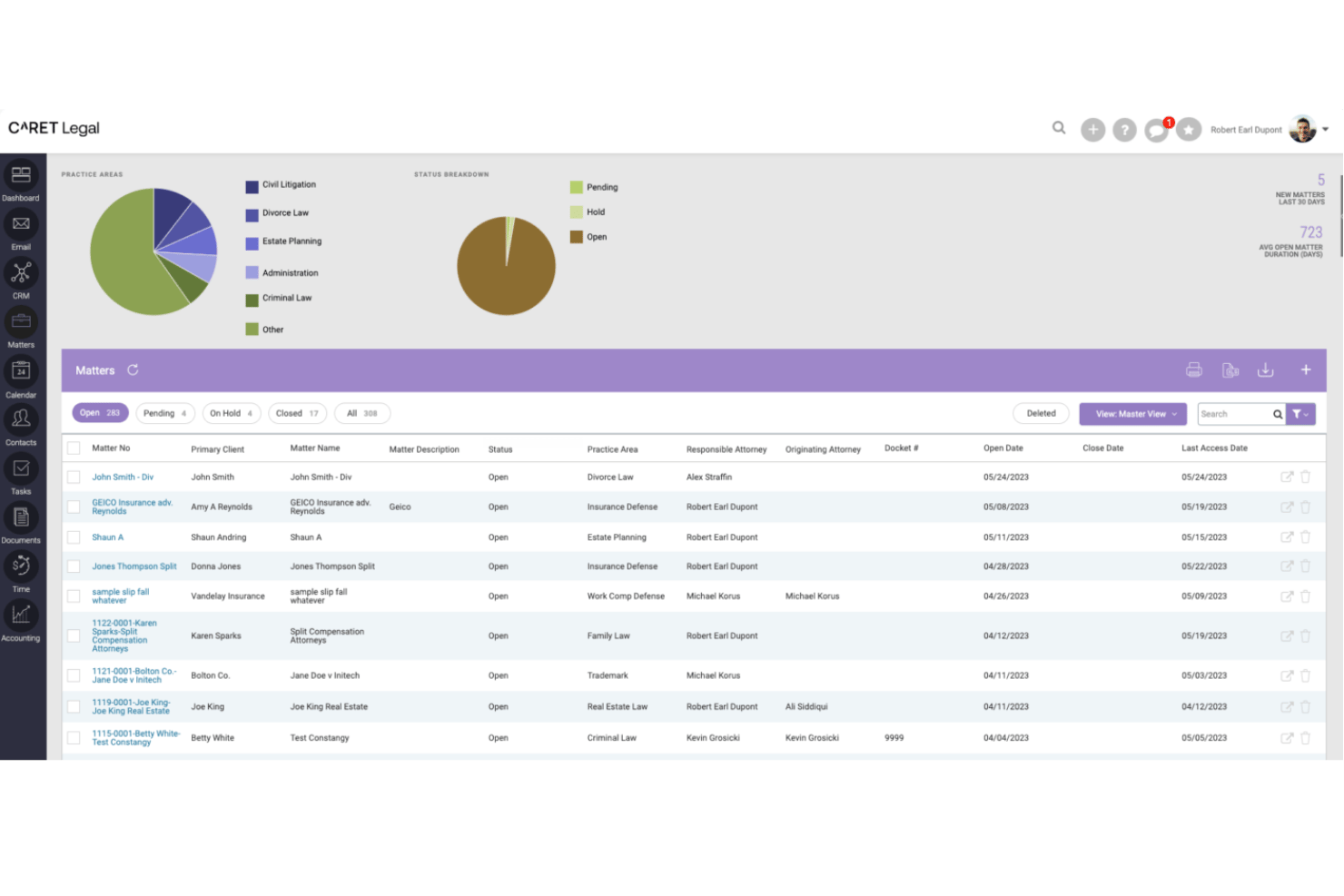
CARET Legal is a practice management platform built for law firms that combines client intake, conflict checking, matter management, billing, trust accounting, and a secure client portal in one system.
Who Is CARET Legal Best For?
CARET Legal is a strong fit for mid-to-large family law firms that want intake, conflict checking, matter management, and trust accounting in one platform.
Why I Picked CARET Legal
I picked CARET Legal as one of the best because its conflict checking is built directly into the matter intake workflow, not bolted on as a separate step. Before a new family law matter opens, I can run a search using Boolean operators and wildcards across active files, archived matters, closed cases, communication logs, and all party types, including opposing counsel and witnesses. That depth matters in divorce and custody work, where conflicts surface in unexpected places. The system also generates exportable PDF and CSV audit reports, so there's a clear record every time.
CARET Legal Key Features
- IOLTA-compliant trust accounting: Manage client funds in dedicated trust accounts that meet legal compliance requirements, with matter-centric billing and split billing support for divorce cases.
- Secure client portal: Give clients encrypted access to documents and invoice payments, backed by 2048-bit encryption, TLS, two-factor authentication, and SOC 2 certification.
- Workflow automation: Automatically trigger task and calendar event sequences based on matter type, helping family law teams manage court date timelines and follow-up steps.
- CARET Pay: Accept credit card, ACH, and e-check payments directly within the platform, including retainer collection through the client portal.
CARET Legal Integrations
CARET Legal has native integrations with Lawmatics, Microsoft 365, Google Workspace, QuickBooks Online, NetDocuments, OneDrive, LawToolBox, HotDocs, and CARET Pay. RMail and Microsoft plugins add electronic signatures and document workflows.
Pros and Cons
Pros:
- IOLTA-compliant trust accounting for retainers
- Secure client portal supports document sharing
- Enhanced conflict checks built into intake
Cons:
- E-signature available only through integration
- Minimum 25 users excludes solo firms

Best for lead-to-matter intake in one platform
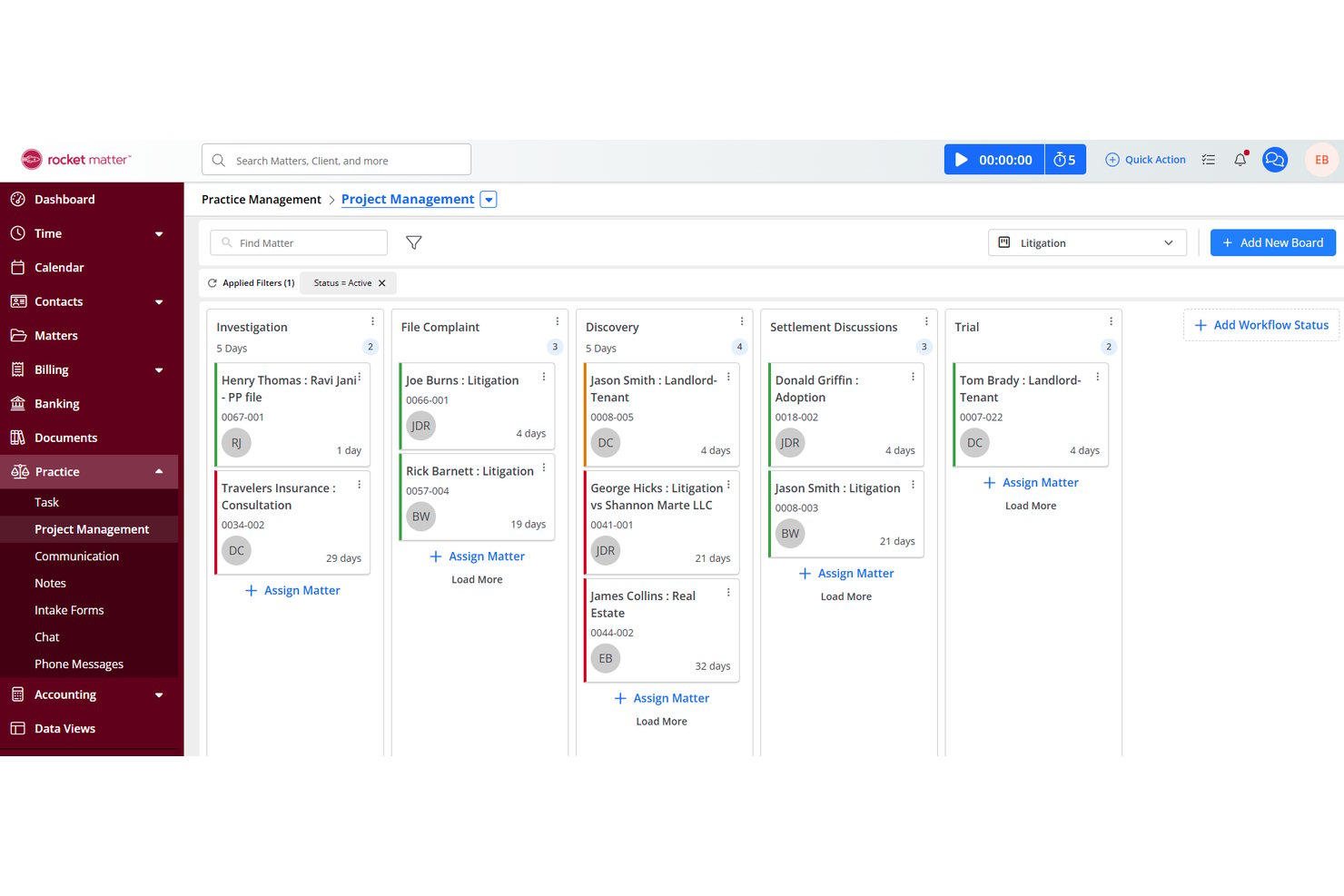
Rocket Matter is a legal practice management platform that combines matter management, time tracking, billing, trust accounting, e-signature, and a Legal CRM add-on built specifically for lead tracking, intake forms, and consultation scheduling.
Who Is Rocket Matter Best For?
Rocket Matter is a strong fit for family law firms that want intake, matter management, billing, and trust accounting to live in a single platform rather than across separate tools.
Why I Picked Rocket Matter
I've included Rocket Matter in my top picks because it's the only tool on this list where lead tracking, intake, and matter management live in the same native platform. When a prospect submits an intake form, that data flows directly into a matter and billing record without any third-party sync. I particularly like the Legal CRM add-on's built-in dialer and automated SMS/email follow-ups, which keep family law leads moving from first contact to signed engagement letter without manual chasing.
Rocket Matter Key Features
- Conflict checking: Search across all matters and contacts by name to identify potential conflicts of interest before opening a new family law matter.
- Native trust accounting: Track per-client trust balances, process deposits and disbursements, and run compliance reports within the same platform you use for billing.
- Split invoicing: Divide invoices across multiple parties on a single matter, which is useful for family law cases with shared billing arrangements.
- Passive time tracking: Capture billable time automatically through desktop activity monitoring via Rocket Matter Track, reducing missed hours across high-volume caseloads.
Rocket Matter Integrations
Rocket Matter offers native integrations with QuickBooks Online, Microsoft Office 365/Outlook, Google Calendar, OneDrive, Dropbox, Box, and NetDocuments. It also supports Zapier.
Pros and Cons
Pros:
- Full legal CRM tailored for law firms
- Native e-signature available on every plan
- Syncs intake data directly into matters
Cons:
- No pre-built family law intake templates
- Intake automation requires paid CRM add-on

Best for family law intake with native matter sync
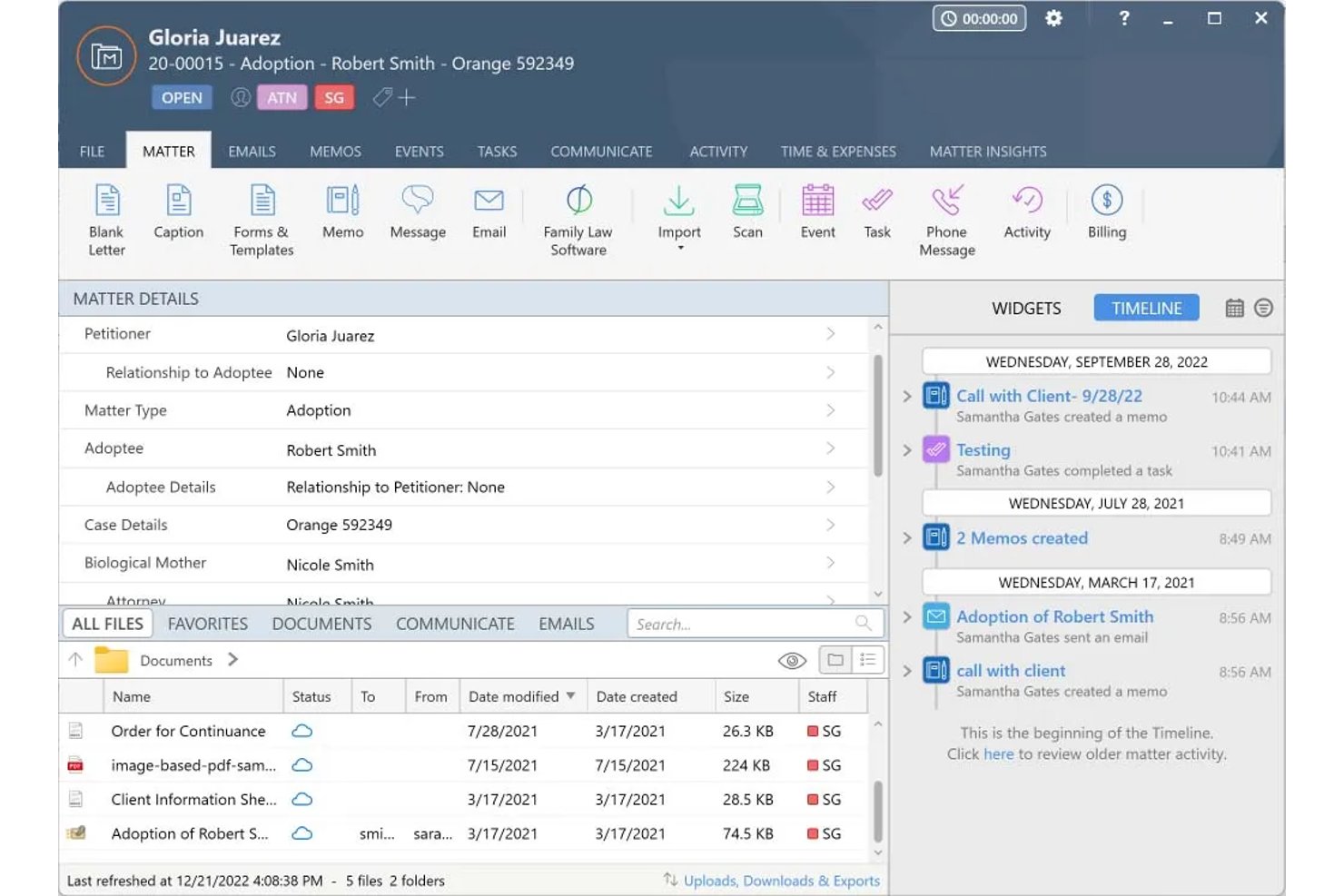
Smokeball is a legal practice management platform built for small law firms, combining family law–specific intake forms, lead pipeline tracking, matter management, document automation, and trust accounting in a single system.
Who Is Smokeball Best For?
Smokeball is a strong fit for small family law firms that want intake, matter management, billing, and document automation in a single platform—without stitching together multiple tools.
Why I Picked Smokeball
I've included Smokeball in my top picks because it's the only tool on this list where intake and matter management aren't just connected—they're the same system. When a prospective divorce or custody client submits a Settify pre-meeting questionnaire, Smokeball automatically creates a matter from that submission, with no manual re-entry. From there, FamilyPro lets clients enter their financial details remotely, then auto-populates mandatory financial affidavit forms directly from what they submitted.
Smokeball Key Features
- TemplateLab document automation: Access 20,000+ jurisdiction-specific legal templates—including divorce petitions, parenting plans, and custody filings—that auto-populate with existing matter data.
- LeadPro lead pipeline tracking: Manage prospective clients through a CRM-style pipeline, from first inquiry through consultation scheduling via Outlook calendar sync.
- AutoTime background time tracking: Automatically captures billable time spent in Smokeball, Microsoft Word, and Outlook, and assigns it to the correct matter without manual input.
- Archie AI matter assistant: Drafts documents, summarizes case content, and flags inconsistencies using only your firm's own matter data—never external sources.
Smokeball Integrations
Smokeball has native integrations across Microsoft 365, including Outlook, Word, and Calendar, plus DocuSign, InfoTrack, Settify, Lawmatics, Hona, LawPay, QuickBooks Online, and LawToolBox. It also supports marketplace integrations such as Smith.ai.
Pros and Cons
Pros:
- Customizable family law intake forms available
- FamilyPro models financial affidavits and property splits
- Native intake and matter sync in one platform
Cons:
- Conflict check is user-initiated, not automated
- Intake and lead features gated to higher tiers
Best for intake-to-matter sync in family law firms
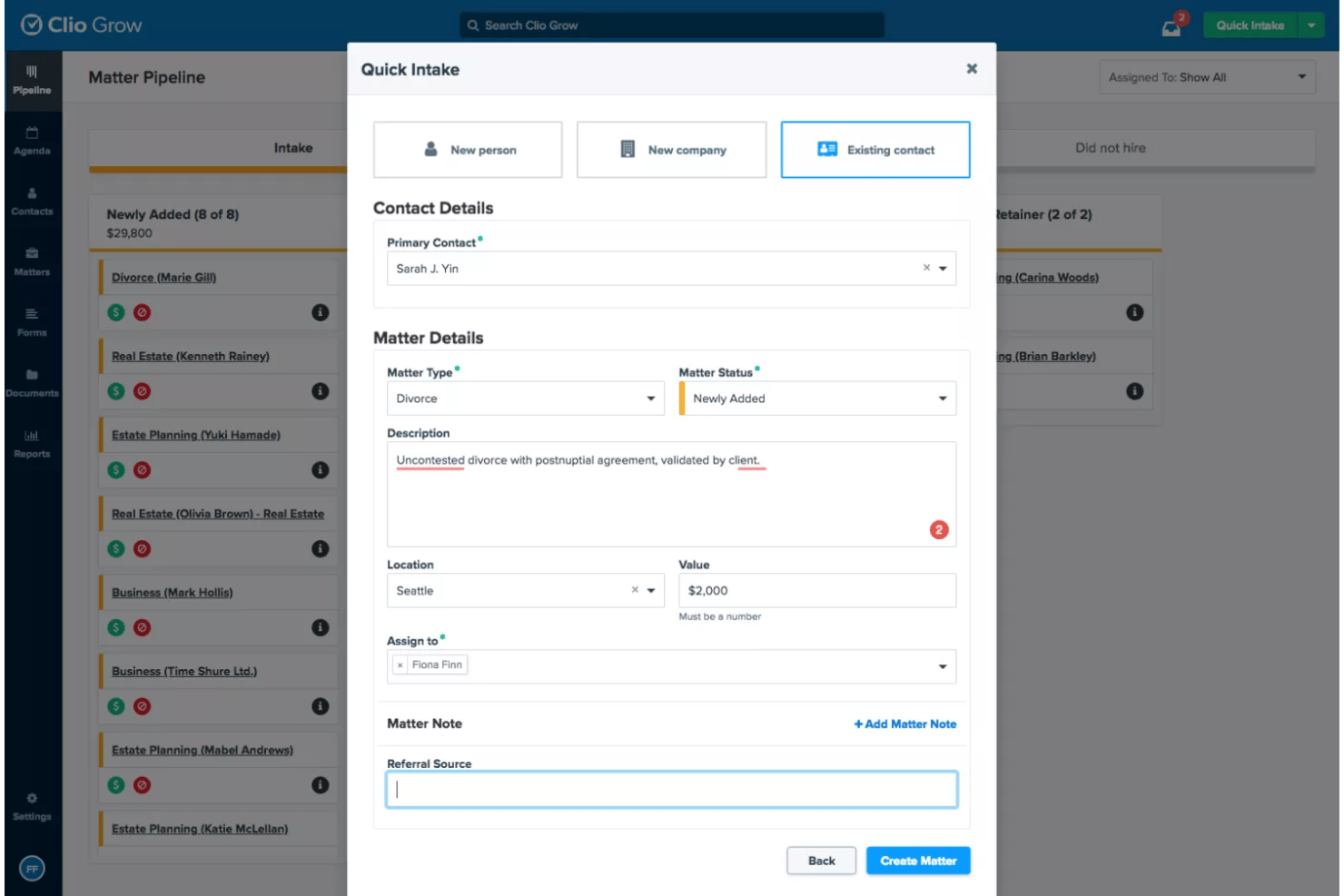
Clio Grow is a legal client intake and CRM platform built for law firms, combining customizable intake forms, kanban pipeline tracking, conflict checking, consultation scheduling, e-signature, and native sync with Clio Manage for matter management.
Who Is Clio Grow Best For?
Clio Grow is the right fit for family law firms already using—or planning to use—Clio Manage as their practice management platform.
Why I Picked Clio Grow
I've included Clio Grow in my top picks because no other tool on this list closes the gap between intake and matter management as tightly. When a lead converts, all intake data, documents, and contact details sync directly into Clio Manage to open a new matter record, with no re-entry required. I also think its automated conflict checking is a genuine differentiator: it runs across both Grow and Manage simultaneously, so family law attorneys catch potential conflicts before the consultation, not after.
Clio Grow Key Features
- Kanban matter pipeline: A drag-and-drop CRM board with customizable stages lets you move leads from first contact through retainer signing in one view.
- Consultation scheduling with SMS reminders: Clients self-book based on attorney availability, with automated text reminders sent before the appointment.
- Family law intake templates: Pre-built forms for divorce, custody, paternity, and adoption cases capture case-specific fields like marriage dates and children's details.
- Grow AI lead screening: AI-powered intake qualification scores and prioritizes incoming leads automatically within the pipeline.
Clio Grow Integrations
Clio Grow has 250+ marketplace integrations through the Clio App Directory, plus native connections with Clio Manage, Dropbox Sign, Google Calendar, Outlook, QuickBooks, Xero, Google Drive, Dropbox, and Clio Payments. It also offers an open API and Zapier.
Pros and Cons
Pros:
- Family law–specific intake and document templates
- Automated conflict checking at intake stage
- Direct intake-to-matter sync with Clio Manage
Cons:
- No dedicated Clio Grow mobile app
- Advanced email drips and automations are basic

Best for AI lead scoring in family law intake
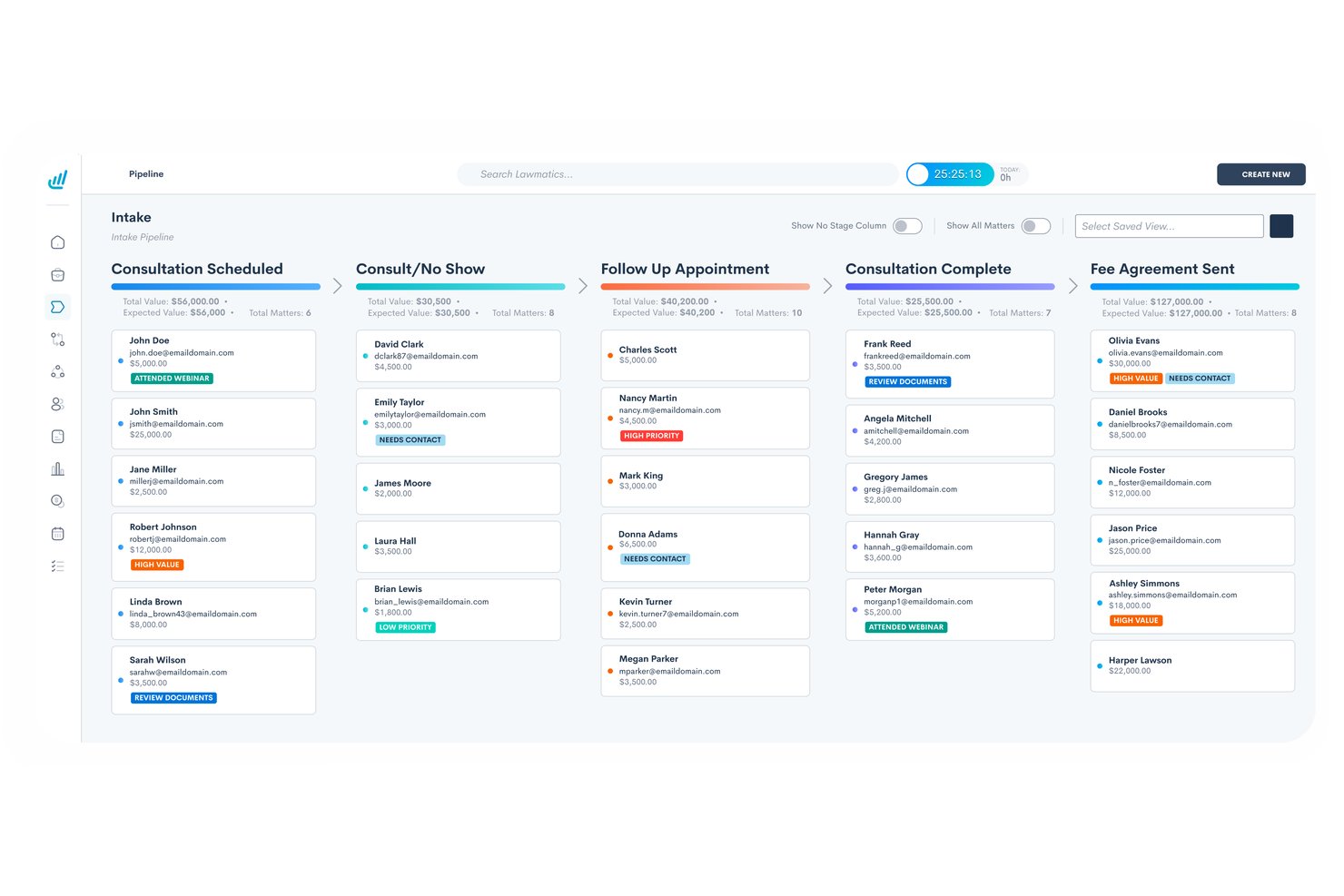
Lawmatics is a legal intake CRM built specifically for law firms, combining customizable intake forms with conditional logic, automated conflict checking, e-signature, client portal messaging, and AI-powered lead scoring across family law matter types like divorce, custody, adoption, and mediation.
Who Is Lawmatics Best For?
Lawmatics is a strong fit for family law firms with dedicated intake staff who need to manage high lead volumes across multiple matter types like divorce, custody, and adoption.
Why I Picked Lawmatics
I picked Lawmatics as one of the best because its Merlin Qualify AI scores family law leads by case type, urgency, contested status, and retainer fit, so your intake team isn't manually triaging every divorce or custody inquiry. I also like that its conditional intake forms branch dynamically by matter type, prompting asset and children-related questions for divorce leads specifically. Layer in automated conflict checking triggered through the automations engine, and you've got a genuinely end-to-end intake workflow built for high-volume family law practice.
Lawmatics Key Features
- Kanban pipeline management: Visualize family law leads across intake stages—from inquiry through consultation booked to retainer signed—with task assignment triggered by pipeline movement.
- Multi-step SMS and email drip campaigns: Build automated nurture sequences with granular triggers, such as sending a follow-up text when a lead clicks a link but hasn't scheduled within a set window.
- Round-robin consultation scheduling: Automatically distribute incoming consultation requests across available attorneys with SMS and email appointment reminders built in.
- Source tracking and ROI reporting: Track lead origins across Google Ads, Meta, referrals, and CallRail, with custom dashboards showing consultation-to-retention conversion rates by channel.
Lawmatics Integrations
Lawmatics has 11+ documented integrations, including Clio Manage, MyCase, LEAP, Smokeball, PracticePanther, Filevine, Rocket Matter, Google Calendar, Microsoft Outlook, Zoom, and LawPay. It also offers a REST API, OAuth2, and webhooks for custom connections.
Pros and Cons
Pros:
- Secure client portal for sensitive documents
- Conditional intake forms branch by case type
- AI lead scoring for family law matters
Cons:
- Conflict checks only after matter creation
- Requires three-user minimum for all plans

Filevine
Best for sign-and-pay retainer conversion at intake
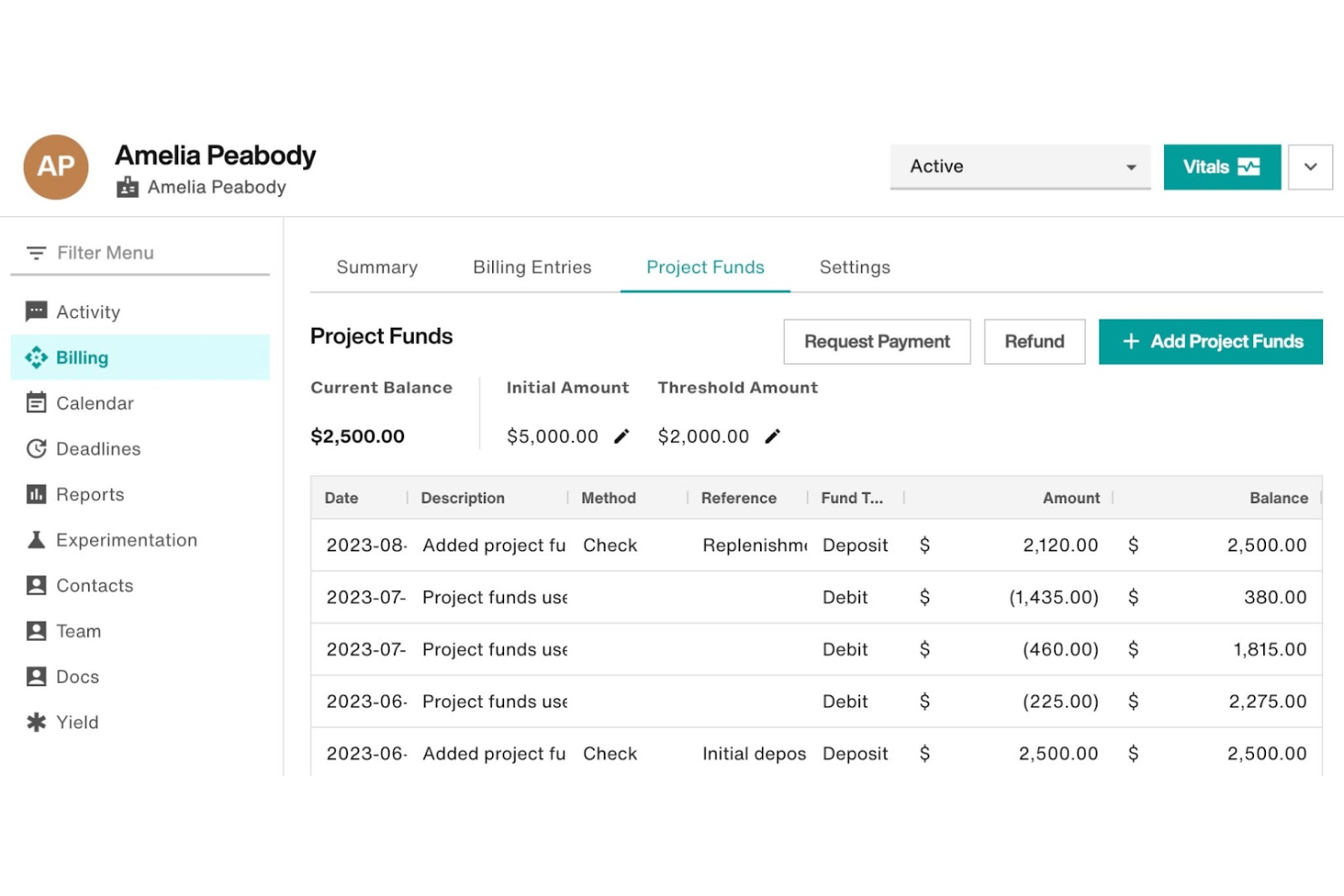
Filevine is a legal practice management platform built for law firms that combines case management, AI-powered intake via Lead Docket, native e-signature with Vinesign, a secure client portal, conflict checking, and document automation—with dedicated functionality for family law matters.
Who Is Filevine Best For?
Filevine is a strong fit for mid-sized and growing family law firms that need a single platform to manage intake, case work, e-signatures, and retainer collection together.
Why I Picked Filevine
I picked Filevine as one of the best because of how it handles the retainer conversion step that so many family law firms fumble. With Vinesign Payments, a prospective client can sign a fee agreement and pay the retainer deposit in a single step, right from their phone. Lead Docket feeds qualified leads directly into that signing workflow without any manual re-entry, so there's no gap between a client saying yes and the firm actually getting paid.
Filevine Key Features
- Conflict checker: Runs fuzzy-match searches across all organizational contacts—first, last, middle, nickname, and suffix—and exports an auditable PDF report for each check.
- Client Portal Forms: Clients complete custom intake forms directly in the secure portal, with responses mapping automatically into their matter fields.
- LeadsAI sentiment analysis: Analyzes intake communications for sentiment signals, helping intake specialists prioritize and tailor follow-up with prospective family law clients.
- Document automation: Generates jurisdiction-specific family law documents—financial affidavits, parenting plans, custody agreements—from matter data in a single click.
Filevine Integrations
Filevine has native integrations with Google Calendar, Office 365 Calendar, Microsoft Outlook, QuickBooks, and Slack. Partner integrations include Lawmatics, Smith.ai, Lex Reception, and InfoTrack, with Zapier also available.
Pros and Cons
Pros:
- Dedicated family law document automation features
- ABA-compliant conflict checks with audit trails
- Sign-and-pay retainers in one workflow
Cons:
- Custom setup often needs outside assistance
- No built-in consultation scheduling widget

CosmoLex
Best for intake-to-trust in one family law platform
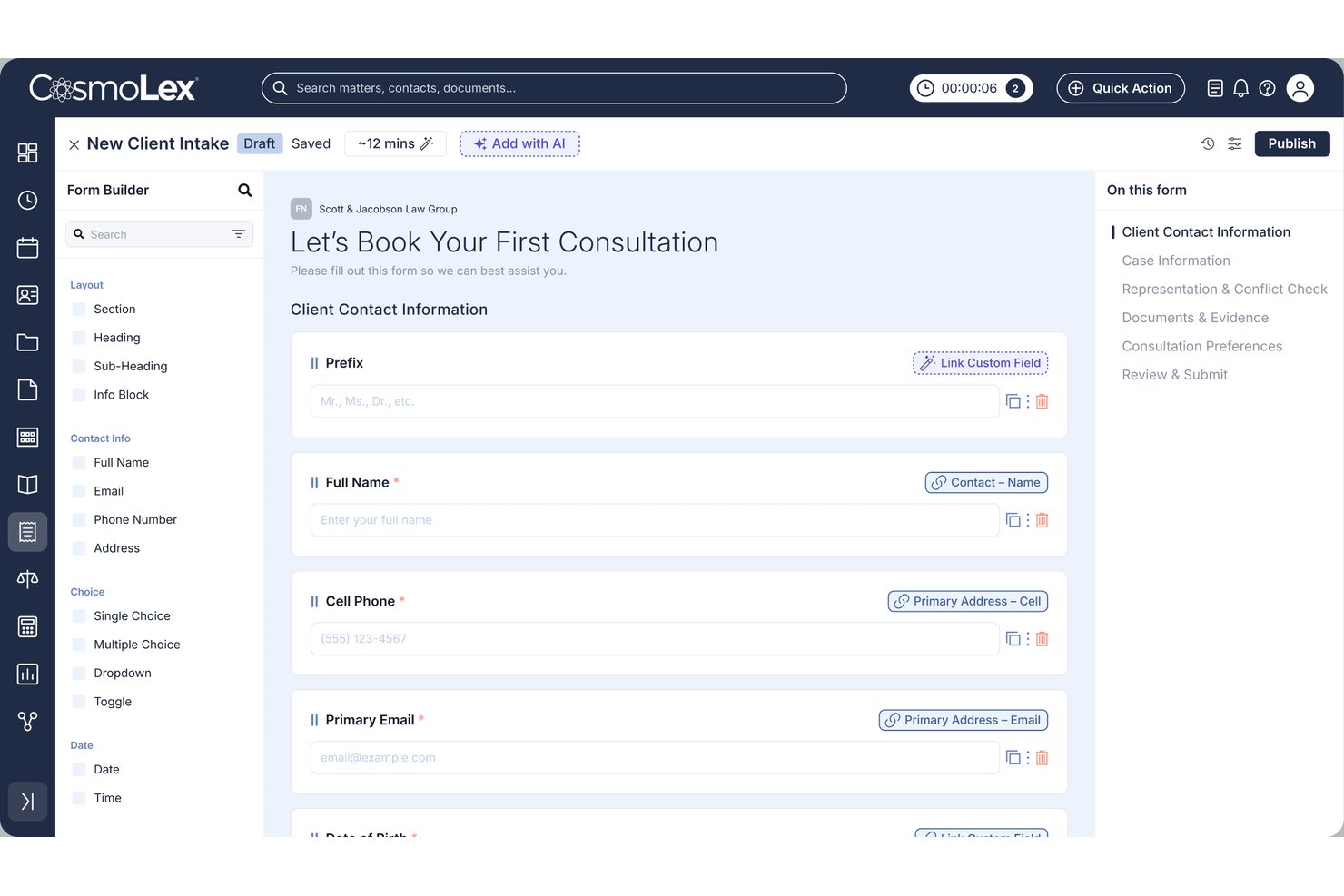
CosmoLex is an all-in-one legal practice management platform that combines AI-powered client intake forms, conflict checking, e-signature, trust accounting, and a CRM pipeline built specifically for family law matters like divorce, custody, and adoption.
Who Is CosmoLex Best For?
CosmoLex is a strong fit for solo and small family law firms that want intake, e-signature, trust accounting, and matter management handled inside a single platform.
Why I Picked CosmoLex
I've included CosmoLex in my top picks because it's the only tool on this list that takes a family law case from first inquiry all the way to funded trust account without leaving the platform. The AI Intake Form Builder generates family law-specific forms from a plain-language prompt, with custom fields for separation dates, children's details, and marital status built in. Once a client signs the retainer via native LexSign, CosmoLex Pay routes the payment directly into an IOLTA-compliant trust account, no third-party tools required.
CosmoLex Key Features
- Secure client portal: Clients access a two-way messaging hub where they can upload documents, view invoices, and make payments, all linked directly to their matter record.
- Built-in SMS texting: Send and receive text messages with clients from within CosmoLex, without using a personal phone number.
- Split billing: Assign invoice portions across multiple responsible parties, with separate percentage controls for fees and expenses.
- CRM lead pipeline: Track prospects through customizable stages with automated email and SMS drip campaigns and one-click conversion to a matter record.
CosmoLex Integrations
CosmoLex has native integrations with Microsoft 365, Outlook, Google Calendar, Dropbox, OneDrive, Google Drive, NetDocuments, Box, LawPay, and QuickBooks Online. It also supports Zapier.
Pros and Cons
Pros:
- SOC 2 Type 2 secure client portal
- Intake data maps directly to matter records
- AI builds family law intake forms automatically
Cons:
- Conflict check needs manual contact setup first
- CRM and advanced intake sold as add-ons
Other Legal Client Take Software for Family Law
Here are some additional legal client take software for family law options that didn’t make it onto my shortlist, but are still worth checking out:
- Actionstep
For all-in-one intake to matter management
- LEAP
For family law firms with native case management
- AbacusLaw
For family law intake with PALS case screens
- Tabs3
For firms needing conflict checks at intake
- PracticePanther
For e-sign and retainer capture at intake
- Lead Docket
For marketing ROI tracking in legal intake
- Law Ruler
For SMS-based retainer sign-off at intake
- Amicus Attorney
For family law intake with document automation
- Intaker
For AI-driven family law lead nurture


How I Evaluate Legal Client Intake Software for Family Law
I split my evaluation into baseline criteria every tool must meet and differentiating factors that separate a good fit from the right one for family law.
Core Functionality (Table Stakes for This List)
When I'm selecting tools for my list, I rank each one on a scale from 0 (does not offer the functionality) to 5 (excels in this area) for each core functionality listed below. I then calculate the tool's total score into a percentage, using 65% as a benchmark to help assess its overall fit for the list.
- Custom intake forms: I evaluate whether forms support family law–specific fields like spouse details, children, and asset types with conditional logic.
- Conflict checking: Automated checks across clients, opposing parties, and related contacts matter here—manual name searches alone don't cut it.
- E-signature and engagement: I look for native or tightly integrated e-signature workflows that handle fee agreements, retainer contracts, and engagement letters.
- Secure client portal: Family law intake involves sensitive financial and personal data, so I check for encrypted portals with authentication and document upload.
- Practice management integration: I evaluate how intake data flows into matter and case records, whether through native modules or bidirectional sync with tools like Clio or Filevine.
- Lead and consultation tracking: CRM-style pipelines with consultation scheduling, follow-up automation, and reporting help firms convert inquiries into retained clients.
Once I have a list of tools that meet the criteria, I consider what sets each platform apart.
Differentiating Factors (What Sets Vendors Apart)
Here's how I compare and contrast different vendors:
Standout Features
I look for retainer and trust payment collection built into the intake flow, so a new divorce client can sign their engagement letter and fund an IOLTA-compliant trust account in one step. Automated lead nurture matters too—family law prospects often deliberate for weeks, and I check whether a tool supports multi-step email and SMS drip campaigns to keep your firm top of mind. I also evaluate referral source analytics, specifically consultation-to-retention conversion rates and per-source ROI, since most family law firms compete heavily on paid search and referral channels.
Beyond Features
I evaluate how well a vendor fits family law specifically—pre-built templates for divorce, custody, and support matters save weeks compared to configuring a generic legal CRM. Security also matters: I check for SOC 2 compliance, encryption, MFA, and audit logs, since intake captures sensitive financial and domestic violence disclosures. Integration depth is another priority. A tool like Lawmatics or Clio Grow needs bidirectional sync with your practice management system so intake data flows into matter records without duplicate entry. I also consider firm size fit—solos need flat pricing and DIY setup, while mid-size teams need role-based permissions and manager dashboards.
How to Choose a Legal Client Take Software for Family Law
Choosing the right family law intake software means finding the best fit for your priorities—not just a list of features. Which of these matters most to you?
| If your priority is... | Look for... |
|---|---|
| Thorough conflict checks | Automated conflict search across parties/files |
| Intake-to-matter workflow | Native matter sync (not just CRM export) |
| Handling sensitive information | Client portal with encryption, MFA, audit logs |
| Fast onboarding and retainer collection | E-sign documents plus payment at intake |
| Long-term lead engagement | Built-in multi-step nurture and tracking tools |
How to Vet Your Shortlist
- Request a conflict check demo: Ask the vendor to run a conflict search using your real or sample data and show you the report.
- Test intake-to-matter sync: Start a trial and create a test client; verify that all intake details, files, and payment records flow directly into a new matter.
- Audit portal security controls: Insist on seeing documented encryption methods, SOC 2 report, and a sample audit log export.
- Simulate retainer workflow: Upload a mock agreement and retainer request to confirm clients can sign and pay in a single step.
- Decide your tradeoff: Prioritize either deep family-law-specific templates and automation, or broader integration with your existing case management—rarely can you maximize both.
What Are Legal Client Take Software for Family Law?
Legal client take software for family law are digital platforms that automate and manage the process of gathering client details, running conflict checks, collecting documents, and handling fee agreements for family law matters. These systems help family law practices organize inquiries and onboarding, safeguard sensitive data, and ensure an efficient transition from initial intake to active case management.
Features of Legal Client Take Software for Family Law
When selecting legal client take software for family law, keep an eye out for the following key features:
- Custom intake forms: Capture family law–specific details such as spouse information, children, asset types, and custody preferences. These forms use conditional logic to collect only what’s relevant for each case.
- Conflict checking: Automatically scan your database for existing clients, opposing parties, and related contacts. Prevent possible conflicts of interest by generating clear reports before you proceed.
- E-signature and engagement workflows: Let clients review and sign retainer agreements, fee arrangements, and engagement letters online. This streamlines onboarding and helps you document client consent.
- Secure client portal: Give clients a password-protected space to upload sensitive documents, review communications, and track their case intake status. Look for encryption and authentication controls.
- Practice management integration: Ensure intake details—forms, contact info, files, and payments—flow directly into your matter management system. Avoid duplicate data entry and keep your case files current.
- Lead and consultation tracking: Organize inbound inquiries with CRM-style pipelines. Schedule consultations, automate follow-ups, and track your conversion from inquiry to retained client.
- Payment integration at intake: Collect retainers or trust account deposits as part of the intake process. Have clients sign and pay in a single step to reduce delays before engagement.
- Template library for family law matters: Use pre-built templates for divorce, custody, adoption, and support intakes. Save setup time and ensure consistency across your team.
- Multi-channel communication tools: Manage intake via email, SMS, and client portal messaging in one place. Track responses and keep a record of every client touchpoint.
- Reporting and analytics: Measure consultation-to-retention conversion rates, lead sources, and intake volume trends. Identify what’s working in your intake process and justify marketing spend.
Benefits of Legal Client Take Software for Family Law
Implementing legal client take software for family law provides several benefits for your team and your business. Here are a few you can look forward to:
- Reduced administrative workload: Automated intake forms, conflict checking, and e-signature workflows eliminate manual data entry and repetitive onboarding tasks.
- Enhanced data security: Encrypted client portals and audit logs help safeguard sensitive financial and personal information in line with family law privacy needs.
- Improved client experience: Customizable intake forms, online document uploads, and integrated payment options make the process convenient for new clients.
- Accurate conflict checking: Automated searches flag potential conflicts across all relevant parties, helping maintain compliance and professional standards.
- Seamless integration with case management: Direct data transfer into your matter management system prevents duplicate entry and preserves detailed intake records.
- Better conversion tracking: Lead and consultation pipelines, reporting dashboards, and analytics measure inquiry-to-retainer rates and identify marketing ROI.
- Faster retainer collection: Integrated e-signature and payment collection lets clients sign engagement letters and fund trust accounts in a single step.
Costs and Pricing of Legal Client Take Software for Family Law
Selecting legal client take software for family law requires an understanding of the various pricing models and plans available. Costs vary based on features, team size, add-ons, and more. The table below summarizes common plans, their average prices, and typical features included in legal client take software for family law solutions:
Plan Comparison Table for Legal Client Take Software for Family Law
| Plan Type | Average Price | Common Features |
|---|---|---|
| Free Plan | $0 | Basic intake forms, limited document upload, manual conflict check, and essential lead tracking. |
| Personal Plan | $30-$50/user/month | Custom intake forms, e-signature support, secure client portal, and simple conflict check automation. |
| Business Plan | $60-$90/user/month | Advanced intake forms, secure client portal, payment integration, practice management sync, and reporting. |
| Enterprise Plan | $100-$150/user/month | Role-based permissions, audit logs, advanced security, custom templates, automation workflows, and integrations. |
Legal Client Take Software for Family Law FAQs
Here are some answers to common questions about legal client take software for family law:
How do I compare different legal client take software for my family law practice?
Start by looking for core features like custom intake forms, conflict checks, secure client portals, and e-signature tools. Then, look closer at family-law-specific templates, security certifications, and integration with your practice management system. Prioritize the systems that make intake-to-matter workflows easier and save you time in onboarding.
Can I automate retainer and trust payments during intake?
Yes, many legal client take software options let you collect e-signatures and retainer payments directly within the intake flow. This means your clients can review, sign, and pay engagement documents all in one step—helping you speed up onboarding and reduce back-and-forth.
What should I ask vendors when shortlisting intake software?
Ask vendors to demonstrate how conflict checking works using your sample data. Test the intake-to-matter data transfer with a real or mock client. Ask about data security certifications (like SOC 2) and if you can audit portal access. Check whether you can handle e-signature and payment workflows in one go.
How does legal client take software protect sensitive client data?
Most reputable software use encryption, secure portals, and multi-factor authentication. Look for tools with audit logs, role-based permissions, and compliance with standards like SOC 2. Never settle for platforms that don’t clearly explain their security measures or provide documentation if you request it.
Is it possible to integrate intake data with my case management platform?
Yes, many legal intake solutions connect directly to platforms like Clio, Filevine, or PracticePanther. Some sync data automatically into your matter records, while others require manual export or custom integration. Always test this integration in a trial before committing to a platform.
What’s the difference between core features and differentiating factors in intake software?
Core features are basics every product should have, like secure forms and conflict checks. Differentiating factors—like built-in payments, SMS drip campaigns, or pre-built divorce templates—can save you setup time and better match your firm’s needs. Focus on what actually improves your workflow.
How can I track lead conversion rates within intake software?
Choose intake systems with CRM-style pipelines, tracking for every inquiry, and detailed reporting dashboards. These let you see how many leads turn into consultations and retained clients. Some platforms also allow you to measure marketing ROI by lead source.